

Best Practice per la Gestione degli SSID nelle Implementazioni Multi-Sede
This guide provides a technical reference for IT leaders on managing SSIDs in multi-venue deployments. It debunks common myths about SSID count impacting performance and offers actionable best practices for balancing security, user experience, and network manageability across hospitality, retail, and large public venues.
🎧 Listen to this Guide
View Transcript

Riepilogo Esecutivo
Per CTO, direttori IT e architetti di rete che supervisionano aziende multi-sede, la gestione degli SSID rappresenta una sfida costante: bilanciare la necessità di un accesso segmentato con l'imperativo di mantenere un WiFi affidabile e ad alte prestazioni. Un mito comune nel settore suggerisce che l'implementazione di più Service Set Identifier (SSID) degradi intrinsecamente le prestazioni della rete a causa dell'overhead di gestione. Questa guida fornisce un approfondimento tecnico e autorevole che sfata questo mito e stabilisce un framework chiaro per un'architettura SSID basata sulle best practice. Dimostreremo che quando una rete è costruita su solide basi di progettazione RF professionale e standard di configurazione moderni, l'impatto sulle prestazioni di SSID aggiuntivi è trascurabile. I veri colpevoli dei rallentamenti della rete sono quasi sempre l'interferenza co-canale, il supporto per velocità di trasmissione dati legacy lente e una scarsa pianificazione RF. Implementando una strategica "Regola del Tre" (segmentando il traffico in reti Guest, Staff e IoT/Operations) e sfruttando tecnologie come WPA3-Enterprise e VLAN dinamiche, le organizzazioni possono ottenere sicurezza e conformità solide senza sacrificare il throughput. Questa guida offre raccomandazioni pratiche e indipendenti dai fornitori (vendor-neutral) e casi di studio reali per consentire ai leader IT di progettare e gestire reti wireless scalabili e ad alte prestazioni che supportino gli obiettivi aziendali e offrano un'esperienza utente superiore in tutto il loro portfolio.
Approfondimento Tecnico
Il timore della proliferazione degli SSID è radicato nel concetto di overhead dei frame di beacon. Ogni SSID trasmesso da un access point (AP) deve inviare periodicamente questi frame di gestione per annunciare la propria presenza. Secondo lo standard IEEE 802.11, i beacon vengono trasmessi all'incirca ogni 100 millisecondi alla velocità di trasmissione dati obbligatoria più bassa per garantire che anche i dispositivi più vecchi possano riceverli. Sebbene possa sembrare un traffico eccessivo, il tempo di trasmissione (airtime) effettivamente consumato è minimo. Come mostrato nell'infografica sottostante, l'overhead è ben lontano dalle cifre catastrofiche spesso citate. Anche con cinque SSID distinti, l'overhead totale dei beacon è poco più di mezzo punto percentuale del tempo di trasmissione totale del canale: un valore che la maggior parte dei professionisti di rete considererebbe trascurabile.
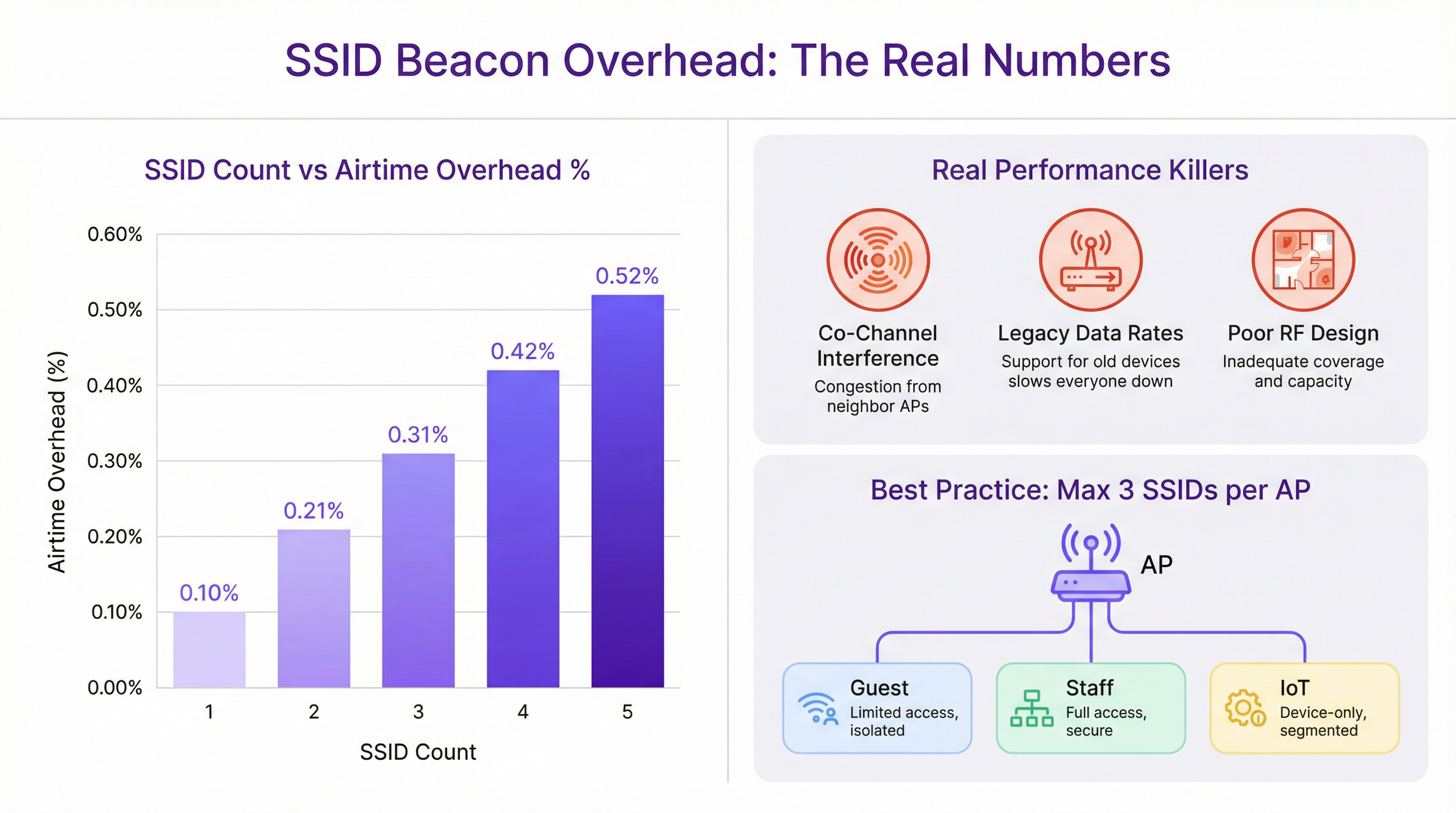
Il degrado delle prestazioni spesso attribuito a SSID multipli è quasi sempre imputato in modo errato. I veri colpevoli sono difetti di progettazione della rete più fondamentali:
Interferenza Co-Canale (CCI): Quando più AP in stretta prossimità operano sullo stesso canale WiFi, devono tutti competere per lo stesso tempo di trasmissione. Questo effetto "vicino rumoroso" è la causa più significativa di degrado delle prestazioni nelle implementazioni ad alta densità. Una corretta pianificazione dei canali, assicurando che gli AP adiacenti si trovino su canali non sovrapposti (es. 1, 6, 11 nella banda a 2,4 GHz), è fondamentale.
Velocità di Trasmissione Dati Legacy: Il supporto di velocità di trasmissione dati 802.11b obsolete (1, 2, 5,5 e 11 Mbps) costringe tutto il traffico di gestione, inclusi i beacon, a essere trasmesso a un ritmo estremamente lento. Ciò consuma una quantità sproporzionata di tempo di trasmissione. Disabilitare queste velocità legacy e impostare una velocità minima obbligatoria di 12 Mbps o superiore è un passaggio di ottimizzazione cruciale.
Scarsa Progettazione RF: Senza un'indagine professionale del sito in radiofrequenza (RF), il posizionamento degli AP è lasciato al caso. Ciò porta a lacune di copertura, CCI eccessiva e scarse prestazioni di roaming. Una solida base RF è il prerequisito per qualsiasi rete wireless ad alte prestazioni, indipendentemente dal numero di SSID.
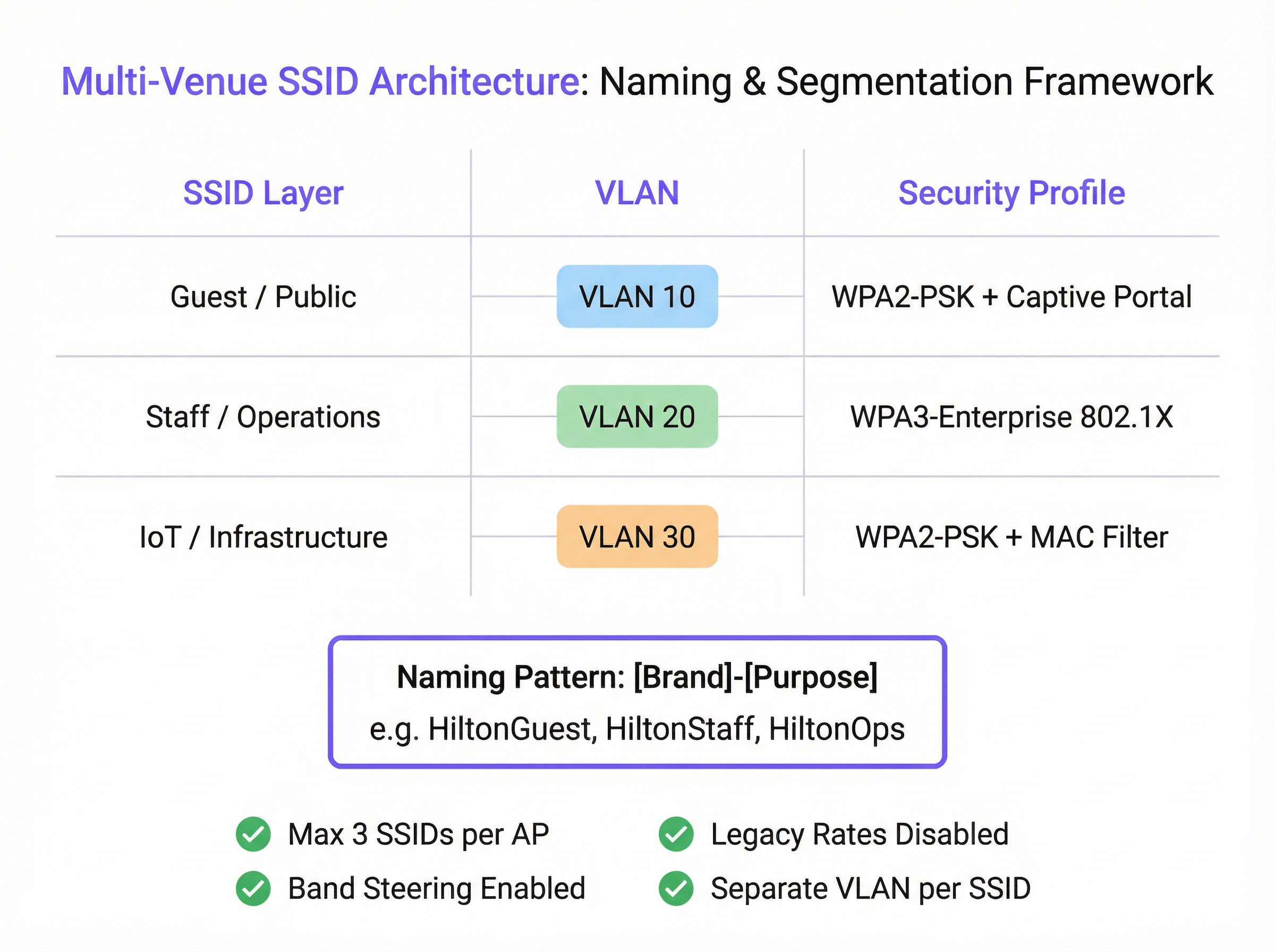
La moderna architettura di rete fornisce strumenti per ottenere la segmentazione senza SSID eccessivi. IEEE 802.1X è uno standard di controllo dell'accesso alla rete basato su porta che fornisce un robusto meccanismo di autenticazione. Quando un utente si connette a un SSID protetto da 802.1X, un server RADIUS può autenticare le sue credenziali e assegnarlo dinamicamente a una VLAN specifica con una policy di sicurezza corrispondente. Ciò consente a un singolo SSID sicuro (es. "Brand-Staff") di servire più ruoli utente con diritti di accesso diversi, riducendo drasticamente la necessità di SSID separati per ogni dipartimento o gruppo di utenti.
Guida all'Implementazione
L'implementazione di un'architettura SSID scalabile e gestibile in più sedi richiede un processo standardizzato e ripetibile. I seguenti passaggi forniscono un framework indipendente dai fornitori.
Fase 1: Definire i Livelli di Accesso Prima di configurare qualsiasi hardware, classificare tutti i requisiti di accesso alla rete in livelli distinti. Per la maggior parte delle organizzazioni multi-sede, ciò si tradurrà in tre livelli principali:
- Guest/Pubblico: Per visitatori, clienti e pubblico in generale. L'accesso è in genere limitato nel tempo, con larghezza di banda limitata e isolato da tutte le reti interne.
- Staff/Operazioni: Per dipendenti e collaboratori fidati. Questo livello fornisce un accesso sicuro alle risorse interne, alle applicazioni aziendali e alle piattaforme di comunicazione.
- IoT/Infrastruttura: Per dispositivi "headless" come terminali POS, digital signage, sistemi HVAC e telecamere di sicurezza. Questa rete dovrebbe essere altamente limitata, con traffico limitato alle funzioni operative essenziali.
Fase 2: Progettare lo Schema VLAN e IP Ogni livello di accesso deve essere mappato su una VLAN dedicata per garantire una segmentazione completa della rete. Assegnare un ID VLAN univoco e una sottorete IP corrispondente per ogni SSID in tutta la struttura. Ad esempio:
- Guest SSID -> VLAN 10 -> 10.10.0.0/16
- Staff SSID -> VLAN 20 -> 10.20.0.0/16
- IoT SSID -> VLAN 30 -> 10.30.0.0/16 Questa separazione logica è fondamentale per la sicurezza e la conformità a standard come il PCI DSS.
Fase 3: Configurare i Profili di Sicurezza
- Guest SSID: Utilizzare WPA2-PSK con un Captive Portal. Il portale è essenziale per l'autenticazione degli utenti, la presentazione di termini e condizioni (per la conformità al GDPR) e la creazione di opportunità di engagement di marketing. La piattaforma di Purple eccelle nel fornire questa funzionalità.
- Staff SSID: Implementare WPA3-Enterprise con autenticazione 802.1X. Questo è il gold standard per la sicurezza wireless aziendale. Richiede che ogni utente disponga di credenziali univoche, eliminando i rischi delle password condivise e consentendo la responsabilità per singolo utente.
- IoT SSID: Utilizzare WPA2-PSK con una password complessa e sicura. Ove possibile, aggiungere un ulteriore livello di sicurezza implementando una whitelist di indirizzi MAC, assicurando che solo i dispositivi pre-approvati possano connettersi.
Fase 4: Standardizzare la Nomenclatura degli SSID
Adottare una convenzione di denominazione coerente e logica in tutte le sedi per facilitare il roaming senza interruzioni e semplificare la gestione. Un modello consigliato è [NomeBrand]-[Scopo]. Ad esempio: Arena-Guest, Arena-Staff, Arena-POS. Ciò evita confusione tra gli utenti e garantisce che i dispositivi possano connettersi automaticamente alla rete corretta indipendentemente dalla posizione.
Best Practice
- La Regola del Tre: Come principio guida, puntare a trasmettere un massimo di tre SSID per access point. Ciò fornisce la segmentazione necessaria per la maggior parte dei casi d'uso, mantenendo al minimo il traffico di gestione.
- Disabilitare le Velocità Legacy: Nel controller wireless, disabilitare tutte le velocità di trasmissione dati 802.11b. Impostare la velocità di trasmissione dati obbligatoria più bassa a 12 Mbps o superiore per garantire che i frame di gestione vengano trasmessi in modo efficiente.
- Abilitare il Band Steering: Configurare gli AP per incoraggiare attivamente i client dual-band a connettersi alle bande meno congestionate a 5 GHz e 6 GHz, preservando la banda a 2,4 GHz per i dispositivi legacy che ne hanno bisogno.
- Disponibilità SSID per AP: Non trasmettere ogni SSID da ogni AP. Una rete guest potrebbe essere necessaria solo nelle aree pubbliche, mentre una rete IoT per gli scanner di magazzino è necessaria solo nel magazzino. Utilizzare le impostazioni SSID per AP o basate su gruppi per limitare le trasmissioni solo dove sono necessarie.
Risoluzione dei Problemi e Mitigazione dei Rischi
- Sintomo: Prestazioni lente sulla rete Staff dopo l'implementazione di un nuovo Guest SSID.
- Causa Probabile: Non il Guest SSID in sé, ma l'interferenza co-canale sottostante o il supporto per le velocità di trasmissione dati legacy. Il carico aggiuntivo di client dalla rete guest ha semplicemente esposto una debolezza preesistente.
- Mitigazione: Eseguire un audit RF per convalidare il piano dei canali. Utilizzare un analizzatore WiFi per verificare la presenza di velocità di trasmissione dati legacy e disabilitarle nel controller di rete.
- Sintomo: I dispositivi si disconnettono frequentemente o non riescono a effettuare il roaming tra gli AP.
- Causa Probabile: Nomi SSID o impostazioni di sicurezza incoerenti tra gli AP. Anche livelli di potenza non corrispondenti tra AP adiacenti possono causare problemi di "sticky client".
- Mitigazione: Assicurarsi che il nome SSID, il tipo di sicurezza e il tagging VLAN siano identici in tutti gli AP che trasmettono quella rete. Utilizzare le funzionalità di gestione RF del controller wireless per bilanciare i livelli di potenza degli AP.
ROI e Impatto Aziendale
Una strategia SSID ben architettata offre un ROI significativo che va oltre la connettività di base. Segmentando il traffico guest attraverso una piattaforma come Purple, le sedi possono acquisire dati preziosi sull'affluenza, comprendere il comportamento dei visitatori e creare campagne di marketing mirate, trasformando un centro di costo in un motore di entrate. Per un hotel di 200 camere, la capacità di coinvolgere gli ospiti tramite un Captive Portal personalizzato con il proprio brand può portare a un aumento misurabile delle iscrizioni al programma fedeltà e delle prenotazioni dirette. Per una catena di vendita al dettaglio, comprendere i tempi di permanenza e la frequenza delle visite in più negozi fornisce una potente business intelligence. L'accesso sicuro e basato sui ruoli per il personale migliora l'efficienza operativa, mentre una rete adeguatamente isolata per i sistemi di pagamento è un componente non negoziabile della conformità al PCI DSS, mitigando significativi rischi finanziari e reputazionali.
Key Terms & Definitions
SSID (Service Set Identifier)
The public name of a WiFi network. It is a human-readable string of up to 32 characters that differentiates one wireless network from another.
IT teams configure SSIDs to provide tailored network access for different user groups, such as 'Guest' or 'Staff'. Consistent naming is crucial for roaming in multi-venue deployments.
Beacon Frame
A management frame sent periodically by an access point to announce its presence and provide network information. Each SSID has its own stream of beacons.
The fear of 'beacon overhead' is often cited as a reason to limit SSID count, but in a well-configured network, their performance impact is negligible.
VLAN (Virtual Local Area Network)
A method of creating logically separate networks on the same physical infrastructure. Traffic on one VLAN is isolated from traffic on another.
VLANs are the primary tool for segmenting different user groups (e.g., Guest vs. Staff) to enhance security and ensure compliance with standards like PCI DSS.
IEEE 802.1X
An IEEE standard for port-based Network Access Control (PNAC). It provides an authentication mechanism for devices wishing to attach to a LAN or WLAN.
This is the foundation of enterprise-grade WiFi security. IT teams use 802.1X with a RADIUS server to grant network access based on individual user credentials, rather than a shared password.
RADIUS (Remote Authentication Dial-In User Service)
A networking protocol that provides centralized Authentication, Authorization, and Accounting (AAA) management for users who connect and use a network service.
In an 802.1X deployment, the RADIUS server is what checks the user's credentials and tells the access point which VLAN and security policy to assign to that user.
Band Steering
A technique used by dual-band access points to encourage capable client devices to connect to the less-congested 5 GHz or 6 GHz frequency bands.
Network architects enable band steering to improve overall network performance by balancing the client load across available frequency bands, freeing up the crowded 2.4 GHz band.
WPA3-Enterprise
The latest generation of WiFi security for enterprise networks, combining the robust authentication of 802.1X with stronger cryptographic protocols.
For any new deployment, CTOs should mandate WPA3-Enterprise for all internal and staff networks to ensure the highest level of security and future-proof the infrastructure.
Captive Portal
A web page that is displayed to newly connected users of a WiFi network before they are granted broader access to network resources.
Venue operators use captive portals on guest networks to present terms of service, capture user data for marketing (with consent), and display branding, often managed through a platform like Purple.
Case Studies
A 200-room hotel needs to provide WiFi for guests, staff, and a new deployment of in-room smart TVs (IoT). They are concerned about performance and PCI DSS compliance for their front-desk payment terminals.
Implement a three-SSID strategy. 1. Guest SSID (HotelGuest): WPA2-PSK with a captive portal on VLAN 10. Apply bandwidth limits per user. 2. Staff SSID (HotelStaff): WPA3-Enterprise with 802.1X on VLAN 20, authenticating against the hotel's directory service. 3. IoT SSID (HotelIoT): WPA2-PSK with a complex key and MAC filtering on VLAN 30 for the smart TVs. The front-desk terminals should be on a separate, wired VLAN and completely isolated from all wireless networks to ensure PCI DSS compliance.
A retail chain with 50 stores wants to standardize its WiFi. They need to support corporate users, store associates with handheld scanners, and a public guest network. Centralized management is key.
Deploy a cloud-managed wireless solution. Use a standardized three-SSID template pushed to all stores. 1. Guest SSID (ShopFreeWiFi): Captive portal on VLAN 100. 2. Staff SSID (ShopStaff): 802.1X on VLAN 110, allowing corporate users and store associates to authenticate with their network credentials. Use RADIUS to assign store associates to a more restrictive security policy. 3. POS SSID (ShopPOS): WPA2-PSK on VLAN 120, with MAC filtering for the handheld scanners and POS devices. Use per-AP SSID availability to ensure the POS SSID is only broadcast in secure staff areas.
Scenario Analysis
Q1. You are taking over a network for a conference center that has 12 different SSIDs, one for each meeting room. Users complain of frequent disconnects when moving between rooms. What is the most likely cause and your first corrective action?
💡 Hint:Consider how client devices handle roaming between access points.
Show Recommended Approach
The most likely cause is the use of unique SSIDs for each room, which breaks client roaming. The first action is to consolidate these into a single 'Conference-Guest' SSID broadcast from all APs. This allows devices to roam seamlessly. Further segmentation for different events can be handled with different pre-shared keys or by using a captive portal with event-specific access codes.
Q2. A stadium is deploying a new high-density WiFi 6E network. They want to provide access for fans, press, and operational staff. How would you structure the SSIDs, and what key feature of the APs would you leverage heavily?
💡 Hint:Think about the different frequency bands available and how to manage congestion.
Show Recommended Approach
I would use a three-SSID model: 'Stadium-Fan', 'Stadium-Press', and 'Stadium-Ops'. I would heavily leverage band steering to push as many capable fan and press devices as possible onto the 6 GHz and 5 GHz bands, leaving the 2.4 GHz band for legacy devices and reducing overall network congestion. The 'Stadium-Press' SSID could have a higher QoS priority and a larger per-client bandwidth limit.
Q3. Your CFO is questioning the expense of a professional RF site survey for a new 5-story office building, suggesting you can 'just add more APs if the signal is weak'. How do you justify the investment in a site survey?
💡 Hint:Focus on the risks and hidden costs of not performing a survey.
Show Recommended Approach
I would explain that 'just adding more APs' without a survey is the primary cause of co-channel interference, which cripples network performance. A professional site survey is not about signal strength alone; it's about creating a precise channel and power plan to ensure APs work together, not against each other. The cost of the survey is a fraction of the productivity lost from a poorly performing network and the expense of troubleshooting and remediating it later. It's a foundational investment in network reliability and performance.
Key Takeaways
- ✓The performance impact of multiple SSIDs is negligible; the real culprits are co-channel interference and legacy data rates.
- ✓Adopt the 'Rule of Three': aim for a maximum of three SSIDs per AP (e.g., Guest, Staff, IoT).
- ✓Use VLANs to segment each SSID, creating logically separate and secure networks on the same hardware.
- ✓Secure staff networks with WPA3-Enterprise and 802.1X for robust, per-user authentication.
- ✓Always disable slow, legacy data rates (below 12 Mbps) to improve management traffic efficiency.
- ✓A professional RF site survey is a non-negotiable prerequisite for any high-performing multi-venue WiFi deployment.
- ✓Standardize SSID naming across all venues to ensure seamless client roaming and simplify management.




