

WiFi per il personale: una guida completa per un accesso di rete sicuro ed efficiente per i dipendenti
A comprehensive technical reference for IT leaders on designing, deploying, and managing secure, high-performance staff WiFi networks. This guide provides actionable best practices for authentication, network segmentation, and bandwidth management to enhance operational efficiency and mitigate security risks.
🎧 Listen to this Guide
View Transcript

Riepilogo esecutivo
Per qualsiasi azienda moderna che opera nel settore dell'ospitalità, del retail o nei grandi spazi pubblici, il WiFi per il personale non è più una comodità; è un'infrastruttura operativa critica. Una rete wireless per il personale ben progettata si traduce direttamente in una maggiore produttività, in un miglioramento del servizio clienti e in una postura di sicurezza rafforzata. Al contrario, una rete configurata in modo inadeguato introduce significativi rischi di conformità, colli di bottiglia operativi e vulnerabilità. Questa guida funge da riferimento tecnico definitivo per responsabili IT, architetti di rete e CTO incaricati di fornire un accesso wireless sicuro ed efficiente ai dipendenti. Va oltre la teoria accademica per fornire indicazioni pratiche e indipendenti dai fornitori (vendor-neutral), basate su scenari di implementazione reali. Tratteremo i principi architettonici essenziali della segmentazione di rete, l'importanza critica dell'autenticazione IEEE 802.1X rispetto alle chiavi precondivise non sicure e il business case per la migrazione allo standard di sicurezza WPA3-Enterprise. Inoltre, questo documento fornisce un framework di implementazione passo-passo, casi di studio dettagliati di settori pertinenti e strumenti pratici per misurare il ritorno sull'investimento (ROI) di una soluzione WiFi per il personale adeguatamente progettata. Il concetto chiave è che un investimento strategico nel WiFi per il personale è un investimento nella spina dorsale operativa dell'intera organizzazione.
Approfondimento tecnico
L'imperativo architettonico: la segmentazione
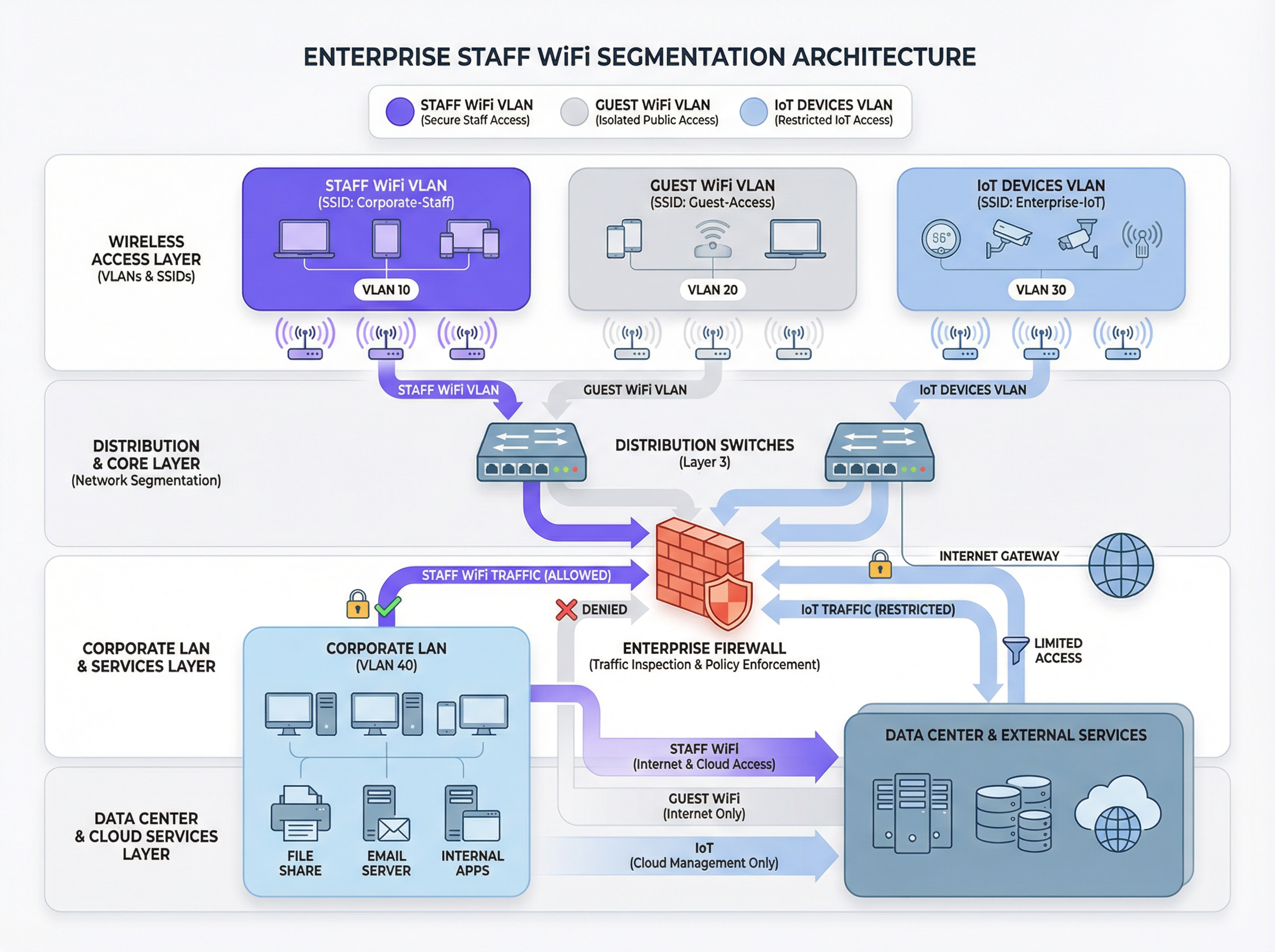
Il principio fondamentale di un WiFi sicuro per il personale è la segmentazione di rete. Una rete piatta in cui coesistono dispositivi del personale, dispositivi degli ospiti, hardware IoT e sistemi sensibili di back-office rappresenta una grave vulnerabilità di sicurezza. Il meccanismo principale per ottenere la segmentazione in un ambiente wireless è l'uso delle VLAN (Virtual Local Area Network). Ogni SSID dovrebbe essere mappato su una VLAN distinta, creando domini di broadcast logicamente isolati e applicati a livello di switch di rete.
Una tipica architettura basata sulle best practice include almeno tre VLAN separate:
- VLAN per il personale: per i dispositivi di proprietà e gestiti dall'azienda utilizzati dai dipendenti. A questa VLAN viene concesso un accesso controllato alle risorse interne come file server, sistemi Point-of-Sale (POS) e Property Management System (PMS) tramite specifiche regole firewall.
- VLAN per gli ospiti: per l'accesso WiFi rivolto al pubblico. Questa VLAN deve essere completamente isolata da tutte le risorse aziendali interne. Il traffico proveniente da questa VLAN dovrebbe essere instradato direttamente verso Internet, con l'isolamento dei client abilitato per impedire ai dispositivi degli ospiti di comunicare tra loro.
- VLAN IoT: per dispositivi 'headless' come telecamere di sicurezza, digital signage e sistemi HVAC. Questi dispositivi hanno spesso capacità di sicurezza più semplici e dovrebbero essere isolati nel proprio segmento di rete con regole altamente restrittive, consentendo l'accesso solo ai server specifici di cui hanno bisogno per funzionare.
Questo approccio segmentato non è solo una raccomandazione; per qualsiasi organizzazione soggetta al Payment Card Industry Data Security Standard (PCI DSS), è un requisito obbligatorio [1]. La mancata segmentazione dell'ambiente dei dati dei titolari di carta dalle altre reti costituisce una grave violazione della conformità.
Autenticazione e controllo degli accessi: oltre la chiave precondivisa
L'errore più comune e critico nell'implementazione del WiFi per il personale è l'uso di una singola chiave precondivisa (PSK) per tutti i dipendenti. Sebbene sia semplice da configurare, una PSK non fornisce alcuna responsabilità individuale e crea un rischio di sicurezza significativo quando un dipendente lascia l'organizzazione. La soluzione standard del settore è IEEE 802.1X, che fornisce un controllo degli accessi di rete basato sulle porte.
In un'implementazione 802.1X, un server RADIUS (Remote Authentication Dial-In User Service) centrale funge da autorità di autenticazione. Il flusso di lavoro è il seguente:
- Supplicant (Dispositivo client): il dispositivo del dipendente richiede l'accesso all'SSID del personale.
- Authenticator (Access Point Wireless): l'AP intercetta la richiesta e chiede le credenziali.
- Server di autenticazione (RADIUS): l'AP inoltra le credenziali al server RADIUS, che le convalida rispetto a una directory utente (es. Active Directory, LDAP o un provider di identità cloud come Azure AD o Okta).
- Autorizzazione: in caso di autenticazione riuscita, il server RADIUS invia un messaggio
Access-Acceptall'AP, che a sua volta concede al dispositivo l'accesso alla rete. Il server RADIUS può anche restituire attributi di autorizzazione, come un ID VLAN specifico o un profilo Quality of Service, abilitando il controllo degli accessi basato sui ruoli.
Questo modello fornisce un'autenticazione per utente e un audit trail dettagliato, essenziale per le indagini di sicurezza e il reporting di conformità.
Protocolli di sicurezza: WPA2-Enterprise vs. WPA3-Enterprise
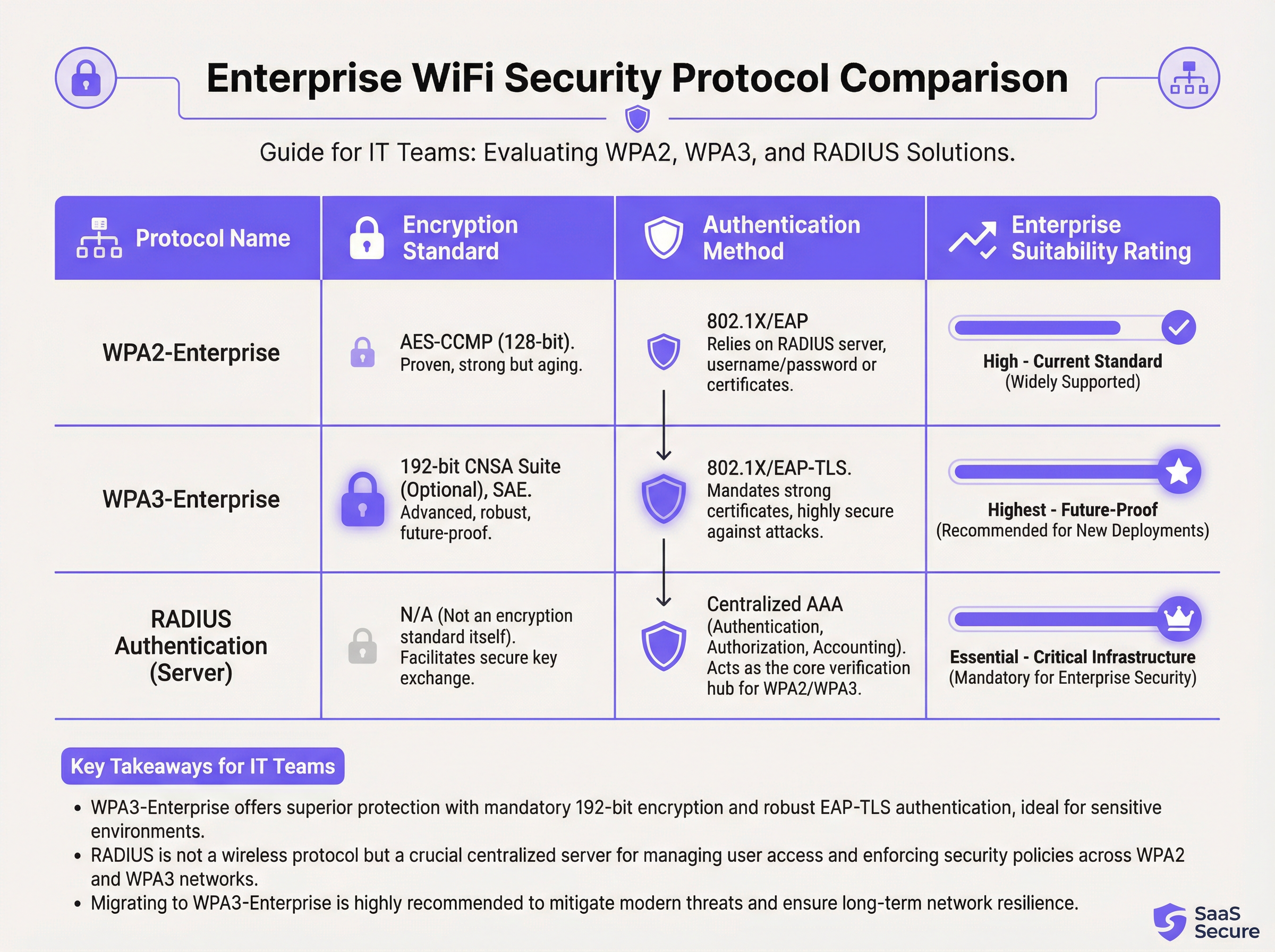
Mentre l'802.1X gestisce l'autenticazione, il traffico wireless stesso deve essere crittografato. La scelta del protocollo ha implicazioni di sicurezza significative.
- WPA2-Enterprise (Wi-Fi Protected Access 2): lo standard aziendale di lunga data, che utilizza la crittografia AES-CCMP a 128 bit. È robusto e ampiamente supportato. Tuttavia, è vulnerabile agli attacchi a dizionario offline se un utente malintenzionato riesce a catturare l'handshake a quattro vie iniziale.
- WPA3-Enterprise (Wi-Fi Protected Access 3): l'attuale generazione di sicurezza. Sostituisce l'handshake WPA2 con la Simultaneous Authentication of Equals (SAE), che è resistente agli attacchi a dizionario offline. WPA3-Enterprise impone inoltre l'uso dei Protected Management Frames (PMF) per prevenire le intercettazioni e la falsificazione del traffico di gestione. Per gli ambienti ad alta sicurezza, offre una suite di sicurezza opzionale a 192 bit allineata alla Commercial National Security Algorithm (CNSA) Suite [2].
Per qualsiasi nuova implementazione o aggiornamento hardware, WPA3-Enterprise dovrebbe essere lo standard predefinito. I vantaggi in termini di sicurezza superano di gran lunga il minimo sovraccarico di implementazione, a condizione che i dispositivi client e l'infrastruttura lo supportino.
Guida all'implementazione
L'implementazione di una rete WiFi sicura ed efficiente per il personale è un processo in più fasi che richiede un'attenta pianificazione.
Fase 1: Scoperta e progettazione
- Audit dell'infrastruttura esistente: identifica tutti i dispositivi che richiedono l'accesso wireless e categorizzali (personale, ospiti, IoT, BYOD).
- Definizione delle policy di accesso: per ogni categoria, definisci a quali risorse di rete devono accedere. Crea una matrice di policy che guiderà le tue regole firewall.
- Progettazione dello schema VLAN e IP: progetta la tua architettura VLAN e assegna le subnet IP per ogni VLAN. Assicurati che gli switch e i router della rete core siano configurati per supportare le nuove VLAN.
Fase 2: Implementazione dell'infrastruttura
- Implementazione dei server RADIUS: configura un server RADIUS primario e uno secondario per la ridondanza. Integrali con la directory utente scelta.
- Configurazione del Wireless LAN Controller (WLC): crea i nuovi SSID (es.
Staff-Secure,Guest-WiFi). Configura l'SSID del personale per WPA3-Enterprise con autenticazione 802.1X, puntando ai tuoi server RADIUS. - Mappatura degli SSID sulle VLAN: assicurati che ogni SSID sia correttamente taggato con il suo ID VLAN corrispondente.
Fase 3: Test e rilascio
- Test pilota: iscrivi un piccolo gruppo di personale IT e operativo a un programma pilota. Testa l'autenticazione, l'accesso alle risorse e le prestazioni di roaming.
- Onboarding dei dispositivi: sviluppa un processo chiaro per la registrazione di dispositivi nuovi ed esistenti. Per i dispositivi di proprietà dell'azienda, questo dovrebbe essere automatizzato tramite una piattaforma di Mobile Device Management (MDM).
- Rilascio completo: una volta che il test pilota ha avuto esito positivo, procedi con un rilascio graduale in tutta l'organizzazione. Fornisci documentazione chiara e supporto agli utenti finali.
Fase 4: Monitoraggio e ottimizzazione
- Implementazione del monitoraggio: utilizza una piattaforma di network intelligence come Purple per monitorare i tassi di successo/fallimento dell'autenticazione, le prestazioni di rete e l'attività a livello di dispositivo.
- Configurazione del QoS: implementa policy di Quality of Service per dare priorità alle applicazioni critiche (es. voce, traffico POS) e impedire che il traffico non essenziale consumi tutta la larghezza di banda disponibile.
- Audit regolari: pianifica revisioni trimestrali delle regole firewall, dei diritti di accesso degli utenti e delle metriche delle prestazioni di rete.
Best practice
- Imporre l'autenticazione basata su certificati: per i dispositivi di proprietà dell'azienda, utilizza EAP-TLS, che si basa su certificati digitali anziché su nomi utente e password. Questo elimina il rischio di phishing delle credenziali e fornisce la forma più forte di autenticazione.
- Implementare il Fast Roaming (802.11r): nelle grandi sedi, assicurati un roaming rapido e senza interruzioni tra gli access point per evitare cadute di connessione per il personale mobile.
- Isolare il traffico BYOD: se consenti ai dipendenti di connettere dispositivi personali (Bring Your Own Device), posizionali su una VLAN separata e più restrittiva rispetto ai dispositivi di proprietà dell'azienda.
- Condurre indagini RF regolari: esegui indagini a radiofrequenza (RF) per identificare e mitigare le fonti di interferenza e garantire un posizionamento ottimale degli AP sia per copertura che per capacità.
- Disabilitare i protocolli legacy: disabilita attivamente i protocolli obsoleti e non sicuri come WEP, WPA e TKIP sulla tua infrastruttura wireless.
Risoluzione dei problemi e mitigazione dei rischi
| Problema comune | Causa principale | Strategia di mitigazione |
|---|---|---|
| Errori di autenticazione | Credenziali errate, certificati scaduti, interruzione del server RADIUS. | Implementare un monitoraggio robusto sui server RADIUS. Utilizzare l'MDM per automatizzare il rinnovo dei certificati. Fornire indicazioni chiare agli utenti sulla gestione delle credenziali. |
| Scarse prestazioni di roaming | Mancanza di supporto 802.11r/k/v, livelli di potenza degli AP configurati in modo errato. | Assicurarsi che il controller e gli AP siano configurati per gli standard di fast roaming. Condurre un'indagine RF post-implementazione per ottimizzare le impostazioni degli AP. |
| Congestione di rete | Larghezza di banda insufficiente, mancanza di QoS, saturazione da traffico non essenziale. | Implementare policy QoS per dare priorità al traffico critico. Utilizzare una piattaforma di network analytics per identificare e limitare la velocità delle applicazioni che consumano molta larghezza di banda. |
| Access Point Rogue | AP non autorizzati collegati alla rete aziendale dai dipendenti. | Abilitare il rilevamento degli AP rogue sul controller wireless. Utilizzare la sicurezza delle porte 802.1X sugli switch cablati per impedire ai dispositivi non autorizzati di ottenere l'accesso alla rete. |
ROI e impatto sul business
L'investimento in una rete WiFi sicura per il personale offre rendimenti misurabili in diversi ambiti:
- Aumento della produttività: un WiFi affidabile e ad alte prestazioni consente al personale di utilizzare applicazioni mobili, accedere alle informazioni e comunicare senza interruzioni, migliorando direttamente l'efficienza operativa. Uno studio della Wi-Fi Alliance ha rilevato che il WiFi contribuisce per oltre 5 trilioni di dollari al valore economico globale annuo [3].
- Riduzione degli incidenti di sicurezza: una corretta segmentazione e una forte autenticazione riducono drasticamente la superficie di attacco, portando a un minor numero di incidenti di sicurezza, minori costi di ripristino e un rischio ridotto di costose violazioni dei dati.
- Conformità semplificata: una rete basata su 802.1X con registrazione dettagliata semplifica gli audit di conformità per standard come PCI DSS, GDPR e HIPAA, risparmiando centinaia di ore di lavoro.
- Maggiore agilità aziendale: una base wireless scalabile e sicura consente la rapida implementazione di nuove iniziative mobile-first, dalle ordinazioni al tavolo nei ristoranti ai point-of-sale mobili nel retail.
Per calcolare il ROI, confronta il costo totale di proprietà (TCO) della nuova infrastruttura con i vantaggi quantificabili, come il tempo risparmiato grazie a una migliore efficienza, i costi evitati per una potenziale violazione dei dati e la riduzione dei costi degli audit di conformità.
Riferimenti
[1] PCI Security Standards Council. (2022). Payment Card Industry Data Security Standard (PCI DSS) v4.0. https://www.pcisecuritystandards.org/documents/PCI-DSS-v4_0.pdf [2] Wi-Fi Alliance. (2024). WPA3™ Specification. https://www.wi-fi.org/discover-wi-fi/security [3] Wi-Fi Alliance. (2021). The Global Economic Value of Wi-Fi. https://www.wi-fi.org/file/the-global-economic-value-of-wi-fi
Key Terms & Definitions
IEEE 802.1X
An IEEE standard for port-based Network Access Control (PNAC). It provides an authentication mechanism to devices wishing to attach to a LAN or WLAN.
This is the core technology that enables per-user authentication on a WiFi network, moving away from insecure shared passwords. IT teams implement 802.1X to meet compliance requirements and enable robust access control.
RADIUS
A networking protocol that provides centralized Authentication, Authorization, and Accounting (AAA) management for users who connect and use a network service.
The RADIUS server is the 'brain' of an 802.1X deployment. It checks the user's credentials against a directory and tells the access point whether to allow or deny access. A failed RADIUS server means no one can log in.
VLAN
A Virtual Local Area Network is any broadcast domain that is partitioned and isolated in a computer network at the data link layer (OSI layer 2).
VLANs are the primary tool for segmenting a network. IT teams use VLANs to create separate, isolated networks for staff, guests, and IoT devices on the same physical hardware, preventing traffic from one from spilling over into another.
WPA3-Enterprise
The third generation of the Wi-Fi Protected Access security protocol, designed for enterprise environments. It uses 192-bit encryption and replaces the PSK handshake with Simultaneous Authentication of Equals (SAE).
This is the current, most secure standard for enterprise WiFi. Network architects should specify WPA3-Enterprise for all new deployments to protect against modern threats and ensure long-term security.
EAP-TLS
Extensible Authentication Protocol-Transport Layer Security. An EAP method that uses digital certificates for mutual authentication between the client and the server.
This is the gold standard for 802.1X authentication. Instead of a user typing a password, the device presents a certificate that is cryptographically verified. It is immune to phishing and credential theft.
QoS (Quality of Service)
The use of mechanisms or technologies to control traffic and ensure the performance of critical applications to the level required by the business.
In a staff WiFi context, QoS is used to prioritize applications like voice calls or payment processing over less important traffic like software updates or web browsing, ensuring operational systems are always responsive.
Client Isolation
A security feature on a wireless access point that prevents wireless clients connected to the same AP from communicating with each other.
This is a mandatory feature for guest WiFi networks. It prevents a malicious guest from attacking another guest's device on the same network. It should be enabled on all non-staff VLANs.
PCI DSS
The Payment Card Industry Data Security Standard is an information security standard for organizations that handle branded credit cards from the major card schemes.
For any business that processes, stores, or transmits credit card information, PCI DSS compliance is mandatory. A key requirement is the segmentation of the network that handles card data from all other networks, which directly impacts staff WiFi design.
Case Studies
A 300-room luxury hotel needs to upgrade its staff WiFi network. The current system uses a single PSK for all staff, including front desk, housekeeping, and management. The hotel uses a cloud-based Property Management System (PMS) and has corporate-owned tablets for housekeeping staff and BYOD for most other employees. They must comply with PCI DSS.
- Architecture: Design a three-VLAN architecture:
VLAN 10 (Staff-Corp)for corporate tablets,VLAN 20 (Staff-BYOD)for personal devices, andVLAN 30 (Guest). - Authentication: Deploy a redundant cloud-based RADIUS solution integrated with the hotel's Azure AD. Configure two SSIDs:
Hotel-Staffusing WPA3-Enterprise with EAP-TLS (certificate-based) for the corporate tablets, andHotel-BYODusing WPA2-Enterprise with PEAP-MSCHAPv2 (credential-based) for personal devices. - Access Control: The
Staff-CorpVLAN is granted access to the PMS cloud endpoints and internal management systems. TheStaff-BYODVLAN is only allowed internet access and access to the PMS cloud endpoints. TheGuestVLAN is completely isolated and routes directly to the internet. - Onboarding: Use the hotel's MDM (e.g., Intune) to automatically provision certificates and the
Hotel-Staffprofile to all corporate tablets. Provide a self-service portal for BYOD users to connect to theHotel-BYODnetwork after authenticating with their Azure AD credentials.
A retail chain with 50 stores wants to deploy staff WiFi for inventory management scanners and manager tablets. The scanners are ruggedized Android devices, and the tablets are iPads. The primary goal is to ensure reliable connectivity in both the front-of-store and back-of-house/stockroom areas, with secure access to the central inventory management system.
- RF Design: Conduct a predictive RF survey for a template store layout, focusing on achieving -67 dBm or better signal strength in all operational areas, especially the dense shelving of the stockroom. Plan for sufficient AP density to handle the capacity of all devices operating concurrently.
- Network Design: Implement a standardized two-VLAN staff architecture across all stores:
VLAN 50 (Scanners)andVLAN 60 (Management). Both SSIDs will use WPA3-Enterprise with 802.1X authentication against a central RADIUS server located at the corporate data center. - Authentication: Use certificate-based authentication (EAP-TLS) for both the Android scanners and the iPads, managed via an MDM platform. This avoids staff having to type complex passwords on devices without full keyboards.
- QoS: Configure QoS policies to prioritize the inventory management application's traffic over any other traffic on the network. This ensures that scanner updates and lookups are always responsive, even during busy periods.
- Roaming: Enable 802.11r (Fast BSS Transition) to ensure the inventory scanners, which are constantly in motion, can roam seamlessly between access points without dropping their connection to the inventory system.
Scenario Analysis
Q1. A large conference center is hosting a high-profile tech event with 1,000 attendees and 200 event staff. The staff need reliable access to an event management app, while attendees need basic internet access. How would you structure the wireless network to ensure the staff app remains performant?
💡 Hint:Consider both segmentation and bandwidth management.
Show Recommended Approach
Deploy at least two SSIDs: Event-Staff and Event-Guest. The Event-Staff SSID would be on its own VLAN with WPA2/3-Enterprise authentication. Crucially, implement QoS policies to prioritize the event management app's traffic and assign a guaranteed minimum bandwidth (e.g., 20% of total capacity) to the Staff VLAN. The Event-Guest SSID would be on an isolated VLAN with a per-client bandwidth limit to prevent attendees from impacting staff network performance.
Q2. Your CFO has questioned the expense of deploying a RADIUS server, suggesting that a complex, rotating PSK would be sufficient for the 150 employees in your office. How do you justify the need for 802.1X?
💡 Hint:Focus on accountability, compliance, and operational overhead.
Show Recommended Approach
The justification has three parts: 1. Accountability: With a PSK, all actions are anonymous. With 802.1X, every connection is logged against a specific user, which is essential for security incident response. 2. Compliance: Many regulatory frameworks (like PCI DSS or HIPAA) require individual accountability, making a shared key non-compliant. 3. Operational Efficiency: With 802.1X, terminating an employee's access is as simple as disabling their Active Directory account. With a PSK, the entire key must be changed and redistributed to all 149 other employees, which is inefficient and disruptive.
Q3. You are deploying a new staff WiFi network in a hospital. The primary users are doctors and nurses using corporate-owned tablets to access patient records (EHR). What is the single most effective security configuration you can implement, and why?
💡 Hint:Think beyond just encryption. How do you provide the strongest possible authentication for sensitive data?
Show Recommended Approach
The single most effective configuration is WPA3-Enterprise with EAP-TLS (certificate-based) authentication. The use of WPA3 provides the strongest available encryption. However, the critical element is EAP-TLS. By using device-specific digital certificates managed by an MDM platform, you eliminate passwords entirely for this user group. This prevents credential theft via phishing or social engineering, which is a major attack vector. Given the sensitivity of patient data (EHR), removing the password from the equation provides a fundamental security uplift that credential-based methods cannot match.
Key Takeaways
- ✓Staff WiFi is not a convenience; it is critical operational infrastructure.
- ✓Always segment staff, guest, and IoT traffic using separate VLANs.
- ✓Use IEEE 802.1X with a RADIUS server for authentication; never use a Pre-Shared Key (PSK).
- ✓Deploy WPA3-Enterprise for all new networks to ensure the strongest encryption.
- ✓For corporate-owned devices, use certificate-based authentication (EAP-TLS) to eliminate password-related risks.
- ✓Implement Quality of Service (QoS) to prioritize critical applications and guarantee performance.
- ✓A well-architected staff WiFi network delivers measurable ROI through increased productivity and reduced security risk.




