

La cronologia definitiva del WiFi: da ALOHAnet al WiFi 7 e oltre
This guide provides a definitive technical timeline of WiFi, tracing its origins from the 1971 ALOHAnet experiment through every major IEEE 802.11 standard to the ratification of WiFi 7 in 2024 and the emerging WiFi 8 roadmap. It is designed for IT managers, network architects, and CTOs who need to understand the engineering evolution of wireless technology to make informed infrastructure investment decisions. By contextualising each generation's innovations within real-world deployment scenarios across hospitality, retail, and large venues, the guide delivers actionable guidance on upgrading, securing, and future-proofing enterprise wireless networks.
🎧 Listen to this Guide
View Transcript
Sintesi esecutiva
Per i leader IT e i gestori di strutture, comprendere l'evoluzione del WiFi non è un esercizio accademico, ma un prerequisito per la pianificazione strategica e gli investimenti di rete. Questa guida fornisce una cronologia definitiva del WiFi, tracciandone le origini da ALOHAnet nel 1971 fino al lancio del WiFi 7 nel 2024 e oltre. Offre un approfondimento tecnico sui passaggi generazionali degli standard IEEE 802.11, spiegando l'impatto aziendale di innovazioni chiave come MIMO, OFDMA e Multi-Link Operation (MLO). Contestualizzando questi progressi all'interno di scenari di implementazione reali per il settore alberghiero, il retail e le grandi strutture, questo riferimento fornisce le informazioni pratiche di cui gli architetti di rete e i CTO hanno bisogno per creare un'infrastruttura wireless a prova di futuro, ottimizzare l'esperienza utente e massimizzare il ROI. La cronologia demistifica gli standard e fornisce un quadro chiaro per prendere decisioni informate sugli aggiornamenti dell'infrastruttura, la selezione dei fornitori e le strategie di implementazione in un mondo sempre più connesso.
Approfondimento tecnico
Il viaggio dalla prima rete a pacchetti wireless alle velocità multi-gigabit di oggi è una storia di innovazione incessante. Le basi del WiFi non sono state gettate negli anni '90, ma decenni prima, con lavori pionieristici nella tecnologia radio e nei protocolli di rete. Comprendere questa progressione è fondamentale per apprezzare la complessità e le capacità delle moderne reti wireless.
L'era pre-standard: ALOHAnet e lo spettro non licenziato
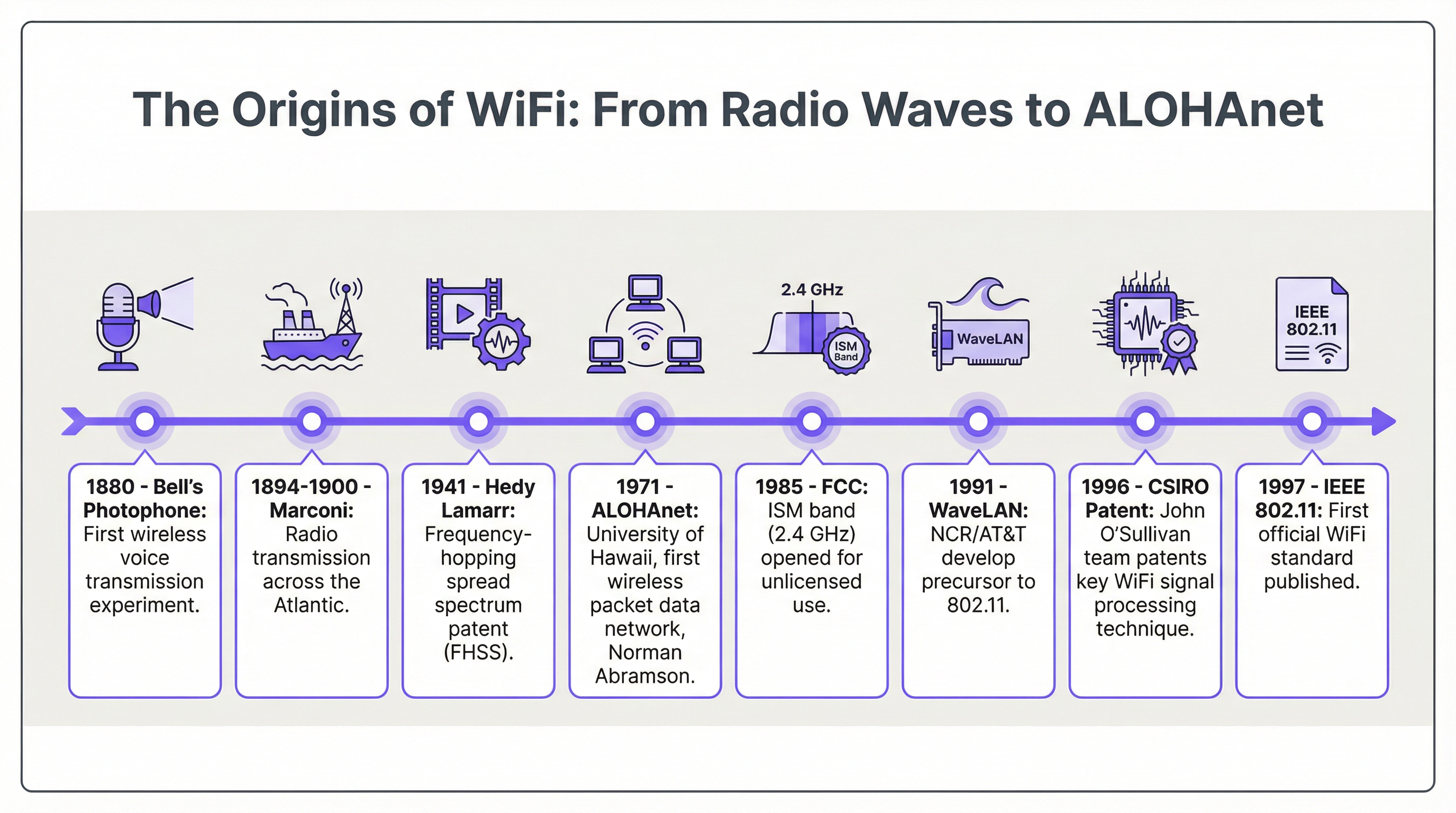
La vera genesi del WiFi può essere fatta risalire al 1971 con ALOHAnet, una rete a pacchetti wireless UHF sviluppata presso l'Università delle Hawaii. Guidato da Norman Abramson, questo progetto è stato il primo a dimostrare il networking pubblico di dati a pacchetti wireless, collegando le isole hawaiane. La sua innovazione principale, il protocollo ad accesso casuale ALOHA, è stata un precursore diretto del meccanismo Carrier-Sense Multiple Access with Collision Avoidance (CSMA/CA) che è alla base di tutti i moderni standard 802.11. Questo primo lavoro ha dimostrato che un mezzo wireless condiviso poteva essere utilizzato in modo efficace per la comunicazione dei dati.
Uno sviluppo normativo fondamentale si è verificato nel 1985, quando la Federal Communications Commission (FCC) degli Stati Uniti ha aperto le bande industriali, scientifiche e mediche (ISM), inclusa la 2.4 GHz, per l'uso non licenziato. Questa decisione ha democratizzato le frequenze, creando uno spazio per l'innovazione al di fuori del controllo dei tradizionali operatori di telecomunicazioni e aprendo la strada allo sviluppo di tecnologie wireless di livello consumer.
Ulteriori lavori fondamentali sono arrivati dalla Commonwealth Scientific and Industrial Research Organisation (CSIRO) del governo australiano. All'inizio degli anni '90, un team guidato dal Dr. John O'Sullivan, nel tentativo di rilevare l'esplosione di mini buchi neri, ha sviluppato e brevettato una tecnica cruciale per ridurre l'interferenza multipath, ovvero il fenomeno dei segnali radio che rimbalzano sulle superfici e arrivano al ricevitore in tempi diversi. Questo brevetto CSIRO è stato determinante per rendere realtà le LAN wireless robuste e ad alta velocità ed è alla base della forma d'onda OFDM utilizzata in ogni moderno standard WiFi.
Le generazioni IEEE 802.11: un'evoluzione standardizzata
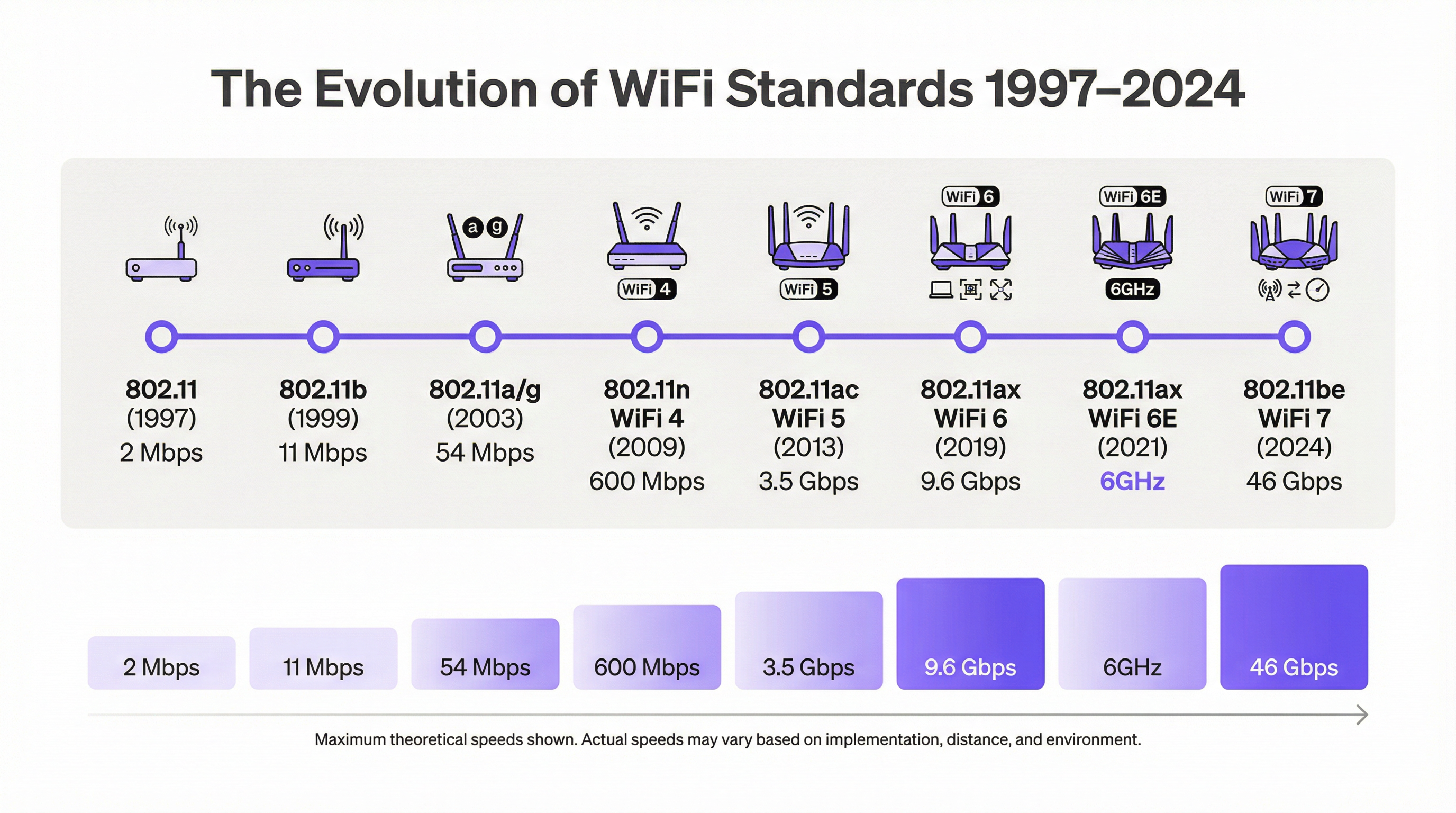
La fine degli anni '90 ha visto la formalizzazione degli standard WiFi sotto la governance dell'IEEE. Questa standardizzazione è stata cruciale per garantire l'interoperabilità tra i prodotti di diversi fornitori, un ruolo successivamente sostenuto dalla Wi-Fi Alliance, fondata nel 1999 per certificare i prodotti conformi e che ha coniato il marchio "Wi-Fi" tramite l'agenzia Interbrand.
| Standard | Generazione Wi-Fi | Anno | Banda/e di frequenza | Velocità teorica max | Innovazione chiave |
|---|---|---|---|---|---|
| 802.11 | — | 1997 | 2.4 GHz | 2 Mbps | Standard di base |
| 802.11b | WiFi 2 | 1999 | 2.4 GHz | 11 Mbps | Primo ampiamente adottato |
| 802.11a | WiFi 2 | 1999 | 5 GHz | 54 Mbps | OFDM a 5 GHz |
| 802.11g | WiFi 3 | 2003 | 2.4 GHz | 54 Mbps | OFDM a 2.4 GHz |
| 802.11n | WiFi 4 | 2009 | 2.4/5 GHz | 600 Mbps | MIMO |
| 802.11ac | WiFi 5 | 2013 | 5 GHz | 3.5 Gbps | MU-MIMO, canali a 160 MHz |
| 802.11ax | WiFi 6 | 2019 | 2.4/5 GHz | 9.6 Gbps | OFDMA, BSS Coloring, WPA3 |
| 802.11ax | WiFi 6E | 2021 | 2.4/5/6 GHz | 9.6 Gbps | Accesso alla banda a 6 GHz |
| 802.11be | WiFi 7 | 2024 | 2.4/5/6 GHz | 46.1 Gbps | MLO, canali a 320 MHz, 4K-QAM |
| 802.11bn | WiFi 8 | ~2028 | Da definire | Da definire | Latenza deterministica |
802.11n (WiFi 4) ha segnato un salto significativo nel throughput introducendo il MIMO (Multiple-Input Multiple-Output), che utilizza più antenne per trasmettere e ricevere più dati contemporaneamente. 802.11ac (WiFi 5) si è basato su questo con canali più ampi (fino a 160 MHz) e Multi-User MIMO (MU-MIMO), consentendo a un access point di trasmettere a più client simultaneamente. 802.11ax (WiFi 6/6E) ha rappresentato un cambio di paradigma incentrato sull'efficienza in ambienti affollati. La sua caratteristica principale, l'Orthogonal Frequency-Division Multiple Access (OFDMA), consente a un access point di servire contemporaneamente più client con diverse esigenze di larghezza di banda all'interno dello stesso canale: una vera rivoluzione per le strutture ad alta densità. L'introduzione del WiFi 6E nel 2021 ha dato ai dispositivi l'accesso alla banda a 6 GHz appena aperta, un blocco di spettro incontaminato con molte meno interferenze rispetto alle congestionate bande a 2.4 GHz e 5 GHz.
802.11be (WiFi 7), ratificato nel 2024, spinge le prestazioni a un nuovo livello. La sua tecnologia fondamentale è il Multi-Link Operation (MLO), che consente ai dispositivi di connettersi e aggregare dati su più bande contemporaneamente. Ciò aumenta drasticamente il throughput, riduce la latenza e migliora l'affidabilità. In combinazione con larghezze di canale di 320 MHz e modulazione 4K-QAM, il WiFi 7 offre velocità multi-gigabit essenziali per applicazioni di nuova generazione come AR/VR ed esperienze immersive nelle strutture.
Il futuro: WiFi 8 e oltre
Guardando al futuro, il focus dell'evoluzione wireless si sta spostando dalla pura velocità alle prestazioni deterministiche. L'imminente standard 802.11bn (WiFi 8), previsto per il 2028, mira a fornire una latenza estremamente bassa e prevedibile per applicazioni industriali e aziendali sensibili al fattore tempo. Ciò comporta un coordinamento multi-AP avanzato e il Coordinated Spatial Reuse (Co-SR) per gestire lo spettro con una precisione senza precedenti.
Guida all'implementazione
L'implementazione di una moderna rete WiFi aziendale richiede un approccio strutturato che va oltre il semplice posizionamento degli access point. Per i responsabili IT e gli architetti di rete, un'implementazione di successo si basa su una pianificazione meticolosa, best practice indipendenti dal fornitore e una profonda comprensione dell'ambiente fisico.
Fase 1: Raccolta dei requisiti e sopralluogo (Site Survey). Definisci i casi d'uso, stima il numero di dispositivi simultanei e conduci sia un site survey predittivo (utilizzando strumenti come Ekahau o Hamina) sia un sopralluogo fisico per identificare le fonti di interferenza RF e le ostruzioni fisiche non presenti nelle planimetrie.
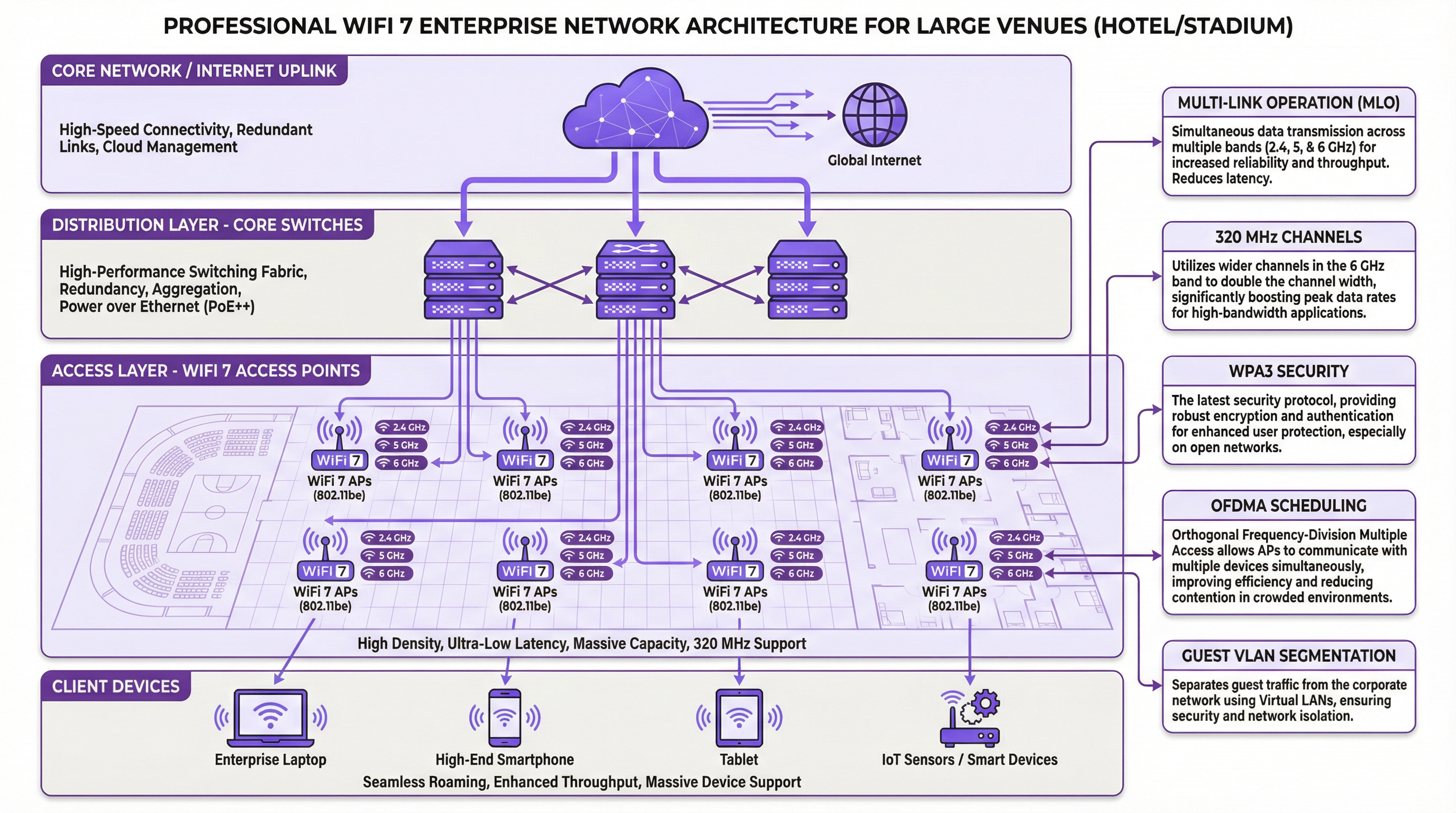
Fase 2: Progettazione e architettura di rete. Seleziona gli AP appropriati in base ai risultati del sopralluogo: WiFi 6E per le nuove implementazioni (greenfield), WiFi 7 per le aree critiche in termini di prestazioni. Sviluppa un piano di canali statico per tutte e tre le bande al fine di ridurre al minimo l'interferenza co-canale e progetta la segmentazione VLAN per isolare il traffico guest, aziendale e IoT. Assicurati che la dorsale cablata utilizzi switch PoE++ multi-gigabit (IEEE 802.3bt).
Fase 3: Configurazione e sicurezza. Imponi il WPA3-Enterprise per tutti gli SSID aziendali. Implementa IEEE 802.1X con un server RADIUS per l'autenticazione basata su certificati. Distribuisci un Captive Portal conforme al GDPR per le reti guest, integrandolo con una piattaforma come Purple per l'analisi e il marketing.
Fase 4: Convalida e ottimizzazione. Esegui un sopralluogo di convalida post-implementazione per misurare l'effettiva potenza del segnale, il throughput e la latenza. Monitora continuamente la rete per analizzare i modelli di traffico e l'integrità RF, utilizzando le informazioni acquisite per perfezionare i livelli di potenza degli AP e le assegnazioni dei canali nel tempo.
Best practice
Dai priorità alla banda a 6 GHz per tutte le nuove implementazioni, riservando la 2.4 GHz esclusivamente ai dispositivi IoT legacy. Progetta per il roaming garantendo una sovrapposizione della copertura di circa il 15-20% con una potenza del segnale minima di -67 dBm al margine della cella. Applica una rigorosa segmentazione della rete utilizzando VLAN e regole firewall: non consentire mai ai dispositivi guest di trovarsi sulla stessa rete dei sistemi di pagamento o dei server operativi. Imponi il WPA3 in tutta l'azienda e disabilita tutti i protocolli di sicurezza legacy, inclusi WPA2 e TKIP. Centralizza la gestione utilizzando una piattaforma basata su cloud per mantenere una configurazione, un livello di sicurezza e un aggiornamento del firmware coerenti su tutti gli access point.
Risoluzione dei problemi e mitigazione dei rischi
L'interferenza co-canale (CCI) è il problema di prestazioni più comune, in cui più AP sullo stesso canale interferiscono tra loro. La mitigazione richiede un site survey approfondito e un piano di canali statico; utilizza canali più stretti nelle implementazioni ad alta densità per aumentare il numero di canali non sovrapposti disponibili. L'autenticazione configurata in modo errato impedisce ai client di connettersi a causa di impostazioni di sicurezza non corrispondenti; una piattaforma di gestione centralizzata che distribuisce profili coerenti elimina questo rischio. L'alimentazione PoE insufficiente causa il riavvio degli AP o il loro funzionamento in modalità a potenza ridotta; verifica che gli switch forniscano lo standard PoE corretto (PoE++ per WiFi 6/7) e che i cavi rientrino nel limite di 100 metri. L'esaurimento del DHCP impedisce ai client di ottenere indirizzi IP in ambienti ad alta transitorietà; assicurati che gli ambiti DHCP siano dimensionati in modo appropriato e riduci i tempi di lease in contesti di conferenze o eventi.
ROI e impatto aziendale
Investire in una moderna infrastruttura WiFi offre ritorni tangibili in tre dimensioni. Primo, l'esperienza del cliente: nel settore alberghiero, un WiFi ad alte prestazioni è un fattore primario per i punteggi di soddisfazione degli ospiti, traducendosi direttamente in recensioni positive e fidelizzazione. Secondo, l'efficienza operativa: una rete WiFi affidabile alimenta sistemi critici come POS mobili, scanner di inventario e dispositivi di comunicazione del personale, riducendo gli errori e accelerando i processi. Terzo, nuovi flussi di entrate: integrando una piattaforma di analisi WiFi come Purple, le strutture possono sfruttare il WiFi per gli ospiti per raccogliere dati di marketing conformi al GDPR, comprendere i modelli di affluenza e offrire promozioni mirate, trasformando un centro di costo in un generatore di entrate.
La misurazione del ROI implica il monitoraggio dell'aumento della soddisfazione degli ospiti e dei punteggi NPS, la riduzione del tempo impiegato dal personale in attività manuali e le entrate incrementali derivanti da campagne di marketing basate sul WiFi. Una rete WiFi ben progettata non è una spesa IT; è un asset strategico che è alla base dell'intera esperienza digitale di una struttura moderna.
Key Terms & Definitions
ALOHAnet
The world's first wireless packet data network, developed at the University of Hawaii in 1971 by Norman Abramson. It connected the Hawaiian Islands via UHF radio and introduced the ALOHA random-access protocol, the conceptual ancestor of CSMA/CA used in all 802.11 standards.
IT teams encounter this term in the historical context of WiFi development. Understanding ALOHAnet's contribution to medium access control helps explain why modern WiFi behaves the way it does in congested environments.
OFDMA (Orthogonal Frequency-Division Multiple Access)
A multi-user version of OFDM modulation that divides a WiFi channel into smaller sub-channels (Resource Units) and allocates them to different clients simultaneously. Introduced in WiFi 6 (802.11ax), it allows an access point to serve multiple devices with different bandwidth requirements in the same transmission window.
OFDMA is the primary reason WiFi 6 outperforms WiFi 5 in high-density environments. Network architects should specify WiFi 6 or higher for any venue expecting more than 30–50 concurrent devices per access point.
Multi-Link Operation (MLO)
A WiFi 7 (802.11be) feature that enables a device to simultaneously connect and aggregate data across multiple frequency bands (2.4, 5, and 6 GHz). Unlike previous generations where a device was tied to a single band at a time, MLO allows concurrent transmission and reception across bands, increasing throughput and reducing latency.
MLO is the defining feature of WiFi 7 and the primary justification for upgrading from WiFi 6E in performance-critical environments. It is particularly valuable for applications requiring consistent low latency, such as AR/VR and real-time collaboration tools.
WPA3 (Wi-Fi Protected Access 3)
The current WiFi security standard, replacing WPA2. WPA3 introduces Simultaneous Authentication of Equals (SAE), which protects against offline dictionary attacks on passwords, and provides forward secrecy, meaning past sessions cannot be decrypted even if the password is later compromised. WPA3-Enterprise adds 192-bit cryptographic strength.
WPA3 is mandatory for WiFi 6 and later certified devices. IT teams should disable WPA2 on all corporate SSIDs and enforce WPA3-Enterprise with 802.1X for any network carrying sensitive data. This is increasingly a compliance requirement under frameworks like Cyber Essentials and PCI DSS.
IEEE 802.1X
An IEEE standard for port-based network access control that provides an authentication framework for devices connecting to a network. In WiFi deployments, it is used with a RADIUS server to authenticate users or devices via credentials or certificates before granting network access.
802.1X is the foundation of enterprise WiFi security. It eliminates the security risks of shared pre-shared keys (PSK) by providing per-user or per-device authentication. It is a requirement for PCI DSS compliance on any network segment that handles cardholder data.
MIMO (Multiple-Input Multiple-Output)
A radio technology that uses multiple antennas at both the transmitter (access point) and receiver (client device) to send and receive multiple data streams simultaneously over the same channel. Introduced in WiFi 4 (802.11n), it dramatically increases throughput and reliability.
MIMO is the foundational technology behind the throughput improvements from WiFi 4 onwards. MU-MIMO (Multi-User MIMO), introduced in WiFi 5, extends this to allow an AP to serve multiple clients simultaneously rather than sequentially.
BSS Coloring
A WiFi 6 (802.11ax) mechanism that assigns a colour identifier to each Basic Service Set (BSS). When a device detects a transmission from a different BSS on the same channel, it can identify it as 'foreign' and continue its own transmission rather than deferring, reducing unnecessary backoff and improving efficiency in dense deployments.
BSS Coloring is particularly relevant in multi-tenant buildings, dense urban deployments, and large venues where multiple overlapping WiFi networks coexist. It is a key reason why WiFi 6 performs better in interference-heavy environments than WiFi 5.
PoE++ (IEEE 802.3bt)
The latest Power over Ethernet standard, delivering up to 90W of power over a standard Ethernet cable. WiFi 6E and WiFi 7 access points often require PoE++ due to their higher power consumption from supporting three radio bands and advanced processing capabilities.
IT teams planning WiFi 6E or 7 deployments must audit their switching infrastructure for PoE++ compatibility. Deploying high-generation APs on older PoE or PoE+ switches will result in APs operating in a reduced-power mode, significantly degrading performance and coverage.
6 GHz Band
A new frequency band (5.925–7.125 GHz) opened for unlicensed WiFi use by regulatory bodies including the FCC (2020) and Ofcom (UK, 2021). It provides approximately 1,200 MHz of additional spectrum, compared to 80 MHz in the 2.4 GHz band. It is exclusively available to WiFi 6E and WiFi 7 devices, meaning it is free from legacy device interference.
The 6 GHz band is the most significant spectrum development in WiFi history since the ISM band was opened in 1985. For network architects, it is the primary reason to specify WiFi 6E or 7 for new deployments, particularly in high-density environments where the 2.4 and 5 GHz bands are congested.
Case Studies
A 350-room full-service hotel is planning a complete WiFi infrastructure refresh. The property includes a large conference centre with a 1,200-seat ballroom, three restaurant spaces, a spa, and a fitness centre. The hotel currently operates a WiFi 5 (802.11ac) network installed in 2017 and is experiencing persistent complaints about slow speeds in the ballroom during large events. The IT director needs to select a new standard, design the architecture, and ensure PCI DSS compliance for the payment network. What is the recommended approach?
The recommended approach is a phased deployment of WiFi 6E as the baseline standard, with WiFi 7 specified for the ballroom and conference centre. Phase 1 deploys WiFi 6E access points throughout guest rooms and back-of-house areas, replacing the 802.11ac infrastructure. Each floor is served by ceiling-mounted APs at approximately 15-metre intervals, with a dedicated IoT SSID on 2.4 GHz for door locks, thermostats, and HVAC sensors. Phase 2 focuses on the ballroom and conference spaces, deploying WiFi 7 (802.11be) access points with a high-density design: ceiling-mounted APs at 8-metre intervals, supplemented by under-table APs at delegate positions for the ballroom. The 6 GHz band is configured as the primary band for all client devices, with OFDMA enabled to manage the high concurrent device count during events. The network architecture uses three VLANs: VLAN 10 for guest WiFi (isolated, internet-only), VLAN 20 for staff and operational systems, and VLAN 30 for payment terminals (PCI DSS scope, isolated with dedicated firewall rules and 802.1X authentication). WPA3-Enterprise is mandated on VLANs 20 and 30. A GDPR-compliant captive portal on VLAN 10 collects guest email addresses for the hotel's CRM, integrated with Purple for analytics. The wired backbone is upgraded to multi-gigabit PoE++ switches to power the WiFi 7 APs. Post-deployment, a validation survey confirms coverage and throughput targets are met.
A national retail chain with 85 stores is planning to deploy a unified WiFi platform to support mobile POS systems, inventory management scanners, digital signage, and a customer-facing guest WiFi network. Each store averages 800 square metres. The CTO wants a single vendor-neutral architecture that can be centrally managed, supports GDPR-compliant customer data capture, and can scale to support future IoT deployments. What architecture and standards should be recommended?
The recommended architecture is a cloud-managed WiFi 6E deployment with a standardised three-SSID design across all 85 stores. Each store is served by 4–6 ceiling-mounted WiFi 6E access points, providing full coverage with appropriate overlap. The three SSIDs are: (1) a corporate SSID on 5 GHz with WPA3-Enterprise and 802.1X authentication, carrying POS and inventory scanner traffic on a dedicated VLAN with firewall rules restricting access to the payment processor and inventory system only; (2) an IoT SSID on 2.4 GHz with WPA2-PSK (or WPA3-SAE for newer devices) for digital signage, environmental sensors, and HVAC controls; and (3) a guest WiFi SSID on 5/6 GHz with a GDPR-compliant captive portal integrated with Purple, collecting opt-in customer data for the chain's loyalty programme. Central management is provided through a cloud-based controller, enabling the IT team to push configuration changes, firmware updates, and security policies to all 85 stores simultaneously. Purple's analytics platform provides footfall data, dwell time analysis, and customer journey mapping across all stores, enabling the marketing team to optimise store layouts and promotional campaigns. The architecture is designed to accommodate future WiFi 7 AP upgrades without changes to the underlying network design.
Scenario Analysis
Q1. A 15,000-seat indoor arena is planning a WiFi upgrade ahead of a major esports tournament series. During the last event, the existing WiFi 5 network experienced severe congestion, with average client throughput dropping below 2 Mbps during peak attendance. The venue operator needs to support 12,000 concurrent devices, with 20% of users streaming 4K video and 5% using AR-enhanced experiences. What WiFi standard should be specified, and what are the three most critical design decisions?
💡 Hint:Consider the specific features of WiFi 6/6E/7 that address high-density performance, and think about the physical deployment pattern for a tiered seating environment.
Show Recommended Approach
WiFi 7 (802.11be) should be specified as the primary standard for this deployment, with WiFi 6E as a fallback for areas where WiFi 7 hardware is not yet available. The three most critical design decisions are: (1) Band allocation — deploy all primary client traffic on the 6 GHz band using 80 MHz channels to maximise the number of non-overlapping channels and minimise interference. The 6 GHz band's 1,200 MHz of spectrum allows for significantly more simultaneous channels than 2.4 or 5 GHz. (2) AP placement — use a high-density under-seat or seat-back AP deployment pattern rather than relying on ceiling-mounted APs. This reduces the number of clients per AP (targeting no more than 30–40 devices per AP) and improves signal quality by reducing path loss. (3) OFDMA configuration — enable OFDMA on all APs and configure the network to prioritise the AR/VR traffic using QoS policies, ensuring the 5% of users with the most demanding latency requirements receive consistent sub-10ms latency. MLO should be enabled to allow devices to aggregate 5 and 6 GHz bandwidth for the 4K streaming use case.
Q2. A regional council is deploying public WiFi across 12 libraries and 8 leisure centres. The network must be GDPR-compliant, support a maximum of 200 concurrent users per site, and integrate with the council's existing Active Directory for staff authentication. The IT team has a limited budget and needs to justify the investment to elected members. What architecture would you recommend, and how would you frame the ROI case?
💡 Hint:Consider the balance between performance requirements and cost-efficiency, and think about how GDPR compliance and analytics can be framed as a public service benefit.
Show Recommended Approach
WiFi 6 (802.11ax) is the appropriate standard for this deployment — the 200 concurrent user density does not justify the premium of WiFi 6E or 7, but WiFi 6's OFDMA efficiency is valuable for the mixed-use environment of libraries and leisure centres. The architecture uses two SSIDs per site: a public SSID with a GDPR-compliant captive portal (collecting only the minimum required data — email for service communications, with explicit opt-in) and a staff SSID with WPA3-Enterprise and 802.1X integrated with Active Directory via RADIUS. The ROI case for elected members should be framed around three outcomes: (1) Digital inclusion — providing free, high-quality internet access supports the council's digital inclusion strategy and is a measurable public service outcome; (2) Service analytics — footfall and dwell time data from the WiFi platform informs decisions about opening hours, staffing levels, and facility investments; (3) Cost avoidance — a modern, centrally managed platform reduces the IT overhead of managing 20 separate sites, with firmware updates and security patches deployed centrally.
Q3. An IT director at a 500-store fast-casual restaurant chain is evaluating whether to upgrade from WiFi 5 to WiFi 6E or wait for WiFi 7. Each restaurant has approximately 80 seats, 15 staff devices (POS, kitchen display systems, handheld ordering tablets), and a guest WiFi network. The chain is also planning to deploy IoT sensors for temperature monitoring and predictive maintenance over the next 18 months. What is your recommendation, and what factors would change it?
💡 Hint:Consider the density requirements, the IoT roadmap, and the total cost of ownership over a 5-year horizon.
Show Recommended Approach
WiFi 6E is the recommended standard for this deployment. The density of 80 seats plus 15 staff devices does not require the peak throughput of WiFi 7, and the cost premium is not justified at this scale. WiFi 6E's 6 GHz band provides clean spectrum for the guest WiFi network, while OFDMA ensures efficient service of the mixed device types. The IoT sensor deployment should use a dedicated 2.4 GHz SSID on a separate VLAN, as most IoT sensors do not support 5 or 6 GHz. The factors that would change this recommendation are: (1) If the chain plans to introduce AR-enhanced ordering or real-time analytics applications within the 5-year horizon, WiFi 7 should be specified now to avoid a mid-cycle refresh; (2) If the switching infrastructure already supports PoE++ and multi-gigabit uplinks, the incremental cost of WiFi 7 hardware may be small enough to justify the future-proofing; (3) If the chain operates in markets where the 6 GHz band is not yet approved by the local regulator, WiFi 6 (not 6E) may be the appropriate choice.
Key Takeaways
- ✓WiFi's origins trace back to 1971 with ALOHAnet, the world's first wireless packet network, and the ALOHA protocol that directly inspired the CSMA/CA mechanism used in every 802.11 standard today.
- ✓The 1985 FCC decision to open the 2.4 GHz ISM band for unlicensed use was the regulatory catalyst that made consumer WiFi possible, and the CSIRO's 1996 OFDM patent provided the signal processing foundation for all modern standards from 802.11a onwards.
- ✓Each WiFi generation has solved a specific bottleneck: WiFi 4 added MIMO for throughput, WiFi 5 added MU-MIMO and wider channels, WiFi 6 added OFDMA for high-density efficiency, WiFi 6E added the clean 6 GHz band, and WiFi 7 added MLO for simultaneous multi-band aggregation.
- ✓For new enterprise deployments in high-density venues, WiFi 6E is the minimum baseline standard; WiFi 7 should be specified for environments requiring sub-10ms latency, AR/VR support, or future-proofing against next-generation applications.
- ✓Security architecture is non-negotiable: WPA3-Enterprise with IEEE 802.1X authentication on corporate SSIDs, strict VLAN segmentation between guest, staff, IoT, and payment networks, and a GDPR-compliant captive portal for public-facing WiFi.
- ✓The wired backhaul is the most commonly overlooked element of a WiFi upgrade: WiFi 6E and 7 APs require PoE++ (IEEE 802.3bt) switches and multi-gigabit uplinks — deploying next-generation APs on legacy switching infrastructure negates the investment.
- ✓A modern WiFi platform like Purple transforms the network from a cost centre into a strategic asset, enabling GDPR-compliant customer data capture, footfall analytics, and targeted marketing that delivers measurable ROI for hospitality, retail, and venue operators.




