

La guida definitiva alla selezione dei canali WiFi: ottimizzare le prestazioni ed evitare le interferenze
This guide provides a comprehensive, step-by-step explanation of how to change WiFi channels on different routers and operating systems. It covers the reasons for changing channels (interference, congestion), how to identify the least congested channels using WiFi analyzer tools (with specific recommendations and screenshots), and the potential impact on network performance. It differentiates itself by offering practical advice for both home and business users, including advanced configurations and troubleshooting tips for common issues.
🎧 Listen to this Guide
View Transcript
Executive Summary
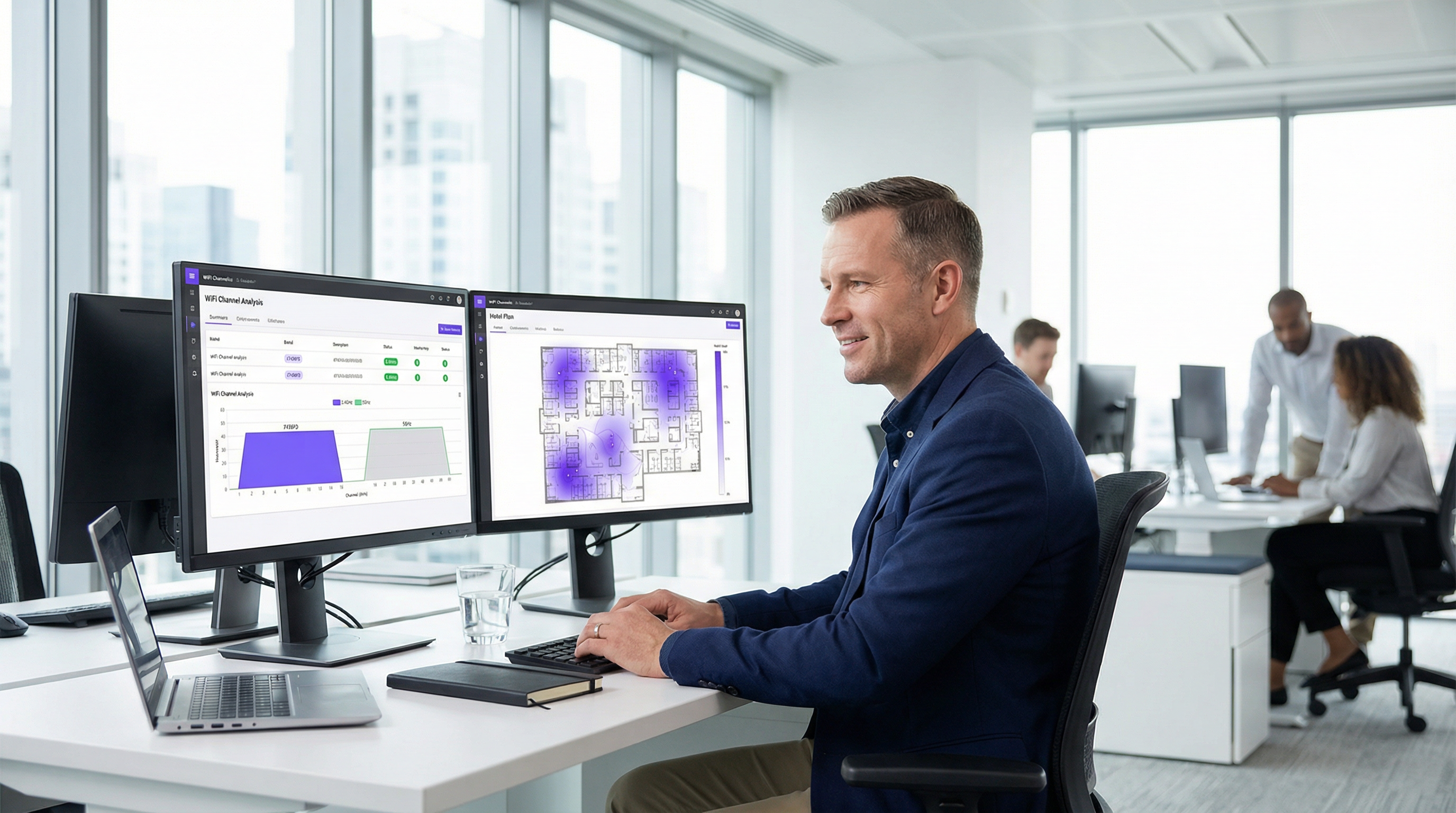
Per i leader IT che gestiscono la connettività in sedi commerciali ad alto traffico, prestazioni WiFi non ottimali non sono un semplice inconveniente; rappresentano un ostacolo diretto ai ricavi e all'efficienza operativa. Questa guida fornisce un framework autorevole e attuabile per la selezione dei canali WiFi, andando oltre la teoria accademica per offrire indicazioni pratiche di implementazione. Affrontiamo le sfide pervasive delle interferenze a radiofrequenza (RF) e della congestione dei canali che degradano il throughput e l'affidabilità della rete in ambienti ad alta densità come hotel, catene di vendita al dettaglio e stadi. La tesi centrale è che una strategia di gestione dei canali ponderata e basata sui dati non è una modifica discrezionale, ma una componente fondamentale dell'architettura wireless di livello enterprise. Padroneggiando i principi dei canali non sovrapposti nella banda a 2,4 GHz, sfruttando strategicamente le larghezze di canale nella banda a 5 GHz e comprendendo le implicazioni operative della Dynamic Frequency Selection (DFS), gli architetti di rete possono mitigare i rischi, migliorare l'esperienza utente e massimizzare il ROI della propria infrastruttura wireless. Questo documento di riferimento fornisce l'approfondimento tecnico, i passaggi di implementazione indipendenti dal fornitore e l'analisi dell'impatto sul business necessari per giustificare ed eseguire un solido progetto di ottimizzazione dei canali.
Approfondimento tecnico
Lo spettro delle radiofrequenze (RF) è una risorsa finita e condivisa, governata da leggi fisiche e domini normativi. Una gestione efficace dei canali WiFi si basa su una profonda comprensione di come questo spettro viene allocato e delle caratteristiche intrinseche delle bande di frequenza principali: 2,4 GHz e 5 GHz.
La banda a 2,4 GHz: una corsia di servizio affollata
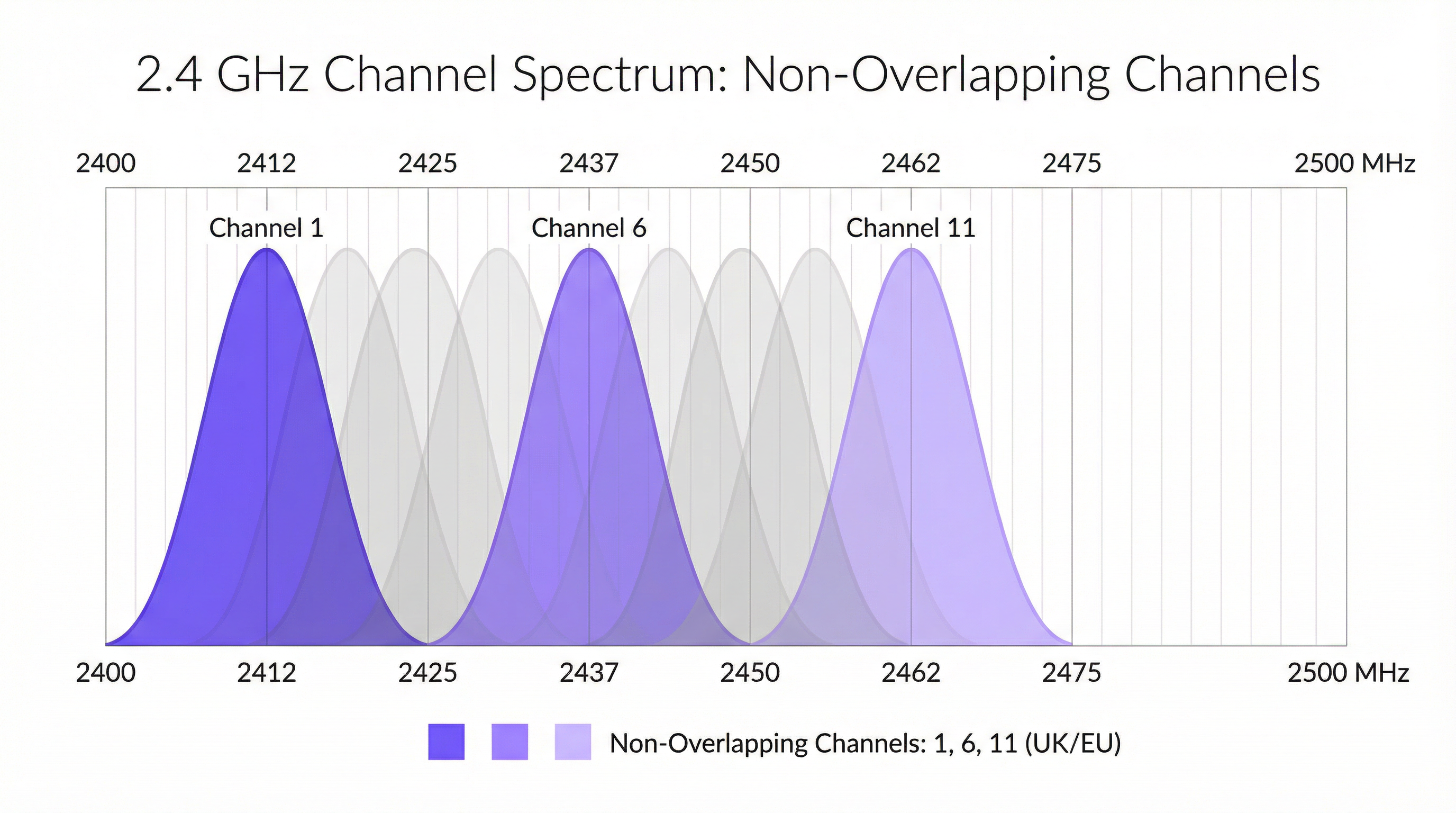
La banda a 2,4 GHz è lo storico cavallo di battaglia del WiFi, offrendo un'eccellente propagazione del segnale e penetrazione dei muri. Tuttavia, è notoriamente affollata e suscettibile alle interferenze. Nel Regno Unito e in Europa, questa banda è divisa in 13 canali, ma a causa della loro vicinanza (5 MHz) e larghezza (20-22 MHz), si sovrappongono in modo significativo. Ciò crea interferenze di canale adiacente e co-canale, in cui gli access point (AP) di fatto si sovrastano a vicenda, corrompendo i pacchetti di dati e forzando le ritrasmissioni. L'unico modo per mitigare questo problema è utilizzare i tre canali che non si sovrappongono: 1, 6 e 11. Questa è una best practice non negoziabile per qualsiasi implementazione professionale. Qualsiasi AP configurato su un canale diverso da 1, 6 o 11 contribuisce attivamente all'inquinamento dello spettro.
Inoltre, la banda a 2,4 GHz è uno spettro non licenziato, il che significa che è accessibile a innumerevoli altri dispositivi, tra cui periferiche Bluetooth, forni a microonde, telefoni cordless e sensori IoT basati su Zigbee. Questa interferenza non WiFi aggiunge un ulteriore livello di rumore imprevedibile che può degradare gravemente le prestazioni.
La banda a 5 GHz: l'autostrada ad alta velocità
La banda a 5 GHz è la chiave per un WiFi ad alte prestazioni. Offre un numero significativamente maggiore di canali (oltre 20 nel Regno Unito) che per progettazione non si sovrappongono, e subisce molte meno interferenze non WiFi. Questo la rende la scelta obbligata per le applicazioni ad alta intensità di banda come lo streaming video, il Voice-over-IP (VoIP) e i trasferimenti di file di grandi dimensioni. Tuttavia, i suoi segnali a frequenza più elevata hanno una portata inferiore e sono più facilmente attenuati da ostacoli fisici come muri e pavimenti.
All'interno della banda a 5 GHz, gli architetti di rete possono anche configurare la larghezza del canale per aumentare il throughput:
- 20 MHz: La larghezza di base. Offre il minor potenziale di interferenza ed è ideale per ambienti ad alta densità in cui sono co-locati molti AP.
- 40 MHz: Unisce due canali da 20 MHz. Raddoppia la potenziale velocità dei dati ma raddoppia anche l'impronta dello spettro, rendendolo più suscettibile alle interferenze.
- 80 MHz: Unisce quattro canali da 20 MHz. Offre velocità di trasmissione dati molto elevate, ma dovrebbe essere utilizzato solo in ambienti RF puliti con bassa densità di AP.
- 160 MHz: Unisce otto canali a 2,4 GHz. Sebbene supportato da 802.11ac/ax, è raramente pratico in ambienti enterprise a causa del suo massiccio consumo di spettro.
Dynamic Frequency Selection (DFS)
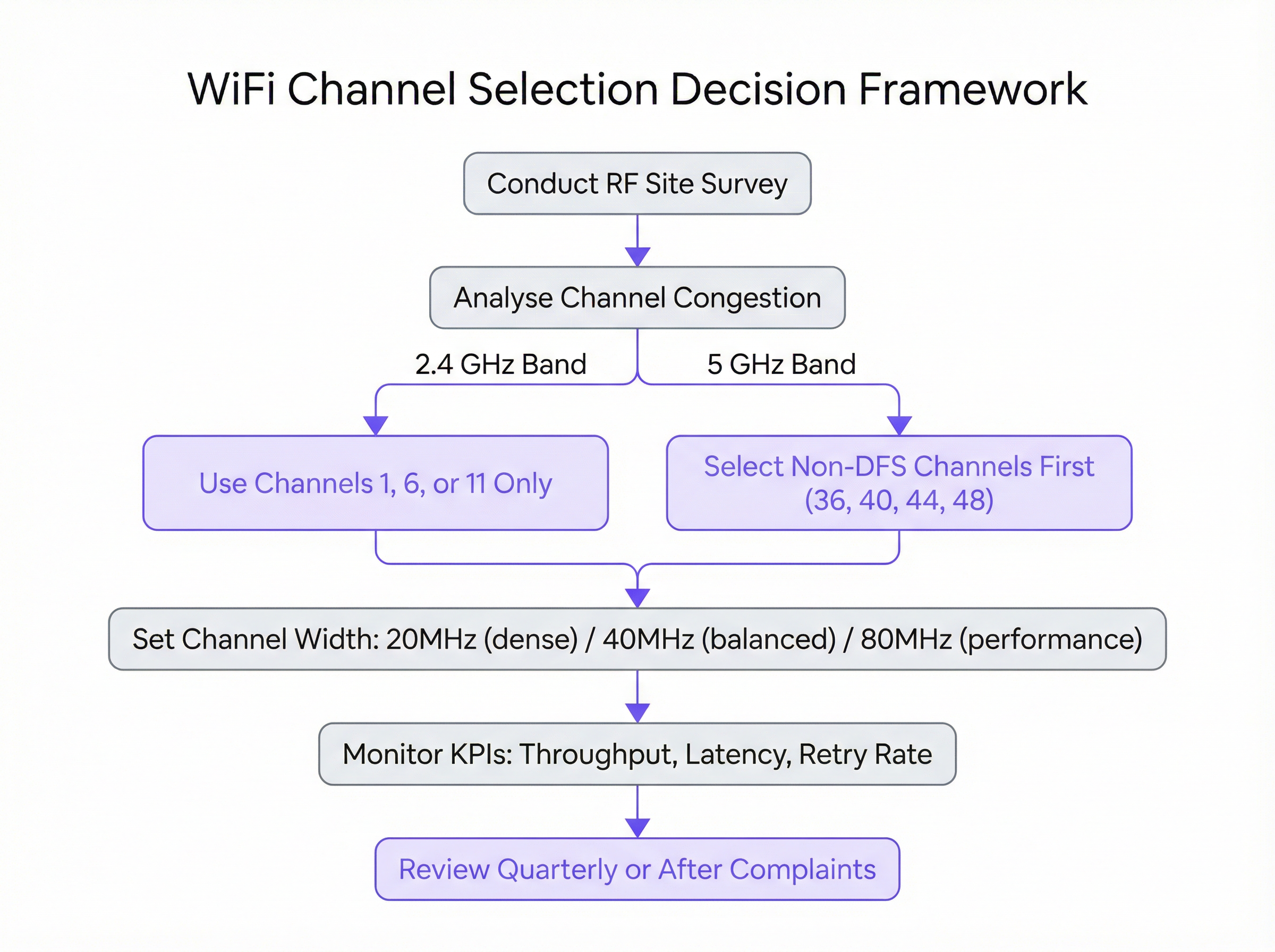
Una considerazione critica nella banda a 5 GHz è la Dynamic Frequency Selection (DFS). Alcuni canali nelle bande UNII-2 e UNII-2e sono condivisi con i sistemi radar meteorologici e militari. Lo standard IEEE 802.11h impone che se un AP rileva un segnale radar su un canale DFS, deve liberare immediatamente quel canale per almeno 30 minuti. Per gli utenti, ciò può causare un'interruzione della connessione improvvisa, seppur breve. Sebbene i canali DFS aprano una vasta quantità di spettro aggiuntivo, il loro utilizzo richiede un'attenta pianificazione. Una site survey è essenziale per determinare il rischio di eventi radar in una posizione specifica. Per le implementazioni mission-critical, è spesso prudente limitare inizialmente gli AP ai canali non DFS (es. 36, 40, 44, 48) per garantire la massima stabilità.
Guida all'implementazione
Il passaggio dalla teoria a un ambiente di produzione live richiede un approccio metodico e avverso al rischio. I seguenti passaggi forniscono un modello indipendente dal fornitore per l'esecuzione di un aggiornamento del piano dei canali.
Fase 1: Condurre una site survey RF di base Prima di apportare qualsiasi modifica, è necessario comprendere l'ambiente RF attuale. Utilizzando uno strumento di analisi WiFi professionale (es. Ekahau, NetSpot o gli strumenti integrati nel controller WLAN aziendale), esegui una site survey completa durante le ore di punta operative. L'obiettivo è mappare tutte le reti WiFi esistenti, identificandone i canali, la potenza del segnale (RSSI) e le larghezze di canale. Questi dati costituiscono il fondamento empirico del tuo nuovo piano dei canali.
Fase 2: Sviluppare il piano dei canali Sulla base della site survey, crea un piano dei canali formale.
- Per i 2,4 GHz: Assegna i canali 1, 6 e 11 in uno schema a rotazione tra i tuoi AP, assicurandoti che due AP adiacenti non condividano lo stesso canale. L'obiettivo è massimizzare la distanza fisica tra gli AP sullo stesso canale.
- Per i 5 GHz: Inizia assegnando a ciascun AP canali univoci non DFS con una larghezza di 20 MHz. Se hai più AP rispetto ai canali non DFS disponibili, puoi iniziare a riutilizzare i canali, garantendo sempre la massima separazione fisica. Prendi in considerazione larghezze di 40 MHz o 80 MHz solo in aree con bassa densità di AP e una comprovata necessità di throughput più elevato.
Fase 3: Implementazione graduale Non applicare mai le modifiche ai canali all'intera rete contemporaneamente. Implementa il nuovo piano in modo graduale, iniziando con un singolo AP o una piccola area a basso rischio. Ciò consente di convalidare l'impatto della modifica in modo controllato. Se la modifica ha esito positivo, puoi procedere con il gruppo successivo di AP.
Fase 4: Configurazione specifica del fornitore Sebbene i principi siano universali, i passaggi di configurazione specifici variano in base al fornitore:
- Cisco Meraki: Vai su
Wireless > Radio settings. Puoi impostare i canali manualmente per ogni AP o configurare il profiloAuto RFper utilizzare solo i canali designati. - Aruba Central: In
Devices > Access Points > Config > Radios, puoi configurare le impostazioni diAdaptive Radio Management (ARM)per definire i canali validi e le larghezze di canale. - Ruckus SmartZone: Utilizza
ChannelFlyeBackground Scanningper la gestione automatizzata, oppure sovrascrivili su base per-AP per il controllo manuale. - Juniper Mist: Definisci un
RF Templatenella schedaOrganizationper specificare le impostazioni del canale e della potenza, che il motore Mist AI utilizzerà poi come vincoli operativi.

Best Practice
L'adesione alle best practice del settore garantisce una rete wireless stabile, scalabile e ad alte prestazioni.
- Dare priorità ai 5 GHz: Indirizza in modo aggressivo i dispositivi client compatibili verso la banda a 5 GHz. Questo riserva lo spettro a 5 GHz, più pulito e veloce, ai dispositivi in grado di trarne vantaggio, lasciando la banda a 2,4 GHz per i client legacy e i dispositivi IoT.
- Controllare la potenza di trasmissione: Una potenza di trasmissione elevata non è sempre la scelta migliore. Gli AP che trasmettono alla massima potenza possono aumentare le interferenze co-canale e far sì che i dispositivi client con radio più deboli (come gli smartphone) rimangano bloccati su un AP distante. Utilizza il controllo automatico della potenza o regola manualmente i livelli di potenza per creare celle di copertura di dimensioni adeguate.
- Condurre audit regolari: L'ambiente RF è dinamico. Compaiono nuove reti vicine e le planimetrie degli edifici cambiano. Conduci un breve audit RF su base trimestrale e una site survey completa ogni anno per garantire che il tuo piano dei canali rimanga ottimale.
- Documentare tutto: Mantieni una documentazione dettagliata del tuo piano dei canali, incluse le mappe dei piani che mostrano le posizioni degli AP e i canali assegnati. Questo è inestimabile per la risoluzione dei problemi e le espansioni future.
Risoluzione dei problemi e mitigazione dei rischi
Anche con un piano ben progettato, possono sorgere dei problemi. La modalità di guasto più comune dopo un cambio di canale è riscontrare interferenze impreviste. Se le prestazioni si degradano, il principale sospettato è un'interferenza intermittente non WiFi. Un analizzatore di spettro (a differenza di un analizzatore WiFi) può aiutare a identificare tali fonti.
Un altro problema comune è quello dello "sticky client" (client incollato), in cui un dispositivo rimane associato a un AP distante nonostante ne sia disponibile uno più vicino. Questo è spesso il risultato di una potenza di trasmissione impostata su un valore troppo alto negli AP. Ridurre la potenza di trasmissione dell'AP può aiutare a restringere le celle di copertura e incoraggiare i client a passare prima a un AP migliore (roaming).
Per mitigare i rischi, disponi sempre di un piano di rollback. Documenta le impostazioni originali dei canali prima di apportare qualsiasi modifica e assicurati di avere una finestra di manutenzione per ripristinare la configurazione precedente se il nuovo piano causa problemi operativi significativi.
ROI e impatto sul business
L'investimento in una corretta gestione dei canali offre un ritorno sull'investimento (ROI) chiaro e misurabile. Per un hotel, si traduce in punteggi di soddisfazione degli ospiti più elevati e in un minor numero di recensioni negative legate a un WiFi scadente. Per un negozio al dettaglio, garantisce l'affidabilità dei sistemi di punti vendita mobili (mPOS) e consente un'esperienza fluida per i clienti che utilizzano la rete guest. In un centro congressi, significa fornire la connettività affidabile richiesta dagli organizzatori di eventi e dai partecipanti.
I principali impatti sul business sono:
- Aumento del throughput: Un canale pulito può aumentare il throughput dei dati del 50-100% o più, con un impatto diretto sulle prestazioni delle applicazioni.
- Riduzione dei ticket di supporto: La gestione proattiva dei canali riduce drasticamente i problemi segnalati dagli utenti relativi a velocità ridotte e cadute di connessione, liberando risorse IT.
- Miglioramento dell'esperienza utente: Una connettività affidabile è ormai un'aspettativa fondamentale. Una rete ben ottimizzata contribuisce direttamente alla soddisfazione e alla fedeltà di clienti e dipendenti.
- Massimizzazione del ROI dell'hardware: Una corretta gestione RF garantisce di ottenere le massime prestazioni dall'hardware degli access point esistenti, ritardando potenzialmente costosi aggiornamenti.
Key Terms & Definitions
Radio Frequency (RF)
A frequency or range of frequencies in the electromagnetic spectrum suitable for transmission of information. WiFi operates in the 2.4 GHz and 5 GHz RF bands.
IT teams must manage the RF environment to minimize interference and ensure reliable communication for their wireless networks.
Channel Congestion
A scenario where multiple WiFi networks are operating on the same or overlapping channels in the same physical area, forcing devices to wait for their turn to transmit.
In a dense urban environment, high channel congestion is the primary cause of slow WiFi speeds. Identifying and moving to a less congested channel is the main goal of channel optimization.
RSSI (Received Signal Strength Indicator)
A measurement of the power present in a received radio signal, typically expressed in negative decibels-milliwatts (-dBm).
When analyzing a WiFi network, an RSSI of -50 dBm indicates a very strong signal, while -90 dBm is very weak. It's used to determine the coverage area of an AP and the potential for interference from other APs.
Co-Channel Interference (CCI)
Interference that occurs when two or more access points operating on the same channel are in close proximity. The APs must contend for the same airtime, reducing throughput for all.
A proper channel plan using staggered channels (e.g., 1, 6, 11) is designed specifically to minimize co-channel interference between a venue's own access points.
Adjacent-Channel Interference (ACI)
Interference that occurs when access points are on overlapping (but not identical) channels, such as channels 2 and 3 in the 2.4 GHz band.
ACI is a major problem in the 2.4 GHz band and is why the 1, 6, 11 channel plan is critical. It is not a significant issue in the 5 GHz band where channels do not overlap.
Dynamic Frequency Selection (DFS)
A mechanism that allows WiFi devices to use 5 GHz channels that are also used by radar systems. If radar is detected, the device must automatically switch to a different channel.
IT teams must decide whether the benefit of extra channels outweighs the risk of potential service interruptions when using DFS channels, especially in locations near airports or weather stations.
Channel Width
The width of the radio band that a WiFi channel uses to transmit data, measured in megahertz (MHz). Wider channels allow for higher data rates.
Network architects must choose an appropriate channel width (20, 40, or 80 MHz) as a trade-off between single-client speed and overall network capacity in a dense environment.
Site Survey
The process of planning and designing a wireless network to provide a solution that will deliver the required wireless coverage, data rates, network capacity, and quality of service.
A site survey is a mandatory first step before any significant WiFi deployment or optimization project. It provides the empirical data needed to make informed decisions about AP placement and channel selection.
Case Studies
A 200-room luxury hotel is experiencing frequent guest complaints about slow and unreliable WiFi, particularly during the evenings when occupancy is high. The hotel has a mix of 802.11ac and 802.11ax access points. How would you diagnose and resolve the issue?
- Diagnosis: Conduct an RF site survey between 7 PM and 10 PM to capture the network state under peak load. Use a WiFi analyzer to map channel usage on both 2.4 GHz and 5 GHz bands across all floors. The likely hypothesis is high co-channel interference from the hotel's own APs and neighboring residential networks. Pay close attention to the retransmission rate KPI in the WLAN controller, which is likely to be high.
- Channel Plan Redesign: Based on the survey, create a new channel plan. For the 2.4 GHz radios, ensure all APs are strictly on channels 1, 6, or 11, with no adjacent APs on the same channel. For the 5 GHz radios, set a uniform 20 MHz channel width to maximize the number of available channels and reduce interference in the high-density environment. Assign unique non-DFS channels first (36, 40, 44, 48, etc.).
- Implementation: Implement the new channel plan floor by floor during a low-traffic period (e.g., mid-morning). Disable lower data rates (below 12 Mbps) to encourage faster roaming and prevent clients from sticking to distant APs.
- Validation: Monitor throughput and latency metrics post-change. Solicit feedback from staff and a few friendly guests to confirm a tangible improvement in user experience.
A national retail chain with 50+ stores wants to ensure reliable performance for its new mobile point-of-sale (mPOS) terminals and guest WiFi network. The stores are often located in busy shopping malls with high levels of RF interference. What is a scalable strategy for channel management?
- Create a Standardized RF Template: Instead of creating a bespoke channel plan for each store, develop a standardized RF template within their central WLAN management platform (e.g., Meraki, Aruba Central). This template will enforce best practices across the entire estate.
- Template Configuration: The template should mandate that 2.4 GHz radios are disabled on every other AP to reduce interference, with the remaining APs locked to channels 1, 6, and 11. For the 5 GHz radios, the template should restrict channels to the non-DFS UNII-1 and UNII-3 bands (e.g., 36, 40, 44, 48 and 149, 153, 157, 161) and enforce a 20 MHz channel width. This provides a stable, predictable RF environment for the critical mPOS devices.
- Automated Deployment & Monitoring: Apply this template to all stores. Leverage the platform's automated RF management for transmit power control, but with the channel assignments locked by the template. Use the platform's reporting tools to centrally monitor key metrics like transaction success rates on the mPOS VLAN and guest WiFi satisfaction scores.
- Exception Handling: For stores that still report issues, an on-site survey can be performed to create a custom plan, but this becomes the exception rather than the rule.
Scenario Analysis
Q1. You are deploying WiFi in a new, multi-floor conference centre. The client requires seamless roaming for VoIP calls and support for high-bandwidth video streaming in the main auditorium. How do you approach your 5 GHz channel and power plan?
💡 Hint:Consider the different requirements of coverage (roaming) and capacity (auditorium). Think about how transmit power affects cell size.
Show Recommended Approach
For the general conference space, I would design a 5 GHz plan with 20 MHz channels to maximize the number of channels and minimize co-channel interference, supporting seamless roaming. Transmit power would be carefully tuned to create smaller, well-defined coverage cells to encourage clients to roam effectively. In the main auditorium, a high-density area, I would use directional antennas and a higher density of APs, also on 20 MHz channels. For the specific high-bandwidth requirement, I might consider using 40 MHz channels if the RF survey shows the spectrum is clean enough, but stability for the large number of users would be the priority.
Q2. A stadium deployment is experiencing major performance degradation during events. The existing network uses the vendor's 'auto-channel' feature. A site survey reveals extreme levels of co-channel interference on both bands. What is your immediate recommendation?
💡 Hint:Is an automated system appropriate for such a high-density, high-stakes environment?
Show Recommended Approach
My immediate recommendation is to disable the 'auto-channel' feature and implement a static, manually assigned channel plan based on a professional site survey. Automated systems are not suitable for extreme-density environments like stadiums, as they can cause unpredictable channel changes during peak usage. A meticulous manual plan, likely using 20 MHz channels on 5 GHz and a minimal 2.4 GHz deployment, is required to provide predictable capacity and performance.
Q3. Your company is located near a regional airport. You want to use 5 GHz channels to improve performance, but you are concerned about DFS events causing drops for your executive video conferencing system. What is a safe, phased approach to introducing 5 GHz?
💡 Hint:Are all 5 GHz channels DFS channels? How can you test the waters?
Show Recommended Approach
The safest approach is to begin by exclusively using the non-DFS channels (UNII-1 and UNII-3 bands). Configure the executive video conferencing system's dedicated APs to use only these channels (e.g., 36, 40, 44, 48). For the general office network, you can enable DFS channels but closely monitor the WLAN controller for any radar detection events over a period of several weeks. If no events are detected, you can be more confident in rolling out DFS channels more broadly, while still keeping the mission-critical systems on the guaranteed-stable non-DFS channels.
Key Takeaways
- ✓In the 2.4 GHz band, only use channels 1, 6, and 11 to avoid interference.
- ✓The 5 GHz band is superior for performance; use it for all critical and high-bandwidth applications.
- ✓Use 20 MHz channel widths in high-density environments to maximize capacity and stability.
- ✓A data-driven site survey is the mandatory first step before any channel plan changes.
- ✓Manual channel planning almost always outperforms automatic selection in complex, high-density venues.
- ✓Be cautious with DFS channels in locations near airports or weather radar, as they can cause connection drops.
- ✓Proper channel management delivers measurable ROI through increased throughput, reduced support tickets, and improved user experience.




