

Configurazione VLAN per reti WiFi
This guide provides a technical deep-dive into VLAN configuration for enterprise WiFi networks, offering actionable guidance for IT leaders and network architects. It covers VLAN fundamentals, SSID-to-VLAN mapping, implementation best practices, and the business impact of proper network segmentation for security, performance, and compliance in venues like hotels, retail chains, and stadiums.
🎧 Listen to this Guide
View Transcript

Sintesi esecutiva
Per qualsiasi azienda moderna che gestisce una rete WiFi su larga scala, che si tratti di una catena di negozi multi-sede, di un vasto resort alberghiero o di uno stadio ad alta densità, la segmentazione della rete non è più una raccomandazione; è un requisito fondamentale per la sicurezza, le prestazioni e l'efficienza operativa. Le Virtual Local Area Network (VLAN) forniscono il meccanismo principale per ottenere questa segmentazione in modo scalabile ed economico. Partizionando logicamente una singola infrastruttura di rete fisica in più domini di broadcast isolati, le VLAN consentono ai team IT di applicare policy di sicurezza distinte, gestire il traffico e migliorare l'esperienza utente per diversi gruppi di utenti e tipi di dispositivi. Ad esempio, il traffico WiFi degli ospiti può essere completamente isolato dalle risorse aziendali sensibili come i sistemi Point-of-Sale (POS) o i server interni, mitigando direttamente i rischi e semplificando la conformità a standard come PCI DSS e GDPR. Questa guida funge da autorevole riferimento tecnico per architetti di rete e responsabili IT, fornendo un framework pratico per la progettazione, l'implementazione e la gestione di una solida architettura VLAN per le implementazioni WiFi aziendali. Va oltre la teoria accademica per offrire indicazioni pratiche e indipendenti dal fornitore, basate su scenari reali e best practice del settore, concentrandosi sulla correlazione diretta tra una corretta configurazione VLAN e risultati aziendali misurabili, come il miglioramento del throughput di rete, il rafforzamento della sicurezza e una maggiore agilità operativa.
Approfondimento tecnico
Fondamentalmente, una VLAN è un raggruppamento logico di dispositivi di rete che comunicano come se si trovassero sulla stessa LAN fisica, indipendentemente dalla loro posizione fisica. La tecnologia alla base di questo è lo standard IEEE 802.1Q, che definisce un sistema di tagging VLAN. Quando un frame Ethernet viaggia attraverso un collegamento di rete configurato come "trunk", viene inserito un tag di 4 byte nell'intestazione del frame. Questo tag contiene un VLAN Identifier (VID), un numero a 12 bit che identifica in modo univoco la VLAN a cui appartiene il frame (consentendo fino a 4.094 VLAN). Gli switch di rete utilizzano questo VID per prendere decisioni di inoltro, garantendo che i frame di una specifica VLAN vengano consegnati solo alle porte appartenenti a quella stessa VLAN o ad altre porte trunk.
Mappatura da SSID a VLAN
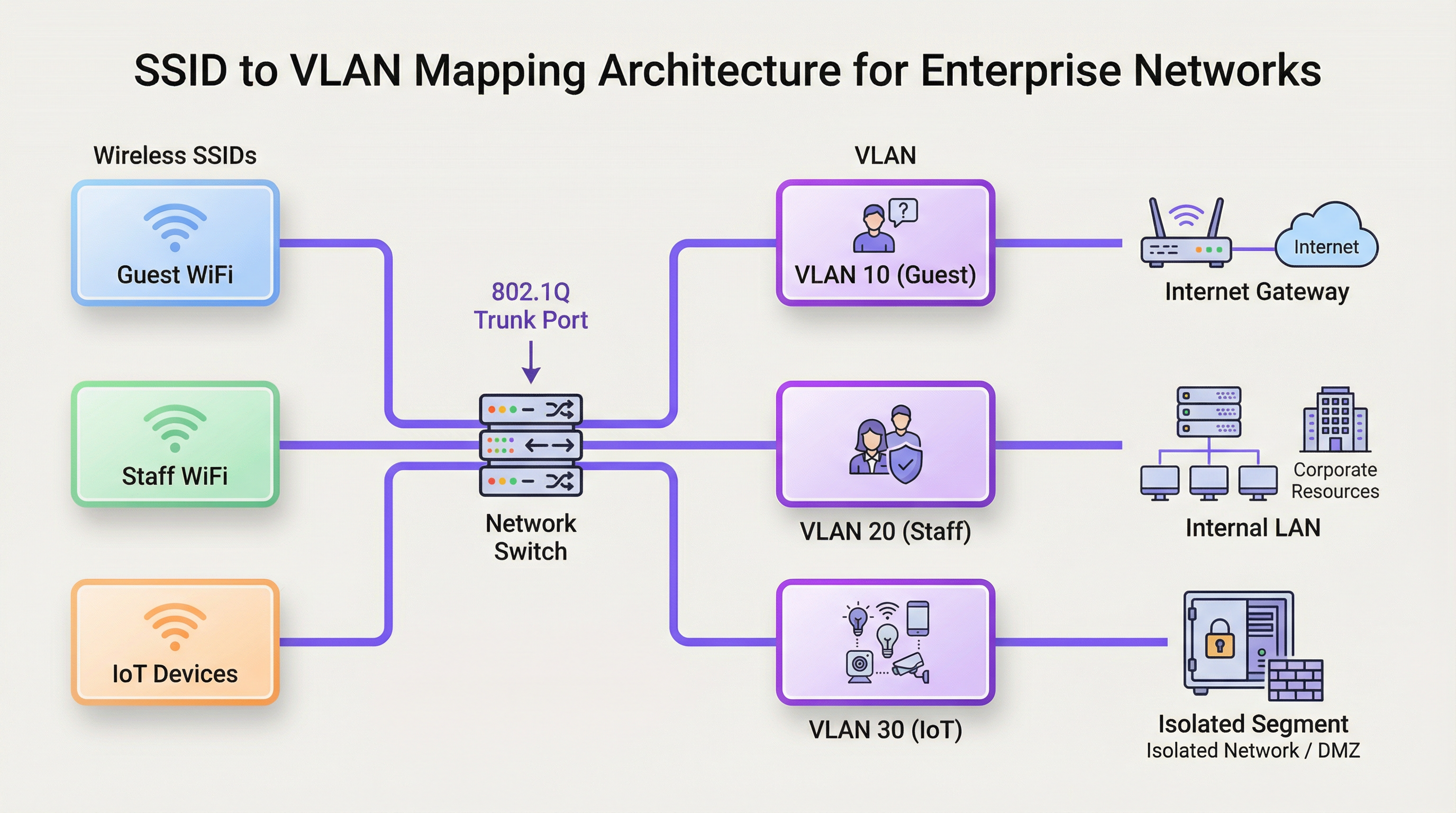
L'applicazione più comune delle VLAN in un contesto WiFi è la mappatura di uno specifico Service Set Identifier (SSID) — il nome pubblico di una rete WiFi — a una VLAN dedicata. Ciò crea un ponte continuo tra i segmenti di rete wireless e cablati. Ad esempio:
- SSID:
Guest-WiFi-> VLAN 10 (Solo accesso a Internet, isolamento client abilitato) - SSID:
Staff-Internal-> VLAN 20 (Accesso a server aziendali, stampanti e applicazioni interne) - SSID:
POS-Terminals-> VLAN 30 (Altamente limitato, accesso solo ai gateway di elaborazione dei pagamenti, conforme a PCI DSS) - SSID:
IoT-Devices-> VLAN 40 (Segmento isolato per la gestione degli edifici, HVAC e telecamere di sicurezza)
Questa architettura si realizza attraverso la configurazione degli Access Point (AP) wireless e degli switch di rete. Gli AP sono configurati per taggare il traffico wireless di ciascun SSID con il VID corrispondente. Le porte dello switch collegate a questi AP sono configurate come porte trunk, consentendo loro di trasportare simultaneamente il traffico per più VLAN. Quando il traffico taggato raggiunge lo switch, questo lo inoltra in base al VID, assicurando che rimanga isolato all'interno del dominio di broadcast designato.
Domini di broadcast e prestazioni di rete
Senza VLAN, una rete di grandi dimensioni è un singolo dominio di broadcast. Ogni frame di broadcast (ad es. da una richiesta ARP) viene inviato a ogni singolo dispositivo sulla rete. In un ambiente ad alta densità con centinaia o migliaia di dispositivi, questo traffico di broadcast può creare una significativa congestione di rete, un fenomeno noto come "broadcast storm", che degrada gravemente le prestazioni per tutti gli utenti. Segmentando la rete in VLAN più piccole, i broadcast vengono confinati alla rispettiva VLAN. Una richiesta ARP sulla VLAN del WiFi per gli ospiti, ad esempio, non sarà vista dai dispositivi sulla VLAN del personale, riducendo drasticamente l'overhead e migliorando il throughput e la stabilità complessivi della rete.
Guida all'implementazione
L'implementazione di una strategia VLAN richiede un'attenta pianificazione e configurazione dell'hardware di rete chiave. L'obiettivo è creare un'architettura resiliente e scalabile in linea con i requisiti operativi e di sicurezza dell'organizzazione.
Requisiti hardware
- Switch compatibili con VLAN: Il cuore di qualsiasi implementazione VLAN è lo switch di rete. Tutti gli switch nel percorso dati devono essere switch "managed" o "smart" che supportano lo standard IEEE 802.1Q. Gli switch unmanaged non possono elaborare i tag VLAN e scarteranno i frame taggati o rimuoveranno i tag, interrompendo la segmentazione.
- Access Point wireless compatibili con VLAN: Sono necessari AP di livello enterprise. Questi AP devono supportare più SSID e avere la capacità di taggare il traffico da ciascun SSID con uno specifico ID VLAN.
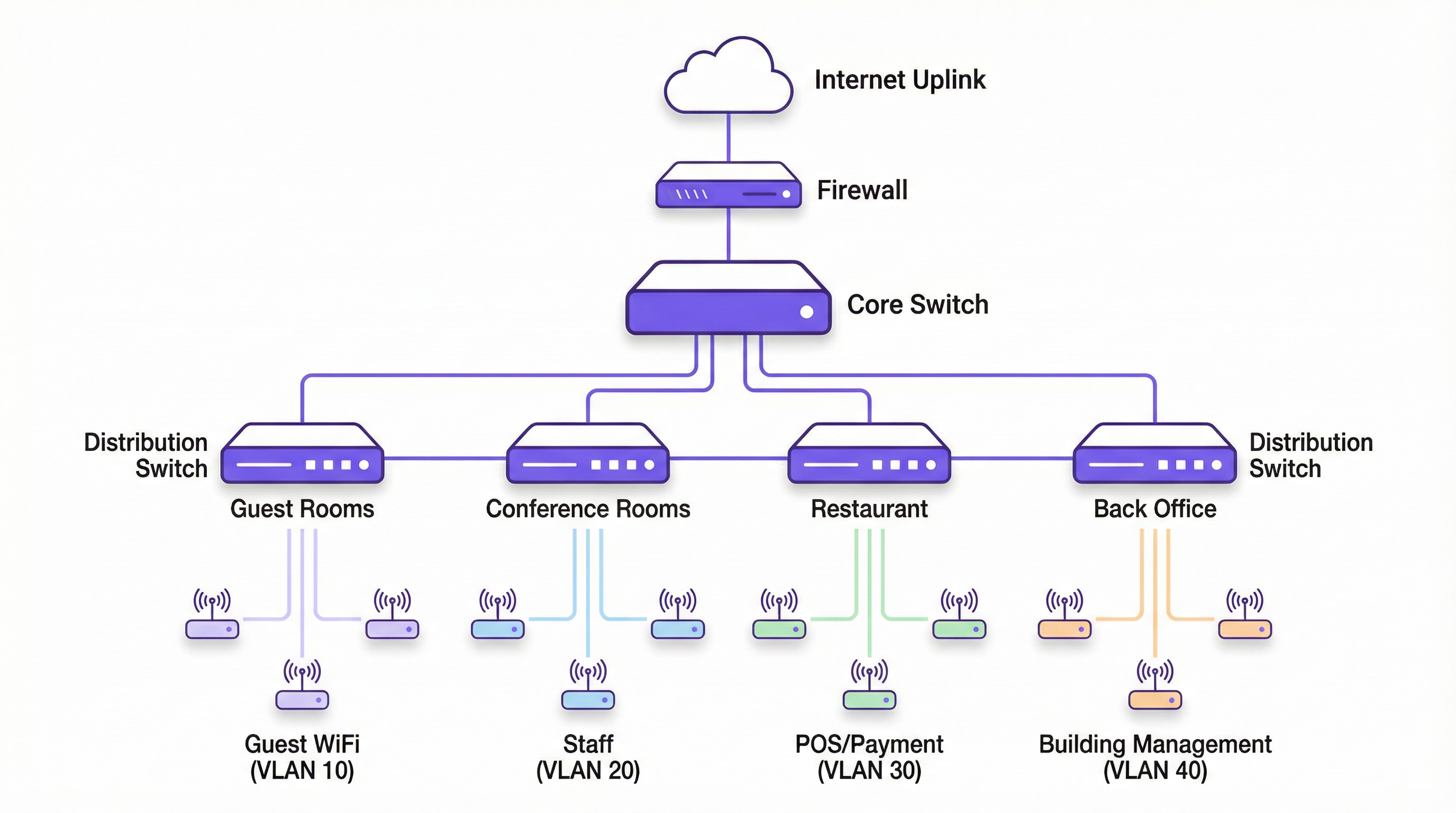
- Router / Switch Layer 3: Poiché le VLAN creano reti logicamente separate, è necessario un dispositivo in grado di instradare il traffico tra di esse se è richiesta una comunicazione inter-VLAN (ad es. per consentire ai dispositivi del personale di accedere a una stampante su una VLAN diversa). Questa funzione è in genere svolta da un core router o da uno switch Layer 3. Su questo dispositivo vengono configurate le Access Control List (ACL) per controllare rigorosamente quale traffico è autorizzato ad attraversare i confini della VLAN.
Passaggi di configurazione indipendenti dal fornitore
- Definire lo schema VLAN: Pianifica le VLAN in base a gruppi di utenti, livelli di attendibilità e tipi di traffico. Assegna un nome e un VID univoco a ciascuna (ad es. VLAN 10 - Ospiti, VLAN 20 - Personale, VLAN 30 - PCI, VLAN 40 - IoT). Fondamentale: non utilizzare la VLAN 1, la VLAN predefinita, per alcun traffico di produzione. È un rischio per la sicurezza molto comune.
- Configurare le VLAN sugli switch: Accedi all'interfaccia di gestione degli switch e crea le VLAN definite. Questo in genere comporta l'assegnazione a ciascuna VLAN di un nome e del VID corrispondente.
- Configurare le porte trunk: Identifica le porte dello switch che si collegheranno agli AP e ad altri switch. Configura queste porte come porte "trunk" e specifica quali VLAN sono autorizzate ad attraversare il trunk. Per motivi di sicurezza, consenti solo le VLAN necessarie, non tutte.
- Configurare le porte di accesso: Per le porte che si collegano a dispositivi finali non compatibili con le VLAN (come un PC desktop), configurale come porte di "accesso" e assegnale a una singola VLAN non taggata.
- Configurare gli AP: Nel controller wireless o nell'interfaccia di gestione degli AP, crea gli SSID. Assegna a ciascun SSID l'ID VLAN corrispondente. Questo è il passaggio che tagga il traffico wireless.
- Configurare il routing inter-VLAN: Sul router o sullo switch Layer 3, crea un'interfaccia virtuale per ciascuna VLAN e assegnale un indirizzo IP. Questo indirizzo fungerà da gateway predefinito per tutti i dispositivi all'interno di quella VLAN. Implementa le ACL per definire le regole per il traffico che scorre tra le VLAN.
Best practice
- Isolare il traffico ad alto rischio: Inserisci sempre le reti per gli ospiti, i dispositivi IoT e i sistemi soggetti a conformità (come PCI DSS) in VLAN dedicate e altamente limitate.
- Utilizzare una VLAN di gestione dedicata: I dispositivi dell'infrastruttura di rete (switch, AP, controller) dovrebbero risiedere su una propria VLAN di gestione isolata per proteggerli dal traffico degli utenti finali e da potenziali attacchi.
- Implementare 802.1X per l'assegnazione dinamica delle VLAN: Per una maggiore sicurezza, utilizza lo standard IEEE 802.1X con un server RADIUS. Ciò consente l'assegnazione dinamica delle VLAN per singolo utente o dispositivo in seguito a un'autenticazione riuscita, anziché fare affidamento esclusivamente sull'SSID a cui si connettono.
- Rimuovere le VLAN inutilizzate dai trunk: Per motivi di prestazioni e sicurezza, configura le porte trunk in modo da consentire solo le VLAN attivamente richieste su quel collegamento. Ciò impedisce la propagazione di traffico di broadcast non necessario attraverso la rete.
- Allinearsi agli standard di sicurezza: Assicurati che l'architettura VLAN supporti la conformità alle normative pertinenti. Ad esempio, il Requisito 1.2.1 del PCI DSS impone la segmentazione dell'ambiente dei dati dei titolari di carta dal resto della rete.
Risoluzione dei problemi e mitigazione dei rischi
- Problema: I dispositivi non ottengono un indirizzo IP.
- Causa: Spesso non è configurato un ambito DHCP per la nuova VLAN, oppure il router/switch L3 non è configurato correttamente per inoltrare le richieste DHCP.
- Mitigazione: Assicurati che un server DHCP abbia un ambito per la sottorete di ciascuna VLAN e che un indirizzo IP helper sia configurato sull'interfaccia VLAN del router.
- Problema: I dispositivi possono connettersi al WiFi ma non hanno accesso alla rete.
- Causa: Una mancata corrispondenza del tagging VLAN tra l'AP e la porta trunk dello switch, oppure la VLAN non è consentita su un collegamento trunk in qualche punto del percorso.
- Mitigazione: Verifica sistematicamente la configurazione della porta trunk su ogni switch nel percorso dall'AP al core router.
- Rischio: VLAN Hopping.
- Causa: Un utente malintenzionato su una VLAN a bassa sicurezza tenta di ottenere l'accesso a una a sicurezza più elevata. Ciò può essere fatto tramite tecniche come lo switch spoofing o il double tagging.
- Mitigazione: Utilizza le moderne best practice di sicurezza: disabilita il Dynamic Trunking Protocol (DTP) sugli switch, configura manualmente le porte trunk e assicurati che la VLAN nativa sui trunk sia una VLAN dedicata e inutilizzata, non la VLAN 1.
ROI e impatto aziendale
L'investimento nella progettazione e nell'implementazione di una corretta architettura VLAN produce rendimenti significativi. Il ROI principale risiede nella mitigazione dei rischi. Una singola violazione su una rete segmentata in modo improprio può esporre l'intera organizzazione, portando a danni finanziari e di reputazione catastrofici. Isolando i sistemi critici, la superficie di attacco si riduce drasticamente. Inoltre, i miglioramenti delle prestazioni derivanti dalla riduzione del traffico di broadcast portano a una migliore esperienza utente sia per gli ospiti che per il personale, il che può tradursi in una maggiore soddisfazione dei clienti in un hotel o in una maggiore produttività dei dipendenti in un ufficio. Infine, una rete segmentata e ben documentata semplifica la gestione e la risoluzione dei problemi, riducendo i costi operativi e consentendo ai team IT di rispondere ai problemi e implementare nuovi servizi in modo più efficiente.
Key Terms & Definitions
VLAN (Virtual Local Area Network)
A logical grouping of devices on one or more physical LANs that are configured to communicate as if they were attached to the same wire, when in fact they are located on a number of different LAN segments.
IT teams use VLANs to segment a network for security and performance reasons, such as separating guest WiFi traffic from internal corporate traffic without needing separate physical hardware for each.
IEEE 802.1Q
The networking standard that defines how VLAN information is inserted into Ethernet frames. It specifies the use of a "tag" in the frame header to identify the VLAN membership.
This is the core technology that makes VLANs work across multiple switches from different vendors. When a switch is "802.1Q compliant," it means it can understand and process these VLAN tags.
SSID (Service Set Identifier)
The public name of a wireless local area network (WLAN) that is broadcast into the air by access points. It is the name you see when you search for WiFi networks on your device.
In a VLAN deployment, IT teams map each SSID to a specific VLAN to automatically segment users based on the WiFi network they connect to (e.g., `Guest-WiFi` SSID maps to the Guest VLAN).
Trunk Port
A port on a network switch configured to carry traffic for multiple VLANs simultaneously. It uses the 802.1Q tagging standard to differentiate between the traffic of different VLANs.
Trunk ports are essential for connecting switches to each other and for connecting switches to VLAN-aware access points. They are the multi-lane highways of a VLAN architecture.
Access Port
A port on a network switch that carries traffic for only one VLAN. It is configured to connect to end-user devices like computers or printers that are not VLAN-aware.
This is the most common port configuration. When a device is plugged into an access port, it becomes a member of that port's assigned VLAN without needing any special configuration on the device itself.
Network Segmentation
The practice of splitting a computer network into smaller, isolated subnetworks or segments. Each segment acts as its own small network, and traffic between segments is controlled.
VLANs are the primary tool for achieving network segmentation. This is a critical security practice for reducing the attack surface and a performance tool for limiting broadcast traffic.
Broadcast Domain
A logical division of a computer network in which all nodes can reach each other by broadcast at the data link layer. A broadcast frame sent from one device will be received by all other devices in the same broadcast domain.
By default, a switched network is one large broadcast domain. VLANs break up the network into multiple, smaller broadcast domains, which improves performance by reducing unnecessary broadcast traffic.
RADIUS (Remote Authentication Dial-In User Service)
A client/server protocol that provides centralized Authentication, Authorization, and Accounting (AAA) management for users who connect to a network service.
In advanced WiFi deployments, a RADIUS server is used with 802.1X to authenticate users. Based on the user's credentials, the RADIUS server can tell the switch or AP to dynamically assign the user to a specific VLAN, providing a very high level of security and flexibility.
Case Studies
A 200-room luxury hotel needs to replace its aging WiFi network. They require secure, high-performance internet for guests, a separate network for corporate staff, a PCI-compliant network for payment systems at the front desk and restaurant, and a network for building management systems (HVAC, smart locks).
- VLAN Planning: Define four primary VLANs: VLAN 10 (Guests), VLAN 20 (Staff), VLAN 30 (PCI-DSS), and VLAN 40 (Building Management). Also, define VLAN 99 for network management.
- IP Addressing: Assign a unique /24 subnet to each VLAN (e.g., 10.10.10.0/24 for Guests, 10.10.20.0/24 for Staff).
- Hardware Configuration: Deploy managed 802.1Q-capable switches. Configure switch-to-switch ports and AP-connected ports as 802.1Q trunks, allowing VLANs 10, 20, 30, 40, and 99.
- SSID Mapping: Configure four SSIDs on the enterprise APs:
Hotel-Guest-WiFi-> VLAN 10,Hotel-Staff-> VLAN 20 (using WPA3-Enterprise with 802.1X),Hotel-POS-> VLAN 30 (hidden SSID), andHotel-IoT-> VLAN 40. - Routing & Security: Use a Layer 3 core switch for inter-VLAN routing. Create strict ACLs: VLAN 10 can only route to the internet. VLAN 30 can only communicate with the payment gateway IP address. VLAN 20 can access internal servers but not VLAN 30. VLAN 40 is completely isolated.
A retail chain with 50 stores wants to provide free guest WiFi while ensuring the security of their in-store POS systems and inventory scanners, which are also wireless.
- Standardised VLAN Template: Create a corporate-wide VLAN template to be deployed at each store: VLAN 110 (Guest WiFi), VLAN 120 (Corporate/Staff), VLAN 130 (POS), VLAN 140 (Inventory Scanners). Using higher VLAN numbers avoids conflicts with default setups.
- Centralised Management: Use a cloud-managed wireless and switching solution (like Purple's platform) to push the standardised configuration to all 50 stores.
- SSID Configuration:
Retail-Guest-> VLAN 110 (with client isolation and a captive portal for marketing).Retail-Staff-> VLAN 120 (WPA3-Enterprise).Retail-POS-> VLAN 130 (hidden SSID, MAC filtering).Retail-Inventory-> VLAN 140 (WPA3-Enterprise). - Firewall Policy: The on-site firewall at each store acts as the router. It is configured with rules to ensure VLAN 110 is internet-only. VLAN 130 traffic is restricted to the payment processor. VLAN 120 and 140 can communicate with the central corporate data centre over a VPN but are blocked from accessing the guest or POS VLANs directly.
Scenario Analysis
Q1. A conference centre is hosting a major tech event with 5,000 attendees, 200 event staff, and a dedicated press corps. How would you structure the VLANs and SSIDs to ensure a secure and performant network experience for all groups?
💡 Hint:Consider the different bandwidth, access, and security requirements for each group. Think about traffic density and potential interference.
Show Recommended Approach
- VLANs: Create at least three primary VLANs: VLAN 100 (Attendees), VLAN 200 (Staff), VLAN 300 (Press).
- SSIDs:
Event-Guest(VLAN 100) with a captive portal for registration and aggressive bandwidth limiting.Event-Staff(VLAN 200) with WPA3-Enterprise and access to production servers.Event-Press(VLAN 300) with higher bandwidth allocation and less restrictive filtering to allow for media uploads. - Network Design: Use a high-density AP deployment. Isolate the VLANs and implement strict inter-VLAN routing rules. The Attendee VLAN should be internet-only with client isolation enabled to prevent peer-to-peer attacks.
Q2. Your organisation has implemented VLANs, but users on the Staff VLAN (VLAN 20) are complaining of slow performance. The Guest VLAN (VLAN 10) seems unaffected. What are the first three things you would investigate?
💡 Hint:Think about the path traffic takes and what could cause congestion specific to one VLAN.
Show Recommended Approach
- Broadcast Traffic: Check for a broadcast storm within VLAN 20. A misconfigured device or a network loop affecting only that VLAN could be flooding it with traffic. Use a packet analyser to inspect traffic on a VLAN 20 access port.
- Uplink Saturation: Check the utilisation of the trunk links carrying VLAN 20 traffic. It's possible that staff activities (e.g., large file transfers to a server) are saturating the uplink, while guest traffic (mostly internet-bound) uses a different path or is shaped differently.
- DHCP/DNS Issues: Verify that the DHCP server for the VLAN 20 subnet is responsive and has available leases. Check the DNS servers assigned to VLAN 20 clients for latency or resolution failures. A problem with these core services can manifest as slow network performance.
Q3. A new security audit requires that all payment terminals be on a network segment that is completely isolated and compliant with PCI DSS. The terminals are currently connected to the same switches as regular staff computers. What is the most cost-effective way to achieve this?
💡 Hint:How can you achieve logical isolation without buying an entire new set of physical hardware?
Show Recommended Approach
The most cost-effective solution is to create a new, dedicated PCI VLAN (e.g., VLAN 30). Assign the switch ports connected to the payment terminals as access ports for VLAN 30. Then, at the router or Layer 3 switch, create a strict firewall rule (ACL) that only allows traffic from the VLAN 30 subnet to communicate with the specific IP addresses of the payment processor, and block all other traffic, including all inter-VLAN traffic. This logically isolates the terminals on the existing hardware, meeting the core requirement of PCI DSS segmentation without capital expenditure on new switches.
Key Takeaways
- ✓VLANs logically segment a physical network into multiple isolated broadcast domains.
- ✓Map SSIDs to specific VLANs to automatically enforce security policies for different user groups (e.g., Guest vs. Staff).
- ✓Use 802.1Q compliant switches and APs to implement a VLAN architecture.
- ✓Isolating guest, corporate, and sensitive (e.g., PCI) traffic into separate VLANs is critical for security and compliance.
- ✓VLANs improve network performance by reducing the size of broadcast domains and mitigating broadcast storms.
- ✓Always use a dedicated, unused VLAN for management and for the native VLAN on trunk ports; avoid using the default VLAN 1.
- ✓For maximum security, combine VLANs with 802.1X and a RADIUS server for dynamic, per-user VLAN assignment.




