

Captive Portal WiFi: La guida definitiva alla configurazione, alla sicurezza e alla personalizzazione
This authoritative technical reference guide covers the full lifecycle of enterprise WiFi captive portal deployment, from network architecture and security hardening to GDPR and CCPA compliance and measurable business ROI. It is designed for IT managers, network architects, and CTOs at hotels, retail chains, stadiums, and public-sector organisations who need actionable, vendor-neutral guidance to implement, secure, and optimise guest WiFi infrastructure. The guide includes step-by-step configuration instructions, real-world case studies, security checklists, compliance frameworks, and a discussion of how captive portals drive first-party data acquisition and customer analytics at scale.
🎧 Listen to this Guide
View Transcript
Executive Summary
Per i leader IT delle aziende multi-sede, il WiFi per gli ospiti non è più un semplice servizio aggiuntivo; è un componente critico della customer experience e una ricca fonte di dati di prima parte. Un Captive Portal WiFi ben strutturato è la chiave per sbloccare questo valore, fungendo da gateway strategico per l'accesso sicuro, la conformità legale e il marketing personalizzato. Questa guida fornisce un riferimento tecnico completo per l'implementazione di Captive Portal di livello enterprise, coprendo l'architettura essenziale, i controlli di sicurezza e i mandati di conformità necessari per mitigare i rischi e massimizzare il ROI. Andiamo oltre la configurazione di base per affrontare le sfide specifiche della scalabilità, dalla gestione centralizzata e segmentazione VLAN fino alla registrazione del consenso GDPR e alla misurazione dell'impatto aziendale. Per il CTO, questa guida offre un framework per valutare la postura di sicurezza e il ritorno commerciale della propria infrastruttura WiFi per gli ospiti. Per l'IT manager e l'architetto di rete, fornisce indicazioni pratiche e indipendenti dal fornitore per un'implementazione immediata, garantendo che il deployment sia sicuro, conforme e in grado di produrre risultati di business misurabili.
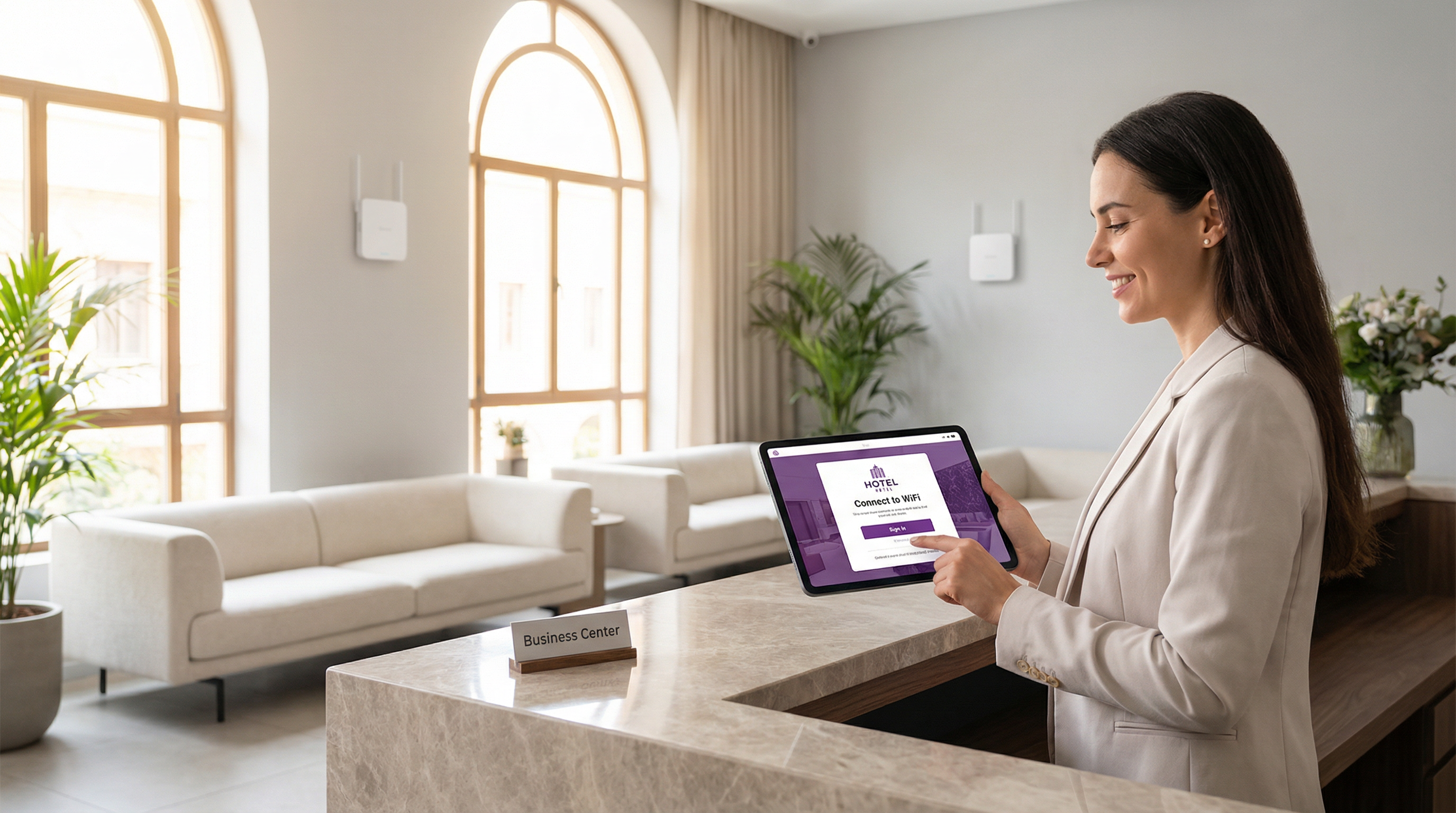
Approfondimento tecnico
Il Captive Portal moderno è un sistema sofisticato che bilancia l'esperienza utente, la sicurezza e gli obiettivi commerciali. Fondamentalmente, il portale intercetta la richiesta web iniziale di un utente e lo reindirizza a una splash page personalizzata con il brand per l'autenticazione o il consenso. Il meccanismo più diffuso è un reindirizzamento HTTP 302. Quando un nuovo dispositivo si connette all'SSID ospite, il suo sistema operativo tenta di contattare un URL di rilevamento noto: Apple utilizza captive.apple.com, Google utilizza connectivitycheck.gstatic.com e Microsoft utilizza www.msftconnecttest.com. Il controller wireless della rete intercetta questa richiesta e restituisce un codice di stato HTTP 302 (Found), indirizzando il browser del client all'URL del Captive Portal. Questo processo è trasparente su tutti i principali sistemi operativi ed è l'approccio consigliato per le implementazioni enterprise.
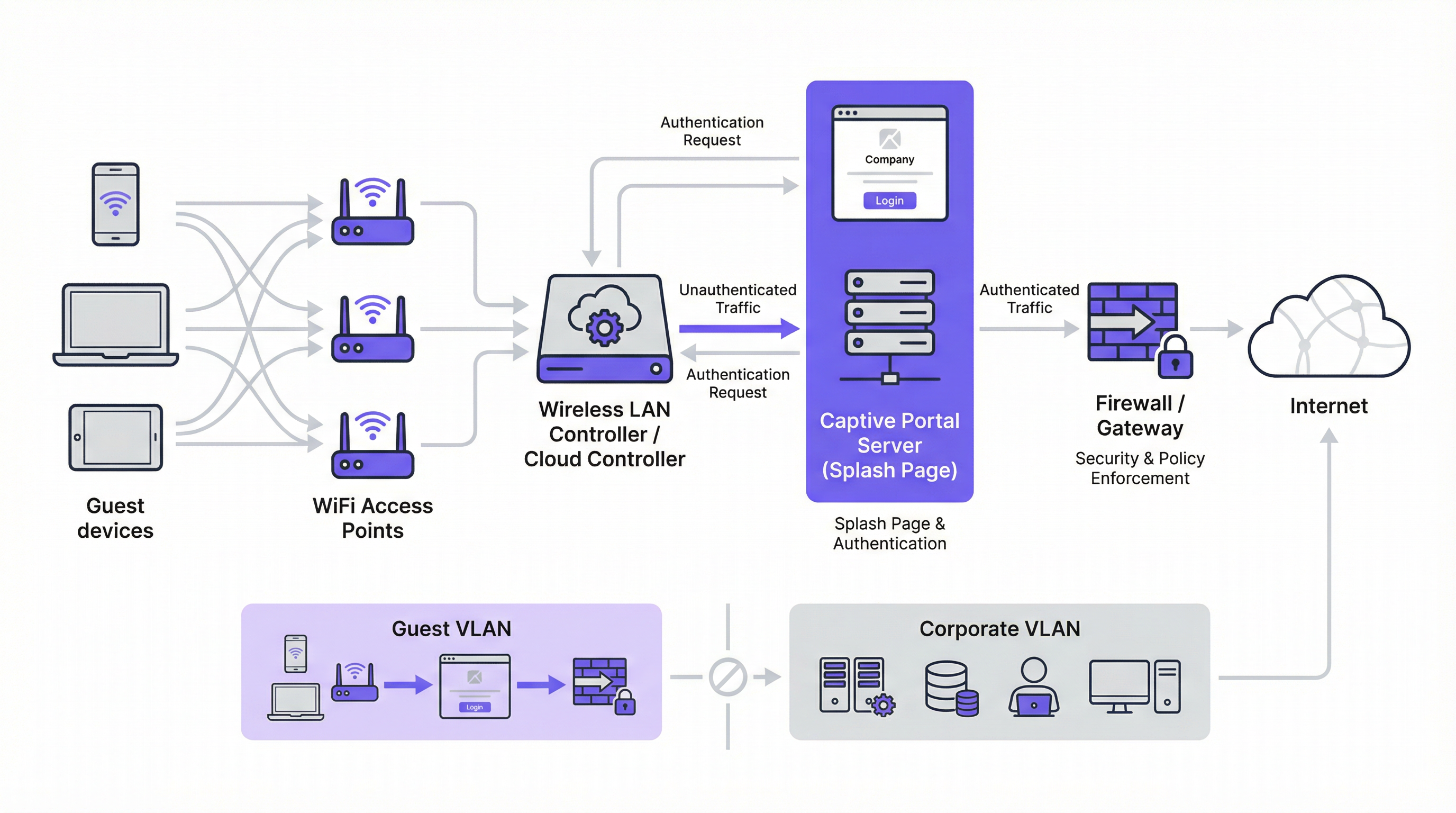
Esistono due meccanismi di reindirizzamento alternativi. Il reindirizzamento DNS funziona configurando il firewall per garantire che i client non autenticati possano accedere solo al resolver DNS designato della rete, che a sua volta risolve tutti gli hostname nell'indirizzo IP del portale. Sebbene efficace, questo approccio è architettonicamente equivalente al DNS hijacking e deve essere implementato con cautela. Il reindirizzamento ICMP opera al Livello 3 per istruire le modifiche di routing a livello di pacchetto; è meno comune nelle implementazioni moderne e comporta rischi di sicurezza intrinseci che lo rendono inadatto alla maggior parte degli ambienti enterprise.
Dal punto di vista architettonico, la pietra miliare di qualsiasi implementazione enterprise sicura è la segmentazione VLAN. Il traffico degli ospiti deve essere isolato logicamente dalla rete aziendale su una propria Virtual Local Area Network. Ciò previene qualsiasi possibilità di movimento laterale da un dispositivo ospite potenzialmente compromesso verso sistemi interni sensibili come terminali point-of-sale, database HR o file server aziendali. La VLAN ospite dovrebbe avere un proprio ambito DHCP e una policy firewall restrittiva che blocchi esplicitamente ogni accesso agli intervalli di indirizzi IP privati RFC 1918, consentendo solo il traffico necessario per l'autenticazione al portale e il successivo accesso a Internet.
Prima dell'autenticazione, deve essere configurato un walled garden per consentire l'accesso a specifiche risorse esterne. Questo include il dominio di hosting del portale, gli endpoint CDN che forniscono gli asset del portale e gli endpoint OAuth per eventuali provider di social login. Un walled garden minimamente permissivo (che inserisce in whitelist endpoint specifici anziché interi domini) è un controllo di sicurezza critico che limita la superficie di attacco pre-autenticazione.
I metodi di autenticazione coprono un ampio spettro, dal click-through senza attriti all'integrazione RADIUS ad alta sicurezza:
| Metodo di autenticazione | Caso d'uso principale | Considerazione chiave |
|---|---|---|
| Click-Through (ToS) | Spazi pubblici, accesso a basso attrito | Nessuna acquisizione dati; attrito minimo per l'utente. |
| Social Login (OAuth) | Retail, Hospitality | Acquisizione dati ricca; richiede un walled garden per gli endpoint OAuth. |
| Email / Modulo | Lead generation, loyalty | Dati diretti di prima parte; richiede la conformità GDPR/CCPA. |
| SMS OTP | Accesso di alto valore, programmi fedeltà | Verifica il numero di telefono; aggiunge un livello di garanzia dell'identità. |
| Codice Voucher | Conferenze, accesso a pagamento | Accesso limitato nel tempo e controllato per utente. |
| RADIUS / IEEE 802.1X | Reti ospiti aziendali | Integrazione dell'identità enterprise; audit trail completo. |
Dal punto di vista degli standard, il settore si sta muovendo verso WPA3-Enterprise, che combina il robusto framework di autenticazione IEEE 802.1X con una suite di sicurezza a 192 bit. Per le reti ospiti aperte, l'Opportunistic Wireless Encryption (OWE) di WPA3 fornisce un significativo miglioramento della sicurezza crittografando il traffico tra ciascun client e l'access point senza richiedere una chiave precondivisa, mitigando direttamente gli attacchi di intercettazione passiva che sono endemici nelle tradizionali reti WiFi aperte.
Guida all'implementazione
L'implementazione di un Captive Portal su scala enterprise richiede un approccio metodico. I seguenti passaggi forniscono una roadmap indipendente dal fornitore per un'implementazione sicura ed efficace.
Fase 1 — Fondamenta di rete: Crea un SSID ospite dedicato e associalo a una nuova VLAN isolata (es. VLAN 100). Definisci un ambito DHCP sufficientemente ampio da accogliere il picco di utenti simultanei. Per un hotel di 200 camere, una sottorete /22 (1.022 indirizzi utilizzabili) è un punto di partenza sicuro; per uno stadio con una capacità di 20.000 posti, è appropriata una /19 o superiore.
Fase 2 — Firewall e policy di sicurezza: Sul firewall principale, crea una policy per la VLAN ospite con un'impostazione predefinita deny all. Aggiungi regole allow esplicite per DNS (porta UDP/TCP 53) e DHCP (porte UDP 67–68). Crea una regola pre-autenticazione che consenta l'accesso HTTP e HTTPS solo agli indirizzi IP elencati nel tuo walled garden. Blocca tutto il traffico destinato allo spazio di indirizzi RFC 1918 (10.0.0.0/8, 172.16.0.0/12, 192.168.0.0/16).
Fase 3 — Configurazione del controller: Nel controller LAN wireless (che sia Cisco Meraki, Aruba ClearPass, Ruckus SmartZone o una piattaforma gestita in cloud) configura l'SSID ospite per utilizzare l'autenticazione esterna del Captive Portal, puntando all'URL del server del portale. Imposta il timeout della sessione (8 ore per l'hospitality, 2–4 ore per il retail, 1 ora per gli eventi). Imposta limiti di larghezza di banda per client (es. 5 Mbps in download, 2 Mbps in upload) per garantire un utilizzo equo e prevenire abusi della rete.
Fase 4 — Design del portale e conformità: Progetta la tua splash page per garantire velocità e chiarezza. La pagina deve essere servita tramite HTTPS con un certificato TLS valido emesso da una Certificate Authority attendibile. Per la conformità al GDPR, includi un link alla tua privacy policy e una casella di controllo non spuntata per il consenso al marketing, presentata separatamente dall'accordo principale sui termini di servizio. Per il CCPA, includi un link chiaramente etichettato "Do Not Sell My Personal Information". Tutte le azioni di consenso devono essere registrate con un timestamp e l'indirizzo IP dell'utente per scopi di audit normativo.
Fase 5 — Autenticazione e Walled Garden: Configura i metodi di autenticazione scelti e le corrispondenti regole del walled garden. Se utilizzi il social login, inserisci in whitelist gli endpoint OAuth specifici per ciascun provider. Testa il flusso di autenticazione completo da dispositivi iOS, Android, Windows e macOS prima del go-live.
Fase 6 — Logging e monitoraggio: Abilita l'accounting RADIUS sul tuo controller per inviare dati di sessione dettagliati (indirizzo MAC, indirizzo IP, orari di inizio e fine sessione, volume di dati trasferiti) a un server di logging centralizzato o SIEM. Conserva i metadati di connessione in conformità con i requisiti della tua giurisdizione (in genere 12 mesi nel Regno Unito e in molti stati membri dell'UE). Implementa il monitoraggio della frequenza delle query DNS per rilevare potenziali tentativi di bypass tramite tunnelling.
Best Practice
L'adesione alle best practice del settore è essenziale per mitigare i rischi e garantire un'esperienza utente di alta qualità. Queste raccomandazioni si basano su framework di sicurezza consolidati, tra cui PCI DSS, GDPR e linee guida sulla sicurezza wireless indipendenti dal fornitore.
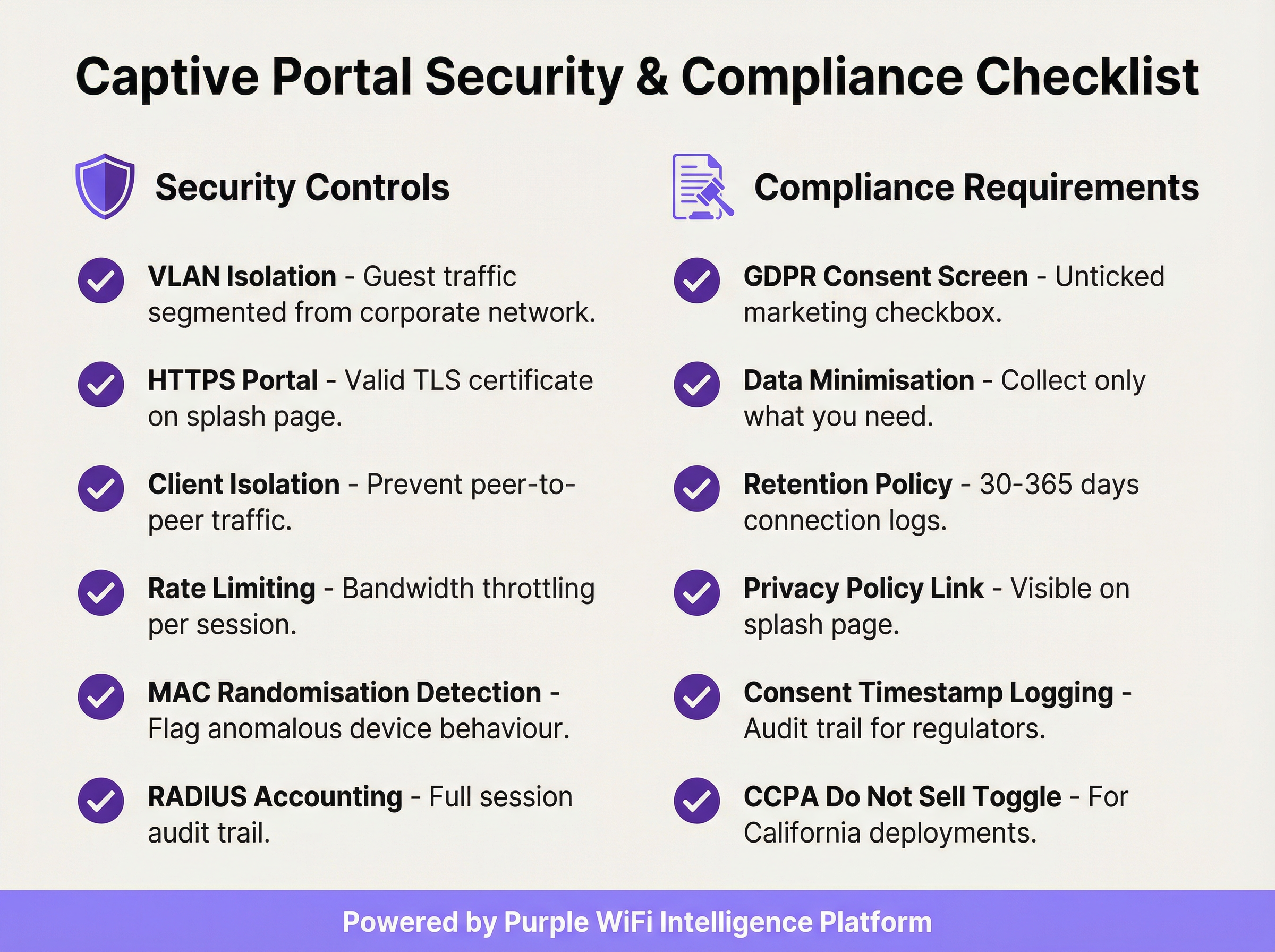
Applica il Client Isolation: Questa impostazione del controller wireless impedisce ai dispositivi ospiti sullo stesso segmento di rete di comunicare direttamente tra loro, riducendo significativamente il rischio di attacchi peer-to-peer e movimenti laterali tra i dispositivi ospiti.
Convalida il certificato TLS: Tutte le comunicazioni con il Captive Portal devono essere crittografate con un certificato TLS valido e attendibile. Un certificato scaduto o autofirmato attiverà avvisi di sicurezza del browser, degradando l'esperienza utente e minando la fiducia nel tuo brand.
Implementa la minimizzazione dei dati: Raccogli solo i dati necessari per lo specifico servizio che stai fornendo. Se il tuo caso d'uso richiede solo un indirizzo email per il marketing, non richiedere un numero di telefono o la data di nascita. Questo è un principio fondamentale dell'Articolo 5(1)(c) del GDPR e riduce la tua esposizione normativa.
Mantieni una policy documentata sulla conservazione dei dati: Stabilisci e documenta programmi di conservazione separati per i log di connessione (in genere 30–365 giorni a seconda della giurisdizione) e i dati di marketing (elimina i contatti inattivi e mantieni la prova del consenso per tutto il periodo di conservazione). Le sanzioni per la non conformità al GDPR possono raggiungere i 20 milioni di euro o il 4% del fatturato annuo globale.
Verifica il tuo Walled Garden trimestralmente: Nel tempo, i walled garden accumulano voci non necessarie. Un audit trimestrale garantisce che ogni dominio in whitelist sia ancora necessario e che le voci siano il più specifiche possibile, riducendo al minimo la superficie di attacco pre-autenticazione.
Pianifica l'ambito PCI DSS: Se la tua sede elabora pagamenti con carta, assicurati che la rete WiFi per gli ospiti sia completamente isolata da qualsiasi infrastruttura per carte di pagamento. Un Qualified Security Assessor (QSA) dovrebbe rivedere la segmentazione della rete in caso di ambiguità sull'ambito.
Risoluzione dei problemi e mitigazione dei rischi
Le modalità di errore più comuni nelle implementazioni di Captive Portal riguardano in genere la compatibilità dei dispositivi, problemi con i certificati o configurazioni di rete errate.
La pagina del portale non si carica automaticamente: La causa più frequente è il mancato avvio del Captive Network Assistant (CNA) del dispositivo. Ciò può verificarsi se il firewall blocca l'accesso agli URL di rilevamento specifici del sistema operativo o se il portale ha un certificato TLS non valido. Verifica che le tue regole pre-autenticazione consentano l'accesso a captive.apple.com, connectivitycheck.gstatic.com e www.msftconnecttest.com. Assicurati che il certificato del portale sia valido e attendibile.
Gli utenti ricevono un avviso di sicurezza dal browser: Questo indica quasi sempre un problema con il certificato TLS (scaduto, autofirmato o dominio non corrispondente). Utilizza un certificato di una CA attendibile e assicurati che l'URL del portale corrisponda esattamente al Subject Alternative Name (SAN) del certificato. Automatizza il rinnovo dei certificati utilizzando Let's Encrypt o un servizio simile per prevenire interruzioni legate alla scadenza.
Bypass tramite DNS tunnelling: Alcuni utenti tecnicamente sofisticati potrebbero tentare di bypassare il portale codificando il traffico all'interno delle query DNS. Mitiga questo rischio bloccando tutto il traffico DNS in uscita dai client non autenticati, ad eccezione del resolver interno designato, e implementando il rate limiting delle query DNS (segnalando qualsiasi client che generi più di una soglia definita di query al secondo prima dell'autenticazione).
Spoofing dell'indirizzo MAC: Un utente malintenzionato può clonare l'indirizzo MAC di un dispositivo autenticato per bypassare il portale. Mitiga questo problema tramite l'accounting RADIUS con binding di sessione sia all'indirizzo MAC che all'indirizzo IP, e monitorando le voci duplicate dell'indirizzo MAC nella tabella dei lease DHCP. Il Client Isolation riduce inoltre il rischio impedendo all'aggressore di osservare gli indirizzi MAC degli altri client.
Tempi di caricamento del portale elevati che riducono i tassi di opt-in: Ogni secondo aggiuntivo nel tempo di caricamento del portale riduce i tassi di completamento dell'autenticazione. Ospita gli asset del portale su una CDN, ottimizza le immagini e riduci al minimo le dipendenze da script di terze parti. Punta a un Time to Interactive (TTI) inferiore a 2 secondi su una connessione mobile 4G.
ROI e impatto aziendale
L'implementazione di un Captive Portal enterprise dovrebbe essere vista come un investimento strategico. Il ritorno si realizza attraverso tre canali principali: acquisizione di dati di prima parte, analisi dei clienti e della posizione, e generazione diretta di ricavi o valore del brand.
Acquisizione di dati di prima parte: In un panorama caratterizzato dalla scomparsa dei cookie di terze parti e dalla crescente perdita di segnale dovuta agli aggiornamenti dei browser incentrati sulla privacy, un Captive Portal è uno degli strumenti più efficaci per costruire un ricco database di marketing basato sul consenso. Un portale ben progettato in una sede retail o hospitality ad alto traffico può acquisire da centinaia a migliaia di nuovi indirizzi email con opt-in al mese, fornendo un canale diretto per il marketing personalizzato, l'iscrizione a programmi fedeltà e l'engagement post-visita.
Analisi dei clienti e della posizione: Analizzando i dati di connessione (visitatori unici, tempo di permanenza, frequenza delle visite, periodi di traffico di picco), le sedi ottengono informazioni utili per l'ottimizzazione operativa. I retailer possono misurare l'impatto in-store delle campagne di marketing, identificare i clienti abituali più fedeli e ottimizzare i livelli di personale in base ai dati di affluenza in tempo reale. Gli operatori dell'hospitality possono correlare i modelli di connessione WiFi con la spesa F&B o le prenotazioni della spa per identificare opportunità di upselling.

Ricavi diretti e rafforzamento del brand: Negli aeroporti, nei centri congressi e negli snodi di trasporto, il WiFi può essere monetizzato direttamente attraverso piani di accesso a livelli. Nel retail e nell'hospitality, il portale funge da potente touchpoint del brand al momento della connessione, consentendo la promozione di offerte speciali, programmi fedeltà e brand partner. Un'esperienza di benvenuto coerente e personalizzata con il brand in centinaia di sedi rafforza l'identità del marchio e dimostra professionalità operativa.
Un tipico calcolo del ROI soppesa i costi operativi e della piattaforma rispetto al lifetime value dei contatti di marketing acquisiti, alle efficienze operative ottenute dall'analisi dell'affluenza e a qualsiasi ricavo diretto generato da accessi a pagamento o partnership di marketing. Per la maggior parte delle implementazioni enterprise, il valore del solo asset di dati di prima parte (in particolare nel contesto di un marketing basato sul consenso e conforme al GDPR) fornisce un business case convincente e difendibile.
Key Terms & Definitions
Captive Portal
A network gateway mechanism that intercepts a connecting device's initial HTTP request and redirects it to a web page requiring user interaction — such as authentication, terms of service acceptance, or payment — before granting full internet access. Technically implemented via HTTP 302 redirect, DNS redirect, or ICMP redirect.
IT teams encounter this as the core technology underpinning guest WiFi access control in any public or semi-public venue. The design and configuration of the captive portal directly determines the security posture, compliance status, and commercial value of the guest WiFi deployment.
VLAN (Virtual Local Area Network)
A logical network segment created within a physical network infrastructure that isolates traffic between different groups of devices. In captive portal deployments, a dedicated guest VLAN ensures that guest device traffic is completely separated from corporate network infrastructure, preventing lateral movement and limiting the blast radius of any security incident on the guest network.
Network architects must configure a dedicated guest VLAN as the foundational security control for any captive portal deployment. Without VLAN isolation, a compromised guest device could potentially access corporate systems, creating significant security and compliance risk.
Walled Garden
A pre-authentication whitelist of network resources (IP addresses, hostnames, or domains) that an unauthenticated guest device is permitted to access before completing the captive portal process. Typically includes the portal server itself, CDN endpoints, and OAuth endpoints for social login providers.
IT teams must configure and maintain the walled garden carefully. An overly permissive walled garden expands the pre-authentication attack surface; an overly restrictive one breaks social login functionality or prevents the portal page from loading correctly.
IEEE 802.1X
An IEEE standard for port-based Network Access Control (PNAC) that provides an authentication framework for devices wishing to connect to a LAN or WLAN. It defines the Extensible Authentication Protocol (EAP) transport mechanism and requires a supplicant (client), authenticator (switch or AP), and authentication server (typically RADIUS) to complete the authentication exchange.
Network architects deploying captive portals for corporate guest environments should consider 802.1X integration for the highest level of identity assurance. It provides mutual authentication and a full audit trail, and is the authentication framework underpinning WPA2-Enterprise and WPA3-Enterprise.
WPA3-OWE (Opportunistic Wireless Encryption)
A WPA3 security mode defined in IEEE 802.11i that provides over-the-air encryption on open (no-password) WiFi networks without requiring user authentication. Each client-to-AP connection is encrypted with a unique key, preventing passive eavesdropping by other devices on the same network, even though no password is required to connect.
IT architects planning new captive portal deployments should evaluate OWE as a security enhancement for open guest SSIDs. It addresses the fundamental vulnerability of traditional open WiFi — unencrypted over-the-air traffic — while maintaining the zero-friction connection experience that guests expect.
RADIUS (Remote Authentication Dial-In User Service)
A networking protocol that provides centralised Authentication, Authorisation, and Accounting (AAA) management for users who connect to a network service. In captive portal deployments, RADIUS accounting records detailed session information — including MAC address, IP address, session duration, and data volume — to a central server.
RADIUS accounting is the mechanism by which IT teams maintain a comprehensive audit trail of guest WiFi sessions. This audit trail is essential for regulatory compliance (data retention laws), security investigations, and the analytics that underpin ROI measurement.
DNS Tunnelling
A network bypass technique in which a client encodes arbitrary internet traffic (e.g., HTTP requests) within DNS query packets, which are typically permitted through firewalls even for unauthenticated clients. An attacker or technically sophisticated user can use a DNS tunnelling tool to bypass a captive portal and access the internet without authenticating.
Network security teams should implement DNS query rate monitoring and anomaly detection to identify potential tunnelling activity. Blocking outbound DNS traffic from unauthenticated clients to all servers except the designated internal resolver is the primary mitigation.
MAC Address Spoofing
A technique in which a device's network interface is configured to broadcast a different MAC (Media Access Control) address than the one burned into the hardware. In captive portal environments, an attacker can clone the MAC address of an already-authenticated device to bypass the portal's access control, as many portals use MAC address as the primary session identifier.
IT security teams should be aware that MAC-based authentication alone is not sufficient for high-security environments. RADIUS accounting with session binding to both MAC address and IP address, combined with client isolation to prevent MAC address observation, provides a more robust defence.
Splash Page
The branded web page presented to a user by a captive portal before internet access is granted. The splash page typically contains the venue's branding, a login or consent form, a link to the privacy policy, and terms of service. It is the primary user-facing element of the captive portal system and the key touchpoint for data capture and brand communication.
Marketing and IT teams must collaborate on splash page design. From an IT perspective, the page must be served over HTTPS, load in under 2 seconds, and contain all legally required consent elements. From a marketing perspective, it must be on-brand, clear, and designed to maximise opt-in rates.
GDPR (General Data Protection Regulation)
The European Union's primary data protection regulation (Regulation 2016/679), which governs the collection, processing, storage, and transfer of personal data relating to EU residents. For captive portal deployments, GDPR mandates freely given, specific, and unambiguous consent for data collection; data minimisation; documented retention policies; and the ability to demonstrate compliance through audit trails.
Any captive portal that collects personal data (email addresses, names, phone numbers) from EU or UK residents must comply with GDPR. Non-compliance penalties can reach €20 million or 4% of global annual turnover. IT and legal teams must collaborate to ensure the portal's consent mechanism, data storage, and retention policies meet the regulation's requirements.
Case Studies
A 250-room luxury hotel group with 12 properties needs to deploy a unified captive portal solution that captures guest email addresses for their loyalty programme, complies with GDPR across all EU properties, and provides the IT team with centralised management. The properties use a mix of Cisco Meraki and Aruba access points. What architecture and implementation approach should they adopt?
The recommended approach is a cloud-managed, hardware-agnostic captive portal platform (such as Purple) that integrates with both Meraki and Aruba controllers via external portal redirect. The implementation proceeds as follows:
VLAN Architecture: Configure a dedicated guest VLAN (e.g., VLAN 200) on all properties, with a consistent IP addressing scheme (e.g., 10.200.x.0/22 per property) to simplify firewall policy management across the estate.
Controller Configuration: On Meraki, navigate to Wireless > SSIDs > [Guest SSID] > Splash page and select 'Click-through' or 'Sign-on splash page', entering the external portal URL. On Aruba, configure a Captive Portal profile in ClearPass Policy Manager pointing to the same external portal URL. Set session timeout to 8 hours and per-client bandwidth to 10 Mbps down / 5 Mbps up.
Portal Design: Build a single portal template with the group's master brand. Use location-specific branding overrides (logo, colour scheme) for each property. The form captures first name, last name, and email. The GDPR consent screen presents two separate, unticked checkboxes: one for the terms of service (required for access) and one for marketing communications (optional). The privacy policy link is prominently displayed.
Compliance Configuration: Enable consent timestamp logging for every session. Configure a data retention policy: connection logs retained for 12 months (UK GDPR requirement), marketing contacts purged after 24 months of inactivity. Export audit logs monthly to the group's central compliance repository.
Loyalty Integration: Connect the portal's API to the hotel group's CRM/loyalty platform. On successful email capture with marketing consent, automatically enrol the guest in the loyalty programme and trigger a welcome email within 15 minutes.
Testing and Rollout: Pilot at one property for 30 days, measuring email capture rate (target: >60% of connecting guests), portal load time (target: <2 seconds), and authentication error rate (target: <1%). Roll out to remaining properties in batches of three.
A national retail chain with 80 stores wants to use their guest WiFi captive portal to measure the effectiveness of their in-store marketing campaigns, specifically whether customers who receive a promotional email visit the store within 14 days. The IT team is concerned about PCI DSS compliance, as the stores also process card payments. How should this be architected?
This deployment requires careful attention to both the analytics use case and PCI DSS network segmentation requirements.
PCI DSS Segmentation: The guest WiFi network must be completely isolated from the payment card environment (PCE). Implement a three-VLAN architecture: VLAN 10 for POS/payment systems, VLAN 20 for corporate/staff systems, VLAN 30 for guest WiFi. The firewall must have explicit
denyrules preventing any traffic between VLAN 30 and VLANs 10 and 20. Engage a QSA to validate the segmentation before go-live.Guest SSID and Portal: Deploy the guest SSID on VLAN 30 with an email-capture portal. The form collects email address and optionally a loyalty card number. GDPR-compliant marketing consent checkbox is included.
Campaign Attribution Architecture: The portal platform assigns each authenticated session a unique session ID linked to the guest's email address and the store location (identified by the access point's location tag). When a promotional email is sent, it contains a unique tracking pixel and a store-specific UTM parameter on the call-to-action link.
Visit Attribution: When a customer who received the promotional email returns to a store and connects to WiFi within 14 days, the portal platform matches their email address to the campaign cohort and records the return visit. This creates a closed-loop attribution model: email sent → store visit detected via WiFi connection → conversion recorded.
Analytics Dashboard: The central analytics platform aggregates data across all 80 stores, providing campaign attribution reports showing email-to-visit conversion rates by store, region, and campaign. Typical metrics: unique visitors per store per day, email capture rate, 14-day return visit rate for campaign cohort vs. control group.
Data Governance: All guest data is stored in a GDPR-compliant data warehouse with role-based access control. Marketing data is retained for 24 months from last interaction. Connection logs are retained for 12 months.
Scenario Analysis
Q1. A conference centre hosts 50 events per year, ranging from 200-person seminars to 5,000-person trade shows. They want to deploy a captive portal that provides event-specific branding for each event, captures attendee email addresses for post-event marketing, and can scale from 200 to 5,000 concurrent connections. The venue's IT team has limited capacity for per-event configuration. What platform architecture and configuration approach would you recommend?
💡 Hint:Consider the operational overhead of per-event portal customisation, the DHCP scope sizing requirements for peak concurrent users, and the GDPR implications of sharing attendee data with event organisers.
Show Recommended Approach
The recommended architecture uses a cloud-managed captive portal platform with a self-service portal builder. The venue's IT team creates a master portal template with the venue's base branding and GDPR consent framework. For each event, the organiser is given access to a restricted portal customisation interface where they can upload their logo, set brand colours, and add event-specific messaging — without touching any network configuration. The DHCP scope for the guest VLAN should be sized for the maximum expected concurrent connections (5,000), using a /19 subnet (8,190 usable addresses) to provide headroom. The wireless controller should be configured with dynamic bandwidth management to automatically adjust per-client limits based on current network load. For GDPR, the data controller relationship must be clearly defined: if attendee data is shared with event organisers, a Data Processing Agreement (DPA) is required, and the privacy policy must disclose this sharing. Attendees should be able to opt out of data sharing with the event organiser while still accepting the venue's terms of service for WiFi access.
Q2. A hospital trust wants to deploy guest WiFi with a captive portal across 5 sites. Clinical staff have raised concerns that the guest WiFi could be used to access patient records if the network segmentation is not correctly implemented. The IT security team also needs to ensure the deployment does not bring any clinical systems into scope for additional regulatory review. How do you address these concerns?
💡 Hint:Consider the network segmentation requirements, the specific clinical systems that must be protected, and the regulatory frameworks (NHS Data Security and Protection Toolkit, Cyber Essentials) that apply in addition to GDPR.
Show Recommended Approach
The deployment requires a minimum three-tier network architecture: a clinical VLAN for patient records systems (EPR, PACS, clinical workstations), a staff VLAN for administrative systems, and a guest VLAN for patient and visitor WiFi. The firewall policy must include explicit deny rules preventing any traffic from the guest VLAN to the clinical and staff VLANs, with the default stance being deny-all for inter-VLAN traffic. The guest SSID should be on a completely separate DHCP scope with no route to RFC 1918 clinical address space. The captive portal itself should be hosted externally (cloud-based) or on a dedicated DMZ server, not on any system within the clinical network. For regulatory compliance, the IT security team should document the network segmentation design and have it reviewed by an independent assessor as part of the NHS Data Security and Protection Toolkit submission. The guest WiFi network should be explicitly scoped out of any clinical system security assessments. GDPR compliance for the portal requires a healthcare-specific privacy notice that discloses the limited data collected (connection metadata, optional email) and the retention period.
Q3. Your organisation's captive portal has been in production for 18 months. A security audit has identified three issues: (1) the portal TLS certificate expired 3 weeks ago and users are receiving browser warnings, (2) the walled garden contains 47 entries, many of which appear to be from a social login provider that was removed 12 months ago, and (3) RADIUS accounting logs show that 15% of guest sessions have a duration of over 30 days, suggesting that session timeouts are not being enforced. Prioritise and address these issues.
💡 Hint:Consider the security and user experience impact of each issue, the speed of remediation required, and the root cause of the session timeout failure.
Show Recommended Approach
Prioritise in order of security and user experience impact. Issue 1 (expired TLS certificate) is the most urgent: it is actively degrading the user experience (browser security warnings) and represents a security risk (users may be trained to click through certificate warnings, making them vulnerable to genuine MITM attacks). Immediate action: renew the certificate from a trusted CA and deploy it to the portal server. Implement automated certificate renewal (e.g., using Let's Encrypt with auto-renewal) to prevent recurrence. Issue 3 (30-day sessions) is the second priority: sessions lasting 30 days represent a significant security risk, as a device that was authenticated 30 days ago may no longer be in the possession of the original user. Investigate the root cause — likely a misconfigured session timeout value on the wireless controller or a controller firmware bug. Set the session timeout to 8 hours (or appropriate for the venue type) and force-terminate all existing sessions over 24 hours old. Issue 2 (walled garden hygiene) is the third priority: while a security concern, stale walled garden entries from a removed provider are lower risk than the first two issues. Audit all 47 entries, remove those associated with the deprecated social login provider, and document the purpose of each remaining entry. Implement a quarterly walled garden review process to prevent recurrence.
Key Takeaways
- ✓VLAN segmentation is the non-negotiable foundation of any enterprise captive portal deployment — guest traffic must be completely isolated from corporate infrastructure before any portal configuration begins.
- ✓The captive portal must be served over HTTPS with a valid TLS certificate from a trusted Certificate Authority; HTTP-only portals are a security liability and will be deprecated by modern browsers.
- ✓GDPR compliance requires a separate, unticked marketing consent checkbox distinct from the terms of service acceptance, with all consent states and timestamps logged for regulatory audit purposes.
- ✓The walled garden should whitelist specific endpoints rather than entire domains, and should be audited quarterly to remove unnecessary entries that expand the pre-authentication attack surface.
- ✓WPA3's Opportunistic Wireless Encryption (OWE) mode should be evaluated for all new deployments, as it provides over-the-air encryption on open networks without requiring a password, directly mitigating passive eavesdropping.
- ✓Portal load time directly impacts opt-in rates — target a Time to Interactive of under 2 seconds by hosting assets on a CDN and minimising third-party script dependencies.
- ✓The commercial ROI of a captive portal is realised through three channels: first-party data acquisition for marketing, customer and location analytics for operational intelligence, and direct revenue or brand value from the connection experience — all of which should be quantified in the business case.




