

WiFi Hotspot 2.0 (Passpoint): La guida definitiva al roaming WiFi fluido e sicuro
This guide provides a comprehensive technical overview of WiFi Hotspot 2.0 (Passpoint) for IT leaders. It details the technology, security benefits, and a step-by-step implementation framework for deploying seamless, secure WiFi roaming in enterprise environments like hotels, retail, and large venues, ultimately improving user experience and reducing operational overhead.
🎧 Listen to this Guide
View Transcript

Sintesi esecutiva
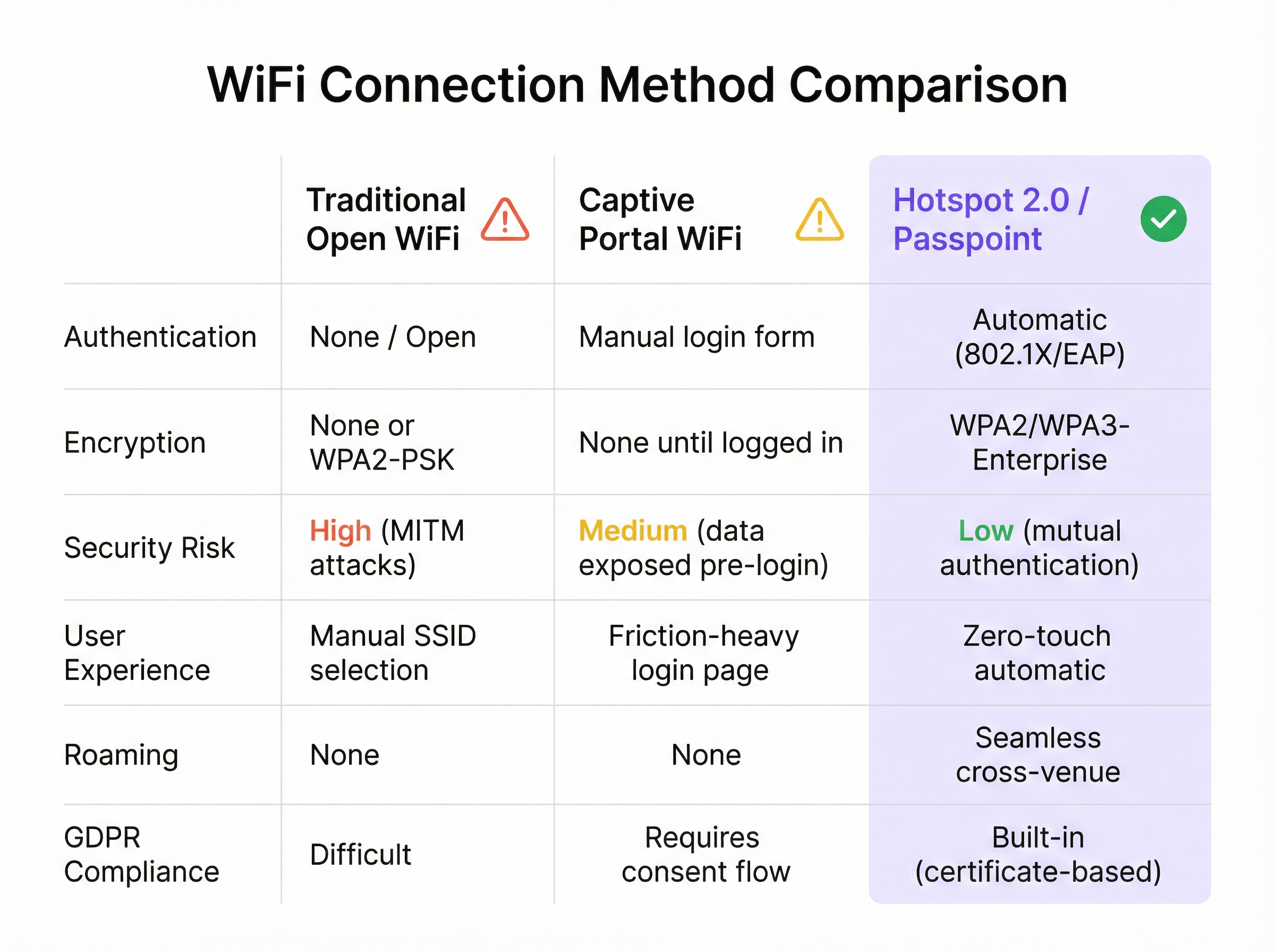
Per l'azienda moderna, offrire un'esperienza WiFi fluida e sicura non è più un lusso, ma un requisito operativo fondamentale. WiFi Hotspot 2.0, noto anche come Passpoint, è un framework standard di settore progettato per eliminare gli attriti e i rischi per la sicurezza associati al WiFi pubblico e guest tradizionale. Consente ai dispositivi mobili di rilevare e autenticarsi automaticamente alle reti WiFi con sicurezza WPA3 di livello enterprise, rispecchiando l'esperienza di roaming fluida delle reti cellulari. Per un CTO o un Direttore IT, ciò si traduce in una significativa riduzione dei problemi di connessione per gli utenti, in una postura di sicurezza rafforzata contro i comuni attacchi WiFi e in un processo di autenticazione ottimizzato che è al contempo conforme al GDPR e immune alle sfide della randomizzazione degli indirizzi MAC. Sostituendo i Captive Portal insicuri e ad alto attrito con un'autenticazione zero-touch basata su credenziali, Passpoint migliora la soddisfazione degli ospiti, riduce i costi di supporto IT e fornisce una base scalabile per il roaming tra sedi e le strategie di data offload. Questa guida fornisce i dettagli tecnici e il framework di implementazione necessari per integrare Passpoint nella tua infrastruttura di rete, portando miglioramenti tangibili sia nella sicurezza che nell'esperienza utente.
Approfondimento tecnico
Hotspot 2.0 e la sua certificazione di base, Passpoint, rappresentano un cambiamento architettonico fondamentale nel modo in cui le reti WiFi vengono rilevate e vi si accede. La tecnologia si basa sull'emendamento IEEE 802.11u, che consente la comunicazione pre-associazione tra un dispositivo client e un access point. Ciò consente a un dispositivo di raccogliere informazioni critiche su una rete prima di stabilire una connessione, passando da un modello legacy di riconoscimento dell'SSID a un modello più intelligente di riconoscimento delle credenziali.
Protocolli principali: ANQP, GAS e 802.11u
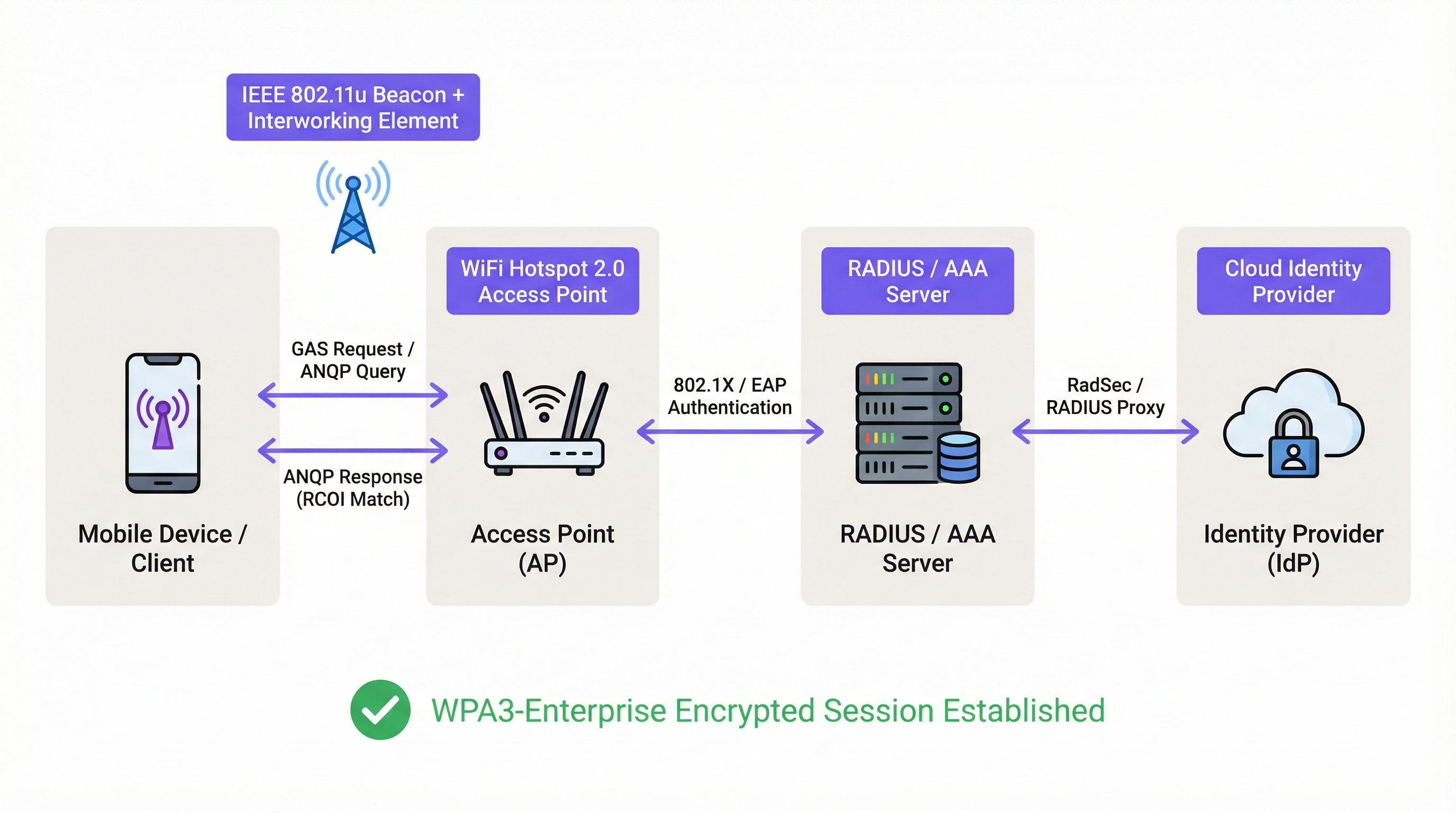
Il meccanismo principale che abilita questo dialogo pre-associazione è una combinazione del Generic Advertisement Service (GAS) e dell'Access Network Query Protocol (ANQP). Ecco come interagiscono:
- Beaconing IEEE 802.11u: Un Access Point (AP) abilitato per Passpoint include un Interworking Element (IE) nei suoi frame di beacon. Questo funge da flag, segnalando ai dispositivi vicini che supporta il rilevamento avanzato della rete.
- Scambio GAS e ANQP: Un dispositivo client che rileva questo IE può avviare una query GAS verso l'AP. All'interno di questa query, utilizza ANQP per porre domande specifiche sull'identità e sulle capacità della rete. La query più critica riguarda i Roaming Consortium Organizational Identifiers (RCOI) supportati dalla rete.
- Corrispondenza delle credenziali: L'AP risponde con il suo elenco di RCOI supportati. Se uno di questi corrisponde a un profilo di credenziali memorizzato sul dispositivo client (ad es. un profilo per un operatore mobile, un marchio alberghiero o una rete aziendale), il dispositivo sa di potersi autenticare e procede al passaggio successivo. Se non viene trovata alcuna corrispondenza, il dispositivo ignora semplicemente la rete, il tutto senza alcuna interazione da parte dell'utente.
Framework di autenticazione e sicurezza
Una volta confermata la corrispondenza delle credenziali, Passpoint sfrutta la solida sicurezza di IEEE 802.1X per l'autenticazione, in genere con crittografia WPA2-Enterprise o la più sicura WPA3-Enterprise. Si tratta dello stesso standard di controllo degli accessi di rete basato su porta ritenuto affidabile nelle reti aziendali cablate sicure. L'autenticazione è gestita tramite un metodo Extensible Authentication Protocol (EAP), come:
- EAP-TLS: Autenticazione basata su certificati, considerata il gold standard per la sicurezza. Sia il client che il server presentano certificati per dimostrare la propria identità.
- EAP-TTLS/PEAP: Incanala un metodo di autenticazione legacy (come nome utente/password) all'interno di un tunnel TLS sicuro.
- EAP-SIM/AKA/AKA': Autenticazione basata su SIM, che consente agli operatori di rete mobile di effettuare il roaming fluido dei propri abbonati su reti WiFi affidabili.
Questo processo garantisce l'autenticazione reciproca: il client convalida la legittimità della rete (prevenendo gli attacchi AP 'Evil Twin') e la rete convalida l'autorizzazione del client. Tutto il traffico successivo viene crittografato, mitigando il rischio di attacchi man-in-the-middle (MITM) comuni sulle reti aperte o basate su PSK.
Passpoint vs. OpenRoaming
È fondamentale distinguere tra Passpoint e OpenRoaming:
Passpoint è il veicolo; OpenRoaming è il sistema autostradale.
- Passpoint è lo standard tecnico (802.11u, ANQP/GAS, 802.1X) che consente a un dispositivo di rilevare e autenticarsi automaticamente a una singola rete o a un gruppo di reti sotto lo stesso controllo amministrativo.
- WBA OpenRoaming è un framework di federazione globale gestito dalla Wireless Broadband Alliance. Crea un ecosistema di fiducia tra migliaia di Identity Provider (IdP) come gli operatori mobili e Access Network Provider (ANP) come hotel, aeroporti e catene di vendita al dettaglio. Ciò consente a un utente con una credenziale di qualsiasi IdP membro di connettersi automaticamente presso qualsiasi sede ANP membro, senza richiedere complessi accordi di roaming bilaterali.
Per la massima compatibilità in un ambiente OpenRoaming, gli architetti di rete dovrebbero trasmettere sia l'RCOI standard settlement-free (5A-03-BA) sia l'RCOI legacy Cisco (00-40-96).
Guida all'implementazione
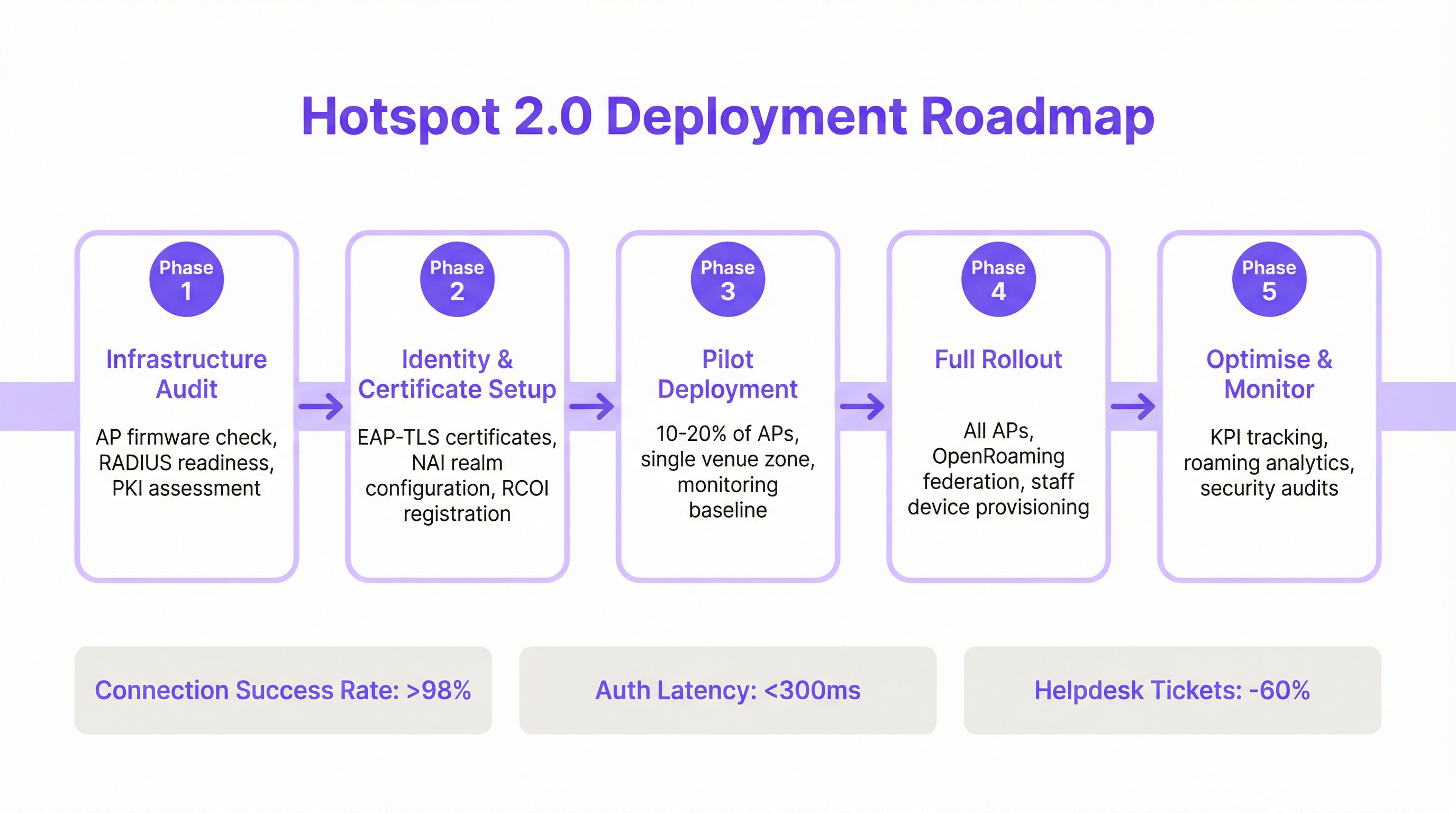
L'implementazione di Passpoint è un processo strutturato che passa dall'audit dell'infrastruttura esistente a un'implementazione e ottimizzazione graduali. Seguire questa roadmap garantirà una transizione fluida e mitigherà le insidie comuni di implementazione.
Fase 1: Audit dell'infrastruttura
Prima di iniziare, valuta l'hardware e il software di rete attuali. I punti chiave dell'audit includono:
- Compatibilità degli Access Point: Verifica che i tuoi AP supportino IEEE 802.11u. La maggior parte degli AP di livello enterprise prodotti dopo il 2015 (da fornitori come Cisco, HPE Aruba, Juniper Mist, Ruckus) dispone dell'hardware necessario, ma potrebbe richiedere un aggiornamento del firmware.
- Idoneità del server RADIUS: Avrai bisogno di un server RADIUS (o AAA) in grado di gestire l'autenticazione EAP 802.1X. Può trattarsi di una soluzione on-premise come Cisco ISE o di un servizio basato su cloud come SecureW2, Foxpass o Google Cloud Identity.
- Valutazione PKI: Per le implementazioni EAP-TLS, è necessaria un'infrastruttura a chiave pubblica (PKI) per emettere e gestire certificati digitali per dispositivi client e server.
Fase 2: Configurazione di identità e certificati
Questa fase prevede la configurazione dei componenti di autenticazione principali:
- Configurazione del realm NAI: Definisci i tuoi realm Network Access Identifier (NAI), che identificano il tuo dominio di autenticazione (ad es.
@tuazienda.com). - Registrazione RCOI: Se partecipi a un consorzio di roaming come OpenRoaming, registra i tuoi RCOI presso la WBA.
- Generazione dei certificati: Per EAP-TLS, genera e distribuisci i certificati client ai tuoi dispositivi gestiti tramite una soluzione di Mobile Device Management (MDM). Per l'accesso guest, avrai bisogno di un meccanismo per il provisioning di un profilo con la catena di attendibilità del certificato necessaria.
Fase 3: Implementazione pilota
Inizia con un progetto pilota controllato in un'area limitata, come un singolo piano o una zona specifica della sede, coprendo il 10-20% dei tuoi AP. Gli obiettivi del progetto pilota sono:
- Stabilire una baseline: Misura le attuali percentuali di successo della connessione, la latenza di autenticazione e il volume di ticket di helpdesk relativi al WiFi.
- Testare la matrice dei dispositivi: Testa l'esperienza di onboarding e connessione su un'ampia gamma di dispositivi (iOS, vari produttori Android come Samsung e Google Pixel, Windows, macOS).
- Perfezionare l'onboarding: Ottimizza il processo per trasferire il profilo Passpoint sui dispositivi guest non gestiti.
Fase 4: Implementazione completa
Una volta che il progetto pilota ha soddisfatto i suoi criteri di successo (ad es. >98% di successo della connessione, latenza di autenticazione <300 ms), procedi con un'implementazione completa su tutti gli AP e le sedi. Questa fase include:
- Configurazione completa degli AP: Distribuisci la configurazione WLAN Passpoint standardizzata a tutti gli access point.
- Provisioning dei dispositivi aziendali e del personale: Assicurati che tutti i dispositivi di proprietà dell'azienda siano dotati del profilo Passpoint tramite MDM.
- Abilitare la federazione OpenRoaming: Se applicabile, abilita le regole di proxy RADIUS per partecipare alla federazione OpenRoaming.
Fase 5: Ottimizzazione e monitoraggio
Dopo l'implementazione, monitora costantemente le prestazioni e la sicurezza della rete:
- Tracciamento dei KPI: Tieni traccia degli indicatori chiave di prestazione, confrontandoli con la baseline del progetto pilota. Le metriche chiave includono la percentuale di successo della connessione, la latenza di autenticazione, il successo del roaming e il throughput dei dati.
- Analisi del roaming: Utilizza gli analytics per comprendere i modelli di roaming tra le tue sedi e con i partner di roaming.
- Audit di sicurezza: Conduci audit di sicurezza regolari per garantire l'integrità della tua infrastruttura RADIUS e PKI.
Best Practice
Per massimizzare il successo e la sicurezza della tua implementazione Passpoint, attieniti alle seguenti best practice standard del settore.
| Categoria | Best Practice | Motivazione |
|---|---|---|
| Sicurezza | Imporre WPA3-Enterprise | WPA3 offre il massimo livello di sicurezza, con una forza crittografica a 192 bit e Protected Management Frames (PMF) per prevenire attacchi di de-autenticazione. |
| Sicurezza | Utilizzare EAP-TLS per i dispositivi aziendali | L'autenticazione basata su certificati è più sicura dei metodi basati su password ed è immune al phishing e al furto di credenziali. |
| Compatibilità | Trasmettere più RCOI | Per garantire un ampio supporto dei dispositivi, trasmetti sia il moderno RCOI OpenRoaming (5A-03-BA) sia l'RCOI legacy Cisco (00-40-96). |
| Esperienza utente | Semplificare l'onboarding del profilo | L'onboarding iniziale è l'unico punto di attrito. Utilizza un Captive Portal semplice e una tantum o un'app leggera per rendere l'installazione del profilo il più semplice possibile. |
| Progettazione di rete | Segmentare i dispositivi IoT | La maggior parte dei dispositivi IoT non supporta 802.1X. Dovrebbero essere segmentati su un SSID separato e adeguatamente protetto (ad es. utilizzando l'autenticazione MPSK o MAC) e non mescolati con il traffico Passpoint. |
| Operazioni | Integrare con gli Analytics | Per mantenere la visibilità sul comportamento degli ospiti in assenza di un Captive Portal, integra i log di autenticazione Passpoint con una piattaforma di analytics WiFi come Purple. |
Risoluzione dei problemi e mitigazione dei rischi
Anche le implementazioni ben pianificate possono incontrare problemi. Ecco le modalità di errore più comuni e come mitigarle.
| Sintomo | Causa potenziale | Strategia di mitigazione |
|---|---|---|
| I dispositivi non tentano di connettersi | Mancata corrispondenza RCOI o RCOI mancante | Verifica che i tuoi AP stiano trasmettendo gli RCOI corretti, incluso l'OI legacy 00-40-96. Utilizza uno strumento di analisi WiFi per ispezionare i frame di beacon. |
| Errori di autenticazione (EAP) | Configurazione errata del server RADIUS / Problemi con i certificati | Controlla i log RADIUS per i codici di errore dettagliati. Assicurati che i certificati client siano validi e che il server consideri attendibile la CA emittente del client. Verifica che il certificato del server sia valido e considerato attendibile dai client. |
| Elevata latenza di autenticazione | Risposta RADIUS lenta / Problemi di percorso di rete | Assicurati che vi sia una bassa latenza tra gli AP e il server RADIUS. Se utilizzi un RADIUS cloud, controlla eventuali congestioni di rete o problemi di routing. Punta a un tempo di risposta inferiore a 300 ms. |
| Comportamento Android incoerente | Implementazione ANQP/GAS specifica dell'OEM | Esegui test approfonditi su una gamma di dispositivi Android durante la fase pilota. Alcune build Android più vecchie o meno comuni potrebbero presentare implementazioni 802.11u con bug. |
| Errori di roaming tra sedi | Configurazione WLAN incoerente | Assicurati che il profilo WLAN Passpoint (SSID, impostazioni di sicurezza, RCOI) sia assolutamente identico in tutte le sedi destinate al roaming fluido. |
ROI e impatto aziendale
Sebbene Passpoint sia una soluzione tecnica, il suo impatto si misura in risultati di business. Il ritorno sull'investimento è guidato dai miglioramenti nell'efficienza operativa, nell'esperienza utente e nella postura di sicurezza.
Analisi costi-benefici
Costi di investimento:
- Hardware: Potenziali aggiornamenti degli AP se l'hardware esistente non è conforme a 802.11u.
- Software/Licenze: Costi per le licenze del server RADIUS (ad es. Cisco ISE) o per i servizi AAA cloud.
- Commissioni di federazione: Quote associative annuali per la partecipazione a WBA OpenRoaming.
- Implementazione: Servizi professionali o tempo del personale interno per la configurazione, i test e il rollout.
Rendimenti e vantaggi attesi:
- Riduzione dei costi IT: Una significativa riduzione dei ticket di helpdesk relativi al WiFi. Un risultato comune è una diminuzione del 40-60% dei ticket relativi a problemi di connettività WiFi.
- Maggiore soddisfazione degli ospiti: L'eliminazione degli attriti di accesso porta a Net Promoter Score (NPS) più elevati e a recensioni migliori, in particolare nel settore alberghiero.
- Sicurezza e conformità migliorate: Mitiga il rischio di violazioni dei dati derivanti da attacchi basati su WiFi, supportando la conformità PCI DSS e GDPR e riducendo le potenziali sanzioni finanziarie.
- Data Offload migliorato: Per gli operatori mobili e i loro partner di sede, Passpoint consente l'offload automatico e sicuro dei dati cellulari sul WiFi, riducendo il carico sulla rete cellulare.
- Maggiore coinvolgimento: Una connessione fluida incoraggia gli utenti a rimanere in loco più a lungo e a interagire maggiormente con i servizi digitali, incrementando i ricavi negli ambienti retail e alberghieri.
Misurando KPI come il volume dei ticket di helpdesk, i punteggi di soddisfazione degli ospiti e le percentuali di successo della connessione prima e dopo l'implementazione, i team IT possono costruire un business case convincente che dimostri un ROI chiaro e misurabile.
Key Terms & Definitions
IEEE 802.11u
An amendment to the IEEE 802.11 standard that enables 'interworking with external networks'. It allows client devices to exchange information with an access point before establishing a connection.
This is the foundational protocol that makes Hotspot 2.0 possible. When an IT team sees that an AP is '802.11u capable', it means it can support the discovery mechanisms required for Passpoint.
ANQP (Access Network Query Protocol)
The specific protocol used by a client device to query an access point about its capabilities, such as roaming partners, venue type, and authentication methods.
Network architects will configure ANQP elements on their wireless controllers to advertise network services. Troubleshooting often involves analyzing ANQP frames to see what information the AP is providing to clients.
GAS (Generic Advertisement Service)
The transport mechanism defined in 802.11u that carries ANQP frames between the client and the access point before an association is formed.
GAS and ANQP work together. GAS is the 'envelope' and ANQP is the 'letter' inside. When troubleshooting, packet captures will show GAS frames containing the ANQP queries and responses.
RCOI (Roaming Consortium Organizational Identifier)
A unique identifier that represents a group of network providers who have a roaming agreement. It's the primary piece of information a device looks for to decide if it can automatically connect.
This is a critical configuration item. An IT manager must ensure their APs are broadcasting the correct RCOIs for their own organization and any roaming partners like OpenRoaming. A missing or incorrect RCOI is a common cause of connection failures.
WPA3-Enterprise
The highest level of WiFi security, which uses 192-bit encryption and requires 802.1X authentication. It provides robust protection against eavesdropping and other sophisticated attacks.
For any organization concerned with security and compliance (PCI DSS, GDPR), deploying WPA3-Enterprise is a non-negotiable best practice. Passpoint is the most user-friendly way to implement it at scale.
EAP-TLS (Extensible Authentication Protocol-Transport Layer Security)
An EAP method that uses client-side and server-side digital certificates for mutual authentication. It is considered the most secure EAP method.
This is the recommended method for securing corporate-owned devices. IT teams will use an MDM to push certificates to devices, enabling zero-touch, highly secure network access.
RadSec (RADIUS over TLS)
A protocol that secures RADIUS authentication traffic by tunneling it through a TLS-encrypted connection (typically over TCP port 2083).
When setting up roaming with OpenRoaming or other external partners, network architects will use RadSec to ensure that authentication requests traversing the public internet are fully encrypted and secure.
NAI (Network Access Identifier)
A standardized way of identifying a user in an 802.1X authentication request, typically formatted like an email address (e.g., 'user@realm'). The realm portion is used to route the request to the correct home RADIUS server.
IT teams configure NAI realms to define their authentication domains. In a roaming scenario, the realm of the user's NAI determines which Identity Provider's RADIUS server needs to process the authentication request.
Case Studies
A 500-room luxury hotel with multiple conference wings wants to eliminate its cumbersome captive portal. Corporate guests frequently complain about having to re-authenticate multiple times per day as they move between their room, the conference centre, and the restaurant. The hotel needs to maintain PCI DSS compliance for its payment systems.
The recommended solution is a phased Passpoint deployment integrated with WBA OpenRoaming. Phase 1 (Pilot): Deploy Passpoint in the main conference wing and on one floor of guest rooms. Configure the WLAN to broadcast the hotel's own RCOI and the OpenRoaming RCOI. Use EAP-TLS for corporate-managed devices (provisioned via MDM by their employers) and provide a simple, one-time onboarding portal for guests to install a Passpoint profile with an EAP-TTLS credential. Phase 2 (Rollout): After a successful pilot, extend the Passpoint WLAN to all guest rooms, public areas, and restaurants. Decommission the legacy captive portal SSID, but keep a single, hidden SSID for specific back-of-house devices that do not support 802.1X. Security: The use of WPA3-Enterprise and 802.1X provides traffic encryption and mutual authentication, satisfying key PCI DSS requirements for securing wireless environments.
A large retail chain with 200 stores across the country wants to offer seamless WiFi to its loyalty program members. They also want to offload traffic from their in-store staff's cellular devices to the corporate WiFi to ensure reliable access to inventory and POS applications. The existing infrastructure is a mix of Cisco Meraki and Aruba hardware.
The solution is to create a unified Passpoint strategy across the mixed-vendor environment. Step 1 (Onboarding): Integrate Passpoint profile generation into the loyalty program's mobile app. When a user signs into the app, it automatically installs the Passpoint profile with a unique EAP-TTLS credential. Step 2 (Staff Provisioning): Use the company's MDM to push a separate Passpoint profile to all corporate-owned staff devices, configured for EAP-TLS using device certificates for zero-touch authentication. Step 3 (Network Configuration): In both Cisco Meraki and Aruba Central dashboards, create a new WLAN profile for Passpoint. Enable Hotspot 2.0, set security to WPA3-Enterprise, and add the company's RCOI and the OpenRoaming RCOI. Point authentication to a central cloud RADIUS server to ensure consistent policy enforcement across all stores. Step 4 (Analytics): Ingest RADIUS authentication logs into the Purple analytics platform to correlate WiFi connections with loyalty member IDs, tracking visit frequency and dwell time without a captive portal.
Scenario Analysis
Q1. You are the network architect for a large international airport. You want to implement Passpoint to provide seamless roaming for travelers from major cellular carriers. During your pilot, you notice that a large number of Android devices are not automatically connecting, while iOS devices are connecting successfully. What is the most likely cause and your first troubleshooting step?
💡 Hint:Consider the differences in how various device manufacturers implement the 802.11u standard and what specific information they look for during discovery.
Show Recommended Approach
The most likely cause is a misconfiguration of the Roaming Consortium Organizational Identifiers (RCOIs). Many Android devices, particularly older models or those with manufacturer-customized operating systems, rely on the legacy Cisco RCOI (00-40-96) to initiate an ANQP query. If only the modern OpenRoaming RCOI (5A-03-BA) is being broadcast, these devices will not attempt to connect. The first troubleshooting step is to use a WiFi analysis tool to inspect the beacon frames from the pilot APs and verify that both the OpenRoaming and the legacy Cisco RCOIs are being broadcast.
Q2. A retail chain has successfully deployed Passpoint with OpenRoaming in all its stores. The marketing team now wants to know if they can still gather customer analytics, such as visit frequency and dwell time, which they previously collected via the captive portal. What is your recommendation?
💡 Hint:Where in the new authentication flow can user identity be correlated with a connection event? Can this be done while respecting privacy and the principles of the OpenRoaming federation?
Show Recommended Approach
While Passpoint eliminates the captive portal, it is still possible to gather valuable analytics. The recommended approach is to leverage the RADIUS authentication logs. Each time a user connects, an authentication request is sent to the RADIUS server, which contains the user's Network Access Identifier (NAI). By integrating the RADIUS server with an analytics platform like Purple, the NAI can be used as a persistent anonymous identifier to track visit frequency and dwell time. This provides the marketing team with the data they need without reintroducing login friction for the user. It's important to ensure this process is compliant with privacy policies and the terms of the roaming federation.
Q3. A conference centre is setting up a Passpoint network. They plan to use EAP-TLS for staff and event organizers, but need a solution for thousands of temporary attendees. They are considering using EAP-TTLS with usernames and passwords distributed at registration. What is a significant security risk of this approach and what is a better alternative?
💡 Hint:Think about the lifecycle of shared credentials and the security of the 'inner' authentication method in EAP-TTLS.
Show Recommended Approach
The significant risk of using shared EAP-TTLS credentials (username/password) is the lack of revocation and accountability. If a credential pair is compromised, it can be used by an unauthorized party until it expires, and it's difficult to trace activity back to a specific individual. A better and more secure alternative is to use an onboarding portal that generates a unique Passpoint profile for each attendee. This can be done by having the attendee scan a QR code or visit a one-time URL. The portal generates a profile containing a unique, short-lived digital certificate (for EAP-TLS) or a unique EAP-TTLS credential. This ensures that each user has a distinct identity, and access can be revoked on a per-user basis if necessary, providing much stronger security and accountability.
Key Takeaways
- ✓WiFi Hotspot 2.0 (Passpoint) enables seamless, zero-touch roaming for users by automatically authenticating devices to trusted WiFi networks.
- ✓It replaces insecure, high-friction captive portals with credential-based authentication using the enterprise-grade WPA3-Enterprise security standard.
- ✓The core technology relies on the IEEE 802.11u standard, which allows devices to query network information (via ANQP/GAS) before connecting.
- ✓Mutual authentication (802.1X) is a key security benefit, protecting against 'Evil Twin' and Man-in-the-Middle (MITM) attacks.
- ✓OpenRoaming is a global federation that works with Passpoint to allow seamless roaming across thousands of different network providers.
- ✓A successful deployment requires a phased approach: audit your infrastructure, run a pilot to test across all device types, and then perform a full rollout.
- ✓Key business benefits include reduced IT helpdesk costs, improved guest satisfaction, enhanced security compliance (PCI DSS, GDPR), and new opportunities for data offload and analytics.




