

Roaming e Handoff WiFi: 802.11r e 802.11k spiegati
This guide provides a senior-level technical deep-dive into WiFi roaming protocols — specifically 802.11r (Fast BSS Transition), 802.11k (Neighbor Reports), and 802.11v (BSS Transition Management) — and their combined role in delivering seamless connectivity across enterprise venues. It equips IT managers, network architects, and venue operations directors with the architectural understanding, implementation steps, and business-impact metrics needed to deploy and validate fast roaming in hospitality, retail, events, and public-sector environments. The guide also addresses the critical interaction between roaming and captive portals, a common deployment failure point in guest WiFi networks.
🎧 Listen to this Guide
View Transcript

Riepilogo esecutivo
Per le strutture enterprise — hotel, catene di vendita al dettaglio, stadi, centri congressi — un WiFi senza interruzioni è un requisito operativo fondamentale. Mentre gli utenti si muovono in uno spazio fisico, i loro dispositivi devono passare da un access point (AP) all'altro senza perdere la connessione. Prestazioni di roaming scadenti causano cadute di chiamate VoIP, blocchi degli streaming video e frustrazione negli utenti, con un impatto diretto sui punteggi di soddisfazione degli ospiti e sulle metriche di produttività del personale. La soluzione risiede in tre emendamenti complementari IEEE 802.11: 802.11k, 802.11v e 802.11r. Insieme, formano un framework di assistenza al roaming che fornisce ai dispositivi client l'intelligenza per prendere decisioni di handoff più rapide e intelligenti, e offre alla rete gli strumenti per guidare attivamente tali decisioni. Lo standard 802.11k fornisce un elenco curato di AP candidati, eliminando le lunghe scansioni dei canali. Lo standard 802.11r (Fast BSS Transition) comprime l'handshake di riautenticazione da 200–300 ms a meno di 50 ms. Lo standard 802.11v consente alla rete di indirizzare proattivamente i client per scopi di bilanciamento del carico. L'implementazione corretta di questi standard — insieme a una piattaforma WiFi per gli ospiti adeguatamente progettata — è il percorso definitivo verso l'esperienza wireless mobile e ad alte prestazioni richiesta dai moderni ambienti enterprise.
Approfondimento tecnico
La sfida: roaming lento e il problema dello sticky client
In un'implementazione WiFi standard senza assistenza al roaming, il dispositivo client è l'unico responsabile della decisione di quando effettuare il roaming. Il risultato tipico è che i dispositivi rimangono collegati al loro AP attuale molto più a lungo di quanto sia ottimale, anche quando è disponibile un segnale significativamente più forte da un AP vicino. Questo è il problema dello sticky client (client "appiccicoso"), ed è endemico negli ambienti enterprise in cui un mix di tipi di dispositivi — smartphone, laptop, sensori IoT, scanner portatili — implementa ciascuno i propri algoritmi di roaming con vari gradi di sofisticazione.
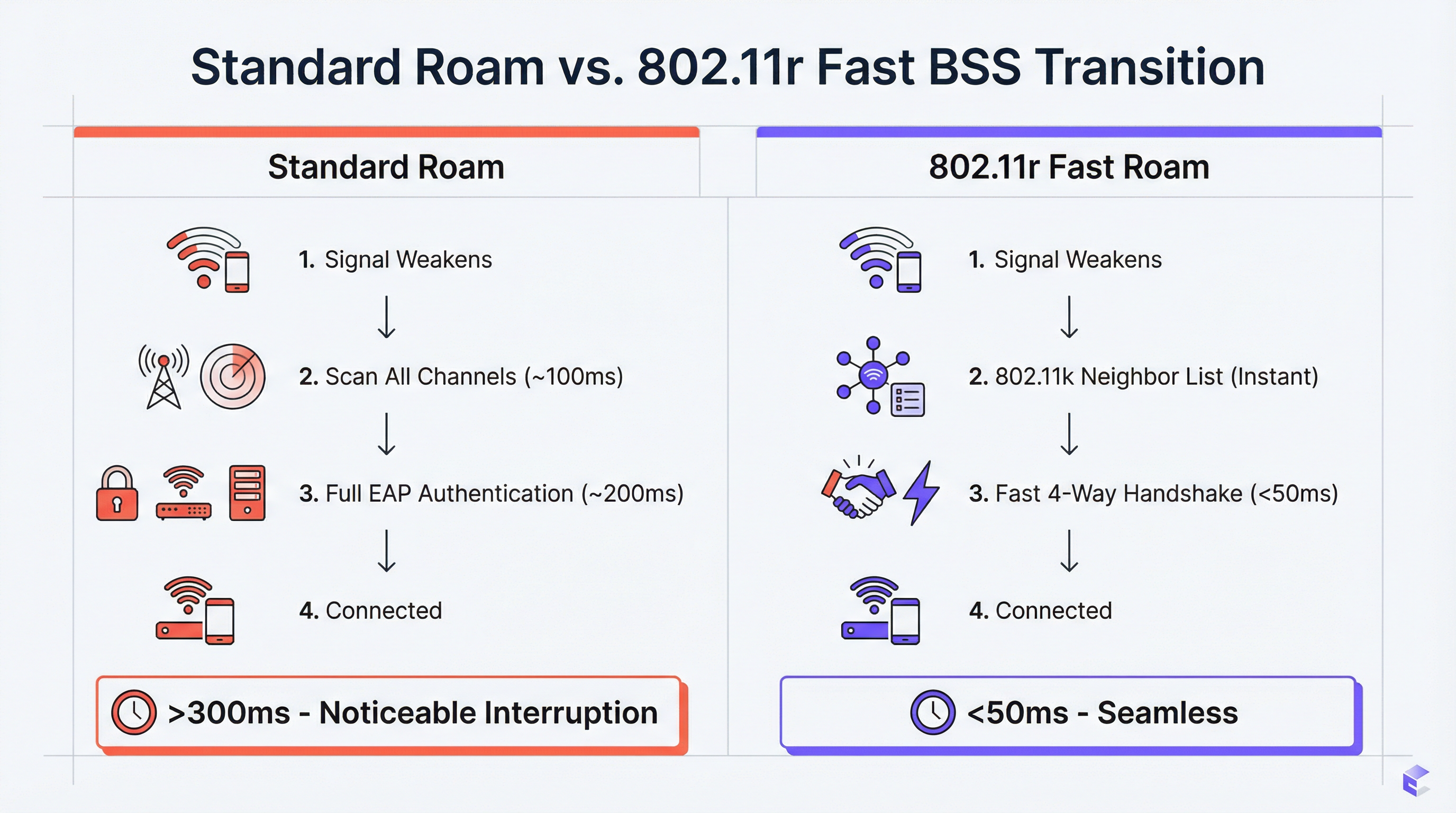
Quando il client decide finalmente di effettuare il roaming, deve completare un ciclo completo di riautenticazione con il nuovo AP. In una rete WPA2-Enterprise o WPA3-Enterprise, ciò comporta molteplici scambi EAP (Extensible Authentication Protocol) tra il client, l'AP e un server RADIUS di back-end. Questo processo può richiedere 200–400 millisecondi. Per le applicazioni in tempo reale — VoIP, videoconferenze, punti vendita mobili — questa latenza è inaccettabile. Il risultato sono chiamate interrotte, fotogrammi video bloccati e transazioni fallite.
802.11k: Radio Resource Management e Neighbor Report
L'emendamento 802.11k introduce il Radio Resource Management (RRM), un framework che consente agli AP e ai client di scambiare informazioni sull'ambiente RF. La funzionalità operativamente più significativa è il Neighbor Report (Report dei vicini). Un AP compatibile con 802.11k può rispondere alla richiesta di un client con un elenco strutturato di AP vicini, inclusi i loro BSSID, i canali operativi e le caratteristiche del segnale. Ciò elimina la necessità per il client di eseguire una scansione passiva o attiva su tutti i canali disponibili — un processo che di per sé può richiedere 100 ms o più su una rete multi-banda.
L'effetto pratico è che un client che si avvicina al limite della zona di copertura di un AP ha già un elenco classificato di candidati per l'handoff prima ancora di dover effettuare il roaming. La decisione viene presa con informazioni complete, non attraverso una ricerca lenta e alla cieca.
802.11r: Fast BSS Transition (FT)
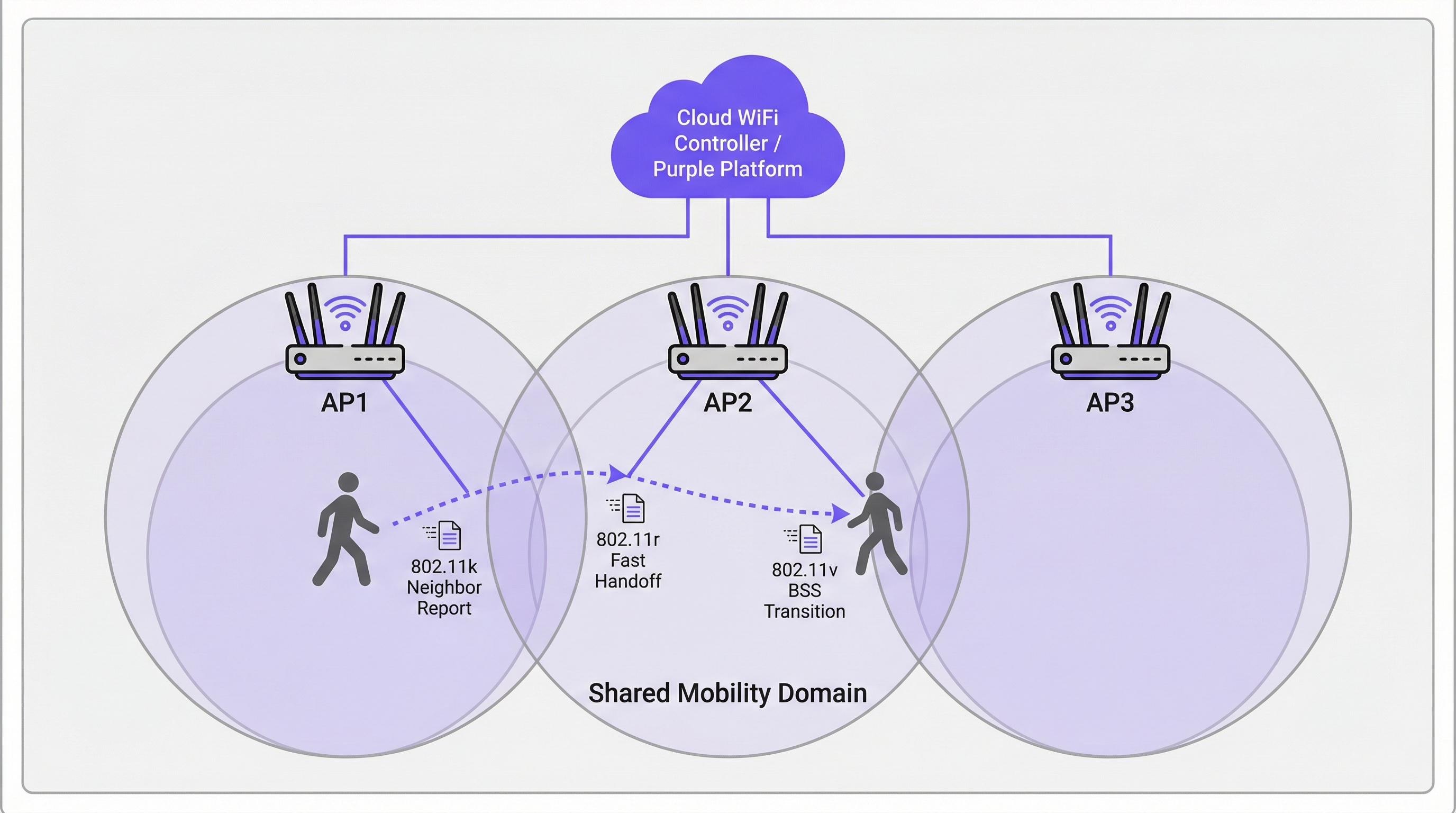
Lo standard 802.11r è la pietra angolare del roaming veloce. La sua innovazione principale è la predistribuzione del materiale delle chiavi tra gli AP all'interno di un Mobility Domain definito. Quando un client si autentica per la prima volta su una rete abilitata per 802.11r, stabilisce una Pairwise Master Key (PMK) attraverso il processo EAP standard. Con FT abilitato, una derivata di questa chiave — la PMK-R1 — viene predistribuita a tutti gli AP nel Mobility Domain tramite il controller o il sistema di distribuzione.
Quando il client effettua il roaming verso un nuovo AP, invece di avviare uno scambio EAP completo, esegue un 4-way handshake compresso utilizzando la PMK-R1 precondivisa. Ciò riduce il tempo di autenticazione dell'handoff a meno di 50 millisecondi — la soglia critica al di sotto della quale un roaming è impercettibile per l'utente finale durante una sessione vocale o video.
Lo standard 802.11r supporta due modalità operative. Con FT over-the-Air, il client comunica direttamente con l'AP di destinazione durante l'handoff; questo è l'approccio più semplice e consigliato per la maggior parte delle implementazioni. FT over-the-DS (Distribution System) instrada i frame FT attraverso la rete cablata tramite l'AP corrente, il che può essere utile in specifiche architetture di controller ma aggiunge complessità.
802.11v: BSS Transition Management
Mentre l'802.11k è reattivo (fornisce informazioni quando il client lo richiede) e l'802.11r è transazionale (velocizza l'handoff), l'802.11v è proattivo. Consente alla rete di inviare BSS Transition Management Requests (Richieste di gestione della transizione BSS) ai dispositivi client, suggerendo o ordinando loro di effettuare il roaming verso un AP specifico. Questo è lo strumento principale della rete per il bilanciamento del carico. Se un AP si sta avvicinando alla capacità massima, il controller può identificare i client connessi con un segnale forte verso un AP vicino meno carico e inviare loro una richiesta di transizione. Il client non è obbligato a conformarsi, ma i client ben implementati (moderni dispositivi iOS, Android e Windows) generalmente onoreranno la richiesta.
Questa capacità di indirizzamento proattivo trasforma la rete da un'infrastruttura passiva a un partecipante attivo nell'ottimizzazione dell'esperienza utente in tutta la struttura.
Come i Captive Portal interagiscono con il roaming
Un punto di errore critico e spesso trascurato nelle implementazioni WiFi per gli ospiti è l'interazione tra il roaming e l'autenticazione tramite Captive Portal. Se un ospite si autentica tramite un Captive Portal sull'AP1 e poi effettua il roaming sull'AP2, un'implementazione ingenua presenterà nuovamente il Captive Portal, forzando la riautenticazione. Questo è un fallimento fondamentale della UX.
L'approccio architetturale corretto consiste nel centralizzare la gestione dello stato della sessione sulla piattaforma WiFi per gli ospiti (come Purple). Una volta che un utente si autentica, il suo indirizzo MAC e il token di sessione vengono memorizzati centralmente. Quando effettua il roaming, il nuovo AP interroga la piattaforma centrale, che conferma la sessione attiva e bypassa automaticamente il Captive Portal. Ciò richiede che la piattaforma WiFi per gli ospiti sia strettamente integrata con l'infrastruttura wireless — una considerazione chiave quando si valutano le soluzioni dei vendor.
Guida all'implementazione
I seguenti passaggi rappresentano un framework di implementazione indipendente dal vendor, applicabile a qualsiasi infrastruttura wireless di livello enterprise.
Fase 1 — Audit hardware e software. Verifica che i tuoi AP, il controller LAN wireless (WLC) o la piattaforma di gestione cloud e i dispositivi client di destinazione supportino tutti gli standard 802.11k, 802.11v e 802.11r. Il supporto di AP e controller è quasi universale sull'hardware enterprise moderno (Cisco Catalyst, Aruba, Juniper Mist, Ruckus). Il supporto dei client varia: verifica le schede tecniche dei dispositivi, in particolare per hardware specializzato come scanner di codici a barre, dispositivi medici o sensori IoT.
Fase 2 — Abilitare gli standard sull'SSID di destinazione. Nel tuo WLC o nella dashboard cloud, vai alla configurazione dell'SSID e abilita 802.11k (Neighbor Reports), 802.11v (BSS Transition Management) e 802.11r (Fast BSS Transition). Per 802.11r, seleziona FT over-the-Air come modalità predefinita a meno che la tua architettura non richieda specificamente over-the-DS.
Fase 3 — Configurare il Mobility Domain. Assicurati che tutti gli AP all'interno della stessa area di roaming fisico siano assegnati allo stesso Mobility Domain. Questo è il prerequisito per la condivisione delle chiavi FT. Verifica che la rete di gestione abbia piena connettività tra tutti gli AP nel dominio.
Fase 4 — Configurazione della sicurezza. Lo standard 802.11r offre i maggiori vantaggi con l'autenticazione WPA2/WPA3-Enterprise, poiché è il complesso processo EAP che FT è progettato per accelerare. Per le reti del personale e aziendali, questo non è negoziabile sia dal punto di vista delle prestazioni che della conformità PCI DSS. Per le reti ospiti che utilizzano un Captive Portal con una Pre-Shared Key (PSK), 802.11r fornisce comunque vantaggi, ma i guadagni sono meno drastici.
Fase 5 — Convalidare con l'acquisizione dei pacchetti. Utilizza uno strumento di analisi WiFi (Wireshark con un adattatore 802.11 compatibile, o uno strumento commerciale come Ekahau o AirMagnet) per acquisire gli eventi di roaming. Conferma la presenza di scambi Neighbor Report 802.11k, frame BSS Transition Management 802.11v e la sequenza di autenticazione FT 802.11r abbreviata. Misura il tempo dall'ultimo frame di dati sul vecchio AP al primo frame di dati sul nuovo AP. Il tuo obiettivo è costantemente inferiore a 50 ms.
Fase 6 — Lancio in produzione graduale. Una volta convalidata su un SSID di test, distribuisci la configurazione agli SSID di produzione in fasi, iniziando con un singolo piano o zona. Monitora eventuali problemi di compatibilità dei client e segnala eventuali anomalie prima di espandere all'intera struttura.
Best Practice
Le seguenti raccomandazioni riflettono le linee guida standard del settore e sono applicabili a tutte le piattaforme dei vendor.
Progettare per il Mobility Domain, non per la VLAN. Un'errata configurazione comune è definire il Mobility Domain lungo i confini della VLAN piuttosto che sui confini fisici del roaming. Un utente che cammina tra due piani dovrebbe trovarsi nello stesso Mobility Domain anche se attraversa un confine VLAN. Assicurati che l'architettura del tuo controller supporti questa funzionalità.
Mantenere un SSID legacy per i dispositivi non conformi. Alcuni dispositivi presentano implementazioni 802.11r difettose o assenti. Invece di disabilitare FT a livello di rete per accoglierli, mantieni un SSID secondario senza FT per i dispositivi legacy. Ciò impedisce una "corsa al ribasso" in cui le capacità dell'intera rete sono limitate dal dispositivo più vecchio.
Allinearsi agli standard di sicurezza. Per gli ambienti di vendita al dettaglio, assicurati che la configurazione di sicurezza wireless sia in linea con i requisiti PCI DSS 4.0, in particolare per quanto riguarda la segmentazione della rete e la crittografia. Per le implementazioni nel settore pubblico e nell'ospitalità che gestiscono dati personali, assicurati che le pratiche sui dati del WiFi per gli ospiti siano conformi al GDPR e alla legislazione nazionale pertinente in materia di protezione dei dati. WPA3-Enterprise, ove supportato, fornisce il livello di sicurezza più elevato.
Documentare la topologia del Mobility Domain. Mantieni un registro aggiornato di quali AP appartengono a quale Mobility Domain. Questo è essenziale per la risoluzione dei problemi e per l'onboarding di nuovi AP durante l'espansione dell'infrastruttura.
Risoluzione dei problemi e mitigazione dei rischi
| Sintomo | Causa probabile | Azione consigliata |
|---|---|---|
| Il dispositivo non riesce a connettersi dopo aver abilitato 802.11r | Il client ha un'implementazione FT difettosa | Disabilita FT sull'SSID o crea un SSID legacy senza FT per il dispositivo interessato |
| I tempi di roaming sono ancora >100 ms nonostante 802.11r | Gli AP non si trovano nello stesso Mobility Domain | Verifica la configurazione del Mobility Domain sul controller; controlla la connettività della rete di gestione tra gli AP |
| L'ospite incontra il Captive Portal dopo ogni roaming | Lo stato della sessione non è centralizzato | Assicurati che la piattaforma WiFi per gli ospiti tracci gli indirizzi MAC e i token di sessione centralmente su tutti gli AP |
| Gli sticky client non rispondono all'indirizzamento 802.11v | Il client non supporta o ignora 802.11v | Regola la potenza di trasmissione dell'AP per ridurre la sovrapposizione della copertura, forzando il client a effettuare il roaming a una soglia RSSI più forte |
| Disconnessioni intermittenti in aree ad alta densità | Loop di roaming tra due AP | Regola le soglie di transizione 802.11v; assicurati che il posizionamento degli AP riduca al minimo l'eccessiva sovrapposizione della copertura |
ROI e impatto sul business
Il business case per investire in una rete di roaming configurata correttamente è semplice. Nel settore dell'ospitalità, un WiFi senza interruzioni è direttamente correlato ai punteggi di soddisfazione degli ospiti. Un ospite a cui cade la chiamata su Teams nel corridoio valuterà negativamente il WiFi dell'hotel, indipendentemente dalle velocità nominali della connessione in camera. Nel retail, una connettività affidabile degli scanner portatili si traduce direttamente in accuratezza dell'inventario ed efficienza del personale — una catena di 200 negozi che elimina le disconnessioni degli scanner può recuperare un numero significativo di ore di lavoro all'anno. Per conferenze ed eventi, il costo reputazionale di una scarsa esperienza di connettività durante un evento di punta può superare di gran lunga il costo dell'investimento infrastrutturale.
I KPI misurabili per un'implementazione di roaming di successo sono: durata media dell'evento di roaming (obiettivo: <50 ms), numero di cadute di chiamate VoIP all'ora (obiettivo: zero) e punteggi di soddisfazione del WiFi per gli ospiti (tracciati tramite sondaggi post-visita). Una rete ben configurata con 802.11k, 802.11v e 802.11r dovrebbe fornire miglioramenti misurabili in tutte e tre le metriche entro il primo mese dall'implementazione.
Key Terms & Definitions
BSS (Basic Service Set)
A fundamental building block of a WiFi network, consisting of one Access Point and all the client devices associated with it. Each BSS is identified by a unique BSSID (the AP's MAC address).
When discussing roaming, a client transitions from the BSS of its current AP to the BSS of a new AP. 'Fast BSS Transition' (802.11r) is literally a faster mechanism for executing this switch.
SSID (Service Set Identifier)
The human-readable name of a WiFi network — the name users see and select on their devices. An SSID can be broadcast by multiple APs simultaneously to create a single logical network across a large area.
For roaming to function, all APs in the roaming area must broadcast the same SSID. Users should experience a single, continuous network, not a series of separate networks named 'Hotel_WiFi_Floor1', 'Hotel_WiFi_Floor2', etc.
WPA2/WPA3-Enterprise
A WiFi security standard that authenticates each user or device individually using a RADIUS server and the EAP protocol, rather than a shared password. It is the required security method for corporate and PCI DSS-compliant networks.
802.11r provides the greatest performance benefit in Enterprise networks, as it is the complex, multi-step EAP authentication process that FT is specifically designed to accelerate.
RADIUS (Remote Authentication Dial-In User Service)
A networking protocol that provides centralised Authentication, Authorisation, and Accounting (AAA) for network access. In a WiFi context, the AP acts as a RADIUS client, forwarding user credentials to the RADIUS server for validation.
In a standard WPA2-Enterprise roam, the client must complete a full EAP exchange with the RADIUS server for every new AP. 802.11r eliminates this requirement by pre-distributing key material, so the RADIUS server is only consulted during the initial authentication.
Pairwise Master Key (PMK)
The top-level cryptographic key in the WPA2/WPA3 security hierarchy, derived during the initial EAP authentication process between the client and the RADIUS server.
802.11r works by deriving a hierarchy of keys from the PMK. A derivative key (PMK-R1) is pre-distributed to APs in the Mobility Domain, allowing a roaming client to perform a fast handshake without re-deriving the PMK from scratch.
Mobility Domain
A set of APs, managed by the same controller or cloud platform, that are configured to share Fast Transition key material and allow seamless 802.11r roaming between them.
This is the foundational configuration element for 802.11r. If two APs are not in the same Mobility Domain, a client roaming between them will fall back to a full, slow re-authentication. Correctly defining Mobility Domain boundaries is the most critical implementation step.
Sticky Client
A wireless client device that fails to roam to a nearby AP with a significantly stronger signal, instead maintaining its association with a distant AP with a weak signal, resulting in degraded throughput and increased latency.
This is the primary user-experience problem that 802.11k and 802.11v are designed to address. 802.11k gives the client better information; 802.11v gives the network the ability to actively encourage the client to move.
Captive Portal
A web page that intercepts a user's initial HTTP request and redirects them to an authentication or registration page before granting full network access. Widely used in hospitality, retail, and public WiFi deployments.
A poorly architected captive portal will re-present itself every time a user roams to a new AP, breaking the seamless experience. The solution is centralised session management on the guest WiFi platform, which recognises authenticated users by their MAC address across all APs.
EAP (Extensible Authentication Protocol)
An authentication framework used in WPA2/WPA3-Enterprise networks. It supports multiple authentication methods (EAP-TLS, PEAP, EAP-TTLS) and involves a multi-step exchange between the client, the AP, and a RADIUS server.
The EAP exchange is the primary source of latency in a standard WiFi roam. 802.11r is specifically designed to bypass the need to repeat this exchange on every roam, replacing it with a much faster 4-way handshake.
Case Studies
A 500-room luxury hotel is experiencing guest complaints of dropped WiFi calls and poor connectivity in hallways and common areas. Their infrastructure consists of enterprise-grade APs from a major vendor, but roaming assistance is not configured. How would you design and implement a solution?
Phase 1 — Baseline Assessment. Conduct a site survey to confirm RF coverage and identify roaming boundaries. Use a WiFi analyser to benchmark current roaming performance. Capture packet traces in the problem corridors to measure actual handoff times. Expect to find values of 200–400 ms, confirming the slow re-authentication hypothesis.
Phase 2 — Pilot Configuration. On the hotel's Wireless LAN Controller, create a test SSID (e.g., 'HotelGuest_FT_Test'). Enable 802.11k (Neighbor Reports), 802.11v (BSS Transition Management), and 802.11r (Fast BSS Transition, over-the-Air mode) on this SSID. Set security to WPA2-Enterprise, integrating with the hotel's existing RADIUS infrastructure. Assign all APs in the pilot zone to the same Mobility Domain.
Phase 3 — Validation. Using a modern smartphone (iOS 14+ or Android 10+), connect to the test SSID and initiate a VoIP call. Walk through the previously identified problem areas. The call should remain clear and uninterrupted. Capture packets to confirm handoff times are now consistently below 50 ms.
Phase 4 — Production Rollout. Apply the configuration to the primary guest and staff SSIDs in a phased rollout, floor by floor. Monitor for client compatibility issues. Communicate the changes to the IT team and set up alerting on the management platform for any roaming anomalies.
A large retail chain wants to deploy handheld inventory scanners across its 200 stores. The scanners must maintain a persistent, low-latency connection to the central inventory management system as employees move throughout stockrooms and sales floors. What are the critical WiFi configuration requirements, and what are the key risks?
Step 1 — Device Procurement Requirement. The absolute first step is to mandate 802.11r, 802.11k, and 802.11v support as a non-negotiable requirement in the scanner procurement specification. This must be confirmed against the manufacturer's data sheet, not assumed. Failure to do this at the procurement stage is the single most common cause of project failure in IoT and specialist device deployments.
Step 2 — Dedicated SSID Architecture. Create a dedicated, hidden SSID for the scanners. This network should be configured for WPA2/WPA3-Enterprise with certificate-based authentication (EAP-TLS) using device certificates provisioned during the scanner build process. This eliminates password management overhead and provides a strong, auditable security posture aligned with PCI DSS requirements for retail networks.
Step 3 — Enable Fast Roaming. On the dedicated SSID, enable 802.11k, 802.11v, and 802.11r. Define a Mobility Domain that encompasses all APs in each store.
Step 4 — QoS Configuration. Implement Quality of Service (QoS) policies to prioritise scanner traffic (DSCP marking) over less critical traffic such as the guest WiFi network. This ensures inventory data is always given network precedence during periods of congestion.
Step 5 — Centralised Management and Monitoring. Deploy a cloud management platform that provides a single-pane-of-glass view across all 200 stores. Configure alerting for roaming failures and AP health events. This allows the central IT team to identify and remediate issues without dispatching on-site engineers.
Scenario Analysis
Q1. You are designing the WiFi for a new conference centre. The main auditorium will host 2,000 concurrent users during keynote sessions, while 20 breakout rooms need reliable connectivity for video conferencing. The AV team will be using wireless microphone systems and tablet-based presentation controllers. Which roaming standard is the single most critical to enable on the AV and staff SSID, and why?
💡 Hint:Consider the latency tolerance of the applications being used by the AV team and presenters.
Show Recommended Approach
802.11r (Fast BSS Transition) is the most critical standard for the AV and staff SSID. The AV team and presenters are running latency-sensitive, real-time applications — wireless microphone control, tablet presentation software, and video feeds — where any interruption is immediately visible to the audience. 802.11k and 802.11v are important supporting standards that help the client make better roaming decisions, but the raw speed of the handoff (the domain of 802.11r) is the primary determinant of whether a roam is noticeable. The target is consistently under 50 ms. For the general attendee SSID, all three standards should be enabled, but 802.11v's load-balancing capability becomes particularly valuable for managing 2,000 concurrent users across the auditorium's AP array.
Q2. A hotel guest complains that their WiFi is slow in their room, despite showing full signal bars on their device. A quick check on the controller shows the guest is connected to an AP two floors below them at a high RSSI, rather than the AP directly above their room. What is the technical term for this condition, and which standard is designed to address it?
💡 Hint:The problem is not signal strength — the device has a strong signal. The problem is which AP it has chosen to associate with.
Show Recommended Approach
This is the classic sticky client problem. The guest's device has associated with a distant AP that happens to have a strong signal (perhaps due to building geometry or AP placement) and is refusing to roam to the closer, more appropriate AP. The standard designed to address this is 802.11v (BSS Transition Management). With 802.11v enabled, the network controller can detect this suboptimal association — the guest is connected to an AP two floors away when a perfectly capable AP is directly above them — and send a BSS Transition Management Request to the client, suggesting it roam to the more appropriate AP. A well-implemented client (modern iOS, Android, Windows) will honour this request.
Q3. An IT administrator enables 802.11r on a hospital's staff WiFi network. Within hours, the helpdesk receives calls from nurses whose older mobile clinical workstations can no longer connect to the network at all. The workstations are running a legacy operating system and were purchased five years ago. What is the most likely cause, and what is the safest remediation strategy that does not require disabling 802.11r for all users?
💡 Hint:The problem is specific to the older devices. The solution should be targeted at those devices, not the entire network.
Show Recommended Approach
The most likely cause is that the legacy clinical workstations have a buggy or absent implementation of 802.11r. Some older devices fail to correctly negotiate the FT capability during the association process, resulting in a connection failure rather than a graceful fallback to standard authentication. The safest remediation strategy is SSID segmentation. Create a secondary staff SSID (e.g., 'ClinicalStaff_Legacy') with 802.11r disabled but 802.11k and 802.11v still enabled. Configure the legacy workstations to connect to this SSID. The primary staff SSID retains 802.11r for all modern devices. This approach avoids a 'race to the bottom' where the entire network's capabilities are constrained by the oldest device, while ensuring the legacy workstations remain operational. The long-term recommendation is to include 802.11r support as a mandatory requirement in the next device refresh cycle.
Key Takeaways
- ✓Seamless WiFi roaming is a critical operational requirement for enterprise venues — poor handoff performance directly impacts guest satisfaction and staff productivity.
- ✓802.11k eliminates slow channel scanning by providing client devices with a curated Neighbor Report of candidate APs before they need to roam.
- ✓802.11r (Fast BSS Transition) is the most impactful standard, reducing AP handoff authentication time from 200–400 ms to under 50 ms by pre-distributing cryptographic key material across the Mobility Domain.
- ✓802.11v enables the network to proactively steer sticky clients to better APs for load balancing, transforming the network from a passive infrastructure into an active participant in optimising user experience.
- ✓Client device compatibility is the most common deployment risk — always verify 802.11r/k/v support against device specification sheets at the procurement stage, not after purchase.
- ✓Captive portals must be backed by centralised session management to prevent re-authentication on every roam — this is a platform architecture requirement, not just a configuration setting.
- ✓Validate every deployment with packet captures measuring actual handoff duration; the target benchmark is consistently under 50 milliseconds.




