

802.1X ऑथेंटिकेशन: आधुनिक उपकरणांवर नेटवर्क ॲक्सेस सुरक्षित करणे
This guide provides a comprehensive, actionable overview of IEEE 802.1X authentication for senior IT professionals and network architects. It details the critical steps for securing network access across diverse enterprise environments, focusing on practical, vendor-neutral deployment guidance to mitigate risk, ensure compliance, and deliver a seamless, secure user experience.
🎧 Listen to this Guide
View Transcript
कार्यकारी सारांश
हे मार्गदर्शक वरिष्ठ IT व्यावसायिक आणि नेटवर्क आर्किटेक्ट्ससाठी IEEE 802.1X ऑथेंटिकेशनचा सर्वसमावेशक आणि कृतीयोग्य आढावा प्रदान करते. हे हॉस्पिटॅलिटी आणि रिटेलपासून ते मोठ्या प्रमाणावरील सार्वजनिक ठिकाणांपर्यंत विविध एंटरप्राइझ वातावरणांमध्ये नेटवर्क ॲक्सेस सुरक्षित करण्यासाठीच्या महत्त्वपूर्ण पायऱ्यांचे तपशील देते. आम्ही जोखीम कमी करणे, PCI DSS आणि GDPR सारख्या मानकांचे पालन सुनिश्चित करणे आणि iOS आणि Android सह आधुनिक उपकरणांवर अखंड, सुरक्षित वापरकर्ता अनुभव प्रदान करण्यावर लक्ष केंद्रित करून व्यावहारिक, व्हेंडर-न्यूट्रल डिप्लॉयमेंट मार्गदर्शन देण्यासाठी शैक्षणिक सिद्धांताच्या पलीकडे जातो. 802.1X चा वापर करून, संस्था असुरक्षित प्री-शेअर्ड कीजच्या जागी मजबूत, ओळख-आधारित ॲक्सेस कंट्रोल वापरू शकतात, ज्यामुळे केवळ अधिकृत आणि विश्वसनीय उपकरणेच कॉर्पोरेट नेटवर्क संसाधनांशी कनेक्ट होऊ शकतील याची खात्री होते. हा दस्तऐवज यशस्वी 802.1X अंमलबजावणीचे नियोजन आणि अंमलबजावणी करण्यासाठी एक धोरणात्मक संदर्भ म्हणून काम करतो, ज्यामध्ये आर्किटेक्चर, EAP पद्धतीची निवड, प्रमाणपत्र व्यवस्थापन आणि ROI विश्लेषणाचा समावेश आहे, जेणेकरून तुम्हाला तुमची सुरक्षा स्थिती वाढवणारे आणि व्यावसायिक उद्दिष्टांना समर्थन देणारे माहितीपूर्ण निर्णय घेण्यास मदत होईल.
तांत्रिक सखोल माहिती
IEEE 802.1X मानक इथरनेट आणि 802.11 वायरलेस नेटवर्क्ससाठी ऑथेंटिकेटेड नेटवर्क ॲक्सेस प्रदान करण्यासाठी पोर्ट-आधारित नेटवर्क ॲक्सेस कंट्रोल (PNAC) यंत्रणा परिभाषित करते. हे जुन्या सुरक्षा प्रोटोकॉल्समधील मूलभूत बदल दर्शवते, जे अनेकदा सर्व वापरकर्त्यांसाठी एकाच, सामायिक पासवर्डवर (प्री-शेअर्ड की किंवा PSK) अवलंबून होते. 802.1X फ्रेमवर्क वापरकर्ता किंवा उपकरणाला IP ॲड्रेस नियुक्त करण्यापूर्वी आणि नेटवर्कचा ॲक्सेस देण्यापूर्वी ऑथेंटिकेट करते, ज्यामुळे प्रवेशाच्या ठिकाणी एक शक्तिशाली सुरक्षा सीमा तयार होते.
हे आर्किटेक्चर तीन प्राथमिक घटकांनी बनलेले आहे:
- सप्लिकंट (Supplicant): नेटवर्कशी कनेक्ट होऊ पाहणारे क्लायंट उपकरण (उदा. लॅपटॉप, स्मार्टफोन किंवा IoT उपकरण). सप्लिकंट हे क्लायंट उपकरणावरील सॉफ्टवेअर असते जे ऑथेंटिकेटरला क्रेडेंशियल्स प्रदान करते.
- ऑथेंटिकेटर (Authenticator): नेटवर्क ॲक्सेस नियंत्रित करणारे नेटवर्क उपकरण, सामान्यतः वायरलेस ॲक्सेस पॉइंट (AP) किंवा स्विच. ऑथेंटिकेटर मध्यस्थ म्हणून काम करतो, सप्लिकंट आणि ऑथेंटिकेशन सर्व्हर दरम्यान ऑथेंटिकेशन संदेश पाठवतो.
- ऑथेंटिकेशन सर्व्हर (AS): केंद्रीकृत सर्व्हर जो सप्लिकंटच्या क्रेडेंशियल्सची पडताळणी करतो आणि ॲक्सेस द्यायचा की नाकारायचा याचा अंतिम निर्णय घेतो. जवळजवळ सर्व एंटरप्राइझ डिप्लॉयमेंट्समध्ये, ही भूमिका RADIUS (रिमोट ऑथेंटिकेशन डायल-इन युजर सर्व्हिस) सर्व्हरद्वारे पार पाडली जाते.
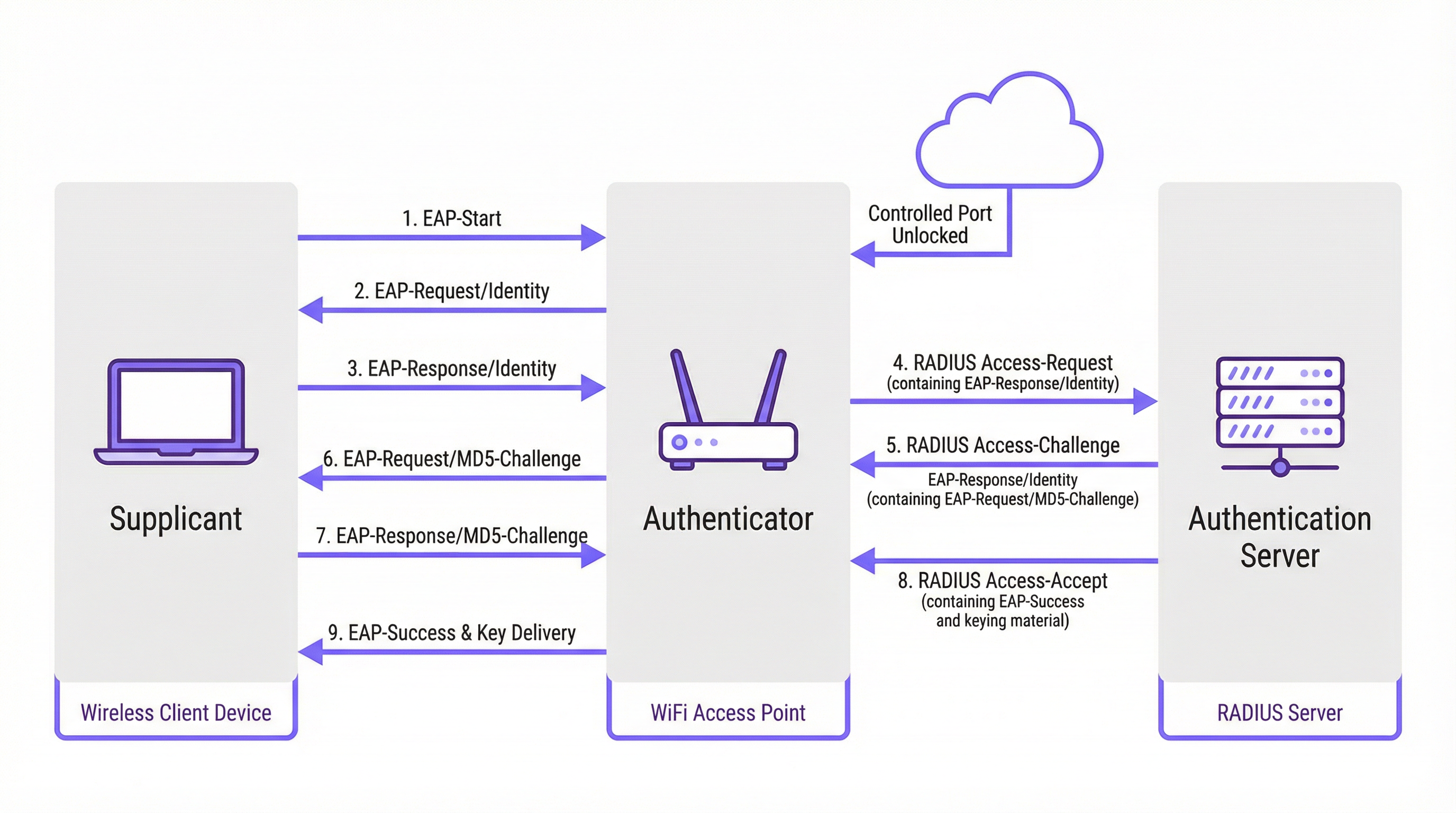
ऑथेंटिकेशन प्रक्रिया एक्स्टेंसिबल ऑथेंटिकेशन प्रोटोकॉल (EAP) द्वारे आयोजित केलेल्या संरचित संदेश देवाणघेवाणीचे अनुसरण करते. EAP हे एक लवचिक फ्रेमवर्क आहे जे विविध ऑथेंटिकेशन पद्धतींना (EAP प्रकार) समर्थन देते, ज्यामुळे संस्थांना त्यांच्या सुरक्षा आवश्यकता आणि विद्यमान पायाभूत सुविधांसाठी सर्वात योग्य पर्याय निवडण्याची अनुमती मिळते.
EAP पद्धतींची तुलना
योग्य EAP पद्धत निवडणे हा एक महत्त्वपूर्ण डिप्लॉयमेंट निर्णय आहे. आधुनिक एंटरप्राइझ नेटवर्क्समध्ये वापरल्या जाणाऱ्या प्राथमिक पद्धती EAP-TLS, PEAP आणि EAP-TTLS आहेत.
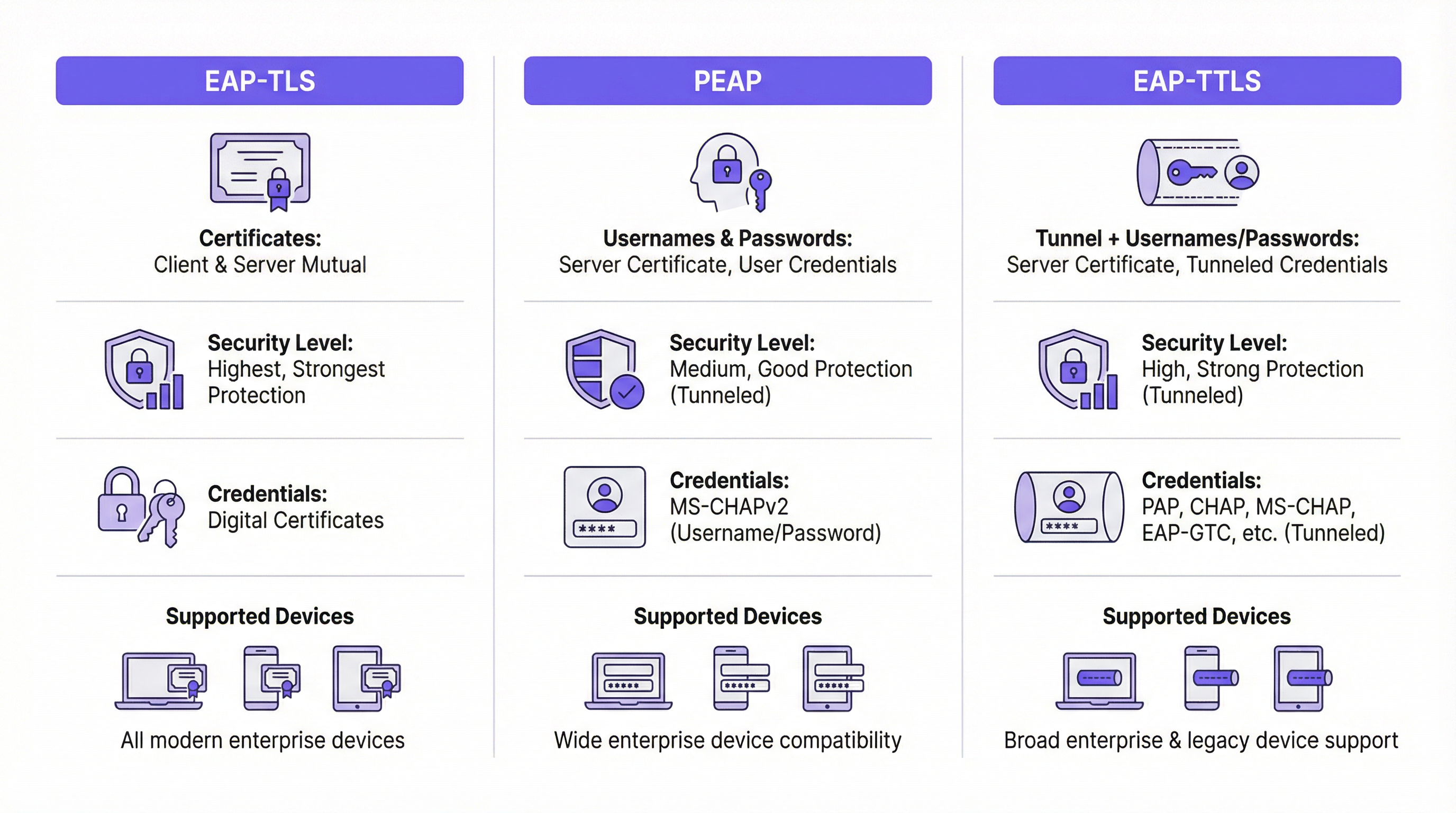
| वैशिष्ट्य | EAP-TLS (ट्रान्सपोर्ट लेयर सिक्युरिटी) | PEAP (प्रोटेक्टेड EAP) | EAP-TTLS (टनेल्ड TLS) |
|---|---|---|---|
| सुरक्षा पातळी | सर्वोच्च. परस्पर प्रमाणपत्र-आधारित ऑथेंटिकेशन प्रदान करते. | उच्च. TLS टनेलमध्ये क्रेडेंशियल एक्सचेंज एन्क्रिप्ट करते. | उच्च. PEAP प्रमाणेच, क्रेडेंशियल एक्सचेंज एन्क्रिप्ट करते. |
| क्रेडेंशियल्स | क्लायंट आणि सर्व्हर डिजिटल प्रमाणपत्रे | सर्व्हर प्रमाणपत्र, वापरकर्ता क्रेडेंशियल्स (उदा. युजरनेम/पासवर्ड) | सर्व्हर प्रमाणपत्र, वापरकर्ता क्रेडेंशियल्स (अधिक लवचिक पर्याय) |
| गुंतागुंत | उच्च. सर्व उपकरणांसाठी प्रमाणपत्रे व्यवस्थापित करण्यासाठी पब्लिक की इन्फ्रास्ट्रक्चर (PKI) आवश्यक आहे. | मध्यम. विद्यमान डिरेक्टरी क्रेडेंशियल्सचा (उदा. ॲक्टिव्ह डिरेक्टरी) वापर करते. | मध्यम. PEAP प्रमाणेच परंतु ऑथेंटिकेशन प्रोटोकॉल्ससाठी अधिक लवचिकता देते. |
| वापर प्रकरण (Use Case) | कॉर्पोरेट-मालकीची उपकरणे जिथे MDM द्वारे प्रमाणपत्र डिप्लॉयमेंट स्वयंचलित केले जाऊ शकते. उच्च-सुरक्षा वातावरण. | BYOD आणि कॉर्पोरेट वातावरण जिथे युजरनेम/पासवर्ड ऑथेंटिकेशनला प्राधान्य दिले जाते. | क्लायंट ऑपरेटिंग सिस्टीम्सच्या (उदा. macOS, Linux) मिश्रणासह विविध वातावरण. |
EAP-TLS ला 802.1X सुरक्षेसाठी सुवर्ण मानक मानले जाते. यासाठी क्लायंट आणि सर्व्हर दोघांकडे डिजिटल प्रमाणपत्र असणे आवश्यक आहे, ज्यामुळे परस्पर ऑथेंटिकेशन सक्षम होते. हे पासवर्ड-आधारित हल्ल्यांचा धोका दूर करते, परंतु प्रत्येक क्लायंट उपकरणावर प्रमाणपत्र डिप्लॉय आणि व्यवस्थापित करण्याचा अतिरिक्त भार वाढवते.
PEAP हा एंटरप्राइझ वातावरणातील सर्वात सामान्य EAP प्रकार आहे. हे केवळ ऑथेंटिकेशन सर्व्हरवर प्रमाणपत्राची आवश्यकता ठेवून डिप्लॉयमेंट सुलभ करते. क्लायंट सर्व्हरची ओळख पडताळतो आणि नंतर एक एन्क्रिप्टेड TLS टनेल तयार करतो. या टनेलच्या आत, क्लायंट कमी गुंतागुंतीच्या पद्धती वापरून ऑथेंटिकेट करतो, सामान्यतः MS-CHAPv2 (युजरनेम आणि पासवर्ड). सुरक्षित असले तरी, जर वापरकर्त्यांना वैध दिसणाऱ्या सर्व्हर प्रमाणपत्रासह बनावट AP शी कनेक्ट करण्यासाठी फसवले गेले, तर ते अद्याप फिशिंग हल्ल्यांना बळी पडू शकते.
EAP-TTLS हे कार्यात्मकदृष्ट्या PEAP सारखेच आहे परंतु अधिक लवचिकता देते. हे देखील एक TLS टनेल तयार करते परंतु PAP, CHAP किंवा EAP-MD5 सारख्या अंतर्गत ऑथेंटिकेशन प्रोटोकॉल्सच्या विस्तृत श्रेणीस अनुमती देते, ज्यामुळे ते जुन्या सिस्टीम्स किंवा विविध क्लायंट प्रकार असलेल्या वातावरणासाठी एक बहुमुखी पर्याय बनते.
अंमलबजावणी मार्गदर्शक
यशस्वी 802.1X डिप्लॉयमेंटसाठी काळजीपूर्वक नियोजन आणि टप्प्याटप्प्याने अंमलबजावणी आवश्यक आहे. खालील पायऱ्या व्हेंडर-न्यूट्रल रोडमॅप प्रदान करतात.
टप्पा 1: पायाभूत सुविधा आणि नियोजन
- तुमचा RADIUS सर्व्हर निवडा: तुमच्या विद्यमान पायाभूत सुविधांशी सुसंगत असा RADIUS सर्व्हर निवडा. Windows-केंद्रित वातावरणासाठी Microsoft चा नेटवर्क पॉलिसी सर्व्हर (NPS) हा एक सामान्य पर्याय आहे, तर FreeRADIUS सारखे ओपन-सोर्स पर्याय अत्यंत लवचिक आहेत. क्लाउड-आधारित RADIUS सेवा देखील त्यांच्या स्केलेबिलिटी आणि कमी व्यवस्थापन भारामुळे वाढत्या प्रमाणात लोकप्रिय होत आहेत.
- तुमची EAP पद्धत निवडा: वरील तुलनेच्या आधारे, तुमच्या सुरक्षा आवश्यकता, वापरकर्ता आधार आणि प्रशासकीय क्षमतांमध्ये सर्वोत्तम संतुलन राखणारी EAP पद्धत निवडा. बहुतांश कॉर्पोरेट वातावरणांसाठी, PEAP एक मजबूत संतुलन देते. उच्च-सुरक्षा डिप्लॉयमेंट्ससाठी, EAP-TLS हा शिफारस केलेला मार्ग आहे.
- तुमच्या प्रमाणपत्र धोरणाचे नियोजन करा: ही सर्वात महत्त्वाची पायरी आहे. PEAP किंवा EAP-TTLS साठी, तुम्हाला तुमच्या RADIUS सर्व्हरसाठी सर्व्हर प्रमाणपत्राची आवश्यकता असेल. हे प्रमाणपत्र एका विश्वसनीय सार्वजनिक सर्टिफिकेट अथॉरिटी (CA) द्वारे जारी केलेले असणे आवश्यक आहे. सेल्फ-साइंड प्रमाणपत्र वापरल्यास सर्व क्लायंट उपकरणांवर सुरक्षा इशारे येतील, ज्यामुळे वापरकर्त्याचा विश्वास आणि सुरक्षा धोक्यात येईल.
टप्पा 2: कॉन्फिगरेशन
- RADIUS सर्व्हर कॉन्फिगर करा: तुमचा निवडलेला RADIUS सर्व्हर इन्स्टॉल आणि कॉन्फिगर करा. यामध्ये खालील गोष्टींचा समावेश आहे:
- सर्व्हर प्रमाणपत्र इन्स्टॉल करणे.
- RADIUS क्लायंट्स (तुमचे ॲक्सेस पॉइंट्स आणि स्विचेस) परिभाषित करणे.
- येणाऱ्या विनंत्यांवर प्रक्रिया करण्यासाठी कनेक्शन रिक्वेस्ट पॉलिसीज तयार करणे.
- ऑथेंटिकेशनसाठी अटी, बंधने आणि सेटिंग्ज परिभाषित करणाऱ्या नेटवर्क पॉलिसीज तयार करणे. उदाहरणार्थ, एखादी पॉलिसी असे सांगू शकते की केवळ विशिष्ट ॲक्टिव्ह डिरेक्टरी ग्रुपच्या सदस्यांनाच कनेक्ट होण्याची परवानगी आहे.
- ऑथेंटिकेटर कॉन्फिगर करा (वायरलेस APs/स्विचेस):
- तुमचा वायरलेस LAN कंट्रोलर किंवा वैयक्तिक ॲक्सेस पॉइंट्स तुमच्या RADIUS सर्व्हरचा IP ॲड्रेस आणि शेअर्ड सिक्रेटसह कॉन्फिगर करा.
- 802.1X ला समर्पित नवीन WLAN/SSID तयार करा. विद्यमान PSK किंवा ओपन नेटवर्कवर 802.1X चालवण्याचा प्रयत्न करू नका.
- SSID हे WPA2-Enterprise किंवा WPA3-Enterprise साठी कॉन्फिगर केलेले असल्याची खात्री करा.
टप्पा 3: क्लायंट ऑनबोर्डिंग आणि डिप्लॉयमेंट
- कॉर्पोरेट उपकरणे: कॉर्पोरेट-मालकीची उपकरणे स्वयंचलितपणे कॉन्फिगर करण्यासाठी मोबाइल डिव्हाइस मॅनेजमेंट (MDM) किंवा ग्रुप पॉलिसी (GPO) सोल्यूशन वापरा. MDM/GPO वायरलेस नेटवर्क प्रोफाइल, ज्यामध्ये SSID, EAP प्रकार आणि कोणतीही आवश्यक CA प्रमाणपत्रे समाविष्ट आहेत, उपकरणावर पुश करू शकते. हे अंतिम वापरकर्त्यासाठी झिरो-टच अनुभव प्रदान करते.
- BYOD (ब्रिंग युअर ओन डिव्हाइस): वैयक्तिक उपकरणे ऑनबोर्ड करणे अधिक गुंतागुंतीचे आहे. एक समर्पित ऑनबोर्डिंग सोल्यूशन वापरणे ही सर्वोत्तम पद्धत आहे. ही सोल्यूशन्स एक तात्पुरता, ओपन "ऑनबोर्डिंग" SSID प्रदान करतात. जेव्हा वापरकर्ता कनेक्ट होतो, तेव्हा त्यांना एका Captive Portal वर पुनर्निर्देशित केले जाते जिथे ते ऑथेंटिकेट करू शकतात आणि एक कॉन्फिगरेशन युटिलिटी किंवा प्रोफाइल डाउनलोड करू शकतात जे सुरक्षित 802.1X नेटवर्कसाठी त्यांचे उपकरण स्वयंचलितपणे सेट करते.
सर्वोत्तम पद्धती
- तुमचे नेटवर्क विभागून घ्या: RADIUS ॲट्रिब्यूट्सवर आधारित डायनॅमिक VLAN असाइनमेंट वापरा. हे तुम्हाला वेगवेगळ्या वापरकर्ता गटांना (उदा. कर्मचारी, कंत्राटदार, अतिथी) वेगवेगळ्या ॲक्सेस पॉलिसीजसह वेगवेगळ्या VLANs मध्ये ठेवण्याची अनुमती देते, जरी ते एकाच SSID शी कनेक्ट झाले तरीही.
- नेहमी सार्वजनिकरित्या विश्वसनीय प्रमाणपत्र वापरा: तुमच्या RADIUS सर्व्हरवर सार्वजनिक प्रमाणपत्र वापरण्याचे महत्त्व कमी लेखता येणार नाही. हा क्लायंटच्या विश्वासाचा आधारस्तंभ आहे आणि मॅन-इन-द-मिडल हल्ल्यांना प्रतिबंधित करतो.
- निरीक्षण आणि लॉग: RADIUS ऑथेंटिकेशन लॉग्सचे सक्रियपणे निरीक्षण करा. कनेक्शन समस्यांचे निवारण करण्यासाठी आणि सुरक्षा ऑडिटिंगसाठी हे अमूल्य आहे. अयशस्वी ऑथेंटिकेशन प्रयत्न हे संभाव्य हल्ल्याचे प्रारंभिक सूचक असू शकतात.
- WPA3-Enterprise ला प्राधान्य द्या: जिथे तुमच्या हार्डवेअर आणि क्लायंट्सद्वारे समर्थित असेल, तिथे WPA3-Enterprise हे WPA2-Enterprise च्या तुलनेत महत्त्वपूर्ण सुरक्षा सुधारणा देते, ज्यामध्ये डी-ऑथेंटिकेशन हल्ले रोखण्यासाठी प्रोटेक्टेड मॅनेजमेंट फ्रेम्स (PMF) चा समावेश आहे.
समस्यानिवारण आणि जोखीम कमी करणे
| सामान्य समस्या | कारण | जोखीम कमी करण्याचे धोरण |
|---|---|---|
| कनेक्शन अयशस्वी | क्लायंट आणि सर्व्हर दरम्यान EAP प्रकारांमध्ये विसंगती. चुकीचे RADIUS शेअर्ड सिक्रेट. फायरवॉल RADIUS पोर्ट्स (UDP 1812/1813) ब्लॉक करत आहे. | क्लायंट आणि सर्व्हर दोन्हीवरील EAP सेटिंग्ज सत्यापित करा. AP आणि RADIUS सर्व्हरवरील शेअर्ड सिक्रेट पुन्हा तपासा. फायरवॉल्स RADIUS ट्रॅफिकला परवानगी देतात याची खात्री करा. |
| प्रमाणपत्र इशारे | RADIUS सर्व्हर सेल्फ-साइंड किंवा अविश्वासार्ह प्रमाणपत्र वापरत आहे. | सेल्फ-साइंड प्रमाणपत्राच्या जागी विश्वसनीय सार्वजनिक CA (उदा. DigiCert, Sectigo) कडील प्रमाणपत्र वापरा. |
| धीमे कनेक्शन | RADIUS सर्व्हर अंडर-प्रोव्हिजन केलेला आहे किंवा डिरेक्टरी सेवेसाठी उच्च लेटन्सी आहे. | RADIUS सर्व्हरच्या कामगिरीचे निरीक्षण करा. RADIUS सर्व्हर आणि डोमेन कंट्रोलर्स दरम्यान लो-लेटन्सी कनेक्टिव्हिटी सुनिश्चित करा. |
| फिशिंग/बनावट APs | वापरकर्त्यांना तोच SSID ब्रॉडकास्ट करणाऱ्या दुर्भावनापूर्ण AP शी कनेक्ट करण्यासाठी फसवले जाते. | पासवर्ड्स काढून टाकण्यासाठी EAP-TLS वापरा. PEAP/EAP-TTLS साठी, क्लायंट्स सर्व्हर प्रमाणपत्र आणि नाव प्रमाणित करण्यासाठी कॉन्फिगर केलेले आहेत याची खात्री करा. |
ROI आणि व्यावसायिक प्रभाव
802.1X ची अंमलबजावणी करण्यासाठी वेळ आणि संसाधनांमध्ये प्रारंभिक गुंतवणूक आवश्यक असली तरी, गुंतवणुकीवरील परतावा (ROI) लक्षणीय आहे, विशेषतः मोठ्या प्रमाणावरील ठिकाणांसाठी.
- सुधारित सुरक्षा स्थिती: एका सामायिक पासवर्डवरून युनिक, प्रति-वापरकर्ता किंवा प्रति-उपकरण क्रेडेंशियल्सकडे वळल्याने, तुम्ही अनधिकृत ॲक्सेसचा धोका नाटकीयरित्या कमी करता. डेटा उल्लंघने कमी करण्यासाठी हे एक महत्त्वपूर्ण पाऊल आहे.
- अनुपालन (Compliance): PCI DSS, GDPR किंवा HIPAA च्या अधीन असलेल्या संस्थांसाठी, तुम्ही मजबूत ॲक्सेस कंट्रोल उपाय लागू केले आहेत हे दर्शविण्यासाठी 802.1X हे एक प्रमुख नियंत्रण आहे. अयशस्वी ऑडिट किंवा अनुपालन दंडाची किंमत डिप्लॉयमेंटच्या खर्चापेक्षा खूप जास्त असते.
- ऑपरेशनल कार्यक्षमता: ऑनबोर्डिंग स्वयंचलित करणे आणि डायनॅमिक VLANs वापरल्याने IT टीम्सवरील प्रशासकीय भार कमी होतो. नवीन कर्मचाऱ्यांना त्यांच्या डिरेक्टरी ग्रुपच्या आधारे स्वयंचलितपणे ॲक्सेस दिला जाऊ शकतो आणि त्यांना काढून टाकल्यावर ॲक्सेस त्वरित रद्द केला जातो.
- सुधारित वापरकर्ता अनुभव: स्वयंचलित ऑनबोर्डिंगसह योग्यरित्या डिप्लॉय केल्यावर, 802.1X एक अखंड आणि सुरक्षित कनेक्शन अनुभव प्रदान करते. वापरकर्ते फक्त त्यांचे उपकरण चालू करतात आणि त्यांना पुन्हा पासवर्ड टाकण्याची आवश्यकता न पडता ते कनेक्ट होते. Captive Portal किंवा गुंतागुंतीच्या PSKs च्या तुलनेत ही एक लक्षणीय सुधारणा आहे.
Key Terms & Definitions
RADIUS
Remote Authentication Dial-In User Service. A networking protocol that provides centralized Authentication, Authorization, and Accounting (AAA) management for users and devices that attempt to access a network service.
In an 802.1X context, the RADIUS server is the 'brain' of the operation. It's the server that checks the user's or device's credentials and tells the access point whether to grant or deny access. IT teams will spend most of their time configuring policies on the RADIUS server.
EAP
Extensible Authentication Protocol. An authentication framework, not a specific authentication mechanism. It provides a standardized way for clients and servers to negotiate an authentication method.
EAP is the language spoken between the client device, the access point, and the RADIUS server. Understanding that EAP is a framework helps explain why there are so many different 'types' of 802.1X (EAP-TLS, PEAP, etc.). The choice of EAP type is the most important decision in an 802.1X deployment.
Supplicant
The software on a client device (like a laptop or smartphone) that is responsible for responding to the authenticator's requests for credentials.
The supplicant is built into modern operating systems like Windows, macOS, iOS, and Android. IT teams rarely interact with the supplicant directly, but they configure it via network profiles, telling it which EAP type to use and which server to trust.
Authenticator
The network device that acts as a gatekeeper, blocking or allowing traffic from the supplicant. In a wireless network, this is the access point (AP).
The authenticator doesn't make the authentication decision itself. It's a middleman that simply passes EAP messages between the supplicant and the authentication server. Its primary job is to enforce the decision made by the RADIUS server.
PKI
Public Key Infrastructure. A set of roles, policies, hardware, software, and procedures needed to create, manage, distribute, use, store, and revoke digital certificates.
A PKI is essential for deploying EAP-TLS, the most secure form of 802.1X. While the term sounds intimidating, a basic PKI can be set up using Microsoft Active Directory Certificate Services or a cloud-based service. It's the foundation for a certificate-based security model.
MDM
Mobile Device Management. Software that allows IT administrators to control, secure, and enforce policies on smartphones, tablets, and other endpoints.
MDM is the key to a scalable and seamless 802.1X deployment for corporate-owned devices. IT teams use the MDM to automatically push the WiFi profile and client certificate to devices, meaning users can connect securely with zero manual configuration.
Dynamic VLAN Assignment
A feature that allows the RADIUS server to assign a user or device to a specific VLAN based on their identity or group membership.
This is a powerful tool for network segmentation. Instead of having multiple SSIDs for different user groups, you can have one secure SSID. The RADIUS server then places employees in the corporate VLAN, guests in the guest VLAN, and IoT devices in their own isolated VLAN, all based on the credentials they present.
WPA3-Enterprise
The latest generation of Wi-Fi security for enterprise networks, building on WPA2-Enterprise by adding stronger encryption and protection against de-authentication attacks.
When procuring new network hardware, IT managers should ensure it supports WPA3-Enterprise. It provides a significant security uplift over its predecessor and is a key component of a modern, secure wireless infrastructure. It's the 'Enterprise' version that integrates with 802.1X.
Case Studies
A 500-room luxury hotel needs to provide secure WiFi for staff (on corporate-issued tablets) and a separate, seamless experience for guests. The hotel must comply with PCI DSS due to its payment systems.
Staff Network: Implement an 802.1X EAP-TLS network. Deploy a RADIUS server and an internal Certificate Authority (or use a cloud PKI service). Use an MDM to automatically provision the corporate tablets with client certificates and the WPA2/WPA3-Enterprise network profile. This provides the highest level of security for devices handling sensitive operational data. Guest Network: Implement a separate SSID using a captive portal with a straightforward, time-limited voucher or social login. This network should be completely isolated from the staff and PCI networks using VLANs and firewall rules. This approach balances high security for corporate assets with ease of use for transient guests.
A large retail chain with 200 stores needs to secure its in-store network, which is used by Point-of-Sale (POS) terminals, employee-used handheld inventory scanners, and a guest WiFi network.
POS & Inventory Scanners: Deploy a single, hidden SSID using 802.1X EAP-TLS. Since these are corporate-controlled devices, certificates can be pre-loaded before deployment. Use MAC Authentication Bypass (MAB) as a fallback for legacy devices that may not support 802.1X, but this should be an exception. Assign this network to a secure, firewalled VLAN that only allows traffic to the payment processor and inventory management servers. Guest WiFi: Deploy a separate, public-facing SSID with a branded captive portal that requires acceptance of terms and conditions. This network must be completely isolated from the secure store network.
Scenario Analysis
Q1. Your CFO is concerned about the cost of a commercial certificate for the RADIUS server and suggests using a self-signed certificate from your internal Windows CA. How do you respond?
💡 Hint:Consider the user experience and the security implications of a client not being able to automatically trust the server.
Show Recommended Approach
A self-signed certificate will cause a security warning on every single device that connects to the network for the first time. This trains users to ignore security warnings, which is a significant security risk. A publicly trusted certificate is automatically recognized by all modern devices, providing a seamless connection experience and ensuring that clients can verify they are connecting to the legitimate server, which is crucial for preventing man-in-the-middle attacks. The annual cost of a public certificate is a small price to pay for the enhanced security and improved user experience.
Q2. A conference centre wants to use 802.1X for event attendees. They have thousands of new users each week. Is EAP-TLS a viable option? Why or why not?
💡 Hint:Think about the lifecycle of a guest user and the administrative overhead of certificate management.
Show Recommended Approach
EAP-TLS is likely not a viable option for this scenario. The primary challenge is the administrative overhead of provisioning a unique digital certificate for thousands of transient users each week. The process of generating, distributing, and then revoking these certificates would be operationally complex and costly. A better approach would be to use a simpler authentication method for guests, such as a captive portal with voucher codes or social login, while reserving 802.1X for staff and permanent infrastructure.
Q3. You are deploying a PEAP-MS-CHAPv2 network. A user reports that they can connect from their Windows laptop but not from their personal Android phone. What is the most likely cause of this issue?
💡 Hint:Consider how different operating systems handle certificate validation and network profiles.
Show Recommended Approach
The most likely cause is that the Android phone has not been configured to properly trust the RADIUS server's certificate. While a Windows laptop joined to a domain might automatically trust the certificate (if the root CA is pushed via Group Policy), a personal Android device needs to be manually configured. The user likely needs to install the root CA certificate on their phone and/or explicitly configure the network profile to validate the server certificate and specify the correct domain name. This highlights the importance of a clear and simple onboarding process for BYOD users.
Key Takeaways
- ✓802.1X provides port-based network access control, authenticating users or devices before granting network access.
- ✓The core components are the Supplicant (client), Authenticator (AP/switch), and Authentication Server (RADIUS).
- ✓EAP-TLS is the most secure method, using mutual certificate authentication, but has higher administrative overhead.
- ✓PEAP and EAP-TTLS are widely used, balancing strong security with easier deployment by using server-side certificates and user credentials.
- ✓Always use a publicly trusted certificate for your RADIUS server to avoid security warnings and prevent man-in-the-middle attacks.
- ✓Automate client configuration using MDM for corporate devices and a dedicated onboarding portal for BYOD.
- ✓Use dynamic VLAN assignment to segment users and devices into different network zones based on their identity and permissions.




