

Captive Portals: अंमलबजावणी, कस्टमायझेशन आणि सुरक्षिततेसाठी एक सर्वसमावेशक मार्गदर्शक
This guide provides IT managers, network architects, and CTOs with a definitive technical reference for deploying, customising, and securing captive wifi portals across enterprise venues including hotels, retail chains, stadiums, and public-sector facilities. It covers authentication architectures, GDPR and PCI DSS compliance obligations, threat mitigation strategies, and the advanced analytics capabilities available through Purple's enterprise WiFi intelligence platform. Organisations that implement captive portals correctly transform a basic connectivity utility into a measurable business intelligence and revenue-generation asset.
🎧 Listen to this Guide
View Transcript

कार्यकारी सारांश
एक Captive Portal WiFi हा एक नियंत्रित गेटवे आहे ज्यातून तुमच्या नेटवर्कमध्ये प्रवेश करण्यापूर्वी प्रत्येक अतिथी डिव्हाइसने जाणे आवश्यक आहे. या गुंतवणुकीचे मूल्यमापन करणाऱ्या CTO साठी, बिझनेस केस अगदी स्पष्ट आहे: एक उत्तम प्रकारे डिप्लॉय केलेले Captive Portal एकाच वेळी GDPR आणि क्षेत्र-विशिष्ट नियमांनुसार तुमच्या कायदेशीर जबाबदाऱ्या पूर्ण करते, अनामित नेटवर्क प्रवेश दूर करते, आणि प्रत्येक Wi-Fi लॉगिनला एका संरचित फर्स्ट-पार्टी डेटा इव्हेंटमध्ये रूपांतरित करते जे तुमच्या CRM, मार्केटिंग ऑटोमेशन आणि ऑपरेशनल ॲनालिटिक्स स्टॅकला फीड करते.
UK मधील Captive Portal मार्केट 2023 आणि 2024 दरम्यान £0.88 अब्ज वरून £1.01 अब्ज पर्यंत वाढले, जे हॉस्पिटॅलिटी आणि रिटेल क्षेत्रातील वापरामुळे 15.3% चक्रवाढ वार्षिक वाढीचा दर दर्शवते. Purple च्या प्लॅटफॉर्मच्या डिप्लॉयमेंटनंतर ब्रुसेल्स साउथ शार्लरोई विमानतळाने गुंतवणुकीवर 842% परतावा नोंदवला, तर एंटरप्राइझ ग्राहक केंद्रीकृत क्लाउड मॅनेजमेंटद्वारे ऑन-साइट IT इंजिनिअरच्या भेटींमध्ये सातत्याने 90% घट झाल्याचे नोंदवतात.
या मार्गदर्शकामध्ये Captive Portals चे तांत्रिक आर्किटेक्चर, तीन प्राथमिक ऑथेंटिकेशन मॉडेल्स आणि त्यांचे फायदे-तोटे, सर्वाधिक सामान्य अटॅक वेक्टर्सविरुद्ध सिक्युरिटी हार्डनिंग, GDPR आणि PCI DSS कंप्लायन्स आवश्यकता, आणि प्रगत कस्टमायझेशन आणि ॲनालिटिक्स क्षमतांचा समावेश आहे जे एका कमोडिटी लॉगिन पेजपेक्षा एंटरप्राइझ-ग्रेड डिप्लॉयमेंटला वेगळे ठरवतात.
तांत्रिक सखोल माहिती
Captive Portal WiFi कसे काम करते
मूळात, Captive Portal ही एक नेटवर्क ॲक्सेस कंट्रोल यंत्रणा आहे जी अनधिकृत ट्रॅफिकला अडवते आणि वेब-आधारित ऑथेंटिकेशन पेजवर रिडायरेक्ट करते. ही यंत्रणा खालीलप्रमाणे काम करते. जेव्हा एखादे डिव्हाइस अतिथी SSID शी कनेक्ट होते, तेव्हा ॲक्सेस पॉइंट DHCP द्वारे IP ॲड्रेस नियुक्त करतो आणि डिव्हाइसला प्रतिबंधित फायरवॉल स्थितीत ठेवतो. DNS रिझोल्यूशन सामान्यपणे कार्य करते — हे डिझाइननुसार आहे, कारण पोर्टल रिडायरेक्ट त्यावर अवलंबून असते — परंतु सर्व आउटबाउंड HTTP आणि HTTPS ट्रॅफिक गेटवेद्वारे अडवले जाते आणि पोर्टल URL वर HTTP 302 रिडायरेक्ट केले जाते.
आधुनिक ऑपरेटिंग सिस्टीममध्ये अंगभूत Captive Network Assistant (CNA) डिटेक्शन समाविष्ट असते. iOS captive.apple.com ला प्रोब करते, Android connectivitycheck.gstatic.com ला प्रोब करते आणि Windows www.msftconnecttest.com ला क्वेरी करण्यासाठी नेटवर्क लोकेशन अवेअरनेस वापरते. जेव्हा हे प्रोब अनपेक्षित प्रतिसाद देतात, तेव्हा OS आपोआप पोर्टल सादर करणारी एक लाइटवेट ब्राउझर विंडो लाँच करते. यामुळेच वापरकर्त्यांना ब्राउझर टाइमआउट ऐवजी जवळजवळ त्वरित पॉप-अपचा अनुभव येतो.
चार-टप्प्यांचा ऑथेंटिकेशन फ्लो खालीलप्रमाणे आहे:
- असोसिएशन आणि DHCP: डिव्हाइस SSID शी कनेक्ट होते आणि IP ॲड्रेस प्राप्त करते. गेटवे सेशनला अनधिकृत म्हणून चिन्हांकित करतो.
- इंटरसेप्शन आणि रिडायरेक्ट: गेटवे पहिली HTTP विनंती अडवतो आणि पोर्टल URL वर 302 रिडायरेक्ट जारी करतो. HTTPS विनंत्यांसाठी, गेटवेने एकतर अडवलेल्या डोमेनसाठी वैध TLS प्रमाणपत्र सादर करणे आवश्यक आहे (ज्यामुळे ब्राउझर चेतावणी ट्रिगर होते) किंवा HTTPS इंटरसेप्शन पूर्णपणे टाळण्यासाठी CNA यंत्रणेवर अवलंबून राहणे आवश्यक आहे.
- ऑथेंटिकेशन ॲक्शन: वापरकर्ता पोर्टल पेजवर आवश्यक कृती पूर्ण करतो — AUP स्वीकारणे, क्रेडेंशियल्स सबमिट करणे किंवा व्हाउचर कोड प्रविष्ट करणे.
- सेशन ऑथोरायझेशन: पोर्टल कंट्रोलर गेटवेला सूचित करतो की डिव्हाइसचा MAC ॲड्रेस (किंवा सेशन टोकन) आता अधिकृत आहे. फायरवॉल नियम अपडेट केला जातो आणि कॉन्फिगर केलेल्या सेशन कालावधीसाठी पूर्ण इंटरनेट ॲक्सेस दिला जातो.
ऑथेंटिकेशन मॉडेल्स: एक तांत्रिक तुलना
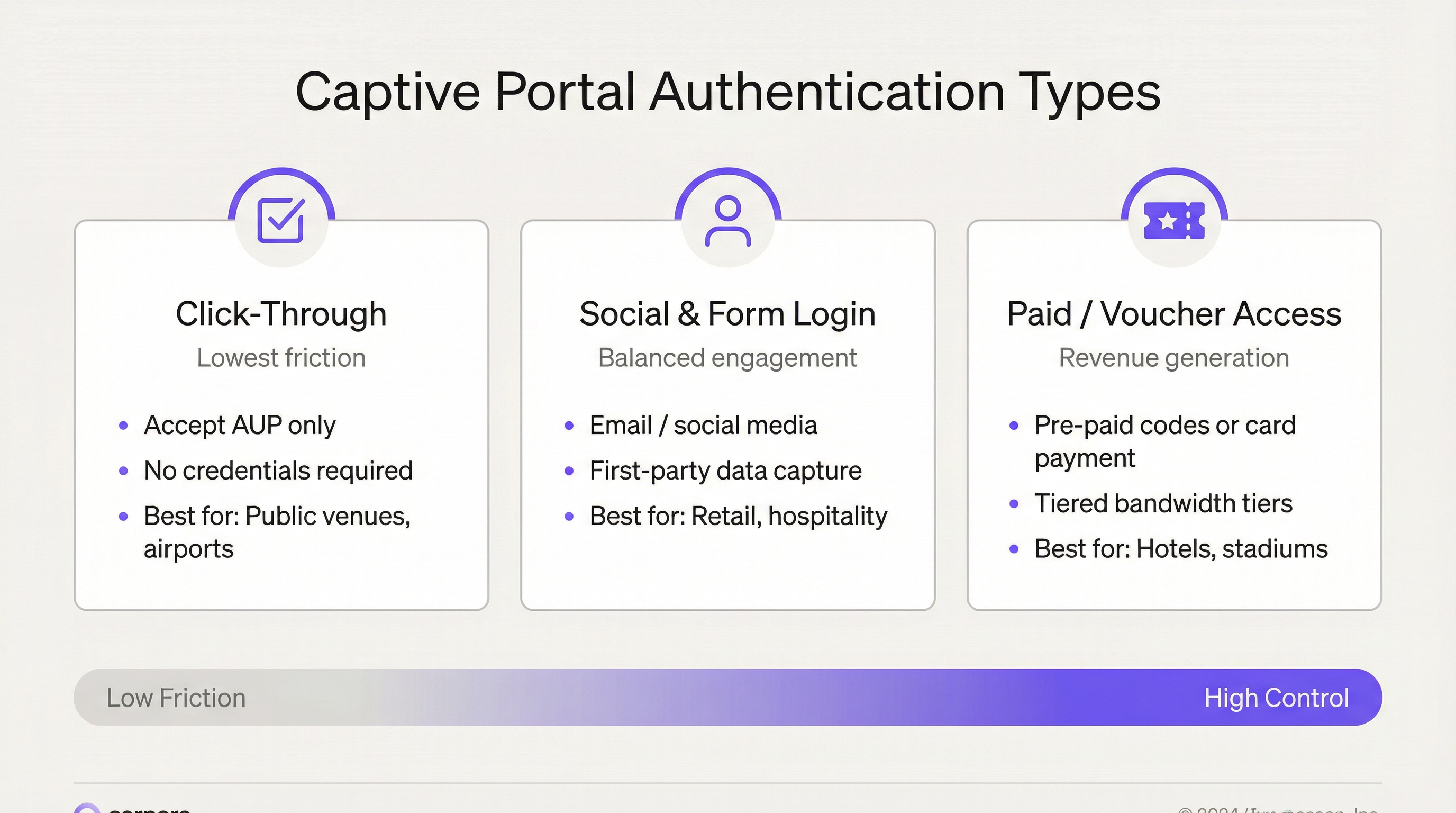
Captive Portal डिप्लॉयमेंटमध्ये ऑथेंटिकेशन मॉडेलची निवड हा सर्वात महत्त्वाचा निर्णय असतो. हे तुमची डेटा गुणवत्ता, तुमची कंप्लायन्स स्थिती आणि तुमचे वापरकर्ता अनुभव मेट्रिक्स निर्धारित करते.
| ऑथेंटिकेशन मॉडेल | तांत्रिक यंत्रणा | कॅप्चर केलेला डेटा | कंप्लायन्स गुंतागुंत | सर्वोत्तम उपयोग |
|---|---|---|---|---|
| क्लिक-थ्रू (केवळ AUP) | सिंगल चेकबॉक्स; MAC-आधारित सेशन ऑथोरायझेशन | डिव्हाइस MAC, टाइमस्टॅम्प, सेशन कालावधी | कमी — कोणताही वैयक्तिक डेटा संकलित केलेला नाही | सार्वजनिक क्षेत्र, ट्रान्सपोर्ट हब, लायब्ररी |
| ईमेल / फॉर्म नोंदणी | फॉर्म सबमिशन; सर्व्हर-साइड व्हॅलिडेशन; सेशन टोकन जारी केले | ईमेल, नाव, डेमोग्राफिक्स, ऑप्ट-इन स्थिती | मध्यम — GDPR संमती फ्लो आवश्यक | हॉस्पिटॅलिटी, रिटेल, कॉर्पोरेट कॅम्पस |
| सोशल लॉगिन (OAuth 2.0) | Facebook, Google, LinkedIn द्वारे OAuth 2.0 ऑथोरायझेशन फ्लो | सोशल प्रोफाइल डेटा (प्लॅटफॉर्म निर्बंधांच्या अधीन) | मध्यम-उच्च — थर्ड-पार्टी डेटा प्रोसेसिंग करार | हॉस्पिटॅलिटी, इव्हेंट्स, रिटेल |
| वाउचर / सशुल्क ॲक्सेस | पूर्व-व्युत्पन्न कोड किंवा पेमेंट गेटवे इंटिग्रेशन | ईमेल (पावतीसाठी), पेमेंट संदर्भ | मध्यम — नेटवर्कवर कार्ड पेमेंट असल्यास PCI DSS व्याप्ती | हॉटेल्स, स्टेडियम, कॉन्फरन्स सेंटर्स |
| PMS / रूम नंबर ऑथेंटिकेशन | प्रॉपर्टी मॅनेजमेंट सिस्टीम API सह इंटिग्रेशन | PMS रेकॉर्डवरून अतिथीची ओळख | कमी — हॉटेल बुकिंग अंतर्गत डेटा आधीच उपलब्ध | हॉटेल्स, रिसॉर्ट्स |
सोशल लॉगिन मॉडेलकडे विशेष लक्ष देणे आवश्यक आहे. Facebook आणि Google द्वारे OAuth 2.0 फ्लो एक घर्षणरहित वापरकर्ता अनुभव आणि अधिक समृद्ध डेमोग्राफिक डेटा प्रदान करतात, परंतु प्लॅटफॉर्म API बदलांनी थर्ड-पार्टी ॲप्लिकेशन्ससाठी ॲक्सेस करण्यायोग्य डेटा फील्ड्सवर उत्तरोत्तर निर्बंध आणले आहेत. नेटवर्क आर्किटेक्ट्सनी अशा डेटा पाइपलाइन्स डिझाइन करू नयेत ज्या सोशल प्रोफाइल फील्ड्सवर अवलंबून असतील जे भविष्यात बंद (deprecated) होऊ शकतात. स्पष्ट संमतीसह ईमेल कॅप्चर करणे ही सर्वात टिकाऊ फर्स्ट-पार्टी डेटा स्ट्रॅटेजी राहिली आहे.
नेटवर्क आर्किटेक्चर आणि सेगमेंटेशन
Captive Portal डिप्लॉयमेंटमध्ये योग्य नेटवर्क सेगमेंटेशन हे सर्वात महत्त्वाचे सिक्युरिटी कंट्रोल आहे. अतिथी नेटवर्क हे कॉर्पोरेट LAN, कोणतेही PCI-स्कोप केलेले कार्डधारक डेटा वातावरण आणि कोणत्याही ऑपरेशनल टेक्नॉलॉजी नेटवर्क्सपासून आर्किटेक्चरलदृष्ट्या वेगळे असले पाहिजे. शिफारस केलेले आर्किटेक्चर खालीलप्रमाणे आहे:
- समर्पित अतिथी SSID एका समर्पित VLAN (उदा. VLAN 100) वर मॅप केलेले असावे, ज्यामध्ये कॉर्पोरेट VLANs शी कोणतीही लेयर 2 संलग्नता नसावी.
- ॲक्सेस पॉइंट स्तरावर इंटर-क्लायंट आयसोलेशन लागू केले जावे, जे अतिथी उपकरणांना एकमेकांशी संवाद साधण्यापासून प्रतिबंधित करते.
- सर्व अतिथी ट्रॅफिकसाठी DMZ राउटिंग, इंटरनेट इग्रेसपूर्वी स्टेटफुल फायरवॉल तपासणीसह.
- DMZ मध्ये स्थित Captive Portal कंट्रोलर (हार्डवेअर, व्हर्च्युअल किंवा क्लाउड-मॅनेज्ड), जे रिडायरेक्ट लॉजिक, सेशन मॅनेजमेंट आणि पॉलिसी अंमलबजावणी हाताळते.
- अतिथी VLAN साठी स्वतंत्र DNS रिझोल्व्हर्स, DNSSEC व्हॅलिडेशन सक्षम करून.
मल्टी-साइट एंटरप्राइझ डिप्लॉयमेंट्ससाठी, Purple सारखे क्लाउड-मॅनेज्ड प्लॅटफॉर्म शेकडो ठिकाणांवर हे आर्किटेक्चर केंद्रीकृत करतात. पॉलिसी बदल — AUP मजकूर अपडेट करणे, नवीन सोशल लॉगिन प्रदाता जोडणे किंवा बँडविड्थ टियर्स सुधारणे — एकदाच पुश केले जाते आणि काही मिनिटांत जागतिक स्तरावर प्रसारित होते, ज्यामुळे प्रति-साइट कॉन्फिगरेशनचा ओव्हरहेड दूर होतो जो कंट्रोलर-आधारित डिप्लॉयमेंट्सना मोठ्या प्रमाणावर ऑपरेशनलदृष्ट्या महाग बनवतो.
अंमलबजावणी मार्गदर्शक
टप्पा 1: आवश्यकता आणि कंप्लायन्स स्कोपिंग
कोणतेही तांत्रिक कॉन्फिगरेशन सुरू करण्यापूर्वी, तुमच्या कंप्लायन्स जबाबदाऱ्या परिभाषित करा. EU आणि UK ऑपरेशन्ससाठी, GDPR कलम 6 नुसार वैयक्तिक डेटावर प्रक्रिया करण्यासाठी कायदेशीर आधार आवश्यक आहे. Captive Portal डिप्लॉयमेंट्ससाठी, हे सहसा संमती (कलम 6(1)(a)) किंवा कायदेशीर स्वारस्य (कलम 6(1)(f)) असते. मार्केटिंग डेटासाठी संमती हा अधिक स्पष्ट आधार आहे; सिक्युरिटी लॉगिंगसाठी कायदेशीर स्वारस्य लागू होऊ शकते. कलम 30 अंतर्गत तुमच्या रेकॉर्ड ऑफ प्रोसेसिंग ॲक्टिव्हिटीज (ROPA) मध्ये प्रत्येक डेटा श्रेणीसाठी तुमचा कायदेशीर आधार दस्तऐवजीकरण करा.
जर तुमचे ठिकाण तुमच्या अतिथी Wi-Fi सह इन्फ्रास्ट्रक्चर शेअर करणाऱ्या कोणत्याही नेटवर्कवर कार्ड पेमेंट्सवर प्रक्रिया करत असेल — अगदी शेअर केलेल्या अपलिंक स्विचेसद्वारे — तर तुम्ही तुमच्या PCI DSS व्याप्तीचे मूल्यांकन करणे आवश्यक आहे. सर्वात सुरक्षित दृष्टीकोन म्हणजे संपूर्ण नेटवर्क आयसोलेशन: अतिथी Wi-Fi एका स्वतंत्र भौतिक किंवा लॉजिकल आयसोलेटेड नेटवर्कवर असावे ज्याचा कार्डधारक डेटा वातावरणाशी कोणताही मार्ग नसावा.
टप्पा 2: नेटवर्क डिझाइन आणि इन्फ्रास्ट्रक्चर
तुमचा अतिथी SSID एका समर्पित VLAN वर डिप्लॉय करा. हे VLAN तुमच्या अपलिंक स्विचेसवर ट्रंक करा आणि पुढे जाण्यापूर्वी ट्रंक कॉन्फिगरेशन सत्यापित करा — चुकीचे कॉन्फिगर केलेले ट्रंक हे अतिथी अनवधानाने कॉर्पोरेट नेटवर्कवर दिसण्याचे सर्वात सामान्य कारण आहे. हाय-टर्नओव्हर वातावरणात IP ॲड्रेस कार्यक्षमतेने परत मिळवण्यासाठी अतिथी VLAN साठी कमी लीज वेळेसह (1-4 तास) DHCP कॉन्फिगर करा.
तुमचे Captive Portal डिप्लॉयमेंट मॉडेल निवडा: कंट्रोलर-आधारित (ऑन-प्रिमाइसेस हार्डवेअर किंवा व्हर्च्युअल अप्लायन्स) किंवा क्लाउड-मॅनेज्ड (SaaS प्लॅटफॉर्म). पाचपेक्षा जास्त साइट्स असलेल्या संस्थांसाठी, ऑपरेशनल कार्यक्षमतेसाठी क्लाउड-मॅनेज्डची जोरदार शिफारस केली जाते. Purple चे प्लॅटफॉर्म Cisco Meraki, Aruba, Ruckus आणि Ubiquiti सह 400 हून अधिक हार्डवेअर इंटिग्रेशन्सना सपोर्ट करते, ज्यामुळे विद्यमान ॲक्सेस पॉइंट इन्फ्रास्ट्रक्चर न बदलता डिप्लॉयमेंट शक्य होते.
टप्पा 3: पोर्टल कॉन्फिगरेशन आणि ब्रँडिंग
Purple च्या प्लॅटफॉर्मसह, पिक्सेल-परफेक्ट ब्रँड अलाइनमेंट आवश्यक असलेल्या संस्थांसाठी पूर्ण HTML/CSS ओव्हरराइडला सपोर्ट करणाऱ्या ड्रॅग-अँड-ड्रॉप एडिटरद्वारे स्प्लॅश पेज कस्टमायझेशन साध्य केले जाते. प्रमुख कॉन्फिगरेशन घटकांमध्ये हे समाविष्ट आहे:
- ब्रँड ॲसेट्स: लोगो, कलर पॅलेट, बॅकग्राउंड इमेजरी आणि फॉन्ट निवड.
- भाषा स्थानिकीकरण: Purple 25+ भाषांमध्ये स्वयंचलित डिव्हाइस भाषा शोधण्यास सपोर्ट करते, मॅन्युअल निवडीशिवाय वापरकर्त्याच्या डिव्हाइस भाषेत पोर्टल सादर करते.
- ऑथेंटिकेशन फ्लो: तुमची निवडलेली ऑथेंटिकेशन पद्धत(ती) कॉन्फिगर करा. एकाच वेळी अनेक पद्धती ऑफर केल्या जाऊ शकतात — उदाहरणार्थ, ईमेल नोंदणी आणि क्लिक-थ्रू — नोंदणी करण्यास इच्छुक नसलेल्या वापरकर्त्यांसाठी क्लिक-थ्रू पर्याय फॉलबॅक म्हणून उपलब्ध आहे.
- संमती व्यवस्थापन: AUP स्वीकृती (ॲक्सेससाठी आवश्यक) आणि मार्केटिंग ऑप्ट-इन (पर्यायी) साठी स्वतंत्र, स्वतंत्रपणे पर्यायी चेकबॉक्सेस कॉन्फिगर करा. मार्केटिंग चेकबॉक्स डीफॉल्टनुसार अनचेक केलेला असल्याची खात्री करा. पोर्टल पेजवरून तुमच्या गोपनीयता धोरणाची लिंक द्या.
- पोस्ट-ऑथेंटिकेशन रिडायरेक्ट: एक अर्थपूर्ण रिडायरेक्ट URL कॉन्फिगर करा — तुमचा लॉयल्टी प्रोग्राम, एक प्रमोशनल लँडिंग पेज किंवा तुमचे व्हेन्यू ॲप डाउनलोड पेज.
- सेशन पॅरामीटर्स: तुमच्या ठिकाणाच्या प्रकारानुसार योग्य सेशन कालावधी सेट करा. हॉटेल्स सहसा 24-तासांचे सेशन्स वापरतात; हाय-टर्नओव्हर रिटेल 4-8 तास वापरू शकतात; इव्हेंट्स इव्हेंट-कालावधीचे सेशन्स वापरू शकतात.
टप्पा 4: सिक्युरिटी हार्डनिंग
गो-लाइव्ह करण्यापूर्वी खालील सिक्युरिटी कंट्रोल्स लागू करा:
- एका विश्वसनीय CA कडून वैध TLS प्रमाणपत्रासह केवळ HTTPS वर पोर्टल डिप्लॉय करा. Let's Encrypt किंवा तुमच्या CA च्या ACME प्रोटोकॉल सपोर्टचा वापर करून प्रमाणपत्रे आपोआप रिन्यू करा. मॅन्युअल बॅकस्टॉप म्हणून कालबाह्य होण्याच्या 30 दिवस आधी कॅलेंडर रिमाइंडर सेट करा.
- अतिथी SSID वर 802.11w मॅनेजमेंट फ्रेम प्रोटेक्शन सक्षम करा. हे WPA3 अंतर्गत अनिवार्य आहे आणि इव्हिल ट्विन परिस्थितींमध्ये वापरल्या जाणाऱ्या डीऑथेंटिकेशन हल्ल्यांना कमी करते.
- तुमच्या अतिथी SSID नावाशी जुळणाऱ्या रोग (rogue) SSIDs वर अलर्ट करण्यासाठी वायरलेस इंट्रुजन डिटेक्शन कॉन्फिगर करा.
- बँडविड्थची मक्तेदारी टाळण्यासाठी आणि वैयक्तिक उपकरणांकडून होणारे डिनायल-ऑफ-सर्व्हिस कमी करण्यासाठी ॲक्सेस पॉइंट स्तरावर प्रति-वापरकर्ता रेट लिमिटिंग सक्षम करा.
- सेशन टाइमआउट आणि आयडल टाइमआउट पॉलिसीज कॉन्फिगर करा. 30-60 मिनिटांचा आयडल टाइमआउट ठिकाण सोडलेल्या उपकरणांकडून गेटवे सेशन्स परत मिळवतो.
टप्पा 5: टेस्टिंग आणि गो-लाइव्ह
गो-लाइव्ह करण्यापूर्वी खालील डिव्हाइस/OS संयोजनांवर संपूर्ण ऑथेंटिकेशन फ्लोची चाचणी करा: iOS Safari (नवीनतम), Android Chrome (नवीनतम), Windows 11 Edge, macOS Safari आणि Android Firefox. iOS आणि Android वर CNA पॉप-अप योग्यरित्या ट्रिगर होत असल्याचे सत्यापित करा. प्रमाणपत्राच्या वैधतेची चाचणी करा — ब्राउझरमध्ये थेट पोर्टल URL वर नेव्हिगेट करा आणि कोणत्याही प्रमाणपत्र चेतावणी नसल्याची पुष्टी करा. पोस्ट-ऑथेंटिकेशन रिडायरेक्टची चाचणी करा. लागू असल्यास बँडविड्थ टियर अंमलबजावणीची चाचणी करा. चाचणी परिणामांचे दस्तऐवजीकरण करा.
सर्वोत्तम पद्धती
सुरक्षिततेच्या सर्वोत्तम पद्धती
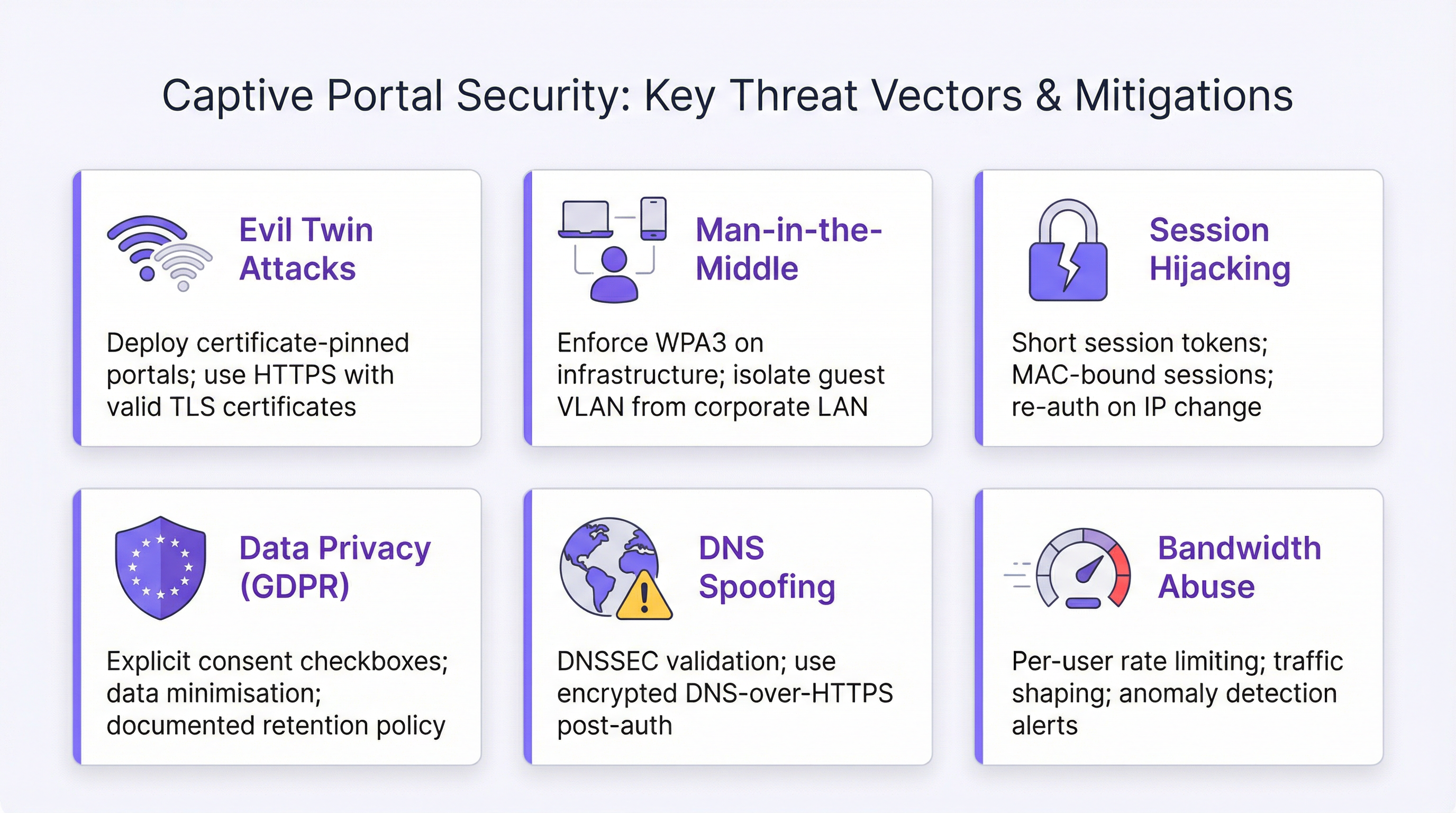
Captive Portal WiFi शी संबंधित सर्वात महत्त्वपूर्ण सुरक्षा धोके म्हणजे इव्हिल ट्विन अटॅक्स, मॅन-इन-द-मिडल इंटरसेप्शन, सेशन हायजॅकिंग आणि DNS स्पूफिंग. प्रत्येकासाठी एक निश्चित शमन धोरण आहे.
वैध TLS प्रमाणपत्रांसह HTTPS अंमलबजावणी, 802.11w मॅनेजमेंट फ्रेम प्रोटेक्शन आणि वायरलेस IDS मॉनिटरिंगद्वारे इव्हिल ट्विन अटॅक्स कमी केले जातात. जर हल्लेखोर तुमच्या पोर्टल डोमेनसाठी वैध प्रमाणपत्र मिळवू शकत नसेल तर रोग (rogue) AP शी कनेक्ट होणाऱ्या वापरकर्त्याला प्रमाणपत्र चेतावणी मिळेल — जे ते करू शकत नाहीत, असे गृहीत धरून की तुमचे डोमेन योग्यरित्या नियंत्रित आहे.
कठोर VLAN सेगमेंटेशन, इंटर-क्लायंट आयसोलेशन आणि सर्व अतिथी ट्रॅफिकला स्टेटफुल फायरवॉलद्वारे राउट करून मॅन-इन-द-मिडल इंटरसेप्शन हाताळले जाते. ऑथेंटिकेशननंतर, वापरकर्त्यांना HTTPS वर साइट्सशी कनेक्ट होण्यासाठी प्रोत्साहित करा — पोस्ट-ऑथेंटिकेशन लँडिंग पेजवरील एक नोंद पुरेशी आहे.
एकमेव ऑथोरायझेशन आयडेंटिफायर म्हणून MAC ॲड्रेसऐवजी सेशन टोकन्स वापरून, योग्य सेशन कालावधी सेट करून आणि IP ॲड्रेस बदलांवर री-ऑथेंटिकेशन ट्रिगर्स लागू करून सेशन हायजॅकिंग कमी केले जाते. लक्षात घ्या की MAC ॲड्रेस रँडमायझेशन — जे iOS 14+, Android 10+ आणि Windows 10+ वर डीफॉल्टनुसार सक्षम असते — याचा अर्थ MAC-आधारित सेशन पर्सिस्टन्स आता विश्वसनीय राहिलेला नाही. ऑथेंटिकेटेड ओळखीशी जोडलेले सेशन टोकन्स हा योग्य दृष्टीकोन आहे.
तुमच्या अतिथी DNS रिझोल्व्हर्सवरील DNSSEC व्हॅलिडेशनद्वारे आणि ऑथेंटिकेशननंतर अतिथी ट्रॅफिकसाठी DNS-over-HTTPS ला प्रोत्साहित करून किंवा लागू करून DNS स्पूफिंग हाताळले जाते.
GDPR कंप्लायन्स चेकलिस्ट
UK आणि EU अधिकारक्षेत्रांमध्ये GDPR-कंप्लायंट Captive Portal ऑपरेशनसाठी खालील कंट्रोल्स आवश्यक आहेत:
- संमती चेकबॉक्सेस डीफॉल्टनुसार अनचेक केलेले असावेत.
- AUP स्वीकृती आणि मार्केटिंग ऑप्ट-इनसाठी स्वतंत्र, स्वतंत्रपणे पर्यायी चेकबॉक्सेस.
- कोणता डेटा संकलित केला जातो आणि का, याचे स्पष्ट, सोप्या भाषेतील वर्णन.
- पोर्टल पेजवर गोपनीयता धोरणाची लिंक.
- दस्तऐवजीकरण केलेले डेटा रिटेन्शन आणि डिलीशन धोरण.
- सर्व थर्ड-पार्टी प्रोसेसर्स (CRM प्लॅटफॉर्म्स, ॲनालिटिक्स टूल्स) सोबत डेटा प्रोसेसिंग करार.
- Captive Portal डेटा संकलनाचा समावेश असलेली रेकॉर्ड ऑफ प्रोसेसिंग ॲक्टिव्हिटीज (ROPA) एंट्री.
- 30 दिवसांच्या आत सब्जेक्ट ॲक्सेस विनंत्यांना प्रतिसाद देण्याची प्रक्रिया.
- विनंतीनुसार डेटा हटवण्याची प्रक्रिया.
ऑपरेशनल सर्वोत्तम पद्धती
एंटरप्राइझ Captive Portal डिप्लॉयमेंट्समधील सर्वात सामान्य ऑपरेशनल अपयश म्हणजे "सेट अँड फरगेट" पॅटर्न: पोर्टल डिप्लॉय केले जाते, ते काम करते आणि जोपर्यंत काहीतरी बिघडत नाही तोपर्यंत त्याकडे लक्ष दिले जात नाही. खालील गोष्टींचा समावेश असलेला त्रैमासिक ऑपरेशनल रिव्ह्यू लागू करा: TLS प्रमाणपत्र कालबाह्यता तारखा, सोशल लॉगिन API की वैधता, गोपनीयता धोरण लिंकची अखंडता, AUP मजकुराची अद्ययावतता (विशेषतः नियामक बदलांनंतर), आणि सर्व समर्थित OS/ब्राउझर संयोजनांवर ऑथेंटिकेशन फ्लो टेस्टिंग.
ट्रबलशूटिंग आणि रिस्क मिटिगेशन
सामान्य फेल्युअर मोड्स
| फेल्युअर मोड | लक्षणे | मूळ कारण | उपाय |
|---|---|---|---|
| iOS वर पोर्टल न दिसणे | डिव्हाइस कनेक्ट होते परंतु CNA पॉप-अप नाही | फायरवॉलद्वारे ॲपल प्रोब ब्लॉक केले | captive.apple.com वर आउटबाउंड HTTP ला अनुमती द्या; DNS योग्यरित्या रिझोल्व्ह होत असल्याची खात्री करा |
| पोर्टलवर प्रमाणपत्र चेतावणी | ब्राउझर "Not Secure" चेतावणी दर्शवतो | कालबाह्य झालेले किंवा सेल्फ-साइंड TLS प्रमाणपत्र | प्रमाणपत्र रिन्यू करा; ऑटो-रिन्यूअल कॉन्फिगर करा |
| रिडायरेक्ट लूप | वापरकर्ता अनंत रिडायरेक्टमध्ये अडकला | चुकीचे कॉन्फिगर केलेले पोस्ट-ऑथेंटिकेशन रिडायरेक्ट URL किंवा फायरवॉल नियम अपडेट केलेला नाही | फायरवॉल सेशन ऑथोरायझेशन सत्यापित करा; रिडायरेक्ट URL कॉन्फिगरेशन तपासा |
| सोशल लॉगिन अपयश | OAuth फ्लो एरर देतो | API की कालबाह्य झाली किंवा प्लॅटफॉर्म परवानगी बदलली | API कीज पुन्हा जनरेट करा; परवानगी बदलांसाठी प्लॅटफॉर्म डेव्हलपर कन्सोलचे पुनरावलोकन करा |
| कॉर्पोरेट नेटवर्कवर अतिथी | अतिथी उपकरणे कॉर्पोरेट VLAN मध्ये दिसतात | VLAN ट्रंक चुकीचे कॉन्फिगरेशन | अपलिंक स्विचवर VLAN ट्रंक सत्यापित करा; SSID-to-VLAN मॅपिंगची पुष्टी करा |
| MAC रँडमायझेशन सेशन्स खंडित करते | पुन्हा कनेक्ट केल्यावर वापरकर्त्यांना लॉगिनसाठी पुन्हा प्रॉम्प्ट केले जाते | रँडमाइज्ड MACs सह MAC-आधारित सेशन पर्सिस्टन्स अपयशी ठरते | टोकन-आधारित सेशन मॅनेजमेंटवर स्विच करा; सेशन कालावधी वाढवा |
| बँडविड्थ टियर लागू नाही | प्रीमियम वापरकर्त्यांना मोफत वापरकर्त्यांइतकाच थ्रूपुट मिळतो | AP स्तरावर QoS पॉलिसी लागू केलेली नाही | केवळ गेटवेवरच नाही तर ॲक्सेस पॉइंटवर प्रति-वापरकर्ता रेट लिमिटिंग कॉन्फिगर करा |
रिस्क रजिस्टर
एंटरप्राइझ रिस्क मॅनेजमेंटच्या उद्देशाने, Captive Portal डिप्लॉयमेंट्सशी संबंधित प्रमुख धोके आणि त्यांचे उपाय खालीलप्रमाणे आहेत. GDPR नॉन-कंप्लायन्स (शक्यता: मध्यम, प्रभाव: उच्च) दस्तऐवजीकरण केलेले संमती फ्लो, ROPA एंट्रीज आणि त्रैमासिक कंप्लायन्स रिव्ह्यूजद्वारे कमी केले जाते. TLS प्रमाणपत्र कालबाह्यता (शक्यता: मध्यम, प्रभाव: उच्च — पोर्टल ॲक्सेस करण्यायोग्य राहत नाही) स्वयंचलित प्रमाणपत्र रिन्यूअल आणि कॅलेंडर-आधारित मॉनिटरिंगद्वारे कमी केले जाते. इव्हिल ट्विन अटॅक (शक्यता: कमी, प्रभाव: उच्च) 802.11w, WIDS मॉनिटरिंग आणि HTTPS अंमलबजावणीद्वारे कमी केला जातो. अतिथी नेटवर्कद्वारे डेटा ब्रीच (शक्यता: कमी, प्रभाव: खूप उच्च) कठोर VLAN सेगमेंटेशन आणि फायरवॉल पॉलिसीद्वारे कमी केले जाते.
ROI आणि बिझनेस इम्पॅक्ट

गुंतवणुकीवरील परतावा (ROI) मोजणे
Captive Portal WiFi डिप्लॉयमेंटचा ROI तीन आयामांमध्ये मोजला जातो: थेट महसूल निर्मिती, ऑपरेशनल खर्चात कपात, आणि मार्केटिंग आणि डेटा मूल्य.
थेट महसूल निर्मिती प्रामुख्याने टियर्ड ॲक्सेस ऑफर करणाऱ्या ठिकाणांना लागू होते — हॉटेल्स, स्टेडियम्स आणि कॉन्फरन्स सेंटर्स जे प्रीमियम बँडविड्थ पॅकेजेस विकतात. 30% अतिथींना प्रीमियम Wi-Fi साठी दररोज £5 आकारणारे 200-खोल्यांचे हॉटेल अशा डिप्लॉयमेंटमधून अंदाजे £110,000 वार्षिक वाढीव महसूल व्युत्पन्न करते ज्याची किंमत त्या आकड्याच्या अगदीच कमी असते.
ऑपरेशनल खर्चात कपात केंद्रीकृत व्यवस्थापनाद्वारे चालविली जाते. Purple चे एंटरप्राइझ ग्राहक कंट्रोलर-आधारित वरून क्लाउड-मॅनेज्ड डिप्लॉयमेंट्समध्ये स्थलांतरित झाल्यानंतर ऑन-साइट IT इंजिनिअरच्या भेटींमध्ये 90% घट झाल्याचे नोंदवतात. 200 ठिकाणे असलेल्या रिटेल चेनसाठी, प्रति भेट £150 दराने प्रति साइट प्रति वर्ष दोन इंजिनिअर भेटी काढून टाकल्यास वार्षिक £60,000 ची बचत होते.
मार्केटिंग आणि डेटा मूल्य हा सर्वात धोरणात्मकदृष्ट्या महत्त्वपूर्ण आयाम आहे. मार्केटिंग संमतीसह ईमेल ॲड्रेस कॅप्चर करणारे Captive Portal एक फर्स्ट-पार्टी डेटा ॲसेट तयार करते जे अधिकाधिक मौल्यवान होत आहे कारण थर्ड-पार्टी कुकी डेप्रिकेशन पर्यायी डेटा स्रोत काढून टाकत आहे. Purple चे प्लॅटफॉर्म 400 हून अधिक CRM आणि मार्केटिंग ऑटोमेशन कनेक्टर्ससह इंटिग्रेट होते, ज्यामुळे कॅप्चर केलेला डेटा थेट Salesforce, HubSpot, Mailchimp आणि तत्सम प्लॅटफॉर्म्समध्ये प्रवाहित होऊ शकतो. ॲनालिटिक्स लेयर — फूटफॉल हीटमॅप्स, ड्वेल टाइम ॲनालिसिस, रिपीट व्हिजिटर आयडेंटिफिकेशन आणि पीक अवर रिपोर्टिंग — ऑपरेशनल इंटेलिजन्स प्रदान करते जे स्टाफिंग, स्टोअर लेआउट आणि प्रमोशनल टायमिंगच्या निर्णयांची माहिती देते.
की परफॉर्मन्स इंडिकेटर्स (KPIs)
| KPI | व्याख्या | टार्गेट बेंचमार्क |
|---|---|---|
| पोर्टल ॲडॉप्शन रेट | ऑथेंटिकेशन पूर्ण करणाऱ्या कनेक्टेड उपकरणांची % | हॉस्पिटॅलिटीसाठी >60%; रिटेलसाठी >40% |
| डेटा कॅप्चर रेट | ईमेल ॲड्रेस प्रदान करणाऱ्या ऑथेंटिकेटेड सेशन्सची % | फॉर्म-आधारित पोर्टल्ससाठी >50% |
| मार्केटिंग ऑप्ट-इन रेट | मार्केटिंगला संमती देणाऱ्या ऑथेंटिकेटेड सेशन्सची % | हॉस्पिटॅलिटीसाठी 20-35% सामान्य आहे |
| सेशन कालावधी | ऑथेंटिकेशननंतर डिव्हाइस कनेक्ट राहण्याची सरासरी वेळ | ठिकाणावर अवलंबून; कालांतराने ट्रेंड्सचा मागोवा घ्या |
| रिपीट व्हिजिटर रेट | पूर्वी पाहिलेल्या ओळखींमधून ऑथेंटिकेटेड सेशन्सची % | लॉयल्टी दर्शवते; रिटेलसाठी टार्गेट >30% |
| पोर्टल अपटाइम | पोर्टल उपलब्ध आणि कार्यरत असण्याची % वेळ | >99.9% SLA टार्गेट |
| TLS प्रमाणपत्र उर्वरित दिवस | प्रमाणपत्र कालबाह्य होईपर्यंतचे दिवस | अलर्ट थ्रेशोल्ड: <30 दिवस |
केस स्टडी: ब्रुसेल्स साउथ शार्लरोई विमानतळ
ब्रुसेल्स साउथ शार्लरोई विमानतळाने त्यांच्या टर्मिनलवर अतिथी Wi-Fi व्यवस्थापित करण्यासाठी Purple चे Captive Portal प्लॅटफॉर्म डिप्लॉय केले. या डिप्लॉयमेंटने प्रति इव्हेंट 25% फॅन कनेक्शन रेट साध्य केला, पहिल्या 24 महिन्यांत 9.2 दशलक्ष ग्राहक भेटी कॅप्चर केल्या आणि गुंतवणुकीवर 842% परतावा दिला. पोर्टलच्या सर्व्हे इंटिग्रेशनने रिअल-टाइम प्रवासी समाधान डेटा संकलन सक्षम केले, महागड्या मॅन्युअल सर्व्हे प्रक्रिया बदलल्या आणि व्हेन्यू मॅनेजमेंटला ॲक्शनेबल ऑपरेशनल इंटेलिजन्स प्रदान केले.
केस स्टडी: प्रमुख UK रिटेल चेन
150+ ठिकाणी कार्यरत असलेल्या एका प्रमुख UK रिटेल चेनने अतिथी Wi-Fi व्यवस्थापन आणि ॲनालिटिक्स एकत्रित करण्यासाठी Purple चे प्लॅटफॉर्म डिप्लॉय केले. डिप्लॉयमेंटपूर्वी, चेनला इन-स्टोअर ड्वेल टाइम, फूटफॉल पॅटर्न्स किंवा Wi-Fi वापर आणि खरेदी वर्तन यांच्यातील संबंधांबद्दल कोणतीही माहिती नव्हती. डिप्लॉयमेंटनंतर, ॲनालिटिक्स लेयरने ओळखले की कॅफे क्षेत्रात सरासरीपेक्षा जास्त ड्वेल टाइम असलेल्या स्टोअर्समध्ये सरासरी ट्रान्झॅक्शन व्हॅल्यू 23% जास्त होती. या इनसाइटमुळे स्टोअर लेआउट रीडिझाइन प्रोग्राम चालविला गेला ज्याने दोन तिमाहींमध्ये मोजता येण्याजोगी महसूल वाढ दिली. केंद्रीकृत व्यवस्थापन क्षमतेने प्रति-साइट कॉन्फिगरेशन व्यवस्थापन दूर करून IT ऑपरेशनल ओव्हरहेड कमी केला, इंजिनिअरच्या भेटींमध्ये 90% घट झाल्यामुळे संपूर्ण इस्टेटमध्ये लक्षणीय वार्षिक खर्चात बचत झाली.
Key Terms & Definitions
Captive WiFi Portal
A network access control mechanism that intercepts unauthenticated HTTP/HTTPS traffic from newly connected devices and redirects it to a web-based landing page. The user must complete a defined action — accepting terms, submitting credentials, or making a payment — before the network gateway grants full internet access. The portal creates a 'walled garden' that controls the initial network access event.
IT teams encounter this term when specifying guest Wi-Fi requirements, evaluating network access control solutions, or auditing existing deployments. It is the foundational concept for all guest connectivity management in hospitality, retail, events, and public-sector environments.
Captive Network Assistant (CNA)
A built-in OS mechanism that detects the presence of a captive portal and automatically launches a lightweight browser window to display the portal page. iOS probes captive.apple.com, Android probes connectivitycheck.gstatic.com, and Windows uses Network Location Awareness. When these probes return unexpected responses, the CNA triggers automatically.
Network architects must ensure their firewall and DNS configuration does not inadvertently block CNA probes, as this prevents the portal from appearing automatically on user devices — the most common cause of 'portal not showing' support tickets.
VLAN (Virtual Local Area Network)
A logical network segmentation technique that isolates traffic at Layer 2 of the OSI model. In captive portal deployments, the guest SSID is mapped to a dedicated VLAN that is architecturally isolated from corporate VLANs, preventing guest traffic from reaching internal systems.
VLAN configuration is the foundational security control in any captive portal deployment. Misconfigured VLAN trunking — where the guest VLAN is not properly isolated from corporate VLANs — is the most common and most serious security failure mode in enterprise guest Wi-Fi deployments.
OAuth 2.0
An open authorisation framework (RFC 6749) that enables third-party applications to obtain limited access to user accounts on platforms such as Facebook, Google, and LinkedIn. In captive portal deployments, OAuth 2.0 is used to implement social login — the user authorises the portal to access their social profile, providing identity verification without requiring a separate account.
IT teams evaluating social login authentication must understand that OAuth 2.0 introduces a dependency on third-party API availability and is subject to platform policy changes that may restrict the data fields accessible to the portal application. Social platform API changes have historically reduced the demographic data available via social login without advance notice.
IEEE 802.11w (Management Frame Protection)
An IEEE 802.11 amendment that provides cryptographic protection for management frames — the control messages that govern Wi-Fi association, disassociation, and authentication. Without 802.11w, management frames can be spoofed by attackers to force device disconnection (deauthentication attacks), a technique used in evil twin attacks. 802.11w is mandatory under WPA3.
Network architects deploying captive portals in high-risk environments (airports, financial institutions, healthcare) should enable 802.11w on guest SSIDs where supported by the access point hardware. It significantly raises the bar for evil twin attacks by preventing the deauthentication frames that force devices to reconnect to a rogue AP.
GDPR Article 30 (Record of Processing Activities)
A GDPR requirement for organisations processing personal data to maintain a documented record of all data processing activities, including the categories of data processed, the purposes of processing, data retention periods, and details of any third-party processors. Captive portal deployments that collect personal data (email addresses, social profile data) must have a corresponding ROPA entry.
IT managers are frequently responsible for ensuring that new data collection systems — including captive portals — are documented in the organisation's ROPA before go-live. Failure to maintain an accurate ROPA is a GDPR compliance gap that can result in ICO enforcement action, particularly following a data breach.
PCI DSS (Payment Card Industry Data Security Standard)
A set of security standards established by the PCI Security Standards Council to protect cardholder data. For captive portal deployments in retail environments, PCI DSS requires complete network isolation between the guest Wi-Fi network and any system that stores, processes, or transmits cardholder data (the Cardholder Data Environment, or CDE).
Retail IT teams must assess PCI DSS scope when deploying guest Wi-Fi. If the guest Wi-Fi network shares any infrastructure — switches, uplinks, or firewalls — with the PCI-scoped network, the guest network may be brought into PCI scope, significantly increasing compliance obligations and audit costs.
MAC Address Randomisation
A privacy feature enabled by default on iOS 14+, Android 10+, and Windows 10+ that generates a random MAC address for each Wi-Fi network a device connects to, rather than using the device's hardware MAC address. This prevents cross-network tracking of devices by their MAC address.
MAC address randomisation directly impacts captive portal session management and analytics. Any system that uses MAC addresses as stable device identifiers for repeat visitor detection, session persistence, or security policy enforcement will produce incorrect results on modern devices. The correct approach is to use authenticated identity (email, social profile ID) as the stable identifier.
Walled Garden
A network configuration in which unauthenticated devices have access only to a restricted set of IP addresses and URLs — typically the captive portal itself and any resources required for the portal to function (CDN assets, OAuth endpoints) — while all other internet traffic is blocked until authentication is complete.
IT teams configuring captive portals must carefully define the walled garden whitelist. Common omissions include: the portal's CDN asset URLs (causing the portal page to render without styling), Apple's CNA probe URL (causing the portal not to appear on iOS), and OAuth provider endpoints (causing social login to fail). A well-documented walled garden configuration is essential for reliable portal operation.
DSCP (Differentiated Services Code Point)
A field in the IP packet header used to classify and manage network traffic for Quality of Service (QoS) purposes. In captive portal deployments with tiered bandwidth, DSCP marking is used to classify traffic from premium-tier users so that QoS policies at the access point and gateway can enforce differentiated throughput limits.
IT teams implementing paid bandwidth tiers must configure DSCP marking and corresponding QoS policies at the access point level, not only at the gateway. Gateway-only QoS policies may not differentiate traffic correctly when multiple users share the same access point, resulting in premium users receiving the same throughput as free-tier users.
Case Studies
A 350-room international hotel needs to deploy a captive wifi portal that authenticates guests using their room number and surname, captures email addresses for the loyalty programme, complies with GDPR, and provides tiered bandwidth (free standard / paid premium at £8/day). The hotel uses Opera PMS and Cisco Meraki access points. What is the recommended deployment architecture and configuration?
The recommended deployment uses Purple's enterprise platform integrated with Cisco Meraki via the Meraki API. Step 1: Configure a dedicated guest SSID on Meraki mapped to VLAN 200, with client isolation enabled and a separate DHCP scope (e.g., 10.200.0.0/22 providing up to 1,022 addresses for a 350-room hotel with multiple devices per guest). Step 2: Configure Purple as the captive portal controller, pointing the Meraki splash page URL to Purple's hosted portal endpoint. Step 3: Enable the Opera PMS integration in Purple's connector library. Configure the authentication flow to present a room number and surname form as the primary authentication method, with email address capture as a mandatory second step post-PMS validation. Step 4: Configure the GDPR consent flow: AUP acceptance checkbox (required, unchecked by default) and marketing opt-in checkbox (optional, unchecked by default) with a link to the hotel's privacy policy. Step 5: Configure two bandwidth tiers in Purple — Standard (5 Mbps down / 2 Mbps up) and Premium (25 Mbps down / 10 Mbps up). Integrate with a payment gateway (Stripe is supported) for the Premium tier purchase flow. Configure Meraki QoS policies using DSCP marking to enforce tier differentiation at the AP level. Step 6: Set session duration to 24 hours with a 60-minute idle timeout. Step 7: Configure post-authentication redirect to the hotel's loyalty programme enrolment page. Step 8: Enable Purple's analytics dashboard and configure a CRM connector to push captured email addresses and opt-in status to the hotel's CRM platform. Test on iOS Safari, Android Chrome, and Windows Edge before go-live.
A national retail chain with 180 stores wants to deploy a unified captive wifi portal programme. Requirements: email capture with marketing consent, footfall analytics by store, GDPR compliance, integration with Salesforce Marketing Cloud, and no replacement of existing Aruba access points. The IT team has three engineers for the entire estate. How should this be structured?
This is a cloud-managed deployment scenario where on-premises infrastructure is non-negotiable. Step 1: Audit existing Aruba infrastructure for firmware versions and confirm compatibility with Purple's Aruba integration (Purple supports Aruba Instant and Aruba Central deployments). Step 2: Configure a standardised guest SSID template in Purple — one configuration that will be pushed to all 180 stores. Define VLAN assignment, DHCP parameters, and firewall policy in the template. Step 3: Design the portal template: brand assets, email registration form with separate AUP and marketing opt-in checkboxes, and a post-auth redirect to the chain's loyalty app download page. Configure the portal in 25+ languages to support stores in international markets if applicable. Step 4: Configure the Salesforce Marketing Cloud connector in Purple. Map captured fields (email, first name, opt-in status, store ID, visit timestamp) to the corresponding Salesforce objects. Ensure a Data Processing Agreement is in place with Salesforce. Step 5: Enable Purple's footfall analytics. Configure store-level dashboards showing daily unique visitors, peak hours, dwell time, and repeat visitor rate. Set up automated weekly reports delivered to store managers and a consolidated estate-level report for the IT and marketing leadership teams. Step 6: Roll out in waves — pilot with 10 stores, validate data flows and Salesforce integration, then deploy remaining 170 stores. With cloud management, each store deployment requires only VLAN configuration on the local switch and SSID assignment on existing APs — typically 30–45 minutes per site for a trained engineer. Step 7: Document all data flows in the ROPA. Establish a quarterly operational review process.
A 60,000-capacity stadium is deploying captive wifi for matchday use. Expected peak concurrent users: 18,000. Requirements: fast authentication (under 10 seconds), event-duration sessions, sponsor branding on the portal, data capture for the club's CRM, and integration with the club's ticketing system for fan verification. What are the key technical considerations and recommended architecture?
High-density stadium deployments require specific architectural decisions that differ from hospitality or retail scenarios. Step 1: Capacity planning. With 18,000 concurrent users, the DHCP scope must accommodate at least 25,000 addresses (allowing for churn). Use a /17 or /16 subnet for the guest VLAN. Configure DHCP lease times of 4 hours (event duration) rather than the default 24 hours to prevent address exhaustion across multiple events. Step 2: Authentication performance. Click-through with email capture is the recommended model for stadium deployments — social login OAuth flows introduce latency and depend on external API availability, which is a risk in high-concurrency scenarios. Configure the portal to be served from a CDN-backed endpoint to minimise latency under load. Step 3: Ticketing system integration. Configure a custom authentication field for ticket barcode or booking reference, validated against the ticketing system API. This provides fan identity verification and links Wi-Fi sessions to ticketing records, enabling post-event CRM segmentation by stand, ticket tier, and attendance frequency. Step 4: Sponsor branding. Purple's platform supports interstitial video and branded splash pages. Configure a sponsor-branded portal with the club's primary and secondary sponsors' assets. Rotate sponsor branding by event type if required. Step 5: Session management. Set session duration to match event duration (typically 3–4 hours) with no idle timeout — fans moving around the stadium should not be re-prompted. Step 6: Analytics. Configure Purple's real-time dashboard for the venue operations team, showing live concurrent connections by zone, authentication rate, and bandwidth utilisation.
Scenario Analysis
Q1. A conference centre hosts 50 events per year, ranging from 200-person seminars to 3,000-person trade shows. The venue's IT team has proposed a single captive portal configuration for all events, using click-through authentication with a generic venue-branded splash page. The sales team wants event-specific sponsor branding and delegate data capture for each event organiser. How would you resolve this conflict, and what is the recommended architecture?
💡 Hint:Consider whether a single portal configuration can serve both the IT team's operational simplicity requirement and the sales team's per-event customisation requirement. Evaluate whether Purple's platform supports per-event portal configurations managed from a central account.
Show Recommended Approach
The conflict is resolvable without choosing between operational simplicity and commercial flexibility. The recommended architecture uses Purple's multi-portal capability, where a single platform account manages multiple portal configurations — one per event or event type — all deployed to the same physical access point infrastructure. The IT team maintains a single platform to manage, while the sales team (or event organisers, via delegated access) can configure event-specific branding, authentication flows, and data capture fields for each event. The recommended authentication model for conference events is email registration with marketing opt-in, not click-through — event organisers have a legitimate commercial interest in capturing delegate contact data, and click-through provides no value for post-event follow-up. Configure a base portal template with the venue's brand framework, then allow per-event customisation of sponsor logos, colour accents, and post-auth redirect URLs. Set session duration to event duration (typically 8-10 hours for a full-day event). Configure data export per event so each organiser receives only their delegates' data, not a combined dataset from all events — this is both a GDPR requirement (data minimisation) and a commercial necessity. The GDPR consent flow must be configured so that the marketing opt-in clearly identifies the event organiser as the data controller, not the venue — or alternatively, the venue acts as data processor under a Data Processing Agreement with each event organiser.
Q2. Your organisation's security audit has flagged that the existing captive portal deployment uses a self-signed TLS certificate, has no inter-client isolation configured, and the guest VLAN is on the same /16 subnet as the corporate network (different VLANs, but same IP range with no firewall between them). Prioritise the remediation actions and explain your reasoning.
💡 Hint:Assess each finding by its potential impact and exploitability. Consider which finding represents an active risk to corporate data versus which represents a user experience or compliance issue.
Show Recommended Approach
Prioritise remediation in the following order. Priority 1 (Immediate): The absence of a firewall between the guest VLAN and the corporate network is a critical vulnerability. Even with VLAN separation, if there is no stateful firewall enforcing policy between the VLANs, a guest device that obtains or guesses a corporate IP address can potentially reach corporate systems. This is an active data breach risk. Remediation: implement a stateful firewall rule set that explicitly denies all traffic from the guest VLAN to the corporate VLAN, with logging enabled. This must be done before any other remediation. Priority 2 (Within 48 hours): Enable inter-client isolation on the guest SSID. Without it, guest devices can communicate directly with each other at Layer 2, enabling ARP poisoning, traffic interception between guests, and lateral movement within the guest network. Priority 3 (Within one week): Replace the self-signed TLS certificate with a certificate from a trusted CA. A self-signed certificate triggers browser warnings that train users to ignore certificate errors — a conditioning that makes them vulnerable to future MITM attacks. Use Let's Encrypt for automated, free certificate issuance and renewal. The self-signed certificate is a compliance and user experience issue rather than an active data breach risk, which is why it is Priority 3 rather than Priority 1 — but it must be remediated within the same change window if possible.
Q3. A 500-store UK retail chain is preparing for a GDPR audit. The DPO has identified that the captive portal has been collecting email addresses and marketing opt-ins for three years, but the consent flow has a pre-checked marketing opt-in checkbox. The DPO estimates that approximately 2.3 million email records in the CRM may have been collected under invalid consent. What are the immediate actions required, and how should the organisation remediate the historical data issue?
💡 Hint:Consider both the forward-looking remediation (fixing the consent flow) and the backward-looking remediation (handling the 2.3 million potentially invalid consent records). Reference GDPR Article 7 on conditions for consent and the ICO's guidance on consent.
Show Recommended Approach
Immediate actions: First, fix the portal consent flow today. Remove the pre-checked marketing opt-in checkbox and replace it with an unchecked checkbox. This stops the ongoing collection of invalid consent and is the highest-priority action. Second, document the change with a timestamp and retain evidence for the audit. Third, notify the DPO and legal counsel — this is a reportable compliance gap that should be disclosed proactively to the ICO rather than discovered during audit. For the historical 2.3 million records: GDPR Article 7(1) requires that the controller be able to demonstrate that consent was given. A pre-checked checkbox does not constitute valid consent under GDPR Recital 32, which explicitly states that silence, pre-ticked boxes or inactivity should not constitute consent. The organisation has three options for the historical records. Option 1 (Recommended): Send a re-consent campaign to the 2.3 million contacts, clearly explaining that their marketing consent is being re-confirmed, providing an easy opt-out, and stating that contacts who do not actively re-confirm will be removed from marketing lists within 30 days. This is the cleanest remediation and demonstrates good faith to the ICO. Option 2: Suppress all 2.3 million records from marketing use immediately, retaining them only for the purposes for which valid consent exists. Option 3: Delete all records collected under invalid consent. The re-consent campaign (Option 1) is recommended as it preserves commercial value while demonstrating active remediation. Document the entire remediation process for the audit.
Key Takeaways
- ✓A captive wifi portal is simultaneously a network access control mechanism, a GDPR compliance instrument, a first-party data collection tool, and — when deployed on a platform like Purple — a business intelligence gateway that delivers measurable ROI through footfall analytics, CRM integration, and operational insights.
- ✓Network segmentation is the foundational security control: the guest VLAN must be completely isolated from the corporate LAN and any PCI-scoped environment, with a stateful firewall enforcing the boundary. This must be verified before any portal configuration begins.
- ✓Authentication model selection drives everything downstream — click-through for public-sector access provision, form/social login for hospitality and retail data capture, paid/voucher for revenue generation. Changing the model post-deployment requires reconfiguring consent flows and data pipelines.
- ✓GDPR compliance requires separate, independently optional, unchecked-by-default checkboxes for AUP acceptance and marketing opt-in. Bundling these or pre-checking the marketing box is a violation that has attracted ICO enforcement action.
- ✓MAC address randomisation — enabled by default on iOS 14+, Android 10+, and Windows 10+ — makes MAC-based session management and repeat visitor analytics unreliable. Use authenticated identity (email, social profile ID) as the stable identifier for cross-session analytics.
- ✓The 'set and forget' portal is the most common enterprise failure mode. Implement a quarterly operational review covering TLS certificate expiry, social login API key validity, privacy policy link integrity, and end-to-end authentication flow testing on iOS and Android.
- ✓Cloud-managed platforms become operationally mandatory above five sites. For estates of 20+ venues, the per-site configuration overhead of controller-based deployments typically exceeds the annual platform subscription cost of cloud-managed alternatives within the first year.




