

गेस्ट WiFi Captive Portals: एक अखंड आणि सुरक्षित युझर अनुभव तयार करण्यासाठी अंतिम मार्गदर्शक
This guide provides IT leaders and venue operators with a comprehensive technical reference for designing, implementing, and securing guest WiFi captive portals at enterprise scale. It covers the full authentication architecture from RADIUS to CRM integration, GDPR compliance requirements, advanced customisation options including A/B testing and personalised content delivery for Purple AI users, and a proven ROI framework with real-world case studies from hospitality and retail environments.
🎧 Listen to this Guide
View Transcript

कार्यकारी सारांश
IT मॅनेजर्स, नेटवर्क आर्किटेक्ट्स आणि व्हेन्यू ऑपरेटर्ससाठी, गेस्ट WiFi नेटवर्क आता केवळ एक साधी सुविधा राहिलेली नसून ती एक महत्त्वपूर्ण व्यावसायिक संपत्ती बनली आहे. योग्यरित्या कार्यान्वित केलेले गेस्ट WiFi Captive Portal हे या संपत्तीचे प्रवेशद्वार आहे — ग्राहक आणि अभ्यागतांशी संवादाचा पहिला टप्पा, आणि डेटा संकलन, ब्रँड एंगेजमेंट आणि महसूल निर्मितीसाठी एक शक्तिशाली इंजिन. हे मार्गदर्शक महत्त्वपूर्ण व्यावसायिक मूल्य अनलॉक करताना अखंड युझर अनुभव तयार करण्यासाठी Captive Portals डिझाइन, अंमलबजावणी आणि सुरक्षित करण्यासाठी एक सर्वसमावेशक तांत्रिक संदर्भ प्रदान करते.
आम्ही प्रारंभिक युझर असोसिएशनपासून ते बॅकएंड ऑथेंटिकेशन आणि CRM इंटिग्रेशनपर्यंत Captive Portal आर्किटेक्चरच्या मुख्य घटकांचा शोध घेतो. प्रमुख विषयांमध्ये GDPR आणि UK GDPR सारख्या डेटा गोपनीयता नियमांचे पालन, WPA3 आणि IEEE 802.1X शी संरेखित मजबूत सुरक्षा उपायांची अंमलबजावणी, A/B टेस्टिंग आणि वैयक्तिकृत कंटेंट डिलिव्हरीसह प्रगत कस्टमायझेशन पर्याय आणि गुंतवणुकीवरील परतावा (ROI) वाढवण्याच्या धोरणांचा समावेश आहे. वरिष्ठ IT प्रोफेशनल्ससाठी, हे मार्गदर्शक या तिमाहीत खरेदीचे निर्णय आणि डिप्लॉयमेंट धोरणांची माहिती देण्यासाठी कृतीयोग्य, व्हेंडर-न्यूट्रल शिफारसी ऑफर करते. घर्षणरहित युझर जर्नी, मजबूत सुरक्षा स्थिती आणि डेटा-चालित वैयक्तिकरणावर लक्ष केंद्रित करून, संस्था त्यांच्या गेस्ट WiFi ला कॉस्ट सेंटरमधून ग्राहक एंगेजमेंट आणि बिझनेस इंटेलिजन्ससाठी एका शक्तिशाली टूलमध्ये रूपांतरित करू शकतात.
तांत्रिक सखोल माहिती
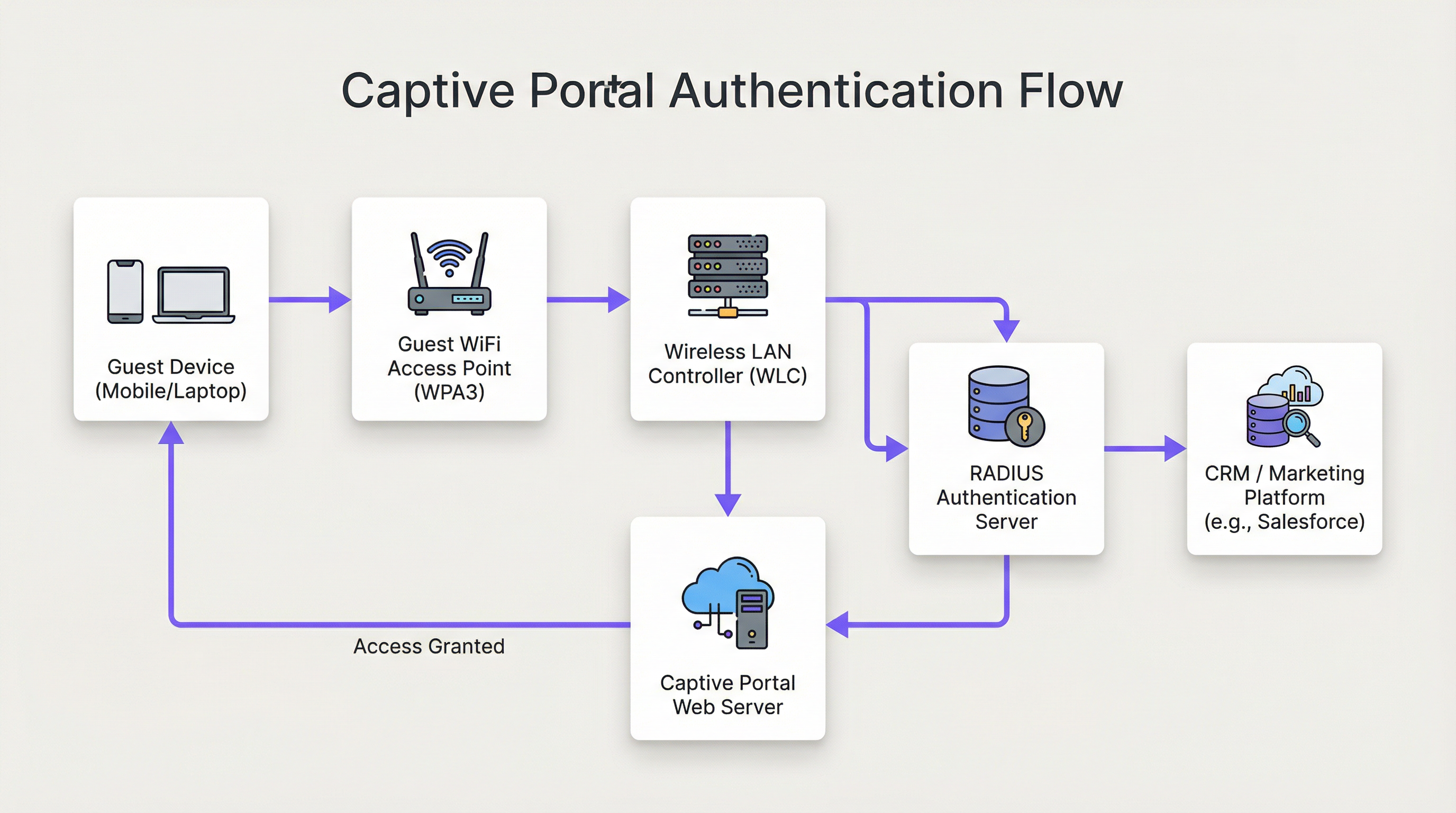
आधुनिक गेस्ट WiFi Captive Portal सोल्यूशनच्या आर्किटेक्चरमध्ये नेटवर्क हार्डवेअर, सॉफ्टवेअर आणि क्लाउड सेवा यांच्यातील एक अत्याधुनिक परस्परसंवाद समाविष्ट असतो. याच्या केंद्रस्थानी, Captive Portal युझरच्या वेब ट्रॅफिकला इंटरसेप्ट करते आणि व्यापक नेटवर्क ॲक्सेस देण्यापूर्वी ऑथेंटिकेशनसाठी त्यांना एका विशिष्ट वेब पेजवर रिडिरेक्ट करते. अशी सिस्टीम डिप्लॉय किंवा मेंटेन करण्यासाठी जबाबदार असलेल्या कोणत्याही नेटवर्क आर्किटेक्टसाठी हा फ्लो सविस्तरपणे समजून घेणे आवश्यक आहे.
टप्पा १ — वायरलेस असोसिएशन: युझरचे डिव्हाइस गेस्ट WiFi SSID शोधते आणि त्याच्याशी कनेक्ट होते. या टप्प्यावर, डिव्हाइस प्री-ऑथेंटिकेटेड, वॉल्ड-गार्डन स्थितीत असते. WLC किंवा AP हे DHCP द्वारे डिव्हाइसला IP ॲड्रेस नियुक्त करते परंतु व्हाईटलिस्ट केलेल्या डोमेन्सची परिभाषित सूची आणि स्वतः Captive Portal होस्ट वगळता सर्व आउटबाउंड ट्रॅफिक प्रतिबंधित करते.
टप्पा २ — HTTP/S रिडिरेक्ट: जेव्हा युझर ब्राउझर किंवा HTTP/S विनंती करणारे कोणतेही ॲप्लिकेशन उघडतो, तेव्हा WLC त्याला इंटरसेप्ट करते. DNS हायजॅकिंग (जिथे सर्व DNS क्वेरीजना पोर्टलच्या IP सह उत्तर दिले जाते) किंवा HTTP 302 रिडिरेक्शन वापरून, युझरला Captive Portal च्या वेब सर्व्हरवर फॉरवर्ड केले जाते. आधुनिक डिप्लॉयमेंट्ससाठी, iOS, Android आणि Windows क्लायंट्सवर विश्वासार्हतेसाठी HTTP रिडिरेक्शनला प्राधान्य दिले जाते.
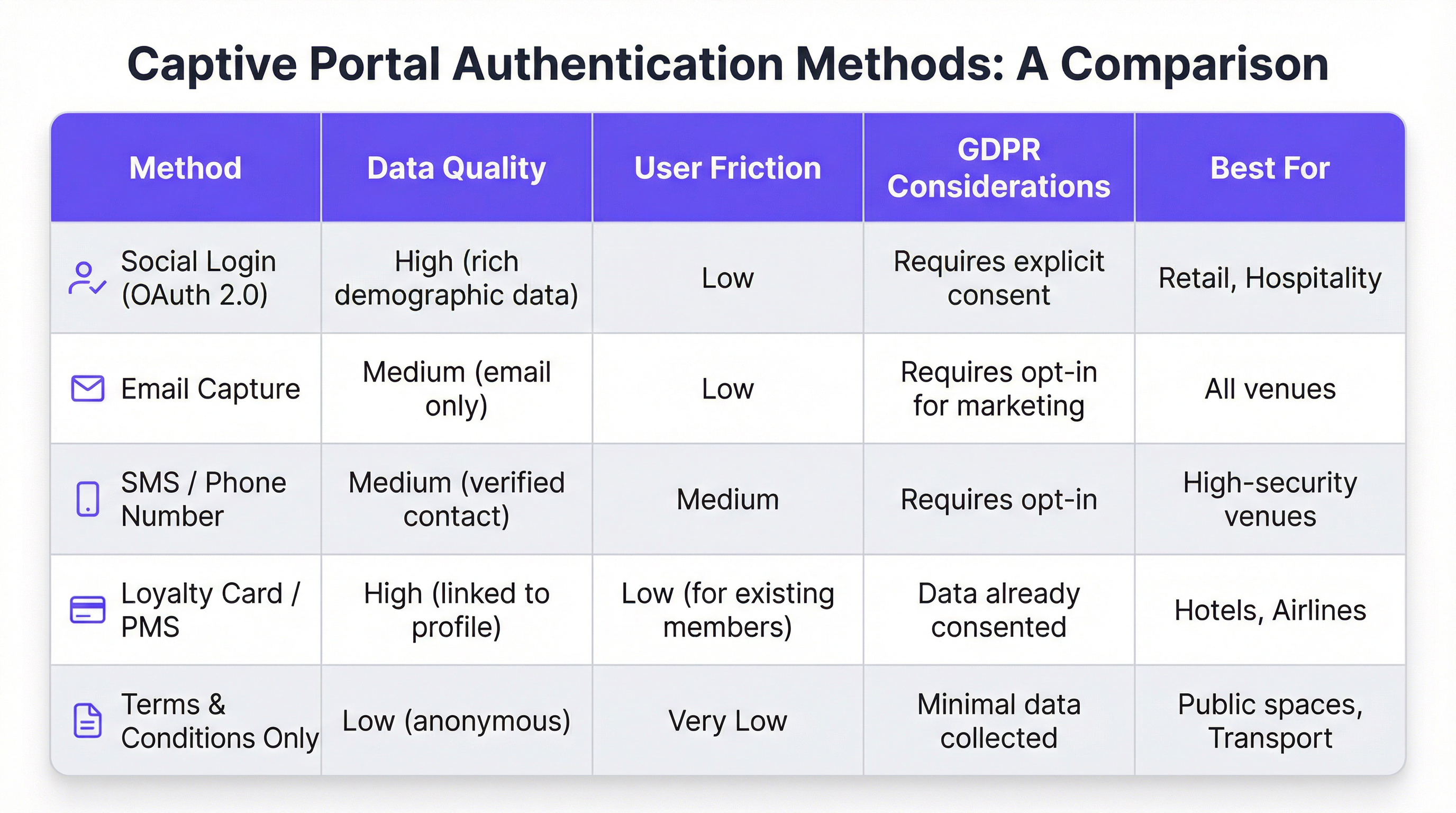
टप्पा ३ — पोर्टल इंटरॅक्शन आणि ऑथेंटिकेशन: युझरसमोर Captive Portal पेज सादर केले जाते. ऑथेंटिकेशन पद्धतींमध्ये OAuth 2.0 (Facebook, Google, LinkedIn) द्वारे सोशल लॉगिन, ईमेल किंवा SMS कॅप्चर, अटी-आणि-शर्तींची स्वीकृती, किंवा REST API द्वारे लॉयल्टी प्रोग्राम किंवा प्रॉपर्टी मॅनेजमेंट सिस्टीम (PMS) सोबत इंटिग्रेशन समाविष्ट आहे. पद्धतीची निवड थेट कॅप्चर केलेल्या डेटाची गुणवत्ता आणि युझर जर्नीमध्ये निर्माण होणाऱ्या घर्षणावर नियंत्रण ठेवते.
टप्पा ४ — RADIUS ऑथेंटिकेशन: फॉर्म सबमिट केल्यावर, पोर्टल सेवा RADIUS सर्व्हर (RFC 2865) शी संवाद साधते. RADIUS सर्व्हर बॅकएंड डेटा स्टोअर — लोकल डेटाबेस, LDAP डिरेक्टरी, CRM, किंवा मार्केटिंग ऑटोमेशन प्लॅटफॉर्म — विरुद्ध क्रेडेन्शियल्स प्रमाणित करतो. सेशन पॉलिसीज लागू करण्यासाठी Session-Timeout आणि Idle-Timeout सारख्या RADIUS ॲट्रिब्यूट्सचा वापर केला जातो.
टप्पा ५ — ॲक्सेस मंजूर: यशस्वी ऑथेंटिकेशनवर, RADIUS सर्व्हर WLC ला युझरची ऑथोरायझेशन स्थिती बदलण्यासाठी सिग्नल देतो, ज्यामुळे पूर्ण इंटरनेट ॲक्सेस मिळतो. या टप्प्यावर WLC च्या पॉलिसी इंजिनद्वारे बँडविड्थ पॉलिसीज, कंटेंट फिल्टरिंग नियम आणि सेशन कालावधी मर्यादा लागू केल्या जातात.
सुरक्षेच्या दृष्टिकोनातून, IEEE 802.1X सह WPA3-Enterprise सर्वोच्च स्तरावरील संरक्षण प्रदान करते, जे WPA3-Enterprise मोडमध्ये 192-बिट सुरक्षा वापरून क्लायंट आणि AP मधील ट्रॅफिक एन्क्रिप्ट करते. स्वतः पोर्टलसाठी, सर्व संवादांनी TLS 1.2 किंवा त्याहून अधिक आवृत्तीसह HTTPS वापरणे आवश्यक आहे. जिथे पोर्टल फ्लोमध्ये कोणतीही पेमेंट प्रक्रिया होते तिथे PCI DSS v4.0 चे पालन करणे अनिवार्य आहे.
Purple AI युझर्ससाठी, प्रगत कस्टमायझेशन क्षमता या आर्किटेक्चरचा लक्षणीय विस्तार करतात. Purple प्लॅटफॉर्म व्हेन्यू स्तरावर पोर्टल डिझाइन्सच्या A/B टेस्टिंगला सपोर्ट करतो, ज्यामुळे ऑपरेटर्सना कन्व्हर्जन रेट्स ऑप्टिमाइझ करण्यासाठी भिन्न लेआउट्स, कॉल्स-टू-ॲक्शन आणि ऑथेंटिकेशन फ्लोजची चाचणी घेता येते. लॉगिन-नंतरची वैयक्तिकृत कंटेंट डिलिव्हरी — जसे की अतिथीच्या CRM प्रोफाईल किंवा लॉयल्टी टियरवर आधारित टार्गेटेड ऑफर्स — Salesforce, HubSpot किंवा REST API असलेल्या कोणत्याही मार्केटिंग ऑटोमेशन प्लॅटफॉर्मवर रिअल-टाइम API कॉल्सद्वारे साध्य केली जाते. Purple चे ॲनालिटिक्स इंजिन हीटमॅप ओव्हरलेज आणि ड्वेल-टाइम ॲनालिसिस देखील प्रदान करते, ज्यामुळे व्हेन्यू ऑपरेटर्सना प्रत्यक्ष फूटफॉल पॅटर्नसह WiFi एंगेजमेंट डेटाचा सहसंबंध जोडता येतो.
अंमलबजावणी मार्गदर्शक
एंटरप्राइझ स्तरावर गेस्ट WiFi Captive Portal डिप्लॉय करण्यासाठी संरचित, टप्प्याटप्प्याने दृष्टिकोन आवश्यक आहे. खालील फ्रेमवर्क व्हेंडर-न्यूट्रल आहे आणि हॉस्पिटॅलिटी, रिटेल, इव्हेंट्स आणि सार्वजनिक-क्षेत्रातील वातावरणात लागू आहे.
टप्पा १ — व्यावसायिक उद्दिष्टे परिभाषित करा: कोणतेही तांत्रिक काम सुरू होण्यापूर्वी, गेस्ट WiFi सेवेच्या विशिष्ट उद्दिष्टांचे दस्तऐवजीकरण करा. सामान्य उद्दिष्टांमध्ये फर्स्ट-पार्टी मार्केटिंग डेटाबेस तयार करणे, व्हेन्यूच्या विशिष्ट भागात फूटफॉल वाढवणे, टार्गेटेड प्रमोशन्सद्वारे अनुषंगिक महसूल वाढवणे किंवा केवळ एक विश्वासार्ह सुविधा प्रदान करणे समाविष्ट आहे. ही उद्दिष्टे ऑथेंटिकेशन पद्धतीपासून ते लॉगिन-नंतरच्या कंटेंट स्ट्रॅटेजीपर्यंत प्रत्येक पुढील डिझाइन निर्णय निश्चित करतील.
टप्पा २ — नेटवर्क इन्फ्रास्ट्रक्चर असेसमेंट: तुमच्या विद्यमान वायरलेस इन्फ्रास्ट्रक्चरचे संपूर्ण ऑडिट करा. तुमचे APs आणि WLC हे Captive Portal रिडिरेक्शन, VLAN टॅगिंग आणि बाह्य RADIUS इंटिग्रेशनला सपोर्ट करतात याची पडताळणी करा. उच्च-घनतेच्या वातावरणासाठी — स्टेडियम्स, कॉन्फरन्स सेंटर्स, ट्रान्सपोर्ट हब्स — पुरेशी कव्हरेज आणि क्षमता सुनिश्चित करण्यासाठी व्यावसायिक RF साइट सर्व्हे करा. खराब कामगिरी करणारे नेटवर्क अत्यंत सुंदर डिझाइन केलेल्या पोर्टलला देखील कमकुवत करेल.
टप्पा ३ — प्लॅटफॉर्म निवड: तुमच्या व्यावसायिक उद्दिष्टांच्या आधारे Captive Portal प्लॅटफॉर्म्सचे मूल्यांकन करा. प्रमुख निकषांमध्ये हार्डवेअर ॲग्नोस्टिसिझम (मल्टी-व्हेंडर इस्टेट्ससाठी महत्त्वपूर्ण), CRM आणि मार्केटिंग ऑटोमेशन इंटिग्रेशन्सची सखोलता, ॲनालिटिक्स आणि रिपोर्टिंगची गुणवत्ता, GDPR कंप्लायन्स टूलिंग आणि डेव्हलपर रिसोर्सशिवाय पोर्टल डिझाइन कस्टमाइझ करण्याची क्षमता समाविष्ट आहे. जटिल इंटिग्रेशन आवश्यकता असलेल्या संस्थांसाठी, प्लॅटफॉर्मच्या API डॉक्युमेंटेशन आणि वेबहुक सपोर्टचे मूल्यांकन करा.
टप्पा ४ — युझर जर्नी डिझाइन: WiFi डिस्कव्हरीपासून ते लॉगिन-नंतरच्या एंगेजमेंटपर्यंत संपूर्ण युझर अनुभवाचा नकाशा तयार करा. युझरला इंटरनेट ॲक्सेस मिळण्यापूर्वी जास्तीत जास्त तीन इंटरॅक्शन्सचे लक्ष्य ठेवा. पूर्णत्वाचे दर वाढवणारे लेआउट आणि ऑथेंटिकेशन फ्लो ओळखण्यासाठी भिन्न पोर्टल डिझाइन्सची A/B टेस्ट करा. पोर्टल पूर्णपणे रिस्पॉन्सिव्ह आहे आणि मोबाईल-फर्स्ट वापरासाठी ऑप्टिमाइझ केलेले आहे याची खात्री करा.
टप्पा ५ — कॉन्फिगरेशन आणि इंटिग्रेशन: अनऑथेंटिकेटेड युझर्सना पोर्टल URL वर रिडिरेक्ट करण्यासाठी WLC कॉन्फिगर करा. पोर्टल होस्ट, सोशल लॉगिन डोमेन्स (accounts.google.com, www.facebook.com, www.linkedin.com) आणि पोर्टल रेंडर करण्यासाठी आवश्यक असलेल्या कोणत्याही CDN रिसोर्सेसना ॲक्सेस देण्यासाठी वॉल्ड गार्डन परिभाषित करा. RADIUS शेअर्ड सिक्रेट्स कॉन्फिगर करा आणि लाईव्ह जाण्यापूर्वी संपूर्ण ऑथेंटिकेशन फ्लोची एंड-टू-एंड चाचणी करा.
टप्पा ६ — पायलट आणि रोलआउट: एकाच पायलट लोकेशनवर डिप्लॉय करा आणि पूर्ण रोलआउट करण्यापूर्वी किमान दोन आठवड्यांसाठी ऑथेंटिकेशन रेट्स, सेशन कालावधी आणि एरर लॉग्सचे निरीक्षण करा. बेसलाइन KPIs स्थापित करा ज्यांच्या आधारे तुम्ही डिप्लॉयमेंटचे यश मोजाल.
सर्वोत्तम पद्धती
युझर अनुभवाला प्राधान्य द्या: एक संथ, गोंधळात टाकणारे किंवा अविश्वसनीय Captive Portal तुमच्या ब्रँडवर वाईट प्रभाव पाडते. 15-सेकंदांपेक्षा कमी एंड-टू-एंड ऑथेंटिकेशन वेळेचे लक्ष्य ठेवा. पोर्टल डिझाइन स्वच्छ ठेवा, सूचना स्पष्ट ठेवा आणि कॉल-टू-ॲक्शन ठळक ठेवा. तुम्ही जोडलेला प्रत्येक अतिरिक्त क्लिक किंवा फॉर्म फील्ड तुमचा पूर्णत्वाचा दर कमी करेल.
मोबाईल-फर्स्ट डिझाइन लागू करा: 75% पेक्षा जास्त गेस्ट WiFi कनेक्शन्स मोबाईल डिव्हाइसेसवरून येतात. तुमचे पोर्टल पूर्णपणे रिस्पॉन्सिव्ह असले पाहिजे, ज्यामध्ये टच-फ्रेंडली UI घटक आणि झूम न करता वाचता येण्याजोगा मजकूर असावा. डिप्लॉयमेंटपूर्वी एकाधिक स्क्रीन आकारांवर iOS आणि Android दोन्हीवर चाचणी करा.
डेटा संकलनाबद्दल पारदर्शक रहा: तुम्ही कोणता डेटा संकलित करत आहात आणि तो कसा वापरला जाईल याचे स्पष्ट, सोप्या भाषेतील स्पष्टीकरण सादर करा. तुमच्या गोपनीयता धोरणाची लिंक द्या आणि तुमची संमती यंत्रणा GDPR कलम 7 चे पालन करत असल्याची खात्री करा. GDPR अंतर्गत प्री-टिक्ड संमती बॉक्सेस वैध नाहीत.
तुमच्या नेटवर्कचे काटेकोरपणे विभाजन करा: तुमच्या कॉर्पोरेट नेटवर्कवरून गेस्ट ट्रॅफिक वेगळे करण्यासाठी VLANs चा वापर करा. हे एक मूलभूत सुरक्षा नियंत्रण आहे. गेस्ट डिव्हाइसेसना तुमच्या कॉर्पोरेट नेटवर्कवरील RFC 1918 ॲड्रेस स्पेस ॲक्सेस करण्यापासून रोखण्यासाठी फायरवॉल नियम लागू करा. गेस्ट डिव्हाइसेसना एकमेकांशी संवाद साधण्यापासून रोखण्यासाठी तुमच्या APs वर क्लायंट आयसोलेशन सक्षम करा.
देखभाल आणि निरीक्षण करा: Captive Portal डिप्लॉयमेंट्स 'सेट-अँड-फरगेट' नसतात. ऑथेंटिकेशन लॉग्सचे पुनरावलोकन करण्यासाठी, APs आणि WLCs वरील फर्मवेअर अपडेट करण्यासाठी आणि तुमच्या वॉल्ड गार्डन कॉन्फिगरेशनचे ऑडिट करण्यासाठी एक नियमित वेळापत्रक स्थापित करा. ऑथेंटिकेशन फेल्युअर रेट स्पाइक्ससाठी अलर्टिंग सेट करा, जे सहसा चुकीचे कॉन्फिगरेशन किंवा सुरक्षा घटनेचे पहिले सूचक असतात.
ट्रबलशूटिंग आणि जोखीम निवारण
गेस्ट WiFi Captive Portal डिप्लॉयमेंट्समधील सर्वात सामान्य फेल्युअर मोड म्हणजे पोर्टल लोड न होणे. हे जवळजवळ नेहमीच तीनपैकी एका समस्येमुळे होते: DNS रिझोल्यूशन फेल्युअर (क्लायंट पोर्टल होस्टनेम रिझोल्व्ह करू शकत नाही), अति-प्रतिबंधात्मक वॉल्ड गार्डन (पोर्टलचे CDN रिसोर्सेस ब्लॉक केलेले असतात), किंवा पोर्ट 443 वर पोर्टलच्या वेब सर्व्हरला ॲक्सेस करण्यापासून रोखणारा फायरवॉल नियम. WLC च्या अपलिंक इंटरफेसवर पॅकेट कॅप्चर वापरून पद्धतशीर निदान केल्यास मूळ कारण पटकन ओळखता येईल.
ऑथेंटिकेशन फेल्युअर्स ही दुसरी सर्वात सामान्य समस्या आहे. हे सहसा चुकीचे RADIUS शेअर्ड सिक्रेट्स, WLC आणि RADIUS सर्व्हरमधील क्लॉक स्क्यू (ज्यामुळे EAP ऑथेंटिकेशन फेल्युअर्स होतात), किंवा बॅकएंड डेटा स्टोअरमधील समस्यांमुळे उद्भवतात. तपशीलवार RADIUS लॉगिंग सक्षम करणे आणि WLC, RADIUS सर्व्हर आणि पोर्टल ॲप्लिकेशन लॉग्सवर टाइमस्टॅम्प्सचा सहसंबंध जोडणे हा सर्वात कार्यक्षम निदानात्मक दृष्टिकोन आहे.
सुरक्षा जोखमीच्या दृष्टिकोनातून, गेस्ट WiFi नेटवर्कसाठी सर्वात महत्त्वपूर्ण थ्रेट व्हेक्टर म्हणजे अनएन्क्रिप्टेड किंवा कमकुवतपणे एन्क्रिप्टेड SSID. एन्क्रिप्शन नसलेला ओपन SSID सर्व युझर ट्रॅफिकला पॅसिव्ह इंटरसेप्शनसाठी उघड करतो. नेहमी WPA2 किंवा WPA3 एन्क्रिप्शन लागू करा. तुमचा SSID ब्रॉडकास्ट करणाऱ्या रोग ॲक्सेस पॉइंट्ससाठी तुमच्या एअरस्पेसचे नियमितपणे स्कॅन करा — हा एक सामान्य अटॅक व्हेक्टर आहे ज्याला "इव्हिल ट्विन" अटॅक म्हणून ओळखले जाते. तुमच्या WLC वर किंवा स्टँडअलोन ओव्हरले सिस्टीम म्हणून वायरलेस इंट्रुजन डिटेक्शन आणि प्रिव्हेन्शन (WIDS/WIPS) क्षमता लागू करा.
ROI आणि व्यावसायिक प्रभाव
एका अत्याधुनिक गेस्ट WiFi Captive Portal साठी बिझनेस केस केवळ मूलभूत इंटरनेट कनेक्शन प्रदान करण्यापलीकडे जाते. खालील तक्ता विविध व्हेन्यू प्रकारांमधील प्रमुख ROI ड्रायव्हर्सचा सारांश देतो:
| व्हेन्यू प्रकार | प्राथमिक ROI ड्रायव्हर | ठराविक KPI | उदाहरण परिणाम |
|---|---|---|---|
| हॉटेल | अनुषंगिक महसूल वाढ | WiFi युझर्सकडून स्पा/F&B बुकिंग्ज | +42% स्पा बुकिंग्ज (200-खोल्यांच्या हॉटेलची केस स्टडी) |
| रिटेल | मार्केटिंग डेटाबेस वाढ | प्रति महिना नवीन ऑप्ट-इन केलेले कॉन्टॅक्ट्स | 6 महिन्यांत 8,000+ कॉन्टॅक्ट्स (500-स्टोअर रिटेल केस स्टडी) |
| स्टेडियम / इव्हेंट्स | स्पॉन्सर ॲक्टिव्हेशन | ब्रँडेड पोर्टल इम्प्रेशन्स | प्रमुख इव्हेंट्समध्ये 95%+ पोर्टल पूर्णत्वाचा दर |
| कॉन्फरन्स सेंटर | डेलिगेट एंगेजमेंट | WiFi द्वारे सेशन चेक-इन दर | इव्हेंट आयोजकांसाठी रिअल-टाइम उपस्थिती डेटा |
| सार्वजनिक क्षेत्र | नागरिक एंगेजमेंट | सर्वेक्षण पूर्णत्वाचा दर | सत्यापित रहिवाशांसाठी टार्गेटेड सार्वजनिक घोषणा |
गेस्ट WiFi गुंतवणुकीसाठी ROI गणनेमध्ये थेट महसूल प्रभाव (अनुषंगिक विक्री, मार्केटिंग मोहिमेचा महसूल) आणि अप्रत्यक्ष फायदे (सुधारित ग्राहक समाधान स्कोअर, कमी झालेला चर्न, समृद्ध फर्स्ट-पार्टी डेटा) या दोन्हींचा विचार केला पाहिजे. 200 खोल्या आणि सरासरी 70% ऑक्युपन्सी असलेल्या हॉटेलसाठी, WiFi-चालित प्रमोशन्समुळे स्पा बुकिंगमध्ये झालेली 42% वाढ ही वाढीव वार्षिक महसुलात हजारो पाउंड्सचे प्रतिनिधित्व करू शकते — एक परतावा जो सामान्यतः डिप्लॉयमेंटच्या पहिल्या वर्षातच प्लॅटफॉर्म गुंतवणुकीचे समर्थन करतो.
Key Terms & Definitions
Captive Portal
A web page that a network operator presents to a newly connected user before granting broader access to the internet. The portal intercepts all HTTP/S traffic from the unauthenticated device and redirects it to a designated URL.
This is the primary mechanism for authenticating, communicating with, and collecting data from users on a guest WiFi network. IT teams configure this at the WLC or AP level to control access and gather marketing consent.
RADIUS (Remote Authentication Dial-In User Service)
A networking protocol (RFC 2865) that provides centralised Authentication, Authorization, and Accounting (AAA) management for users connecting to a network service. It operates over UDP and uses a shared secret for security.
RADIUS is the backend authentication engine for most enterprise captive portal deployments. When a user submits their login credentials, the portal sends an Access-Request to the RADIUS server, which responds with an Access-Accept or Access-Reject. IT teams must configure the correct RADIUS shared secret on both the WLC and the portal platform.
Walled Garden
A restricted network environment in which a pre-authenticated user can only access a defined list of approved domains and IP addresses, typically limited to the captive portal itself and any resources required to render it.
Before a user completes the captive portal login, they are in a walled garden. Network architects must carefully define the walled garden whitelist to include all resources required for the portal to function (including social login provider domains) while blocking all other internet access.
IEEE 802.1X
An IEEE standard for port-based Network Access Control (PNAC) that provides an authentication mechanism for devices wishing to attach to a LAN or WLAN. It requires a supplicant (client device), an authenticator (AP or switch), and an authentication server (RADIUS).
802.1X is the foundation of enterprise-grade wireless security. When combined with WPA3-Enterprise, it provides per-user, per-session encryption keys and strong mutual authentication. Network architects should specify 802.1X for any deployment where security is a primary concern.
WPA3 (Wi-Fi Protected Access 3)
The third generation of the WPA security certification programme for wireless networks, introduced by the Wi-Fi Alliance in 2018. WPA3-Personal uses Simultaneous Authentication of Equals (SAE) to replace the vulnerable PSK handshake, while WPA3-Enterprise offers 192-bit security mode.
WPA3 should be the default security protocol for any new guest WiFi deployment. It provides significant security improvements over WPA2, including protection against offline dictionary attacks and forward secrecy. IT teams should verify WPA3 client support before mandating it as the sole security mode.
GDPR (General Data Protection Regulation)
A regulation in EU law (Regulation 2016/679) on data protection and privacy, applicable to all organisations processing personal data of individuals in the EU/EEA. The UK GDPR is a retained version of the regulation applicable in the United Kingdom post-Brexit.
GDPR compliance is a legal obligation for any organisation collecting personal data via a guest WiFi captive portal. Key requirements include a lawful basis for processing (typically consent), transparent privacy notices, the right to erasure, and data minimisation. Non-compliance can result in fines of up to €20 million or 4% of global annual turnover, whichever is higher.
OAuth 2.0
An open standard for access delegation (RFC 6749) that allows users to grant third-party applications limited access to their accounts on other services without exposing their passwords. It is the protocol underpinning social login functionality.
OAuth 2.0 is the technology that powers 'Log in with Google/Facebook/LinkedIn' on captive portals. It provides a secure, user-friendly authentication flow and, with the user's consent, allows the portal to retrieve profile data (name, email, age range, gender) from the social platform. IT teams must register the portal as an OAuth application with each social provider and configure the correct redirect URIs.
PCI DSS (Payment Card Industry Data Security Standard)
A set of security standards (currently v4.0) designed to ensure that all companies that accept, process, store, or transmit credit card information maintain a secure environment. Compliance is mandated by the major card schemes.
PCI DSS compliance is mandatory for any captive portal that processes payments for premium WiFi access or any other service. Key requirements include network segmentation, encryption of cardholder data in transit and at rest, and regular penetration testing. IT teams should engage a Qualified Security Assessor (QSA) to validate compliance.
VLAN (Virtual Local Area Network)
A logical segmentation of a physical network into multiple isolated broadcast domains, configured at the switch or WLC level. Traffic on one VLAN cannot communicate with traffic on another VLAN without passing through a router or firewall.
VLAN segmentation is the primary mechanism for isolating guest WiFi traffic from the corporate network. IT teams should assign guest WiFi traffic to a dedicated VLAN and enforce strict firewall rules at the inter-VLAN routing point to prevent guest devices from accessing internal resources.
Case Studies
A 200-room luxury hotel wants to replace its outdated voucher-based guest WiFi system with a modern captive portal. The goals are to provide a seamless login experience for guests, promote hotel amenities, and integrate with their existing CRM (Salesforce) to track guest preferences. The hotel has a mixed-vendor wireless estate comprising both Cisco WLCs and Meraki cloud-managed APs.
The recommended approach is to deploy a cloud-based, hardware-agnostic captive portal platform such as Purple, which offers native support for both Cisco and Meraki hardware and a pre-built Salesforce integration. The implementation proceeds as follows: (1) Create a dedicated guest SSID on both the Cisco WLC and Meraki dashboard, tagged to a guest VLAN (e.g., VLAN 100) that is isolated from the corporate network. (2) Configure both controllers to redirect unauthenticated HTTP/S traffic to the Purple-hosted captive portal URL. Define the walled garden to permit access to the portal host, Salesforce domains, and social login providers. (3) Design a branded portal with two authentication paths: social login (LinkedIn, Facebook) for transient guests, and room number plus surname authentication for registered guests, validated in real-time against the hotel's PMS via a REST API call. (4) Configure the post-login redirect to a personalised welcome page that queries Salesforce for the guest's loyalty tier and surfaces relevant offers for the hotel's spa and restaurant. (5) Configure Purple's Salesforce connector to push all login events, demographic data, and session metadata to Salesforce in real-time, enriching the guest's contact record. (6) Enable Purple's analytics dashboard to track daily active users, authentication method split, and dwell time by venue zone. Establish a baseline and review monthly.
A national retail chain with 500 stores wants to implement guest WiFi to track in-store footfall, build a first-party marketing database, and send personalised promotional offers to customers. The IT team is concerned about the cost and disruption of replacing the diverse range of wireless hardware across the estate, which includes equipment from at least four different vendors.
The critical success factor for this deployment is hardware agnosticism. Select a cloud-based captive portal platform that supports all four vendors via standard RADIUS and HTTP redirection protocols, avoiding any hardware replacement. The implementation proceeds as follows: (1) Conduct a hardware audit across all 500 stores to document AP and controller models, firmware versions, and current SSID configurations. Identify any hardware that cannot support external RADIUS or HTTP redirection and plan for targeted upgrades at those locations only. (2) Deploy the captive portal platform in a phased rollout, starting with a 20-store pilot in a single region. Configure each store's hardware to redirect guest traffic to the centralised portal. (3) Design a single, mobile-optimised portal page with email capture as the primary authentication method, supplemented by social login. Ensure the consent mechanism is GDPR-compliant with a clear opt-in for marketing communications. (4) Configure the platform's marketing automation connector to push new contacts to the chain's email marketing platform (e.g., Klaviyo or Salesforce Marketing Cloud) in real-time. (5) Implement Purple's footfall analytics to track dwell time and repeat visit frequency by store. Use this data to identify high-performing stores and replicate their layout and offer strategies. (6) After a 4-week pilot, review KPIs (authentication rate, opt-in rate, email open rate) and iterate on the portal design before rolling out to the remaining 480 stores.
Scenario Analysis
Q1. A 500-store national retail chain wants to implement guest WiFi across its entire estate to build a first-party marketing database. The IT director has confirmed that the chain uses wireless hardware from four different vendors and has no budget for hardware replacement. The marketing director wants to send personalised promotional emails to customers within 24 hours of their in-store WiFi session. What is the most critical platform selection criterion, and what integration architecture would you recommend?
💡 Hint:Consider the hardware diversity challenge and the real-time data pipeline requirement between the captive portal and the email marketing platform.
Show Recommended Approach
The most critical platform selection criterion is hardware agnosticism — the platform must support all four wireless vendors via standard RADIUS and HTTP redirection protocols without requiring proprietary hardware or firmware modifications. For the integration architecture, configure the platform to push login events and contact data to the email marketing platform via a real-time webhook or API connector. This ensures that new contacts are available for campaign targeting within minutes of authentication, well within the 24-hour window. Ensure the consent mechanism on the portal captures explicit opt-in for marketing emails (GDPR Article 7), and configure the email platform to suppress contacts who have not opted in. Implement a data deduplication process to handle users who log in at multiple stores.
Q2. A conference centre is hosting a high-profile international event for 5,000 attendees over three days. The event organiser wants to provide a fast, seamless WiFi experience with a branded captive portal, but the centre's IT team is concerned about: (a) the security implications of 5,000 unknown devices on the network, (b) the performance of the captive portal under peak load, and (c) GDPR compliance given the international audience. What are your recommendations for each concern?
💡 Hint:Address each concern separately: security (segmentation and encryption), performance (load testing and CDN), and GDPR (consent mechanism and data residency).
Show Recommended Approach
(a) Security: Implement WPA3-Personal or WPA3-Enterprise on the event SSID. Create a dedicated VLAN for event traffic, completely isolated from the centre's corporate network. Enable client isolation on all APs to prevent device-to-device communication. Deploy a content filtering policy to block known malicious domains. Enable WIDS/WIPS to detect rogue APs. (b) Performance: Load test the captive portal platform to verify it can handle 5,000 concurrent authentication requests. Use a cloud-based portal platform with auto-scaling capabilities. Ensure the portal page is served from a CDN to minimise latency for international attendees. Pre-stage the RADIUS server with event attendee credentials if using pre-registration, to reduce authentication latency. (c) GDPR: Ensure the consent mechanism is available in all relevant languages. Use a cloud-based portal platform with data residency options to ensure EU citizen data is processed and stored within the EU/EEA. Implement a data retention policy that deletes personal data within the timeframe specified in your privacy notice. Appoint a Data Protection Officer if not already in place.
Q3. Following a routine security audit, your organisation's penetration testers have identified that the guest WiFi captive portal at your flagship venue is being served over HTTP rather than HTTPS, and that the guest VLAN has a misconfigured firewall rule that permits access to a subnet containing file servers. Describe the specific risks these two findings present and the remediation steps you would take.
💡 Hint:Consider the attack vectors enabled by each misconfiguration: man-in-the-middle for the HTTP finding, and lateral movement for the VLAN finding.
Show Recommended Approach
Finding 1 (HTTP portal): The risk is a man-in-the-middle (MitM) attack. An attacker on the same network segment can intercept the unencrypted HTTP traffic between the user's device and the portal server, capturing login credentials, session tokens, and any personal data submitted via the portal form. Remediation: Immediately provision a TLS certificate for the portal domain (a free Let's Encrypt certificate is acceptable for most deployments) and configure the portal web server to enforce HTTPS and redirect all HTTP requests to HTTPS. Update the WLC redirect URL to use HTTPS. Verify the certificate chain is valid and that HSTS is configured. Finding 2 (VLAN misconfiguration): The risk is lateral movement. A guest device that has authenticated to the WiFi network could access the file server subnet, potentially exfiltrating sensitive data or deploying malware. Remediation: Immediately review and correct the firewall ACL at the inter-VLAN routing point to deny all traffic from the guest VLAN to the file server subnet. Implement a default-deny policy on the guest VLAN firewall rule set, with explicit permit rules only for internet-bound traffic. Review all inter-VLAN rules as part of a broader firewall audit.
Key Takeaways
- ✓A guest WiFi captive portal is a strategic business asset — not a utility. It is the primary mechanism for customer data collection, brand engagement, and revenue generation from your wireless network.
- ✓The authentication method you choose (social login, email capture, PMS integration, T&C only) directly determines the quality of data you collect and the friction you introduce. Match the method to your business objectives.
- ✓Security is non-negotiable: enforce WPA3 encryption, segment guest traffic onto a dedicated VLAN, serve the portal over HTTPS, and comply with PCI DSS if processing payments.
- ✓GDPR compliance requires a valid lawful basis for processing (typically explicit consent), a transparent privacy notice, and a documented data retention and deletion policy. Fines of up to 4% of global turnover apply for non-compliance.
- ✓Hardware agnosticism is the most critical platform selection criterion for multi-site, multi-vendor deployments. A cloud-based platform avoids costly hardware replacement programmes.
- ✓The 15-Second Rule: if end-to-end authentication takes longer than 15 seconds, completion rates will drop significantly. Benchmark and optimise your RADIUS response times and portal page load speed.
- ✓Measure ROI using concrete business metrics: marketing database growth, ancillary revenue uplift, customer dwell time, and repeat visit frequency. These metrics justify the investment and guide ongoing optimisation.




