

WiFi नेटवर्क कार्यक्षमतेचे मोजमाप: IT टीम्ससाठी प्रमुख मेट्रिक्स
A comprehensive technical reference for IT managers and network architects on the key metrics for measuring and benchmarking enterprise WiFi network performance. This guide provides actionable insights into interpreting performance data to optimize user experience and achieve business objectives in large-scale venues.

कार्यकारी सारांश
हॉस्पिटॅलिटी, रिटेल आणि मोठ्या सार्वजनिक ठिकाणांच्या IT लीडर्ससाठी, WiFi नेटवर्कची कार्यक्षमता आता केवळ एक तांत्रिक सोय राहिलेली नाही; तर तो ग्राहक अनुभवाचा एक मुख्य घटक आणि ऑपरेशनल कार्यक्षमतेचा चालक बनला आहे. खराब कार्यक्षमता असलेल्या नेटवर्कमुळे अतिथींच्या तक्रारी, नकारात्मक पुनरावलोकने, अर्धवट सोडलेले शॉपिंग कार्ट्स आणि कर्मचाऱ्यांच्या उत्पादकतेत घट होऊ शकते, ज्याचा थेट परिणाम महसूल आणि ब्रँडच्या प्रतिष्ठेवर होतो. हे मार्गदर्शक IT मॅनेजर्स, नेटवर्क आर्किटेक्ट्स आणि CTOs साठी एक अधिकृत संदर्भ म्हणून काम करते, जे सिग्नल स्ट्रेंथसारख्या साध्या मोजमापांच्या पलीकडे जाऊन WiFi कार्यक्षमता मोजमापासाठी अधिक प्रगत, व्यवसाय-केंद्रित दृष्टिकोन प्रदान करते. हे चार महत्त्वपूर्ण मेट्रिक्सवर लक्ष केंद्रित करते—Received Signal Strength Indication (RSSI), Signal-to-Noise Ratio (SNR), थ्रूपुट (Throughput) आणि लेटन्सी (Latency)—जे नेटवर्क इंजिनिअर्ससाठी आवश्यक तांत्रिक तपशील आणि वरिष्ठ नेतृत्वासाठी आवश्यक धोरणात्मक संदर्भ प्रदान करते. स्पष्ट कार्यक्षमता बेंचमार्क स्थापित करून आणि सतत देखरेख धोरण अवलंबून, संस्था हे सुनिश्चित करू शकतात की त्यांची WiFi पायाभूत सुविधा ही एक लवचिक, उच्च-कार्यक्षमता देणारी संपत्ती आहे जी गुंतवणुकीवर मोजता येण्याजोगा परतावा (ROI) देते. हा दस्तऐवज आजच्या कनेक्टेड वापरकर्त्याच्या मागण्या पूर्ण करणारे एंटरप्राइझ-ग्रेड वायरलेस वातावरण तयार करण्यासाठी आणि राखण्यासाठी आवश्यक मानके, साधने आणि सर्वोत्तम पद्धतींची रूपरेषा देतो.
{{asset:measuring_wifi_network_performance_key_metrics_for_it_teams_podcast.mp3}}
तांत्रिक सखोल माहिती (Technical Deep-Dive)
WiFi कार्यक्षमतेतील बारकावे समजून घेण्यासाठी वापरकर्त्याचा अनुभव परिभाषित करणाऱ्या मेट्रिक्सवर सविस्तर लक्ष देणे आवश्यक आहे. यशस्वी वायरलेस डिप्लॉयमेंटसाठी अनेक घटक कारणीभूत असले तरी, खालील मुख्य निर्देशकांवर लक्ष केंद्रित केल्याने नेटवर्कचे आरोग्य आणि क्षमतेचे सर्वात अचूक चित्र मिळते.
Received Signal Strength Indication (RSSI)
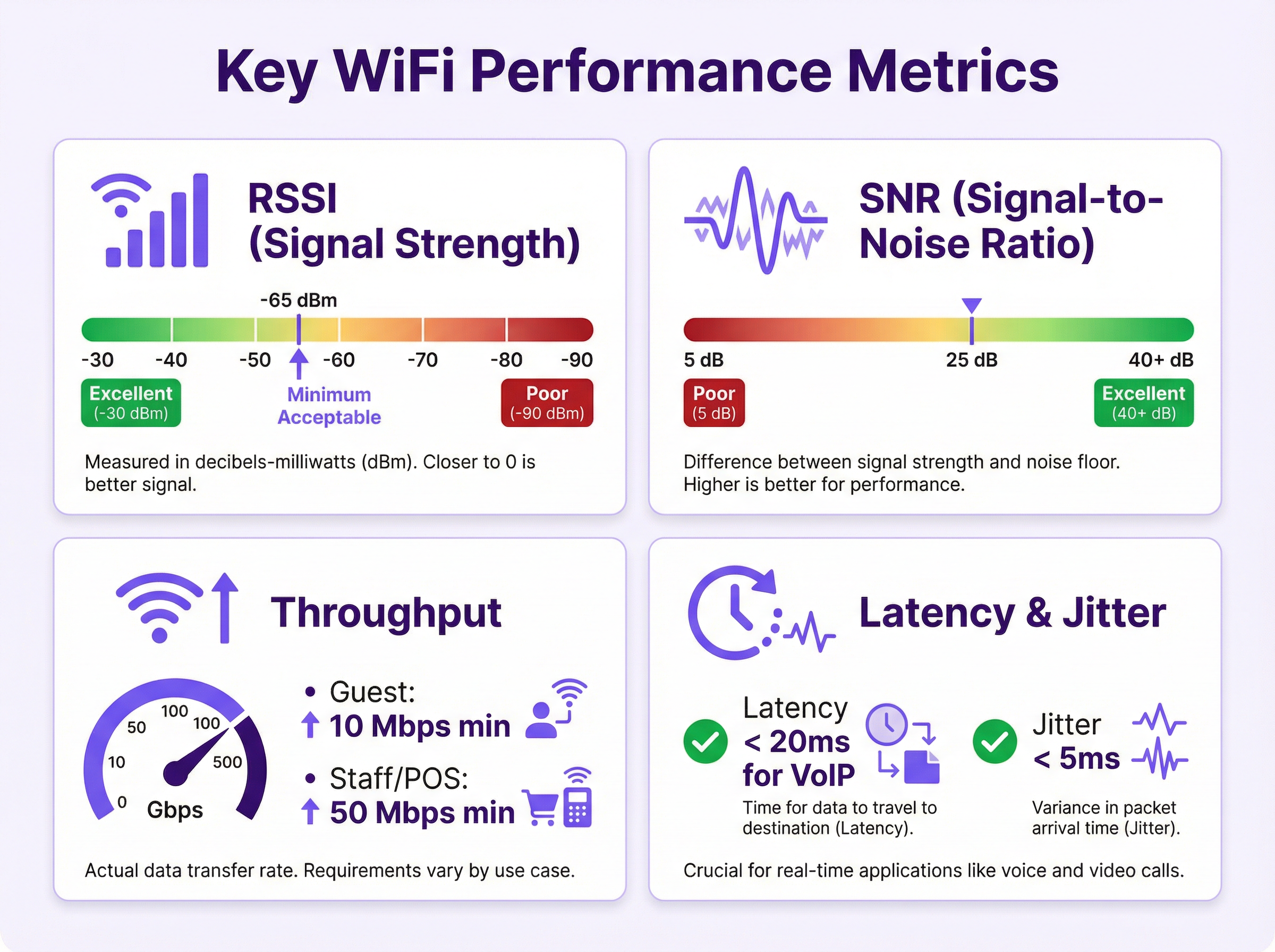
RSSI हे सर्वात मूलभूत मेट्रिक आहे, जे क्लायंट डिव्हाइसद्वारे प्राप्त झालेल्या सिग्नलची शक्ती दर्शवते. हे 0 ते -120 पर्यंतच्या लॉगरिदमिक स्केलवर डेसिबल्स-मिलिवॅट्स (dBm) मध्ये मोजले जाते. ही एक नकारात्मक संख्या असल्यामुळे, 0 च्या जवळचे मूल्य अधिक मजबूत सिग्नल दर्शवते.
- -30 dBm: प्राप्त करण्यायोग्य कमाल सिग्नल स्ट्रेंथ. क्लायंट बहुधा ॲक्सेस पॉईंटच्या अगदी जवळ असतो.
- -50 dBm: एक उत्कृष्ट सिग्नल मानला जातो.
- -67 dBm: बहुतांश सेवांच्या विश्वसनीय वितरणासाठी उद्योगात मोठ्या प्रमाणावर स्वीकारलेली किमान पातळी.
- -70 dBm: विश्वसनीय व्हॉइस आणि व्हिडिओ स्ट्रीमिंगसाठी किमान पातळी.
- -80 dBm: मूलभूत कनेक्टिव्हिटीसाठी किमान पातळी; पॅकेट लॉस आणि संथ गती असण्याची शक्यता असते.
- -90 dBm आणि त्याहून कमी: प्रभावीपणे कोणताही वापरण्यायोग्य सिग्नल नाही.
आवश्यक असले तरी, केवळ RSSI हे कार्यक्षमतेचे एक कमकुवत सूचक आहे. रेडिओ फ्रिक्वेन्सी (RF) हस्तक्षेपाच्या उच्च पातळीमुळे एक मजबूत सिग्नल निरुपयोगी ठरू शकतो.
Signal-to-Noise Ratio (SNR)
SNR हे WiFi कार्यक्षमतेसाठी निःसंशयपणे सर्वात महत्त्वपूर्ण मेट्रिक आहे. हे प्राप्त झालेला सिग्नल (RSSI) आणि सभोवतालचा RF नॉइज फ्लोअर यामधील फरक मोजते, जे डेसिबल्स (dB) मध्ये व्यक्त केले जाते. उच्च SNR मूल्याचा अर्थ अधिक स्पष्ट, अधिक सुस्पष्ट सिग्नल असा होतो जो क्लायंट डिव्हाइसला समजण्यास सोपा असतो.
सूत्र (Formula): SNR (dB) = Signal (dBm) - Noise (dBm)
उदाहरणार्थ, जर तुमचा RSSI -65 dBm असेल आणि नॉइज फ्लोअर -90 dBm असेल, तर तुमचा SNR 25 dB आहे. हा एक चांगला, वापरण्यायोग्य सिग्नल आहे. तथापि, हस्तक्षेपाच्या कारणामुळे नॉइज फ्लोअर -70 dBm पर्यंत वाढल्यास, तुमचा SNR केवळ 5 dB पर्यंत घसरतो आणि RSSI अपरिवर्तित राहूनही कनेक्शन अस्थिर होईल.
- 40+ dB: उत्कृष्ट सिग्नल गुणवत्ता, हाय-डेन्सिटी डिप्लॉयमेंट्स आणि 4K व्हिडिओसारख्या हाय-बिटरेट ॲप्लिकेशन्ससाठी आवश्यक.
- 25-40 dB: अतिशय चांगला सिग्नल, VoIP आणि पॉइंट-ऑफ-सेल सिस्टीम्ससारख्या व्यवसाय-गंभीर ॲप्लिकेशन्ससाठी योग्य.
- 15-25 dB: वेब ब्राउझिंग आणि ईमेलसारख्या सामान्य वापरासाठी चांगला सिग्नल.
- 10-15 dB: मूलभूत, कमी-गतीच्या कनेक्टिव्हिटीसाठी किमान पातळी.
- 10 dB च्या खाली: न वापरता येण्याजोगे कनेक्शन.
नॉइजच्या स्त्रोतांमध्ये इतर WiFi नेटवर्क्स (को-चॅनेल आणि ॲडजसंट-चॅनेल हस्तक्षेप), ब्लूटूथ डिव्हाइसेस, मायक्रोवेव्ह ओव्हन्स, कॉर्डलेस फोन्स आणि अगदी खराब शील्डिंग असलेली इलेक्ट्रिकल उपकरणे यांचा समावेश असू शकतो.
थ्रूपुट (Throughput)
थ्रूपुट हे दिलेल्या वेळेत क्लायंट आणि नेटवर्क दरम्यान प्रत्यक्षात किती डेटा ट्रान्सफर झाला याचे मोजमाप आहे, जे सामान्यतः मेगाबिट्स प्रति सेकंद (Mbps) मध्ये मोजले जाते. ही नेटवर्क क्षमतेची अंतिम चाचणी आहे आणि अंतिम वापरकर्त्याला सर्वात थेट जाणवणारे मेट्रिक आहे. हार्डवेअर विक्रेत्यांद्वारे जाहिरात केलेल्या 'डेटा रेट' किंवा 'स्पीड' सोबत याची गल्लत करू नये, जे वापरात असलेल्या IEEE 802.11 मानकावर आधारित एक सैद्धांतिक कमाल मर्यादा असते.
प्रोटोकॉल ओव्हरहेड, हस्तक्षेपामुळे होणारे रिट्रान्समिशन आणि वायरलेस माध्यमाच्या सामायिक स्वरूपामुळे वास्तविक-जगातील थ्रूपुट नेहमी डेटा रेटपेक्षा कमी असते. बेंचमार्किंग करताना, युज केसच्या आधारावर किमान स्वीकार्य थ्रूपुट पातळी परिभाषित करणे महत्त्वपूर्ण आहे.
- गेस्ट WiFi (हॉस्पिटॅलिटी/रिटेल): प्रति वापरकर्ता 10-20 Mbps हे एक सामान्य लक्ष्य असते.
- स्टाफ/कॉर्पोरेट WiFi: बिझनेस ॲप्लिकेशन्स, फाईल ट्रान्सफर्स आणि कोलॅबोरेशन टूल्सना सपोर्ट करण्यासाठी 30-50+ Mbps.
- हाय-डेन्सिटी ठिकाणे (स्टेडियम्स): 5-10 Mbps मिळवणे देखील एक आव्हान असू शकते, ज्यासाठी अत्यंत काळजीपूर्वक क्षमता नियोजन आवश्यक असते.
लेटन्सी, जिटर आणि पॅकेट लॉस (Latency, Jitter, and Packet Loss)
हे तीन मेट्रिक्स रिअल-टाइम ॲप्लिकेशन्ससाठी विशेषतः महत्त्वपूर्ण आहेत.
- लेटन्सी (Latency): डेटा पॅकेटला स्त्रोतापासून गंतव्यस्थानापर्यंत जाण्यासाठी लागणारा वेळ, जो मिलिसेकंद (ms) मध्ये मोजला जातो. वेब ब्राउझिंगसाठी, 100ms पेक्षा कमी लेटन्सी स्वीकार्य आहे. व्हॉइस ओव्हर WiFi (VoWiFi) साठी, जाणवणारा विलंब टाळण्यासाठी ती 30ms पेक्षा कमी असणे आवश्यक आहे.
- जिटर (Jitter): वेळेनुसार लेटन्सीमध्ये होणारा बदल. उच्च जिटरमुळे रिअल-टाइम कम्युनिकेशन (व्हॉइस, व्हिडिओ) अडखळत आणि अविश्वसनीय होते. जिटर 5-10ms च्या खाली ठेवला पाहिजे.
- पॅकेट लॉस (Packet Loss): गंतव्यस्थानावर पोहोचण्यात अयशस्वी झालेल्या आणि पुन्हा प्रसारित करण्याची आवश्यकता असलेल्या डेटा पॅकेट्सची टक्केवारी. 1-2% पेक्षा जास्त पॅकेट लॉसमुळे बहुतांश ॲप्लिकेशन्सच्या कार्यक्षमतेत लक्षणीय घट होईल.

अंमलबजावणी मार्गदर्शक (Implementation Guide)
एखाद्या ठिकाणच्या WiFi डिप्लॉयमेंटचे मोजमाप आणि बेंचमार्किंग करणे ही एक पद्धतशीर प्रक्रिया आहे. ती सुरुवातीच्या नियोजनापासून ते डिप्लॉयमेंट-नंतरच्या प्रमाणीकरणापर्यंत आणि सतत देखरेखीपर्यंत जाते.
पायरी 1: कार्यक्षमता आवश्यकता परिभाषित करा कोणतेही तांत्रिक काम करण्यापूर्वी, व्यवसायाची उद्दिष्टे परिभाषित करण्यासाठी स्टेकहोल्डर्ससोबत सहयोग करा. कोणते ॲप्लिकेशन्स वापरले जातील? किती वापरकर्ते अपेक्षित आहेत? सर्वाधिक वापराच्या वेळा कोणत्या आहेत? यावरून लक्ष्यित मेट्रिक्सची माहिती मिळेल.
| युज केस (Use Case) | किमान RSSI | किमान SNR | किमान थ्रूपुट | कमाल लेटन्सी |
|---|---|---|---|---|
| गेस्ट वेब ब्राउझिंग | -70 dBm | 20 dB | 10 Mbps | 100 ms |
| रिटेल पॉइंट-ऑफ-सेल | -67 dBm | 25 dB | 50 Mbps | 20 ms |
| हॉटेल VoIP फोन्स | -67 dBm | 25 dB | 1 Mbps | 30 ms |
| स्टेडियम फॅन एक्सपिरियन्स | -70 dBm | 20 dB | 5 Mbps | 150 ms |
पायरी 2: प्रेडिक्टिव्ह साईट सर्व्हे करा व्यावसायिक सॉफ्टवेअर (उदा. Ekahau Pro, AirMagnet Survey PRO) वापरून, फ्लोअर प्लॅन्स इम्पोर्ट करून तुमच्या ठिकाणाचा डिजिटल ट्विन तयार करा. व्हर्च्युअल ॲक्सेस पॉईंट्स ठेवा आणि RF प्रोपगेशनचे मॉडेल तयार करा. यामुळे तुम्हाला कोणतेही हार्डवेअर खरेदी करण्यापूर्वी किंवा इन्स्टॉल करण्यापूर्वी कव्हरेज आणि क्षमतेचा अंदाज लावता येतो. बजेटिंग आणि जोखीम कमी करण्यासाठी ही एक महत्त्वपूर्ण पायरी आहे.
पायरी 3: इन्स्टॉलेशन आणि फिजिकल व्हॅलिडेशन प्रेडिक्टिव्ह प्लॅननुसार ॲक्सेस पॉईंट्स इन्स्टॉल करा. त्यानंतर, फिजिकल 'वॉक-थ्रू' व्हॅलिडेशन सर्व्हे करा. एक इंजिनिअर ऑन-साइट प्रत्यक्ष RF वातावरण मोजण्यासाठी पोर्टेबल स्पेक्ट्रम ॲनालायझर आणि सर्व्हे टूल वापरतो. ही प्रक्रिया प्रेडिक्टिव्ह मॉडेल आणि वास्तवातील कोणतीही तफावत ओळखते, जसे की हस्तक्षेपाचे अनपेक्षित स्त्रोत किंवा इमारतीच्या साहित्यामुळे होणारे ॲटेन्युएशन (attenuation).
पायरी 4: ॲक्टिव्ह परफॉर्मन्स टेस्टिंग नेटवर्क लाईव्ह असताना, वायर्ड नेटवर्कवरील एका समर्पित टेस्ट सर्व्हरवर थ्रूपुट, लेटन्सी आणि जिटर मोजण्यासाठी iPerf3 सारख्या टूल्सचा वापर करून ॲक्टिव्ह टेस्ट्स करा. हे एक खरे एंड-टू-एंड परफॉर्मन्स बेसलाईन प्रदान करते. संपूर्ण चित्र मिळवण्यासाठी अनेक ठिकाणांहून आणि विविध क्लायंट डिव्हाइसेससह (लॅपटॉप्स, स्मार्टफोन्स, POS टर्मिनल्ससारखे विशेष हार्डवेअर) चाचणी करा.
पायरी 5: सतत देखरेख (Continuous Monitoring) लागू करा रिअल-टाइममध्ये की परफॉर्मन्स इंडिकेटर्स (KPIs) ट्रॅक करण्यासाठी Purple च्या ॲनालिटिक्स प्लॅटफॉर्मसारखे नेटवर्क मॉनिटरिंग सोल्यूशन डिप्लॉय करा. यामुळे IT टीम्सना रिॲक्टिव्ह ट्रबलशूटिंगकडून प्रोॲक्टिव्ह नेटवर्क मॅनेजमेंटकडे वळता येते, ज्यामुळे वापरकर्त्यांवर परिणाम होण्यापूर्वीच समस्या ओळखून त्या सोडवता येतात. सर्व्हिस लेव्हल ॲग्रीमेंट्स (SLAs) राखण्यासाठी आणि ROI प्रदर्शित करण्यासाठी हे आवश्यक आहे.
सर्वोत्तम पद्धती (Best Practices)
- केवळ कव्हरेजसाठी नाही, तर क्षमतेसाठी डिझाईन करा: सर्वत्र सिग्नल प्रदान करण्यासाठी पुरेसे APs डिप्लॉय करणे, परंतु आवश्यक वापरकर्ता घनता हाताळण्यासाठी पुरेसे नसणे ही सर्वात सामान्य चूक आहे. यामुळे को-चॅनेल हस्तक्षेप होतो आणि कार्यक्षमता खालावते. 802.11ax (WiFi 6) किंवा 802.11be (WiFi 7) मानकांचा वापर करा, जे विशेषतः दाट वातावरणात उच्च कार्यक्षमतेसाठी डिझाइन केलेले आहेत.
- स्पेक्ट्रम ॲनालिसिस करा: डिप्लॉयमेंटपूर्वी, नॉन-WiFi हस्तक्षेपाचे स्त्रोत ओळखण्यासाठी आणि शोधण्यासाठी स्पेक्ट्रम ॲनालायझर वापरा. ही एक पायरी आहे जी अनेकदा वगळली जाते परंतु रिटेल मॉल्स किंवा कॉन्फरन्स सेंटर्ससारख्या व्यस्त RF वातावरणात ती अत्यंत महत्त्वाची असते.
- चॅनेल प्लॅनिंग अनिवार्य आहे: को-चॅनेल आणि ॲडजसंट-चॅनेल हस्तक्षेप कमी करण्यासाठी ॲक्सेस पॉईंट्ससाठी मॅन्युअली चॅनेल्स नियुक्त करा, विशेषतः 2.4 GHz बँडमध्ये. 2.4 GHz साठी 20 MHz रुंद चॅनेल्स वापरा, आणि योग्य तिथे उच्च थ्रूपुटसाठी प्रामुख्याने 40 MHz किंवा 80 MHz चॅनेल्ससह 5 GHz आणि 6 GHz बँड्स वापरा.
- सुरक्षा मानकांचे पालन करा: सर्व कॉर्पोरेट आणि स्टाफ नेटवर्क्स WPA3-Enterprise सह सुरक्षित असले पाहिजेत, जे ऑथेंटिकेशनसाठी IEEE 802.1X वापरते. गेस्ट नेटवर्क्सनी WPA3-Personal किंवा मजबूत सुरक्षा उपायांसह Captive Portal वापरले पाहिजे. पेमेंट कार्ड डेटा हाताळणाऱ्या कोणत्याही नेटवर्क सेगमेंटसाठी PCI DSS चे पालन करणे अनिवार्य आहे.
ट्रबलशूटिंग आणि जोखीम निवारण
जेव्हा वापरकर्ते 'खराब WiFi' ची तक्रार करतात, तेव्हा त्याचे कारण गुंतागुंतीचे असू शकते. ट्रबलशूटिंगसाठी एक संरचित दृष्टिकोन आवश्यक आहे.
सामान्य समस्या: मजबूत सिग्नल असूनही संथ गती
- संभाव्य कारण: उच्च RF हस्तक्षेप (कमी SNR) किंवा उच्च वापरकर्ता घनता (कॅपॅसिटी ओव्हरलोड).
- ट्रबलशूटिंग:
- प्रभावित क्लायंट्ससाठी SNR तपासण्यासाठी WiFi ॲनालायझर वापरा. जर ते 25 dB च्या खाली असेल, तर नॉइजच्या स्त्रोतांचा शोध घ्या.
- ॲक्सेस पॉईंटशी कनेक्ट असलेल्या क्लायंट्सची संख्या तपासा. जर ते ओव्हरलोड असेल (उदा. सामान्य एंटरप्राइझ AP साठी >30-40 क्लायंट्स), तर त्या भागात अधिक APs जोडण्याचा विचार करा.
- को-चॅनेल हस्तक्षेपासाठी तपासा. एकाच किंवा ओव्हरलॅपिंग चॅनेल्सवर एकाधिक APs आहेत का?
सामान्य समस्या: अधूनमधून कनेक्टिव्हिटी जाणे / ड्रॉपआउट्स
- संभाव्य कारण: क्लायंट 'स्टिकी' आहे आणि दूरच्या AP शी जोडलेला राहतो, किंवा रोमिंग योग्यरित्या कार्य करत नाही.
- ट्रबलशूटिंग:
- क्लायंटचा RSSI तपासा. जर तो -75 dBm च्या खाली असेल, तर क्लायंटने जवळच्या AP वर रोम केले पाहिजे होते.
- क्लायंट्सना रोमिंगचे चांगले निर्णय घेण्यास मदत करण्यासाठी नेटवर्कवर 802.11k (Neighbor Reports) आणि 802.11v (BSS Transition Management) सक्षम असल्याची खात्री करा.
- तुमच्या ॲक्सेस पॉईंट्सच्या पॉवर लेव्हल्सचे पुनरावलोकन करा. जर त्या खूप जास्त असतील, तर क्लायंट्स प्रभावीपणे रोम करू शकणार नाहीत. ही एक सामान्य समस्या आहे.
ROI आणि व्यावसायिक प्रभाव
उच्च-कार्यक्षमता असलेल्या WiFi नेटवर्कमधील गुंतवणूक व्यवसायाच्या अनेक क्षेत्रांमध्ये परतावा देते.
- ग्राहकांच्या समाधानात वाढ: हॉस्पिटॅलिटीमध्ये, चांगले WiFi आता स्वच्छ खोलीइतकेच महत्त्वाचे आहे. सकारात्मक अनुभवांमुळे चांगली पुनरावलोकने मिळतात आणि व्यवसाय वाढतो.
- वाढलेली ऑपरेशनल कार्यक्षमता: रिटेलमध्ये, विश्वसनीय WiFi मुळे मोबाईल पॉइंट-ऑफ-सेल, इन्व्हेंटरी मॅनेजमेंट आणि कर्मचाऱ्यांमधील संवाद शक्य होतो, ज्यामुळे जलद चेकआउट आणि अधिक कार्यक्षम स्टोअर ऑपरेशन्स होतात.
- नवीन महसूल स्त्रोत: स्टेडियम्स आणि कॉन्फरन्स सेंटर्समध्ये, मजबूत WiFi मोबाईल ऑर्डरिंग, टार्गेटेड ॲडव्हर्टायझिंग आणि प्रीमियम ॲक्सेस टियर्सना सपोर्ट करू शकते.
- कर्मचाऱ्यांच्या उत्पादकतेत सुधारणा: कॉर्पोरेट वापरकर्त्यांसाठी, अखंड वायरलेस अनुभव डाउनटाइम आणि निराशा कमी करतो, ज्यामुळे कर्मचाऱ्यांना ठिकाणातील कोणत्याही ठिकाणाहून प्रभावीपणे काम करता येते.
नेटवर्क अपग्रेड करण्यापूर्वी आणि नंतर गेस्ट सॅटिस्फॅक्शन स्कोअर्स, कर्मचाऱ्यांची कार्यक्षमता आणि प्रति अभ्यागत महसूल यांसारख्या मेट्रिक्सचा मागोवा घेऊन, IT टीम्स एंटरप्राइझ-ग्रेड WiFi पायाभूत सुविधांमधील त्यांच्या गुंतवणुकीचे व्यावसायिक मूल्य स्पष्टपणे प्रदर्शित करू शकतात.
Key Terms & Definitions
Received Signal Strength Indication (RSSI)
The power level of the WiFi signal as received by the client device, measured in dBm. A value closer to 0 is stronger.
This is the first metric IT teams check to determine if a device has a basic signal. If RSSI is below -75 dBm, the connection will be poor regardless of other factors.
Signal-to-Noise Ratio (SNR)
The ratio of the desired WiFi signal strength to the background RF noise level, measured in dB. A higher value is better.
This is the most important metric for performance. A low SNR is the primary cause of 'slow' WiFi, even with a strong signal, as it forces devices to retransmit data.
Throughput
The actual, real-world data transfer rate achieved by a user, measured in Mbps. This is always lower than the theoretical data rate.
This is the metric that end-users experience directly. When a user complains of 'slow WiFi', they are describing low throughput.
Latency
The time delay for a data packet to travel from a source to a destination, measured in milliseconds (ms).
Crucial for real-time applications. High latency causes the delay in video calls and makes applications like mobile payments feel unresponsive.
Co-Channel Interference (CCI)
Interference caused by two or more access points operating on the same channel in close proximity.
This is a major problem in dense deployments. It's like two groups of people trying to have separate conversations in the same small room. Proper channel planning is the only solution.
Site Survey
The process of planning and validating a wireless network's performance by analysing RF behaviour within a physical venue.
A professional site survey is a mandatory step for any enterprise-grade WiFi deployment to ensure it meets performance requirements and avoids costly rework.
IEEE 802.11ax (WiFi 6)
The current mainstream standard for WiFi, offering higher efficiency, capacity, and performance, especially in dense environments.
Any new enterprise WiFi deployment should be based on WiFi 6 or the emerging WiFi 7 standard to ensure future-proofing and optimal performance.
Captive Portal
A web page that users of a public-access network are obliged to view and interact with before access is granted.
Used for guest networks to present terms and conditions, capture user data for marketing (with consent under GDPR), or offer tiered access plans. It's a key component of Purple's Guest WiFi solution.
Case Studies
A 200-room luxury hotel is receiving guest complaints about slow and unreliable WiFi, particularly during the evening peak between 7 PM and 10 PM. The existing network was installed 5 years ago using 802.11n technology. How would you benchmark the current performance and propose a solution?
- Benchmark Current State: Conduct a validation site survey focusing on the 7 PM-10 PM window. Measure RSSI, SNR, and active throughput in guest rooms, hallways, and common areas. Use a spectrum analyser to identify the noise floor and sources of interference. It's highly likely the 2.4 GHz band is saturated. Concurrently, use the existing network management system to check client counts per AP during this peak time.
- Identify Bottlenecks: The data will likely show low SNR (<20 dB) due to co-channel interference from too many APs on the 2.4 GHz band and interference from guest devices (Bluetooth, etc.). Client counts per AP will likely exceed 50-60, far too high for 802.11n hardware. Throughput tests will likely show less than 5 Mbps.
- Propose Solution: Recommend a full network upgrade to the IEEE 802.11ax (WiFi 6) standard. The new design should prioritize 5 GHz and 6 GHz bands, using 20 MHz channels in the 2.4 GHz band only for legacy support. The design should be based on capacity, not just coverage, potentially increasing the number of APs by 25-30% to reduce the number of users per AP. Implement WPA3 for security and a modern analytics platform for ongoing monitoring.
- Justify ROI: The cost of the upgrade can be justified by linking it directly to guest satisfaction scores (e.g., TripAdvisor reviews mentioning WiFi), increased conference bookings, and the ability to support new services like in-room streaming and smart room controls.
A large retail chain wants to deploy handheld scanners for inventory management and mobile point-of-sale (mPOS) terminals in its 50 stores. The network must be highly reliable and secure to comply with PCI DSS. What are the key network performance requirements?
- Security First (PCI DSS): The network segment for mPOS and scanners must be completely isolated from the guest and corporate networks using VLANs and firewalls. It must be secured with WPA3-Enterprise and 802.1X authentication, ensuring only authorized devices can connect.
- Performance Metrics: The primary concern for these devices is not high throughput, but low latency and seamless roaming.
- Latency: Must be consistently below 20ms to ensure real-time transaction processing and inventory lookups without delay.
- Jitter: Must be below 5ms.
- Roaming: The network must support 802.11k/r/v to ensure the handheld devices can roam from one AP to another in less than 50ms, preventing dropped sessions during a transaction.
- RSSI/SNR: A minimum RSSI of -67 dBm and SNR of 25 dB must be maintained throughout all areas where transactions or scanning will occur.
- Deployment Strategy: A professional site survey is mandatory for each store to validate coverage and capacity. The APs should be configured with lower power settings to encourage efficient roaming. The network must be continuously monitored for performance deviations.
Scenario Analysis
Q1. A conference centre is hosting a live-streamed event for 500 attendees in its main auditorium. The event requires attendees to use a web-based voting application. What is the single most important metric to design for, and why?
💡 Hint:Consider the nature of the application and the user density.
Show Recommended Approach
The most important metric is capacity, which translates to ensuring adequate throughput per user under high density. While low latency is important, the primary challenge is serving 500 simultaneous users in a single space. The design must focus on deploying enough access points with a careful channel plan to handle the load, ensuring each user gets a minimum of 5-10 Mbps throughput. This is a capacity problem first and foremost.
Q2. You have two potential locations for a new access point to cover a hotel bar. Location A provides an RSSI of -60 dBm but an SNR of 20 dB. Location B provides an RSSI of -70 dBm but an SNR of 35 dB. Which location is better?
💡 Hint:Refer back to the 'volume vs. clarity' analogy.
Show Recommended Approach
Location B is significantly better. While the signal is technically weaker (lower RSSI), the signal quality is far superior (higher SNR). The 35 dB SNR provides a very clean, reliable connection suitable for any application. The 20 dB SNR at Location A is only adequate for basic data and would be susceptible to performance issues. Always prioritize SNR over RSSI.
Q3. A stadium deployment is experiencing issues where clients are not roaming between APs as they move through the concourse, causing dropped connections. The APs are all WiFi 6 and have 802.11k/v enabled. What is the most likely configuration error?
💡 Hint:Think about how a client device decides when to roam.
Show Recommended Approach
The most likely configuration error is that the transmit power of the access points is set too high. When AP power is too high, a client device will 'hear' a usable signal from a distant AP and will not initiate a roam to a much closer AP, even though the connection would be better. This is known as the 'sticky client' problem. The solution is to conduct a survey and reduce the AP transmit power to create smaller, more defined cells that encourage clients to roam appropriately.
Key Takeaways
- ✓Focus on four key metrics: RSSI (signal strength), SNR (signal clarity), Throughput (real-world speed), and Latency (responsiveness).
- ✓SNR is the most critical metric for performance; a strong signal is useless without clarity.
- ✓Design for capacity (user density), not just coverage (signal reach).
- ✓A professional site survey and spectrum analysis are non-negotiable for enterprise deployments.
- ✓Use WPA3-Enterprise and network segmentation to meet modern security and compliance standards like PCI DSS.
- ✓Continuously monitor network performance with an analytics platform to move from reactive to proactive management.
- ✓Always prioritize SNR over RSSI when making deployment decisions.




