

WiFi नेटवर्क्ससाठी VLAN कॉन्फिगरेशन
This guide provides a technical deep-dive into VLAN configuration for enterprise WiFi networks, offering actionable guidance for IT leaders and network architects. It covers VLAN fundamentals, SSID-to-VLAN mapping, implementation best practices, and the business impact of proper network segmentation for security, performance, and compliance in venues like hotels, retail chains, and stadiums.
🎧 Listen to this Guide
View Transcript

कार्यकारी सारांश
मोठ्या प्रमाणावर WiFi नेटवर्क चालवणाऱ्या कोणत्याही आधुनिक एंटरप्राइझसाठी—मग ती मल्टी-साइट रिटेल चेन असो, विस्तीर्ण हॉटेल रिसॉर्ट असो किंवा हाय-डेन्सिटी स्टेडियम असो—नेटवर्क सेगमेंटेशन ही आता केवळ शिफारस राहिलेली नाही; तर सुरक्षा, कार्यप्रदर्शन आणि ऑपरेशनल कार्यक्षमतेसाठी ती एक मूलभूत आवश्यकता आहे. व्हर्च्युअल लोकल एरिया नेटवर्क्स (VLANs) हे सेगमेंटेशन स्केलेबल आणि किफायतशीर पद्धतीने साध्य करण्यासाठी प्राथमिक यंत्रणा प्रदान करतात. एकाच फिजिकल नेटवर्क इन्फ्रास्ट्रक्चरला लॉजिकली अनेक, आयसोलेटेड ब्रॉडकास्ट डोमेन्समध्ये विभागून, VLANs IT टीम्सना विविध युझर ग्रुप्स आणि डिव्हाइस प्रकारांमध्ये स्वतंत्र सुरक्षा धोरणे लागू करण्यास, ट्रॅफिक व्यवस्थापित करण्यास आणि युझर एक्सपिरियन्स सुधारण्यास सक्षम करतात. उदाहरणार्थ, गेस्ट WiFi ट्रॅफिक हे पॉइंट-ऑफ-सेल (POS) सिस्टीम किंवा इंटरनल सर्व्हर्ससारख्या संवेदनशील कॉर्पोरेट संसाधनांपासून पूर्णपणे वेगळे (आयसोलेट) केले जाऊ शकते, ज्यामुळे धोका थेट कमी होतो आणि PCI DSS आणि GDPR सारख्या मानकांचे पालन करणे सोपे होते. हे मार्गदर्शक नेटवर्क आर्किटेक्ट्स आणि IT मॅनेजर्ससाठी एक अधिकृत तांत्रिक संदर्भ म्हणून काम करते, जे एंटरप्राइझ WiFi डिप्लॉयमेंट्ससाठी मजबूत VLAN आर्किटेक्चर डिझाइन, अंमलबजावणी आणि व्यवस्थापित करण्यासाठी एक व्यावहारिक फ्रेमवर्क प्रदान करते. हे केवळ शैक्षणिक सिद्धांताच्या पलीकडे जाऊन, वास्तविक-जगातील परिस्थिती आणि इंडस्ट्रीतील सर्वोत्तम पद्धतींवर आधारित व्हेंडर-न्यूट्रल, कृतीयोग्य मार्गदर्शन देते. तसेच, योग्य VLAN कॉन्फिगरेशन आणि सुधारित नेटवर्क थ्रूपुट, वर्धित सुरक्षा स्थिती आणि अधिक ऑपरेशनल चपळता यांसारख्या मोजता येण्याजोग्या व्यावसायिक परिणामांमधील थेट संबंधावर लक्ष केंद्रित करते.
तांत्रिक सखोल माहिती (Technical Deep-Dive)
मुळात, VLAN हे नेटवर्क उपकरणांचे एक लॉजिकल ग्रुपिंग आहे जे त्यांचे फिजिकल लोकेशन काहीही असले तरीही, ते एकाच फिजिकल LAN वर असल्यासारखे संवाद साधतात. याला आधार देणारे तंत्रज्ञान IEEE 802.1Q मानक आहे, जे VLAN टॅगिंगची प्रणाली परिभाषित करते. जेव्हा इथरनेट फ्रेम "ट्रंक" म्हणून कॉन्फिगर केलेल्या नेटवर्क लिंकवरून प्रवास करते, तेव्हा फ्रेम हेडरमध्ये 4-बाइट टॅग इन्सर्ट केला जातो. या टॅगमध्ये VLAN आयडेंटिफायर (VID) असतो, जो 12-बिट नंबर असतो आणि फ्रेम ज्या VLAN ची आहे त्याची युनिक ओळख पटवतो (4,094 VLANs पर्यंत अनुमती देतो). नेटवर्क स्विचेस या VID चा वापर फॉरवर्डिंगचे निर्णय घेण्यासाठी करतात, हे सुनिश्चित करून की विशिष्ट VLAN मधील फ्रेम्स फक्त त्याच VLAN च्या पोर्ट्सवर किंवा इतर ट्रंक पोर्ट्सवर वितरित केल्या जातात.
SSID ते VLAN मॅपिंग
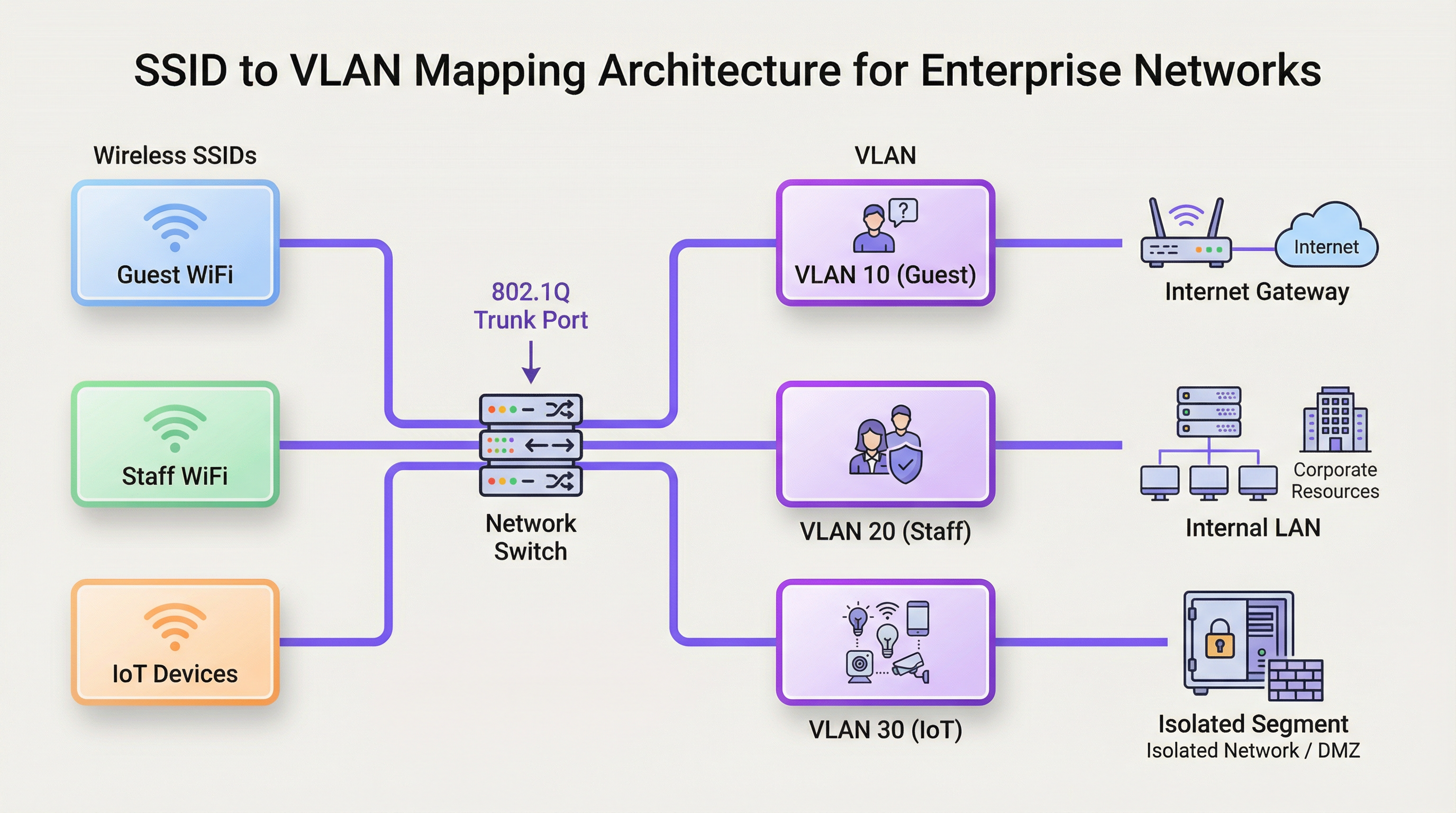
WiFi संदर्भात VLANs चा सर्वात सामान्य वापर म्हणजे विशिष्ट सर्व्हिस सेट आयडेंटिफायर (SSID)—WiFi नेटवर्कचे सार्वजनिक नाव—एका समर्पित VLAN शी मॅप करणे. हे वायरलेस आणि वायर्ड नेटवर्क सेगमेंट्समध्ये एक अखंड ब्रिज तयार करते. उदाहरणार्थ:
- SSID:
Guest-WiFi-> VLAN 10 (फक्त इंटरनेट ॲक्सेस, क्लायंट आयसोलेशन सक्षम) - SSID:
Staff-Internal-> VLAN 20 (कॉर्पोरेट सर्व्हर्स, प्रिंटर्स आणि इंटरनल ॲप्लिकेशन्सचा ॲक्सेस) - SSID:
POS-Terminals-> VLAN 30 (अत्यंत प्रतिबंधित, फक्त पेमेंट प्रोसेसिंग गेटवेचा ॲक्सेस, PCI DSS सुसंगत) - SSID:
IoT-Devices-> VLAN 40 (बिल्डिंग मॅनेजमेंट, HVAC आणि सिक्युरिटी कॅमेऱ्यांसाठी आयसोलेटेड सेगमेंट)
हे आर्किटेक्चर वायरलेस ॲक्सेस पॉइंट्स (APs) आणि नेटवर्क स्विचेसच्या कॉन्फिगरेशनद्वारे साकार केले जाते. प्रत्येक SSID मधील वायरलेस ट्रॅफिकला संबंधित VID सह टॅग करण्यासाठी APs कॉन्फिगर केलेले असतात. या APs शी जोडलेले स्विच पोर्ट्स ट्रंक पोर्ट्स म्हणून कॉन्फिगर केलेले असतात, ज्यामुळे ते एकाच वेळी अनेक VLANs साठी ट्रॅफिक वाहून नेऊ शकतात. जेव्हा टॅग केलेले ट्रॅफिक स्विचवर पोहोचते, तेव्हा स्विच ते VID च्या आधारावर फॉरवर्ड करतो, हे सुनिश्चित करून की ते त्याच्या नियुक्त ब्रॉडकास्ट डोमेनमध्ये आयसोलेटेड राहील.
ब्रॉडकास्ट डोमेन्स आणि नेटवर्क परफॉर्मन्स
VLANs शिवाय, मोठे नेटवर्क हे एकच ब्रॉडकास्ट डोमेन असते. प्रत्येक ब्रॉडकास्ट फ्रेम (उदा., ARP विनंतीवरून) नेटवर्कवरील प्रत्येक डिव्हाइसला पाठविली जाते. शेकडो किंवा हजारो उपकरणांसह हाय-डेन्सिटी वातावरणात, हे ब्रॉडकास्ट ट्रॅफिक लक्षणीय नेटवर्क गर्दी निर्माण करू शकते, ज्याला "ब्रॉडकास्ट स्टॉर्म" म्हणून ओळखले जाते, जे सर्व युझर्ससाठी कार्यप्रदर्शन गंभीरपणे कमी करते. नेटवर्कला लहान VLANs मध्ये विभागून, ब्रॉडकास्ट्स त्यांच्या संबंधित VLAN पुरते मर्यादित राहतात. उदाहरणार्थ, गेस्ट WiFi VLAN वरील ARP विनंती स्टाफ VLAN वरील उपकरणांना दिसणार नाही, ज्यामुळे ओव्हरहेड मोठ्या प्रमाणात कमी होतो आणि एकूण नेटवर्क थ्रूपुट आणि स्थिरता सुधारते.
अंमलबजावणी मार्गदर्शक (Implementation Guide)
VLAN धोरणाची अंमलबजावणी करण्यासाठी प्रमुख नेटवर्क हार्डवेअरचे काळजीपूर्वक नियोजन आणि कॉन्फिगरेशन आवश्यक आहे. संस्थेच्या सुरक्षा आणि ऑपरेशनल आवश्यकतांशी सुसंगत असे लवचिक आणि स्केलेबल आर्किटेक्चर तयार करणे हे याचे ध्येय आहे.
हार्डवेअर आवश्यकता
- VLAN-अवेअर स्विचेस: कोणत्याही VLAN डिप्लॉयमेंटचा गाभा नेटवर्क स्विच असतो. डेटा पाथमधील सर्व स्विचेस "मॅनेज्ड" किंवा "स्मार्ट" स्विचेस असले पाहिजेत जे IEEE 802.1Q मानकाला सपोर्ट करतात. अनमॅनेज्ड स्विचेस VLAN टॅग्जवर प्रक्रिया करू शकत नाहीत आणि एकतर टॅग केलेल्या फ्रेम्स ड्रॉप करतील किंवा टॅग्ज काढून टाकतील, ज्यामुळे सेगमेंटेशन खंडित होईल.
- VLAN-अवेअर वायरलेस ॲक्सेस पॉइंट्स: एंटरप्राइझ-ग्रेड APs आवश्यक आहेत. या APs ने एकाधिक SSIDs ला सपोर्ट केला पाहिजे आणि प्रत्येक SSID मधील ट्रॅफिकला विशिष्ट VLAN ID सह टॅग करण्याची क्षमता त्यांच्यात असली पाहिजे.
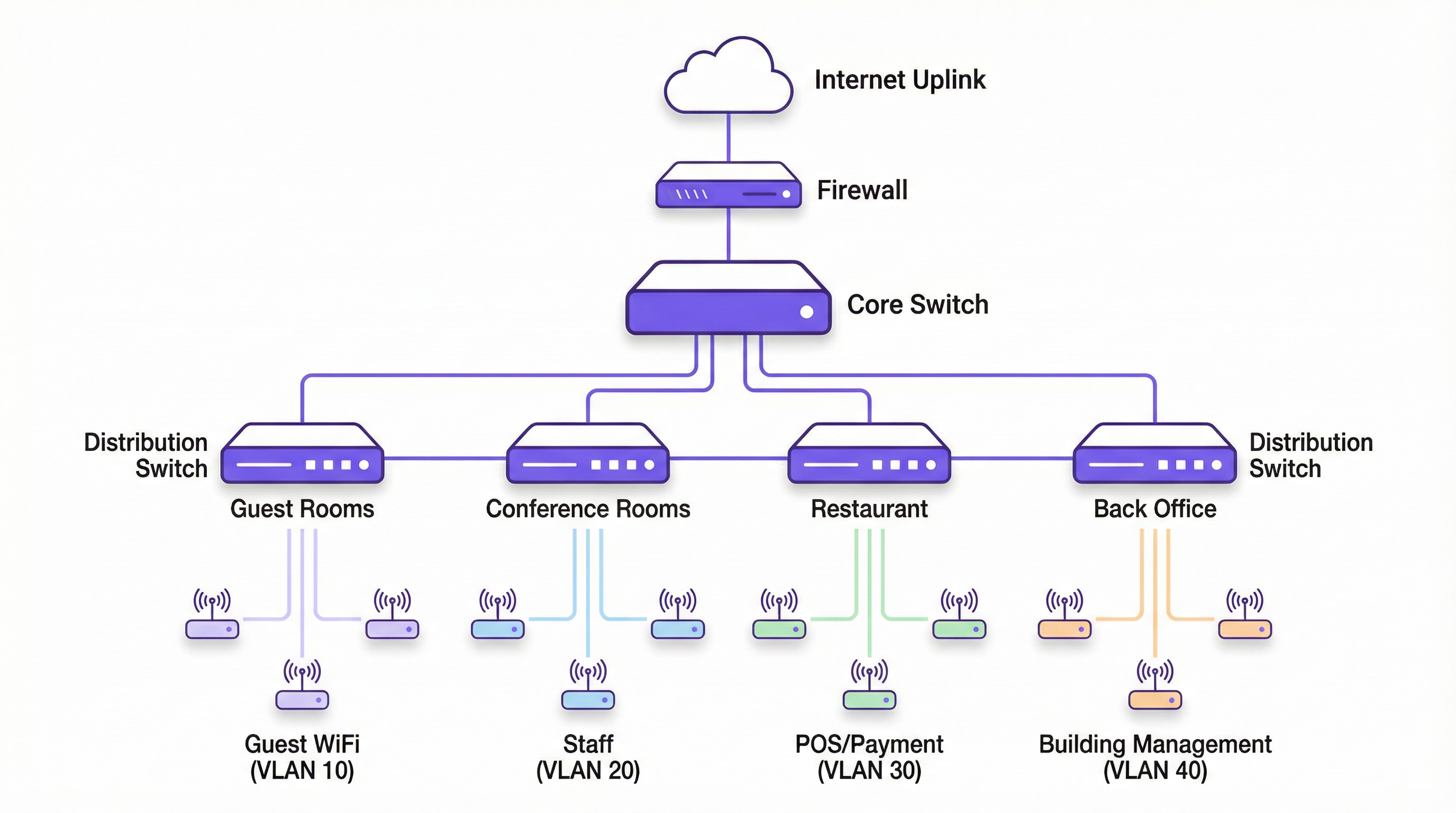
- राउटर / लेयर 3 स्विच: VLANs लॉजिकली स्वतंत्र नेटवर्क्स तयार करत असल्याने, जर कोणत्याही इंटर-VLAN संवादाची आवश्यकता असेल (उदा., स्टाफ उपकरणांना वेगळ्या VLAN वरील प्रिंटर ॲक्सेस करण्याची अनुमती देणे) तर त्यांच्यामध्ये राउटिंग करण्यास सक्षम असलेले उपकरण आवश्यक आहे. हे कार्य सामान्यतः कोर राउटर किंवा लेयर 3 स्विचद्वारे केले जाते. VLAN सीमा ओलांडण्यासाठी कोणत्या ट्रॅफिकला परवानगी आहे हे काटेकोरपणे नियंत्रित करण्यासाठी या उपकरणावर ॲक्सेस कंट्रोल लिस्ट्स (ACLs) कॉन्फिगर केल्या जातात.
व्हेंडर-न्यूट्रल कॉन्फिगरेशन स्टेप्स
- तुमची VLAN स्कीम परिभाषित करा: युझर ग्रुप्स, ट्रस्ट लेव्हल्स आणि ट्रॅफिक प्रकारांवर आधारित तुमच्या VLANs चे नियोजन करा. प्रत्येकाला एक नाव आणि युनिक VID नियुक्त करा (उदा., VLAN 10 - गेस्ट्स, VLAN 20 - स्टाफ, VLAN 30 - PCI, VLAN 40 - IoT). महत्त्वाचे म्हणजे, कोणत्याही प्रोडक्शन ट्रॅफिकसाठी डीफॉल्ट VLAN असलेल्या VLAN 1 चा वापर करू नका. हा एक सामान्य सुरक्षेचा धोका आहे.
- स्विचेसवर VLANs कॉन्फिगर करा: तुमच्या स्विचेसच्या मॅनेजमेंट इंटरफेसमध्ये ॲक्सेस मिळवा आणि परिभाषित केलेले VLANs तयार करा. यामध्ये सामान्यतः प्रत्येक VLAN ला एक नाव आणि त्याचा संबंधित VID देणे समाविष्ट असते.
- ट्रंक पोर्ट्स कॉन्फिगर करा: तुमच्या APs आणि इतर स्विचेसशी जोडले जाणारे स्विच पोर्ट्स ओळखा. हे पोर्ट्स "ट्रंक" पोर्ट्स म्हणून कॉन्फिगर करा आणि ट्रंकवरून कोणत्या VLANs ला जाण्याची परवानगी आहे ते निर्दिष्ट करा. सुरक्षेसाठी, फक्त आवश्यक VLANs ला परवानगी द्या, सर्वांना नाही.
- ॲक्सेस पोर्ट्स कॉन्फिगर करा: VLAN-अवेअर नसलेल्या एंड डिव्हाइसेसना (जसे की डेस्कटॉप PC) जोडणाऱ्या पोर्ट्ससाठी, त्यांना "ॲक्सेस" पोर्ट्स म्हणून कॉन्फिगर करा आणि त्यांना एकाच, अनटॅग्ड VLAN वर नियुक्त करा.
- APs कॉन्फिगर करा: तुमच्या वायरलेस कंट्रोलर किंवा AP मॅनेजमेंट इंटरफेसमध्ये, तुमचे SSIDs तयार करा. प्रत्येक SSID साठी, तो संबंधित VLAN ID ला नियुक्त करा. ही ती स्टेप आहे जी वायरलेस ट्रॅफिकला टॅग करते.
- इंटर-VLAN राउटिंग कॉन्फिगर करा: तुमच्या राउटर किंवा लेयर 3 स्विचवर, प्रत्येक VLAN साठी एक व्हर्च्युअल इंटरफेस तयार करा आणि त्याला IP ॲड्रेस नियुक्त करा. हा ॲड्रेस त्या VLAN मधील सर्व उपकरणांसाठी डीफॉल्ट गेटवे म्हणून काम करेल. VLANs दरम्यान वाहणाऱ्या ट्रॅफिकसाठी नियम परिभाषित करण्यासाठी ACLs लागू करा.
सर्वोत्तम पद्धती (Best Practices)
- हाय-रिस्क ट्रॅफिक आयसोलेट करा: गेस्ट नेटवर्क्स, IoT डिव्हाइसेस आणि कंप्लायन्सच्या अधीन असलेल्या सिस्टीम्स (जसे की PCI DSS) नेहमी त्यांच्या स्वतःच्या समर्पित, अत्यंत प्रतिबंधित VLANs मध्ये ठेवा.
- समर्पित मॅनेजमेंट VLAN वापरा: नेटवर्क इन्फ्रास्ट्रक्चर डिव्हाइसेस (स्विचेस, APs, कंट्रोलर्स) एंड-युझर ट्रॅफिक आणि संभाव्य हल्ल्यांपासून संरक्षित करण्यासाठी त्यांच्या स्वतःच्या आयसोलेटेड मॅनेजमेंट VLAN वर असावेत.
- डायनॅमिक VLAN असाइनमेंटसाठी 802.1X लागू करा: वर्धित सुरक्षेसाठी, RADIUS सर्व्हरसह IEEE 802.1X मानक वापरा. हे केवळ ते कनेक्ट करत असलेल्या SSID वर अवलंबून राहण्याऐवजी, यशस्वी ऑथेंटिकेशनवर प्रति-युझर किंवा प्रति-डिव्हाइस आधारावर डायनॅमिक VLAN असाइनमेंट करण्यास अनुमती देते.
- ट्रंकमधून न वापरलेले VLANs प्रून करा: कार्यप्रदर्शन आणि सुरक्षेसाठी, ट्रंक पोर्ट्स कॉन्फिगर करा जेणेकरून त्या लिंकवर सक्रियपणे आवश्यक असलेल्या VLANs लाच परवानगी मिळेल. हे अनावश्यक ब्रॉडकास्ट ट्रॅफिक नेटवर्कवर पसरण्यापासून प्रतिबंधित करते.
- सुरक्षा मानकांशी संरेखित करा: तुमचे VLAN आर्किटेक्चर संबंधित नियमांच्या पालनास समर्थन देते याची खात्री करा. उदाहरणार्थ, PCI DSS Requirement 1.2.1 कार्डहोल्डर डेटा वातावरणाला उर्वरित नेटवर्कपासून वेगळे करणे अनिवार्य करते.
ट्रबलशूटिंग आणि रिस्क मिटिगेशन
- समस्या: डिव्हाइसेसना IP ॲड्रेस मिळत नाही.
- कारण: बऱ्याचदा नवीन VLAN साठी DHCP स्कोप कॉन्फिगर केलेला नसतो, किंवा DHCP विनंत्या रिले करण्यासाठी राउटर/L3 स्विच योग्यरित्या कॉन्फिगर केलेला नसतो.
- उपाय: DHCP सर्व्हरकडे प्रत्येक VLAN च्या सबनेटसाठी स्कोप असल्याची आणि तुमच्या राउटरवरील VLAN इंटरफेसवर IP हेल्पर-ॲड्रेस कॉन्फिगर केल्याची खात्री करा.
- समस्या: डिव्हाइसेस WiFi शी कनेक्ट होऊ शकतात परंतु नेटवर्क ॲक्सेस नाही.
- कारण: AP आणि स्विच ट्रंक पोर्ट दरम्यान VLAN टॅगिंग मिसमॅच, किंवा पाथमध्ये कुठेतरी ट्रंक लिंकवर VLAN ला परवानगी दिली जात नाही.
- उपाय: AP पासून कोर राउटरपर्यंतच्या पाथमधील प्रत्येक स्विचवरील ट्रंक पोर्ट कॉन्फिगरेशनची पद्धतशीरपणे पडताळणी करा.
- धोका: VLAN हॉपिंग.
- कारण: कमी-सुरक्षा असलेल्या VLAN वरील हल्लेखोर उच्च-सुरक्षा असलेल्या VLAN मध्ये ॲक्सेस मिळवण्याचा प्रयत्न करतो. हे स्विच स्पूफिंग किंवा डबल टॅगिंग सारख्या तंत्रांद्वारे केले जाऊ शकते.
- उपाय: आधुनिक सुरक्षा सर्वोत्तम पद्धती वापरा: स्विचेसवर डायनॅमिक ट्रंकिंग प्रोटोकॉल (DTP) अक्षम करा, ट्रंक पोर्ट्स मॅन्युअली कॉन्फिगर करा आणि ट्रंक्सवरील तुमचे नेटिव्ह VLAN हे न वापरलेले, समर्पित VLAN असल्याची खात्री करा, VLAN 1 नाही.
ROI आणि व्यावसायिक प्रभाव
योग्य VLAN आर्किटेक्चर डिझाइन आणि अंमलात आणण्यासाठी केलेली गुंतवणूक महत्त्वपूर्ण परतावा देते. प्राथमिक ROI हा रिस्क मिटिगेशन (धोका कमी करणे) मध्ये आहे. अयोग्यरित्या सेगमेंट केलेल्या नेटवर्कवरील एकाच ब्रीचमुळे संपूर्ण संस्था उघडी पडू शकते, ज्यामुळे आपत्तीजनक आर्थिक आणि प्रतिष्ठेचे नुकसान होऊ शकते. गंभीर सिस्टीम्स आयसोलेट करून, अटॅक सरफेस नाटकीयरित्या कमी केला जातो. शिवाय, कमी झालेल्या ब्रॉडकास्ट ट्रॅफिकमुळे कार्यप्रदर्शनात होणारी सुधारणा गेस्ट्स आणि स्टाफ दोघांसाठीही उत्तम युझर एक्सपिरियन्स देते, ज्याचे रूपांतर हॉटेलमध्ये उच्च ग्राहक समाधानात किंवा ऑफिसमध्ये कर्मचाऱ्यांच्या अधिक उत्पादकतेत होऊ शकते. शेवटी, एक उत्तम-दस्तऐवजीकरण केलेले, सेगमेंटेड नेटवर्क व्यवस्थापन आणि ट्रबलशूटिंग सोपे करते, ऑपरेशनल ओव्हरहेड कमी करते आणि IT टीम्सना समस्यांना प्रतिसाद देण्यास आणि नवीन सेवा अधिक कार्यक्षमतेने डिप्लॉय करण्यास अनुमती देते.
Key Terms & Definitions
VLAN (Virtual Local Area Network)
A logical grouping of devices on one or more physical LANs that are configured to communicate as if they were attached to the same wire, when in fact they are located on a number of different LAN segments.
IT teams use VLANs to segment a network for security and performance reasons, such as separating guest WiFi traffic from internal corporate traffic without needing separate physical hardware for each.
IEEE 802.1Q
The networking standard that defines how VLAN information is inserted into Ethernet frames. It specifies the use of a "tag" in the frame header to identify the VLAN membership.
This is the core technology that makes VLANs work across multiple switches from different vendors. When a switch is "802.1Q compliant," it means it can understand and process these VLAN tags.
SSID (Service Set Identifier)
The public name of a wireless local area network (WLAN) that is broadcast into the air by access points. It is the name you see when you search for WiFi networks on your device.
In a VLAN deployment, IT teams map each SSID to a specific VLAN to automatically segment users based on the WiFi network they connect to (e.g., `Guest-WiFi` SSID maps to the Guest VLAN).
Trunk Port
A port on a network switch configured to carry traffic for multiple VLANs simultaneously. It uses the 802.1Q tagging standard to differentiate between the traffic of different VLANs.
Trunk ports are essential for connecting switches to each other and for connecting switches to VLAN-aware access points. They are the multi-lane highways of a VLAN architecture.
Access Port
A port on a network switch that carries traffic for only one VLAN. It is configured to connect to end-user devices like computers or printers that are not VLAN-aware.
This is the most common port configuration. When a device is plugged into an access port, it becomes a member of that port's assigned VLAN without needing any special configuration on the device itself.
Network Segmentation
The practice of splitting a computer network into smaller, isolated subnetworks or segments. Each segment acts as its own small network, and traffic between segments is controlled.
VLANs are the primary tool for achieving network segmentation. This is a critical security practice for reducing the attack surface and a performance tool for limiting broadcast traffic.
Broadcast Domain
A logical division of a computer network in which all nodes can reach each other by broadcast at the data link layer. A broadcast frame sent from one device will be received by all other devices in the same broadcast domain.
By default, a switched network is one large broadcast domain. VLANs break up the network into multiple, smaller broadcast domains, which improves performance by reducing unnecessary broadcast traffic.
RADIUS (Remote Authentication Dial-In User Service)
A client/server protocol that provides centralized Authentication, Authorization, and Accounting (AAA) management for users who connect to a network service.
In advanced WiFi deployments, a RADIUS server is used with 802.1X to authenticate users. Based on the user's credentials, the RADIUS server can tell the switch or AP to dynamically assign the user to a specific VLAN, providing a very high level of security and flexibility.
Case Studies
A 200-room luxury hotel needs to replace its aging WiFi network. They require secure, high-performance internet for guests, a separate network for corporate staff, a PCI-compliant network for payment systems at the front desk and restaurant, and a network for building management systems (HVAC, smart locks).
- VLAN Planning: Define four primary VLANs: VLAN 10 (Guests), VLAN 20 (Staff), VLAN 30 (PCI-DSS), and VLAN 40 (Building Management). Also, define VLAN 99 for network management.
- IP Addressing: Assign a unique /24 subnet to each VLAN (e.g., 10.10.10.0/24 for Guests, 10.10.20.0/24 for Staff).
- Hardware Configuration: Deploy managed 802.1Q-capable switches. Configure switch-to-switch ports and AP-connected ports as 802.1Q trunks, allowing VLANs 10, 20, 30, 40, and 99.
- SSID Mapping: Configure four SSIDs on the enterprise APs:
Hotel-Guest-WiFi-> VLAN 10,Hotel-Staff-> VLAN 20 (using WPA3-Enterprise with 802.1X),Hotel-POS-> VLAN 30 (hidden SSID), andHotel-IoT-> VLAN 40. - Routing & Security: Use a Layer 3 core switch for inter-VLAN routing. Create strict ACLs: VLAN 10 can only route to the internet. VLAN 30 can only communicate with the payment gateway IP address. VLAN 20 can access internal servers but not VLAN 30. VLAN 40 is completely isolated.
A retail chain with 50 stores wants to provide free guest WiFi while ensuring the security of their in-store POS systems and inventory scanners, which are also wireless.
- Standardised VLAN Template: Create a corporate-wide VLAN template to be deployed at each store: VLAN 110 (Guest WiFi), VLAN 120 (Corporate/Staff), VLAN 130 (POS), VLAN 140 (Inventory Scanners). Using higher VLAN numbers avoids conflicts with default setups.
- Centralised Management: Use a cloud-managed wireless and switching solution (like Purple's platform) to push the standardised configuration to all 50 stores.
- SSID Configuration:
Retail-Guest-> VLAN 110 (with client isolation and a captive portal for marketing).Retail-Staff-> VLAN 120 (WPA3-Enterprise).Retail-POS-> VLAN 130 (hidden SSID, MAC filtering).Retail-Inventory-> VLAN 140 (WPA3-Enterprise). - Firewall Policy: The on-site firewall at each store acts as the router. It is configured with rules to ensure VLAN 110 is internet-only. VLAN 130 traffic is restricted to the payment processor. VLAN 120 and 140 can communicate with the central corporate data centre over a VPN but are blocked from accessing the guest or POS VLANs directly.
Scenario Analysis
Q1. A conference centre is hosting a major tech event with 5,000 attendees, 200 event staff, and a dedicated press corps. How would you structure the VLANs and SSIDs to ensure a secure and performant network experience for all groups?
💡 Hint:Consider the different bandwidth, access, and security requirements for each group. Think about traffic density and potential interference.
Show Recommended Approach
- VLANs: Create at least three primary VLANs: VLAN 100 (Attendees), VLAN 200 (Staff), VLAN 300 (Press).
- SSIDs:
Event-Guest(VLAN 100) with a captive portal for registration and aggressive bandwidth limiting.Event-Staff(VLAN 200) with WPA3-Enterprise and access to production servers.Event-Press(VLAN 300) with higher bandwidth allocation and less restrictive filtering to allow for media uploads. - Network Design: Use a high-density AP deployment. Isolate the VLANs and implement strict inter-VLAN routing rules. The Attendee VLAN should be internet-only with client isolation enabled to prevent peer-to-peer attacks.
Q2. Your organisation has implemented VLANs, but users on the Staff VLAN (VLAN 20) are complaining of slow performance. The Guest VLAN (VLAN 10) seems unaffected. What are the first three things you would investigate?
💡 Hint:Think about the path traffic takes and what could cause congestion specific to one VLAN.
Show Recommended Approach
- Broadcast Traffic: Check for a broadcast storm within VLAN 20. A misconfigured device or a network loop affecting only that VLAN could be flooding it with traffic. Use a packet analyser to inspect traffic on a VLAN 20 access port.
- Uplink Saturation: Check the utilisation of the trunk links carrying VLAN 20 traffic. It's possible that staff activities (e.g., large file transfers to a server) are saturating the uplink, while guest traffic (mostly internet-bound) uses a different path or is shaped differently.
- DHCP/DNS Issues: Verify that the DHCP server for the VLAN 20 subnet is responsive and has available leases. Check the DNS servers assigned to VLAN 20 clients for latency or resolution failures. A problem with these core services can manifest as slow network performance.
Q3. A new security audit requires that all payment terminals be on a network segment that is completely isolated and compliant with PCI DSS. The terminals are currently connected to the same switches as regular staff computers. What is the most cost-effective way to achieve this?
💡 Hint:How can you achieve logical isolation without buying an entire new set of physical hardware?
Show Recommended Approach
The most cost-effective solution is to create a new, dedicated PCI VLAN (e.g., VLAN 30). Assign the switch ports connected to the payment terminals as access ports for VLAN 30. Then, at the router or Layer 3 switch, create a strict firewall rule (ACL) that only allows traffic from the VLAN 30 subnet to communicate with the specific IP addresses of the payment processor, and block all other traffic, including all inter-VLAN traffic. This logically isolates the terminals on the existing hardware, meeting the core requirement of PCI DSS segmentation without capital expenditure on new switches.
Key Takeaways
- ✓VLANs logically segment a physical network into multiple isolated broadcast domains.
- ✓Map SSIDs to specific VLANs to automatically enforce security policies for different user groups (e.g., Guest vs. Staff).
- ✓Use 802.1Q compliant switches and APs to implement a VLAN architecture.
- ✓Isolating guest, corporate, and sensitive (e.g., PCI) traffic into separate VLANs is critical for security and compliance.
- ✓VLANs improve network performance by reducing the size of broadcast domains and mitigating broadcast storms.
- ✓Always use a dedicated, unused VLAN for management and for the native VLAN on trunk ports; avoid using the default VLAN 1.
- ✓For maximum security, combine VLANs with 802.1X and a RADIUS server for dynamic, per-user VLAN assignment.




