

WPA2 विरुद्ध WPA3: काय फरक आहे आणि तुम्ही अपग्रेड करावे का?
This guide provides IT managers, network architects, and venue operations directors with a definitive, actionable comparison of WPA2 and WPA3 WiFi security protocols. It explains the critical technical differences — including SAE authentication, Perfect Forward Secrecy, and Enhanced Open — and outlines a practical, phased migration strategy using WPA3 Transition Mode. The guide is essential for any organisation operating guest or staff WiFi in hospitality, retail, events, or public-sector environments who needs to understand the upgrade case, manage device compatibility, and align their wireless security posture with modern compliance requirements.
🎧 Listen to this Guide
View Transcript

कार्यकारी सारांश
एका दशकाहून अधिक काळ, WPA2 हा एंटरप्राइझ WiFi सुरक्षेचा पाया राहिला आहे. तथापि, त्यातील अंगभूत असुरक्षा — ऑफलाइन डिक्शनरी हल्ल्यांना बळी पडण्याची शक्यता आणि KRACK (Key Reinstallation Attack) एक्सप्लॉइट — आता संस्थांसाठी एक मूर्त आणि सक्रियपणे वापरला जाणारा धोका निर्माण करतात. 2018 मध्ये Wi-Fi अलायन्सने प्रमाणित केलेला पुढील पिढीचा सुरक्षा प्रोटोकॉल, WPA3, Simultaneous Authentication of Equals (SAE) सह मजबूत प्रमाणीकरण, GCMP-256 द्वारे अधिक मजबूत एन्क्रिप्शन आणि अनिवार्य Protected Management Frames (PMF) सादर करून या त्रुटी दूर करतो. हे मार्गदर्शक हॉस्पिटॅलिटी, रिटेल आणि मोठ्या-स्थळांच्या वातावरणातील IT लीडर्स आणि नेटवर्क आर्किटेक्ट्ससाठी WPA2 आणि WPA3 ची व्यावहारिक, कृतीयोग्य तुलना प्रदान करते. हे अपग्रेड करण्यासाठी बिझनेस केसची रूपरेषा देते, WPA3 ट्रान्झिशन मोड वापरून धोरणात्मक संक्रमण मार्गाचा तपशील देते आणि आधुनिक अनुपालन आणि अतिथी अनुभवाच्या मागण्या पूर्ण करणारे सुरक्षित, उच्च-कार्यक्षमता वायरलेस नेटवर्क सुनिश्चित करण्यासाठी व्हेंडर-न्यूट्रल सर्वोत्तम पद्धती ऑफर करते. मुख्य निष्कर्ष असा आहे की WPA3 वर स्थलांतर करणे हा आता करायचे की नाही हा प्रश्न राहिला नसून कसे करायचे हा आहे — आणि टप्प्याटप्प्याने, धोरणात्मक दृष्टिकोन हा धोका कमी करण्यासाठी आणि तुमच्या पायाभूत सुविधांना भविष्यासाठी सज्ज करण्यासाठी सर्वात प्रभावी मार्ग आहे.
तांत्रिक सखोल विश्लेषण
WPA2 वरून WPA3 मधील संक्रमण वायरलेस सुरक्षेतील महत्त्वपूर्ण आर्किटेक्चरल बदल दर्शवते. उपयोजनाचे (deployment) माहितीपूर्ण निर्णय घेण्यासाठी नेटवर्क आर्किटेक्ट्स आणि IT व्यवस्थापकांना अंतर्निहित तांत्रिक फरक समजून घेणे महत्त्वाचे आहे. WPA2 हे एक लवचिक मानक असले तरी, WPA3 हे विशिष्ट, चांगल्या प्रकारे दस्तऐवजीकरण केलेले हल्ल्याचे मार्ग (attack vectors) निष्प्रभ करण्यासाठी आणि वायरलेस कनेक्टिव्हिटीच्या पुढील दशकासाठी अधिक सुरक्षित पाया प्रदान करण्यासाठी डिझाइन केले गेले आहे.
प्रमाणीकरण: PSK कडून SAE कडे
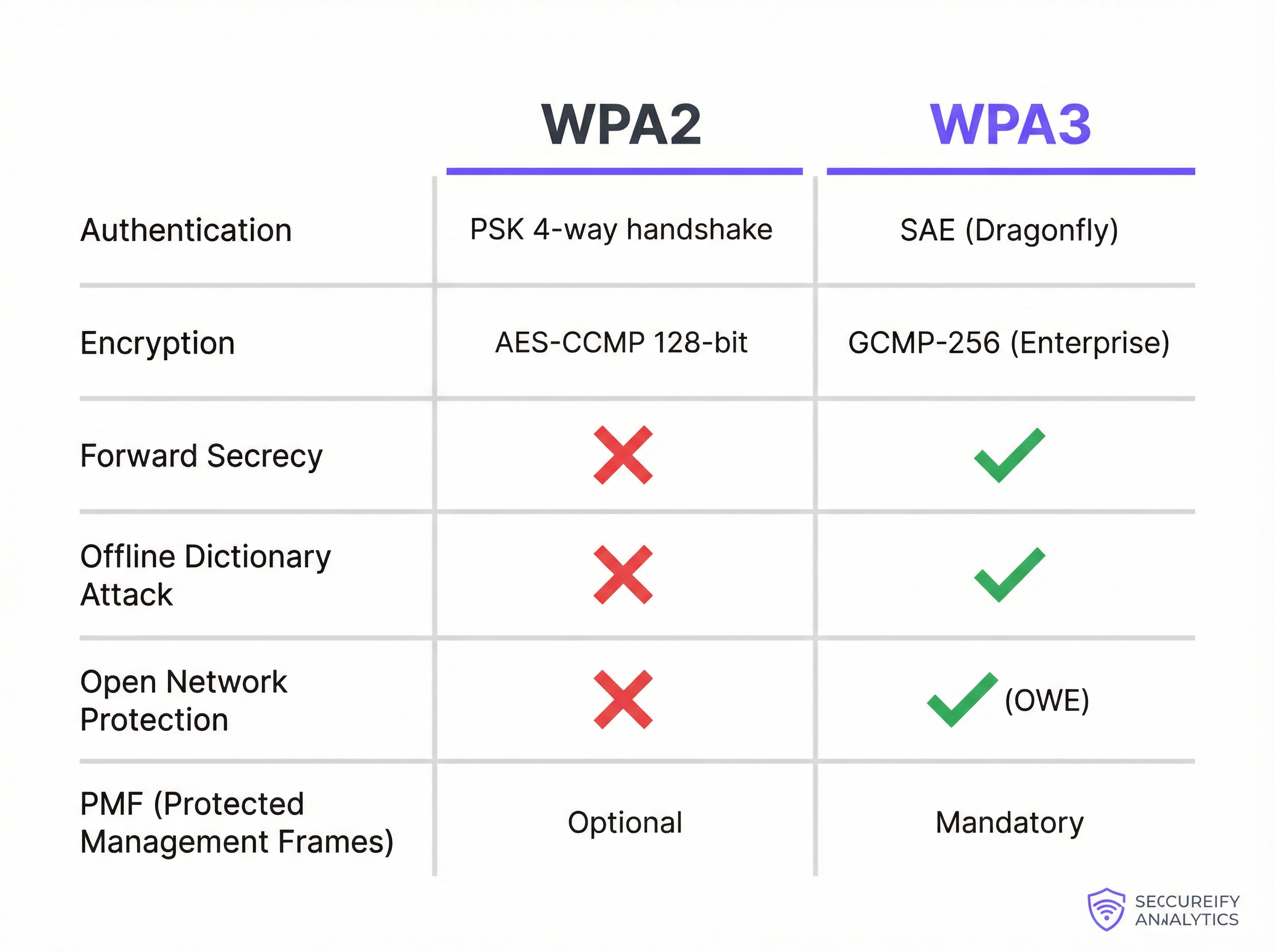
WPA2-Personal आणि WPA3-Personal मधील सर्वात मूलभूत बदल म्हणजे प्रमाणीकरण यंत्रणा (authentication mechanism). WPA2 4-वे हँडशेकसह एकत्रित प्री-शेअर्ड की (PSK) वापरते. त्याच्या डिझाइनच्या वेळी प्रभावी असली तरी, ही पद्धत ऑफलाइन डिक्शनरी हल्ल्यांसाठी असुरक्षित आहे. एखादा हल्लेखोर निष्क्रियपणे हँडशेक कॅप्चर करू शकतो आणि नंतर नेटवर्कशी कोणताही पुढील संवाद न साधता, ऑफलाइन पासवर्डचा अंदाज लावण्यासाठी संगणकीय शक्तीचा वापर करू शकतो. यामुळे कमकुवत किंवा मध्यम गुंतागुंतीच्या पासवर्डसह सुरक्षित केलेले नेटवर्क तडजोड (compromise) होण्यास अत्यंत असुरक्षित बनतात.
WPA3 PSK च्या जागी Simultaneous Authentication of Equals (SAE) वापरते, ज्याला ड्रॅगनफ्लाय की एक्सचेंज (Dragonfly Key Exchange) म्हणूनही ओळखले जाते. SAE हा एक पासवर्ड-प्रमाणित की करार प्रोटोकॉल आहे जो ऑफलाइन डिक्शनरी हल्ल्यांना प्रतिरोधक आहे. प्रमाणीकरण प्रक्रियेदरम्यान, पासवर्डची कधीही थेट देवाणघेवाण केली जात नाही. त्याऐवजी, क्लायंट आणि ॲक्सेस पॉईंट दोन्ही क्रिप्टोग्राफिक हॅशेस तयार करण्यासाठी पासवर्ड वापरतात, ज्यांची नंतर की चे परस्पर ज्ञान सिद्ध करण्यासाठी देवाणघेवाण केली जाते. ही देवाणघेवाण कॅप्चर करणारा हल्लेखोर ऑफलाइन पासवर्ड ब्रूट-फोर्स करण्यासाठी त्याचा वापर करू शकत नाही. पासवर्डचा अंदाज लावण्याचा कोणताही प्रयत्न हा सक्रिय, ऑनलाइन हल्ला असला पाहिजे — जो खूप संथ आणि शोधण्यास व ब्लॉक करण्यास खूप सोपा आहे.
एन्क्रिप्शन, की व्यवस्थापन आणि फॉरवर्ड सिक्रेसी
WPA2-Enterprise 128-बिट एन्क्रिप्शनसह AES-CCMP वापरते, जे अनेक वर्षांपासून सुरक्षित मानले गेले आहे. WPA3-Enterprise कमर्शियल नॅशनल सिक्युरिटी अल्गोरिदम (CNSA) सूटशी संरेखित पर्यायी 192-बिट सिक्युरिटी मोड ऑफर करून, ही पातळी लक्षणीयरीत्या उंचावते. हे सरकार, संरक्षण आणि इतर उच्च-सुरक्षा वातावरणासाठी आवश्यक असलेली क्रिप्टोग्राफिक स्थिती प्रदान करते.
अधिक व्यापकपणे, WPA3 परफेक्ट फॉरवर्ड सिक्रेसी (PFS) सादर करते. WPA2 सह, जर एखाद्या हल्लेखोराने नेटवर्क पासवर्डशी तडजोड केली, तर ते संभाव्यतः त्यांनी पूर्वी कॅप्चर केलेला आणि संचयित केलेला मागील ट्रॅफिक डिक्रिप्ट करू शकतात. SAE सह WPA3 हे सुनिश्चित करते की प्रत्येक सत्रात (session) एक अद्वितीय, अल्पकालिक एन्क्रिप्शन की आहे. जरी एका सत्रातील की तडजोड झाली तरीही, ती कोणत्याही मागील किंवा भविष्यातील सत्रांना डिक्रिप्ट करण्यासाठी वापरली जाऊ शकत नाही — ज्यामुळे कोणत्याही संभाव्य उल्लंघनाची व्याप्ती (blast radius) नाटकीयरित्या कमी होते.
ओपन नेटवर्कसाठी संरक्षण: एन्हांस्ड ओपन (OWE)
हॉटेल्स, विमानतळ आणि रिटेल स्टोअर्स सारख्या सार्वजनिक ठिकाणी, अतिथींच्या प्रवेशासाठी ओपन (पासवर्ड-मुक्त) WiFi नेटवर्क सामान्य आहेत. पारंपारिक ओपन नेटवर्कवर, सर्व ट्रॅफिक प्लेनटेक्स्टमध्ये प्रसारित केले जाते, ज्यामुळे प्रत्येक वापरकर्ता त्याच नेटवर्कवरील इतर कोणाकडूनही निष्क्रिय इव्हस्ड्रॉपिंगसाठी (eavesdropping) असुरक्षित बनतो. WPA3 यावर एन्हांस्ड ओपन सह उपाय करते, जे ऑपर्च्युनिस्टिक वायरलेस एन्क्रिप्शन (OWE) लागू करते. OWE आपोआप प्रत्येक वापरकर्ता आणि ॲक्सेस पॉईंट दरम्यान एक वैयक्तिक, एन्क्रिप्टेड टनेल तयार करते, अगदी पासवर्ड नसलेल्या नेटवर्कवरही. हे कनेक्शन प्रक्रियेत कोणताही अडथळा न आणता अर्थपूर्ण गोपनीयता प्रदान करते — मोठ्या प्रमाणावरील अतिथी WiFi उपयोजनांसाठी ही एक महत्त्वपूर्ण सुधारणा आहे.
प्रोटेक्टेड मॅनेजमेंट फ्रेम्स (PMF)
मॅनेजमेंट फ्रेम्स WiFi उपकरणे त्यांचे कनेक्शन कसे व्यवस्थापित करतात हे नियंत्रित करतात, ज्यामध्ये असोसिएशन आणि डिसअसोसिएशन समाविष्ट आहे. WPA2 मध्ये, या फ्रेम्स असुरक्षित असतात, ज्यामुळे हल्लेखोर कायदेशीर वापरकर्त्याला बळजबरीने डी-ऑथेंटिकेट करण्यासाठी त्यांना स्पूफ करू शकतो, ज्यामुळे डिनायल-ऑफ-सर्व्हिस किंवा मॅन-इन-द-मिडल हल्ले शक्य होतात. WPA2 अंतर्गत PMF (IEEE 802.11w मध्ये परिभाषित) ऐच्छिक असले तरी, WPA3 प्रोटेक्टेड मॅनेजमेंट फ्रेम्सचा वापर अनिवार्य करते, या महत्त्वपूर्ण नियंत्रण संदेशांची अखंडता आणि सत्यता सुनिश्चित करते आणि वायरलेस कनेक्शनच्या एकूण स्थिरतेचे संरक्षण करते.
अंमलबजावणी मार्गदर्शक
एंटरप्राइझ नेटवर्क WPA2 वरून WPA3 वर स्थलांतरित करणे हे केवळ एक साधे बटण दाबण्यासारखे नाही तर एक धोरणात्मक प्रकल्प आहे ज्यासाठी काळजीपूर्वक नियोजन आणि अंमलबजावणी आवश्यक आहे. व्यावसायिक ऑपरेशन्स आणि वापरकर्त्याच्या अनुभवातील व्यत्यय कमीत कमी ठेवून सुरक्षा वाढवणे हे उद्दिष्ट आहे. टप्प्याटप्प्याने केलेला दृष्टिकोन हा नेहमीच शिफारस केलेला मार्ग असतो.
टप्पा 1 — पायाभूत सुविधा आणि उपकरणांचे ऑडिट. पहिली पायरी म्हणजे तुमच्या संपूर्ण वायरलेस इकोसिस्टमचे सर्वसमावेशक ऑडिट. ॲक्सेस पॉईंट्ससाठी, सर्व युनिट्सचे मेक, मॉडेल आणि फर्मवेअर आवृत्ती ओळखा आणि WPA3 समर्थनासाठी उत्पादकाचे दस्तऐवज तपासा. 2019 पासून विकले गेलेले बहुतांश एंटरप्राइझ-ग्रेड APs WPA3 ला समर्थन देतात, परंतु सामान्यतः फर्मवेअर अपग्रेड आवश्यक असते. जर तुम्ही कंट्रोलर-आधारित आर्किटेक्चर वापरत असाल, तर कंट्रोलर सॉफ्टवेअर WPA3 कॉन्फिगरेशन आणि व्यवस्थापनास समर्थन देणाऱ्या आवृत्तीवर अपडेट केले असल्याची खात्री करा. ऑडिटचा सर्वात गंभीर आणि आव्हानात्मक भाग म्हणजे क्लायंट डिव्हाइस इन्व्हेंटरी. तुम्ही तुमच्या WiFi नेटवर्कशी कनेक्ट होणाऱ्या प्रत्येक उपकरणाची सूची तयार केली पाहिजे — कॉर्पोरेट लॅपटॉप्स, स्मार्टफोन्स, BYOD उपकरणे आणि पॉईंट-ऑफ-सेल (POS) टर्मिनल्स, बारकोड स्कॅनर्स, IoT सेन्सर्स आणि स्मार्ट बिल्डिंग घटकांसारखे विशेष-उद्देशीय हार्डवेअर.
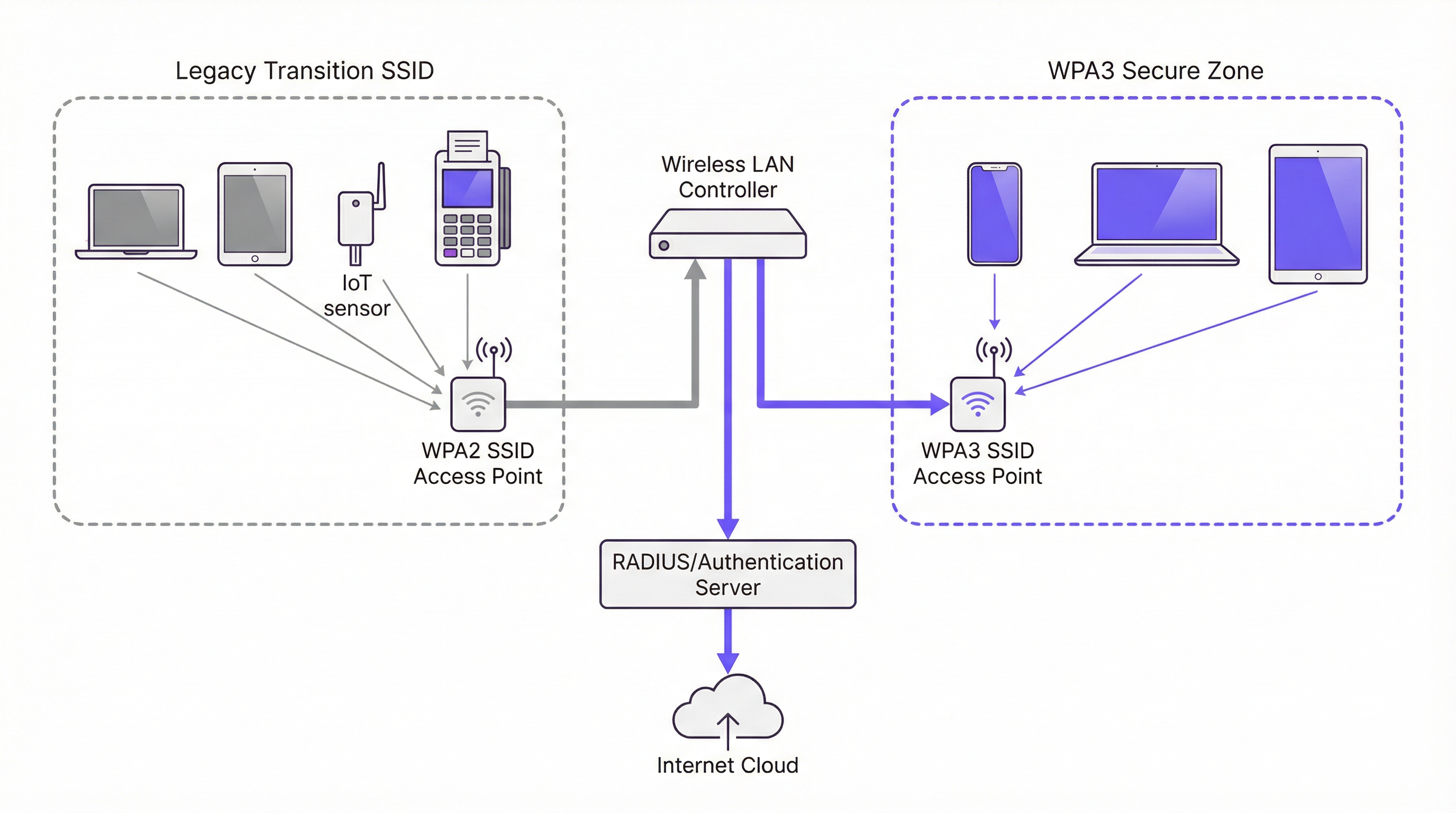
टप्पा 2 — WPA3/WPA2 ट्रान्झिशन मोड सक्षम करा. क्लायंट उपकरणांच्या विविधतेमुळे बहुतांश संस्थांसाठी WPA3 वर पूर्ण, त्वरित कटओव्हर व्यावहारिक नाही. उद्योग-मानक उपाय म्हणजे WPA3/WPA2 मिक्स्ड मोड वापरणे, ज्याला ट्रान्झिशन मोड असेही म्हणतात. या कॉन्फिगरेशनमध्ये, समान SSID WPA3 आणि WPA2 दोन्ही प्रमाणीकरणाच्या समर्थनासह प्रसारित केला जातो. WPA3-सक्षम क्लायंट आपोआप वाटाघाटी करतात आणि अधिक सुरक्षित प्रोटोकॉल वापरून कनेक्ट होतात; लेगसी क्लायंट WPA2 वापरून कनेक्ट होतात. हे स्थलांतर कालावधीत अखंड वापरकर्ता अनुभव देते. तुमच्या वायरलेस LAN कंट्रोलर किंवा AP व्यवस्थापन इंटरफेसमध्ये, तुम्हाला सामान्यतः तुमच्या SSID साठी एक सुरक्षा सेटिंग मिळेल जी तुम्हाला "WPA3+WPA2-Enterprise" किंवा तत्सम मिक्स्ड-मोड पर्याय निवडण्याची अनुमती देते.
टप्पा 3 — केवळ-WPA3 सुरक्षित झोन तयार करा. जशी तुमची क्लायंट उपकरणे अधिकाधिक WPA3-सक्षम होत जातील, तसतसे विशिष्ट वापरकर्ता गट किंवा उपकरण प्रकारांसाठी केवळ-WPA3 SSIDs तयार करण्यास सुरुवात करा. सर्वात संवेदनशील डेटा हाताळणाऱ्या उपकरणे आणि वापरकर्त्यांना प्राधान्य द्या. उदाहरणार्थ, वित्त विभागासाठी किंवा कॉर्पोरेट एक्झिक्युटिव्ह उपकरणांसाठी केवळ-WPA3 SSID तयार करा, नंतर सक्षम उपकरणांवर नवीन नेटवर्क प्रोफाइल्स पुश करण्यासाठी तुमच्या डिव्हाइस मॅनेजमेंट प्लॅटफॉर्मचा वापर करा, ज्यामुळे मिक्स्ड-मोड SSID वरील तुमचे अवलंबित्व हळूहळू कमी होईल.
टप्पा 4 — लेगसी उपकरणांना वेगळे करा आणि व्यवस्थापित करा. अपरिहार्यपणे, तुमच्याकडे WPA3 ला समर्थन न देणाऱ्या लेगसी उपकरणांची एक मोठी संख्या असेल. केवळ-WPA2 साठी कॉन्फिगर केलेला एक वेगळा, समर्पित SSID तयार करा, जो कठोर ॲक्सेस नियमांसह उर्वरित कॉर्पोरेट नेटवर्कपासून फायरवॉल केलेला असेल. त्याच वेळी, कालांतराने गैर-अनुपालन उपकरणांना टप्प्याटप्प्याने काढून टाकण्यासाठी हार्डवेअर रिफ्रेश जीवनचक्र योजना विकसित करा. प्रत्येक नवीन उपकरण खरेदीसाठी, खरेदीची आवश्यकता म्हणून WPA3 समर्थन अनिवार्य करा.
सर्वोत्तम पद्धती
खालील तक्ता IEEE 802.1X, Wi-Fi अलायन्स स्पेसिफिकेशन्स आणि PCI DSS v4.0 आवश्यकतांच्या मार्गदर्शनावर आधारित, सुरक्षित WPA3 उपयोजनासाठी प्रमुख उद्योग-मानक शिफारसींचा सारांश देतो.
| सर्वोत्तम पद्धत | कारण | प्राधान्य |
|---|---|---|
| सर्व कॉर्पोरेट SSIDs साठी 802.1X अनिवार्य करा | शेअर केलेले पासवर्ड काढून टाकते; RADIUS द्वारे प्रति-वापरकर्ता उत्तरदायित्व आणि केंद्रीकृत धोरण नियंत्रण प्रदान करते. | अत्यंत महत्त्वाचे |
| EAP-TLS (प्रमाणपत्र-आधारित प्रमाणीकरण) लागू करा | पासवर्ड-आधारित हल्ल्याचा पृष्ठभाग पूर्णपणे काढून टाकते; प्रमाणपत्रांचे फिशिंग केले जाऊ शकत नाही. | उच्च |
| सर्व WPA2 नेटवर्कवर PMF सक्षम करा | पूर्ण WPA3 स्थलांतरापूर्वीच डी-ऑथेंटिकेशन आणि डिसअसोसिएशन हल्ल्यांपासून संरक्षण करते. | उच्च |
| लेगसी डेटा रेट्स अक्षम करा (< 6 Mbps) | सर्वात जुन्या, सर्वात कमी सुरक्षित क्लायंट्ससह सुसंगतता काढून टाकते आणि एकूण एअरटाइम कार्यक्षमता सुधारते. | मध्यम |
| IoT आणि अतिथी ट्रॅफिक समर्पित VLANs वर विभागून टाका | लेगसी उपकरण किंवा ओपन नेटवर्कवरील कोणत्याही तडजोडीची व्याप्ती मर्यादित करते. | अत्यंत महत्त्वाचे |
| फर्मवेअर अपडेटची नियमितता स्थापित करा | APs आणि कंट्रोलर्सवर ज्ञात असुरक्षा त्वरित पॅच केल्या जातील याची खात्री करते. | उच्च |
| सर्व नवीन हार्डवेअर खरेदीमध्ये WPA3 अनिवार्य करा | तांत्रिक कर्जाचे संचय रोखते आणि स्थलांतराच्या टाइमलाइनला गती देते. | उच्च |
समस्यानिवारण आणि जोखीम निवारण
WPA3 उपयोजित केल्याने नवीन आव्हाने निर्माण होऊ शकतात. सर्वात सामान्य अपयश मोड म्हणजे क्लायंट कनेक्टिव्हिटी, जिथे जुने वायरलेस ड्रायव्हर्स किंवा ऑपरेटिंग सिस्टीम असलेली उपकरणे WPA3 कनेक्शनशी वाटाघाटी करण्यात अयशस्वी ठरतात. WPA3 सक्षम करण्यापूर्वी नवीनतम ड्रायव्हर्स आणि OS अपडेट्स लागू केले आहेत याची खात्री करणे हाच यावरील उपाय आहे. व्यापक रोलआउटपूर्वी उपकरणांच्या प्रकारांच्या प्रातिनिधिक नमुन्यासह चाचणी करणे ही कोणत्याही जबाबदार उपयोजन योजनेतील एक अनिवार्य पायरी आहे.
कार्यक्षमतेतील घट ही आणखी एक चिंता आहे, जरी व्यवहारात ती क्वचितच WPA3 मुळे होते. बऱ्याचदा, हे चुकीच्या पद्धतीने कॉन्फिगर केलेले ॲक्सेस पॉईंट्स किंवा सदोष फर्मवेअर आवृत्त्यांमुळे होते. उत्पादन उपयोजनापूर्वी लॅब वातावरणात नवीन फर्मवेअर प्रमाणित करणे आणि कोणत्याही कॉन्फिगरेशन बदलानंतर लेटन्सी, पॅकेट ड्रॉप रेट्स आणि रिट्रान्समिशन काउंट्स यांसारख्या प्रमुख मेट्रिक्सचे बारकाईने निरीक्षण केल्याने तुम्हाला समस्या त्वरित ओळखता येतील आणि सोडवता येतील.
आधुनिक ऑपरेटिंग सिस्टीमच्या अत्याधुनिक सप्लिकंट्सचा (supplicants) अभाव असलेल्या IoT आणि हेडलेस उपकरणांचे व्यवस्थापन करणे हे सर्वात सततचे आव्हान आहे. ही उपकरणे कठोर फायरवॉल नियमांसह समर्पित, सुरक्षित केवळ-WPA2 SSID वर वेगळी ठेवली पाहिजेत. हा कायमस्वरूपी उपाय नाही तर बदली योजना विकसित आणि अंमलात आणली जाईपर्यंत हा एक जोखीम-नियंत्रण उपाय आहे.
ROI आणि व्यावसायिक प्रभाव
WPA3 अपग्रेडचा ROI प्रामुख्याने जोखीम निवारणाद्वारे चालविला जातो. WPA2 मधील असुरक्षा सक्रियपणे वापरल्या जातात आणि वायरलेस नेटवर्कवरील यशस्वी हल्ल्यामुळे डेटा चोरी (data exfiltration), प्रतिष्ठेचे नुकसान आणि PCI DSS v4.0 आणि GDPR सारख्या फ्रेमवर्क अंतर्गत महत्त्वपूर्ण अनुपालन दंड होऊ शकतो. एकाच उल्लंघनाची किंमत — ज्यामध्ये फॉरेन्सिक तपासणी, कायदेशीर शुल्क, ग्राहक सूचना आणि नियामक दंड समाविष्ट आहेत — सहजपणे लाखो पौंडांपर्यंत पोहोचू शकते. WPA3-सक्षम पायाभूत सुविधांमधील गुंतवणूक या संभाव्य खर्चाचा एक छोटासा भाग आहे.
जोखमीच्या पलीकडे, अतिथी अनुभव आणि ब्रँड विश्वासावर थेट परिणाम होतो. सार्वजनिक ठिकाणी, अतिथी WiFi ची सुरक्षा हा ब्रँडच्या आश्वासनाचा एक भाग आहे. WPA3 एन्हांस्ड ओपन ठिकाणांना अखंड, पासवर्ड-मुक्त ॲक्सेस प्रदान करण्याची अनुमती देते आणि त्याच वेळी प्रत्येक वापरकर्त्याचा ट्रॅफिक एन्क्रिप्टेड आहे आणि त्याच नेटवर्कवरील इतर वापरकर्त्यांपासून वेगळा आहे याची खात्री करते. हे विश्वास निर्माण करते आणि ऑपरेशनल गुंतागुंत न वाढवता एकूण अतिथी अनुभव वाढवते.
शेवटी, WPA3 ही भविष्यासाठी सज्ज करणारी गुंतवणूक आहे. हा WiFi 6, 6E आणि WiFi 7 साठी सुरक्षेचा पाया आहे. संक्रमणास विलंब केल्याने केवळ तांत्रिक कर्ज जमा होते, ज्यामुळे अंतिम स्थलांतर अधिक गुंतागुंतीचे आणि महाग होते. WPA3 मध्ये धोरणात्मक, टप्प्याटप्प्याने केलेले अपग्रेड हा दीर्घकालीन नेटवर्क आर्किटेक्चर नियोजनासाठी आर्थिकदृष्ट्या जबाबदार दृष्टिकोन आहे जो पायाभूत सुविधांच्या गुंतवणुकीच्या जीवनचक्रात चक्रवाढ परतावा देतो.
Key Terms & Definitions
SAE (Simultaneous Authentication of Equals)
A password-authenticated key agreement protocol, also known as the Dragonfly handshake, that replaces WPA2's Pre-Shared Key (PSK) mechanism. SAE prevents offline dictionary attacks by ensuring the password is never transmitted or exposed during the authentication process. Both parties prove knowledge of the password through cryptographic exchange, making passive capture of the handshake useless to an attacker.
IT teams encounter SAE when configuring WPA3-Personal SSIDs. It is the primary reason WPA3-Personal is significantly more secure than WPA2-PSK and is the first capability to verify when assessing WPA3 readiness.
GCMP-256 (Galois/Counter Mode Protocol, 256-bit)
The encryption cipher used in WPA3-Enterprise's 192-bit security mode. GCMP-256 provides both data confidentiality and data integrity (authentication) in a single, highly efficient operation. It is aligned with the Commercial National Security Algorithm (CNSA) suite and represents a significant improvement over WPA2's AES-CCMP-128.
Relevant for network architects designing networks for government, defence, financial services, or healthcare environments where regulatory requirements mandate the highest available encryption standards.
Perfect Forward Secrecy (PFS)
A cryptographic property that ensures each communication session uses a unique, ephemeral encryption key. If a session key is compromised, it cannot be used to decrypt any past or future sessions. WPA3 achieves PFS through the SAE handshake, which generates a unique Pairwise Master Key (PMK) for each session.
Critical for environments where sensitive data is transmitted over WiFi and where the threat of 'capture now, decrypt later' attacks is a concern. PFS is a key differentiator between WPA2 and WPA3 from a data protection standpoint.
OWE (Opportunistic Wireless Encryption)
A WiFi security mechanism defined in RFC 8110 and implemented in WPA3 as 'Enhanced Open'. OWE automatically establishes an encrypted connection between each client and the access point on an open (password-free) network, providing individualised data encryption without any user interaction or credential exchange.
The standard configuration for guest and public WiFi in hospitality, retail, and venue environments. OWE allows operators to provide seamless connectivity while protecting users from passive eavesdropping, directly addressing a long-standing privacy concern with traditional open networks.
PMF (Protected Management Frames)
A security mechanism defined in IEEE 802.11w that encrypts and authenticates WiFi management frames, such as de-authentication and disassociation frames. Without PMF, an attacker can spoof these frames to forcibly disconnect legitimate users from the network. PMF is optional in WPA2 but mandatory in WPA3.
IT teams should enable PMF on all WPA2 networks as a hardening measure, even before migrating to WPA3. It is a simple configuration change that provides meaningful protection against denial-of-service attacks.
WPA3 Transition Mode
A mixed-mode SSID configuration that simultaneously supports both WPA3 and WPA2 authentication on the same network name (SSID). WPA3-capable clients automatically negotiate and use the more secure WPA3 protocol; legacy WPA2-only clients connect using the older protocol. This is the primary mechanism for managing the migration from WPA2 to WPA3 in environments with mixed device populations.
The recommended starting point for any WPA3 migration. IT teams should enable transition mode on existing SSIDs as the first step, then monitor which devices are connecting via WPA2 to identify the remaining legacy device population.
802.1X / RADIUS Authentication
An IEEE standard for port-based network access control. In the context of enterprise WiFi, 802.1X uses a RADIUS (Remote Authentication Dial-In User Service) server to authenticate individual users or devices before granting network access. This provides per-user accountability and centralised access control, replacing the single shared password of PSK-based networks.
The mandatory authentication framework for any corporate WiFi network carrying sensitive data. Both WPA2-Enterprise and WPA3-Enterprise use 802.1X as their authentication layer. IT teams should use this in conjunction with EAP-TLS (certificate-based authentication) for the highest security posture.
EAP-TLS (Extensible Authentication Protocol - Transport Layer Security)
A certificate-based WiFi authentication method that uses digital certificates on both the client and the authentication server to establish mutual trust, without requiring a password. EAP-TLS is considered the gold standard for enterprise WiFi authentication as it eliminates the risk of password phishing, credential theft, and brute-force attacks.
IT teams should prioritise EAP-TLS over password-based EAP methods (like PEAP-MSCHAPv2) for all corporate devices. It requires a Public Key Infrastructure (PKI) to manage and distribute certificates, but this investment is justified by the significant security improvement.
KRACK (Key Reinstallation Attack)
A vulnerability discovered in 2017 that exploits a flaw in the WPA2 four-way handshake. By manipulating and replaying cryptographic handshake messages, an attacker can force a victim's device to reinstall an already-in-use encryption key, causing nonce reuse and potentially allowing the attacker to decrypt, replay, or forge network packets. WPA3's SAE handshake is not susceptible to KRACK.
KRACK is a key reason for migrating to WPA3. While patches were released for many devices, not all devices received updates, and the underlying vulnerability is a structural weakness of the WPA2 handshake design. IT teams should treat unpatched devices as a significant risk.
Case Studies
A 450-room luxury hotel group with 12 properties needs to upgrade its guest and staff WiFi. The network currently runs WPA2-PSK for guests and WPA2-Enterprise for staff. The IT director is concerned about PCI DSS compliance for the payment systems on the staff network, and wants to improve guest privacy without adding a password requirement to the guest network. The estate includes a mix of Cisco Catalyst 9130 APs (WPA3-capable) and older Cisco 2800 series APs (WPA2-only). What is the recommended migration strategy?
The recommended approach is a phased, property-by-property migration that prioritises the highest-risk network segments first. For properties with Cisco 9130 APs, the immediate action is to update the controller software (Cisco IOS-XE) to a version that supports WPA3, then enable WPA3-Enterprise Transition Mode on the staff SSID. This allows WPA3-capable corporate devices to automatically use the more secure protocol while legacy devices continue to connect via WPA2-Enterprise. For the guest network, enable WPA3 Enhanced Open (OWE) on a new SSID. This provides automatic, per-user encryption for all guests without requiring a password, directly addressing the privacy concern. For properties with legacy Cisco 2800 APs, these units should be placed on a hardware refresh roadmap. In the interim, harden the existing WPA2-Enterprise configuration by ensuring 802.1X with EAP-TLS (certificate-based authentication) is in use for all staff devices. For PCI DSS compliance, ensure the payment systems are on a dedicated, isolated SSID or VLAN with the strictest possible access controls, and document the compensating controls in place while the hardware refresh is underway. The migration should be completed property by property, starting with the highest-revenue or highest-risk locations, to manage change and validate the configuration before a full estate rollout.
A national retail chain with 250 stores is preparing for a PCI DSS v4.0 audit. Each store has a mix of corporate WiFi (for staff devices and POS terminals) and guest WiFi (for customer-facing promotions and loyalty app connectivity). The IT security team has been told by the auditors that their current WPA2-PSK configuration for the staff network is a finding. The POS terminals are a mix of modern Android-based units (WPA3-capable) and older Windows CE-based units (WPA2-only). How should the IT team respond to the audit finding and plan the remediation?
The audit finding is valid. WPA2-PSK for a network carrying payment card data is a significant risk, as a single compromised password exposes the entire network. The immediate remediation for the staff network is to migrate from WPA2-PSK to WPA2-Enterprise with 802.1X authentication, using a RADIUS server (e.g., Cisco ISE, Aruba ClearPass, or a cloud-based RADIUS service). This provides per-device authentication and eliminates the shared password vulnerability. This action alone resolves the audit finding and is achievable without any hardware changes. In parallel, the team should audit all POS terminals and other staff devices for WPA3 capability. For the modern Android POS terminals, enable WPA3-Enterprise Transition Mode on the staff SSID. For the legacy Windows CE units, these must be placed on a dedicated, isolated SSID with WPA2-Enterprise and strict VLAN-based network segmentation, ensuring they can only communicate with the payment processing server and nothing else. For the guest network, implement WPA3 Enhanced Open to provide customer privacy. This also demonstrates a proactive security posture to the auditors, which is beneficial for the overall compliance assessment.
Scenario Analysis
Q1. A 20,000-seat stadium is deploying a new WiFi network for a major multi-day event. The network must support 15,000 concurrent guest connections and a separate staff network for 500 employees handling ticketing and point-of-sale. The IT team has a budget for new WiFi 6E access points. The event organiser wants to offer free, seamless WiFi to all attendees without a password. What security protocol configuration would you recommend for the guest and staff networks, and why?
💡 Hint:Consider the specific use case for each network segment. The guest network requires seamless access with privacy; the staff network requires strong authentication for PCI DSS compliance. WPA3 has specific features designed for each of these scenarios.
Show Recommended Approach
For the guest network, the correct configuration is WPA3 Enhanced Open (OWE). This provides automatic, per-user encrypted tunnels without requiring a password, delivering the seamless experience the organiser wants while protecting each attendee's traffic from eavesdropping by other users. A traditional open network would leave all guest traffic in plaintext. For the staff network, the configuration should be WPA3-Enterprise with 802.1X authentication using a RADIUS server. Since the staff are handling payment card data via POS terminals, this is a PCI DSS requirement. If the POS terminals support it, EAP-TLS (certificate-based authentication) is the preferred EAP method. The two networks should be on completely separate VLANs with strict firewall rules between them. Since the new APs are WiFi 6E, they will natively support WPA3, so no transition mode is required for a greenfield deployment.
Q2. An IT manager at a 50-store retail chain has just received a penetration test report showing that the WPA2-PSK password for the staff network was cracked using an offline dictionary attack. The password was 12 characters long and considered 'strong'. The manager needs to remediate the finding immediately. What is the most effective immediate action, and what is the longer-term strategic recommendation?
💡 Hint:The root cause is not the password strength — it is the use of PSK. Consider what authentication mechanism would eliminate this entire class of vulnerability, regardless of password complexity.
Show Recommended Approach
The immediate action is to change the PSK to a highly complex, randomly generated passphrase (at least 20 characters) to reduce the risk while the longer-term fix is implemented. However, the strategic recommendation is to migrate from WPA2-PSK to WPA2-Enterprise with 802.1X authentication. This eliminates the shared password entirely. Each device or user authenticates individually against a RADIUS server, and there is no single password to crack. The preferred EAP method is EAP-TLS, which uses digital certificates instead of passwords, making offline dictionary attacks impossible. In parallel, the team should assess the WPA3 readiness of their access points and begin planning a migration to WPA3-Enterprise, which provides the additional protection of SAE and Perfect Forward Secrecy. The key insight is that the problem is not the password strength but the use of a shared secret — 802.1X eliminates this vulnerability class entirely.
Q3. A large conference centre is planning to upgrade its WiFi infrastructure. The venue hosts events ranging from small corporate meetings to large trade shows with 5,000+ attendees. The IT team is evaluating whether to deploy WPA3-only, WPA2-only, or a mixed WPA3/WPA2 configuration. The venue's device inventory shows that 85% of client devices are modern smartphones and laptops that support WPA3, but 15% are older event management tablets and barcode scanners that only support WPA2. What is the recommended SSID architecture?
💡 Hint:Consider the different user groups and device types. A single SSID for all devices may not be the optimal solution. Think about how to provide the highest security for the majority while managing the risk of the legacy minority.
Show Recommended Approach
The recommended architecture is a three-SSID model. First, a WPA3-Enterprise SSID for staff corporate devices (the modern laptops and smartphones), providing the highest security with 802.1X authentication. Second, a WPA3 Enhanced Open SSID for event attendees and guests, providing seamless, encrypted public access. Third, a dedicated WPA2-Enterprise (or WPA2-PSK) SSID, isolated on its own VLAN with strict firewall rules, for the legacy event management tablets and barcode scanners. This architecture ensures that the 85% of capable devices get the full benefit of WPA3, while the legacy 15% are contained and managed without compromising the security of the rest of the network. The legacy SSID should be treated as a temporary measure, with a hardware refresh plan to replace the non-compliant devices within a defined timeframe. Using WPA3 Transition Mode on a single SSID is an alternative but less preferable option, as it means the entire SSID operates at WPA2 security levels for any client that connects via WPA2.
Key Takeaways
- ✓WPA3 replaces WPA2's vulnerable PSK 4-way handshake with SAE (Simultaneous Authentication of Equals), which completely eliminates offline dictionary attacks — the most common method used to crack WiFi passwords.
- ✓WPA3 introduces Perfect Forward Secrecy, ensuring that a compromised session key cannot be used to decrypt previously captured traffic, defeating 'steal now, decrypt later' attack strategies.
- ✓WPA3 Enhanced Open (OWE) provides automatic, per-user encrypted tunnels on open, password-free networks — the optimal configuration for guest WiFi in hotels, retail stores, and stadiums.
- ✓WPA3 Transition Mode is the recommended migration path: it allows a single SSID to support both WPA2 and WPA3 clients simultaneously, enabling a phased migration without disrupting legacy devices.
- ✓The most critical immediate action for any organisation still using WPA2-PSK on a corporate network is to migrate to 802.1X authentication — this eliminates the shared password vulnerability regardless of WPA version.
- ✓A comprehensive device audit is the non-negotiable first step in any WPA3 migration. Legacy IoT and headless devices that cannot support WPA3 must be isolated on dedicated, firewalled network segments.
- ✓WPA3 is the security foundation for WiFi 6, 6E, and WiFi 7. Mandating WPA3 support in all new hardware procurement is the most effective long-term strategy for managing the transition and preventing the accumulation of technical debt.




