

Band Steering e Balanceamento de Carga para WiFi de Alta Densidade
This authoritative technical reference equips IT managers, network architects, and venue operations directors with the knowledge to design, configure, and optimise high-density WiFi networks using band steering and load balancing. It covers the architectural principles behind 2.4 GHz vs. 5 GHz band selection, AP load distribution strategies, and vendor-neutral configuration best practices for demanding environments such as stadiums, hotels, and conference centres. By applying these strategies, organisations can measurably improve wireless throughput, reduce user complaints, and transform their network infrastructure into a strategic business asset.
🎧 Listen to this Guide
View Transcript

Resumo Executivo
Para organizações que gerenciam ambientes sem fio de alta densidade, manter o desempenho ideal do WiFi é um desafio operacional crítico. À medida que o número de dispositivos conectados por metro quadrado aumenta em locais como aeroportos, centros de conferências e polos varejistas, as configurações de rede convencionais falham, resultando em uma experiência ruim para o usuário, quedas de conexão e redução na taxa de transferência de dados. Este guia aborda esses desafios de frente, fornecendo uma análise técnica aprofundada de duas estratégias principais de otimização: band steering e balanceamento de carga (load balancing). Exploramos os princípios arquitetônicos que diferenciam as bandas de frequência de 2,4 GHz e 5 GHz e detalhamos como direcionar de forma inteligente clientes dual-band para o espectro de 5 GHz, que é menos congestionado e de maior capacidade. Além disso, analisamos as técnicas de balanceamento de carga de pontos de acesso (AP) que distribuem as conexões de clientes uniformemente pelos recursos de rede disponíveis, evitando que APs individuais se tornem gargalos de desempenho. Ao implementar as práticas recomendadas independentes de fornecedor e as orientações de configuração descritas aqui, os gerentes de TI e arquitetos de rede podem oferecer uma experiência sem fio superior e mais confiável, impactando diretamente a satisfação do cliente, a eficiência operacional e o ROI dos negócios. Esta referência foi projetada para aplicação prática, oferecendo cenários de implantação concretos e resultados mensuráveis para orientar sua estratégia de infraestrutura de rede neste trimestre.
Análise Técnica Aprofundada
Entendendo as Bandas de Frequência: 2,4 GHz vs. 5 GHz
A base do gerenciamento eficaz de WiFi em ambientes de alta densidade reside na compreensão das diferenças fundamentais entre as bandas de frequência de 2,4 GHz e 5 GHz. Estas não são meramente duas vias para dados; são ambientes de RF distintos com características de propagação únicas que ditam sua adequação para diferentes casos de uso e cenários de implantação.
| Recurso | Banda de 2,4 GHz | Banda de 5 GHz |
|---|---|---|
| Alcance | Comprimento de onda maior, melhor penetração em paredes | Comprimento de onda menor, mais facilmente obstruído |
| Interferência | Alta (Micro-ondas, Bluetooth, telefones sem fio) | Baixa (Menos congestionada, mais canais) |
| Canais | 11-14 canais, apenas 3 não sobrepostos | 23+ canais não sobrepostos |
| Largura de Banda | Taxas de dados potenciais mais baixas | Taxas de dados potenciais mais altas (ex.: com 802.11ac/ax) |
| Adequação | Conectividade básica, IoT, dispositivos legados | Aplicações de alta largura de banda (vídeo, voz), áreas densas |
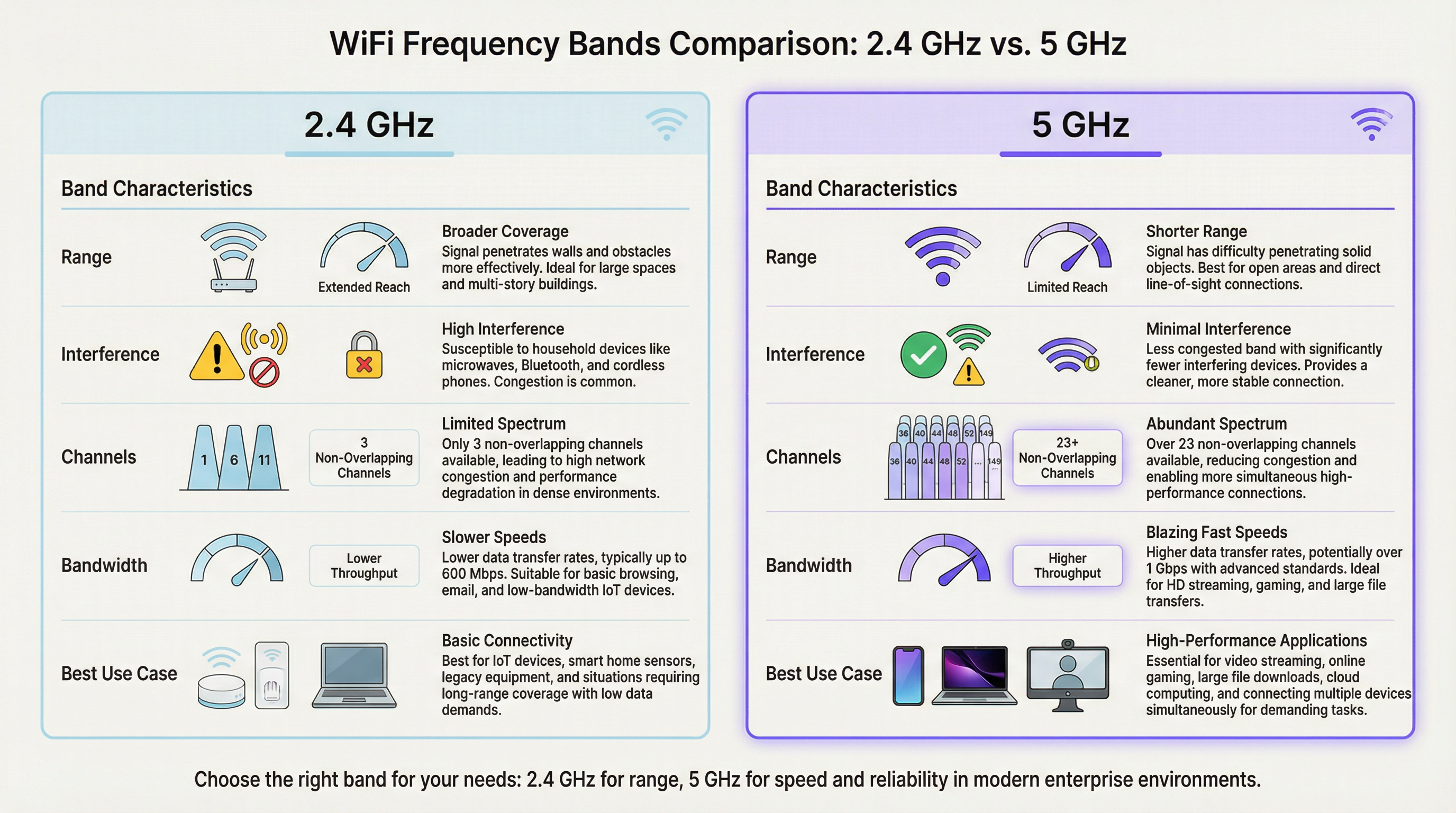
Em um ambiente de alta densidade, como um estádio ou auditório, a banda de 2,4 GHz satura rapidamente. Com apenas três canais não sobrepostos (1, 6 e 11 na América do Norte), a interferência co-canal é um inibidor de desempenho significativo e persistente. Cada AP adicional operando no mesmo canal na mesma área degrada o desempenho de todos os outros. A banda de 5 GHz, por outro lado, oferece um espectro muito mais amplo com vários canais não sobrepostos, tornando-a a escolha preferida para aplicações críticas de desempenho. O objetivo principal das implementações de band steering WiFi é mover proativamente os dispositivos clientes compatíveis da congestionada banda de 2,4 GHz para a banda de 5 GHz, que é mais limpa e rápida, reservando o espectro de 2,4 GHz para sensores IoT, dispositivos legados e clientes no limite da cobertura.
Como o Band Steering Funciona
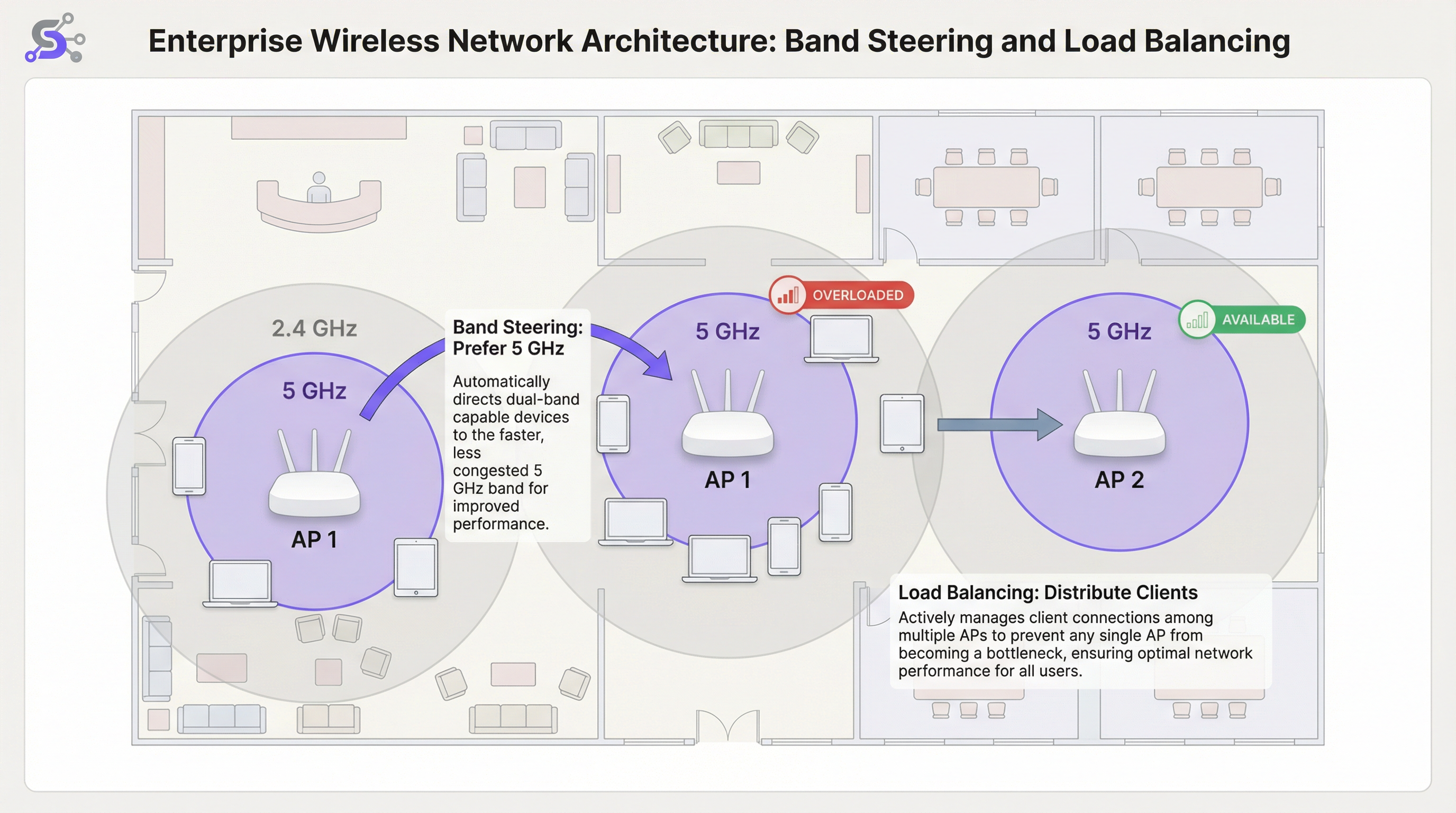
O band steering não é um padrão formal do IEEE, mas uma técnica proprietária implementada por fornecedores de WiFi corporativo. Embora os algoritmos específicos variem entre os fabricantes, o mecanismo geral envolve o Ponto de Acesso (AP) incentivando ou forçando ativamente um cliente dual-band a se conectar ao rádio de 5 GHz. Isso geralmente é alcançado por meio de vários métodos que operam no nível do quadro de gerenciamento 802.11.
O primeiro é o Atraso nas Respostas de Sondagem (Delayed Probe Responses): quando um cliente dual-band envia uma solicitação de sondagem (probe request) em ambas as bandas simultaneamente, o AP pode atrasar intencionalmente sua resposta na frequência de 2,4 GHz em várias centenas de milissegundos. O cliente, ao ver uma resposta mais rápida em 5 GHz, naturalmente prefere e se conecta à banda superior. O segundo é a Supressão de Resposta de Sondagem (Probe Response Suppression): o AP pode ignorar as solicitações de sondagem de 2,4 GHz de clientes que ele identificou como compatíveis com 5 GHz, tornando a rede de 2,4 GHz efetivamente invisível para eles durante a fase inicial de descoberta. A terceira e mais moderna abordagem é o Gerenciamento de Transição BSS IEEE 802.11v (BSS Transition Management): este quadro padrão permite que o AP solicite explicitamente que um cliente faça a transição para um BSS (Basic Service Set) diferente, neste caso, o rádio de 5 GHz no mesmo AP. Este é um método cooperativo que depende do suporte do lado do cliente para o padrão 802.11v e é a abordagem recomendada para implantações corporativas, pois evita as técnicas agressivas de supressão que podem causar problemas de conectividade com clientes não compatíveis.
Balanceamento de Carga de AP
Enquanto o band steering otimiza a seleção da banda de frequência por AP, o balanceamento de carga WiFi aborda o desafio mais amplo de distribuir clientes uniformemente por vários APs em uma determinada área. Em um terminal de aeroporto movimentado ou saguão de hotel, é comum que os usuários se reúnam perto de um único AP localizado centralmente, sobrecarregando-o enquanto os APs adjacentes permanecem subutilizados. Isso cria uma disparidade de desempenho significativa: usuários próximos ao AP sobrecarregado experimentam um serviço degradado, enquanto usuários próximos a APs ociosos não obtêm o benefício total da infraestrutura disponível. Os algoritmos de balanceamento de carga evitam isso definindo limites para a contagem de clientes ou utilização de rádio em cada AP.
Quando um AP atinge seu limite de carga configurado, ele pode recusar novas solicitações de associação. Isso incentiva o novo dispositivo cliente a verificar novamente e descobrir um AP próximo e menos congestionado. Sistemas mais sofisticados aproveitam o 802.11v para sugerir proativamente um AP alternativo específico ao cliente, tornando a transição contínua e transparente para o usuário final. As implementações mais avançadas usam algoritmos preditivos que antecipam aumentos de carga com base em padrões históricos e começam a redistribuir os clientes antes que um gargalo se forme.
O Papel da Controladora Wireless LAN (WLC)
Em implantações corporativas, o band steering e o balanceamento de carga não são gerenciados no nível individual do AP, mas orquestrados por uma Controladora Wireless LAN (WLC) centralizada ou uma plataforma de gerenciamento baseada em nuvem. A WLC mantém uma visão global de todos os clientes associados, suas intensidades de sinal, a carga atual em cada AP e o ambiente de RF em todo o local. Essa inteligência centralizada é o que torna possível o balanceamento de carga sofisticado: a controladora pode tomar decisões informadas sobre para onde redirecionar um novo cliente com base em dados em tempo real de toda a rede, e não apenas na visão local limitada de um único AP.
Plataformas gerenciadas na nuvem, como as oferecidas pela Cisco Meraki, Aruba Central e Juniper Mist, estendem ainda mais esse conceito ao incorporar o gerenciamento de recursos de rádio (RRM) orientado por IA. Esses sistemas analisam continuamente os dados de RF, o comportamento do cliente e o desempenho da aplicação para ajustar dinamicamente as atribuições de canal, a potência de transmissão e os limites de direcionamento sem intervenção manual. Para operadores de grandes locais que gerenciam dezenas ou centenas de APs em vários andares ou edifícios, esse nível de automação não é um luxo, mas uma necessidade operacional prática.
WiFi 6 e Band Steering na Era dos 6 GHz
A introdução do WiFi 6E (IEEE 802.11ax) e a abertura regulatória da banda de espectro de 6 GHz representam uma evolução significativa para a arquitetura WiFi de alta densidade. A banda de 6 GHz oferece até 1.200 MHz de espectro limpo adicional, com 59 canais não sobrepostos de 20 MHz disponíveis em mercados como os Estados Unidos e o Reino Unido. Para locais que implantam APs compatíveis com WiFi 6E, a estratégia de band steering deve evoluir para um modelo de três bandas: direcionar dispositivos legados para 2,4 GHz, dispositivos compatíveis para 5 GHz e os clientes WiFi 6E mais recentes para a banda limpa de 6 GHz. Essa abordagem em camadas maximiza a utilização de todo o espectro disponível e garante que os dispositivos mais novos e de maior desempenho se beneficiem do ambiente de RF mais limpo possível, livre da interferência legada que se acumula nas bandas mais antigas.
Guia de Implementação
Passo 1: Site Survey Pré-Implantação
Um site survey preditivo usando ferramentas profissionais como Ekahau Site Survey ou iBwave Design é inegociável para qualquer implantação de alta densidade. Não se trata apenas de verificar a cobertura, mas de planejar a capacidade. Seu objetivo é identificar zonas de alta densidade de dispositivos, modelar as características de propagação de RF do espaço físico e planejar o posicionamento do AP e a alocação de canais para minimizar a interferência co-canal. A pesquisa também deve levar em conta a densidade esperada de clientes durante os períodos de pico de uso, que para um centro de conferências pode ser uma sessão de abertura e para um estádio é a janela de 30 minutos antes do início do jogo, quando dezenas de milhares de torcedores tentam se conectar simultaneamente.
Passo 2: Configuração de Band Steering
Em sua controladora wireless LAN (WLC) ou painel de gerenciamento em nuvem, você encontrará uma configuração para Band Steering ou Band Select. Os principais parâmetros de configuração de band steering incluem o seguinte. Modo (Mode): a maioria dos fornecedores corporativos oferece opções como Preferir 5 GHz (Prefer 5 GHz), Forçar 5 GHz (Force 5 GHz) ou Balancear Bandas (Balance Bands). Para locais de alta densidade, Preferir 5 GHz é o ponto de partida recomendado. Forçar pode ser muito agressivo e pode negar serviço a clientes legados apenas de 2,4 GHz, gerando chamados de suporte desnecessários. Limite de Direcionamento (Steering Threshold - RSSI): defina uma intensidade de sinal mínima para que um cliente seja direcionado para 5 GHz. Um valor inicial típico é -65 dBm. Se o sinal de 5 GHz do cliente for mais fraco que esse limite, ele pode realmente ter uma experiência melhor em 2,4 GHz, apesar da interferência, particularmente em ambientes com paredes grossas ou materiais de construção significativos que atenuam a frequência mais alta.
Passo 3: Configuração de Balanceamento de Carga
Limite de Contagem de Clientes (Client Count Threshold): defina um número máximo de clientes por rádio AP. Para uma área de alta densidade, isso pode ser tão baixo quanto 25 a 30 clientes para garantir a qualidade do serviço, mesmo que o hardware do AP suporte tecnicamente mais associações simultâneas. Limite de Utilização (Utilisation Threshold): uma abordagem mais dinâmica e recomendada é balancear com base na utilização do rádio, expressa como a porcentagem de tempo que o meio de rádio está ocupado transmitindo ou recebendo. Um limite de 60 a 70 por cento é uma prática recomendada amplamente aceita, pois deixa espaço suficiente para tráfego de pico (burst traffic) sem permitir que nenhum AP se torne um gargalo sustentado.
Passo 4: Validar e Monitorar
Após a implantação, o monitoramento contínuo é essencial. Use sua WLC ou plataforma de gerenciamento em nuvem para rastrear a proporção de clientes em 5 GHz versus 2,4 GHz, a distribuição de clientes entre os APs em cada zona e as taxas médias de dados dos clientes ao longo do tempo. Estabeleça uma linha de base durante um período operacional normal e use-a para identificar anomalias. Um aumento repentino nas associações de 2,4 GHz ou uma distribuição irregular de clientes geralmente indica um desvio de configuração, uma nova fonte de interferência ou uma falha de hardware em um dos APs.
Melhores Práticas
Estratégia de SSID Único: use um único SSID para as bandas de 2,4 GHz e 5 GHz. Este é um pré-requisito inegociável para um band steering eficaz, pois permite que o cliente e a rede negociem a melhor banda de forma transparente em segundo plano. SSIDs separados para cada banda exigem que os usuários façam uma escolha manual, o que anula o propósito do direcionamento automatizado e cria um fardo de suporte quando os usuários escolhem consistentemente a banda errada.
Desativar Baixas Taxas de Dados (Disable Low Data Rates): para evitar que clientes lentos consumam tempo de transmissão excessivo (airtime), desative as taxas de dados legadas abaixo de 12 Mbps em ambas as bandas. Isso melhora o desempenho geral da célula por meio de uma prática conhecida como justiça de tempo de transmissão (airtime fairness). Em ambientes muito densos, como estádios ou grandes salas de conferência, é aconselhável aumentar a taxa mínima para 24 Mbps, pois isso reduz significativamente a sobrecarga dos quadros de gerenciamento e garante que o tempo de transmissão disponível seja usado com eficiência.
Largura de Canal (Channel Width): em áreas de alta densidade, prefira canais mais estreitos de 20 MHz para 5 GHz. Embora os canais de 40 MHz ou 80 MHz ofereçam velocidades de pico mais altas para clientes individuais, eles reduzem o número total de canais não sobrepostos disponíveis, aumentando o risco de interferência co-canal em um ambiente com vários APs. A capacidade agregada da rede, medida como a taxa de transferência total disponível em todos os APs, é muito mais importante do que a velocidade de pico de qualquer conexão de cliente único.
Controle de Potência de Transmissão (TPC): não opere os APs na potência máxima de transmissão. Isso é contraintuitivo, mas é uma das melhores práticas mais impactantes no design de WiFi de alta densidade. A alta potência aumenta a interferência co-canal, cria grandes células sobrepostas que dificultam o roaming dos clientes e pode, na verdade, reduzir a capacidade total da rede. Use algoritmos TPC automatizados ou defina a potência manualmente para criar células menores e mais densas que aumentam a capacidade geral da rede e melhoram a relação sinal-interferência-ruído (SINR) para todos os clientes.
Solução de Problemas e Mitigação de Riscos
Clientes "Pegajosos" (Sticky Clients): o problema operacional mais comum no WiFi corporativo é o cliente que permanece associado a um AP distante, apesar de haver uma opção melhor disponível. Este é um problema de lógica de roaming do lado do cliente que não pode ser totalmente resolvido apenas pela rede. O balanceamento de carga agressivo e as configurações otimizadas de potência do AP podem ajudar a mitigar isso, reduzindo a sobreposição de cobertura e incentivando os clientes a fazer roaming com mais frequência. A ativação do 802.11k (relatórios de vizinhos) e do 802.11r (transição rápida de BSS) junto com o 802.11v cria a tríade de roaming que fornece aos clientes as informações e o incentivo para tomar melhores decisões de roaming.
Clientes Incompatíveis: alguns dispositivos clientes mais antigos ou de baixo custo não implementam corretamente os mecanismos de resposta de band steering. Monitore sua rede em busca de clientes que falham repetidamente em se associar ou que geram eventos de desautenticação e considere a criação de um SSID dedicado para dispositivos legados, se eles forem essenciais para os negócios. Isso isola o impacto deles na rede primária de alto desempenho e evita que seu mau comportamento de roaming degrade a experiência de outros usuários.
Configuração Excessivamente Agressiva: uma política de Forçar 5 GHz combinada com um limite de balanceamento de carga muito rigoroso pode resultar na incapacidade total de conexão dos clientes, particularmente em ambientes onde o sinal de 5 GHz é atenuado por materiais de construção. Sempre teste as alterações de configuração em um ambiente controlado ou fora dos horários de pico e monitore de perto as taxas de falha de associação e os problemas de conectividade relatados pelos clientes após qualquer alteração.
ROI e Impacto nos Negócios
O investimento em uma rede WiFi de alta densidade adequadamente arquitetada gera retornos significativos e mensuráveis em todos os tipos de locais. Para um hotel, um WiFi confiável e de alto desempenho é consistentemente citado como um dos principais fatores nas pontuações de satisfação dos hóspedes e avaliações online, influenciando diretamente as taxas de reserva e a receita por quarto disponível. Para uma rede de varejo, ele permite a operação confiável de sistemas de PDV, scanners de gerenciamento de estoque e plataformas de análise de WiFi para visitantes, como o Purple, que dependem de conectividade consistente para capturar tempo de permanência, padrões de tráfego de pessoas e dados de comportamento do cliente que informam as decisões de merchandising e de equipe.
Em um local de conferências e eventos, a qualidade da rede é um fator primordial para atrair e reter eventos corporativos de grande escala. Uma única falha de conectividade de alto perfil durante uma apresentação de abertura pode resultar na perda de reservas futuras que valem significativamente mais do que o custo da atualização da rede que a teria evitado. Os principais indicadores de desempenho (KPIs) para medir o sucesso incluem: uma redução nos chamados de problemas relatados pelos usuários; um aumento nas taxas médias de dados dos clientes; uma proporção maior de clientes em 5 GHz versus 2,4 GHz, com uma meta de 70 a 80 por cento de clientes compatíveis com dual-band em 5 GHz; e uma distribuição uniforme de clientes entre os APs em uma determinada zona, sem que nenhum AP carregue consistentemente mais de 20 por cento acima da carga média. Ao focar nessas otimizações técnicas, as organizações podem transformar seu WiFi de um utilitário de commodity em um ativo estratégico que aprimora a experiência do cliente, permite operações baseadas em dados e impulsiona resultados de negócios mensuráveis.
Key Terms & Definitions
Band Steering
A technique used by WiFi access points to encourage dual-band client devices to connect to the less congested 5 GHz frequency band instead of the 2.4 GHz band, typically by manipulating probe responses or using IEEE 802.11v BSS Transition Management frames.
IT teams implement band steering WiFi configurations to improve overall network performance in areas with many connected devices. It is a foundational feature of any high-density WiFi deployment and is configured at the wireless LAN controller or cloud management layer.
WiFi Load Balancing
A process that distributes client connections evenly across multiple access points in a network to prevent any single AP from becoming overloaded, typically enforced by setting client count or radio utilisation thresholds on the wireless LAN controller.
In a busy area like a conference hall or retail floor, network architects use load balancing to ensure a stable experience for all users. It works in conjunction with band steering: steering handles the frequency band, while load balancing handles the AP selection.
RSSI (Received Signal Strength Indicator)
A measurement of the power level that a client device is receiving from an access point, expressed in decibels-milliwatts (dBm) as a negative value. A value closer to zero (e.g., -40 dBm) indicates a stronger signal than a value further from zero (e.g., -80 dBm).
A network engineer uses RSSI values to determine connection quality and to set thresholds for roaming and band steering decisions. A typical steering threshold is -65 dBm, meaning a client will only be pushed to 5 GHz if its signal on that band is at least this strong.
Co-Channel Interference (CCI)
Performance degradation that occurs when two or more access points in close proximity are operating on the same wireless channel, causing their transmissions to collide and forcing devices to wait before transmitting, which reduces overall throughput.
Proper channel planning is the primary mitigation for CCI. This is a major reason why the 5 GHz band, with its many non-overlapping channels, is preferred for high-density deployments. Poor channel planning is one of the most common causes of underperforming WiFi networks.
Airtime Fairness
A feature that allocates wireless airtime equitably across all connected clients, preventing a slow or distant device from consuming a disproportionate share of the available transmission time and degrading performance for all other users on that AP.
Venue operators enable airtime fairness to guarantee a more consistent level of performance, especially when a mix of old and new devices are connecting to the same network. It is often implemented alongside the disabling of low data rates.
IEEE 802.11v (BSS Transition Management)
An IEEE standard that allows a wireless network to send a request to a client device to transition to a different access point or frequency band, providing a cooperative and more seamless handoff than forceful deauthentication.
Modern enterprise networks leverage 802.11v to make band steering and load balancing more efficient. It is part of the 802.11k/v/r trifecta that underpins intelligent client roaming in enterprise WiFi deployments.
Single SSID
The practice of broadcasting the same network name (SSID) for both the 2.4 GHz and 5 GHz bands on a dual-band access point, presenting one unified network identity to users while the infrastructure manages band selection in the background.
Using a single SSID is a non-negotiable prerequisite for effective band steering. If separate SSIDs exist for each band, the user must manually choose, and the network loses its ability to optimise band allocation automatically.
Sticky Client
A client device that remains associated with a distant access point with a weak signal, even when a closer AP with a stronger signal is available, due to the client's conservative roaming algorithm prioritising connection stability over performance.
IT support teams frequently troubleshoot sticky client issues in enterprise environments. The primary mitigations are optimising AP transmit power to create smaller cells, and enabling 802.11k/v/r to give clients the information and incentive to roam more aggressively.
Microcell Architecture
A high-density WiFi deployment strategy that uses a large number of low-power access points, each covering a small area, rather than a small number of high-power APs covering large areas. This maximises total network capacity by increasing the number of simultaneous, non-interfering transmissions.
Microcell architecture is the standard approach for ultra-high-density venues like stadiums and arenas. It is the WiFi equivalent of the small-cell strategy used in modern cellular networks and is the key to supporting tens of thousands of simultaneous connections.
Case Studies
A 50,000-seat sports stadium is upgrading its WiFi network to support fan engagement apps, mobile ticketing, and cashless payments. The primary challenge is extreme device density during the 3-hour peak of a game. How should they configure band steering and load balancing?
Step 1 - AP Placement: Deploy a high number of low-power APs, with directional antennas focused on specific seating sections (under-seat or handrail mounting). This creates small, manageable microcells, each serving a limited number of seats.
Step 2 - Band Steering: Implement an aggressive Prefer 5 GHz policy. Given the modern smartphones expected at a live event, the vast majority of devices will be dual-band capable. Set a steering RSSI threshold of -67 dBm to strongly encourage 5 GHz connections.
Step 3 - Load Balancing: Configure a strict client count limit of 25 clients per radio. This seems low, but in such a dense RF environment, it is critical to maintain airtime fairness and prevent any single AP from degrading the experience for an entire seating section. Enable 802.11v to assist with steering and load balancing transitions.
Step 4 - Data Rates and Channels: Disable all data rates below 24 Mbps. Use only 20 MHz channel widths on the 5 GHz band to maximise the number of unique channels and minimise interference. Manually plan the channel reuse pattern across the stadium bowl to avoid co-channel interference between adjacent sections.
A historic 200-room hotel with thick masonry walls struggles with WiFi performance. Guests complain about slow speeds and dropped connections. They have modern dual-band APs, but performance is still poor. What is the likely issue and solution?
Step 1 - Problem Analysis: The thick walls cause significant attenuation of the 5 GHz signal. An aggressive band steering policy might be forcing clients onto a weak 5 GHz connection when the more resilient 2.4 GHz signal would actually provide a better experience. This is a classic case where the physical environment overrides standard best practices.
Step 2 - Site Survey: Conduct a physical walkthrough survey to measure signal strength for both bands in representative guest rooms. Pay close attention to the RSSI difference between the 5 GHz and 2.4 GHz signals from the same AP. If 5 GHz is consistently below -70 dBm in rooms, the steering policy needs adjustment.
Step 3 - Configuration Adjustment: Relax the band steering policy. Instead of Prefer 5 GHz, use a Balance Bands setting. Adjust the steering RSSI threshold to be more conservative, for example -60 dBm. This means a client will only be steered to 5 GHz if the signal is genuinely strong enough to deliver a good experience.
Step 4 - AP Power: Ensure Transmit Power Control is enabled and correctly calibrated. The APs in the corridors should be running at a power level that provides adequate coverage inside the rooms without being excessively high and causing interference with adjacent rooms on the same channel.
Scenario Analysis
Q1. You are deploying WiFi in a new multi-floor conference centre. The main keynote hall on the ground floor holds 2,000 attendees, while the upper floors have 20 smaller breakout rooms of 50 people each. How would your channel plan and band steering configuration differ between the two areas?
💡 Hint:Consider the density of APs, the potential for co-channel interference, and the physical separation between areas in each zone.
Show Recommended Approach
In the large, open keynote hall, I would deploy a high number of APs using a meticulous manual channel plan with only 20 MHz channel widths. The goal is to maximise the number of non-overlapping channels (e.g., 36, 40, 44, 48, 149, 153, 157, 161) and create a non-repeating reuse pattern to avoid CCI. Band steering would be set to Prefer 5 GHz with an aggressive RSSI threshold of -65 dBm, and load balancing would be set to a strict 25 clients per radio. On the upper floors, the walls between breakout rooms provide natural RF separation, reducing CCI risk. Here, I could use an automated RRM system and potentially allow 40 MHz channels in some rooms if density is lower. Band steering configuration would remain the same, but load balancing thresholds could be slightly more relaxed, perhaps 35 clients per radio, given the lower absolute density per room.
Q2. A retail chain uses your WiFi network for both guest access and wireless payment terminals (which must be PCI DSS compliant). The payment terminals are 2.4 GHz only. How would you configure the network to ensure the reliability of payments while still offering good performance for guests?
💡 Hint:Consider network segmentation, PCI DSS requirements for network isolation, and how to protect the 2.4 GHz spectrum for critical devices.
Show Recommended Approach
The correct approach is network segmentation with dual SSIDs. First, I would create a hidden SSID with WPA3-Enterprise security using 802.1X authentication, operating exclusively on the 2.4 GHz band and mapped to a dedicated VLAN that is PCI DSS scoped. This isolates payment terminal traffic from all other network traffic, satisfying PCI DSS segmentation requirements. Second, I would create a guest SSID broadcast on both bands with an aggressive Prefer 5 GHz band steering policy. This actively moves guest devices off the 2.4 GHz band, leaving that spectrum as clean as possible for the critical payment terminals. Load balancing would be active on the guest network. The payment terminal SSID would not use load balancing, ensuring terminals always connect to their nearest AP without being redirected.
Q3. A user reports that their laptop keeps disconnecting from the WiFi in the office. You check the controller logs and see the device has a good signal strength (-55 dBm) but is repeatedly being deauthenticated by the AP. What is the most likely cause related to band steering, and what is the remediation?
💡 Hint:Consider what happens when a band steering policy is too aggressive for a specific client device that does not correctly implement 802.11v.
Show Recommended Approach
This is a classic symptom of a client that is not correctly handling the band steering mechanism. The AP is likely sending an 802.11v BSS Transition Management request to move the client to the 5 GHz band. The client, either due to a driver bug or a non-compliant 802.11v implementation, is not responding correctly. The AP, after a timeout, may be sending a deauthentication frame to forcibly disconnect the client, expecting it to re-associate on the 5 GHz band. The remediation has two steps: first, update the client's wireless adapter driver to the latest version. Second, if the problem persists, create a client-specific policy on the WLC to disable band steering for that device's MAC address, or use a vendor feature to add it to a band steering exclusion list. If the problem is widespread across a device model, consider relaxing the overall steering policy from Prefer to Balance for that network zone.
Key Takeaways
- ✓High-density WiFi requires a fundamental shift in mindset from coverage to capacity: the goal is to maximise available airtime, not just signal strength.
- ✓Band steering intelligently pushes dual-band clients to the cleaner, faster 5 GHz band, reducing congestion on the overloaded 2.4 GHz spectrum.
- ✓Load balancing prevents any single Access Point from becoming a performance bottleneck by distributing clients evenly across available infrastructure.
- ✓A single SSID for both bands is a non-negotiable prerequisite for effective band steering: never separate them into distinct network names.
- ✓Disable low data rates (below 12 Mbps) and use narrow 20 MHz channels in dense environments to maximise airtime efficiency and channel reuse.
- ✓Run APs at optimised, not maximum, transmit power to reduce co-channel interference and create smaller, more efficient microcells.
- ✓Measure success by tracking the ratio of 5 GHz clients (target: 70-80%), evenness of client distribution across APs, and reduction in user-reported connectivity issues.




