

Crie Seu Próprio App de Captive Portal: Um Guia para Desenvolvedores (com Exemplos de Código)
This technical guide provides developers and IT leaders with a comprehensive framework for building custom captive portal applications. It covers architectural design, platform selection (iOS, Android, Web), security best practices (802.1X, GDPR), and API integration strategies to transform guest WiFi into a powerful tool for customer engagement and data analytics.
🎧 Listen to this Guide
View Transcript
Resumo Executivo
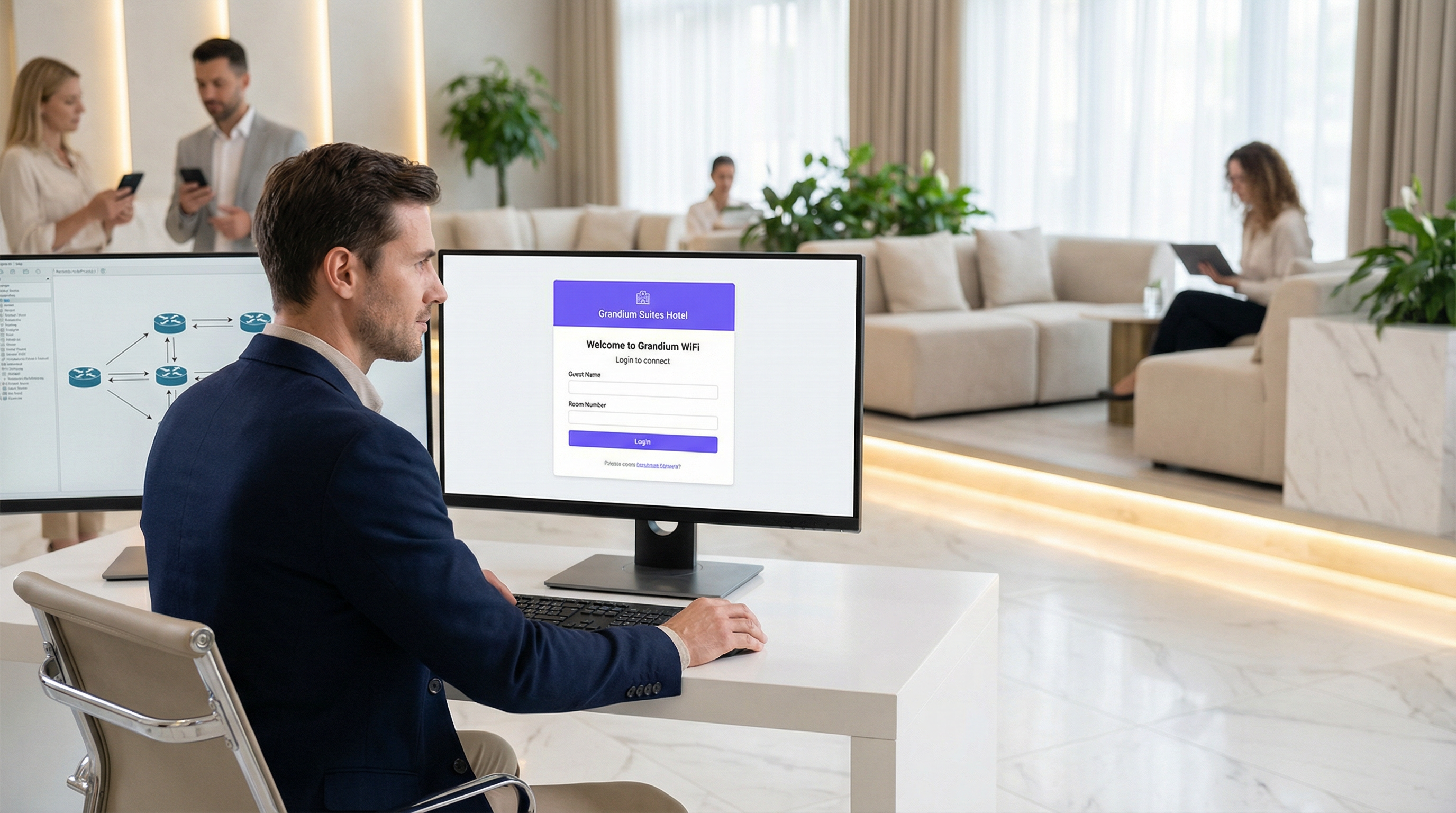
Este guia fornece uma referência técnica abrangente para gerentes de TI, arquitetos de rede e desenvolvedores sobre a criação de aplicativos personalizados de Captive Portal. Ele aborda a necessidade crítica dos locais de controlar o acesso à rede, ao mesmo tempo em que cria oportunidades valiosas para o engajamento dos visitantes e análise de dados. Exploramos as decisões arquitetônicas, escolhas de plataforma (iOS, Android, Web) e protocolos de segurança essenciais para uma implantação bem-sucedida. Para o CTO, este guia oferece uma visão estratégica do ROI, riscos de conformidade e impacto nos negócios de uma estratégia de Captive Portal bem executada, indo além de um simples gateway de conectividade para uma ferramenta poderosa capaz de aprimorar a experiência do cliente e impulsionar a receita.
Análise Técnica Aprofundada
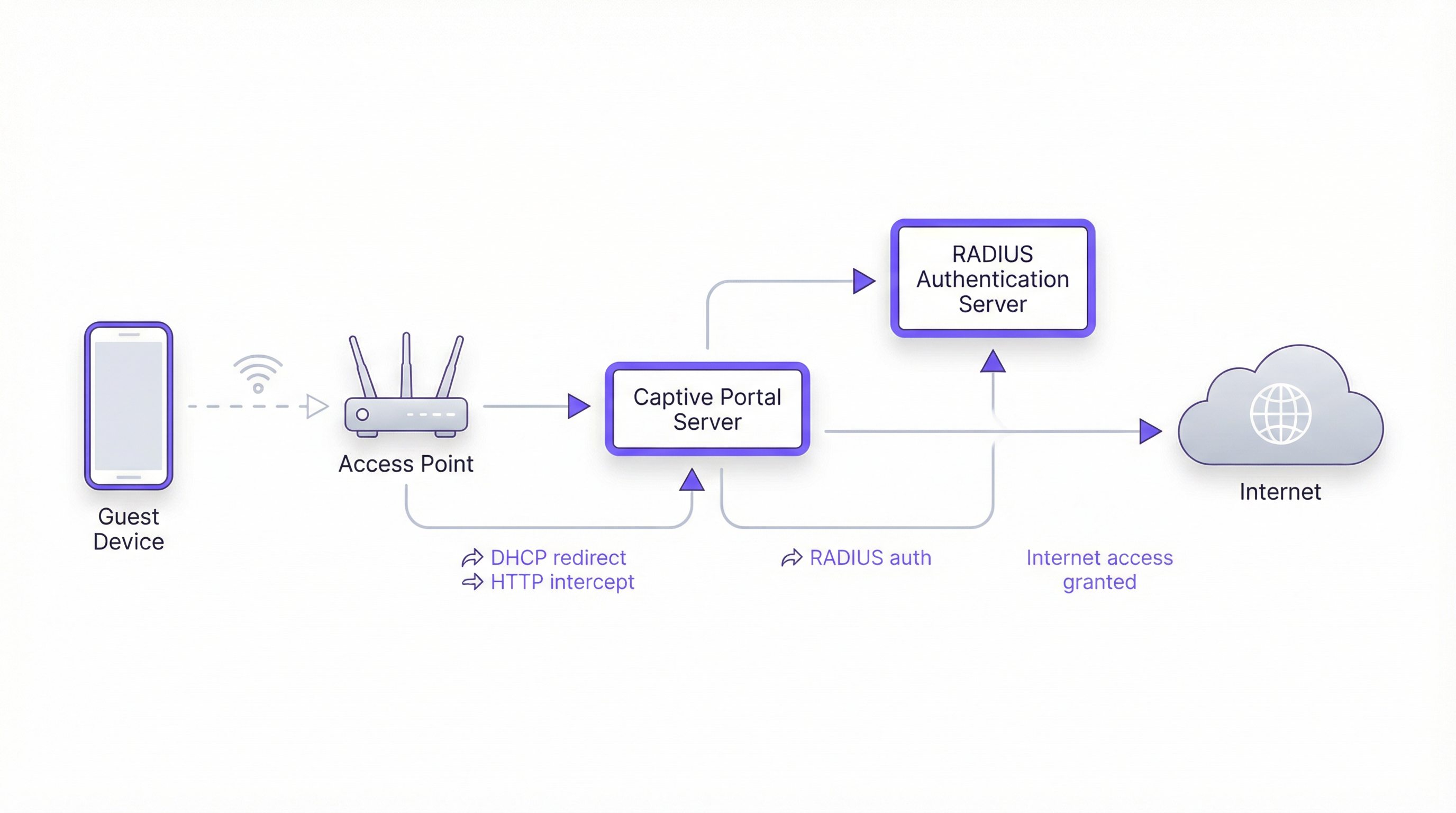
A construção de um Captive Portal envolve uma interação sofisticada entre protocolos de rede, tecnologias web e sistemas de autenticação de backend. O objetivo fundamental é interceptar o tráfego web de um usuário e redirecioná-lo para um portal dedicado para autenticação antes de conceder um acesso mais amplo à rede. Esse processo depende de alguns componentes principais.
Arquitetura Principal
- Access Point (AP): O hardware sem fio que transmite o sinal WiFi. APs modernos de nível corporativo possuem recursos integrados para suportar Captive Portals.
- Servidor DHCP: Atribui um endereço IP ao dispositivo que está se conectando. Em uma configuração de Captive Portal, o servidor DHCP também pode fornecer a URL para o endpoint da API do Captive Portal (via Opção DHCP 114), um método padronizado na RFC7710bis que melhora a confiabilidade da detecção em clientes modernos, como o Android 11+.
- Interceptação/Redirecionamento de DNS: Quando o dispositivo do usuário tenta resolver um nome de domínio (ex.:
google.com), o servidor DNS da rede retorna inicialmente o endereço IP do servidor do Captive Portal. Esta é a clássica abordagem de "walled garden" (jardim murado). - Servidor do Captive Portal: Um servidor web que hospeda a página de login/splash. Este é o aplicativo com o qual o usuário final interage. Ele é responsável por apresentar o formulário de login, validar credenciais e se comunicar com o backend de autenticação.
- Servidor de Autenticação (RADIUS): O Remote Authentication Dial-In User Service (RADIUS) é o backend padrão do setor para autenticação de rede. Quando um usuário envia suas credenciais no portal, o servidor do portal as encaminha para o servidor RADIUS, que as verifica em um banco de dados de usuários autorizados. Ele é fundamental para a aplicação de políticas baseadas nos padrões IEEE 802.1X.
Escolhas de Plataforma e Framework
Os desenvolvedores têm três caminhos principais para criar o aplicativo de Captive Portal voltado para o usuário. A escolha tem implicações significativas para a implantação, a experiência do usuário e a sobrecarga de manutenção.
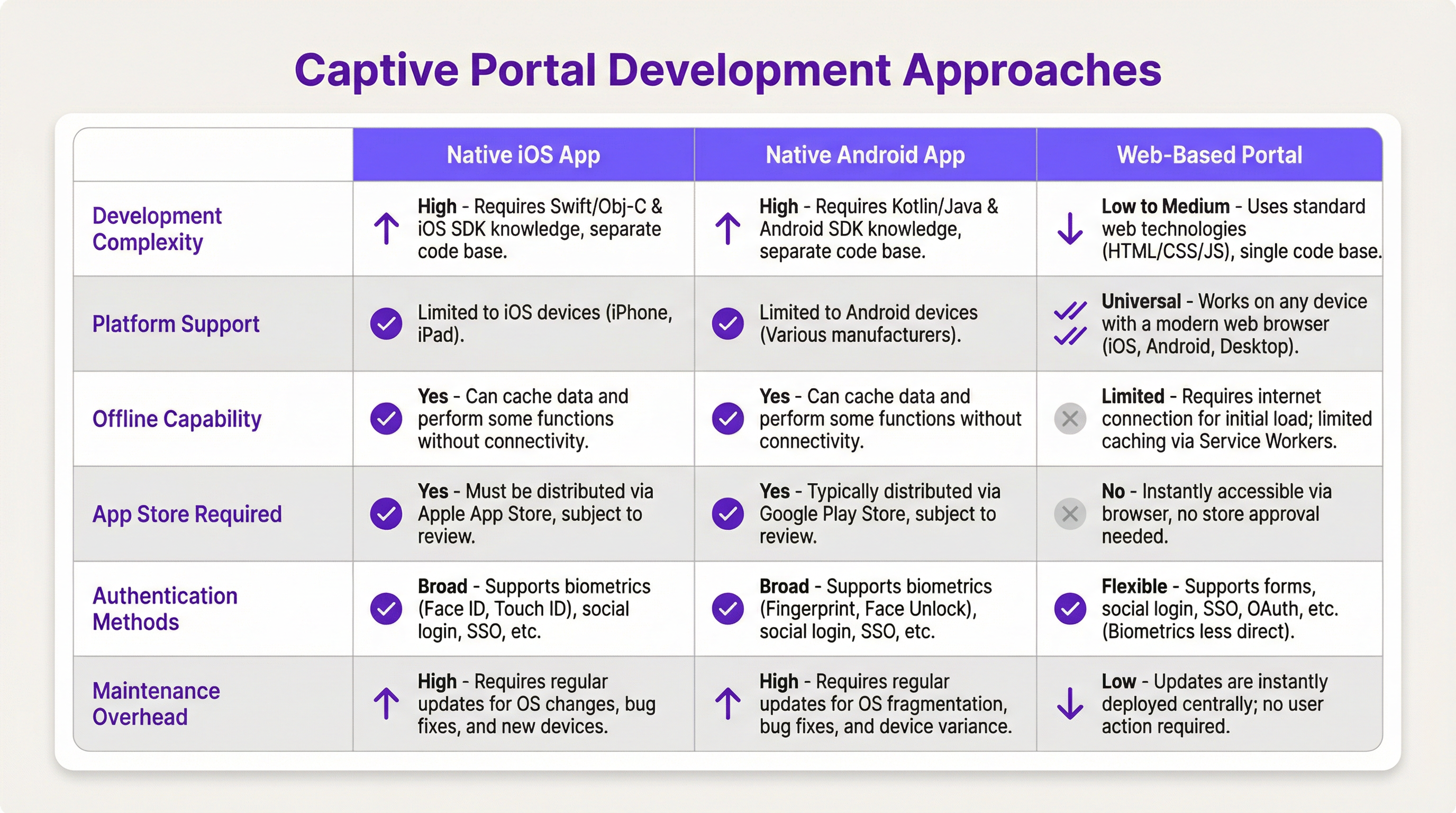
- App Nativo iOS/Android: Oferece a experiência de usuário mais rica, incluindo integração perfeita com recursos do dispositivo, como biometria (Face ID, impressão digital) e recursos offline. No entanto, esse caminho exige bases de código separadas (Swift/Objective-C para iOS, Kotlin/Java para Android), processos de revisão da App Store e força os usuários a baixar um aplicativo, o que pode ser uma barreira de entrada significativa.
- Portal Baseado na Web: A abordagem mais comum e flexível. Um aplicativo web responsivo (HTML, CSS, JavaScript) é servido ao navegador do usuário. É independente de plataforma, não requer instalação e as atualizações são implantadas instantaneamente. Tecnologias web modernas, como Service Workers, podem fornecer alguma funcionalidade offline, mas geralmente são mais limitadas do que os apps nativos.
Guia de Implementação
Esta seção fornece um passo a passo de alto nível e independente de fornecedor para a implantação de um Captive Portal baseado na web.
Passo 1: Configuração de Rede e Hardware
- Selecione APs de Nível Corporativo: Escolha access points de fornecedores como Cisco Meraki, Ruckus ou Aruba que suportem explicitamente Captive Portals externos e autenticação RADIUS.
- Configure VLANs: Isole o tráfego de visitantes da sua rede corporativa interna usando uma VLAN dedicada. Esta é uma medida de segurança crítica.
- Configure DHCP e DNS: Configure seu servidor DHCP para atribuir IPs na VLAN de visitantes e seu servidor DNS para realizar o redirecionamento inicial para o servidor do seu portal.
Passo 2: Desenvolva o Aplicativo do Portal Web
- Frontend: Use um framework JavaScript moderno como React, Vue ou Svelte para uma experiência de usuário dinâmica. Certifique-se de que o design seja responsivo e mobile-first.
- Backend: Um backend leve (ex.: Node.js com Express, Python com Flask) é necessário para servir o frontend e lidar com a comunicação com o servidor RADIUS.
- Lógica de Autenticação: O fluxo de trabalho principal é o seguinte:
- O usuário se conecta ao WiFi.
- O dispositivo é redirecionado para a URL do portal.
- O usuário envia as credenciais (ex.: número do quarto e sobrenome, e-mail, login social).
- O backend do portal envia um
Access-Requestao servidor RADIUS com as credenciais do usuário. - O servidor RADIUS valida as credenciais e, se for bem-sucedido, retorna uma mensagem
Access-Accept. - O backend do portal sinaliza ao controlador/gateway de rede para liberar o acesso ao endereço MAC do dispositivo do usuário.
Passo 3: Integrações de API
- Sistema de Gestão de Propriedades (PMS): Para hotéis, a integração com o PMS (ex.: Oracle Opera) permite a autenticação com base nas reservas dos hóspedes (número do quarto + sobrenome).
- CRM: A sincronização dos dados coletados (ex.: endereços de e-mail) com um CRM como o Salesforce possibilita uma poderosa automação de marketing.
- Login Social: Use OAuth2 para permitir que os usuários façam login com suas contas de redes sociais (Facebook, Google, LinkedIn). Isso fornece dados demográficos mais ricos, mas exige um tratamento cuidadoso da privacidade e do consentimento de acordo com a GDPR.
Melhores Práticas
- Segurança em Primeiro Lugar: Sempre use HTTPS para o seu Captive Portal para criptografar as credenciais do usuário em trânsito. Implemente a limitação de taxa (rate limiting) para evitar ataques de força bruta. Esteja em conformidade com o PCI DSS se estiver processando pagamentos.
- Conformidade: Seja transparente sobre a coleta de dados. A splash page do seu portal deve incluir um link claro para a sua política de privacidade e obter consentimento explícito, conforme exigido pela GDPR e outras regulamentações de proteção de dados.
- Experiência do Usuário: Mantenha o processo de login o mais fluido possível. Para locais com várias unidades, implemente um roaming contínuo, onde um usuário autenticado em um local é conectado automaticamente em outro.
- Gerenciamento de Largura de Banda: Implemente políticas de Qualidade de Serviço (QoS) para garantir uma alocação justa de largura de banda e evitar que alguns usuários prejudiquem a experiência de todos.
Solução de Problemas e Mitigação de Riscos
- Problemas de Detecção de Dispositivos: Nem todos os dispositivos funcionam bem com Captive Portals. A mudança para endereços MAC randomizados no iOS e Android pode complicar o rastreamento de dispositivos. A API de Captive Portal (RFC7710bis) é o método de detecção mais confiável.
- Falhas de Login: Implemente logs robustos em seu portal e servidor RADIUS para diagnosticar problemas de autenticação. Problemas comuns incluem credenciais incorretas, contas expiradas ou problemas de conectividade de rede entre o portal e o servidor RADIUS.
- Riscos de Segurança: Um Captive Portal protegido de forma inadequada pode ser um vetor para ataques man-in-the-middle. Certifique-se de que toda a comunicação seja criptografada e que o servidor do seu portal esteja protegido contra vulnerabilidades web comuns.
ROI e Impacto nos Negócios
Um Captive Portal não é apenas uma despesa de TI; é um ativo estratégico. O ROI é medido através de:
- Aumento do Engajamento do Cliente: Use o portal para promover serviços no local, exibir programações de eventos ou oferecer descontos exclusivos.
- Análise de Dados Aprimorada: Ao analisar os dados de login, os locais podem entender os padrões de tráfego de pessoas, tempos de permanência e dados demográficos dos clientes, levando a melhores decisões operacionais.
- Novos Fluxos de Receita: Para centros de conferências ou aeroportos, o acesso em níveis (ex.: WiFi básico gratuito, WiFi premium pago) pode gerar receita direta. O portal também pode ser usado para publicidade de terceiros.
- Melhor Percepção da Marca: Uma experiência de WiFi contínua e confiável agora é uma expectativa básica. Um Captive Portal profissional melhora a percepção da sua marca como moderna e focada no cliente.
Key Terms & Definitions
Captive Portal
A web page that the user of a public-access network is obliged to view and interact with before access is granted. It intercepts traffic until the user completes a required action, such as authentication or accepting terms of service.
This is the core component IT teams build to manage guest WiFi. It's the gateway that controls access and provides a branding and data collection opportunity.
RADIUS (Remote Authentication Dial-In User Service)
A client/server protocol (IETF standard) that provides centralized Authentication, Authorization, and Accounting (AAA) management for users who connect and use a network service.
For developers, this is the definitive backend protocol for network authentication. Your captive portal app will act as a RADIUS client to validate users against a central directory.
IEEE 802.1X
An IEEE standard for port-based Network Access Control (PNAC). It provides an authentication mechanism to devices wishing to attach to a LAN or WLAN.
This is the enterprise-grade security standard that underpins secure WiFi. While a captive portal is a web-layer solution, 802.1X provides a deeper, more secure authentication framework that can work in conjunction with it.
VLAN (Virtual Local Area Network)
A logical grouping of devices in the same broadcast domain. A VLAN partitions a single physical network into multiple, isolated logical networks.
This is a critical security tool for network architects. Guest WiFi traffic must always be segregated onto its own VLAN to prevent any possibility of access to the internal corporate network.
DHCP (Dynamic Host Configuration Protocol)
A network management protocol used on IP networks for automatically assigning IP addresses and other communication parameters to devices.
In a captive portal context, DHCP is not just for IP assignment. Using DHCP Option 114, it can also inform client devices of the captive portal API location, improving detection reliability.
GDPR (General Data Protection Regulation)
A regulation in EU law on data protection and privacy for all individuals within the European Union and the European Economic Area. It also addresses the transfer of personal data outside the EU and EEA areas.
If your venue serves European citizens (regardless of where the venue is located), your captive portal's data collection and handling practices must be GDPR compliant. This has major implications for consent and data transparency.
PCI DSS (Payment Card Industry Data Security Standard)
An information security standard for organizations that handle branded credit cards from the major card schemes.
If your captive portal involves any form of payment (e.g., for premium access), the entire application and infrastructure falls within the scope of PCI DSS, requiring stringent security controls and regular audits.
OAuth 2.0
An open standard for access delegation, commonly used as a way for Internet users to grant websites or applications access to their information on other websites but without giving them the passwords.
This is the framework developers use to implement 'Login with Google/Facebook' functionality. It provides a secure way to authenticate users and retrieve profile data without handling their actual social media passwords.
Case Studies
A 500-room luxury hotel wants to replace its generic WiFi login with a branded captive portal. The goal is to authenticate guests using their room number and last name, offer tiered bandwidth options (free standard, paid premium), and promote spa services. The existing network uses Cisco Meraki hardware.
- Architecture: Deploy a web-based captive portal hosted on a cloud server (AWS/Azure). 2. Network Configuration: Configure the Meraki dashboard to use an external captive portal, pointing to the URL of your new web app. Create two SSIDs on a guest VLAN: 'HotelGuest_Free' and 'HotelGuest_Premium'. 3. Application Development: Build a responsive web app. The landing page will have fields for 'Room Number' and 'Last Name'. 4. API Integration: Use the hotel's PMS API (e.g., Oracle Hospitality) to validate the guest credentials in real-time. On successful validation, the app makes a RADIUS request. 5. RADIUS Configuration: Set up a RADIUS server (e.g., FreeRADIUS) with policies. If the user is on the 'Premium' SSID, the RADIUS server returns attributes to the Meraki controller to unlock higher bandwidth for that user's MAC address. 6. Post-Login Experience: After authentication, redirect the user to a page featuring a prominent advertisement for the hotel spa with a 'Book Now' button.
A national retail chain with 200 stores wants to offer free guest WiFi to gather customer email addresses for its loyalty program. The solution must be centrally managed, GDPR compliant, and provide basic analytics on visitor counts and dwell times.
- Architecture: A centralized, cloud-hosted, multi-tenant web portal is the only viable option for this scale. 2. Authentication: The portal will feature a simple form asking for an email address. A checkbox for 'I agree to the terms and consent to receive marketing communications' is mandatory and must not be pre-checked. 3. Backend: The portal backend validates the email format and sends it via API to the central CRM/loyalty database. It then sends a RADIUS Access-Request. 4. RADIUS & Analytics: The RADIUS server logs the authentication event (with a timestamp and the store ID, passed as a RADIUS attribute from the local AP). This data is used for analytics. The RADIUS accounting records (Start and Stop messages) provide the data needed to calculate session duration (dwell time). 5. Deployment: The same portal URL is configured across all 200 stores. The local network at each store is configured to pass a unique 'NAS-Identifier' attribute to the RADIUS server so that analytics can be segmented by location.
Scenario Analysis
Q1. A stadium with a capacity of 50,000 needs to provide guest WiFi. The primary goal is to manage congestion and ensure fair bandwidth usage. A secondary goal is to display advertisements for upcoming events. What is the most critical technical feature to implement?
💡 Hint:Think about network performance at scale, not just authentication.
Show Recommended Approach
The most critical feature is Quality of Service (QoS) and bandwidth throttling. With 50,000 potential users, the network would be unusable without strict policies to limit each user's bandwidth and prevent a small number of users from consuming all available throughput. While authentication and advertising are important, ensuring the core service is stable is the top priority.
Q2. A hospital wants to provide WiFi for patients and visitors. They need to comply with HIPAA regulations regarding data privacy. They also want to allow users to access the hospital's patient portal. How should they design their captive portal authentication?
💡 Hint:Consider the sensitivity of healthcare data and the need for secure, but simple, access.
Show Recommended Approach
The solution requires a two-tiered approach. 1. A simple, click-through captive portal for general internet access that collects no personal data, thus minimizing HIPAA scope. This portal should clearly state the terms of use. 2. For access to the patient portal, the user should be redirected to the portal's separate, secure login page, which uses multi-factor authentication. The captive portal itself should not handle patient portal credentials. The guest network must be strictly isolated from the hospital's internal clinical network via VLANs and firewalls.
Q3. You are deploying a captive portal for a coffee shop chain. The marketing team wants to allow login via Facebook to gather customer demographic data. What are the key technical and compliance steps you must take?
💡 Hint:Focus on the intersection of OAuth, data collection, and privacy regulations like GDPR.
Show Recommended Approach
- Technical: Implement the OAuth 2.0 protocol to securely connect with Facebook's API. Ensure you only request the minimum necessary data permissions (e.g., public profile and email). 2. Compliance (GDPR): On the login page, before the user clicks 'Login with Facebook', you must display a clear statement explaining what data will be collected and for what purpose. You must include a link to your privacy policy. The user must actively consent (e.g., by clicking the login button after reading the notice); you cannot assume consent. 3. Backend: Your backend must securely store the access tokens and handle the collected data in accordance with your privacy policy.
Key Takeaways
- ✓A captive portal is a strategic asset for controlling network access and driving guest engagement.
- ✓The industry-standard architecture uses a web-based portal with a RADIUS server for authentication.
- ✓Always segregate guest traffic onto a dedicated VLAN and enforce HTTPS for security.
- ✓Compliance with GDPR and other privacy laws requires explicit, informed user consent before data collection.
- ✓Leverage API integrations with PMS and CRM systems to automate authentication and marketing.
- ✓Focus on a frictionless user experience to enhance brand perception and guest satisfaction.
- ✓Measure ROI through increased engagement, data analytics, and new revenue opportunities.




