

Campus Area Networks (CANs): Um Guia Abrangente sobre Design, Implementação e Gerenciamento
This comprehensive technical reference guide covers the full lifecycle of Campus Area Networks (CANs) — from architectural design and technology selection to implementation, security hardening, and ongoing management. It is written for IT managers, network architects, and CTOs at hotels, retail chains, stadiums, and corporate campuses who need to build or modernise a high-performance, resilient connectivity backbone. By combining vendor-neutral best practices, real-world case studies, and actionable frameworks, this guide equips senior technical professionals to make informed decisions that deliver measurable ROI and support long-term strategic objectives.
🎧 Listen to this Guide
View Transcript
Resumo Executivo
Uma Campus Area Network (CAN) é um componente de infraestrutura crítico para qualquer local de grande escala, desde campi corporativos e educacionais até resorts hoteleiros, parques comerciais e estádios. Ela fornece o backbone de conectividade de alta velocidade, confiável e seguro necessário para suportar operações digitais modernas, serviços para visitantes e implantações de IoT. Para gerentes de TI, arquitetos de rede e CTOs, uma CAN bem projetada não é meramente um centro de custos, mas um ativo estratégico que aprimora a eficiência operacional, melhora a experiência do usuário e revela novas oportunidades de receita.
Este guia fornece um framework prático e neutro em relação a fornecedores para projetar, implementar e gerenciar uma CAN de alto desempenho. Ele abrange a arquitetura hierárquica essencial de três camadas, as principais escolhas tecnológicas, incluindo fibra óptica e padrões modernos de Wi-Fi, e as melhores práticas para garantir segurança, escalabilidade e redundância. Ao seguir os princípios descritos aqui, as organizações podem construir uma rede preparada para o futuro que entrega um ROI mensurável e apoia seus objetivos estratégicos por muitos anos.
Análise Técnica Aprofundada
O Modelo Hierárquico de Três Camadas
A arquitetura mais amplamente adotada e comprovada para uma Campus Area Network escalável e resiliente é o modelo hierárquico de três camadas. Esse design segmenta a rede em três camadas distintas: Core (Núcleo), Distribution (Distribuição) e Access (Acesso). Essa modularidade simplifica o design, aprimora o isolamento de falhas e permite uma escalabilidade previsível.
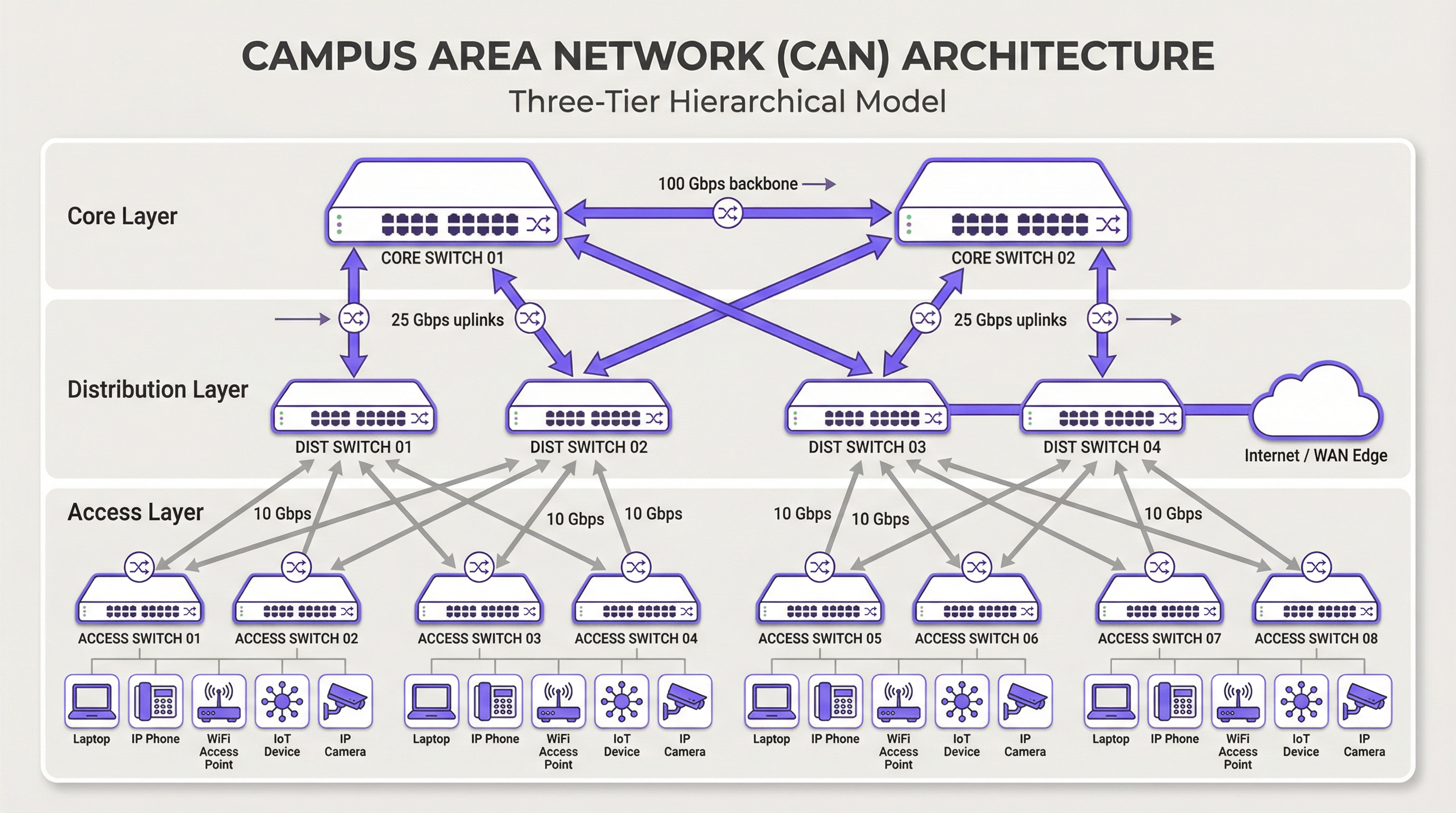
Camada Core: O core é o backbone de alta velocidade da rede. Seu único propósito é comutar o tráfego o mais rápido possível entre os dispositivos da camada de distribuição. O core deve ser mantido enxuto e simples, evitando a implementação de políticas complexas ou a manipulação de pacotes. As principais características incluem alta redundância (geralmente com switches e links redundantes), alto rendimento (frequentemente 100 Gbps ou mais) e rápida convergência em caso de falha. A camada core garante que o tráfego entre diferentes partes do campus não crie um gargalo.
Camada de Distribuição: Esta camada atua como o hub de comunicação entre as camadas de acesso e core. É um ponto crítico para a implementação de políticas de rede, incluindo roteamento, listas de controle de acesso (ACLs), Qualidade de Serviço (QoS) e filtragem de segurança. A camada de distribuição agrega o tráfego de vários switches da camada de acesso antes de encaminhá-lo para o core. Ela define domínios de broadcast e fornece conexões redundantes para as camadas de acesso e core, frequentemente usando tecnologias como EtherChannel para agregação de links e redundância.
Camada de Acesso: É aqui que os dispositivos dos usuários finais se conectam à rede — estações de trabalho, laptops, telefones IP, impressoras, dispositivos IoT e, crucialmente, Wireless Access Points (APs). A camada de acesso fornece segurança em nível de porta, Power over Ethernet (PoE) para dispositivos como APs e câmeras, e segmentação de VLAN para isolar diferentes tipos de tráfego (por exemplo, corporativo, visitantes, IoT). Os switches nesta camada devem fornecer alta densidade de portas e suporte para padrões modernos como Ethernet multi-gigabit (IEEE 802.3bz) para lidar com as demandas de largura de banda do Wi-Fi 6/6E e posteriores.
Tecnologias Principais
O Cabeamento de Fibra Óptica é o padrão para conectividade de backbone dentro de uma CAN, conectando edifícios e interligando as camadas core e de distribuição. Sua alta largura de banda, baixa latência e imunidade à interferência eletromagnética o tornam ideal para links de alta velocidade nas distâncias encontradas em um campus. A fibra monomodo é normalmente usada para trechos mais longos entre edifícios, enquanto a fibra multimodo pode ser usada para links mais curtos e de alta largura de banda dentro do data center de um edifício.
A Wireless LAN (WLAN) não é mais apenas uma sobreposição, mas uma parte integrante da camada de acesso. As CANs modernas devem ser projetadas com uma mentalidade "Wi-Fi first". Isso exige um planejamento cuidadoso para o posicionamento de APs por meio de site surveys de RF, alocação de canais e planejamento de capacidade. O padrão mais recente, Wi-Fi 6E (802.11ax), que opera na banda de 6 GHz, oferece significativamente mais capacidade e menos interferência, tornando-se uma tecnologia crítica para ambientes de alta densidade, como centros de conferências e estádios.
O Power over Ethernet (PoE) é essencial para simplificar a implantação de dispositivos da camada de acesso. Padrões como IEEE 802.3bt (PoE++) podem fornecer até 90W de energia, suportando não apenas APs Wi-Fi, mas também câmeras de segurança de alta definição, sinalização digital e até mesmo alguns switches pequenos. Isso elimina a necessidade de tomadas de energia separadas para cada dispositivo, reduzindo os custos e a complexidade da instalação.
Guia de Implementação
Uma abordagem estruturada e em fases para a implantação da CAN é essencial para gerenciar riscos e garantir resultados de qualidade.
Fase 1 — Levantamento de Requisitos e Site Survey: Comece definindo os requisitos de negócios. Quais aplicativos rodarão na rede? Quais são as expectativas de densidade de usuários e tipos de dispositivos? Conduza um site survey físico minucioso para identificar layouts de edifícios, possíveis fontes de interferência de RF e locais para armários de telecomunicações (IDFs) e o data center principal (MDF). Esta fase também deve incluir uma revisão da infraestrutura existente para identificar o que pode ser mantido ou atualizado.
Fase 2 — Design Arquitetônico: Com base nos requisitos, projete a arquitetura de três camadas. Determine o número de switches de acesso necessários por andar e edifício, a capacidade exigida na camada de distribuição e o rendimento necessário para o backbone core. Planeje sua estratégia de segmentação de VLAN para separar logicamente os tipos de tráfego. Documente o design minuciosamente — isso se torna sua especificação de construção e linha de base para o gerenciamento de mudanças.
Fase 3 — Seleção de Tecnologia e Fornecedores: Selecione o hardware que atenda às suas especificações de design. Considere fatores como suporte a padrões abertos, opções de interface de gerenciamento (CLI vs. gerenciamento em nuvem), orçamento de PoE e termos de garantia. Para uma CAN de grande escala, uma plataforma de gerenciamento centralizado é crucial para operações eficientes e deve ser selecionada junto com o hardware.
Fase 4 — Instalação Física: Passe o cabeamento de fibra óptica entre os edifícios e para cada IDF. Instale os switches em racks, garantindo energia e refrigeração adequadas. Monte os wireless access points de acordo com o plano do site survey de RF. O gerenciamento meticuloso de cabos e a rotulagem nesta etapa economizarão um tempo significativo durante a solução de problemas e futuras atualizações.
Fase 5 — Configuração e Comissionamento: Configure os switches começando pelo core e descendo até a camada de acesso. Implemente VLANs, protocolos de roteamento (por exemplo, OSPF), políticas de segurança (802.1X) e QoS. Coloque a rede online em uma abordagem em fases, testando a conectividade em cada etapa. Valide a cobertura e o desempenho wireless em relação aos objetivos iniciais de design antes de declarar a rede pronta para produção.
Melhores Práticas
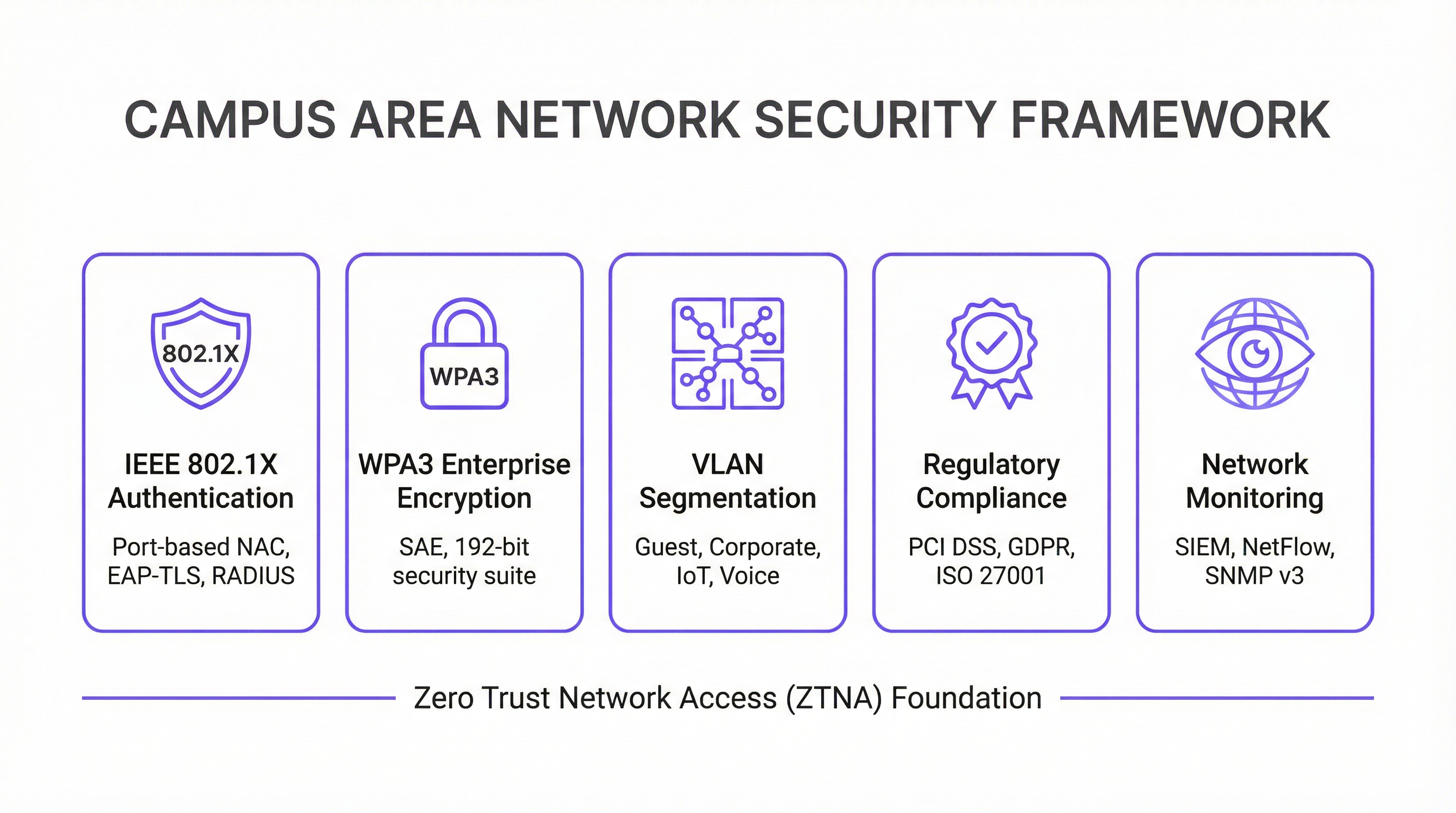
Segurança em Primeiro Lugar — Arquitetura Zero Trust: Implemente um modelo de segurança Zero Trust desde o primeiro dia. Use IEEE 802.1X para Controle de Acesso à Rede (NAC) baseado em porta para autenticar cada dispositivo que se conecta à rede com ou sem fio. Imponha criptografia forte com WPA3-Enterprise em sua WLAN. Segmente a rede com VLANs para conter ameaças e restringir o movimento lateral. Todo o tráfego de gerenciamento de rede deve usar protocolos seguros como SSH e SNMPv3. Para organizações que lidam com dados de cartões de pagamento, a conformidade com o PCI DSS exige segmentação de rede e controle de acesso rigorosos, o que uma CAN bem projetada torna simples de implementar e auditar.
Projete para Redundância: Elimine pontos únicos de falha em todas as camadas. Use switches redundantes nas camadas core e de distribuição. Empregue agregação de links (EtherChannel/LACP) para fornecer maior largura de banda e redundância de links. Garanta fontes de alimentação redundantes em switches críticos e caminhos de fibra diversificados entre edifícios, sempre que possível. Para ambientes de missão crítica, considere Fontes de Alimentação Ininterrupta (UPS) para todos os equipamentos de rede.
Planeje para Escalabilidade: Projete para daqui a cinco anos, não apenas para hoje. Certifique-se de que suas camadas core e de distribuição tenham capacidade suficiente para lidar com o crescimento futuro do tráfego e de dispositivos conectados. Use um chassi modular na camada de distribuição ou core para permitir uma expansão fácil. Escolha fibra com uma contagem de vias maior do que a necessária imediatamente para acomodar requisitos futuros sem recabeamento dispendioso.
Gerenciamento e Monitoramento Centralizados: Uma grande CAN é complexa demais para ser gerenciada dispositivo por dispositivo. Use um sistema de gerenciamento de rede (NMS) centralizado para automatizar a configuração, monitorar o desempenho e receber alertas. Plataformas como a solução de inteligência WiFi da Purple fornecem insights profundos sobre o comportamento do usuário e a integridade da rede, permitindo gerenciamento e otimização proativos. A conformidade com o GDPR também exige visibilidade dos fluxos de dados e do acesso do usuário, o que uma plataforma de gerenciamento centralizado facilita.
Solução de Problemas e Mitigação de Riscos
Problemas na Camada Física são a causa mais comum de problemas de rede. Cabos ruins, transceptores com falha e conexões soltas são responsáveis por uma proporção significativa de interrupções de rede. Uma metodologia estruturada de solução de problemas seguindo o modelo OSI — começando na Camada 1 (Física) e subindo — é a abordagem mais eficiente. Invista em equipamentos de teste de cabos de qualidade e mantenha um estoque de peças de reposição para componentes críticos.
Interferência de RF em um ambiente wireless denso pode degradar severamente o desempenho. A interferência co-canal e de canal adjacente são os principais culpados. Use uma ferramenta de monitoramento de RF para identificar fontes de interferência, que podem incluir redes vizinhas, fornos de micro-ondas e dispositivos Bluetooth. Algoritmos de Atribuição Dinâmica de Canal (DCA) em controladoras wireless modernas podem ajudar, mas o ajuste manual às vezes é necessário em ambientes desafiadores.
Desvio de Configuração ocorre quando mudanças manuais em dispositivos individuais criam inconsistências em toda a rede ao longo do tempo. Isso leva a comportamentos inesperados e complica a solução de problemas. Use uma ferramenta de gerenciamento de configuração para rastrear mudanças, impor modelos padrão e reverter modificações incorretas. Todas as mudanças devem ser feitas por meio de um processo formal de gerenciamento de mudanças.
Vulnerabilidades de Segurança: Firmware sem patch é um risco persistente. Estabeleça um cronograma regular de patches para todos os dispositivos de rede. Monitore padrões de tráfego anômalos usando um sistema SIEM (Security Information and Event Management). Realize testes de penetração periódicos para identificar fraquezas antes que os invasores o façam.
ROI e Impacto nos Negócios
Uma Campus Area Network bem executada entrega valor de negócios significativo e mensurável em várias dimensões.
| Resultado de Negócios | Métrica Principal | Melhoria Típica |
|---|---|---|
| Satisfação do Visitante | NPS / Pontuações de Avaliação | +25-40% para pontuações relacionadas à conectividade |
| Eficiência Operacional de TI | Chamados de Suporte | Redução de 40-60% em chamados relacionados à rede |
| Tempo de Auditoria de Conformidade | Dias para concluir a auditoria PCI DSS | Redução de 50-70% |
| Uptime da Rede | % de Disponibilidade | 99,9%+ com design redundante |
| Receita de Novos Serviços | Serviços de IoT / Analytics habilitados | Desbloqueia location analytics, rastreamento de ativos |
Produtividade Aprimorada: A conectividade confiável e de alta velocidade permite que funcionários e visitantes trabalhem com eficiência e sem interrupções. Em um contexto de hospitalidade, isso se traduz diretamente em pontuações de satisfação do hóspede e reservas recorrentes.
Experiência do Visitante e do Cliente Aprimorada: Na hospitalidade e no varejo, um Wi-Fi rápido e contínuo é um fator-chave para a satisfação e lealdade do cliente. O analytics derivado da rede Wi-Fi — como tempo de permanência, padrões de tráfego de pessoas e contagem de dispositivos — pode ser usado para personalizar as experiências dos visitantes e otimizar as operações do local.
Eficiência Operacional: Uma CAN gerenciada centralmente reduz a sobrecarga operacional para a equipe de TI. O PoE simplifica a implantação de novos dispositivos, e uma arquitetura resiliente minimiza o tempo de inatividade dispendioso. A capacidade de gerenciar todo o parque a partir de um único console é particularmente valiosa para organizações com vários locais.
Habilitação de Novos Serviços: A CAN é a base para uma série de serviços de locais inteligentes, incluindo automação predial baseada em IoT, serviços baseados em localização, rastreamento de ativos e sistemas de segurança aprimorados. Esses serviços representam novos fluxos de receita e diferenciais competitivos que simplesmente não são possíveis sem uma rede subjacente robusta.
Ao medir métricas como uptime da rede, rendimento médio, número de chamados de suporte e pontuações de satisfação do visitante, as organizações podem quantificar o ROI positivo de seu investimento em uma Campus Area Network moderna. Para a maioria das implantações corporativas, uma CAN bem projetada atinge o retorno do investimento em 18 a 36 meses por meio de uma combinação de custos operacionais reduzidos e receita de novos serviços.
Key Terms & Definitions
Campus Area Network (CAN)
A computer network that interconnects multiple local area networks (LANs) within a geographically bounded area, such as a corporate campus, hotel resort, university, or large retail estate. A CAN is typically owned and operated by a single organisation and provides high-speed, low-latency connectivity between buildings.
IT teams encounter this term when planning network infrastructure for any multi-building facility. It is the correct technical term for what is often colloquially called 'the campus network' or 'the site network'. Understanding the distinction between a CAN, a LAN, and a WAN is essential for scoping infrastructure projects and vendor conversations.
Three-Tier Hierarchical Model
The industry-standard architectural framework for enterprise campus networks, comprising three distinct layers: the Access Layer (where end devices connect), the Distribution Layer (where policy is enforced and traffic is aggregated), and the Core Layer (the high-speed backbone). Each layer has a specific, well-defined role.
This model is the starting point for virtually every enterprise CAN design. IT teams use it to structure their design conversations, allocate budget, and plan for scalability. Deviating from this model (e.g., using a flat, single-tier design) is a common cause of scalability and performance problems in growing organisations.
IEEE 802.1X
An IEEE standard for port-based Network Access Control (NAC) that provides an authentication mechanism for devices wishing to connect to a LAN or WLAN. It uses the Extensible Authentication Protocol (EAP) and requires a RADIUS server to authenticate users and devices before granting network access.
IT teams implement 802.1X to ensure that only authorised devices can connect to the network. It is a foundational security control for PCI DSS compliance (Requirement 1.3) and is a key component of a Zero Trust network architecture. Without 802.1X, any device that can physically connect to a network port or associate with a Wi-Fi SSID can gain network access.
WPA3-Enterprise
The latest generation of Wi-Fi security protocol for enterprise environments, ratified by the Wi-Fi Alliance. WPA3-Enterprise mandates the use of 192-bit minimum-strength security protocols and uses Simultaneous Authentication of Equals (SAE) to replace the older Pre-Shared Key (PSK) mechanism, providing stronger protection against offline dictionary attacks.
IT teams should be migrating to WPA3-Enterprise as the standard for all corporate and sensitive Wi-Fi SSIDs. WPA2 remains acceptable for guest networks in many contexts, but WPA3 is the requirement for networks handling sensitive data. It is increasingly referenced in security frameworks and is expected to become mandatory in future PCI DSS and ISO 27001 guidance.
VLAN (Virtual Local Area Network)
A logical subdivision of a physical network that groups devices into separate broadcast domains, regardless of their physical location. VLANs are defined by IEEE 802.1Q and are implemented on managed switches. Traffic between VLANs requires routing (a Layer 3 function), which provides a natural security boundary.
VLAN segmentation is the primary tool for isolating different types of traffic on a shared physical network. IT teams use VLANs to separate guest traffic from corporate traffic, isolate IoT devices, and create a dedicated PCI DSS cardholder data environment. Incorrect VLAN configuration is a common cause of both security incidents and network performance problems.
Power over Ethernet (PoE)
A technology that allows network cables to carry electrical power, enabling devices like Wi-Fi access points, IP cameras, and VoIP phones to receive power through the same Ethernet cable used for data. Key standards include IEEE 802.3af (15.4W), IEEE 802.3at (30W), and IEEE 802.3bt (90W, also known as PoE++).
PoE is a critical consideration when specifying access layer switches for a CAN. IT teams must calculate the total PoE budget required for all connected devices and ensure the switch's power supply can meet that demand. Underestimating PoE requirements is a common and costly mistake, as it can require switch replacements or additional power injectors.
Wi-Fi 6E (IEEE 802.11ax)
The latest generation of the Wi-Fi standard, extending Wi-Fi 6 into the 6 GHz frequency band. Wi-Fi 6E provides access to up to 1,200 MHz of additional spectrum, significantly increasing capacity and reducing congestion compared to the 2.4 GHz and 5 GHz bands. It supports theoretical throughput of up to 9.6 Gbps.
IT teams planning new CAN deployments should specify Wi-Fi 6E-capable access points as the standard. The 6 GHz band is particularly valuable in high-density environments (conference centres, stadiums, hotel lobbies) where the 2.4 GHz and 5 GHz bands are congested. Note that client devices must also support Wi-Fi 6E to benefit from the 6 GHz band.
EtherChannel / LACP
EtherChannel is a port link aggregation technology that bundles multiple physical Ethernet links into a single logical link, providing both increased bandwidth and link redundancy. LACP (Link Aggregation Control Protocol), defined in IEEE 802.3ad, is the open-standard protocol used to negotiate and manage EtherChannel bundles.
IT teams use EtherChannel/LACP on uplinks between the access, distribution, and core layers to eliminate single points of failure and increase available bandwidth. It is a standard component of any redundant CAN design. When a single link in the bundle fails, traffic is automatically redistributed across the remaining links without interruption.
Zero Trust Network Access (ZTNA)
A security framework based on the principle of 'never trust, always verify'. In a ZTNA model, no user or device is trusted by default, regardless of whether they are inside or outside the network perimeter. Access is granted on a least-privilege basis, based on continuous verification of identity, device health, and context.
ZTNA is increasingly the recommended security architecture for enterprise CANs, replacing the older 'castle and moat' perimeter security model. IT teams implement ZTNA through a combination of 802.1X, micro-segmentation, multi-factor authentication, and continuous monitoring. It is particularly relevant for organisations with IoT devices, guest access, and remote workers connecting to campus resources.
Case Studies
A 450-room international hotel group is experiencing persistent guest complaints about Wi-Fi quality. Their current network is a flat, single-VLAN design with consumer-grade access points installed five years ago. The hotel has a main building, a conference centre, and a spa/leisure wing. The IT Director has a budget for a full network refresh and needs to deliver a measurable improvement in guest satisfaction within six months. How should the network be redesigned?
The solution requires a full three-tier CAN deployment across the property. Step 1: Conduct a detailed RF site survey across all three buildings to determine optimal AP placement, identify sources of interference, and plan for high-density areas (conference rooms, restaurant, lobby). Step 2: Design a redundant core in the main data centre, with dual core switches connected via 100 Gbps links. Step 3: Deploy distribution switches on each floor of each building, connected to the core via dual 25 Gbps fiber uplinks. Step 4: Install Wi-Fi 6E access points — one per room corridor (covering 4-6 rooms each), plus dedicated high-density APs in the conference centre and lobby. Step 5: Implement strict VLAN segmentation: VLAN 10 for guest Wi-Fi (internet access only, isolated from corporate network), VLAN 20 for staff devices (access to PMS and operational systems), VLAN 30 for building management systems (HVAC, door locks, CCTV), VLAN 40 for voice (IP phones). Step 6: Deploy IEEE 802.1X for staff devices and WPA3-Personal with a captive portal for guest access. Step 7: Integrate with Purple's WiFi intelligence platform for real-time monitoring, guest analytics, and automated alerting.
A regional retail chain operates 12 stores across a large shopping centre campus. Each store currently has its own isolated network, managed independently. The IT team is struggling with PCI DSS compliance audits (which take two weeks each time), inconsistent security policies, and an inability to deploy new services like in-store analytics and digital signage centrally. The CTO wants a unified campus network that addresses all three problems. What architecture should be recommended?
The solution is a campus-wide CAN with a shared core infrastructure and per-store logical isolation via VLANs. Step 1: Deploy a redundant core in the shopping centre's main data centre (or a dedicated co-location space), with dual core switches and diverse fiber paths to each store. Step 2: Each store gets a distribution switch connected to the core via dedicated fiber, with a separate VLAN per store for corporate traffic and a shared VLAN for guest Wi-Fi. Step 3: Implement IEEE 802.1X for all point-of-sale (POS) devices, with a dedicated PCI DSS-compliant VLAN that is strictly isolated from all other traffic. Step 4: Deploy WPA3-Enterprise for staff devices and a captive portal for customer Wi-Fi. Step 5: Centralise all management through a single NMS, giving the IT team a unified view of all 12 locations. Step 6: Integrate Purple's analytics platform to capture footfall data, dwell time, and customer device counts across the estate. Step 7: Use the centralised management platform to push consistent security policies, firmware updates, and new service configurations to all stores simultaneously.
Scenario Analysis
Q1. You are the IT Director of a 600-room conference hotel. Your network currently has 98% uptime but guests in the conference centre consistently report poor Wi-Fi during large events (500+ attendees). Your access points are Wi-Fi 5 (802.11ac) and were installed four years ago. You have budget for either (a) replacing all APs with Wi-Fi 6E models, or (b) a full network refresh including new distribution switches, fiber uplinks, and Wi-Fi 6E APs. Which option do you choose, and why?
💡 Hint:Consider where the bottleneck actually is. Is the problem at the wireless layer, the wired layer, or both? What happens to the traffic once it leaves the access point?
Show Recommended Approach
Option (b) — the full network refresh — is the correct choice, though it requires justification. The symptoms (poor performance in high-density areas during peak load) could be caused by wireless congestion (too many clients per AP, insufficient spectrum), wired bottlenecks (insufficient uplink capacity from APs to distribution switches), or both. Simply replacing the APs with Wi-Fi 6E models (Option a) addresses the wireless layer but leaves the wired infrastructure unchanged. If the distribution switches or uplinks are already at capacity, the new APs will still be bottlenecked. Furthermore, Wi-Fi 6E APs with 2.5 Gbps or 5 Gbps ports require multi-gigabit Ethernet (IEEE 802.3bz) uplinks to realise their full throughput — which older distribution switches may not support. The full refresh ensures the entire path from client to core is capable of handling the load. The additional cost of the wired infrastructure upgrade is typically 30-40% of the total project cost but eliminates the risk of a second, more disruptive upgrade within 12-18 months. Present this to the CTO as a five-year investment, not a one-time fix.
Q2. Your organisation is a retail chain preparing for its annual PCI DSS audit. The auditor has flagged that your point-of-sale (POS) terminals share a VLAN with your staff Wi-Fi network, creating an overly broad cardholder data environment (CDE) scope. You have 30 days before the audit. What immediate and medium-term actions do you take?
💡 Hint:PCI DSS Requirement 1.3 mandates that the CDE is isolated from all other networks. Focus on network segmentation as the primary control. Consider what is achievable in 30 days versus what requires a longer project.
Show Recommended Approach
Immediate actions (within 30 days): Create a dedicated VLAN (e.g., VLAN 50) for all POS terminals and configure ACLs on the distribution switches to restrict traffic from this VLAN to only the payment gateway and necessary management systems. Remove all POS terminals from the shared staff VLAN. Implement IEEE 802.1X on POS switch ports to ensure only authorised POS devices can connect to VLAN 50. Document the new network topology and VLAN map for the auditor. This reduces the CDE scope to only the POS VLAN and its connections, significantly simplifying the audit. Medium-term actions (within 90 days): Conduct a full network segmentation review to ensure all VLANs are correctly configured and that no unintended paths exist between the CDE and other network segments. Deploy a SIEM to monitor traffic to and from the CDE VLAN. Consider a penetration test specifically targeting the CDE segmentation to validate the controls. The key principle is that network segmentation is the most effective way to reduce PCI DSS audit scope and cost. Every device that is not in the CDE is outside the scope of the audit.
Q3. You are designing a CAN for a 15,000-seat stadium that hosts 80 events per year, ranging from football matches to concerts. The venue has 12 buildings (including the main bowl, corporate hospitality suites, media centre, and operations centre) connected by an existing but aging fiber ring. Peak concurrent users are estimated at 18,000 (including staff). What are the three most critical design decisions you need to make, and what is your recommendation for each?
💡 Hint:Think about the unique characteristics of a stadium environment: extreme density, highly variable load (near-zero between events, maximum during events), diverse user types (fans, corporate guests, media, staff, operations), and the need for the network to support both public-facing and operational systems.
Show Recommended Approach
Decision 1 — Wireless Density and AP Placement: In a stadium, the density challenge is extreme. The recommendation is to deploy under-seat APs in the bowl (one AP per 4-6 rows of seats), supplemented by overhead APs for concourse areas. Wi-Fi 6E is mandatory — the 6 GHz band provides the additional spectrum needed to handle 18,000 concurrent users. Each AP should be configured with a narrow beam pattern directed at the seating rows, not broadcasting broadly. Decision 2 — Network Segmentation: Implement strict VLAN segmentation for at least five zones: Fan Wi-Fi (internet access only), Corporate Hospitality (higher bandwidth, access to streaming services), Media (dedicated high-bandwidth VLAN for broadcast and press), Operations (CCTV, access control, building management), and Staff (operational systems). Each zone has different performance and security requirements. Decision 3 — Scalability of the Core and Fiber Infrastructure: The existing fiber ring must be assessed. If it is a single ring with no redundancy, it is a critical risk. The recommendation is to upgrade to a dual-ring or mesh fiber topology between buildings, with the core switches in a geographically separate location from the main distribution point. The core must be sized for 100 Gbps+ throughput to handle peak event load. Critically, the network must be designed for peak load (event day), not average load — this is the opposite of most enterprise network designs.
Key Takeaways
- ✓The three-tier hierarchical model (Core, Distribution, Access) is the proven architectural foundation for any enterprise Campus Area Network — it provides modularity, scalability, and fault isolation that flat or two-tier designs cannot match.
- ✓Security must be designed in from the start, not bolted on afterwards. IEEE 802.1X for port-based authentication, WPA3-Enterprise for wireless encryption, and strict VLAN segmentation are the non-negotiable baseline controls for any professional CAN.
- ✓Design for redundancy at every layer: dual core switches, dual distribution uplinks, redundant power supplies, and diverse fiber paths between buildings. The cost of redundancy is always less than the cost of an unplanned outage.
- ✓Wi-Fi 6E (802.11ax) in the 6 GHz band is the current standard for new deployments in high-density environments. Specifying Wi-Fi 5 or earlier for a new build is a false economy that will require premature replacement.
- ✓Centralised management is not optional for a multi-building CAN. A Network Management System (NMS) and a WiFi intelligence platform like Purple are essential for maintaining consistent security policies, monitoring performance, and demonstrating compliance during audits.
- ✓The Fiber Surplus Principle: always install at least twice as many fiber strands as you need today. Re-cabling a campus is far more expensive and disruptive than the marginal cost of additional strands during initial installation.
- ✓A well-executed CAN delivers measurable ROI through improved guest satisfaction, reduced IT support overhead, faster compliance audits, and the ability to deploy new revenue-generating services like location analytics and IoT-based building automation.




