

Captive Portals para Guest WiFi: O Guia Definitivo para Criar uma Experiência de Usuário Contínua e Segura
This guide provides IT leaders and venue operators with a comprehensive technical reference for designing, implementing, and securing guest WiFi captive portals at enterprise scale. It covers the full authentication architecture from RADIUS to CRM integration, GDPR compliance requirements, advanced customisation options including A/B testing and personalised content delivery for Purple AI users, and a proven ROI framework with real-world case studies from hospitality and retail environments.
🎧 Listen to this Guide
View Transcript

Resumo Executivo
Para gerentes de TI, arquitetos de rede e operadores de locais, a rede de Guest WiFi evoluiu de uma simples comodidade para um ativo comercial crítico. Um Captive Portal de Guest WiFi bem executado é a porta de entrada para esse ativo — o primeiro ponto de interação com clientes e visitantes, e um mecanismo poderoso para coleta de dados, engajamento com a marca e geração de receita. Este guia fornece uma referência técnica abrangente para projetar, implementar e proteger Captive Portals para criar uma experiência de usuário contínua, ao mesmo tempo em que revela um valor comercial significativo.
Exploramos os principais componentes da arquitetura do Captive Portal, desde a associação inicial do usuário até a autenticação de backend e integração com CRM. Os principais tópicos incluem a conformidade com regulamentações de privacidade de dados, como a GDPR e a UK GDPR, a implementação de medidas de segurança robustas alinhadas com WPA3 e IEEE 802.1X, opções avançadas de personalização, incluindo testes A/B e entrega de conteúdo personalizado, e estratégias para maximizar o retorno sobre o investimento. Para profissionais seniores de TI, este guia oferece recomendações acionáveis e neutras em relação a fornecedores para orientar decisões de aquisição e estratégias de implantação neste trimestre. Ao focar em uma jornada do usuário sem atritos, postura de segurança robusta e personalização baseada em dados, as organizações podem transformar seu Guest WiFi de um centro de custos em uma ferramenta poderosa para o engajamento do cliente e business intelligence.
Análise Técnica Aprofundada
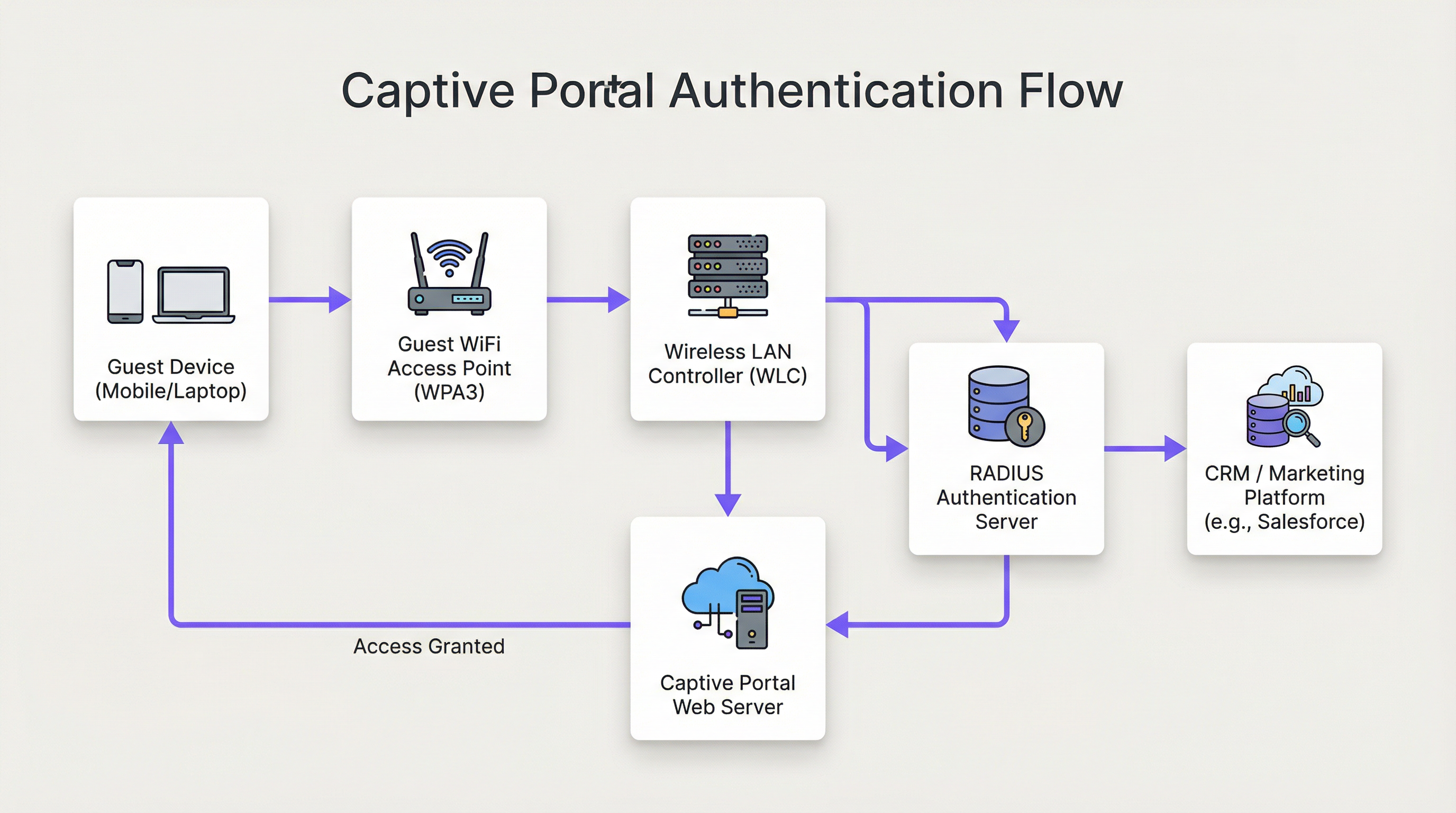
A arquitetura de uma solução moderna de Captive Portal de Guest WiFi envolve uma interação sofisticada entre hardware de rede, software e serviços em nuvem. Em sua essência, o Captive Portal intercepta o tráfego da web de um usuário e o redireciona para uma página da web específica para autenticação antes de conceder acesso mais amplo à rede. Entender esse fluxo em detalhes é essencial para qualquer arquiteto de rede responsável por implantar ou manter esse sistema.
Estágio 1 — Associação Sem Fio: O dispositivo do usuário descobre e se conecta ao SSID do Guest WiFi. Neste estágio, o dispositivo está em um estado de "walled-garden" (jardim murado) pré-autenticado. O WLC ou AP atribui ao dispositivo um endereço IP via DHCP, mas restringe todo o tráfego de saída, exceto para uma lista definida de domínios permitidos (whitelisted) e o próprio host do Captive Portal.
Estágio 2 — Redirecionamento HTTP/S: Quando o usuário abre um navegador ou qualquer aplicativo que faça uma solicitação HTTP/S, o WLC a intercepta. Usando sequestro de DNS (onde todas as consultas DNS são respondidas com o IP do portal) ou redirecionamento HTTP 302, o usuário é encaminhado para o servidor web do Captive Portal. Para implantações modernas, o redirecionamento HTTP é preferido por sua confiabilidade em clientes iOS, Android e Windows.
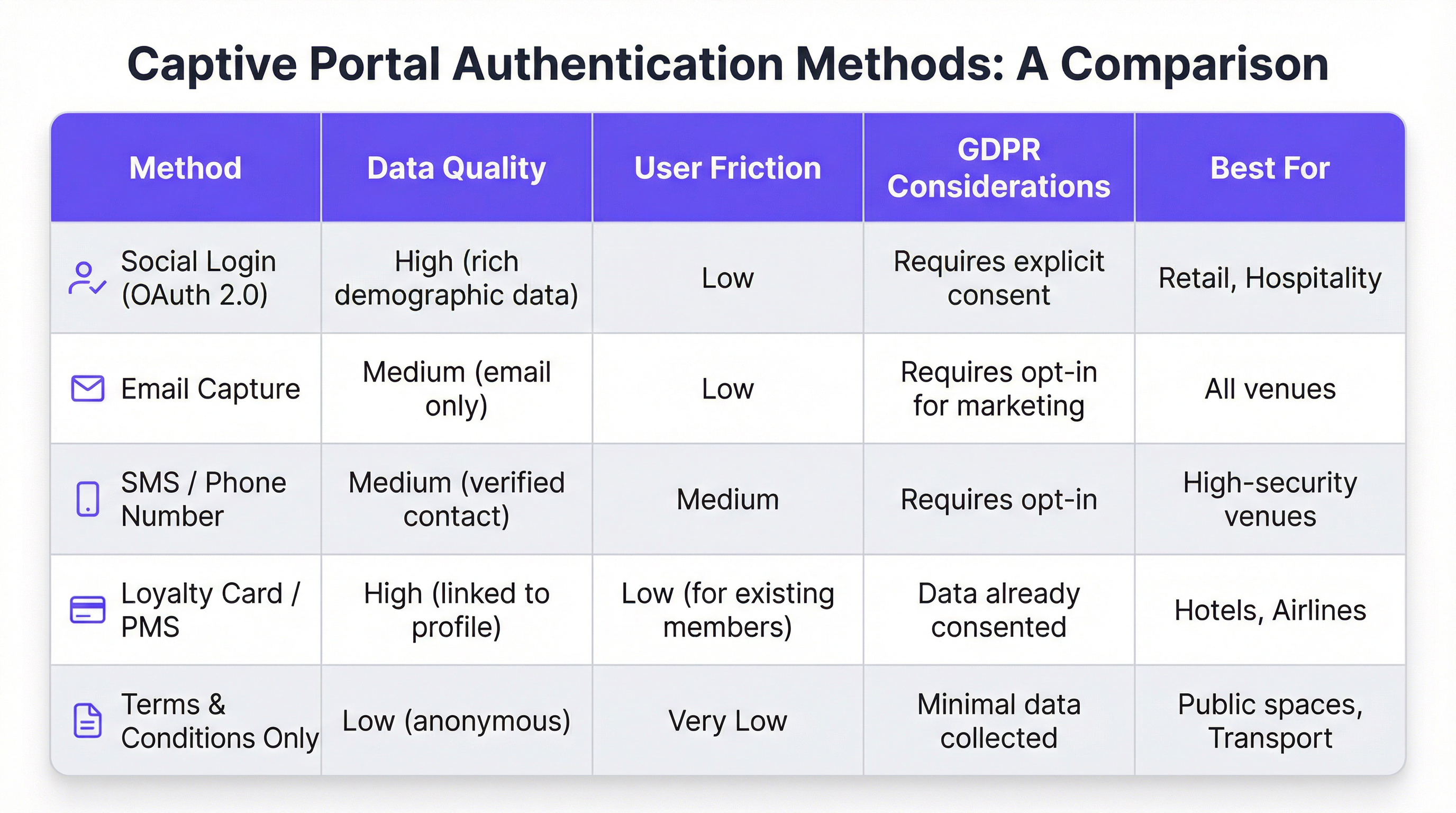
Estágio 3 — Interação e Autenticação no Portal: A página do Captive Portal é apresentada ao usuário. Os métodos de autenticação incluem login social via OAuth 2.0 (Facebook, Google, LinkedIn), captura de e-mail ou SMS, aceitação de termos e condições, ou integração com um programa de fidelidade ou Sistema de Gestão de Propriedades (PMS) via REST API. A escolha do método governa diretamente a qualidade dos dados capturados e o atrito introduzido na jornada do usuário.
Estágio 4 — Autenticação RADIUS: Após o envio do formulário, o serviço do portal se comunica com um servidor RADIUS (RFC 2865). O servidor RADIUS valida as credenciais em um armazenamento de dados de backend — um banco de dados local, diretório LDAP, CRM ou plataforma de automação de marketing. Atributos RADIUS, como Session-Timeout e Idle-Timeout, são usados para aplicar políticas de sessão.
Estágio 5 — Acesso Concedido: Com a autenticação bem-sucedida, o servidor RADIUS sinaliza ao WLC para alterar o estado de autorização do usuário, concedendo acesso total à internet. Políticas de largura de banda, regras de filtragem de conteúdo e limites de duração de sessão são aplicados neste ponto por meio do mecanismo de políticas do WLC.
Do ponto de vista da segurança, o WPA3-Enterprise com IEEE 802.1X oferece o mais alto nível de proteção, criptografando o tráfego entre o cliente e o AP usando segurança de 192 bits no modo WPA3-Enterprise. Para o próprio portal, toda comunicação deve usar HTTPS com TLS 1.2 ou superior. A conformidade com o PCI DSS v4.0 é obrigatória onde qualquer processamento de pagamento ocorra dentro do fluxo do portal.
Para usuários da Purple AI, os recursos avançados de personalização estendem essa arquitetura significativamente. A plataforma Purple suporta testes A/B de designs de portal no nível do local, permitindo que os operadores testem diferentes layouts, calls-to-action e fluxos de autenticação para otimizar as taxas de conversão. A entrega de conteúdo personalizado pós-login — como ofertas direcionadas com base no perfil de CRM de um visitante ou nível de fidelidade — é alcançada por meio de chamadas de API em tempo real para o Salesforce, HubSpot ou qualquer plataforma de automação de marketing com uma REST API. O mecanismo de análise da Purple também fornece sobreposições de mapas de calor e análise de tempo de permanência, permitindo que os operadores do local correlacionem dados de engajamento do WiFi com padrões de tráfego físico.
Guia de Implementação
A implantação de um Captive Portal de Guest WiFi em escala corporativa requer uma abordagem estruturada e em fases. O framework a seguir é neutro em relação a fornecedores e aplicável em ambientes de hospitalidade, varejo, eventos e setor público.
Fase 1 — Definir Objetivos de Negócios: Antes do início de qualquer trabalho técnico, documente as metas específicas do serviço de Guest WiFi. Objetivos comuns incluem a construção de um banco de dados de marketing primário (first-party), direcionar o tráfego para áreas específicas de um local, aumentar a receita auxiliar por meio de promoções direcionadas ou simplesmente fornecer uma comodidade confiável. Esses objetivos determinarão todas as decisões de design subsequentes, desde o método de autenticação até a estratégia de conteúdo pós-login.
Fase 2 — Avaliação da Infraestrutura de Rede: Realize uma auditoria completa da sua infraestrutura sem fio existente. Verifique se seus APs e WLC suportam redirecionamento de Captive Portal, marcação de VLAN e integração RADIUS externa. Para ambientes de alta densidade — estádios, centros de conferências, centros de transporte — encomende um site survey de RF profissional para garantir cobertura e capacidade adequadas. Uma rede com baixo desempenho prejudicará até mesmo o portal com o design mais bonito.
Fase 3 — Seleção de Plataforma: Avalie as plataformas de Captive Portal em relação aos seus objetivos de negócios. Os principais critérios incluem agnosticismo de hardware (crítico para propriedades de vários fornecedores), profundidade das integrações de CRM e automação de marketing, qualidade de análises e relatórios, ferramentas de conformidade com a GDPR e a capacidade de personalizar o design do portal sem recursos de desenvolvedor. Para organizações com requisitos de integração complexos, avalie a documentação da API da plataforma e o suporte a webhooks.
Fase 4 — Design da Jornada do Usuário: Mapeie a experiência completa do usuário, desde a descoberta do WiFi até o engajamento pós-login. Tenha como meta um máximo de três interações antes que o usuário obtenha acesso à internet. Faça testes A/B de diferentes designs de portal para identificar o layout e o fluxo de autenticação que maximizam as taxas de conclusão. Certifique-se de que o portal seja totalmente responsivo e otimizado para consumo mobile-first.
Fase 5 — Configuração e Integração: Configure o WLC para redirecionar usuários não autenticados para a URL do portal. Defina o walled garden para permitir o acesso ao host do portal, domínios de login social (accounts.google.com, www.facebook.com, www.linkedin.com) e quaisquer recursos de CDN necessários para renderizar o portal. Configure os segredos compartilhados do RADIUS e teste todo o fluxo de autenticação de ponta a ponta antes de entrar em operação.
Fase 6 — Piloto e Lançamento: Implante em um único local piloto e monitore as taxas de autenticação, durações de sessão e logs de erro por no mínimo duas semanas antes de um lançamento completo. Estabeleça KPIs de linha de base contra os quais você medirá o sucesso da implantação.
Melhores Práticas
Priorize a Experiência do Usuário: Um Captive Portal lento, confuso ou não confiável reflete mal na sua marca. Tenha como meta um tempo de autenticação de ponta a ponta inferior a 15 segundos. Mantenha o design do portal limpo, as instruções inequívocas e o call-to-action proeminente. Cada clique ou campo de formulário adicional que você adicionar reduzirá sua taxa de conclusão.
Imponha o Design Mobile-First: Mais de 75% das conexões de Guest WiFi se originam de dispositivos móveis. Seu portal deve ser totalmente responsivo, com elementos de interface do usuário amigáveis ao toque e texto legível sem zoom. Teste no iOS e Android em vários tamanhos de tela antes da implantação.
Seja Transparente Sobre a Coleta de Dados: Apresente uma explicação clara e em linguagem simples sobre quais dados você está coletando e como eles serão usados. Forneça um link para sua política de privacidade e garanta que seu mecanismo de consentimento esteja em conformidade com o Artigo 7 da GDPR. Caixas de consentimento pré-marcadas não são válidas sob a GDPR.
Segmente Sua Rede Rigorosamente: Use VLANs para isolar o tráfego de convidados da sua rede corporativa. Este é um controle de segurança fundamental. Implemente regras de firewall para impedir que dispositivos de convidados acessem o espaço de endereço RFC 1918 na sua rede corporativa. Habilite o isolamento de clientes em seus APs para impedir que dispositivos de convidados se comuniquem entre si.
Mantenha e Monitore: As implantações de Captive Portal não são do tipo "configure e esqueça". Estabeleça uma cadência regular para revisar logs de autenticação, atualizar firmware em APs e WLCs e auditar sua configuração de walled garden. Configure alertas para picos na taxa de falha de autenticação, que geralmente são o primeiro indicador de uma configuração incorreta ou incidente de segurança.
Solução de Problemas e Mitigação de Riscos
O modo de falha mais comum em implantações de Captive Portal de Guest WiFi é a falha no carregamento do portal. Isso quase sempre é causado por um de três problemas: falha na resolução de DNS (o cliente não consegue resolver o hostname do portal), um walled garden excessivamente restritivo (os recursos de CDN do portal estão bloqueados) ou uma regra de firewall impedindo o acesso ao servidor web do portal na porta 443. O diagnóstico sistemático usando uma captura de pacotes na interface de uplink do WLC identificará rapidamente a causa raiz.
Falhas de autenticação são o segundo problema mais comum. Elas geralmente decorrem de segredos compartilhados RADIUS incorretos, distorção de relógio (clock skew) entre o WLC e o servidor RADIUS (o que causa falhas de autenticação EAP) ou problemas com o armazenamento de dados de backend. Habilitar o registro detalhado do RADIUS e correlacionar timestamps entre o WLC, o servidor RADIUS e os logs da aplicação do portal é a abordagem de diagnóstico mais eficiente.
Do ponto de vista de risco de segurança, o vetor de ameaça mais significativo para uma rede de Guest WiFi é um SSID não criptografado ou com criptografia fraca. Um SSID aberto sem criptografia expõe todo o tráfego do usuário à interceptação passiva. Sempre imponha a criptografia WPA2 ou WPA3. Faça varreduras regulares no seu espaço aéreo em busca de pontos de acesso não autorizados (rogue APs) transmitindo seu SSID — um vetor de ataque comum conhecido como ataque "evil twin". Implemente recursos de detecção e prevenção de intrusão sem fio (WIDS/WIPS) em seu WLC ou como um sistema de sobreposição (overlay) independente.
ROI e Impacto nos Negócios
O business case para um Captive Portal de Guest WiFi sofisticado vai muito além de fornecer uma conexão básica à internet. A tabela a seguir resume os principais impulsionadores de ROI em diferentes tipos de locais:
| Tipo de Local | Principal Impulsionador de ROI | KPI Típico | Exemplo de Resultado |
|---|---|---|---|
| Hotel | Aumento da receita auxiliar | Reservas de Spa/A&B de usuários do WiFi | +42% de reservas de spa (estudo de caso de hotel com 200 quartos) |
| Varejo | Crescimento do banco de dados de marketing | Novos contatos com opt-in por mês | Mais de 8.000 contatos em 6 meses (estudo de caso de varejo com 500 lojas) |
| Estádio / Eventos | Ativação de patrocinadores | Impressões de portal com marca | Taxa de conclusão do portal de 95%+ em grandes eventos |
| Centro de Conferências | Engajamento de delegados | Taxa de check-in em sessões via WiFi | Dados de comparecimento em tempo real para organizadores de eventos |
| Setor Público | Engajamento do cidadão | Taxa de conclusão de pesquisas | Anúncios públicos direcionados a residentes verificados |
O cálculo do ROI para um investimento em Guest WiFi deve levar em conta tanto o impacto direto na receita (vendas auxiliares, receita de campanhas de marketing) quanto os benefícios indiretos (melhores pontuações de satisfação do cliente, redução de churn, dados primários mais ricos). Para um hotel com 200 quartos e uma ocupação média de 70%, um aumento de 42% nas reservas de spa atribuível a promoções impulsionadas pelo WiFi pode representar dezenas de milhares de libras em receita anual incremental — um retorno que normalmente justifica o investimento na plataforma no primeiro ano de implantação.
Key Terms & Definitions
Captive Portal
A web page that a network operator presents to a newly connected user before granting broader access to the internet. The portal intercepts all HTTP/S traffic from the unauthenticated device and redirects it to a designated URL.
This is the primary mechanism for authenticating, communicating with, and collecting data from users on a guest WiFi network. IT teams configure this at the WLC or AP level to control access and gather marketing consent.
RADIUS (Remote Authentication Dial-In User Service)
A networking protocol (RFC 2865) that provides centralised Authentication, Authorization, and Accounting (AAA) management for users connecting to a network service. It operates over UDP and uses a shared secret for security.
RADIUS is the backend authentication engine for most enterprise captive portal deployments. When a user submits their login credentials, the portal sends an Access-Request to the RADIUS server, which responds with an Access-Accept or Access-Reject. IT teams must configure the correct RADIUS shared secret on both the WLC and the portal platform.
Walled Garden
A restricted network environment in which a pre-authenticated user can only access a defined list of approved domains and IP addresses, typically limited to the captive portal itself and any resources required to render it.
Before a user completes the captive portal login, they are in a walled garden. Network architects must carefully define the walled garden whitelist to include all resources required for the portal to function (including social login provider domains) while blocking all other internet access.
IEEE 802.1X
An IEEE standard for port-based Network Access Control (PNAC) that provides an authentication mechanism for devices wishing to attach to a LAN or WLAN. It requires a supplicant (client device), an authenticator (AP or switch), and an authentication server (RADIUS).
802.1X is the foundation of enterprise-grade wireless security. When combined with WPA3-Enterprise, it provides per-user, per-session encryption keys and strong mutual authentication. Network architects should specify 802.1X for any deployment where security is a primary concern.
WPA3 (Wi-Fi Protected Access 3)
The third generation of the WPA security certification programme for wireless networks, introduced by the Wi-Fi Alliance in 2018. WPA3-Personal uses Simultaneous Authentication of Equals (SAE) to replace the vulnerable PSK handshake, while WPA3-Enterprise offers 192-bit security mode.
WPA3 should be the default security protocol for any new guest WiFi deployment. It provides significant security improvements over WPA2, including protection against offline dictionary attacks and forward secrecy. IT teams should verify WPA3 client support before mandating it as the sole security mode.
GDPR (General Data Protection Regulation)
A regulation in EU law (Regulation 2016/679) on data protection and privacy, applicable to all organisations processing personal data of individuals in the EU/EEA. The UK GDPR is a retained version of the regulation applicable in the United Kingdom post-Brexit.
GDPR compliance is a legal obligation for any organisation collecting personal data via a guest WiFi captive portal. Key requirements include a lawful basis for processing (typically consent), transparent privacy notices, the right to erasure, and data minimisation. Non-compliance can result in fines of up to €20 million or 4% of global annual turnover, whichever is higher.
OAuth 2.0
An open standard for access delegation (RFC 6749) that allows users to grant third-party applications limited access to their accounts on other services without exposing their passwords. It is the protocol underpinning social login functionality.
OAuth 2.0 is the technology that powers 'Log in with Google/Facebook/LinkedIn' on captive portals. It provides a secure, user-friendly authentication flow and, with the user's consent, allows the portal to retrieve profile data (name, email, age range, gender) from the social platform. IT teams must register the portal as an OAuth application with each social provider and configure the correct redirect URIs.
PCI DSS (Payment Card Industry Data Security Standard)
A set of security standards (currently v4.0) designed to ensure that all companies that accept, process, store, or transmit credit card information maintain a secure environment. Compliance is mandated by the major card schemes.
PCI DSS compliance is mandatory for any captive portal that processes payments for premium WiFi access or any other service. Key requirements include network segmentation, encryption of cardholder data in transit and at rest, and regular penetration testing. IT teams should engage a Qualified Security Assessor (QSA) to validate compliance.
VLAN (Virtual Local Area Network)
A logical segmentation of a physical network into multiple isolated broadcast domains, configured at the switch or WLC level. Traffic on one VLAN cannot communicate with traffic on another VLAN without passing through a router or firewall.
VLAN segmentation is the primary mechanism for isolating guest WiFi traffic from the corporate network. IT teams should assign guest WiFi traffic to a dedicated VLAN and enforce strict firewall rules at the inter-VLAN routing point to prevent guest devices from accessing internal resources.
Case Studies
A 200-room luxury hotel wants to replace its outdated voucher-based guest WiFi system with a modern captive portal. The goals are to provide a seamless login experience for guests, promote hotel amenities, and integrate with their existing CRM (Salesforce) to track guest preferences. The hotel has a mixed-vendor wireless estate comprising both Cisco WLCs and Meraki cloud-managed APs.
The recommended approach is to deploy a cloud-based, hardware-agnostic captive portal platform such as Purple, which offers native support for both Cisco and Meraki hardware and a pre-built Salesforce integration. The implementation proceeds as follows: (1) Create a dedicated guest SSID on both the Cisco WLC and Meraki dashboard, tagged to a guest VLAN (e.g., VLAN 100) that is isolated from the corporate network. (2) Configure both controllers to redirect unauthenticated HTTP/S traffic to the Purple-hosted captive portal URL. Define the walled garden to permit access to the portal host, Salesforce domains, and social login providers. (3) Design a branded portal with two authentication paths: social login (LinkedIn, Facebook) for transient guests, and room number plus surname authentication for registered guests, validated in real-time against the hotel's PMS via a REST API call. (4) Configure the post-login redirect to a personalised welcome page that queries Salesforce for the guest's loyalty tier and surfaces relevant offers for the hotel's spa and restaurant. (5) Configure Purple's Salesforce connector to push all login events, demographic data, and session metadata to Salesforce in real-time, enriching the guest's contact record. (6) Enable Purple's analytics dashboard to track daily active users, authentication method split, and dwell time by venue zone. Establish a baseline and review monthly.
A national retail chain with 500 stores wants to implement guest WiFi to track in-store footfall, build a first-party marketing database, and send personalised promotional offers to customers. The IT team is concerned about the cost and disruption of replacing the diverse range of wireless hardware across the estate, which includes equipment from at least four different vendors.
The critical success factor for this deployment is hardware agnosticism. Select a cloud-based captive portal platform that supports all four vendors via standard RADIUS and HTTP redirection protocols, avoiding any hardware replacement. The implementation proceeds as follows: (1) Conduct a hardware audit across all 500 stores to document AP and controller models, firmware versions, and current SSID configurations. Identify any hardware that cannot support external RADIUS or HTTP redirection and plan for targeted upgrades at those locations only. (2) Deploy the captive portal platform in a phased rollout, starting with a 20-store pilot in a single region. Configure each store's hardware to redirect guest traffic to the centralised portal. (3) Design a single, mobile-optimised portal page with email capture as the primary authentication method, supplemented by social login. Ensure the consent mechanism is GDPR-compliant with a clear opt-in for marketing communications. (4) Configure the platform's marketing automation connector to push new contacts to the chain's email marketing platform (e.g., Klaviyo or Salesforce Marketing Cloud) in real-time. (5) Implement Purple's footfall analytics to track dwell time and repeat visit frequency by store. Use this data to identify high-performing stores and replicate their layout and offer strategies. (6) After a 4-week pilot, review KPIs (authentication rate, opt-in rate, email open rate) and iterate on the portal design before rolling out to the remaining 480 stores.
Scenario Analysis
Q1. A 500-store national retail chain wants to implement guest WiFi across its entire estate to build a first-party marketing database. The IT director has confirmed that the chain uses wireless hardware from four different vendors and has no budget for hardware replacement. The marketing director wants to send personalised promotional emails to customers within 24 hours of their in-store WiFi session. What is the most critical platform selection criterion, and what integration architecture would you recommend?
💡 Hint:Consider the hardware diversity challenge and the real-time data pipeline requirement between the captive portal and the email marketing platform.
Show Recommended Approach
The most critical platform selection criterion is hardware agnosticism — the platform must support all four wireless vendors via standard RADIUS and HTTP redirection protocols without requiring proprietary hardware or firmware modifications. For the integration architecture, configure the platform to push login events and contact data to the email marketing platform via a real-time webhook or API connector. This ensures that new contacts are available for campaign targeting within minutes of authentication, well within the 24-hour window. Ensure the consent mechanism on the portal captures explicit opt-in for marketing emails (GDPR Article 7), and configure the email platform to suppress contacts who have not opted in. Implement a data deduplication process to handle users who log in at multiple stores.
Q2. A conference centre is hosting a high-profile international event for 5,000 attendees over three days. The event organiser wants to provide a fast, seamless WiFi experience with a branded captive portal, but the centre's IT team is concerned about: (a) the security implications of 5,000 unknown devices on the network, (b) the performance of the captive portal under peak load, and (c) GDPR compliance given the international audience. What are your recommendations for each concern?
💡 Hint:Address each concern separately: security (segmentation and encryption), performance (load testing and CDN), and GDPR (consent mechanism and data residency).
Show Recommended Approach
(a) Security: Implement WPA3-Personal or WPA3-Enterprise on the event SSID. Create a dedicated VLAN for event traffic, completely isolated from the centre's corporate network. Enable client isolation on all APs to prevent device-to-device communication. Deploy a content filtering policy to block known malicious domains. Enable WIDS/WIPS to detect rogue APs. (b) Performance: Load test the captive portal platform to verify it can handle 5,000 concurrent authentication requests. Use a cloud-based portal platform with auto-scaling capabilities. Ensure the portal page is served from a CDN to minimise latency for international attendees. Pre-stage the RADIUS server with event attendee credentials if using pre-registration, to reduce authentication latency. (c) GDPR: Ensure the consent mechanism is available in all relevant languages. Use a cloud-based portal platform with data residency options to ensure EU citizen data is processed and stored within the EU/EEA. Implement a data retention policy that deletes personal data within the timeframe specified in your privacy notice. Appoint a Data Protection Officer if not already in place.
Q3. Following a routine security audit, your organisation's penetration testers have identified that the guest WiFi captive portal at your flagship venue is being served over HTTP rather than HTTPS, and that the guest VLAN has a misconfigured firewall rule that permits access to a subnet containing file servers. Describe the specific risks these two findings present and the remediation steps you would take.
💡 Hint:Consider the attack vectors enabled by each misconfiguration: man-in-the-middle for the HTTP finding, and lateral movement for the VLAN finding.
Show Recommended Approach
Finding 1 (HTTP portal): The risk is a man-in-the-middle (MitM) attack. An attacker on the same network segment can intercept the unencrypted HTTP traffic between the user's device and the portal server, capturing login credentials, session tokens, and any personal data submitted via the portal form. Remediation: Immediately provision a TLS certificate for the portal domain (a free Let's Encrypt certificate is acceptable for most deployments) and configure the portal web server to enforce HTTPS and redirect all HTTP requests to HTTPS. Update the WLC redirect URL to use HTTPS. Verify the certificate chain is valid and that HSTS is configured. Finding 2 (VLAN misconfiguration): The risk is lateral movement. A guest device that has authenticated to the WiFi network could access the file server subnet, potentially exfiltrating sensitive data or deploying malware. Remediation: Immediately review and correct the firewall ACL at the inter-VLAN routing point to deny all traffic from the guest VLAN to the file server subnet. Implement a default-deny policy on the guest VLAN firewall rule set, with explicit permit rules only for internet-bound traffic. Review all inter-VLAN rules as part of a broader firewall audit.
Key Takeaways
- ✓A guest WiFi captive portal is a strategic business asset — not a utility. It is the primary mechanism for customer data collection, brand engagement, and revenue generation from your wireless network.
- ✓The authentication method you choose (social login, email capture, PMS integration, T&C only) directly determines the quality of data you collect and the friction you introduce. Match the method to your business objectives.
- ✓Security is non-negotiable: enforce WPA3 encryption, segment guest traffic onto a dedicated VLAN, serve the portal over HTTPS, and comply with PCI DSS if processing payments.
- ✓GDPR compliance requires a valid lawful basis for processing (typically explicit consent), a transparent privacy notice, and a documented data retention and deletion policy. Fines of up to 4% of global turnover apply for non-compliance.
- ✓Hardware agnosticism is the most critical platform selection criterion for multi-site, multi-vendor deployments. A cloud-based platform avoids costly hardware replacement programmes.
- ✓The 15-Second Rule: if end-to-end authentication takes longer than 15 seconds, completion rates will drop significantly. Benchmark and optimise your RADIUS response times and portal page load speed.
- ✓Measure ROI using concrete business metrics: marketing database growth, ancillary revenue uplift, customer dwell time, and repeat visit frequency. These metrics justify the investment and guide ongoing optimisation.




