

Marketing de WiFi para Visitantes: O Guia Definitivo para Capturar Leads, Impulsionar Vendas e Melhorar a Experiência do Cliente
This guide provides a technical deep-dive into leveraging guest WiFi for marketing, lead capture, and customer analytics. It offers actionable strategies for IT managers and venue operators to transform their WiFi from a cost centre into a powerful, ROI-driven marketing platform, covering architecture, implementation, and compliance.
🎧 Listen to this Guide
View Transcript
Resumo Executivo
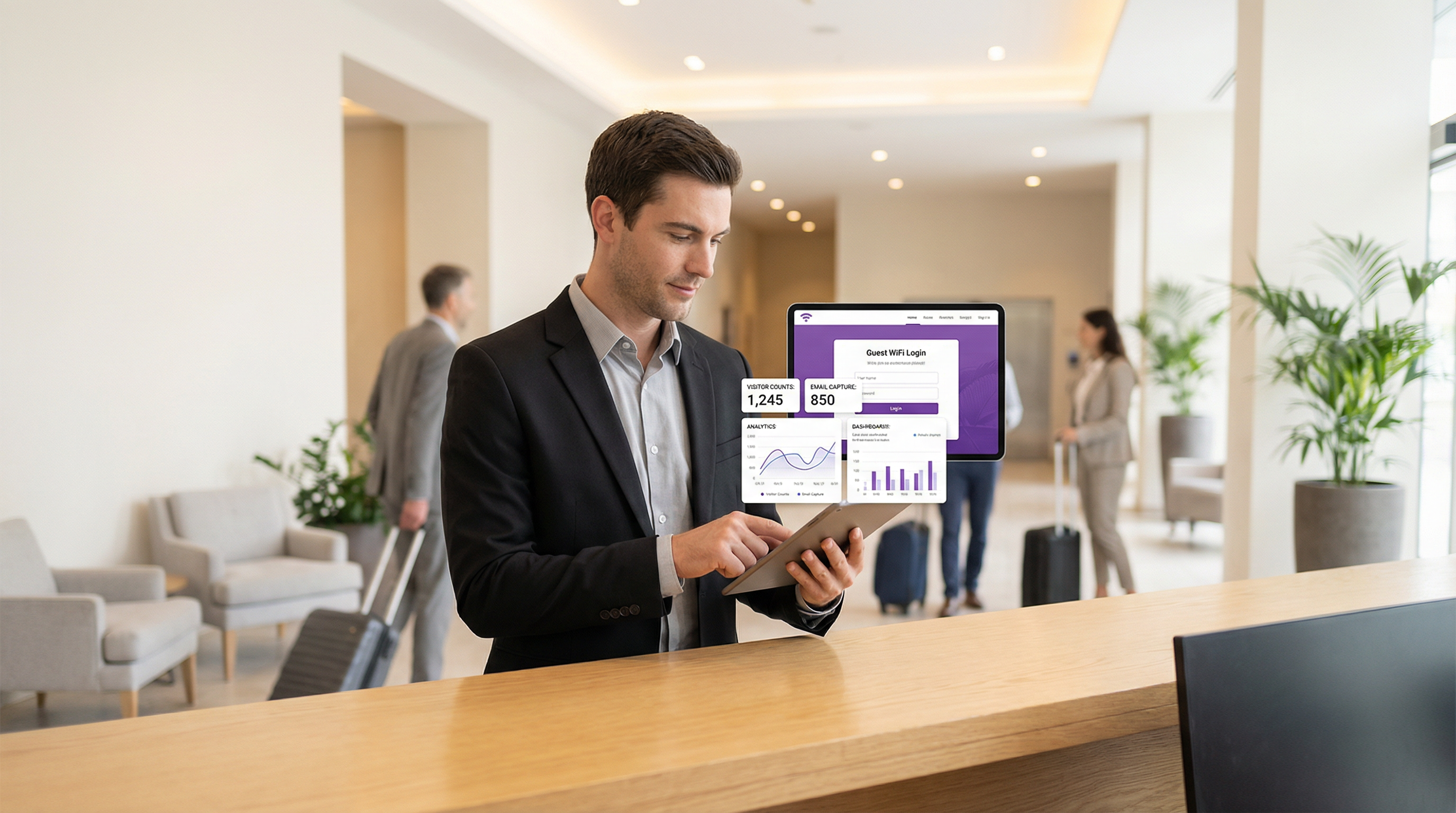
O WiFi para visitantes não é mais uma mera comodidade; é um ativo estratégico capaz de entregar valor comercial substancial. Para CTOs, gerentes de TI e diretores de estabelecimentos, o imperativo é mudar a percepção do WiFi para visitantes de uma despesa operacional necessária para um mecanismo proativo de marketing e análise. Este guia fornece uma estrutura técnica e estratégica para alcançar essa transformação. Ao implantar uma solução de WiFi para visitantes habilitada para marketing, as organizações podem capturar dados primários ricos de clientes, entender o comportamento dos visitantes em espaços físicos e impulsionar campanhas de marketing direcionadas que geram um Retorno sobre o Investimento (ROI) mensurável. Os componentes principais envolvem uma infraestrutura de rede robusta, um Captive Portal sofisticado para aquisição de dados e integração perfeita com plataformas de CRM e automação de marketing. Fundamentalmente, isso deve ser executado dentro de uma estrutura segura e em conformidade, aderindo a padrões como WPA3 para segurança de rede e GDPR para privacidade de dados. O resultado é uma ferramenta poderosa que preenche a lacuna entre a jornada digital e física do cliente, permitindo experiências personalizadas e impulsionando a receita.
Análise Técnica Aprofundada
A arquitetura de uma solução de marketing de WiFi para visitantes consiste em três camadas principais: a Infraestrutura de Rede, o Captive Portal e Plataforma de Marketing e a Camada de Integração e Análise.
Infraestrutura de Rede: A base é o seu hardware de WiFi existente — pontos de acesso (APs), controladores e gateways. Para análises de localização eficazes, a densidade de APs deve ser suficiente para triangular as posições dos dispositivos com precisão. A segmentação de rede é fundamental; o tráfego de visitantes deve ser isolado da rede corporativa usando VLANs (Virtual LANs) e regras rígidas de firewall. Isso mitiga o risco de uma violação de segurança originada na rede voltada ao público. A adesão ao IEEE 802.1X para controle de acesso à rede baseado em porta e ao WPA3 para criptografia robusta é um requisito básico para segurança de nível corporativo.
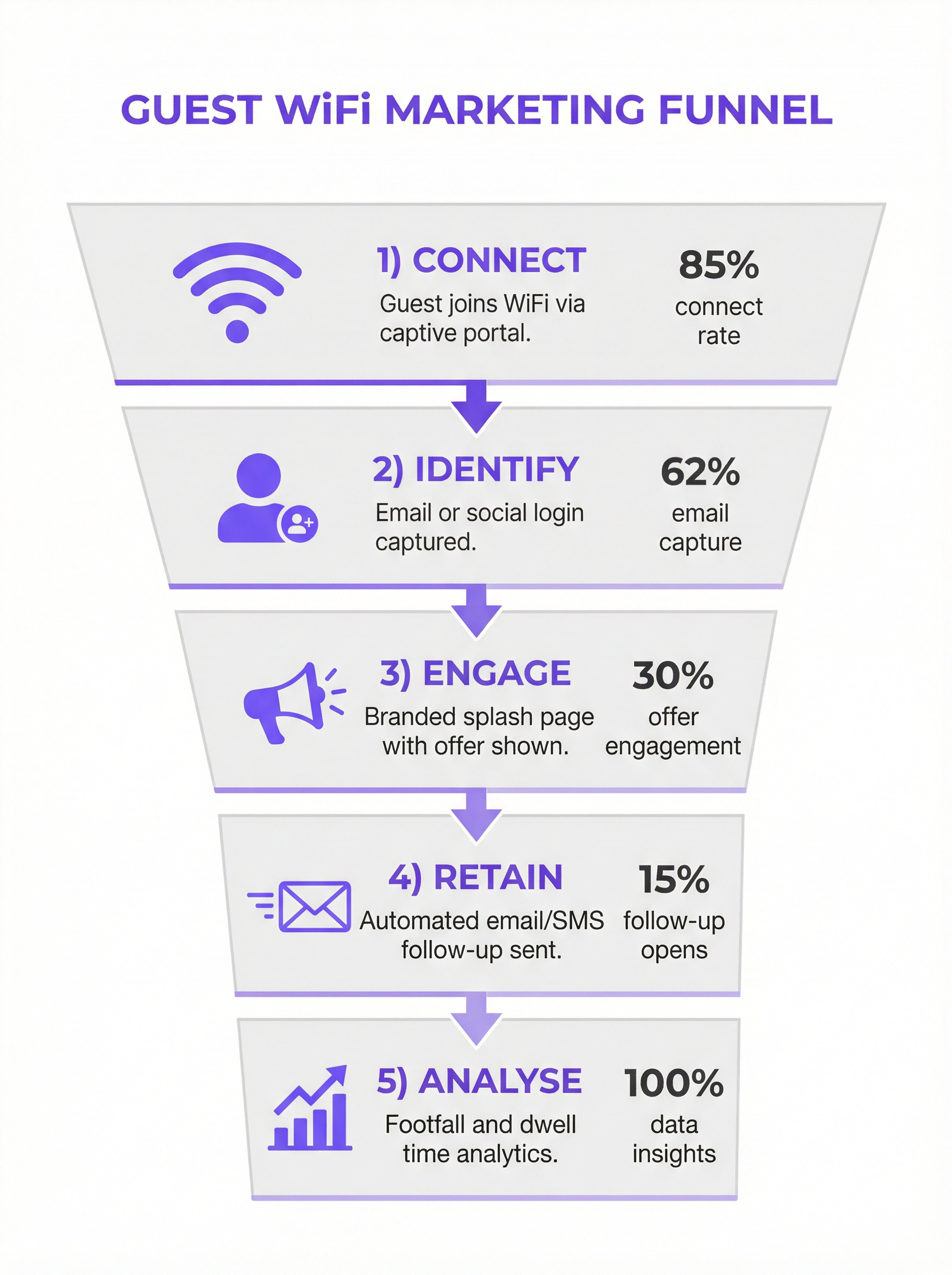
Captive Portal e Plataforma de Marketing: Esta é a camada de software que fica sobre o hardware da sua rede. Quando um usuário se conecta ao SSID de visitantes, ele é redirecionado para um Captive Portal. Ao contrário de uma simples página de inserção de senha, um portal de marketing oferece vários métodos de autenticação:
- E-mail/Preenchimento de Formulário: O método mais direto para captura de leads.
- Login Social: (ex.: Google, LinkedIn, Facebook) Fornece dados demográficos mais ricos e validados com o consentimento do usuário.
- Voucher/Código de Acesso: Permite acesso em níveis e sessões com tempo limitado, comum no setor de hospitalidade.
A plataforma captura esses dados, vincula-os ao endereço MAC do dispositivo e os armazena em um banco de dados centralizado. É aqui que a conformidade com o GDPR e outras regulamentações de privacidade de dados é aplicada por meio de caixas de seleção de consentimento explícito e links claros para políticas de privacidade.
- Camada de Integração e Análise: O verdadeiro valor dos dados capturados é desbloqueado por meio da integração. Usando APIs REST e Webhooks, a plataforma de marketing de WiFi deve alimentar dados em tempo real para sistemas externos:
- Sistemas de CRM (Salesforce, HubSpot): Para enriquecer os perfis dos clientes com o comportamento no local.
- Automação de Marketing (Mailchimp, Klaviyo): Para acionar campanhas automatizadas de e-mail/SMS (ex.: uma oferta de "bem-vindo de volta" para um visitante recorrente).
- Ferramentas de Business Intelligence (BI): Para correlacionar análises de WiFi com dados de vendas.
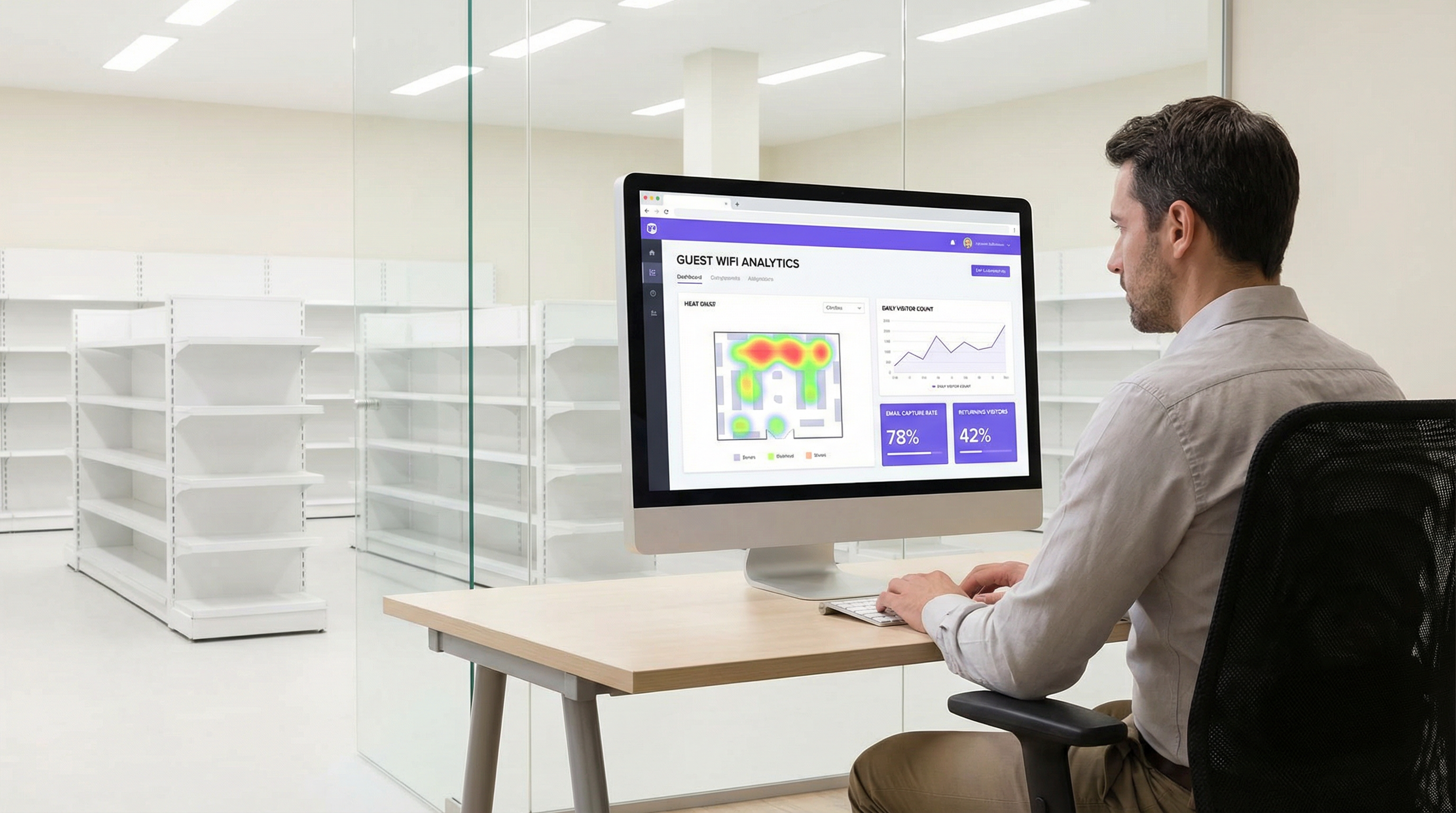
Esta camada também fornece o painel de análise, oferecendo insights sobre fluxo de pessoas, tempos de permanência, fidelidade do visitante e mapas de calor de localização.
Guia de Implementação
A implantação de uma solução de marketing de WiFi para visitantes requer uma abordagem em fases:
Definir Objetivos de Negócios: Quais são as metas principais? Aumentar o tamanho da lista de e-mails em 25%? Impulsionar um aumento de 10% em negócios recorrentes? Vincular 5% das vendas na loja a uma promoção baseada em WiFi? KPIs claros são essenciais.
Auditoria de Infraestrutura: Avalie sua rede atual. A cobertura de APs é adequada para análises de localização? Seu gateway suporta integração com plataformas de Captive Portal de terceiros? Uma pesquisa de local (site survey) minuciosa é frequentemente necessária.
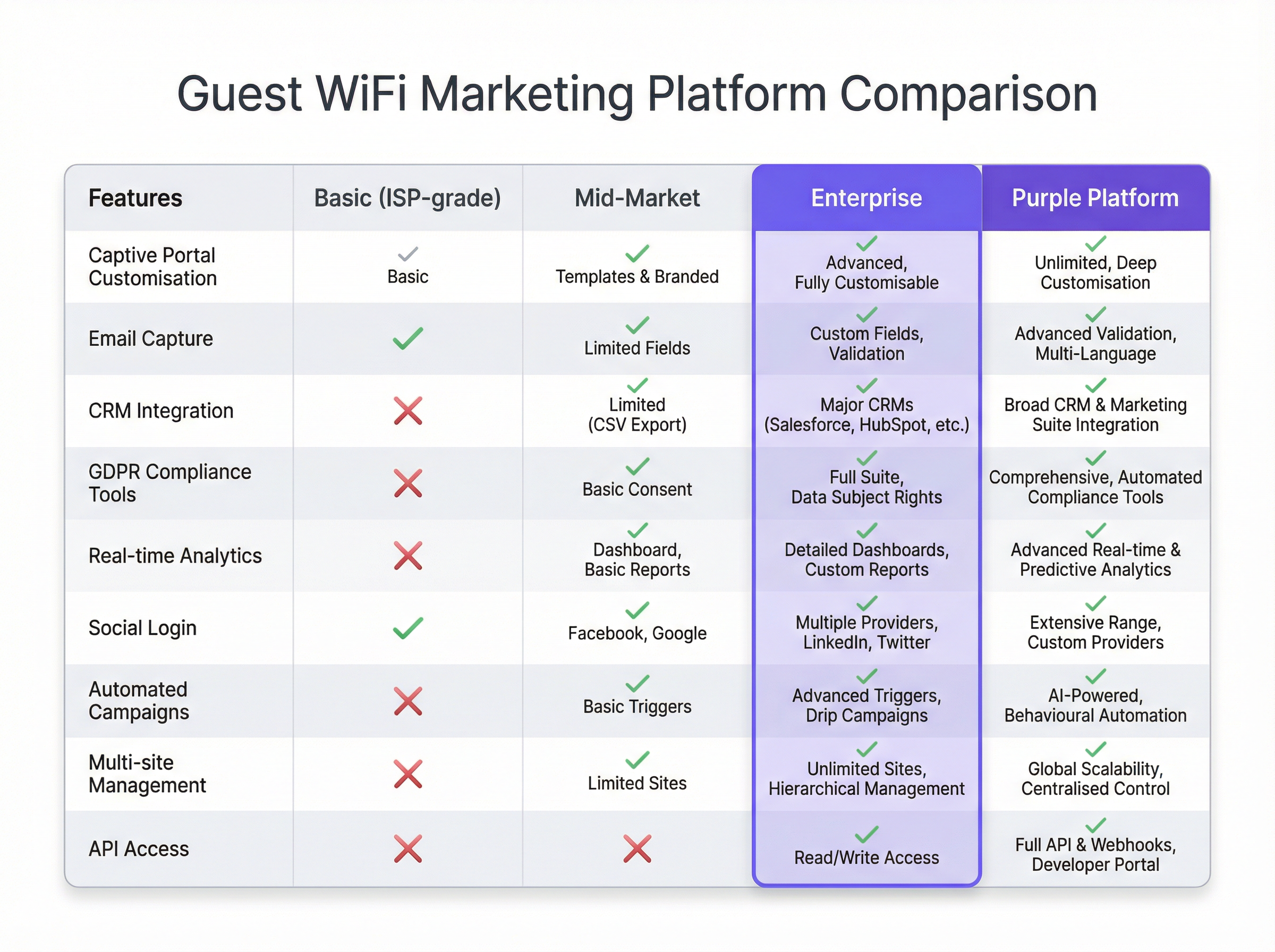
Seleção de Plataforma: Escolha uma plataforma que atenda aos seus objetivos. As principais considerações incluem a amplitude das integrações de CRM, a sofisticação de suas análises e a robustez de suas ferramentas de conformidade. Veja o gráfico de comparação abaixo para uma visão geral neutra em relação a fornecedores.
Projetar a Jornada do Cliente: Mapeie a experiência do usuário desde a conexão até a comunicação pós-visita. Projete um Captive Portal limpo e focado em dispositivos móveis (mobile-first) com uma troca de valor clara (ex.: "WiFi grátis em troca do seu e-mail e um voucher de 15% de desconto").
Configurar e Integrar: Configure o Captive Portal, defina os gatilhos de automação de marketing e estabeleça os links de API para o seu CRM. Esta é uma tarefa técnica que requer colaboração entre as equipes de rede e marketing.
Piloto e Iteração: Lance em um número limitado de locais. Monitore as taxas de conexão, a qualidade da captura de dados e o desempenho da campanha. Use os insights para refinar a abordagem antes de um lançamento completo.
Melhores Práticas
- Priorize a Experiência do Usuário: Um processo de login lento, complexo ou não confiável acabará com a adoção. Mantenha os formulários curtos e o processo de conexão contínuo.
- Ofereça uma Troca de Valor Clara: Os usuários estão mais dispostos a compartilhar dados se receberem valor tangível em troca. Isso pode ser velocidade premium, um desconto ou conteúdo exclusivo.
- Incorpore a Conformidade no Design: A privacidade de dados não é um detalhe secundário. Garanta que cada etapa, desde o consentimento no Captive Portal até o gerenciamento de dados no CRM, esteja em conformidade com o GDPR/CCPA.
- Segmente e Personalize: Não envie a mesma mensagem para todos os usuários. Use os dados para segmentar seu público (ex.: visitantes de primeira viagem vs. visitantes recorrentes) e personalizar a comunicação.
- Proteja a Rede: Audite regularmente a segmentação da sua rede e as regras de firewall. Redes de visitantes são um vetor de ataque comum.
Solução de Problemas e Mitigação de Riscos
- Baixas Taxas de Conexão: Frequentemente causadas por uma experiência do usuário ruim. Simplifique o processo de login, melhore o desempenho da rede ou aumente a visibilidade do serviço de WiFi.
- Baixa Qualidade de Dados: Implemente a validação de e-mail em tempo real no seu Captive Portal para reduzir entradas falsas ou digitadas incorretamente. Prefira logins sociais para dados verificados e de maior qualidade.
- Violações de Conformidade: O maior risco. Trabalhe com as equipes jurídicas para garantir que todo o seu fluxo de dados esteja em conformidade. Use uma plataforma com ferramentas de conformidade automatizadas e integradas para gerenciar o consentimento e as solicitações dos titulares dos dados.
- ROI Negativo: Isso ocorre quando os dados são coletados, mas nenhuma ação é tomada. Certifique-se de que a camada de integração esteja funcionando e que as equipes de marketing estejam usando ativamente os dados para executar campanhas direcionadas.
ROI e Impacto nos Negócios
O ROI do marketing de WiFi para visitantes é medido em vários eixos:
- Crescimento do Banco de Dados de Marketing: Acompanhe os novos contatos líquidos adquiridos por meio da plataforma de WiFi. Atribua um valor a cada lead com base em benchmarks do setor.
- Aumento de Vendas: Atribua a receita a promoções impulsionadas pelo WiFi. Por exemplo, acompanhe a taxa de resgate de códigos de desconto oferecidos no Captive Portal.
- Melhoria na Fidelidade do Cliente: Meça o aumento de visitas recorrentes de clientes conhecidos após a implementação do sistema.
- Eficiência Operacional: Use dados de fluxo de pessoas e tempo de permanência para otimizar os níveis de equipe, layouts de loja e horários de funcionamento.
Ao conectar o comportamento offline aos perfis digitais, o marketing de WiFi para visitantes fornece o elo perdido na jornada omnichannel do cliente, entregando um impacto claro e mensurável nos resultados financeiros.
Key Terms & Definitions
Captive Portal
A web page that the user of a public-access network is obliged to view and interact with before access is granted. In a marketing context, it's the primary tool for data capture.
IT teams deploy captive portals as the gateway to the guest network. It's the bridge between the network infrastructure and the marketing platform.
MAC Address (Media Access Control)
A unique identifier assigned to a network interface controller (NIC) for use as a network address in communications within a network segment.
The WiFi marketing platform links a user's captured data (e.g., email) to their device's MAC address to track their presence and behaviour (dwell time, repeat visits) anonymously.
VLAN (Virtual Local Area Network)
A logical grouping of devices in the same broadcast domain. VLANs are usually configured on switches by placing some interfaces into one broadcast domain and some into another.
This is the fundamental mechanism IT teams use to segregate the guest WiFi network from the secure internal corporate network, preventing lateral movement by attackers.
GDPR (General Data Protection Regulation)
A regulation in EU law on data protection and privacy in the European Union and the European Economic Area.
For any organisation collecting data from EU citizens, GDPR compliance is mandatory. IT and marketing teams must ensure the WiFi platform provides tools for explicit consent, data access requests, and the right to be forgotten.
Webhook
An automated message sent from an app when something happens. It has a message—or payload—and is sent to a unique URL—a webhook URL.
This is how a WiFi platform can instantly notify a CRM when a new guest connects. For example, a webhook can trigger an action in Salesforce to create a new lead record the moment a guest logs into the WiFi.
Presence Analytics
The analysis of data from WiFi signals to understand how many people are in a physical space, without identifying them personally.
Venue operators use this data to understand footfall patterns, peak hours, and popular areas, allowing them to optimise staffing, layout, and operations.
Location Analytics
A more granular form of analytics that uses the signal strength from multiple access points to triangulate a device's position within a venue.
This provides heatmaps and path analysis, showing where visitors spend the most time and the routes they take. It requires a higher density of APs than simple presence analytics.
WPA3 (Wi-Fi Protected Access 3)
The latest generation of security for wireless networks. It provides more robust authentication and increased cryptographic strength.
Network architects should specify WPA3-compatible hardware for all new deployments to provide the highest level of security for guest and corporate wireless networks.
Case Studies
A 200-room luxury hotel wants to increase direct bookings and build a guest database for marketing, moving away from reliance on Online Travel Agencies (OTAs). They have a modern Cisco Meraki network infrastructure.
The hotel integrates Purple with their Meraki dashboard. They configure a captive portal offering two tiers of WiFi: a free, standard-speed service requiring email and consent for marketing, and a paid, high-speed premium service. The captured email is sent via webhook to their HubSpot CRM and added to a 'New Guest' workflow. This workflow sends a welcome email with a 10% discount code for their next direct booking. The hotel also uses the presence analytics to understand guest flow in the lobby, bar, and spa, helping them optimise staffing.
A retail chain with 50 stores wants to understand in-store customer behaviour and drive footfall through targeted promotions. They use a mix of Aruba and Ruckus hardware.
The chain deploys a hardware-agnostic platform like Purple across all 50 stores. They use a social login (Facebook/Google) on their captive portal to gather rich demographic data. This data is fed into their central BI tool. They identify that their highest-value customers (those with high repeat visits and long dwell times) are predominantly in the 25-34 age bracket. They then run a targeted Facebook ad campaign aimed at this demographic in the geographic areas around their underperforming stores, promoting a new product line. The WiFi analytics are then used to measure the uplift in footfall from this specific demographic post-campaign.
Scenario Analysis
Q1. A large conference centre is hosting a 3-day tech event with 5,000 attendees. They want to provide WiFi while also giving event sponsors opportunities for lead generation. How would you architect the WiFi solution?
💡 Hint:Consider tiered access and how to provide value to both attendees and sponsors.
Show Recommended Approach
Implement a two-tiered WiFi system. Tier 1 is a free, baseline-speed service for all attendees, with a captive portal that requires only email registration. This builds the centre's own marketing list. Tier 2 is a sponsored, high-speed premium service. Attendees can access it by opting-in to share their details (name, email, company) with a specific sponsor. Each major sponsor gets their own 'branded' access portal. This provides high-quality leads for sponsors and a clear value exchange for attendees (premium speed for data). The network must be robust with high AP density in breakout rooms and the main hall to handle the load.
Q2. A public library wants to offer free WiFi but is concerned about GDPR compliance and data security. They have a limited budget and minimal IT staff. What is the most critical first step in their deployment?
💡 Hint:What is the single most important security measure for any guest network?
Show Recommended Approach
The most critical first step is to ensure complete network segmentation. Using a VLAN, the guest WiFi network must be entirely isolated from the library's internal administrative network. This prevents any possibility of a user on the public network accessing sensitive internal systems, like the library management system or staff computers. Before even considering data capture, this fundamental security measure must be implemented and verified. A simple, reliable firewall rule blocking all traffic between the guest VLAN and the internal VLAN is essential.
Q3. A restaurant chain notices a high connection rate on their guest WiFi but a very low open rate on their marketing emails. What is the likely cause and how would you troubleshoot it?
💡 Hint:Think about the quality of the data being captured at the source.
Show Recommended Approach
The most likely cause is poor data quality, specifically fake or mistyped email addresses being entered on the captive portal. To troubleshoot, first analyse the captured data for obvious fake domains (e.g., test@test.com). The best long-term solution is to implement real-time email validation via an API on the captive portal. This checks if an email address is valid before the user is granted access. An alternative or complementary solution is to incentivise social logins, which provide verified email addresses and richer data, leading to higher engagement.
Key Takeaways
- ✓Guest WiFi can be transformed from a cost centre into a powerful marketing and analytics tool.
- ✓A captive portal is the gateway for capturing valuable first-party customer data with their consent.
- ✓Seamless integration with CRM and marketing platforms is crucial for acting on captured data and proving ROI.
- ✓Network segmentation (using VLANs) is the most critical security measure to protect your corporate network.
- ✓Compliance with data privacy regulations like GDPR is non-negotiable and must be built into the system design.
- ✓A clear value exchange (e.g., a discount for an email) is essential to maximise user adoption and data capture rates.
- ✓WiFi analytics provide unprecedented insight into customer behaviour in physical spaces, bridging the online-offline gap.




