

WiFi para Visitantes: O Guia Definitivo para Empresas Aprimorarem a Experiência do Cliente e Coletarem Dados Valiosos
This guide is the definitive technical reference for IT leaders and venue operators on deploying enterprise-grade guest WiFi. It provides actionable guidance on network architecture, security, and data analytics to transform guest WiFi from a cost centre into a powerful tool for enhancing customer experience and driving business intelligence.
🎧 Listen to this Guide
View Transcript

Resumo Executivo
Para profissionais seniores de TI e diretores de operações, o WiFi para visitantes evoluiu muito além de uma simples comodidade. Antes considerado um serviço necessário, porém periférico, agora representa um ativo estratégico capaz de entregar um ROI significativo. Uma rede WiFi para visitantes projetada profissionalmente não se trata mais apenas de fornecer acesso à internet; é um veículo principal para aprimorar a experiência do cliente, coletar dados incomparáveis sobre o comportamento no local e criar novas oportunidades de marketing. Este guia serve como uma referência técnica e prática para projetar, implementar e gerenciar uma solução de WiFi para visitantes segura e de alto desempenho. Iremos além da teoria acadêmica para fornecer insights acionáveis baseados em implantações no mundo real em hospitalidade, varejo e grandes locais públicos. O foco está em uma abordagem de três frentes: 1) Segurança e Arquitetura: Implementar segmentação de rede robusta e controles de acesso para mitigar riscos. 2) Dados e Analytics: Aproveitar um Captive Portal e uma plataforma de inteligência WiFi para entender quem são seus clientes e como eles se comportam em seu espaço. 3) Impacto nos Negócios: Traduzir esses dados em resultados mensuráveis, desde a melhoria da eficiência operacional até o aumento da fidelidade do cliente e da receita. Para o CTO, este guia fornece a estrutura para justificar o investimento em uma plataforma moderna de inteligência WiFi como a Purple AI, mudando a conversa de custo para valor estratégico.
Análise Técnica Aprofundada
Uma implantação bem-sucedida de WiFi para visitantes baseia-se em uma base de arquitetura técnica sólida. O objetivo principal é fornecer acesso à internet contínuo e de alto desempenho aos visitantes sem comprometer a segurança ou o desempenho da rede corporativa interna. Isso requer uma abordagem em várias camadas que aborde hardware, design de rede e protocolos de segurança.
Arquitetura Principal: A Segmentação é Inegociável
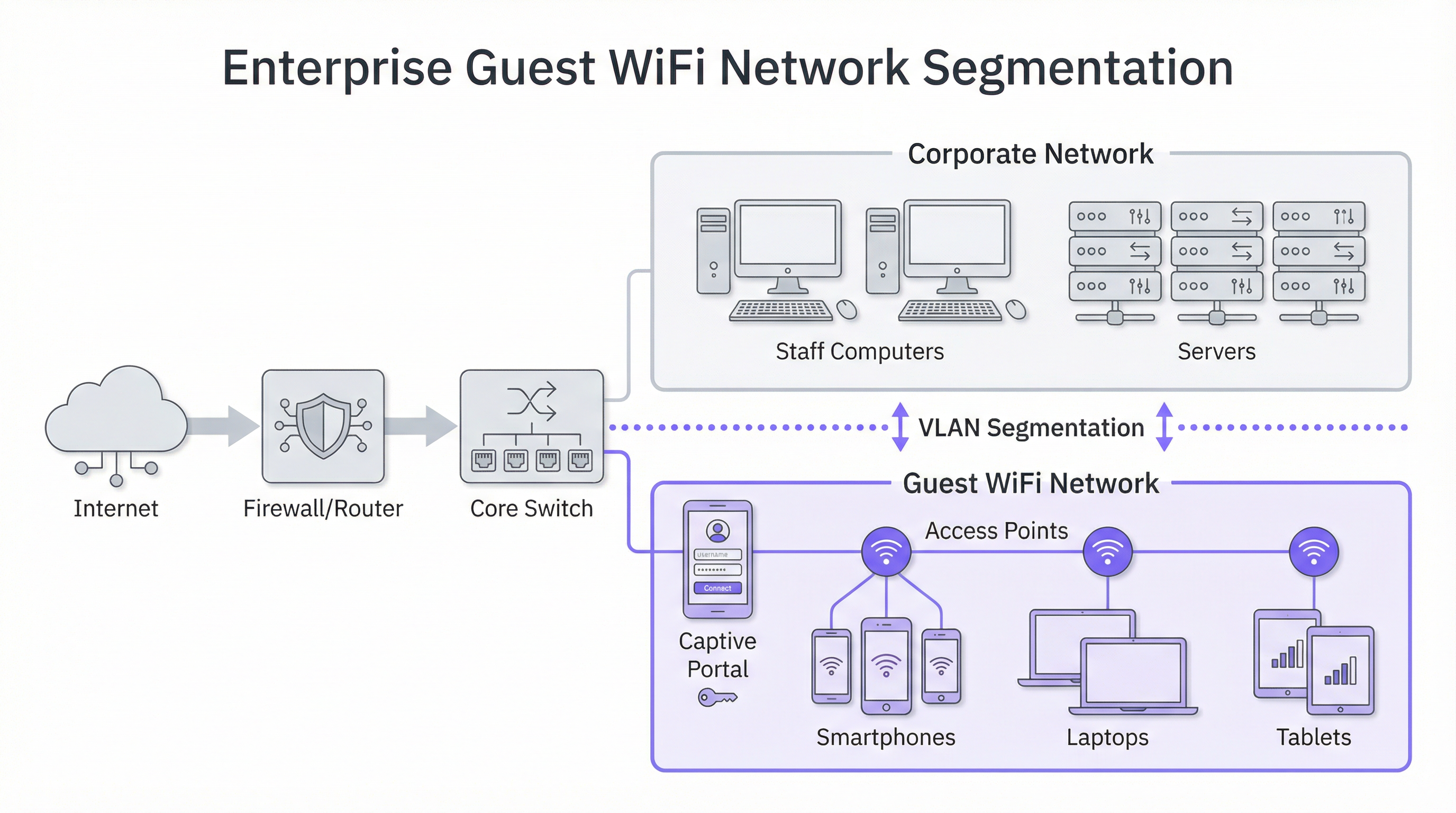
O princípio mais crítico na segurança do WiFi para visitantes é a segmentação de rede. Uma rede 'plana', onde dispositivos de visitantes e sistemas corporativos internos (por exemplo, terminais de Ponto de Venda, computadores de funcionários, servidores de arquivos) compartilham a mesma rede lógica, representa um risco de segurança inaceitável. Uma violação em um único dispositivo de visitante pode expor toda a sua infraestrutura corporativa. A solução padrão do setor é a implementação de VLANs (Virtual Local Area Networks). Uma VLAN divide logicamente uma única rede física em vários domínios de broadcast isolados. Neste modelo, todo o tráfego de visitantes é confinado à sua própria VLAN dedicada, que é roteada diretamente para a internet e protegida por firewall de quaisquer VLANs corporativas internas. Isso garante que, mesmo que um dispositivo de visitante seja comprometido, a superfície de ataque seja estritamente limitada à própria rede de visitantes.
Considerações de Hardware: Access Points e Controladoras
A qualidade da experiência do usuário está diretamente ligada à qualidade e ao posicionamento de seus Wireless Access Points (APs). A seleção de hardware deve ser guiada pelas demandas específicas do seu ambiente:
- Locais de Alta Densidade (Estádios, Centros de Conferência): Exigem APs 4x4 MU-MIMO (Multi-User, Multiple Input, Multiple Output) de alta capacidade, frequentemente suportando os padrões mais recentes WiFi 6 (802.11ax) ou WiFi 6E. Eles são projetados para lidar com um grande número de conexões simultâneas em uma área concentrada, mitigando interferências e garantindo uma alocação justa de tempo de transmissão (airtime).
- Hospitalidade e Varejo (Hotéis, Lojas): Cobertura e estética costumam ser fundamentais. APs de quarto ou de parede podem fornecer excelente cobertura direcionada em quartos de hotel, enquanto APs montados no teto com design discreto são adequados para pisos de varejo e áreas públicas. Um site survey de RF (Radiofrequência) profissional é essencial antes da implantação para identificar os locais ideais dos APs, minimizar a interferência de canais e eliminar falhas de cobertura.
Protocolos de Segurança e Controle de Acesso
Além da segmentação, várias camadas de segurança devem ser implementadas:
- Criptografia WPA3: O padrão de segurança atual para redes WiFi. O WPA3-Enterprise oferece o mais alto nível de segurança ao fornecer a cada usuário uma chave de criptografia individual, mas para redes públicas de visitantes, o WPA3-Personal é mais comum. O segredo é afastar-se de protocolos legados como WEP e WPA/WPA2 sempre que possível.
- Isolamento de Cliente (Client Isolation): Este é um recurso crucial em sua controladora wireless ou APs que impede que dispositivos de visitantes na mesma rede WiFi se comuniquem entre si. Ele efetivamente coloca cada visitante em sua própria bolha digital, prevenindo ataques peer-to-peer e a propagação de malware dentro da rede de visitantes.
- Captive Portal: O Captive Portal é a página da web para a qual um usuário é redirecionado antes de receber acesso total à rede. De uma perspectiva técnica, ele serve como um gateway de autenticação e autorização. Ele intercepta a solicitação HTTP inicial do usuário e a redireciona para um servidor de login. Assim que o usuário atende aos critérios definidos (por exemplo, aceita os termos, insere um e-mail, faz login via redes sociais), o portal autoriza o endereço MAC do seu dispositivo com a controladora de rede, que então permite que o tráfego passe para a internet.
Guia de Implementação
A implantação de uma rede WiFi para visitantes pode ser dividida em um projeto em fases, passando do planejamento e design para a configuração e testes.
Fase 1: Descoberta e Planejamento
- Definir Objetivos de Negócios: Qual é o objetivo principal? É a coleta de dados para marketing, melhorar a experiência no local ou simplesmente fornecer acesso básico? A resposta dita os recursos necessários e o orçamento.
- Avaliar a Infraestrutura Existente: Seu hardware atual de switching e roteamento suporta VLANs? Seu backhaul de internet é suficiente para o número esperado de usuários simultâneos? Uma regra geral comum é orçar de 5 a 10 Mbps por usuário simultâneo esperado para uma boa experiência.
- Realizar um Site Survey: Contrate um engenheiro de redes para realizar um site survey físico e de RF. Isso determinará o número e o posicionamento dos APs necessários para fornecer cobertura e capacidade adequadas.
Fase 2: Design e Configuração
- Esquema de VLAN e IP: Projete sua topologia de rede. Defina uma VLAN e uma sub-rede IP separadas para a rede de visitantes (por exemplo, VLAN 100, 10.100.0.0/16). Configure seu core switch para fazer o trunk desta VLAN para sua controladora wireless e firewall.
- Política de Firewall: Crie uma política de firewall rigorosa para a VLAN de visitantes. Esta política deve bloquear TODO o tráfego destinado a sub-redes corporativas internas e permitir apenas tráfego de saída em portas web padrão (80, 443) e outros serviços necessários (por exemplo, DNS, DHCP).
- Configuração da Controladora Wireless/AP:
- Crie uma nova WLAN/SSID (por exemplo, "NomeDaMarca Free WiFi").
- Atribua este SSID à VLAN de visitantes.
- Habilite o Isolamento de Cliente (Client Isolation).
- Configure as definições de segurança (WPA2/WPA3 com uma chave pré-compartilhada).
- Configure as definições do Captive Portal, apontando para sua plataforma de inteligência WiFi (como a Purple).
Fase 3: Integração e Testes
- Integração do Captive Portal: Configure sua plataforma de analytics WiFi. Isso envolve adicionar seu local, definir a jornada de login (por exemplo, login social, preenchimento de formulário) e personalizar o branding das páginas do portal.
- Testes: Teste exaustivamente toda a jornada do usuário a partir de vários tipos de dispositivos (iOS, Android, laptop). Verifique se a segmentação de VLAN está funcionando corretamente tentando acessar recursos internos a partir da rede de visitantes (essas tentativas devem falhar).
- Go-Live: Assim que os testes forem concluídos, transmita o SSID e monitore as conexões iniciais por meio do seu painel de analytics.
Melhores Práticas
- Priorize a Experiência do Usuário: O processo de login deve ser o mais fluido possível. Um processo complexo e com várias etapas levará a altas taxas de abandono. Ofereça várias opções de login, como contas de redes sociais, para acelerar o processo.
- Seja Transparente Sobre a Coleta de Dados: Os termos e condições do seu Captive Portal devem declarar claramente quais dados você está coletando e como pretende usá-los, em conformidade com regulamentações como a GDPR. Forneça um link para sua política de privacidade completa.
- Centralize o Gerenciamento: Para organizações com vários locais, uma plataforma de gerenciamento baseada em nuvem é essencial. Ela permite que uma pequena equipe de TI monitore, gerencie e atualize milhares de APs em centenas de locais a partir de um único painel.
- Integre com Outros Sistemas: O valor dos dados do WiFi para visitantes é ampliado quando integrado a outros sistemas de negócios. Por exemplo, a integração com um CRM pode enriquecer os perfis dos clientes, enquanto a integração com uma plataforma de automação de marketing pode acionar campanhas de e-mail direcionadas com base no comportamento do visitante.
Solução de Problemas e Mitigação de Riscos
Modos de Falha Comuns:
- Baixo Desempenho: Frequentemente causado por largura de banda de internet insuficiente, mau posicionamento de APs (falhas de cobertura) ou interferência de canais em ambientes densos. O monitoramento regular da integridade e utilização da rede é fundamental.
- Problemas no Captive Portal: Os usuários podem não ser redirecionados para a página de login. Isso pode ser causado por problemas de DNS ou configurações específicas do dispositivo (por exemplo, retransmissão privada). Certifique-se de que seu escopo DHCP forneça um servidor DNS público confiável.
- Falhas de Autenticação: A configuração incorreta do RADIUS (para WPA-Enterprise) ou integrações de API com o Captive Portal podem impedir que os usuários fiquem online. Verifique os logs tanto na controladora de rede quanto na plataforma do portal.
Estratégias de Mitigação de Riscos:
- Auditorias de Segurança Regulares: Realize testes de penetração periodicamente em sua rede de visitantes para identificar e corrigir vulnerabilidades.
- Filtragem de Conteúdo: Implemente um serviço de filtragem de conteúdo baseado em DNS na rede de visitantes para bloquear o acesso a sites maliciosos ou inadequados.
- Timeouts de Sessão: Imponha limites de duração de sessão (por exemplo, 8 horas) para desconectar automaticamente dispositivos inativos e liberar recursos da rede.
ROI e Impacto nos Negócios
O investimento em uma plataforma corporativa de WiFi para visitantes oferece retornos em vários domínios:
- Aumento da Fidelidade do Cliente: Uma experiência WiFi confiável e de alto desempenho agora é uma expectativa. Atender a essa expectativa melhora a satisfação do cliente e incentiva visitas repetidas.
- Operações Baseadas em Dados: Análises de fluxo de pessoas (footfall) e tempo de permanência (dwell time) fornecem dados concretos para otimizar layouts de lojas, escalas de funcionários e até mesmo negociações de aluguel em propriedades comerciais. Por exemplo, uma loja de varejo pode usar dados de mapas de calor para colocar produtos de alta margem nas zonas de maior tráfego.
- Capacidades de Marketing Aprimoradas: Ao converter visitantes anônimos em clientes conhecidos por meio do Captive Portal, você constrói um banco de dados de marketing valioso. Isso permite comunicação pós-visita personalizada, promoções direcionadas e inscrição em programas de fidelidade.
- Geração Direta de Receita: Em alguns locais, como aeroportos ou centros de conferência, um modelo de largura de banda em níveis (por exemplo, acesso básico gratuito, acesso premium pago) pode criar um fluxo de receita direto.
Em última análise, o impacto nos negócios é a transformação de um espaço físico em um local inteligente. Os dados coletados da rede WiFi fornecem o mesmo nível de insight do cliente que os sites de e-commerce desfrutam há anos, finalmente preenchendo a lacuna entre a jornada física e digital do cliente.

Referências
[1]: Padrão IEEE 802.1X "Controle de Acesso à Rede Baseado em Porta" [2]: PCI Security Standards Council "Padrão de Segurança de Dados da Indústria de Cartões de Pagamento" [3]: Informações Oficiais da GDPR "Regulamento Geral sobre a Proteção de Dados (GDPR)"
Key Terms & Definitions
Captive Portal
The web page a user is required to view and interact with before being granted access to a public network. It 'captures' them to force an action, such as accepting terms, providing an email, or completing a social login.
This is the primary tool for IT teams to enforce acceptable use policies and for marketing teams to convert anonymous visitors into known customers. It is the gateway between providing a utility and gathering intelligence.
VLAN (Virtual LAN)
A technology that allows network administrators to logically segment a single physical network into multiple, isolated networks. Devices in one VLAN cannot communicate with devices in another unless explicitly allowed by a router or firewall.
For IT architects, this is the most fundamental tool for securing a guest WiFi network. It ensures that any security event on the guest network is contained and cannot impact the sensitive corporate network.
Client Isolation
A security feature on a wireless access point or controller that prevents devices connected to the same WiFi network from communicating with each other. It creates a private virtual network for each user.
In a public venue, you have no control over the security posture of guest devices. Client Isolation is a critical risk mitigation tool that prevents malware from spreading between laptops in a hotel lobby or conference hall.
SSID (Service Set Identifier)
The public name of a Wireless Local Area Network (WLAN). It is the name you see and select from the list of available WiFi networks on your device.
While a simple concept, the SSID is part of the brand experience. It should be clear, professional, and consistent across all locations (e.g., 'BrandName_Free_WiFi').
802.1X
An IEEE standard for Port-Based Network Access Control (PNAC). It provides an authentication mechanism to devices wishing to attach to a LAN or WLAN. It is often used in corporate environments to grant access based on user or machine credentials.
While typically used for corporate networks, network architects may encounter 802.1X in more advanced guest scenarios, such as providing secure, seamless access for conference attendees who are part of an educational roaming federation (eduroam).
GDPR (General Data Protection Regulation)
A regulation in EU law on data protection and privacy for all individuals within the European Union and the European Economic Area. It governs how personal data is collected, processed, and stored.
For any business with a European presence, GDPR compliance is mandatory. A guest WiFi platform must provide tools for obtaining explicit consent for data collection via the captive portal and for managing user data access requests.
Heatmap
A graphical representation of data where values are depicted by colour. In the context of WiFi analytics, it shows the physical areas of a venue with the highest and lowest concentrations of visitor devices.
For venue operations directors, heatmaps provide immediate, visual insight into how their space is being used. It helps answer questions like 'What are the most popular paths through my store?' or 'Which seating area in my lobby is underutilised?'
Dwell Time
A metric that measures the amount of time a visitor spends in a specific area or in the venue as a whole. It is calculated by tracking the duration a device is associated with the WiFi network.
This is a critical KPI for retail and hospitality. It helps managers understand engagement. Longer dwell times in a retail store often correlate with higher sales, while tracking dwell time in a restaurant can help optimise table turnover.
Case Studies
A 250-room luxury hotel wants to replace its outdated and slow guest WiFi. The goals are to provide seamless, high-performance coverage in all rooms and public areas, eliminate negative reviews about connectivity, and gather data to better understand guest behaviour in the lobby, bar, and restaurant.
- Infrastructure Upgrade: Deploy a new network core with a 10Gbps-capable firewall and core switch. 2. Site Survey & APs: Conduct a full RF site survey. Deploy one WiFi 6 wall-plate AP in each guest room for perfect coverage. Deploy ceiling-mounted WiFi 6E APs in public areas like the lobby, bar, and conference rooms to handle high device density. 3. Network Design: Create three separate VLANs: Corporate (for hotel staff and systems), Guest (for hotel visitors), and IoT (for smart room devices like thermostats and TVs). Implement strict firewall rules to prevent inter-VLAN routing. 4. Platform Integration: Integrate the network controller with the Purple AI platform. Configure the captive portal with a simple, branded login page offering two options: 'Connect with Room Number & Last Name' (integrating with the hotel's Property Management System) or a quick social media login. 5. Data Analytics: Use the Purple dashboard to create reports on dwell time in the bar, footfall patterns in the lobby throughout the day, and the percentage of guests who are repeat visitors.
A retail chain with 50 stores across the country wants to understand in-store customer behaviour. They currently offer no guest WiFi. The primary goal is to measure footfall, identify popular zones within stores, and build a marketing list, all while minimising the management burden on a small central IT team.
- Hardware Selection: Choose a template of 3-5 cost-effective, cloud-managed WiFi 6 APs per store, depending on the average store size. 2. Centralised Management: Select a cloud-native network vendor and the Purple AI platform. This allows the central IT team to configure, monitor, and manage all 50 stores from a single web-based dashboard without needing to travel to each site. 3. Deployment: Use a third-party contractor for the physical installation of APs at each store, following the template design. The central IT team can then remotely provision the devices once they are online. 4. Captive Portal: Design a simple, mobile-first captive portal that offers a 10% discount voucher in exchange for an email address. This provides a clear value exchange for the customer. 5. ROI Measurement: Use the Purple analytics dashboard to track the growth of the marketing database, view aggregated footfall across all stores, and compare dwell-time heatmaps between high-performing and low-performing locations to identify layout optimisation opportunities.
Scenario Analysis
Q1. A large conference centre is hosting a 3-day tech event with 5,000 attendees, each carrying at least two devices (laptop and smartphone). The event organiser wants to provide free, high-performance WiFi. What are the three most critical technical considerations for the network architect to ensure a successful deployment?
💡 Hint:Think about capacity, interference, and traffic management in a high-density environment.
Show Recommended Approach
- Capacity & Density Planning: The primary concern is the sheer number of concurrent connections. The architect must use high-density WiFi 6 or 6E APs and perform a detailed RF site survey to ensure sufficient APs are deployed in session halls and common areas. 2. Backhaul & Throughput: The internet connection must be able to handle the aggregated load. A 10Gbps (or higher) redundant internet connection is likely required. QoS (Quality of Service) policies should be implemented to prioritise interactive traffic (like web browsing) over bulk traffic. 3. Efficient Onboarding: With thousands of users connecting at once, the authentication process must be extremely efficient. An open network (no encryption) with a simple, click-through captive portal is the most practical approach to avoid configuration issues for non-technical users and minimise support requests.
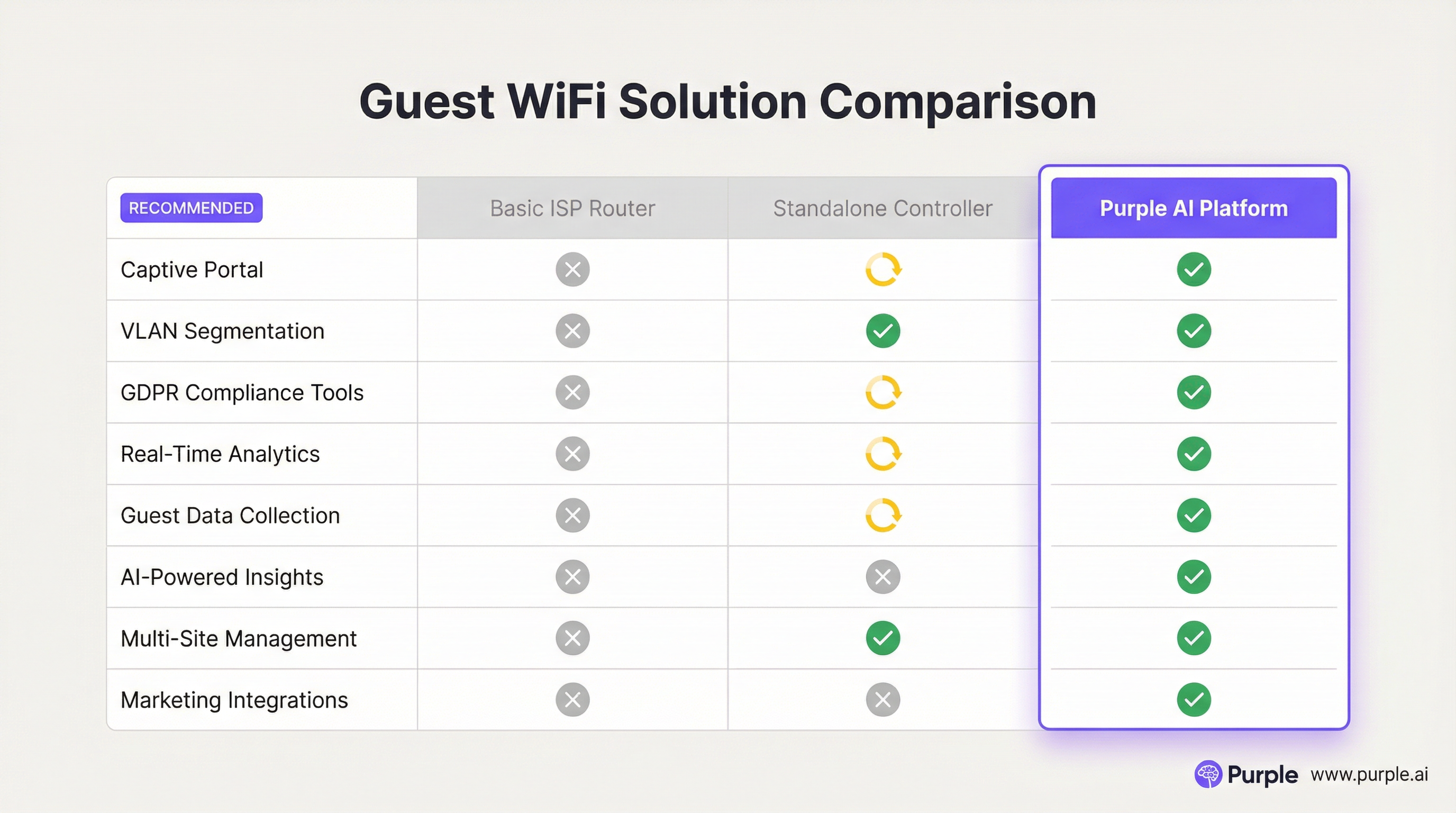
Q2. A restaurant chain is using a basic guest WiFi solution from their ISP. They have noticed that the WiFi performance is slow during peak hours, and they have no visibility into who is using the network. What is the most compelling argument for the IT manager to make to the CTO to justify an upgrade to a platform like Purple AI?
💡 Hint:Focus on the transition from a cost/utility to a business intelligence tool.
Show Recommended Approach
The most compelling argument is the shift from viewing WiFi as a cost centre to an ROI-generating asset. The IT manager should frame the investment not as an IT upgrade, but as a business intelligence project. The key points would be: 1) Problem/Opportunity: We are currently blind to our customer behaviour. We don't know our ratio of new vs. repeat diners, our busiest times by actual customer count (not just sales), or how long customers stay. 2) Solution: A platform like Purple AI will not only solve the performance issues with better hardware management but will give us a dashboard to visualise this critical data. 3. ROI: By collecting emails via a captive portal, we can build a marketing database to drive repeat business. By analysing dwell times, we can optimise seating and staffing for peak periods, improving table turnover and revenue. The cost of the platform is offset by the value of this new data and the marketing capabilities it unlocks.
Q3. A hospital wants to provide guest WiFi to patients and visitors. The hospital's CIO is extremely concerned about the security of patient data and compliance with healthcare regulations (like HIPAA). How would you design the guest network to address these specific concerns?
💡 Hint:Security and isolation are paramount. How do you create a 'hermetically sealed' guest network?
Show Recommended Approach
The design must prioritise security above all else. 1. Extreme Segmentation: Implement a guest VLAN that is completely firewalled from all other hospital networks, especially those containing Electronic Health Records (EHR). The firewall rules should be 'deny-all' by default, with an explicit rule to only allow guest VLAN traffic out to the internet. There should be absolutely no route from the guest network to any internal network. 2. Physical & Logical Separation: Where possible, use a physically separate internet line for guest traffic. If not feasible, use a high-end firewall capable of deep packet inspection and intrusion prevention on the guest traffic. 3. Strict Access Control: Enable Client Isolation on all APs to prevent any patient or visitor devices from communicating with each other. Implement a captive portal that requires acceptance of a stringent acceptable use policy and displays clear warnings against attempting to access clinical systems. 4. No Data Collection: For maximum privacy and minimum risk, the captive portal should be a simple 'click-to-accept' with no personal data collection (no email, no social login). The focus is purely on providing access, not marketing.
Key Takeaways
- ✓Guest WiFi is no longer a simple amenity; it is a strategic tool for data collection and customer engagement.
- ✓Network segmentation (using VLANs) is the most critical security measure to protect your corporate network.
- ✓A captive portal is the gateway to converting anonymous visitors into known customers and enforcing legal terms.
- ✓High-quality Access Points and a professional RF site survey are essential for a positive user experience.
- ✓WiFi analytics platforms like Purple AI provide actionable insights into footfall, dwell time, and visitor behaviour.
- ✓Compliance with data privacy regulations like GDPR is mandatory and must be designed into your solution.
- ✓The ROI of a professional guest WiFi solution is realised through improved operations, enhanced marketing, and increased customer loyalty.




