

Passpoint (Hotspot 2.0): Um Guia Abrangente para um Roaming de WiFi Seguro e Contínuo
This guide provides a comprehensive technical overview of Passpoint (Hotspot 2.0) for IT leaders and network architects, covering the IEEE 802.11u standard, GAS/ANQP discovery protocols, WPA3-Enterprise security, and the WBA OpenRoaming federation. It delivers a vendor-neutral implementation framework with phased deployment guidance, real-world case studies from hospitality and retail, and a clear analysis of the ROI and compliance benefits for enterprise venue operators.
🎧 Listen to this Guide
View Transcript

Resumo Executivo
Para executivos de TI e arquitetos de rede em locais de grande escala, oferecer uma experiência de WiFi contínua e segura não é mais uma conveniência, mas um imperativo operacional central. O desafio está em eliminar o atrito do Captive Portal e de redes abertas inseguras, mantendo uma segurança robusta e obtendo insights valiosos dos usuários. O Passpoint, também conhecido como Hotspot 2.0, resolve diretamente esse desafio. É um protocolo certificado pela Wi-Fi Alliance baseado no padrão IEEE 802.11u que permite que dispositivos móveis descubram e se autentiquem automaticamente em redes WiFi com segurança WPA3 de nível corporativo, espelhando a experiência contínua do roaming de celular.
Este guia serve como uma referência prática para tomadores de decisão, fornecendo uma análise técnica aprofundada da arquitetura do Passpoint, um framework de implementação neutro em relação a fornecedores e uma análise de seu ROI. Ao aproveitar o Passpoint, as organizações podem melhorar significativamente a experiência do visitante, reduzir a sobrecarga de suporte de TI, fortalecer sua postura de segurança e desbloquear novas oportunidades para o engajamento orientado a dados — transformando, em última análise, sua infraestrutura de WiFi de um centro de custos em um ativo estratégico.
Análise Técnica Aprofundada
O Passpoint muda fundamentalmente o paradigma de conexão WiFi de centrado na rede (conectar a um SSID específico) para centrado no usuário (conectar a qualquer rede que confie nas credenciais do usuário). Isso é alcançado por meio de uma série de consultas de pré-associação e um framework de segurança robusto construído com base em padrões estabelecidos do setor.
Arquitetura Principal: GAS e ANQP
O mecanismo que permite a descoberta contínua é definido na emenda IEEE 802.11u. Antes mesmo de um dispositivo cliente tentar se associar a um ponto de acesso, ele pode consultar a rede para determinar se há um acordo de roaming em vigor. Essa conversa de pré-associação usa dois protocolos principais trabalhando em conjunto.
O Generic Advertisement Service (GAS) fornece a camada de transporte para quadros de anúncio entre uma estação cliente e um servidor antes que a autenticação ocorra. O Access Network Query Protocol (ANQP) é o próprio protocolo de consulta, transportado dentro dos quadros GAS. O dispositivo cliente usa o ANQP para fazer perguntas específicas à rede, sendo a mais crítica: quais consórcios de roaming ou provedores de identidade ela suporta?
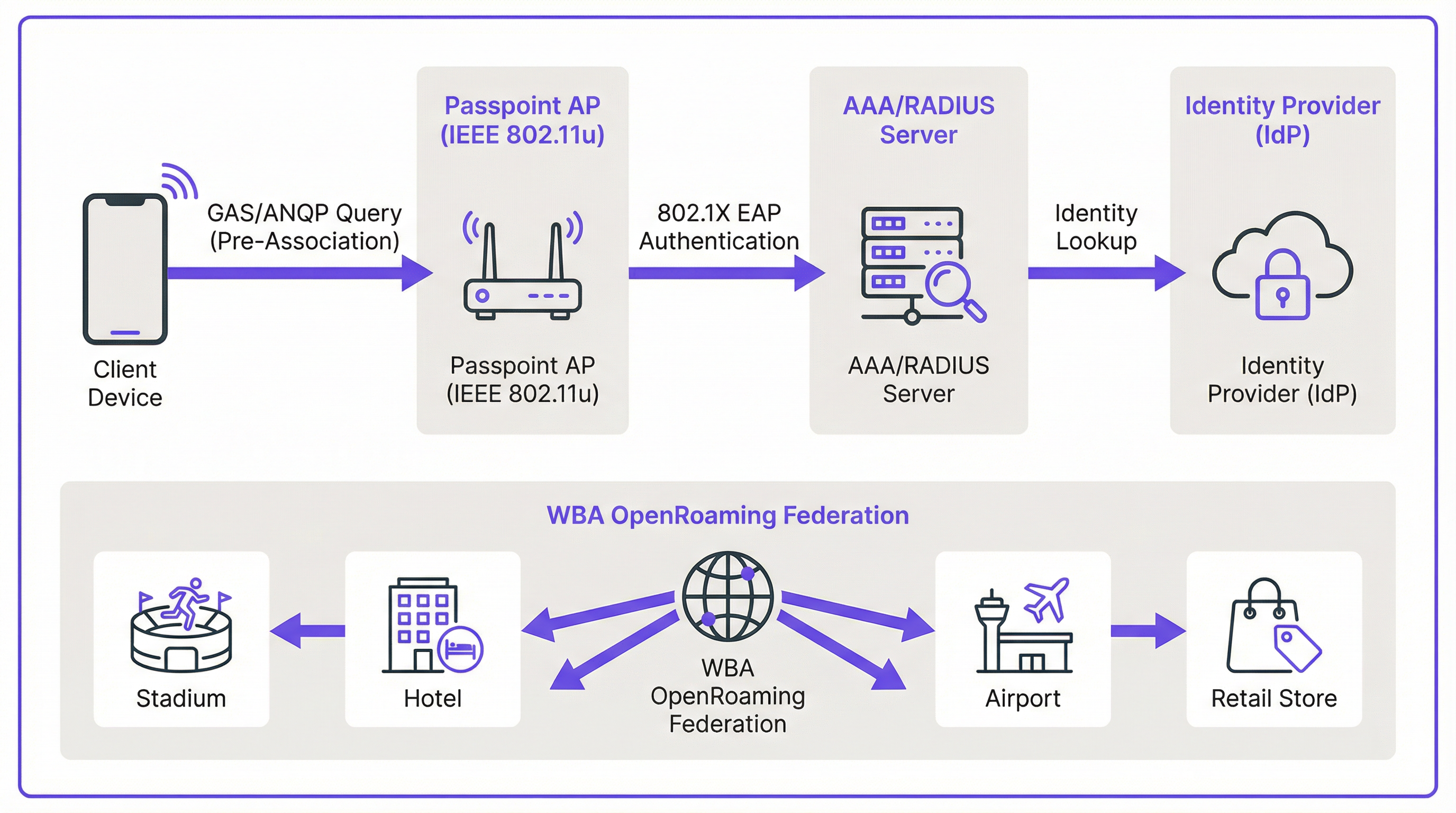
O fluxo de conexão prossegue da seguinte forma. Um Ponto de Acesso (AP) habilitado para Passpoint inclui um Interworking Element em seus quadros de beacon, atuando como um sinalizador que anuncia os recursos do Hotspot 2.0. Um dispositivo compatível vê esse sinalizador e envia uma solicitação GAS contendo uma consulta ANQP para o AP. A consulta pergunta quais Roaming Consortium Organizational Identifiers (RCOIs) a rede suporta. Se a resposta do AP contiver um RCOI que corresponda a um perfil no dispositivo — por exemplo, um perfil de uma operadora de celular ou um perfil WBA OpenRoaming — o dispositivo prossegue com o handshake seguro 802.1X.
Segurança: WPA3-Enterprise e 802.1X
A segurança é a base do Passpoint. Diferentemente do Captive Portal, que frequentemente fica sobre uma rede aberta e não criptografada, o Passpoint exige o uso de WPA2-Enterprise ou WPA3-Enterprise. Isso impõe a autenticação 802.1X, onde o dispositivo de cada usuário é autenticado individualmente por meio de um servidor RADIUS. Essa arquitetura oferece várias vantagens críticas de segurança que são diretamente relevantes para as obrigações de conformidade com PCI DSS e GDPR.
Todo o tráfego entre o dispositivo cliente e o ponto de acesso é criptografado individualmente, eliminando o risco de espionagem passiva. Como a autenticação é baseada em credenciais e certificados confiáveis, os usuários são protegidos contra ataques de 'evil twin', onde um agente mal-intencionado transmite um SSID falso para interceptar o tráfego. Não há chaves pré-compartilhadas (PSKs) que, se comprometidas, poderiam expor toda a rede a movimentos laterais.
Passpoint vs. OpenRoaming: Uma Distinção Crítica
É essencial distinguir entre o padrão Passpoint e o framework WBA OpenRoaming, pois os dois termos são frequentemente confundidos. A analogia mais útil é a diferença entre um carro e um sistema de rodovias.
O Passpoint é o veículo: o padrão técnico (IEEE 802.11u) e a certificação da Wi-Fi Alliance que permite que um dispositivo descubra e se conecte a uma rede automaticamente. O OpenRoaming é a rodovia: um framework de federação global gerenciado pela Wireless Broadband Alliance (WBA) que cria um ecossistema de confiança entre milhares de Provedores de Identidade (IdPs) — como operadoras de celular e fabricantes de dispositivos — e Provedores de Rede de Acesso (ANPs), como hotéis, estádios e redes de varejo. Uma implantação privada do Passpoint pode operar sem o OpenRoaming, mas a participação no OpenRoaming requer o Passpoint.
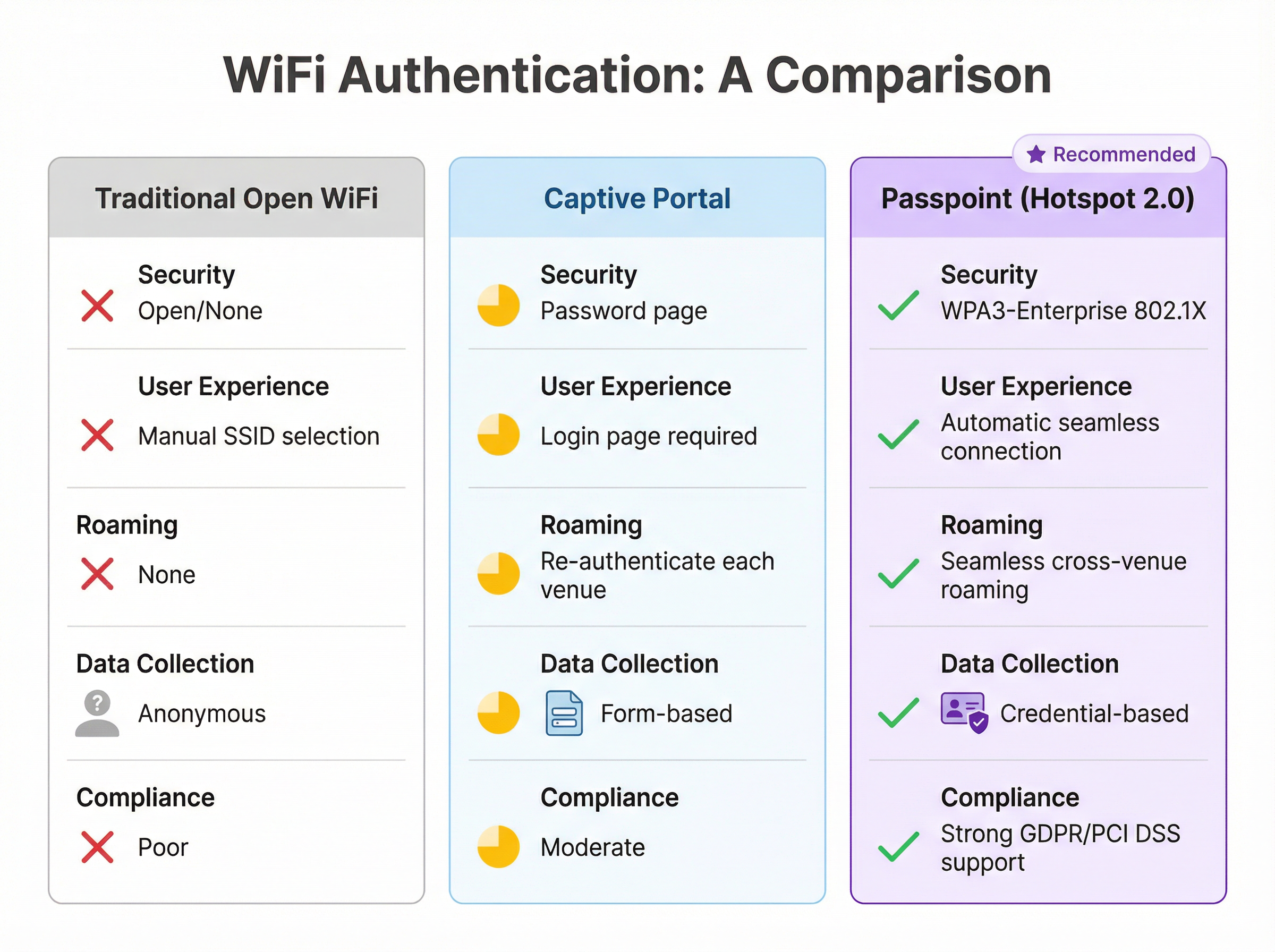
| Recurso | WiFi Aberto Tradicional | Captive Portal | Passpoint (Hotspot 2.0) |
|---|---|---|---|
| Padrão de Segurança | Nenhum (Aberto) | Varia (frequentemente aberto) | WPA3-Enterprise (802.1X) |
| Experiência do Usuário | Seleção manual de SSID | Página de login necessária | Totalmente automática |
| Roaming entre Locais | Nenhum | Reautenticar a cada vez | Contínuo |
| Coleta de Dados | Anônima | Baseada em formulário (risco de GDPR) | Baseada em credenciais |
| Alinhamento com PCI DSS | Fraco | Moderado | Forte |
Guia de Implementação
A implantação do Passpoint é um processo estruturado que vai da avaliação à configuração da infraestrutura, testes piloto e lançamento completo. Uma abordagem em fases garante uma transição suave e minimiza a interrupção para os usuários existentes.
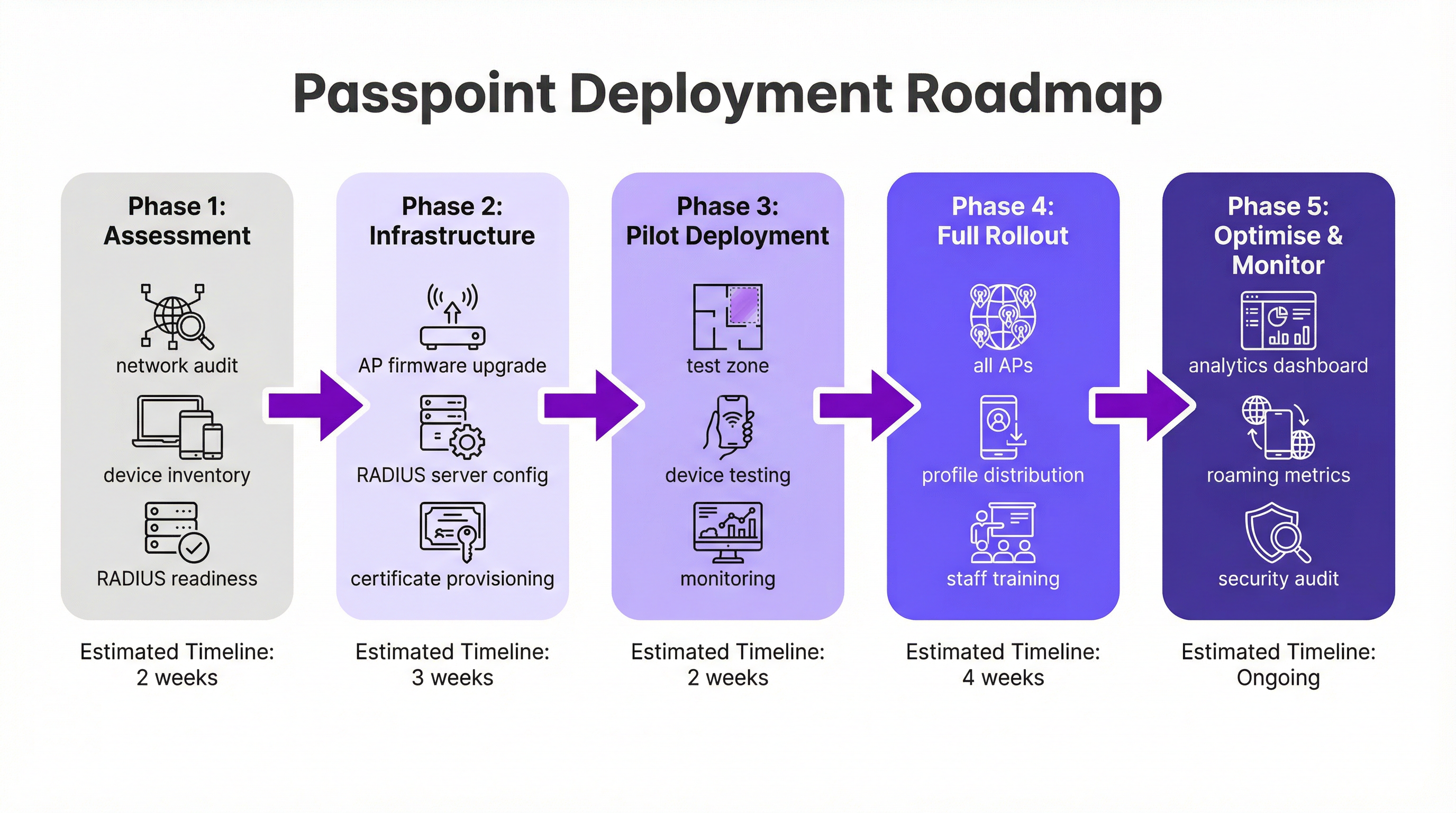
Fase 1: Avaliação e Planejamento (2 Semanas). Comece com uma auditoria completa da rede para verificar se o seu hardware de WiFi existente suporta os recursos necessários do IEEE 802.11u. A maioria dos hardwares de nível corporativo fabricados nos últimos cinco a sete anos é compatível, mas uma atualização de firmware é frequentemente necessária. Simultaneamente, avalie sua infraestrutura RADIUS quanto à capacidade, alta disponibilidade e sua capacidade de lidar com métodos EAP baseados em certificados. Defina sua estratégia de identidade: você autenticará os usuários em um banco de dados de programa de fidelidade, integrará com uma operadora de celular parceira ou ingressará na federação WBA OpenRoaming?
Fase 2: Configuração da Infraestrutura (3 Semanas). Implemente atualizações de firmware em todos os APs e controladoras. Configure seu servidor RADIUS para suportar os tipos de EAP escolhidos — o EAP-TLS é a opção mais segura para autenticação baseada em certificados, enquanto o EAP-TTLS oferece uma alternativa mais flexível. Se for participar do OpenRoaming, obtenha os certificados PKI da WBA necessários. Crie um perfil WLAN dedicado configurado para WPA3-Enterprise com os recursos do Hotspot 2.0 habilitados, incluindo os RCOIs relevantes. Para máxima compatibilidade de dispositivos, transmita tanto o RCOI padrão sem liquidação (5A-03-BA) quanto o RCOI legado da Cisco (00-40-96).
Fase 3: Implantação Piloto (2 Semanas). Designe uma área limitada e controlada do seu local — um único andar, uma sala de conferências específica ou uma zona de uma loja de varejo — para o piloto. Integre dispositivos de teste nas plataformas iOS, Android e Windows. Monitore os logs do RADIUS e o desempenho da rede de perto para validar a descoberta contínua, a autenticação e o roaming de AP para AP.
Fase 4: Lançamento Completo e Distribuição de Perfil (4 Semanas). Aplique a configuração validada a todos os APs em todo o local. Determine sua estratégia de distribuição de perfil: a integração em um aplicativo móvel da marca é o padrão ouro para hospitalidade e varejo, enquanto uma plataforma MDM é o canal apropriado para ambientes corporativos. Treine a equipe de suporte de TI na nova arquitetura e nos procedimentos comuns de solução de problemas.
Fase 5: Otimização e Monitoramento (Contínuo). Aproveite o network analytics para monitorar padrões de roaming, taxas de sucesso de autenticação e distribuições de tipos de dispositivos. Use esses dados para refinar a experiência do usuário e explorar oportunidades de integração mais profunda com plataformas de CRM, PMS ou automação de marketing. Realize auditorias de segurança regulares para manter a conformidade com os requisitos do PCI DSS e GDPR.
Melhores Práticas
Várias melhores práticas neutras em relação a fornecedores surgiram de implantações de Passpoint em larga escala nos setores de hospitalidade, varejo e transporte.
A transmissão de múltiplos RCOIs é essencial para a compatibilidade. O RCOI padrão sem liquidação (5A-03-BA) cobre a maioria dos dispositivos modernos inscritos no OpenRoaming, enquanto o RCOI legado da Cisco (00-40-96) é crítico para dispositivos Android mais antigos e aparelhos Samsung executando OneUI. Omitir o RCOI legado pode excluir silenciosamente uma parcela significativa da sua base de usuários.
O WPA3-Enterprise deve ser o padrão para todas as novas implantações. Embora o WPA2-Enterprise continue sendo suportado, o WPA3 introduz o Protected Management Frames (PMF) como um recurso obrigatório, fornecendo uma camada adicional de proteção contra ataques de desautenticação.
Para marcas com um aplicativo de fidelidade ou de visitantes, integrar a instalação do perfil Passpoint diretamente no aplicativo é o mecanismo de distribuição mais eficaz. O perfil pode ser enviado automaticamente no primeiro login do usuário, criando uma experiência de integração totalmente sem atrito que não requer nenhuma ação do usuário em visitas subsequentes.
A segmentação de rede via VLANs é uma melhor prática inegociável para conformidade. O tráfego do Passpoint deve ser isolado das redes corporativas internas e de quaisquer sistemas que lidem com dados de cartões de pagamento, garantindo um limite de escopo limpo para o PCI DSS.
Solução de Problemas e Mitigação de Riscos
Compreender os modos de falha mais comuns antes da implantação reduz significativamente o risco de um go-live problemático.
O problema mais frequente é um dispositivo não conseguir se conectar automaticamente. A causa raiz é quase sempre um perfil Passpoint ausente, formatado incorretamente ou expirado no dispositivo cliente. Verifique se o perfil está instalado corretamente e se o RCOI que ele especifica corresponde ao RCOI que está sendo transmitido pela rede. No iOS, os perfis podem ser inspecionados por meio do aplicativo Ajustes; no Android, o processo varia de acordo com o fabricante.
Falhas de autenticação são o segundo problema mais comum. Os logs do servidor RADIUS são a ferramenta de diagnóstico definitiva. As falhas geralmente decorrem de formatos de credenciais incorretos, certificados expirados ou uma relação de confiança quebrada com um provedor de identidade upstream. Ao ingressar no OpenRoaming, certifique-se de que os certificados raiz da WBA estejam instalados corretamente no armazenamento de confiança do seu servidor RADIUS.
A configuração incorreta do firewall é um risco que bloqueia a implantação e é facilmente negligenciado. O tráfego RadSec (porta TCP 2083) deve ser permitido entre o seu servidor RADIUS e quaisquer parceiros de roaming federados ou servidores proxy OpenRoaming. Valide essa regra explicitamente antes do go-live.
A alta disponibilidade da infraestrutura RADIUS é o risco operacional mais crítico. Uma interrupção do servidor RADIUS impedirá toda a autenticação do Passpoint, efetivamente derrubando a rede para todos os usuários inscritos. Implante um par de servidores RADIUS em cluster ou geograficamente redundante e teste o mecanismo de failover antes do lançamento em produção.
ROI e Impacto nos Negócios
A implementação do Passpoint entrega valor de negócios mensurável em vários domínios, tornando o caso de investimento atraente tanto para a TI quanto para os negócios em geral.
O benefício operacional mais imediato é a redução nos custos de suporte de TI. Ao eliminar a necessidade de os usuários selecionarem SSIDs manualmente, inserirem senhas ou reautenticarem após o tempo limite da sessão, o Passpoint reduz drasticamente o volume de chamados de suporte relacionados ao WiFi. Para um grande hotel ou centro de conferências, isso pode se traduzir em uma redução significativa na carga de trabalho da recepção e do helpdesk de TI.
A satisfação do visitante é um resultado direto e mensurável. No setor de hospitalidade, a qualidade do WiFi está consistentemente entre os principais fatores nas pesquisas de satisfação dos hóspedes. Uma experiência de conexão contínua e automática — particularmente para hóspedes recorrentes que são reconhecidos e conectados sem nenhuma ação de sua parte — cria uma impressão positiva poderosa que impulsiona a fidelidade e a repetição de negócios.
A mudança de dados anônimos de rede aberta para dados do Passpoint baseados em credenciais desbloqueia um valor analítico significativo. Os locais podem entender a frequência de visitas, o tempo de permanência por local e a demografia dos dispositivos com um nível de precisão que simplesmente não é possível com um Captive Portal. Esses dados, quando integrados a plataformas de CRM e marketing, permitem um engajamento personalizado que gera receita incremental por meio de promoções direcionadas e oportunidades de upsell.
Por fim, o valor de conformidade e mitigação de riscos do Passpoint não deve ser subestimado. Em um ambiente de crescente escrutínio regulatório sob o GDPR e o PCI DSS, a segurança de nível corporativo do WPA3-Enterprise fornece uma postura de segurança comprovadamente mais forte do que redes abertas ou baseadas em PSK. Isso reduz o risco de uma violação de dados e as consequências financeiras e de reputação associadas.
Key Terms & Definitions
IEEE 802.11u
An amendment to the IEEE 802.11 WiFi standard that enables network discovery and information exchange between a client device and an access point before an association is established. It is the foundational standard underpinning Passpoint.
When evaluating WiFi hardware for a Passpoint deployment, IT teams should verify that the access points and controllers explicitly list IEEE 802.11u support in their technical specifications. Its presence confirms the hardware is capable of Hotspot 2.0 features.
ANQP (Access Network Query Protocol)
The protocol used by a client device to query a Hotspot 2.0-enabled access point for information before associating, including its roaming partners, venue name, IP address type availability, and network capabilities.
During troubleshooting, a network architect can use a wireless packet analyser to inspect ANQP frames and confirm that the AP is correctly advertising its roaming consortium OIs and that the client is receiving and processing the response.
RCOI (Roaming Consortium Organizational Identifier)
A unique identifier that represents a group of network providers who have a roaming agreement. A client device will only attempt to connect to a Passpoint network if the RCOI broadcast by the AP matches an RCOI specified in one of its installed Passpoint profiles.
This is the most critical configuration parameter in a Passpoint deployment. Incorrect or missing RCOIs are the most common cause of devices failing to connect automatically. The standard OpenRoaming RCOI is 5A-03-BA; the legacy Cisco RCOI is 00-40-96.
RADIUS (Remote Authentication Dial-In User Service)
A networking protocol providing centralised Authentication, Authorization, and Accounting (AAA) management for users connecting to a network service. In a Passpoint deployment, the RADIUS server is the core authentication engine.
The RADIUS server is the single most critical piece of infrastructure in a Passpoint deployment. Its availability directly determines the availability of the Passpoint network. IT teams should deploy RADIUS in a high-availability cluster and monitor it proactively.
EAP (Extensible Authentication Protocol)
An authentication framework used in 802.1X networks that supports multiple authentication methods. Common EAP types used with Passpoint include EAP-TLS (certificate-based, highest security), EAP-TTLS (tunnelled credentials), and EAP-SIM/AKA (SIM-card based, used by mobile carriers).
The choice of EAP method determines the security level and operational complexity of the deployment. EAP-TLS requires a PKI to issue client certificates, which is operationally demanding but provides the strongest security. EAP-TTLS is a common, more manageable alternative for enterprise deployments.
WBA (Wireless Broadband Alliance)
A global industry organisation that promotes the adoption of interoperable wireless services. The WBA manages the OpenRoaming federation, including its PKI, policy framework, and the onboarding of Identity Providers and Access Network Providers.
When a venue operator decides to join OpenRoaming, they are entering into a legal and technical framework governed by the WBA. This involves signing a participation agreement, obtaining WBA PKI certificates, and configuring their network to comply with the OpenRoaming technical specifications.
Identity Provider (IdP)
An entity that creates, maintains, and manages identity information and provides authentication services to relying parties. In the Passpoint/OpenRoaming ecosystem, IdPs include mobile carriers (e.g., Verizon, EE), device manufacturers (e.g., Samsung), and enterprises.
Understanding the IdP model is essential for scoping a Passpoint deployment. The venue operator (as the Access Network Provider) does not need to manage user identities; it delegates that responsibility to trusted IdPs via the roaming federation.
RadSec (RADIUS over TLS)
A protocol that secures RADIUS communication by tunnelling it over Transport Layer Security (TLS), typically on TCP port 2083. It replaces the traditional UDP-based RADIUS transport, providing encryption and mutual authentication for RADIUS traffic.
RadSec is a mandatory component of the OpenRoaming framework. IT teams must ensure that firewall rules explicitly permit TCP port 2083 between their RADIUS server and the OpenRoaming proxy servers. This is a frequently overlooked configuration step that can block all federated authentication.
Case Studies
A 500-room luxury hotel with a large conference centre wants to replace its legacy captive portal system. The goal is to provide seamless, secure WiFi for hotel guests, conference attendees, and staff, while also enabling personalised engagement through the hotel's loyalty app.
The recommended approach is a phased Passpoint deployment integrated with the hotel's loyalty programme. Begin with a full audit of the existing Cisco Meraki network to confirm all APs support Hotspot 2.0. Configure the hotel's RADIUS server to authenticate loyalty members using EAP-TTLS against the loyalty programme's member database. Update the hotel's mobile app to include a Passpoint profile installation flow, triggered automatically upon the user's first login. Create two distinct WLAN profiles: one for guests and loyalty members broadcasting the hotel's specific RCOI, and a second for conference attendees that utilises the WBA OpenRoaming RCOI (5A-03-BA) to allow attendees from diverse organisations to connect automatically without any pre-registration. In the loyalty app, configure a trigger to send a personalised welcome notification upon guest arrival, detected via the Passpoint connection event, including their room number and a link to book restaurant reservations.
A large retail chain with 300 stores across the country uses a basic open guest WiFi network. They face challenges with network abuse, a poor user experience, and an inability to gather meaningful customer data. They need a scalable, secure solution that can be managed centrally.
The retailer should implement a Passpoint solution federated with WBA OpenRoaming, managed via a centralised cloud platform. Replace the existing consumer-grade access points with enterprise-grade hardware from a vendor such as HPE Aruba Networking, managed through Aruba Central. Deploy a cloud-based RADIUS infrastructure for scalability and simplified management across all 300 locations. Configure the WLAN profile on Aruba Central to enable Passpoint and broadcast the OpenRoaming RCOI. The RADIUS server proxies all authentication requests to the OpenRoaming federation, meaning any shopper with a Passpoint profile from their mobile carrier can connect automatically and securely at any of the 300 stores without any pre-registration. Leverage the anonymised, credential-based data from RADIUS accounting logs to analyse footfall and dwell times by store zone, without collecting personal information via a captive portal, thereby simplifying GDPR compliance significantly.
Scenario Analysis
Q1. You are the network architect for a major international airport. You have been tasked with improving the passenger WiFi experience, which currently uses a slow, cumbersome captive portal. The airport hosts dozens of different airlines, and passengers arrive from all over the world with devices from hundreds of different carriers. What is your recommended strategy for implementing Passpoint?
💡 Hint:Consider the diversity of users and the need for a globally interoperable solution. How can you avoid the operational burden of managing bilateral roaming agreements with hundreds of mobile carriers?
Show Recommended Approach
The optimal strategy is to deploy a Passpoint-certified network and join the WBA OpenRoaming federation. This allows the airport to accept credentials from a vast ecosystem of identity providers — including major global mobile carriers and device manufacturers — without negotiating individual roaming agreements. The implementation involves upgrading the airport's WiFi infrastructure to be Passpoint-compliant (802.11u-capable APs with current firmware), configuring the RADIUS servers to proxy authentication requests to the OpenRoaming network via RadSec, and broadcasting the standard OpenRoaming RCOI (5A-03-BA) alongside the legacy Cisco RCOI (00-40-96) for compatibility. This provides a seamless, secure, automatic connection experience for the majority of travellers, dramatically improving satisfaction scores and reducing WiFi-related support burden.
Q2. A large university campus wants to extend its secure Eduroam WiFi service into the surrounding student-heavy cafes and local businesses. The goal is to allow students and staff to seamlessly roam from the campus network to these partner venues. How would you use Passpoint to achieve this?
💡 Hint:Eduroam is itself a roaming federation based on 802.1X. Consider how you can extend the university's identity trust to third-party venues without requiring those venues to manage student credentials directly.
Show Recommended Approach
This is a well-suited use case for a private Passpoint federation. The university acts as the central Identity Provider. The partner cafes and shops become Access Network Providers. The university's IT department provides the partner venues with access to a cloud-based RADIUS proxy that is configured to trust the university's main RADIUS server. The cafes' APs are configured to broadcast a specific RCOI designated for this 'Campus Community' network. The university then updates the Passpoint profile on student and staff devices — distributed via the university's MDM platform — to include this new RCOI. When a student enters a partner cafe, their device recognises the RCOI, initiates an 802.1X connection, and the cafe's network proxies the authentication back to the university's trusted RADIUS server. Students are connected automatically and securely; the cafe never handles student credentials directly.
Q3. Your organisation has deployed Passpoint in its corporate headquarters. During the pilot phase, Android devices are connecting successfully, but a significant number of corporate-issued iPhones are failing to connect automatically. What is the most likely cause and how would you systematically troubleshoot it?
💡 Hint:Device operating systems handle Passpoint profiles differently. In a corporate environment, consider how profiles are created, signed, and distributed to managed iOS devices.
Show Recommended Approach
The most likely cause is an issue with the Passpoint configuration profile on the managed iPhones. iOS devices in a corporate environment are typically managed via an MDM platform, and Passpoint profiles must be correctly structured as Apple Configuration Profiles (.mobileconfig). The systematic troubleshooting process is: (1) Check the MDM console to confirm the profile has been successfully pushed to the affected devices; (2) On a test iPhone, navigate to Settings > General > VPN & Device Management to verify the profile is installed and not showing an error; (3) Manually install a known-good, manually created profile on a test iPhone to determine if the issue is with the profile content or the MDM delivery mechanism; (4) Inspect the RADIUS server logs for authentication attempts from the failing iPhones — the rejection reason (e.g., 'client certificate not trusted', 'unknown EAP type') will identify the specific misconfiguration; (5) Verify that the trusted root certificate for the RADIUS server is included in the MDM-pushed profile, as iOS requires explicit trust for the server certificate used in EAP authentication.
Key Takeaways
- ✓Passpoint (Hotspot 2.0) is a Wi-Fi Alliance certification based on IEEE 802.11u that enables automatic, secure WiFi connection without manual SSID selection or captive portal login.
- ✓The technology uses GAS and ANQP protocols for pre-association network discovery, allowing devices to identify compatible networks using Roaming Consortium Organizational Identifiers (RCOIs) before committing to a connection.
- ✓All Passpoint connections are secured with WPA2 or WPA3-Enterprise and 802.1X authentication, providing enterprise-grade encryption and eliminating the risk of rogue AP attacks.
- ✓WBA OpenRoaming is a global federation built on Passpoint that enables large-scale, interoperable roaming between thousands of networks without bilateral agreements — the recommended approach for large public venues.
- ✓A successful deployment requires three pillars: compliant 802.11u infrastructure, a highly available RADIUS server, and a clear strategy for distributing Passpoint profiles to user devices.
- ✓The business case is compelling: reduced IT support costs, measurably improved guest satisfaction, richer credential-based analytics, and a stronger compliance posture under GDPR and PCI DSS.
- ✓For maximum device compatibility, always broadcast both the standard OpenRoaming RCOI (5A-03-BA) and the legacy Cisco RCOI (00-40-96) on your Passpoint WLAN.




