

Encaminhamento de Porta para Controladoras WiFi: Um Guia de Configuração
This guide provides a technical reference for network architects and IT managers on configuring port forwarding for on-premise WiFi controllers. It covers when port forwarding is necessary, which ports are required for major vendors, and how to mitigate the associated security risks to ensure a secure and scalable deployment.
🎧 Listen to this Guide
View Transcript
Resumo Executivo
Para organizações corporativas que gerenciam WiFi em vários locais com uma Wireless LAN Controller (WLC) local (on-premise), a conectividade segura e confiável é uma preocupação operacional primária. Quando os pontos de acesso (APs) estão localizados em filiais remotas, separados da controladora central pela internet, é necessário um método para permitir a comunicação entre eles. Este guia aborda o uso do encaminhamento de porta (NAT de entrada) como esse método. Exploraremos a estrutura de decisão crítica sobre quando usar o encaminhamento de porta em vez de alternativas mais seguras, como VPNs ou arquiteturas gerenciadas na nuvem. O documento fornece uma visão geral neutra em relação a fornecedores sobre as portas essenciais necessárias para túneis CAPWAP, acesso de gerenciamento e serviços de autenticação, incluindo listas de portas específicas para controladoras Cisco, Ruckus e Ubiquiti. Fundamentalmente, detalhamos os riscos significativos de segurança — desde superfícies de ataque expandidas até violações de conformidade sob PCI DSS e GDPR — e fornecemos práticas recomendadas acionáveis para mitigação de riscos. Isso inclui a configuração de regras de firewall, segmentação de rede em uma DMZ e o princípio do menor privilégio. O objetivo é equipar arquitetos de rede e diretores de TI com o conhecimento para implementar uma arquitetura WiFi em vários locais que seja robusta, segura e de alto desempenho, apoiando os objetivos de negócios sem comprometer a integridade da rede.
Aprofundamento Técnico
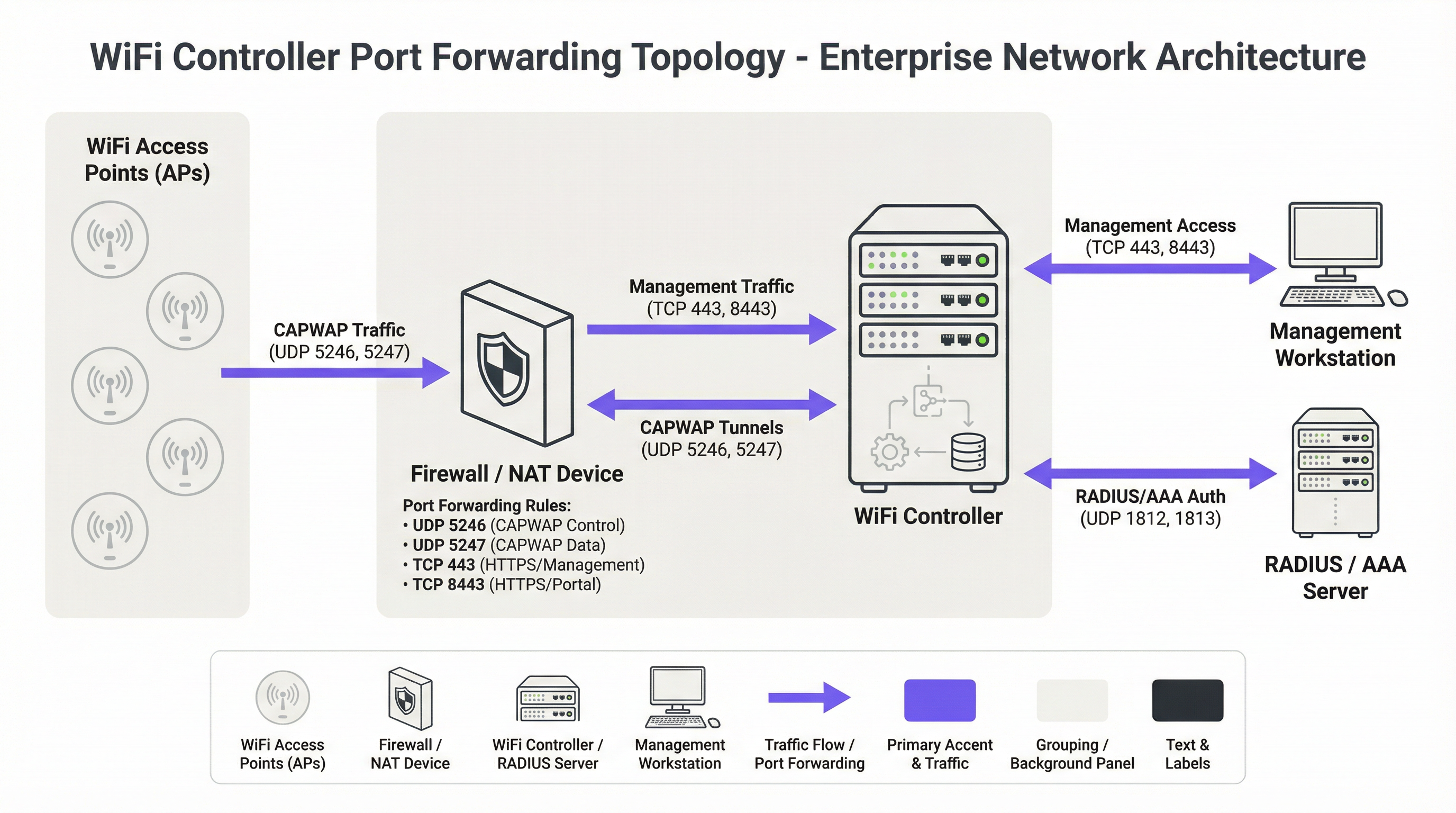
O protocolo fundamental para arquiteturas WiFi centralizadas modernas é o protocolo Control and Provisioning of Wireless Access Points (CAPWAP), padronizado na RFC 5415 [1]. O CAPWAP permite que uma WLC gerencie e controle uma frota de APs, criando uma malha de rede unificada. O protocolo foi projetado para atravessar roteadores e firewalls, tornando-o adequado para implantações em vários locais. A comunicação ocorre por meio de dois canais UDP principais:
- Controle CAPWAP (UDP 5246): Este canal é usado para todas as funções de gerenciamento e controle entre o AP e a WLC. Isso inclui envios de configuração, atualizações de firmware e monitoramento de status. De acordo com o padrão, este canal de controle é obrigatoriamente protegido usando criptografia Datagram Transport Layer Security (DTLS), fornecendo um túnel seguro para comandos de gerenciamento.
- Dados CAPWAP (UDP 5247): Em implantações onde o tráfego do cliente é encapsulado de volta para a controladora (em vez de ser roteado localmente no AP), este canal transporta os dados de usuário encapsulados. Embora a criptografia para este canal seja opcional no padrão, as práticas recomendadas ditam que ele também deve ser protegido com DTLS para proteger os dados do cliente em trânsito.
Quando um AP está atrás de um dispositivo NAT, ele descobre o endereço IP público da WLC (geralmente via DNS ou uma opção DHCP) e inicia uma conexão CAPWAP. O firewall à frente da WLC deve ser configurado com regras de encaminhamento de porta para direcionar esses pacotes UDP de entrada para o endereço IP privado da controladora.
Além do protocolo CAPWAP principal, várias outras portas são necessárias para uma implantação totalmente funcional:
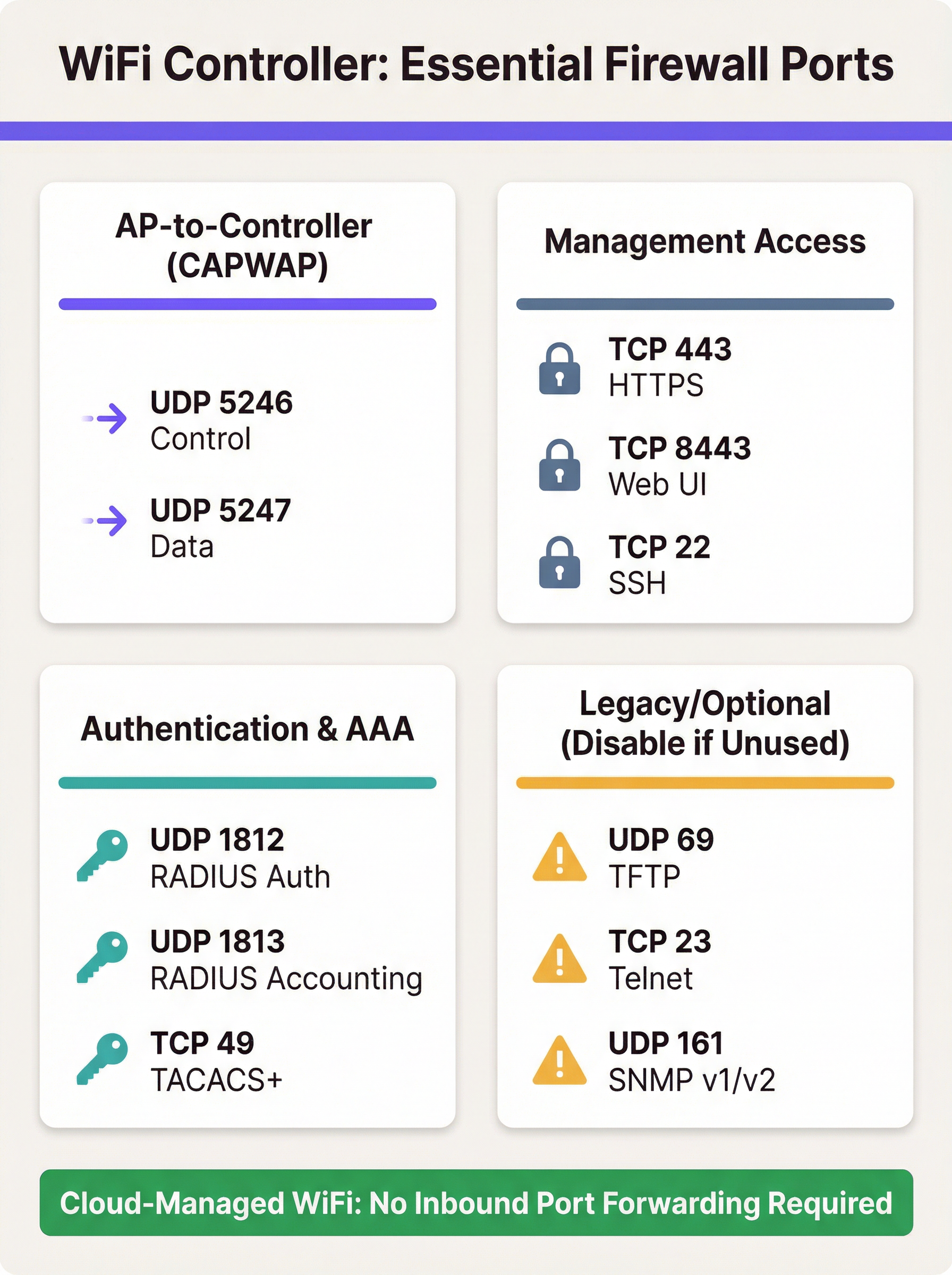
- Acesso de Gerenciamento: Os administradores exigem acesso à interface de gerenciamento da controladora. Isso geralmente é fornecido via HTTPS (TCP 443 ou, em algumas plataformas como Ruckus e Ubiquiti, TCP 8443). O Secure Shell (TCP 22) fornece acesso à CLI. Expor essas portas à internet é uma preocupação primária de segurança e o acesso deve ser estritamente restrito.
- Autenticação (AAA): Para segurança de nível corporativo usando WPA2/WPA3-Enterprise, a WLC deve se comunicar com um servidor RADIUS. Isso requer UDP 1812 (Autenticação) e UDP 1813 (Contabilização). Se o servidor RADIUS for externo à rede local, essas portas deverão ser encaminhadas.
- Visitantes e Captive Portals: Se um Captive Portal for usado para acesso de visitantes, a WLC deverá ser capaz de se comunicar com ele. Para portais externos como a Purple, isso geralmente significa permitir o tráfego HTTPS de entrada dos servidores do portal para a controladora para processar informações de autenticação e sessão.
Requisitos de Porta Específicos do Fornecedor
Embora o CAPWAP seja um padrão, os fornecedores implementam portas adicionais para recursos específicos. A tabela abaixo resume as portas padrão comuns para as principais plataformas de controladoras locais. Ela não é exaustiva e você deve consultar a documentação mais recente do seu fornecedor.
| Fornecedor/Plataforma | Protocolo | Porta | Finalidade |
|---|---|---|---|
| Cisco WLC | UDP | 5246/5247 | Controle/Dados CAPWAP |
| TCP | 443 | Gerenciamento HTTPS | |
| EoIP | 97 | Túneis de Mobilidade/Âncora | |
| UDP | 16666 | Mobilidade (Não seguro) | |
| Ruckus SmartZone | UDP | 12223 | Descoberta LWAPP |
| TCP | 91/443 | Atualização de Firmware do AP | |
| TCP | 8443 | Interface Web HTTPS | |
| TCP | 22 | Gerenciamento SSH | |
| Ubiquiti UniFi | TCP | 8080 | Informação do Dispositivo |
| TCP | 8443 | Interface Web HTTPS/API | |
| UDP | 3478 | STUN (Travessia NAT) | |
| UDP | 10001 | Descoberta de AP |
Guia de Implantação
A implementação do encaminhamento de porta para uma WLC requer uma abordagem metódica focada na segurança. O objetivo é permitir a conectividade remota do AP enquanto se expõe o mínimo absoluto necessário à internet.
Passo 1: Arquitetura e Posicionamento na Rede
A decisão mais crítica é onde posicionar a WLC. Ela nunca deve ser colocada na LAN corporativa confiável. A prática recomendada é criar um segmento de rede dedicado, ou Zona Desmilitarizada (DMZ), para a controladora. Isso isola a WLC e garante que, mesmo se fosse comprometida, o invasor não teria acesso direto à rede corporativa interna. A política de firewall deve então ser configurada para controlar estritamente o tráfego entre a DMZ, a internet e a LAN confiável.
Passo 2: Configuração do Firewall
- Criar Regras de NAT e Encaminhamento de Porta: Para cada porta necessária, crie uma regra de Destination NAT (DNAT) que traduza o endereço IP público do firewall e a porta externa para o endereço IP privado da WLC na DMZ e a porta interna correspondente.
- Criar Regras de Acesso de Entrada: Este é o passo de segurança mais importante. Crie regras de firewall para permitir o tráfego para as portas encaminhadas, mas sempre especifique o endereço IP de origem. Para portas CAPWAP, a origem deve ser os endereços IP públicos de seus locais remotos. Para portas de gerenciamento (HTTPS/SSH), a origem deve ser restrita a uma lista de permissões (whitelist) de endereços IP confiáveis, como seu escritório corporativo ou um jump host de gerenciamento dedicado.
Aviso de Segurança: Um erro comum e perigoso é deixar o endereço de origem como 'Any' (Qualquer) ou '0.0.0.0/0'. Isso expõe a interface de gerenciamento da sua controladora a toda a internet, convidando a ataques de força bruta.
- Bloquear Protocolos Desnecessários: Crie explicitamente regras que neguem todo o tráfego restante para o IP público da WLC. Além disso, certifique-se de que protocolos inseguros como Telnet (TCP 23) e TFTP (UDP 69) estejam desativados na própria controladora e bloqueados no firewall.
- Habilitar Inspeção Stateful: Certifique-se de que seu firewall esteja operando em modo stateful. Isso significa que ele rastreia o estado das conexões e negará automaticamente pacotes de entrada não solicitados que não façam parte de uma sessão reconhecida.
Passo 3: Configuração da Controladora
Na WLC, certifique-se de que o endereço IP público do firewall esteja configurado como a interface primária da controladora ou endereço NAT. Isso permite que a controladora construa corretamente as respostas CAPWAP para que possam ser roteadas de volta aos APs. Certifique-se de que recursos como a criptografia DTLS para CAPWAP estejam habilitados.
Práticas Recomendadas
- Prefira Alternativas: A abordagem mais segura é evitar o encaminhamento direto de porta. Se viável, implemente uma VPN site-to-site entre locais remotos e o data center da controladora. Isso encapsula todo o tráfego em um túnel seguro, eliminando a necessidade de portas voltadas para o público.
- Adote a Nuvem: Para novas implantações ou atualizações de hardware, considere fortemente uma solução WiFi gerenciada na nuvem (por exemplo, Cisco Meraki, Ruckus One, Aruba Central). Essas plataformas são projetadas para que os APs iniciem conexões de saída para a nuvem, removendo a necessidade de quaisquer regras de firewall de entrada e simplificando o gerenciamento.
- Auditorias Regulares: Conforme exigido pelo Requisito 1.1.6 do PCI DSS, os conjuntos de regras de firewall e roteador devem ser revisados pelo menos a cada seis meses. Esse processo deve verificar a justificativa de negócios para cada regra e garantir que sejam o mais restritivas possível.
- Use Autenticação Forte: Proteja as interfaces de gerenciamento com autenticação multifator (MFA) sempre que possível. Use senhas fortes e complexas e altere-as regularmente.
- Registro e Monitoramento: Encaminhe os logs do firewall e da WLC para um sistema SIEM (Gerenciamento de Eventos e Informações de Segurança) central. Monitore tentativas de conexão anômalas, falhas repetidas de login e padrões de tráfego inesperados.
Solução de Problemas e Mitigação de Riscos
Modo de Falha Comum: APs Falham ao Ingressar na Controladora
- Sintoma: APs em um local remoto ficam presos em um loop de descoberta e nunca aparecem no painel da controladora.
- Solução de Problemas:
- Verifique a conectividade básica de rede do local remoto para o IP público da controladora (ping, traceroute).
- Verifique os logs do firewall no lado da controladora. Você está vendo os pacotes UDP 5246 de entrada do IP público do AP? Eles estão sendo permitidos ou descartados?
- Verifique se as regras de NAT/encaminhamento de porta estão configuradas corretamente para o IP privado da WLC.
- Certifique-se de que não haja uma segunda camada de NAT no local remoto (NAT duplo) que possa estar interferindo na conexão.
Risco: Comprometimento da Controladora
- Cenário: Uma vulnerabilidade é descoberta na interface de gerenciamento web da WLC e sua regra de encaminhamento de porta para TCP 443 tem uma origem definida como 'Any' (Qualquer).
- Mitigação: Isso destaca a importância crítica de restringir IPs de origem. Se a origem for limitada aos IPs do seu escritório, a vulnerabilidade não poderá ser explorada a partir da internet em geral. Este é um exemplo clássico de defesa em profundidade. Mitigações adicionais incluem colocar a WLC em uma DMZ para limitar o movimento lateral do invasor e aplicar patches de segurança do fornecedor em tempo hábil.
Risco: Violações de Conformidade
- Cenário: Uma auditoria do PCI DSS descobre que a WLC está gerenciando APs em uma loja de varejo que processa pagamentos com cartão de crédito, e a WLC não está devidamente segmentada do Ambiente de Dados do Titular do Cartão (CDE).
- Mitigação: A segmentação de rede é inegociável para a conformidade com o PCI DSS [2]. A rede sem fio usada pelos terminais de pagamento deve ser isolada de todas as outras redes, incluindo o WiFi corporativo e de visitantes. A própria WLC deve ser considerada no escopo da auditoria se puder impactar a segurança do CDE. Para o GDPR, os dados do WiFi de visitantes são dados pessoais, e o design da rede deve impedir o acesso não autorizado a eles [3].
ROI e Impacto nos Negócios
Embora seja um tópico técnico, a escolha da arquitetura WiFi tem implicações diretas nos negócios. Um modelo de controladora local (on-premise) pode representar uma despesa de capital significativa, mas oferece controle granular e mantém todos os dados dentro da infraestrutura da organização. O custo operacional desse modelo inclui o tempo da equipe necessário para gerenciar, proteger e auditar a configuração do firewall e da controladora. Uma violação de segurança resultante de um firewall mal configurado pode levar a perdas financeiras significativas, danos à reputação e multas regulatórias.
Em contraste, uma solução gerenciada na nuvem muda o modelo de custo de CapEx para OpEx (taxas de assinatura recorrentes). O ROI é percebido por meio da redução da sobrecarga de TI — sem hardware local para manter, sem regras complexas de firewall para gerenciar o acesso à controladora e implantação mais rápida de novos locais. Para muitas empresas distribuídas, como redes de varejo ou grupos de hospitalidade, o custo total de propriedade (TCO) e a postura de segurança aprimorada de uma plataforma gerenciada na nuvem fornecem um caso de negócios convincente, justificando a migração de uma arquitetura local legada.
Referências
[1] IETF, RFC 5415: Especificação do Protocolo Control And Provisioning of Wireless Access Points (CAPWAP), https://datatracker.ietf.org/doc/html/rfc5415 [2] PCI Security Standards Council, PCI DSS v4.0, https://www.pcisecuritystandards.org/document_library/ [3] Regulamento Geral sobre a Proteção de Dados (GDPR), https://gdpr-info.eu/
Key Terms & Definitions
Port Forwarding (Inbound NAT)
A network configuration that directs traffic from a specific port on a public-facing firewall or router to a specific port on a private device within the internal network.
IT teams use this to make an on-premise WiFi controller, which has a private IP address, accessible to access points located across the public internet.
CAPWAP (Control and Provisioning of Wireless Access Points)
An IETF standard protocol (RFC 5415) that enables a central controller to manage a collection of wireless access points. It operates over UDP ports 5246 (Control) and 5247 (Data).
This is the fundamental protocol that facilitates communication between APs and the WLC. Understanding its port requirements is the first step in configuring the firewall.
DMZ (Demilitarized Zone)
A perimeter network segment that is isolated from an organization's trusted internal LAN. It is used to host public-facing services and adds a layer of security.
Placing a WiFi controller in a DMZ is a critical best practice. If the controller is compromised, the attacker is contained within the DMZ and does not have direct access to the corporate network.
Stateful Firewall
A firewall that tracks the state of active network connections and makes decisions based on the context of the traffic, not just on individual packets.
A stateful firewall is essential for secure port forwarding, as it will only allow return traffic from the WLC to an AP if it is part of an established CAPWAP session, preventing unsolicited inbound traffic.
PCI DSS
The Payment Card Industry Data Security Standard, a set of security standards designed to ensure that all companies that accept, process, store or transmit credit card information maintain a secure environment.
For any organization in retail or hospitality, ensuring the WiFi architecture complies with PCI DSS is non-negotiable. This heavily influences decisions around network segmentation and firewall configuration.
RADIUS (Remote Authentication Dial-In User Service)
A client/server protocol that provides centralized Authentication, Authorization, and Accounting (AAA) management for users who connect and use a network service.
In enterprise WiFi, RADIUS is used to enable WPA2/WPA3-Enterprise security (802.1X). The WLC acts as a RADIUS client, and firewall rules must allow it to communicate with the RADIUS server on UDP ports 1812 and 1813.
Cloud-Managed WiFi
A WiFi architecture where access points are managed by a controller platform that is hosted in the cloud by the vendor (e.g., Cisco Meraki, Aruba Central).
This architecture is a direct alternative to on-premise controllers. It simplifies deployment and eliminates the need for port forwarding because APs initiate outbound connections to the cloud, which is a more secure default posture.
Source IP Whitelisting
The practice of configuring a firewall rule to only allow traffic from a specific, pre-approved list of source IP addresses.
This is the single most important security control when port forwarding. Restricting management access (HTTPS/SSH) to a whitelist of office or VPN IPs drastically reduces the risk of unauthorized access.
Case Studies
A 250-room hotel needs to provide guest WiFi and support internal staff devices (housekeeping tablets, PoS systems). They have an on-premise Cisco 3504 WLC in their server room and want to ensure PCI DSS compliance while offering a seamless guest experience with a Purple captive portal.
- Network Segmentation: The WLC is placed in a new DMZ VLAN (e.g., VLAN 100). Three new wireless LANs are created: 'GUEST_WIFI' (VLAN 101), 'STAFF_CORP' (VLAN 102), and 'POS_SECURE' (VLAN 103). Firewall rules are configured to completely isolate these VLANs from each other. The POS_SECURE network is isolated from the internet, except for traffic to the payment processor.
- Firewall & Port Forwarding: No ports are forwarded from the public internet to the WLC. Instead, a rule is created to allow inbound HTTPS (TCP 443) traffic only from the specific IP range provided by Purple for their captive portal service. This allows the portal to communicate with the controller to authorize guest sessions. All other inbound traffic to the WLC is blocked.
- PCI DSS Compliance: The 'POS_SECURE' WLAN is configured with WPA2-Enterprise and 802.1X authentication. The firewall policy ensures this network segment is completely isolated from the guest and corporate staff networks, meeting PCI DSS Requirement 1.2.3. The WLC itself is considered in-scope and hardened according to PCI guidelines.
A retail chain with 50 stores has a central Ruckus SmartZone controller at its headquarters. Each store has 5-10 APs that need to connect back to the HQ controller over the public internet. The IT team needs to manage the controller remotely.
- VPN as Primary Choice: The recommended solution is to deploy a small firewall/VPN gateway at each retail store to create a site-to-site IPsec VPN back to the HQ firewall. All AP traffic is then routed over the secure VPN tunnel. This requires no inbound port forwarding at the HQ, making it the most secure option.
- Port Forwarding as Fallback: If VPN is not feasible due to cost or technical constraints, a port forwarding approach is used. At the HQ firewall, DNAT rules are created to forward UDP 12223 (for discovery) and TCP 91/443 (for firmware) to the SmartZone controller. Crucially, the source for these rules is a list of the static public IP addresses of all 50 stores. A separate rule forwards TCP 8443 for management, with the source restricted to the IT team's office IP.
- AP Configuration: The APs at each store are configured with the public IP address of the HQ firewall as their controller address. They will then initiate the connection, which will be forwarded to the internal SmartZone controller.
Scenario Analysis
Q1. You are deploying a new WiFi network for a conference center. The client wants to use Purple for guest analytics and has an existing on-premise Aruba Mobility Controller. What is the most critical firewall rule you need to configure to allow the Purple captive portal to function?
💡 Hint:Consider the communication flow. The external service needs to talk to the internal controller. What IP addresses are involved?
Show Recommended Approach
The most critical rule is to allow inbound HTTPS (TCP 443) traffic from Purple's specific public IP address range to the Aruba controller's public-facing IP. You must obtain this IP range from Purple's documentation or support. A rule with a source of 'Any' would be a major security risk. You would then create a DNAT rule to forward this traffic to the controller's internal IP address in the DMZ.
Q2. A junior network engineer has configured port forwarding for a new remote office. The APs are online, but he tells you he opened TCP port 23 to the controller from 'Any' source IP to "make troubleshooting easier." What is the immediate risk, and what is your instruction to him?
💡 Hint:TCP port 23 is for Telnet. What are the security characteristics of this protocol?
Show Recommended Approach
The immediate risk is severe. Telnet is an unencrypted protocol, meaning the username and password for the controller are sent in clear text. Exposing this to the entire internet makes the controller highly vulnerable to credential theft and compromise. The instruction is to immediately disable the firewall rule, disable the Telnet service on the controller itself, and use SSH (TCP 22) for all CLI management, with the source IP restricted to a trusted management network.
Q3. Your CFO is questioning the subscription cost for a cloud-managed WiFi solution for 100 new retail stores, arguing that buying on-premise controllers is a cheaper one-time cost. How do you explain the ROI of the cloud solution from a security and operational perspective?
💡 Hint:Think about the Total Cost of Ownership (TCO), not just the initial purchase price. What ongoing work is required for an on-premise, multi-site deployment?
Show Recommended Approach
The ROI of a cloud-managed solution extends beyond the initial hardware cost. Operationally, it eliminates the significant staff overhead required to configure, manage, and audit complex firewall rules and VPNs for 100 separate locations. This accelerates deployment and reduces ongoing labor costs. From a security perspective, the cloud model has a fundamentally lower risk profile. It removes the need for any inbound port forwarding, drastically reducing the network's attack surface and simplifying compliance with standards like PCI DSS. The subscription cost effectively outsources the security and maintenance of the management platform to the vendor, leading to a lower TCO and a more secure, scalable network.
Key Takeaways
- ✓Port forwarding is required for on-premise WiFi controllers when APs are at remote sites across the internet.
- ✓The core protocols are CAPWAP (UDP 5246/5247), but management (TCP 443/8443) and AAA (UDP 1812/1813) ports are also needed.
- ✓Cloud-managed WiFi and site-to-site VPNs are more secure alternatives that eliminate the need for port forwarding.
- ✓If you must use port forwarding, place the controller in a DMZ and strictly whitelist source IP addresses.
- ✓Never expose insecure protocols like Telnet (TCP 23) or TFTP (UDP 69) to the internet.
- ✓Regularly audit firewall rules to ensure they are necessary and as restrictive as possible, as required by PCI DSS.
- ✓Failing to properly segment networks can lead to serious security breaches and compliance violations (PCI DSS, GDPR).




