

Melhores Práticas de Gerenciamento de SSID para Implantações em Múltiplos Locais
This guide provides a technical reference for IT leaders on managing SSIDs in multi-venue deployments. It debunks common myths about SSID count impacting performance and offers actionable best practices for balancing security, user experience, and network manageability across hospitality, retail, and large public venues.
🎧 Listen to this Guide
View Transcript

Resumo Executivo
Para CTOs, diretores de TI e arquitetos de rede que supervisionam empresas com múltiplos locais, o gerenciamento de SSID apresenta um desafio persistente: equilibrar a necessidade de acesso segmentado com o imperativo de manter um WiFi confiável e de alto desempenho. Um mito comum no setor sugere que a implantação de múltiplos Service Set Identifiers (SSIDs) degrada inerentemente o desempenho da rede devido à sobrecarga de gerenciamento. Este guia fornece uma análise técnica aprofundada e confiável que desmistifica esse mito e estabelece uma estrutura clara para as melhores práticas de arquitetura de SSID. Demonstraremos que, quando uma rede é construída sobre uma base sólida de design de RF profissional e padrões de configuração modernos, o impacto no desempenho de SSIDs adicionais é insignificante. Os verdadeiros culpados pela lentidão da rede são quase sempre a interferência co-canal, o suporte a taxas de dados legadas lentas e um planejamento de RF deficiente. Ao implementar uma 'Regra de Três' estratégica — segmentando o tráfego em redes de Visitantes (Guest), Equipe (Staff) e IoT/Operações — e aproveitando tecnologias como WPA3-Enterprise e VLANs dinâmicas, as organizações podem alcançar segurança e conformidade robustas sem sacrificar a taxa de transferência. Este guia oferece recomendações práticas e independentes de fornecedores, além de estudos de caso do mundo real para capacitar os líderes de TI a projetar e gerenciar redes sem fio escaláveis e de alto desempenho que apoiem os objetivos de negócios e ofereçam uma experiência de usuário superior em todo o seu portfólio.
Análise Técnica Aprofundada
O medo da proliferação de SSID está enraizado no conceito de sobrecarga de quadros de beacon (beacon frame overhead). Todo SSID transmitido por um ponto de acesso (AP) deve enviar periodicamente esses quadros de gerenciamento para anunciar sua presença. De acordo com o padrão IEEE 802.11, os beacons são transmitidos aproximadamente a cada 100 milissegundos na taxa de dados obrigatória mais baixa para garantir que até os dispositivos mais antigos possam recebê-los. Embora isso pareça muita comunicação, o tempo de transmissão (airtime) real consumido é mínimo. Como mostrado no infográfico abaixo, a sobrecarga está longe dos números catastróficos frequentemente citados. Mesmo com cinco SSIDs distintos, a sobrecarga total de beacon é de pouco mais de meio por cento do tempo total de transmissão do canal — um valor que a maioria dos profissionais de rede consideraria insignificante.
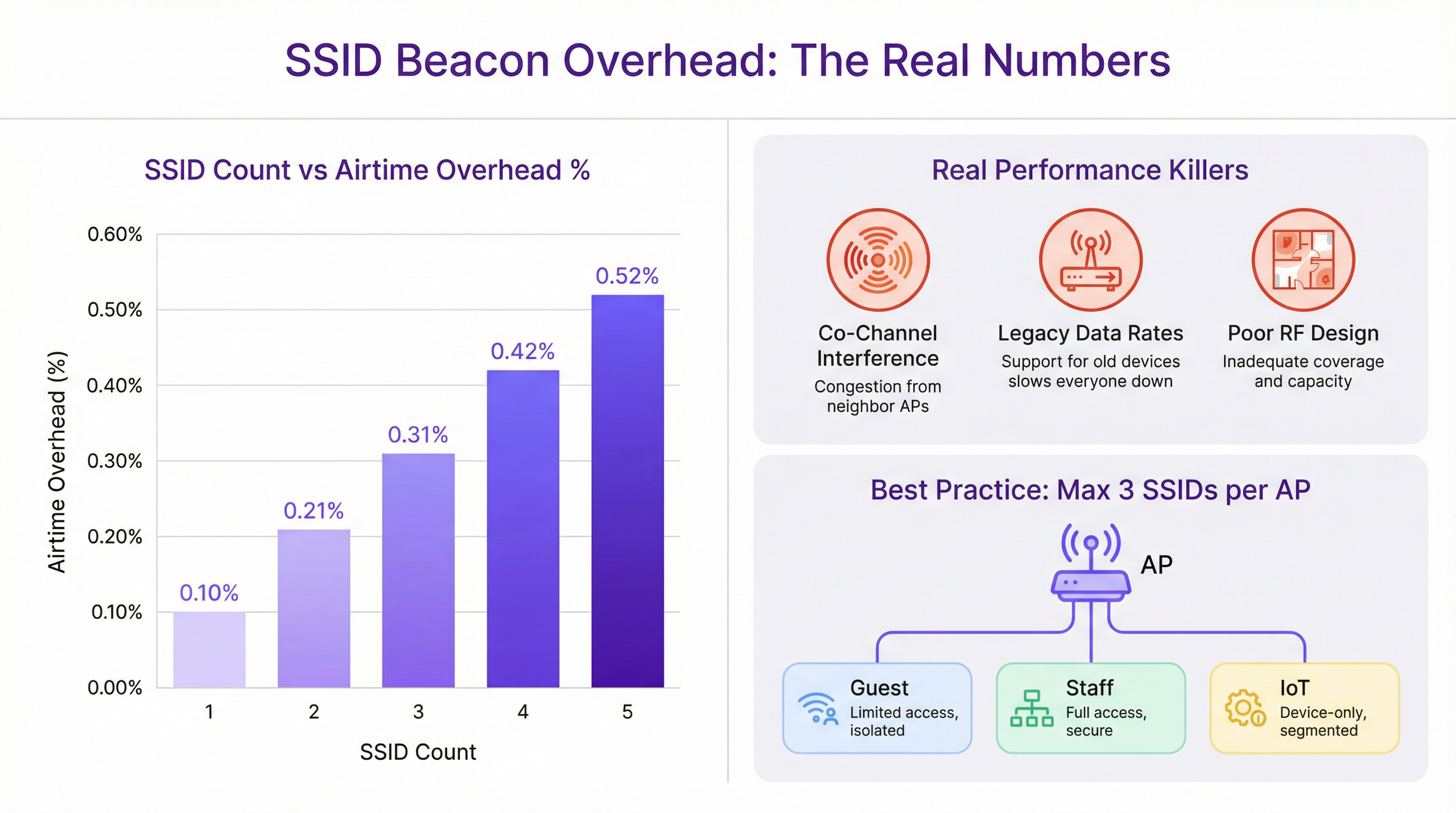
A degradação de desempenho frequentemente atribuída a múltiplos SSIDs é quase sempre mal interpretada. Os verdadeiros culpados são falhas mais fundamentais no design da rede:
Interferência Co-Canal (CCI): Quando múltiplos APs próximos operam no mesmo canal WiFi, todos devem competir pelo mesmo tempo de transmissão. Esse efeito de 'vizinho barulhento' é a causa mais significativa de degradação de desempenho em implantações de alta densidade. O planejamento adequado de canais, garantindo que APs adjacentes estejam em canais não sobrepostos (por exemplo, 1, 6, 11 na banda de 2,4 GHz), é fundamental.
Taxas de Dados Legadas: O suporte a taxas de dados 802.11b desatualizadas (1, 2, 5,5 e 11 Mbps) força todo o tráfego de gerenciamento, incluindo beacons, a ser transmitido em um ritmo extremamente lento. Isso consome uma quantidade desproporcional de tempo de transmissão. Desativar essas taxas legadas e definir uma taxa mínima obrigatória de 12 Mbps ou superior é uma etapa crucial de otimização.
Design de RF Deficiente: Sem um site survey profissional de Radiofrequência (RF), o posicionamento dos APs é apenas adivinhação. Isso leva a lacunas de cobertura, CCI excessiva e baixo desempenho de roaming. Uma base sólida de RF é o pré-requisito para qualquer rede sem fio de alto desempenho, independentemente da contagem de SSID.
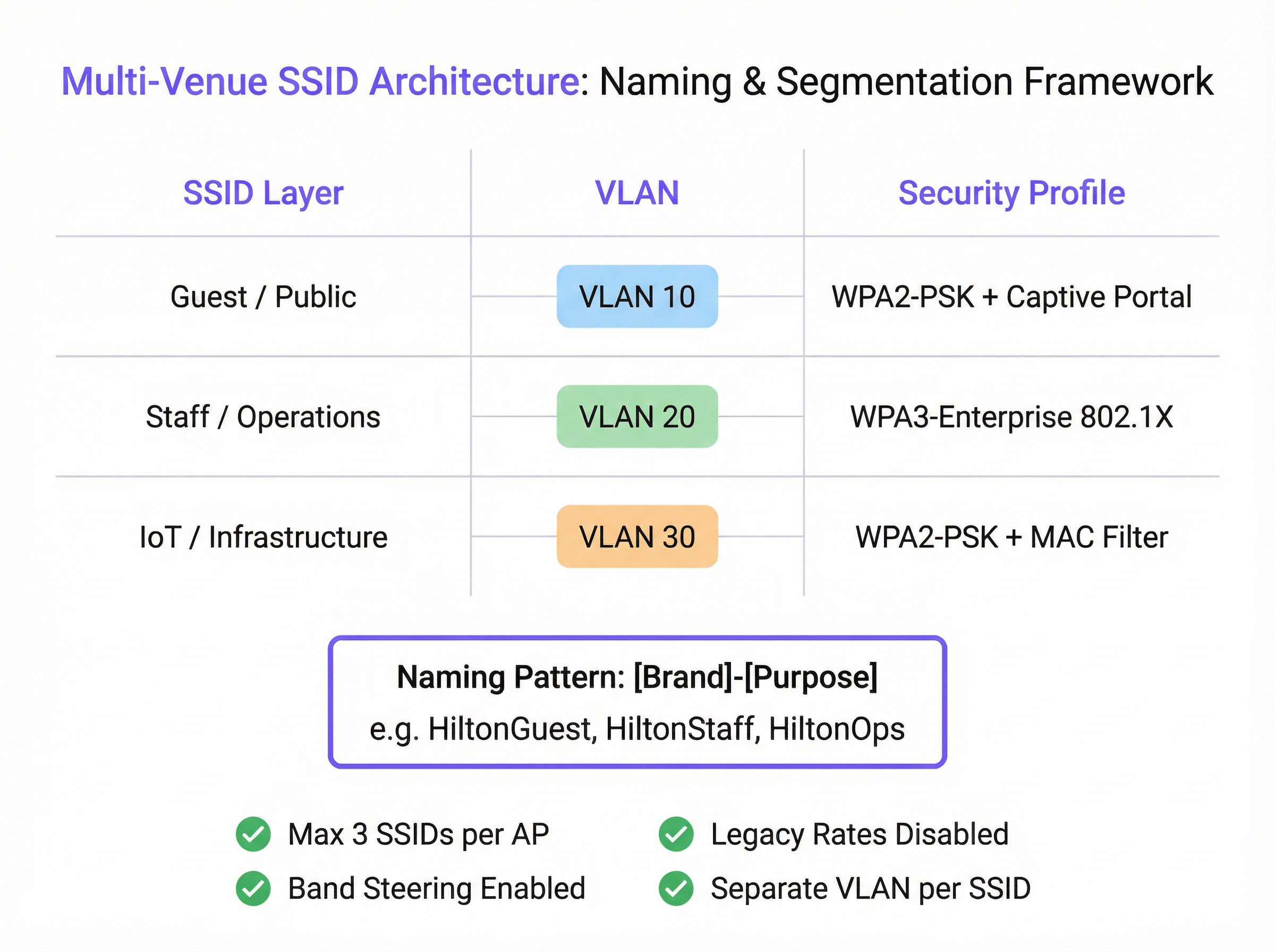
A arquitetura de rede moderna fornece ferramentas para alcançar a segmentação sem SSIDs excessivos. O IEEE 802.1X é um padrão de controle de acesso à rede baseado em porta que fornece um mecanismo de autenticação robusto. Quando um usuário se conecta a um SSID protegido por 802.1X, um servidor RADIUS pode autenticar suas credenciais e atribuí-lo dinamicamente a uma VLAN específica com uma política de segurança correspondente. Isso permite que um único SSID seguro (por exemplo, "Marca-Equipe") atenda a várias funções de usuário com diferentes direitos de acesso, reduzindo drasticamente a necessidade de SSIDs separados para cada departamento ou grupo de usuários.
Guia de Implantação
A implantação de uma arquitetura de SSID escalável e gerenciável em vários locais requer um processo padronizado e repetível. As etapas a seguir fornecem uma estrutura independente de fornecedor.
Etapa 1: Defina Seus Níveis de Acesso Antes de configurar qualquer hardware, classifique todos os requisitos de acesso à rede em níveis distintos. Para a maioria das organizações com múltiplos locais, isso resultará em três níveis principais:
- Visitantes/Público: Para visitantes, clientes e o público em geral. O acesso é normalmente limitado por tempo, com restrição de largura de banda e isolado de todas as redes internas.
- Equipe/Operações: Para funcionários e prestadores de serviços confiáveis. Este nível fornece acesso seguro a recursos internos, aplicativos corporativos e plataformas de comunicação.
- IoT/Infraestrutura: Para dispositivos 'headless' (sem interface de usuário), como terminais de PDV, sinalização digital, sistemas HVAC e câmeras de segurança. Esta rede deve ser altamente restrita, com tráfego limitado a funções operacionais essenciais.
Etapa 2: Projete o Esquema de VLAN e IP Cada nível de acesso deve ser mapeado para uma VLAN dedicada para garantir a segmentação completa da rede. Atribua um ID de VLAN exclusivo e uma sub-rede IP correspondente para cada SSID em toda a sua infraestrutura. Por exemplo:
- Guest SSID -> VLAN 10 -> 10.10.0.0/16
- Staff SSID -> VLAN 20 -> 10.20.0.0/16
- IoT SSID -> VLAN 30 -> 10.30.0.0/16 Essa separação lógica é fundamental para a segurança e conformidade com padrões como o PCI DSS.
Etapa 3: Configure os Perfis de Segurança
- Guest SSID: Use WPA2-PSK com um Captive Portal. O portal é essencial para a autenticação do usuário, apresentação de termos e condições (para conformidade com a GDPR) e criação de oportunidades de engajamento de marketing. A plataforma da Purple se destaca no fornecimento dessa funcionalidade.
- Staff SSID: Implemente WPA3-Enterprise com autenticação 802.1X. Este é o padrão ouro para segurança corporativa sem fio. Exige que cada usuário tenha credenciais exclusivas, eliminando os riscos de senhas compartilhadas e permitindo a responsabilização por usuário.
- IoT SSID: Use WPA2-PSK com uma senha forte e complexa. Sempre que possível, adicione uma camada extra de segurança implementando uma lista de permissões (whitelist) de endereços MAC, garantindo que apenas dispositivos pré-aprovados possam se conectar.
Etapa 4: Padronize a Nomenclatura de SSID
Adote uma convenção de nomenclatura lógica e consistente em todos os locais para facilitar o roaming contínuo e simplificar o gerenciamento. Um padrão recomendado é [NomeDaMarca]-[Propósito]. Por exemplo: Arena-Guest, Arena-Staff, Arena-POS. Isso evita a confusão do usuário e garante que os dispositivos possam se conectar automaticamente à rede correta, independentemente da localização.
Melhores Práticas
- A Regra de Três: Como princípio orientador, procure transmitir no máximo três SSIDs por ponto de acesso. Isso fornece a segmentação necessária para a maioria dos casos de uso, mantendo o tráfego de gerenciamento no mínimo.
- Desative Taxas Legadas: Em sua controladora sem fio, desative todas as taxas de dados 802.11b. Defina a taxa de dados obrigatória mais baixa para 12 Mbps ou superior para garantir que os quadros de gerenciamento sejam transmitidos com eficiência.
- Ative o Band Steering: Configure seus APs para incentivar ativamente os clientes de banda dupla a se conectarem às bandas menos congestionadas de 5 GHz e 6 GHz, preservando a banda de 2,4 GHz para dispositivos legados que a exigem.
- Disponibilidade de SSID por AP: Não transmita todos os SSIDs de todos os APs. Uma rede de visitantes pode ser necessária apenas em áreas públicas, enquanto uma rede IoT para scanners de armazém é necessária apenas no estoque. Use configurações de SSID por AP ou baseadas em grupo para limitar as transmissões apenas para onde elas são necessárias.
Solução de Problemas e Mitigação de Riscos
- Sintoma: Desempenho lento na rede da Equipe (Staff) após a implantação de um novo Guest SSID.
- Causa Provável: Não é o Guest SSID em si, mas a interferência co-canal subjacente ou o suporte a taxas de dados legadas. A carga adicional de clientes da rede de visitantes simplesmente expôs uma fraqueza preexistente.
- Mitigação: Realize uma auditoria de RF para validar seu plano de canais. Use um analisador de WiFi para verificar as taxas de dados legadas e desative-as na controladora de rede.
- Sintoma: Dispositivos se desconectam com frequência ou falham ao fazer roaming entre os APs.
- Causa Provável: Nomes de SSID ou configurações de segurança inconsistentes entre os APs. Níveis de potência incompatíveis entre APs adjacentes também podem causar problemas de 'sticky client' (cliente preso).
- Mitigação: Certifique-se de que o nome do SSID, o tipo de segurança e a marcação de VLAN sejam idênticos em todos os APs que transmitem essa rede. Use os recursos de gerenciamento de RF da sua controladora sem fio para equilibrar os níveis de potência dos APs.
ROI e Impacto nos Negócios
Uma estratégia de SSID bem arquitetada oferece um ROI significativo além da conectividade básica. Ao segmentar o tráfego de visitantes por meio de uma plataforma como a Purple, os locais podem capturar dados valiosos de fluxo de pessoas, entender o comportamento dos visitantes e criar campanhas de marketing direcionadas, transformando um centro de custos em um gerador de receita. Para um hotel de 200 quartos, a capacidade de interagir com os hóspedes por meio de um Captive Portal personalizado pode levar a um aumento mensurável nas inscrições em programas de fidelidade e reservas diretas. Para uma rede de varejo, entender os tempos de permanência e a frequência de visitas em várias lojas fornece uma poderosa inteligência de negócios. O acesso seguro e baseado em funções para a equipe melhora a eficiência operacional, enquanto uma rede adequadamente isolada para sistemas de pagamento é um componente inegociável da conformidade com o PCI DSS, mitigando riscos financeiros e de reputação significativos.
Key Terms & Definitions
SSID (Service Set Identifier)
The public name of a WiFi network. It is a human-readable string of up to 32 characters that differentiates one wireless network from another.
IT teams configure SSIDs to provide tailored network access for different user groups, such as 'Guest' or 'Staff'. Consistent naming is crucial for roaming in multi-venue deployments.
Beacon Frame
A management frame sent periodically by an access point to announce its presence and provide network information. Each SSID has its own stream of beacons.
The fear of 'beacon overhead' is often cited as a reason to limit SSID count, but in a well-configured network, their performance impact is negligible.
VLAN (Virtual Local Area Network)
A method of creating logically separate networks on the same physical infrastructure. Traffic on one VLAN is isolated from traffic on another.
VLANs are the primary tool for segmenting different user groups (e.g., Guest vs. Staff) to enhance security and ensure compliance with standards like PCI DSS.
IEEE 802.1X
An IEEE standard for port-based Network Access Control (PNAC). It provides an authentication mechanism for devices wishing to attach to a LAN or WLAN.
This is the foundation of enterprise-grade WiFi security. IT teams use 802.1X with a RADIUS server to grant network access based on individual user credentials, rather than a shared password.
RADIUS (Remote Authentication Dial-In User Service)
A networking protocol that provides centralized Authentication, Authorization, and Accounting (AAA) management for users who connect and use a network service.
In an 802.1X deployment, the RADIUS server is what checks the user's credentials and tells the access point which VLAN and security policy to assign to that user.
Band Steering
A technique used by dual-band access points to encourage capable client devices to connect to the less-congested 5 GHz or 6 GHz frequency bands.
Network architects enable band steering to improve overall network performance by balancing the client load across available frequency bands, freeing up the crowded 2.4 GHz band.
WPA3-Enterprise
The latest generation of WiFi security for enterprise networks, combining the robust authentication of 802.1X with stronger cryptographic protocols.
For any new deployment, CTOs should mandate WPA3-Enterprise for all internal and staff networks to ensure the highest level of security and future-proof the infrastructure.
Captive Portal
A web page that is displayed to newly connected users of a WiFi network before they are granted broader access to network resources.
Venue operators use captive portals on guest networks to present terms of service, capture user data for marketing (with consent), and display branding, often managed through a platform like Purple.
Case Studies
A 200-room hotel needs to provide WiFi for guests, staff, and a new deployment of in-room smart TVs (IoT). They are concerned about performance and PCI DSS compliance for their front-desk payment terminals.
Implement a three-SSID strategy. 1. Guest SSID (HotelGuest): WPA2-PSK with a captive portal on VLAN 10. Apply bandwidth limits per user. 2. Staff SSID (HotelStaff): WPA3-Enterprise with 802.1X on VLAN 20, authenticating against the hotel's directory service. 3. IoT SSID (HotelIoT): WPA2-PSK with a complex key and MAC filtering on VLAN 30 for the smart TVs. The front-desk terminals should be on a separate, wired VLAN and completely isolated from all wireless networks to ensure PCI DSS compliance.
A retail chain with 50 stores wants to standardize its WiFi. They need to support corporate users, store associates with handheld scanners, and a public guest network. Centralized management is key.
Deploy a cloud-managed wireless solution. Use a standardized three-SSID template pushed to all stores. 1. Guest SSID (ShopFreeWiFi): Captive portal on VLAN 100. 2. Staff SSID (ShopStaff): 802.1X on VLAN 110, allowing corporate users and store associates to authenticate with their network credentials. Use RADIUS to assign store associates to a more restrictive security policy. 3. POS SSID (ShopPOS): WPA2-PSK on VLAN 120, with MAC filtering for the handheld scanners and POS devices. Use per-AP SSID availability to ensure the POS SSID is only broadcast in secure staff areas.
Scenario Analysis
Q1. You are taking over a network for a conference center that has 12 different SSIDs, one for each meeting room. Users complain of frequent disconnects when moving between rooms. What is the most likely cause and your first corrective action?
💡 Hint:Consider how client devices handle roaming between access points.
Show Recommended Approach
The most likely cause is the use of unique SSIDs for each room, which breaks client roaming. The first action is to consolidate these into a single 'Conference-Guest' SSID broadcast from all APs. This allows devices to roam seamlessly. Further segmentation for different events can be handled with different pre-shared keys or by using a captive portal with event-specific access codes.
Q2. A stadium is deploying a new high-density WiFi 6E network. They want to provide access for fans, press, and operational staff. How would you structure the SSIDs, and what key feature of the APs would you leverage heavily?
💡 Hint:Think about the different frequency bands available and how to manage congestion.
Show Recommended Approach
I would use a three-SSID model: 'Stadium-Fan', 'Stadium-Press', and 'Stadium-Ops'. I would heavily leverage band steering to push as many capable fan and press devices as possible onto the 6 GHz and 5 GHz bands, leaving the 2.4 GHz band for legacy devices and reducing overall network congestion. The 'Stadium-Press' SSID could have a higher QoS priority and a larger per-client bandwidth limit.
Q3. Your CFO is questioning the expense of a professional RF site survey for a new 5-story office building, suggesting you can 'just add more APs if the signal is weak'. How do you justify the investment in a site survey?
💡 Hint:Focus on the risks and hidden costs of not performing a survey.
Show Recommended Approach
I would explain that 'just adding more APs' without a survey is the primary cause of co-channel interference, which cripples network performance. A professional site survey is not about signal strength alone; it's about creating a precise channel and power plan to ensure APs work together, not against each other. The cost of the survey is a fraction of the productivity lost from a poorly performing network and the expense of troubleshooting and remediating it later. It's a foundational investment in network reliability and performance.
Key Takeaways
- ✓The performance impact of multiple SSIDs is negligible; the real culprits are co-channel interference and legacy data rates.
- ✓Adopt the 'Rule of Three': aim for a maximum of three SSIDs per AP (e.g., Guest, Staff, IoT).
- ✓Use VLANs to segment each SSID, creating logically separate and secure networks on the same hardware.
- ✓Secure staff networks with WPA3-Enterprise and 802.1X for robust, per-user authentication.
- ✓Always disable slow, legacy data rates (below 12 Mbps) to improve management traffic efficiency.
- ✓A professional RF site survey is a non-negotiable prerequisite for any high-performing multi-venue WiFi deployment.
- ✓Standardize SSID naming across all venues to ensure seamless client roaming and simplify management.




