

WiFi para Funcionários: Um Guia Completo para Acesso de Rede Seguro e Eficiente para Colaboradores
A comprehensive technical reference for IT leaders on designing, deploying, and managing secure, high-performance staff WiFi networks. This guide provides actionable best practices for authentication, network segmentation, and bandwidth management to enhance operational efficiency and mitigate security risks.
🎧 Listen to this Guide
View Transcript

Resumo Executivo
Para qualquer empresa moderna que atue nos setores de hospitalidade, varejo ou locais públicos de grande escala, o WiFi para funcionários não é mais uma conveniência; é uma infraestrutura operacional crítica. Uma rede sem fio para a equipe bem arquitetada se traduz diretamente em maior produtividade, melhor atendimento ao cliente e uma postura de segurança fortalecida. Por outro lado, uma rede mal configurada introduz riscos significativos de conformidade, gargalos operacionais e vulnerabilidades. Este guia serve como uma referência técnica definitiva para gerentes de TI, arquitetos de rede e CTOs encarregados de fornecer acesso sem fio seguro e eficiente aos colaboradores. Ele vai além da teoria acadêmica para fornecer orientações práticas e neutras em relação a fornecedores, fundamentadas em cenários de implantação do mundo real. Abordaremos os princípios arquitetônicos essenciais da segmentação de rede, a importância crítica da autenticação IEEE 802.1X em vez de chaves pré-compartilhadas inseguras e o business case para a migração para o padrão de segurança WPA3-Enterprise. Além disso, este documento fornece um framework de implementação passo a passo, estudos de caso detalhados de setores relevantes e ferramentas práticas para medir o retorno sobre o investimento (ROI) de uma solução de WiFi para funcionários adequadamente projetada. A principal conclusão é que um investimento estratégico no WiFi para funcionários é um investimento na espinha dorsal operacional de toda a organização.
Análise Técnica Aprofundada
O Imperativo Arquitetônico: Segmentação
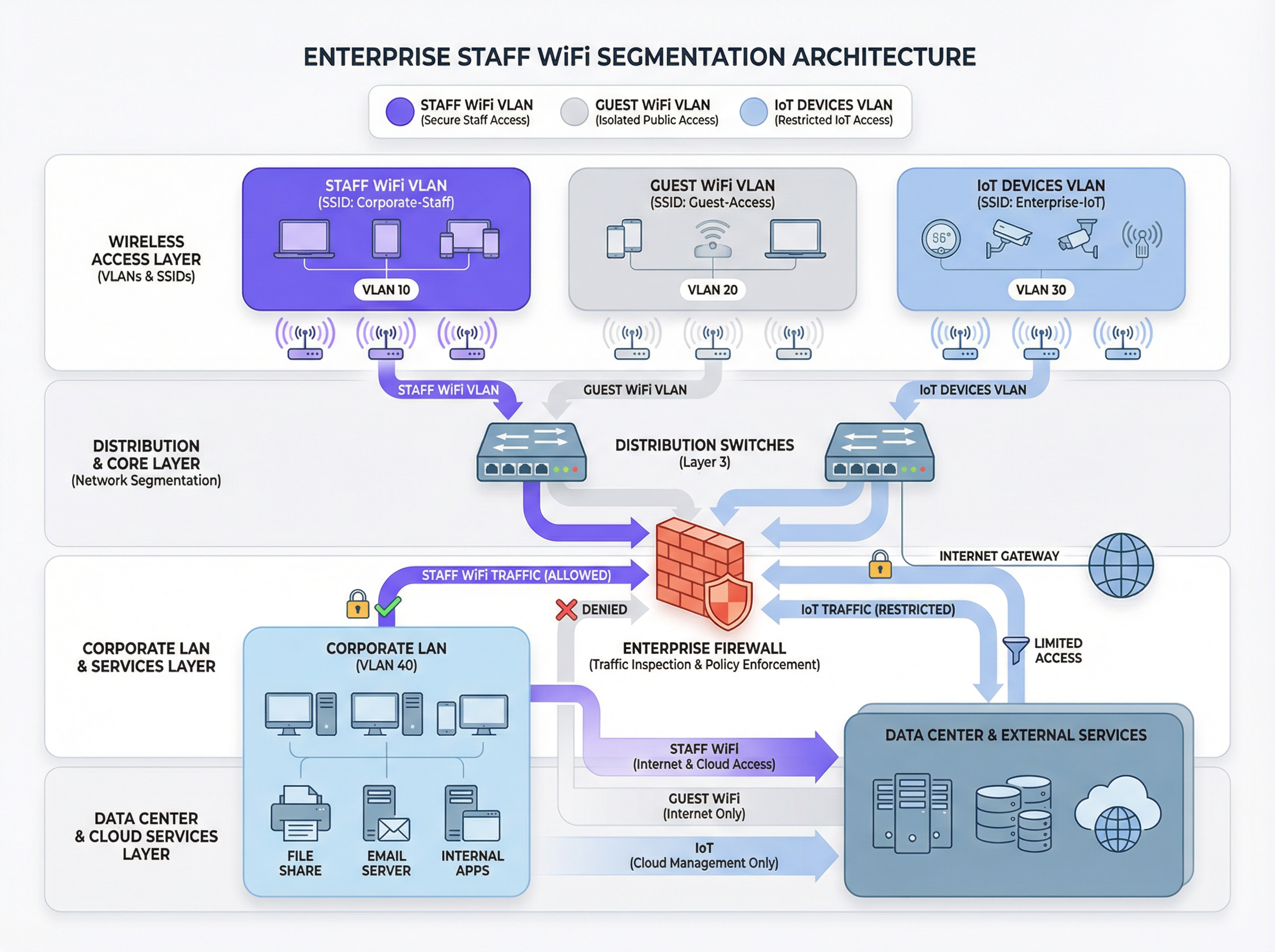
O princípio fundamental de um WiFi seguro para funcionários é a segmentação de rede. Uma rede plana onde dispositivos de funcionários, dispositivos de convidados, hardware de IoT e sistemas sensíveis de back-office coexistem é uma vulnerabilidade de segurança significativa. O principal mecanismo para alcançar a segmentação em um ambiente sem fio é o uso de VLANs (Virtual Local Area Networks). Cada SSID deve ser mapeado para uma VLAN distinta, criando domínios de broadcast logicamente isolados que são aplicados no nível do switch de rede.
Uma arquitetura típica de melhores práticas inclui pelo menos três VLANs separadas:
- VLAN de Funcionários: Para dispositivos de propriedade corporativa e gerenciados usados por colaboradores. Esta VLAN recebe acesso controlado a recursos internos, como servidores de arquivos, sistemas de Ponto de Venda (POS) e Sistemas de Gestão de Propriedades (PMS) por meio de regras de firewall específicas.
- VLAN de Convidados: Para acesso WiFi voltado ao público. Esta VLAN deve ser completamente isolada de todos os recursos corporativos internos. O tráfego desta VLAN deve ser roteado diretamente para a internet, com o isolamento de clientes ativado para impedir que os dispositivos dos convidados se comuniquem entre si.
- VLAN de IoT: Para dispositivos 'headless' (sem interface de usuário), como câmeras de segurança, sinalização digital e sistemas HVAC. Esses dispositivos geralmente possuem recursos de segurança mais simples e devem ser isolados em seu próprio segmento de rede com regras altamente restritivas, permitindo acesso apenas aos servidores específicos de que precisam para funcionar.
Essa abordagem segmentada não é meramente uma recomendação; para qualquer organização sujeita ao Payment Card Industry Data Security Standard (PCI DSS), é um requisito obrigatório [1]. A falha em segmentar o ambiente de dados do titular do cartão de outras redes constitui uma grave falha de conformidade.
Autenticação e Controle de Acesso: Além da Chave Pré-Compartilhada
O erro mais comum e crítico na implantação do WiFi para funcionários é o uso de uma única Chave Pré-Compartilhada (PSK) para todos os colaboradores. Embora simples de configurar, uma PSK não oferece responsabilidade individual e cria um risco de segurança significativo quando um funcionário deixa a organização. A solução padrão do setor é o IEEE 802.1X, que fornece controle de acesso à rede baseado em porta.
Em uma implantação 802.1X, um servidor central RADIUS (Remote Authentication Dial-In User Service) atua como a autoridade de autenticação. O fluxo de trabalho é o seguinte:
- Suplicante (Dispositivo Cliente): O dispositivo do funcionário solicita acesso ao SSID da equipe.
- Autenticador (Ponto de Acesso Sem Fio): O AP intercepta a solicitação e pede as credenciais.
- Servidor de Autenticação (RADIUS): O AP encaminha as credenciais para o servidor RADIUS, que as valida em um diretório de usuários (por exemplo, Active Directory, LDAP ou um provedor de identidade em nuvem como Azure AD ou Okta).
- Autorização: Após a autenticação bem-sucedida, o servidor RADIUS envia uma mensagem
Access-Acceptde volta ao AP, que então concede ao dispositivo acesso à rede. O servidor RADIUS também pode retornar atributos de autorização, como um ID de VLAN específico ou um perfil de Qualidade de Serviço (QoS), permitindo o controle de acesso baseado em funções.
Este modelo fornece autenticação por usuário e uma trilha de auditoria detalhada, o que é essencial para investigações de segurança e relatórios de conformidade.
Protocolos de Segurança: WPA2-Enterprise vs. WPA3-Enterprise
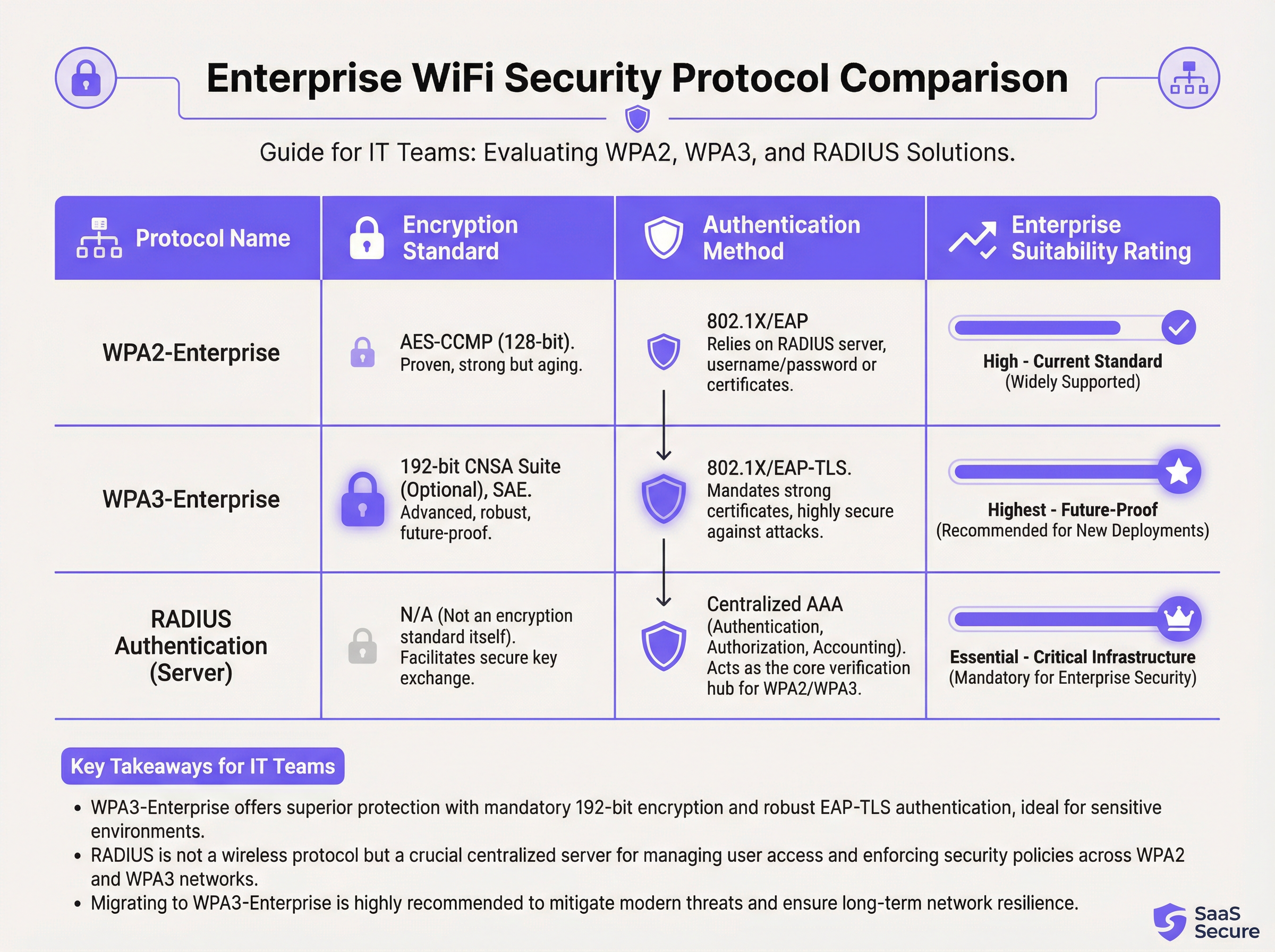
Embora o 802.1X lide com a autenticação, o próprio tráfego sem fio deve ser criptografado. A escolha do protocolo tem implicações de segurança significativas.
- WPA2-Enterprise (Wi-Fi Protected Access 2): O padrão corporativo de longa data, usando criptografia AES-CCMP de 128 bits. É robusto e amplamente suportado. No entanto, é vulnerável a ataques de dicionário offline se um invasor conseguir capturar o handshake inicial de quatro vias.
- WPA3-Enterprise (Wi-Fi Protected Access 3): A atual geração de segurança. Ele substitui o handshake do WPA2 pela Autenticação Simultânea de Iguais (SAE), que é resistente a ataques de dicionário offline. O WPA3-Enterprise também exige o uso de Quadros de Gerenciamento Protegidos (PMF) para evitar interceptação e falsificação de tráfego de gerenciamento. Para ambientes de alta segurança, oferece um pacote de segurança opcional de 192 bits alinhado com o Commercial National Security Algorithm (CNSA) Suite [2].
Para quaisquer novas implantações ou atualizações de hardware, o WPA3-Enterprise deve ser o padrão predefinido. Os benefícios de segurança superam em muito a sobrecarga mínima de implementação, desde que os dispositivos clientes e a infraestrutura o suportem.
Guia de Implementação
A implantação de uma rede WiFi segura e eficiente para funcionários é um processo de várias etapas que requer um planejamento cuidadoso.
Fase 1: Descoberta e Design
- Auditoria da Infraestrutura Existente: Identifique todos os dispositivos que requerem acesso sem fio e categorize-os (funcionários, convidados, IoT, BYOD).
- Definição de Políticas de Acesso: Para cada categoria, defina quais recursos de rede eles precisam acessar. Crie uma matriz de políticas que orientará suas regras de firewall.
- Design de VLAN e Esquema de IP: Projete sua arquitetura de VLAN e atribua sub-redes IP para cada VLAN. Certifique-se de que seus switches e roteadores de rede principal estejam configurados para suportar as novas VLANs.
Fase 2: Implantação da Infraestrutura
- Implantação de Servidor(es) RADIUS: Configure um servidor RADIUS primário e um secundário para redundância. Integre com o diretório de usuários escolhido.
- Configuração do Controlador de LAN Sem Fio (WLC): Crie os novos SSIDs (por exemplo,
Staff-Secure,Guest-WiFi). Configure o SSID da equipe para WPA3-Enterprise com autenticação 802.1X, apontando para seus servidores RADIUS. - Mapeamento de SSIDs para VLANs: Certifique-se de que cada SSID esteja corretamente marcado com seu ID de VLAN correspondente.
Fase 3: Testes e Lançamento
- Teste Piloto: Inscreva um pequeno grupo de funcionários de TI e operacionais em um programa piloto. Teste a autenticação, o acesso aos recursos e o desempenho de roaming.
- Integração de Dispositivos: Desenvolva um processo claro para registrar dispositivos novos e existentes. Para dispositivos de propriedade corporativa, isso deve ser automatizado por meio de uma plataforma de Gerenciamento de Dispositivos Móveis (MDM).
- Lançamento Completo: Assim que o teste piloto for bem-sucedido, prossiga com um lançamento em fases em toda a organização. Forneça documentação clara e suporte para os usuários finais.
Fase 4: Monitoramento e Otimização
- Implementação de Monitoramento: Use uma plataforma de inteligência de rede como a Purple para monitorar taxas de sucesso/falha de autenticação, desempenho da rede e atividade no nível do dispositivo.
- Configuração de QoS: Implemente políticas de Qualidade de Serviço para priorizar aplicativos críticos (por exemplo, voz, tráfego de POS) e evitar que o tráfego não essencial consuma toda a largura de banda disponível.
- Auditorias Regulares: Agende revisões trimestrais de regras de firewall, direitos de acesso de usuários e métricas de desempenho de rede.
Melhores Práticas
- Impor Autenticação Baseada em Certificado: Para dispositivos de propriedade corporativa, use EAP-TLS, que depende de certificados digitais em vez de nomes de usuário e senhas. Isso elimina o risco de phishing de credenciais e fornece a forma mais forte de autenticação.
- Implementar Fast Roaming (802.11r): Em locais grandes, garanta um roaming rápido e contínuo entre os pontos de acesso para evitar quedas de conexão para a equipe móvel.
- Isolar Tráfego BYOD: Se você permitir que os funcionários conectem dispositivos pessoais (Bring Your Own Device), coloque-os em uma VLAN separada e mais restritiva do que os dispositivos de propriedade corporativa.
- Realizar Pesquisas de RF Regulares: Realize pesquisas de radiofrequência (RF) para identificar e mitigar fontes de interferência e garantir o posicionamento ideal do AP para cobertura e capacidade.
- Desativar Protocolos Legados: Desative ativamente protocolos desatualizados e inseguros como WEP, WPA e TKIP em sua infraestrutura sem fio.
Solução de Problemas e Mitigação de Riscos
| Problema Comum | Causa Raiz | Estratégia de Mitigação |
|---|---|---|
| Falhas de Autenticação | Credenciais incorretas, certificados expirados, interrupção do servidor RADIUS. | Implemente um monitoramento robusto nos servidores RADIUS. Use MDM para automatizar a renovação de certificados. Forneça orientações claras aos usuários sobre o gerenciamento de credenciais. |
| Baixo Desempenho de Roaming | Falta de suporte a 802.11r/k/v, níveis de energia do AP mal configurados. | Certifique-se de que o controlador e os APs estejam configurados para padrões de fast roaming. Conduza uma pesquisa de RF pós-implantação para otimizar as configurações do AP. |
| Congestionamento de Rede | Largura de banda insuficiente, falta de QoS, saturação de tráfego não essencial. | Implemente políticas de QoS para priorizar o tráfego crítico. Use uma plataforma de análise de rede para identificar e limitar a taxa de aplicativos que consomem muita largura de banda. |
| Pontos de Acesso Invasores (Rogue APs) | APs não autorizados conectados à rede corporativa por funcionários. | Ative a detecção de rogue AP em seu controlador sem fio. Use a segurança de porta 802.1X em switches com fio para impedir que dispositivos não autorizados obtenham acesso à rede. |
ROI e Impacto nos Negócios
O investimento em uma rede WiFi segura para funcionários oferece retornos mensuráveis em vários domínios:
- Aumento da Produtividade: Um WiFi confiável e de alto desempenho permite que a equipe use aplicativos móveis, acesse informações e se comunique sem interrupções, melhorando diretamente a eficiência operacional. Um estudo da Wi-Fi Alliance descobriu que o WiFi contribui com mais de US$ 5 trilhões em valor econômico global anual [3].
- Redução de Incidentes de Segurança: A segmentação adequada e a autenticação forte reduzem drasticamente a superfície de ataque, resultando em menos incidentes de segurança, menores custos de remediação e um risco reduzido de violações de dados dispendiosas.
- Conformidade Otimizada: Uma rede baseada em 802.1X com registros detalhados simplifica as auditorias de conformidade para padrões como PCI DSS, GDPR e HIPAA, economizando centenas de horas de trabalho.
- Maior Agilidade nos Negócios: Uma base sem fio escalável e segura permite a rápida implantação de novas iniciativas mobile-first, desde pedidos na mesa em restaurantes até pontos de venda móveis no varejo.
Para calcular o ROI, compare o custo total de propriedade (TCO) da nova infraestrutura com os benefícios quantificáveis, como o tempo economizado por meio da melhoria da eficiência, a prevenção de custos de uma possível violação de dados e a redução dos custos de auditoria de conformidade.
Referências
[1] PCI Security Standards Council. (2022). Payment Card Industry Data Security Standard (PCI DSS) v4.0. https://www.pcisecuritystandards.org/documents/PCI-DSS-v4_0.pdf [2] Wi-Fi Alliance. (2024). WPA3™ Specification. https://www.wi-fi.org/discover-wi-fi/security [3] Wi-Fi Alliance. (2021). The Global Economic Value of Wi-Fi. https://www.wi-fi.org/file/the-global-economic-value-of-wi-fi
Key Terms & Definitions
IEEE 802.1X
An IEEE standard for port-based Network Access Control (PNAC). It provides an authentication mechanism to devices wishing to attach to a LAN or WLAN.
This is the core technology that enables per-user authentication on a WiFi network, moving away from insecure shared passwords. IT teams implement 802.1X to meet compliance requirements and enable robust access control.
RADIUS
A networking protocol that provides centralized Authentication, Authorization, and Accounting (AAA) management for users who connect and use a network service.
The RADIUS server is the 'brain' of an 802.1X deployment. It checks the user's credentials against a directory and tells the access point whether to allow or deny access. A failed RADIUS server means no one can log in.
VLAN
A Virtual Local Area Network is any broadcast domain that is partitioned and isolated in a computer network at the data link layer (OSI layer 2).
VLANs are the primary tool for segmenting a network. IT teams use VLANs to create separate, isolated networks for staff, guests, and IoT devices on the same physical hardware, preventing traffic from one from spilling over into another.
WPA3-Enterprise
The third generation of the Wi-Fi Protected Access security protocol, designed for enterprise environments. It uses 192-bit encryption and replaces the PSK handshake with Simultaneous Authentication of Equals (SAE).
This is the current, most secure standard for enterprise WiFi. Network architects should specify WPA3-Enterprise for all new deployments to protect against modern threats and ensure long-term security.
EAP-TLS
Extensible Authentication Protocol-Transport Layer Security. An EAP method that uses digital certificates for mutual authentication between the client and the server.
This is the gold standard for 802.1X authentication. Instead of a user typing a password, the device presents a certificate that is cryptographically verified. It is immune to phishing and credential theft.
QoS (Quality of Service)
The use of mechanisms or technologies to control traffic and ensure the performance of critical applications to the level required by the business.
In a staff WiFi context, QoS is used to prioritize applications like voice calls or payment processing over less important traffic like software updates or web browsing, ensuring operational systems are always responsive.
Client Isolation
A security feature on a wireless access point that prevents wireless clients connected to the same AP from communicating with each other.
This is a mandatory feature for guest WiFi networks. It prevents a malicious guest from attacking another guest's device on the same network. It should be enabled on all non-staff VLANs.
PCI DSS
The Payment Card Industry Data Security Standard is an information security standard for organizations that handle branded credit cards from the major card schemes.
For any business that processes, stores, or transmits credit card information, PCI DSS compliance is mandatory. A key requirement is the segmentation of the network that handles card data from all other networks, which directly impacts staff WiFi design.
Case Studies
A 300-room luxury hotel needs to upgrade its staff WiFi network. The current system uses a single PSK for all staff, including front desk, housekeeping, and management. The hotel uses a cloud-based Property Management System (PMS) and has corporate-owned tablets for housekeeping staff and BYOD for most other employees. They must comply with PCI DSS.
- Architecture: Design a three-VLAN architecture:
VLAN 10 (Staff-Corp)for corporate tablets,VLAN 20 (Staff-BYOD)for personal devices, andVLAN 30 (Guest). - Authentication: Deploy a redundant cloud-based RADIUS solution integrated with the hotel's Azure AD. Configure two SSIDs:
Hotel-Staffusing WPA3-Enterprise with EAP-TLS (certificate-based) for the corporate tablets, andHotel-BYODusing WPA2-Enterprise with PEAP-MSCHAPv2 (credential-based) for personal devices. - Access Control: The
Staff-CorpVLAN is granted access to the PMS cloud endpoints and internal management systems. TheStaff-BYODVLAN is only allowed internet access and access to the PMS cloud endpoints. TheGuestVLAN is completely isolated and routes directly to the internet. - Onboarding: Use the hotel's MDM (e.g., Intune) to automatically provision certificates and the
Hotel-Staffprofile to all corporate tablets. Provide a self-service portal for BYOD users to connect to theHotel-BYODnetwork after authenticating with their Azure AD credentials.
A retail chain with 50 stores wants to deploy staff WiFi for inventory management scanners and manager tablets. The scanners are ruggedized Android devices, and the tablets are iPads. The primary goal is to ensure reliable connectivity in both the front-of-store and back-of-house/stockroom areas, with secure access to the central inventory management system.
- RF Design: Conduct a predictive RF survey for a template store layout, focusing on achieving -67 dBm or better signal strength in all operational areas, especially the dense shelving of the stockroom. Plan for sufficient AP density to handle the capacity of all devices operating concurrently.
- Network Design: Implement a standardized two-VLAN staff architecture across all stores:
VLAN 50 (Scanners)andVLAN 60 (Management). Both SSIDs will use WPA3-Enterprise with 802.1X authentication against a central RADIUS server located at the corporate data center. - Authentication: Use certificate-based authentication (EAP-TLS) for both the Android scanners and the iPads, managed via an MDM platform. This avoids staff having to type complex passwords on devices without full keyboards.
- QoS: Configure QoS policies to prioritize the inventory management application's traffic over any other traffic on the network. This ensures that scanner updates and lookups are always responsive, even during busy periods.
- Roaming: Enable 802.11r (Fast BSS Transition) to ensure the inventory scanners, which are constantly in motion, can roam seamlessly between access points without dropping their connection to the inventory system.
Scenario Analysis
Q1. A large conference center is hosting a high-profile tech event with 1,000 attendees and 200 event staff. The staff need reliable access to an event management app, while attendees need basic internet access. How would you structure the wireless network to ensure the staff app remains performant?
💡 Hint:Consider both segmentation and bandwidth management.
Show Recommended Approach
Deploy at least two SSIDs: Event-Staff and Event-Guest. The Event-Staff SSID would be on its own VLAN with WPA2/3-Enterprise authentication. Crucially, implement QoS policies to prioritize the event management app's traffic and assign a guaranteed minimum bandwidth (e.g., 20% of total capacity) to the Staff VLAN. The Event-Guest SSID would be on an isolated VLAN with a per-client bandwidth limit to prevent attendees from impacting staff network performance.
Q2. Your CFO has questioned the expense of deploying a RADIUS server, suggesting that a complex, rotating PSK would be sufficient for the 150 employees in your office. How do you justify the need for 802.1X?
💡 Hint:Focus on accountability, compliance, and operational overhead.
Show Recommended Approach
The justification has three parts: 1. Accountability: With a PSK, all actions are anonymous. With 802.1X, every connection is logged against a specific user, which is essential for security incident response. 2. Compliance: Many regulatory frameworks (like PCI DSS or HIPAA) require individual accountability, making a shared key non-compliant. 3. Operational Efficiency: With 802.1X, terminating an employee's access is as simple as disabling their Active Directory account. With a PSK, the entire key must be changed and redistributed to all 149 other employees, which is inefficient and disruptive.
Q3. You are deploying a new staff WiFi network in a hospital. The primary users are doctors and nurses using corporate-owned tablets to access patient records (EHR). What is the single most effective security configuration you can implement, and why?
💡 Hint:Think beyond just encryption. How do you provide the strongest possible authentication for sensitive data?
Show Recommended Approach
The single most effective configuration is WPA3-Enterprise with EAP-TLS (certificate-based) authentication. The use of WPA3 provides the strongest available encryption. However, the critical element is EAP-TLS. By using device-specific digital certificates managed by an MDM platform, you eliminate passwords entirely for this user group. This prevents credential theft via phishing or social engineering, which is a major attack vector. Given the sensitivity of patient data (EHR), removing the password from the equation provides a fundamental security uplift that credential-based methods cannot match.
Key Takeaways
- ✓Staff WiFi is not a convenience; it is critical operational infrastructure.
- ✓Always segment staff, guest, and IoT traffic using separate VLANs.
- ✓Use IEEE 802.1X with a RADIUS server for authentication; never use a Pre-Shared Key (PSK).
- ✓Deploy WPA3-Enterprise for all new networks to ensure the strongest encryption.
- ✓For corporate-owned devices, use certificate-based authentication (EAP-TLS) to eliminate password-related risks.
- ✓Implement Quality of Service (QoS) to prioritize critical applications and guarantee performance.
- ✓A well-architected staff WiFi network delivers measurable ROI through increased productivity and reduced security risk.




