

Configuração de VLAN para Redes WiFi
This guide provides a technical deep-dive into VLAN configuration for enterprise WiFi networks, offering actionable guidance for IT leaders and network architects. It covers VLAN fundamentals, SSID-to-VLAN mapping, implementation best practices, and the business impact of proper network segmentation for security, performance, and compliance in venues like hotels, retail chains, and stadiums.
🎧 Listen to this Guide
View Transcript

Resumo Executivo
Para qualquer empresa moderna que opere uma rede WiFi de grande escala — seja uma rede de varejo com várias filiais, um amplo resort hoteleiro ou um estádio de alta densidade —, a segmentação de rede não é mais uma recomendação; é um requisito fundamental para segurança, desempenho e eficiência operacional. As Redes Locais Virtuais (VLANs) fornecem o mecanismo principal para alcançar essa segmentação de maneira escalável e econômica. Ao particionar logicamente uma única infraestrutura de rede física em múltiplos domínios de broadcast isolados, as VLANs permitem que as equipes de TI apliquem políticas de segurança distintas, gerenciem o tráfego e aprimorem a experiência do usuário em diferentes grupos de usuários e tipos de dispositivos. Por exemplo, o tráfego do WiFi de visitantes pode ser completamente isolado de recursos corporativos confidenciais, como sistemas de Ponto de Venda (PDV) ou servidores internos, mitigando riscos diretamente e simplificando a conformidade com padrões como PCI DSS e GDPR. Este guia serve como uma referência técnica oficial para arquitetos de rede e gerentes de TI, fornecendo uma estrutura prática para projetar, implementar e gerenciar uma arquitetura de VLAN robusta para implantações de WiFi corporativo. Ele vai além da teoria acadêmica para oferecer orientações práticas e independentes de fornecedores, baseadas em cenários do mundo real e nas melhores práticas do setor, com foco na correlação direta entre a configuração adequada de VLAN e resultados de negócios mensuráveis, como melhoria na taxa de transferência da rede, postura de segurança aprimorada e maior agilidade operacional.
Análise Técnica Aprofundada
Em sua essência, uma VLAN é um agrupamento lógico de dispositivos de rede que se comunicam como se estivessem na mesma LAN física, independentemente de sua localização física. A tecnologia que sustenta isso é o padrão IEEE 802.1Q, que define um sistema de marcação (tagging) de VLAN. Quando um quadro Ethernet viaja por um link de rede configurado como "tronco" (trunk), uma tag de 4 bytes é inserida no cabeçalho do quadro. Essa tag contém um Identificador de VLAN (VID), um número de 12 bits que identifica exclusivamente a VLAN à qual o quadro pertence (permitindo até 4.094 VLANs). Os switches de rede usam esse VID para tomar decisões de encaminhamento, garantindo que os quadros de uma VLAN específica sejam entregues apenas às portas pertencentes a essa mesma VLAN ou a outras portas de tronco.
Mapeamento de SSID para VLAN
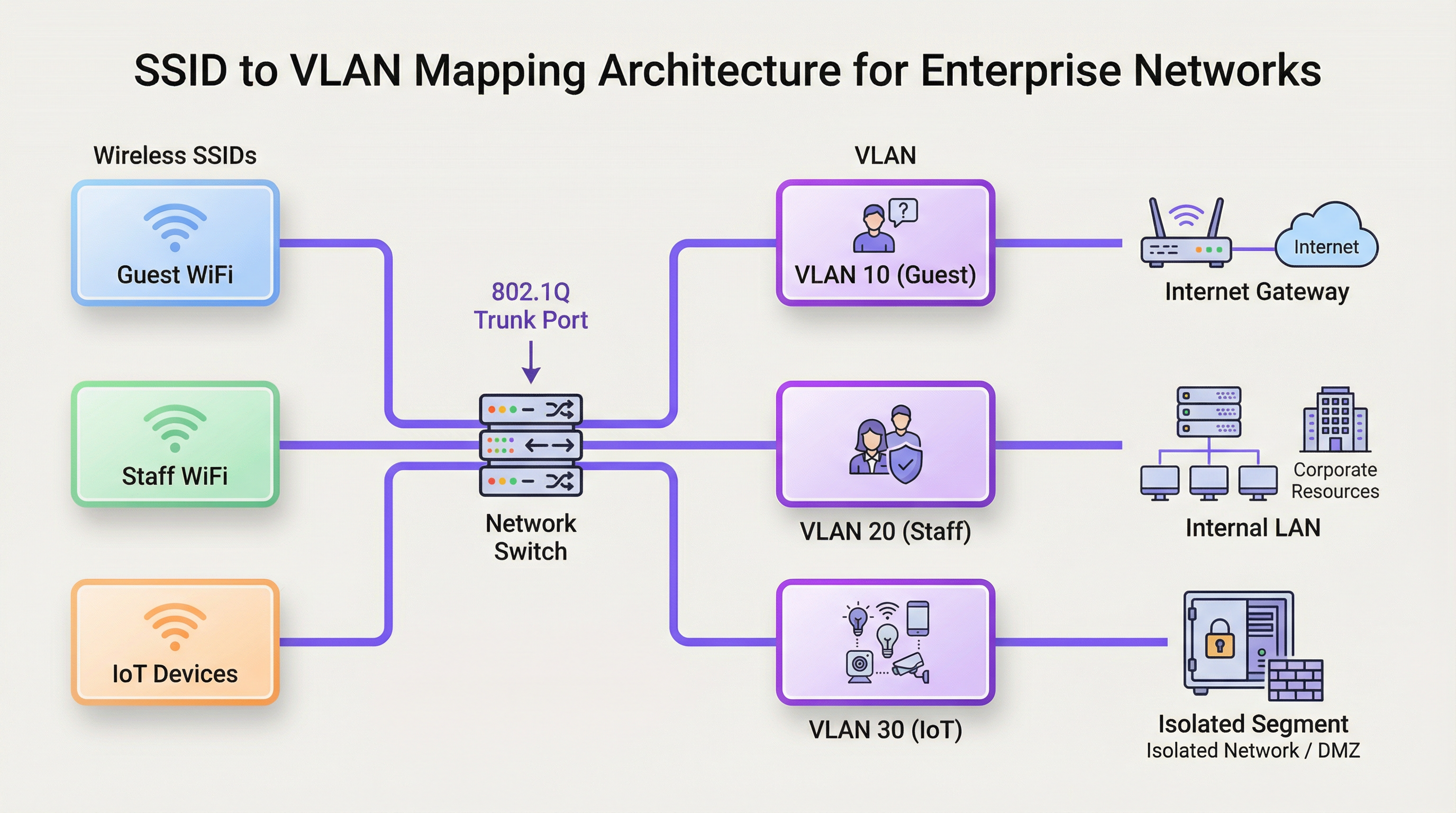
A aplicação mais comum de VLANs em um contexto de WiFi é o mapeamento de um Service Set Identifier (SSID) específico — o nome público de uma rede WiFi — para uma VLAN dedicada. Isso cria uma ponte contínua entre os segmentos de rede com e sem fio. Por exemplo:
- SSID:
Guest-WiFi-> VLAN 10 (Apenas acesso à internet, isolamento de cliente ativado) - SSID:
Staff-Internal-> VLAN 20 (Acesso a servidores corporativos, impressoras e aplicativos internos) - SSID:
POS-Terminals-> VLAN 30 (Altamente restrito, acesso apenas a gateways de processamento de pagamentos, em conformidade com PCI DSS) - SSID:
IoT-Devices-> VLAN 40 (Segmento isolado para automação predial, HVAC e câmeras de segurança)
Essa arquitetura é realizada por meio da configuração dos Pontos de Acesso (APs) sem fio e dos switches de rede. Os APs são configurados para marcar o tráfego sem fio de cada SSID com o VID correspondente. As portas do switch conectadas a esses APs são configuradas como portas de tronco, permitindo que transportem tráfego para várias VLANs simultaneamente. Quando o tráfego marcado chega ao switch, o switch o encaminha com base no VID, garantindo que ele permaneça isolado em seu domínio de broadcast designado.
Domínios de Broadcast e Desempenho da Rede
Sem VLANs, uma rede grande é um único domínio de broadcast. Cada quadro de broadcast (por exemplo, de uma solicitação ARP) é enviado para todos os dispositivos na rede. Em um ambiente de alta densidade com centenas ou milhares de dispositivos, esse tráfego de broadcast pode criar um congestionamento de rede significativo, um fenômeno conhecido como "tempestade de broadcast", que degrada severamente o desempenho para todos os usuários. Ao segmentar a rede em VLANs menores, os broadcasts ficam confinados à sua respectiva VLAN. Uma solicitação ARP na VLAN do WiFi de visitantes, por exemplo, não será vista pelos dispositivos na VLAN da equipe, reduzindo drasticamente a sobrecarga e melhorando a taxa de transferência e a estabilidade geral da rede.
Guia de Implementação
A implementação de uma estratégia de VLAN requer planejamento cuidadoso e configuração do hardware de rede principal. O objetivo é criar uma arquitetura resiliente e escalável que se alinhe aos requisitos operacionais e de segurança da organização.
Requisitos de Hardware
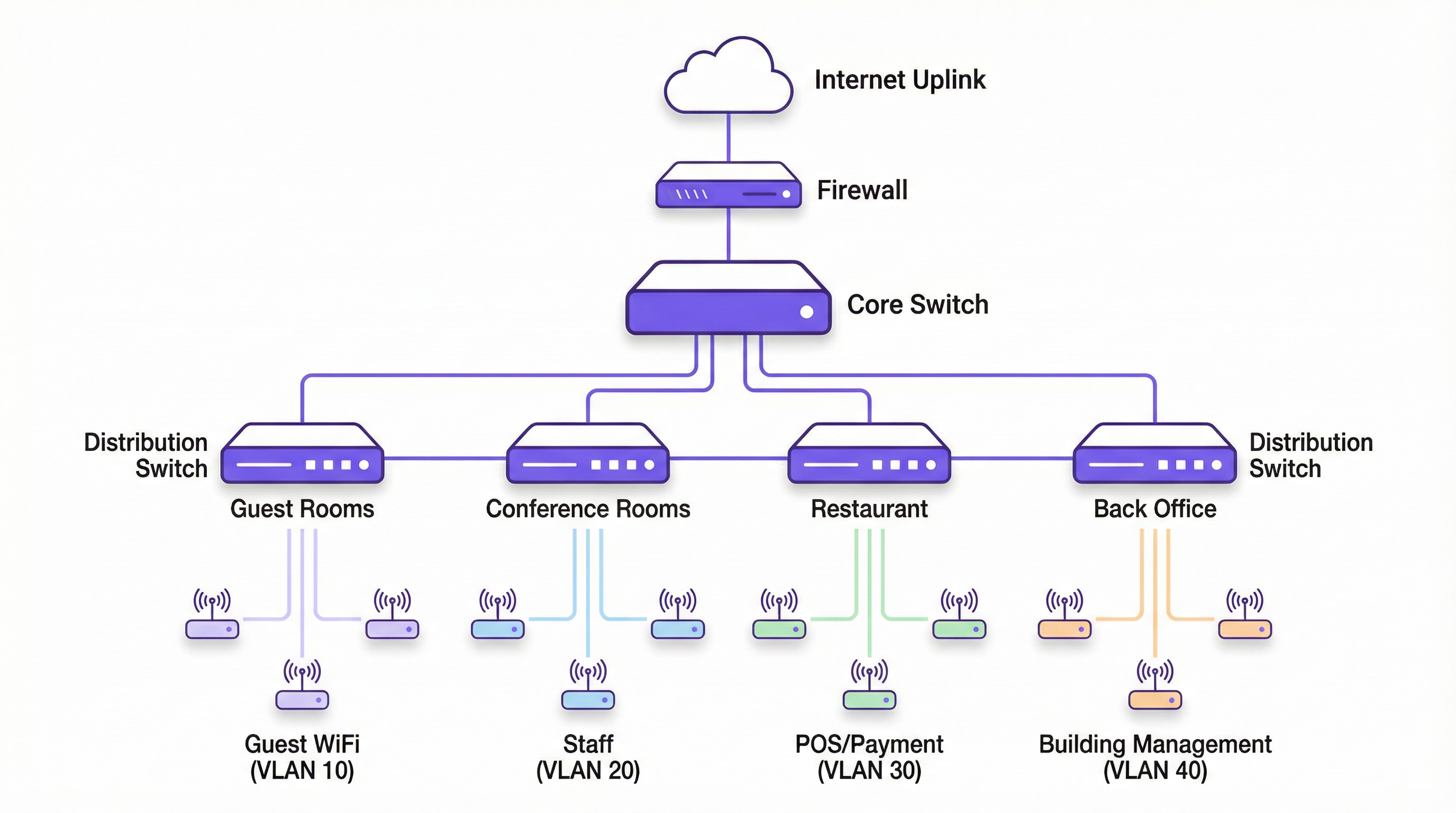
- Switches Compatíveis com VLAN: O núcleo de qualquer implantação de VLAN é o switch de rede. Todos os switches no caminho de dados devem ser switches "gerenciáveis" ou "inteligentes" que suportem o padrão IEEE 802.1Q. Switches não gerenciáveis não conseguem processar tags de VLAN e irão descartar os quadros marcados ou remover as tags, quebrando a segmentação.
- Pontos de Acesso Sem Fio Compatíveis com VLAN: São necessários APs de nível corporativo. Esses APs devem suportar múltiplos SSIDs e ter a capacidade de marcar o tráfego de cada SSID com um ID de VLAN específico.
- Roteador / Switch Layer 3: Como as VLANs criam redes logicamente separadas, é necessário um dispositivo capaz de rotear entre elas caso alguma comunicação inter-VLAN seja exigida (por exemplo, permitir que dispositivos da equipe acessem uma impressora em uma VLAN diferente). Essa função é normalmente executada por um roteador de núcleo ou um switch Layer 3. Listas de Controle de Acesso (ACLs) são configuradas neste dispositivo para controlar estritamente qual tráfego tem permissão para cruzar os limites da VLAN.
Etapas de Configuração Independentes de Fornecedor
- Defina seu Esquema de VLAN: Planeje suas VLANs com base em grupos de usuários, níveis de confiança e tipos de tráfego. Atribua um nome e um VID exclusivo a cada uma (por exemplo, VLAN 10 - Visitantes, VLAN 20 - Equipe, VLAN 30 - PCI, VLAN 40 - IoT). Crucialmente, não use a VLAN 1, a VLAN padrão, para nenhum tráfego de produção. É um risco de segurança comum.
- Configure as VLANs nos Switches: Acesse a interface de gerenciamento de seus switches e crie as VLANs definidas. Isso normalmente envolve dar a cada VLAN um nome e seu VID correspondente.
- Configure as Portas de Tronco: Identifique as portas do switch que se conectarão aos seus APs e a outros switches. Configure essas portas como portas de "tronco" (trunk) e especifique quais VLANs têm permissão para atravessar o tronco. Por segurança, permita apenas as VLANs necessárias, não todas elas.
- Configure as Portas de Acesso: Para portas conectadas a dispositivos finais que não são compatíveis com VLAN (como um PC de mesa), configure-as como portas de "acesso" e atribua-as a uma única VLAN não marcada (untagged).
- Configure os APs: Em sua controladora sem fio ou interface de gerenciamento de AP, crie seus SSIDs. Para cada SSID, atribua-o ao ID de VLAN correspondente. Esta é a etapa que marca o tráfego sem fio.
- Configure o Roteamento Inter-VLAN: Em seu roteador ou switch Layer 3, crie uma interface virtual para cada VLAN e atribua a ela um endereço IP. Esse endereço servirá como gateway padrão para todos os dispositivos dentro dessa VLAN. Implemente ACLs para definir as regras para o tráfego que flui entre as VLANs.
Melhores Práticas
- Isole o Tráfego de Alto Risco: Sempre coloque redes de visitantes, dispositivos IoT e sistemas sujeitos a conformidade (como PCI DSS) em suas próprias VLANs dedicadas e altamente restritas.
- Use uma VLAN de Gerenciamento Dedicada: Dispositivos de infraestrutura de rede (switches, APs, controladoras) devem residir em sua própria VLAN de gerenciamento isolada para protegê-los do tráfego de usuários finais e de possíveis ataques.
- Implemente 802.1X para Atribuição Dinâmica de VLAN: Para maior segurança, use o padrão IEEE 802.1X com um servidor RADIUS. Isso permite a atribuição dinâmica de VLAN por usuário ou por dispositivo após a autenticação bem-sucedida, em vez de depender exclusivamente do SSID ao qual eles se conectam.
- Remova VLANs Não Utilizadas dos Troncos: Para desempenho e segurança, configure as portas de tronco para permitir apenas as VLANs que são ativamente necessárias naquele link. Isso evita que o tráfego de broadcast desnecessário se propague pela rede.
- Alinhe-se aos Padrões de Segurança: Certifique-se de que sua arquitetura de VLAN suporte a conformidade com as regulamentações relevantes. Por exemplo, o Requisito 1.2.1 do PCI DSS exige a segmentação do ambiente de dados do titular do cartão do restante da rede.
Solução de Problemas e Mitigação de Riscos
- Problema: Dispositivos não estão obtendo um endereço IP.
- Causa: Frequentemente, um escopo DHCP não está configurado para a nova VLAN, ou o roteador/switch L3 não está configurado corretamente para retransmitir solicitações DHCP.
- Mitigação: Certifique-se de que um servidor DHCP tenha um escopo para a sub-rede de cada VLAN e que um endereço auxiliar de IP (IP helper-address) esteja configurado na interface da VLAN em seu roteador.
- Problema: Dispositivos conseguem se conectar ao WiFi, mas não têm acesso à rede.
- Causa: Uma incompatibilidade de marcação de VLAN entre o AP e a porta de tronco do switch, ou a VLAN não está sendo permitida em um link de tronco em algum lugar do caminho.
- Mitigação: Verifique sistematicamente a configuração da porta de tronco em cada switch no caminho do AP até o roteador de núcleo.
- Risco: Salto de VLAN (VLAN Hopping).
- Causa: Um invasor em uma VLAN de menor segurança tenta obter acesso a uma de maior segurança. Isso pode ser feito por meio de técnicas como falsificação de switch (switch spoofing) ou marcação dupla (double tagging).
- Mitigação: Use as melhores práticas de segurança modernas: desative o Dynamic Trunking Protocol (DTP) nos switches, configure manualmente as portas de tronco e certifique-se de que sua VLAN nativa nos troncos seja uma VLAN dedicada e não utilizada, não a VLAN 1.
ROI e Impacto nos Negócios
O investimento no projeto e na implementação de uma arquitetura de VLAN adequada gera retornos significativos. O principal ROI está na mitigação de riscos. Uma única violação em uma rede segmentada incorretamente pode expor toda a organização, levando a danos financeiros e de reputação catastróficos. Ao isolar sistemas críticos, a superfície de ataque é drasticamente reduzida. Além disso, as melhorias de desempenho decorrentes da redução do tráfego de broadcast levam a uma melhor experiência do usuário tanto para visitantes quanto para a equipe, o que pode se traduzir em maior satisfação do cliente em um hotel ou maior produtividade dos funcionários em um escritório. Por fim, uma rede segmentada e bem documentada simplifica o gerenciamento e a solução de problemas, reduzindo a sobrecarga operacional e permitindo que as equipes de TI respondam a problemas e implantem novos serviços com mais eficiência.
Key Terms & Definitions
VLAN (Virtual Local Area Network)
A logical grouping of devices on one or more physical LANs that are configured to communicate as if they were attached to the same wire, when in fact they are located on a number of different LAN segments.
IT teams use VLANs to segment a network for security and performance reasons, such as separating guest WiFi traffic from internal corporate traffic without needing separate physical hardware for each.
IEEE 802.1Q
The networking standard that defines how VLAN information is inserted into Ethernet frames. It specifies the use of a "tag" in the frame header to identify the VLAN membership.
This is the core technology that makes VLANs work across multiple switches from different vendors. When a switch is "802.1Q compliant," it means it can understand and process these VLAN tags.
SSID (Service Set Identifier)
The public name of a wireless local area network (WLAN) that is broadcast into the air by access points. It is the name you see when you search for WiFi networks on your device.
In a VLAN deployment, IT teams map each SSID to a specific VLAN to automatically segment users based on the WiFi network they connect to (e.g., `Guest-WiFi` SSID maps to the Guest VLAN).
Trunk Port
A port on a network switch configured to carry traffic for multiple VLANs simultaneously. It uses the 802.1Q tagging standard to differentiate between the traffic of different VLANs.
Trunk ports are essential for connecting switches to each other and for connecting switches to VLAN-aware access points. They are the multi-lane highways of a VLAN architecture.
Access Port
A port on a network switch that carries traffic for only one VLAN. It is configured to connect to end-user devices like computers or printers that are not VLAN-aware.
This is the most common port configuration. When a device is plugged into an access port, it becomes a member of that port's assigned VLAN without needing any special configuration on the device itself.
Network Segmentation
The practice of splitting a computer network into smaller, isolated subnetworks or segments. Each segment acts as its own small network, and traffic between segments is controlled.
VLANs are the primary tool for achieving network segmentation. This is a critical security practice for reducing the attack surface and a performance tool for limiting broadcast traffic.
Broadcast Domain
A logical division of a computer network in which all nodes can reach each other by broadcast at the data link layer. A broadcast frame sent from one device will be received by all other devices in the same broadcast domain.
By default, a switched network is one large broadcast domain. VLANs break up the network into multiple, smaller broadcast domains, which improves performance by reducing unnecessary broadcast traffic.
RADIUS (Remote Authentication Dial-In User Service)
A client/server protocol that provides centralized Authentication, Authorization, and Accounting (AAA) management for users who connect to a network service.
In advanced WiFi deployments, a RADIUS server is used with 802.1X to authenticate users. Based on the user's credentials, the RADIUS server can tell the switch or AP to dynamically assign the user to a specific VLAN, providing a very high level of security and flexibility.
Case Studies
A 200-room luxury hotel needs to replace its aging WiFi network. They require secure, high-performance internet for guests, a separate network for corporate staff, a PCI-compliant network for payment systems at the front desk and restaurant, and a network for building management systems (HVAC, smart locks).
- VLAN Planning: Define four primary VLANs: VLAN 10 (Guests), VLAN 20 (Staff), VLAN 30 (PCI-DSS), and VLAN 40 (Building Management). Also, define VLAN 99 for network management.
- IP Addressing: Assign a unique /24 subnet to each VLAN (e.g., 10.10.10.0/24 for Guests, 10.10.20.0/24 for Staff).
- Hardware Configuration: Deploy managed 802.1Q-capable switches. Configure switch-to-switch ports and AP-connected ports as 802.1Q trunks, allowing VLANs 10, 20, 30, 40, and 99.
- SSID Mapping: Configure four SSIDs on the enterprise APs:
Hotel-Guest-WiFi-> VLAN 10,Hotel-Staff-> VLAN 20 (using WPA3-Enterprise with 802.1X),Hotel-POS-> VLAN 30 (hidden SSID), andHotel-IoT-> VLAN 40. - Routing & Security: Use a Layer 3 core switch for inter-VLAN routing. Create strict ACLs: VLAN 10 can only route to the internet. VLAN 30 can only communicate with the payment gateway IP address. VLAN 20 can access internal servers but not VLAN 30. VLAN 40 is completely isolated.
A retail chain with 50 stores wants to provide free guest WiFi while ensuring the security of their in-store POS systems and inventory scanners, which are also wireless.
- Standardised VLAN Template: Create a corporate-wide VLAN template to be deployed at each store: VLAN 110 (Guest WiFi), VLAN 120 (Corporate/Staff), VLAN 130 (POS), VLAN 140 (Inventory Scanners). Using higher VLAN numbers avoids conflicts with default setups.
- Centralised Management: Use a cloud-managed wireless and switching solution (like Purple's platform) to push the standardised configuration to all 50 stores.
- SSID Configuration:
Retail-Guest-> VLAN 110 (with client isolation and a captive portal for marketing).Retail-Staff-> VLAN 120 (WPA3-Enterprise).Retail-POS-> VLAN 130 (hidden SSID, MAC filtering).Retail-Inventory-> VLAN 140 (WPA3-Enterprise). - Firewall Policy: The on-site firewall at each store acts as the router. It is configured with rules to ensure VLAN 110 is internet-only. VLAN 130 traffic is restricted to the payment processor. VLAN 120 and 140 can communicate with the central corporate data centre over a VPN but are blocked from accessing the guest or POS VLANs directly.
Scenario Analysis
Q1. A conference centre is hosting a major tech event with 5,000 attendees, 200 event staff, and a dedicated press corps. How would you structure the VLANs and SSIDs to ensure a secure and performant network experience for all groups?
💡 Hint:Consider the different bandwidth, access, and security requirements for each group. Think about traffic density and potential interference.
Show Recommended Approach
- VLANs: Create at least three primary VLANs: VLAN 100 (Attendees), VLAN 200 (Staff), VLAN 300 (Press).
- SSIDs:
Event-Guest(VLAN 100) with a captive portal for registration and aggressive bandwidth limiting.Event-Staff(VLAN 200) with WPA3-Enterprise and access to production servers.Event-Press(VLAN 300) with higher bandwidth allocation and less restrictive filtering to allow for media uploads. - Network Design: Use a high-density AP deployment. Isolate the VLANs and implement strict inter-VLAN routing rules. The Attendee VLAN should be internet-only with client isolation enabled to prevent peer-to-peer attacks.
Q2. Your organisation has implemented VLANs, but users on the Staff VLAN (VLAN 20) are complaining of slow performance. The Guest VLAN (VLAN 10) seems unaffected. What are the first three things you would investigate?
💡 Hint:Think about the path traffic takes and what could cause congestion specific to one VLAN.
Show Recommended Approach
- Broadcast Traffic: Check for a broadcast storm within VLAN 20. A misconfigured device or a network loop affecting only that VLAN could be flooding it with traffic. Use a packet analyser to inspect traffic on a VLAN 20 access port.
- Uplink Saturation: Check the utilisation of the trunk links carrying VLAN 20 traffic. It's possible that staff activities (e.g., large file transfers to a server) are saturating the uplink, while guest traffic (mostly internet-bound) uses a different path or is shaped differently.
- DHCP/DNS Issues: Verify that the DHCP server for the VLAN 20 subnet is responsive and has available leases. Check the DNS servers assigned to VLAN 20 clients for latency or resolution failures. A problem with these core services can manifest as slow network performance.
Q3. A new security audit requires that all payment terminals be on a network segment that is completely isolated and compliant with PCI DSS. The terminals are currently connected to the same switches as regular staff computers. What is the most cost-effective way to achieve this?
💡 Hint:How can you achieve logical isolation without buying an entire new set of physical hardware?
Show Recommended Approach
The most cost-effective solution is to create a new, dedicated PCI VLAN (e.g., VLAN 30). Assign the switch ports connected to the payment terminals as access ports for VLAN 30. Then, at the router or Layer 3 switch, create a strict firewall rule (ACL) that only allows traffic from the VLAN 30 subnet to communicate with the specific IP addresses of the payment processor, and block all other traffic, including all inter-VLAN traffic. This logically isolates the terminals on the existing hardware, meeting the core requirement of PCI DSS segmentation without capital expenditure on new switches.
Key Takeaways
- ✓VLANs logically segment a physical network into multiple isolated broadcast domains.
- ✓Map SSIDs to specific VLANs to automatically enforce security policies for different user groups (e.g., Guest vs. Staff).
- ✓Use 802.1Q compliant switches and APs to implement a VLAN architecture.
- ✓Isolating guest, corporate, and sensitive (e.g., PCI) traffic into separate VLANs is critical for security and compliance.
- ✓VLANs improve network performance by reducing the size of broadcast domains and mitigating broadcast storms.
- ✓Always use a dedicated, unused VLAN for management and for the native VLAN on trunk ports; avoid using the default VLAN 1.
- ✓For maximum security, combine VLANs with 802.1X and a RADIUS server for dynamic, per-user VLAN assignment.




