

O que é um controlador WiFi e você precisa de um?
This authoritative guide provides IT leaders and network architects with a practical overview of WiFi controllers, detailing their function, comparing on-premises and cloud-based models, and explaining how they integrate with WiFi intelligence platforms like Purple. It offers actionable insights for deploying scalable, secure, and high-performance wireless networks in enterprise environments such as hospitality, retail, and large venues. By the end, readers will have a clear framework for choosing the right controller architecture and understanding where a platform like Purple adds transformative business value.
🎧 Listen to this Guide
View Transcript
Resumo Executivo
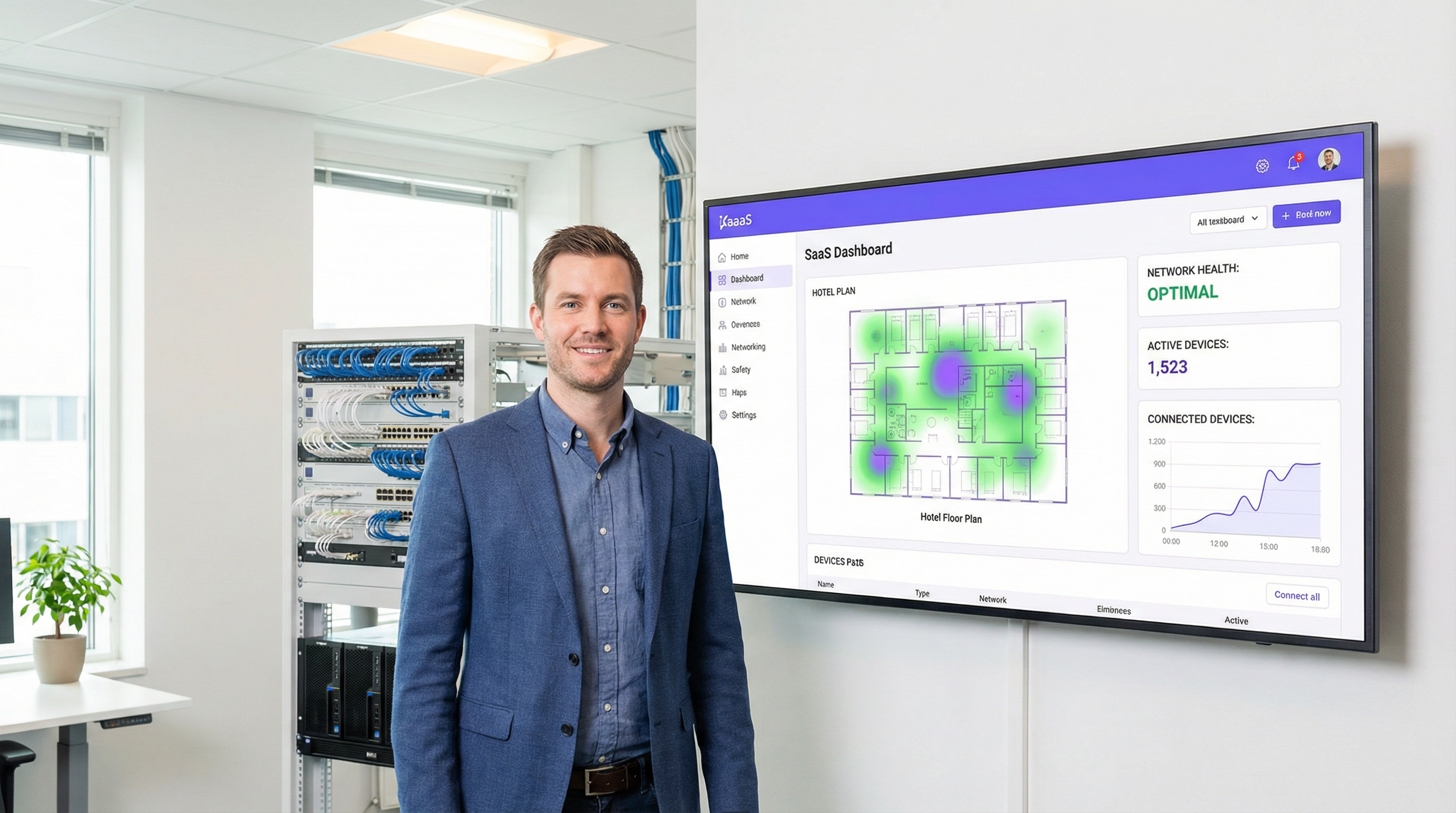
Um Wireless LAN Controller (WLC), ou controlador WiFi, é um componente de rede centralizado que gerencia múltiplos pontos de acesso (APs) a partir de uma única interface, garantindo a aplicação consistente de políticas, administração simplificada e segurança aprimorada em toda uma rede sem fio corporativa. Para gerentes de TI, arquitetos de rede e CTOs que supervisionam a conectividade em locais como hotéis, redes de varejo ou estádios, o controlador é o cérebro da operação. Ele automatiza funções críticas, como gerenciamento de radiofrequência (RF), roaming de clientes, autenticação e balanceamento de carga — funções que são simplesmente impossíveis de gerenciar em escala com APs independentes ou 'autônomos'.
A principal decisão que a liderança enfrenta hoje não é se deve usar um controlador, mas qual modelo de implantação adotar: um controlador de hardware local (on-premises) tradicional ou uma solução moderna baseada em nuvem. Os controladores locais oferecem controle granular e mantêm todo o processamento de dados local, um requisito fundamental para certas estruturas de conformidade, mas exigem despesas de capital (CapEx) significativas e conhecimento especializado no local. Por outro lado, o WiFi gerenciado na nuvem muda o gerenciamento para um serviço baseado em assinatura, oferecendo escalabilidade superior, provisionamento zero-touch para implantações em vários locais e redução de custos operacionais.
A Purple atua como uma poderosa camada de inteligência, integrando-se à infraestrutura de controladores existente de fornecedores como Cisco, Aruba e Ruckus para fornecer serviços avançados de WiFi para visitantes, análises e recursos de marketing sem alterar a estrutura principal da rede. Este guia fornece uma análise técnica aprofundada dessas arquiteturas para ajudar você a determinar a estratégia certa para sua organização.
Análise Técnica Aprofundada
Em sua essência, um controlador WiFi resolve o problema de escala. Um único ponto de acesso é simples de configurar, mas gerenciar dez, cem ou mil APs individualmente é insustentável. A arquitetura WLC centraliza esse gerenciamento, criando um sistema unificado e inteligente. Isso geralmente é alcançado usando o protocolo Control and Provisioning of Wireless Access Points (CAPWAP), um padrão IETF definido na RFC 5415. O CAPWAP cria um túnel seguro entre cada AP e o controlador, separando as funções de gerenciamento e controle (o 'plano de controle') do tráfego de dados do usuário final (o 'plano de dados').
As Principais Funções do Controlador abrangem todo o ciclo de vida do gerenciamento de redes sem fio. O Gerenciamento Centralizado de APs é a função mais fundamental: a partir do controlador, os administradores podem enviar atualizações de firmware, configurar SSIDs, definir políticas de segurança como WPA3-Enterprise e definir VLANs para todos os APs conectados simultaneamente. O Gerenciamento Dinâmico de RF permite que o controlador monitore continuamente o espectro de radiofrequência, ajustando automaticamente as atribuições de canais dos APs e os níveis de potência para mitigar interferências e otimizar a cobertura. O Roaming de Clientes Contínuo é facilitado pelo controlador, que gerencia as chaves de segurança e o estado da sessão à medida que os usuários se movem entre os APs, aproveitando os padrões 802.11k/v/r para transições rápidas. A Autenticação e Aplicação de Políticas permite que o WLC atue como um guardião central, integrando-se a um servidor RADIUS e ao IEEE 802.1X para conceder acesso à rede com base na identidade do usuário e na postura do dispositivo, permitindo um controle de acesso robusto baseado em funções.
Local (On-Premises) vs. Gerenciado na Nuvem: O Trade-Off Arquitetônico
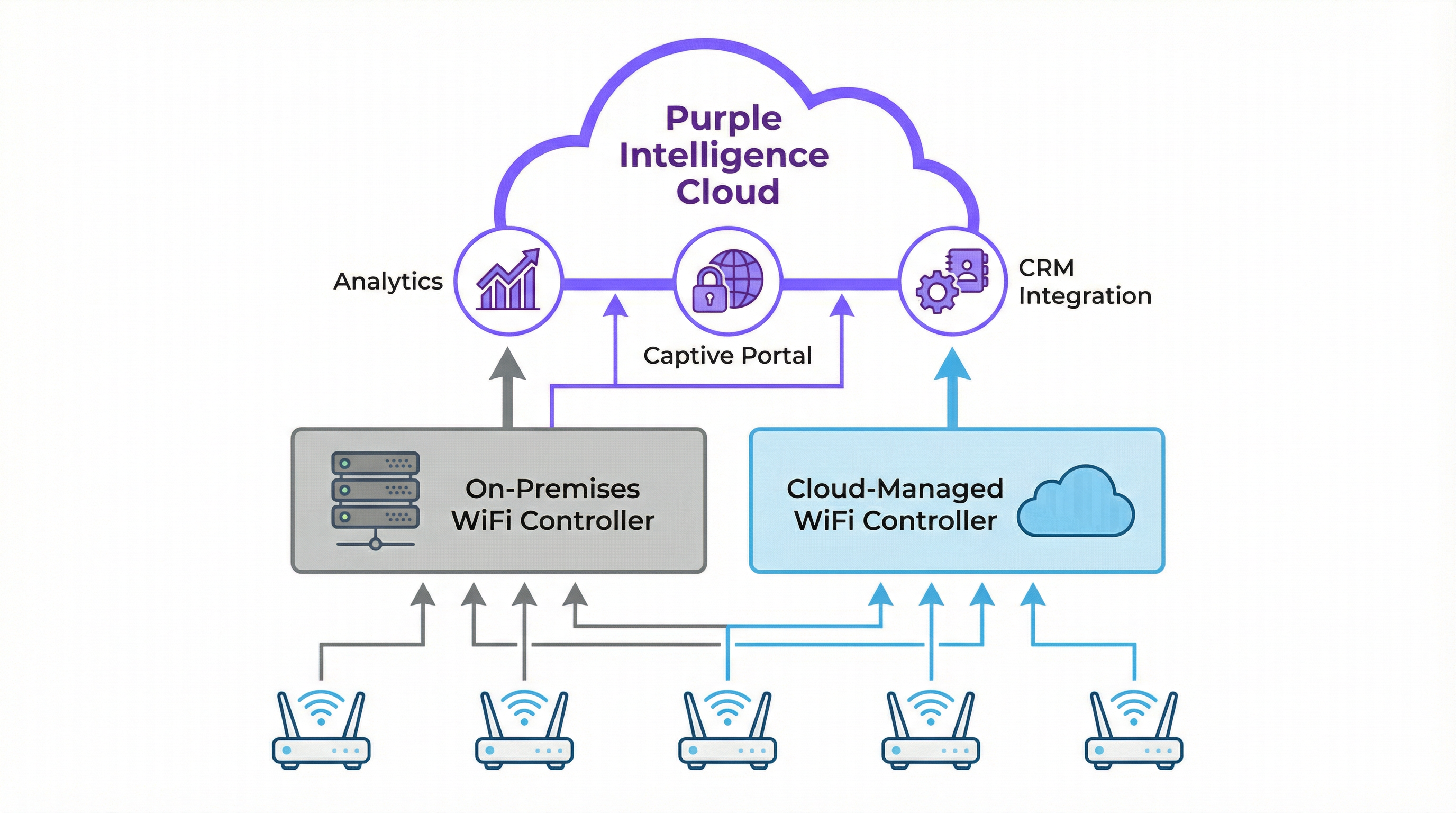
A escolha estratégica entre um WLC local e um gerenciado na nuvem tem implicações significativas para custos, escalabilidade e operações. A tabela abaixo resume os principais trade-offs.
| Recurso | Controlador Local | WiFi Gerenciado na Nuvem |
|---|---|---|
| Modelo de Implantação | Appliance físico ou virtual em um data center local | Plano de gerenciamento hospedado por um fornecedor terceirizado |
| Custo Inicial (CapEx) | Alto — appliances de hardware com limites de capacidade específicos | Baixo — nenhum hardware de controlador local necessário |
| Custo Operacional (OpEx) | Custos recorrentes mais baixos, mas inclui energia e manutenção | Custos recorrentes mais altos via licença de assinatura anual |
| Escalabilidade | Limitada pela capacidade do hardware; atualizações exigem novo hardware | Altamente elástica; novos APs e locais adicionados com um ajuste de licença |
| Gerenciamento Multi-Site | Complexo; frequentemente exige VPNs ou controladores dedicados por local | Simples; um único painel web fornece uma visão global unificada |
| Dependência de Internet | Baixa; o WiFi principal continua funcionando se a internet falhar | Alta; internet necessária para gerenciamento e configuração |
| Conformidade e Dados | Ideal para requisitos rigorosos de soberania de dados | Exige due diligence do fornecedor para conformidade com GDPR e PCI DSS |
Como a Purple se Integra ao seu Controlador
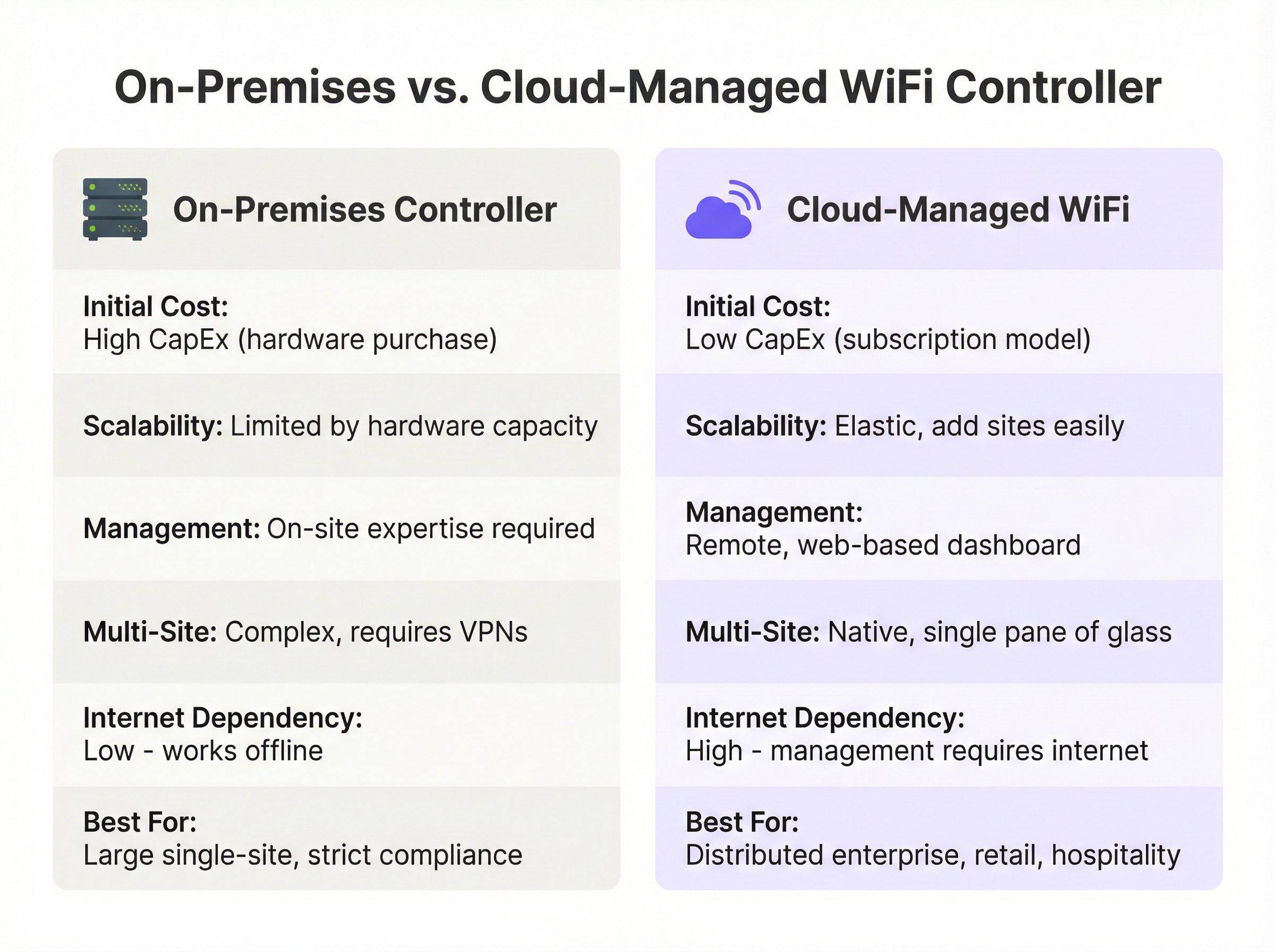
A Purple é uma plataforma de inteligência WiFi baseada em nuvem que funciona como uma camada sofisticada, aprimorando os recursos da sua infraestrutura de rede existente em vez de substituí-la. Ela se integra perfeitamente a arquiteturas de controladores locais e gerenciados na nuvem de mais de 200 fornecedores de hardware.
A integração segue uma sequência clara. Primeiro, o controlador WiFi é configurado para redirecionar todos os novos dispositivos de visitantes não autenticados para o Captive Portal da Purple. O usuário então se autentica por meio de uma splash page personalizada, usando logins sociais, envio de formulário ou perfis contínuos Passpoint/OpenRoaming — um processo totalmente em conformidade com o GDPR e a CCPA. Após a autenticação bem-sucedida, a Purple captura dados demográficos e comportamentais valiosos (opt-in), que alimentam o mecanismo de análise e podem ser integrados ao seu CRM. Por fim, a Purple sinaliza ao controlador para conceder acesso à internet ao dispositivo, aplicando quaisquer políticas predefinidas, como limites de largura de banda, duração da sessão ou filtragem de conteúdo por meio do Purple Shield.
Esse modelo permite que as organizações retenham seu investimento em hardware robusto de nível corporativo enquanto adicionam análises poderosas e ferramentas de engajamento de visitantes que impulsionam o valor dos negócios.
Guia de Implantação
Implantar ou atualizar a arquitetura do seu controlador WiFi exige uma abordagem estruturada. Este guia neutro em relação a fornecedores descreve as principais fases para uma implantação bem-sucedida.
Fase 1: Descoberta e Levantamento de Requisitos. Realize uma pesquisa de RF física ou preditiva para determinar o número ideal e o posicionamento dos pontos de acesso, levando em consideração os materiais de construção, a densidade de usuários e os requisitos de taxa de transferência de aplicativos. Documente os principais casos de uso — acesso de visitantes, equipe interna, sistemas de ponto de venda, dispositivos IoT — pois eles ditarão as políticas de segmentação e segurança. Catalogue sua infraestrutura de rede atual e identifique todos os requisitos regulatórios, incluindo PCI DSS para o varejo e GDPR para o tratamento de dados de cidadãos da UE.
Fase 2: Seleção de Arquitetura. Use a tabela de comparação e o diagrama de fluxo de decisão neste guia para escolher entre soluções locais e gerenciadas na nuvem. Para a maioria das empresas com vários locais no varejo, hospitalidade e setores semelhantes, a eficiência operacional e a escalabilidade de uma arquitetura gerenciada na nuvem apresentam um caso de negócios atraente.
Fase 3: Implantação e Configuração. Configure VLANs separadas para cada grupo de usuários (Visitantes, Equipe, Corporativo, IoT) — esta é uma medida de segurança crítica. Para sistemas gerenciados na nuvem, pré-registre os APs no painel para habilitar o provisionamento zero-touch. Implemente o WPA3-Enterprise com IEEE 802.1X para todas as redes seguras. Para a rede de visitantes, configure um SSID aberto com isolamento de cliente ativado, forçando todo o tráfego através do Captive Portal da Purple. Configure a URL do Captive Portal da Purple como a fonte de autenticação externa nas configurações do seu controlador e adicione os endereços IP necessários às suas listas de controle de acesso de pré-autenticação.
Fase 4: Teste e Validação. Realize uma pesquisa de RF pós-implantação para verificar a cobertura. Teste o processo de integração (onboarding) para cada grupo de usuários. Execute testes de taxa de transferência usando ferramentas como iPerf para garantir que a rede atenda aos benchmarks de desempenho.
Melhores Práticas
Priorizar a segurança por meio da segmentação de rede é inegociável. O tráfego de visitantes nunca deve compartilhar uma VLAN com o tráfego corporativo ou compatível com PCI. Habilitar o isolamento de clientes em redes de visitantes é um recurso crítico do WLC que impede que clientes sem fio se comuniquem entre si, mitigando os riscos de ataques peer-to-peer. Centralizar a autenticação com um servidor RADIUS em conjunto com o WLC fornece um banco de dados único e auditável de usuários e políticas. Atualizações regulares de firmware tanto para o controlador quanto para os APs são essenciais, pois são ativos de segurança críticos. Soluções gerenciadas na nuvem geralmente automatizam esse processo, o que é uma vantagem operacional significativa. Por fim, o monitoramento contínuo por meio do painel do controlador e das análises da Purple permite que as equipes de TI identifiquem proativamente problemas de desempenho, APs invasores (rogue APs) e anomalias de segurança antes que afetem os usuários.
Solução de Problemas e Mitigação de Riscos
Quando os clientes não conseguem se conectar, o primeiro passo de diagnóstico é verificar o controlador em busca de erros de autenticação: verifique se o servidor RADIUS está acessível, se as credenciais do cliente estão corretas e se os endereços IP do portal da Purple estão corretamente na lista de permissões (whitelisted) nas ACLs de pré-autenticação do controlador. O baixo desempenho sem fio geralmente aponta para interferência de RF ou canais sobrecarregados, que podem ser diagnosticados por meio do painel de gerenciamento de RF do controlador. Áreas de alta densidade podem exigir APs adicionais ou uma reavaliação das atribuições de canais.
Para implantações locais, o principal risco é a falha de hardware do controlador. Isso é mitigado implantando controladores em um par de alta disponibilidade (HA) — uma configuração ativo/standby — e mantendo backups regulares da configuração do controlador. Para redes gerenciadas na nuvem, o risco é a perda de conectividade com a internet. Os APs devem ser configurados para continuar fornecendo acesso à rede local durante interrupções, e os serviços operacionais críticos não devem depender do link de gerenciamento na nuvem.
ROI e Impacto nos Negócios
Uma rede sem fio adequadamente arquitetada não é um centro de custos; é um facilitador de negócios. O ROI vai muito além de fornecer uma simples conexão à internet. O gerenciamento centralizado reduz drasticamente a sobrecarga de TI, conforme demonstrado pelo McDonald's, onde as análises e os recursos de gerenciamento remoto da Purple levaram a uma redução de 90% nas visitas de engenheiros de TI aos locais, com 4 milhões de logins WiFi por restaurante por ano e 2,5 milhões de usuários únicos capturados no CRM.
Um WiFi rápido, confiável e de fácil acesso é agora uma expectativa básica em hospitalidade e varejo. Uma experiência contínua, facilitada pelo roaming gerenciado pelo controlador e pela integração simples por meio do portal da Purple, impacta diretamente a satisfação e a fidelidade do cliente. Ao integrar a Purple, a rede WiFi se transforma em uma rica fonte de dados primários (first-party data), permitindo que os operadores dos locais meçam o fluxo de pessoas, os tempos de permanência e a frequência dos visitantes. Esses dados fornecem um ROI tangível, com os clientes da Purple obtendo um ROI médio de 873%. Para locais como centros de conferências ou hotéis, o acesso WiFi premium em níveis também pode se tornar um fluxo de receita direto, facilmente gerenciado e automatizado por meio do controlador e da plataforma Purple.
Key Terms & Definitions
Wireless LAN Controller (WLC)
A centralized network appliance or cloud service that configures, manages, and monitors wireless access points at scale, handling functions such as RF management, roaming, authentication, and security policy enforcement.
This is the core component for any enterprise-grade WiFi deployment. IT teams use the WLC to avoid having to configure hundreds of APs individually and to ensure a consistent, secure experience across the entire network.
Access Point (AP)
A hardware device that creates a wireless local area network (WLAN) by transmitting and receiving radio signals. In a controller-based architecture, APs are 'lightweight' devices whose intelligence is provided by the central WLC.
These are the physical devices installed in ceilings and walls throughout a venue. In enterprise settings, they are often referred to as 'thin' or 'lightweight' APs because the controller provides their configuration and management logic.
Cloud-Managed WiFi
An architecture where the WLC functionality is hosted in the cloud as a subscription service, allowing for centralized management of geographically distributed APs via a web-based dashboard without any on-site controller hardware.
This is the dominant model for retail, hospitality, and distributed enterprises due to its scalability and operational simplicity. Purple is a cloud-native platform that integrates perfectly with this model.
CAPWAP (Control and Provisioning of Wireless Access Points)
An IETF standard protocol (RFC 5415) that enables a WLC to manage a collection of access points by establishing a secure, encrypted tunnel for control traffic and, optionally, data traffic.
This is the technical underpinning of how controllers and APs communicate. Understanding CAPWAP is essential for troubleshooting connectivity issues between the controller and its managed APs, particularly in complex network topologies.
IEEE 802.1X
An IEEE standard for port-based Network Access Control (PNAC) that provides an authentication framework requiring devices to present valid credentials before being granted access to a LAN or WLAN.
This is the gold standard for securing corporate wireless networks. It requires users to authenticate with unique credentials before being granted access, managed by the WLC in conjunction with a RADIUS server. It is a key requirement for PCI DSS and ISO 27001 compliance.
Captive Portal
A web page displayed to newly connected users of a WiFi network before they are granted broader internet access, typically used for authentication, terms-of-service acceptance, or data capture.
This is Purple's core entry point for guest users. The WLC is configured to redirect all unauthenticated guest devices to the Purple captive portal, which then handles the entire user onboarding journey, from authentication to data capture.
Network Segmentation
The practice of dividing a computer network into distinct subnetworks (VLANs) to improve security, performance, and compliance by preventing unauthorized traffic between segments.
This is a non-negotiable best practice enforced via the WLC. Separating guest traffic from corporate and POS systems is a fundamental security requirement and a compliance obligation under PCI DSS for any organization processing card payments.
PCI DSS (Payment Card Industry Data Security Standard)
A set of security standards mandating that all companies that accept, process, store, or transmit credit card information maintain a secure environment, including strict network segmentation requirements.
For any retail or hospitality client, the WLC and network architecture must be configured to meet PCI DSS requirements. Failure to comply can result in significant fines and the revocation of the ability to process card payments.
Case Studies
A 250-room luxury hotel needs to upgrade its legacy WiFi network to provide seamless, high-performance coverage for guests and staff while enabling marketing to capture guest data for loyalty programs. The hotel has a central server room and a dedicated IT team.
1. Architecture Choice: A hybrid approach is recommended. Deploy on-premises controllers in a high-availability (HA) pair to manage all on-site access points. This ensures maximum performance and resilience for in-room streaming and staff operational systems. 2. Network Segmentation: Create distinct VLANs and SSIDs: 'HotelGuest' (open, with captive portal), 'Staff_Secure' (WPA3-Enterprise with 802.1X), and 'POS_Systems' (WPA3-Enterprise, highly restricted, firewalled from guest VLAN). 3. Purple Integration: Configure the controllers to redirect the 'HotelGuest' SSID to the Purple cloud-based captive portal. The portal handles guest authentication via room number and last name, or social login, and captures opt-in marketing consent. 4. Policy Enforcement: The controller enforces a bandwidth limit of 25 Mbps per guest device, while the Purple platform manages session duration and feeds data directly into the hotel's Salesforce CRM, enabling targeted loyalty campaigns.
A retail chain with 80 stores across the country wants to standardize its in-store guest WiFi experience, centrally manage all networks, and use WiFi analytics to understand customer footfall patterns. Each store has limited on-site technical staff.
1. Architecture Choice: A fully cloud-managed WiFi solution is the clear choice. Equip each store with cloud-managed access points from a single vendor. There is no need for an on-premises controller in any store. 2. Zero-Touch Provisioning: APs are pre-configured in the central cloud dashboard and shipped to each store. The local store manager simply plugs them in — the AP automatically downloads its configuration. 3. Centralized Management: From corporate headquarters, the IT team uses a single web dashboard to monitor all 80 stores, push configuration updates, and manage security policies simultaneously. 4. Purple Integration: The cloud controller is configured globally to use Purple for guest authentication across all stores, ensuring a consistent branded experience. Purple's analytics dashboard provides footfall, dwell time, and loyalty metrics for every store, enabling direct comparison of performance across the estate.
Scenario Analysis
Q1. A large conference center is preparing for a major tech summit expecting 10,000 concurrent users, all requiring high-throughput video streaming. They have a large, expert IT team on-site and a dedicated server room. Which controller architecture should they primarily rely on and why?
💡 Hint:Consider the requirements for latency, throughput, and the value of on-site expertise in a single-location, high-density scenario.
Show Recommended Approach
They should deploy a high-capacity, on-premises controller cluster in a high-availability (active/standby) configuration. For a high-density, single-site event, minimizing latency and maximizing throughput is critical. Routing all traffic through a powerful on-site controller avoids the latency of cloud-based data paths and provides the advanced RF management needed to handle 10,000 concurrent users. The presence of an expert on-site IT team mitigates the management overhead of an on-premises solution. Purple would be integrated as an overlay for guest authentication and analytics.
Q2. A fast-growing coffee shop chain plans to expand from 10 to 50 locations in the next year. They want to offer a consistent, branded guest WiFi experience at all stores and use the data for marketing campaigns. Their corporate IT team consists of just two people. What is the single most critical feature they should look for in a WiFi solution?
💡 Hint:Think about the operational challenge of deploying and managing 50 separate locations with a two-person IT team.
Show Recommended Approach
The most critical feature is zero-touch provisioning via a cloud-based management dashboard. This will allow their small IT team to pre-configure access points in the cloud dashboard and ship them to new stores. The local store manager simply plugs in the AP, and it automatically downloads its configuration — no specialist IT visit required. A cloud architecture is essential for them to scale rapidly and manage all 50 locations from a single interface, ensuring a consistent guest experience and centralized data collection via Purple.
Q3. A hospital needs to provide guest WiFi for patients and visitors while ensuring that patient health records, stored on a separate internal clinical network, remain completely isolated and secure. How should the IT team use a WLC to achieve this, and what specific configuration steps are required?
💡 Hint:Focus on the security and traffic separation capabilities of the WLC, and consider both the technical and compliance dimensions.
Show Recommended Approach
The IT team must use the WLC to implement strict network segmentation. The specific steps are: (1) Create a dedicated 'Guest' SSID on a separate VLAN (e.g., VLAN 100) that is completely firewalled from all internal clinical VLANs. (2) Configure an Access Control List (ACL) on the controller that explicitly denies any traffic originating from VLAN 100 from reaching the internal network segments. (3) Enable 'client isolation' on the guest SSID to prevent guest devices from communicating with each other. (4) Configure the guest SSID to redirect unauthenticated clients to the Purple captive portal for terms-of-service acceptance. This architecture ensures compliance with healthcare data regulations and protects patient data from both external and internal threats.
Key Takeaways
- ✓A WiFi Controller (WLC) centralizes the management of multiple access points, providing the consistency, security, and scalability that enterprise wireless networks demand.
- ✓The primary architectural choice is between on-premises controllers (high control, high CapEx, ideal for single-site or strict compliance environments) and cloud-managed controllers (high scalability, subscription-based, ideal for distributed enterprises).
- ✓Cloud-managed WiFi is the dominant choice for distributed enterprises in retail and hospitality due to zero-touch provisioning, single-pane-of-glass management, and elastic scalability.
- ✓Purple is a cloud-based intelligence platform that acts as an overlay on existing WiFi infrastructure — it does not replace the controller, but enhances it with guest authentication, analytics, and CRM integration.
- ✓Security is non-negotiable: use the WLC to enforce network segmentation (separate VLANs for guests, staff, and POS), enable client isolation on guest networks, and implement WPA3-Enterprise with IEEE 802.1X for secure access.
- ✓The ROI of a modern WiFi architecture is driven by operational efficiency, enhanced customer experience, and the business intelligence derived from WiFi analytics — Purple customers see an average ROI of 873%.
- ✓The core framework: your controller manages the APs; a platform like Purple manages the users — turning connectivity from a cost centre into a source of measurable business value.




