

WiFi Hotspot 2.0 (Passpoint): O Guia Definitivo para um Roaming WiFi Contínuo e Seguro
This guide provides a comprehensive technical overview of WiFi Hotspot 2.0 (Passpoint) for IT leaders. It details the technology, security benefits, and a step-by-step implementation framework for deploying seamless, secure WiFi roaming in enterprise environments like hotels, retail, and large venues, ultimately improving user experience and reducing operational overhead.
🎧 Listen to this Guide
View Transcript

Resumo Executivo
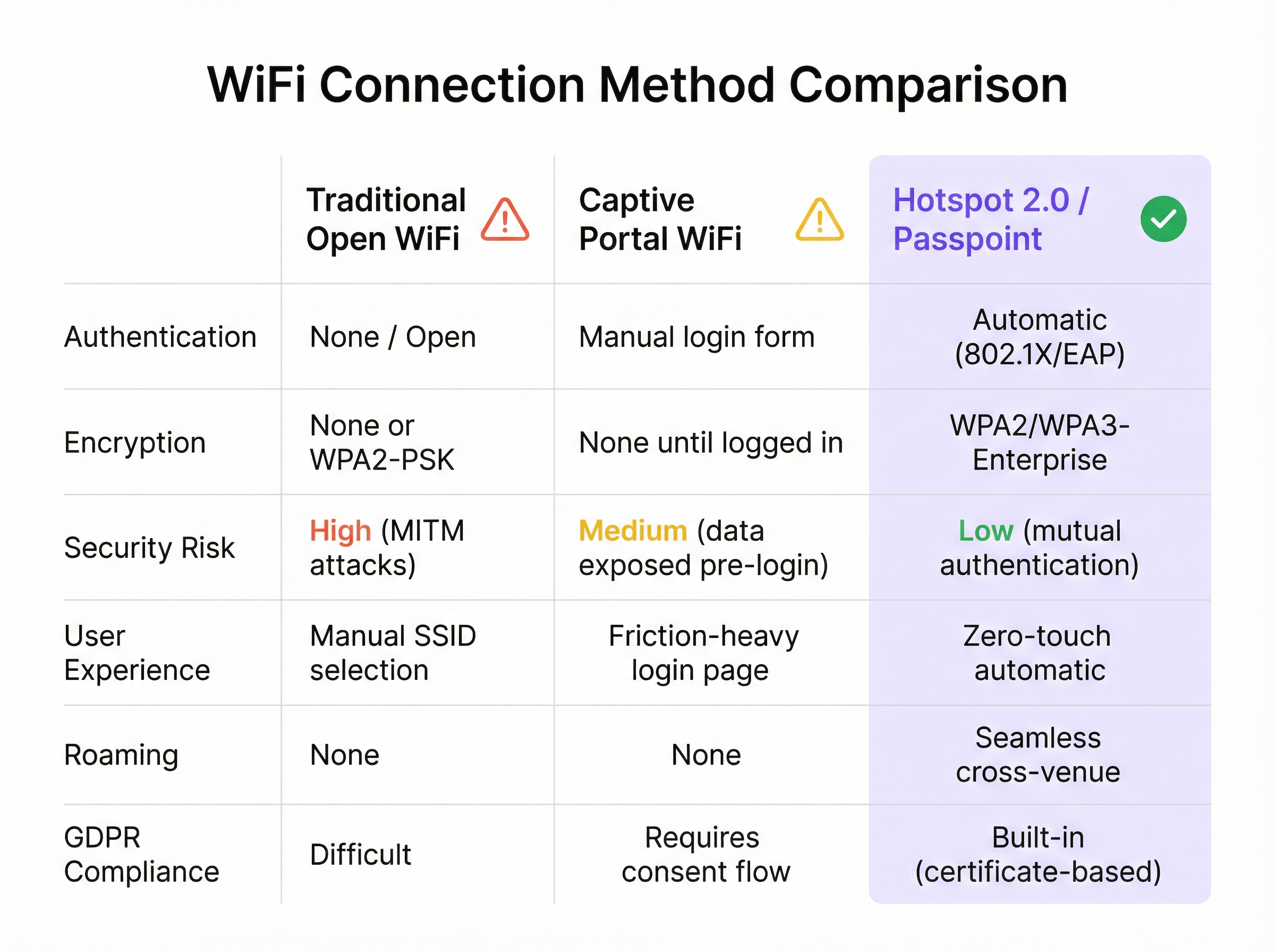
Para a empresa moderna, oferecer uma experiência WiFi contínua e segura não é mais um luxo — é um requisito operacional essencial. O WiFi Hotspot 2.0, também conhecido como Passpoint, é um framework padrão do setor projetado para eliminar o atrito e os riscos de segurança associados ao WiFi público e de convidados tradicional. Ele permite que dispositivos móveis descubram e se autentiquem automaticamente em redes WiFi com segurança WPA3 de nível corporativo, espelhando a experiência de roaming contínuo das redes celulares. Para um CTO ou Diretor de TI, isso se traduz em uma redução significativa nos problemas de conexão enfrentados pelos usuários, uma postura de segurança reforçada contra ataques WiFi comuns e um processo de autenticação simplificado que é compatível com a GDPR e imune aos desafios da randomização de endereços MAC. Ao substituir Captive Portals inseguros e de alto atrito por autenticação baseada em credenciais e zero-touch, o Passpoint aumenta a satisfação dos convidados, reduz a sobrecarga de suporte de TI e fornece uma base escalável para roaming entre locais e estratégias de descarregamento de dados (data offload). Este guia fornece os detalhes técnicos e o framework de implantação necessários para integrar o Passpoint à sua infraestrutura de rede, impulsionando melhorias tangíveis tanto na segurança quanto na experiência do usuário.
Análise Técnica Aprofundada
O Hotspot 2.0 e sua certificação subjacente, o Passpoint, representam uma mudança arquitetônica fundamental na forma como as redes WiFi são descobertas e acessadas. A tecnologia é baseada na emenda IEEE 802.11u, que permite a comunicação pré-associação entre um dispositivo cliente e um ponto de acesso. Isso permite que um dispositivo colete informações críticas sobre uma rede antes de se comprometer com uma conexão, passando de um modelo legado de reconhecimento de SSID para um modelo mais inteligente de reconhecimento de credenciais.
Protocolos Principais: ANQP, GAS e 802.11u
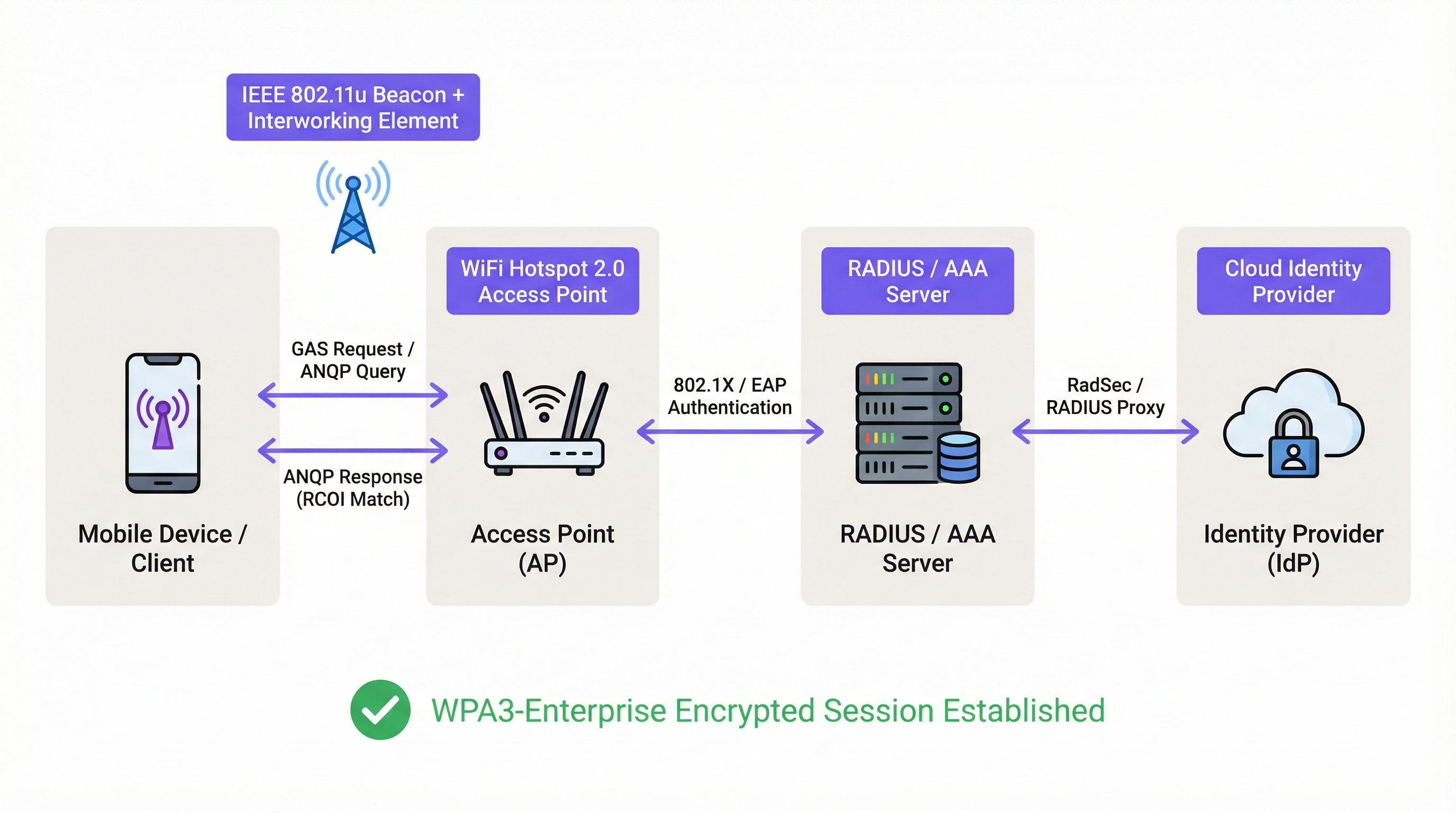
O principal mecanismo que permite esse diálogo pré-associação é uma combinação do Generic Advertisement Service (GAS) e do Access Network Query Protocol (ANQP). Veja como eles interagem:
- Sinalização IEEE 802.11u (Beaconing): Um Ponto de Acesso (AP) habilitado para Passpoint inclui um Elemento de Interfuncionamento (IE) em seus quadros de beacon. Isso atua como um sinalizador, anunciando aos dispositivos próximos que ele suporta descoberta avançada de rede.
- Troca de GAS e ANQP: Um dispositivo cliente que detecta esse IE pode iniciar uma consulta GAS ao AP. Dentro dessa consulta, ele usa o ANQP para fazer perguntas específicas sobre a identidade e os recursos da rede. A consulta mais crítica é para os Identificadores Organizacionais do Consórcio de Roaming (RCOIs) suportados pela rede.
- Correspondência de Credenciais: O AP responde com sua lista de RCOIs suportados. Se algum deles corresponder a um perfil de credencial armazenado no dispositivo cliente (por exemplo, um perfil de uma operadora de celular, uma marca de hotel ou uma rede corporativa), o dispositivo saberá que pode se autenticar e passará para a próxima etapa. Se nenhuma correspondência for encontrada, o dispositivo simplesmente ignorará a rede, tudo sem nenhuma interação do usuário.
Framework de Autenticação e Segurança
Uma vez confirmada a correspondência de credenciais, o Passpoint aproveita a segurança robusta do IEEE 802.1X para autenticação, normalmente com criptografia WPA2-Enterprise ou a mais segura WPA3-Enterprise. Este é o mesmo padrão de controle de acesso à rede baseado em porta confiável em redes corporativas com fio seguras. A autenticação é tratada por meio de um método Extensible Authentication Protocol (EAP), como:
- EAP-TLS: Autenticação baseada em certificado, considerada o padrão ouro em segurança. Tanto o cliente quanto o servidor apresentam certificados para provar sua identidade.
- EAP-TTLS/PEAP: Encapsula um método de autenticação legado (como nome de usuário/senha) dentro de um túnel TLS seguro.
- EAP-SIM/AKA/AKA': Autenticação baseada em SIM, permitindo que as operadoras de redes móveis façam o roaming contínuo de seus assinantes em redes WiFi confiáveis.
Esse processo garante a autenticação mútua: o cliente valida que a rede é legítima (evitando ataques de AP 'Evil Twin') e a rede valida que o cliente está autorizado. Todo o tráfego subsequente é criptografado, mitigando o risco de ataques man-in-the-middle (MITM) comuns em redes abertas ou baseadas em PSK.
Passpoint vs. OpenRoaming
É crucial distinguir entre Passpoint e OpenRoaming:
O Passpoint é o veículo; o OpenRoaming é o sistema de rodovias.
- Passpoint é o padrão técnico (802.11u, ANQP/GAS, 802.1X) que permite que um dispositivo descubra e se autentique automaticamente em uma única rede ou em um grupo de redes sob o mesmo controle administrativo.
- WBA OpenRoaming é um framework de federação global gerenciado pela Wireless Broadband Alliance. Ele cria um ecossistema de confiança entre milhares de Provedores de Identidade (IdPs), como operadoras de celular, e Provedores de Rede de Acesso (ANPs), como hotéis, aeroportos e redes de varejo. Isso permite que um usuário com uma credencial de qualquer IdP membro se conecte automaticamente em qualquer local de ANP membro, sem exigir acordos bilaterais complexos de roaming.
Para máxima compatibilidade em um ambiente OpenRoaming, os arquitetos de rede devem transmitir tanto o RCOI padrão sem liquidação (5A-03-BA) quanto o RCOI legado da Cisco (00-40-96).
Guia de Implantação
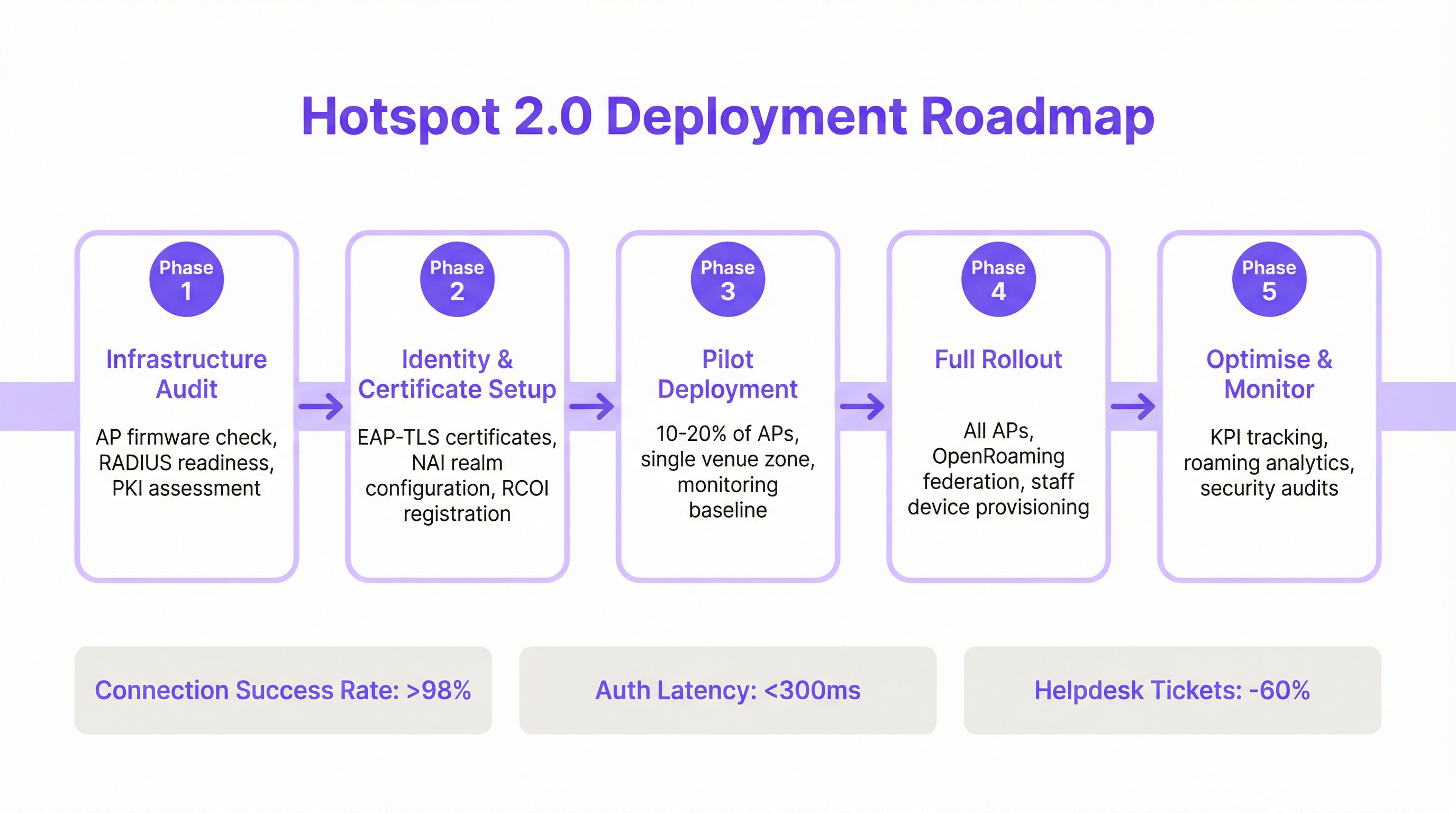
A implantação do Passpoint é um processo estruturado que vai desde a auditoria da sua infraestrutura existente até um lançamento em fases e otimização. Seguir este roteiro garantirá uma transição suave e mitigará as armadilhas comuns de implantação.
Fase 1: Auditoria de Infraestrutura
Antes de começar, avalie o hardware e o software atuais da sua rede. Os principais pontos de auditoria incluem:
- Compatibilidade do Ponto de Acesso: Verifique se seus APs suportam IEEE 802.11u. A maioria dos APs de nível corporativo fabricados após 2015 (de fornecedores como Cisco, HPE Aruba, Juniper Mist, Ruckus) possui o hardware necessário, mas pode exigir uma atualização de firmware.
- Prontidão do Servidor RADIUS: Você precisará de um servidor RADIUS (ou AAA) capaz de lidar com a autenticação 802.1X EAP. Pode ser uma solução local como o Cisco ISE ou um serviço baseado em nuvem como SecureW2, Foxpass ou Google Cloud Identity.
- Avaliação de PKI: Para implantações EAP-TLS, é necessária uma Infraestrutura de Chave Pública (PKI) para emitir e gerenciar certificados digitais para dispositivos clientes e servidores.
Fase 2: Configuração de Identidade e Certificado
Esta fase envolve a configuração dos principais componentes de autenticação:
- Configuração de Realm NAI: Defina seus realms de Network Access Identifier (NAI), que identificam seu domínio de autenticação (por exemplo,
@suaempresa.com.br). - Registro de RCOI: Se estiver participando de um consórcio de roaming como o OpenRoaming, registre seus RCOIs na WBA.
- Geração de Certificados: Para EAP-TLS, gere e implante certificados de cliente em seus dispositivos gerenciados por meio de uma solução de Mobile Device Management (MDM). Para acesso de convidados, você precisará de um mecanismo para provisionar um perfil com a cadeia de confiança de certificados necessária.
Fase 3: Implantação Piloto
Comece com um piloto controlado em uma área limitada, como um único andar ou uma zona específica do local, cobrindo de 10 a 20% dos seus APs. Os objetivos do piloto são:
- Estabelecer uma Linha de Base: Meça as taxas atuais de sucesso de conexão, a latência de autenticação e o volume de chamados de helpdesk relacionados ao WiFi.
- Testar a Matriz de Dispositivos: Teste a experiência de integração e conexão em uma ampla variedade de dispositivos (iOS, vários fabricantes Android como Samsung e Google Pixel, Windows, macOS).
- Refinar a Integração (Onboarding): Ajuste o processo para obter o perfil Passpoint em dispositivos de convidados não gerenciados.
Fase 4: Lançamento Completo
Assim que o piloto atingir seus critérios de sucesso (por exemplo, >98% de sucesso de conexão, latência de autenticação <300ms), prossiga com um lançamento completo em todos os APs e locais. Esta fase inclui:
- Configuração Completa de AP: Envie a configuração WLAN padronizada do Passpoint para todos os pontos de acesso.
- Provisionamento de Dispositivos Corporativos e de Equipe: Certifique-se de que todos os dispositivos de propriedade da empresa sejam provisionados com o perfil Passpoint via MDM.
- Habilitar Federação OpenRoaming: Se aplicável, habilite as regras de proxy RADIUS para participar da federação OpenRoaming.
Fase 5: Otimizar e Monitorar
Pós-lançamento, monitore continuamente o desempenho e a segurança da rede:
- Acompanhamento de KPIs: Acompanhe os principais indicadores de desempenho, comparando-os com a linha de base do piloto. As principais métricas incluem taxa de sucesso de conexão, latência de autenticação, sucesso de roaming e taxa de transferência de dados (throughput).
- Análise de Roaming: Use análises para entender os padrões de roaming entre seus locais e com parceiros de roaming.
- Auditorias de Segurança: Conduza auditorias de segurança regulares para garantir a integridade da sua infraestrutura RADIUS e PKI.
Melhores Práticas
Para maximizar o sucesso e a segurança da sua implantação do Passpoint, siga as seguintes melhores práticas padrão do setor.
| Categoria | Melhor Prática | Justificativa |
|---|---|---|
| Segurança | Exigir WPA3-Enterprise | O WPA3 oferece o mais alto nível de segurança, com força criptográfica de 192 bits e Protected Management Frames (PMF) para evitar ataques de desautenticação. |
| Segurança | Usar EAP-TLS para Dispositivos Corporativos | A autenticação baseada em certificado é mais segura do que os métodos baseados em senha e é imune a phishing e roubo de credenciais. |
| Compatibilidade | Transmitir Múltiplos RCOIs | Para garantir amplo suporte a dispositivos, transmita tanto o RCOI moderno do OpenRoaming (5A-03-BA) quanto o RCOI legado da Cisco (00-40-96). |
| Experiência do Usuário | Simplificar a Integração de Perfil | A integração inicial é o único ponto de atrito. Use um Captive Portal simples e de uso único ou um aplicativo leve para tornar a instalação do perfil o mais fácil possível. |
| Design de Rede | Segmentar Dispositivos IoT | A maioria dos dispositivos IoT não suporta 802.1X. Eles devem ser segmentados em um SSID separado e devidamente seguro (por exemplo, usando MPSK ou autenticação MAC) e não misturados com o tráfego do Passpoint. |
| Operações | Integrar com Análises | Para manter a visibilidade do comportamento dos convidados na ausência de um Captive Portal, integre seus logs de autenticação do Passpoint a uma plataforma de análise de WiFi como a Purple. |
Solução de Problemas e Mitigação de Riscos
Mesmo implantações bem planejadas podem encontrar problemas. Aqui estão os modos de falha comuns e como mitigá-los.
| Sintoma | Causa Potencial | Estratégia de Mitigação |
|---|---|---|
| Dispositivos não tentam se conectar | Incompatibilidade ou Falta de RCOI | Verifique se seus APs estão transmitindo os RCOIs corretos, incluindo o OI legado 00-40-96. Use uma ferramenta de análise de WiFi para inspecionar os quadros de beacon. |
| Falhas de autenticação (EAP) | Configuração Incorreta do Servidor RADIUS / Problemas de Certificado | Verifique os logs do RADIUS para obter códigos de erro detalhados. Certifique-se de que os certificados do cliente sejam válidos e que o servidor confie na CA emissora do cliente. Verifique se o certificado do servidor é válido e confiável para os clientes. |
| Alta latência de autenticação | Resposta Lenta do RADIUS / Problemas de Caminho de Rede | Garanta baixa latência entre os APs e o servidor RADIUS. Se estiver usando um RADIUS em nuvem, verifique se há congestionamento de rede ou problemas de roteamento. Tenha como meta um tempo de resposta inferior a 300ms. |
| Comportamento inconsistente no Android | Implementação ANQP/GAS Específica do OEM | Teste exaustivamente em uma variedade de dispositivos Android durante a fase piloto. Algumas compilações Android mais antigas ou menos comuns podem ter implementações 802.11u com bugs. |
| Falhas de roaming entre locais | Configuração WLAN Inconsistente | Certifique-se de que o perfil WLAN do Passpoint (SSID, configurações de segurança, RCOIs) seja absolutamente idêntico em todos os locais destinados ao roaming contínuo. |
ROI e Impacto nos Negócios
Embora o Passpoint seja uma solução técnica, seu impacto é medido em resultados de negócios. O retorno sobre o investimento é impulsionado por melhorias na eficiência operacional, na experiência do usuário e na postura de segurança.
Análise de Custo-Benefício
Custos de Investimento:
- Hardware: Possíveis atualizações de AP se o hardware existente não for compatível com 802.11u.
- Software/Licenciamento: Custos para licenças de servidor RADIUS (por exemplo, Cisco ISE) ou serviços AAA em nuvem.
- Taxas de Federação: Taxas anuais de associação para participar do WBA OpenRoaming.
- Implantação: Serviços profissionais ou tempo da equipe interna para configuração, testes e lançamento.
Retornos e Benefícios Esperados:
- Redução da Sobrecarga de TI: Uma redução significativa nos chamados de helpdesk relacionados ao WiFi. Um resultado comum é uma diminuição de 40 a 60% nos chamados relacionados a problemas de conectividade WiFi.
- Aumento da Satisfação dos Convidados: A remoção do atrito de login leva a Net Promoter Scores (NPS) mais altos e melhores avaliações, particularmente no setor de hospitalidade.
- Segurança e Conformidade Aprimoradas: Mitiga o risco de violações de dados decorrentes de ataques baseados em WiFi, apoiando a conformidade com PCI DSS e GDPR e reduzindo possíveis penalidades financeiras.
- Melhoria no Descarregamento de Dados (Data Offload): Para operadoras de celular e seus parceiros de local, o Passpoint permite o descarregamento automático e seguro de dados de celular para o WiFi, reduzindo a sobrecarga na rede celular.
- Aumento do Engajamento: Uma conexão contínua incentiva os usuários a permanecerem no local por mais tempo e a se envolverem mais com os serviços digitais, impulsionando a receita em ambientes de varejo e hospitalidade.
Ao medir KPIs como volume de chamados de helpdesk, pontuações de satisfação dos convidados e taxas de sucesso de conexão antes e depois da implantação, as equipes de TI podem construir um business case convincente demonstrando um ROI claro e mensurável.
Key Terms & Definitions
IEEE 802.11u
An amendment to the IEEE 802.11 standard that enables 'interworking with external networks'. It allows client devices to exchange information with an access point before establishing a connection.
This is the foundational protocol that makes Hotspot 2.0 possible. When an IT team sees that an AP is '802.11u capable', it means it can support the discovery mechanisms required for Passpoint.
ANQP (Access Network Query Protocol)
The specific protocol used by a client device to query an access point about its capabilities, such as roaming partners, venue type, and authentication methods.
Network architects will configure ANQP elements on their wireless controllers to advertise network services. Troubleshooting often involves analyzing ANQP frames to see what information the AP is providing to clients.
GAS (Generic Advertisement Service)
The transport mechanism defined in 802.11u that carries ANQP frames between the client and the access point before an association is formed.
GAS and ANQP work together. GAS is the 'envelope' and ANQP is the 'letter' inside. When troubleshooting, packet captures will show GAS frames containing the ANQP queries and responses.
RCOI (Roaming Consortium Organizational Identifier)
A unique identifier that represents a group of network providers who have a roaming agreement. It's the primary piece of information a device looks for to decide if it can automatically connect.
This is a critical configuration item. An IT manager must ensure their APs are broadcasting the correct RCOIs for their own organization and any roaming partners like OpenRoaming. A missing or incorrect RCOI is a common cause of connection failures.
WPA3-Enterprise
The highest level of WiFi security, which uses 192-bit encryption and requires 802.1X authentication. It provides robust protection against eavesdropping and other sophisticated attacks.
For any organization concerned with security and compliance (PCI DSS, GDPR), deploying WPA3-Enterprise is a non-negotiable best practice. Passpoint is the most user-friendly way to implement it at scale.
EAP-TLS (Extensible Authentication Protocol-Transport Layer Security)
An EAP method that uses client-side and server-side digital certificates for mutual authentication. It is considered the most secure EAP method.
This is the recommended method for securing corporate-owned devices. IT teams will use an MDM to push certificates to devices, enabling zero-touch, highly secure network access.
RadSec (RADIUS over TLS)
A protocol that secures RADIUS authentication traffic by tunneling it through a TLS-encrypted connection (typically over TCP port 2083).
When setting up roaming with OpenRoaming or other external partners, network architects will use RadSec to ensure that authentication requests traversing the public internet are fully encrypted and secure.
NAI (Network Access Identifier)
A standardized way of identifying a user in an 802.1X authentication request, typically formatted like an email address (e.g., 'user@realm'). The realm portion is used to route the request to the correct home RADIUS server.
IT teams configure NAI realms to define their authentication domains. In a roaming scenario, the realm of the user's NAI determines which Identity Provider's RADIUS server needs to process the authentication request.
Case Studies
A 500-room luxury hotel with multiple conference wings wants to eliminate its cumbersome captive portal. Corporate guests frequently complain about having to re-authenticate multiple times per day as they move between their room, the conference centre, and the restaurant. The hotel needs to maintain PCI DSS compliance for its payment systems.
The recommended solution is a phased Passpoint deployment integrated with WBA OpenRoaming. Phase 1 (Pilot): Deploy Passpoint in the main conference wing and on one floor of guest rooms. Configure the WLAN to broadcast the hotel's own RCOI and the OpenRoaming RCOI. Use EAP-TLS for corporate-managed devices (provisioned via MDM by their employers) and provide a simple, one-time onboarding portal for guests to install a Passpoint profile with an EAP-TTLS credential. Phase 2 (Rollout): After a successful pilot, extend the Passpoint WLAN to all guest rooms, public areas, and restaurants. Decommission the legacy captive portal SSID, but keep a single, hidden SSID for specific back-of-house devices that do not support 802.1X. Security: The use of WPA3-Enterprise and 802.1X provides traffic encryption and mutual authentication, satisfying key PCI DSS requirements for securing wireless environments.
A large retail chain with 200 stores across the country wants to offer seamless WiFi to its loyalty program members. They also want to offload traffic from their in-store staff's cellular devices to the corporate WiFi to ensure reliable access to inventory and POS applications. The existing infrastructure is a mix of Cisco Meraki and Aruba hardware.
The solution is to create a unified Passpoint strategy across the mixed-vendor environment. Step 1 (Onboarding): Integrate Passpoint profile generation into the loyalty program's mobile app. When a user signs into the app, it automatically installs the Passpoint profile with a unique EAP-TTLS credential. Step 2 (Staff Provisioning): Use the company's MDM to push a separate Passpoint profile to all corporate-owned staff devices, configured for EAP-TLS using device certificates for zero-touch authentication. Step 3 (Network Configuration): In both Cisco Meraki and Aruba Central dashboards, create a new WLAN profile for Passpoint. Enable Hotspot 2.0, set security to WPA3-Enterprise, and add the company's RCOI and the OpenRoaming RCOI. Point authentication to a central cloud RADIUS server to ensure consistent policy enforcement across all stores. Step 4 (Analytics): Ingest RADIUS authentication logs into the Purple analytics platform to correlate WiFi connections with loyalty member IDs, tracking visit frequency and dwell time without a captive portal.
Scenario Analysis
Q1. You are the network architect for a large international airport. You want to implement Passpoint to provide seamless roaming for travelers from major cellular carriers. During your pilot, you notice that a large number of Android devices are not automatically connecting, while iOS devices are connecting successfully. What is the most likely cause and your first troubleshooting step?
💡 Hint:Consider the differences in how various device manufacturers implement the 802.11u standard and what specific information they look for during discovery.
Show Recommended Approach
The most likely cause is a misconfiguration of the Roaming Consortium Organizational Identifiers (RCOIs). Many Android devices, particularly older models or those with manufacturer-customized operating systems, rely on the legacy Cisco RCOI (00-40-96) to initiate an ANQP query. If only the modern OpenRoaming RCOI (5A-03-BA) is being broadcast, these devices will not attempt to connect. The first troubleshooting step is to use a WiFi analysis tool to inspect the beacon frames from the pilot APs and verify that both the OpenRoaming and the legacy Cisco RCOIs are being broadcast.
Q2. A retail chain has successfully deployed Passpoint with OpenRoaming in all its stores. The marketing team now wants to know if they can still gather customer analytics, such as visit frequency and dwell time, which they previously collected via the captive portal. What is your recommendation?
💡 Hint:Where in the new authentication flow can user identity be correlated with a connection event? Can this be done while respecting privacy and the principles of the OpenRoaming federation?
Show Recommended Approach
While Passpoint eliminates the captive portal, it is still possible to gather valuable analytics. The recommended approach is to leverage the RADIUS authentication logs. Each time a user connects, an authentication request is sent to the RADIUS server, which contains the user's Network Access Identifier (NAI). By integrating the RADIUS server with an analytics platform like Purple, the NAI can be used as a persistent anonymous identifier to track visit frequency and dwell time. This provides the marketing team with the data they need without reintroducing login friction for the user. It's important to ensure this process is compliant with privacy policies and the terms of the roaming federation.
Q3. A conference centre is setting up a Passpoint network. They plan to use EAP-TLS for staff and event organizers, but need a solution for thousands of temporary attendees. They are considering using EAP-TTLS with usernames and passwords distributed at registration. What is a significant security risk of this approach and what is a better alternative?
💡 Hint:Think about the lifecycle of shared credentials and the security of the 'inner' authentication method in EAP-TTLS.
Show Recommended Approach
The significant risk of using shared EAP-TTLS credentials (username/password) is the lack of revocation and accountability. If a credential pair is compromised, it can be used by an unauthorized party until it expires, and it's difficult to trace activity back to a specific individual. A better and more secure alternative is to use an onboarding portal that generates a unique Passpoint profile for each attendee. This can be done by having the attendee scan a QR code or visit a one-time URL. The portal generates a profile containing a unique, short-lived digital certificate (for EAP-TLS) or a unique EAP-TTLS credential. This ensures that each user has a distinct identity, and access can be revoked on a per-user basis if necessary, providing much stronger security and accountability.
Key Takeaways
- ✓WiFi Hotspot 2.0 (Passpoint) enables seamless, zero-touch roaming for users by automatically authenticating devices to trusted WiFi networks.
- ✓It replaces insecure, high-friction captive portals with credential-based authentication using the enterprise-grade WPA3-Enterprise security standard.
- ✓The core technology relies on the IEEE 802.11u standard, which allows devices to query network information (via ANQP/GAS) before connecting.
- ✓Mutual authentication (802.1X) is a key security benefit, protecting against 'Evil Twin' and Man-in-the-Middle (MITM) attacks.
- ✓OpenRoaming is a global federation that works with Passpoint to allow seamless roaming across thousands of different network providers.
- ✓A successful deployment requires a phased approach: audit your infrastructure, run a pilot to test across all device types, and then perform a full rollout.
- ✓Key business benefits include reduced IT helpdesk costs, improved guest satisfaction, enhanced security compliance (PCI DSS, GDPR), and new opportunities for data offload and analytics.




