

Autenticação 802.1X: Proteger o Acesso à Rede em Dispositivos Modernos
This guide provides a comprehensive, actionable overview of IEEE 802.1X authentication for senior IT professionals and network architects. It details the critical steps for securing network access across diverse enterprise environments, focusing on practical, vendor-neutral deployment guidance to mitigate risk, ensure compliance, and deliver a seamless, secure user experience.
🎧 Listen to this Guide
View Transcript
Resumo Executivo
Este guia fornece uma visão geral abrangente e acionável da autenticação IEEE 802.1X para profissionais de TI seniores e arquitetos de rede. Detalha os passos críticos para proteger o acesso à rede em diversos ambientes empresariais — desde a hotelaria e o retalho até locais públicos de grande escala. Vamos além da teoria académica para oferecer orientações de implementação práticas e independentes de fornecedores, focadas na mitigação de riscos, na garantia de conformidade com normas como PCI DSS e GDPR, e na oferta de uma experiência de utilizador fluida e segura em dispositivos modernos, incluindo iOS e Android. Ao tirar partido do 802.1X, as organizações podem substituir as chaves pré-partilhadas vulneráveis por um controlo de acessos robusto e baseado na identidade, garantindo que apenas dispositivos autorizados e de confiança se podem ligar aos recursos da rede corporativa. Este documento serve como referência estratégica para planear e executar uma implementação 802.1X bem-sucedida, abrangendo a arquitetura, a seleção do método EAP, a gestão de certificados e a análise de ROI para o ajudar a tomar decisões informadas que melhorem a sua postura de segurança e apoiem os objetivos do negócio.
Análise Técnica Aprofundada
A norma IEEE 802.1X define um mecanismo de controlo de acesso à rede baseado em portas (PNAC) para fornecer acesso autenticado à rede em redes Ethernet e redes sem fios 802.11. Representa uma mudança fundamental em relação aos protocolos de segurança legados, que frequentemente dependiam de uma única palavra-passe partilhada (Pre-Shared Key ou PSK) para todos os utilizadores. Uma estrutura 802.1X autentica o utilizador ou dispositivo antes de lhes ser atribuído um endereço IP e concedido o acesso à rede, criando uma poderosa fronteira de segurança no ponto de entrada.
A arquitetura é composta por três componentes principais:
- Suplicante (Supplicant): O dispositivo cliente que procura ligar-se à rede (por exemplo, um portátil, smartphone ou dispositivo IoT). O suplicante é o software no dispositivo cliente que fornece as credenciais ao autenticador.
- Autenticador (Authenticator): O dispositivo de rede que controla o acesso à rede, tipicamente um ponto de acesso sem fios (AP) ou um switch. O autenticador atua como um intermediário, passando as mensagens de autenticação entre o suplicante e o servidor de autenticação.
- Servidor de Autenticação (AS): O servidor centralizado que valida as credenciais do suplicante e toma a decisão final sobre conceder ou negar o acesso. Em quase todas as implementações empresariais, esta função é desempenhada por um servidor RADIUS (Remote Authentication Dial-In User Service).
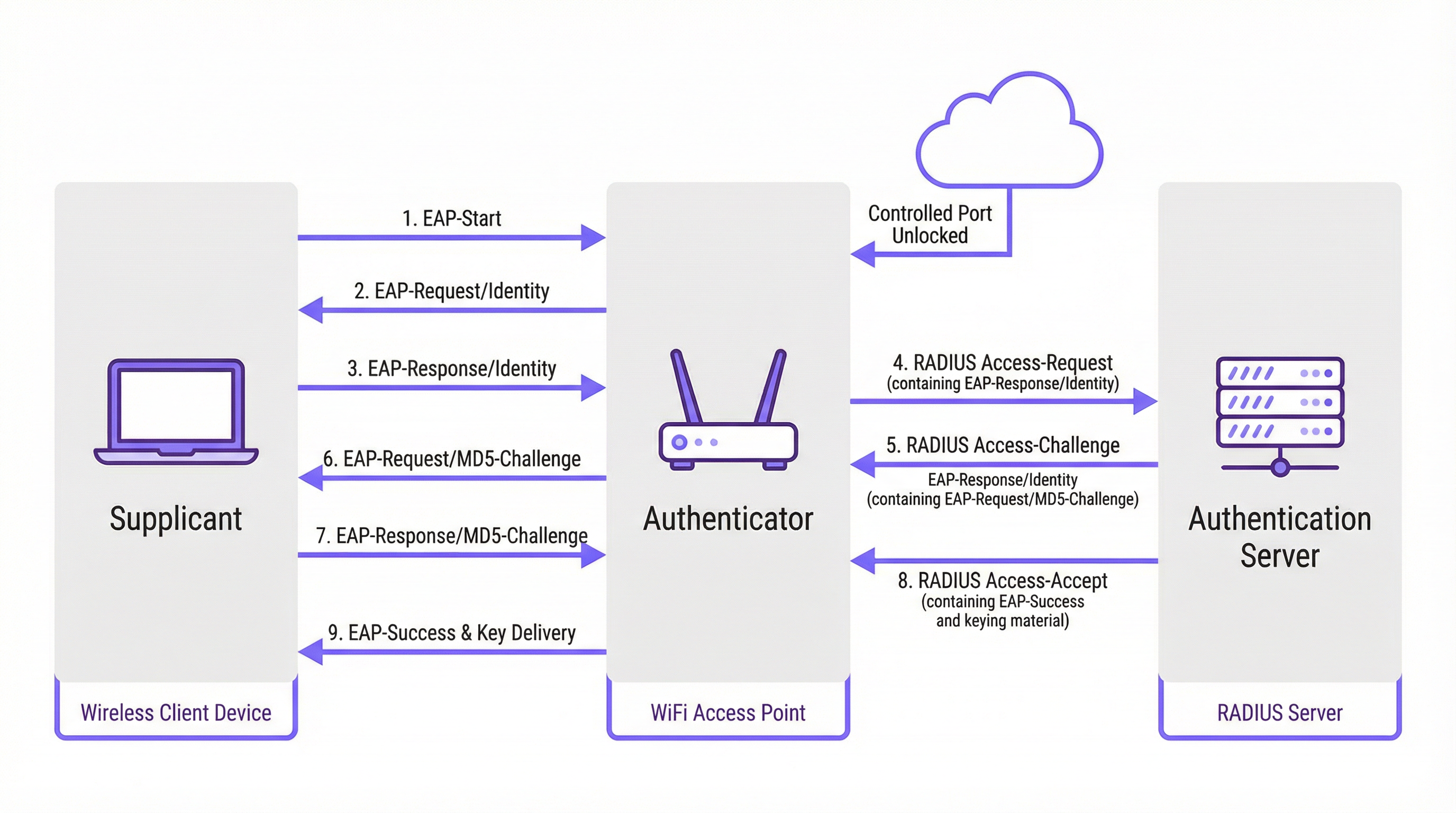
O processo de autenticação segue uma troca de mensagens estruturada, orquestrada pelo Extensible Authentication Protocol (EAP). O EAP é uma estrutura flexível que suporta vários métodos de autenticação (tipos de EAP), permitindo às organizações escolher aquele que melhor se adapta aos seus requisitos de segurança e infraestrutura existente.
Comparação de Métodos EAP
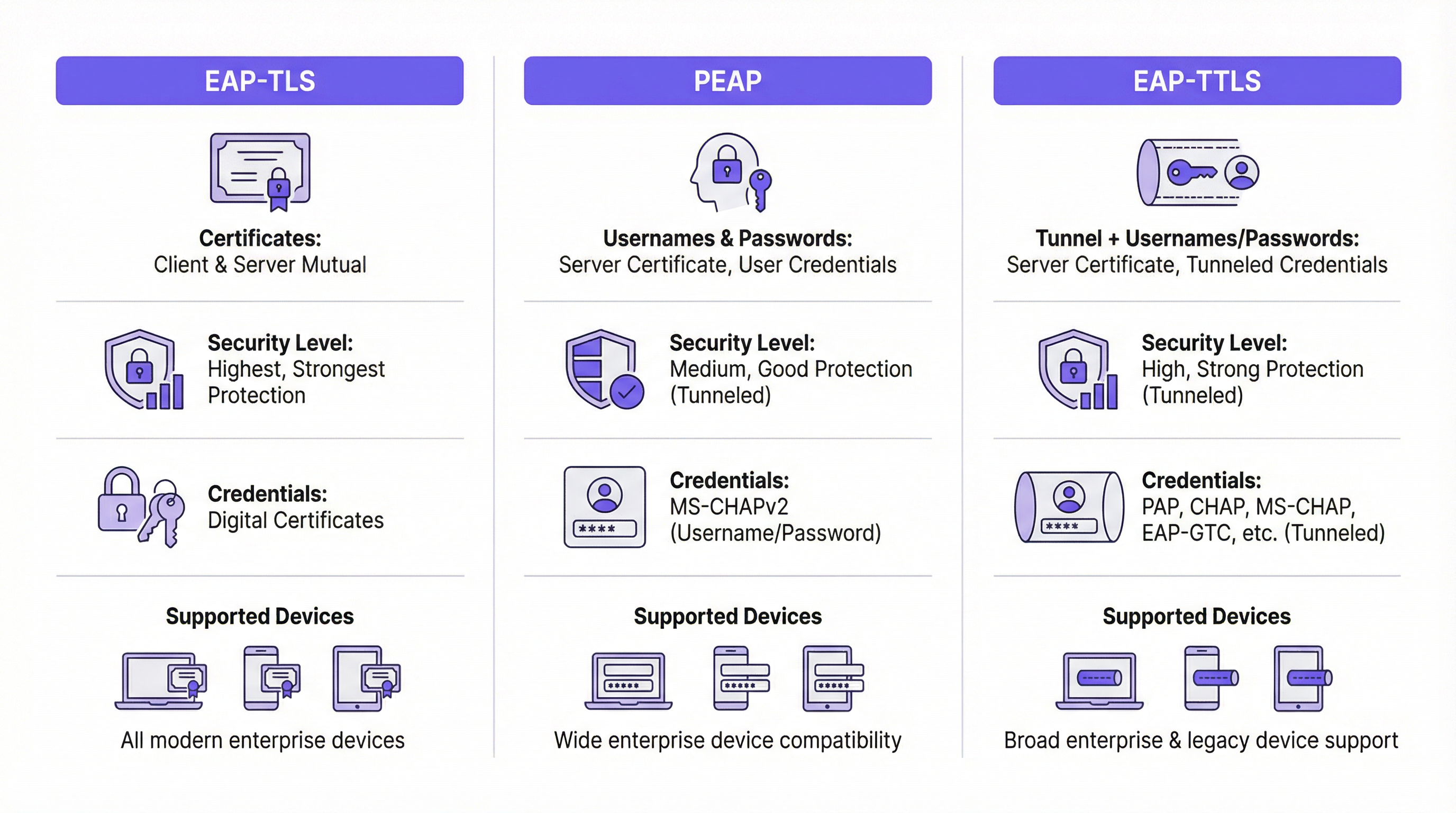
A escolha do método EAP adequado é uma decisão de implementação crítica. Os principais métodos utilizados nas redes empresariais modernas são o EAP-TLS, PEAP e EAP-TTLS.
| Funcionalidade | EAP-TLS (Transport Layer Security) | PEAP (Protected EAP) | EAP-TTLS (Tunneled TLS) |
|---|---|---|---|
| Nível de Segurança | Mais Elevado. Fornece autenticação mútua baseada em certificados. | Elevado. Encripta a troca de credenciais dentro de um túnel TLS. | Elevado. Semelhante ao PEAP, encripta a troca de credenciais. |
| Credenciais | Certificados Digitais de Cliente e Servidor | Certificado de Servidor, Credenciais de Utilizador (ex.: Nome de Utilizador/Palavra-passe) | Certificado de Servidor, Credenciais de Utilizador (opções mais flexíveis) |
| Complexidade | Elevada. Requer uma Infraestrutura de Chave Pública (PKI) para gerir os certificados de todos os dispositivos. | Média. Tira partido das credenciais de diretório existentes (ex.: Active Directory). | Média. Semelhante ao PEAP, mas oferece maior flexibilidade para protocolos de autenticação. |
| Caso de Uso | Dispositivos corporativos onde a implementação de certificados pode ser automatizada via MDM. Ambientes de alta segurança. | BYOD e ambientes corporativos onde a autenticação por nome de utilizador/palavra-passe é preferida. | Ambientes diversos com uma mistura de sistemas operativos clientes (ex.: macOS, Linux). |
O EAP-TLS é amplamente considerado o padrão de excelência para a segurança 802.1X. Exige que tanto o cliente como o servidor possuam um certificado digital, permitindo a autenticação mútua. Isto elimina o risco de ataques baseados em palavras-passe, mas introduz a sobrecarga de implementar e gerir um certificado em cada dispositivo cliente.
O PEAP é o tipo de EAP mais comum em ambientes empresariais. Simplifica a implementação ao exigir apenas um certificado no servidor de autenticação. O cliente verifica a identidade do servidor e, em seguida, cria um túnel TLS encriptado. Dentro deste túnel, o cliente autentica-se utilizando métodos menos complexos, tipicamente o MS-CHAPv2 (nome de utilizador e palavra-passe). Embora seguro, continua vulnerável a ataques de phishing se os utilizadores forem enganados e se ligarem a um AP malicioso com um certificado de servidor de aspeto válido.
O EAP-TTLS é funcionalmente semelhante ao PEAP, mas oferece mais flexibilidade. Também cria um túnel TLS, mas permite uma gama mais ampla de protocolos de autenticação internos, como PAP, CHAP ou EAP-MD5, tornando-o uma escolha versátil para ambientes com sistemas legados ou diversos tipos de clientes.
Guia de Implementação
Uma implementação 802.1X bem-sucedida requer um planeamento cuidadoso e uma execução faseada. Os passos seguintes fornecem um roteiro independente de fornecedores.
Fase 1: Infraestrutura e Planeamento
- Selecione o seu Servidor RADIUS: Escolha um servidor RADIUS que esteja alinhado com a sua infraestrutura existente. O Network Policy Server (NPS) da Microsoft é uma escolha comum para ambientes centrados em Windows, enquanto opções de código aberto como o FreeRADIUS são altamente flexíveis. Os serviços RADIUS baseados na cloud também se estão a tornar cada vez mais populares devido à sua escalabilidade e redução da sobrecarga de gestão.
- Escolha o seu Método EAP: Com base na comparação acima, selecione o método EAP que melhor equilibra os seus requisitos de segurança, base de utilizadores e capacidades administrativas. Para a maioria dos ambientes corporativos, o PEAP oferece um forte equilíbrio. Para implementações de alta segurança, o EAP-TLS é o caminho recomendado.
- Planeie a sua Estratégia de Certificados: Este é o passo mais crítico. Para PEAP ou EAP-TTLS, necessitará de um certificado de servidor para o seu servidor RADIUS. Este certificado DEVE ser emitido por uma Autoridade de Certificação (CA) pública de confiança. A utilização de um certificado autoassinado resultará em avisos de segurança em todos os dispositivos clientes, minando a confiança do utilizador e a segurança.
Fase 2: Configuração
- Configure o Servidor RADIUS: Instale e configure o servidor RADIUS escolhido. Isto envolve:
- Instalar o certificado do servidor.
- Definir os clientes RADIUS (os seus pontos de acesso e switches).
- Criar Políticas de Pedido de Ligação para processar os pedidos recebidos.
- Criar Políticas de Rede que definam as condições, restrições e definições para a autenticação. Por exemplo, uma política pode estabelecer que apenas os membros de um grupo específico do Active Directory têm permissão para se ligar.
- Configure o Autenticador (APs Sem Fios/Switches):
- Configure o seu controlador de LAN sem fios ou pontos de acesso individuais com o endereço IP do seu servidor RADIUS e o segredo partilhado (shared secret).
- Crie uma nova WLAN/SSID dedicada ao 802.1X. Não tente executar o 802.1X numa rede PSK ou aberta existente.
- Certifique-se de que o SSID está configurado para WPA2-Enterprise ou WPA3-Enterprise.
Fase 3: Integração e Implementação de Clientes
- Dispositivos Corporativos: Utilize uma solução de Gestão de Dispositivos Móveis (MDM) ou Política de Grupo (GPO) para configurar automaticamente os dispositivos corporativos. O MDM/GPO pode enviar o perfil da rede sem fios, incluindo o SSID, o tipo de EAP e quaisquer certificados de CA necessários, para o dispositivo. Isto proporciona uma experiência "zero-touch" (sem intervenção) para o utilizador final.
- BYOD (Bring Your Own Device): A integração de dispositivos pessoais é mais complexa. A melhor prática é utilizar uma solução de integração dedicada. Estas soluções fornecem um SSID de "integração" temporário e aberto. Quando um utilizador se liga, é redirecionado para um Captive Portal onde se pode autenticar e transferir um utilitário de configuração ou perfil que configura automaticamente o seu dispositivo para a rede 802.1X segura.
Melhores Práticas
- Segmente a sua Rede: Utilize a atribuição dinâmica de VLANs com base em atributos RADIUS. Isto permite-lhe colocar diferentes grupos de utilizadores (ex.: funcionários, prestadores de serviços, convidados) em VLANs diferentes com políticas de acesso distintas, mesmo quando se ligam ao mesmo SSID.
- Utilize Sempre um Certificado de Confiança Pública: A importância de utilizar um certificado público no seu servidor RADIUS não pode ser subestimada. É a pedra angular da confiança do cliente e previne ataques man-in-the-middle.
- Monitorize e Registe: Monitorize ativamente os registos de autenticação RADIUS. Isto é inestimável para a resolução de problemas de ligação e para auditorias de segurança. Tentativas de autenticação falhadas podem ser um indicador precoce de um potencial ataque.
- Dê Preferência ao WPA3-Enterprise: Onde suportado pelo seu hardware e clientes, o WPA3-Enterprise oferece melhorias de segurança significativas em relação ao WPA2-Enterprise, incluindo Protected Management Frames (PMF) para prevenir ataques de desautenticação.
Resolução de Problemas e Mitigação de Riscos
| Problema Comum | Causa | Estratégia de Mitigação |
|---|---|---|
| Falha na Ligação | Incompatibilidade nos tipos de EAP entre cliente e servidor. Segredo partilhado RADIUS incorreto. Firewall a bloquear portas RADIUS (UDP 1812/1813). | Verifique as definições de EAP tanto no cliente como no servidor. Confirme o segredo partilhado no AP e no servidor RADIUS. Certifique-se de que as firewalls permitem o tráfego RADIUS. |
| Avisos de Certificado | O servidor RADIUS está a utilizar um certificado autoassinado ou não confiável. | Substitua o certificado autoassinado por um de uma CA pública de confiança (ex.: DigiCert, Sectigo). |
| Ligações Lentas | O servidor RADIUS está subprovisionado ou tem alta latência para o serviço de diretório. | Monitorize o desempenho do servidor RADIUS. Garanta uma conectividade de baixa latência entre o servidor RADIUS e os controladores de domínio. |
| Phishing/APs Maliciosos | Os utilizadores são enganados e ligam-se a um AP malicioso que transmite o mesmo SSID. | Utilize EAP-TLS para eliminar palavras-passe. Para PEAP/EAP-TTLS, certifique-se de que os clientes estão configurados para validar o certificado e o nome do servidor. |
ROI e Impacto no Negócio
Embora a implementação do 802.1X exija um investimento inicial de tempo e recursos, o retorno do investimento (ROI) é significativo, particularmente para locais de grande escala.
- Postura de Segurança Reforçada: Ao passar de uma única palavra-passe partilhada para credenciais únicas por utilizador ou por dispositivo, reduz drasticamente o risco de acesso não autorizado. Este é um passo crítico na mitigação de violações de dados.
- Conformidade: Para organizações sujeitas a PCI DSS, GDPR ou HIPAA, o 802.1X é um controlo fundamental para demonstrar que implementou medidas rigorosas de controlo de acessos. O custo de uma auditoria falhada ou de uma penalização por não conformidade supera largamente o custo da implementação.
- Eficiência Operacional: A automatização da integração e a utilização de VLANs dinâmicas reduzem a carga administrativa das equipas de TI. Os novos funcionários podem obter acesso automaticamente com base no seu grupo de diretório, e o acesso é revogado instantaneamente quando são removidos.
- Melhoria da Experiência do Utilizador: Quando implementado corretamente com integração automatizada, o 802.1X proporciona uma experiência de ligação fluida e segura. Os utilizadores simplesmente ligam o seu dispositivo, e este liga-se sem exigir que voltem a introduzir uma palavra-passe. Esta é uma melhoria significativa em relação a Captive Portals ou PSKs complexas.
Key Terms & Definitions
RADIUS
Remote Authentication Dial-In User Service. A networking protocol that provides centralized Authentication, Authorization, and Accounting (AAA) management for users and devices that attempt to access a network service.
In an 802.1X context, the RADIUS server is the 'brain' of the operation. It's the server that checks the user's or device's credentials and tells the access point whether to grant or deny access. IT teams will spend most of their time configuring policies on the RADIUS server.
EAP
Extensible Authentication Protocol. An authentication framework, not a specific authentication mechanism. It provides a standardized way for clients and servers to negotiate an authentication method.
EAP is the language spoken between the client device, the access point, and the RADIUS server. Understanding that EAP is a framework helps explain why there are so many different 'types' of 802.1X (EAP-TLS, PEAP, etc.). The choice of EAP type is the most important decision in an 802.1X deployment.
Supplicant
The software on a client device (like a laptop or smartphone) that is responsible for responding to the authenticator's requests for credentials.
The supplicant is built into modern operating systems like Windows, macOS, iOS, and Android. IT teams rarely interact with the supplicant directly, but they configure it via network profiles, telling it which EAP type to use and which server to trust.
Authenticator
The network device that acts as a gatekeeper, blocking or allowing traffic from the supplicant. In a wireless network, this is the access point (AP).
The authenticator doesn't make the authentication decision itself. It's a middleman that simply passes EAP messages between the supplicant and the authentication server. Its primary job is to enforce the decision made by the RADIUS server.
PKI
Public Key Infrastructure. A set of roles, policies, hardware, software, and procedures needed to create, manage, distribute, use, store, and revoke digital certificates.
A PKI is essential for deploying EAP-TLS, the most secure form of 802.1X. While the term sounds intimidating, a basic PKI can be set up using Microsoft Active Directory Certificate Services or a cloud-based service. It's the foundation for a certificate-based security model.
MDM
Mobile Device Management. Software that allows IT administrators to control, secure, and enforce policies on smartphones, tablets, and other endpoints.
MDM is the key to a scalable and seamless 802.1X deployment for corporate-owned devices. IT teams use the MDM to automatically push the WiFi profile and client certificate to devices, meaning users can connect securely with zero manual configuration.
Dynamic VLAN Assignment
A feature that allows the RADIUS server to assign a user or device to a specific VLAN based on their identity or group membership.
This is a powerful tool for network segmentation. Instead of having multiple SSIDs for different user groups, you can have one secure SSID. The RADIUS server then places employees in the corporate VLAN, guests in the guest VLAN, and IoT devices in their own isolated VLAN, all based on the credentials they present.
WPA3-Enterprise
The latest generation of Wi-Fi security for enterprise networks, building on WPA2-Enterprise by adding stronger encryption and protection against de-authentication attacks.
When procuring new network hardware, IT managers should ensure it supports WPA3-Enterprise. It provides a significant security uplift over its predecessor and is a key component of a modern, secure wireless infrastructure. It's the 'Enterprise' version that integrates with 802.1X.
Case Studies
A 500-room luxury hotel needs to provide secure WiFi for staff (on corporate-issued tablets) and a separate, seamless experience for guests. The hotel must comply with PCI DSS due to its payment systems.
Staff Network: Implement an 802.1X EAP-TLS network. Deploy a RADIUS server and an internal Certificate Authority (or use a cloud PKI service). Use an MDM to automatically provision the corporate tablets with client certificates and the WPA2/WPA3-Enterprise network profile. This provides the highest level of security for devices handling sensitive operational data. Guest Network: Implement a separate SSID using a captive portal with a straightforward, time-limited voucher or social login. This network should be completely isolated from the staff and PCI networks using VLANs and firewall rules. This approach balances high security for corporate assets with ease of use for transient guests.
A large retail chain with 200 stores needs to secure its in-store network, which is used by Point-of-Sale (POS) terminals, employee-used handheld inventory scanners, and a guest WiFi network.
POS & Inventory Scanners: Deploy a single, hidden SSID using 802.1X EAP-TLS. Since these are corporate-controlled devices, certificates can be pre-loaded before deployment. Use MAC Authentication Bypass (MAB) as a fallback for legacy devices that may not support 802.1X, but this should be an exception. Assign this network to a secure, firewalled VLAN that only allows traffic to the payment processor and inventory management servers. Guest WiFi: Deploy a separate, public-facing SSID with a branded captive portal that requires acceptance of terms and conditions. This network must be completely isolated from the secure store network.
Scenario Analysis
Q1. Your CFO is concerned about the cost of a commercial certificate for the RADIUS server and suggests using a self-signed certificate from your internal Windows CA. How do you respond?
💡 Hint:Consider the user experience and the security implications of a client not being able to automatically trust the server.
Show Recommended Approach
A self-signed certificate will cause a security warning on every single device that connects to the network for the first time. This trains users to ignore security warnings, which is a significant security risk. A publicly trusted certificate is automatically recognized by all modern devices, providing a seamless connection experience and ensuring that clients can verify they are connecting to the legitimate server, which is crucial for preventing man-in-the-middle attacks. The annual cost of a public certificate is a small price to pay for the enhanced security and improved user experience.
Q2. A conference centre wants to use 802.1X for event attendees. They have thousands of new users each week. Is EAP-TLS a viable option? Why or why not?
💡 Hint:Think about the lifecycle of a guest user and the administrative overhead of certificate management.
Show Recommended Approach
EAP-TLS is likely not a viable option for this scenario. The primary challenge is the administrative overhead of provisioning a unique digital certificate for thousands of transient users each week. The process of generating, distributing, and then revoking these certificates would be operationally complex and costly. A better approach would be to use a simpler authentication method for guests, such as a captive portal with voucher codes or social login, while reserving 802.1X for staff and permanent infrastructure.
Q3. You are deploying a PEAP-MS-CHAPv2 network. A user reports that they can connect from their Windows laptop but not from their personal Android phone. What is the most likely cause of this issue?
💡 Hint:Consider how different operating systems handle certificate validation and network profiles.
Show Recommended Approach
The most likely cause is that the Android phone has not been configured to properly trust the RADIUS server's certificate. While a Windows laptop joined to a domain might automatically trust the certificate (if the root CA is pushed via Group Policy), a personal Android device needs to be manually configured. The user likely needs to install the root CA certificate on their phone and/or explicitly configure the network profile to validate the server certificate and specify the correct domain name. This highlights the importance of a clear and simple onboarding process for BYOD users.
Key Takeaways
- ✓802.1X provides port-based network access control, authenticating users or devices before granting network access.
- ✓The core components are the Supplicant (client), Authenticator (AP/switch), and Authentication Server (RADIUS).
- ✓EAP-TLS is the most secure method, using mutual certificate authentication, but has higher administrative overhead.
- ✓PEAP and EAP-TTLS are widely used, balancing strong security with easier deployment by using server-side certificates and user credentials.
- ✓Always use a publicly trusted certificate for your RADIUS server to avoid security warnings and prevent man-in-the-middle attacks.
- ✓Automate client configuration using MDM for corporate devices and a dedicated onboarding portal for BYOD.
- ✓Use dynamic VLAN assignment to segment users and devices into different network zones based on their identity and permissions.




