

Colocação de Access Points e Planeamento de Cobertura para Espaços
A technical reference for IT leaders on designing high-performance WiFi networks in complex venues. This guide provides actionable best practices for access point placement, coverage planning, and capacity calculation to improve guest experience and operational ROI.
🎧 Listen to this Guide
View Transcript

Resumo Executivo
O design eficaz de uma rede WiFi é uma componente de infraestrutura crítica para qualquer espaço moderno, com impacto direto na satisfação dos visitantes, na eficiência operacional e na geração de receitas. Este guia serve como referência técnica para gestores de TI, arquitetos de redes e operadores de espaços, fornecendo as melhores práticas acionáveis e independentes de fornecedores para a colocação de access points (AP) e planeamento de cobertura. Vamos além dos conceitos teóricos para oferecer estratégias práticas de implementação adaptadas aos desafios únicos da hotelaria, retalho, grandes espaços públicos e ambientes corporativos. O foco está em equilibrar os pilares centrais de uma implementação de WiFi bem-sucedida: cobertura, capacidade e experiência do cliente. Ao seguir os princípios delineados, as organizações podem garantir um roaming contínuo, mitigar interferências e fornecer a conectividade de alto débito exigida pela atual base de utilizadores com elevada densidade de dispositivos. Este documento fornece as estruturas para calcular a densidade adequada de AP, planear a sobreposição de sinal e a canalização, e evitar as armadilhas comuns de implementação, permitindo, em última análise, uma experiência sem fios superior e mais fiável que proporciona um retorno do investimento mensurável.
Análise Técnica Aprofundada
O sucesso da implementação de WiFi depende de uma compreensão profunda do comportamento da Radiofrequência (RF). O objetivo principal é criar um mapa de cobertura abrangente e fiável, fornecendo simultaneamente capacidade suficiente para lidar com a densidade esperada de dispositivos clientes. Isto exige uma abordagem sistemática ao planeamento.
Calcular a Densidade e Capacidade de AP
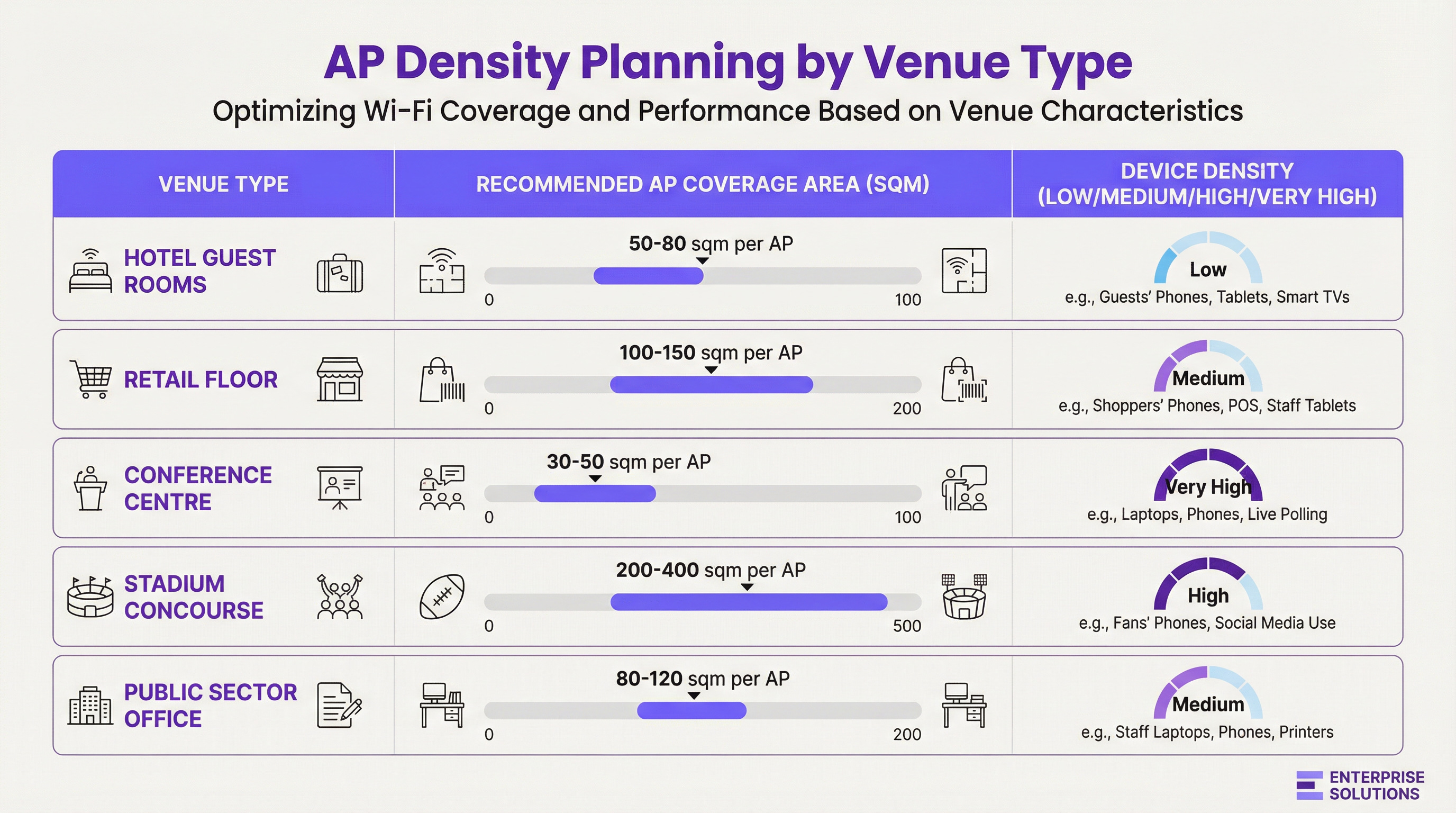
A densidade de AP não é uma métrica universal. É uma função de três variáveis: a dimensão física da área, o número de utilizadores simultâneos e os tipos de aplicações que irão utilizar.
- Design Orientado para a Cobertura: Em ambientes como hotéis ou armazéns, o objetivo principal é fornecer um sinal consistente numa grande área. Aqui, o planeamento começa com o raio de cobertura efetivo do AP, tendo em conta a atenuação dos materiais de construção.
- Design Orientado para a Capacidade: Em ambientes de alta densidade, como centros de conferências ou estádios, o plano deve dar prioridade ao número de ligações simultâneas que um AP consegue suportar. Isto leva frequentemente à implementação de mais APs do que o necessário apenas para cobertura, operando com uma potência de transmissão mais baixa para criar células mais pequenas e focadas.
Atenuação de Sinal e Impacto dos Materiais
Os sinais de RF são absorvidos, refletidos e difratados pelos materiais de construção. Um site survey abrangente deve ter em conta a perda de dB causada por obstruções comuns:
| Material | Atenuação a 2.4 GHz (Aprox.) | Atenuação a 5 GHz (Aprox.) | Impacto na Colocação |
|---|---|---|---|
| Pladur (Gesso Cartonado) | -3 dB | -4 a -5 dB | Impacto mínimo, padrão para ambientes de escritório. |
| Parede de Betão | -10 a -15 dB | -15 a -20 dB | Alto impacto; requer APs em ambos os lados. |
| Janela de Vidro | -4 dB | -7 dB | Impacto moderado; pode causar reflexos. |
| Porta de Metal/Elevador | -15 a -25 dB | -20 a -30 dB | Cria sombras de RF; planear a cobertura à sua volta. |
Planeamento de Canais e Sobreposição de Sinal
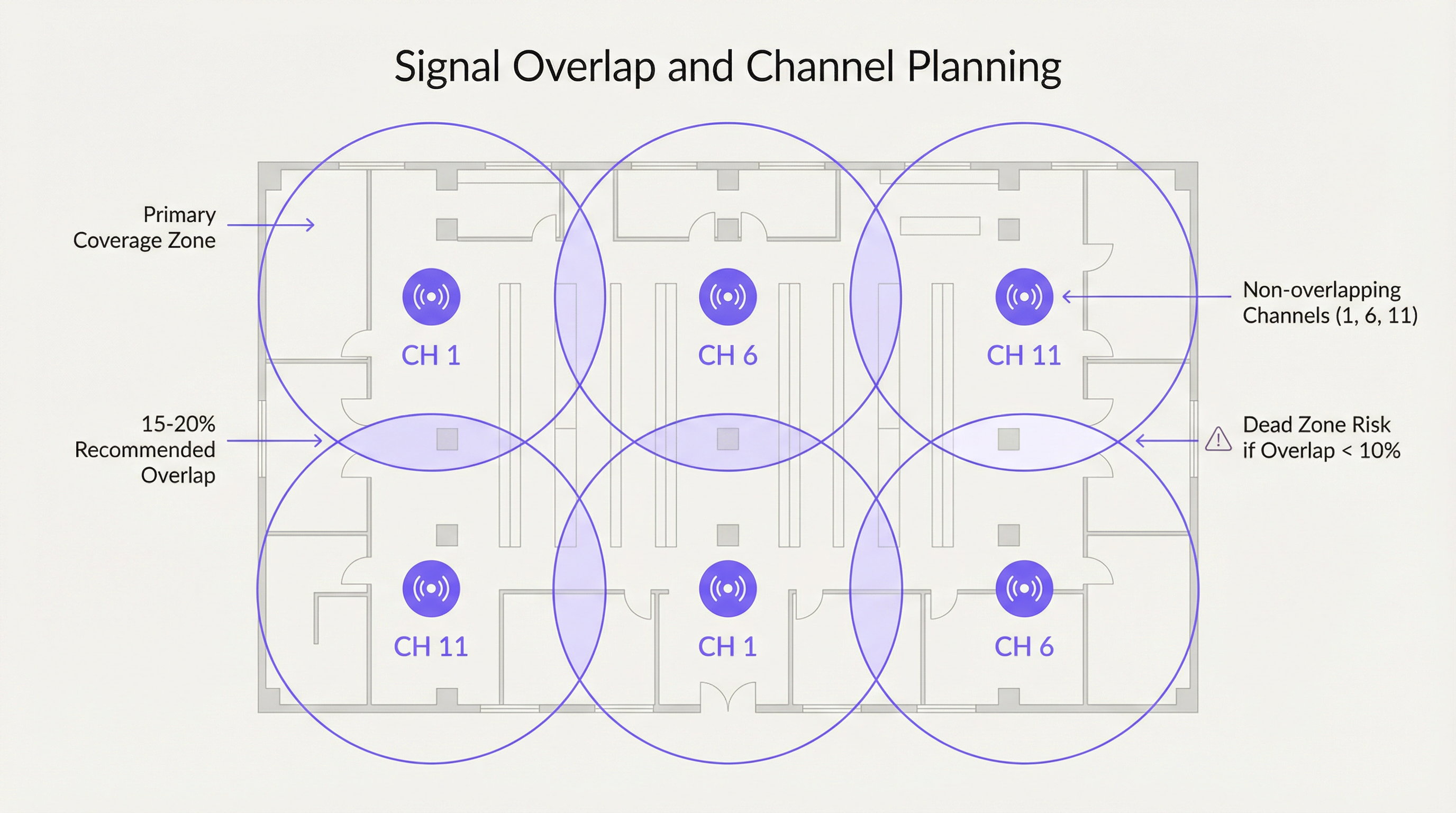
Para garantir um roaming contínuo, recomenda-se uma sobreposição deliberada de 15-20% entre células de cobertura de AP adjacentes. Isto permite que um dispositivo cliente descubra e se associe a um novo AP antes de perder o sinal do anterior. No entanto, esta sobreposição deve ser gerida com um plano de canais adequado para evitar interferências.
- Interferência Cocanal (CCI): Ocorre quando dois APs no mesmo canal estão demasiado próximos. Têm de competir pelo tempo de transmissão (airtime), reduzindo o desempenho para todos os clientes ligados.
- Interferência de Canal Adjacente (ACI): Ocorre quando APs em canais sobrepostos estão demasiado próximos (por exemplo, canais 1 e 2 na banda de 2.4 GHz).
Para a banda de 2.4 GHz, apenas os canais 1, 6 e 11 não se sobrepõem e devem ser utilizados exclusivamente em qualquer implementação empresarial. A banda de 5 GHz oferece um número muito maior de canais não sobrepostos, tornando-a a escolha preferencial para designs orientados para a capacidade.
Guia de Implementação
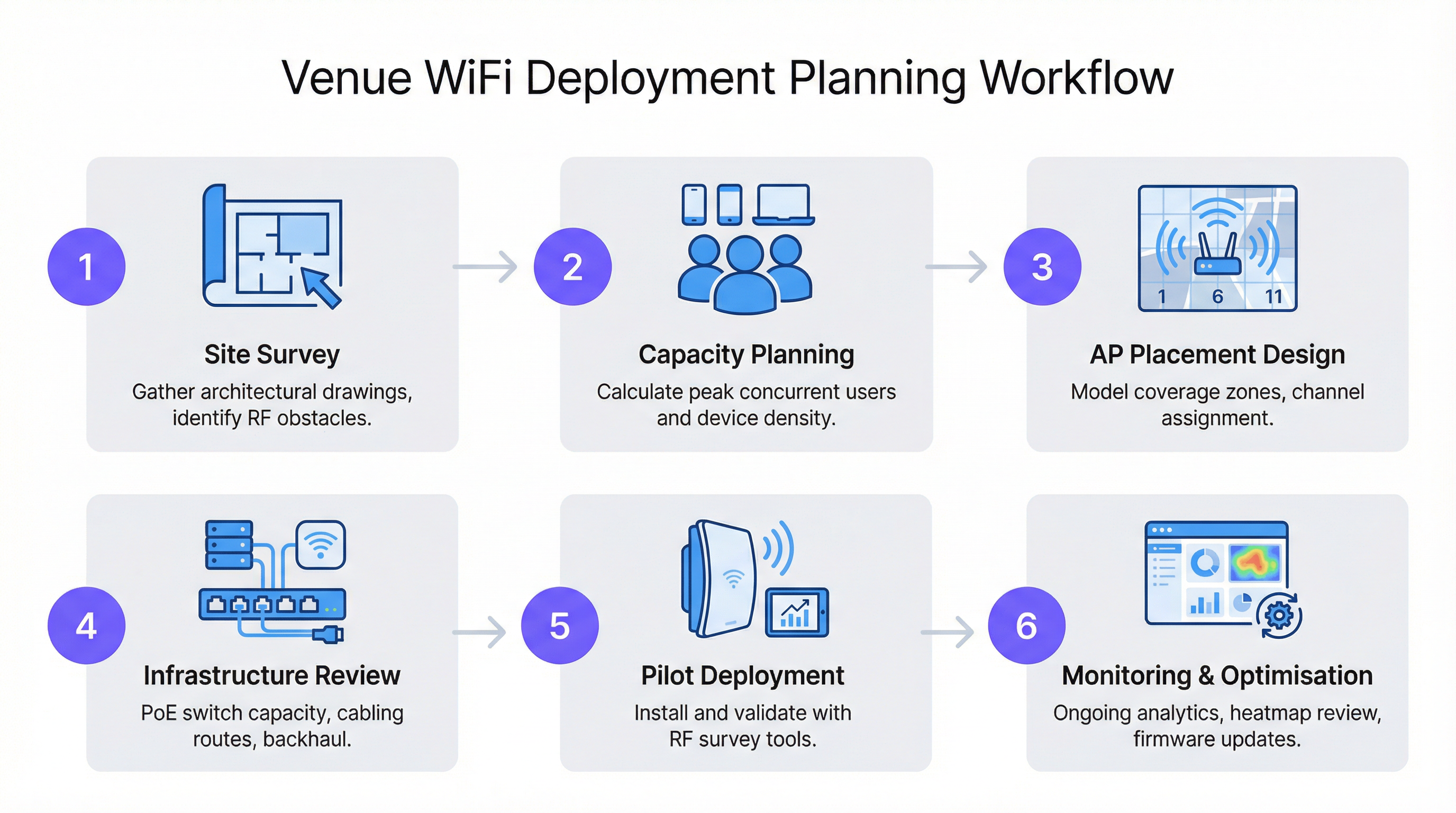
Seguir um fluxo de trabalho estruturado é fundamental para uma implementação de WiFi bem-sucedida e escalável. Este processo garante que todas as variáveis são consideradas, desde o planeamento inicial até à otimização pós-instalação.
Passo 1: O Site Survey
Um site survey profissional é a base de qualquer design de rede. Envolve duas fases:
- Survey Preditivo: Utilização de plantas baixas e software como o Ekahau ou AirMagnet para modelar a propagação de RF e criar um mapa inicial de colocação de APs.
- Survey Físico: Uma inspeção presencial do espaço com um analisador de espetro e uma ferramenta de survey para validar o modelo preditivo, identificar fontes de interferência de RF (como micro-ondas ou redes vizinhas) e confirmar as propriedades de RF dos materiais de construção.
Passo 2: Montagem e Colocação
- Montagem no Teto: Ideal para áreas abertas com tetos altos (3-5 metros), como pisos de retalho ou salões de baile. Utilize um padrão de antena com inclinação descendente (down-tilt) para uma cobertura focada.
- Montagem na Parede: Preferencial na hotelaria (quartos de hotel) e escritórios. Monte os APs a uma altura de 2,5-3 metros para os posicionar acima da maioria do mobiliário e obstruções.
- Evitar Tetos Falsos: Colocar APs no espaço acima de um teto falso pode reduzir a força do sinal em 3-5 dB e dificulta o acesso físico para manutenção.
- Desfasamento Vertical: Em edifícios de vários andares, os APs não devem ser colocados na mesma localização em cada piso. Desfasar a colocação ajuda a mitigar a interferência cocanal entre pisos.
Melhores Práticas
- Priorizar os 5 GHz: Direcione os clientes compatíveis para a banda de 5 GHz. Tem mais canais, menos interferência e oferece taxas de dados mais elevadas. Utilize as funcionalidades de band-steering nos seus APs para incentivar esta prática.
- Ajustar a Potência de Transmissão: A potência máxima nem sempre é a melhor. Em designs de alta densidade, reduzir a potência de transmissão cria microcélulas mais pequenas, o que aumenta a capacidade global da rede ao permitir uma reutilização de canais mais frequente.
- Aproveitar as Normas Modernas: Implemente APs com capacidade para Wi-Fi 6 (802.11ax) ou Wi-Fi 6E. Funcionalidades como OFDMA e MU-MIMO são especificamente concebidas para melhorar o desempenho em ambientes congestionados.
- Planear o Backhaul: Certifique-se de que a sua infraestrutura de switching consegue fornecer o orçamento necessário de Power over Ethernet (PoE) (PoE+ ou PoE++ para APs de alto desempenho) e tem capacidade de uplink suficiente para lidar com o tráfego sem fios agregado.
Resolução de Problemas e Mitigação de Riscos
- Sintoma: Velocidades lentas apesar de um sinal forte. Causa: Provável interferência cocanal ou um AP sobrecarregado. Solução: Realize uma análise de espetro para identificar redes concorrentes. Reveja a carga de clientes do AP e considere adicionar capacidade ou fazer o balanceamento de carga dos clientes.
- Sintoma: Quebras de ligação em movimento. Causa: Sobreposição de cobertura insuficiente (<10%) ou configuração de roaming inadequada. Solução: Aumente a densidade de APs na área afetada ou ajuste a potência de transmissão dos APs adjacentes para criar uma zona de sobreposição maior.
- Sintoma: Determinadas áreas não têm cobertura (zonas mortas). Causa: Obstruções de RF imprevistas (por exemplo, novas estantes de metal). Solução: Realize um survey pós-instalação para identificar a zona morta e implemente um AP adicional para preencher a lacuna.
ROI e Impacto no Negócio
Uma rede WiFi bem concebida não é um centro de custos; é um facilitador de business intelligence e de uma melhor experiência do cliente. Para uma cadeia de retalho, os dados recolhidos a partir de uma rede WiFi com tecnologia Purple podem fundamentar decisões sobre o layout da loja, medir o tráfego de pessoas e impulsionar o marketing personalizado. Na hotelaria, é um fator determinante para os índices de satisfação dos hóspedes e permite serviços como o check-in móvel e o streaming nos quartos. O ROI mede-se em:
- Aumento da Satisfação e Fidelização dos Hóspedes: O WiFi de alto desempenho é agora uma comodidade principal, influenciando as decisões de reserva.
- Melhoria da Eficiência Operacional: A conectividade fiável para os dispositivos dos funcionários (sistemas POS, leitores de inventário, ferramentas de comunicação) reduz o tempo de inatividade.
- Novas Fontes de Receita: A análise baseada na localização e o marketing de Captive Portal podem criar novas oportunidades de envolvimento e vendas.
Key Terms & Definitions
Access Point (AP)
A networking hardware device that allows a Wi-Fi compliant device to connect to a wired network. APs are the bridge between the wireless and wired worlds.
This is the fundamental building block of your WiFi network. IT teams will be physically deploying and configuring these devices based on the network plan.
Site Survey
The process of planning and designing a wireless network to provide a solution that will deliver the required wireless coverage, data rates, network capacity, roaming capability and Quality of Service (QoS).
This is the most critical pre-deployment step. Skipping or rushing a site survey is the number one cause of poor WiFi performance. It provides the data needed to justify AP count and placement to management.
AP Density
The concentration of access points within a given physical area. High density refers to a large number of APs in a small area, typically for capacity reasons.
This term is central to budget discussions. A CTO needs to understand why a high-density area like a conference room requires a higher AP density (and thus cost) than a hallway.
Signal-to-Noise Ratio (SNR)
A measure that compares the level of a desired signal to the level of background noise. It is expressed in decibels (dB). A higher SNR means a cleaner, more reliable signal.
When troubleshooting a user's complaint of 'bad WiFi', SNR is a key metric. A strong signal is useless if the background noise (from other networks, microwaves, etc.) is also high. Aim for an SNR of 25 dB or higher for good performance.
Co-Channel Interference (CCI)
Interference that occurs when two or more access points on the same channel operate in close proximity. They are forced to share the available airtime, reducing throughput for all clients.
This is why channel planning is crucial. A network architect must design the AP layout to minimize CCI by reusing channels effectively across the venue.
Roaming
The process of a wireless client device moving from one access point to another within the same network without losing connectivity.
For venue operations, seamless roaming is essential for staff using mobile devices (e.g., scanners, tablets) and for guests on calls. It relies on having sufficient coverage overlap between APs.
Power over Ethernet (PoE)
A standard that allows electrical power to be passed along with data on twisted-pair Ethernet cabling. This allows a single cable to provide both data connection and electrical power to devices like APs.
This simplifies deployment and reduces costs by eliminating the need for a separate power outlet at every AP location. Network architects must ensure their switches have a large enough PoE budget to power all planned APs.
Wi-Fi 6 (802.11ax)
The latest generation of Wi-Fi technology, offering faster speeds and, more importantly, better performance in congested, high-density environments through technologies like OFDMA and MU-MIMO.
When planning a new deployment, especially for a high-traffic venue, specifying Wi-Fi 6 is a form of future-proofing and risk mitigation. It ensures the network can handle the increasing number of devices per user.
Case Studies
A 200-room, 5-story luxury hotel needs to upgrade its WiFi. The building is concrete and steel. The goal is to provide high-performance streaming for guests and reliable connectivity for staff operations.
A capacity-driven design is required. Plan for one AP per 2-4 guest rooms, depending on wall density. Given the concrete construction, placing APs in hallways is not viable; an in-room or near-room wall-plate AP strategy is necessary. For example, a wall-plate AP in every other room, with careful channel planning to avoid interference with rooms on adjacent floors. A staggered floor-by-floor layout is critical. For common areas like the lobby and restaurant, a ceiling-mounted, high-density AP solution is required, with APs placed approximately 10-15 meters apart. The entire network should be designed using Wi-Fi 6 APs to handle the high number of devices and streaming applications. A physical site survey is mandatory to validate RF penetration through the hotel's specific wall types.
A large retail store (5,000 sq. meters) wants to deploy guest WiFi and support staff inventory scanners and POS devices. The store has high ceilings and wide, open aisles, but also dense shelving units.
A mixed-coverage and capacity approach is needed. The primary design should be coverage-oriented, using ceiling-mounted APs with omnidirectional antennas placed in a grid pattern across the open floor areas, approximately 15-20 meters apart. However, a secondary survey must be done to identify potential RF dead zones created by high, metal shelving units. In these areas, additional, lower-power APs may be needed, mounted to the ends of aisles or on pillars. Channel planning should use a standard 1, 6, 11 rotation for 2.4 GHz and a wider range of non-overlapping channels for 5 GHz. The network must be configured with separate SSIDs and VLANs for guest and corporate traffic, in line with PCI DSS compliance for the POS systems.
Scenario Analysis
Q1. You are designing WiFi for a historic hotel with thick plaster and lath walls. A predictive survey suggests a single AP in the corridor can cover four rooms. What is your primary concern and how do you validate your design?
💡 Hint:Historic building materials are notoriously unpredictable for RF signals.
Show Recommended Approach
The primary concern is that the predictive model is inaccurate due to the variable density of the plaster and lath walls. The model should not be trusted. The only way to validate the design is with a physical pilot test. Place a single AP on a temporary stand in the corridor and use a survey tool (like Ekahau Sidekick) to measure the actual signal strength inside each of the four rooms. It is highly likely that an in-room or two-room deployment model will be required.
Q2. A conference is reporting that WiFi performance is excellent in the main hall but becomes unusable in the smaller breakout rooms. All APs are the same model. What is the most likely cause?
💡 Hint:Think about user density and the difference between a large hall and a small room.
Show Recommended Approach
The most likely cause is a capacity issue, not a coverage one. The AP density was likely planned for the lower-density main hall and not adjusted for the much higher user density in the breakout rooms. During breakout sessions, a large number of users move into small spaces, overwhelming the few APs covering those rooms. The solution is to increase the AP density in the breakout rooms and potentially use directional antennas to focus coverage and limit interference.
Q3. Your company is deploying a new network in a multi-tenant office building. You do not control the other tenants' networks. What is the most critical step in your site survey process?
💡 Hint:You can't control your neighbours, but you need to account for them.
Show Recommended Approach
The most critical step is a thorough spectrum analysis. In a multi-tenant building, the RF environment is chaotic. You must identify all other WiFi networks operating in the space, paying close attention to the channels they are using and their signal strength in your deployment area. This analysis is crucial for creating a channel plan that avoids the most congested channels, mitigating co-channel and adjacent channel interference from networks you do not control. You may need to rely more heavily on the 5 GHz band and potentially use narrower channel widths (e.g., 20 MHz) to find clean spectrum.
Key Takeaways
- ✓AP placement is a balance of providing wide coverage and sufficient capacity for users.
- ✓A physical site survey is non-negotiable to understand a building's unique RF characteristics.
- ✓Plan for 15-20% signal overlap between APs to ensure seamless roaming.
- ✓In the 2.4 GHz band, only ever use channels 1, 6, and 11 to avoid interference.
- ✓High-density venues like conference halls require more APs for capacity, not just coverage.
- ✓Deploy Wi-Fi 6 (802.11ax) for better performance in crowded environments.
- ✓A WiFi network is not 'set and forget'; it requires continuous monitoring and optimisation.




