

Arquitetura de Captive Portal: Uma Análise Técnica Aprofundada
This technical reference guide provides a comprehensive architectural breakdown of captive portal systems for enterprise guest WiFi deployments. It examines how network-level redirection, RADIUS authentication, access node policy enforcement, and walled garden configuration interact to create a secure and scalable access control framework. Designed for IT managers, network architects, and venue operations directors, this guide delivers actionable implementation guidance, real-world case studies, and compliance-aligned best practices that directly support deployment decisions in hospitality, retail, events, and public-sector environments.
🎧 Listen to this Guide
View Transcript
Resumo Executivo
Este guia fornece uma análise técnica aprofundada da arquitetura de Captive Portal, concebido para gestores de TI, arquitetos de redes e diretores de operações. Desconstrói os componentes principais — desde o nó de acesso até ao servidor RADIUS — explicando como os mecanismos de redirecionamento ao nível da rede, autenticação e controlo de acesso funcionam em uníssono. Ao explorar normas como o 802.1X, o papel do walled garden e cenários de implementação no mundo real, este documento dota os profissionais de tecnologia seniores com os conhecimentos práticos necessários para conceber, implementar e gerir uma rede WiFi de convidados segura, escalável e de alto desempenho, que proporciona uma experiência de utilizador perfeita e um forte retorno do investimento.
Análise Técnica Aprofundada
Um Captive Portal é a porta de entrada para o WiFi de convidados, mas a sua aparente simplicidade esconde uma arquitetura sofisticada. Compreender esta arquitetura é fundamental para implementar uma solução segura, escalável e em conformidade. Esta análise aprofundada examina a jornada de um utilizador desde a ligação até à autenticação, detalhando o papel de cada componente ao nível da rede.
A Ligação Inicial e o Redirecionamento
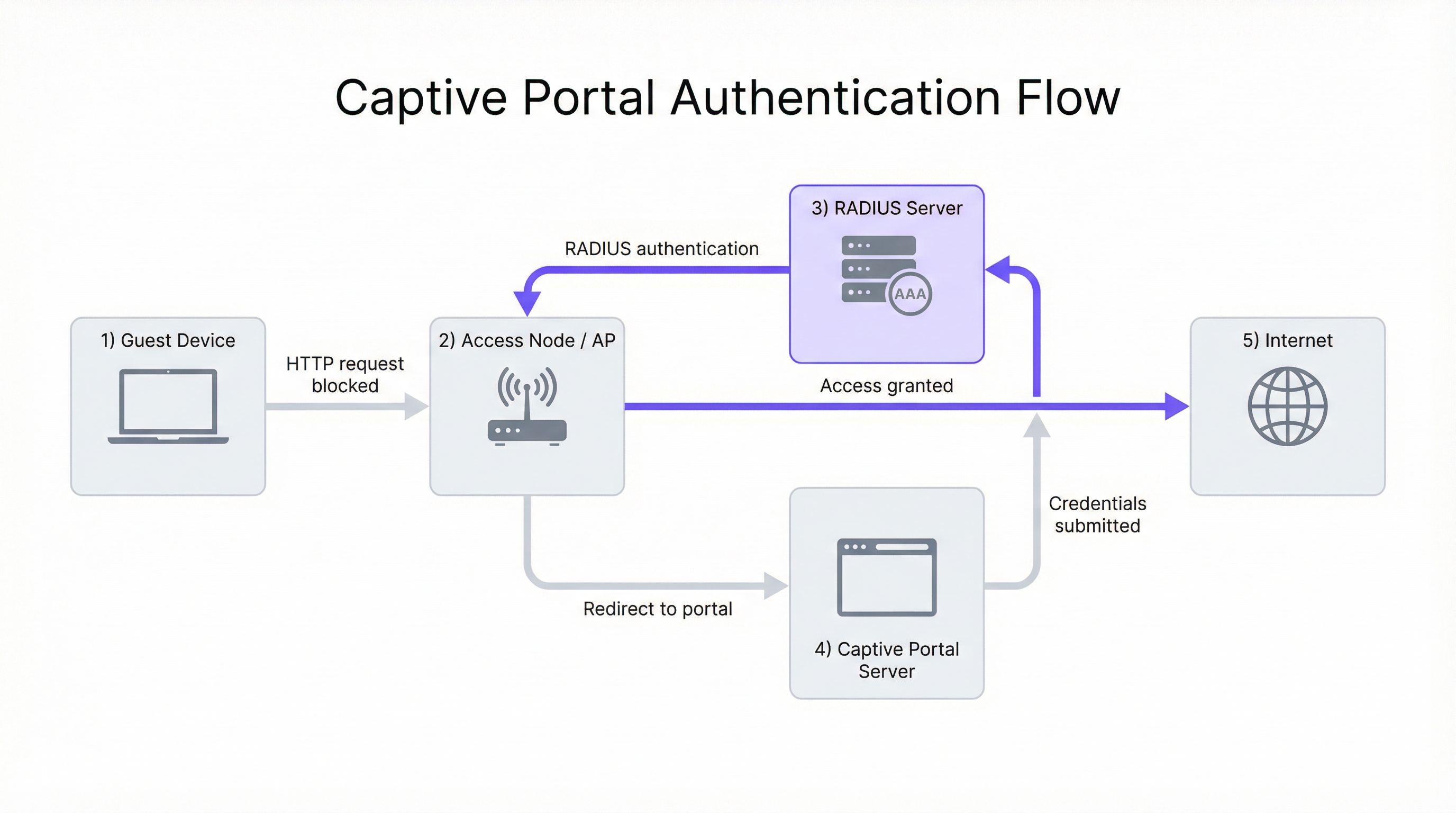
O processo começa quando o dispositivo de um utilizador (o suplicante) se associa a um Nó de Acesso (AN - Access Node) sem fios, tipicamente um Ponto de Acesso (AP) WiFi. Nesta fase, o dispositivo tem uma ligação de Camada 2, mas não tem acesso mais amplo à rede. O AN, a operar em conjunto com um gateway de rede ou firewall, está configurado para intercetar todo o tráfego web de saída de utilizadores não autenticados.
O principal desafio é forçar o browser web do utilizador a aceder à página de login do Captive Portal. São utilizados dois métodos principais:
Redirecionamento HTTP: Quando o utilizador tenta aceder a um website HTTP, o gateway de rede interceta o pacote TCP SYN. Em vez de o reencaminhar, o gateway conclui o handshake TCP com o cliente e, ao receber o pedido HTTP GET, devolve uma resposta HTTP/1.1 302 Found ou 307 Temporary Redirect. Esta resposta contém um cabeçalho Location que aponta para o URL do Captive Portal. O browser do cliente, em conformidade com o RFC 2616, navega automaticamente para a página do portal.
Redirecionamento DNS: Neste modelo, o servidor DNS da rede está configurado para resolver todos os hostnames externos solicitados por utilizadores não autenticados para o endereço IP único do servidor do Captive Portal. Quando o browser do utilizador tenta resolver um domínio como purple.ai, recebe o endereço IP do portal. O browser inicia então uma ligação ao portal, que apresenta a página de login. Este método pode ser problemático com clientes modernos que utilizam DNS over HTTPS (DoH) ou que têm entradas DNS em cache.
O Papel do Servidor RADIUS
Assim que o utilizador submete as suas credenciais (por exemplo, e-mail, login social, código de voucher) no portal, o Servidor do Captive Portal orquestra o processo de autenticação. Normalmente, não armazena as credenciais do utilizador. Em vez disso, atua como um cliente para um servidor centralizado de Autenticação, Autorização e Contabilização (AAA), utilizando quase universalmente o protocolo Remote Authentication Dial-In User Service (RADIUS), conforme definido no RFC 2865.
O fluxo é o seguinte. Primeiro, Autenticação: o servidor do portal empacota as credenciais e as informações de identificação do utilizador (incluindo o endereço MAC do cliente) num pacote RADIUS Access-Request enviado para o servidor RADIUS. Segundo, Autorização: o servidor RADIUS valida as credenciais na sua base de dados interna ou atua como proxy do pedido para uma fonte de identidade externa — um Sistema de Gestão de Propriedades (PMS) de um hotel, Microsoft Active Directory ou um fornecedor de identidade social via OAuth. Se a autenticação for bem-sucedida, o servidor RADIUS devolve uma mensagem Access-Accept contendo atributos RADIUS cruciais que definem a política de sessão do utilizador, incluindo Session-Timeout, Idle-Timeout e atributos de largura de banda WISPr. Terceiro, Contabilização: ao receber a mensagem Access-Accept, o servidor do portal sinaliza o Nó de Acesso ou gateway para permitir o tráfego do utilizador e envia simultaneamente um pacote RADIUS Accounting-Request (Start) para iniciar o registo da sessão, permitindo o rastreio detalhado da utilização para efeitos de conformidade e análise.
O Walled Garden: Acesso Pré-Autenticação
Um componente crítico da arquitetura é o walled garden. Isto refere-se a um conjunto específico de endereços IP, nomes de domínio ou protocolos a que um utilizador não autenticado tem permissão para aceder. É implementado através de regras de firewall ou listas de controlo de acesso (ACLs) no gateway de rede.
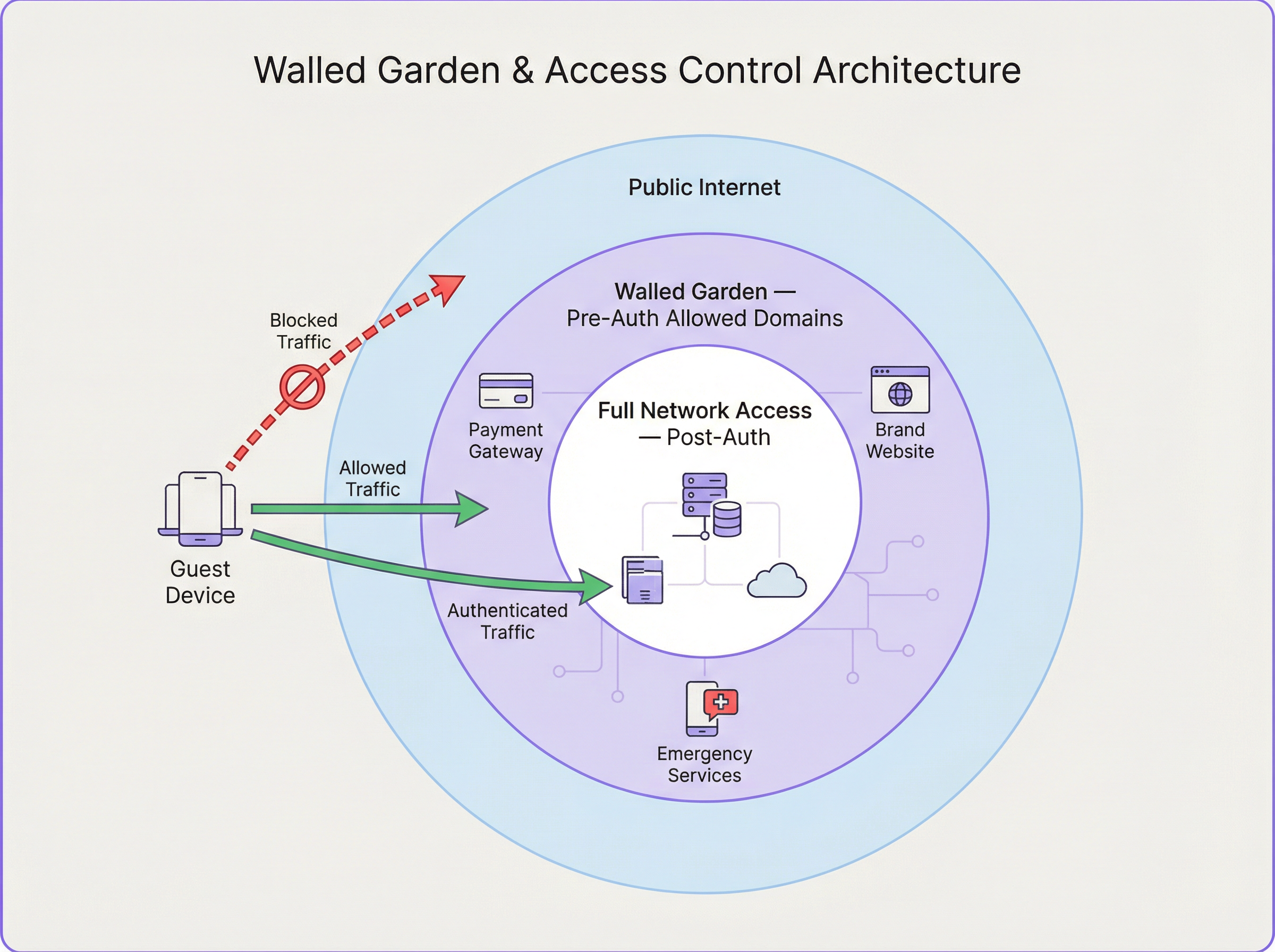
Os casos de uso comuns do walled garden incluem fornecedores de identidade de login social (Google, Facebook, LinkedIn), gateways de pagamento (Stripe, PayPal), propriedades web da marca e recursos de serviços de emergência. A configuração adequada do walled garden é um ponto de falha frequente nas implementações. Uma lista incompleta pode quebrar os fluxos de trabalho de autenticação, enquanto uma lista excessivamente permissiva pode criar vulnerabilidades de segurança.
Guia de Implementação
A implementação de uma arquitetura robusta de Captive Portal requer um planeamento cuidadoso em vários domínios.
Passo 1 — Design de Rede e Seleção de Componentes: Selecione APs de nível empresarial que suportem WPA3 e ofereçam capacidades robustas de integração com servidores RADIUS para pedidos de Change of Authorization (CoA) (RFC 5176), que permitem atualizações dinâmicas de políticas a meio da sessão. Certifique-se de que o seu gateway de rede tem a flexibilidade necessária para implementar regras sofisticadas de redirecionamento e walled garden. Para implementações em vários locais, como uma cadeia de retalho, um servidor RADIUS centralizado alojado na cloud proporciona consistência e simplifica a gestão.
Passo 2 — Configuração do Fluxo de Autenticação: Configure o SSID de convidados nos seus APs. Embora as redes abertas sejam comuns, a utilização de WPA3-Enhanced Open (OWE) proporciona encriptação de dados individualizada entre cada cliente e o AP, evitando a interceção passiva. No seu gateway, crie as regras de interceção para clientes não autenticados. Documente e implemente meticulosamente as regras de firewall para o seu walled garden, revendo esta lista regularmente à medida que os serviços de terceiros alteram as suas estruturas de domínio.
Passo 3 — Experiência do Utilizador e Onboarding: A página do portal deve ser responsiva, de carregamento rápido e com a marca claramente identificada, otimizada para dispositivos móveis. Ofereça vários métodos de autenticação — logins sociais, captura de e-mail e códigos de voucher — alinhados com os objetivos de negócio do local. O portal é um ponto crítico para a obtenção do consentimento do utilizador ao abrigo do GDPR; certifique-se de que a sua política de privacidade está claramente ligada e que é obtido consentimento explícito para qualquer processamento de dados.
Melhores Práticas
Utilize HTTPS para a página do Captive Portal e encripte toda a comunicação entre o portal e o servidor RADIUS utilizando RADIUS over TLS ou IPsec. Em ambientes com vários locais, centralize o Captive Portal e a infraestrutura RADIUS para garantir políticas, branding e recolha de dados uniformes. Implemente registos e análises robustos para monitorizar as taxas de sucesso/falha de autenticação, durações de sessão e utilização de largura de banda. Conceba a pensar em falhas: defina uma política clara sobre se o sistema deve adotar o modo fail-open ou fail-closed quando o servidor RADIUS estiver inacessível, com mensagens de erro claras para o utilizador.
Resolução de Problemas e Mitigação de Riscos
| Problema Comum | Causa(s) Raiz | Estratégia de Mitigação |
|---|---|---|
| O utilizador não é redirecionado para o portal | Problemas de DNS (cache do lado do cliente, DoH); má configuração da regra de redirecionamento; cliente a utilizar IP estático. | Implemente o redirecionamento HTTP e DNS como alternativas. Imponha o DHCP. Utilize o isolamento de clientes ao nível do AP. |
| Os botões de login social não funcionam | Walled garden incompleto; os domínios do fornecedor de identidade estão a ser bloqueados. | Utilize as ferramentas de programador do browser para identificar os domínios bloqueados e adicione-os às ACLs do walled garden. |
| Tempos de login lentos | Servidor RADIUS ou de portal subprovisionado; elevada latência para o fornecedor de identidade externo. | Efetue testes de carga à infraestrutura de autenticação. Utilize serviços cloud distribuídos geograficamente. |
| O utilizador é desligado frequentemente | Timeouts de sessão ou inatividade agressivos no servidor RADIUS; sinal WiFi fraco a causar reassociação. | Reveja os atributos de sessão RADIUS. Realize um site survey wireless para garantir uma cobertura adequada. |
ROI e Impacto no Negócio
Um Captive Portal bem arquitetado é mais do que um utilitário de rede; é um ativo de negócio. O ROI é medido através de vários vetores. Marketing Baseado em Dados: a recolha de dados dos utilizadores (com consentimento) permite campanhas de marketing direcionadas e impulsiona a repetição de negócios. Para uma cadeia de retalho, associar a utilização de WiFi às visitas à loja fornece modelos de atribuição poderosos. Experiência do Cliente Melhorada: um processo de login perfeito, rápido e seguro melhora a satisfação dos convidados, impactando diretamente as avaliações e a fidelização na hotelaria. Eficiência Operacional: a gestão centralizada reduz a sobrecarga administrativa para as equipas de TI, enquanto as análises de tráfego de pessoas e tempo de permanência podem informar os níveis de pessoal e os layouts das lojas. Conformidade e Mitigação de Riscos: uma arquitetura robusta garante a conformidade com o GDPR e o PCI DSS, mitigando o risco de penalizações financeiras significativas.
Ao encarar o Captive Portal não como um centro de custos, mas como uma plataforma de envolvimento, as organizações podem desbloquear um valor de negócio significativo a partir da sua infraestrutura de WiFi de convidados.
Key Terms & Definitions
Captive Portal
A web-based authentication mechanism that intercepts a user's HTTP or HTTPS traffic and redirects them to a login page before granting access to the broader network. It operates at the application layer (Layer 7) of the OSI model.
IT teams encounter this as the primary mechanism for controlling guest access to WiFi networks in hotels, retail spaces, stadiums, and public venues. It is the enforcement point for both security policies and business data-capture objectives.
Access Node (AN)
A network device—typically a Wireless Access Point (AP) or a network switch—that provides the physical or wireless connection point for end-user devices. In a captive portal architecture, the AN is responsible for enforcing the access policy dictated by the RADIUS server, either permitting or blocking a user's traffic based on their authentication state.
The AN is the 'gatekeeper' at the edge of the network. Its ability to support features like CoA (Change of Authorization) is critical for dynamic policy updates, such as upgrading a user from a free to a paid tier without requiring them to re-authenticate.
RADIUS (Remote Authentication Dial-In User Service)
A client-server networking protocol defined in RFC 2865 that provides centralized Authentication, Authorization, and Accounting (AAA) management for users connecting to a network service. It uses UDP for transport (ports 1812 for authentication, 1813 for accounting) and a shared secret for message integrity.
RADIUS is the backbone of enterprise network access control. In a captive portal deployment, it is the authoritative source for user identity validation and session policy. IT teams must ensure RADIUS server redundancy and secure communication channels.
Walled Garden
A controlled network environment in which an unauthenticated user's internet access is restricted to a pre-defined set of whitelisted IP addresses, domain names, or services. It is implemented via firewall rules or ACLs on the network gateway.
The walled garden is essential for enabling the authentication process itself (e.g., allowing access to social login providers) and for providing a degree of service before authentication (e.g., access to the venue's own website). Misconfiguration is a leading cause of captive portal authentication failures.
RADIUS Redirect
A mechanism by which the RADIUS server, within an Access-Accept response, includes a vendor-specific attribute (VSA) that instructs the Access Node or gateway to redirect the user's browser to a specific URL—typically the captive portal login page. This is an alternative to gateway-level HTTP interception.
RADIUS redirect is commonly used in architectures where the AP itself handles the redirection logic, rather than a separate gateway. It is supported by most enterprise-grade AP vendors and is particularly useful in distributed deployments where a centralised gateway is not present.
Change of Authorization (CoA)
An extension to the RADIUS protocol defined in RFC 5176 that allows the RADIUS server to dynamically modify an active user session. This enables the server to push new policy attributes (e.g., increased bandwidth) or terminate a session entirely, without requiring the user to re-authenticate.
CoA is the mechanism that enables tiered access models in real time. For example, when a hotel guest upgrades from a free to a paid WiFi tier, the payment system triggers a CoA request to the RADIUS server, which then pushes the new bandwidth policy to the Access Node instantly.
WPA3-Enhanced Open (OWE)
A WiFi security mode defined in IEEE 802.11 that provides opportunistic wireless encryption on open (no-password) networks. Each client device negotiates an individual encryption key with the AP, preventing passive eavesdropping by other users on the same network, without requiring a password.
OWE is the recommended security mode for guest WiFi networks that use a captive portal for authentication. It provides a significant security improvement over traditional open networks (which transmit all data in plaintext) while maintaining the seamless connection experience users expect from public WiFi.
AAA (Authentication, Authorization, and Accounting)
A security framework for controlling access to network resources. Authentication verifies identity, Authorization determines what the authenticated user is permitted to do, and Accounting records what the user did and for how long. RADIUS is the most common protocol implementing this framework.
The AAA framework is the conceptual foundation of all enterprise network access control. For venue operators, the Accounting component is particularly valuable, as it provides the audit trail required for regulatory compliance and the usage data needed for network capacity planning.
IEEE 802.1X
An IEEE standard for port-based Network Access Control (PNAC). It provides an authentication mechanism for devices wishing to attach to a LAN or WLAN, operating at Layer 2 before an IP address is assigned. It requires a supplicant (client software), an authenticator (the AP or switch), and an authentication server (typically RADIUS).
802.1X is the standard for corporate device authentication (e.g., employee laptops) and is distinct from captive portal authentication. IT teams should understand the difference: 802.1X is more secure but requires client-side configuration, making it unsuitable for guest devices. A well-designed network uses both — 802.1X for corporate devices and a captive portal for guests.
Case Studies
A 350-room international hotel brand is deploying a new guest WiFi system across its flagship London property. The CTO requires social login (Google and Facebook), email capture for the loyalty programme, PCI DSS compliance for a premium paid-access tier, and GDPR-compliant consent management. The existing network uses a mix of Cisco and Aruba access points. How should the captive portal architecture be designed?
The recommended architecture is a cloud-hosted captive portal platform (such as Purple) integrated with a centralized cloud RADIUS server. The deployment proceeds as follows:
- SSID Configuration: Create two SSIDs — a guest SSID (WPA3-OWE) for the captive portal flow, and a management SSID (WPA3-Enterprise, 802.1X) for staff devices. Segment these into separate VLANs.
- Redirection: Configure the gateway firewall with HTTP 302 redirect rules for the guest VLAN, targeting the cloud portal URL. Implement DNS redirection as a secondary fallback.
- Walled Garden: Whitelist the following domain groups:
accounts.google.com,*.googleapis.com(Google Login);*.facebook.com,*.fbcdn.net(Facebook Login); the hotel's own domain; the payment gateway's domains (e.g.,*.stripe.com). This is critical for the social login flow to function. - RADIUS Integration: Configure the cloud portal to send RADIUS
Access-Requestpackets to the centralized RADIUS server. Define two user groups: 'Free' (bandwidth-limited via WISPr attributes: 5 Mbps down, 2 Mbps up; 1-hour session timeout) and 'Premium' (unlimited bandwidth; 24-hour session timeout). The premium tier is unlocked after a payment transaction, with the RADIUS server dynamically updating the user's policy via a Change of Authorization (CoA) request per RFC 5176. - GDPR Consent: The portal landing page presents a clear, unbundled consent form. Users must actively tick a checkbox to consent to marketing communications — pre-ticked boxes are non-compliant under GDPR. The consent timestamp and method are logged and stored.
- PCI DSS: The payment page is hosted on the payment gateway's domain (within the walled garden), ensuring that card data never transits the hotel's network infrastructure, significantly reducing the PCI DSS scope.
A national retail chain with 280 stores wants to deploy a unified guest WiFi platform. Each store has between 2 and 8 access points. The business objective is to capture customer email addresses and link WiFi sessions to in-store purchase data from the EPOS system. The IT team is small and cannot manage per-store configurations. How should the architecture be structured for scale?
A centralised, cloud-managed architecture is the only viable approach at this scale. The deployment model is as follows:
- Centralised Management: Deploy a cloud-managed WiFi platform where all 280 stores are managed from a single dashboard. Access nodes at each store are zero-touch provisioned — they connect to the cloud controller on first boot and receive their full configuration automatically. No per-store manual configuration is required.
- Standardised SSID and Portal Template: Define a single SSID template and a single branded portal template that is pushed to all stores. Any changes to the portal design or authentication policy are made once and propagated to all 280 locations simultaneously.
- Centralised RADIUS: All authentication requests from all stores are directed to a pair of redundant, cloud-hosted RADIUS servers. This provides a single point of policy management and a unified data store for all user sessions.
- EPOS Integration: The WiFi platform's API is integrated with the EPOS system. The customer's email address (captured at WiFi login) is used as the matching key. When a customer makes a purchase, the EPOS system queries the WiFi platform's API to check if a WiFi session was active for that email address within the store's geographic boundary, creating an attribution record.
- Walled Garden: A single, centrally-managed walled garden policy is applied to all stores, covering the email validation service and any social login providers used.
Scenario Analysis
Q1. A stadium with a capacity of 60,000 is deploying guest WiFi for a major sporting event. The network team expects 40,000 concurrent device connections, with a peak authentication burst of approximately 8,000 logins per minute at kick-off. The venue's IT director wants to use a social login (Google/Facebook) captive portal. What are the three most critical architectural decisions the network architect must address to ensure the authentication system does not become a bottleneck?
💡 Hint:Consider the load on each component in the authentication chain: the portal server, the RADIUS server, and the external identity provider. Also consider the network-level implications of 40,000 concurrent DHCP leases and ARP tables.
Show Recommended Approach
The three most critical architectural decisions are: (1) RADIUS Server Scalability: A single RADIUS server instance will be unable to handle 8,000 authentication requests per minute. The architect must deploy a horizontally scaled cluster of RADIUS servers behind a load balancer, with session state shared via a distributed cache (e.g., Redis). The RADIUS server's database connection pool must also be sized appropriately. (2) Captive Portal Server Scalability: Similarly, the portal server must be horizontally scaled. A cloud-hosted portal platform with auto-scaling capabilities is strongly recommended over on-premise servers, which cannot be rapidly provisioned. (3) Walled Garden and External Identity Provider Latency: Social logins introduce a dependency on external services (Google/Facebook). Under high load, the round-trip time to these providers can increase significantly. The architect should consider offering a faster, lower-friction alternative (e.g., a simple click-through or SMS OTP) as the primary authentication method for the mass audience, reserving social login for users who specifically prefer it. Additionally, the DHCP server must be configured with a large enough pool for 40,000+ leases, and the network gateway must be capable of maintaining state for 40,000 concurrent sessions without exhausting its connection table.
Q2. A large NHS hospital trust is evaluating a guest WiFi deployment for patient and visitor use. The information governance team has raised concerns about GDPR compliance, specifically around data retention, the right to erasure, and the lawful basis for processing patient data. The proposed portal design captures email addresses and allows social logins. What changes to the architecture and portal design are required to achieve compliance?
💡 Hint:Consider the distinction between patients (a potentially special category of data subject under GDPR Article 9) and general visitors. Also consider the lawful basis for processing — is consent the appropriate basis, or could legitimate interest apply? What are the implications of each?
Show Recommended Approach
Several architectural and design changes are required. First, Lawful Basis: For a public-sector body, consent is typically the most appropriate lawful basis for processing guest WiFi data. However, the trust's Data Protection Officer (DPO) must confirm this. The portal must present a clear, unbundled consent request — separate checkboxes for 'access to WiFi' and 'marketing communications', with the former not conditional on the latter. Second, Data Minimisation: The portal should only capture the minimum data necessary. For a hospital environment, capturing email addresses may be justifiable for service notifications, but social logins (which can expose additional profile data) should be evaluated carefully. Consider whether a simple click-through with IP logging (for network security purposes) is sufficient. Third, Right to Erasure: The backend system must support a data erasure workflow. When a user submits a right-to-erasure request, all associated data (email, session logs, usage data) must be deleted within 30 days. This requires a clear data map of where user data is stored across the portal, RADIUS, and analytics systems. Fourth, Data Retention Policy: Define and enforce a clear retention period for session logs. Retaining data for longer than necessary is a GDPR violation. A 90-day rolling retention window for session logs is a common and defensible policy. Fifth, Special Category Data: The trust must ensure that the WiFi system does not inadvertently capture or infer health-related data. The portal must not ask questions about the user's reason for visiting the hospital.
Q3. A network engineer is troubleshooting a captive portal deployment at a conference centre. Attendees report that they are successfully connecting to the WiFi and reaching the portal login page, but when they attempt to log in using their LinkedIn credentials, the social login button appears to load briefly and then fails silently. Email/password login works correctly. What is the most likely cause, and what is the diagnostic process?
💡 Hint:The fact that the portal page loads correctly and email login works rules out issues with the portal server itself and the RADIUS integration. The problem is specific to the LinkedIn OAuth flow. Consider what network resources the LinkedIn login process requires that the email login does not.
Show Recommended Approach
The most likely cause is an incomplete walled garden configuration. The LinkedIn OAuth flow requires the user's browser to make requests to multiple LinkedIn domains and CDN resources. If these domains are not whitelisted in the pre-authentication firewall rules, the browser will silently fail to load the necessary JavaScript or complete the OAuth redirect. The diagnostic process is as follows: (1) Open the browser's developer tools (F12) on a device connected to the guest WiFi but not yet authenticated. (2) Navigate to the portal page and attempt the LinkedIn login. (3) In the 'Network' tab of developer tools, filter for failed requests (status 0, ERR_CONNECTION_REFUSED, or similar). (4) Identify the specific domains that are being blocked. Common LinkedIn domains that must be whitelisted include www.linkedin.com, platform.linkedin.com, static.licdn.com, and media.licdn.com. (5) Add the identified domains to the walled garden ACLs on the network gateway. (6) Re-test. If the issue persists, repeat the diagnostic process to identify any remaining blocked domains. This is a methodical process — use the browser's network inspector as your primary diagnostic tool for walled garden issues.
Key Takeaways
- ✓Captive portal architecture is a five-component system: Guest Device, Access Node, Gateway/Firewall, Captive Portal Server, and RADIUS Server — each with a distinct and interdependent role in the authentication flow.
- ✓Network-level redirection is achieved via HTTP 302 redirects (gateway intercepts TCP and returns a redirect response) or DNS redirection (all hostnames resolve to the portal IP). Modern deployments should implement both as fallbacks.
- ✓The walled garden is a pre-authentication whitelist of IP addresses and domains that must be meticulously configured to include all social login provider domains, payment gateways, and brand assets — incomplete walled gardens are the most common cause of authentication failures.
- ✓RADIUS is the authoritative AAA engine: it validates credentials, returns session policy attributes (bandwidth, timeout), and supports dynamic policy updates via Change of Authorization (CoA, RFC 5176), enabling real-time tier upgrades without re-authentication.
- ✓For deployments exceeding 10 sites, a cloud-hosted, centrally managed architecture is the only operationally viable approach — zero-touch provisioning and centralised policy management are non-negotiable for small IT teams managing large estates.
- ✓GDPR and PCI DSS compliance must be designed into the architecture from the outset, not retrofitted: the portal is the primary consent-capture point, and the payment flow must be scoped to the payment gateway's domain to minimise PCI DSS obligations.
- ✓A well-architected captive portal delivers measurable ROI through customer data capture, marketing attribution, and enhanced guest experience — it should be positioned as a business intelligence platform, not merely a network access utility.




