

Soluções de Captive Portal: O Guia Definitivo para Empresas de Todos os Tamanhos
This guide provides a comprehensive technical reference for IT managers, network architects, and CTOs on deploying effective captive portal solutions. It offers actionable guidance on architecture, vendor selection, and implementation to transform a network access point into a strategic asset for data collection, customer engagement, and ROI generation.
🎧 Listen to this Guide
View Transcript
Soluções de Captive Portal: O Guia Definitivo para Empresas de Todos os Tamanhos

Resumo Executivo
Para qualquer organização que forneça WiFi a convidados, o captive portal evoluiu de uma simples página de login para um ativo estratégico de segurança, conformidade e marketing. Este guia fornece uma referência técnica abrangente para gestores de TI, arquitetos de redes e CTOs sobre a implementação de soluções de captive portal eficazes. Vai além da teoria para oferecer orientações práticas sobre arquitetura, seleção de fornecedores e implementação, demonstrando como transformar um ponto de acesso à rede numa ferramenta poderosa para a recolha de dados, envolvimento do cliente e geração de ROI. Exploraremos como potenciar os captive portals para melhorar a experiência dos hóspedes na hotelaria, impulsionar as vendas no retalho e garantir uma segurança robusta em qualquer ambiente voltado para o público, tudo isto enquanto navegamos no complexo panorama das regulamentações de privacidade de dados, como o GDPR. Esta não é uma visão geral académica; é um manual prático para implementar uma solução que proporcione um impacto comercial mensurável neste trimestre.
Análise Técnica Aprofundada
Um captive portal funciona como um gateway, intercetando o pedido web inicial de um utilizador e redirecionando-o para uma página de autenticação dedicada antes de conceder um acesso mais amplo à rede. Esta interação controlada é fundamental para a sua função, permitindo a autenticação, a aplicação de políticas e o envolvimento de marketing. O processo baseia-se numa sequência coordenada de eventos de rede, envolvendo tipicamente um controlador de LAN sem fios (WLC), um gateway ou firewall e um servidor de portal externo ou interno.
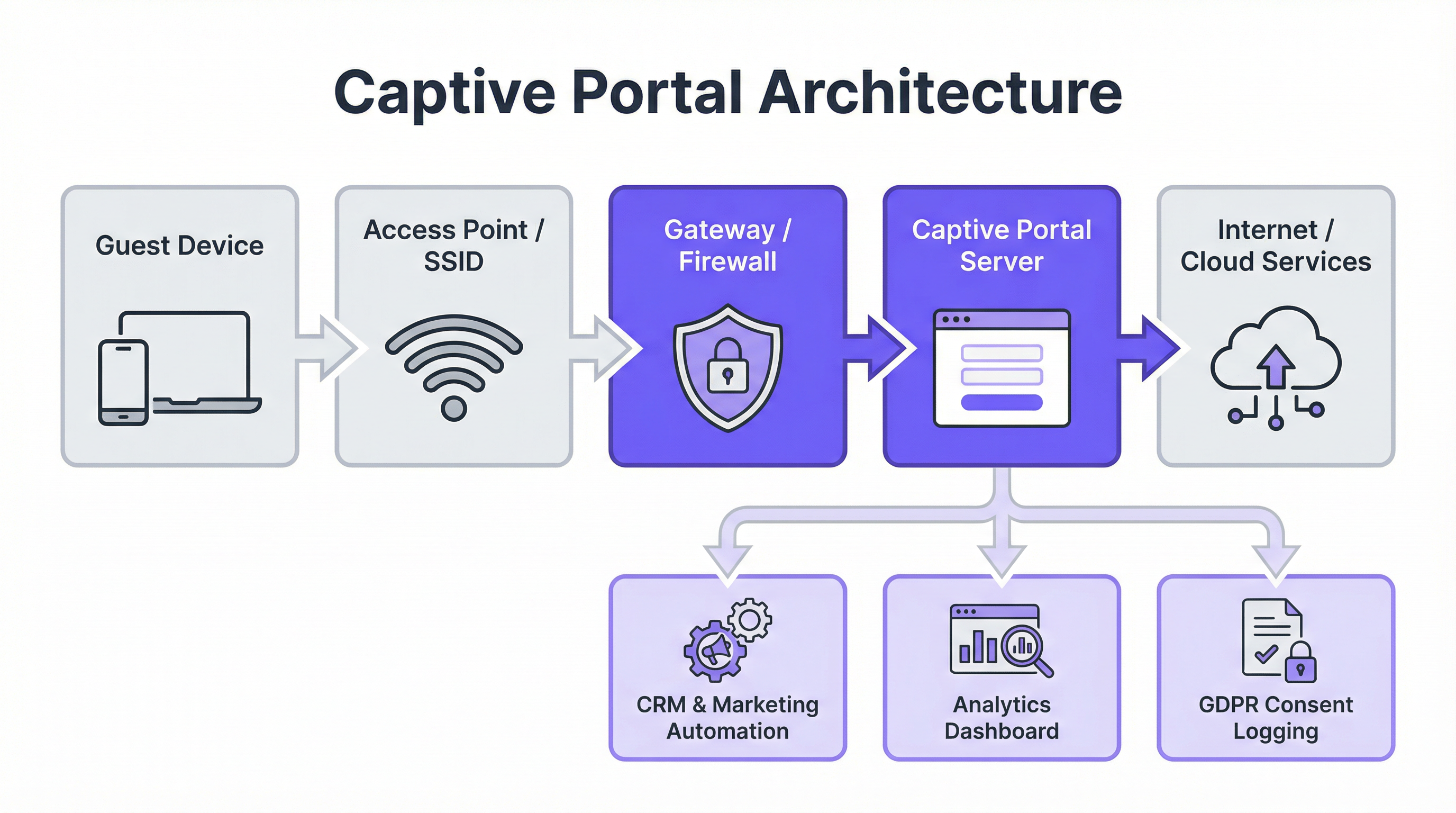
Componentes Arquitetónicos Principais:
- Ligação do Dispositivo Convidado: O processo começa quando um utilizador liga o seu dispositivo ao SSID de convidado. O sistema operativo do dispositivo realiza frequentemente uma verificação de 'vivacidade' (liveness) ao tentar contactar um URL predefinido (por exemplo,
http://captive.apple.com/hotspot-detect.htmlpara iOS). - Interceção de DNS e HTTP: O gateway ou firewall da rede interceta este pedido HTTP inicial. Em vez de permitir a sua resolução, devolve uma resposta DNS que aponta o browser do utilizador para o endereço IP do servidor do captive portal. Isto é frequentemente alcançado através de um redirecionamento DNS ou respondendo com um redirecionamento HTTP 302/307.
- Autenticação no Portal: É apresentada ao utilizador a splash page do captive portal. Aqui, este deve concluir uma ação obrigatória, como introduzir um e-mail, iniciar sessão através de um fornecedor de redes sociais (OAuth 2.0), introduzir um código de voucher ou simplesmente aceitar os Termos de Serviço. Toda a comunicação nesta fase deve ser protegida via HTTPS para salvaguardar as credenciais do utilizador.
- Autenticação e Autorização: O servidor do portal valida as credenciais ou a ação do utilizador. Após uma autenticação bem-sucedida, comunica com o controlador de rede ou gateway, sinalizando que o dispositivo (identificado pelo seu endereço MAC) está agora autorizado para acesso. O controlador atualiza então a sua lista de controlo de acesso (ACL) para permitir o tráfego desse dispositivo para a internet.
Normas e Protocolos Principais:
- IEEE 802.1X: Embora seja frequentemente utilizado para o acesso a redes corporativas, o 802.1X fornece uma estrutura para o controlo de acesso à rede baseado em portas que pode ser integrado com captive portals para uma autenticação mais robusta e baseada em certificados.
- WPA3-Enterprise: A mais recente norma de segurança, oferecendo proteção reforçada contra ataques de dicionário offline e garantindo uma encriptação mais forte para dados sensíveis.
- RADIUS (Remote Authentication Dial-In User Service): Um protocolo de rede que fornece gestão centralizada de Autenticação, Autorização e Contabilização (AAA) para utilizadores que se ligam e utilizam um serviço de rede. Os captive portals utilizam frequentemente um servidor RADIUS no backend para gerir as sessões dos utilizadores.
- GDPR e Privacidade de Dados: O Regulamento Geral sobre a Proteção de Dados exige um consentimento explícito e informado para a recolha de dados. Um captive portal em conformidade deve indicar claramente quais os dados que estão a ser recolhidos, para que fim, e fornecer um opt-in separado e não pré-selecionado para comunicações de marketing.
Guia de Implementação
A implementação de uma solução de captive portal requer um planeamento cuidadoso que se alinhe com a sua infraestrutura existente e os objetivos de negócio. A escolha entre um portal baseado em controlador (interno) e uma solução externa baseada na cloud é um ponto de decisão principal.
Processo de Implementação Passo a Passo:
- Definir Requisitos: Determine o objetivo principal. É um acesso simples e seguro? Recolha de dados para marketing? Largura de banda em níveis para geração de receitas? Os seus objetivos ditarão as funcionalidades necessárias.
- Avaliar a Infraestrutura: Identifique o seu hardware sem fios atual (Pontos de Acesso, Controladores) e o fornecedor do gateway de rede (por exemplo, Cisco, Aruba, Meraki, Ruckus). A sua escolha de solução de portal deve ser compatível com a sua stack.
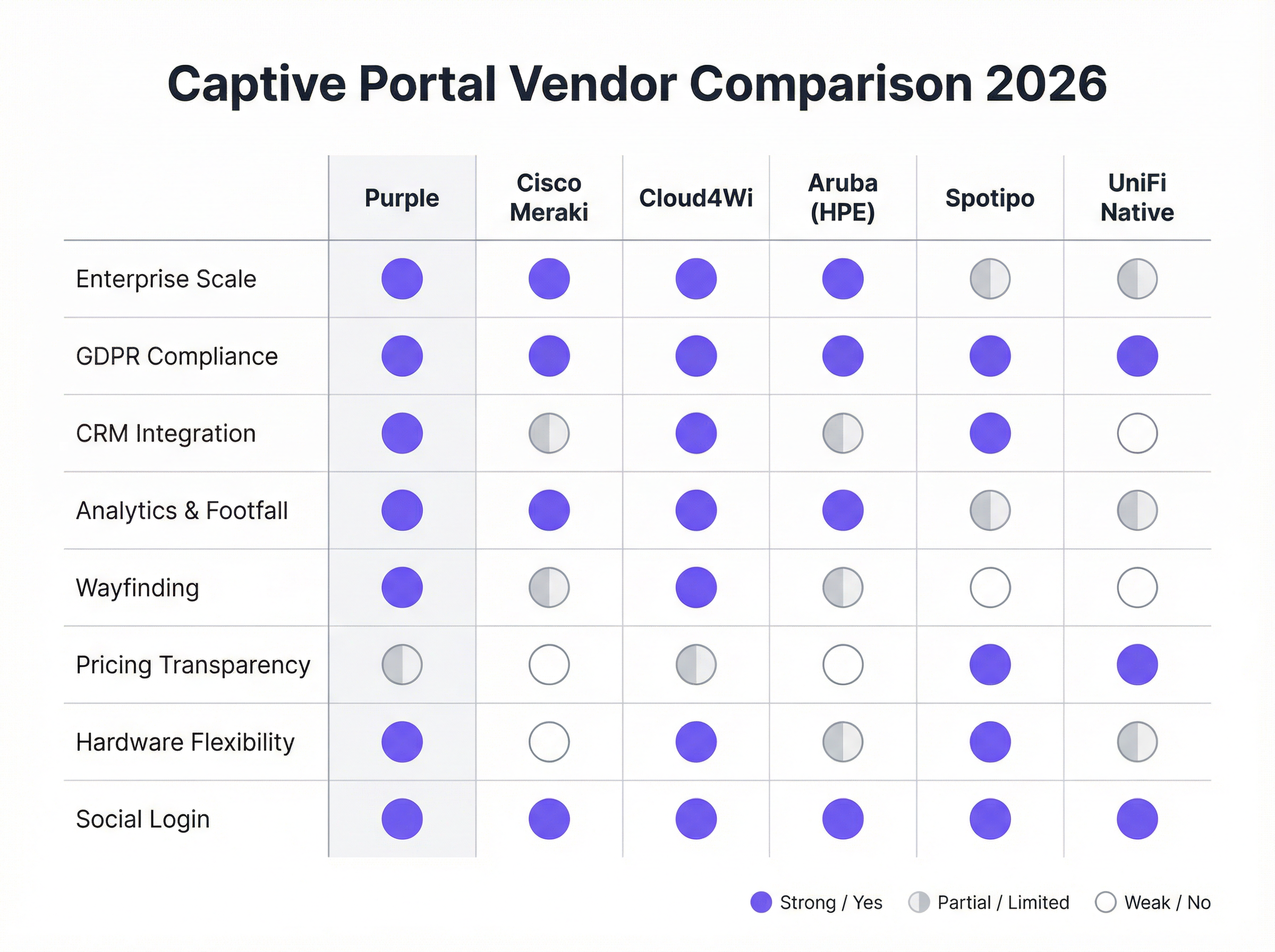
- Selecionar um Fornecedor/Solução:
- Portais Nativos de Hardware (por exemplo, UniFi Native Portal): Incluídos gratuitamente com o hardware. Bons para controlo de acesso básico, mas carecem de funcionalidades avançadas de marketing e integração de CRM.
- Plataformas Cloud Especializadas (por exemplo, Purple, Cloud4Wi, Spotipo): Oferecem conjuntos de funcionalidades ricos, ampla compatibilidade de hardware e integrações profundas. São ideais para empresas focadas em marketing e analítica.
- Soluções Full-Stack (por exemplo, Cisco Meraki): Fornecem hardware e software estreitamente integrados, simplificando a implementação, mas criando dependência do fornecedor (vendor lock-in).
- Configurar a Splash Page: Crie o design da página de login voltada para o utilizador. Certifique-se de que é responsiva para dispositivos móveis, reflete a identidade da sua marca e apresenta claramente os métodos de login necessários e as caixas de verificação de conformidade.
- Integrar com Sistemas de Backend: Ligue o portal ao seu CRM (por exemplo, Salesforce, HubSpot), plataforma de automação de marketing (por exemplo, Klaviyo) e quaisquer Sistemas de Gestão de Propriedades (PMS) para hotelaria.
- Testar a Jornada do Utilizador: Teste exaustivamente o processo de ligação e autenticação em vários dispositivos (iOS, Android, portáteis) para garantir uma experiência perfeita. Verifique se os dados estão a fluir corretamente para os seus sistemas integrados.
- Monitorizar e Otimizar: Utilize a analítica da plataforma para monitorizar a utilização, acompanhar as taxas de sucesso de login e medir o ROI de marketing. Refine a sua splash page e ofertas com base nos dados de desempenho.
Melhores Práticas
- Priorizar a Experiência do Utilizador: Um processo de login lento, confuso ou com várias etapas levará a altas taxas de abandono. Ofereça opções de login sem atrito, como redes sociais ou um simples 'clique para ligar', quando apropriado.
- Garantir a Conformidade com o GDPR/CCPA: Nunca pré-selecione as caixas de opt-in de marketing. Forneça links claros para a sua Política de Privacidade e Termos de Serviço. Registe o consentimento do utilizador com carimbos de data/hora para fins de auditoria.
- Segmentar a sua Rede: Execute sempre o seu WiFi de convidados numa VLAN separada, completamente isolada da sua rede corporativa, para mitigar os riscos de segurança.
- Utilizar HTTPS em Todo o Lado: A própria página do captive portal e todas as interações subsequentes devem ser encriptadas com SSL/TLS para proteger os dados do utilizador em trânsito.
- Potenciar os Dados para Personalização: Utilize os dados recolhidos para personalizar a experiência pós-login. Por exemplo, um hóspede de hotel que regressa pode ser recebido pelo nome e receber um desconto de fidelidade.
Resolução de Problemas e Mitigação de Riscos
- Problema: Falha no Redirecionamento (Preso em 'A ligar'): Frequentemente causado por problemas de DNS ou regras de firewall que bloqueiam o redirecionamento. Certifique-se de que o gateway consegue resolver e redirecionar corretamente para o servidor do portal. Alguns dispositivos com VPNs ou definições de DNS personalizadas também podem falhar no redirecionamento.
- Problema: Falha no Login Social: Isto pode acontecer se o endereço IP do servidor do portal não estiver na lista de permissões (whitelist) na consola de programador do fornecedor da rede social (por exemplo, Facebook Login for Business). As chaves de API e os URIs de redirecionamento permitidos devem estar configurados corretamente.
- Risco: Ataques 'Evil Twin': Um atacante configura um ponto de acesso malicioso com o mesmo SSID da sua rede legítima. Os utilizadores ligam-se inadvertidamente à rede do atacante, que apresenta um captive portal falso para roubar credenciais. A mitigação envolve a implementação de um Sistema de Prevenção de Intrusões sem Fios (WIPS) e a utilização de segurança WPA3-Enterprise.
- Risco: Violação de Dados: Se o servidor do captive portal ou a sua base de dados ligada for comprometido, todos os dados recolhidos dos utilizadores estarão em risco. A mitigação requer uma segurança robusta do servidor, encriptação de dados em repouso e adesão às normas PCI DSS se forem processados pagamentos.
ROI e Impacto Comercial
O business case para uma solução estratégica de captive portal vai muito além do fornecimento de acesso à internet. O ROI é medido através da geração de receitas diretas e indiretas, capacidades de marketing melhoradas e maior eficiência operacional.
- Receitas Diretas: Hotéis e centros de conferências podem oferecer largura de banda em níveis, cobrando um prémio por acesso de alta velocidade adequado para streaming de vídeo ou videoconferências.
- Crescimento da Base de Dados de Marketing: Para uma cadeia de retalho, a recolha de 5.000 novos endereços de e-mail de alta intenção por mês de visitantes na loja fornece um canal direto para promoções direcionadas, impulsionando visitas repetidas e vendas.
- Aumento do Customer Lifetime Value (CLV): Ao integrar com um CRM, as empresas podem identificar visitantes recorrentes e inscrevê-los em programas de fidelidade, aumentando a frequência de visitas e o gasto médio.
- Insights Operacionais: A analítica de tráfego de pessoas (footfall), os dados de tempo de permanência e os mapas de fluxo de visitantes permitem que os espaços otimizem o pessoal, a disposição das lojas e até mesmo as taxas de aluguer para zonas específicas num centro comercial.
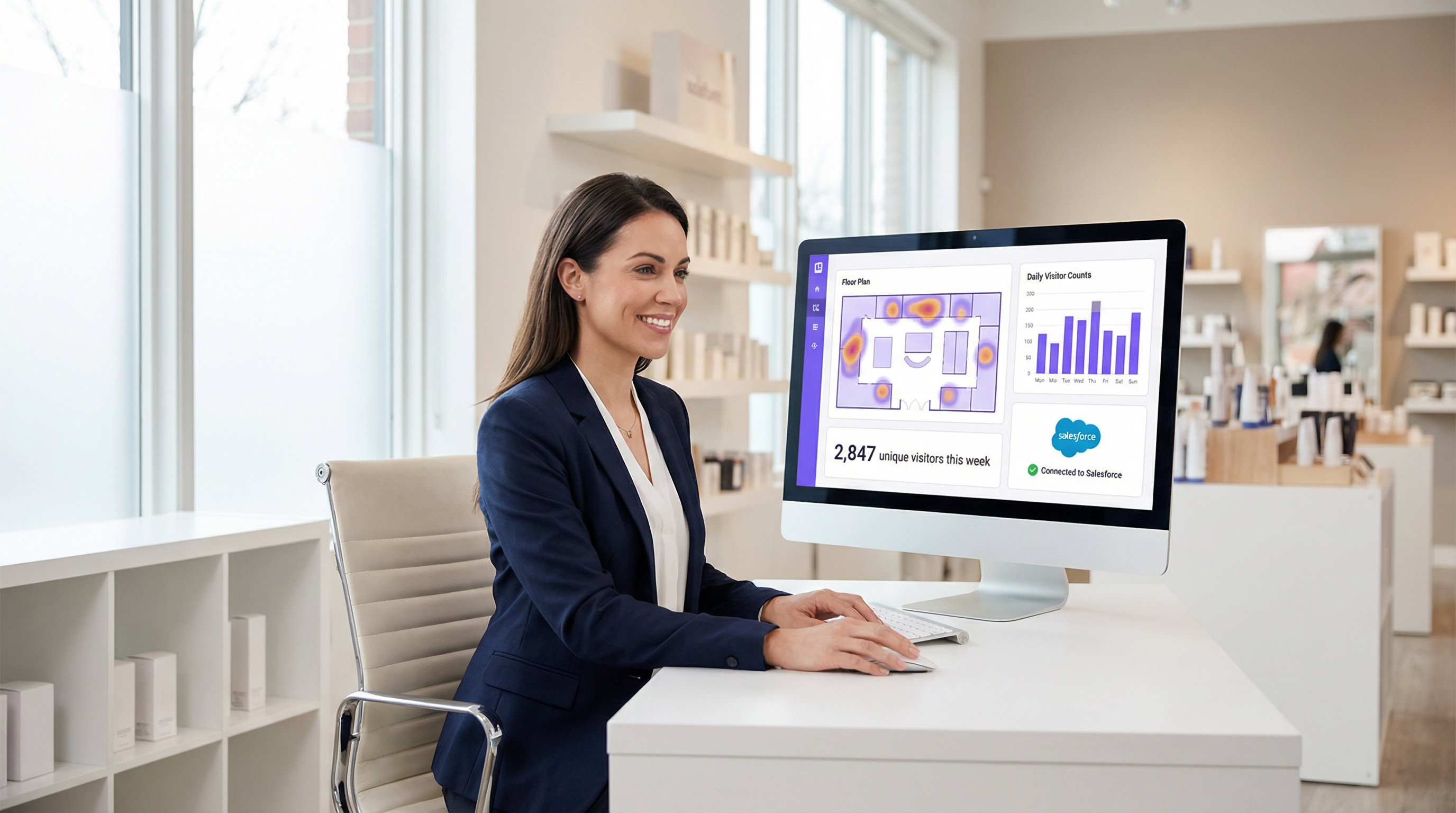
Ao encarar o WiFi de convidados como um canal de inteligência do cliente em vez de um centro de custos de TI, as organizações podem desbloquear um valor significativo e mensurável que impacta diretamente os resultados financeiros.
Key Terms & Definitions
Captive Portal
A web page that the user of a public-access network is obliged to view and interact with before access is granted. It acts as a customizable gateway for authentication, policy acceptance, and marketing.
This is the core technology being discussed. IT teams deploy it to control and monetize guest WiFi access in venues like hotels, retail stores, and stadiums.
SSID (Service Set Identifier)
The name of a wireless network that is broadcasted by an access point. It's the name you see when you search for WiFi networks on your device.
IT teams configure a specific SSID for guest access (e.g., \'Hotel Guest WiFi\') which is then associated with the captive portal policy. Clear and distinct SSIDs are crucial for user experience and security.
VLAN (Virtual Local Area Network)
A method of creating logically separate networks on the same physical network infrastructure. Traffic from one VLAN is isolated from another.
This is a critical security best practice. IT architects MUST place the guest WiFi network on a separate VLAN from the corporate network to prevent guests from accessing sensitive internal resources.
MAC Address (Media Access Control Address)
A unique identifier assigned to a network interface controller (NIC) for use as a network address in communications within a network segment.
The captive portal system uses the device's MAC address to identify it and track its authentication status. Once a device is authenticated, its MAC address is added to an allow list on the gateway.
GDPR (General Data Protection Regulation)
A regulation in EU law on data protection and privacy for all individuals within the European Union and the European Economic Area. It governs how personal data is collected, processed, and stored.
For any business operating in or serving customers from the EU, the captive portal must be GDPR-compliant. This means obtaining explicit, un-coerced consent for data collection and marketing, which has major implications for portal design and data handling.
CRM (Customer Relationship Management)
Software that helps companies manage and analyze customer interactions and data throughout the customer lifecycle, with the goal of improving business relationships.
Integrating the captive portal with a CRM like Salesforce or HubSpot is how you turn WiFi access into a marketing asset. It allows guest data (email, name) to be automatically synced for targeted campaigns.
WPA3 (Wi-Fi Protected Access 3)
The latest generation of WiFi security standard, offering enhanced security features over its predecessor, WPA2, including protection against brute-force attacks.
Network architects should specify WPA3-Enterprise for the highest level of security on their guest networks. It ensures that the connection between the user's device and the access point is strongly encrypted.
Footfall Analytics
The process of analyzing data about customer traffic and behavior in a physical location, such as a retail store or a shopping mall.
Advanced captive portal solutions like Purple provide footfall analytics by analyzing WiFi connection data. This gives venue operators valuable insights into visitor numbers, dwell times, and movement patterns, which can be used to optimize operations and marketing.
Case Studies
A 250-room upscale hotel wants to replace its outdated, unreliable guest WiFi system. The goals are to provide a seamless, premium connectivity experience, gather guest data to personalize marketing, and create a new revenue stream from high-speed internet access. The existing hardware is a mix of older Cisco and Ruckus access points.
- Infrastructure Upgrade & Vendor Selection: The mixed hardware is inefficient. Standardize on a single vendor for new WiFi 6/6E access points. Select a cloud-based captive portal provider like Purple that offers broad hardware compatibility and robust PMS integration. 2. Portal Configuration: Design a branded splash page that authenticates users via Room Number + Surname. This validates their guest status via a real-time PMS lookup. 3. Tiered Access Model: Configure two tiers: a) Standard Access (Free): 5 Mbps, suitable for email and web browsing, offered complimentary. b) Premium Access ($15/day): 100 Mbps, for streaming 4K video and video conferencing. The PMS integration allows the charge to be automatically added to the guest's room bill. 4. Marketing Integration: On successful login, redirect guests to a welcome page promoting hotel amenities (spa, restaurant). Use the collected email addresses (with GDPR-compliant consent) for post-stay feedback surveys and targeted offers for future bookings. 5. Security: Deploy the guest network on a separate VLAN, isolated from the hotel's corporate and operational networks. Enforce WPA3 security on the new access points.
A national retail chain with 200 stores wants to leverage in-store guest WiFi to increase its loyalty program membership and measure the impact of digital advertising on physical foot traffic. They currently use Cisco Meraki across all locations.
- Vendor Selection: Since the hardware is standardized on Cisco Meraki, a solution with deep Meraki integration is ideal. Adentro (formerly Zenreach) is a strong candidate due to its focus on the 'Walk-Through Rate' metric, but Purple also offers robust Meraki integration with more flexible pricing. Let's proceed with Purple for its balance of features and cost-effectiveness. 2. Portal Configuration: Configure the captive portal to offer two login methods: a) Social Login (Facebook/Google) for quick access, and b) 'Join Our Loyalty Program' form that captures name, email, and mobile number in exchange for a 10% off digital coupon. 3. CRM & Ad Platform Integration: Connect the portal directly to the company's Salesforce CRM and Facebook Ads account. New loyalty sign-ups are automatically added to Salesforce. The platform will capture the MAC addresses of devices that connect to WiFi. 4. Attribution Measurement: When a customer who has previously logged into the WiFi sees a Facebook ad for the brand and subsequently enters a store (their device is detected by the WiFi network), this is recorded as a 'Walk-Through'. This allows the marketing team to directly measure the ROI of their ad spend on driving in-store traffic. 5. Analytics: Use the platform's analytics dashboard to monitor new loyalty sign-ups per store, identify peak traffic hours, and analyze customer dwell times to optimize store layouts and staffing.
Scenario Analysis
Q1. Your organization is a fast-growing chain of 50 coffee shops using a mix of different consumer-grade routers. The marketing team wants to build a customer email list. What is your primary recommendation for a captive portal strategy?
💡 Hint:Consider the challenges of managing a diverse and non-enterprise hardware environment and the primary goal of marketing data collection.
Show Recommended Approach
The primary recommendation is to deploy a hardware-agnostic, cloud-based captive portal solution like Spotipo or Purple. This approach avoids a costly and immediate hardware replacement across all 50 stores. These platforms are designed to work with a wide range of hardware and provide the centralized management and CRM integration needed to meet the marketing team's goal of building an email list. A simple, email-based login should be implemented to maximize sign-ups.
Q2. A large conference center is hosting a cybersecurity summit and needs to provide WiFi for 5,000 attendees. The summit organizers are concerned about security. How would you configure the captive portal and network?
💡 Hint:Focus on security and scalability. How do you authenticate a large number of users securely while protecting them and your network?
Show Recommended Approach
- Network Segmentation: Create a dedicated VLAN for attendee WiFi, completely isolated from the center's operational network. 2. Security Protocol: Enforce WPA3-Enterprise for robust encryption. 3. Authentication: Use a voucher-based system. Each attendee receives a unique, single-use code upon registration. This prevents unauthorized access and provides a clear audit trail. 4. Portal Configuration: The portal should be minimal, requiring only the voucher code. Disable social logins or open forms to reduce the attack surface. 5. Bandwidth Management: Implement per-user bandwidth limits to ensure fair usage and prevent network saturation. 6. Monitoring: Actively monitor the network for rogue access points or suspicious activity using a WIPS.
Q3. A hospital wants to provide guest WiFi in its waiting rooms but is extremely concerned about HIPAA compliance and protecting patient data. What is the most critical architectural decision to ensure security?
💡 Hint:What is the single most important measure to prevent any possibility of guest traffic interfering with sensitive internal systems?
Show Recommended Approach
The most critical architectural decision is the strict implementation of network segmentation using a VLAN. The guest WiFi network must be on its own VLAN, completely firewalled off from the hospital's internal clinical network where Electronic Health Records (EHR) and other sensitive patient data reside. There should be no routes and no trust between the guest VLAN and the internal VLAN. This ensures that even if a guest device is compromised, it has no network path to access sensitive internal systems, forming the foundation of a HIPAA-compliant guest WiFi strategy.
Key Takeaways
- ✓A captive portal is a strategic asset for security, compliance, and marketing, not just a login page.
- ✓The core architecture involves DNS/HTTP interception to redirect users to a portal for authentication before granting internet access.
- ✓Choosing between hardware-native portals and specialist cloud platforms depends on your business goals, particularly regarding marketing and data analytics.
- ✓GDPR and CCPA compliance are non-negotiable; portals must be designed for explicit, logged user consent.
- ✓Security best practices, like network segmentation (VLANs) and WPA3 encryption, are critical to mitigate risks like 'Evil Twin' attacks.
- ✓The ROI of a captive portal is measured in direct revenue (tiered access), marketing database growth, and operational insights from footfall analytics.
- ✓A seamless user experience is paramount; a complex login process will lead to high abandonment and low data capture.




