

Fundamentos de DHCP e DNS para Administradores de Redes WiFi
An authoritative technical reference for IT leaders and network administrators on the critical roles of DHCP and DNS in enterprise WiFi deployments. This guide provides practical, vendor-neutral guidance for designing, implementing, and troubleshooting robust network services in hospitality, retail, and large-venue environments.
🎧 Listen to this Guide
View Transcript

Resumo Executivo
Para a empresa moderna, o WiFi para convidados e funcionários já não é uma conveniência; é uma utilidade central que sustenta as operações, o envolvimento do cliente e a inteligência de negócio. No entanto, a estabilidade e a segurança destas redes dependem inteiramente de serviços fundamentais que são frequentemente tidos como garantidos: o Dynamic Host Configuration Protocol (DHCP) e o Domain Name System (DNS). Para CTOs, gestores de TI e diretores de espaços, uma compreensão detalhada destes protocolos não é meramente um exercício técnico — é uma questão de mitigação de riscos, otimização de recursos e de proporcionar uma experiência de utilizador superior. Configurações incorretas podem levar a interrupções críticas de serviço, vulnerabilidades de segurança e a uma experiência degradada que afeta diretamente a satisfação do cliente e as receitas. Este guia fornece uma estrutura prática e acionável para a arquitetura de serviços DHCP e DNS em redes WiFi de grande escala. Vai além da teoria académica para abordar desafios do mundo real, desde a gestão de endereços IP em locais de alta densidade até às complexas mecânicas de DNS que regem a funcionalidade do Captive Portal. Ao adotar as melhores práticas delineadas, as organizações podem garantir que a sua infraestrutura WiFi não é apenas fiável e segura, mas também um ativo poderoso para a recolha de dados e o crescimento do negócio.
Análise Técnica Aprofundada
O Papel do DHCP nas Redes WiFi
O DHCP é o motor da automatização de endereços IP. Num contexto WiFi, onde centenas ou milhares de dispositivos se podem ligar e desligar de forma fluida, a atribuição manual de IPs é uma impossibilidade operacional. O DHCP automatiza isto através do processo DORA de quatro etapas (Discover, Offer, Request, Acknowledge), garantindo que cada cliente recebe um endereço IP único e a configuração necessária para comunicar na rede.
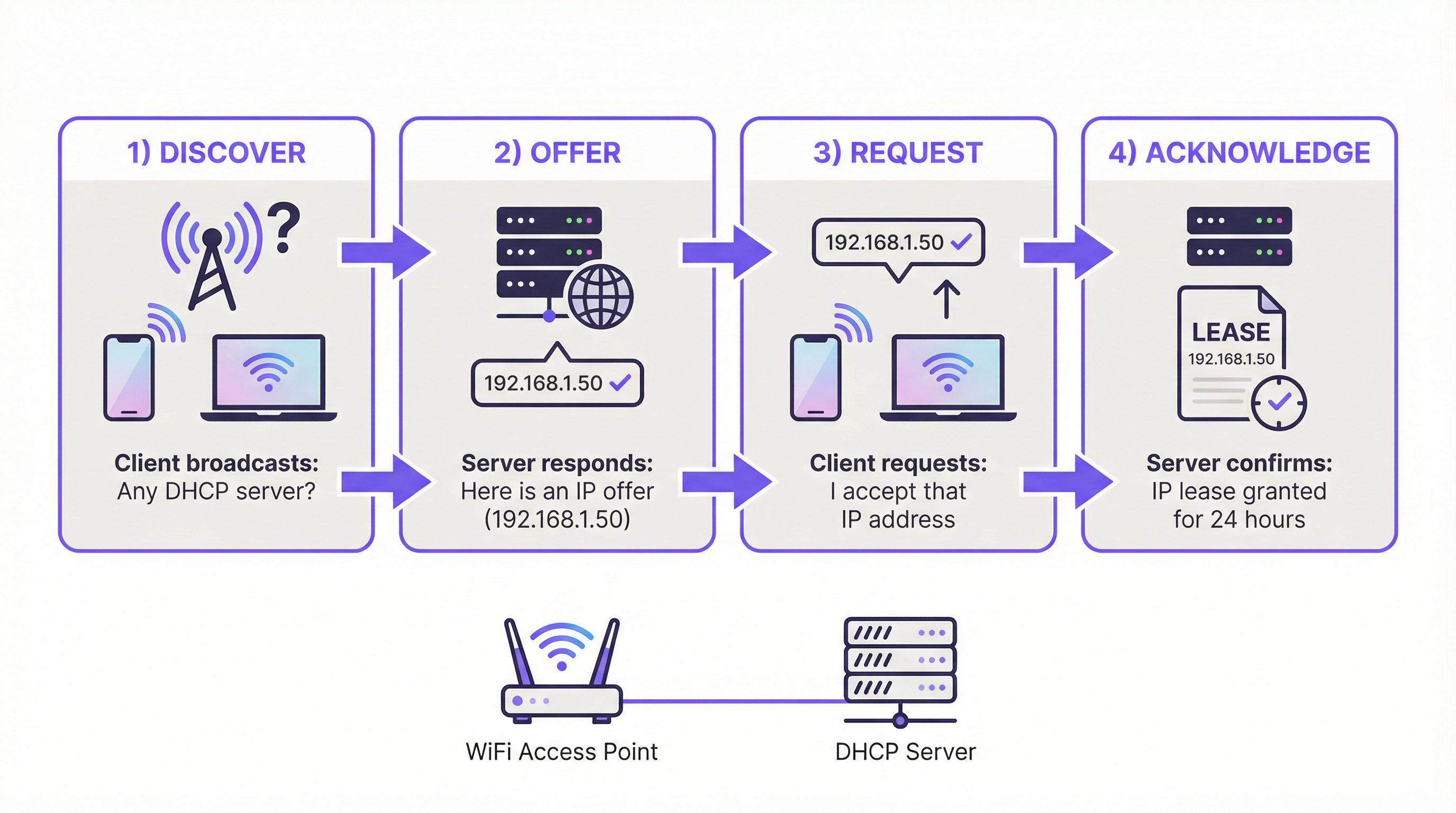
Principais Parâmetros de DHCP para WiFi:
- Tempo de Concessão (Lease Time): Determina durante quanto tempo um dispositivo pode reter um endereço IP. Em ambientes de alta rotatividade, como um café ou uma conferência, tempos de concessão curtos (ex.: 1-4 horas) são críticos para reciclar IPs de forma eficiente. Num hotel ou escritório corporativo, concessões mais longas (ex.: 24 horas) são mais adequadas para dispositivos residentes.
- Tamanho do Âmbito (Scope Size): Um ponto de falha comum é o subdimensionamento do pool de endereços IP. Uma sub-rede /24 (254 IPs utilizáveis) é frequentemente insuficiente para redes de convidados empresariais. Uma regra geral é provisionar pelo menos 2-3 dispositivos por utilizador ou quarto. Para um hotel de 200 quartos, isto significa planear para 400-600 dispositivos simultâneos, necessitando de uma sub-rede maior (ex.: uma /22) para evitar o esgotamento de endereços IP durante os picos de utilização.
- Opções de DHCP: Para além do endereço IP, o DHCP fornece aos clientes informações críticas, nomeadamente o Default Gateway (o IP do router) e o endereço do Servidor DNS. A Opção 43 também pode ser utilizada para fornecer informações específicas do fornecedor aos pontos de acesso para a descoberta do controlador.
O DNS e o seu Impacto na Experiência do Utilizador WiFi
O DNS traduz nomes de domínio legíveis por humanos (ex.: purple.ai) em endereços IP legíveis por máquinas. No contexto do WiFi para convidados, o seu papel é fundamental, particularmente para o Captive Portal.
A Interceção do Captive Portal:
Quando um novo dispositivo de convidado se liga, é bloqueado da internet pública por uma firewall. Quando o utilizador abre um browser e tenta navegar para qualquer website, o servidor DNS da rede interceta este pedido. Em vez de resolver o domínio solicitado para o seu IP público, o servidor DNS responde com o endereço IP do próprio servidor do Captive Portal. Isto força o browser do utilizador a carregar a página de autenticação. Esta é uma forma de sequestro de DNS (DNS hijacking) controlado e é fundamental para o fluxo de trabalho do Captive Portal.
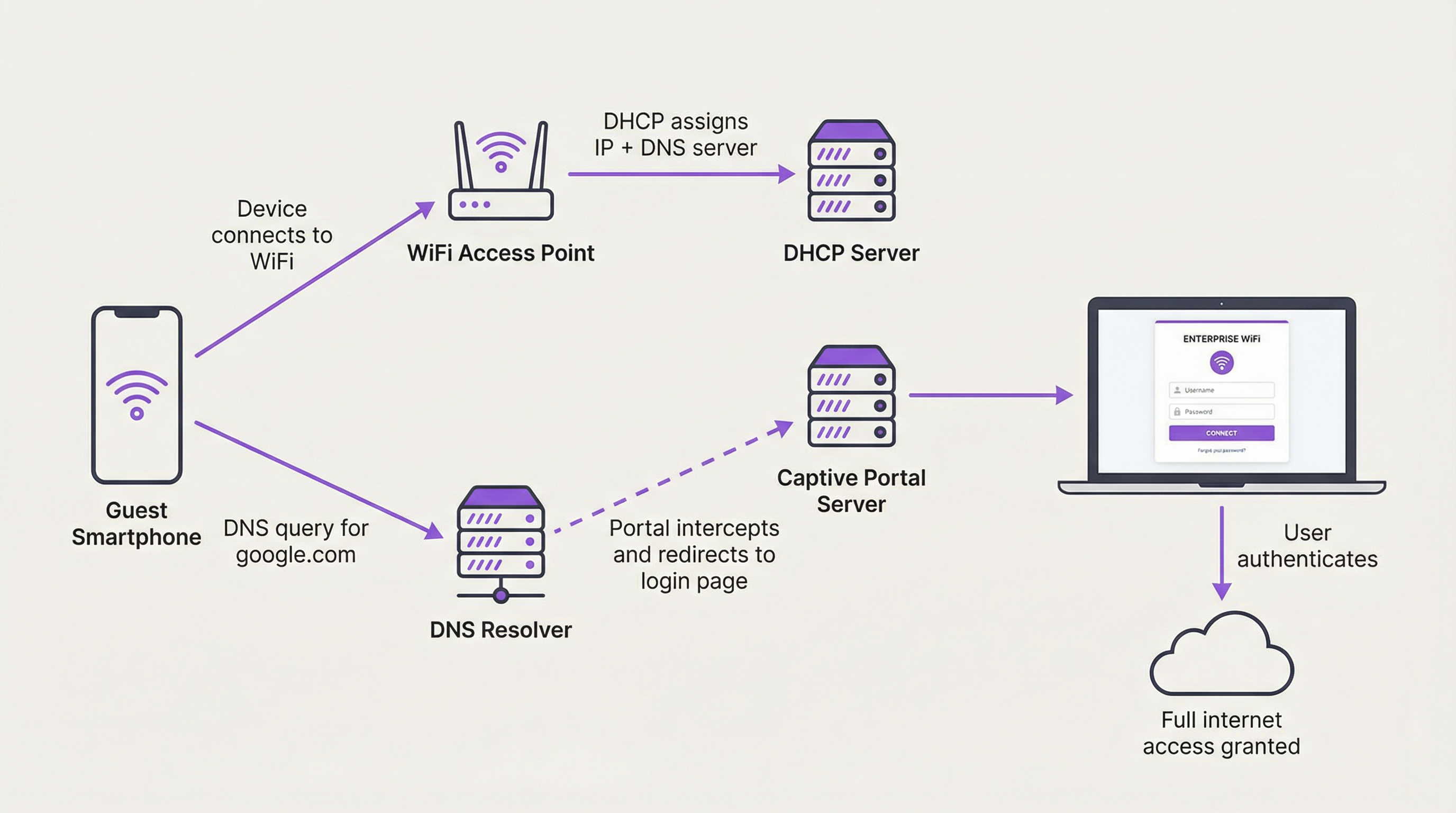
Configurações Incorretas Comuns de DNS:
- Permitir DNS Externo: Se as regras da firewall permitirem que os clientes convidados enviem consultas DNS para resolutores externos (como o 8.8.8.8 da Google ou o 1.1.1.1 da Cloudflare) antes da autenticação, o Captive Portal pode ser contornado. Todo o tráfego DNS de clientes não autenticados deve ser forçado para o resolutor interno.
- DNS Split-Horizon: Em ambientes com redes de convidados e internas, uma arquitetura DNS split-horizon (ou split-brain) é essencial. Isto significa que o seu servidor DNS fornece respostas diferentes dependendo de quem faz o pedido. Um funcionário no WiFi da equipa que consulte o nome de um servidor interno deve obter um endereço IP privado, enquanto um convidado não deve conseguir resolver esse nome de todo. Esta é uma fronteira de segurança crítica.
Guia de Implementação
A arquitetura de DHCP e DNS para WiFi empresarial requer uma abordagem estruturada. O que se segue fornece um modelo de implementação independente do fornecedor.
Passo 1: Segmentação de Rede
Esta é a base absoluta. O tráfego de convidados e de funcionários/corporativo deve ser logicamente separado utilizando VLANs. Este é um requisito fundamental para normas de segurança como o PCI DSS e o GDPR.
- VLAN de Convidados: Acesso irrestrito à internet (pós-autenticação), mas completamente isolado por firewall de todos os recursos corporativos internos.
- VLAN de Funcionários: Acesso à internet e acesso específico, baseado em funções, a recursos internos (servidores de ficheiros, bases de dados, etc.).
- VLAN de Gestão: Para dispositivos de infraestrutura de rede, como pontos de acesso, switches e controladores.
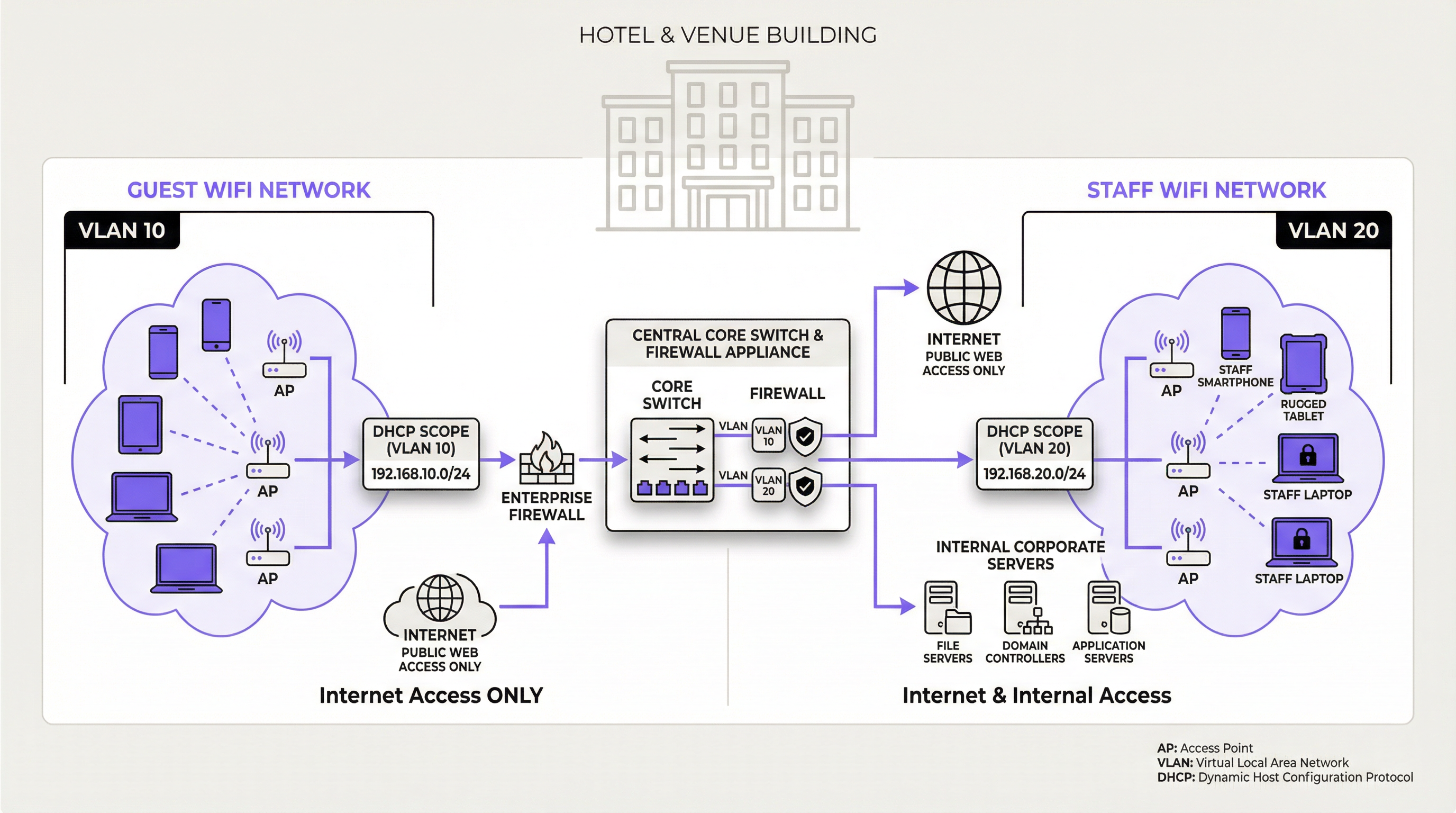
Passo 2: Arquitetura de Servidores DHCP e DNS
- Modelo Centralizado: Para organizações com vários locais (ex.: cadeias de retalho), um servidor DHCP/DNS centralizado na sede ou num data center proporciona uma gestão consistente. Cada local remoto utiliza Agentes de Retransmissão DHCP (IP helpers) no seu router/switch local para reencaminhar os pedidos DHCP para o servidor central. Risco: Elevada dependência da ligação WAN.
- Modelo Descentralizado/Distribuído: Para grandes locais únicos (estádios, aeroportos) ou onde a autonomia do local é crítica, a implementação local de servidores DHCP/DNS redundantes é a melhor prática. Isto proporciona a máxima resiliência e desempenho, uma vez que uma falha na WAN não afetará os serviços da rede local.
- Modelo Baseado na Cloud: Algumas soluções de rede geridas na cloud oferecem serviços DHCP e DNS integrados. Isto simplifica a gestão, mas requer uma avaliação cuidadosa da segurança e do conjunto de funcionalidades.
Passo 3: Configuração do Âmbito e Concessão DHCP
Para cada VLAN, crie um âmbito DHCP dedicado.
| Rede | ID da VLAN | Exemplo de Sub-rede | Tempo de Concessão Recomendado | Principais Considerações |
|---|---|---|---|---|
| WiFi de Convidados | 10 | 10.10.0.0/21 |
1-8 Horas | Dimensionar para a capacidade máxima (3x utilizadores). Concessão curta. |
| WiFi de Funcionários | 20 | 192.168.20.0/24 |
24 Horas | Concessão mais longa para dispositivos persistentes. |
| IoT / Scanners | 30 | 192.168.30.0/24 |
7 Dias / Estático | Utilizar reservas estáticas para infraestruturas críticas. |
Melhores Práticas
- Ativar DHCP Snooping: Esta é uma funcionalidade de segurança de Camada 2 em switches que valida as mensagens DHCP. Impede a introdução de servidores DHCP não autorizados (rogue) na rede, o que é um vetor de ataque comum.
- Monitorizar a Utilização do Âmbito DHCP: Monitorize ativamente o número de IPs disponíveis nos seus pools DHCP. Configure alertas para o notificar quando a utilização exceder um determinado limite (ex.: 85%) para evitar proativamente o esgotamento de endereços.
- Utilizar Servidores Redundantes: Para qualquer implementação de nível empresarial, os serviços DHCP e DNS devem ser implementados num par redundante (ex.: um cluster de failover) para eliminar pontos únicos de falha.
- Documentar Reservas DHCP: Para dispositivos de infraestrutura crítica que requerem um endereço IP consistente (ex.: impressoras, servidores, pontos de acesso), utilize reservas DHCP associadas ao endereço MAC do dispositivo. Isto centraliza a gestão de IPs em vez de utilizar IPs estáticos configurados nos próprios dispositivos.
Resolução de Problemas e Mitigação de Riscos
| Sintoma | Causa Potencial | Mitigação / Solução |
|---|---|---|
| Os utilizadores não conseguem obter um endereço IP. | Esgotamento do Âmbito DHCP: O pool de endereços IP disponíveis está vazio. | Aumentar o tamanho da sub-rede. Diminuir o tempo de concessão DHCP para reciclar endereços mais rapidamente. |
| Os utilizadores obtêm um IP 'autoatribuído'. | Nenhum Servidor DHCP Acessível: O pacote DHCP Discover do cliente não está a chegar a um servidor. | Verificar se existem configurações incorretas de VLAN. Garantir que os endereços de DHCP Relay/IP Helper estão corretamente configurados nos routers/switches L3. |
| Os utilizadores são direcionados para websites errados. | Servidor DHCP Não Autorizado ou Sequestro de DNS: Um dispositivo não autorizado está a emitir definições de rede maliciosas. | Ativar o DHCP Snooping em todos os switches de acesso. Utilizar extensões de segurança DNS (DNSSEC) se suportado. |
| A página do Captive Portal não carrega. | Contorno de DNS: O cliente está a utilizar um servidor DNS externo. Problema de Firewall: O tráfego para o servidor do portal está bloqueado. | Criar regras de firewall para bloquear todo o DNS de saída (Porta 53) de clientes não autenticados, exceto para o resolutor interno. |
ROI e Impacto no Negócio
Uma infraestrutura DHCP e DNS bem arquitetada proporciona um valor de negócio tangível para além de simplesmente fornecer acesso à internet. O principal ROI deriva da redução de riscos e da eficiência operacional. Uma rede estável minimiza o tempo de inatividade dispendioso e reduz o número de pedidos de suporte relacionados com problemas de conectividade. Para um grande hotel, evitar uma única hora de interrupção do WiFi para convidados durante uma grande conferência pode prevenir danos reputacionais significativos e exigências de créditos de serviço. Além disso, o funcionamento fiável do Captive Portal, que depende do DNS, é a porta de entrada para a recolha de dados valiosos dos clientes para marketing e análise, conforme facilitado por plataformas como a Purple. Estes dados permitem um envolvimento personalizado, impulsionam a fidelização e fornecem análises de tráfego de pessoas (footfall) que podem otimizar a disposição e as operações do espaço, proporcionando um impacto direto e mensurável nas receitas.
Key Terms & Definitions
DHCP Lease Time
The duration for which a DHCP server grants a client the right to use an assigned IP address.
IT teams must balance lease time against device turnover. Short leases in high-traffic venues prevent IP exhaustion, while long leases in corporate environments reduce unnecessary network chatter.
DHCP Scope
A defined range of IP addresses that a DHCP server is authorized to distribute to clients on a specific subnet.
This is the pool of available addresses. If the scope is too small for the number of connecting devices, new users will be denied access, leading to service outages.
DHCP Relay Agent (IP Helper)
A router or switch configuration that forwards DHCP broadcast packets from one subnet to a DHCP server on another subnet.
This is essential for centralized DHCP management. It allows a single DHCP server in a data center to serve multiple VLANs and remote sites without needing a server in every location.
DHCP Snooping
A Layer 2 security feature that filters DHCP messages, blocking responses from untrusted ports to prevent rogue DHCP servers.
This is a critical security control to prevent man-in-the-middle attacks where an attacker's device could start issuing malicious IP configurations to clients.
Captive Portal
A web page that a user of a public-access network is obliged to view and interact with before access is granted.
For venue operators, this is the primary mechanism for user authentication, presenting terms of service, and capturing marketing data. Its functionality is entirely dependent on correct DNS and firewall configuration.
Split-Horizon DNS (Split-Brain DNS)
A DNS configuration where the server provides different responses (different IP addresses) for the same domain name depending on the source of the query.
This is used to securely separate internal and external users. It ensures an employee can resolve `intranet.company.com` to a private IP while a guest on the public WiFi cannot resolve it at all.
VLAN (Virtual Local Area Network)
A method of creating logically separate networks on the same physical network infrastructure.
This is the fundamental tool for network segmentation. IT teams must use VLANs to isolate guest traffic from secure corporate and payment-card (PCI) traffic as a baseline security measure.
IP Address Exhaustion
A state where all available IP addresses in a DHCP scope have been leased, preventing new devices from connecting to the network.
This is the most common failure mode for poorly planned guest WiFi networks. It is a direct result of underestimating device density and setting lease times that are too long for the environment.
Case Studies
A 500-room luxury hotel is experiencing frequent complaints about WiFi connectivity, especially during large conferences. Guests report being unable to connect, and the IT team is constantly "rebooting the router". They are using a single /24 subnet for their guest network, provided by their ISP's basic firewall.
The core issue is DHCP scope exhaustion and a lack of enterprise-grade architecture.
- Immediate Triage: Lower the DHCP lease time on the existing firewall from the default (often 24 hours) to 1 hour. This will more rapidly recycle the limited IP addresses as conference attendees come and go.
- Strategic Redesign: Procure and deploy two dedicated servers to run as a DHCP failover cluster. This provides redundancy.
- Implement VLANs: Create a new, dedicated Guest WiFi VLAN (e.g., VLAN 100).
- Expand IP Scope: Assign a significantly larger subnet to the new guest VLAN, such as a /21 (which provides 2046 usable IPs). This accommodates the 500 rooms plus multiple devices per guest and conference attendees (500 rooms * 3 devices/room = 1500 IPs needed at a minimum).
- Configure DHCP Relay: On the hotel's core switch/router, configure an IP Helper address on the Guest VLAN interface, pointing to the new DHCP servers. This directs all guest DHCP requests to the dedicated servers.
- Monitoring: Implement monitoring on the new DHCP servers to track scope utilization in real-time.
A retail chain with 100 stores wants to implement a branded guest WiFi captive portal to gather marketing data. They notice that some tech-savvy customers are able to get online without ever seeing the login page. Their current setup has a simple guest network at each store using the local ISP router.
The problem is DNS leakage, allowing clients to bypass the captive portal redirect.
- Firewall Policy Implementation: At each store, the firewall controlling the guest network must be configured with a new outbound rule. This rule should DENY all traffic from the Guest WiFi subnet with a destination port of 53 (DNS), for all destination IPs EXCEPT for the IP address of the store's own internal DNS resolver (which may be the router itself or a designated server).
- DNS Interception: Ensure the internal DNS resolver is configured to intercept all DNS queries from unauthenticated clients and redirect them to the captive portal's IP address.
- Centralized Management (Optional but Recommended): For better consistency, deploy a standardized firewall configuration to all 100 stores using a central management platform (e.g., Meraki, FortiManager). This ensures the anti-bypass rule is applied uniformly and cannot be accidentally misconfigured by local staff.
Scenario Analysis
Q1. You are designing the network for a new 10,000-seat sports stadium. The client wants seamless WiFi for all attendees. What DHCP lease time would you recommend for the public guest network and why?
💡 Hint:Consider the duration of an average event and the sheer volume of unique devices over a short period.
Show Recommended Approach
A very short lease time, such as 30-60 minutes, is recommended. During a 3-4 hour event, thousands of devices will connect and disconnect. A short lease ensures that IP addresses from departed fans are rapidly recycled and made available to new or reconnecting devices, preventing IP address exhaustion in such a high-density, high-turnover environment.
Q2. A hospital wants to provide guest WiFi but is concerned about security and compliance with health data regulations (e.g., HIPAA). What is the single most important architectural principle you must enforce regarding their guest and internal networks?
💡 Hint:How do you ensure guest devices can never, under any circumstances, communicate with internal clinical systems?
Show Recommended Approach
The single most important principle is strict network segmentation using VLANs and restrictive firewall rules. The guest WiFi network must be on its own isolated VLAN and all traffic from this VLAN must be explicitly denied from reaching any internal network segment, especially those containing clinical systems or patient data. There should be zero trust and zero connectivity between the two environments.
Q3. Your company's CFO is questioning the expense of dedicated DHCP/DNS servers, arguing that the firewall provided by the ISP should be sufficient. How do you justify the investment in terms of business risk?
💡 Hint:Translate technical benefits (redundancy, scalability) into business outcomes (risk mitigation, uptime, user experience).
Show Recommended Approach
The justification is a risk-mitigation and business continuity argument. While the ISP firewall provides basic functionality, it represents a single point of failure with limited scalability and management features. For an enterprise, a DHCP or DNS failure is not an IT issue; it's a business outage. For a hotel, it means unhappy guests and refunds. For a retail store, it means point-of-sale systems or customer analytics could fail. Investing in redundant, dedicated servers is like buying insurance; it protects against costly downtime and ensures the network can scale with business demand, directly protecting revenue and customer satisfaction.
Key Takeaways
- ✓DHCP and DNS are foundational services that determine the stability and security of any enterprise WiFi network.
- ✓Always right-size your DHCP scope for peak device density (The 3:1 Rule) and use short lease times in high-turnover venues.
- ✓Strict network segmentation using VLANs to separate guest and staff traffic is a non-negotiable security requirement.
- ✓Captive portal functionality relies on intercepting and redirecting DNS queries; block external DNS for unauthenticated users to prevent bypass.
- ✓Use DHCP Snooping to prevent rogue DHCP servers and other man-in-the-middle attacks.
- ✓For enterprise scale, use redundant, dedicated DHCP/DNS servers to eliminate single points of failure and ensure business continuity.
- ✓Monitor DHCP scope utilization proactively to prevent IP address exhaustion before it impacts users.




