

Regras de Firewall para Redes WiFi de Convidados
This guide provides IT managers and network architects with an authoritative reference for configuring firewall rules for guest WiFi networks, specifically in support of a Purple deployment. It offers actionable, vendor-neutral guidance on network segmentation, port configuration, and security best practices to ensure both seamless guest access and robust protection of corporate assets.
🎧 Listen to this Guide
View Transcript
Resumo Executivo
Para a empresa moderna, oferecer WiFi a convidados já não é um luxo — é um serviço de missão crítica que impulsiona o envolvimento do cliente, fornece análises valiosas e melhora a experiência no local. No entanto, uma rede de convidados incorretamente protegida representa um dos vetores de ataque mais significativos para o ambiente corporativo. Este guia de referência técnica fornece uma estrutura acionável para líderes de TI e arquitetos de rede implementarem configurações de firewall robustas, seguras e de alto desempenho para redes WiFi de convidados. Foca-se nos princípios fundamentais de isolamento de rede, acesso de menor privilégio e monitorização proativa. Ao aderir a estas melhores práticas independentes de fornecedor, as organizações podem mitigar riscos de segurança, garantir a conformidade regulamentar (como PCI DSS e GDPR) e maximizar o ROI da sua infraestrutura WiFi. Este documento vai além da teoria académica para oferecer orientações pragmáticas passo a passo e exemplos do mundo real, adaptados para profissionais técnicos ocupados, responsáveis pela implementação e gestão de redes empresariais na hotelaria, retalho e grandes espaços públicos.
Análise Técnica Aprofundada
O princípio fundamental da arquitetura segura de WiFi para convidados é a segmentação rigorosa da rede. A rede de convidados deve ser tratada como um ambiente externo não confiável, logicamente separada da LAN corporativa confiável, onde residem os sistemas de negócios críticos, servidores e dados dos funcionários. Isto é alcançado de forma mais eficaz utilizando LANs Virtuais (VLANs), com uma firewall a atuar como o ponto de controlo entre elas.
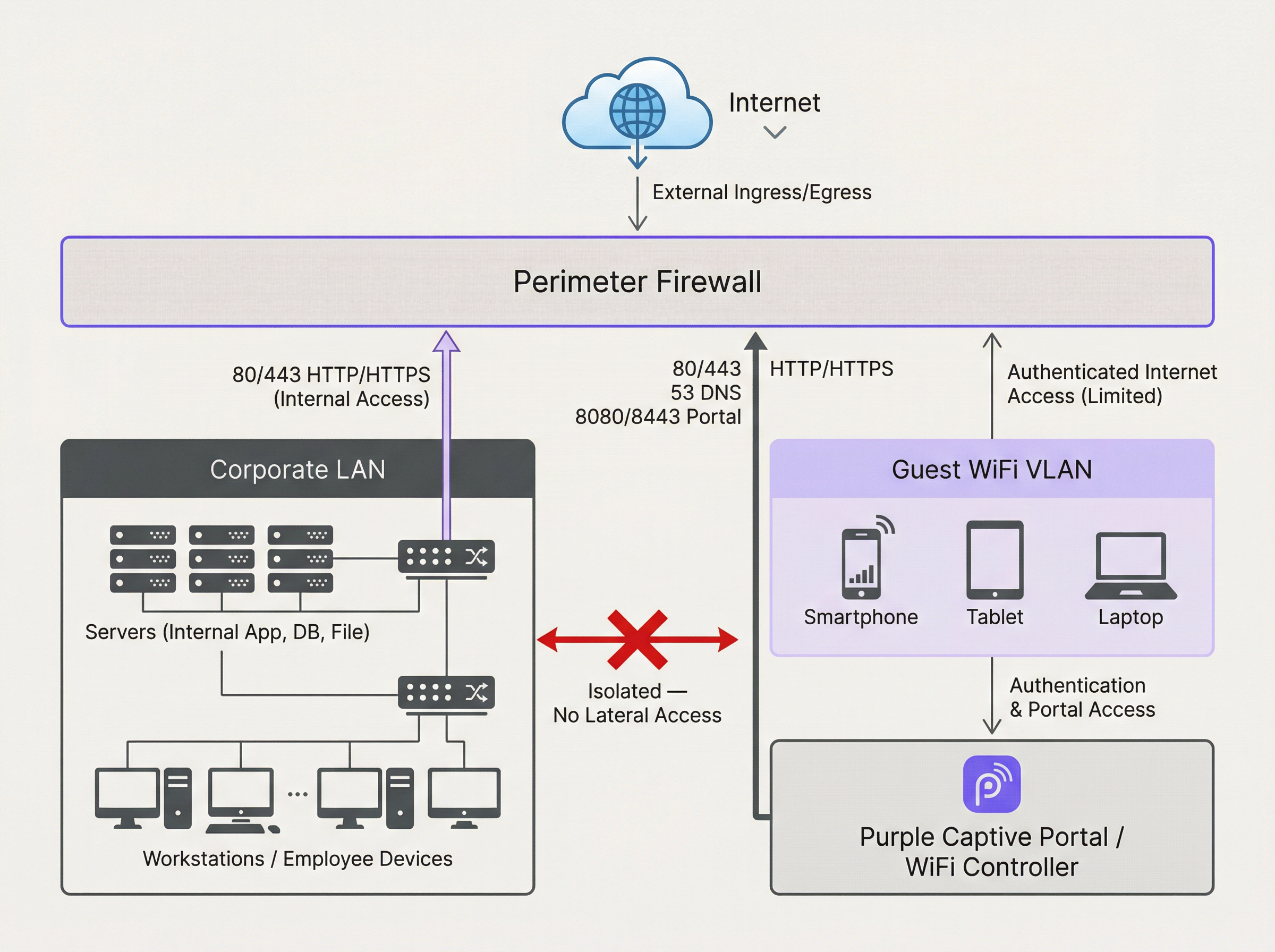
O diagrama acima ilustra a arquitetura ideal. Todo o tráfego com origem na VLAN do WiFi de Convidados passa pela firewall e é inspecionado antes de poder chegar à internet ou a qualquer outro segmento de rede. Crucialmente, deve existir uma regra de firewall para negar explicitamente qualquer tráfego iniciado a partir da VLAN de Convidados para a LAN Corporativa. Isto impede que um dispositivo de convidado comprometido seja utilizado como ponto de articulação para atacar recursos internos.
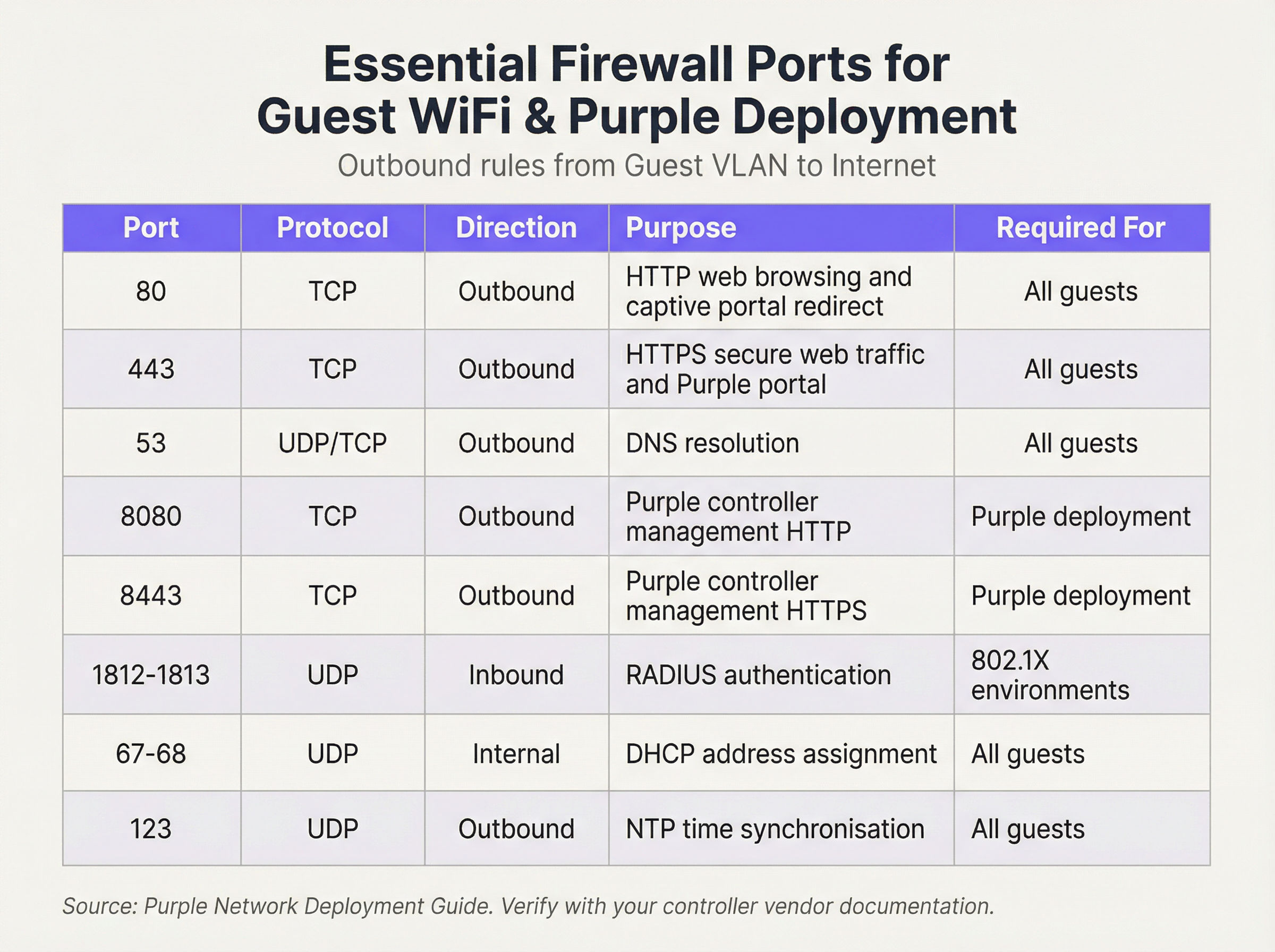
Operamos com uma postura de segurança de 'Negação por Defeito' (Default Deny). Isto significa que a firewall bloqueará todo o tráfego, a menos que uma regra o permita explicitamente. As seguintes regras de saída formam a base para uma rede de convidados funcional e segura:
Regras de Entrada e Encaminhamento de Portas (Port Forwarding):
Para a VLAN de Convidados, a política de entrada é simples: negar todo o tráfego iniciado a partir da internet. Não existe nenhum motivo comercial válido para que uma entidade externa inicie uma ligação ao dispositivo de um convidado. A única exceção é para hardware no local (on-premise). Se alojar o seu próprio controlador WiFi ou servidor de Captive Portal dentro da sua rede (em oposição à utilização de uma solução alojada na cloud), precisará de criar uma regra específica de Encaminhamento de Portas (ou Destination NAT). Esta regra mapeia uma porta específica no seu endereço IP público para o endereço IP interno e porta do controlador, por exemplo, encaminhando o tráfego de entrada na porta TCP 443 para 192.168.100.10:8443. Esta regra deve ser o mais restritiva possível, especificando a origem exata (se conhecida), o destino e a porta.
Guia de Implementação
- Criação de VLAN: Nos seus switches de rede, crie uma nova VLAN dedicada para o tráfego de convidados (por exemplo, VLAN 100). Atribua este ID de VLAN ao SSID que transmite a sua rede de convidados.
- Configuração da Interface da Firewall: Configure uma nova interface ou subinterface na sua firewall e atribua-a à VLAN de convidados. Esta interface servirá como gateway predefinido para todos os dispositivos de convidados.
- Serviço DHCP: Configure um servidor DHCP para a VLAN de convidados para atribuir endereços IP automaticamente. Certifique-se de que o âmbito DHCP fornece apenas o endereço IP, a máscara de sub-rede e a interface de convidados da firewall como gateway predefinido. Os servidores DNS fornecidos devem ser resolutores públicos (por exemplo, 1.1.1.1, 8.8.8.8).
- Regras de Firewall de Saída: Crie as regras de firewall de saída essenciais, conforme detalhado na tabela de referência de portas. Comece com as regras mais específicas e termine com uma regra 'Negar Tudo' (Deny All). A ordem é crítica. A firewall avalia as regras de cima para baixo, e a primeira correspondência determina a ação.
- Isolamento de Clientes: Nos seus pontos de acesso sem fios, ative a funcionalidade 'Isolamento de Clientes' (Client Isolation, por vezes designada 'Isolamento de AP' ou 'Modo de Convidado'). Este é um controlo crítico que impede que os dispositivos de convidados na mesma rede WiFi comuniquem entre si, mitigando o risco de ataques peer-to-peer.
- Registo e Monitorização: Ative o registo detalhado (logging) para todas as regras de firewall, especialmente para tráfego negado. Encaminhe estes registos para um sistema central SIEM (Security Information and Event Management) para correlação e alerta sobre atividades anómalas.
Melhores Práticas
- Utilize uma Firewall Stateful: Uma firewall stateful rastreia o estado das ligações ativas e permite automaticamente o tráfego de retorno para sessões estabelecidas. Isto simplifica a criação de regras, uma vez que apenas necessita de definir regras de saída para o tráfego iniciado pelo convidado.
- Audite Regularmente: Agende revisões trimestrais do seu conjunto de regras de firewall. Remova quaisquer regras temporárias, não utilizadas ou excessivamente permissivas. A segurança é um processo, não uma configuração única.
- Aborde o IPv6: Certifique-se de que as suas regras de firewall se aplicam tanto ao tráfego IPv4 como ao IPv6. Muitos dispositivos modernos utilizam o IPv6 por defeito, e ignorá-lo pode deixar uma lacuna de segurança significativa.
- Cumpra as Normas da Indústria: Alinhe a sua configuração com as estruturas de segurança estabelecidas. Para o retalho, o Requisito 1.2.1 do PCI DSS exige explicitamente a restrição do tráfego entre redes confiáveis e não confiáveis. Para o tratamento de dados pessoais, o GDPR exige 'medidas técnicas e organizacionais' para proteger os dados, para as quais a segmentação de rede é um controlo fundamental.
Resolução de Problemas e Mitigação de Riscos
- Problema: O Captive Portal não carrega: Isto é quase sempre um problema de DNS ou de regra de firewall. Certifique-se de que o convidado consegue resolver o nome de anfitrião do portal (verifique a Porta 53) e que o tráfego para o endereço IP e porta do portal (geralmente 80/443) é permitido antes da autenticação.
- Problema: WiFi de Convidados Lento: Regras de firewall excessivamente permissivas podem permitir que tempestades de broadcast ou tráfego malicioso consumam largura de banda. Implemente o princípio do menor privilégio para restringir o tráfego apenas ao que é estritamente necessário.
- Risco: Worm Zero-Day: Um convidado liga-se com um dispositivo infetado com um worm zero-day que se propaga automaticamente. Mitigação: O Isolamento de Clientes é a sua principal defesa, pois impede que o worm se propague a outros convidados na mesma rede WiFi. A filtragem rigorosa de saída também pode bloquear o tráfego de comando e controlo de que o malware necessita para operar.
ROI e Impacto no Negócio
Uma rede WiFi de convidados segura e bem gerida contribui diretamente para o sucesso do negócio. Em ambientes de retalho, permite o acesso às análises da Purple, fornecendo informações sobre o tráfego de pessoas, tempos de permanência e comportamento do cliente que informam diretamente as decisões operacionais e de marketing. Na hotelaria, uma rede de convidados de alto desempenho é um fator-chave para a satisfação dos hóspedes e avaliações positivas. Ao investir numa arquitetura de firewall adequada, não está apenas a mitigar riscos; está a garantir a fiabilidade e o desempenho de uma plataforma crítica de business intelligence e envolvimento do cliente. Uma implementação segura cria confiança e protege a marca, proporcionando um claro retorno do investimento ao evitar violações de dados dispendiosas e falhas de conformidade.

Resumo em Podcast
Para um resumo em áudio destes pontos-chave, ouça o nosso briefing técnico de 10 minutos.
Key Terms & Definitions
VLAN (Virtual LAN)
A method of creating logically separate networks on the same physical network infrastructure. Devices on different VLANs cannot communicate without passing through a router or firewall.
IT teams use VLANs as the primary tool to enforce segmentation between the guest network and the corporate network, which is a foundational requirement for security and compliance.
Firewall Egress Filtering
The practice of filtering traffic as it leaves a network, as opposed to when it enters. It controls what outbound connections internal devices are permitted to make.
For a guest network, egress filtering is critical. By only allowing outbound traffic on specific ports (like 80 and 443), you can block malware, prevent users from running unauthorised services, and reduce your attack surface.
Client/AP Isolation
A security feature on wireless access points that prevents devices connected to the same WiFi network from communicating directly with each other.
This is a critical defence against peer-to-peer attacks on the guest network. If one guest's device is compromised, Client Isolation prevents it from attacking other guests' laptops or phones in the same venue.
Stateful Firewall
A firewall that tracks the state of network connections (e.g., TCP streams). It automatically allows return traffic for connections that were initiated from inside the network.
Using a stateful firewall simplifies administration. An IT manager only needs to write a rule allowing a guest to connect to a website on port 443; the firewall automatically handles the return traffic without needing a complex inbound rule.
Default Deny
A security posture where any traffic that is not explicitly permitted by a firewall rule is blocked.
This is a best-practice principle for all firewall configuration. It ensures that any new or un-categorised traffic is blocked by default, providing a much higher level of security than a 'default allow' policy.
PCI DSS
The Payment Card Industry Data Security Standard, a set of security standards designed to ensure that all companies that accept, process, store or transmit credit card information maintain a secure environment.
For any retail or hospitality business, proving that the guest WiFi network is robustly isolated from the network that handles payments (the Cardholder Data Environment) is a fundamental requirement for passing a PCI DSS audit.
Captive Portal
A web page that the user of a public-access network is obliged to view and interact with before access is granted. It is used for authentication, payment, or accepting terms of service.
The firewall must be configured to allow unauthenticated users to access the captive portal (and its supporting services like DNS) before they have full internet access. This pre-authentication access is often managed via a walled-garden configuration.
Port Forwarding (Destination NAT)
A technique used to redirect a communication request from one address and port number combination to another while the packets are traversing a network gateway, such as a router or firewall.
If a venue hosts its own on-premise WiFi controller, IT teams must configure port forwarding to allow guest devices on the internet to reach the captive portal on the internal network. This is a critical step for enabling the guest journey.
Case Studies
A 200-room hotel is experiencing frequent guest complaints about slow WiFi and connection drops. An initial check reveals a flat network architecture where guest and hotel operational traffic (CCTV, staff PCs) share the same subnet. The firewall has a permissive 'allow any-to-any' rule for all internal traffic.
- Immediate Action: Create a new Guest VLAN (e.g., VLAN 200) and a corresponding guest SSID. 2. Segmentation: Migrate all guest-facing access points to the new VLAN. 3. Firewall Policy: Create a new zone and interface for the Guest VLAN on the firewall. Implement a strict outbound policy allowing only ports 53, 80, 443, and 123. Add a rule to explicitly deny any traffic from the Guest VLAN to the corporate VLAN. 4. Enable Client Isolation: Activate AP/Client Isolation on the wireless controller for the guest SSID. 5. Remove Permissive Rule: Once guest traffic is successfully segmented, remove the legacy 'allow any-to-any' rule and replace it with specific rules for required corporate traffic.
A retail chain is opening a new flagship store and needs to provide guest WiFi that is compliant with PCI DSS 4.0. The store will have point-of-sale (POS) terminals, inventory scanners, and corporate PCs on the same physical network infrastructure.
- Define CDE: The first step is to define the Cardholder Data Environment (CDE). Create a dedicated VLAN for all POS terminals. 2. Isolate Guest Network: Create a separate VLAN for guest WiFi. 3. Isolate Corporate Services: Create a third VLAN for other corporate services like inventory scanners and staff PCs. 4. Firewall Enforcement: The firewall must enforce strict segmentation. There must be an explicit 'deny all' rule for any traffic originating from the Guest VLAN or the Corporate Services VLAN to the CDE VLAN. 5. Restrict CDE Egress: The CDE VLAN should only be allowed outbound access to the specific IP addresses of the payment processor, and nothing else. 6. Prove Isolation: Use tools like
nmapor a vulnerability scanner to run tests from the guest network to prove that no CDE hosts or ports are reachable.
Scenario Analysis
Q1. A stadium is hosting a major sporting event and expects 50,000 concurrent users on its guest WiFi. What is the most critical firewall consideration to ensure network stability and security?
💡 Hint:Consider the impact of broadcast and multicast traffic in such a high-density environment.
Show Recommended Approach
The most critical consideration is the aggressive filtering of all unnecessary traffic, particularly broadcast and multicast traffic (like mDNS), at the firewall and access point level. In a high-density environment, this traffic can quickly lead to a broadcast storm, consuming all available bandwidth and bringing the network to a halt. Strict egress rules allowing only essential web and DNS traffic, combined with Client Isolation, are paramount.
Q2. You discover that a previous administrator has configured the guest network to use the internal corporate DNS servers. What are the risks, and what is the immediate remediation?
💡 Hint:What information can be gleaned from internal DNS records?
Show Recommended Approach
The risks are significant. It exposes the names and IP addresses of all internal corporate servers (e.g., payroll.internal.corp, dc01.internal.corp) to anyone on the guest network, providing a detailed map for an attacker. It also creates a potential vector for DNS cache poisoning attacks against the corporate network. The immediate remediation is to change the DHCP configuration for the guest VLAN to assign public DNS servers only (e.g., 1.1.1.1, 8.8.8.8) and ensure the firewall blocks the guest VLAN from sending any traffic to the internal DNS servers.
Q3. A user reports they cannot access their corporate VPN over the guest WiFi. Your firewall logs show denied UDP traffic on port 500 and 4500 from the user's IP. What is the issue and how would you decide whether to resolve it?
💡 Hint:What protocol uses UDP ports 500 and 4500?
Show Recommended Approach
The issue is that the firewall is blocking the IKE and IPsec NAT-T protocols, which are commonly used to establish IPsec VPN tunnels. The decision to resolve this is a policy-level one. For a venue catering to business travellers (like a hotel or conference centre), allowing VPN access is often a business requirement. The resolution would be to create a specific outbound firewall rule to allow UDP traffic on ports 500 and 4500. For a public library or school, the policy might be to block VPNs to ensure traffic can be filtered. The decision must balance user needs against the organisation's security policy and risk tolerance.
Key Takeaways
- ✓Always isolate guest WiFi traffic on its own dedicated VLAN.
- ✓Operate on a 'Default Deny' firewall policy; only allow what is essential.
- ✓Enable Client Isolation on access points to prevent peer-to-peer attacks.
- ✓Use public DNS servers for guests; never expose internal DNS.
- ✓Strictly limit inbound traffic and only use port forwarding for specific, on-premise services.
- ✓Regularly audit firewall rules and monitor logs for anomalies.
- ✓A secure guest network is a prerequisite for compliance (PCI DSS, GDPR) and leveraging WiFi analytics.




