

LogicFlow: Automatizar Eventos e Acionadores de WiFi
This authoritative technical reference guide covers Purple's LogicFlow, an enterprise-grade WiFi event automation engine that enables IT managers and network architects to build intelligent, trigger-based workflows across hospitality, retail, stadium, and public-sector venues. It details the platform's Event-Decision-Action architecture, explores the full range of available triggers, and provides concrete implementation guidance with real-world case studies from hotel and retail deployments. For venue operators and IT teams, this guide demonstrates how to transform passive WiFi infrastructure into a proactive, revenue-generating, and operationally efficient platform.
🎧 Listen to this Guide
View Transcript
Resumo Executivo
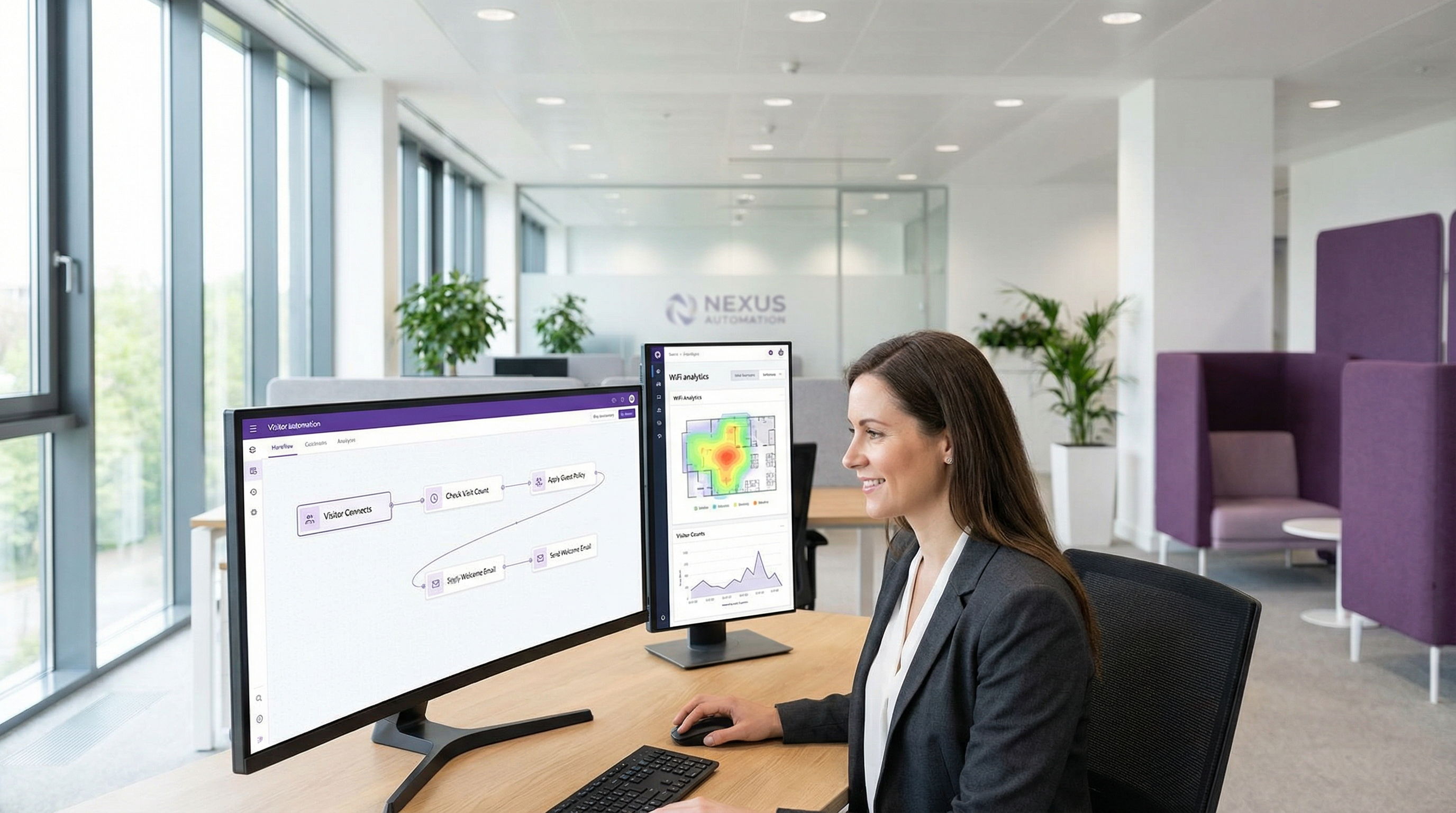
No panorama competitivo das redes empresariais, a capacidade de automatizar respostas a eventos em tempo real já não é um luxo, mas um requisito operacional central. Para gestores de TI, arquitetos de redes e operadores de recintos, o desafio reside em traduzir dados brutos da rede em ações imediatas e orientadas para o valor. O LogicFlow da Purple é um motor de automação de nível empresarial concebido para dar resposta direta a este desafio. Fornece uma interface visual de arrastar e largar (drag-and-drop) para construir fluxos de trabalho sofisticados, iniciados por uma vasta gama de eventos de WiFi e relacionados com os visitantes. Este guia serve como uma análise técnica aprofundada do LogicFlow, indo além dos resumos de marketing para fornecer orientações de implementação acionáveis. Iremos dissecar a arquitetura da plataforma, explorar cenários de implementação comuns em setores como a hotelaria e o retalho, e quantificar o ROI em termos de eficiência operacional, maior envolvimento dos visitantes e mitigação de riscos. Para o CTO, este documento delineia uma estratégia para potenciar a infraestrutura de WiFi existente como um sistema proativo e inteligente que impulsiona os resultados do negócio. Para o gestor de TI e o programador, é um manual prático para implementar fluxos de trabalho robustos e automatizados que se alinham com as principais normas de conformidade, como o GDPR e o PCI DSS, garantindo tanto a segurança como uma experiência de utilizador perfeita.
Análise Técnica Aprofundada
O LogicFlow opera como o sistema nervoso central da plataforma Purple, processando um fluxo contínuo de pontos de dados para acionar ações predefinidas. A sua arquitetura baseia-se em três conceitos centrais: Eventos, Decisões e Ações. Este modelo permite a criação de fluxos de trabalho complexos e com estado (stateful) que se podem adaptar a condições em mudança em tempo real.
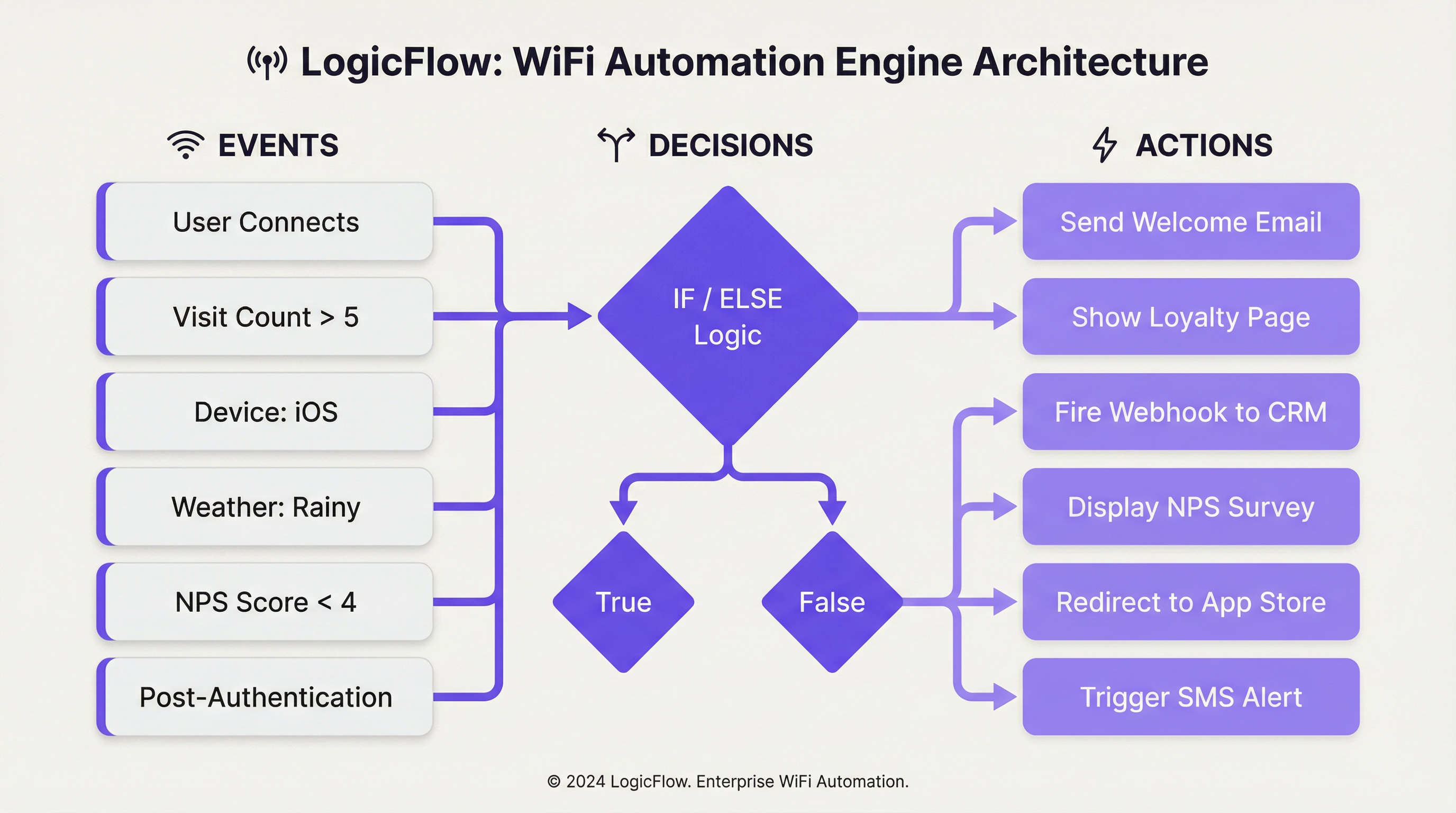
Acionadores de Eventos (Event Triggers): O processo começa quando um evento é detetado. O LogicFlow suporta um conjunto abrangente de acionadores, que podem ser amplamente categorizados:
| Categoria | Acionadores Específicos | Contexto Técnico |
|---|---|---|
| Eventos de Integração (Onboarding) | Pré-Autenticação, Pós-Autenticação, Online | Estes correspondem às fases distintas da jornada de ligação ao WiFi do visitante. As ações de pré-autenticação são limitadas, uma vez que o utilizador ainda não está online, enquanto os acionadores de pós-autenticação e online podem tirar partido de um conjunto de dados mais rico. |
| Demografia do Visitante | Idade, Género, Idioma, Endereço de E-mail, Contagem de Visitas | Obtidos a partir do formulário de início de sessão do Captive Portal ou do início de sessão social, estes dados permitem jornadas de utilizador altamente personalizadas. A conformidade com os regulamentos de privacidade de dados, como o GDPR, é fundamental ao utilizar estes dados. |
| Dispositivo e Rede | Sistema Operativo, Browser, SSID, MAC/Nome do Ponto de Acesso, Fabricante | Essencial para a otimização específica do dispositivo (por exemplo, promover a transferência de uma aplicação para utilizadores de iOS) ou ações específicas da localização com base no AP a que o utilizador está ligado. |
| Dados Ambientais | Localização do Recinto (País, Etiquetas), Meteorologia (Condição, Temperatura), Hora/Dia/Data | Permite uma automação sensível ao contexto, como apresentar uma oferta de 'dia de chuva' na splash page de uma loja de retalho ou alterar o conteúdo com base em feriados nacionais. |
| Comportamento do Utilizador | Resposta NPS, Respostas a Micro-inquéritos, Método de Início de Sessão, Plano de WiFi Pago | Acionadores baseados no feedback direto ou nas escolhas do utilizador, permitindo a recuperação imediata do serviço ou oportunidades de venda adicional (upselling). |
Nós de Decisão: Uma vez acionado um evento, este é passado para um Nó de Decisão. É aqui que reside a 'lógica' no LogicFlow. Utilizando declarações 'Verdadeiro/Falso' ou 'Se/Senão' (If/Else), os administradores podem construir caminhos ramificados com base nas condições cumpridas pelos dados do evento. Por exemplo, um nó 'Se/Senão' pode verificar a visit_count (contagem de visitas) de um visitante. Se for superior a 5 (um cliente leal), segue o caminho 'Verdadeiro'; caso contrário, segue o caminho 'Falso' para novos visitantes. Múltiplas condições podem ser agrupadas utilizando a lógica 'E'/'OU' (AND/OR), permitindo uma segmentação altamente granular.
Nós de Ação: O passo final é o Nó de Ação, que executa uma tarefa específica. As ações dependem do contexto com base no tipo de evento.
- Pré-Autenticação: Principalmente a ação
Splash Page, permitindo um branding dinâmico com base na localização ou na hora do dia. - Pós-Autenticação: Está disponível uma gama mais vasta de ações, incluindo a apresentação de
NPS/Micro-survey(Micro-inquérito), o disparo de umWebhookpara um sistema de terceiros, a exibição deMedia(por exemplo, um anúncio em vídeo) ou a atribuição a um nível dePaid WiFi(WiFi Pago). - Online: Ações que ocorrem assim que o utilizador tem acesso total à rede, como o
Redirect(Redirecionamento) para um URL específico, o envio de umaEmail/SMS Campaign(Campanha de E-mail/SMS) ou a exibição de umaSplash Pagediferente na sua próxima visita.
Esta abordagem estruturada garante que os fluxos de trabalho sejam simultaneamente poderosos e fáceis de manter, aderindo às melhores práticas padrão para automação e arquitetura orientada a eventos.
Guia de Implementação
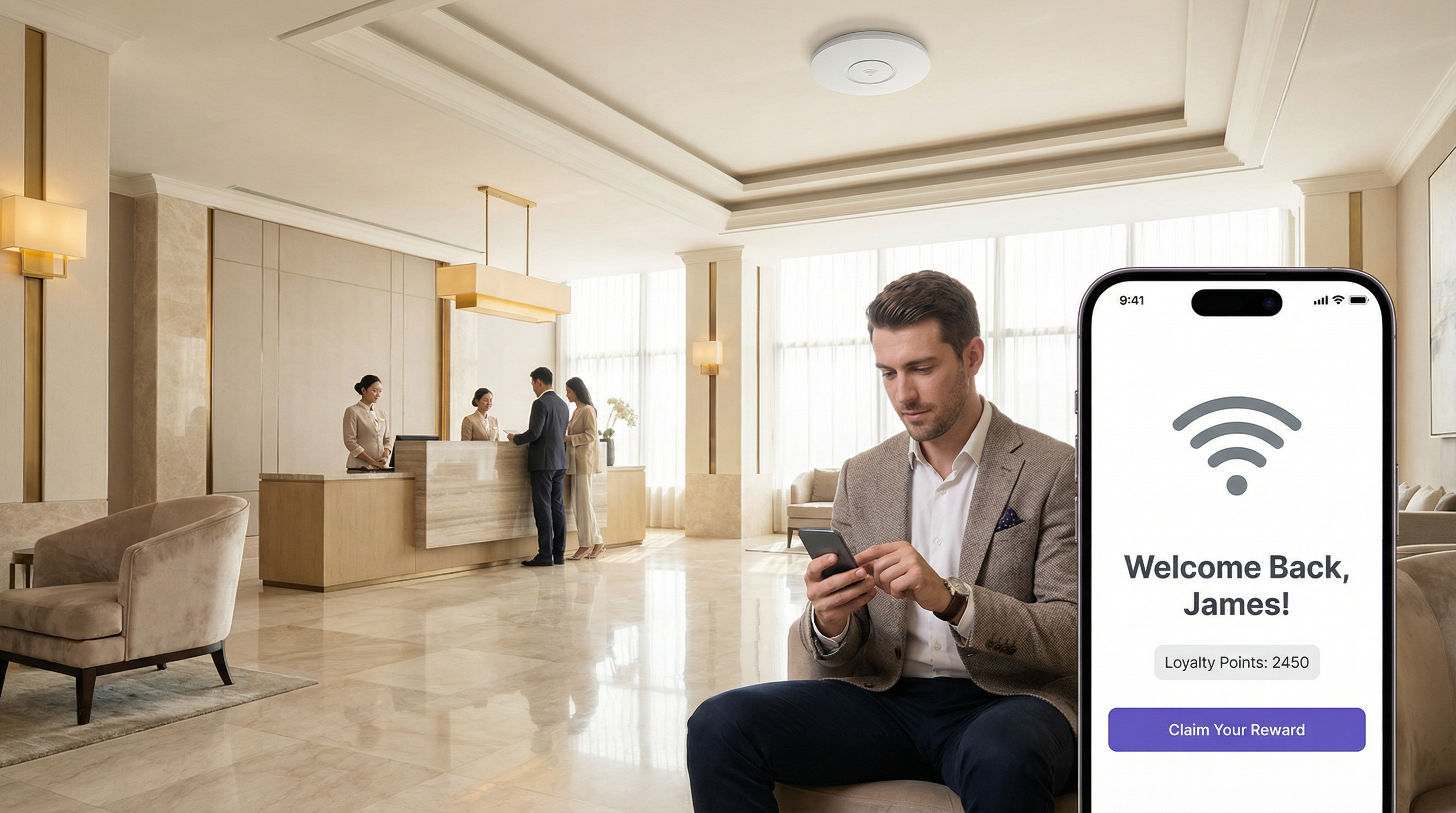
A implementação eficaz do LogicFlow requer uma abordagem estruturada, passando dos objetivos estratégicos para a configuração tática. Os passos seguintes fornecem uma estrutura neutra em relação ao fornecedor para a implementação.
Passo 1 — Definir Objetivos de Negócio: Antes de construir qualquer fluxo de trabalho, defina claramente o resultado pretendido. O objetivo é aumentar as transferências da aplicação de fidelização, melhorar as pontuações de satisfação dos visitantes ou impulsionar a afluência a uma área específica? Um objetivo claro dita os acionadores e as ações necessários.
Passo 2 — Mapear a Jornada do Cliente: Identifique os principais pontos de contacto na experiência do visitante onde a automação pode acrescentar valor. Isto alinha-se tipicamente com as fases de Pré-Autenticação, Pós-Autenticação e Online da jornada de acesso ao WiFi.
Passo 3 — Construir o Fluxo de Trabalho: Comece com um fluxo de trabalho único e simples. Por exemplo, uma mensagem de 'Bem-vindo de volta' para visitantes recorrentes. No LogicFlow v2, selecione 'Add logic flow' (Adicionar fluxo lógico) e escolha o tipo de evento apropriado. Arraste um nó de decisão 'Visitor' (Visitante) para a tela e configure-o com uma condição 'Verdadeiro/Falso': visit_count é greater than (maior que) 1. Para o caminho 'Verdadeiro', adicione um nó de ação Email Campaign (Campanha de E-mail) e selecione um modelo de e-mail 'Bem-vindo de volta' pré-configurado. Para o caminho 'Falso' (novos visitantes), adicione uma ação diferente, como um e-mail de 'Desconto de Primeira Visita'. Ligue todos os nós, garantindo que todos os caminhos terminam com um nó 'End' (Fim).
Passo 4 — Validar e Publicar: Utilize a ferramenta 'Validate' (Validar) integrada para verificar a existência de erros na lógica. Uma vez válido, clique em 'Publish' (Publicar) no fluxo de trabalho.
Passo 5 — Atribuir à Jornada de Acesso: Ligue o LogicFlow publicado a uma Access Journey (Jornada de Acesso) específica (a experiência do Captive Portal para um determinado recinto ou SSID). Isto ativa o fluxo de trabalho.
Passo 6 — Monitorizar e Iterar: Utilize as análises da plataforma para medir o impacto do fluxo de trabalho. Acompanhe as taxas de abertura de e-mails, as taxas de resgate e a frequência de visitas. Utilize estes dados para refinar a lógica e melhorar o desempenho ao longo do tempo.
Melhores Práticas
Começar Simples, Escalar de Forma Inteligente: Evite criar fluxos de trabalho monolíticos e excessivamente complexos desde o início. Comece com fluxos de finalidade única e combine-os à medida que ganha confiança e recolhe dados. Um único fluxo de trabalho bem ajustado que produza resultados mensuráveis vale mais do que dez mal direcionados.
Aderir às Normas de Conformidade: Ao utilizar dados demográficos, certifique-se de que a sua lógica respeita o consentimento do utilizador e está alinhada com regulamentos como o GDPR. Construa um nó de decisão que verifique o sinalizador emailable (contactável por e-mail) antes de acionar quaisquer ações de marketing. Para recintos que lidam com dados de pagamento, certifique-se de que os fluxos de trabalho que envolvem transações financeiras são revistos em relação aos requisitos do PCI DSS.
Potenciar Webhooks para Integração: Os webhooks são uma ferramenta poderosa para expandir as capacidades do LogicFlow. Utilize-os para enviar dados para sistemas de CRM externos, acionar alertas em painéis operacionais (como o Slack ou o Microsoft Teams) ou integrar com sistemas de gestão de edifícios. Isto promove uma estratégia de integração neutra em relação ao fornecedor e orientada para API, que protege o seu investimento tecnológico.
Utilizar Convenções de Nomenclatura: À medida que o número de fluxos de trabalho cresce, uma convenção de nomenclatura consistente — por exemplo, [Recinto]-[Objetivo]-[Acionador] — torna-se essencial para a manutenção e colaboração da equipa.
Auditar e Limpar Regularmente: Reveja periodicamente todos os fluxos de trabalho ativos para garantir que permanecem alinhados com os objetivos de negócio atuais. Desative ou arquive fluxos obsoletos para reduzir a complexidade e mitigar o risco de consequências indesejadas.
Resolução de Problemas e Mitigação de Riscos
Problema — O Fluxo de Trabalho Não é Acionado: O problema mais comum é uma configuração incorreta na atribuição. Verifique se o LogicFlow está corretamente publicado e atribuído à Access Journey ativa para o recinto ou SSID de destino. Verifique também a lógica dentro dos nós de decisão; uma condição excessivamente restritiva pode impedir o disparo do acionador.
Problema — Experiência de Utilizador Indesejada: Um fluxo de trabalho complexo com muitas ramificações pode levar a resultados inesperados. Utilize a ferramenta 'Validate' e teste exaustivamente com um SSID de não-produção antes de o implementar num ambiente real. Considere a ordem das operações, especialmente em fluxos de Pós-Autenticação onde múltiplas ações (por exemplo, um inquérito e um redirecionamento) podem competir entre si.
Risco — Fadiga de Alertas: Automatizar alertas via e-mail ou webhooks é poderoso, mas pode levar à 'fadiga de alertas' se não for gerido cuidadosamente. Implemente uma lógica de decisão que apenas acione alertas para eventos de alta prioridade — por exemplo, uma pontuação NPS de 1 a 3, indicando uma falha de serviço significativa — em vez de o fazer para cada evento de ligação individual.
Risco — Violação de Privacidade de Dados: A utilização de dados pessoais (idade, género, e-mail) é uma funcionalidade essencial, mas também uma responsabilidade significativa. A mitigação envolve a adesão estrita ao princípio da minimização de dados. Recolha apenas os dados necessários para um fim específico e definido, e certifique-se de que todos os fluxos de trabalho que utilizam estes dados verificam o consentimento do utilizador. Reveja regularmente os fluxos em relação às obrigações do GDPR e mantenha um registo de processamento de dados atualizado.
ROI e Impacto no Negócio
Eficiência Operacional: A automatização de tarefas como alertas de recuperação de serviço ou inscrições em programas de fidelização reduz a carga de trabalho manual do pessoal. Um hotel pode acionar automaticamente um ticket de manutenção e alertar o gestor da receção se um hóspede deixar uma má classificação de NPS após ligar-se ao WiFi, permitindo uma intervenção imediata. Isto traduz-se diretamente na redução de custos operacionais e numa resolução de problemas mais rápida — mensurável em horas de trabalho poupadas e pontuações de satisfação dos hóspedes.
Aumento do Valor do Tempo de Vida do Cliente (CLV): Ao personalizar a experiência do visitante, os recintos podem aumentar a fidelização e a repetição de negócios. Uma cadeia de retalho que utiliza o LogicFlow para enviar um voucher de desconto direcionado a visitantes que não são vistos há 90 dias está a trabalhar ativamente para evitar a perda de clientes (churn). O sucesso desta ação pode ser medido acompanhando a taxa de resgate destas ofertas e a subsequente frequência de visitas da coorte segmentada.
Inteligência de Recinto Melhorada: Os dados gerados pelo LogicFlow fornecem informações profundas sobre o comportamento dos visitantes. Um estádio pode analisar quais as áreas de restauração mais populares durante períodos específicos, acompanhando a densidade de dispositivos perto de APs específicos, e utilizar estes dados para otimizar o pessoal e o inventário para eventos futuros. Esta abordagem baseada em dados para a gestão de recintos conduz a um maior rendimento e ao aumento da receita por visitante.
Conformidade e Mitigação de Riscos: A automatização das verificações de conformidade — como garantir que a cada utilizador são apresentados os Termos e Condições mais recentes na sua primeira visita do ano — reduz o risco legal e financeiro. O custo do incumprimento de regulamentos como o GDPR pode ser substancial, tornando a aplicação automatizada uma componente crítica de qualquer cálculo de ROI.
Key Terms & Definitions
LogicFlow
A visual, drag-and-drop workflow automation engine within the Purple platform that enables the triggering of specific actions based on a wide range of WiFi events, visitor demographics, device data, and environmental context.
IT teams use LogicFlow to move beyond providing simple connectivity, transforming their WiFi network into an intelligent, responsive system that can drive marketing, operational, and security objectives without manual intervention.
Event-Driven Architecture (EDA)
A software architecture paradigm that promotes the production, detection, consumption of, and reaction to events. LogicFlow is a practical, no-code application of EDA principles for enterprise WiFi networks.
For a network architect, understanding that LogicFlow is based on EDA principles clarifies its asynchronous, non-blocking nature. It is not about polling for status; it is about reacting instantly when a specific event, such as a new user connection or a negative survey response, occurs.
Webhook
An automated HTTP callback sent from one application to another when a specific event occurs. In LogicFlow, a webhook is an action node that can push data to an external system in real-time upon a trigger condition being met.
A developer can use a webhook action in LogicFlow to send guest data to a corporate CRM, trigger an alert in a Slack channel, or instruct a building management system to take an action, providing limitless integration possibilities with any platform that exposes a REST API.
Access Journey
The complete sequence of steps and pages a visitor interacts with from the moment they connect to a WiFi SSID to the point they are granted online access. A published LogicFlow must be assigned to an Access Journey to become active.
Venue operations directors are concerned with the Access Journey as a whole. LogicFlow gives them the power to make this journey dynamic, ensuring the branding, messaging, and any required steps are appropriate for the specific venue, event, or user type.
Captive Portal
A web page that is displayed to newly connected users of a WiFi network before they are granted broader access to network resources. It is the primary source of demographic and consent data for many LogicFlow triggers.
While IT managers deploy captive portals for authentication and security, LogicFlow allows them to transform the portal from a simple gatekeeper into a strategic tool for data collection and personalised engagement, without requiring changes to the underlying network infrastructure.
Decision Node
A component in the LogicFlow canvas that evaluates incoming event data against a set of predefined conditions and directs the workflow down a specific path based on the outcome, using True/False or If/Else logic.
For an IT professional configuring a workflow, the Decision Node is the core component for creating targeted logic. It is where the 'if-then' intelligence of the automation is defined, ensuring actions are only performed on the intended segment of users.
SSID (Service Set Identifier)
The public name of a wireless local area network (WLAN). A single venue may broadcast multiple SSIDs — for example, 'Hotel-Guest', 'Hotel-Conference', and 'Hotel-Staff' — each of which can be assigned a different Access Journey and LogicFlow.
Network architects can use the SSID as a trigger in LogicFlow to apply completely different automation rules depending on which network a user connects to, ensuring that a conference delegate and a hotel guest in the same building have entirely different and contextually appropriate online experiences.
GDPR (General Data Protection Regulation)
A regulation in EU law on data protection and privacy for all individuals within the European Union and the European Economic Area, governing how personal data is collected, processed, and stored.
When a CTO or IT Manager designs a LogicFlow that uses personal data such as email address or age, they must build in checks to ensure compliance with GDPR. This means using LogicFlow's capabilities to verify consent before triggering any marketing actions, mitigating significant legal and financial risk.
NPS (Net Promoter Score)
A widely used customer experience metric that measures customer loyalty by asking respondents to rate, on a scale of 0 to 10, how likely they are to recommend a product or service. Scores of 9–10 are Promoters, 7–8 are Passives, and 0–6 are Detractors.
In LogicFlow, an NPS survey can be presented as a Post-Authentication or Online action, and the resulting score can be used as a decision trigger. This enables real-time service recovery for Detractors and automated review solicitation for Promoters, directly impacting online reputation management.
Case Studies
A 500-room luxury hotel wants to improve its guest satisfaction scores and encourage positive online reviews. They have identified two key visitor segments: first-time guests and returning VIP members. How can they use LogicFlow to create a tailored experience for each segment?
The IT Director implements a multi-path LogicFlow triggered on the 'Post-Authentication' event.
Workflow Configuration:
- Start Node: Triggers after a guest successfully authenticates on the hotel WiFi.
- Decision Node 1 (If/Else): Checks the visitor's profile for a 'VIP Member' tag, synced from the hotel's Property Management System via the Purple API.
- IF True (VIP Member): Route to Path A.
- ELSE (First-Time or Regular Guest): Route to Path B.
- Path A — VIP Member:
- Action Node 1:
Redirectthe guest to a personalised welcome page (https://hotel.com/vip-welcome) with exclusive offers and an upgrade prompt. - Action Node 2:
Email Campaigntriggered with a 1-hour delay, sending a 'Welcome Back' email with a direct link to book spa treatments.
- Action Node 1:
- Path B — First-Time Guest:
- Action Node 1:
NPS Surveypresented immediately to capture initial sentiment. - Decision Node 2 (If/Else): Evaluates the NPS Survey response.
- IF
NPS Scoreis between 9 and 10 (Promoter): Trigger anEmail Campaignwith a 24-hour delay, thanking the guest and providing a direct link to leave a review on TripAdvisor. - ELSE (Score 0–8): Trigger a
Webhookaction that sends an immediate alert to the Front Desk Manager's Slack channel with the guest's name and room number, enabling proactive service recovery.
- IF
- Action Node 1:
- End Node: All paths terminate here.
A large retail shopping centre with over 200 stores wants to increase downloads of its new loyalty and wayfinding app. How can they leverage their existing guest WiFi infrastructure to drive app adoption without disrupting the experience for loyal customers?
The Head of Digital Marketing deploys a LogicFlow that specifically targets users based on device type and visit frequency.
Workflow Configuration:
- Start Node: Triggers on the 'Online' event, once the visitor has full network access.
- Decision Node 1 (True/False): Checks if
visit_countisless than3. This targets newer visitors who are less likely to have downloaded the app. - Decision Node 2 (True/False): Nested under the 'True' path of Node 1. Checks if
Operating SystemisiOSORAndroid. This filters out laptops and other non-mobile devices where an app download is not relevant. - Action Node (True path of Node 2):
Redirectthe user to a custom, mobile-friendly landing page. This page explains the benefits of the app — interactive maps, exclusive offers, loyalty points — and has prominent, one-click buttons to the Apple App Store and Google Play Store. - Alternative Paths: The 'False' path from either decision node (a visitor with more than 3 visits, or a laptop user) proceeds without any redirect, ensuring a standard browsing experience for loyal customers or those on non-mobile devices.
- End Node: All paths terminate here.
Scenario Analysis
Q1. A multi-national coffee chain wants to ensure a consistent global brand experience while also promoting location-specific specials. How would you configure LogicFlow to show a global branding page to all visitors, but also surface a location-specific offer for visitors in specific cities?
💡 Hint:Consider using a combination of Pre-Authentication and Online event triggers. How can venue tags or venue names be used as decision criteria?
Show Recommended Approach
You would implement two LogicFlows. The first is a Pre-Authentication flow assigned globally to all venues. It contains a single Action node to display the main corporate-branded Splash Page, ensuring brand consistency across all locations. The second is an Online flow. It uses a Decision node based on 'Venue Name' or 'Venue Tags'. For each specific venue (e.g., tagged 'London-Covent-Garden'), you create a path that redirects the user to a page for the local special offer. Venues without a specific tag follow a default path with no redirect. This layered approach meets both requirements without requiring separate infrastructure configurations per venue.
Q2. A stadium is hosting a major sporting event and wants to manage network congestion. How could LogicFlow be used to mitigate performance issues for general attendees while preserving bandwidth for press and VIP guests?
💡 Hint:Think about how different SSIDs can be used in conjunction with LogicFlow. What actions can influence user behaviour to reduce bandwidth consumption during peak periods?
Show Recommended Approach
The network architect should configure multiple SSIDs: 'Stadium-Public', 'Stadium-VIP', and 'Stadium-Press'. The VIP and Press SSIDs receive higher QoS priority at the network infrastructure level (IEEE 802.11e/WMM). A LogicFlow is then applied to the 'Stadium-Public' Access Journey with a 'Day/Time' decision node. During peak periods such as halftime, the flow triggers a 'Redirect' action that sends public users to a cached, lightweight page with game statistics and social media feeds rather than allowing unrestricted internet access. This contains traffic and reduces load on the main internet uplink. The VIP and Press SSIDs have no such restriction, preserving their performance for critical use cases.
Q3. A conference centre wants to gather feedback on individual speaker sessions. How can they use LogicFlow to send a targeted micro-survey to attendees shortly after a specific session ends, without surveying attendees who were in a different room?
💡 Hint:This requires integrating location data from the network infrastructure. How can AP naming conventions and time-based triggers be combined to achieve room-level targeting?
Show Recommended Approach
This use case requires precise AP naming. Each conference room's access points are named with a room identifier (e.g., 'Room-101-AP1'). An Online LogicFlow uses a Decision node checking the 'Access Point Name' field. If a user was associated with an AP containing 'Room-101' between the session start and end times (using the 'Time' decision node), they are added to a tagged segment. A second LogicFlow, triggered 15 minutes after the session end time, sends an Email Campaign or Micro Survey to all visitors in that segment, asking specifically about the session in Room 101. This requires disciplined AP naming conventions and careful time-based logic, but delivers highly relevant, timely feedback that is directly attributable to a specific session.
Key Takeaways
- ✓LogicFlow is Purple's visual, event-driven automation engine that transforms passive WiFi infrastructure into an intelligent, responsive business platform.
- ✓Every workflow follows the Event-Decision-Action architecture: a trigger event feeds into If/Else logic, which executes a targeted action.
- ✓Key trigger categories include visitor demographics, device and network data, environmental context (including real-time weather), and user behaviour such as NPS responses.
- ✓Common high-value use cases include real-time service recovery, personalised loyalty engagement, targeted app download campaigns, and dynamic venue branding.
- ✓Webhooks are the primary integration mechanism, enabling LogicFlow to communicate with external CRMs, operational dashboards, and building management systems via REST APIs.
- ✓GDPR compliance must be built into every marketing workflow by checking user consent flags before triggering any communications.
- ✓Implementation best practice is to start with single-purpose, clearly-scoped workflows, validate thoroughly on a non-production SSID, and iterate based on measurable outcomes.




