

Proteger Redes com Wi-Fi 7: Uma Análise Técnica Detalhada
This guide provides a comprehensive technical reference on Wi-Fi 7 security features for enterprise IT teams, covering the mandatory enforcement of WPA3 encryption, the security implications of Multi-Link Operation (MLO), and the practical challenges of supporting legacy devices during migration. It equips network architects, IT managers, and CTOs at hotels, retail chains, stadiums, and public-sector organisations with actionable deployment strategies, compliance guidance aligned to PCI DSS and GDPR, and real-world case studies with measurable outcomes. Understanding these changes is critical for any organisation planning a wireless infrastructure upgrade this year, as Wi-Fi 7 represents a fundamental shift in the security baseline for enterprise wireless networks.
🎧 Listen to this Guide
View Transcript

Resumo Executivo
O Wi-Fi 7 (IEEE 802.11be) não é uma simples atualização de hardware de rotina. É a atualização de segurança mais significativa nas redes sem fios empresariais desde que o WPA2 substituiu o WEP, e traz implicações de conformidade obrigatórias que todos os CTO e diretores de TI precisam de compreender antes de aprovar um plano de despesas de capital.
A principal alteração é inequívoca: a encriptação WPA3 é obrigatória para todos os dispositivos Wi-Fi 7 que operem com Multi-Link Operation (MLO) e taxas de dados 802.11be completas. Esta obrigatoriedade estende-se a todas as bandas de rádio em simultâneo, fechando os vetores de ataque de downgrade que persistiram nas redes sem fios empresariais durante anos. Juntamente com o WPA3, o Wi-Fi 7 introduz a encriptação GCMP-256 (substituindo o AES-128 CCMP), Protected Management Frames obrigatórios (802.11w) e Opportunistic Wireless Encryption (OWE) para redes abertas com Captive Portal.
Para os operadores de espaços — hotéis, cadeias de retalho, estádios, centros de conferências e organizações do setor público — as implicações práticas são três. Primeiro, o seu parque de dispositivos IoT legados (terminais POS, controladores de sala, sistemas IPTV) exigirá segmentação de rede, e não a sua substituição no primeiro dia. Segundo, a sua postura de conformidade ao abrigo do PCI DSS v4.0 e do GDPR melhora substancialmente com uma arquitetura Wi-Fi 7 devidamente implementada. Terceiro, os ganhos de desempenho do MLO — operação multibanda simultânea que oferece até 46 Gbps de débito teórico — só estão acessíveis a dispositivos que cumpram o requisito de segurança WPA3.
As organizações que encararem isto como uma atualização estratégica de segurança, em vez de uma simples troca direta de hardware, emergirão com uma postura de risco substancialmente mais forte e uma infraestrutura de rede preparada para a próxima década.
Análise Técnica Detalhada
A Obrigatoriedade do WPA3 e o que Realmente Muda
A norma IEEE 802.11be exige o suporte WPA3 para todos os dispositivos que pretendam operar com as funcionalidades do Wi-Fi 7. Trata-se de um desvio em relação às gerações anteriores: os pontos de acesso Wi-Fi 6 e Wi-Fi 6E podiam executar o WPA2 sem restrições. No Wi-Fi 7, o WPA3 é um pré-requisito para o Multi-Link Operation e para as taxas de dados EHT (Extremely High Throughput) completas. O programa de certificação da Wi-Fi Alliance impõe este requisito, o que significa que qualquer dispositivo com o selo de certificação Wi-Fi 7 tem de suportar WPA3.
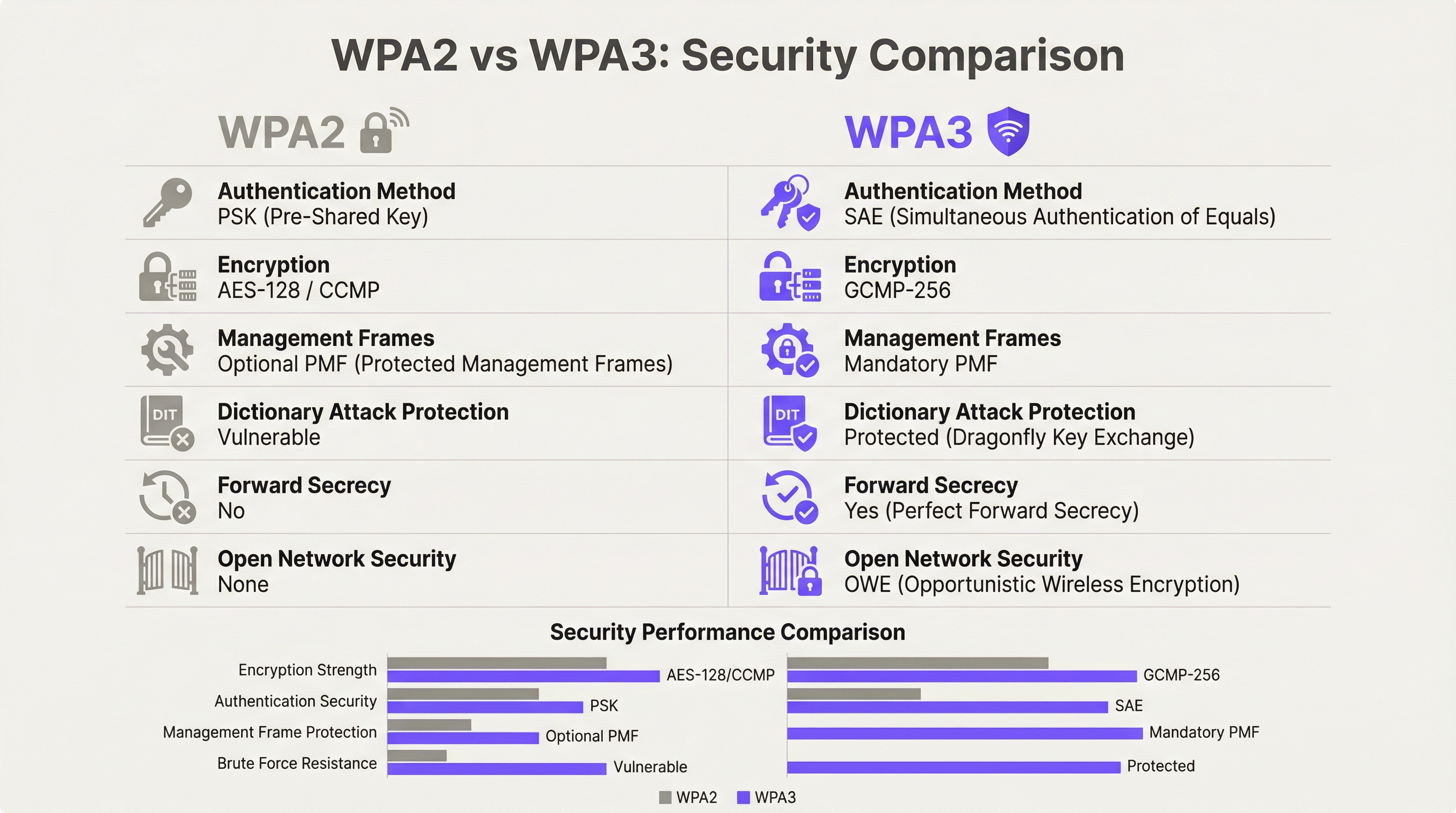
O WPA3 oferece quatro melhorias de segurança substanciais em relação ao seu antecessor.
Autenticação: SAE Substitui PSK. O WPA3-Personal substitui o modelo Pre-Shared Key (PSK) pela Simultaneous Authentication of Equals (SAE), que utiliza o protocolo de troca de chaves Dragonfly. A SAE é resistente a ataques de dicionário offline — uma vulnerabilidade crítica no WPA2-PSK, onde um handshake de quatro vias capturado podia ser sujeito a tentativas ilimitadas de força bruta offline. O mecanismo de prova de conhecimento nulo (zero-knowledge proof) da SAE garante que mesmo um handshake capturado não produz qualquer informação explorável sem acesso à palavra-passe original.
Encriptação: GCMP-256 Substitui AES-128 CCMP. O Wi-Fi 7 introduz o Galois/Counter Mode Protocol com chaves de 256 bits (GCMP-256) como a principal suite de cifras. O GCMP-256 encripta o campo Frame Body de cada MPDU, fornecendo confidencialidade de dados, autenticação, integridade e proteção contra repetição em simultâneo. Os pontos de acesso Wi-Fi 7 anunciam tanto o GCMP-256 como o legado AES-128 CCMP nos seus RSN Information Elements, permitindo que clientes mais antigos se liguem com uma força de cifra reduzida, enquanto os clientes mais recentes negoceiam o protocolo mais forte.
Proteção de Management Frames: 802.11w Obrigatório. No WPA2, os management frames — os sinais de controlo 802.11 que regem a associação, desassociação e roaming — eram transmitidos em texto simples. Isto permitia ataques de desautenticação e a personificação de pontos de acesso (evil twin). O WPA3 exige o 802.11w (Protected Management Frames, ou PMF), que autentica e encripta os management frames unicast e broadcast. Isto é obrigatório tanto para a operação single-link como multi-link no Wi-Fi 7.
Segurança de Redes Abertas: OWE. A Opportunistic Wireless Encryption fornece encriptação por sessão em redes abertas sem exigir uma palavra-passe. Cada dispositivo que se liga negoceia uma sessão encriptada individualizada utilizando a troca de chaves Diffie-Hellman, o que significa que o tráfego numa rede aberta partilhada é encriptado e não pode ser intercetado por outros utilizadores no mesmo SSID. Para os operadores de hotelaria e do setor público que gerem redes WiFi de convidados com Captive Portal, o OWE é o mecanismo que traz a proteção de dados alinhada com o GDPR ao acesso sem fios aberto.
Multi-Link Operation: Desempenho e Arquitetura de Segurança
O MLO é a funcionalidade de desempenho definidora do Wi-Fi 7, permitindo que um único dispositivo mantenha ligações ativas em simultâneo nas bandas de 2.4 GHz, 5 GHz e 6 GHz. A arquitetura de segurança do MLO é mais exigente do que a operação single-link, e compreendê-la é essencial para o planeamento da implementação empresarial.
A norma IEEE 802.11be introduz duas novas suites de Authentication and Key Management (AKM) especificamente para o MLO: AKM 24 (00-0F-AC:24) e AKM 25 (00-0F-AC:25). Estas fornecem autenticação por MLD (Multi-Link Device), estabelecendo uma única Pairwise Master Key (PMK) que é sincronizada em todos os links ativos. Esta conceção garante que a hierarquia de chaves é consistente em todas as bandas, evitando um cenário em que um link de menor segurança comprometido pudesse ser utilizado para atacar a sessão numa banda de maior segurança.
De forma crítica, a norma proíbe explicitamente o modo de transição WPA3 em qualquer ligação com capacidade MLO. O modo de transição — a configuração mista WPA2/WPA3 que permite ambas as versões do protocolo num único SSID — é proibido para o MLO. Trata-se de uma medida anti-downgrade deliberada. Num ambiente de modo de transição, um adversário pode forçar um cliente a negociar o WPA2 mesmo quando o WPA3 está disponível; a arquitetura de segurança do MLO elimina totalmente este vetor de ataque ao exigir o WPA3 em cada link.
Para os arquitetos empresariais, isto tem uma implicação direta: qualquer dispositivo que não suporte WPA3 não pode participar no MLO. Tais dispositivos reverterão para a operação single-band e single-link na banda que suportarem, ao nível de segurança que suportarem. Isto não é uma falha da rede; é o comportamento correto de uma implementação Wi-Fi 7 devidamente configurada.
Modo WPA3-Enterprise de 192 Bits
Para as organizações que operam em setores regulamentados — governo, defesa, saúde e serviços financeiros — o modo WPA3-Enterprise de 192 bits (Suite B) fornece o perfil de segurança sem fios mais elevado disponível. Este modo utiliza o GCMP-256 para encriptação de dados, o SHA-384 para hashing e o ECDH/ECDSA com curvas elípticas de 384 bits para troca de chaves e autenticação. Está alinhado com os requisitos da CNSA (Commercial National Security Algorithm) Suite e é adequado para redes que lidam com dados classificados ou altamente sensíveis.
Guia de Implementação
Fase 1: Auditoria de Dispositivos e Conceção da Segmentação
Antes de instalar um único ponto de acesso, realize uma auditoria abrangente aos dispositivos. Cada dispositivo na sua rede tem de ser categorizado pelo seu protocolo de segurança máximo suportado: WPA3-Enterprise, WPA3-Personal, WPA2-Enterprise, WPA2-Personal ou legado (WPA/TKIP). Esta auditoria orienta todas as decisões arquitetónicas subsequentes.
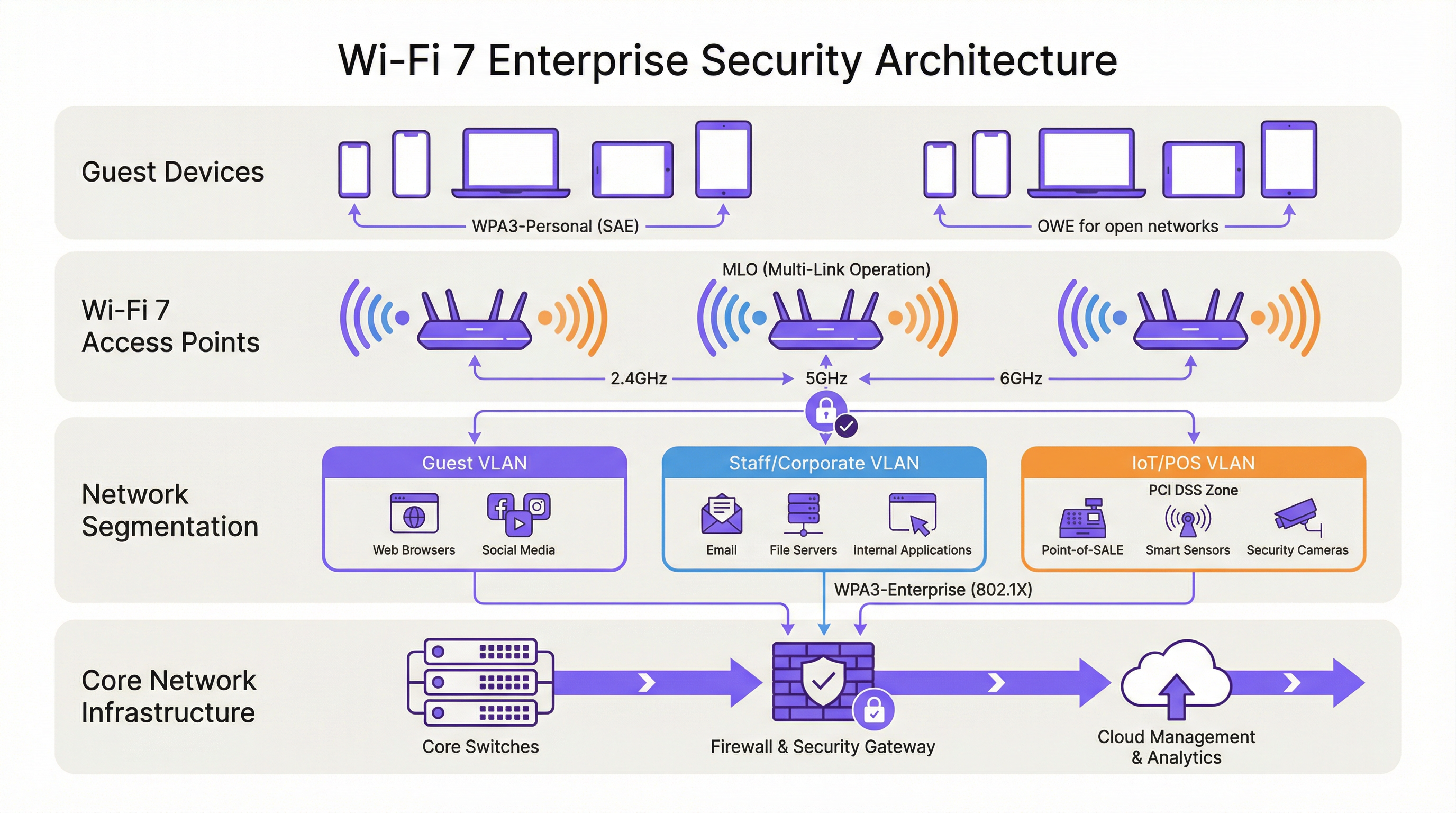
O resultado desta auditoria deve definir três níveis de rede:
| Nível | Banda | Protocolo de Segurança | Dispositivos-Alvo |
|---|---|---|---|
| Nível 1 — Corporativo/Staff | 6 GHz | WPA3-Enterprise (802.1X) | Portáteis de funcionários, dispositivos móveis corporativos, endpoints Wi-Fi 7 |
| Nível 2 — Convidados/BYOD | 5 GHz | WPA3-Personal (SAE) ou WPA3-Enterprise | Dispositivos de convidados, BYOD, smartphones modernos |
| Nível 3 — Legado/IoT | 2.4 GHz | WPA2-Personal (VLAN isolada) | Terminais POS, controladores de sala, IPTV, scanners legados |
Cada nível tem de ser isolado por VLAN com políticas de firewall inter-VLAN que neguem explicitamente o movimento lateral. Os dispositivos do Nível 3 não devem ter acesso aos segmentos de rede do Nível 1 ou do Nível 2, e o acesso à internet deve ser restrito aos destinos específicos necessários para o funcionamento do dispositivo.
Fase 2: Preparação da Infraestrutura RADIUS e PKI
As implementações WPA3-Enterprise exigem um servidor RADIUS (normalmente FreeRADIUS, Cisco ISE ou Aruba ClearPass) configurado para suportar EAP-TLS com suites de cifras modernas. Verifique se a sua implementação RADIUS suporta TLS 1.2 ou 1.3, e se a sua infraestrutura de autoridade de certificação é capaz de emitir certificados de cliente à escala necessária. Para o modo WPA3-Enterprise de 192 bits, confirme se o seu servidor RADIUS suporta EAP-TLS com suites de cifras Suite B.
Se a sua infraestrutura RADIUS existente foi implementada há mais de cinco anos, é aconselhável realizar uma avaliação de prontidão antes de se comprometer com um cronograma de lançamento do Wi-Fi 7.
Fase 3: Arquitetura de SSID e Evitar o Modo de Transição
Configure os seus SSIDs de acordo com o modelo de três níveis acima. Resista à tentação de implementar o modo de transição WPA3 como uma configuração permanente. O modo de transição é uma medida adequada a curto prazo durante uma migração controlada, mas não deve ser o estado final. O modo de transição anuncia tanto o WPA2 como o WPA3 em simultâneo no mesmo SSID; qualquer dispositivo que negoceie o WPA2 nesse SSID reduz a segurança efetiva de todo o segmento de rede para os níveis do WPA2.
A arquitetura correta a longo prazo é o WPA3 estrito nos SSIDs de Nível 1 e Nível 2, com os dispositivos legados explicitamente atribuídos ao SSID de Nível 3 isolado. Esta abordagem fornece a postura de segurança mais forte para dispositivos modernos, mantendo a continuidade operacional para o hardware legado.
Fase 4: Implementação de OWE para Redes de Convidados
Para redes de convidados com Captive Portal, implemente o OWE como mecanismo de segurança. O OWE opera de forma transparente para os utilizadores finais — não é necessária qualquer palavra-passe e o fluxo de autenticação do Captive Portal permanece inalterado. A diferença é que o tráfego de cada dispositivo é encriptado com uma chave de sessão individualizada, fornecendo proteção de dados alinhada com o GDPR sem adicionar atrito à experiência de integração do convidado.
Note que o modo de transição OWE (análogo ao modo de transição WPA3) permite que dispositivos não-OWE se liguem ao mesmo SSID. Tal como acontece com o modo de transição WPA3, isto deve ser tratado como uma medida temporária durante a migração, e não como uma configuração permanente.
Fase 5: Monitorização, Políticas e Governação Contínua
Implemente um Wireless Intrusion Prevention System (WIPS) para monitorizar pontos de acesso não autorizados (rogue APs), ataques de desautenticação e dispositivos não autorizados. Embora o PMF obrigatório do WPA3 reduza significativamente a eficácia dos ataques de desautenticação, um WIPS fornece a camada de visibilidade necessária para a resposta a incidentes e relatórios de conformidade.
Atualize a sua política de segurança da informação para exigir o suporte WPA3 como requisito mínimo para a aquisição de todos os novos dispositivos sem fios. Esta alteração de política é a medida a longo prazo mais eficaz para reduzir a acumulação de dispositivos legados.
Melhores Práticas
As seguintes melhores práticas, independentes do fornecedor, refletem as normas atuais da indústria e são aplicáveis a todas as principais plataformas de redes sem fios empresariais.
A segmentação de rede é inegociável. O controlo de acesso à rede baseado em IEEE 802.1X, combinado com a segmentação de VLAN, é a base de uma arquitetura sem fios empresarial defensável. Nenhuma categoria de dispositivo — convidados, funcionários, IoT ou POS — deve partilhar um segmento de rede com dispositivos de um nível de confiança diferente.
Evite o modo de transição WPA3 como configuração permanente. Conforme documentado por investigadores de segurança, o modo de transição é explorável para ataques de downgrade. Utilize-o apenas como um auxílio de migração com tempo limitado, com uma data de descontinuação definida para o suporte WPA2 em cada SSID.
Imponha a autenticação baseada em certificados para redes de funcionários. O WPA3-Enterprise com EAP-TLS e certificados de cliente fornece a postura de autenticação mais forte para endpoints corporativos. Os métodos EAP baseados em palavras-passe (PEAP-MSCHAPv2) continuam vulneráveis ao roubo de credenciais; a autenticação baseada em certificados elimina este risco.
Trate a banda de 6 GHz como exclusiva para WPA3 por conceção. A banda de 6 GHz tem sido exclusiva do WPA3 desde o Wi-Fi 6E. Utilize esta banda exclusivamente para o seu nível de maior segurança e desempenho. Não tente alargar o suporte de dispositivos legados aos 6 GHz.
Implemente o Network Access Control (NAC) para a criação de perfis de dispositivos. Uma solução NAC que crie perfis dos dispositivos que se ligam e imponha políticas de segurança com base no tipo de dispositivo e no estado de conformidade é essencial em ambientes de dispositivos mistos. Os dispositivos que não cumpram a política de segurança mínima devem ser colocados em quarentena ou redirecionados para uma VLAN de remediação.
Alinhe a política de aquisições com os requisitos de segurança do Wi-Fi 7. Qualquer novo dispositivo adquirido para utilização na sua rede deve ser obrigado a suportar o WPA3, no mínimo. Esta política, aplicada de forma consistente, reduzirá naturalmente o seu parque de dispositivos legados ao longo de um ciclo de atualização de hardware de três a cinco anos.
Resolução de Problemas e Mitigação de Riscos
Falhas de ligação em dispositivos legados. O problema de implementação mais comum é a falha de ligação de dispositivos legados após o lançamento do Wi-Fi 7. A causa principal é quase sempre o facto de o dispositivo não suportar WPA3 e o SSID ter sido configurado no modo WPA3 estrito. Resolução: confirme o protocolo de segurança máximo suportado pelo dispositivo, atribua-o ao SSID de Nível 3 adequado e certifique-se de que o SSID está a transmitir numa banda que o dispositivo suporta (2.4 GHz para a maioria do IoT legado).
Ataques de downgrade no modo de transição WPA3. Se estiver a executar o modo de transição durante a migração, monitorize o seu WIPS para detetar clientes a ligarem-se via WPA2 em SSIDs com capacidade WPA3. Isto pode indicar um ataque de downgrade em curso ou um cliente mal configurado. Investigue e resolva prontamente.
Falhas de autenticação RADIUS com WPA3-Enterprise. Se os clientes estiverem a falhar a autenticação 802.1X após uma migração para WPA3-Enterprise, verifique se o certificado TLS do servidor RADIUS é de confiança para os dispositivos clientes, se o método EAP está corretamente configurado tanto no servidor RADIUS como no suplicante do cliente, e se o servidor RADIUS suporta as suites de cifras exigidas pelo WPA3-Enterprise.
Problemas de ligação MLO. Os dispositivos que suportam Wi-Fi 7 mas que não conseguem estabelecer ligações MLO estão normalmente a deparar-se com uma falha de negociação WPA3 numa ou mais bandas. Verifique se todas as bandas no ponto de acesso estão configuradas para WPA3 e se o driver Wi-Fi 7 do cliente está atualizado. As atualizações de drivers para suporte de MLO no Wi-Fi 7 têm sido ativamente lançadas ao longo de 2024 e 2025.
Deteção de pontos de acesso não autorizados. O PMF obrigatório no WPA3 reduz significativamente a eficácia dos ataques evil twin, mas não elimina o risco de pontos de acesso não autorizados (rogue APs) na sua rede. Mantenha um WIPS com varrimento ativo e alertas para qualquer ponto de acesso que transmita os seus SSIDs e que não conste do seu inventário de APs autorizados.
ROI e Impacto no Negócio

Redução do Risco de Conformidade
O ROI mais quantificável de uma implementação de segurança Wi-Fi 7 é a redução do risco de conformidade. Ao abrigo do PCI DSS v4.0, o Requisito 4 exige criptografia forte para os dados dos titulares de cartões em trânsito. A encriptação GCMP-256 do WPA3 satisfaz este requisito; o AES-128 CCMP do WPA2 é cada vez mais escrutinado pelos QSAs como insuficiente para novas implementações. Uma arquitetura Wi-Fi 7 devidamente segmentada com WPA3-Enterprise nos segmentos de rede POS reduz o âmbito da sua auditoria PCI DSS e os custos de remediação associados.
Ao abrigo do GDPR, o Artigo 25 (Proteção de Dados desde a Conceção e por Defeito) e o Artigo 32 (Segurança do Tratamento) exigem medidas técnicas adequadas para proteger os dados pessoais. O OWE em redes de convidados, combinado com o WPA3 em redes autenticadas, fornece um controlo técnico demonstrável que apoia a documentação de conformidade com o GDPR.
Ganhos de Eficiência Operacional
A capacidade MLO do Wi-Fi 7 oferece melhorias mensuráveis de débito em ambientes de alta densidade. Em implementações em estádios e centros de conferências, onde centenas ou milhares de utilizadores simultâneos competem por largura de banda, a capacidade do MLO de agregar capacidade em várias bandas simultaneamente reduz o congestionamento e melhora a experiência do utilizador. Para os operadores hoteleiros, isto traduz-se diretamente em pontuações de satisfação dos convidados e na redução de chamadas de suporte relacionadas com o desempenho do WiFi.
Prevenção de Custos com Incidentes de Segurança
O custo médio de uma violação de dados no Reino Unido excede os 3,4 milhões de libras, de acordo com os benchmarks da indústria. O comprometimento da rede sem fios — através do roubo de credenciais facilitado por vulnerabilidades do WPA2-PSK, ataques de desautenticação ou interceção por pontos de acesso não autorizados — é um vetor de ataque documentado em ambientes de hotelaria e retalho. A autenticação SAE do WPA3, o PMF obrigatório e a encriptação OWE por sessão eliminam coletivamente os vetores de ataque sem fios mais comuns, reduzindo a probabilidade de uma violação com origem na camada sem fios.
Planeamento de Despesas de Capital
Uma implementação faseada do Wi-Fi 7 — começando por áreas de elevado tráfego e elevado valor e alargando progressivamente a cobertura — permite às organizações distribuir as despesas de capital, ao mesmo tempo que proporciona benefícios de segurança imediatos nas áreas de maior risco. A banda de 6 GHz, disponível apenas para dispositivos Wi-Fi 7 e Wi-Fi 6E, fornece um ambiente limpo exclusivo para WPA3 que pode ser implementado imediatamente sem preocupações de compatibilidade com sistemas legados, enquanto as bandas de 2.4 e 5 GHz continuam a servir o parque de dispositivos existente durante o período de transição.
Key Terms & Definitions
WPA3 (Wi-Fi Protected Access 3)
The third generation of the Wi-Fi Protected Access security certification, introduced by the Wi-Fi Alliance in 2018 and mandated for all Wi-Fi 7 devices. WPA3 replaces PSK authentication with SAE, upgrades encryption to GCMP-256, mandates Protected Management Frames (802.11w), and introduces OWE for open networks. WPA3 comes in two variants: WPA3-Personal (using SAE) and WPA3-Enterprise (using 802.1X/EAP authentication).
IT teams encounter WPA3 as the mandatory security baseline for Wi-Fi 7 deployments. Understanding the distinction between WPA3-Personal and WPA3-Enterprise is essential for designing the correct authentication architecture for each network segment.
SAE (Simultaneous Authentication of Equals)
The authentication protocol used in WPA3-Personal, replacing the Pre-Shared Key (PSK) model of WPA2. SAE uses the Dragonfly key exchange mechanism, a zero-knowledge proof protocol that is resistant to offline dictionary attacks. Even if an attacker captures the SAE handshake, they cannot perform offline brute-force attacks against the passphrase.
SAE is the reason WPA3-Personal is materially more secure than WPA2-PSK for environments where a shared passphrase is used, such as hotel guest WiFi with a posted password or retail customer WiFi.
MLO (Multi-Link Operation)
Wi-Fi 7's headline performance feature, enabling a single device (a Multi-Link Device, or MLD) to simultaneously maintain active connections across multiple radio bands — 2.4 GHz, 5 GHz, and 6 GHz — at the same time. MLO aggregates bandwidth across bands, reduces latency through load balancing, and improves resilience by maintaining connectivity if one band becomes congested. WPA3 is mandatory on all links in an MLO connection.
Network architects need to understand MLO's WPA3 requirement when planning device compatibility. Devices that cannot support WPA3 will not benefit from MLO and will connect as single-link clients.
OWE (Opportunistic Wireless Encryption)
A Wi-Fi security mechanism that provides per-session encryption on open networks without requiring a password. OWE uses Diffie-Hellman key exchange to establish an individualised encrypted session for each connecting device, preventing other users on the same open network from intercepting traffic. OWE is transparent to end users.
OWE is the recommended security mechanism for captive portal guest networks in hospitality, retail, and public-sector environments. It provides GDPR-aligned data protection without adding friction to the guest onboarding experience.
PMF (Protected Management Frames) / 802.11w
An IEEE 802.11 amendment that authenticates and encrypts wireless management frames, including deauthentication and disassociation frames. Without PMF, these frames are transmitted in plaintext and can be spoofed by an attacker to forcibly disconnect devices from the network. PMF is mandatory in WPA3 and is a prerequisite for all Wi-Fi 7 connections.
PMF is the technical control that prevents deauthentication attacks and significantly reduces the effectiveness of evil twin access point attacks. IT security teams should verify that PMF is enabled on all WPA3-capable SSIDs.
GCMP-256 (Galois/Counter Mode Protocol, 256-bit)
The primary cipher suite for Wi-Fi 7, replacing AES-128 CCMP used in WPA2. GCMP-256 uses 256-bit keys and provides authenticated encryption with associated data (AEAD), simultaneously providing confidentiality, integrity, and authentication for each transmitted frame. GCMP-256 is computationally more efficient than CCMP at high data rates.
GCMP-256 is the encryption standard that satisfies PCI DSS v4.0 Requirement 4's mandate for strong cryptography in cardholder data environments. IT teams should verify that their wireless infrastructure supports GCMP-256 and that it is correctly negotiated by WPA3-capable clients.
WPA3-Enterprise 192-Bit Mode (Suite B)
The highest-security WPA3 profile, using GCMP-256 for data encryption, SHA-384 for hashing, and ECDH/ECDSA with 384-bit elliptic curves for key exchange and authentication. Suite B aligns with the US NSA's Commercial National Security Algorithm (CNSA) Suite and is designed for government, defence, healthcare, and financial services environments.
Public-sector and regulated-industry organisations should evaluate WPA3-Enterprise 192-bit mode for their highest-security network segments. Deployment requires a RADIUS server and PKI infrastructure capable of supporting Suite B cipher suites.
802.1X (Port-Based Network Access Control)
An IEEE standard for port-based network access control, providing an authentication framework for devices attempting to connect to a network. In wireless deployments, 802.1X is used with WPA3-Enterprise to authenticate users or devices against a RADIUS server using EAP methods such as EAP-TLS (certificate-based) or PEAP-MSCHAPv2 (password-based).
802.1X is the authentication backbone of WPA3-Enterprise deployments. IT teams planning a Wi-Fi 7 rollout must ensure their RADIUS infrastructure is correctly configured and that client supplicants are configured to use the correct EAP method.
MLD (Multi-Link Device)
A Wi-Fi 7 device capable of Multi-Link Operation, maintaining simultaneous connections across multiple radio bands. An MLD has a single MAC address at the logical layer (the MLD MAC address) but may have multiple physical radio interfaces. Authentication in Wi-Fi 7 is performed at the MLD level, with a single Pairwise Master Key shared across all links.
Network architects should be aware that MLDs present differently in network management tools than single-link devices. DHCP leases, RADIUS accounting records, and network monitoring data will reference the MLD MAC address, not the individual link MAC addresses.
WPA3 Transition Mode
A configuration mode in which a single SSID advertises support for both WPA2 and WPA3 simultaneously, allowing devices that support only WPA2 to connect alongside WPA3-capable devices. Transition mode is intended as a temporary migration aid. It is explicitly prohibited for Multi-Link Operation in Wi-Fi 7 and is vulnerable to downgrade attacks.
IT teams should use WPA3 transition mode only as a time-limited migration measure, with a defined sunset date. Transition mode should never be the permanent configuration for any SSID that carries sensitive data or is within PCI DSS scope.
Case Studies
A 350-room hotel is upgrading from Wi-Fi 5 to Wi-Fi 7. The property runs a captive portal guest WiFi network, a staff network used by front-of-house and back-office employees, and a building management network serving IPTV systems, door lock controllers, and HVAC sensors. The IPTV system vendor has confirmed that their devices only support WPA2-Personal. The hotel's IT director wants to achieve WPA3 across the entire property and meet PCI DSS requirements for the payment terminals at the front desk. How should the network be architected?
The deployment should be structured across four distinct network segments, each mapped to a dedicated SSID and VLAN. Segment 1 (Staff/Corporate): WPA3-Enterprise with 802.1X authentication on the 6 GHz band. All staff laptops, tablets, and corporate mobile devices connect here. The RADIUS server authenticates users against Active Directory using EAP-TLS with client certificates. This segment has full access to the hotel's PMS, back-office applications, and internet. Segment 2 (PCI DSS Zone): A separate WPA3-Enterprise SSID, also 802.1X authenticated, dedicated exclusively to payment terminals at the front desk and any other card-present transaction points. This segment is isolated by firewall from all other VLANs, with outbound traffic restricted to the payment processor's IP ranges. This satisfies PCI DSS v4.0 Requirement 4 and reduces the audit scope to this segment alone. Segment 3 (Guest WiFi): An OWE-enabled SSID on the 5 GHz band, fronted by the captive portal. OWE provides per-session encryption without requiring a password, satisfying GDPR Article 32's requirement for appropriate technical measures. The captive portal collects only the minimum data required for network access. This segment has internet access only, with no access to hotel internal resources. Segment 4 (Legacy IoT/Building Management): A WPA2-Personal SSID on the 2.4 GHz band, isolated in its own VLAN. The IPTV systems, door lock controllers, and HVAC sensors connect here. Strict firewall rules permit only the specific traffic flows required for device operation. No internet access. No access to any other VLAN. A Network Access Control policy enforces a device allowlist, preventing unauthorised devices from joining this segment. The migration timeline should prioritise Segments 1 and 2 (staff and PCI) in the first phase, followed by guest WiFi (Segment 3), with the legacy IoT segment (Segment 4) maintained on the existing Wi-Fi 5 infrastructure until a planned replacement cycle for the IPTV system.
A national retail chain with 120 stores is planning a Wi-Fi 7 rollout. Each store has a mix of devices: modern Android and iOS point-of-sale tablets (WPA3 capable), legacy barcode scanners running embedded Linux firmware that only supports WPA2-Personal, customer-facing WiFi for in-store browsing, and a back-office network for inventory management systems. The IT security team has flagged that the current WPA2-PSK network for barcode scanners uses a single shared passphrase that has not been rotated in three years. How should the security architecture be designed, and what is the recommended approach for the legacy scanner estate?
The retail architecture should deploy four SSIDs per store, managed centrally via a cloud-based wireless management platform. SSID 1 (POS Tablets — WPA3-Enterprise): The modern POS tablets connect to a WPA3-Enterprise SSID using 802.1X with certificate-based EAP-TLS. Certificates are issued and managed via the chain's PKI, with automatic renewal. This SSID operates on the 5 GHz and 6 GHz bands. The POS VLAN is isolated and has outbound access only to the payment processor and the chain's retail management platform. SSID 2 (Customer WiFi — OWE + Captive Portal): An OWE-enabled SSID on the 5 GHz band provides encrypted guest access. The captive portal is configured to collect only the data required for GDPR-compliant marketing consent. Customer traffic is internet-only with no access to store internal systems. SSID 3 (Back Office — WPA3-Personal or WPA3-Enterprise): Inventory management systems and back-office PCs connect to a WPA3 SSID. If device management allows, WPA3-Enterprise with 802.1X is preferred. SSID 4 (Legacy Scanners — WPA2-Personal, Isolated VLAN): The legacy barcode scanners are assigned to a dedicated WPA2-Personal SSID on the 2.4 GHz band. The immediate priority is passphrase rotation — the three-year-old shared passphrase represents a critical risk. The central management platform should enforce a passphrase rotation policy (minimum 90-day rotation) and generate unique passphrases per store to limit blast radius in the event of a compromise. The VLAN for this segment should have access only to the inventory management system's specific API endpoints, with all other traffic blocked. A device allowlist should be implemented to prevent unauthorised devices joining this segment. The medium-term roadmap should include a business case for replacing the legacy scanners with WPA3-capable hardware at the next refresh cycle, targeting complete elimination of WPA2 from the estate within 24 months.
Scenario Analysis
Q1. A conference centre hosts 50 events per year, ranging from small boardroom meetings to 5,000-delegate conferences. The venue's IT team is planning a Wi-Fi 7 upgrade. During a site survey, they discover that the venue's digital signage system — 120 screens throughout the building — uses embedded WiFi adapters that only support WPA2-Personal with a shared passphrase. The signage vendor has stated that a firmware update to support WPA3 is 'on the roadmap' but has no committed delivery date. The IT director wants to deploy WPA3-only across the entire venue. What is the recommended approach, and what risks must be documented?
💡 Hint:Consider the operational impact of the signage system going offline, the security risk of maintaining WPA2 for the signage VLAN, and the contractual leverage available with the signage vendor.
Show Recommended Approach
The recommended approach is to deploy a dedicated WPA2-Personal SSID on the 2.4 GHz band exclusively for the digital signage system, isolated in its own VLAN with firewall rules permitting only the specific traffic required for signage operation. All other SSIDs should be configured for WPA3. The risks to document are: (1) the signage VLAN represents a persistent WPA2 segment — implement MAC address allowlisting and monitor for unauthorised associations; (2) the shared passphrase for the signage system should be rotated immediately and managed centrally with a rotation schedule; (3) the vendor's firmware roadmap commitment should be formalised in writing with a contractual deadline for WPA3 support delivery; (4) if the signage system handles any data within GDPR or PCI DSS scope, this must be assessed and documented. The IT director's goal of WPA3-only is achievable for all other network segments; the signage system represents a time-limited exception that should be governed by a formal risk acceptance process and a documented remediation timeline.
Q2. A regional hospital trust is deploying Wi-Fi 7 across three hospital sites. The trust's CISO has mandated WPA3-Enterprise 192-bit mode for all clinical networks carrying patient data. The network architect has identified that the trust's existing RADIUS infrastructure (FreeRADIUS 3.0, deployed six years ago) may not support Suite B cipher suites. The project timeline requires the first site to go live in eight weeks. How should the architect proceed?
💡 Hint:Consider the RADIUS infrastructure upgrade path, the risk of delaying the go-live, and whether a phased approach to 192-bit mode is feasible.
Show Recommended Approach
The architect should immediately conduct a RADIUS capability assessment to confirm whether the existing FreeRADIUS 3.0 deployment supports EAP-TLS with Suite B cipher suites. FreeRADIUS 3.0 has limited Suite B support; FreeRADIUS 3.2 and later versions provide full Suite B capability. If the existing deployment cannot support 192-bit mode, the architect has two options: (1) upgrade FreeRADIUS to version 3.2 or later before the go-live date — this is the preferred path if the eight-week timeline permits; (2) deploy WPA3-Enterprise standard mode (128-bit) for the initial go-live, with a documented plan to migrate to 192-bit mode following the RADIUS upgrade. Option 2 is acceptable as an interim measure because WPA3-Enterprise standard mode still provides materially stronger security than WPA2-Enterprise. The risk acceptance for Option 2 must be documented and approved by the CISO, with a committed timeline for the 192-bit mode migration. The PKI infrastructure must also be assessed: 192-bit mode requires ECDSA certificates with P-384 curves, which may require new certificate templates and CA configuration.
Q3. A large retail bank is conducting a PCI DSS v4.0 compliance assessment. The QSA has flagged that the bank's branch WiFi networks — used by customer-facing staff for tablet-based banking applications — are running WPA3 transition mode, with WPA2 clients still connecting. The QSA has indicated that the transition mode configuration may not satisfy Requirement 4.2.1's mandate for strong cryptography. The bank's IT team argues that WPA3 is available on the SSID and that the WPA2 clients are legacy devices being phased out. How should the bank respond to the QSA's finding, and what remediation steps are required?
💡 Hint:Focus on the QSA's specific concern about Requirement 4.2.1, the definition of 'strong cryptography' in PCI DSS v4.0, and the practical steps to demonstrate compliance.
Show Recommended Approach
The QSA's finding is technically valid. WPA3 transition mode allows WPA2 clients to connect to the same SSID, and any WPA2 connection on that SSID is subject to WPA2's AES-128 CCMP encryption, not WPA3's GCMP-256. PCI DSS v4.0 Requirement 4.2.1 requires that strong cryptography is used to safeguard PAN during transmission over open, public networks. The bank's response should acknowledge the finding and present a remediation plan with three components: (1) Immediate: identify all WPA2 clients connecting to the branch WiFi SSIDs within PCI DSS scope. Provide the QSA with a documented inventory and a committed timeline for their replacement or removal. (2) Short-term (within 90 days): migrate all WPA2 clients to WPA3-capable hardware or remove them from PCI DSS scope by assigning them to a separate, isolated SSID that does not carry cardholder data. (3) Medium-term: convert all PCI DSS scope SSIDs to strict WPA3-Enterprise mode, eliminating transition mode. The bank should also present evidence that the WPA2 clients are not handling cardholder data directly — if the tablet-based banking applications are the primary PCI DSS scope devices and they are all WPA3-capable, the QSA may accept a compensating control while the legacy device remediation is completed.
Key Takeaways
- ✓Wi-Fi 7 (IEEE 802.11be) mandates WPA3 encryption for all devices using Multi-Link Operation and full 802.11be data rates — this is not optional, and it is the most significant security baseline change in enterprise wireless since WPA2.
- ✓WPA3 delivers four critical improvements over WPA2: SAE authentication (resistant to offline dictionary attacks), GCMP-256 encryption (256-bit vs AES-128), mandatory Protected Management Frames (802.11w), and OWE for encrypted open networks.
- ✓MLO requires WPA3 on every simultaneous band connection — WPA3 transition mode is explicitly prohibited for MLO connections, eliminating the downgrade attack vector that has persisted in enterprise wireless.
- ✓Legacy device compatibility requires a three-tier SSID architecture: WPA3-Enterprise on 6 GHz for modern corporate devices, WPA3-Personal/OWE on 5 GHz for guests and BYOD, and WPA2-Personal on 2.4 GHz in an isolated VLAN for legacy IoT — never mix security tiers on the same SSID.
- ✓WPA3 transition mode is a migration tool, not a destination — every SSID running transition mode must have a documented sunset date, as it is vulnerable to downgrade attacks and does not provide WPA3-level security for WPA2 clients.
- ✓PCI DSS v4.0 Requirement 4 and GDPR Article 32 are both materially satisfied by a properly deployed Wi-Fi 7 architecture: GCMP-256 for cardholder data networks, OWE for guest networks, and 802.1X for staff authentication.
- ✓Conduct a device audit before designing your architecture — the audit output determines your SSID design, VLAN structure, migration timeline, and hardware replacement roadmap, and skipping it is the primary cause of deployment failures.




