

A Cronologia Definitiva do WiFi: Do ALOHAnet ao WiFi 7 e Mais Além
This guide provides a definitive technical timeline of WiFi, tracing its origins from the 1971 ALOHAnet experiment through every major IEEE 802.11 standard to the ratification of WiFi 7 in 2024 and the emerging WiFi 8 roadmap. It is designed for IT managers, network architects, and CTOs who need to understand the engineering evolution of wireless technology to make informed infrastructure investment decisions. By contextualising each generation's innovations within real-world deployment scenarios across hospitality, retail, and large venues, the guide delivers actionable guidance on upgrading, securing, and future-proofing enterprise wireless networks.
🎧 Listen to this Guide
View Transcript
Resumo Executivo
Para líderes de TI e operadores de recintos, compreender a evolução do WiFi não é um exercício académico — é um pré-requisito para o planeamento estratégico e investimento em redes. Este guia apresenta uma cronologia definitiva do WiFi, traçando as suas origens desde o ALOHAnet de 1971 até ao lançamento do WiFi 7 em 2024 e mais além. Oferece uma análise técnica aprofundada das mudanças geracionais nas normas IEEE 802.11, explicando o impacto comercial de inovações essenciais como MIMO, OFDMA e Multi-Link Operation (MLO). Ao contextualizar estes avanços em cenários reais de implementação na hotelaria, retalho e grandes recintos, esta referência fornece os insights acionáveis de que os arquitetos de redes e CTOs necessitam para construir uma infraestrutura sem fios preparada para o futuro, otimizar a experiência do utilizador e maximizar o ROI. A cronologia desmistifica as normas e fornece uma estrutura clara para a tomada de decisões informadas sobre atualizações de infraestrutura, seleção de fornecedores e estratégias de implementação num mundo cada vez mais conectado.
Análise Técnica Aprofundada
A jornada desde a primeira rede de pacotes sem fios até às velocidades multi-gigabit de hoje é uma história de inovação implacável. As bases do WiFi não foram estabelecidas na década de 1990, mas décadas antes, com trabalhos pioneiros em tecnologia de rádio e protocolos de rede. Compreender esta progressão é fundamental para apreciar a complexidade e as capacidades das redes sem fios modernas.
A Era Pré-Norma: ALOHAnet e Espectro Não Licenciado
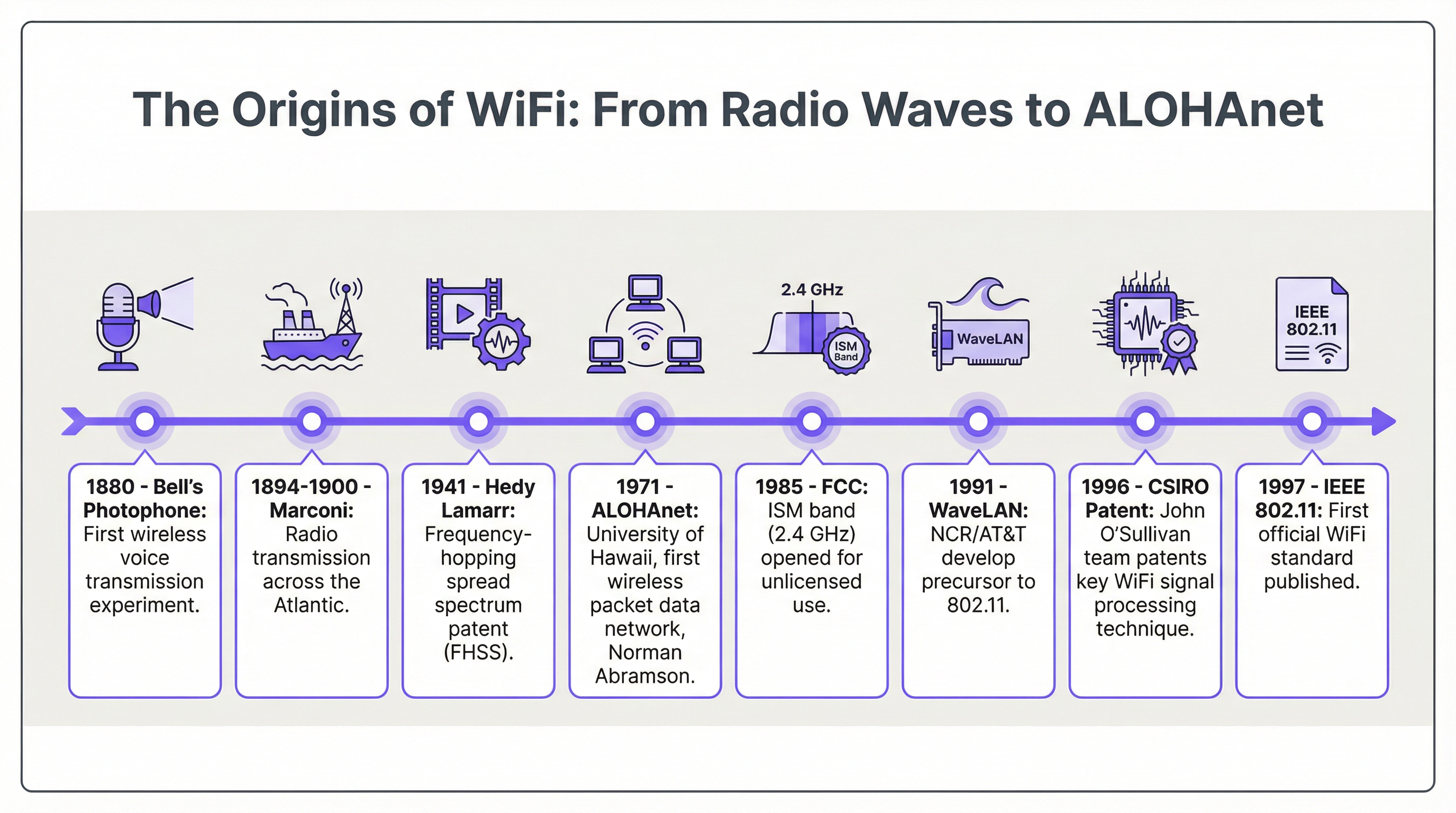
A verdadeira génese do WiFi remonta a 1971 com o ALOHAnet, uma rede de pacotes sem fios UHF desenvolvida na Universidade do Havai. Liderado por Norman Abramson, este projeto foi o primeiro a demonstrar a rede pública de dados por pacotes sem fios, ligando as ilhas havaianas. A sua principal inovação, o protocolo de acesso aleatório ALOHA, foi um precursor direto do mecanismo Carrier-Sense Multiple Access with Collision Avoidance (CSMA/CA) que sustenta todas as normas 802.11 modernas. Este trabalho inicial provou que um meio sem fios partilhado poderia ser utilizado de forma eficaz para a comunicação de dados.
Um desenvolvimento regulamentar crítico ocorreu em 1985, quando a Comissão Federal de Comunicações (FCC) dos EUA abriu as bandas Industriais, Científicas e Médicas (ISM) — incluindo a de 2,4 GHz — para uso não licenciado. Esta decisão democratizou as ondas de rádio, criando um espaço para a inovação fora do controlo das operadoras de telecomunicações tradicionais e abrindo caminho para o desenvolvimento de tecnologias sem fios para o consumidor.
Outro trabalho fundamental surgiu da Commonwealth Scientific and Industrial Research Organisation (CSIRO) do governo australiano. No início da década de 1990, uma equipa liderada pelo Dr. John O'Sullivan, ao tentar detetar a explosão de mini buracos negros, desenvolveu e patenteou uma técnica crucial para reduzir a interferência multipercurso — o fenómeno dos sinais de rádio que ressaltam em superfícies e chegam ao recetor em momentos diferentes. Esta patente da CSIRO foi fundamental para tornar as LANs sem fios robustas e de alta velocidade numa realidade e sustenta a forma de onda OFDM utilizada em todas as normas WiFi modernas.
As Gerações IEEE 802.11: Uma Evolução Normalizada
O final da década de 1990 assistiu à formalização das normas WiFi sob a governação do IEEE. Esta normalização foi crucial para garantir a interoperabilidade entre produtos de diferentes fornecedores, um papel mais tarde assumido pela Wi-Fi Alliance, que foi formada em 1999 para certificar produtos compatíveis e cunhou a marca "Wi-Fi" através da agência Interbrand.
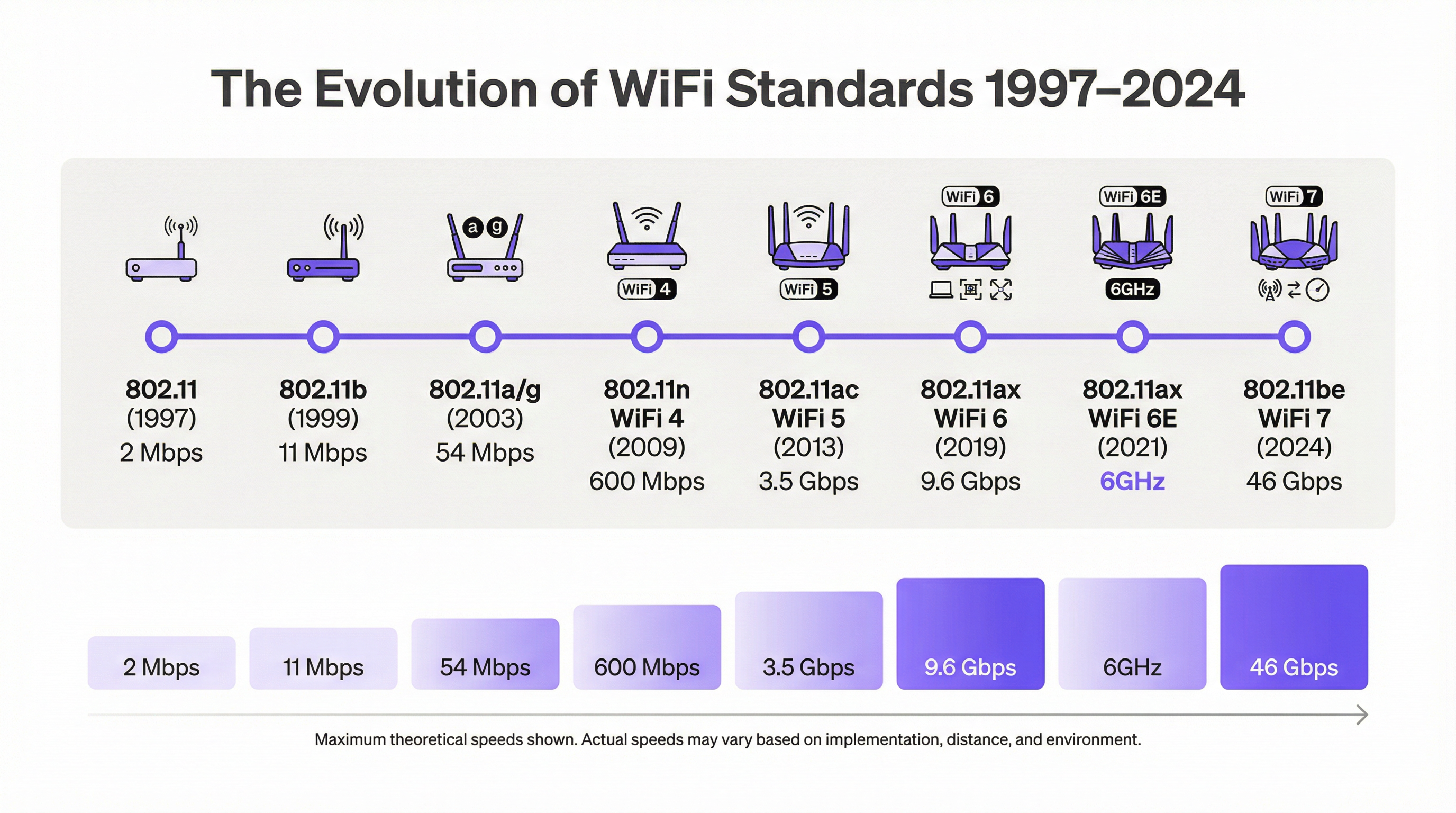
| Norma | Geração Wi-Fi | Ano | Banda(s) de Frequência | Velocidade Teórica Máx. | Inovação Principal |
|---|---|---|---|---|---|
| 802.11 | — | 1997 | 2.4 GHz | 2 Mbps | Norma Fundacional |
| 802.11b | WiFi 2 | 1999 | 2.4 GHz | 11 Mbps | Primeira Amplamente Adotada |
| 802.11a | WiFi 2 | 1999 | 5 GHz | 54 Mbps | OFDM em 5 GHz |
| 802.11g | WiFi 3 | 2003 | 2.4 GHz | 54 Mbps | OFDM em 2.4 GHz |
| 802.11n | WiFi 4 | 2009 | 2.4/5 GHz | 600 Mbps | MIMO |
| 802.11ac | WiFi 5 | 2013 | 5 GHz | 3.5 Gbps | MU-MIMO, Canais de 160 MHz |
| 802.11ax | WiFi 6 | 2019 | 2.4/5 GHz | 9.6 Gbps | OFDMA, BSS Coloring, WPA3 |
| 802.11ax | WiFi 6E | 2021 | 2.4/5/6 GHz | 9.6 Gbps | Acesso à Banda de 6 GHz |
| 802.11be | WiFi 7 | 2024 | 2.4/5/6 GHz | 46.1 Gbps | MLO, Canais de 320 MHz, 4K-QAM |
| 802.11bn | WiFi 8 | ~2028 | A definir | A definir | Latência Determinística |
O 802.11n (WiFi 4) marcou um salto significativo no rendimento ao introduzir o MIMO (Multiple-Input Multiple-Output), que utiliza múltiplas antenas para transmitir e receber mais dados em simultâneo. O 802.11ac (WiFi 5) baseou-se nisto com canais mais amplos (até 160 MHz) e Multi-User MIMO (MU-MIMO), permitindo que um ponto de acesso transmita para vários clientes simultaneamente. O 802.11ax (WiFi 6/6E) foi uma mudança de paradigma focada na eficiência em ambientes congestionados. A sua principal funcionalidade, Orthogonal Frequency-Division Multiple Access (OFDMA), permite que um ponto de acesso sirva vários clientes com diferentes necessidades de largura de banda simultaneamente dentro do mesmo canal — um fator de mudança para recintos de alta densidade. A introdução do WiFi 6E em 2021 deu aos dispositivos acesso à recém-aberta banda de 6 GHz, um bloco de espectro imaculado com muito menos interferência do que as congestionadas bandas de 2,4 GHz e 5 GHz.
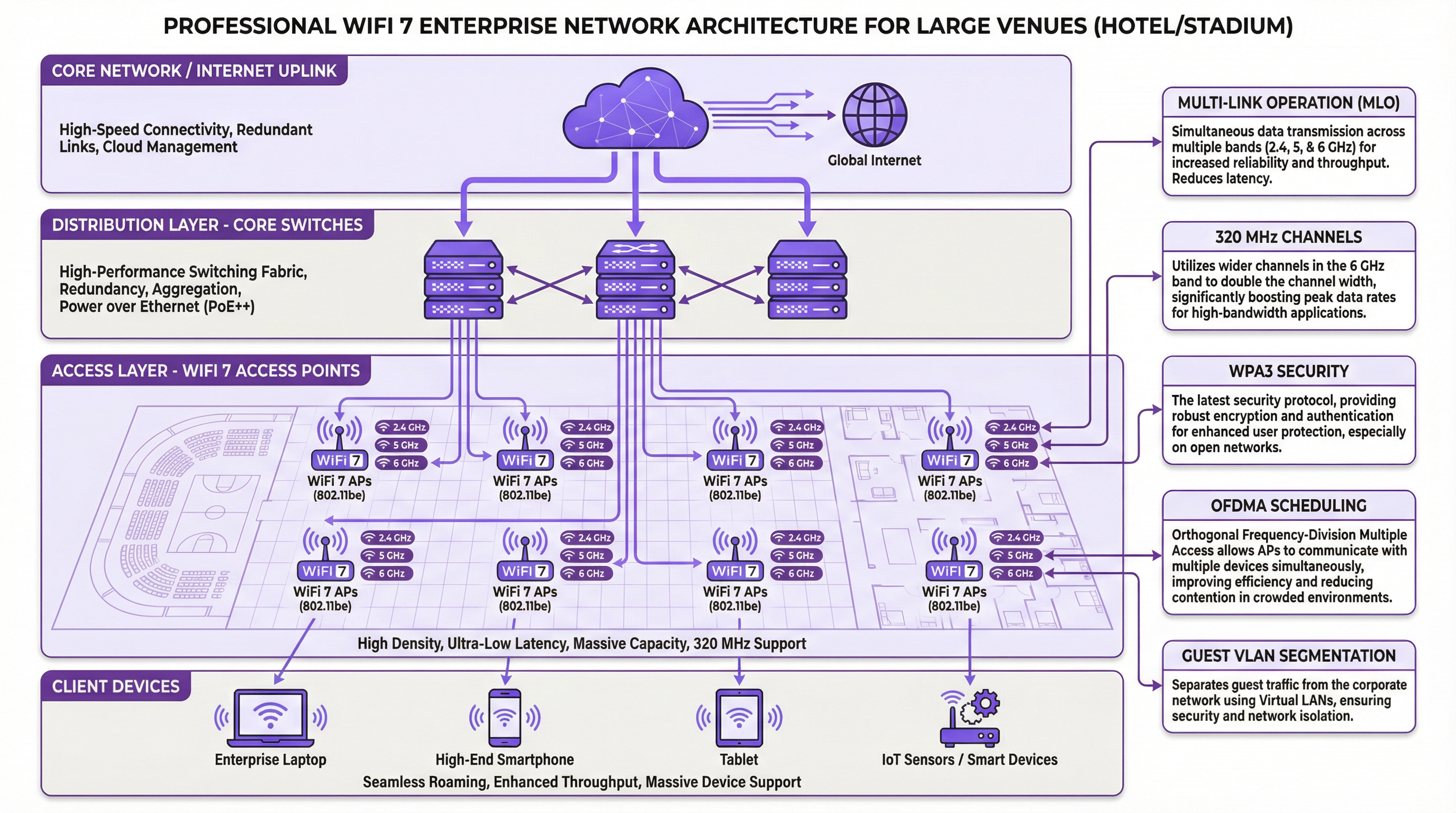
O 802.11be (WiFi 7), ratificado em 2024, eleva o desempenho a um novo patamar. A sua tecnologia basilar é a Multi-Link Operation (MLO), que permite aos dispositivos ligarem-se e agregarem dados através de múltiplas bandas em simultâneo. Isto aumenta drasticamente o rendimento, reduz a latência e melhora a fiabilidade. Combinado com larguras de canal de 320 MHz e modulação 4K-QAM, o WiFi 7 oferece velocidades multi-gigabit essenciais para aplicações de próxima geração, como AR/VR e experiências imersivas em recintos.
O Futuro: WiFi 8 e Mais Além
Olhando para o futuro, o foco da evolução sem fios está a mudar da velocidade bruta para o desempenho determinístico. A futura norma 802.11bn (WiFi 8), prevista para cerca de 2028, visa fornecer uma latência extremamente baixa e previsível para aplicações industriais e empresariais sensíveis ao tempo. Isto envolve coordenação avançada multi-AP e Coordinated Spatial Reuse (Co-SR) para gerir o espectro com uma precisão sem precedentes.
Guia de Implementação
A implementação de uma rede WiFi empresarial moderna requer uma abordagem estruturada que vai além da simples colocação de pontos de acesso. Para gestores de TI e arquitetos de redes, uma implementação bem-sucedida depende de um planeamento meticuloso, das melhores práticas neutras em relação a fornecedores e de uma compreensão profunda do ambiente físico.
Passo 1: Levantamento de Requisitos e Site Survey. Defina casos de uso, estime a contagem de dispositivos simultâneos e realize tanto um site survey preditivo (utilizando ferramentas como Ekahau ou Hamina) como uma inspeção física para identificar fontes de interferência de RF e obstruções físicas não presentes nas plantas.
Passo 2: Design e Arquitetura de Rede. Selecione os APs adequados com base nos resultados do survey — WiFi 6E para novas implementações (greenfield), WiFi 7 para áreas críticas de desempenho. Desenvolva um plano de canais estático para as três bandas de forma a minimizar a interferência cocanal e desenhe a segmentação de VLAN para isolar o tráfego de convidados, corporativo e IoT. Certifique-se de que o backbone com fios utiliza switches multi-gigabit PoE++ (IEEE 802.3bt).
Passo 3: Configuração e Segurança. Exija o WPA3-Enterprise para todos os SSIDs corporativos. Implemente o IEEE 802.1X com um servidor RADIUS para autenticação baseada em certificados. Implemente um Captive Portal em conformidade com o GDPR para redes de convidados, integrando-o com uma plataforma como a Purple para análises e marketing.
Passo 4: Validação e Otimização. Realize um survey de validação pós-implementação para medir a força real do sinal, o rendimento e a latência. Monitorize continuamente a rede para analisar os padrões de tráfego e a integridade da RF, utilizando os insights para ajustar os níveis de potência dos APs e as atribuições de canais ao longo do tempo.
Melhores Práticas
Priorize a banda de 6 GHz para todas as novas implementações, reservando a de 2,4 GHz exclusivamente para dispositivos IoT legados. Desenhe para roaming garantindo aproximadamente 15–20% de sobreposição de cobertura com uma força de sinal mínima de -67 dBm no limite da célula. Imponha uma segmentação de rede rigorosa utilizando VLANs e regras de firewall — nunca permita dispositivos de convidados na mesma rede que sistemas de pagamento ou servidores operacionais. Exija o WPA3 em toda a empresa e desative todos os protocolos de segurança legados, incluindo WPA2 e TKIP. Centralize a gestão utilizando uma plataforma baseada na cloud para manter uma configuração consistente, postura de segurança e atualização de firmware em todos os pontos de acesso.
Resolução de Problemas e Mitigação de Riscos
A Interferência Cocanal (CCI) é o problema de desempenho mais comum, onde múltiplos APs no mesmo canal interferem uns com os outros. A mitigação requer um site survey minucioso e um plano de canais estático; utilize canais mais estreitos em implementações densas para aumentar o número de canais não sobrepostos disponíveis. A Autenticação Mal Configurada faz com que os clientes falhem a ligação devido a definições de segurança incompatíveis; uma plataforma de gestão centralizada que envie perfis consistentes elimina este risco. A Potência PoE Insuficiente faz com que os APs reiniciem ou operem num modo de potência reduzida; verifique se os switches fornecem a norma PoE correta (PoE++ para WiFi 6/7) e se os cabos estão dentro do limite de 100 metros. O Esgotamento de DHCP impede que os clientes obtenham endereços IP em ambientes de alta transitoriedade; certifique-se de que os âmbitos de DHCP estão dimensionados adequadamente e reduza os tempos de concessão em ambientes de conferências ou eventos.
ROI e Impacto Comercial
Investir numa infraestrutura WiFi moderna proporciona retornos tangíveis em três dimensões. Primeiro, a experiência do cliente: na hotelaria, um WiFi de alto desempenho é um dos principais impulsionadores dos índices de satisfação dos hóspedes, traduzindo-se diretamente em avaliações positivas e na repetição de negócios. Segundo, a eficiência operacional: uma rede WiFi fiável alimenta sistemas críticos como POS móveis, scanners de inventário e dispositivos de comunicação do pessoal, reduzindo erros e acelerando processos. Terceiro, novos fluxos de receitas: ao integrar uma plataforma de análise de WiFi como a Purple, os recintos podem aproveitar o WiFi de convidados para recolher dados de marketing em conformidade com o GDPR, compreender os padrões de afluência e fornecer promoções direcionadas — transformando um centro de custos num gerador de receitas.
A medição do ROI envolve o acompanhamento do aumento da satisfação dos hóspedes e das pontuações NPS, a redução do tempo do pessoal em tarefas manuais e as receitas incrementais provenientes de campanhas de marketing impulsionadas pelo WiFi. Uma rede WiFi bem arquitetada não é uma despesa de TI; é um ativo estratégico que sustenta toda a experiência digital de um recinto moderno.
Key Terms & Definitions
ALOHAnet
The world's first wireless packet data network, developed at the University of Hawaii in 1971 by Norman Abramson. It connected the Hawaiian Islands via UHF radio and introduced the ALOHA random-access protocol, the conceptual ancestor of CSMA/CA used in all 802.11 standards.
IT teams encounter this term in the historical context of WiFi development. Understanding ALOHAnet's contribution to medium access control helps explain why modern WiFi behaves the way it does in congested environments.
OFDMA (Orthogonal Frequency-Division Multiple Access)
A multi-user version of OFDM modulation that divides a WiFi channel into smaller sub-channels (Resource Units) and allocates them to different clients simultaneously. Introduced in WiFi 6 (802.11ax), it allows an access point to serve multiple devices with different bandwidth requirements in the same transmission window.
OFDMA is the primary reason WiFi 6 outperforms WiFi 5 in high-density environments. Network architects should specify WiFi 6 or higher for any venue expecting more than 30–50 concurrent devices per access point.
Multi-Link Operation (MLO)
A WiFi 7 (802.11be) feature that enables a device to simultaneously connect and aggregate data across multiple frequency bands (2.4, 5, and 6 GHz). Unlike previous generations where a device was tied to a single band at a time, MLO allows concurrent transmission and reception across bands, increasing throughput and reducing latency.
MLO is the defining feature of WiFi 7 and the primary justification for upgrading from WiFi 6E in performance-critical environments. It is particularly valuable for applications requiring consistent low latency, such as AR/VR and real-time collaboration tools.
WPA3 (Wi-Fi Protected Access 3)
The current WiFi security standard, replacing WPA2. WPA3 introduces Simultaneous Authentication of Equals (SAE), which protects against offline dictionary attacks on passwords, and provides forward secrecy, meaning past sessions cannot be decrypted even if the password is later compromised. WPA3-Enterprise adds 192-bit cryptographic strength.
WPA3 is mandatory for WiFi 6 and later certified devices. IT teams should disable WPA2 on all corporate SSIDs and enforce WPA3-Enterprise with 802.1X for any network carrying sensitive data. This is increasingly a compliance requirement under frameworks like Cyber Essentials and PCI DSS.
IEEE 802.1X
An IEEE standard for port-based network access control that provides an authentication framework for devices connecting to a network. In WiFi deployments, it is used with a RADIUS server to authenticate users or devices via credentials or certificates before granting network access.
802.1X is the foundation of enterprise WiFi security. It eliminates the security risks of shared pre-shared keys (PSK) by providing per-user or per-device authentication. It is a requirement for PCI DSS compliance on any network segment that handles cardholder data.
MIMO (Multiple-Input Multiple-Output)
A radio technology that uses multiple antennas at both the transmitter (access point) and receiver (client device) to send and receive multiple data streams simultaneously over the same channel. Introduced in WiFi 4 (802.11n), it dramatically increases throughput and reliability.
MIMO is the foundational technology behind the throughput improvements from WiFi 4 onwards. MU-MIMO (Multi-User MIMO), introduced in WiFi 5, extends this to allow an AP to serve multiple clients simultaneously rather than sequentially.
BSS Coloring
A WiFi 6 (802.11ax) mechanism that assigns a colour identifier to each Basic Service Set (BSS). When a device detects a transmission from a different BSS on the same channel, it can identify it as 'foreign' and continue its own transmission rather than deferring, reducing unnecessary backoff and improving efficiency in dense deployments.
BSS Coloring is particularly relevant in multi-tenant buildings, dense urban deployments, and large venues where multiple overlapping WiFi networks coexist. It is a key reason why WiFi 6 performs better in interference-heavy environments than WiFi 5.
PoE++ (IEEE 802.3bt)
The latest Power over Ethernet standard, delivering up to 90W of power over a standard Ethernet cable. WiFi 6E and WiFi 7 access points often require PoE++ due to their higher power consumption from supporting three radio bands and advanced processing capabilities.
IT teams planning WiFi 6E or 7 deployments must audit their switching infrastructure for PoE++ compatibility. Deploying high-generation APs on older PoE or PoE+ switches will result in APs operating in a reduced-power mode, significantly degrading performance and coverage.
6 GHz Band
A new frequency band (5.925–7.125 GHz) opened for unlicensed WiFi use by regulatory bodies including the FCC (2020) and Ofcom (UK, 2021). It provides approximately 1,200 MHz of additional spectrum, compared to 80 MHz in the 2.4 GHz band. It is exclusively available to WiFi 6E and WiFi 7 devices, meaning it is free from legacy device interference.
The 6 GHz band is the most significant spectrum development in WiFi history since the ISM band was opened in 1985. For network architects, it is the primary reason to specify WiFi 6E or 7 for new deployments, particularly in high-density environments where the 2.4 and 5 GHz bands are congested.
Case Studies
A 350-room full-service hotel is planning a complete WiFi infrastructure refresh. The property includes a large conference centre with a 1,200-seat ballroom, three restaurant spaces, a spa, and a fitness centre. The hotel currently operates a WiFi 5 (802.11ac) network installed in 2017 and is experiencing persistent complaints about slow speeds in the ballroom during large events. The IT director needs to select a new standard, design the architecture, and ensure PCI DSS compliance for the payment network. What is the recommended approach?
The recommended approach is a phased deployment of WiFi 6E as the baseline standard, with WiFi 7 specified for the ballroom and conference centre. Phase 1 deploys WiFi 6E access points throughout guest rooms and back-of-house areas, replacing the 802.11ac infrastructure. Each floor is served by ceiling-mounted APs at approximately 15-metre intervals, with a dedicated IoT SSID on 2.4 GHz for door locks, thermostats, and HVAC sensors. Phase 2 focuses on the ballroom and conference spaces, deploying WiFi 7 (802.11be) access points with a high-density design: ceiling-mounted APs at 8-metre intervals, supplemented by under-table APs at delegate positions for the ballroom. The 6 GHz band is configured as the primary band for all client devices, with OFDMA enabled to manage the high concurrent device count during events. The network architecture uses three VLANs: VLAN 10 for guest WiFi (isolated, internet-only), VLAN 20 for staff and operational systems, and VLAN 30 for payment terminals (PCI DSS scope, isolated with dedicated firewall rules and 802.1X authentication). WPA3-Enterprise is mandated on VLANs 20 and 30. A GDPR-compliant captive portal on VLAN 10 collects guest email addresses for the hotel's CRM, integrated with Purple for analytics. The wired backbone is upgraded to multi-gigabit PoE++ switches to power the WiFi 7 APs. Post-deployment, a validation survey confirms coverage and throughput targets are met.
A national retail chain with 85 stores is planning to deploy a unified WiFi platform to support mobile POS systems, inventory management scanners, digital signage, and a customer-facing guest WiFi network. Each store averages 800 square metres. The CTO wants a single vendor-neutral architecture that can be centrally managed, supports GDPR-compliant customer data capture, and can scale to support future IoT deployments. What architecture and standards should be recommended?
The recommended architecture is a cloud-managed WiFi 6E deployment with a standardised three-SSID design across all 85 stores. Each store is served by 4–6 ceiling-mounted WiFi 6E access points, providing full coverage with appropriate overlap. The three SSIDs are: (1) a corporate SSID on 5 GHz with WPA3-Enterprise and 802.1X authentication, carrying POS and inventory scanner traffic on a dedicated VLAN with firewall rules restricting access to the payment processor and inventory system only; (2) an IoT SSID on 2.4 GHz with WPA2-PSK (or WPA3-SAE for newer devices) for digital signage, environmental sensors, and HVAC controls; and (3) a guest WiFi SSID on 5/6 GHz with a GDPR-compliant captive portal integrated with Purple, collecting opt-in customer data for the chain's loyalty programme. Central management is provided through a cloud-based controller, enabling the IT team to push configuration changes, firmware updates, and security policies to all 85 stores simultaneously. Purple's analytics platform provides footfall data, dwell time analysis, and customer journey mapping across all stores, enabling the marketing team to optimise store layouts and promotional campaigns. The architecture is designed to accommodate future WiFi 7 AP upgrades without changes to the underlying network design.
Scenario Analysis
Q1. A 15,000-seat indoor arena is planning a WiFi upgrade ahead of a major esports tournament series. During the last event, the existing WiFi 5 network experienced severe congestion, with average client throughput dropping below 2 Mbps during peak attendance. The venue operator needs to support 12,000 concurrent devices, with 20% of users streaming 4K video and 5% using AR-enhanced experiences. What WiFi standard should be specified, and what are the three most critical design decisions?
💡 Hint:Consider the specific features of WiFi 6/6E/7 that address high-density performance, and think about the physical deployment pattern for a tiered seating environment.
Show Recommended Approach
WiFi 7 (802.11be) should be specified as the primary standard for this deployment, with WiFi 6E as a fallback for areas where WiFi 7 hardware is not yet available. The three most critical design decisions are: (1) Band allocation — deploy all primary client traffic on the 6 GHz band using 80 MHz channels to maximise the number of non-overlapping channels and minimise interference. The 6 GHz band's 1,200 MHz of spectrum allows for significantly more simultaneous channels than 2.4 or 5 GHz. (2) AP placement — use a high-density under-seat or seat-back AP deployment pattern rather than relying on ceiling-mounted APs. This reduces the number of clients per AP (targeting no more than 30–40 devices per AP) and improves signal quality by reducing path loss. (3) OFDMA configuration — enable OFDMA on all APs and configure the network to prioritise the AR/VR traffic using QoS policies, ensuring the 5% of users with the most demanding latency requirements receive consistent sub-10ms latency. MLO should be enabled to allow devices to aggregate 5 and 6 GHz bandwidth for the 4K streaming use case.
Q2. A regional council is deploying public WiFi across 12 libraries and 8 leisure centres. The network must be GDPR-compliant, support a maximum of 200 concurrent users per site, and integrate with the council's existing Active Directory for staff authentication. The IT team has a limited budget and needs to justify the investment to elected members. What architecture would you recommend, and how would you frame the ROI case?
💡 Hint:Consider the balance between performance requirements and cost-efficiency, and think about how GDPR compliance and analytics can be framed as a public service benefit.
Show Recommended Approach
WiFi 6 (802.11ax) is the appropriate standard for this deployment — the 200 concurrent user density does not justify the premium of WiFi 6E or 7, but WiFi 6's OFDMA efficiency is valuable for the mixed-use environment of libraries and leisure centres. The architecture uses two SSIDs per site: a public SSID with a GDPR-compliant captive portal (collecting only the minimum required data — email for service communications, with explicit opt-in) and a staff SSID with WPA3-Enterprise and 802.1X integrated with Active Directory via RADIUS. The ROI case for elected members should be framed around three outcomes: (1) Digital inclusion — providing free, high-quality internet access supports the council's digital inclusion strategy and is a measurable public service outcome; (2) Service analytics — footfall and dwell time data from the WiFi platform informs decisions about opening hours, staffing levels, and facility investments; (3) Cost avoidance — a modern, centrally managed platform reduces the IT overhead of managing 20 separate sites, with firmware updates and security patches deployed centrally.
Q3. An IT director at a 500-store fast-casual restaurant chain is evaluating whether to upgrade from WiFi 5 to WiFi 6E or wait for WiFi 7. Each restaurant has approximately 80 seats, 15 staff devices (POS, kitchen display systems, handheld ordering tablets), and a guest WiFi network. The chain is also planning to deploy IoT sensors for temperature monitoring and predictive maintenance over the next 18 months. What is your recommendation, and what factors would change it?
💡 Hint:Consider the density requirements, the IoT roadmap, and the total cost of ownership over a 5-year horizon.
Show Recommended Approach
WiFi 6E is the recommended standard for this deployment. The density of 80 seats plus 15 staff devices does not require the peak throughput of WiFi 7, and the cost premium is not justified at this scale. WiFi 6E's 6 GHz band provides clean spectrum for the guest WiFi network, while OFDMA ensures efficient service of the mixed device types. The IoT sensor deployment should use a dedicated 2.4 GHz SSID on a separate VLAN, as most IoT sensors do not support 5 or 6 GHz. The factors that would change this recommendation are: (1) If the chain plans to introduce AR-enhanced ordering or real-time analytics applications within the 5-year horizon, WiFi 7 should be specified now to avoid a mid-cycle refresh; (2) If the switching infrastructure already supports PoE++ and multi-gigabit uplinks, the incremental cost of WiFi 7 hardware may be small enough to justify the future-proofing; (3) If the chain operates in markets where the 6 GHz band is not yet approved by the local regulator, WiFi 6 (not 6E) may be the appropriate choice.
Key Takeaways
- ✓WiFi's origins trace back to 1971 with ALOHAnet, the world's first wireless packet network, and the ALOHA protocol that directly inspired the CSMA/CA mechanism used in every 802.11 standard today.
- ✓The 1985 FCC decision to open the 2.4 GHz ISM band for unlicensed use was the regulatory catalyst that made consumer WiFi possible, and the CSIRO's 1996 OFDM patent provided the signal processing foundation for all modern standards from 802.11a onwards.
- ✓Each WiFi generation has solved a specific bottleneck: WiFi 4 added MIMO for throughput, WiFi 5 added MU-MIMO and wider channels, WiFi 6 added OFDMA for high-density efficiency, WiFi 6E added the clean 6 GHz band, and WiFi 7 added MLO for simultaneous multi-band aggregation.
- ✓For new enterprise deployments in high-density venues, WiFi 6E is the minimum baseline standard; WiFi 7 should be specified for environments requiring sub-10ms latency, AR/VR support, or future-proofing against next-generation applications.
- ✓Security architecture is non-negotiable: WPA3-Enterprise with IEEE 802.1X authentication on corporate SSIDs, strict VLAN segmentation between guest, staff, IoT, and payment networks, and a GDPR-compliant captive portal for public-facing WiFi.
- ✓The wired backhaul is the most commonly overlooked element of a WiFi upgrade: WiFi 6E and 7 APs require PoE++ (IEEE 802.3bt) switches and multi-gigabit uplinks — deploying next-generation APs on legacy switching infrastructure negates the investment.
- ✓A modern WiFi platform like Purple transforms the network from a cost centre into a strategic asset, enabling GDPR-compliant customer data capture, footfall analytics, and targeted marketing that delivers measurable ROI for hospitality, retail, and venue operators.




