

WPA2 vs WPA3: Qual é a diferença e deverá atualizar?
This guide provides IT managers, network architects, and venue operations directors with a definitive, actionable comparison of WPA2 and WPA3 WiFi security protocols. It explains the critical technical differences — including SAE authentication, Perfect Forward Secrecy, and Enhanced Open — and outlines a practical, phased migration strategy using WPA3 Transition Mode. The guide is essential for any organisation operating guest or staff WiFi in hospitality, retail, events, or public-sector environments who needs to understand the upgrade case, manage device compatibility, and align their wireless security posture with modern compliance requirements.
🎧 Listen to this Guide
View Transcript

Resumo Executivo
Durante mais de uma década, o WPA2 foi a base da segurança WiFi empresarial. No entanto, as suas vulnerabilidades inerentes — suscetibilidade a ataques de dicionário offline e a exploração KRACK (Key Reinstallation Attack) — representam agora um risco tangível e ativamente explorado para as organizações. O WPA3, o protocolo de segurança de próxima geração certificado pela Wi-Fi Alliance em 2018, aborda diretamente estas falhas ao introduzir uma autenticação robusta com Simultaneous Authentication of Equals (SAE), encriptação mais forte através de GCMP-256 e Protected Management Frames (PMF) obrigatórios. Este guia fornece uma comparação prática e acionável entre o WPA2 e o WPA3 para líderes de TI e arquitetos de redes em ambientes de hotelaria, retalho e grandes recintos. Delineia o business case para a atualização, detalha um caminho de transição estratégico utilizando o WPA3 Transition Mode e oferece as melhores práticas independentes de fornecedor para garantir uma rede sem fios segura e de alto desempenho que cumpra as exigências modernas de conformidade e de experiência dos hóspedes. A principal conclusão é que a migração para o WPA3 já não é uma questão de se, mas sim de como — e uma abordagem faseada e estratégica é o caminho mais eficaz para mitigar riscos e preparar a sua infraestrutura para o futuro.
Análise Técnica Aprofundada
A transição do WPA2 para o WPA3 representa uma mudança arquitetónica significativa na segurança sem fios. Compreender as diferenças técnicas subjacentes é crucial para que os arquitetos de redes e gestores de TI tomem decisões de implementação informadas. Embora o WPA2 tenha sido uma norma resiliente, o WPA3 foi concebido para neutralizar vetores de ataque específicos e bem documentados, e para fornecer uma base mais segura para a próxima década de conectividade sem fios.
Autenticação: Do PSK ao SAE
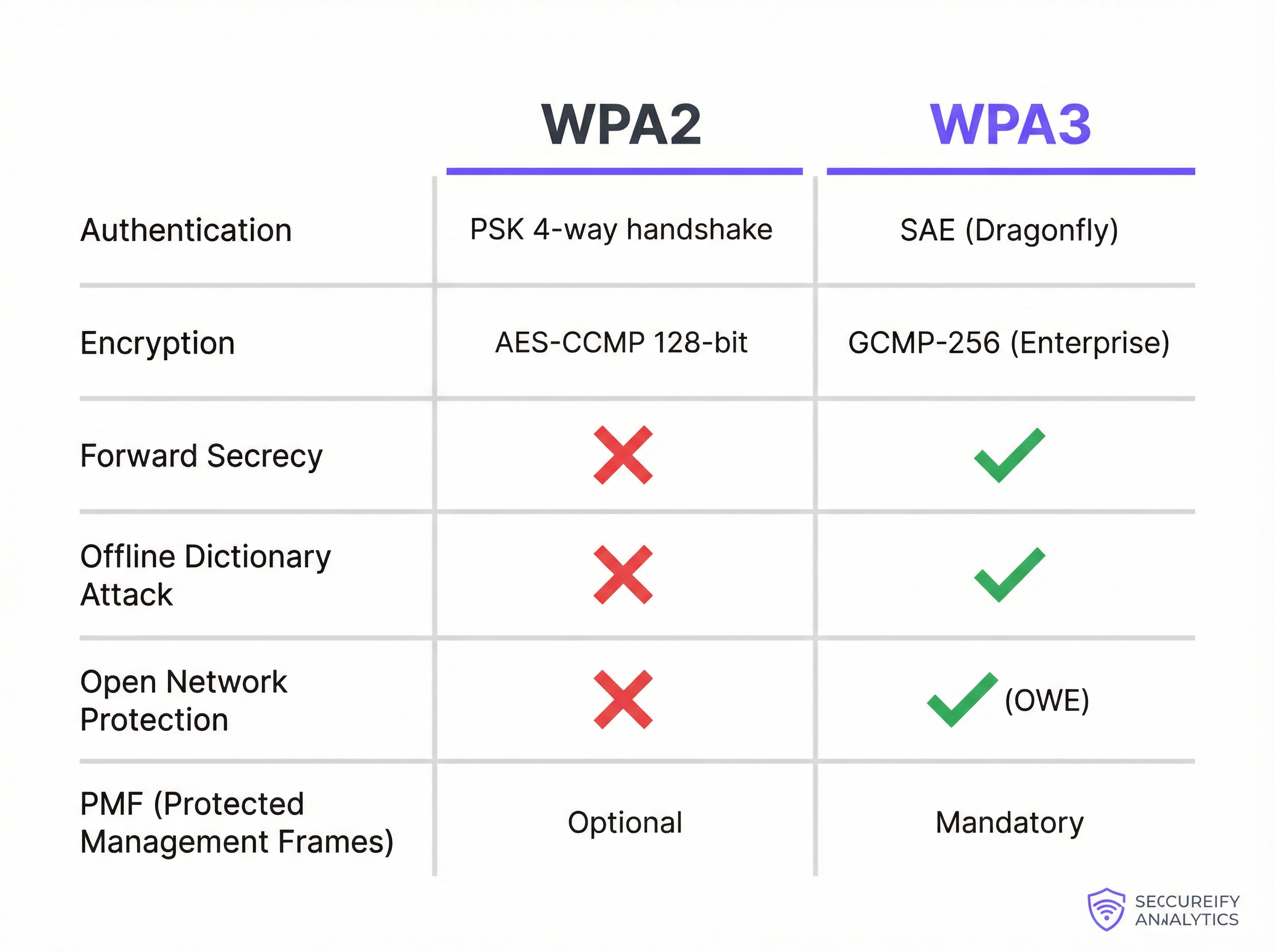
A mudança mais fundamental entre o WPA2-Personal e o WPA3-Personal é o mecanismo de autenticação. O WPA2 utiliza uma Pre-Shared Key (PSK) combinada com um handshake de 4 vias. Embora eficaz na altura da sua conceção, este método é vulnerável a ataques de dicionário offline. Um atacante pode capturar passivamente o handshake e, em seguida, utilizar poder computacional para adivinhar a palavra-passe offline, sem qualquer interação adicional com a rede. Isto torna as redes protegidas com palavras-passe fracas ou moderadamente complexas altamente suscetíveis a comprometimentos.
O WPA3 substitui o PSK pelo Simultaneous Authentication of Equals (SAE), também conhecido como Dragonfly Key Exchange. O SAE é um protocolo de acordo de chaves autenticado por palavra-passe que é resistente a ataques de dicionário offline. Durante o processo de autenticação, a palavra-passe nunca é trocada diretamente. Em vez disso, tanto o cliente como o ponto de acesso utilizam a palavra-passe para gerar hashes criptográficos, que são depois trocados para provar o conhecimento mútuo da chave. Um atacante que capture esta troca não pode utilizá-la para forçar a palavra-passe offline. Qualquer tentativa de adivinhar a palavra-passe tem de ser um ataque ativo e online — muito mais lento e muito mais fácil de detetar e bloquear.
Encriptação, Gestão de Chaves e Forward Secrecy
O WPA2-Enterprise utiliza AES-CCMP com encriptação de 128 bits, que tem sido considerada segura durante muitos anos. O WPA3-Enterprise eleva significativamente a fasquia, oferecendo um modo de segurança de 192 bits opcional, alinhado com a suite Commercial National Security Algorithm (CNSA). Isto proporciona uma postura criptográfica exigida para ambientes governamentais, de defesa e outros de alta segurança.
De forma mais abrangente, o WPA3 introduz o Perfect Forward Secrecy (PFS). Com o WPA2, se um atacante comprometer a palavra-passe da rede, poderá potencialmente desencriptar tráfego passado que tenha capturado e armazenado anteriormente. O WPA3 com SAE garante que cada sessão tem uma chave de encriptação única e efémera. Mesmo que uma chave de uma única sessão seja comprometida, não pode ser utilizada para desencriptar quaisquer sessões anteriores ou futuras — reduzindo drasticamente o raio de impacto de qualquer potencial violação.
Proteção para Redes Abertas: Enhanced Open (OWE)
Em locais de acesso público, como hotéis, aeroportos e lojas de retalho, as redes WiFi abertas (sem palavra-passe) são comuns para o acesso de convidados. Numa rede aberta tradicional, todo o tráfego é transmitido em texto simples, tornando cada utilizador vulnerável a interceções passivas por parte de qualquer outra pessoa na mesma rede. O WPA3 resolve esta questão com o Enhanced Open, que implementa a Opportunistic Wireless Encryption (OWE). A OWE cria automaticamente um túnel individual e encriptado entre cada utilizador e o ponto de acesso, mesmo numa rede sem palavra-passe. Isto proporciona uma privacidade significativa sem adicionar qualquer atrito ao processo de ligação — uma melhoria crítica para implementações de WiFi de convidados à escala.
Protected Management Frames (PMF)
As management frames regem a forma como os dispositivos WiFi gerem as suas ligações, incluindo a associação e a desassociação. No WPA2, estas tramas não estão protegidas, o que permite a um atacante falsificá-las para desautenticar forçosamente um utilizador legítimo, permitindo ataques de negação de serviço ou man-in-the-middle. Embora os PMF (definidos na norma IEEE 802.11w) fossem opcionais no WPA2, o WPA3 exige a utilização de Protected Management Frames, garantindo a integridade e a autenticidade destas mensagens de controlo críticas e protegendo a estabilidade geral da ligação sem fios.
Guia de Implementação
A migração de uma rede empresarial do WPA2 para o WPA3 não é uma simples mudança de botão, mas sim um projeto estratégico que requer um planeamento e execução cuidadosos. O objetivo é melhorar a segurança, minimizando simultaneamente as interrupções nas operações comerciais e na experiência do utilizador. Uma abordagem faseada é quase sempre o caminho recomendado.
Fase 1 — Auditoria à Infraestrutura e Dispositivos. O primeiro passo é uma auditoria abrangente a todo o seu ecossistema sem fios. Para os pontos de acesso, identifique a marca, o modelo e a versão de firmware de todas as unidades e verifique a documentação do fabricante quanto ao suporte para WPA3. A maioria dos APs de nível empresarial vendidos desde 2019 suporta WPA3, mas normalmente é necessária uma atualização de firmware. Se utilizar uma arquitetura baseada em controladores, certifique-se de que o software do controlador está atualizado para uma versão que suporte a configuração e gestão do WPA3. A parte mais crítica e desafiante da auditoria é o inventário dos dispositivos clientes. Deve catalogar todos os dispositivos que se ligam à sua rede WiFi — portáteis corporativos, smartphones, dispositivos BYOD e hardware de finalidade específica, como terminais de Ponto de Venda (POS), leitores de códigos de barras, sensores IoT e componentes de edifícios inteligentes.
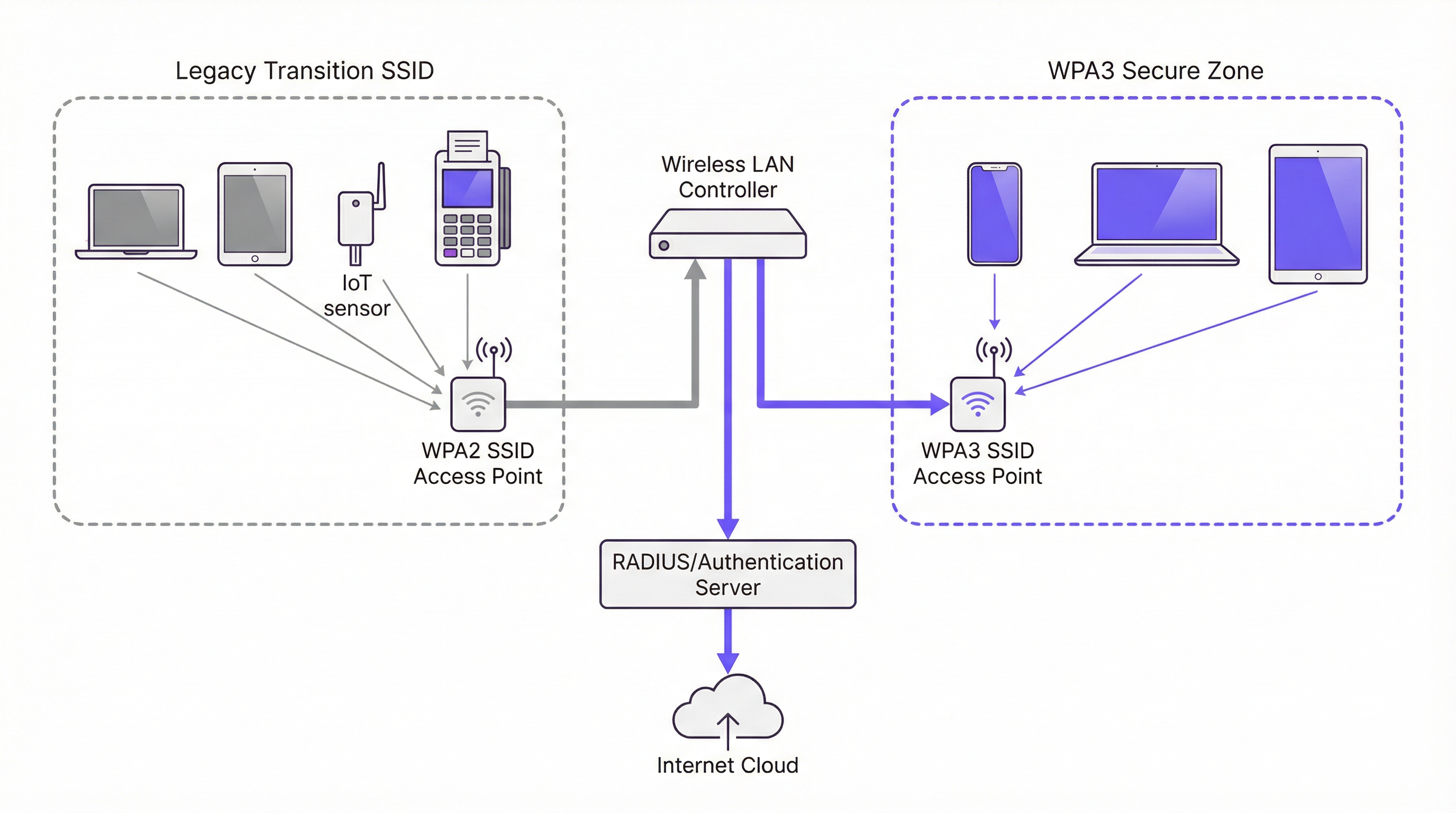
Fase 2 — Ativar o WPA3/WPA2 Transition Mode. Uma transição total e imediata para o WPA3 não é prática para a maioria das organizações devido à diversidade de dispositivos clientes. A solução padrão da indústria é utilizar o WPA3/WPA2 Mixed Mode, também designado por Transition Mode. Nesta configuração, o mesmo SSID é transmitido com suporte para autenticação WPA3 e WPA2. Os clientes compatíveis com WPA3 negoceiam e ligam-se automaticamente utilizando o protocolo mais seguro; os clientes legados ligam-se utilizando o WPA2. Isto permite uma experiência de utilizador perfeita durante o período de migração. No seu controlador de LAN sem fios ou interface de gestão de APs, encontrará normalmente uma definição de segurança para o seu SSID que lhe permite selecionar "WPA3+WPA2-Enterprise" ou uma opção de modo misto semelhante.
Fase 3 — Criar Zonas Seguras Exclusivas para WPA3. À medida que a sua população de dispositivos clientes se torna cada vez mais compatível com o WPA3, comece a criar SSIDs exclusivos para WPA3 para grupos de utilizadores ou tipos de dispositivos específicos. Dê prioridade aos dispositivos e utilizadores que lidam com os dados mais sensíveis. Por exemplo, crie um SSID exclusivo para WPA3 para o departamento financeiro ou para os dispositivos dos executivos da empresa e, em seguida, utilize a sua plataforma de gestão de dispositivos para enviar novos perfis de rede para os dispositivos compatíveis, reduzindo gradualmente a sua dependência do SSID de modo misto.
Fase 4 — Isolar e Gerir Dispositivos Legados. Inevitavelmente, terá uma longa lista de dispositivos legados que não suportam WPA3. Crie um SSID separado e dedicado, configurado apenas para WPA2, protegido por firewall do resto da rede corporativa com regras de acesso rigorosas. Em simultâneo, desenvolva um plano de ciclo de vida de renovação de hardware para eliminar gradualmente os dispositivos não conformes ao longo do tempo. Para cada nova compra de dispositivos, exija o suporte para WPA3 como um requisito de aquisição.
Melhores Práticas
A tabela seguinte resume as principais recomendações padrão da indústria para uma implementação segura do WPA3, com base nas orientações da norma IEEE 802.1X, nas especificações da Wi-Fi Alliance e nos requisitos do PCI DSS v4.0.
| Melhor Prática | Justificação | Prioridade |
|---|---|---|
| Exigir 802.1X para todos os SSIDs corporativos | Elimina palavras-passe partilhadas; fornece responsabilização por utilizador e controlo centralizado de políticas via RADIUS. | Crítica |
| Implementar EAP-TLS (autenticação baseada em certificados) | Remove totalmente a superfície de ataque baseada em palavras-passe; os certificados não podem ser alvo de phishing. | Alta |
| Ativar PMF em todas as redes WPA2 | Protege contra ataques de desautenticação e desassociação mesmo antes da migração total para o WPA3. | Alta |
| Desativar taxas de dados legadas (< 6 Mbps) | Remove a compatibilidade com os clientes mais antigos e menos seguros e melhora a eficiência geral do tempo de transmissão. | Média |
| Segmentar o tráfego IoT e de convidados em VLANs dedicadas | Limita o raio de impacto de qualquer comprometimento num dispositivo legado ou rede aberta. | Crítica |
| Estabelecer uma cadência de atualização de firmware | Garante que as vulnerabilidades conhecidas são corrigidas prontamente nos APs e controladores. | Alta |
| Exigir WPA3 em todas as novas aquisições de hardware | Evita a acumulação de dívida técnica e acelera o cronograma de migração. | Alta |
Resolução de Problemas e Mitigação de Riscos
A implementação do WPA3 pode introduzir novos desafios. O modo de falha mais comum é a conectividade do cliente, onde dispositivos com drivers sem fios ou sistemas operativos desatualizados não conseguem negociar uma ligação WPA3. A solução passa quase sempre por garantir que os drivers e as atualizações de SO mais recentes são aplicados antes de ativar o WPA3. Testar com uma amostra representativa de tipos de dispositivos antes de uma implementação alargada é um passo inegociável em qualquer plano de implementação responsável.
A degradação do desempenho é outra preocupação, embora na prática raramente seja causada pelo próprio WPA3. Mais frequentemente, resulta de pontos de acesso mal configurados ou de versões de firmware com bugs. Validar o novo firmware num ambiente de laboratório antes da implementação em produção e monitorizar de perto as principais métricas, como a latência, as taxas de perda de pacotes e as contagens de retransmissão após qualquer alteração de configuração, permitir-lhe-á identificar e resolver problemas rapidamente.
O desafio mais persistente é a gestão de dispositivos IoT e headless que não possuem os suplicantes sofisticados dos sistemas operativos modernos. Estes dispositivos devem ser isolados num SSID dedicado e reforçado, exclusivo para WPA2, com regras de firewall rigorosas. Esta não é uma solução permanente, mas sim uma medida de contenção de riscos enquanto um plano de substituição é desenvolvido e executado.
ROI e Impacto no Negócio
O ROI de uma atualização para WPA3 é impulsionado principalmente pela mitigação de riscos. As vulnerabilidades no WPA2 são ativamente exploradas e um ataque bem-sucedido a uma rede sem fios pode levar à exfiltração de dados, danos à reputação e penalizações de conformidade significativas ao abrigo de quadros como o PCI DSS v4.0 e o GDPR. O custo de uma única violação — englobando investigação forense, honorários advocatícios, notificação de clientes e multas regulamentares — pode facilmente atingir centenas de milhares de euros. O investimento numa infraestrutura compatível com WPA3 é uma fração deste custo potencial.
Para além do risco, existe um impacto direto na experiência dos hóspedes e na confiança na marca. Em locais de acesso público, a segurança do WiFi de convidados faz parte da promessa da marca. O WPA3 Enhanced Open permite que os locais forneçam um acesso perfeito e sem palavra-passe, garantindo simultaneamente que o tráfego de cada utilizador é encriptado e isolado de outros utilizadores na mesma rede. Isto cria confiança e melhora a experiência geral dos hóspedes sem adicionar complexidade operacional.
Por fim, o WPA3 é um investimento preparado para o futuro. É a base de segurança para o WiFi 6, 6E e WiFi 7. Adiar a transição apenas acumula dívida técnica, tornando a eventual migração mais complexa e dispendiosa. Uma atualização estratégica e faseada para o WPA3 é uma abordagem fiscalmente responsável para o planeamento da arquitetura de rede a longo prazo, que proporciona retornos compostos ao longo do ciclo de vida do investimento na infraestrutura.
Key Terms & Definitions
SAE (Simultaneous Authentication of Equals)
A password-authenticated key agreement protocol, also known as the Dragonfly handshake, that replaces WPA2's Pre-Shared Key (PSK) mechanism. SAE prevents offline dictionary attacks by ensuring the password is never transmitted or exposed during the authentication process. Both parties prove knowledge of the password through cryptographic exchange, making passive capture of the handshake useless to an attacker.
IT teams encounter SAE when configuring WPA3-Personal SSIDs. It is the primary reason WPA3-Personal is significantly more secure than WPA2-PSK and is the first capability to verify when assessing WPA3 readiness.
GCMP-256 (Galois/Counter Mode Protocol, 256-bit)
The encryption cipher used in WPA3-Enterprise's 192-bit security mode. GCMP-256 provides both data confidentiality and data integrity (authentication) in a single, highly efficient operation. It is aligned with the Commercial National Security Algorithm (CNSA) suite and represents a significant improvement over WPA2's AES-CCMP-128.
Relevant for network architects designing networks for government, defence, financial services, or healthcare environments where regulatory requirements mandate the highest available encryption standards.
Perfect Forward Secrecy (PFS)
A cryptographic property that ensures each communication session uses a unique, ephemeral encryption key. If a session key is compromised, it cannot be used to decrypt any past or future sessions. WPA3 achieves PFS through the SAE handshake, which generates a unique Pairwise Master Key (PMK) for each session.
Critical for environments where sensitive data is transmitted over WiFi and where the threat of 'capture now, decrypt later' attacks is a concern. PFS is a key differentiator between WPA2 and WPA3 from a data protection standpoint.
OWE (Opportunistic Wireless Encryption)
A WiFi security mechanism defined in RFC 8110 and implemented in WPA3 as 'Enhanced Open'. OWE automatically establishes an encrypted connection between each client and the access point on an open (password-free) network, providing individualised data encryption without any user interaction or credential exchange.
The standard configuration for guest and public WiFi in hospitality, retail, and venue environments. OWE allows operators to provide seamless connectivity while protecting users from passive eavesdropping, directly addressing a long-standing privacy concern with traditional open networks.
PMF (Protected Management Frames)
A security mechanism defined in IEEE 802.11w that encrypts and authenticates WiFi management frames, such as de-authentication and disassociation frames. Without PMF, an attacker can spoof these frames to forcibly disconnect legitimate users from the network. PMF is optional in WPA2 but mandatory in WPA3.
IT teams should enable PMF on all WPA2 networks as a hardening measure, even before migrating to WPA3. It is a simple configuration change that provides meaningful protection against denial-of-service attacks.
WPA3 Transition Mode
A mixed-mode SSID configuration that simultaneously supports both WPA3 and WPA2 authentication on the same network name (SSID). WPA3-capable clients automatically negotiate and use the more secure WPA3 protocol; legacy WPA2-only clients connect using the older protocol. This is the primary mechanism for managing the migration from WPA2 to WPA3 in environments with mixed device populations.
The recommended starting point for any WPA3 migration. IT teams should enable transition mode on existing SSIDs as the first step, then monitor which devices are connecting via WPA2 to identify the remaining legacy device population.
802.1X / RADIUS Authentication
An IEEE standard for port-based network access control. In the context of enterprise WiFi, 802.1X uses a RADIUS (Remote Authentication Dial-In User Service) server to authenticate individual users or devices before granting network access. This provides per-user accountability and centralised access control, replacing the single shared password of PSK-based networks.
The mandatory authentication framework for any corporate WiFi network carrying sensitive data. Both WPA2-Enterprise and WPA3-Enterprise use 802.1X as their authentication layer. IT teams should use this in conjunction with EAP-TLS (certificate-based authentication) for the highest security posture.
EAP-TLS (Extensible Authentication Protocol - Transport Layer Security)
A certificate-based WiFi authentication method that uses digital certificates on both the client and the authentication server to establish mutual trust, without requiring a password. EAP-TLS is considered the gold standard for enterprise WiFi authentication as it eliminates the risk of password phishing, credential theft, and brute-force attacks.
IT teams should prioritise EAP-TLS over password-based EAP methods (like PEAP-MSCHAPv2) for all corporate devices. It requires a Public Key Infrastructure (PKI) to manage and distribute certificates, but this investment is justified by the significant security improvement.
KRACK (Key Reinstallation Attack)
A vulnerability discovered in 2017 that exploits a flaw in the WPA2 four-way handshake. By manipulating and replaying cryptographic handshake messages, an attacker can force a victim's device to reinstall an already-in-use encryption key, causing nonce reuse and potentially allowing the attacker to decrypt, replay, or forge network packets. WPA3's SAE handshake is not susceptible to KRACK.
KRACK is a key reason for migrating to WPA3. While patches were released for many devices, not all devices received updates, and the underlying vulnerability is a structural weakness of the WPA2 handshake design. IT teams should treat unpatched devices as a significant risk.
Case Studies
A 450-room luxury hotel group with 12 properties needs to upgrade its guest and staff WiFi. The network currently runs WPA2-PSK for guests and WPA2-Enterprise for staff. The IT director is concerned about PCI DSS compliance for the payment systems on the staff network, and wants to improve guest privacy without adding a password requirement to the guest network. The estate includes a mix of Cisco Catalyst 9130 APs (WPA3-capable) and older Cisco 2800 series APs (WPA2-only). What is the recommended migration strategy?
The recommended approach is a phased, property-by-property migration that prioritises the highest-risk network segments first. For properties with Cisco 9130 APs, the immediate action is to update the controller software (Cisco IOS-XE) to a version that supports WPA3, then enable WPA3-Enterprise Transition Mode on the staff SSID. This allows WPA3-capable corporate devices to automatically use the more secure protocol while legacy devices continue to connect via WPA2-Enterprise. For the guest network, enable WPA3 Enhanced Open (OWE) on a new SSID. This provides automatic, per-user encryption for all guests without requiring a password, directly addressing the privacy concern. For properties with legacy Cisco 2800 APs, these units should be placed on a hardware refresh roadmap. In the interim, harden the existing WPA2-Enterprise configuration by ensuring 802.1X with EAP-TLS (certificate-based authentication) is in use for all staff devices. For PCI DSS compliance, ensure the payment systems are on a dedicated, isolated SSID or VLAN with the strictest possible access controls, and document the compensating controls in place while the hardware refresh is underway. The migration should be completed property by property, starting with the highest-revenue or highest-risk locations, to manage change and validate the configuration before a full estate rollout.
A national retail chain with 250 stores is preparing for a PCI DSS v4.0 audit. Each store has a mix of corporate WiFi (for staff devices and POS terminals) and guest WiFi (for customer-facing promotions and loyalty app connectivity). The IT security team has been told by the auditors that their current WPA2-PSK configuration for the staff network is a finding. The POS terminals are a mix of modern Android-based units (WPA3-capable) and older Windows CE-based units (WPA2-only). How should the IT team respond to the audit finding and plan the remediation?
The audit finding is valid. WPA2-PSK for a network carrying payment card data is a significant risk, as a single compromised password exposes the entire network. The immediate remediation for the staff network is to migrate from WPA2-PSK to WPA2-Enterprise with 802.1X authentication, using a RADIUS server (e.g., Cisco ISE, Aruba ClearPass, or a cloud-based RADIUS service). This provides per-device authentication and eliminates the shared password vulnerability. This action alone resolves the audit finding and is achievable without any hardware changes. In parallel, the team should audit all POS terminals and other staff devices for WPA3 capability. For the modern Android POS terminals, enable WPA3-Enterprise Transition Mode on the staff SSID. For the legacy Windows CE units, these must be placed on a dedicated, isolated SSID with WPA2-Enterprise and strict VLAN-based network segmentation, ensuring they can only communicate with the payment processing server and nothing else. For the guest network, implement WPA3 Enhanced Open to provide customer privacy. This also demonstrates a proactive security posture to the auditors, which is beneficial for the overall compliance assessment.
Scenario Analysis
Q1. A 20,000-seat stadium is deploying a new WiFi network for a major multi-day event. The network must support 15,000 concurrent guest connections and a separate staff network for 500 employees handling ticketing and point-of-sale. The IT team has a budget for new WiFi 6E access points. The event organiser wants to offer free, seamless WiFi to all attendees without a password. What security protocol configuration would you recommend for the guest and staff networks, and why?
💡 Hint:Consider the specific use case for each network segment. The guest network requires seamless access with privacy; the staff network requires strong authentication for PCI DSS compliance. WPA3 has specific features designed for each of these scenarios.
Show Recommended Approach
For the guest network, the correct configuration is WPA3 Enhanced Open (OWE). This provides automatic, per-user encrypted tunnels without requiring a password, delivering the seamless experience the organiser wants while protecting each attendee's traffic from eavesdropping by other users. A traditional open network would leave all guest traffic in plaintext. For the staff network, the configuration should be WPA3-Enterprise with 802.1X authentication using a RADIUS server. Since the staff are handling payment card data via POS terminals, this is a PCI DSS requirement. If the POS terminals support it, EAP-TLS (certificate-based authentication) is the preferred EAP method. The two networks should be on completely separate VLANs with strict firewall rules between them. Since the new APs are WiFi 6E, they will natively support WPA3, so no transition mode is required for a greenfield deployment.
Q2. An IT manager at a 50-store retail chain has just received a penetration test report showing that the WPA2-PSK password for the staff network was cracked using an offline dictionary attack. The password was 12 characters long and considered 'strong'. The manager needs to remediate the finding immediately. What is the most effective immediate action, and what is the longer-term strategic recommendation?
💡 Hint:The root cause is not the password strength — it is the use of PSK. Consider what authentication mechanism would eliminate this entire class of vulnerability, regardless of password complexity.
Show Recommended Approach
The immediate action is to change the PSK to a highly complex, randomly generated passphrase (at least 20 characters) to reduce the risk while the longer-term fix is implemented. However, the strategic recommendation is to migrate from WPA2-PSK to WPA2-Enterprise with 802.1X authentication. This eliminates the shared password entirely. Each device or user authenticates individually against a RADIUS server, and there is no single password to crack. The preferred EAP method is EAP-TLS, which uses digital certificates instead of passwords, making offline dictionary attacks impossible. In parallel, the team should assess the WPA3 readiness of their access points and begin planning a migration to WPA3-Enterprise, which provides the additional protection of SAE and Perfect Forward Secrecy. The key insight is that the problem is not the password strength but the use of a shared secret — 802.1X eliminates this vulnerability class entirely.
Q3. A large conference centre is planning to upgrade its WiFi infrastructure. The venue hosts events ranging from small corporate meetings to large trade shows with 5,000+ attendees. The IT team is evaluating whether to deploy WPA3-only, WPA2-only, or a mixed WPA3/WPA2 configuration. The venue's device inventory shows that 85% of client devices are modern smartphones and laptops that support WPA3, but 15% are older event management tablets and barcode scanners that only support WPA2. What is the recommended SSID architecture?
💡 Hint:Consider the different user groups and device types. A single SSID for all devices may not be the optimal solution. Think about how to provide the highest security for the majority while managing the risk of the legacy minority.
Show Recommended Approach
The recommended architecture is a three-SSID model. First, a WPA3-Enterprise SSID for staff corporate devices (the modern laptops and smartphones), providing the highest security with 802.1X authentication. Second, a WPA3 Enhanced Open SSID for event attendees and guests, providing seamless, encrypted public access. Third, a dedicated WPA2-Enterprise (or WPA2-PSK) SSID, isolated on its own VLAN with strict firewall rules, for the legacy event management tablets and barcode scanners. This architecture ensures that the 85% of capable devices get the full benefit of WPA3, while the legacy 15% are contained and managed without compromising the security of the rest of the network. The legacy SSID should be treated as a temporary measure, with a hardware refresh plan to replace the non-compliant devices within a defined timeframe. Using WPA3 Transition Mode on a single SSID is an alternative but less preferable option, as it means the entire SSID operates at WPA2 security levels for any client that connects via WPA2.
Key Takeaways
- ✓WPA3 replaces WPA2's vulnerable PSK 4-way handshake with SAE (Simultaneous Authentication of Equals), which completely eliminates offline dictionary attacks — the most common method used to crack WiFi passwords.
- ✓WPA3 introduces Perfect Forward Secrecy, ensuring that a compromised session key cannot be used to decrypt previously captured traffic, defeating 'steal now, decrypt later' attack strategies.
- ✓WPA3 Enhanced Open (OWE) provides automatic, per-user encrypted tunnels on open, password-free networks — the optimal configuration for guest WiFi in hotels, retail stores, and stadiums.
- ✓WPA3 Transition Mode is the recommended migration path: it allows a single SSID to support both WPA2 and WPA3 clients simultaneously, enabling a phased migration without disrupting legacy devices.
- ✓The most critical immediate action for any organisation still using WPA2-PSK on a corporate network is to migrate to 802.1X authentication — this eliminates the shared password vulnerability regardless of WPA version.
- ✓A comprehensive device audit is the non-negotiable first step in any WPA3 migration. Legacy IoT and headless devices that cannot support WPA3 must be isolated on dedicated, firewalled network segments.
- ✓WPA3 is the security foundation for WiFi 6, 6E, and WiFi 7. Mandating WPA3 support in all new hardware procurement is the most effective long-term strategy for managing the transition and preventing the accumulation of technical debt.




