

WPA3-Enterprise: Um Guia Completo de Implementação
This guide provides enterprise IT teams, network architects, and CTOs with a definitive, vendor-neutral reference for deploying WPA3-Enterprise across hospitality, retail, events, and public-sector environments. It covers the full deployment lifecycle — from hardware and RADIUS infrastructure requirements through phased migration strategy and client device configuration — while addressing the specific security improvements WPA3-Enterprise delivers over WPA2-Enterprise, including mandatory Protected Management Frames, enforced server certificate validation, and forward secrecy. Teams will find actionable configuration guidance, real-world case studies, and a structured troubleshooting framework to de-risk their migration and demonstrate compliance with PCI DSS v4.0 and GDPR Article 32.
🎧 Listen to this Guide
View Transcript
Resumo Executivo

O WPA3-Enterprise representa a atualização mais significativa para a segurança sem fios empresarial desde a introdução da autenticação 802.1X. Para organizações que operam nos setores da hotelaria, retalho, eventos ou setor público, a migração do WPA2-Enterprise não é uma questão de se, mas de quando — e de como executá-la sem disrupção operacional.
As principais melhorias de segurança são concretas e mensuráveis. As Protected Management Frames (PMF) tornam-se obrigatórias, eliminando o vetor de ataque de desautenticação que tem sido amplamente explorado em locais de alta densidade. A validação do certificado do servidor durante o handshake 802.1X é imposta, fechando a lacuna de roubo de credenciais por pontos de acesso não autorizados (rogue access points) que a validação opcional no WPA2 deixava em aberto. A derivação de chaves por sessão introduz o forward secrecy (sigilo perfeito), garantindo que o tráfego histórico não pode ser desencriptado retroativamente, mesmo que as chaves de sessão sejam posteriormente comprometidas.
Para organizações orientadas para a conformidade, o WPA3-Enterprise satisfaz o Requisito 4.2.1 do PCI DSS v4.0 para criptografia forte em trânsito e alinha-se com o mandato do Artigo 32 do GDPR para medidas técnicas de segurança adequadas. O modo de segurança de 192 bits cumpre os requisitos do NIST SP 800-187 e da suite NSA CNSA para ambientes governamentais e financeiros sensíveis.
Este guia fornece um percurso de implementação estruturado: auditoria de infraestrutura, configuração RADIUS, lançamento faseado do SSID utilizando o modo de transição, configuração de dispositivos cliente via MDM e um caminho de escalonamento claro para os cinco modos de falha mais comuns.
Análise Técnica Aprofundada
A Arquitetura de Segurança do WPA3-Enterprise
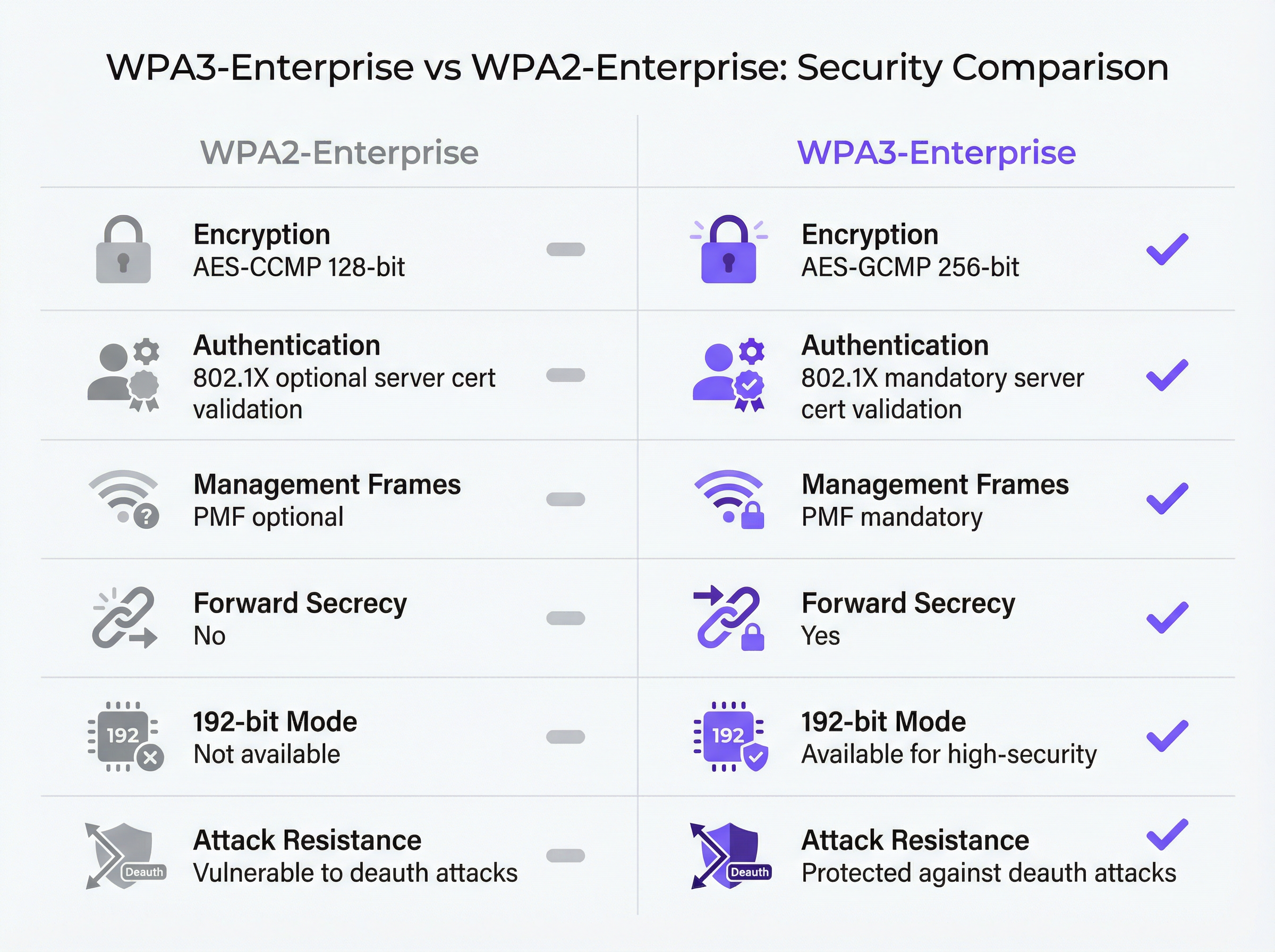
O WPA3-Enterprise é definido pela Especificação WPA3 da Wi-Fi Alliance (versão atual 3.3) e baseia-se diretamente na framework de segurança IEEE 802.11i. A camada de autenticação permanece a IEEE 802.1X — a mesma norma de controlo de acesso à rede baseada em portas que sustenta o WPA2-Enterprise — mas com três melhorias obrigatórias críticas que o WPA2 tratava como opcionais.
As Protected Management Frames (IEEE 802.11w) são obrigatórias para todas as ligações WPA3. No WPA2, as tramas de gestão (management frames) — as mensagens de controlo 802.11 que regem a associação, desassociação e desautenticação — são transmitidas em texto limpo. Um atacante com um adaptador sem fios comum pode forjar tramas de desautenticação e forçar a saída de clientes da rede à sua vontade. Este ataque não requer credenciais nem ferramentas sofisticadas. Em ambientes de alta densidade, como centros de conferências, estádios e lobbies de hotéis, representa um risco operacional genuíno. O PMF obrigatório do WPA3 autentica criptograficamente as tramas de gestão, tornando esta classe de ataques ineficaz.
A validação obrigatória do certificado do servidor fecha o vetor de ataque de pontos de acesso não autorizados. No WPA2-Enterprise, o suplicante 802.1X num dispositivo cliente não é obrigado a validar o certificado do servidor RADIUS antes de submeter as credenciais de autenticação. Na prática, muitas implementações empresariais ignoram esta configuração ou implementam-na incorretamente, deixando os utilizadores vulneráveis ao roubo de credenciais através de pontos de acesso "evil twin". O WPA3-Enterprise exige que os clientes verifiquem o certificado do servidor RADIUS face a uma CA de confiança antes de prosseguirem com a autenticação. Esta única alteração elimina toda uma classe de ataques man-in-the-middle.
O Forward secrecy através da derivação de chaves por sessão garante que o comprometimento das chaves de uma sessão não expõe sessões históricas ou futuras. No WPA2, a ausência de forward secrecy significa que um atacante que capture tráfego encriptado e obtenha posteriormente as chaves de sessão — através de um comprometimento separado — pode desencriptar todo o tráfego capturado anteriormente. Para organizações que lidam com dados de cartões de pagamento, informações de saúde pessoais ou comunicações comercialmente sensíveis, este é um risco material.
Modos de Operação do WPA3-Enterprise
Existem três modos de operação distintos, e a seleção do modo adequado é a primeira decisão arquitetónica em qualquer implementação.
| Modo | Encriptação | Métodos EAP | PMF | Caso de Uso |
|---|---|---|---|---|
| WPA3-Enterprise (Standard) | AES-CCMP-128 | PEAP, EAP-TLS, EAP-TTLS | Obrigatório | Empresa em geral, hotelaria, retalho |
| WPA3-Enterprise 192-bit | AES-GCMP-256 + HMAC-SHA-384 | Apenas EAP-TLS | Obrigatório | Governo, finanças, defesa, infraestruturas críticas |
| Transição WPA2/WPA3-Enterprise | AES-CCMP-128 / GCMP-256 | PEAP, EAP-TLS, EAP-TTLS | Opcional | Fase de migração, frotas de dispositivos mistas |
O WPA3-Enterprise Standard é a escolha adequada para a maioria das implementações empresariais. Oferece as três principais melhorias de segurança — PMF obrigatório, validação obrigatória do certificado do servidor e forward secrecy — ao mesmo tempo que suporta toda a gama de métodos EAP, incluindo PEAP-MSCHAPv2, que permite a autenticação por nome de utilizador e palavra-passe face ao Active Directory ou LDAP. A compatibilidade com dispositivos cliente é ampla: Windows 10 versão 1903 e posterior, macOS 10.15 (Catalina) e posterior, iOS 13 e posterior, e Android 10 e posterior suportam o WPA3-Enterprise standard.
O Modo de Segurança WPA3-Enterprise de 192 bits foi concebido para ambientes com requisitos regulamentares ou de segurança elevados. A suite de encriptação — AES-GCMP-256 para confidencialidade de dados, HMAC-SHA-384 para integridade de mensagens e ECDH/ECDSA-384 para troca de chaves e autenticação — alinha-se com a suite Commercial National Security Algorithm (CNSA) da NSA e com o NIST SP 800-187. A restrição crítica é que o EAP-TLS com autenticação mútua de certificados é o único método EAP permitido. A autenticação por nome de utilizador e palavra-passe não é suportada. Este modo requer uma infraestrutura PKI madura e não é adequado para ambientes com dispositivos não geridos ou BYOD.
O Modo de Transição permite que clientes WPA2 e WPA3 se liguem ao mesmo SSID em simultâneo. Os clientes negoceiam a versão de segurança mais elevada que suportam. Este é o ponto de partida recomendado para qualquer migração, uma vez que elimina o risco de disrupção em dispositivos legados, ativando o WPA3 para clientes compatíveis desde o primeiro dia.
O Fluxo de Autenticação 802.1X
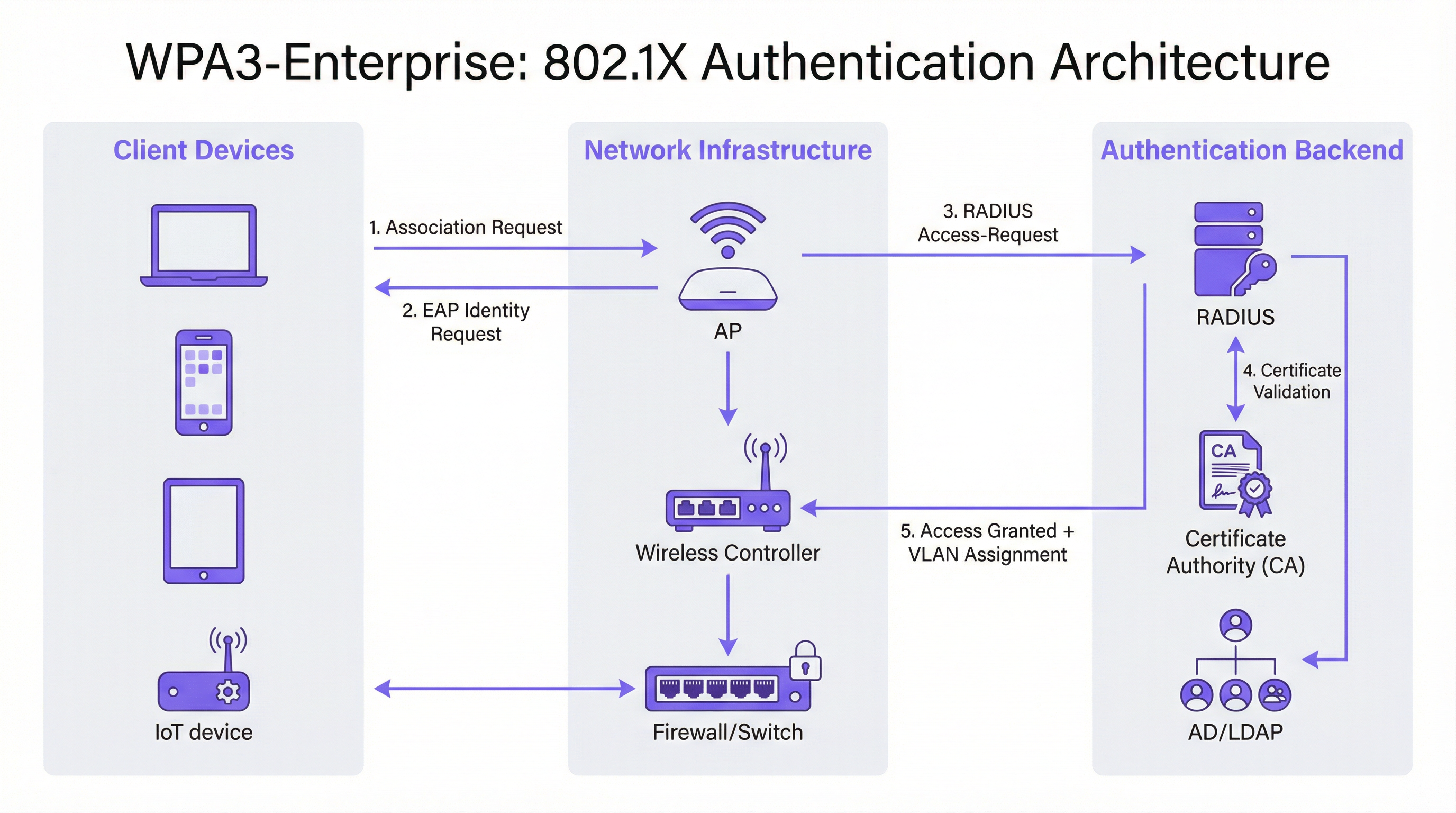
A troca de autenticação 802.1X no WPA3-Enterprise envolve três papéis: o suplicante (dispositivo cliente), o autenticador (ponto de acesso ou controlador sem fios) e o servidor de autenticação (servidor RADIUS). O fluxo processa-se da seguinte forma.
O dispositivo cliente associa-se ao ponto de acesso e inicia uma troca EAP. O ponto de acesso atua como um proxy transparente, reencaminhando mensagens EAP entre o cliente e o servidor RADIUS através de pacotes RADIUS Access-Request e Access-Challenge. O servidor RADIUS apresenta o seu certificado ao cliente, que o cliente deve agora validar face ao seu armazenamento de CAs de confiança — este é o passo de validação obrigatório que o WPA3 introduz. Uma vez verificada a identidade do servidor, o cliente prossegue com a submissão de credenciais (PEAP) ou troca mútua de certificados (EAP-TLS). Após uma autenticação bem-sucedida, o servidor RADIUS devolve uma mensagem Access-Accept, incluindo opcionalmente atributos de atribuição de VLAN (Tunnel-Type, Tunnel-Medium-Type, Tunnel-Private-Group-ID) que o ponto de acesso utiliza para colocar o cliente no segmento de rede adequado.
Guia de Implementação
Fase 1: Auditoria de Infraestrutura e Avaliação de Prontidão
Antes de qualquer alteração de configuração, é essencial um inventário exaustivo do ambiente existente. A auditoria deve abranger quatro áreas.
Firmware do ponto de acesso e do controlador: Verifique se todos os APs e o controlador sem fios suportam o WPA3. A maioria do hardware de nível empresarial expedido após 2019 suporta o WPA3 através de atualização de firmware, mas a versão específica de firmware necessária varia consoante o fornecedor. Consulte as notas de lançamento do fornecedor e certifique-se de que todos os APs estão a executar uma versão de firmware compatível com WPA3 antes de prosseguir.
Inventário de dispositivos cliente: Categorize os dispositivos pelo estado de suporte ao WPA3. Endpoints geridos (portáteis corporativos, tablets, smartphones inscritos em MDM) devem ser fáceis de avaliar. Dispositivos não geridos e IoT — impressoras, fechaduras inteligentes, controladores AVAC, terminais POS — requerem avaliação individual. Os dispositivos que não suportam o WPA3 devem ser identificados precocemente, uma vez que exigirão um SSID WPA2 separado ou a colocação em modo de transição.
Infraestrutura RADIUS: Avalie o servidor RADIUS existente quanto ao suporte de métodos EAP, capacidade e redundância. Se estiver a mudar para EAP-TLS, determine se existe uma PKI interna ou se é necessária uma autoridade de certificação alojada na cloud. Avalie se a infraestrutura RADIUS atual possui configuração de alta disponibilidade — um único servidor RADIUS sem failover é um ponto único de falha inaceitável numa implementação de produção.
Segmentação de rede: Reveja a arquitetura VLAN existente. As implementações WPA3-Enterprise beneficiam tipicamente da atribuição dinâmica de VLAN através de atributos RADIUS, o que permite que um único SSID sirva múltiplas populações de utilizadores com o isolamento de rede adequado. Confirme se a infraestrutura de switching suporta tagging de VLAN 802.1Q e se o servidor RADIUS está configurado para devolver os atributos VLAN corretos.
Fase 2: Configuração do Servidor RADIUS
O servidor RADIUS é a espinha dorsal de autenticação de qualquer implementação 802.1X. Os requisitos de configuração variam consoante a plataforma, mas os seguintes passos aplicam-se independentemente do fornecedor.
Definir entradas de Network Access Server (NAS): Para cada ponto de acesso ou controlador sem fios que enviará pedidos de autenticação para o servidor RADIUS, crie uma entrada NAS especificando o endereço IP de origem e um segredo partilhado (shared secret). Este segredo partilhado deve ser complexo (mínimo de 24 caracteres, maiúsculas e minúsculas, números e símbolos) e único por entrada NAS.
Configurar método EAP e certificado: Para implementações PEAP-MSCHAPv2, instale um certificado de servidor no servidor RADIUS emitido por uma CA em que os clientes confiem. Para implementações EAP-TLS, configure a validação de certificados tanto do lado do servidor como do lado do cliente. O Common Name ou Subject Alternative Name do certificado do servidor RADIUS deve corresponder ao valor configurado nos perfis de cliente, caso contrário a validação do certificado falhará.
Integrar com diretório de utilizadores: Ligue o servidor RADIUS ao Active Directory, LDAP ou a um fornecedor de identidade na cloud para validação de credenciais. Para implementações EAP-TLS, configure a autenticação baseada em certificados com o modelo de certificado adequado e a verificação de revogação (OCSP ou CRL).
Configurar RADIUS accounting: Ative o accounting no servidor RADIUS e configure o controlador sem fios para enviar registos de início, intermédios e de fim de accounting. Isto fornece o rasto de auditoria exigido pelo Requisito 8 do PCI DSS (responsabilização individual do utilizador) e apoia a investigação de incidentes.
Configurar atribuição dinâmica de VLAN: Defina atributos RADIUS para cada grupo de utilizadores ou perfil de certificado: Tunnel-Type (valor 13, VLAN), Tunnel-Medium-Type (valor 6, 802) e Tunnel-Private-Group-ID (o ID da VLAN como string). Isto permite que o servidor RADIUS coloque os clientes autenticados no segmento de rede adequado com base na sua identidade ou certificado.
Fase 3: Configuração do SSID
Configure o SSID WPA3-Enterprise no controlador sem fios com os seguintes parâmetros.
- Modo de segurança: WPA2/WPA3-Enterprise (modo de transição) para implementação inicial
- PMF: Opcional (modo de transição) ou Obrigatório (modo apenas WPA3)
- Método EAP: PEAP ou EAP-TLS, conforme adequado
- Servidor RADIUS: Endereços IP dos servidores RADIUS primário e secundário, portas (1812 para autenticação, 1813 para accounting) e segredos partilhados
- RADIUS accounting: Ativado, com servidor de accounting configurado
- VLAN Dinâmica: Ativada se utilizar atribuição de VLAN baseada em RADIUS
Fase 4: Configuração de Dispositivos Cliente
A configuração de clientes é a fase operacionalmente mais intensiva da implementação. Para dispositivos geridos, utilize MDM ou Group Policy para enviar os seguintes elementos de configuração.
Certificado CA do RADIUS: O certificado CA que emitiu o certificado de autenticação do servidor RADIUS deve ser implementado no armazenamento de certificados raiz de confiança do cliente. Sem isto, a validação do certificado falhará ou — se os clientes estiverem mal configurados para ignorar a validação — o benefício de segurança do WPA3-Enterprise é anulado.
Perfil SSID: Configure o nome do SSID, tipo de segurança (WPA3-Enterprise ou WPA2/WPA3-Enterprise), método EAP e parâmetros de validação do certificado do servidor, incluindo o nome esperado do servidor ou o assunto do certificado.
Para implementações EAP-TLS: Implemente certificados de cliente em cada dispositivo via SCEP (Simple Certificate Enrolment Protocol) ou instalação manual. Automatize a renovação de certificados para evitar falhas de autenticação na expiração do certificado.
Fase 5: Monitorização e Conclusão da Migração
Assim que o modo de transição estiver ativo, monitorize o controlador sem fios ou a plataforma de gestão na cloud quanto a métricas de adoção do WPA3. Acompanhe a percentagem de associações de clientes utilizando WPA3 versus WPA2. Quando a adoção do WPA3 exceder os 95% e todos os restantes clientes WPA2 tiverem sido identificados e migrados ou segmentados para um SSID legado dedicado, transite o SSID principal para o modo apenas WPA3.
Melhores Práticas
Implemente servidores RADIUS redundantes desde o primeiro dia. A falha de um único servidor RADIUS deita abaixo toda a rede autenticada. Configure servidores RADIUS primários e secundários em cada AP e controlador, com failover automático. Para implementações em múltiplos locais, considere um serviço RADIUS alojado na cloud com redundância geográfica integrada.
Imponha a validação do certificado do servidor em todos os clientes. Este é o item de configuração mais importante numa implementação WPA3-Enterprise. Implementar o WPA3-Enterprise sem a validação obrigatória do certificado do servidor nos clientes não oferece qualquer proteção contra ataques de pontos de acesso não autorizados. Valide esta configuração explicitamente durante os testes — não assuma que os perfis MDM foram aplicados corretamente.
Utilize a atribuição dinâmica de VLAN para segmentação de rede. Em vez de implementar múltiplos SSIDs para diferentes populações de utilizadores, utilize a atribuição dinâmica de VLAN baseada em RADIUS para colocar os utilizadores no segmento de rede adequado com base na sua identidade. Isto reduz o congestionamento de RF (menos SSIDs), simplifica a arquitetura sem fios e mantém o isolamento de rede por utilizador.
Mantenha um SSID legado dedicado para dispositivos IoT não geridos. Os dispositivos que não suportam WPA3 — terminais POS legados, impressoras mais antigas, sensores IoT — devem ser colocados num SSID WPA2-Enterprise separado com isolamento rigoroso de VLAN e regras de firewall. Não permita que estes dispositivos bloqueiem a migração da rede principal de funcionários para WPA3.
Referencie a IEEE 802.1X e a Especificação WPA3 v3.3 da Wi-Fi Alliance como as normas autorizadas para a sua documentação de implementação. Para fins de conformidade, documente as suites de cifras específicas, métodos EAP e configuração PMF na sua política de segurança de rede, referenciando estas normas explicitamente.
Alinhe-se com o Requisito 4.2.1 do PCI DSS v4.0 documentando que o WPA3-Enterprise com encriptação AES-GCMP satisfaz o requisito de criptografia forte para dados em trânsito. Retenha os registos de RADIUS accounting pelo período exigido pela sua framework de conformidade (tipicamente 12 meses online, 12 meses arquivados).
Resolução de Problemas e Mitigação de Riscos

A tabela seguinte resume os cinco modos de falha mais comuns em implementações WPA3-Enterprise, as suas causas raiz e a remediação recomendada.
| Modo de Falha | Causa Raiz | Remediação |
|---|---|---|
| Cliente falha a ligação, erro de PMF | Dispositivo legado com implementação PMF com bugs | Mudar para modo de transição (PMF opcional) ou mover dispositivo para SSID WPA2 |
| Autenticação falha, erro de certificado | Certificado CA do RADIUS não está no armazenamento de confiança do cliente | Implementar certificado CA via MDM antes de lançar o perfil SSID |
| Falhas de autenticação intermitentes | Capacidade do servidor RADIUS ou timeout EAP | Escalar infraestrutura RADIUS; aumentar timeout EAP para 30s+ para RADIUS na cloud |
| Atribuição de VLAN não aplicada | Atributos RADIUS incorretos | Verificar Tunnel-Type (13), Tunnel-Medium-Type (6), Tunnel-Private-Group-ID (ID da VLAN como string) |
| Dispositivos Windows 10 falham a ligação | Driver ou build do SO desatualizados | Garantir que o Windows Update está atualizado; atualizar driver do adaptador sem fios; testar com Windows 11 |
Problemas de Compatibilidade PMF: As Protected Management Frames são obrigatórias no WPA3-Enterprise, mas alguns dispositivos legados — particularmente telemóveis Android mais antigos, impressoras legadas e certos dispositivos IoT — têm implementações PMF não conformes que causam falhas de ligação. A remediação imediata é ativar o modo de transição, que define o PMF como opcional em vez de obrigatório. A longo prazo, estes dispositivos devem ser migrados para um SSID WPA2 dedicado com o isolamento de VLAN adequado.
Falhas na Cadeia de Confiança de Certificados: A causa mais frequente de falhas de autenticação EAP em novas implementações WPA3-Enterprise é a ausência do certificado CA do servidor RADIUS no armazenamento raiz de confiança do cliente. Isto manifesta-se como uma falha de autenticação com um erro de validação de certificado no registo de eventos do cliente. A correção é simples — implementar o certificado CA via MDM — mas deve ser feita antes de o perfil SSID ser enviado para os clientes. Recomenda-se vivamente testar a implementação do certificado num grupo piloto de dispositivos antes do lançamento alargado.
Capacidade do Servidor RADIUS: Em grandes implementações, particularmente durante os picos de login matinais, o servidor RADIUS pode tornar-se um estrangulamento. Monitorize a utilização de CPU e memória do servidor RADIUS durante os períodos de pico. Para implementações que excedam 500 utilizadores simultâneos, considere implementar múltiplos servidores RADIUS atrás de um balanceador de carga, ou utilizar um serviço RADIUS alojado na cloud com auto-scaling.
Fragmentação de Dispositivos Android: A implementação do WPA3-Enterprise no Android varia significativamente entre fabricantes e versões do Android. O Android 10 introduziu o suporte para WPA3, mas a qualidade da implementação varia. Teste com uma amostra representativa da frota de dispositivos Android — incluindo modelos específicos de fabricantes — antes do lançamento alargado. Alguns dispositivos requerem parâmetros de configuração EAP específicos que diferem do perfil standard.
ROI e Impacto no Negócio
O business case para a migração para WPA3-Enterprise assenta em três pilares: redução de riscos, eficiência de conformidade e resiliência operacional.
Redução de Riscos: A eliminação de ataques de desautenticação é particularmente valiosa em ambientes críticos para as receitas. Um centro de conferências ou hotel que sofra um ataque de negação de serviço sem fios durante um grande evento enfrenta perdas diretas de receitas e danos reputacionais. O PMF obrigatório remove totalmente este vetor de ataque. O fecho da lacuna de roubo de credenciais por pontos de acesso não autorizados reduz o risco de roubo de credenciais que conduza a um comprometimento mais amplo da rede — um incidente que, ao abrigo do GDPR, acarreta potenciais multas de até 4% do volume de negócios anual global.
Eficiência de Conformidade: As organizações sujeitas ao PCI DSS v4.0 beneficiam de uma postura de conformidade mais limpa. O WPA3-Enterprise com encriptação AES-GCMP satisfaz o Requisito 4.2.1 para criptografia forte, e os registos de RADIUS accounting satisfazem o Requisito 8 para responsabilização individual do utilizador. Documentar uma implementação WPA3-Enterprise é materialmente mais simples do que justificar uma implementação WPA2 face aos atuais requisitos do PCI DSS, que escrutinam cada vez mais a utilização de protocolos legados.
Resiliência Operacional: A abordagem de migração faseada — começando com o modo de transição e monitorizando a adoção do WPA3 — permite às organizações melhorar a sua postura de segurança sem uma transição disruptiva. O investimento na redundância da infraestrutura RADIUS, na automatização da gestão de certificados e na configuração de clientes baseada em MDM rende dividendos para além do WPA3: estas capacidades sustentam qualquer futura iniciativa de controlo de acesso à rede.
Resultados Mensuráveis: As organizações que concluíram implementações WPA3-Enterprise reportam a eliminação de incidentes baseados em desautenticação, a redução de eventos de segurança relacionados com credenciais e a simplificação dos processos de auditoria PCI DSS. Para um grupo hoteleiro de 400 quartos que processa dados de cartões de pagamento, apenas os ganhos de eficiência de conformidade — âmbito de auditoria reduzido, pacotes de evidências mais limpos — justificam tipicamente o investimento na implementação dentro do primeiro ciclo de conformidade.
Key Terms & Definitions
WPA3-Enterprise
The enterprise mode of Wi-Fi Protected Access 3, defined by the Wi-Fi Alliance WPA3 Specification. It uses IEEE 802.1X for authentication, mandatory Protected Management Frames (IEEE 802.11w), mandatory server certificate validation, and AES-GCMP encryption. It is available in standard (128-bit) and 192-bit security modes.
IT teams encounter this when planning a wireless security upgrade from WPA2-Enterprise. It is the current best-practice standard for enterprise wireless security and is referenced in PCI DSS v4.0, NIST SP 800-187, and GDPR Article 32 compliance discussions.
IEEE 802.1X
An IEEE standard for port-based network access control. It defines an authentication framework involving three roles: the supplicant (client device), the authenticator (access point or switch), and the authentication server (RADIUS). 802.1X is the authentication backbone of both WPA2-Enterprise and WPA3-Enterprise.
Network architects encounter 802.1X when designing enterprise wireless or wired network access control. Understanding the three-party authentication model is essential for troubleshooting authentication failures and configuring RADIUS servers correctly.
RADIUS (Remote Authentication Dial-In User Service)
A networking protocol (RFC 2865) that provides centralised authentication, authorisation, and accounting (AAA) for network access. In WPA3-Enterprise deployments, the RADIUS server validates client credentials or certificates and returns access decisions, optionally including VLAN assignment attributes.
IT teams encounter RADIUS as the authentication server in any 802.1X deployment. Common implementations include Microsoft NPS (Windows Server), FreeRADIUS (open source), Cisco ISE, and Aruba ClearPass. Cloud-hosted RADIUS services are increasingly common for distributed enterprise estates.
Protected Management Frames (PMF / IEEE 802.11w)
A Wi-Fi security mechanism that cryptographically authenticates 802.11 management frames — the control messages governing device association, disassociation, and deauthentication. PMF prevents attackers from forging deauthentication frames to force clients off the network. Mandatory in WPA3; optional in WPA2.
Network architects encounter PMF when configuring WPA3-Enterprise SSIDs and when troubleshooting legacy device connectivity issues. Devices with non-compliant PMF implementations will fail to connect when PMF is set to 'required', necessitating transition mode or a separate WPA2 SSID.
EAP-TLS (Extensible Authentication Protocol - Transport Layer Security)
An EAP method that uses X.509 digital certificates for mutual authentication between the client and the RADIUS server. Both the client and the server present certificates, providing the strongest authentication assurance of any EAP method. Required for WPA3-Enterprise 192-bit mode.
IT teams encounter EAP-TLS when deploying certificate-based wireless authentication. It requires a PKI infrastructure (internal CA or cloud-hosted) and MDM-based certificate deployment to client devices. It eliminates the credential theft risk entirely, as there are no passwords to steal.
PEAP-MSCHAPv2 (Protected EAP with Microsoft Challenge Handshake Authentication Protocol v2)
An EAP method that tunnels MSCHAPv2 username and password authentication inside a TLS session established with the RADIUS server's certificate. It is the most widely deployed EAP method in enterprise wireless networks, supporting authentication against Active Directory and LDAP directories.
IT teams encounter PEAP-MSCHAPv2 as the default EAP method for WPA2-Enterprise and standard WPA3-Enterprise deployments. It is appropriate for environments with managed devices and an existing Active Directory infrastructure. Server certificate validation must be configured on clients to prevent credential interception.
Dynamic VLAN Assignment
A RADIUS feature that allows the authentication server to assign a client to a specific VLAN at authentication time, based on the user's identity, group membership, or certificate attributes. The RADIUS server returns three attributes in the Access-Accept message: Tunnel-Type (13/VLAN), Tunnel-Medium-Type (6/802), and Tunnel-Private-Group-ID (VLAN ID).
Network architects use dynamic VLAN assignment to implement per-user or per-role network segmentation without deploying multiple SSIDs. It is particularly valuable in hospitality and retail environments where different user populations (staff, management, contractors) require different network access levels.
Forward Secrecy
A cryptographic property that ensures that the compromise of a session key does not expose past or future session traffic. WPA3-Enterprise achieves forward secrecy through per-session key derivation, meaning each authentication session generates a unique key that is discarded after the session ends.
CTOs and security architects encounter forward secrecy in discussions about data protection risk. In WPA2, the absence of forward secrecy means that an attacker who captures encrypted wireless traffic today and later obtains session keys through a separate compromise can decrypt all historical traffic. Forward secrecy eliminates this retroactive decryption risk.
Transition Mode (WPA2/WPA3-Enterprise Mixed Mode)
A WPA3 operating mode that allows both WPA2-Enterprise and WPA3-Enterprise clients to connect to the same SSID simultaneously. Clients negotiate the highest security version they support. PMF is set to optional rather than required in this mode, ensuring compatibility with legacy devices.
IT teams use transition mode as the standard starting point for WPA3-Enterprise migrations. It eliminates the risk of disrupting legacy devices while enabling WPA3 for capable clients immediately. Most organisations maintain transition mode for 12-24 months before switching to WPA3-only.
WPA3-Enterprise 192-bit Security Mode
An optional high-security mode of WPA3-Enterprise using AES-GCMP-256 encryption, HMAC-SHA-384 for message integrity, and ECDH/ECDSA-384 for key exchange. Only EAP-TLS is permitted. Aligns with NIST SP 800-187 and the NSA's Commercial National Security Algorithm (CNSA) suite.
Network architects in government, financial services, and defence sectors encounter this mode when deploying wireless networks for sensitive or classified environments. It requires a mature PKI infrastructure and is not appropriate for environments with unmanaged or BYOD devices.
Case Studies
A 400-room hotel group with 12 UK properties needs to migrate their staff wireless network from WPA2-Enterprise to WPA3-Enterprise. The estate includes managed Windows laptops, iOS devices enrolled in MDM, legacy CCTV cameras running embedded firmware, and smart door lock controllers that are WPA2-only. They process payment card data through a cloud-based PMS and must maintain PCI DSS v4.0 compliance throughout the migration.
The deployment follows a five-phase approach. Phase 1 (Weeks 1-2): Conduct a full device inventory across all 12 properties. Categorise devices into three groups: WPA3-capable managed endpoints (Windows 10 1903+, iOS 13+), WPA3-incapable IoT devices (CCTV, door locks), and unknown/unmanaged devices. Audit AP firmware versions across the estate — most enterprise APs from 2019 onwards support WPA3 via firmware update. Phase 2 (Weeks 3-4): Configure the cloud-hosted RADIUS server (or Windows Server NPS at each property) with PEAP-MSCHAPv2 against Active Directory. Install a valid server certificate from a trusted CA. Configure NAS entries for each AP/controller. Enable RADIUS accounting. Phase 3 (Week 5): Deploy the RADIUS CA certificate to all managed devices via Intune MDM. Push a WPA2/WPA3-Enterprise transition mode SSID profile to managed devices, including the server certificate validation configuration pointing to the deployed CA cert. Phase 4 (Weeks 6-8): Enable the transition mode SSID on all APs. Monitor WPA3 vs WPA2 association statistics on the wireless controller. Simultaneously, create a dedicated WPA2-Enterprise SSID on a separate VLAN for CCTV cameras and door lock controllers, with strict firewall rules permitting only the specific traffic these devices require. Phase 5 (Month 3+): When WPA3 adoption on the staff SSID exceeds 95%, schedule a maintenance window to switch the staff SSID from transition mode to WPA3-only. Retain the WPA2 IoT SSID indefinitely for legacy devices. Document the configuration for PCI DSS evidence: cipher suites (AES-CCMP-128 minimum), PMF status (required), RADIUS accounting enabled, per-device authentication logs retained for 12 months.
A European retail chain with 250 stores needs to secure their staff mobile device network (tablets used for inventory management and customer service) with WPA3-Enterprise, while maintaining PCI DSS compliance for their existing WPA2-Enterprise POS terminal network. The IT team has limited on-site technical resource and needs a solution that can be managed centrally.
The architecture separates the POS and staff mobile networks at the SSID level. The POS network remains on WPA2-Enterprise with 802.1X, isolated on a dedicated VLAN with ACLs permitting only traffic to the payment processor's IP range and the PMS. This network is not migrated to WPA3 until POS terminal firmware supports it. The staff mobile network is deployed as a new WPA3-Enterprise SSID using EAP-TLS with client certificates. A cloud-hosted RADIUS service (such as Cisco ISE, Aruba ClearPass, or a cloud-native option) is selected to eliminate the need for on-site RADIUS infrastructure at each store. Certificates are deployed to staff tablets via MDM (Microsoft Intune or Jamf) using SCEP, with automatic renewal 30 days before expiry. The RADIUS server is configured for dynamic VLAN assignment: store manager tablets receive a management VLAN with broader access; standard staff tablets receive a restricted VLAN permitting only inventory system and customer service application traffic. RADIUS accounting logs are centralised and retained for 12 months to satisfy PCI DSS Requirement 8. The cloud RADIUS service provides geographic redundancy across two AWS regions, eliminating the single-point-of-failure risk. Rollout proceeds store-by-store over an 8-week period, with the IT team using the cloud management console to monitor authentication success rates and WPA3 adoption per store.
Scenario Analysis
Q1. Your organisation operates a 50,000-seat stadium with a mixed device fleet: 800 managed Windows staff laptops, 200 Android tablets used by event staff (enrolled in MDM), 150 legacy POS terminals running Windows Embedded (WPA2-only), and approximately 400 IoT devices including turnstile controllers and digital signage. You have been asked to deploy WPA3-Enterprise for the staff network within 90 days while maintaining PCI DSS compliance for the POS network. Outline your deployment architecture and phased rollout plan.
💡 Hint:Consider the POS terminals and IoT devices separately from the managed staff endpoints. The 90-day timeline requires a phased approach — identify which network segments can be migrated first and which require longer-term planning. Think about RADIUS redundancy given the high-density, event-driven nature of the environment.
Show Recommended Approach
The deployment requires a three-SSID architecture. First, a WPA3-Enterprise SSID in transition mode for managed staff devices (Windows laptops and Android tablets), using PEAP-MSCHAPv2 against Active Directory, with dynamic VLAN assignment separating operational staff from management. Second, a WPA2-Enterprise SSID for POS terminals, isolated on a dedicated VLAN with ACLs permitting only payment processor traffic — this network is not migrated to WPA3 until POS firmware supports it. Third, a WPA2 SSID for IoT devices (turnstile controllers, digital signage) on a separate VLAN with strict firewall rules. The RADIUS infrastructure must be sized for event-day peaks — a stadium environment may see 1,000+ simultaneous authentications during staff check-in. Deploy primary and secondary RADIUS servers (or a cloud-hosted service with redundancy) and test failover before the first major event. The 90-day timeline is achievable: weeks 1-2 for infrastructure audit and RADIUS configuration, weeks 3-4 for CA certificate deployment via MDM and pilot SSID testing, weeks 5-8 for phased rollout across the venue, weeks 9-12 for monitoring and documentation. The POS and IoT networks remain on WPA2 indefinitely until those device populations can be refreshed.
Q2. A government department is deploying a new wireless network for a sensitive operational environment. The security team has specified WPA3-Enterprise 192-bit security mode. The device fleet consists entirely of managed Windows 11 laptops and iOS 16 iPads, all enrolled in MDM. The IT team has no existing PKI infrastructure. What are the key prerequisites for this deployment, and what is the recommended approach to certificate management?
💡 Hint:WPA3-Enterprise 192-bit mode has specific EAP method restrictions. Consider what certificate infrastructure is required and whether an internal PKI or cloud-hosted CA is more appropriate for a government environment. Also consider the certificate lifecycle management requirements.
Show Recommended Approach
WPA3-Enterprise 192-bit mode requires EAP-TLS with mutual certificate authentication — there is no alternative EAP method. The prerequisites are: (1) a Certificate Authority infrastructure capable of issuing certificates meeting the 192-bit mode requirements (ECDSA-384 or RSA-3072 minimum); (2) a RADIUS server that supports EAP-TLS with the required cipher suites (AES-GCMP-256, HMAC-SHA-384); (3) MDM infrastructure capable of deploying client certificates via SCEP. For a government environment without existing PKI, the recommended approach is to deploy an internal CA using Windows Server Certificate Services (ADCS) with an offline root CA and an online issuing CA — this provides the audit control and air-gap security appropriate for a sensitive environment. The RADIUS server certificate should be issued by the issuing CA. Client certificates should be deployed to devices via SCEP through the MDM platform, with automatic renewal triggered 30 days before expiry. The CA root certificate must be deployed to all client devices' trusted root stores before the SSID profile is pushed. Certificate revocation should be implemented via OCSP for real-time revocation checking, with CRL as a fallback. The RADIUS server must be configured to check revocation status on every authentication. Document the PKI architecture, certificate policies, and revocation procedures for the security accreditation package.
Q3. Six weeks after deploying WPA3-Enterprise in transition mode at a 300-room hotel, your wireless controller dashboard shows that only 60% of client associations are using WPA3, with 40% still using WPA2. The IT team wants to understand why adoption is lower than expected and whether it is safe to switch to WPA3-only mode. What diagnostic steps would you take, and what criteria must be met before switching to WPA3-only?
💡 Hint:The 40% WPA2 figure could represent legacy devices that cannot support WPA3, managed devices with misconfigured profiles, or devices where the MDM profile has not yet been applied. Distinguish between devices that cannot support WPA3 and devices that have not yet been configured for it. The criteria for WPA3-only should address both categories.
Show Recommended Approach
The diagnostic process starts with identifying the WPA2 clients by MAC address and device type using the wireless controller's client association logs. Export the list of WPA2-connected clients and cross-reference against the device inventory. This will typically reveal three categories: (1) devices that are WPA3-capable but have not received the updated MDM profile (configuration issue); (2) devices that are WPA3-capable but have a driver or OS version issue preventing WPA3 association (remediation required); (3) devices that are genuinely WPA2-only — legacy IoT, older guest devices, or unmanaged personal devices (architecture decision required). For category 1, verify MDM profile deployment status and force a profile sync on affected devices. For category 2, check Windows Update and wireless adapter driver versions — many WPA3 compatibility issues are resolved by driver updates. For category 3, these devices must be accommodated: either maintain transition mode permanently, or move them to a dedicated WPA2 SSID before switching the main SSID to WPA3-only. The criteria for switching to WPA3-only are: (a) all remaining WPA2 clients have been identified by device type and owner; (b) WPA3-capable devices with configuration issues have been remediated; (c) WPA2-only devices have been moved to a dedicated SSID or the decision has been made to maintain transition mode; (d) the WPA3 adoption rate among the target device population (managed staff devices) is 100%, even if overall adoption including guest devices is lower. Do not switch to WPA3-only based solely on the overall percentage — ensure the managed device fleet is fully migrated first.
Key Takeaways
- ✓WPA3-Enterprise delivers three concrete security improvements over WPA2-Enterprise: mandatory Protected Management Frames (eliminating deauthentication attacks), mandatory server certificate validation (closing the rogue access point credential-harvesting gap), and forward secrecy through per-session key derivation.
- ✓Always begin migration in WPA2/WPA3 transition mode — never switch directly to WPA3-only. Transition mode allows both protocol versions on the same SSID and gives you a safe migration runway while you identify and accommodate legacy devices.
- ✓The RADIUS server's CA certificate must be deployed to all client devices via MDM before the SSID profile is pushed. This single sequencing rule prevents the most common cause of first-day deployment failures.
- ✓WPA3-Enterprise 192-bit security mode is for genuinely high-security environments (government, finance, defence) and requires EAP-TLS with mutual certificate authentication. For most enterprise deployments, standard WPA3-Enterprise with PEAP-MSCHAPv2 is the correct choice.
- ✓RADIUS redundancy is a hard requirement, not an optional enhancement. A single RADIUS server failure takes down the entire authenticated network. Deploy primary and secondary RADIUS servers with tested failover before go-live.
- ✓Legacy IoT devices, POS terminals, and older embedded-OS equipment are the long tail of every WPA3 migration. Identify them early, segment them on a dedicated WPA2 SSID with VLAN isolation, and do not allow them to block the migration of the primary staff network.
- ✓WPA3-Enterprise satisfies PCI DSS v4.0 Requirement 4.2.1 for strong cryptography in transit and supports GDPR Article 32 compliance. RADIUS accounting logs provide the per-device authentication audit trail required for PCI DSS Requirement 8.




