To secure your Wi-Fi properly, you need to think beyond just having a password. The real goal is identity-based authentication for every single user and device. This means using robust protocols like WPA3-Enterprise and 802.1X to ensure only authorised people and equipment can get anywhere near your network. It's a foundational step in protecting your business data from modern cyber threats.
Why Traditional Wi-Fi Security Is Failing Your Business
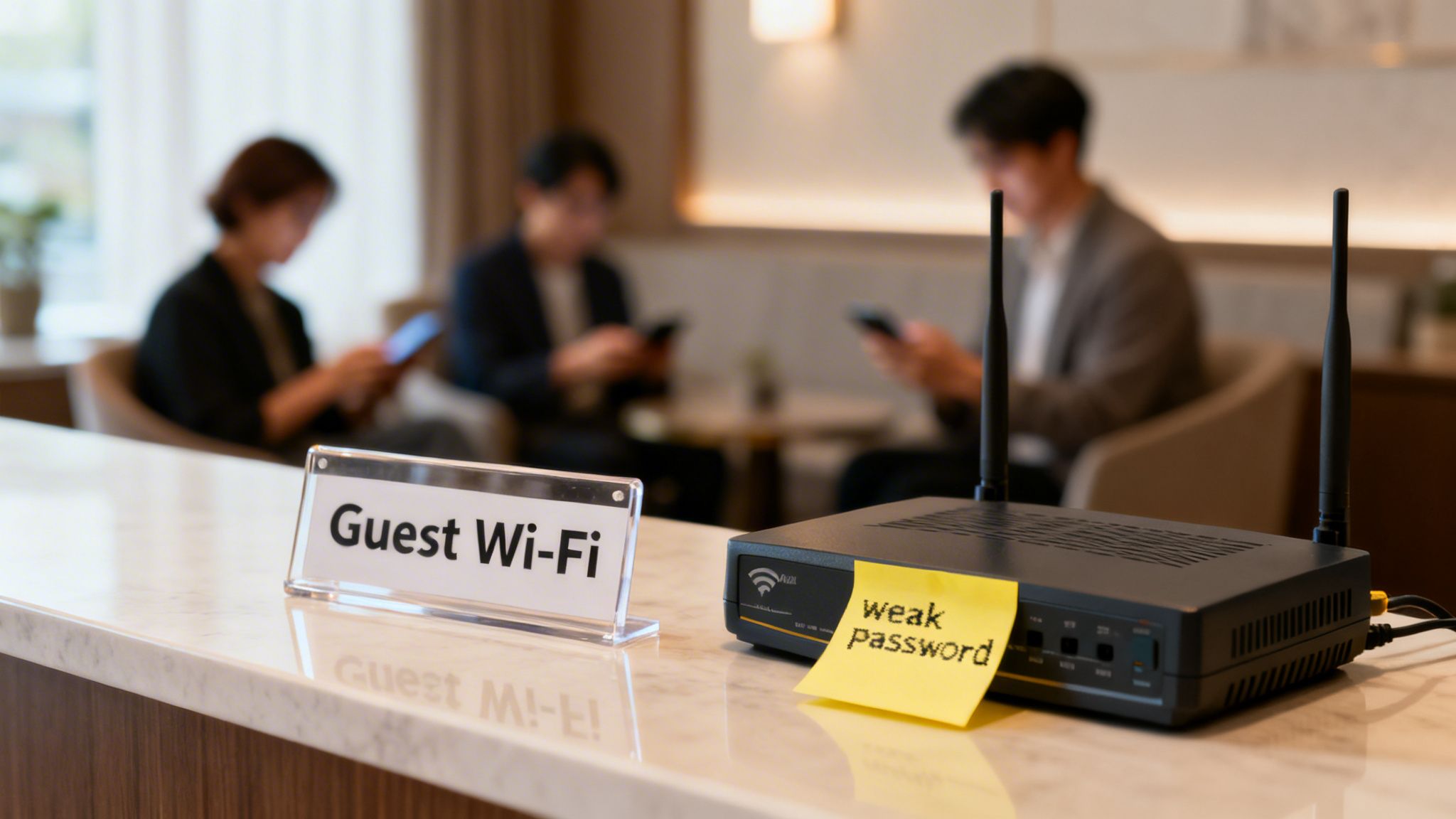
Let's be direct: the old model of a simple guest network with a shared password that never changes is fundamentally broken. For any enterprise—especially in hospitality, retail, or multi-tenant properties—this isn't just a minor risk. It’s a wide-open invitation for attackers.
The truth is, traditional Wi-Fi security methods just can't keep up with the complexity of today's network environments. The vulnerabilities often start with the most basic things. Many businesses still rely on the default settings that come with their routers, which are often publicly known and easily exploited.
This isn't just a theoretical problem. A 2025 survey revealed that an alarming 47% of UK internet users had never changed their router’s default settings, leaving them completely exposed. This lax approach also extends to how access is managed. That password written on a whiteboard or printed on a receipt quickly becomes public knowledge, and once it's out, you lose all visibility and control over who is connecting to your network.
The Problem with BYOD and Unmanaged IoT
This challenge gets even bigger when you factor in two major trends: Bring Your Own Device (BYOD) policies and the explosion of unmanaged Internet of Things (IoT) devices. Every personal smartphone, tablet, and smart TV connecting to your network represents another potential entry point for threats.
These devices rarely have enterprise-grade security controls, making them prime targets. A single compromised employee phone connecting to the staff network could give an attacker a direct path to sensitive company data. Likewise, unsecured IoT devices like smart thermostats or security cameras can be hijacked and used to launch attacks from inside your own network perimeter.
The core issue with traditional Wi-Fi is its reliance on a single point of failure—the shared password. If that key is compromised, the entire network is exposed. There is no individual accountability, no way to trace activity, and no method to revoke access for a single user without disrupting everyone.
The old ways of securing Wi-Fi clearly aren't working anymore. To highlight the gap, let's look at how modern threats stack up against outdated defences.
Modern Wi-Fi Threats vs Traditional Defences
As this table shows, the old playbook is dangerously obsolete. This is why so many organisations now implement Zero Trust security , a modern framework built on the critical principle of "never trust, always verify."
The Real-World Business Consequences
These risks aren't just technical; they translate into tangible business harm. A breach that starts on an insecure Wi-Fi network can lead to devastating financial losses from data theft, regulatory fines, and the staggering cost of remediation.
Beyond the immediate financial hit, the reputational damage can be even more severe. For a hotel, retailer, or residential building, a publicised data breach can completely erode customer trust and loyalty, impacting revenue for years to come. Ultimately, failing to invest in modern Wi-Fi security isn't just a technical oversight—it's a gamble most businesses simply cannot afford to take.
Building Your Secure Wi-Fi Foundation
If you're still using a single, shared password for your main Wi-Fi network, it's time for a fundamental change. Moving beyond that outdated model is the first real step in securing your Wi-Fi infrastructure. To build a genuinely robust security posture, you need a foundation based on modern, identity-driven protocols. This means leaving the vulnerabilities of shared keys behind and embracing a system where every single connection is authenticated and trusted.
The cornerstone of this modern approach is WPA3-Enterprise. While the name sounds similar to its home-use cousin (WPA3-Personal), the "Enterprise" version operates on a completely different security level. Instead of one password for everyone, it leverages the 802.1X protocol to check the identity of each user and device individually against a central directory.
This is a complete shift in how you should think about network access. It's no longer about what you know (a password) but who you are (a proven identity). This method ensures only authorised people and company-managed devices can get on the network, effectively shutting the door on anyone trying to get in with a stolen or shared password.
Understanding 802.1X and EAP
At the heart of WPA3-Enterprise is the 802.1X standard, which acts as a gatekeeper for your network. It works hand-in-hand with the Extensible Authentication Protocol (EAP), which is the specific "language" used to verify credentials. Think of 802.1X as the security guard at the door and EAP as the ID card they check.
There are several "flavours" of EAP, each with its own way of verifying an identity. Choosing the right one is a critical balancing act between security and user experience.
- EAP-TLS (Transport Layer Security): This is widely seen as the gold standard for Wi-Fi security. It uses digital certificates on both the server and the client device to authenticate each other. This completely gets rid of passwords, making it incredibly resistant to phishing and man-in-the-middle attacks.
- EAP-TTLS (Tunneled Transport Layer Security): This method creates a secure, encrypted tunnel first and then authenticates the user inside it, often with a standard username and password. It's a strong option that's a bit easier to roll out than EAP-TLS if you're not quite ready for a full certificate-based setup.
- PEAP (Protected Extensible Authentication Protocol): Similar to EAP-TTLS, PEAP creates an encrypted tunnel before checking the user's credentials. It was developed by Microsoft and is very common in Windows-heavy environments.
For most enterprise setups, EAP-TLS is the ultimate goal. It delivers the strongest security by removing the weakest link in the chain—the password—entirely. Solutions like Purple make this much simpler by integrating with cloud directories to automate certificate deployment, putting this top-tier security within reach without the usual complexity. You can learn more by reviewing our comprehensive overview of Purple's data and security framework .
The Critical Role of Network Segmentation
Once you have strong authentication locked down, the next foundational pillar is network segmentation. Put simply, not all traffic is created equal, and it shouldn't all be mixing on the same flat network. Segmentation uses Virtual LANs (VLANs) to create isolated, virtual pathways for different types of traffic.
Imagine your network as a building. Without VLANs, everyone—staff, guests, and all your IoT devices—is wandering around the same open-plan office. A single compromised device has free rein to snoop on everything.
With VLANs, you create separate, locked rooms. Staff are in one room with access to sensitive company resources. Guests are in another with internet access only. Your IoT devices, like security cameras and smart thermostats, are in a third, completely walled off from everything else. A breach in one room doesn't compromise the others.
Proper segmentation isn't just a nice-to-have; it's non-negotiable for securing enterprise Wi-Fi. It drastically shrinks your attack surface and contains the damage if a device ever gets compromised.
Putting It Into Practice with Meraki and Aruba
Theory is one thing, but making it happen is what counts. Thankfully, modern network hardware from vendors like Meraki and Aruba makes implementing these concepts pretty straightforward.
- Configuring on a Meraki Dashboard: To get WPA3-Enterprise running, you'd navigate to the SSID settings, select "Enterprise with my RADIUS server," and plug in your RADIUS server details. You would then create separate SSIDs for Staff, Guest, and IoT traffic, assigning each to a distinct VLAN ID (e.g., VLAN 10 for Staff, VLAN 20 for Guests).
- Setting up on an Aruba Controller: The process is very similar. In the Aruba interface, you’d define a new WLAN, choose WPA3-Enterprise with 802.1X authentication, and link it to your authentication server profile. From there, you assign the WLAN to a specific VLAN, making sure traffic is properly segregated from the moment a device connects.
By combining strong, identity-based authentication like WPA3-Enterprise with rigorous network segmentation using VLANs, you build a resilient foundation. This layered defence ensures that even if one security control fails, others are standing by to protect your critical assets.
Moving to Passwordless and Certificate-Based Access
Once you've locked down your authentication and segmented your network, the next big leap is getting rid of the weakest link in the chain: the password. This is where modern security really starts to shine, shifting from something users have to remember to something their devices simply are—trusted and verified. It’s a move that ends password management headaches for IT and kills phishing risks for users, creating a far more secure and effortless experience.
The demand for these kinds of robust solutions is exploding. The UK wireless network security market hit USD 1,436.9 million in 2023 and is on track to nearly double by 2030. This isn't just a trend; it's a clear signal that enterprises in hospitality, retail, and healthcare are urgently seeking better ways to secure their Wi-Fi.
The Seamless Guest Experience with OpenRoaming
For guest networks—especially in busy public venues like hotels, airports, or shopping centres—the name of the game is secure access without the friction. This is exactly what technologies like OpenRoaming and Passpoint (which you might remember as Hotspot 2.0) were built for. They create a "connect once, and you're always connected" experience.
Here’s the magic behind it: a guest authenticates just one time using a trusted identity, like their mobile carrier or even a simple email verification through a platform like Purple. From then on, their device automatically and securely connects to the Wi-Fi anytime they're near any OpenRoaming-enabled venue, spanning thousands of locations worldwide.
This unlocks two massive benefits:
- Airtight Security: The connection is encrypted from the very first packet, shielding users from common threats like "Evil Twin" attacks where a hacker spoofs a legitimate guest Wi-Fi network.
- Frictionless Access: Visitors don't have to hunt for the network, type in a password, or wrestle with a clunky captive portal every single time they visit. Their device just connects. It’s a vastly superior user experience.
Certificate-Based Authentication for Staff
For your employees, the gold standard is certificate-based authentication. This method ties network access directly to a device's digital identity, which is managed by your central cloud directory—think Entra ID, Google Workspace, or Okta. Instead of a username and password, each corporate device gets a unique digital certificate that acts as its unforgeable ID card.
When an employee tries to connect, the network simply checks their device's certificate against the directory. If it’s valid, they're in. If not, the connection is flat-out denied. This approach is a cornerstone of a zero-trust architecture.
The most powerful part of certificate-based access is the ability to instantly revoke it. The moment an employee leaves and their account is disabled in Entra ID, their Wi-Fi certificate is immediately invalidated. Their devices can no longer get onto the network—a major security gap closed with zero manual effort from IT.
Choosing the right security policy really comes down to who or what is connecting. This decision tree shows a practical way to think about applying different policies for guests, staff, and IoT devices.
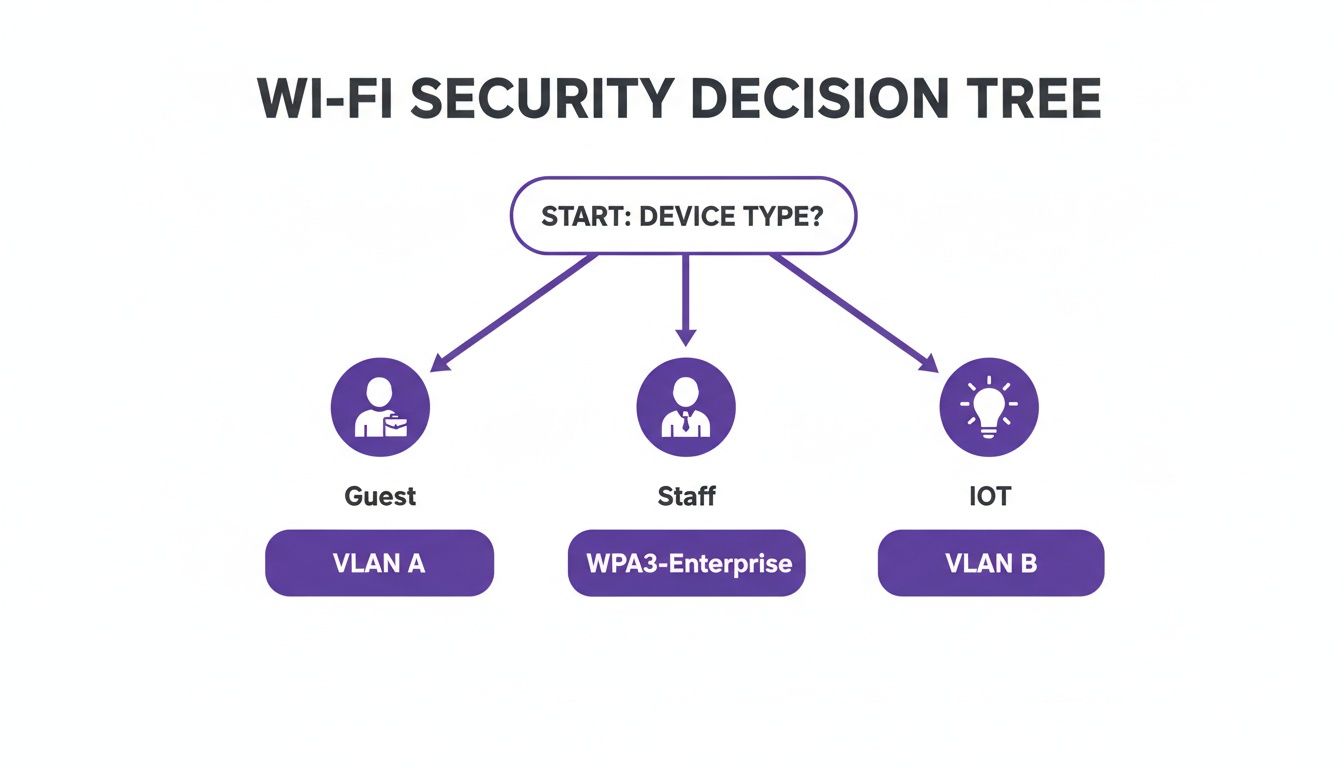
The key takeaway here is that one size doesn't fit all. You need a tailored security policy for each device type to properly balance usability with risk.
Authentication Method Comparison
To help you decide on the right approach for different parts of your network, here’s a quick comparison of the main authentication methods we've discussed. Each has its place, and understanding the trade-offs between security and user experience is crucial.
Ultimately, a multi-layered approach using a combination of these methods provides the most comprehensive security posture for a modern enterprise network.
Tackling Legacy and IoT Devices with iPSK
Let's be realistic: not every device on your network can handle sophisticated 802.1X authentication. Legacy systems, printers, smart TVs, and a whole army of IoT devices often don't have the software for it. This is where Individual Pre-Shared Keys (iPSK)—also known as Private PSK or Multi-PSK—come in as a brilliant, practical solution.
Instead of one shared password for all these miscellaneous devices (a huge security risk), iPSK lets you generate a unique key for each one. This gives you several massive advantages over a standard PSK network:
- Individual Revocation: If a device is compromised or retired, you just revoke its specific key. No other device is affected.
- Device Identification: You know exactly which device is using which key, giving you much-needed visibility and traceability.
- Network Segmentation: Each key can be tied to a specific VLAN and set of access rules. This ensures an IoT camera, for instance, can only talk to its server and nothing else on the network.
To get truly granular control, applying principles like Role Based Access Control (RBAC) is key. iPSK is a great tool for enforcing these principles at the device level, even for equipment that doesn't support user-based login. If you want to go deeper, our guide on iPSK provides a complete overview of identity-based security .
By bringing together these passwordless and certificate-based methods, you can build a Wi-Fi environment that is both highly secure and dead simple for your users to access. A modern platform like Purple can orchestrate all these technologies, simplifying the deployment and making this level of security achievable in weeks, not months.
Integrating Wi-Fi Security with Your Core Infrastructure
Effective security isn't a feature you bolt on at the end; it has to be woven directly into the fabric of your IT ecosystem. For any modern business, securing Wi-Fi means ditching standalone systems and creating a unified security posture. This is about replacing clunky, high-maintenance on-prem RADIUS servers with agile, cloud-native solutions that talk directly to your core identity providers.
The whole point is to make Wi-Fi authentication a natural extension of your central identity management. By connecting directly to directories like Entra ID (what used to be Azure AD), Google Workspace , or Okta , you can completely automate the access lifecycle for your employees. For overworked IT teams, this is a total game-changer.
Connecting to Your Cloud Directory
The old-school way of managing a local RADIUS server is just asking for trouble. It's inefficient and riddled with potential for human error. Every new starter needs a manual setup, and every leaver demands a swift, manual removal to kill their access. One forgotten account is a security breach waiting to happen.
Modern cloud-based platforms completely sidestep this risk. When you integrate with your cloud directory, user provisioning and de-provisioning become a "set it and forget it" process.
- Automated Onboarding: When a new employee is added to Entra ID, their Wi-Fi access can be provisioned automatically. You can even have a security certificate pushed to their company device before they even walk in the door on day one.
- Instant Revocation: The second an employee is marked as inactive in your directory, their Wi-Fi access is cut off. Instantly and automatically. There's no lag, no manual checklist to run through, and zero chance of an account being missed.
This automated revocation is a critical security control. It ensures that when someone leaves, their access is severed from all systems at the same time, slamming shut a common vulnerability that many organisations struggle to manage. It's a huge step towards a genuine zero-trust model.
This deep level of integration turns Wi-Fi security from a reactive, manual chore into a proactive, automated strength. It frees up your IT team for more important work and massively strengthens your overall security. You can get a deeper understanding of the principles behind this in our article on the benefits of 802.1X authentication .
Designing Secure Device Onboarding Workflows
Having a rock-solid security foundation is pointless if your users can't actually get their devices connected safely and easily. A clunky, frustrating onboarding process just leads to a flood of support tickets and encourages people to find insecure workarounds. The key is to design simple, secure workflows that work for both corporate-owned and personal (BYOD) devices.
For company-owned kit, the process should be practically invisible to the user. Using a Mobile Device Management (MDM) platform, IT can push Wi-Fi profiles and certificates straight to laptops and smartphones. The device shows up pre-configured and just connects to the secure corporate network without the user having to do a thing.
For BYOD, the workflow needs to be just as simple but with the right security guardrails in place. A self-service portal is the perfect way to handle this.
Example BYOD Onboarding Workflow
- Initial Connection: The user connects their personal device to a dedicated "Onboarding" SSID. This network is completely isolated and can't access any internal resources; its only job is to get the user to the onboarding portal.
- Authentication: They're redirected to a simple webpage where they sign in with their normal company credentials (e.g., their Microsoft 365 or Google login).
- Profile Installation: Once they're authenticated, the portal walks them through a one-click process to install a configuration profile. This profile contains the certificate and all the settings needed to connect to the secure staff Wi-Fi network (WPA3-Enterprise).
- Secure Connection: The device automatically drops the onboarding network and connects to the proper, encrypted staff network. From then on, all future connections are automatic.
The whole thing takes less than a minute. It guarantees that every personal device connecting to your network is properly authenticated and configured according to IT policy, all without creating a headache for your users or your helpdesk.
Monitoring Your Network and Responding to Threats

Putting strong authentication and network segmentation in place is a brilliant start, but securing your Wi-Fi is anything but a one-time job. It demands constant vigilance. The real shift needs to be from a purely preventative mindset to one of active detection and response. This is crucial for handling the threats that will, inevitably, test your defences.
It's about knowing what to look for and having a solid plan of action when something suspicious crops up.
Attackers are persistent. It’s a simple fact. Government research highlights that cybersecurity breaches hit 43% of UK businesses in the last reporting period. That translates to over 600,000 organisations across retail, hospitality, and healthcare facing attacks that started with a network vulnerability. It shows just how widespread the danger really is. Discover more insights into these UK cybersecurity statistics .
Key Metrics and Alerts to Watch
Effective monitoring begins the moment you configure your network management system to flag strange behaviour. Your IT team should have alerts tuned for several critical wireless security events. These early warnings are your best chance to shut down an attack before it causes any real damage.
Key alerts to set up include:
- Rogue Access Points: Your system must immediately flag any unauthorised AP broadcasting your company’s SSID. This is the classic signature of an "Evil Twin" attack, designed to fool users into connecting to a malicious network.
- Deauthentication Attacks: A sudden spike in devices being forcibly kicked off the network can signal a denial-of-service (DoS) attack. Attackers use this to disrupt business or coerce devices into connecting to their rogue AP.
- Unusual Traffic Patterns: Be alerted to sudden, large data transfers from devices that don’t typically move much data, especially if it's happening out of hours. This could be a clear sign of data exfiltration from a compromised machine.
A well-configured alerting system acts as your digital nervous system. It lets you know the moment something is wrong, allowing you to react with speed and precision rather than discovering a breach weeks or months after the fact.
An Incident Response Plan for Wi-Fi Threats
When an alert goes off, your team needs a clear, pre-defined plan. A chaotic response just pours fuel on the fire. A Wi-Fi-specific incident response checklist is what separates a managed event from a full-blown crisis.
Your checklist should walk the team through these phases:
- Investigate and Verify: The first move is always to confirm the threat. Is that a genuine rogue AP, or just a misconfigured company device? Use your network tools to pinpoint the physical source of the suspicious signal.
- Contain the Threat: Once confirmed, immediate containment is everything. This could mean shutting down the switch port connected to a rogue device or using your management console to block the MAC address of a malicious client. The goal is to isolate the threat and stop it from spreading.
- Eradicate and Recover: After containment, it’s time to get the threat out of your environment. This means physically removing rogue hardware, wiping any compromised devices, and triple-checking that all systems are clean.
- Learn and Harden: This is the most important step. Hold a post-incident review. Analyse exactly how the breach happened and what you can do to strengthen your defences. Was a policy ignored? Is there a gap in your security stack? Use every incident as a lesson to improve your overall security posture.
This structured approach transforms a potential crisis into a manageable event. Better yet, modern analytics platforms, like those integrated with Purple , can turn this raw security data into valuable business intelligence. By analysing connection data, marketing and operations teams can get a real sense of footfall and visitor behaviour, proving that a robust investment in securing Wi-Fi can deliver a powerful, positive return across the entire business.
Your Wi-Fi Security Deployment Checklist
Alright, let's turn theory into practice. All the strategies we've discussed are great, but they're useless without a solid action plan. This checklist is your roadmap, consolidating everything into clear, actionable steps to get your Wi-Fi infrastructure locked down.
Think of this as building a layered defence. It’s not just about flicking a few switches; it's about creating a security posture that protects your organisation from the ground up.
Foundational Security and Access Control
First things first, you need a rock-solid baseline. This means locking down your core protocols and getting a tight grip on who can access what, and how.
- Enforce WPA3-Enterprise: This is non-negotiable for your staff network. It’s the gold standard for encryption and, more importantly, it enables the identity-based authentication you need to move beyond risky shared passwords. Make it your default.
- Implement 802.1X Authentication: It’s time to ditch pre-shared keys for good. Use 802.1X to force every single user and device to prove who they are against a trusted directory before they get anywhere near your network.
- Integrate with Your Cloud Directory: Tie your Wi-Fi authentication directly into your main identity provider, whether that’s Entra ID or Google Workspace . Doing this automates user provisioning and, crucially, means access is cut off the instant an employee leaves the company.
Network Segmentation and Onboarding
With a strong foundation in place, the next job is to slice up your network traffic and build a safe, simple way for new devices to get connected. This is all about containing potential threats while making life easier for your users and your IT team.
A well-structured deployment checklist is your best defence against configuration drift and human error. It ensures consistency and completeness, turning your security policy into a practical reality that protects your business day in and day out.
- Create Separate VLANs: Don't cut corners here. Segmenting your network with distinct VLANs for staff, guests, and IoT devices is critical. It stops attackers from moving laterally across your network and keeps a potential breach in one area from becoming a catastrophe.
- Deploy a Secure Onboarding SSID: Set up a dedicated, self-service workflow for BYOD devices. This lets users securely configure their personal phones and laptops for WPA3-Enterprise access themselves, saving your helpdesk from being buried under a mountain of support tickets.
Frequently Asked Questions About Securing Wi-Fi
When you're overhauling network security, certain questions pop up time and time again. Let's tackle some of the most common hurdles IT professionals face when securing their enterprise Wi-Fi.
WPA3-Personal vs. WPA3-Enterprise
The real difference here comes down to the authentication method, and it's a crucial one.
WPA3-Personal is basically the consumer-grade version. It uses a single password, or Pre-Shared Key (PSK), for every single person and device connecting to the network. While the encryption is a step up from WPA2, it’s still fundamentally flawed for business use because it relies on a shared secret.
WPA3-Enterprise, on the other hand, is built for business. It leverages the 802.1X protocol, forcing every user and device to authenticate individually against a central directory like Entra ID. This means every connection has its own unique credentials, giving you granular control and a clear audit trail of who is on your network and when—something you simply can't do with a shared password.
Why Passwordless Is More Secure
Let's be honest: traditional passwords are the weakest link in the security chain. They get phished, stolen, written on sticky notes, and cracked. Even with the strictest password policies imaginable, you're still betting on perfect human behaviour, which is always a losing game.
Passwordless authentication, particularly EAP-TLS with digital certificates, completely sidesteps this human risk. Access isn't granted by something you know (a password), but by something you have—a cryptographically secure certificate installed on a trusted device. This approach is virtually immune to phishing and credential theft, offering a far higher level of security assurance.
Securing Legacy IoT Devices
This is a problem everyone has. You've got older security cameras, HVAC sensors, or other IoT gadgets that just don't support modern security protocols like 802.1X. Tossing them onto a shared password network is an open invitation for trouble.
The best way to wrangle these legacy devices involves a two-pronged attack:
- Use Individual Pre-Shared Keys (iPSK): Instead of one password for all your IoT junk, you assign a unique, long, and complex password to each individual device. This way, if one device is compromised, you can instantly revoke its access without disrupting everything else.
- Strict Network Segmentation: This is non-negotiable. All IoT devices must live on their own isolated VLAN, completely walled off from your corporate network. From there, you lock down its access so it can only communicate with the specific internet servers it absolutely needs to function, and nothing more.
This strategy effectively contains the risk. Even if an attacker manages to compromise an IoT device, they're trapped in a digital cage with nowhere to go. They can't move laterally into the parts of your network that actually matter.
Ready to eliminate passwords and automate your Wi-Fi security? Purple integrates seamlessly with your existing infrastructure and leading vendors like Meraki and Aruba to deliver zero-trust, certificate-based access in weeks, not months. Learn more at https://www.purple.ai