Warehouse WiFi capacity and RF architecture planner
Calculate access point counts, narrow-beam antenna geometry, floor RSSI thresholds, and fast-roaming parameters across high-bay racking.
10 to 14 metre pallet racking with mixed dry goods and steel framing.
Enforces strict -65 dBm floor signal and <35 ms fast roaming
Antenna radiation patterns & high-bay mounting geometry
Standard omnidirectional access points mounted at 10 metres or higher create wide RF coverage bubbles that bounce across metal racking. Down-tilt directional patch antennas concentrate RF energy down aisle corridors, reducing co-channel interference and eliminating hidden-node packet collisions.
Positioned at alternate aisle ends pointing downward at 15° to 20°. Keeps signal contained strictly within picking aisles to eliminate cross-aisle signal bleeding.
Avoid mounting APs flush to metal roof decking. Drop APs below HVAC ducts, overhead lighting, and structural steel trusses using rigid conduit or uni-strut drops.
Warehouses near airports or weather radar must avoid dynamic frequency selection (DFS) channel hops. Reserve non-DFS 5 GHz or 6 GHz channels to keep pickers online 24/7.
Need an on-site predictive RF heat map and site survey?
Purple network engineers validate RF attenuation, 3D rack reflections, and client roaming behaviour across UK and European distribution hubs.
When it comes to warehouse WiFi, you can't just take what works in an office and expect it to hold up. The sheer scale, endless metal racking, and constant radio frequency chaos mean that a standard solution is doomed from the start. Getting it right hinges on a professional radio frequency (RF) site survey, smart access point placement, and ironclad security that can support everything from handheld scanners to autonomous robots.
This isn't just about getting a signal; it's about building a high-performance wireless backbone for your entire logistics operation.
Why Standard WiFi Fails in the Modern Warehouse
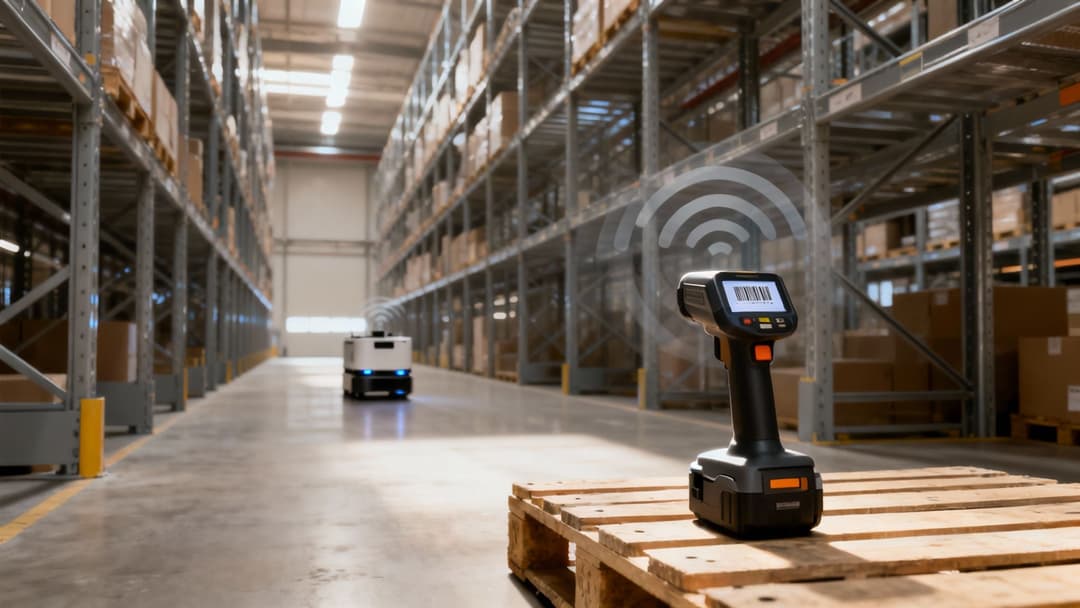
Trying to cover a warehouse with an office WiFi setup is a bit like trying to light a football stadium with a desk lamp. It’s simply the wrong tool for the job. An office is a relatively calm, predictable space with plasterboard walls. A warehouse? It's a completely different beast.
This environment is fundamentally hostile to wireless signals. We’re talking about towering steel racks, thick concrete pillars, and constantly moving metal forklifts. These materials don’t just block WiFi; they reflect and scatter the signals in all directions. This creates a messy, unpredictable coverage map full of dead zones that can shift and change as stock levels fluctuate.
The Unique Challenges of a Warehouse Environment
The building itself is just one piece of the puzzle. A warehouse is a noisy, dynamic ecosystem of competing radio frequencies. Just think about all the wireless devices fighting for airtime:
- Handheld Scanners and Terminals: These are the lifeblood of inventory management, needing a rock-solid, constant connection back to the Warehouse Management System (WMS).
- Autonomous Guided Vehicles (AGVs) and Robots: These machines demand ultra-low latency connections to navigate safely and effectively. One dropped signal could bring an entire production line to a grinding halt.
- IoT Sensors: Devices tracking everything from temperature to machinery health are constantly sending small but critical packets of data that can't afford to be lost.
- Voice-over-WiFi Systems: Voice-picking systems are incredibly sensitive to network jitter and packet loss, which can turn clear instructions into an unintelligible mess.
Each of these systems is screaming for bandwidth, creating a congested RF environment that can easily overwhelm a network that isn't built for it. Standard office access points (APs) simply aren't designed to handle this kind of device density or complexity. You can dive deeper into these issues in our guide to industrial WiFi.
The High Cost of Unreliable Connectivity
In an office, a brief WiFi outage is an inconvenience. In a warehouse, it's a full-blown crisis. When the network drops, barcode scanners are useless, pick lists can't be updated, and autonomous robots freeze in their tracks.
An unreliable network directly strangles your operational throughput. Every minute of downtime translates into delayed shipments, frustrated staff, and a very real financial loss. Gartner estimates that network downtime costs businesses an average of £4,500 per minute.
This is precisely why a specialised approach to warehouse WiFi is non-negotiable. It demands meticulous planning, industrial-grade hardware, and a deep understanding of how radio waves behave in these tough environments. The goal isn't just basic connectivity; it's about building a resilient digital foundation that powers every single part of your logistics machine.
Designing Your WiFi Blueprint for Flawless Coverage
Getting warehouse WiFi right isn't a case of scattering a few access points (APs) and hoping for the best. It’s a meticulous, engineering-led process, a lot like an architect drafting a detailed blueprint before the first brick is laid. This digital blueprint is your roadmap to flawless coverage, making sure every scanner, tablet, and sensor has a strong, stable connection.
The entire plan is built on a solid foundation of Radio Frequency (RF) planning. This is the science of mapping out exactly how wireless signals will behave in your specific, complex environment using a mix of software modelling and real-world testing. Honestly, skipping this step is the single biggest reason warehouse WiFi projects fail, leading to frustrating dead zones and eye-watering downtime.
Starting with a Predictive Site Survey
The journey starts with a predictive site survey. This is a critical first step where you use specialised software to build a digital twin of your warehouse's RF characteristics. You’ll begin by uploading detailed floor plans into the planning tool.
This digital model lets network engineers place virtual APs and simulate how the WiFi coverage will look. They can factor in the physical layout, ceiling heights, aisle locations, and even the materials your building is made of. This simulation gives you a powerful baseline for figuring out how many APs you'll likely need and where they should go.
From Digital Plans to Physical Reality
While a predictive survey is a fantastic starting point, it’s still just a simulation. It can't fully account for the dynamic, ever-changing nature of a live warehouse. The "RF weather" inside your building is constantly in flux as shelves get filled, forklifts move stock around, and new machinery is brought online.
This is where a proper on-site physical survey becomes absolutely essential. Engineers will physically walk the floor with specialised gear to measure actual signal strength, hunt down sources of interference, and find those unexpected dead zones the software model might have missed.
A physical survey validates the digital blueprint. It’s the difference between looking at a map and actually walking the terrain - it uncovers the real-world obstacles that can derail your network's performance.
This hands-on process makes sure your final AP placement is optimised for reality, not just for a static floor plan. It confirms that signals can actually penetrate dense pallets of inventory and reach the low-powered handheld scanners your teams depend on.
Mastering AP Placement and Antenna Selection
Once you've got a validated RF map, the focus switches to the hardware itself. The goal is to deliver a strong, clean signal exactly where it’s needed, which usually means using a smart mix of different antenna types.
Choosing the right tool for the job is critical for reliable warehouse WiFi. The two main types of antennas you'll work with are:
- Omnidirectional Antennas: These broadcast a signal in a 360-degree pattern, much like a standard lightbulb lighting up a whole room. They're perfect for large, open spaces like staging and packing zones where you need coverage in all directions.
- Directional Antennas: These act more like a spotlight, focusing the RF signal into a specific, concentrated beam. They are the ideal choice for long, narrow spaces like inventory aisles, channelling the signal right down the corridor to ensure strong connectivity from end to end without wasting it by broadcasting into metal racks.
Mounting height is another piece of the puzzle. Place an AP too high, and you might get a wide but weak signal on the ground. Too low, and it’s easily blocked by forklifts and tall pallets. Getting the height right is a careful balancing act, typically figured out during the survey process, to maximise reach without killing signal quality.
By combining predictive modelling with physical validation and strategic hardware choices, you create a robust network blueprint built for the unique challenges of your warehouse. To get a rough idea of your hardware needs, you can use this handy access point calculator as a starting point.
Planning for Every Device, from Scanners to Robots
Nailing flawless WiFi coverage across your warehouse is a huge win, but it’s only half the battle.
Think of it like building a brand-new motorway. Having wide, clear lanes (coverage) is fantastic, but if you don't manage the flow of traffic (capacity), you'll end up with total gridlock during rush hour. Your warehouse network has to be built to handle the diverse and demanding traffic from every single device - from the simplest barcode scanner to the most complex autonomous robot.
This whole process is what we call device profiling and capacity planning. It's all about preventing the digital traffic jams that can bring your entire operation to a screeching halt. You need to get under the hood, understand the unique needs of every device, and design a network that can serve them all at the same time, without compromise.
Getting to Know Your Device Ecosystem
Let's be clear: not all devices are created equal. A simple handheld scanner sending tiny packets of data has completely different needs than a high-definition security camera streaming video, or an AGV that needs a rock-solid, near-instantaneous connection to navigate safely. The very first step is to create a complete inventory of every wireless device that will live on your network.
This workflow breaks down the core stages of planning and deploying a warehouse WiFi network that actually works.
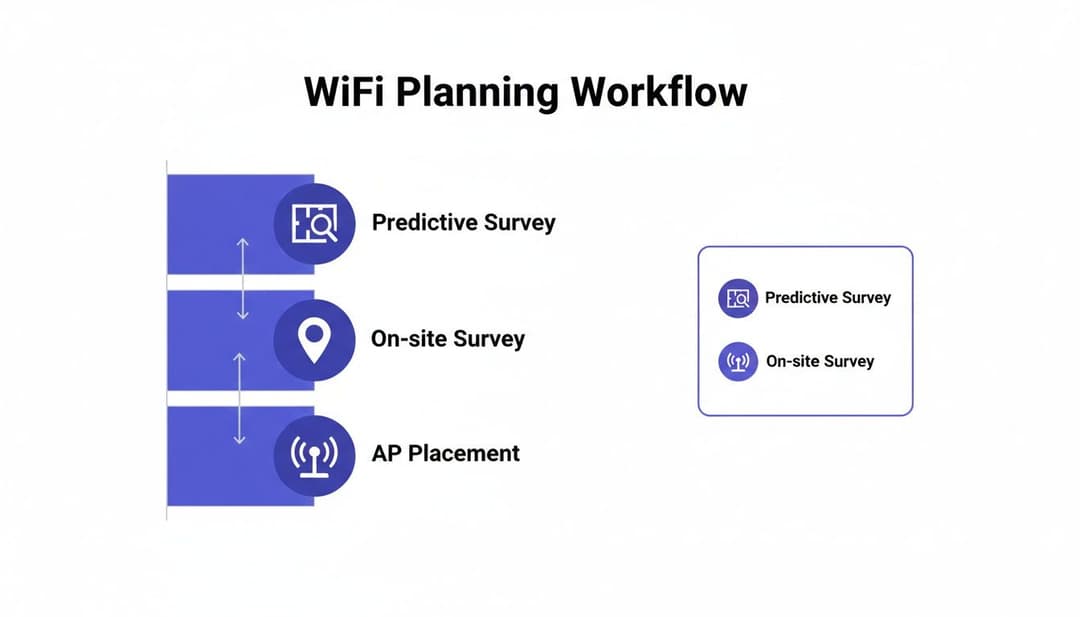
As you can see, a successful deployment isn't guesswork. It's a structured process that moves from digital simulation to physical, on-the-ground validation before you even think about finalising where your access points will go.
As you map out your WiFi blueprint, it’s vital to account for the huge variety of devices your teams rely on, including those for centralising driver and dispatch communication for logistics teams, which absolutely demand uninterrupted connectivity to function.
For each type of device, you need to document its specific network demands:
- Bandwidth Needs: How much data does it actually use? A voice-picking headset sips data, while a robotic arm with a machine vision camera guzzles it.
- Latency Sensitivity: How critical is a real-time connection? AGVs and voice systems are incredibly sensitive to delays (latency), whereas a temperature sensor that reports in every five minutes couldn't care less.
- Mobility and Roaming: Does the device move around? Forklift tablets and scanners must roam seamlessly between access points without dropping their connection. A dropped connection mid-pick is a productivity killer.
This profile helps you build a crystal-clear picture of the load your network will be under from minute to minute.
To illustrate, here's a look at some common warehouse devices and what they typically require from the network.
Warehouse Device Profile and Network Requirements
This table isn't just a list; it's a blueprint for building a network that anticipates the needs of your operation instead of just reacting to problems.
Smart Strategies for Managing Network Capacity
Once you have a handle on your device landscape, you can start using smart strategies to manage the load and prevent any single part of the network from getting overwhelmed. This is about working smarter, not just throwing more hardware at the problem.
A well-designed network doesn't just provide a signal; it intelligently manages resources. By anticipating device needs and controlling how they connect, you ensure smooth, predictable performance even during the most frantic operational peaks.
Here are a few key strategies that make a massive difference:
Smart Channel Planning: WiFi operates on a limited number of channels. Bad planning leads to "co-channel interference," where nearby access points try to talk over each other - it’s like too many people shouting in a small room. A proper channel plan ensures APs are spaced out across non-overlapping channels, which dramatically reduces interference and boosts overall performance.
Load Balancing: This is an intelligent traffic management system for your network. It allows the APs to automatically shift devices from an overloaded access point to a nearby one with more available capacity. This prevents any single AP from becoming a bottleneck and ensures a more stable experience for every user and device. You can learn more about using WiFi for location-based insights in our guide on Real-Time Location Systems.
Band Steering: Most modern devices can operate on both the 2.4 GHz and 5 GHz frequency bands. The 5 GHz band is like a multi-lane, high-speed motorway - it offers more channels and faster speeds, making it perfect for your high-performance devices. Band steering cleverly encourages capable devices to connect to 5 GHz, leaving the more congested 2.4 GHz band free for older, legacy scanners that might not support it.
By proactively mapping out device requirements and using these intelligent management techniques, you build a resilient network. You create a system that can handle the intense, non-stop demands of a modern warehouse, ensuring your operations run like clockwork from the first pick of the day to the last shipment out the door.
Securing Your Network with a Zero-Trust Approach

In a high-stakes warehouse, a network breach isn't just an IT headache. It’s an operational catastrophe that can halt picking, packing, and shipping in an instant. The old way of thinking about security - building a strong wall around your network like a castle and moat - is dangerously outdated. Once a threat gets inside, it has free rein.
This is exactly why modern warehouse WiFi demands a zero-trust approach. This security model works on a simple but powerful principle: never trust, always verify. It assumes no user or device is automatically trustworthy, whether they're inside or outside your network. Access is only granted after strict verification, every single time.
Why Zero-Trust Is Essential for Warehouses
A zero-trust framework is perfectly suited to the dynamic, slightly chaotic nature of a warehouse. You have a constant flow of different people and devices, each with vastly different needs and security profiles.
Just think about who’s on your network at any given moment:
- Full-Time Employees: Staff using scanners, tablets, and voice-picking headsets need rock-solid access to the Warehouse Management System (WMS).
- Temporary Contractors: A third-party maintenance crew or seasonal workers might need limited, time-bound access to very specific systems.
- IoT Devices: Headless devices like environmental sensors, security cameras, and automated machinery need a secure connection but have no human user to type in a password.
- Guest Visitors: Suppliers or clients might need basic internet, but they must be kept completely separate from your core operational network.
Using a single, shared password for everyone is a recipe for disaster. It gives you no visibility, no control, and punches a massive hole in your security. Zero-trust eliminates this risk by treating every connection request with a healthy dose of suspicion.
Building Secure Zones with Network Segmentation
A core pillar of zero-trust is network segmentation. Instead of one large, flat network where every device can see every other device, you carve it up into separate, isolated zones called Virtual Local Area Networks (VLANs).
Think of your network like a secure building with multiple rooms, each needing a specific keycard. The barcode scanners can only enter the "Inventory Data" room. The security cameras are restricted to the "Surveillance Feed" room. Guest devices are kept in the "Lobby" and have no keys to any other area.
By segmenting the network, you contain potential threats. If a contractor's laptop is compromised, the malware can't spread to your critical WMS because it's locked out of that network segment. This containment strategy is fundamental to resilient warehouse WiFi security.
This isolation is critical. It ensures a vulnerability on a low-priority device, like a visitor's phone, can't be used as a stepping stone to attack high-value assets like your inventory servers or autonomous robots.
The Power of Identity-Based Access Control
The next step is to ditch insecure shared passwords and move to identity-based access. Every user and every device gets a unique digital identity and credential, which dictates exactly what they can and can’t do on the network.
This is where integrating with a central identity directory becomes a game-changer. By connecting your WiFi system to a service like Microsoft Entra ID (formerly Azure AD) or Google Workspace, you can automate the entire access control process.
Here’s how it works:
- Automated Onboarding: A new employee starts and is added to Entra ID. They are instantly and automatically given the correct WiFi access for their role. No manual setup needed from IT.
- Instant Revocation: The moment an employee leaves and their account is deactivated in Entra ID, their WiFi access is instantly and automatically revoked. This closes a huge, commonly overlooked security gap, making sure former staff can't connect.
This automation not only tightens security but also massively reduces the admin burden on your IT team. With projections showing 85% automation in UK warehouses by 2030, a robust and secure WiFi infrastructure is simply non-negotiable.
To properly support this model, you need to combine a zero-trust architecture with strong, identity-driven access controls. It's also vital to implement broader network security best practices to build a network that is both highly secure and operationally efficient.
Simplifying Access with Passwordless Authentication
Once you've built a secure, segmented network, the next job is to completely rethink how people and devices actually connect to it. For years, we've relied on shared passwords or clunky captive portals, but in a hectic warehouse, these methods are a recipe for frustration and a massive security risk. Think about the chaos of updating a shared password on hundreds of handheld scanners, or the time wasted while a delivery driver struggles with a login page.
This is where a modern, passwordless approach changes the game entirely. It’s all about creating a connection experience that’s ridiculously simple for the user but far more secure for the business. Instead of relying on something you know (like a password that can be stolen or shared), this model is built on something you have - a trusted device or a verified identity.
This shift doesn't just bulletproof your network; it frees up your IT team from the never-ending stream of password-related support calls. It’s about making secure access the easiest, most invisible part of the day for everyone walking through your doors.
Moving Beyond Outdated Connection Methods
Warehouse WiFi has long been stuck with two main ways of getting online, and frankly, neither is fit for purpose in a dynamic, high-stakes environment.
Shared Passwords (PSK): A single password spread across hundreds of devices is a security nightmare waiting to happen. When an employee leaves, the only way to revoke their access is to change the password on every single device. It's a logistical impossibility that almost never gets done, leaving gaping security holes open for months.
Captive Portals: We've all seen them - those web pages that pop up demanding a login. They’re a constant source of annoyance for staff and create a terrible first impression for visitors. They break up workflows, need manual logins, and are often just a box-ticking exercise that provides a poor, inconsistent user experience.
These old methods force you to choose between security and usability. A passwordless system gets rid of that compromise completely, delivering a far better experience on both fronts.
The Seamless Experience of Passwordless WiFi
Imagine this: a new hire starts their first shift. Instead of being given a crumpled piece of paper with a WiFi key, their company-issued scanner just connects, automatically and securely, the second they switch it on. Or a visiting contractor, who just needs to verify their email on their phone once to get temporary, firewalled internet access for the day.
This is the reality of passwordless authentication, made possible by technologies like:
OpenRoaming and Passpoint: These are brilliant industry standards that let devices connect to trusted WiFi networks securely and automatically, with zero user input. Once a device has a profile - like a corporate credential or even just a verified email address - it can securely and seamlessly hop onto any participating network.
Identity-Based Certificates: For company-owned devices, you can install a digital certificate that acts like a unique, unforgeable ID badge. The network checks this certificate to grant access, completely eliminating the need for any usernames or passwords.
By moving away from shared secrets and towards verified identities, you create an access system that is inherently more secure and totally invisible to the end-user. Connectivity just becomes a utility that works in the background, letting your staff get on with their jobs without interruption.
Integrating with Your Existing Identity Systems
The real magic happens when you connect this system directly to your organisation’s central identity provider, like Google Workspace or Microsoft Entra ID. This link automates the entire user access lifecycle, from the moment someone is hired to the moment they leave.
For logistics and retail operations, where staff turnover can be high, this automation is a game-changer. For instance, in logistics environments with a hospitality element, Purple’s integration with Google Workspace means a staff member's WiFi access is revoked the instant their Google account is disabled. This completely removes the chaos and security risk of trying to manage shared passwords. To get a broader view on digital trends, you can find more insights about digital adoption in the UK on datareportal.com.
This deep integration makes sure your network access rules are always perfectly in sync with your HR and IT systems. It’s a core piece of a zero-trust security model, giving you precise control while slashing the administrative workload for your IT team.
Turning WiFi Data into Actionable Business Insights

A well-designed wifi for warehouses system does far more than just keep your devices online. Think of it as a powerful source of operational intelligence just waiting to be tapped. Every single device that connects - whether it’s a staff handheld scanner or a contractor's phone - leaves a digital footprint. Modern WiFi analytics platforms can gather this anonymous data and translate it, turning your entire network into a sensor that shows you how your physical space is really being used.
This is your chance to move beyond guesswork and start making decisions backed by hard data. By analysing foot traffic, device usage, and movement patterns, you can uncover hidden bottlenecks and opportunities for optimisation that were completely invisible before.
From Connectivity Data to Operational Intelligence
The insights you can pull from WiFi analytics directly impact your warehouse’s productivity and layout. The system can generate detailed heatmaps, showing you precisely which areas are busiest and at what specific times of the day.
This kind of information is gold for optimising workflows. For example, you might discover that a certain picking aisle becomes a major bottleneck every morning between 9 am and 11 am. Armed with this knowledge, you could reorganise stock, tweak staff rotas, or even reroute forklift traffic to ease the gridlock and speed up fulfilment.
Your network is already collecting this data. The key is using a platform that can translate raw connection logs into clear, actionable visualisations about how your teams, assets, and visitors move and interact within your facility.
This level of detail shifts your decision-making from reactive to proactive, helping you get ahead of problems before they ever hit your bottom line.
Real-World Applications of WiFi Analytics
The practical uses for this data are massive, driving real, tangible improvements right across your operation.
- Optimising Asset Tracking: By tracking the location of WiFi-enabled assets like forklifts or high-value equipment, you can analyse their travel paths to find more efficient routes and cut down on fuel or battery use.
- Improving Labour Allocation: Pinpoint peak times at your loading and receiving bays to make sure you have the right number of staff on hand, slashing vehicle waiting times and boosting throughput.
- Enhancing Layout and Safety: Analyse foot traffic to place shared resources like charging stations or tool cribs in the most convenient, high-traffic locations. This simple change can dramatically reduce wasted travel time for your team.
The e-commerce boom means warehouses have to chase near-perfect fulfilment, with some predicting 85% automation by 2030 just to keep up. While 41% of warehouses see 5G as a priority, platforms like Purple bridge the gap today. They use your existing WiFi infrastructure to give you the data needed for smarter, more automated operations right now. You can find out more about the UK warehouse automation market on imarcgroup.com.
Warehouse WiFi: Your Questions Answered
When you're knee-deep in planning a warehouse WiFi overhaul, a lot of practical questions pop up. Let's get straight to the point and tackle some of the most common ones we hear from IT and operations leaders.
How Can We Connect All Our Old Legacy Devices?
This is a big one. Many warehouses are full of older barcode scanners and terminals that still work perfectly fine but might only speak the language of outdated security protocols or the crowded 2.4 GHz band. Tossing hundreds of functional devices is a tough pill to swallow.
The good news is, you don't have to. A modern network system can bring them into the fold securely.
The trick is smart network segmentation. You create a separate, isolated network - a VLAN - just for these legacy devices. Using a feature like an Identity Pre-Shared Key (iPSK), you can wrap a specific set of security rules around them. This effectively firewalls them off from your main operational network, letting them do their job without poking holes in your core security.
It’s a clever way to integrate older kit into a modern, zero-trust security model without having to spend a fortune on new hardware right away.
What Should We Actually Look for in a WiFi Vendor?
Picking the right hardware vendor is a decision that will stick with you for years. While the big names like Meraki, Aruba, and Ruckus are all fantastic choices, the decision goes way beyond the access points themselves.
You need to look at the entire hardware ecosystem. Does it offer:
- Centralised Cloud Management: A single pane of glass to see and manage everything is non-negotiable. It makes administration and troubleshooting infinitely easier.
- Robust Analytics: You need the ability to see what's happening on your network. Data on device performance, roaming patterns, and overall network health is gold.
- Third-Party Integration: Make sure the vendor's platform plays nicely with your other systems, especially your security and identity management tools.
Focus on the total management experience. The raw performance of the hardware is important, but how you manage it day-to-day is what really matters.
Is 5G a Good Backup for Our Warehouse WiFi?
Absolutely. While a rock-solid WiFi network should always be your primary plan, using 5G as a backup is a brilliant move for guaranteeing 100% uptime on your most critical systems.
Think about your Warehouse Management System (WMS) server or the controllers for your key robotics. If the main internet connection hiccups, an automatic failover to a private 5G connection can be the difference between a minor blip and a catastrophic shutdown. It's an essential layer of redundancy that keeps the heart of your operation beating, no matter what.
Ready to modernise your warehouse network with secure, passwordless access? Purple provides an identity-based networking platform that integrates seamlessly with leading hardware and your existing directory services to deliver a superior, automated experience for staff, guests, and IoT devices. Learn how Purple can transform your warehouse connectivity.