

विश्वविद्यालय परिसर WiFi: eduroam, आवासीय हॉल्स, और बड़े पैमाने पर BYOD
यह संदर्भ आर्किटेक्चर विश्वविद्यालय परिसर WiFi के लिए उन्नत परिनियोजन रणनीतियाँ प्रदान करता है, जिसमें eduroam फेडरेशन यांत्रिकी, आवासीय हॉल्स में प्रति-कमरा VLAN माइक्रो-सेगमेंटेशन, और बड़े पैमाने पर स्वचालित BYOD प्रमाणपत्र ऑनबोर्डिंग शामिल है। यह IT लीडर्स और नेटवर्क आर्किटेक्ट्स को विक्रेता-तटस्थ, तुरंत कार्रवाई योग्य मार्गदर्शन प्रदान करता है ताकि सुरक्षा बढ़ाई जा सके, हेल्पडेस्क के ओवरहेड को कम किया जा सके और अकादमिक व आवासीय वातावरण में एक सहज कनेक्टिविटी अनुभव प्रदान किया जा सके।
🎧 Listen to this Guide
View Transcript
कार्यकारी सारांश
आधुनिक विश्वविद्यालयों के लिए, परिसर WiFi नेटवर्क अब केवल एक सुविधा मात्र नहीं है — यह एक महत्वपूर्ण बुनियादी ढाँचा है जो अकादमिक वितरण, छात्र जीवन और परिचालन दक्षता को आधार प्रदान करता है। जैसे-जैसे उच्च शिक्षा संस्थान बढ़ते हैं, IT टीमों को जटिल नेटवर्किंग चुनौतियों के एक त्रय का सामना करना पड़ता है: eduroam के सहज, सुरक्षित फेडरेशन का प्रबंधन करना, आवासीय हॉल्स में उच्च-घनत्व वाले माइक्रो-सेगमेंटेड वातावरण को इंजीनियर करना, और हजारों समवर्ती उपयोगकर्ताओं के लिए ब्रिंग योर ओन डिवाइस (BYOD) ऑनबोर्डिंग को स्वचालित करना।
यह संदर्भ मार्गदर्शिका वरिष्ठ IT लीडर्स, नेटवर्क आर्किटेक्ट्स और वेन्यू ऑपरेशंस डायरेक्टर्स को परिसर कनेक्टिविटी के लिए एक व्यावहारिक, विक्रेता-तटस्थ खाका प्रदान करती है। हम eduroam को शक्ति प्रदान करने वाले पदानुक्रमित RADIUS प्रॉक्सी मॉडल की जांच करते हैं, छात्र उपकरणों को सुरक्षित करने के लिए प्रति-कमरा VLANs के कार्यान्वयन का विवरण देते हैं, और एक मजबूत डिवाइस पंजीकरण जीवनचक्र की रूपरेखा तैयार करते हैं। इन वास्तुशिल्प मानकों को अपनाकर, संस्थान हेल्पडेस्क के ओवरहेड को काफी कम कर सकते हैं, डेटा सुरक्षा नियमों का अनुपालन सुनिश्चित कर सकते हैं, और अकादमिक व आवासीय स्थानों पर एक सहज डिजिटल अनुभव प्रदान कर सकते हैं। यहां खोजे गए सिद्धांत हॉस्पिटैलिटी और हेल्थकेयर वातावरण में समान रूप से हस्तांतरणीय हैं जहाँ उच्च-घनत्व, बहु-किरायेदार कनेक्टिविटी एक दैनिक परिचालन चुनौती है।
तकनीकी गहन-विश्लेषण
eduroam फेडरेशन आर्किटेक्चर
eduroam (एजुकेशन रोमिंग) अंतरराष्ट्रीय अनुसंधान और शिक्षा समुदाय के लिए विकसित एक सुरक्षित, विश्वव्यापी रोमिंग एक्सेस सेवा है। यह भाग लेने वाले संस्थानों के छात्रों, शोधकर्ताओं और कर्मचारियों को परिसर में और अन्य भाग लेने वाले संस्थानों का दौरा करते समय इंटरनेट कनेक्टिविटी प्राप्त करने की अनुमति देता है, बस अपना लैपटॉप खोलकर या अपने मोबाइल डिवाइस को कनेक्ट करके — विज़िट की गई साइट पर किसी मैन्युअल कॉन्फ़िगरेशन की आवश्यकता नहीं होती है।
पर्दे के पीछे, eduroam एक IEEE 802.1X प्रमाणीकरण फ्रेमवर्क पर निर्भर करता है जो एक पदानुक्रमित RADIUS (रिमोट ऑथेंटिकेशन डायल-इन यूजर सर्विस) प्रॉक्सी आर्किटेक्चर के साथ जुड़ा हुआ है। जब कोई उपयोगकर्ता किसी विज़िट किए गए संस्थान (सेवा प्रदाता, या SP) में eduroam SSID से कनेक्ट करने का प्रयास करता है, तो स्थानीय एक्सेस पॉइंट नेटवर्क एक्सेस सर्वर (NAS) के रूप में कार्य करता है। यह एक्सटेंसिबल ऑथेंटिकेशन प्रोटोकॉल (EAP) के माध्यम से प्रमाणीकरण अनुरोध को परिसर RADIUS सर्वर पर अग्रेषित करता है।
यदि उपयोगकर्ता का realm (उदाहरण के लिए, @university.edu) स्थानीय डोमेन से मेल नहीं खाता है, तो परिसर RADIUS सर्वर अनुरोध को एक राष्ट्रीय RADIUS प्रॉक्सी — यूके में JANET, पैन-यूरोपीय स्तर पर GÉANT — को प्रॉक्सी करता है। राष्ट्रीय प्रॉक्सी अनुरोध को उपयोगकर्ता के गृह संस्थान (पहचान प्रदाता, या IdP) पर रूट करता है, जो अपनी पहचान स्टोर (एक्टिव डायरेक्टरी या LDAP) के विरुद्ध क्रेडेंशियल को मान्य करता है और प्रॉक्सी चेन के माध्यम से एक एक्सेस-एक्सेप्ट या एक्सेस-रिजेक्ट संदेश लौटाता है।
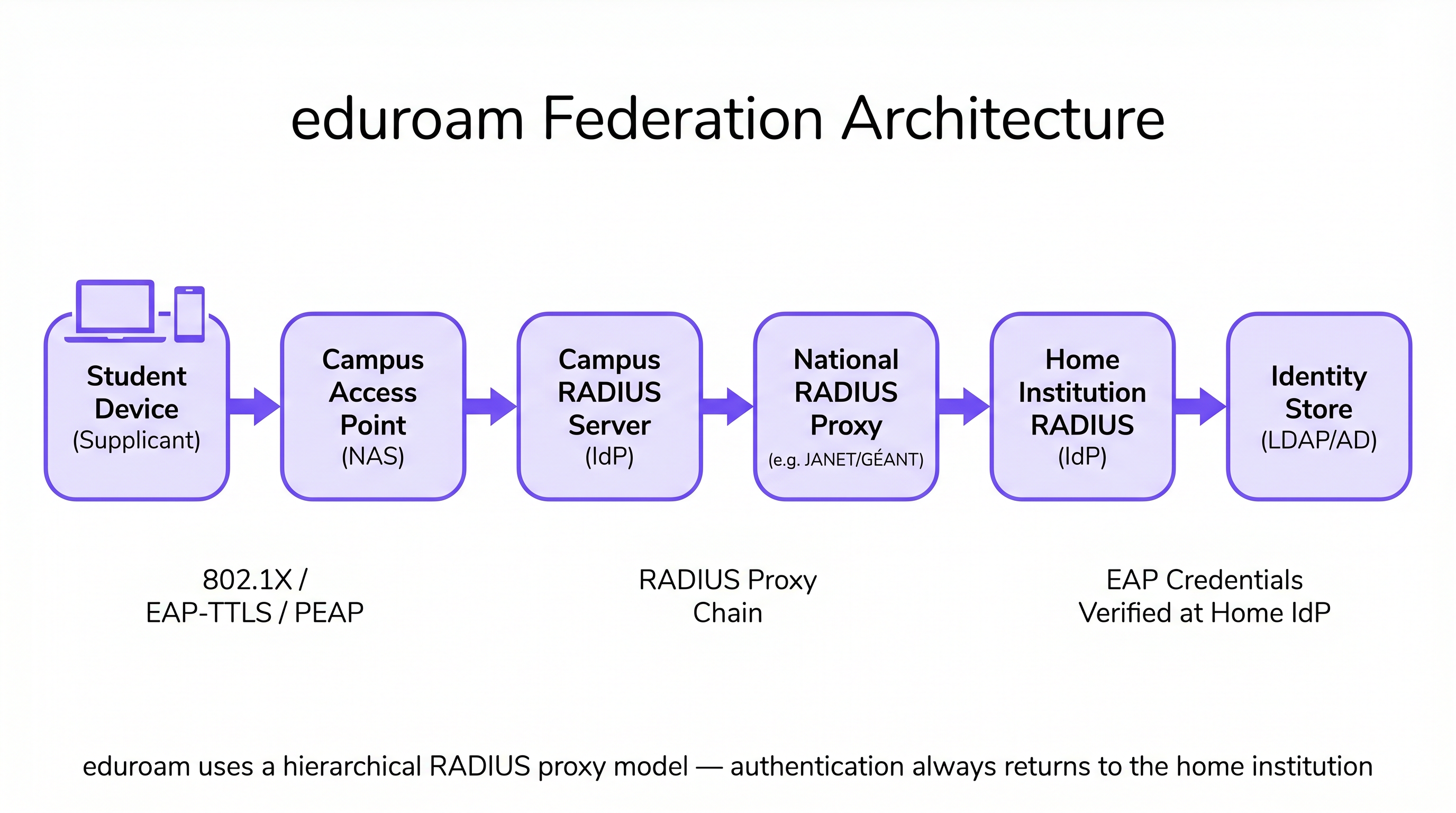
यह आर्किटेक्चर सुनिश्चित करता है कि उपयोगकर्ता क्रेडेंशियल कभी भी विज़िट किए गए संस्थान के सामने उजागर न हों, GDPR आवश्यकताओं के अनुरूप सख्त सुरक्षा और गोपनीयता मानकों को बनाए रखता है। विज़िट किया गया परिसर कभी भी उपयोगकर्ता का पासवर्ड नहीं रखता या संसाधित नहीं करता — इसे केवल गृह संस्थान में ही प्रेषित और सत्यापित किया जाता है।
आवासीय हॉल माइक्रो-सेगमेंटेशन: प्रति-कमरा VLANs
आवासीय हॉल एंटरप्राइज़ नेटवर्किंग में सबसे चुनौतीपूर्ण RF वातावरणों में से एक प्रस्तुत करते हैं। उपकरणों का घनत्व — अक्सर प्रति छात्र तीन से पाँच — उपभोक्ता IoT (स्मार्ट स्पीकर, गेमिंग कंसोल, स्ट्रीमिंग स्टिक्स, वायरलेस प्रिंटर) के प्रसार के साथ मिलकर, एक ऐसा वातावरण बनाता है जो फ्लैट नेटवर्क आर्किटेक्चर को जल्दी से अभिभूत कर देता है। पारंपरिक सिंगल-सबनेट छात्रावास नेटवर्क अत्यधिक ब्रॉडकास्ट ट्रैफ़िक उत्पन्न करते हैं, महत्वपूर्ण सुरक्षा कमजोरियाँ पैदा करते हैं, और एक खराब उपयोगकर्ता अनुभव उत्पन्न करते हैं क्योंकि डिवाइस पूरे भवन में एक-दूसरे को खोजते हैं।
उद्योग मानक दृष्टिकोण प्रति-कमरा VLAN मैपिंग है। इस आर्किटेक्चर में, नेटवर्क एक्सेस कंट्रोल (NAC) सिस्टम प्रत्येक व्यक्तिगत छात्रावास के कमरे या सुइट को गतिशील रूप से एक अद्वितीय VLAN असाइन करता है। जब कोई छात्र अपना स्मार्टफोन, लैपटॉप, या पंजीकृत IoT डिवाइस कनेक्ट करता है, तो RADIUS सर्वर उपयोगकर्ता की पहचान और स्थान विशेषताओं का मूल्यांकन करता है, उन्हें उनके विशिष्ट माइक्रो-सेगमेंट में असाइन करता है। यह एक पर्सनल एरिया नेटवर्क (PAN) अनुभव बनाता है: छात्र के डिवाइस एक-दूसरे के साथ संवाद कर सकते हैं (उदाहरण के लिए, फोन से Apple TV पर कास्ट करना), लेकिन वे बगल के कमरे के उपकरणों से पूरी तरह से अलग होते हैं।
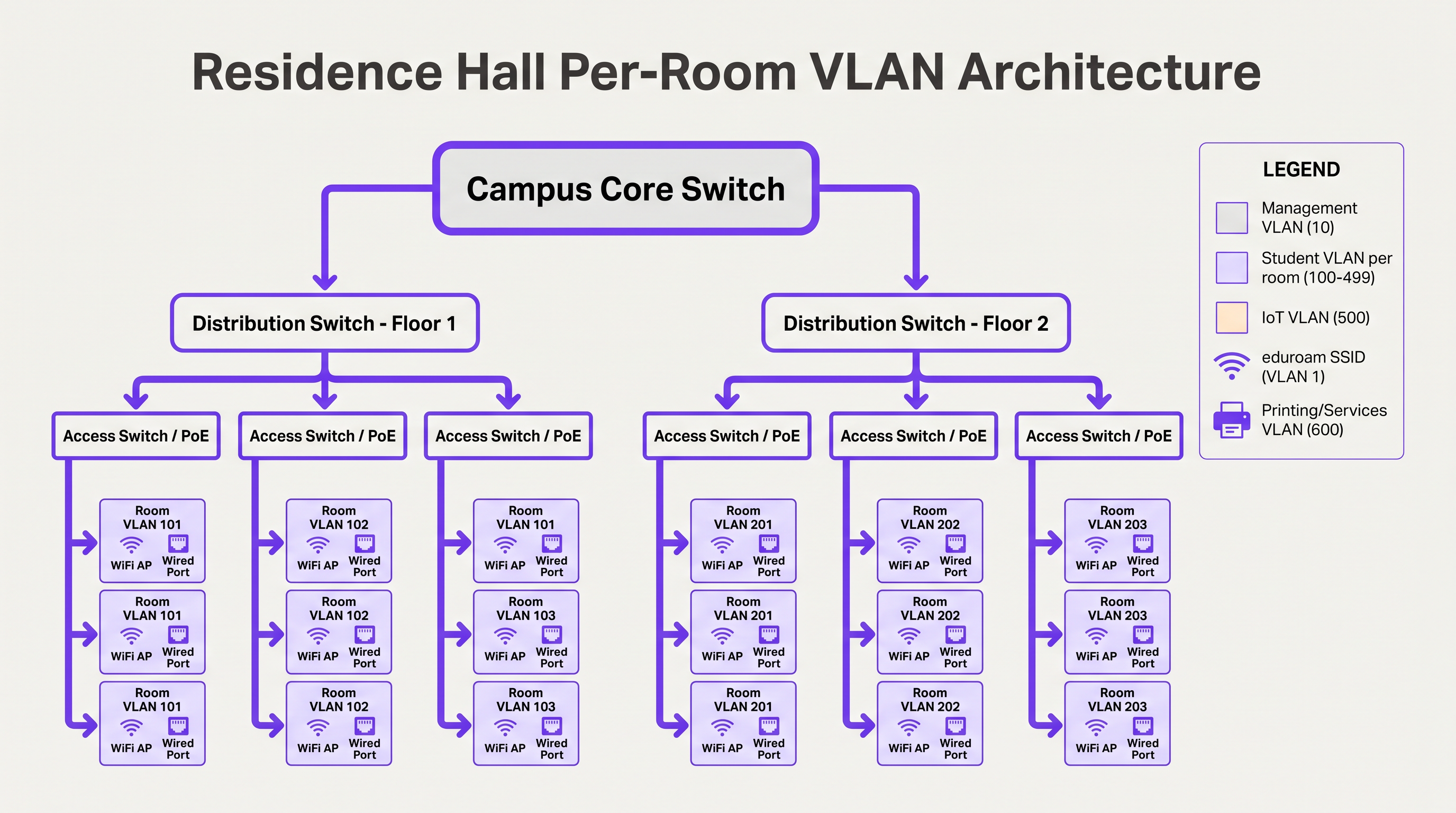
इसे बड़े पैमाने पर प्रबंधित करने के लिए, IT टीमों को सक्षम उपकरणों (लैपटॉप, स्मार्टफोन) के लिए 802.1X का उपयोग करके गतिशील VLAN असाइनमेंट लागू करना होगा, और हेडलेस IoT उपकरणों के लिए एक डिवाइस पंजीकरण पोर्टल के साथ MAC ऑथेंटिकेशन बाईपास (MAB) को जोड़ना होगा जो एंटरप्राइज़ प्रमाणीकरण का समर्थन नहीं करते हैं। VLAN असाइनमेंट RADIUS सर्वर द्वारा एक्सेस-एक्सेप्ट संदेश (Tunnel-Type, Tunnel-Medium-Type, Tunnel-Private-Group-ID) में एक मानक विशेषता के रूप में लौटाया जाता है।
बड़े पैमाने पर BYOD ऑनबोर्डिंग
शैक्षणिक वर्ष की शुरुआत में, विश्वविद्यालयों में बड़े पैमाने पर ऑनबोर्डिंग स्पाइक्स का अनुभव होता है। एक मैन्युअल या खराब डिज़ाइन की गई BYOD प्रक्रिया घंटों के भीतर IT हेल्पडेस्क को अभिभूत कर देगी। एक स्केलेबल आर्किटेक्चर स्वचालित प्रमाणपत्र प्रावधान पर निर्भर करता है, बजाय इसके कि उपयोगकर्ताओं को मैन्युअल रूप से जटिल EAP सेटिंग्स को कॉन्फ़िगर करने या हर बार उनके डायरेक्टरी पासवर्ड बदलने पर अपनी WiFi कॉन्फ़िगरेशन को अपडेट करने की आवश्यकता हो।
इष्टतम प्रवाह एक खुले ऑनबोर्डिंग SSID का उपयोग करता है जो एक captive portal और आवश्यक प्रावधान सर्वर तक पहुंच को प्रतिबंधित करता है। उपयोगकर्ता सिंगल साइन-ऑन (SSO) के माध्यम से प्रमाणित होते हैं, एकजिसके बाद एक नेटिव OS प्रोफ़ाइल पेलोड डाउनलोड किया जाता है। यह पेलोड कैंपस सर्टिफ़िकेट अथॉरिटी से एक अद्वितीय क्लाइंट सर्टिफ़िकेट का अनुरोध करने के लिए SCEP (Simple Certificate Enrollment Protocol) या EST (Enrollment over Secure Transport) का उपयोग करता है।
एक बार सर्टिफ़िकेट इंस्टॉल हो जाने पर, डिवाइस स्वचालित रूप से ऑनबोर्डिंग कनेक्शन छोड़ देता है और EAP-TLS का उपयोग करके सुरक्षित 802.1X नेटवर्क (जैसे eduroam) से जुड़ जाता है। यह पासवर्ड-संबंधी कनेक्शन समस्याओं को समाप्त करता है — जो WiFi हेल्पडेस्क टिकटों का प्रमुख कारण है — और नेटवर्क टीम को हर कनेक्टेड डिवाइस में विस्तृत दृश्यता प्रदान करता है।
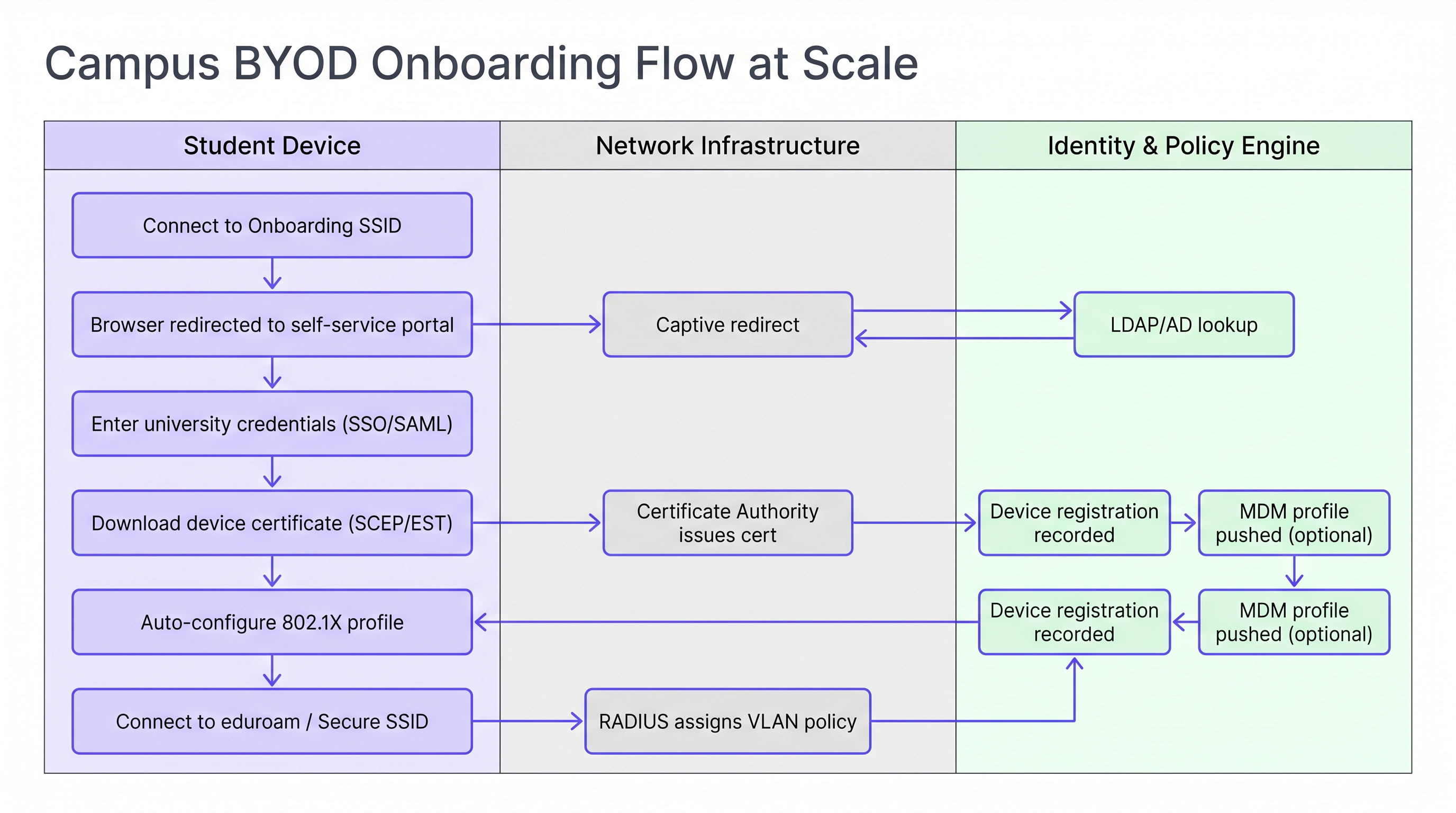
व्यक्तिगत और विश्वविद्यालय-स्वामित्व वाले डिवाइसों के मिश्रण का प्रबंधन करने वाले संस्थानों के लिए, MDM (Mobile Device Management) समाधान के साथ ऑनबोर्डिंग फ़्लो को एकीकृत करने से सर्टिफ़िकेट प्रोविज़निंग चरण के दौरान पॉलिसी प्रोफ़ाइल स्वचालित रूप से पुश की जा सकती हैं, जिससे अतिरिक्त उपयोगकर्ता इंटरैक्शन के बिना प्रति-डिवाइस पॉलिसी लागू की जा सकती है।
कार्यान्वयन मार्गदर्शिका
इस आर्किटेक्चर को डिप्लॉय करने के लिए नेटवर्क इंजीनियरिंग, आइडेंटिटी मैनेजमेंट और सिक्योरिटी टीमों के बीच सावधानीपूर्वक समन्वय की आवश्यकता होती है। निम्नलिखित अनुक्रम एक ग्रीनफ़ील्ड या प्रमुख रीफ़्रेश प्रोजेक्ट के लिए एक सिद्ध डिप्लॉयमेंट ऑर्डर का प्रतिनिधित्व करता है।
चरण 1 — आइडेंटिटी स्टोर को मानकीकृत करें। सुनिश्चित करें कि आपकी Active Directory या LDAP डायरेक्टरी साफ़ है, जिसमें छात्रों, फ़ैकल्टी, स्टाफ़ और मेहमानों के लिए सु-परिभाषित समूह हैं। पुष्टि करें कि समूह सदस्यता सटीक है और स्वचालित प्रोविज़निंग और डी-प्रोविज़निंग प्रक्रियाएं मौजूद हैं। यह पॉलिसी लागू करने के लिए मूलभूत है: जैसा बोओगे, वैसा काटोगे।
चरण 2 — एक मज़बूत NAC समाधान डिप्लॉय करें। एक Network Access Control सिस्टम लागू करें जो उच्च-मात्रा वाले RADIUS अनुरोधों, डायनामिक VLAN असाइनमेंट और डिवाइस प्रोफ़ाइलिंग को संभालने में सक्षम हो। अलग-अलग डेटा सेंटरों में कई नोड्स में रिडंडेंसी सुनिश्चित करें। टर्म शुरू होने से पहले इन्फ्रास्ट्रक्चर का लोड टेस्ट करें, न कि उसके दौरान।
चरण 3 — eduroam RADIUS प्रॉक्सी कॉन्फ़िगर करें। अपने राष्ट्रीय रोमिंग ऑपरेटर के लिए सुरक्षित टनल स्थापित करें। लूप को रोकने और यह सुनिश्चित करने के लिए सख्त रील्म रूटिंग नियम लागू करें कि केवल वैध, पंजीकृत रील्म ही बाहर प्रॉक्सी किए जाएं। प्रॉक्सी लेटेंसी और विफलता दरों के लिए मॉनिटरिंग अलर्ट कॉन्फ़िगर करें।
चरण 4 — IoT के लिए डिवाइस पंजीकरण लागू करें। एक सेल्फ-सर्विस पोर्टल डिप्लॉय करें जहां छात्र अपने गेमिंग कंसोल, स्मार्ट टीवी और अन्य हेडलेस डिवाइसों के MAC एड्रेस रजिस्टर कर सकें। पोर्टल IT सहायता के बिना उपयोग करने के लिए पर्याप्त सरल होना चाहिए। MAB के माध्यम से स्वचालित VLAN असाइनमेंट के लिए इसे सीधे अपने NAC से जोड़ें।
चरण 5 — उच्च घनत्व के लिए RF को अनुकूलित करें। डिप्लॉयमेंट से पहले एक उचित RF सर्वेक्षण करवाएं। रेजिडेंस हॉल में, इन-रूम AP कवरेज की योजना बनाएं। क्लाइंट्स को इष्टतम AP पर रोम करने के लिए 12 Mbps से कम की लेगेसी डेटा दरों को अक्षम करें। कमरों के बीच स्पष्ट RF सीमाएं बनाने के लिए ट्रांसमिट पावर कॉन्फ़िगर करें।
कैंपस के सार्वजनिक क्षेत्रों — पुस्तकालयों, छात्र संघों, बाहरी स्थानों — के लिए, उन आगंतुकों के लिए सोशल लॉगिन या SMS प्रमाणीकरण के साथ Guest WiFi समाधानों का लाभ उठाने पर विचार करें जिनके पास eduroam क्रेडेंशियल नहीं हैं। WiFi Analytics के साथ इन वातावरणों की निगरानी वास्तविक समय क्षमता प्रबंधन और कवरेज गैप की सक्रिय पहचान को सक्षम बनाती है।
सर्वोत्तम अभ्यास
प्रबंधित डिवाइसों के लिए EAP-TLS अनिवार्य करें। विश्वविद्यालय-स्वामित्व वाली संपत्तियों के लिए, विशेष रूप से सर्टिफ़िकेट-आधारित प्रमाणीकरण का उपयोग करें। यह उच्चतम स्तर की सुरक्षा प्रदान करता है और क्रेडेंशियल चोरी को रोकता है। EAP-TTLS या PEAP को केवल संक्रमण अवधि के दौरान अप्रबंधित व्यक्तिगत डिवाइसों के लिए फ़ॉलबैक के रूप में आरक्षित किया जाना चाहिए।
DHCP Snooping और BPDU Guard लागू करें। एक छात्र द्वारा डॉर्म रूम के ईथरनेट पोर्ट में एक उपभोक्ता राउटर लगाने से पूरा सबनेट डाउन हो सकता है। ये नियंत्रण बिना किसी अपवाद के सभी एक्सेस स्विच पोर्ट पर लागू किए जाने चाहिए।
लगातार मॉनिटर और विश्लेषण करें। AP उपयोग, क्लाइंट गणना और रोमिंग पैटर्न की निगरानी के लिए WiFi Analytics का उपयोग करें। यह डेटा क्षमता नियोजन और लेक्चर थिएटरों और पुस्तकालयों में RF डेड ज़ोन की पहचान करने के लिए अमूल्य है। WiFi उपस्थिति डेटा को स्थान उपयोग मेट्रिक्स के साथ सहसंबंधित करने से डेटा-संचालित सुविधा प्रबंधन निर्णय सक्षम होते हैं।
कैंपस संचालन के लिए स्थान सेवाओं का लाभ उठाएं। नए छात्रों को जटिल इमारतों में नेविगेट करने और वास्तविक समय AP एसोसिएशन डेटा के आधार पर उपलब्ध अध्ययन स्थानों का पता लगाने में मदद करने के लिए कैंपस ऐप में Wayfinding एकीकरण लागू करें। यह भौतिक साइनेज पर दबाव कम करता है और उच्च-ट्रैफ़िक अवधियों के दौरान छात्र अनुभव को बेहतर बनाता है।
WPA3 संक्रमण योजना के साथ संरेखित करें। जबकि WPA2-Enterprise प्रमुख मानक बना हुआ है, अपने AP रीफ़्रेश चक्र की योजना WPA3-Enterprise (उच्च-सुरक्षा वातावरण के लिए 192-बिट मोड) और अतिथि SSIDs के लिए Enhanced Open (OWE) का समर्थन करने के लिए बनाएं। WPA3 KRACK भेद्यता वर्ग को समाप्त करता है और फ़ॉरवर्ड सीक्रेसी प्रदान करता है, जो GDPR अनुपालन के लिए तेजी से प्रासंगिक है।
समस्या निवारण और जोखिम न्यूनीकरण
पीक ऑनबोर्डिंग के दौरान RADIUS टाइमआउट विफलताएं। टर्म के पहले 48 घंटों के दौरान, RADIUS सर्वर अभिभूत हो सकते हैं, जिससे प्रमाणीकरण टाइमआउट और हेल्पडेस्क कॉलों की बाढ़ आ सकती है। न्यूनीकरण: पूर्व-खाली लोड परीक्षण, कई RADIUS नोड्स में लोड संतुलन, और मामूली प्रॉक्सी देरी को समायोजित करने के लिए वायरलेस LAN कंट्रोलर पर EAP टाइमर को ट्यून करना।
IoT डिवाइस खोज विफलताएं। छात्र अक्सर रिपोर्ट करते हैं कि वे अपने स्मार्ट टीवी पर कास्ट नहीं कर सकते या वायरलेस प्रिंटर से कनेक्ट नहीं कर सकते। न्यूनीकरण: यदि डिवाइस अलग-अलग VLAN पर रहते हैं, तो संबंधित प्रति-कमरा VLAN जोड़े के लिए VLAN सीमा के पार विशिष्ट खोज प्रोटोकॉल को फ़ॉरवर्ड करने के लिए एक mDNS गेटवे या Bonjour प्रॉक्सी कॉन्फ़िगर करें। सुनिश्चित करें कि गेटवे को व्यक्तिगत कमरे के VLAN तक सीमित किया गया है, न कि पूरी इमारत तक।
eduroam प्रॉक्सी रूटिंग लूप। गलत कॉन्फ़िगर किए गए रील्म रूटिंग नियम प्रमाणीकरण अनुरोधों को प्रॉक्सी सर्वर के बीच लूप करने का कारण बन सकते हैं, जिसके परिणामस्वरूप टाइमआउट हो सकता है। न्यूनीकेशन: सख्त रील्म व्हाइटलिस्टिंग लागू करें और अपने RADIUS प्रॉक्सी पर लूप डिटेक्शन कॉन्फ़िगर करें। राष्ट्रीय ऑपरेटर की प्रकाशित रील्म रजिस्ट्री के विरुद्ध रूटिंग तालिकाओं का नियमित रूप से ऑडिट करें।
बड़े पैमाने पर प्रमाणपत्र निरस्तीकरण। जब कोई छात्र संस्थान छोड़ता है, तो नेटवर्क तक निरंतर पहुंच को रोकने के लिए उनका प्रमाणपत्र तुरंत रद्द किया जाना चाहिए। शमन: OCSP (ऑनलाइन प्रमाणपत्र स्थिति प्रोटोकॉल) स्टेपलिंग लागू करें और सुनिश्चित करें कि आपके CA की CRL (प्रमाणपत्र निरस्तीकरण सूची) प्रकाशित हो और आपके RADIUS सर्वर के लिए सुलभ हो। छात्र डी-प्रोविजनिंग वर्कफ़्लो के हिस्से के रूप में निरस्तीकरण को स्वचालित करें।
ROI और व्यावसायिक प्रभाव
एक मजबूत, स्वचालित कैंपस WiFi आर्किटेक्चर में निवेश कई आयामों में महत्वपूर्ण, मापने योग्य रिटर्न प्रदान करता है।
| मीट्रिक | बेसलाइन (विरासत आर्किटेक्चर) | लक्ष्य (आधुनिक आर्किटेक्चर) | सुधार |
|---|---|---|---|
| हेल्पडेस्क WiFi टिकट (सप्ताह 1) | 2,000–3,000 | 600–900 | ~70% कमी |
| एक नए डिवाइस को ऑनबोर्ड करने का औसत समय | 15–30 मिनट (मैनुअल) | 3–5 मिनट (स्वचालित) | ~80% कमी |
| सुरक्षा घटना का प्रभाव क्षेत्र | पूरा भवन सबनेट | एकल कक्ष VLAN | नियंत्रित |
| प्रति कक्ष AP परिनियोजन लागत | उच्च (गलियारा मॉडल) | मध्यम (इन-रूम, कम शक्ति) | बेहतर परिणामों के साथ तुलनीय |
कम हेल्पडेस्क वॉल्यूम। स्वचालित प्रमाणपत्र-आधारित BYOD ऑनबोर्डिंग महत्वपूर्ण सेमेस्टर-शुरुआत अवधि के दौरान WiFi-संबंधित समर्थन टिकटों को 70% तक कम कर सकता है, जिससे IT कर्मचारियों को उच्च-मूल्य वाले कार्यों पर ध्यान केंद्रित करने के लिए मुक्त किया जा सकता है।
बेहतर सुरक्षा स्थिति। माइक्रो-सेगमेंटेशन और 802.1X प्रमाणीकरण एक समझौता किए गए डिवाइस के प्रभाव क्षेत्र को नाटकीय रूप से कम करते हैं, रैंसमवेयर द्वारा पार्श्व आंदोलन के जोखिम को कम करते हैं — उच्च शिक्षा के वातावरण में एक बढ़ता खतरा।
डेटा-संचालित कैंपस प्रबंधन। नेटवर्क डेटा को Sensors और एनालिटिक्स प्लेटफॉर्म के साथ एकीकृत करके, विश्वविद्यालय स्थान उपयोग को अनुकूलित कर सकते हैं, अधिभोग के आधार पर HVAC शेड्यूल समायोजित कर सकते हैं, और समग्र कैंपस संचालन में सुधार कर सकते हैं। नेटवर्क प्रबंधन के लिए उपयोग किया जाने वाला वही WiFi Analytics इन्फ्रास्ट्रक्चर सुविधाओं और संपत्ति नियोजन के लिए एक रणनीतिक संपत्ति बन जाता है।
इस गाइड में वर्णित वास्तुशिल्प पैटर्न — माइक्रो-सेगमेंटेशन, स्वचालित ऑनबोर्डिंग और फेडरेटेड पहचान — उच्च शिक्षा से परे सीधे लागू होते हैं। Retail वातावरण कर्मचारियों के उपकरणों के लिए समान BYOD सेगमेंटेशन सिद्धांतों से लाभान्वित होते हैं, और Healthcare नेटवर्क को मेडिकल IoT अलगाव के लिए समान कठोरता की आवश्यकता होती है। कैंपस WAN कनेक्टिविटी को रेखांकित करने वाले SD-WAN सिद्धांतों को The Core SD-WAN Benefits for Modern Businesses में आगे खोजा गया है।
उन संगठनों के लिए जो WiFi-संचालित बुद्धिमत्ता को मार्केटिंग ऑटोमेशन और एंगेजमेंट वर्कफ़्लो में विस्तारित करना चाहते हैं, उपस्थिति-आधारित ट्रिगरिंग के सिद्धांत Event-Driven Marketing Automation Triggered by WiFi Presence में विस्तृत हैं।
ऑडियो ब्रीफिंग सुनें:
Key Terms & Definitions
RADIUS Proxy
A server that forwards authentication requests between a Network Access Server (NAS) and the final authentication server (IdP), routing based on the user's realm.
Crucial for eduroam federation. When a visiting user's realm does not match the local domain, the campus RADIUS server proxies the request outward through the national hierarchy to the home institution.
EAP-TLS (Extensible Authentication Protocol — Transport Layer Security)
An 802.1X authentication method requiring both a server-side certificate (on the RADIUS server) and a client-side certificate (on the endpoint device). No passwords are transmitted.
The gold standard for BYOD security in higher education. Eliminates password-related WiFi helpdesk tickets and provides mutual authentication, preventing rogue AP attacks.
Micro-segmentation
The practice of dividing a network into small, isolated segments — typically at the VLAN level — to limit lateral movement and reduce the attack surface.
Applied in residence halls via Per-Room VLANs to isolate student devices from one another, preventing ransomware propagation and enforcing privacy between residents.
MAC Authentication Bypass (MAB)
A fallback authentication method that uses a device's MAC address as its identity when the device does not support 802.1X.
Essential for connecting IoT devices (gaming consoles, smart TVs, printers) in dormitories to the secure network. The MAC must be pre-registered in the NAC to receive a valid VLAN assignment.
Realm
The domain portion of a user's Network Access Identifier (NAI), typically the part after the '@' symbol (e.g., 'university.edu' in 'student@university.edu').
RADIUS proxy servers use the realm to route eduroam authentication requests to the correct home institution. Misconfigured realm routing is a common cause of eduroam failures for visiting users.
SCEP (Simple Certificate Enrollment Protocol)
A protocol that enables network devices to automatically request and receive digital certificates from a Certificate Authority.
Used in BYOD onboarding flows to automatically provision client certificates to student devices without manual IT intervention, enabling EAP-TLS authentication at scale.
mDNS Gateway (Bonjour Proxy)
A service that forwards Multicast DNS packets across different subnets or VLANs, enabling device discovery protocols to function in segmented networks.
Required in Per-Room VLAN architectures when a student's phone (on the wireless VLAN) needs to discover their smart TV (on the wired VLAN) within the same room's micro-segment.
Network Access Control (NAC)
A security solution that enforces policy on devices seeking to access a network, controlling admission based on identity, device health, and context.
The central orchestration layer in a campus WiFi architecture. NAC handles 802.1X authentication, dynamic VLAN assignment, device profiling, and MAB for IoT devices.
Supplicant
The software component on an endpoint device that handles the 802.1X authentication exchange with the network.
Built into modern operating systems (Windows, macOS, iOS, Android). When troubleshooting eduroam connection failures, the supplicant configuration — specifically the EAP method and server certificate validation settings — is the first place to investigate.
WPA3-Enterprise
The latest generation of the Wi-Fi Protected Access enterprise security standard, introducing 192-bit cryptographic strength and eliminating vulnerabilities present in WPA2.
Relevant for campus network refresh planning. WPA3-Enterprise provides forward secrecy via ECDHE key exchange, meaning captured traffic cannot be decrypted retroactively even if a certificate is later compromised.
Case Studies
A university is upgrading a 500-bed residence hall built in the 1970s. Students are complaining that they cannot see their wireless printers or cast to their smart TVs, while the IT security team is concerned about the flat /22 subnet currently serving the entire building. How should the network be redesigned?
Phase 1 — Network Redesign: Replace the flat /22 subnet with a Per-Room VLAN architecture. Assign a unique VLAN ID (e.g., VLANs 1000–1499) to each room. Configure the NAC to dynamically assign the correct VLAN based on the student's authenticated identity and their room assignment in the student records system.
Phase 2 — Device Registration Portal: Deploy a self-service portal where students register the MAC addresses of headless devices (printers, smart TVs, gaming consoles). The portal authenticates the student via SSO and records the MAC-to-room mapping in the NAC database.
Phase 3 — MAB Configuration: Configure switch ports and the residential SSID to use MAC Authentication Bypass for registered devices. When a registered MAC connects, RADIUS returns the student's Per-Room VLAN assignment, placing the device in the correct micro-segment.
Phase 4 — mDNS Gateway: Configure the wireless controller's mDNS gateway to proxy Bonjour and SSDP discovery traffic within each Per-Room VLAN boundary, enabling casting and printing without cross-room exposure.
Phase 5 — AP Refresh: Replace hallway APs with in-room units. Reduce transmit power to 8–12 dBm to create clean RF cells and reduce co-channel interference.
During the first week of term, a 15,000-student university's IT helpdesk receives over 2,500 WiFi tickets in 48 hours. The majority are from students who changed their university portal password and are now unable to connect to eduroam. The current authentication method is PEAP-MSCHAPv2. What is the architectural change required, and how should it be rolled out?
Root Cause: PEAP-MSCHAPv2 authenticates using the user's AD password. When the password changes, the stored WiFi profile credential becomes invalid, breaking the connection.
Architectural Change: Transition from PEAP-MSCHAPv2 to EAP-TLS (certificate-based authentication).
Rollout Plan:
- Deploy a Campus Certificate Authority (or integrate with an existing PKI) and configure SCEP/EST endpoints.
- Stand up a BYOD onboarding tool (vendor-neutral options include FreeRADIUS with a custom portal, or commercial solutions). Configure it to authenticate via SSO and provision client certificates.
- Create an 'Onboarding' SSID (open, captive-portal restricted) alongside the existing eduroam SSID.
- Communicate to students: 'Connect to Onboarding-WiFi, follow the steps, and your WiFi will never break when you change your password again.'
- Once certificate adoption reaches >80%, disable PEAP-MSCHAPv2 on the RADIUS server and enforce EAP-TLS only.
- Set certificate lifetime to 2 years with automated renewal 30 days before expiry.
Scenario Analysis
Q1. A visiting researcher from the University of Amsterdam arrives at your campus in London. They connect to the eduroam SSID but receive an 'Authentication Failed' error. Your local RADIUS logs confirm the Access-Request is being forwarded to the national proxy, but no response is received within the timeout window. Where is the most likely point of failure, and what is your escalation path?
💡 Hint:Apply the 'Home Always Knows' principle. Your local infrastructure is functioning correctly if the request is leaving your campus.
Show Recommended Approach
Since the local RADIUS server is successfully proxying the request outward, the local campus infrastructure is functioning correctly. The most likely failure points are: (1) the national proxy (JANET) is unable to route to the Dutch national proxy (SURFnet), or (2) the researcher's home institution RADIUS server is offline or misconfigured. The escalation path is: first, contact your national roaming operator (JANET) with the timestamp and realm (@uva.nl) to check proxy routing logs. Second, advise the researcher to contact their home institution's IT helpdesk, as the issue is almost certainly on their side. Do not spend time troubleshooting your own RADIUS infrastructure.
Q2. You are designing the WiFi for a new 1,000-bed residence hall. The facilities team wants to install APs in the hallways to save on cabling and installation costs. Provide a technical argument against this approach and specify the recommended alternative.
💡 Hint:Consider RF attenuation through fire doors and masonry, co-channel interference in long corridors, and the implications for Per-Room VLAN architecture.
Show Recommended Approach
Hallway deployments are an anti-pattern for modern high-density residential environments for three reasons. First, RF signals must penetrate thick fire-rated doors and masonry walls to reach devices inside rooms, resulting in poor signal quality and low throughput precisely where users are located. Second, APs deployed in a long corridor have clear line-of-sight to each other, causing severe co-channel interference that degrades performance for all clients. Third, the hallway model makes Per-Room VLAN micro-segmentation architecturally ambiguous — a hallway AP serves multiple rooms simultaneously, complicating dynamic VLAN assignment. The recommended approach is in-room AP deployment: one AP per room for new builds, or one AP per two rooms in modern construction with thin partition walls. Transmit power should be set to 8–12 dBm to create clean RF cells. While the upfront cabling cost is higher, the operational savings from reduced helpdesk volume and improved user experience deliver a positive ROI within the first academic year.
Q3. A student registers their PlayStation 5 MAC address in the device registration portal. The console is connected via the residential SSID but cannot discover the student's phone for Remote Play. Both devices are confirmed to be on the same Per-Room VLAN. What is the most likely configuration issue?
💡 Hint:Consider the wireless controller's client isolation settings and the protocols used by device discovery.
Show Recommended Approach
The most likely cause is that client isolation (also called AP isolation or wireless isolation) is enabled on the residential SSID. Client isolation prevents wireless clients on the same SSID from communicating directly with each other, even if they are on the same VLAN. This is a common security default that is appropriate for guest networks but counterproductive in a Per-Room VLAN environment where device-to-device communication is intentional. The fix is to disable client isolation specifically on the residential SSID (or create a policy exception for the Per-Room VLAN range). If the console is on the wired network and the phone is on wireless, the issue may instead be an mDNS gateway not forwarding Sony's device discovery protocol (SSDP/UPnP) across the wired-to-wireless boundary within the same VLAN.




