
WiFi no Campus Universitário: eduroam, Residências Universitárias e BYOD em Escala
Esta arquitetura de referência fornece estratégias avançadas de implementação para WiFi em campus universitários, abrangendo a mecânica de federação eduroam, micro-segmentação VLAN por quarto em residências universitárias e o onboarding automatizado de certificados BYOD em escala. Equipa líderes de TI e arquitetos de rede com orientação neutra em relação a fornecedores e imediatamente acionável para melhorar a segurança, reduzir a sobrecarga do helpdesk e proporcionar uma experiência de conectividade contínua em ambientes académicos e residenciais.
Ouça este guia
Ver transcrição do podcast
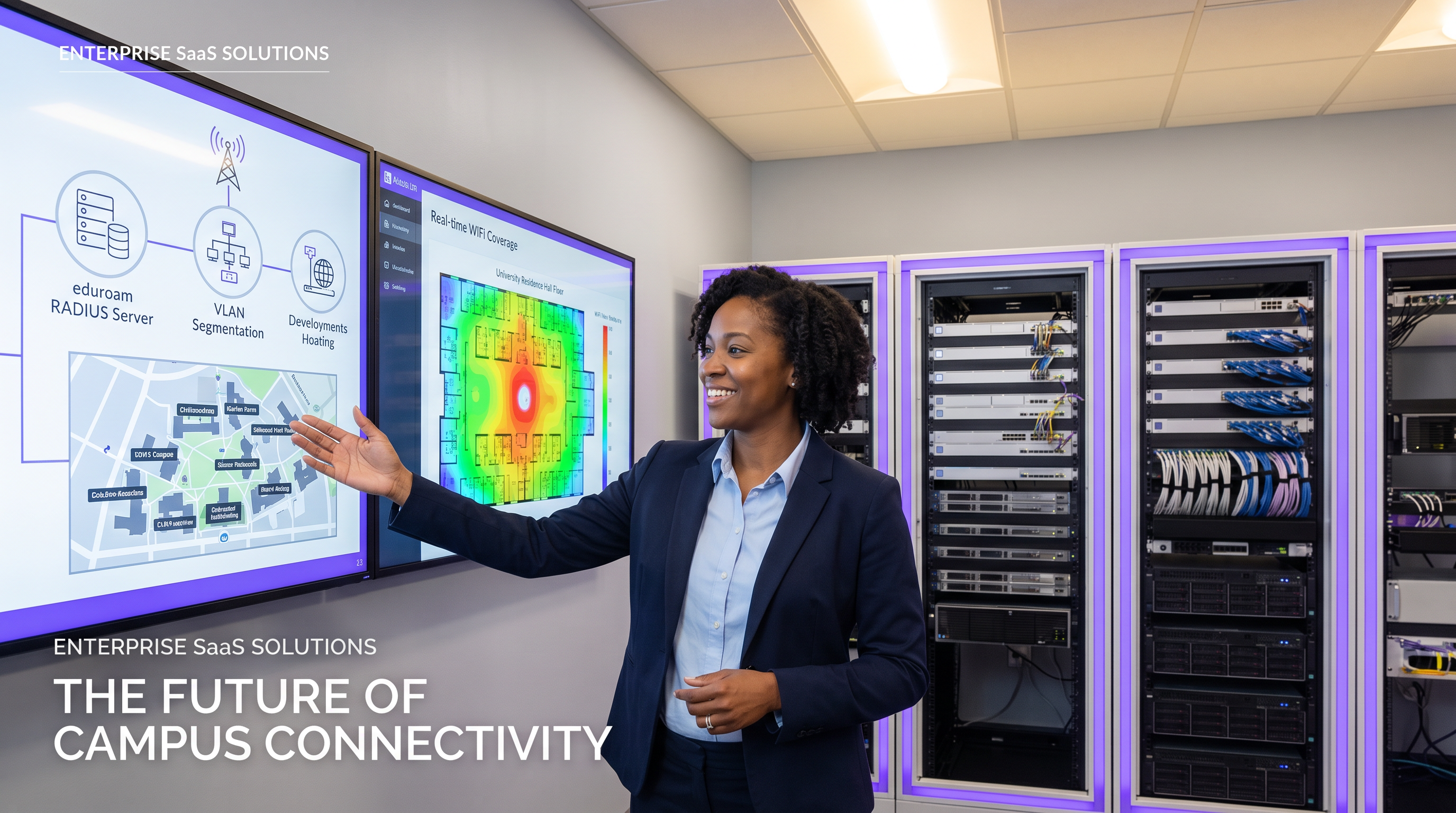
Resumo Executivo
Para as universidades modernas, a rede WiFi do campus deixou de ser uma mera comodidade — é uma infraestrutura crítica que sustenta a entrega académica, a vida estudantil e a eficiência operacional. À medida que as instituições de ensino superior escalam, as equipas de TI enfrentam uma tríade de desafios complexos de rede: gerir a federação contínua e segura de eduroam, projetar ambientes micro-segmentados de alta densidade em residências universitárias e automatizar o onboarding de Bring Your Own Device (BYOD) para dezenas de milhares de utilizadores simultâneos.
Este guia de referência fornece a líderes de TI seniores, arquitetos de rede e diretores de operações de instalações um plano prático e neutro em relação a fornecedores para a conectividade do campus. Examinamos o modelo de proxy RADIUS hierárquico que alimenta o eduroam, detalhamos a implementação de VLANs por quarto para proteger os dispositivos dos estudantes e delineamos um ciclo de vida robusto de registo de dispositivos. Ao adotar estes padrões arquitetónicos, as instituições podem reduzir significativamente a sobrecarga do helpdesk, garantir a conformidade com os regulamentos de proteção de dados e proporcionar uma experiência digital contínua em espaços académicos e residenciais. Os princípios aqui explorados são igualmente transferíveis para ambientes de Hotelaria e Saúde onde a conectividade de alta densidade e multi-inquilino é um desafio operacional diário.
Análise Técnica Detalhada
A Arquitetura de Federação eduroam
eduroam (education roaming) é o serviço de acesso roaming seguro e mundial desenvolvido para a comunidade internacional de investigação e educação. Permite que estudantes, investigadores e funcionários de instituições participantes obtenham conectividade à internet em todo o campus e ao visitar outras instituições participantes, simplesmente abrindo o seu portátil ou conectando o seu dispositivo móvel — sem necessidade de configuração manual no local visitado.
Nos bastidores, o eduroam depende de uma estrutura de autenticação IEEE 802.1X acoplada a uma arquitetura de proxy RADIUS (Remote Authentication Dial-In User Service) hierárquica. Quando um utilizador tenta conectar-se ao SSID eduroam numa instituição visitada (o Provedor de Serviço, ou SP), o ponto de acesso local atua como o Network Access Server (NAS). Encaminha o pedido de autenticação via Extensible Authentication Protocol (EAP) para o servidor RADIUS do campus.
Se o realm do utilizador (por exemplo, @university.edu) não corresponder ao domínio local, o servidor RADIUS do campus encaminha o pedido para um Proxy RADIUS Nacional — JANET no Reino Unido, GÉANT a nível pan-europeu. O proxy nacional encaminha o pedido para a Instituição de Origem do utilizador (o Provedor de Identidade, ou IdP), que valida as credenciais contra o seu armazenamento de identidade (Active Directory ou LDAP) e retorna uma mensagem de Access-Accept ou Access-Reject através da cadeia de proxy.
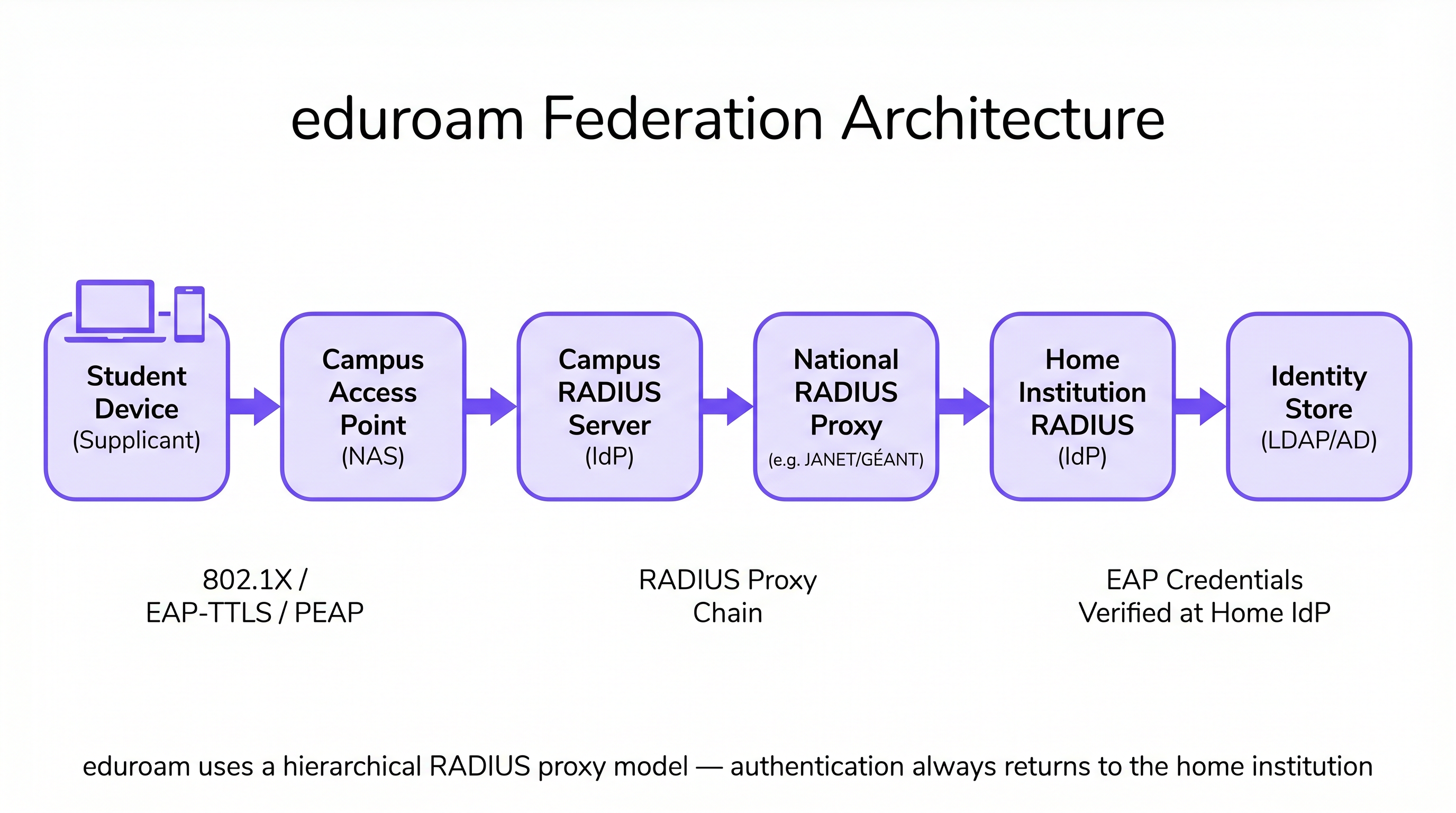
Esta arquitetura garante que as credenciais do utilizador nunca são expostas à instituição visitada, mantendo padrões rigorosos de segurança e privacidade consistentes com os requisitos do GDPR. O campus visitado nunca detém ou processa a palavra-passe do utilizador — esta é apenas transmitida e verificada na instituição de origem.
Micro-Segmentação em Residências Universitárias: VLANs por Quarto
As residências universitárias apresentam um dos ambientes de RF mais desafiadores em redes empresariais. A densidade de dispositivos — frequentemente três a cinco por estudante — combinada com a proliferação de IoT de consumo (colunas inteligentes, consolas de jogos, streaming sticks, impressoras sem fios), cria um ambiente que rapidamente sobrecarrega as arquiteturas de rede planas. As redes de dormitório tradicionais de sub-rede única geram tráfego de broadcast excessivo, criam vulnerabilidades de segurança significativas e produzem uma experiência de utilizador degradada à medida que os dispositivos se descobrem uns aos outros em todo o edifício.
A abordagem padrão da indústria é o mapeamento de VLAN por quarto. Nesta arquitetura, o sistema de Controlo de Acesso à Rede (NAC) atribui dinamicamente uma VLAN única a cada quarto ou suite de dormitório individual. Quando um estudante conecta o seu smartphone, portátil ou dispositivo IoT registado, o servidor RADIUS avalia a identidade do utilizador e os atributos de localização, atribuindo-os ao seu micro-segmento específico. Isto cria uma experiência de Rede de Área Pessoal (PAN): os dispositivos do estudante podem comunicar entre si (por exemplo, transmitir de um telemóvel para uma Apple TV), mas estão completamente isolados dos dispositivos no quarto adjacente.
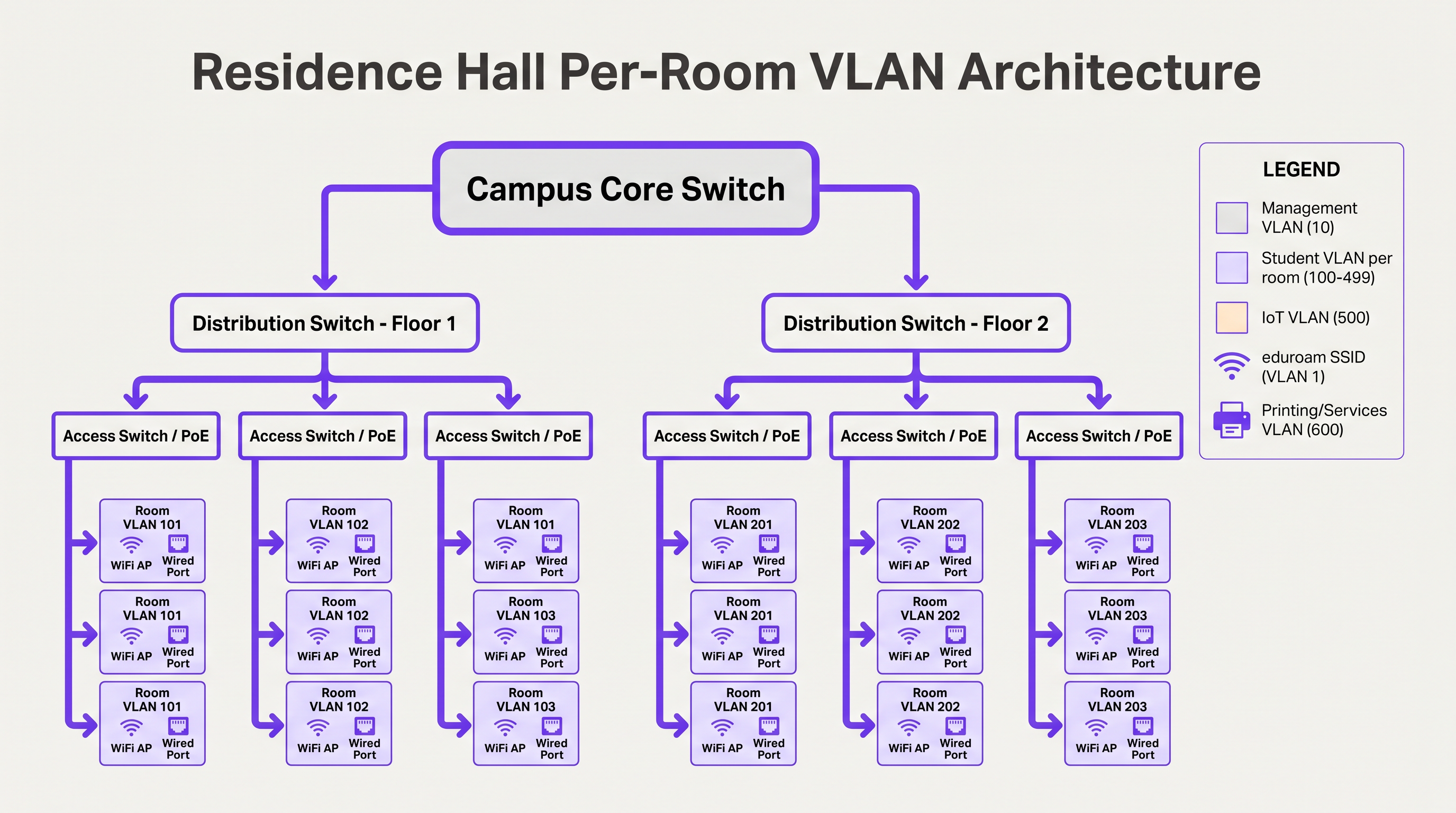
Para gerir isto em escala, as equipas de TI devem implementar a atribuição dinâmica de VLAN usando 802.1X para dispositivos capazes (portáteis, smartphones) e MAC Authentication Bypass (MAB) acoplado a um portal de registo de dispositivos para dispositivos IoT sem interface que não suportam autenticação empresarial. A atribuição de VLAN é retornada pelo servidor RADIUS como um atributo padrão na mensagem Access-Accept (Tunnel-Type, Tunnel-Medium-Type, Tunnel-Private-Group-ID).
Onboarding BYOD em Escala
No início do ano académico, as universidades experienciam picos massivos de onboarding. Um processo BYOD manual ou mal concebido irá sobrecarregar o helpdesk de TI em poucas horas. Uma arquitetura escalável depende do aprovisionamento automatizado de certificados em vez de exigir que os utilizadores configurem manualmente definições EAP complexas ou se lembrem de atualizar a sua configuração WiFi sempre que a sua palavra-passe de diretório muda.
O fluxo ideal utiliza um SSID de onboarding aberto que restringe o acesso a um captive portal e aos servidores de aprovisionamento necessários. Os utilizadores autenticam-se via Single Sign-On (SSO), umapós o qual um payload de perfil de SO nativo é descarregado. Este payload utiliza SCEP (Simple Certificate Enrollment Protocol) ou EST (Enrollment over Secure Transport) para solicitar um certificado de cliente único à Autoridade de Certificação do campus.
Uma vez instalado o certificado, o dispositivo desliga automaticamente a ligação de onboarding e associa-se à rede segura 802.1X (como a eduroam) utilizando EAP-TLS. Isto elimina problemas de ligação relacionados com palavras-passe — a principal causa de tickets de suporte de WiFi — e fornece à equipa de rede uma visibilidade granular sobre cada dispositivo ligado.
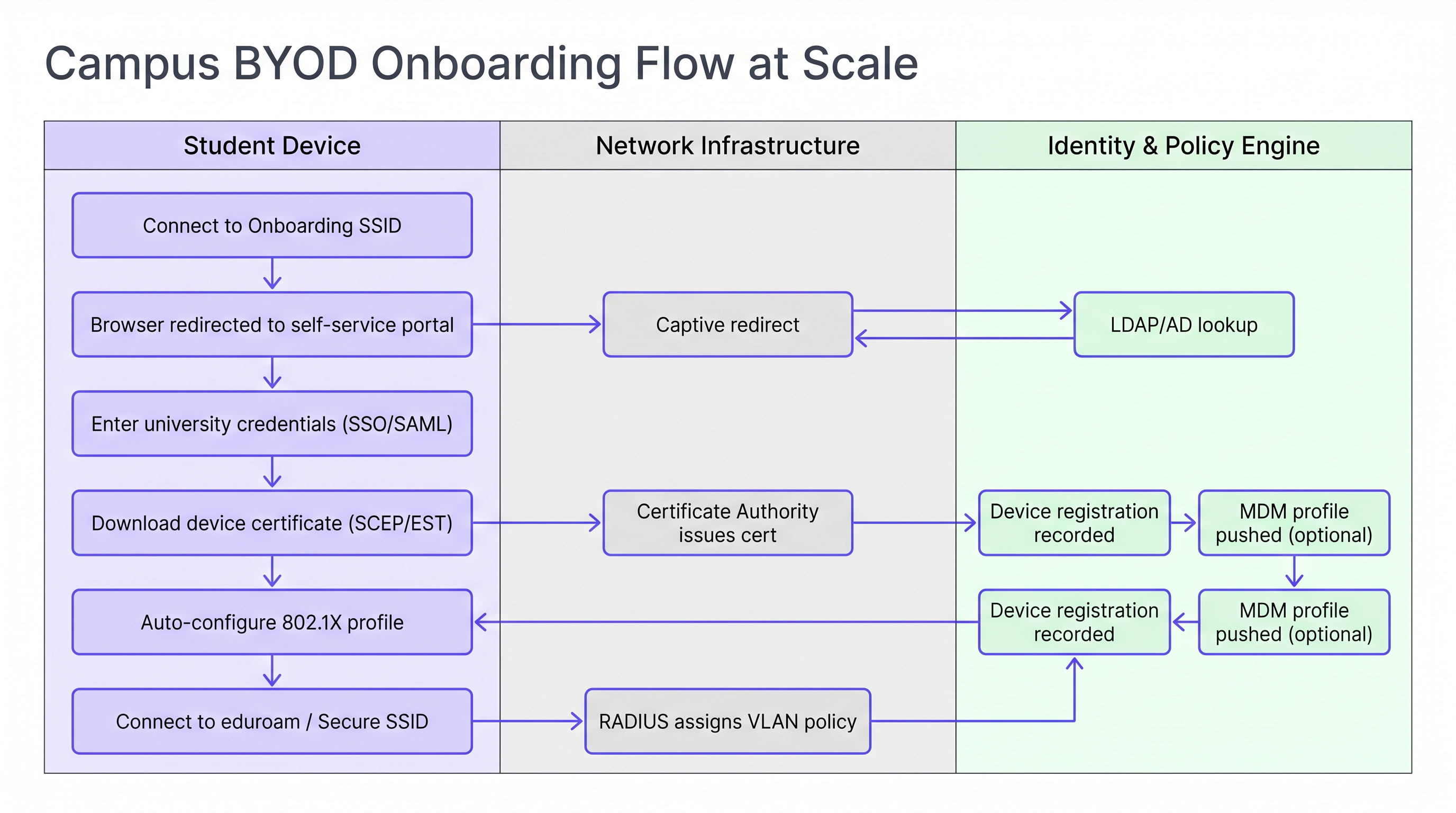
Para instituições que gerem uma mistura de dispositivos pessoais e propriedade da universidade, a integração do fluxo de onboarding com uma solução MDM (Mobile Device Management) permite que os perfis de política sejam enviados automaticamente durante a etapa de provisionamento do certificado, possibilitando a aplicação de políticas por dispositivo sem interação adicional do utilizador.
Guia de Implementação
A implementação desta arquitetura requer uma coordenação cuidadosa entre as equipas de engenharia de rede, gestão de identidade e segurança. A sequência seguinte representa uma ordem de implementação comprovada para um projeto novo (greenfield) ou de grande atualização.
Passo 1 — Padronizar o Repositório de Identidades. Certifique-se de que o seu diretório Active Directory ou LDAP está limpo, com grupos bem definidos para estudantes, docentes, funcionários e convidados. Confirme que a adesão aos grupos é precisa e que os processos automatizados de provisionamento e desprovisionamento estão em vigor. Isto é fundamental para a aplicação de políticas: lixo entra, lixo sai.
Passo 2 — Implementar uma Solução NAC Robusta. Implemente um sistema de Controlo de Acesso à Rede (Network Access Control) capaz de lidar com pedidos RADIUS de alto volume, atribuição dinâmica de VLAN e perfilagem de dispositivos. Garanta redundância em múltiplos nós em centros de dados separados. Teste a carga da infraestrutura antes do início do período letivo, não durante.
Passo 3 — Configurar Proxies RADIUS eduroam. Estabeleça túneis seguros para o seu operador de roaming nacional. Implemente regras rigorosas de encaminhamento de realm para evitar loops e garantir que apenas realms válidos e registados são encaminhados para o exterior. Configure alertas de monitorização para latência do proxy e taxas de falha.
Passo 4 — Implementar o Registo de Dispositivos para IoT. Implemente um portal de autoatendimento onde os estudantes possam registar os endereços MAC das suas consolas de jogos, smart TVs e outros dispositivos sem interface. O portal deve ser suficientemente simples de usar sem assistência de TI. Ligue-o diretamente ao seu NAC para atribuição automática de VLAN via MAB.
Passo 5 — Otimizar RF para Alta Densidade. Encomende um levantamento de RF adequado antes da implementação. Em residências universitárias, planeie a cobertura de AP nos quartos. Desative as taxas de dados legadas abaixo de 12 Mbps para forçar os clientes a fazer roaming para o AP ideal. Configure a potência de transmissão para criar limites de RF limpos entre os quartos.
Para áreas públicas em todo o campus — bibliotecas, associações de estudantes, espaços ao ar livre — considere utilizar soluções de Guest WiFi com login social ou autenticação por SMS para visitantes que não possuam credenciais eduroam. A monitorização destes ambientes com WiFi Analytics permite a gestão de capacidade em tempo real e a identificação proativa de lacunas de cobertura.
Melhores Práticas
Exigir EAP-TLS para Dispositivos Geridos. Para ativos propriedade da universidade, utilize exclusivamente autenticação baseada em certificados. Proporciona o mais alto nível de segurança e previne o roubo de credenciais. EAP-TTLS ou PEAP devem ser reservados como um fallback para dispositivos pessoais não geridos apenas durante um período de transição.
Aplicar DHCP Snooping e BPDU Guard. Um estudante que ligue um router de consumo a uma porta Ethernet de um quarto de residência pode derrubar toda a sub-rede. Estes controlos devem ser aplicados a todas as portas de switch de acesso sem exceção.
Monitorizar e Analisar Continuamente. Utilize WiFi Analytics para monitorizar a utilização de AP, contagens de clientes e padrões de roaming. Estes dados são inestimáveis para o planeamento de capacidade e identificação de zonas mortas de RF em anfiteatros e bibliotecas. A correlação de dados de presença WiFi com métricas de utilização de espaço permite decisões de gestão de instalações baseadas em dados.
Aproveitar os Serviços de Localização para Operações do Campus. Implemente a integração de Wayfinding na aplicação do campus para ajudar os novos estudantes a navegar em edifícios complexos e a localizar espaços de estudo disponíveis com base em dados de associação de AP em tempo real. Isto reduz a pressão sobre a sinalização física e melhora a experiência do estudante durante períodos de alto tráfego.
Alinhar com o Planeamento de Transição para WPA3. Embora o WPA2-Enterprise continue a ser o padrão dominante, planeie o seu ciclo de atualização de AP para suportar WPA3-Enterprise (modo de 192 bits para ambientes de alta segurança) e Enhanced Open (OWE) para SSIDs de convidados. O WPA3 elimina a classe de vulnerabilidades KRACK e fornece sigilo de encaminhamento, o que é cada vez mais relevante para a conformidade com o GDPR.
Resolução de Problemas e Mitigação de Riscos
Falhas de Timeout do RADIUS Durante o Onboarding de Pico. Durante as primeiras 48 horas do período letivo, os servidores RADIUS podem ficar sobrecarregados, levando a timeouts de autenticação e a um grande número de chamadas para o suporte técnico. Mitigação: Testes de carga preventivos, balanceamento de carga em múltiplos nós RADIUS e ajuste dos temporizadores EAP no controlador de LAN sem fios para acomodar pequenos atrasos do proxy.
Falhas na Descoberta de Dispositivos IoT. Os estudantes frequentemente relatam que não conseguem fazer cast para as suas smart TVs ou ligar-se a impressoras sem fios. Mitigação: Se os dispositivos residirem em VLANs separadas, configure um mDNS Gateway ou Bonjour Proxy para encaminhar protocolos de descoberta específicos através do limite da VLAN para os pares de VLANs por quarto relevantes. Certifique-se de que o gateway está configurado para VLANs de quartos individuais, e não para todo o edifício.
Loops de Encaminhamento do Proxy eduroam. Regras de encaminhamento de realm mal configuradas podem fazer com que os pedidos de autenticação entrem em loop entre os servidores proxy, resultando em timeouts. Mitigação:** Implemente uma lista de permissões de realm rigorosa e configure a deteção de loops no seu proxy RADIUS. Audite regularmente as tabelas de encaminhamento em relação ao registo de realm publicado pelo operador nacional.
Revogação de Certificados em Escala. Quando um estudante deixa a instituição, o seu certificado deve ser revogado prontamente para evitar o acesso contínuo à rede. Mitigação: Implemente o OCSP (Online Certificate Status Protocol) stapling e garanta que a CRL (Certificate Revocation List) da sua CA é publicada e acessível aos seus servidores RADIUS. Automatize a revogação como parte do fluxo de trabalho de desativação do estudante.
ROI e Impacto no Negócio
Investir numa arquitetura WiFi de campus robusta e automatizada proporciona retornos significativos e mensuráveis em múltiplas dimensões.
| Métrica | Linha de Base (Arquitetura Legada) | Alvo (Arquitetura Moderna) | Melhoria |
|---|---|---|---|
| Tickets de WiFi no Helpdesk (Semana 1) | 2.000–3.000 | 600–900 | ~70% de redução |
| Tempo médio para integrar um novo dispositivo | 15–30 minutos (manual) | 3–5 minutos (automatizado) | ~80% de redução |
| Raio de impacto de incidente de segurança | Sub-rede de edifício inteiro | VLAN de sala única | Contido |
| Custo de implementação de AP por sala | Alto (modelo de corredor) | Moderado (na sala, menor potência) | Comparável com melhores resultados |
Volume de Helpdesk Reduzido. A integração BYOD automatizada baseada em certificados pode reduzir os tickets de suporte relacionados com WiFi em até 70% durante o período crítico de início de período, libertando o pessoal de TI para se concentrar em trabalho de maior valor.
Postura de Segurança Reforçada. A microssegmentação e a autenticação 802.1X reduzem drasticamente o raio de impacto de um dispositivo comprometido, mitigando o risco de movimento lateral por ransomware — uma ameaça crescente em ambientes de ensino superior.
Gestão de Campus Orientada por Dados. Ao integrar dados de rede com Sensors e plataformas de análise, as universidades podem otimizar a utilização do espaço, ajustar os horários do HVAC com base na ocupação e melhorar as operações gerais do campus. A mesma infraestrutura de WiFi Analytics utilizada para a gestão de rede torna-se um ativo estratégico para o planeamento de instalações e património.
Os padrões arquitetónicos descritos neste guia — microssegmentação, integração automatizada e identidade federada — são diretamente aplicáveis para além do ensino superior. Ambientes de Retail beneficiam dos mesmos princípios de segmentação BYOD para dispositivos de funcionários, e redes de Healthcare exigem o mesmo rigor para o isolamento de IoT médico. Os princípios de SD-WAN que sustentam a conectividade WAN do campus são explorados mais aprofundadamente em The Core SD-WAN Benefits for Modern Businesses .
Para organizações que procuram estender a inteligência impulsionada por WiFi para automação de marketing e fluxos de trabalho de engagement, os princípios de acionamento baseado em presença são detalhados em Event-Driven Marketing Automation Triggered by WiFi Presence .
Ouça o Briefing em Áudio:
Definições Principais
RADIUS Proxy
A server that forwards authentication requests between a Network Access Server (NAS) and the final authentication server (IdP), routing based on the user's realm.
Crucial for eduroam federation. When a visiting user's realm does not match the local domain, the campus RADIUS server proxies the request outward through the national hierarchy to the home institution.
EAP-TLS (Extensible Authentication Protocol — Transport Layer Security)
An 802.1X authentication method requiring both a server-side certificate (on the RADIUS server) and a client-side certificate (on the endpoint device). No passwords are transmitted.
The gold standard for BYOD security in higher education. Eliminates password-related WiFi helpdesk tickets and provides mutual authentication, preventing rogue AP attacks.
Micro-segmentation
The practice of dividing a network into small, isolated segments — typically at the VLAN level — to limit lateral movement and reduce the attack surface.
Applied in residence halls via Per-Room VLANs to isolate student devices from one another, preventing ransomware propagation and enforcing privacy between residents.
MAC Authentication Bypass (MAB)
A fallback authentication method that uses a device's MAC address as its identity when the device does not support 802.1X.
Essential for connecting IoT devices (gaming consoles, smart TVs, printers) in dormitories to the secure network. The MAC must be pre-registered in the NAC to receive a valid VLAN assignment.
Realm
The domain portion of a user's Network Access Identifier (NAI), typically the part after the '@' symbol (e.g., 'university.edu' in 'student@university.edu').
RADIUS proxy servers use the realm to route eduroam authentication requests to the correct home institution. Misconfigured realm routing is a common cause of eduroam failures for visiting users.
SCEP (Simple Certificate Enrollment Protocol)
A protocol that enables network devices to automatically request and receive digital certificates from a Certificate Authority.
Used in BYOD onboarding flows to automatically provision client certificates to student devices without manual IT intervention, enabling EAP-TLS authentication at scale.
mDNS Gateway (Bonjour Proxy)
A service that forwards Multicast DNS packets across different subnets or VLANs, enabling device discovery protocols to function in segmented networks.
Required in Per-Room VLAN architectures when a student's phone (on the wireless VLAN) needs to discover their smart TV (on the wired VLAN) within the same room's micro-segment.
Network Access Control (NAC)
A security solution that enforces policy on devices seeking to access a network, controlling admission based on identity, device health, and context.
The central orchestration layer in a campus WiFi architecture. NAC handles 802.1X authentication, dynamic VLAN assignment, device profiling, and MAB for IoT devices.
Supplicant
The software component on an endpoint device that handles the 802.1X authentication exchange with the network.
Built into modern operating systems (Windows, macOS, iOS, Android). When troubleshooting eduroam connection failures, the supplicant configuration — specifically the EAP method and server certificate validation settings — is the first place to investigate.
WPA3-Enterprise
The latest generation of the Wi-Fi Protected Access enterprise security standard, introducing 192-bit cryptographic strength and eliminating vulnerabilities present in WPA2.
Relevant for campus network refresh planning. WPA3-Enterprise provides forward secrecy via ECDHE key exchange, meaning captured traffic cannot be decrypted retroactively even if a certificate is later compromised.
Exemplos Práticos
A university is upgrading a 500-bed residence hall built in the 1970s. Students are complaining that they cannot see their wireless printers or cast to their smart TVs, while the IT security team is concerned about the flat /22 subnet currently serving the entire building. How should the network be redesigned?
Phase 1 — Network Redesign: Replace the flat /22 subnet with a Per-Room VLAN architecture. Assign a unique VLAN ID (e.g., VLANs 1000–1499) to each room. Configure the NAC to dynamically assign the correct VLAN based on the student's authenticated identity and their room assignment in the student records system.
Phase 2 — Device Registration Portal: Deploy a self-service portal where students register the MAC addresses of headless devices (printers, smart TVs, gaming consoles). The portal authenticates the student via SSO and records the MAC-to-room mapping in the NAC database.
Phase 3 — MAB Configuration: Configure switch ports and the residential SSID to use MAC Authentication Bypass for registered devices. When a registered MAC connects, RADIUS returns the student's Per-Room VLAN assignment, placing the device in the correct micro-segment.
Phase 4 — mDNS Gateway: Configure the wireless controller's mDNS gateway to proxy Bonjour and SSDP discovery traffic within each Per-Room VLAN boundary, enabling casting and printing without cross-room exposure.
Phase 5 — AP Refresh: Replace hallway APs with in-room units. Reduce transmit power to 8–12 dBm to create clean RF cells and reduce co-channel interference.
During the first week of term, a 15,000-student university's IT helpdesk receives over 2,500 WiFi tickets in 48 hours. The majority are from students who changed their university portal password and are now unable to connect to eduroam. The current authentication method is PEAP-MSCHAPv2. What is the architectural change required, and how should it be rolled out?
Root Cause: PEAP-MSCHAPv2 authenticates using the user's AD password. When the password changes, the stored WiFi profile credential becomes invalid, breaking the connection.
Architectural Change: Transition from PEAP-MSCHAPv2 to EAP-TLS (certificate-based authentication).
Rollout Plan:
- Deploy a Campus Certificate Authority (or integrate with an existing PKI) and configure SCEP/EST endpoints.
- Stand up a BYOD onboarding tool (vendor-neutral options include FreeRADIUS with a custom portal, or commercial solutions). Configure it to authenticate via SSO and provision client certificates.
- Create an 'Onboarding' SSID (open, captive-portal restricted) alongside the existing eduroam SSID.
- Communicate to students: 'Connect to Onboarding-WiFi, follow the steps, and your WiFi will never break when you change your password again.'
- Once certificate adoption reaches >80%, disable PEAP-MSCHAPv2 on the RADIUS server and enforce EAP-TLS only.
- Set certificate lifetime to 2 years with automated renewal 30 days before expiry.
Perguntas de Prática
Q1. A visiting researcher from the University of Amsterdam arrives at your campus in London. They connect to the eduroam SSID but receive an 'Authentication Failed' error. Your local RADIUS logs confirm the Access-Request is being forwarded to the national proxy, but no response is received within the timeout window. Where is the most likely point of failure, and what is your escalation path?
Dica: Apply the 'Home Always Knows' principle. Your local infrastructure is functioning correctly if the request is leaving your campus.
Ver resposta modelo
Since the local RADIUS server is successfully proxying the request outward, the local campus infrastructure is functioning correctly. The most likely failure points are: (1) the national proxy (JANET) is unable to route to the Dutch national proxy (SURFnet), or (2) the researcher's home institution RADIUS server is offline or misconfigured. The escalation path is: first, contact your national roaming operator (JANET) with the timestamp and realm (@uva.nl) to check proxy routing logs. Second, advise the researcher to contact their home institution's IT helpdesk, as the issue is almost certainly on their side. Do not spend time troubleshooting your own RADIUS infrastructure.
Q2. You are designing the WiFi for a new 1,000-bed residence hall. The facilities team wants to install APs in the hallways to save on cabling and installation costs. Provide a technical argument against this approach and specify the recommended alternative.
Dica: Consider RF attenuation through fire doors and masonry, co-channel interference in long corridors, and the implications for Per-Room VLAN architecture.
Ver resposta modelo
Hallway deployments are an anti-pattern for modern high-density residential environments for three reasons. First, RF signals must penetrate thick fire-rated doors and masonry walls to reach devices inside rooms, resulting in poor signal quality and low throughput precisely where users are located. Second, APs deployed in a long corridor have clear line-of-sight to each other, causing severe co-channel interference that degrades performance for all clients. Third, the hallway model makes Per-Room VLAN micro-segmentation architecturally ambiguous — a hallway AP serves multiple rooms simultaneously, complicating dynamic VLAN assignment. The recommended approach is in-room AP deployment: one AP per room for new builds, or one AP per two rooms in modern construction with thin partition walls. Transmit power should be set to 8–12 dBm to create clean RF cells. While the upfront cabling cost is higher, the operational savings from reduced helpdesk volume and improved user experience deliver a positive ROI within the first academic year.
Q3. A student registers their PlayStation 5 MAC address in the device registration portal. The console is connected via the residential SSID but cannot discover the student's phone for Remote Play. Both devices are confirmed to be on the same Per-Room VLAN. What is the most likely configuration issue?
Dica: Consider the wireless controller's client isolation settings and the protocols used by device discovery.
Ver resposta modelo
The most likely cause is that client isolation (also called AP isolation or wireless isolation) is enabled on the residential SSID. Client isolation prevents wireless clients on the same SSID from communicating directly with each other, even if they are on the same VLAN. This is a common security default that is appropriate for guest networks but counterproductive in a Per-Room VLAN environment where device-to-device communication is intentional. The fix is to disable client isolation specifically on the residential SSID (or create a policy exception for the Per-Room VLAN range). If the console is on the wired network and the phone is on wireless, the issue may instead be an mDNS gateway not forwarding Sony's device discovery protocol (SSDP/UPnP) across the wired-to-wireless boundary within the same VLAN.
Continue a ler esta série
O que é um Pedido de Sondagem? Compreender Como os Dispositivos Descobrem Redes
Este guia de referência técnica oferece uma análise aprofundada dos pedidos de sondagem IEEE 802.11, da varredura ativa versus passiva e do impacto da aleatorização de MAC na análise de locais. Apresenta estratégias de implementação acionáveis para arquitetos de rede otimizarem implementações de alta densidade, mitigarem tempestades de sondagem e garantirem a recolha de dados precisa e em conformidade com o GDPR, utilizando camadas de identidade autenticadas.
Como Corrigir WiFi Lento Sem Atualizar o Seu Plano de Internet
Um guia de referência técnica abrangente para gestores de TI e arquitetos de rede sobre como otimizar o desempenho de WiFi empresarial sem aumentar a largura de banda do ISP. Abrange a otimização de RF, gestão da densidade de clientes, implementação de QoS e como aproveitar a análise de WiFi para diagnosticar e resolver gargalos.
A Lista de Verificação para Migrar de NAC Legado para NAC Nativo da Nuvem
Este guia de referência técnica e autoritário fornece uma lista de verificação estruturada em três fases para migrar do Network Access Control (NAC) legado para uma arquitetura nativa da nuvem. Ele equipa gestores de TI e arquitetos de rede com estratégias acionáveis para gerir a integração de identidades, a paridade de políticas e a conformidade sem interromper as operações do local.