
Universitäts-Campus-WiFi: eduroam, Studentenwohnheime und BYOD im großen Maßstab
Diese Referenzarchitektur bietet fortschrittliche Bereitstellungsstrategien für Universitäts-Campus-WiFi, die die eduroam-Föderationsmechanismen, die VLAN-Mikrosegmentierung pro Zimmer in Studentenwohnheimen und die automatisierte BYOD-Zertifikatsbereitstellung im großen Maßstab abdecken. Sie stattet IT-Leiter und Netzwerkarchitekten mit herstellerneutralen, sofort umsetzbaren Anleitungen aus, um die Sicherheit zu erhöhen, den Helpdesk-Aufwand zu reduzieren und ein nahtloses Konnektivitätserlebnis in akademischen und studentischen Umgebungen zu bieten.
Diesen Leitfaden anhören
Podcast-Transkript ansehen
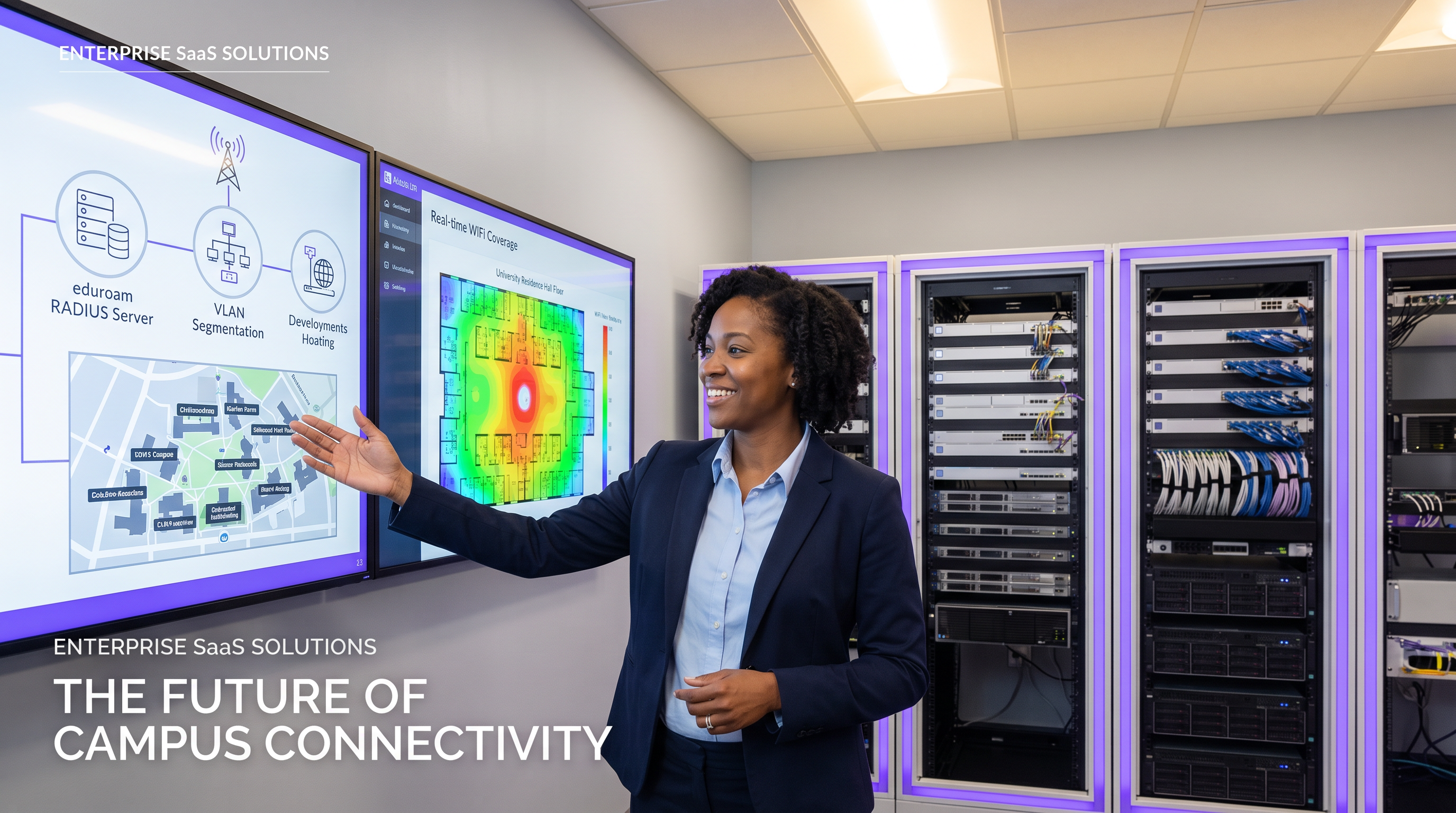
Zusammenfassung für Führungskräfte
Für moderne Universitäten ist das Campus-WiFi-Netzwerk nicht länger nur eine Annehmlichkeit – es ist eine kritische Infrastruktur, die die akademische Lehre, das Studentenleben und die betriebliche Effizienz untermauert. Wenn Hochschulen wachsen, stehen IT-Teams vor einer Dreiergruppe komplexer Netzwerkherausforderungen: die nahtlose, sichere Föderation von eduroam zu verwalten, hochdichte, mikrosegmentierte Umgebungen in Studentenwohnheimen zu entwickeln und die Automatisierung des Bring Your Own Device (BYOD)-Onboardings für Zehntausende gleichzeitiger Benutzer.
Dieser Referenzleitfaden bietet erfahrenen IT-Leitern, Netzwerkarchitekten und Direktoren für Veranstaltungsbetrieb einen praktischen, herstellerneutralen Entwurf für die Campus-Konnektivität. Wir untersuchen das hierarchische RADIUS-Proxy-Modell, das eduroam antreibt, detaillieren die Implementierung von VLANs pro Zimmer zur Sicherung von Studentengeräten und skizzieren einen robusten Geräteregistrierungslebenszyklus. Durch die Übernahme dieser Architekturstandards können Institutionen den Helpdesk-Aufwand erheblich reduzieren, die Einhaltung von Datenschutzbestimmungen gewährleisten und ein nahtloses digitales Erlebnis in akademischen und studentischen Bereichen bieten. Die hier untersuchten Prinzipien sind gleichermaßen auf Gastgewerbe und Gesundheitswesen übertragbar, wo hochdichte, mandantenfähige Konnektivität eine tägliche betriebliche Herausforderung darstellt.
Technischer Einblick
Die eduroam-Föderationsarchitektur
eduroam (education roaming) ist der sichere, weltweite Roaming-Zugangsdienst, der für die internationale Forschungs- und Bildungsgemeinschaft entwickelt wurde. Er ermöglicht Studenten, Forschern und Mitarbeitern teilnehmender Institutionen, Internetkonnektivität auf dem Campus und beim Besuch anderer teilnehmender Institutionen zu erhalten, indem sie einfach ihren Laptop öffnen oder ihr mobiles Gerät verbinden – keine manuelle Konfiguration am besuchten Standort erforderlich.
Hinter den Kulissen basiert eduroam auf einem IEEE 802.1X-Authentifizierungsframework, gekoppelt mit einer hierarchischen RADIUS (Remote Authentication Dial-In User Service)-Proxy-Architektur. Wenn ein Benutzer versucht, sich mit der eduroam SSID an einer besuchten Institution (dem Service Provider, oder SP) zu verbinden, fungiert der lokale Access Point als Network Access Server (NAS). Er leitet die Authentifizierungsanfrage über das Extensible Authentication Protocol (EAP) an den Campus-RADIUS-Server weiter.
Wenn der Realm des Benutzers (z.B. @university.edu) nicht mit der lokalen Domäne übereinstimmt, leitet der Campus-RADIUS-Server die Anfrage an einen nationalen RADIUS-Proxy weiter – JANET im Vereinigten Königreich, GÉANT auf paneuropäischer Ebene. Der nationale Proxy leitet die Anfrage an die Heimatinstitution des Benutzers (den Identity Provider, oder IdP) weiter, die die Anmeldeinformationen anhand ihres Identitätsspeichers (Active Directory oder LDAP) validiert und eine Access-Accept- oder Access-Reject-Nachricht über die Proxy-Kette zurückgibt.
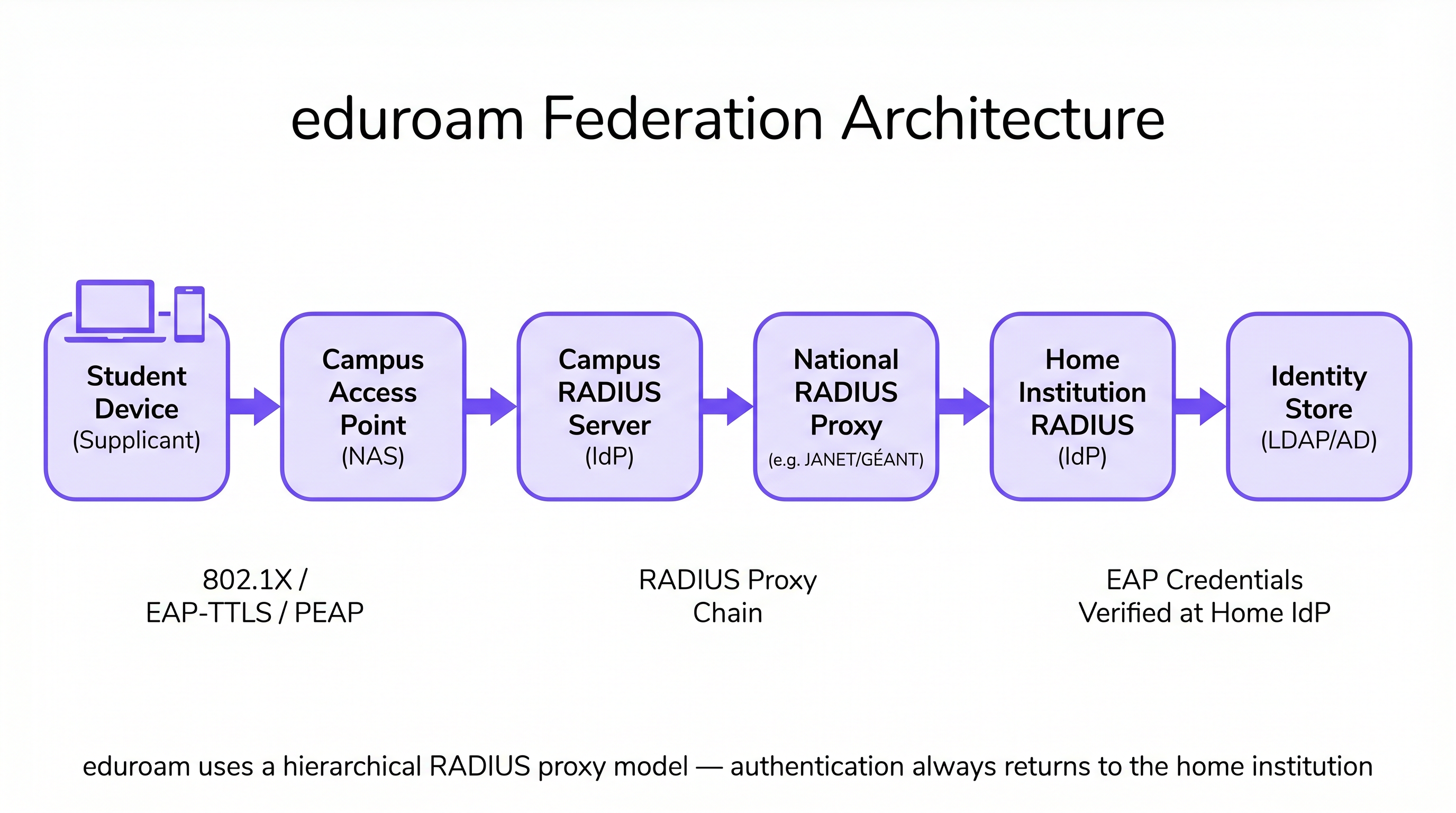
Diese Architektur stellt sicher, dass Benutzeranmeldeinformationen niemals der besuchten Institution offengelegt werden, und wahrt strenge Sicherheits- und Datenschutzstandards, die den GDPR-Anforderungen entsprechen. Der besuchte Campus speichert oder verarbeitet niemals das Passwort des Benutzers – es wird immer nur an die Heimatinstitution übermittelt und dort überprüft.
Mikrosegmentierung in Studentenwohnheimen: VLANs pro Zimmer
Studentenwohnheime stellen eine der anspruchsvollsten HF-Umgebungen im Unternehmensnetzwerk dar. Die Dichte der Geräte – oft drei bis fünf pro Student – kombiniert mit der Verbreitung von Consumer-IoT (Smart Speaker, Spielkonsolen, Streaming-Sticks, WLAN-Drucker), schafft eine Umgebung, die flache Netzwerkarchitekturen schnell überfordert. Traditionelle Wohnheimnetzwerke mit einem einzigen Subnetz erzeugen übermäßigen Broadcast-Verkehr, schaffen erhebliche Sicherheitslücken und führen zu einer verschlechterten Benutzererfahrung, da sich Geräte im gesamten Gebäude gegenseitig entdecken.
Der Industriestandardansatz ist das VLAN-Mapping pro Zimmer. In dieser Architektur weist das Network Access Control (NAC)-System jedem einzelnen Wohnheimzimmer oder jeder Suite dynamisch ein eindeutiges VLAN zu. Wenn ein Student sein Smartphone, Laptop oder registriertes IoT-Gerät verbindt, bewertet der RADIUS-Server die Identitäts- und Standortattribute des Benutzers und weist sie ihrem spezifischen Mikrosegment zu. Dies schafft ein Personal Area Network (PAN)-Erlebnis: Die Geräte des Studenten können miteinander kommunizieren (z.B. Casting von einem Telefon auf ein Apple TV), sind aber vollständig von Geräten im angrenzenden Zimmer isoliert.
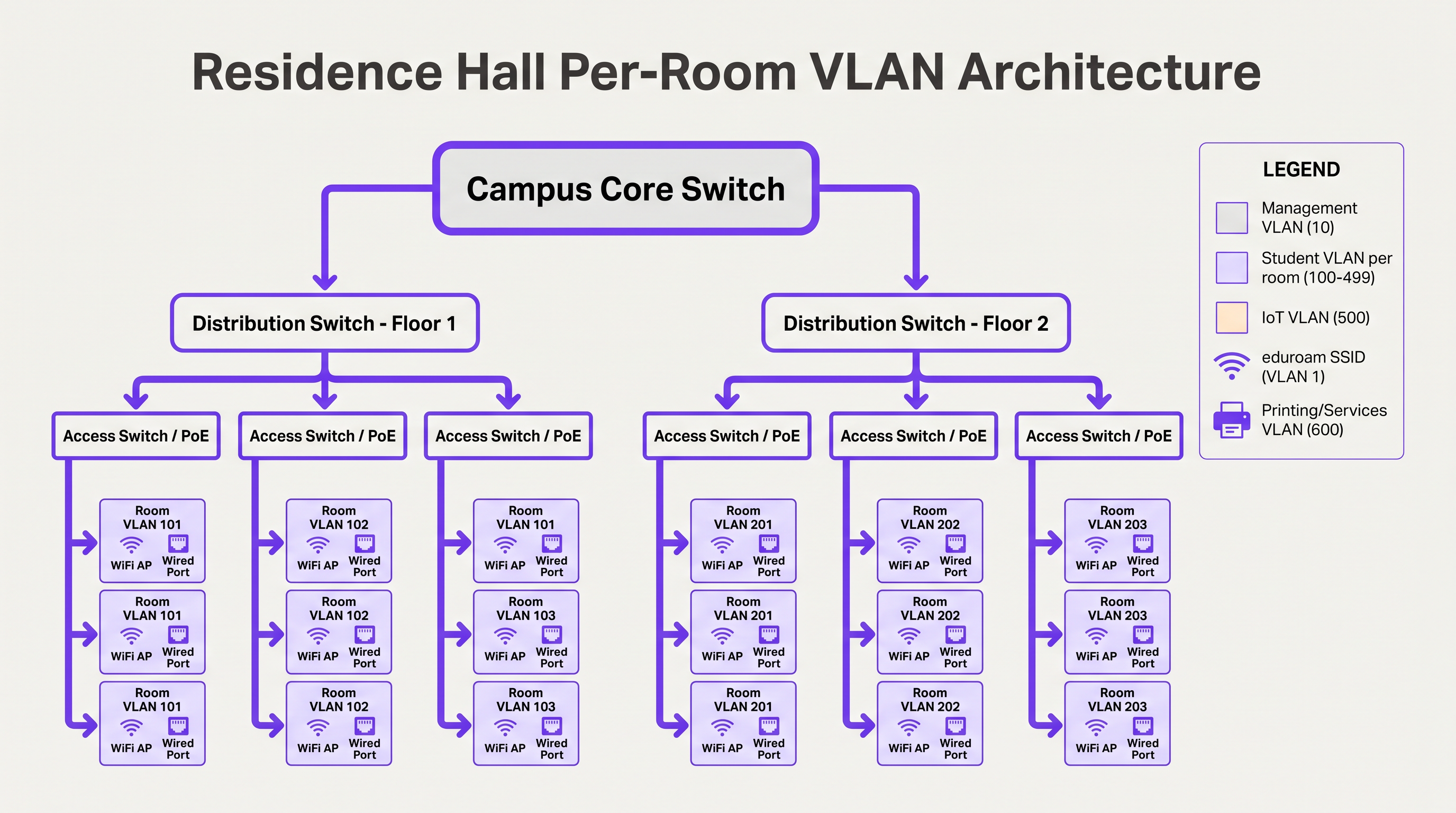
Um dies im großen Maßstab zu verwalten, müssen IT-Teams eine dynamische VLAN-Zuweisung mithilfe von 802.1X für fähige Geräte (Laptops, Smartphones) und MAC Authentication Bypass (MAB) in Verbindung mit einem Geräteregistrierungsportal für headless IoT-Geräte implementieren, die keine Unternehmensauthentifizierung unterstützen. Die VLAN-Zuweisung wird vom RADIUS-Server als Standardattribut in der Access-Accept-Nachricht (Tunnel-Type, Tunnel-Medium-Type, Tunnel-Private-Group-ID) zurückgegeben.
BYOD-Onboarding im großen Maßstab
Zu Beginn des akademischen Jahres erleben Universitäten massive Onboarding-Spitzen. Ein manueller oder schlecht konzipierter BYOD-Prozess wird den IT-Helpdesk innerhalb weniger Stunden überfordern. Eine skalierbare Architektur basiert auf der automatisierten Zertifikatsbereitstellung, anstatt von Benutzern zu verlangen, komplexe EAP-Einstellungen manuell zu konfigurieren oder sich daran zu erinnern, ihre WiFi-Konfiguration jedes Mal zu aktualisieren, wenn sich ihr Verzeichnispasswort ändert.
Der optimale Ablauf nutzt eine offene Onboarding-SSID, die den Zugriff auf ein Captive Portal und notwendige Bereitstellungsserver beschränkt. Benutzer authentifizieren sich über Single Sign-On (SSO), eindanach wird eine native OS-Profil-Payload heruntergeladen. Diese Payload verwendet SCEP (Simple Certificate Enrollment Protocol) oder EST (Enrollment over Secure Transport), um ein eindeutiges Client-Zertifikat von der Campus-Zertifizierungsstelle anzufordern.
Sobald das Zertifikat installiert ist, trennt das Gerät automatisch die Onboarding-Verbindung und verbindet sich über EAP-TLS mit dem sicheren 802.1X-Netzwerk (wie eduroam). Dies eliminiert passwortbezogene Verbindungsprobleme – die Hauptursache für WiFi-Helpdesk-Tickets – und bietet dem Netzwerkteam eine detaillierte Sichtbarkeit jedes verbundenen Geräts.
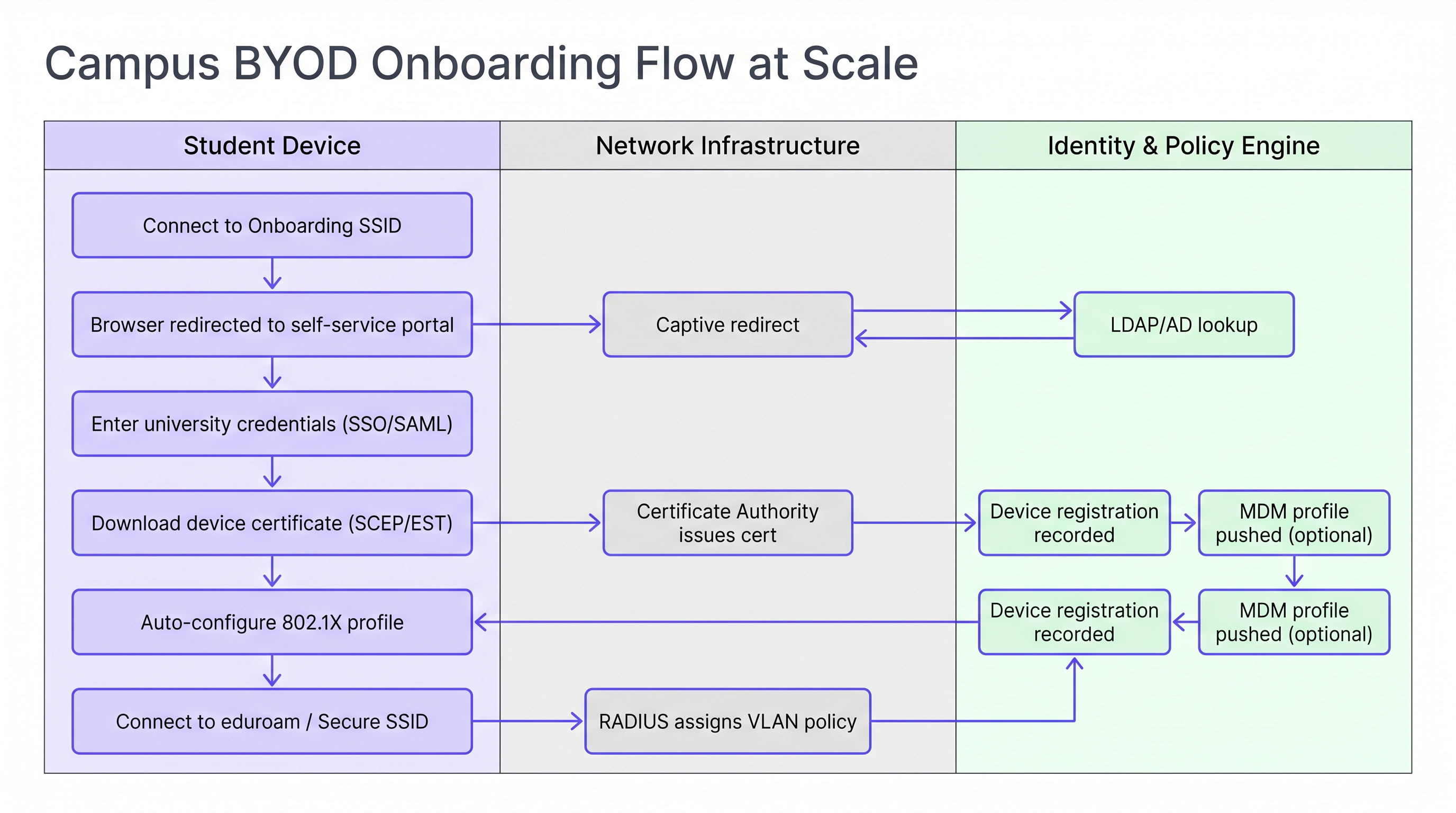
Für Institutionen, die eine Mischung aus persönlichen und universitätseigenen Geräten verwalten, ermöglicht die Integration des Onboarding-Flows mit einer MDM (Mobile Device Management)-Lösung, dass Richtlinienprofile während des Zertifikatsbereitstellungsschritts automatisch übertragen werden, was eine gerätebezogene Richtliniendurchsetzung ohne zusätzliche Benutzerinteraktion ermöglicht.
Implementierungsleitfaden
Die Bereitstellung dieser Architektur erfordert eine sorgfältige Koordination zwischen Netzwerktechnik, Identitätsmanagement und Sicherheitsteams. Die folgende Reihenfolge stellt eine bewährte Bereitstellungsreihenfolge für ein Greenfield- oder ein großes Refresh-Projekt dar.
Schritt 1 — Den Identitätsspeicher standardisieren. Stellen Sie sicher, dass Ihr Active Directory oder LDAP-Verzeichnis sauber ist und klar definierte Gruppen für Studenten, Dozenten, Mitarbeiter und Gäste enthält. Bestätigen Sie, dass die Gruppenmitgliedschaft korrekt ist und dass automatisierte Bereitstellungs- und De-Bereitstellungsprozesse vorhanden sind. Dies ist grundlegend für die Richtliniendurchsetzung: Ungenaue Eingaben führen zu ungenauen Ergebnissen.
Schritt 2 — Eine robuste NAC-Lösung bereitstellen. Implementieren Sie ein Network Access Control-System, das in der Lage ist, hochvolumige RADIUS-Anfragen, dynamische VLAN-Zuweisung und Geräteprofilierung zu verarbeiten. Stellen Sie Redundanz über mehrere Knoten in separaten Rechenzentren sicher. Testen Sie die Infrastruktur vor Semesterbeginn, nicht währenddessen.
Schritt 3 — eduroam RADIUS-Proxys konfigurieren. Richten Sie sichere Tunnel zu Ihrem nationalen Roaming-Betreiber ein. Implementieren Sie strenge Realm-Routing-Regeln, um Schleifen zu verhindern und sicherzustellen, dass nur gültige, registrierte Realms nach außen proxied werden. Konfigurieren Sie Überwachungswarnungen für Proxy-Latenz und Fehlerraten.
Schritt 4 — Geräteregistrierung für IoT implementieren. Stellen Sie ein Self-Service-Portal bereit, in dem Studenten die MAC-Adressen ihrer Spielkonsolen, Smart TVs und anderer Headless-Geräte registrieren können. Das Portal muss einfach genug sein, um es ohne IT-Hilfe nutzen zu können. Verbinden Sie es direkt mit Ihrem NAC für die automatische VLAN-Zuweisung über MAB.
Schritt 5 — RF für hohe Dichte optimieren. Beauftragen Sie vor der Bereitstellung eine ordnungsgemäße RF-Vermessung. In Wohnheimen planen Sie die AP-Abdeckung im Zimmer. Deaktivieren Sie ältere Datenraten unter 12 Mbit/s, um Clients zum Roaming zum optimalen AP zu zwingen. Konfigurieren Sie die Sendeleistung, um saubere RF-Grenzen zwischen Räumen zu schaffen.
Für öffentliche Bereiche auf dem Campus – Bibliotheken, Studentenwerke, Außenbereiche – sollten Sie Guest WiFi -Lösungen mit Social Login oder SMS-Authentifizierung für Besucher in Betracht ziehen, die keine eduroam-Zugangsdaten besitzen. Die Überwachung dieser Umgebungen mit WiFi Analytics ermöglicht ein Echtzeit-Kapazitätsmanagement und die proaktive Identifizierung von Abdeckungslücken.
Best Practices
EAP-TLS für verwaltete Geräte vorschreiben. Verwenden Sie für universitätseigene Assets ausschließlich zertifikatbasierte Authentifizierung. Dies bietet das höchste Sicherheitsniveau und verhindert den Diebstahl von Zugangsdaten. EAP-TTLS oder PEAP sollten nur als Fallback für nicht verwaltete persönliche Geräte während einer Übergangszeit reserviert werden.
DHCP Snooping und BPDU Guard durchsetzen. Ein Student, der einen Consumer-Router an einen Ethernet-Port im Studentenwohnheim anschließt, kann das gesamte Subnetz lahmlegen. Diese Kontrollen müssen ausnahmslos auf alle Access-Switch-Ports angewendet werden.
Kontinuierlich überwachen und analysieren. Nutzen Sie WiFi Analytics , um die AP-Auslastung, Client-Anzahlen und Roaming-Muster zu überwachen. Diese Daten sind von unschätzbarem Wert für die Kapazitätsplanung und die Identifizierung von RF-Funklöchern in Hörsälen und Bibliotheken. Die Korrelation von WiFi-Präsenzdaten mit Metriken zur Raumnutzung ermöglicht datengesteuerte Entscheidungen im Facility Management.
Standortdienste für den Campusbetrieb nutzen. Implementieren Sie die Wayfinding -Integration in der Campus-App, um neuen Studenten zu helfen, sich in komplexen Gebäuden zurechtzufinden und verfügbare Lernräume basierend auf Echtzeit-AP-Assoziationsdaten zu lokalisieren. Dies reduziert den Bedarf an physischer Beschilderung und verbessert die Studentenerfahrung während Zeiten hohen Verkehrsaufkommens.
An die WPA3-Übergangsplanung anpassen. Während WPA2-Enterprise der dominierende Standard bleibt, planen Sie Ihren AP-Erneuerungszyklus so, dass er WPA3-Enterprise (192-Bit-Modus für Hochsicherheitsumgebungen) und Enhanced Open (OWE) für Gast-SSIDs unterstützt. WPA3 eliminiert die KRACK-Schwachstellenklasse und bietet Forward Secrecy, was für die GDPR-Konformität zunehmend relevant ist.
Fehlerbehebung & Risikominderung
RADIUS-Timeout-Fehler während des Spitzen-Onboardings. In den ersten 48 Stunden des Semesters können RADIUS-Server überlastet sein, was zu Authentifizierungs-Timeouts und einer Flut von Helpdesk-Anrufen führt. Abhilfe: Präventive Lasttests, Lastausgleich über mehrere RADIUS-Knoten und Anpassung der EAP-Timer auf dem Wireless LAN Controller, um leichte Proxy-Verzögerungen zu berücksichtigen.
Fehler bei der IoT-Geräteerkennung. Studenten berichten häufig, dass sie nicht auf ihre Smart TVs streamen oder sich mit drahtlosen Druckern verbinden können. Abhilfe: Wenn sich Geräte in separaten VLANs befinden, konfigurieren Sie ein mDNS Gateway oder einen Bonjour Proxy, um spezifische Erkennungsprotokolle über die VLAN-Grenze für die relevanten Per-Room VLAN-Paare weiterzuleiten. Stellen Sie sicher, dass das Gateway auf einzelne Raum-VLANs beschränkt ist, nicht auf das gesamte Gebäude.
eduroam Proxy-Routing-Schleifen. Fehlkonfigurierte Realm-Routing-Regeln können dazu führen, dass Authentifizierungsanfragen zwischen Proxy-Servern in einer Schleife laufen, was zu Timeouts führt. Abhilfation:** Implementieren Sie eine strikte Realm-Whitelisting und konfigurieren Sie die Schleifenerkennung auf Ihrem RADIUS-Proxy. Überprüfen Sie regelmäßig die Routing-Tabellen anhand des veröffentlichten Realm-Registers des nationalen Betreibers.
Zertifikatswiderruf im großen Maßstab. Wenn ein Student die Einrichtung verlässt, muss sein Zertifikat umgehend widerrufen werden, um einen fortgesetzten Netzwerkzugriff zu verhindern. Abhilfemaßnahme: Implementieren Sie OCSP (Online Certificate Status Protocol) Stapling und stellen Sie sicher, dass die CRL (Certificate Revocation List) Ihrer CA veröffentlicht und für Ihre RADIUS-Server zugänglich ist. Automatisieren Sie den Widerruf als Teil des De-Provisioning-Workflows für Studenten.
ROI & Geschäftlicher Nutzen
Die Investition in eine robuste, automatisierte Campus-WiFi-Architektur liefert erhebliche, messbare Erträge in mehreren Dimensionen.
| Metrik | Ausgangswert (Legacy-Architektur) | Ziel (Moderne Architektur) | Verbesserung |
|---|---|---|---|
| Helpdesk WiFi-Tickets (Woche 1) | 2.000–3.000 | 600–900 | ~70% Reduzierung |
| Durchschnittliche Zeit zur Geräteintegration | 15–30 Minuten (manuell) | 3–5 Minuten (automatisiert) | ~80% Reduzierung |
| Ausbreitungsradius von Sicherheitsvorfällen | Gesamtes Gebäudesubnetz | Einzelraum-VLAN | Eingedämmt |
| AP-Bereitstellungskosten pro Raum | Hoch (Flurmodell) | Moderat (im Raum, geringere Leistung) | Vergleichbar mit besseren Ergebnissen |
Reduziertes Helpdesk-Aufkommen. Automatisiertes zertifikatbasiertes BYOD-Onboarding kann die Anzahl der WiFi-bezogenen Support-Tickets während der kritischen Semesteranfangsphase um bis zu 70 % reduzieren, wodurch IT-Mitarbeiter sich auf höherwertige Aufgaben konzentrieren können.
Verbesserte Sicherheitslage. Mikro-Segmentierung und 802.1X-Authentifizierung reduzieren den Ausbreitungsradius eines kompromittierten Geräts drastisch und mindern das Risiko der lateralen Bewegung durch Ransomware – eine wachsende Bedrohung in Hochschulumgebungen.
Datengestütztes Campus-Management. Durch die Integration von Netzwerkdaten mit Sensoren und Analyseplattformen können Universitäten die Raumnutzung optimieren, HVAC-Zeitpläne basierend auf der Belegung anpassen und den gesamten Campusbetrieb verbessern. Dieselbe WiFi Analytics -Infrastruktur, die für das Netzwerkmanagement verwendet wird, wird zu einem strategischen Vorteil für die Gebäude- und Liegenschaftsplanung.
Die in diesem Leitfaden beschriebenen Architekturmuster – Mikro-Segmentierung, automatisiertes Onboarding und föderierte Identität – sind direkt über die Hochschulbildung hinaus anwendbar. Einzelhandelsumgebungen profitieren von denselben BYOD-Segmentierungsprinzipien für Mitarbeitergeräte, und Gesundheitsnetzwerke erfordern eine gleichwertige Strenge für die Isolation medizinischer IoT-Geräte. Die SD-WAN-Prinzipien, die die WAN-Konnektivität des Campus untermauern, werden ausführlicher in Die wichtigsten SD-WAN-Vorteile für moderne Unternehmen erläutert.
Für Organisationen, die WiFi-gesteuerte Intelligenz in Marketing-Automatisierungs- und Engagement-Workflows erweitern möchten, werden die Prinzipien der präsenzbasierten Auslösung in Ereignisgesteuerte Marketing-Automatisierung ausgelöst durch WiFi-Präsenz detailliert beschrieben.
Hören Sie das Audio-Briefing:
Schlüsseldefinitionen
RADIUS Proxy
A server that forwards authentication requests between a Network Access Server (NAS) and the final authentication server (IdP), routing based on the user's realm.
Crucial for eduroam federation. When a visiting user's realm does not match the local domain, the campus RADIUS server proxies the request outward through the national hierarchy to the home institution.
EAP-TLS (Extensible Authentication Protocol — Transport Layer Security)
An 802.1X authentication method requiring both a server-side certificate (on the RADIUS server) and a client-side certificate (on the endpoint device). No passwords are transmitted.
The gold standard for BYOD security in higher education. Eliminates password-related WiFi helpdesk tickets and provides mutual authentication, preventing rogue AP attacks.
Micro-segmentation
The practice of dividing a network into small, isolated segments — typically at the VLAN level — to limit lateral movement and reduce the attack surface.
Applied in residence halls via Per-Room VLANs to isolate student devices from one another, preventing ransomware propagation and enforcing privacy between residents.
MAC Authentication Bypass (MAB)
A fallback authentication method that uses a device's MAC address as its identity when the device does not support 802.1X.
Essential for connecting IoT devices (gaming consoles, smart TVs, printers) in dormitories to the secure network. The MAC must be pre-registered in the NAC to receive a valid VLAN assignment.
Realm
The domain portion of a user's Network Access Identifier (NAI), typically the part after the '@' symbol (e.g., 'university.edu' in 'student@university.edu').
RADIUS proxy servers use the realm to route eduroam authentication requests to the correct home institution. Misconfigured realm routing is a common cause of eduroam failures for visiting users.
SCEP (Simple Certificate Enrollment Protocol)
A protocol that enables network devices to automatically request and receive digital certificates from a Certificate Authority.
Used in BYOD onboarding flows to automatically provision client certificates to student devices without manual IT intervention, enabling EAP-TLS authentication at scale.
mDNS Gateway (Bonjour Proxy)
A service that forwards Multicast DNS packets across different subnets or VLANs, enabling device discovery protocols to function in segmented networks.
Required in Per-Room VLAN architectures when a student's phone (on the wireless VLAN) needs to discover their smart TV (on the wired VLAN) within the same room's micro-segment.
Network Access Control (NAC)
A security solution that enforces policy on devices seeking to access a network, controlling admission based on identity, device health, and context.
The central orchestration layer in a campus WiFi architecture. NAC handles 802.1X authentication, dynamic VLAN assignment, device profiling, and MAB for IoT devices.
Supplicant
The software component on an endpoint device that handles the 802.1X authentication exchange with the network.
Built into modern operating systems (Windows, macOS, iOS, Android). When troubleshooting eduroam connection failures, the supplicant configuration — specifically the EAP method and server certificate validation settings — is the first place to investigate.
WPA3-Enterprise
The latest generation of the Wi-Fi Protected Access enterprise security standard, introducing 192-bit cryptographic strength and eliminating vulnerabilities present in WPA2.
Relevant for campus network refresh planning. WPA3-Enterprise provides forward secrecy via ECDHE key exchange, meaning captured traffic cannot be decrypted retroactively even if a certificate is later compromised.
Ausgearbeitete Beispiele
A university is upgrading a 500-bed residence hall built in the 1970s. Students are complaining that they cannot see their wireless printers or cast to their smart TVs, while the IT security team is concerned about the flat /22 subnet currently serving the entire building. How should the network be redesigned?
Phase 1 — Network Redesign: Replace the flat /22 subnet with a Per-Room VLAN architecture. Assign a unique VLAN ID (e.g., VLANs 1000–1499) to each room. Configure the NAC to dynamically assign the correct VLAN based on the student's authenticated identity and their room assignment in the student records system.
Phase 2 — Device Registration Portal: Deploy a self-service portal where students register the MAC addresses of headless devices (printers, smart TVs, gaming consoles). The portal authenticates the student via SSO and records the MAC-to-room mapping in the NAC database.
Phase 3 — MAB Configuration: Configure switch ports and the residential SSID to use MAC Authentication Bypass for registered devices. When a registered MAC connects, RADIUS returns the student's Per-Room VLAN assignment, placing the device in the correct micro-segment.
Phase 4 — mDNS Gateway: Configure the wireless controller's mDNS gateway to proxy Bonjour and SSDP discovery traffic within each Per-Room VLAN boundary, enabling casting and printing without cross-room exposure.
Phase 5 — AP Refresh: Replace hallway APs with in-room units. Reduce transmit power to 8–12 dBm to create clean RF cells and reduce co-channel interference.
During the first week of term, a 15,000-student university's IT helpdesk receives over 2,500 WiFi tickets in 48 hours. The majority are from students who changed their university portal password and are now unable to connect to eduroam. The current authentication method is PEAP-MSCHAPv2. What is the architectural change required, and how should it be rolled out?
Root Cause: PEAP-MSCHAPv2 authenticates using the user's AD password. When the password changes, the stored WiFi profile credential becomes invalid, breaking the connection.
Architectural Change: Transition from PEAP-MSCHAPv2 to EAP-TLS (certificate-based authentication).
Rollout Plan:
- Deploy a Campus Certificate Authority (or integrate with an existing PKI) and configure SCEP/EST endpoints.
- Stand up a BYOD onboarding tool (vendor-neutral options include FreeRADIUS with a custom portal, or commercial solutions). Configure it to authenticate via SSO and provision client certificates.
- Create an 'Onboarding' SSID (open, captive-portal restricted) alongside the existing eduroam SSID.
- Communicate to students: 'Connect to Onboarding-WiFi, follow the steps, and your WiFi will never break when you change your password again.'
- Once certificate adoption reaches >80%, disable PEAP-MSCHAPv2 on the RADIUS server and enforce EAP-TLS only.
- Set certificate lifetime to 2 years with automated renewal 30 days before expiry.
Übungsfragen
Q1. A visiting researcher from the University of Amsterdam arrives at your campus in London. They connect to the eduroam SSID but receive an 'Authentication Failed' error. Your local RADIUS logs confirm the Access-Request is being forwarded to the national proxy, but no response is received within the timeout window. Where is the most likely point of failure, and what is your escalation path?
Hinweis: Apply the 'Home Always Knows' principle. Your local infrastructure is functioning correctly if the request is leaving your campus.
Musterlösung anzeigen
Since the local RADIUS server is successfully proxying the request outward, the local campus infrastructure is functioning correctly. The most likely failure points are: (1) the national proxy (JANET) is unable to route to the Dutch national proxy (SURFnet), or (2) the researcher's home institution RADIUS server is offline or misconfigured. The escalation path is: first, contact your national roaming operator (JANET) with the timestamp and realm (@uva.nl) to check proxy routing logs. Second, advise the researcher to contact their home institution's IT helpdesk, as the issue is almost certainly on their side. Do not spend time troubleshooting your own RADIUS infrastructure.
Q2. You are designing the WiFi for a new 1,000-bed residence hall. The facilities team wants to install APs in the hallways to save on cabling and installation costs. Provide a technical argument against this approach and specify the recommended alternative.
Hinweis: Consider RF attenuation through fire doors and masonry, co-channel interference in long corridors, and the implications for Per-Room VLAN architecture.
Musterlösung anzeigen
Hallway deployments are an anti-pattern for modern high-density residential environments for three reasons. First, RF signals must penetrate thick fire-rated doors and masonry walls to reach devices inside rooms, resulting in poor signal quality and low throughput precisely where users are located. Second, APs deployed in a long corridor have clear line-of-sight to each other, causing severe co-channel interference that degrades performance for all clients. Third, the hallway model makes Per-Room VLAN micro-segmentation architecturally ambiguous — a hallway AP serves multiple rooms simultaneously, complicating dynamic VLAN assignment. The recommended approach is in-room AP deployment: one AP per room for new builds, or one AP per two rooms in modern construction with thin partition walls. Transmit power should be set to 8–12 dBm to create clean RF cells. While the upfront cabling cost is higher, the operational savings from reduced helpdesk volume and improved user experience deliver a positive ROI within the first academic year.
Q3. A student registers their PlayStation 5 MAC address in the device registration portal. The console is connected via the residential SSID but cannot discover the student's phone for Remote Play. Both devices are confirmed to be on the same Per-Room VLAN. What is the most likely configuration issue?
Hinweis: Consider the wireless controller's client isolation settings and the protocols used by device discovery.
Musterlösung anzeigen
The most likely cause is that client isolation (also called AP isolation or wireless isolation) is enabled on the residential SSID. Client isolation prevents wireless clients on the same SSID from communicating directly with each other, even if they are on the same VLAN. This is a common security default that is appropriate for guest networks but counterproductive in a Per-Room VLAN environment where device-to-device communication is intentional. The fix is to disable client isolation specifically on the residential SSID (or create a policy exception for the Per-Room VLAN range). If the console is on the wired network and the phone is on wireless, the issue may instead be an mDNS gateway not forwarding Sony's device discovery protocol (SSDP/UPnP) across the wired-to-wireless boundary within the same VLAN.
Weiterlesen in dieser Reihe
Was ist eine Probe Request? Verstehen, wie Geräte Netzwerke entdecken
Dieser technische Leitfaden bietet einen tiefen Einblick in IEEE 802.11 Probe Requests, aktives versus passives Scannen und die Auswirkungen der MAC randomisation auf Standortanalysen. Er liefert umsetzbare Implementierungsstrategien für Netzwerkarchitekten zur Optimierung von High-Density-Bereitstellungen, zur Minderung von Probe Storms und zur Sicherstellung einer genauen, GDPR-konformen Datenerfassung mithilfe authentifizierter Identitätsschichten.
Wie man langsames WiFi behebt, ohne Ihr Internetpaket zu aktualisieren
Ein umfassender technischer Leitfaden für IT-Manager und Netzwerkarchitekten zur Optimierung der Unternehmens-WiFi-Leistung, ohne die ISP-Bandbreite zu erhöhen. Behandelt HF-Tuning, Client-Dichte-Management, QoS-Implementierung und wie man WiFi-Analysen nutzt, um Engpässe zu diagnostizieren und zu beheben.
Die Checkliste für die Migration von Legacy NAC zu Cloud-Native NAC
Dieser maßgebliche technische Leitfaden bietet eine strukturierte, dreiphasige Checkliste für die Migration von der traditionellen Netzwerkzugriffskontrolle (NAC) zu einer Cloud-nativen Architektur. Er stattet IT-Manager und Netzwerkarchitekten mit umsetzbaren Strategien aus, um die Identitätsintegration, Richtlinienkonsistenz und Compliance zu gewährleisten, ohne den Veranstaltungsbetrieb zu stören.