
WiFi del Campus Universitario: eduroam, Residenze Universitarie e BYOD su Larga Scala
Questa architettura di riferimento fornisce strategie di implementazione avanzate per il WiFi del campus universitario, coprendo le meccaniche di federazione eduroam, la micro-segmentazione VLAN per stanza nelle residenze universitarie e l'onboarding automatizzato dei certificati BYOD su larga scala. Fornisce a leader IT e architetti di rete una guida neutrale rispetto ai fornitori e immediatamente attuabile per migliorare la sicurezza, ridurre il carico di lavoro dell'helpdesk e offrire un'esperienza di connettività senza interruzioni in ambienti accademici e residenziali.
Ascolta questa guida
Visualizza trascrizione del podcast
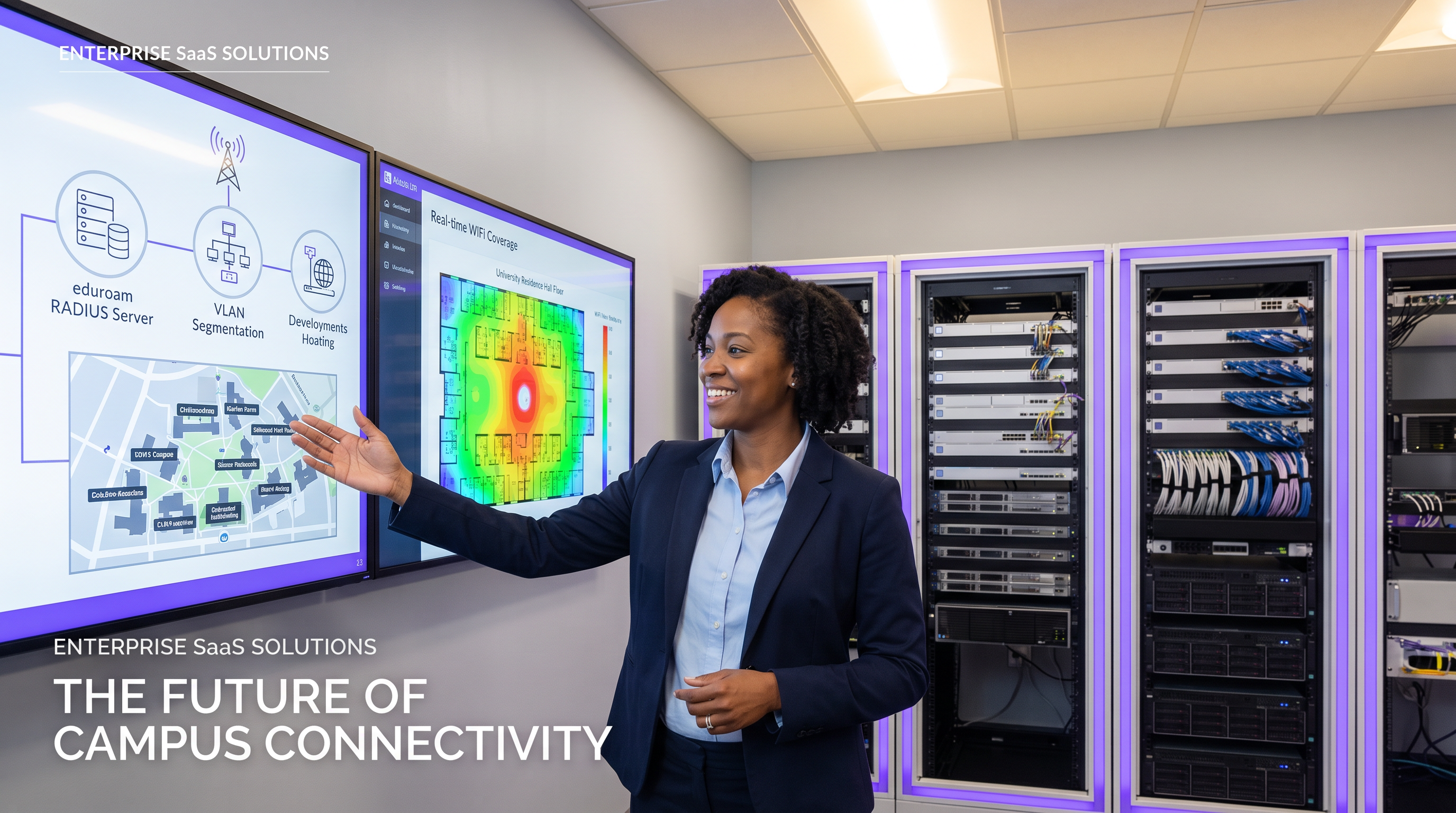
Riepilogo Esecutivo
Per le università moderne, la rete WiFi del campus non è più un semplice servizio aggiuntivo — è un'infrastruttura critica che sostiene l'erogazione accademica, la vita studentesca e l'efficienza operativa. Man mano che le istituzioni di istruzione superiore si espandono, i team IT affrontano una triade di complesse sfide di rete: la gestione della federazione sicura e senza interruzioni di eduroam, la progettazione di ambienti micro-segmentati ad alta densità nelle residenze universitarie e l'automazione dell'onboarding Bring Your Own Device (BYOD) per decine di migliaia di utenti simultanei.
Questa guida di riferimento fornisce a leader IT senior, architetti di rete e direttori delle operazioni delle sedi un progetto pratico e neutrale rispetto ai fornitori per la connettività del campus. Esaminiamo il modello proxy RADIUS gerarchico che alimenta eduroam, dettagliamo l'implementazione delle VLAN per stanza per proteggere i dispositivi degli studenti e delineiamo un robusto ciclo di vita della registrazione dei dispositivi. Adottando questi standard architettonici, le istituzioni possono ridurre significativamente il carico di lavoro dell'helpdesk, garantire la conformità con le normative sulla protezione dei dati e offrire un'esperienza digitale senza interruzioni negli spazi accademici e residenziali. I principi qui esplorati sono ugualmente trasferibili agli ambienti Hospitality e Healthcare dove la connettività ad alta densità e multi-tenant è una sfida operativa quotidiana.
Approfondimento Tecnico
L'Architettura di Federazione eduroam
eduroam (education roaming) è il servizio di accesso roaming sicuro e mondiale sviluppato per la comunità internazionale della ricerca e dell'istruzione. Consente a studenti, ricercatori e personale delle istituzioni partecipanti di ottenere connettività internet in tutto il campus e quando visitano altre istituzioni partecipanti, semplicemente aprendo il proprio laptop o collegando il proprio dispositivo mobile — nessuna configurazione manuale richiesta nel sito visitato.
Dietro le quinte, eduroam si basa su un framework di autenticazione IEEE 802.1X accoppiato con un'architettura proxy RADIUS (Remote Authentication Dial-In User Service) gerarchica. Quando un utente tenta di connettersi all'SSID eduroam presso un'istituzione visitata (il Service Provider, o SP), il punto di accesso locale agisce come Network Access Server (NAS). Inoltra la richiesta di autenticazione tramite l'Extensible Authentication Protocol (EAP) al server RADIUS del campus.
Se il realm dell'utente (ad esempio, @university.edu) non corrisponde al dominio locale, il server RADIUS del campus inoltra la richiesta a un proxy RADIUS nazionale — JANET nel Regno Unito, GÉANT a livello paneuropeo. Il proxy nazionale instrada la richiesta all'istituzione di origine dell'utente (l'Identity Provider, o IdP), che convalida le credenziali rispetto al suo archivio di identità (Active Directory o LDAP) e restituisce un messaggio Access-Accept o Access-Reject attraverso la catena di proxy.
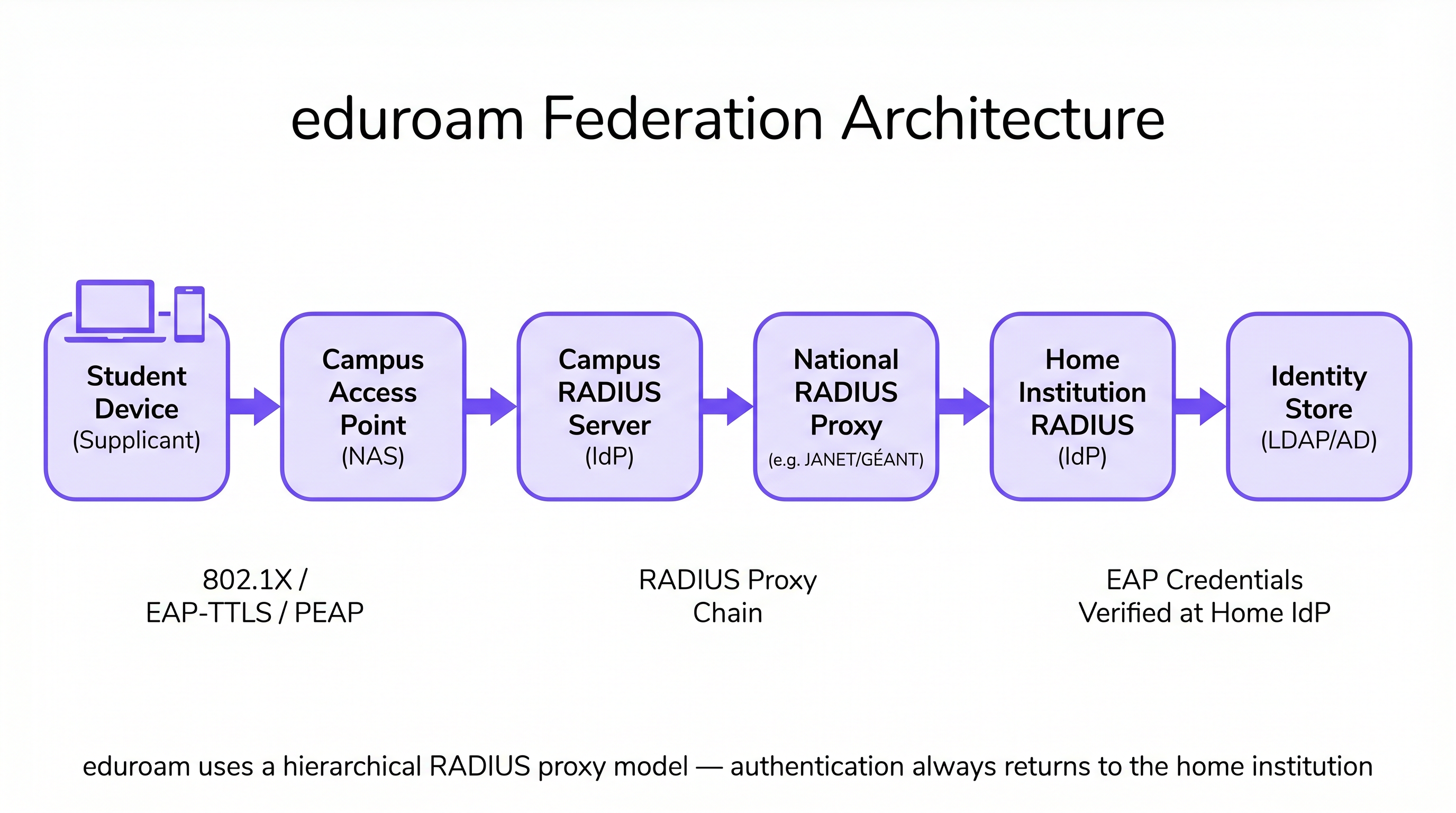
Questa architettura garantisce che le credenziali dell'utente non siano mai esposte all'istituzione visitata, mantenendo rigorosi standard di sicurezza e privacy coerenti con i requisiti GDPR. Il campus visitato non detiene né elabora mai la password dell'utente — essa viene sempre e solo trasmessa e verificata presso l'istituzione di origine.
Micro-Segmentazione delle Residenze Universitarie: VLAN per Stanza
Le residenze universitarie presentano uno degli ambienti RF più impegnativi nel networking aziendale. La densità dei dispositivi — spesso da tre a cinque per studente — combinata con la proliferazione dell'IoT consumer (altoparlanti intelligenti, console di gioco, chiavette per lo streaming, stampanti wireless), crea un ambiente che sovraccarica rapidamente le architetture di rete piatte. Le reti tradizionali di dormitori a singola sottorete generano traffico broadcast eccessivo, creano significative vulnerabilità di sicurezza e producono un'esperienza utente degradata man mano che i dispositivi si scoprono a vicenda in tutto l'edificio.
L'approccio standard del settore è il mapping VLAN per stanza. In questa architettura, il sistema Network Access Control (NAC) assegna dinamicamente una VLAN unica a ogni singola stanza o suite del dormitorio. Quando uno studente connette il proprio smartphone, laptop o dispositivo IoT registrato, il server RADIUS valuta l'identità dell'utente e gli attributi di posizione, assegnandoli al loro micro-segmento specifico. Questo crea un'esperienza di Personal Area Network (PAN): i dispositivi dello studente possono comunicare tra loro (ad esempio, trasmettere da un telefono a una Apple TV), ma sono completamente isolati dai dispositivi nella stanza adiacente.
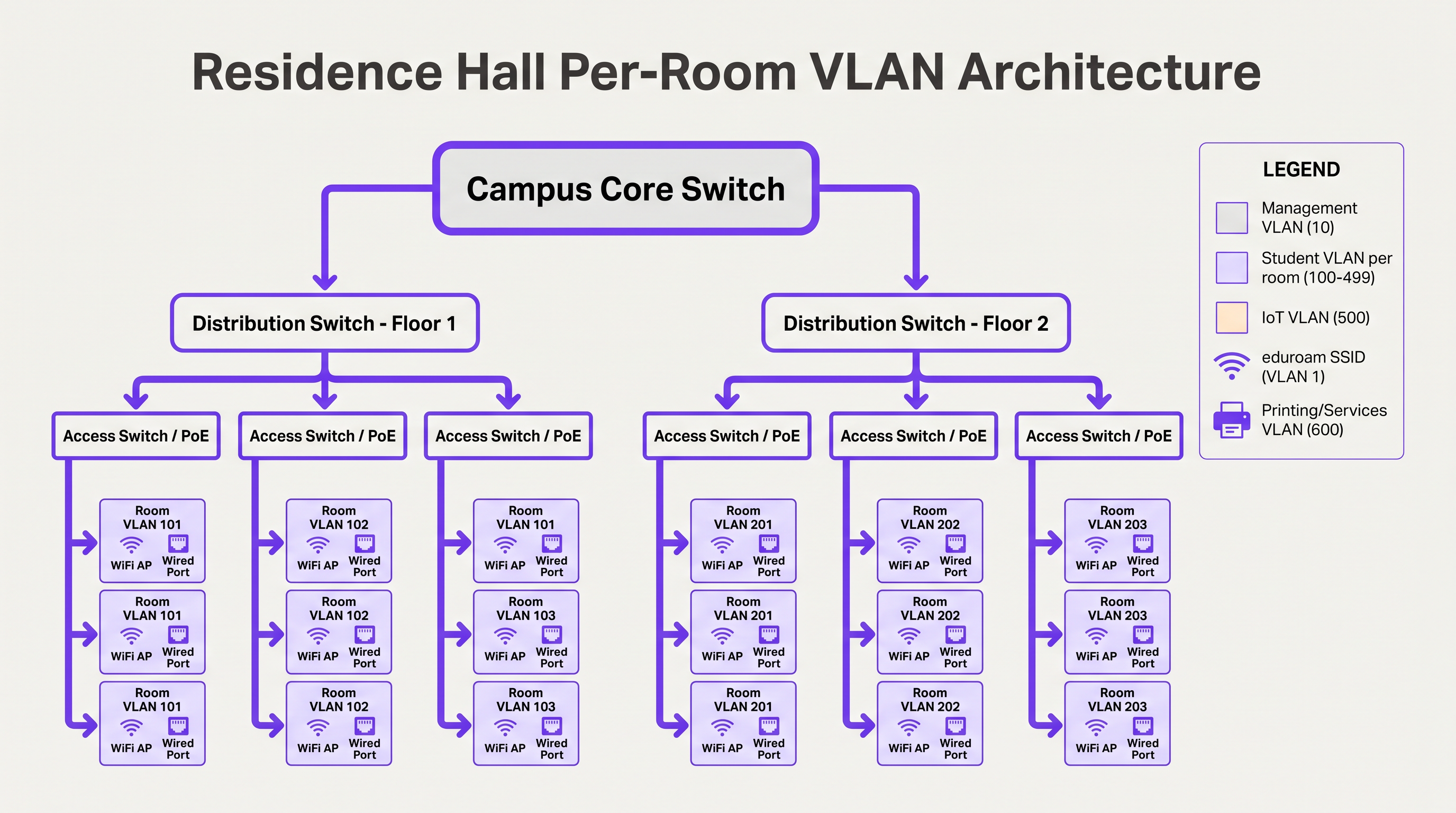
Per gestire questo su larga scala, i team IT devono implementare l'assegnazione dinamica di VLAN utilizzando 802.1X per i dispositivi compatibili (laptop, smartphone) e MAC Authentication Bypass (MAB) accoppiato con un portale di registrazione dei dispositivi per i dispositivi IoT headless che non supportano l'autenticazione aziendale. L'assegnazione VLAN viene restituita dal server RADIUS come attributo standard nel messaggio Access-Accept (Tunnel-Type, Tunnel-Medium-Type, Tunnel-Private-Group-ID).
Onboarding BYOD su Larga Scala
All'inizio dell'anno accademico, le università sperimentano picchi massicci di onboarding. Un processo BYOD manuale o mal progettato sovraccaricherà l'helpdesk IT entro poche ore. Un'architettura scalabile si basa sul provisioning automatizzato dei certificati piuttosto che richiedere agli utenti di configurare manualmente impostazioni EAP complesse o di ricordarsi di aggiornare la propria configurazione WiFi ogni volta che la password della directory cambia.
Il flusso ottimale utilizza un SSID di onboarding aperto che limita l'accesso a un captive portal e ai server di provisioning necessari. Gli utenti si autenticano tramite Single Sign-On (SSO), undopo il quale viene scaricato un payload del profilo del sistema operativo nativo. Questo payload utilizza SCEP (Simple Certificate Enrollment Protocol) o EST (Enrollment over Secure Transport) per richiedere un certificato client unico all'Autorità di Certificazione del campus.
Una volta installato il certificato, il dispositivo interrompe automaticamente la connessione di onboarding e si associa alla rete sicura 802.1X (come eduroam) utilizzando EAP-TLS. Ciò elimina i problemi di connessione legati alla password — la causa principale dei ticket di assistenza WiFi — e fornisce al team di rete una visibilità granulare su ogni dispositivo connesso.
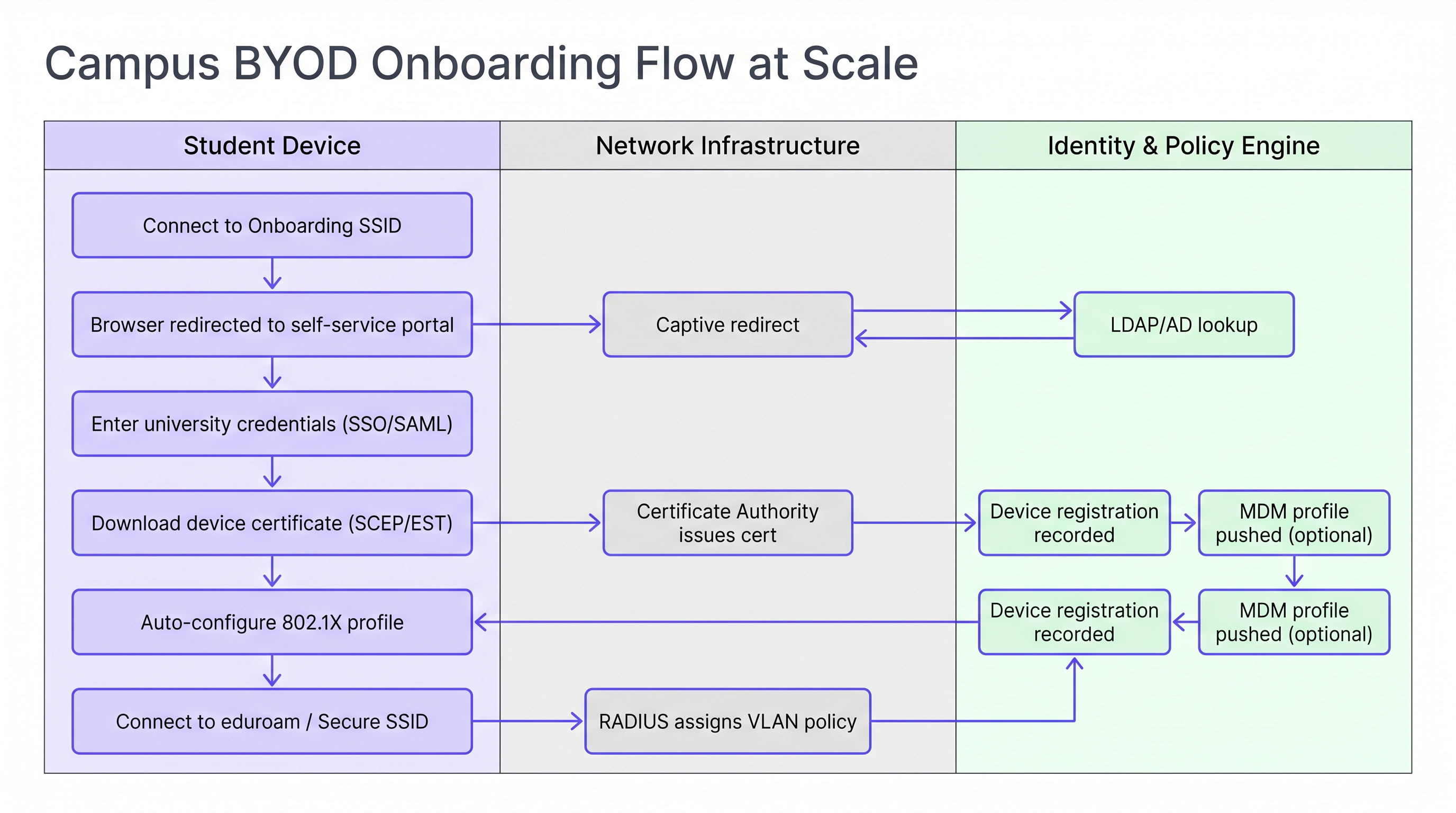
Per le istituzioni che gestiscono un mix di dispositivi personali e di proprietà dell'università, l'integrazione del flusso di onboarding con una soluzione MDM (Mobile Device Management) consente di inviare automaticamente i profili di policy durante la fase di provisioning del certificato, abilitando l'applicazione delle policy per dispositivo senza ulteriore interazione da parte dell'utente.
Guida all'Implementazione
La distribuzione di questa architettura richiede un attento coordinamento tra i team di ingegneria di rete, gestione delle identità e sicurezza. La seguente sequenza rappresenta un ordine di distribuzione collaudato per un progetto greenfield o di aggiornamento importante.
Fase 1 — Standardizzare l'archivio delle identità. Assicurarsi che la directory Active Directory o LDAP sia pulita, con gruppi ben definiti per studenti, docenti, personale e ospiti. Confermare che l'appartenenza ai gruppi sia accurata e che siano in atto processi automatizzati di provisioning e de-provisioning. Questo è fondamentale per l'applicazione delle policy: se i dati in ingresso sono errati, lo saranno anche quelli in uscita.
Fase 2 — Implementare una soluzione NAC robusta. Implementare un sistema di Network Access Control in grado di gestire richieste RADIUS ad alto volume, assegnazione dinamica di VLAN e profilazione dei dispositivi. Assicurare la ridondanza su più nodi in data center separati. Testare il carico dell'infrastruttura prima dell'inizio del semestre, non durante.
Fase 3 — Configurare i proxy RADIUS eduroam. Stabilire tunnel sicuri verso il proprio operatore di roaming nazionale. Implementare regole di routing del realm rigorose per prevenire loop e garantire che solo i realm validi e registrati siano instradati verso l'esterno. Configurare avvisi di monitoraggio per la latenza del proxy e i tassi di errore.
Fase 4 — Implementare la registrazione dei dispositivi per IoT. Distribuire un portale self-service dove gli studenti possono registrare gli indirizzi MAC delle loro console di gioco, smart TV e altri dispositivi headless. Il portale deve essere abbastanza semplice da usare senza l'assistenza IT. Collegarlo direttamente al NAC per l'assegnazione automatica di VLAN tramite MAB.
Fase 5 — Ottimizzare la RF per alta densità. Commissionare un'adeguata indagine RF prima della distribuzione. Nelle residenze universitarie, pianificare la copertura AP in ogni stanza. Disabilitare le velocità di trasmissione dati legacy inferiori a 12 Mbps per forzare i client a spostarsi sull'AP ottimale. Configurare la potenza di trasmissione per creare confini RF puliti tra le stanze.
Per le aree pubbliche del campus — biblioteche, centri studenteschi, spazi esterni — considerare l'utilizzo di soluzioni Guest WiFi con social login o autenticazione SMS per i visitatori che non dispongono di credenziali eduroam. Il monitoraggio di questi ambienti con WiFi Analytics consente la gestione della capacità in tempo reale e l'identificazione proattiva delle lacune di copertura.
Migliori Pratiche
Rendere obbligatorio EAP-TLS per i dispositivi gestiti. Per le risorse di proprietà dell'università, utilizzare esclusivamente l'autenticazione basata su certificato. Offre il massimo livello di sicurezza e previene il furto di credenziali. EAP-TTLS o PEAP dovrebbero essere riservati come fallback per i dispositivi personali non gestiti solo durante un periodo di transizione.
Applicare DHCP Snooping e BPDU Guard. Uno studente che collega un router consumer a una porta Ethernet di una stanza del dormitorio può compromettere l'intera sottorete. Questi controlli devono essere applicati a tutte le porte degli switch di accesso senza eccezioni.
Monitorare e analizzare continuamente. Utilizzare WiFi Analytics per monitorare l'utilizzo degli AP, il numero di client e i modelli di roaming. Questi dati sono preziosi per la pianificazione della capacità e l'identificazione di zone morte RF in aule e biblioteche. La correlazione dei dati di presenza WiFi con le metriche di utilizzo dello spazio consente decisioni di gestione delle strutture basate sui dati.
Sfruttare i servizi di localizzazione per le operazioni del campus. Implementare l'integrazione di Wayfinding nell'app del campus per aiutare i nuovi studenti a navigare in edifici complessi e a individuare spazi di studio disponibili basati sui dati di associazione AP in tempo reale. Ciò riduce la pressione sulla segnaletica fisica e migliora l'esperienza degli studenti durante i periodi di traffico intenso.
Allinearsi alla pianificazione della transizione a WPA3. Sebbene WPA2-Enterprise rimanga lo standard dominante, pianificare il ciclo di aggiornamento degli AP per supportare WPA3-Enterprise (modalità a 192 bit per ambienti ad alta sicurezza) ed Enhanced Open (OWE) per gli SSID guest. WPA3 elimina la classe di vulnerabilità KRACK e fornisce la forward secrecy, sempre più rilevante per la conformità GDPR.
Risoluzione dei Problemi e Mitigazione dei Rischi
Errori di timeout RADIUS durante l'onboarding di picco. Durante le prime 48 ore del semestre, i server RADIUS possono essere sovraccaricati, portando a timeout di autenticazione e a un'ondata di chiamate all'helpdesk. Mitigazione: Test di carico preventivi, bilanciamento del carico su più nodi RADIUS e regolazione dei timer EAP sul controller LAN wireless per accomodare lievi ritardi del proxy.
Errori di rilevamento dei dispositivi IoT. Gli studenti segnalano frequentemente di non riuscire a trasmettere ai loro smart TV o a connettersi a stampanti wireless. Mitigazione: Se i dispositivi risiedono su VLAN separate, configurare un gateway mDNS o un proxy Bonjour per inoltrare specifici protocolli di rilevamento attraverso il confine VLAN per le coppie VLAN per stanza pertinenti. Assicurarsi che il gateway sia configurato per le singole VLAN delle stanze, non per l'intero edificio.
Loop di routing del proxy eduroam. Regole di routing del realm configurate in modo errato possono causare il looping delle richieste di autenticazione tra i server proxy, con conseguenti timeout. Mitigazione: Implementare un rigoroso whitelisting del realm e configurare il rilevamento dei loop sul proxy RADIUS. Verificare regolarmente le tabelle di routing rispetto al registro dei realm pubblicato dall'operatore nazionale.
Revoca dei Certificati su Larga Scala. Quando uno studente lascia l'istituzione, il suo certificato deve essere revocato tempestivamente per impedire l'accesso continuo alla rete. Mitigazione: Implementare lo stapling OCSP (Online Certificate Status Protocol) e assicurarsi che la CRL (Certificate Revocation List) della CA sia pubblicata e accessibile ai server RADIUS. Automatizzare la revoca come parte del flusso di lavoro di de-provisioning degli studenti.
ROI e Impatto sul Business
Investire in un'architettura WiFi campus robusta e automatizzata offre ritorni significativi e misurabili su più dimensioni.
| Metrica | Baseline (Architettura Legacy) | Obiettivo (Architettura Moderna) | Miglioramento |
|---|---|---|---|
| Ticket Helpdesk WiFi (Settimana 1) | 2.000–3.000 | 600–900 | ~70% di riduzione |
| Tempo medio per l'onboarding di un nuovo dispositivo | 15–30 minuti (manuale) | 3–5 minuti (automatizzato) | ~80% di riduzione |
| Raggio d'azione dell'incidente di sicurezza | Intera sottorete dell'edificio | VLAN di una singola stanza | Contenuto |
| Costo di implementazione AP per stanza | Alto (modello corridoio) | Moderato (in-room, bassa potenza) | Comparabile con risultati migliori |
Volume Helpdesk Ridotto. L'onboarding BYOD automatizzato basato su certificati può ridurre i ticket di supporto relativi al WiFi fino al 70% durante il periodo critico di inizio trimestre, liberando il personale IT per concentrarsi su lavori di maggior valore.
Postura di Sicurezza Migliorata. La micro-segmentazione e l'autenticazione 802.1X riducono drasticamente il raggio d'azione di un dispositivo compromesso, mitigando il rischio di movimento laterale da parte di ransomware — una minaccia crescente negli ambienti dell'istruzione superiore.
Gestione del Campus Basata sui Dati. Integrando i dati di rete con Sensors e piattaforme di analisi, le università possono ottimizzare l'utilizzo dello spazio, regolare gli orari HVAC in base all'occupazione e migliorare le operazioni complessive del campus. La stessa infrastruttura WiFi Analytics utilizzata per la gestione della rete diventa una risorsa strategica per la pianificazione delle strutture e del patrimonio.
I modelli architetturali descritti in questa guida — micro-segmentazione, onboarding automatizzato e identità federata — sono direttamente applicabili oltre l'istruzione superiore. Gli ambienti Retail beneficiano degli stessi principi di segmentazione BYOD per i dispositivi del personale, e le reti Healthcare richiedono un rigore equivalente per l'isolamento dell'IoT medico. I principi SD-WAN che sono alla base della connettività WAN del campus sono ulteriormente esplorati in I Vantaggi Chiave dell'SD-WAN per le Aziende Moderne .
Per le organizzazioni che desiderano estendere l'intelligenza basata sul WiFi nell'automazione del marketing e nei flussi di lavoro di engagement, i principi del triggering basato sulla presenza sono dettagliati in Automazione del Marketing Basata su Eventi Attivata dalla Presenza WiFi .
Ascolta il Briefing Audio:
Definizioni chiave
RADIUS Proxy
A server that forwards authentication requests between a Network Access Server (NAS) and the final authentication server (IdP), routing based on the user's realm.
Crucial for eduroam federation. When a visiting user's realm does not match the local domain, the campus RADIUS server proxies the request outward through the national hierarchy to the home institution.
EAP-TLS (Extensible Authentication Protocol — Transport Layer Security)
An 802.1X authentication method requiring both a server-side certificate (on the RADIUS server) and a client-side certificate (on the endpoint device). No passwords are transmitted.
The gold standard for BYOD security in higher education. Eliminates password-related WiFi helpdesk tickets and provides mutual authentication, preventing rogue AP attacks.
Micro-segmentation
The practice of dividing a network into small, isolated segments — typically at the VLAN level — to limit lateral movement and reduce the attack surface.
Applied in residence halls via Per-Room VLANs to isolate student devices from one another, preventing ransomware propagation and enforcing privacy between residents.
MAC Authentication Bypass (MAB)
A fallback authentication method that uses a device's MAC address as its identity when the device does not support 802.1X.
Essential for connecting IoT devices (gaming consoles, smart TVs, printers) in dormitories to the secure network. The MAC must be pre-registered in the NAC to receive a valid VLAN assignment.
Realm
The domain portion of a user's Network Access Identifier (NAI), typically the part after the '@' symbol (e.g., 'university.edu' in 'student@university.edu').
RADIUS proxy servers use the realm to route eduroam authentication requests to the correct home institution. Misconfigured realm routing is a common cause of eduroam failures for visiting users.
SCEP (Simple Certificate Enrollment Protocol)
A protocol that enables network devices to automatically request and receive digital certificates from a Certificate Authority.
Used in BYOD onboarding flows to automatically provision client certificates to student devices without manual IT intervention, enabling EAP-TLS authentication at scale.
mDNS Gateway (Bonjour Proxy)
A service that forwards Multicast DNS packets across different subnets or VLANs, enabling device discovery protocols to function in segmented networks.
Required in Per-Room VLAN architectures when a student's phone (on the wireless VLAN) needs to discover their smart TV (on the wired VLAN) within the same room's micro-segment.
Network Access Control (NAC)
A security solution that enforces policy on devices seeking to access a network, controlling admission based on identity, device health, and context.
The central orchestration layer in a campus WiFi architecture. NAC handles 802.1X authentication, dynamic VLAN assignment, device profiling, and MAB for IoT devices.
Supplicant
The software component on an endpoint device that handles the 802.1X authentication exchange with the network.
Built into modern operating systems (Windows, macOS, iOS, Android). When troubleshooting eduroam connection failures, the supplicant configuration — specifically the EAP method and server certificate validation settings — is the first place to investigate.
WPA3-Enterprise
The latest generation of the Wi-Fi Protected Access enterprise security standard, introducing 192-bit cryptographic strength and eliminating vulnerabilities present in WPA2.
Relevant for campus network refresh planning. WPA3-Enterprise provides forward secrecy via ECDHE key exchange, meaning captured traffic cannot be decrypted retroactively even if a certificate is later compromised.
Esempi pratici
A university is upgrading a 500-bed residence hall built in the 1970s. Students are complaining that they cannot see their wireless printers or cast to their smart TVs, while the IT security team is concerned about the flat /22 subnet currently serving the entire building. How should the network be redesigned?
Phase 1 — Network Redesign: Replace the flat /22 subnet with a Per-Room VLAN architecture. Assign a unique VLAN ID (e.g., VLANs 1000–1499) to each room. Configure the NAC to dynamically assign the correct VLAN based on the student's authenticated identity and their room assignment in the student records system.
Phase 2 — Device Registration Portal: Deploy a self-service portal where students register the MAC addresses of headless devices (printers, smart TVs, gaming consoles). The portal authenticates the student via SSO and records the MAC-to-room mapping in the NAC database.
Phase 3 — MAB Configuration: Configure switch ports and the residential SSID to use MAC Authentication Bypass for registered devices. When a registered MAC connects, RADIUS returns the student's Per-Room VLAN assignment, placing the device in the correct micro-segment.
Phase 4 — mDNS Gateway: Configure the wireless controller's mDNS gateway to proxy Bonjour and SSDP discovery traffic within each Per-Room VLAN boundary, enabling casting and printing without cross-room exposure.
Phase 5 — AP Refresh: Replace hallway APs with in-room units. Reduce transmit power to 8–12 dBm to create clean RF cells and reduce co-channel interference.
During the first week of term, a 15,000-student university's IT helpdesk receives over 2,500 WiFi tickets in 48 hours. The majority are from students who changed their university portal password and are now unable to connect to eduroam. The current authentication method is PEAP-MSCHAPv2. What is the architectural change required, and how should it be rolled out?
Root Cause: PEAP-MSCHAPv2 authenticates using the user's AD password. When the password changes, the stored WiFi profile credential becomes invalid, breaking the connection.
Architectural Change: Transition from PEAP-MSCHAPv2 to EAP-TLS (certificate-based authentication).
Rollout Plan:
- Deploy a Campus Certificate Authority (or integrate with an existing PKI) and configure SCEP/EST endpoints.
- Stand up a BYOD onboarding tool (vendor-neutral options include FreeRADIUS with a custom portal, or commercial solutions). Configure it to authenticate via SSO and provision client certificates.
- Create an 'Onboarding' SSID (open, captive-portal restricted) alongside the existing eduroam SSID.
- Communicate to students: 'Connect to Onboarding-WiFi, follow the steps, and your WiFi will never break when you change your password again.'
- Once certificate adoption reaches >80%, disable PEAP-MSCHAPv2 on the RADIUS server and enforce EAP-TLS only.
- Set certificate lifetime to 2 years with automated renewal 30 days before expiry.
Domande di esercitazione
Q1. A visiting researcher from the University of Amsterdam arrives at your campus in London. They connect to the eduroam SSID but receive an 'Authentication Failed' error. Your local RADIUS logs confirm the Access-Request is being forwarded to the national proxy, but no response is received within the timeout window. Where is the most likely point of failure, and what is your escalation path?
Suggerimento: Apply the 'Home Always Knows' principle. Your local infrastructure is functioning correctly if the request is leaving your campus.
Visualizza risposta modello
Since the local RADIUS server is successfully proxying the request outward, the local campus infrastructure is functioning correctly. The most likely failure points are: (1) the national proxy (JANET) is unable to route to the Dutch national proxy (SURFnet), or (2) the researcher's home institution RADIUS server is offline or misconfigured. The escalation path is: first, contact your national roaming operator (JANET) with the timestamp and realm (@uva.nl) to check proxy routing logs. Second, advise the researcher to contact their home institution's IT helpdesk, as the issue is almost certainly on their side. Do not spend time troubleshooting your own RADIUS infrastructure.
Q2. You are designing the WiFi for a new 1,000-bed residence hall. The facilities team wants to install APs in the hallways to save on cabling and installation costs. Provide a technical argument against this approach and specify the recommended alternative.
Suggerimento: Consider RF attenuation through fire doors and masonry, co-channel interference in long corridors, and the implications for Per-Room VLAN architecture.
Visualizza risposta modello
Hallway deployments are an anti-pattern for modern high-density residential environments for three reasons. First, RF signals must penetrate thick fire-rated doors and masonry walls to reach devices inside rooms, resulting in poor signal quality and low throughput precisely where users are located. Second, APs deployed in a long corridor have clear line-of-sight to each other, causing severe co-channel interference that degrades performance for all clients. Third, the hallway model makes Per-Room VLAN micro-segmentation architecturally ambiguous — a hallway AP serves multiple rooms simultaneously, complicating dynamic VLAN assignment. The recommended approach is in-room AP deployment: one AP per room for new builds, or one AP per two rooms in modern construction with thin partition walls. Transmit power should be set to 8–12 dBm to create clean RF cells. While the upfront cabling cost is higher, the operational savings from reduced helpdesk volume and improved user experience deliver a positive ROI within the first academic year.
Q3. A student registers their PlayStation 5 MAC address in the device registration portal. The console is connected via the residential SSID but cannot discover the student's phone for Remote Play. Both devices are confirmed to be on the same Per-Room VLAN. What is the most likely configuration issue?
Suggerimento: Consider the wireless controller's client isolation settings and the protocols used by device discovery.
Visualizza risposta modello
The most likely cause is that client isolation (also called AP isolation or wireless isolation) is enabled on the residential SSID. Client isolation prevents wireless clients on the same SSID from communicating directly with each other, even if they are on the same VLAN. This is a common security default that is appropriate for guest networks but counterproductive in a Per-Room VLAN environment where device-to-device communication is intentional. The fix is to disable client isolation specifically on the residential SSID (or create a policy exception for the Per-Room VLAN range). If the console is on the wired network and the phone is on wireless, the issue may instead be an mDNS gateway not forwarding Sony's device discovery protocol (SSDP/UPnP) across the wired-to-wireless boundary within the same VLAN.
Continua a leggere questa serie
Cos'è una Probe Request? Capire come i dispositivi scoprono le reti
Questa guida di riferimento tecnico offre un'analisi approfondita delle probe request IEEE 802.11, della scansione attiva versus passiva e dell'impatto della randomizzazione MAC sull'analisi dei dati dei luoghi. Fornisce strategie di implementazione attuabili per gli architetti di rete al fine di ottimizzare le implementazioni ad alta densità, mitigare le probe storm e garantire una raccolta dati accurata e conforme al GDPR utilizzando livelli di identità autenticati.
Come Risolvere il WiFi Lento Senza Aggiornare il Tuo Piano Internet
Una guida tecnica di riferimento completa per IT managers e network architects sull'ottimizzazione delle prestazioni WiFi aziendali senza aumentare la ISP bandwidth. Copre RF tuning, la gestione della densità dei client, l'implementazione di QoS e come sfruttare WiFi analytics per diagnosticare e risolvere i colli di bottiglia.
La Checklist per la Migrazione da NAC Legacy a NAC Cloud-Native
Questa guida tecnica di riferimento autorevole fornisce una checklist strutturata in tre fasi per la migrazione da Network Access Control (NAC) legacy a un'architettura cloud-native. Fornisce a manager IT e architetti di rete strategie attuabili per gestire l'integrazione dell'identità, la parità delle policy e la conformità senza interrompere le operazioni della sede.