
WiFi en Campus Universitario: eduroam, Residencias Universitarias y BYOD a Gran Escala
Esta arquitectura de referencia proporciona estrategias avanzadas de implementación para el WiFi en campus universitarios, cubriendo la mecánica de federación de eduroam, la microsegmentación VLAN por habitación en residencias universitarias y la incorporación automatizada de certificados BYOD a gran escala. Equipa a los líderes de TI y arquitectos de red con una guía neutral respecto al proveedor y de aplicación inmediata para mejorar la seguridad, reducir la carga de trabajo del servicio de asistencia y ofrecer una experiencia de conectividad fluida en entornos académicos y residenciales.
Escuchar esta guía
Ver transcripción del podcast
Resumen Ejecutivo
Para las universidades modernas, la red WiFi del campus ya no es una mera comodidad, sino una infraestructura crítica que sustenta la impartición académica, la vida estudiantil y la eficiencia operativa. A medida que las instituciones de educación superior crecen, los equipos de TI se enfrentan a una tríada de complejos desafíos de red: gestionar la federación segura y sin interrupciones de eduroam, diseñar entornos microsegmentados de alta densidad en residencias universitarias y automatizar la incorporación de dispositivos propios (BYOD) para decenas de miles de usuarios concurrentes.
Esta guía de referencia proporciona a los líderes de TI sénior, arquitectos de red y directores de operaciones de instalaciones un plan práctico y neutral respecto al proveedor para la conectividad del campus. Examinamos el modelo de proxy RADIUS jerárquico que impulsa eduroam, detallamos la implementación de VLANs por habitación para asegurar los dispositivos de los estudiantes y describimos un ciclo de vida robusto para el registro de dispositivos. Al adoptar estos estándares arquitectónicos, las instituciones pueden reducir significativamente la carga de trabajo del servicio de asistencia, garantizar el cumplimiento de las normativas de protección de datos y ofrecer una experiencia digital fluida en todos los espacios académicos y residenciales. Los principios aquí explorados son igualmente transferibles a entornos de Hostelería y Sanidad donde la conectividad de alta densidad y multiusuario es un desafío operativo diario.
Análisis Técnico Detallado
La Arquitectura de Federación de eduroam
eduroam (education roaming) es el servicio de acceso itinerante seguro y mundial desarrollado para la comunidad internacional de investigación y educación. Permite a estudiantes, investigadores y personal de las instituciones participantes obtener conectividad a internet en el campus y al visitar otras instituciones participantes, simplemente abriendo su portátil o conectando su dispositivo móvil, sin necesidad de configuración manual en el sitio visitado.
Entre bastidores, eduroam se basa en un marco de autenticación IEEE 802.1X acoplado a una arquitectura de proxy RADIUS (Remote Authentication Dial-In User Service) jerárquica. Cuando un usuario intenta conectarse al SSID eduroam en una institución visitada (el Proveedor de Servicios, o SP), el punto de acceso local actúa como Servidor de Acceso a la Red (NAS). Reenvía la solicitud de autenticación a través del Protocolo de Autenticación Extensible (EAP) al servidor RADIUS del campus.
Si el realm del usuario (p. ej., @university.edu) no coincide con el dominio local, el servidor RADIUS del campus envía la solicitud a un Proxy RADIUS Nacional — JANET en el Reino Unido, GÉANT a nivel paneuropeo. El proxy nacional enruta la solicitud a la Institución de Origen del usuario (el Proveedor de Identidad, o IdP), que valida las credenciales contra su almacén de identidades (Active Directory o LDAP) y devuelve un mensaje de Access-Accept o Access-Reject a través de la cadena de proxies.
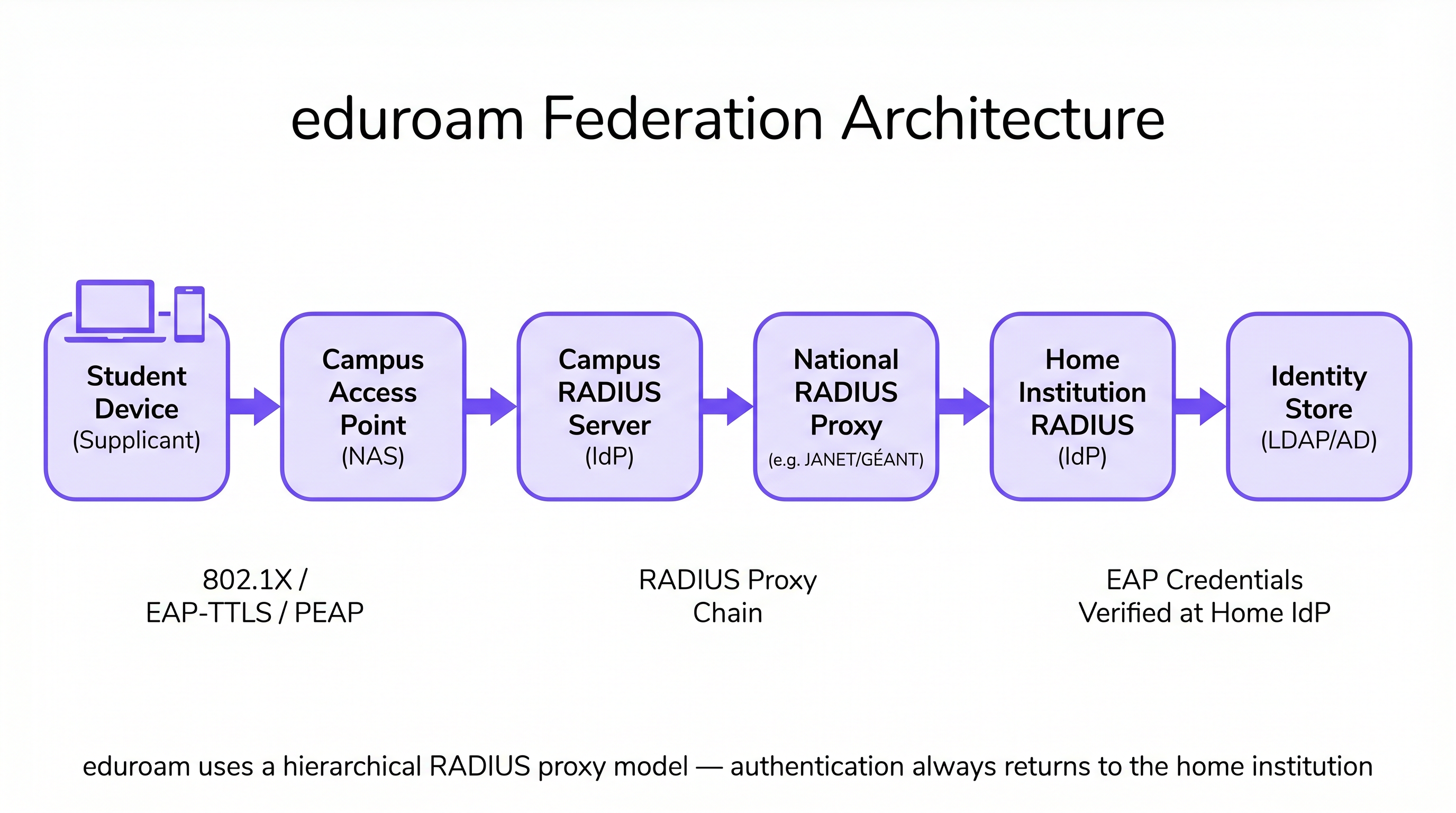
Esta arquitectura garantiza que las credenciales del usuario nunca se exponen a la institución visitada, manteniendo estrictos estándares de seguridad y privacidad consistentes con los requisitos de GDPR. El campus visitado nunca guarda ni procesa la contraseña del usuario; esta solo se transmite y verifica en la institución de origen.
Microsegmentación en Residencias Universitarias: VLANs por Habitación
Las residencias universitarias presentan uno de los entornos de RF más desafiantes en las redes empresariales. La densidad de dispositivos —a menudo de tres a cinco por estudiante—, combinada con la proliferación de IoT de consumo (altavoces inteligentes, consolas de juegos, dispositivos de streaming, impresoras inalámbricas), crea un entorno que rápidamente satura las arquitecturas de red planas. Las redes de dormitorios tradicionales de una sola subred generan un tráfico de difusión excesivo, crean importantes vulnerabilidades de seguridad y producen una experiencia de usuario degradada a medida que los dispositivos se descubren entre sí en todo el edificio.
El enfoque estándar de la industria es el mapeo de VLAN por habitación. En esta arquitectura, el sistema de Control de Acceso a la Red (NAC) asigna dinámicamente una VLAN única a cada habitación o suite de la residencia. Cuando un estudiante conecta su smartphone, portátil o dispositivo IoT registrado, el servidor RADIUS evalúa la identidad del usuario y los atributos de ubicación, asignándolos a su microsegmento específico. Esto crea una experiencia de Red de Área Personal (PAN): los dispositivos del estudiante pueden comunicarse entre sí (p. ej., transmitir desde un teléfono a un Apple TV), pero están completamente aislados de los dispositivos de la habitación adyacente.
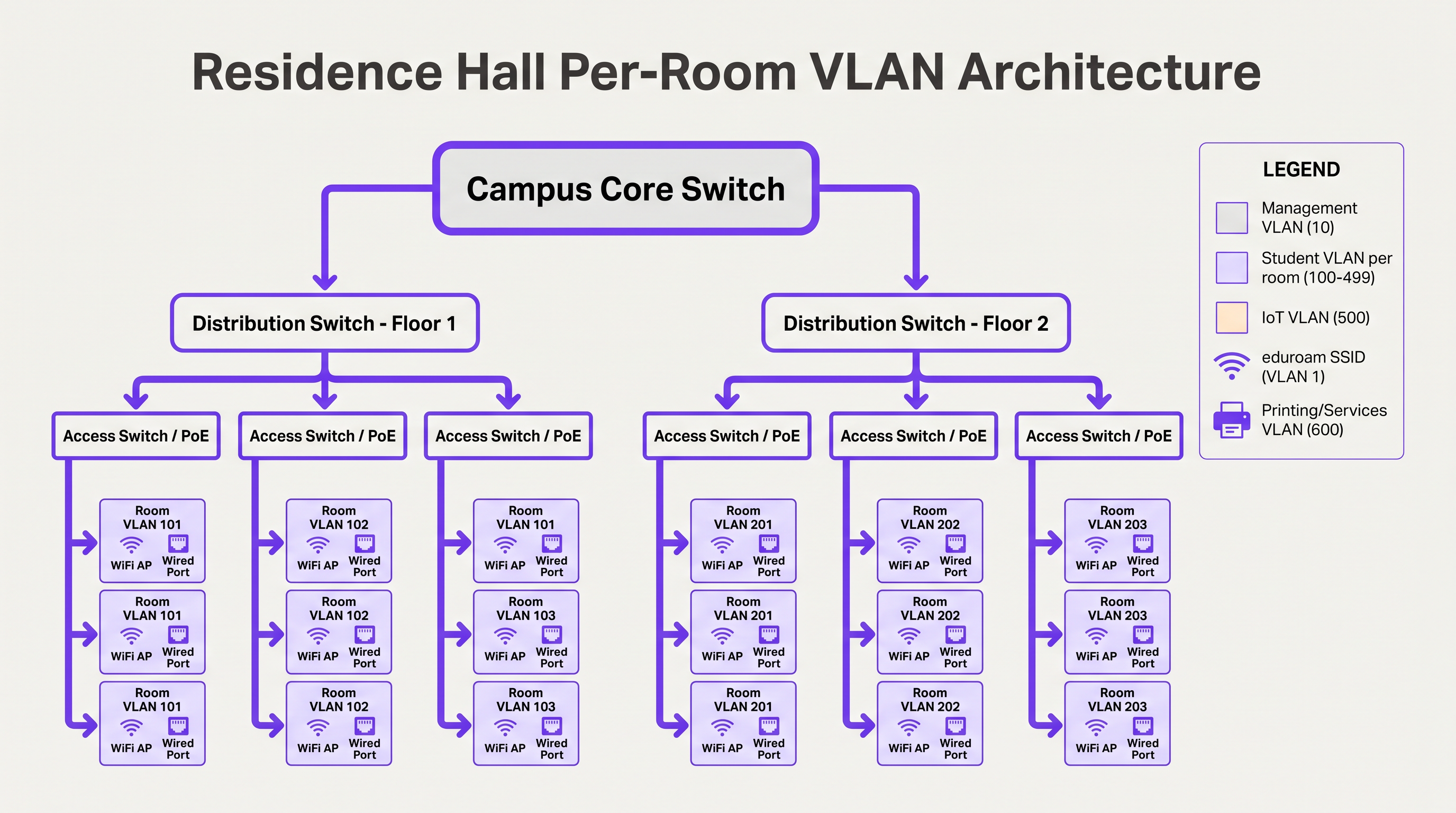
Para gestionar esto a gran escala, los equipos de TI deben implementar la asignación dinámica de VLAN utilizando 802.1X para dispositivos compatibles (portátiles, smartphones) y MAC Authentication Bypass (MAB) junto con un portal de registro de dispositivos para dispositivos IoT sin interfaz que no admiten autenticación empresarial. La asignación de VLAN es devuelta por el servidor RADIUS como un atributo estándar en el mensaje Access-Accept (Tunnel-Type, Tunnel-Medium-Type, Tunnel-Private-Group-ID).
Incorporación de BYOD a Gran Escala
Al inicio del año académico, las universidades experimentan picos masivos de incorporación. Un proceso BYOD manual o mal diseñado saturará el servicio de asistencia de TI en cuestión de horas. Una arquitectura escalable se basa en el aprovisionamiento automatizado de certificados en lugar de requerir que los usuarios configuren manualmente ajustes EAP complejos o recuerden actualizar su configuración WiFi cada vez que cambie su contraseña de directorio. El flujo óptimo utiliza un SSID de incorporación abierto que restringe el acceso a un Captive Portal y a los servidores de aprovisionamiento necesarios. Los usuarios se autentican mediante Single Sign-On (SSO), unPosteriormente, se descarga una carga útil de perfil de SO nativo. Esta carga útil utiliza SCEP (Simple Certificate Enrollment Protocol) o EST (Enrollment over Secure Transport) para solicitar un certificado de cliente único a la Autoridad de Certificación del campus.
Una vez instalado el certificado, el dispositivo abandona automáticamente la conexión de incorporación y se asocia con la red segura 802.1X (como eduroam) utilizando EAP-TLS. Esto elimina los problemas de conexión relacionados con contraseñas —la principal causa de los tickets de soporte de WiFi— y proporciona al equipo de red una visibilidad granular de cada dispositivo conectado.
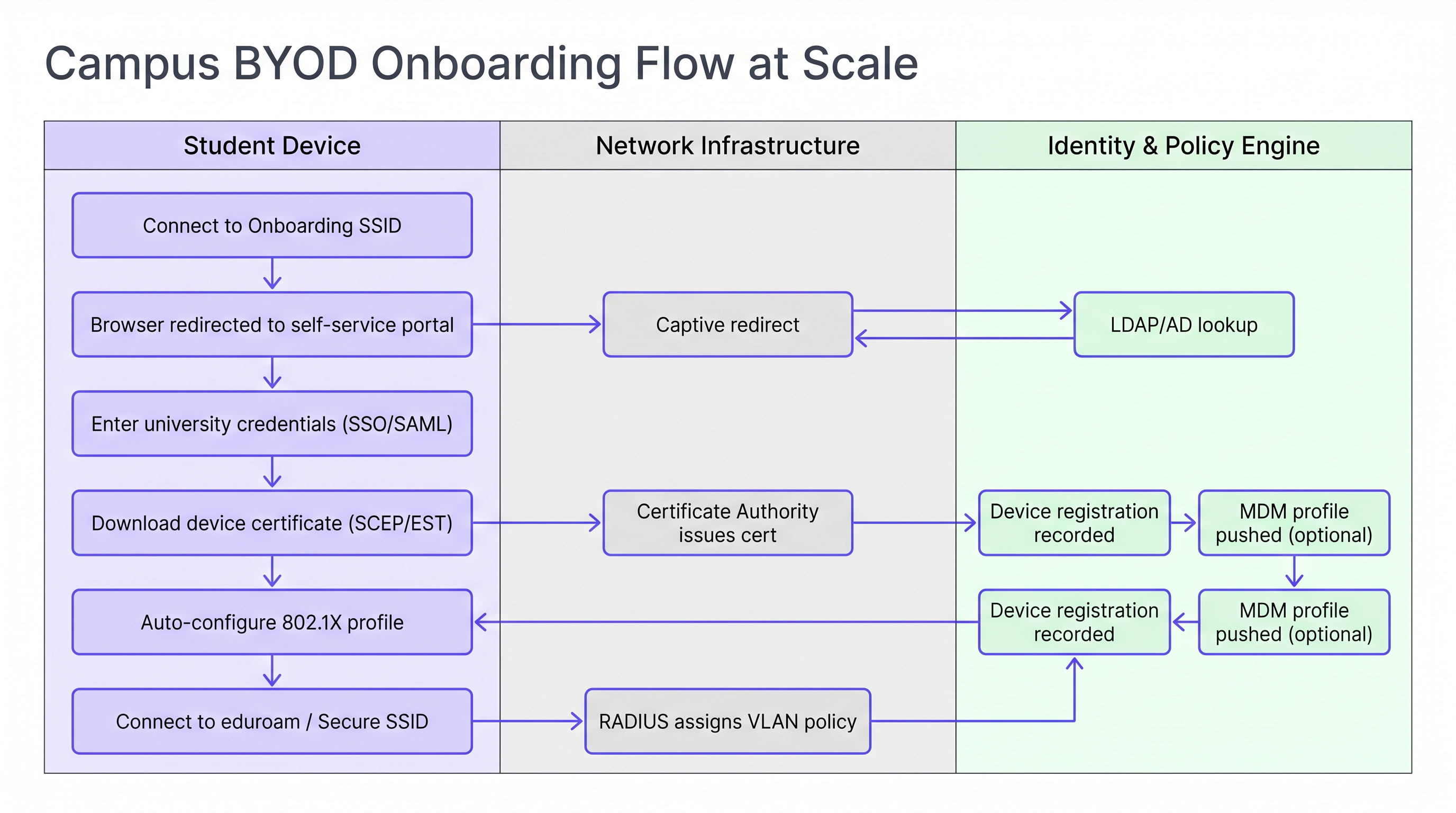
Para las instituciones que gestionan una combinación de dispositivos personales y propiedad de la universidad, la integración del flujo de incorporación con una solución MDM (Mobile Device Management) permite que los perfiles de política se envíen automáticamente durante el paso de aprovisionamiento del certificado, lo que posibilita la aplicación de políticas por dispositivo sin interacción adicional del usuario.
Guía de Implementación
La implementación de esta arquitectura requiere una coordinación cuidadosa entre los equipos de ingeniería de red, gestión de identidades y seguridad. La siguiente secuencia representa un orden de implementación probado para un proyecto nuevo o de actualización importante.
Paso 1 — Estandarizar el Almacén de Identidades. Asegúrese de que su directorio Active Directory o LDAP esté limpio, con grupos bien definidos para estudiantes, profesores, personal y visitantes. Confirme que la pertenencia a los grupos es precisa y que existen procesos automatizados de aprovisionamiento y desaprovisionamiento. Esto es fundamental para la aplicación de políticas: si entra basura, sale basura.
Paso 2 — Implementar una Solución NAC Robusta. Implemente un sistema de Control de Acceso a la Red (NAC) capaz de manejar solicitudes RADIUS de alto volumen, asignación dinámica de VLAN y perfilado de dispositivos. Asegure la redundancia en múltiples nodos en centros de datos separados. Realice pruebas de carga de la infraestructura antes de que comience el trimestre, no durante el mismo.
Paso 3 — Configurar Proxies RADIUS de eduroam. Establezca túneles seguros con su operador nacional de roaming. Implemente reglas estrictas de enrutamiento de reinos para evitar bucles y asegurar que solo los reinos válidos y registrados se reenvíen hacia el exterior. Configure alertas de monitoreo para la latencia del proxy y las tasas de fallo.
Paso 4 — Implementar el Registro de Dispositivos para IoT. Implemente un portal de autoservicio donde los estudiantes puedan registrar las direcciones MAC de sus consolas de videojuegos, televisores inteligentes y otros dispositivos sin pantalla. El portal debe ser lo suficientemente sencillo de usar sin asistencia de TI. Conéctelo directamente a su NAC para la asignación automática de VLAN a través de MAB.
Paso 5 — Optimizar la RF para Alta Densidad. Encargue un estudio de RF adecuado antes de la implementación. En las residencias, planifique la cobertura de AP en las habitaciones. Deshabilite las tasas de datos heredadas por debajo de 12 Mbps para forzar a los clientes a conectarse al AP óptimo. Configure la potencia de transmisión para crear límites de RF limpios entre habitaciones.
Para las áreas públicas del campus —bibliotecas, centros de estudiantes, espacios al aire libre— considere aprovechar las soluciones de Guest WiFi con inicio de sesión social o autenticación por SMS para visitantes que no tengan credenciales de eduroam. La monitorización de estos entornos con WiFi Analytics permite la gestión de la capacidad en tiempo real y la identificación proactiva de las brechas de cobertura.
Mejores Prácticas
Exigir EAP-TLS para Dispositivos Gestionados. Para los activos propiedad de la universidad, utilice exclusivamente la autenticación basada en certificados. Proporciona el nivel más alto de seguridad y previene el robo de credenciales. EAP-TTLS o PEAP deben reservarse como alternativa para dispositivos personales no gestionados solo durante un período de transición.
Aplicar DHCP Snooping y BPDU Guard. Un estudiante que conecta un router de consumo a un puerto Ethernet de una habitación de residencia puede inhabilitar toda la subred. Estos controles deben aplicarse a todos los puertos de conmutación de acceso sin excepción.
Monitorizar y Analizar Continuamente. Utilice WiFi Analytics para monitorizar la utilización de los AP, el número de clientes y los patrones de roaming. Estos datos son inestimables para la planificación de la capacidad y la identificación de zonas muertas de RF en aulas y bibliotecas. La correlación de los datos de presencia WiFi con las métricas de utilización del espacio permite tomar decisiones de gestión de instalaciones basadas en datos.
Aprovechar los Servicios de Ubicación para las Operaciones del Campus. Implemente la integración de Wayfinding en la aplicación del campus para ayudar a los nuevos estudiantes a navegar por edificios complejos y localizar espacios de estudio disponibles basándose en datos de asociación de AP en tiempo real. Esto reduce la presión sobre la señalización física y mejora la experiencia del estudiante durante los períodos de alto tráfico.
Alinear con la Planificación de Transición a WPA3. Aunque WPA2-Enterprise sigue siendo el estándar dominante, planifique su ciclo de actualización de AP para soportar WPA3-Enterprise (modo de 192 bits para entornos de alta seguridad) y Enhanced Open (OWE) para SSIDs de invitados. WPA3 elimina la clase de vulnerabilidad KRACK y proporciona secreto hacia adelante, lo que es cada vez más relevante para el cumplimiento de GDPR.
Solución de Problemas y Mitigación de Riesgos
Fallos de Tiempo de Espera de RADIUS Durante la Incorporación Pico. Durante las primeras 48 horas del trimestre, los servidores RADIUS pueden verse desbordados, lo que provoca tiempos de espera de autenticación y una avalancha de llamadas al servicio de asistencia. Mitigación: Pruebas de carga preventivas, equilibrio de carga entre múltiples nodos RADIUS y ajuste de los temporizadores EAP en el controlador de LAN inalámbrica para acomodar ligeros retrasos del proxy.
Fallos de Detección de Dispositivos IoT. Los estudiantes suelen informar que no pueden transmitir a sus televisores inteligentes ni conectarse a impresoras inalámbricas. Mitigación: Si los dispositivos residen en VLAN separadas, configure una puerta de enlace mDNS o un proxy Bonjour para reenviar protocolos de detección específicos a través del límite de VLAN para los pares de VLAN por habitación relevantes. Asegúrese de que la puerta de enlace esté limitada a VLAN de habitaciones individuales, no a todo el edificio.
Bucles de Enrutamiento del Proxy de eduroam. Las reglas de enrutamiento de reinos mal configuradas pueden hacer que las solicitudes de autenticación entren en bucle entre los servidores proxy, lo que provoca tiempos de espera. Mitigación: Implemente una estricta lista blanca de reinos y configure la detección de bucles en su proxy RADIUS. Audite regularmente las tablas de enrutamiento contra el registro de reinos publicado por el operador nacional.
Revocación de certificados a escala. Cuando un estudiante abandona la institución, su certificado debe ser revocado rápidamente para evitar el acceso continuo a la red. Mitigación: Implemente el 'stapling' de OCSP (Online Certificate Status Protocol) y asegúrese de que la CRL (Certificate Revocation List) de su CA esté publicada y sea accesible para sus servidores RADIUS. Automatice la revocación como parte del flujo de trabajo de desaprovisionamiento de estudiantes.
ROI e Impacto Empresarial
Invertir en una arquitectura WiFi de campus robusta y automatizada ofrece retornos significativos y medibles en múltiples dimensiones.
| Métrica | Línea base (Arquitectura heredada) | Objetivo (Arquitectura moderna) | Mejora |
|---|---|---|---|
| Tickets de Helpdesk de WiFi (Semana 1) | 2.000–3.000 | 600–900 | ~70% de reducción |
| Tiempo medio para incorporar un nuevo dispositivo | 15–30 minutos (manual) | 3–5 minutos (automatizado) | ~80% de reducción |
| Radio de impacto de incidentes de seguridad | Subred de edificio completo | VLAN de una sola habitación | Contenido |
| Coste de despliegue de AP por habitación | Alto (modelo de pasillo) | Moderado (en habitación, menor potencia) | Comparable con mejores resultados |
Reducción del volumen de Helpdesk. La incorporación automatizada de BYOD basada en certificados puede reducir los tickets de soporte relacionados con el WiFi hasta en un 70% durante el período crítico de inicio de curso, liberando al personal de TI para que se centre en trabajos de mayor valor.
Postura de seguridad mejorada. La microsegmentación y la autenticación 802.1X reducen drásticamente el radio de impacto de un dispositivo comprometido, mitigando el riesgo de movimiento lateral por ransomware, una amenaza creciente en entornos de educación superior.
Gestión del campus basada en datos. Al integrar los datos de red con Sensores y plataformas de análisis, las universidades pueden optimizar la utilización del espacio, ajustar los horarios de HVAC según la ocupación y mejorar las operaciones generales del campus. La misma infraestructura de Análisis WiFi utilizada para la gestión de red se convierte en un activo estratégico para la planificación de instalaciones y propiedades.
Los patrones arquitectónicos descritos en esta guía —microsegmentación, incorporación automatizada e identidad federada— son directamente aplicables más allá de la educación superior. Los entornos Minorista se benefician de los mismos principios de segmentación BYOD para dispositivos del personal, y las redes de Sanidad requieren un rigor equivalente para el aislamiento de IoT médico. Los principios de SD-WAN que sustentan la conectividad WAN del campus se exploran con más detalle en Los beneficios clave de SD-WAN para empresas modernas .
Para las organizaciones que buscan extender la inteligencia impulsada por WiFi a la automatización de marketing y los flujos de trabajo de engagement, los principios de activación basada en presencia se detallan en Automatización de marketing basada en eventos activada por la presencia WiFi .
Escuche el resumen de audio:
Definiciones clave
RADIUS Proxy
A server that forwards authentication requests between a Network Access Server (NAS) and the final authentication server (IdP), routing based on the user's realm.
Crucial for eduroam federation. When a visiting user's realm does not match the local domain, the campus RADIUS server proxies the request outward through the national hierarchy to the home institution.
EAP-TLS (Extensible Authentication Protocol — Transport Layer Security)
An 802.1X authentication method requiring both a server-side certificate (on the RADIUS server) and a client-side certificate (on the endpoint device). No passwords are transmitted.
The gold standard for BYOD security in higher education. Eliminates password-related WiFi helpdesk tickets and provides mutual authentication, preventing rogue AP attacks.
Micro-segmentation
The practice of dividing a network into small, isolated segments — typically at the VLAN level — to limit lateral movement and reduce the attack surface.
Applied in residence halls via Per-Room VLANs to isolate student devices from one another, preventing ransomware propagation and enforcing privacy between residents.
MAC Authentication Bypass (MAB)
A fallback authentication method that uses a device's MAC address as its identity when the device does not support 802.1X.
Essential for connecting IoT devices (gaming consoles, smart TVs, printers) in dormitories to the secure network. The MAC must be pre-registered in the NAC to receive a valid VLAN assignment.
Realm
The domain portion of a user's Network Access Identifier (NAI), typically the part after the '@' symbol (e.g., 'university.edu' in 'student@university.edu').
RADIUS proxy servers use the realm to route eduroam authentication requests to the correct home institution. Misconfigured realm routing is a common cause of eduroam failures for visiting users.
SCEP (Simple Certificate Enrollment Protocol)
A protocol that enables network devices to automatically request and receive digital certificates from a Certificate Authority.
Used in BYOD onboarding flows to automatically provision client certificates to student devices without manual IT intervention, enabling EAP-TLS authentication at scale.
mDNS Gateway (Bonjour Proxy)
A service that forwards Multicast DNS packets across different subnets or VLANs, enabling device discovery protocols to function in segmented networks.
Required in Per-Room VLAN architectures when a student's phone (on the wireless VLAN) needs to discover their smart TV (on the wired VLAN) within the same room's micro-segment.
Network Access Control (NAC)
A security solution that enforces policy on devices seeking to access a network, controlling admission based on identity, device health, and context.
The central orchestration layer in a campus WiFi architecture. NAC handles 802.1X authentication, dynamic VLAN assignment, device profiling, and MAB for IoT devices.
Supplicant
The software component on an endpoint device that handles the 802.1X authentication exchange with the network.
Built into modern operating systems (Windows, macOS, iOS, Android). When troubleshooting eduroam connection failures, the supplicant configuration — specifically the EAP method and server certificate validation settings — is the first place to investigate.
WPA3-Enterprise
The latest generation of the Wi-Fi Protected Access enterprise security standard, introducing 192-bit cryptographic strength and eliminating vulnerabilities present in WPA2.
Relevant for campus network refresh planning. WPA3-Enterprise provides forward secrecy via ECDHE key exchange, meaning captured traffic cannot be decrypted retroactively even if a certificate is later compromised.
Ejemplos prácticos
A university is upgrading a 500-bed residence hall built in the 1970s. Students are complaining that they cannot see their wireless printers or cast to their smart TVs, while the IT security team is concerned about the flat /22 subnet currently serving the entire building. How should the network be redesigned?
Phase 1 — Network Redesign: Replace the flat /22 subnet with a Per-Room VLAN architecture. Assign a unique VLAN ID (e.g., VLANs 1000–1499) to each room. Configure the NAC to dynamically assign the correct VLAN based on the student's authenticated identity and their room assignment in the student records system.
Phase 2 — Device Registration Portal: Deploy a self-service portal where students register the MAC addresses of headless devices (printers, smart TVs, gaming consoles). The portal authenticates the student via SSO and records the MAC-to-room mapping in the NAC database.
Phase 3 — MAB Configuration: Configure switch ports and the residential SSID to use MAC Authentication Bypass for registered devices. When a registered MAC connects, RADIUS returns the student's Per-Room VLAN assignment, placing the device in the correct micro-segment.
Phase 4 — mDNS Gateway: Configure the wireless controller's mDNS gateway to proxy Bonjour and SSDP discovery traffic within each Per-Room VLAN boundary, enabling casting and printing without cross-room exposure.
Phase 5 — AP Refresh: Replace hallway APs with in-room units. Reduce transmit power to 8–12 dBm to create clean RF cells and reduce co-channel interference.
During the first week of term, a 15,000-student university's IT helpdesk receives over 2,500 WiFi tickets in 48 hours. The majority are from students who changed their university portal password and are now unable to connect to eduroam. The current authentication method is PEAP-MSCHAPv2. What is the architectural change required, and how should it be rolled out?
Root Cause: PEAP-MSCHAPv2 authenticates using the user's AD password. When the password changes, the stored WiFi profile credential becomes invalid, breaking the connection.
Architectural Change: Transition from PEAP-MSCHAPv2 to EAP-TLS (certificate-based authentication).
Rollout Plan:
- Deploy a Campus Certificate Authority (or integrate with an existing PKI) and configure SCEP/EST endpoints.
- Stand up a BYOD onboarding tool (vendor-neutral options include FreeRADIUS with a custom portal, or commercial solutions). Configure it to authenticate via SSO and provision client certificates.
- Create an 'Onboarding' SSID (open, captive-portal restricted) alongside the existing eduroam SSID.
- Communicate to students: 'Connect to Onboarding-WiFi, follow the steps, and your WiFi will never break when you change your password again.'
- Once certificate adoption reaches >80%, disable PEAP-MSCHAPv2 on the RADIUS server and enforce EAP-TLS only.
- Set certificate lifetime to 2 years with automated renewal 30 days before expiry.
Preguntas de práctica
Q1. A visiting researcher from the University of Amsterdam arrives at your campus in London. They connect to the eduroam SSID but receive an 'Authentication Failed' error. Your local RADIUS logs confirm the Access-Request is being forwarded to the national proxy, but no response is received within the timeout window. Where is the most likely point of failure, and what is your escalation path?
Sugerencia: Apply the 'Home Always Knows' principle. Your local infrastructure is functioning correctly if the request is leaving your campus.
Ver respuesta modelo
Since the local RADIUS server is successfully proxying the request outward, the local campus infrastructure is functioning correctly. The most likely failure points are: (1) the national proxy (JANET) is unable to route to the Dutch national proxy (SURFnet), or (2) the researcher's home institution RADIUS server is offline or misconfigured. The escalation path is: first, contact your national roaming operator (JANET) with the timestamp and realm (@uva.nl) to check proxy routing logs. Second, advise the researcher to contact their home institution's IT helpdesk, as the issue is almost certainly on their side. Do not spend time troubleshooting your own RADIUS infrastructure.
Q2. You are designing the WiFi for a new 1,000-bed residence hall. The facilities team wants to install APs in the hallways to save on cabling and installation costs. Provide a technical argument against this approach and specify the recommended alternative.
Sugerencia: Consider RF attenuation through fire doors and masonry, co-channel interference in long corridors, and the implications for Per-Room VLAN architecture.
Ver respuesta modelo
Hallway deployments are an anti-pattern for modern high-density residential environments for three reasons. First, RF signals must penetrate thick fire-rated doors and masonry walls to reach devices inside rooms, resulting in poor signal quality and low throughput precisely where users are located. Second, APs deployed in a long corridor have clear line-of-sight to each other, causing severe co-channel interference that degrades performance for all clients. Third, the hallway model makes Per-Room VLAN micro-segmentation architecturally ambiguous — a hallway AP serves multiple rooms simultaneously, complicating dynamic VLAN assignment. The recommended approach is in-room AP deployment: one AP per room for new builds, or one AP per two rooms in modern construction with thin partition walls. Transmit power should be set to 8–12 dBm to create clean RF cells. While the upfront cabling cost is higher, the operational savings from reduced helpdesk volume and improved user experience deliver a positive ROI within the first academic year.
Q3. A student registers their PlayStation 5 MAC address in the device registration portal. The console is connected via the residential SSID but cannot discover the student's phone for Remote Play. Both devices are confirmed to be on the same Per-Room VLAN. What is the most likely configuration issue?
Sugerencia: Consider the wireless controller's client isolation settings and the protocols used by device discovery.
Ver respuesta modelo
The most likely cause is that client isolation (also called AP isolation or wireless isolation) is enabled on the residential SSID. Client isolation prevents wireless clients on the same SSID from communicating directly with each other, even if they are on the same VLAN. This is a common security default that is appropriate for guest networks but counterproductive in a Per-Room VLAN environment where device-to-device communication is intentional. The fix is to disable client isolation specifically on the residential SSID (or create a policy exception for the Per-Room VLAN range). If the console is on the wired network and the phone is on wireless, the issue may instead be an mDNS gateway not forwarding Sony's device discovery protocol (SSDP/UPnP) across the wired-to-wireless boundary within the same VLAN.
Continúe leyendo esta serie
Gestión del ancho de banda para WiFi de empleados: modelado, QoS y reducción de tráfico
Esta guía detalla métodos prácticos para gestionar el ancho de banda para el WiFi de empleados en entornos empresariales. Cubre el modelado de tráfico, la implementación de QoS y cómo el despliegue de Purple Shield reduce la carga de la red sin necesidad de actualizar la infraestructura.
¿Qué es una solicitud de sondeo (Probe Request)? Entendiendo cómo los dispositivos descubren redes
Esta guía de referencia técnica ofrece un análisis en profundidad de las solicitudes de sondeo IEEE 802.11, el escaneo activo frente al pasivo y el impacto de la aleatorización de MAC en el análisis de ubicaciones. Proporciona estrategias de implementación prácticas para que los arquitectos de red optimicen las implementaciones de alta densidad, mitiguen las 'tormentas de sondeo' y garanticen una recopilación de datos precisa y compatible con GDPR utilizando capas de identidad autenticadas.
Cómo solucionar el WiFi lento sin actualizar tu plan de internet
Una guía de referencia técnica completa para gerentes de TI y arquitectos de red sobre cómo optimizar el rendimiento del WiFi empresarial sin aumentar el ancho de banda del ISP. Cubre la sintonización de RF, la gestión de la densidad de clientes, la implementación de QoS y cómo aprovechar el análisis de WiFi para diagnosticar y resolver cuellos de botella.