
User provisioning is the controlled creation, change and removal of a person's access to accounts, applications, networks and data as their role changes. If your team can create an account but can't prove when its permissions should end, has it really finished provisioning?
That's the gap behind many access problems. A successful first login proves someone can get in, not that they should retain that access indefinitely. For IT administrators, network teams and operational managers, the important question is whether each permission still has a valid reason to exist.
What user provisioning means in plain terms
Think of a hotel receptionist issuing a guest's key card. The card opens the assigned room, works for the dates of the stay and doesn't provide access to the housekeeping office. At checkout, the hotel cancels it.
Digital provisioning follows the same logic. An administrator gives someone an account, assigns appropriate permissions and changes or removes those permissions when the reason for access changes.

The account is only the starting point
An account is a system's record of an identity. Entitlements are the things that account can do, such as read a booking, approve an invoice or connect to a staff network. An approved role determines which entitlements someone needs for their responsibilities.
Say a hotel recruits a receptionist. They need booking-system access, but not permission to change payroll details. Copying another receptionist's account is risky because that colleague might have extra duties or old permissions nobody removed.
The Cybersecurity and Infrastructure Security Agency's introduction to identity and access management connects verified individuals or systems with defined permissions, supported by role definitions, strong authentication and secure credential provisioning. The practical principle is least privilege: grant what the role requires, rather than everything that might be convenient.
Verification, authentication, and provisioning aren't interchangeable
These terms answer different questions:
- Identity verification establishes who someone is or confirms a relevant attribute.
- Authentication checks that whoever is signing in controls the credentials associated with that identity.
- Authorization determines what the authenticated identity may do.
- Provisioning puts the approved account and permissions into place and maintains them.
A person can authenticate successfully and still have inappropriate access. A valid password doesn't justify permission to download a payroll file.
The same distinction applies to contractors and non-human identities, such as service accounts used by software integrations. Those accounts need an approved purpose and accountable owner, even though nobody uses them as a normal employee login.
So, what is user provisioning in operational terms? It's the bridge between a recognized identity and usable access, maintained beyond the first login.
How joiner, mover and leaver events drive Access
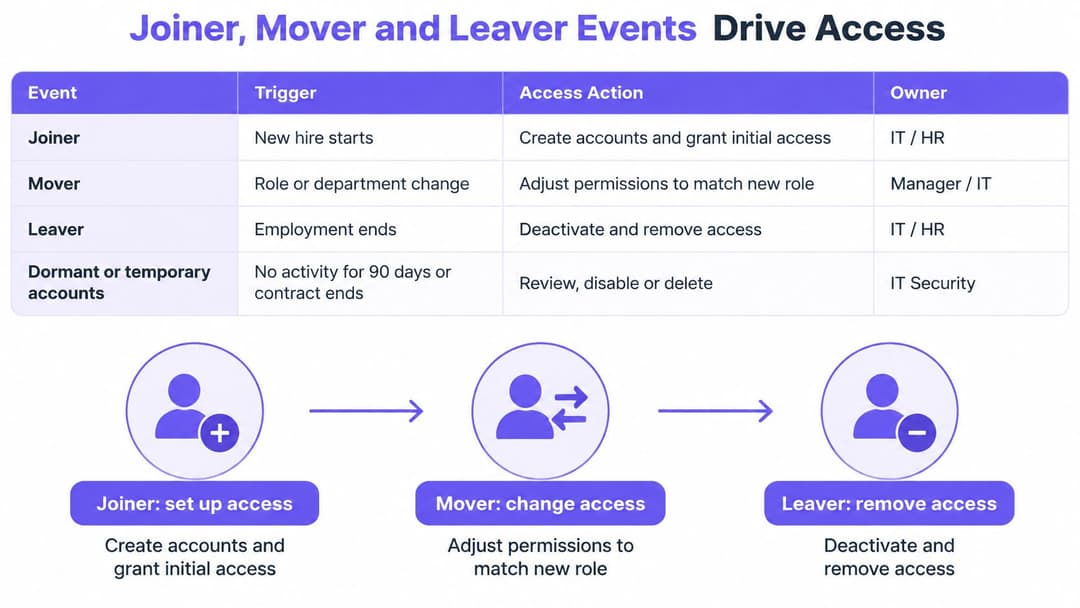
A badge that still opens last year's office is not a small admin miss. It is access that stopped being justified and was never taken back. Joiner, mover and leaver events are the moments when that justification is created, changed or withdrawn. Provisioning only works if each of those moments updates every system the person can use, and if the change is checked afterwards.
| Event | Trigger | Access action | Typical owner |
|---|---|---|---|
| Joiner | Verified start date and approved role | Create account and grant role-based permissions only | HR record and direct manager |
| Mover | Department or role change in the HR record | Recalculate entitlements and remove old-role access | Direct manager approves new access |
| Leaver | Employment end or contract expiration | Disable account, revoke sessions and tokens, and remove device access | HR and identity team |
| Dormant account | No sign-in for an agreed period | Suspend and review before any reactivation | Application owner |
| Temporary or non-human account | Contract end or service purpose ends | Time-bound access with an expiration date | Sponsoring manager |
The table separates who approves access from who implements it. HR confirms employment status, a manager explains the business need, and the identity team turns that decision into system changes. The usual failure is a shared assumption: each team thinks another team owns the trigger, so the change never starts.
Joining should start with an approved record
A joiner needs a confirmed start date, manager and role before permissions are assigned. You can prepare an account beforehand, but preparation should not become early access to live systems. Think of it as cutting a key and leaving it in the locksmith's drawer until the start date, rather than handing it over on the day the offer is accepted.
Keep the new hire's access package explicit. A receptionist might receive booking tools and staff WiFi, while a finance colleague receives accounting applications. Copying a colleague's profile looks quick and hides exceptions that nobody approved. Each exception needs its own approval.
Training can support readiness without becoming the authority for access. Where continuing education forms part of onboarding, Premiere Education's group CE training for staff can sit alongside the induction process; the manager must still approve the person's actual responsibilities.
Moving means subtracting as well as adding
A department transfer is easy to mishandle. IT adds the new team's applications, and nobody asks whether the employee still needs the old ones. The person now holds two jobs' worth of access, and the old access has no current business reason.
Compare the approved new role with existing entitlements. Remove access that no longer belongs, and give any handover exception a named approver and an expiration date. Two weeks of overlap for a clean handover is reasonable. Leaving that overlap in place for a year is how temporary access becomes permanent.
Practical rule: A role change should produce a removal decision, not just a request for additional access.
Leaving needs a complete access boundary
A departing employee event must reach more than the main directory login. Check application sessions, refresh tokens, separate administrator accounts, and device certificates or registrations that still permit access. Taking the office key does not lock a session that is already open on a laptop at home.
The same employment event should govern connectivity, as illustrated by staff WiFi lifecycle management. Do not leave network credentials outside offboarding because a different team manages the access points.
Each event should leave an audit record showing the trigger, the approval, the requested change and the confirmed outcome. For any person in your organization, can you name which event last changed their access, when it happened, and whether every target system applied it?
How provisioning connects identity systems
Automated provisioning is a chain of coordinated changes, not a single switch. The important components are the authoritative record, the identity provider, the connector and the target system.
An authoritative record might be an HR entry for an employee or an approved contractor register. The identity provider represents that identity to connected services, while provisioning connectors translate approved changes into actions those services understand.
Follow the change from source to target
- The source record changes. HR records a department transfer, start date or employment end. For contractors, an approved sponsor updates the contract record.
- The identity platform evaluates the change. Rules map the person's attributes to groups or roles. Missing manager or department fields should produce an exception, not a guess.
- A connector sends the required update. SCIM, the System for Cross-domain Identity Management standard, or an application-specific API creates, updates or disables the downstream account.
- The target confirms the result. Record whether the application accepted the change. A request sent successfully isn't proof that the permission changed.
- The end event follows the same route. When the authoritative record ends, the workflow sends removal instructions and checks the outcome.
Use a stable identifier to match records. Names and email addresses can change, so matching solely on either can create duplicate accounts or update the wrong record.
Signing in is a separate connection
Federation lets an application rely on an identity provider instead of maintaining a separate password for every user. SAML and OpenID Connect support federated sign-in; OAuth supports delegated authorization and shouldn't be treated as a login protocol by itself.
Federation doesn't automatically provide lifecycle management. An application may accept central sign-in while retaining local accounts, permissions or active sessions. TekRecruiter's discussion of session trust versus repeated access checks is useful context when deciding what an application should re-evaluate after login.
Authentication strength matters too. In Bitwarden's World Password Day survey of 400 UK respondents, 74% said they used two-factor authentication for most workplace accounts or only important workplace accounts in 2024, according to Intelligent CISO's coverage. That measures authentication practices, not whether those accounts had justified permissions.
Use MFA or suitable passwordless methods, and protect initial credential delivery. An account invitation sent to the wrong recipient can undermine an otherwise sound workflow.
Centralize identity data where practical and separate externally exposed access components from internal systems. For network authentication, RADIUS-as-a-Service is another architectural consideration, not a substitute for lifecycle decisions.
The governing principle is one authoritative record, with downstream copies reconciled against it. Automation is only dependable when the source attributes, mappings and confirmations are dependable too.
Provisioning in hotels, hospitals and multi-family housing
Secure access needs to arrive quickly without becoming permanent by accident. The answer is to approve a narrowly defined access package, attach a time limit and make removal part of the original request.
The UK Government's digital identity public-services publication emphasizes managing accurate identity information throughout its lifecycle. In operational settings, that means checking whether the person's current assignment still justifies the access, not merely whether their identity was checked at onboarding.
| Sector | Access decision | Time limit | Risk if leaver step fails |
|---|---|---|---|
| Hotel group with seasonal staff | Booking and housekeeping access on day one, according to role | Ends at season end | Former staff keep access to booking and room systems |
| Hospital with contractors and clinical rotations | Access matched to rotation dates, with a sponsor named on each account | Expires automatically at rotation end | Ex-contractors retain clinical-record access |
| Residential landlord with several tenants | Unique credential per tenant for shared WiFi and building systems | Revoked when the lease ends | Former tenants retain network and building access |
A hotel preparing for its seasonal team
Say a hotel group recruits receptionists and housekeeping staff for its busy season. The hiring manager selects the appropriate role package and confirms the employment dates before the team arrives.
Reception staff receive booking access; housekeeping staff receive the tools needed for room assignments. Neither group automatically receives the other's permissions, and neither receives administrative access just to avoid a support ticket.
Delegate approved onboarding tasks to the hotel manager, but don't let that manager invent unrestricted roles. An extension to seasonal employment should require a recorded date change, rather than disabling the expiration because it feels inconvenient.
A hospital managing changing assignments
Consider a contractor moving between clinical rotations. The sponsoring manager approves access for the assignment, including the relevant service or department, and the account expires when that assignment ends.
Clinical and administrative work need different permissions. If a practice uses medical virtual assistants from MedicalVirtual, for example, the access decision should reflect the delegated administrative tasks, not copy a clinician's account.
Urgent care requirements also need a controlled exception route. Where emergency access is necessary, make it attributable, limited and reviewable. Don't solve urgency by issuing a shared permanent login that nobody can confidently revoke.
Shared housing needs individual accountability
A property manager should be able to end a former tenant's connectivity without disrupting everyone still living in the building. Unique credentials make that possible; a shared building-wide password makes individual removal difficult.
Treat network access and physical entry as distinct targets. Ending a lease should trigger the relevant changes in both, with confirmation from each system rather than an assumption that one update covers everything.
Fast access is compatible with careful control when the approver, scope and end condition are decided before credentials are issued.
Across these settings, delegated administration, time-bound access and least privilege let operational teams act without giving them unrestricted control. Passwordless authentication can reduce password handling, but it doesn't remove the need to decide who qualifies for access.
Automated deprovisioning should be backed by failure alerts and an exception owner. The operational benefit is fewer avoidable help-desk interventions and a clearer record of why access exists. The shared pattern isn't permanent credentials distributed quickly, but appropriately scoped access with a tested removal path.
Where provisioning goes wrong and how to stop it
Granting access is only half of provisioning. In a 2026 survey of 333 UK IT decision-makers, 77% of businesses didn't immediately deactivate staff logins after employees left, while 28% of organizations still used spreadsheets or paperwork to validate former employees' accounts, according to National Technology's account of the study.
The weakness isn't necessarily account creation. It's the missing connection between a change in someone's circumstances and a confirmed change in every system they can still use.

Look beyond ordinary employee accounts
Pre-start accounts can remain enabled when a candidate never joins. Temporary workers can outlast their recorded assignment because a manager extends the work informally. Test and service accounts can survive after the project or integration that justified them has ended.
Don't disable every inactive service account solely because it has no interactive sign-ins. Check its workload activity, dependencies and owner first, then remove it through a controlled process. Otherwise, an access cleanup can interrupt a live service.
| Symptom | Likely cause | Control |
|---|---|---|
| Former staff still sign in | Leaver step relies on a manual report | Disable from the authoritative record and alert on failures |
| Accounts with no owner | Test or service accounts created outside the process | Assign an owner and an expiration date to every account |
| Permissions grow after each move | Role changes add access but never remove it | Recalculate entitlements at every mover event |
| Old weak passwords on active accounts | Dormant accounts never reviewed | Suspend dormant accounts and require strong authentication |
| Changes fail without notice | No monitoring of failed provisioning events | Log every change and alert on failed events |
Require evidence of completion
A disabled directory entry isn't sufficient evidence if a separate application still accepts a local password. Equally, a successful connector run can conceal exclusions, unmapped groups or accounts the connector never managed.
Reconcile target accounts against approved identities and investigate discrepancies. Record the reason for legitimate exceptions, who approved them and when they'll be reviewed.
Network controls need the same accountability. With identity-based networking, the useful audit question is which identity justified the connection, rather than which shared password was presented.
Audit question: Can you show that every active account and permission still has a valid owner, purpose and approval?
That question catches failures a successful onboarding checklist won't. It also turns periodic reviews into a test of business justification, rather than a request for managers to approve an unexplained list of usernames.
Compare manual and automated provisioning then audit yours
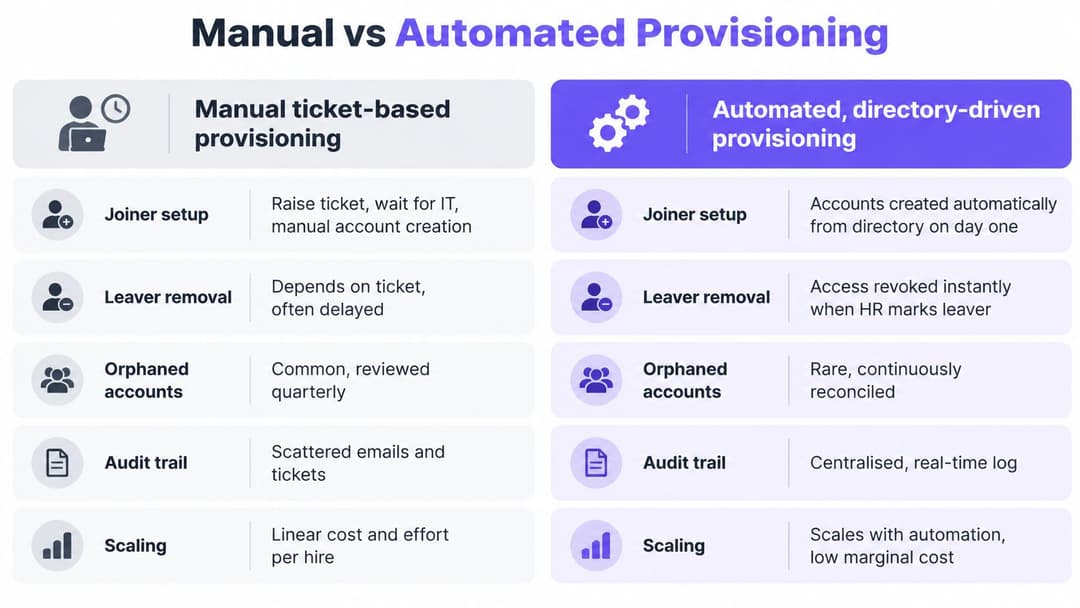
| Criterion | Manual ticket-based | Automated, directory-driven |
|---|---|---|
| Joiner setup | Depends on the ticket queue and approvals | Starts once the approved HR record is in place |
| Leaver removal | Depends on a manager reporting the exit | Triggered when the authoritative record ends |
| Orphaned accounts | Easier to miss when tickets are omitted | Reduced when source changes and target reconciliation cover the account |
| Audit trail | Spread across tickets, emails and spreadsheets | Logged for each change in the provisioning system |
| Scaling with headcount | Adds service-desk work for each hire | Reuses established rules, with exception handling still required |
Manual provisioning persists because tickets feel visible and controllable. A small organization can operate that way for years, especially where applications don't offer usable connectors.
The failure appears when the underlying event never reaches the queue. If a manager forgets to report an exit, an administrator has no ticket to complete, however carefully they handle the tickets they receive.
Automate the highest-risk paths first
The UK Government's identity and access control policy requires access controls to operate alongside joiner, mover and leaver processes. A practical implementation combines directory-driven changes and lifecycle tooling such as SCIM, with manual exceptions and periodic reviews where integration isn't available.
Suppose a finance analyst moves into HR. On the approved date, the workflow should remove the finance role and apply the approved HR role. If the payroll application rejects the update, an alert should reach someone responsible for resolving it.
Prioritize applications holding the most sensitive data or handling the greatest volume of departures. Don't begin with an easy, low-risk integration merely to increase the count of automated applications.
Automation also needs testing. Connector schedules, API failures and application-specific session behavior mean a directory change doesn't guarantee instantaneous removal everywhere.
Make this week's audit concrete
- Inventory sensitive applications. List systems holding personal or sensitive data, including local logins and separate administrator accounts.
- Confirm the authority. Name the record that controls each joiner, mover and leaver event, and who maintains it.
- Test removal. Use a controlled test identity to measure how long each application continues accepting access after the source record ends.
- Find unexplained accounts. Investigate missing owners, absent expiration dates and inactivity beyond your agreed review period.
- Replace the riskiest spreadsheet dependency. Introduce an automated trigger, confirmed target update and failure alert for the highest-priority application.
Track time from directory change to access update, the share of applications covered by automated lifecycle workflows, orphaned-account count, failed provisioning events and time to revoke privileged access. Define the start and end of each measurement so the results reflect actual access, not just ticket closure.
Staff connectivity belongs in that audit too. Our Staff WiFi onboards employee devices with managed EAP-TLS certificates, so there's no shared passphrase to rotate. Every staff WiFi authentication is logged with user, device, time and location.
Choose an application this month and make its leaver removal automatic. Test the entire path, capture evidence that access ended and assign someone to handle failures before expanding the rollout.
Purple provides identity-based WiFi access for staff, guests and multi-family environments, helping you apply access-lifecycle decisions to connectivity as well as applications. Visit Purple to discuss connecting staff network access to your identity provider and replacing shared passwords with individually managed access.