

Explicación de NAC (Network Access Control)
An authoritative technical reference for IT leaders on Network Access Control (NAC), explaining its architecture, deployment models, and critical role in enterprise WiFi security. This guide provides actionable insights for securing network access across hospitality, retail, and corporate environments, detailing how platforms like Purple integrate to enforce robust access policies.
🎧 Escucha esta guía
Ver transcripción

Resumen ejecutivo
El Network Access Control (NAC) ha evolucionado de ser una medida de seguridad de nicho a un componente fundamental de la estrategia de red empresarial moderna. Para los gerentes de TI, arquitectos de red y CTOs, implementar una solución NAC robusta ya no es una cuestión de si se debe hacer, sino de cuándo y cómo. Esta guía sirve como una referencia práctica y neutral en cuanto a proveedores para comprender e implementar NAC, particularmente en el contexto de entornos WiFi complejos que se encuentran en hoteles, cadenas de retail y grandes recintos. Analizaremos los componentes principales de NAC, contrastándolo con métodos de autenticación básicos para aclarar su valor en la mitigación de riesgos de seguridad. El enfoque está en resultados tangibles: lograr el cumplimiento de los endpoints, aplicar políticas de acceso granulares y asegurar el perímetro de la red contra una gama cada vez mayor de dispositivos administrados y no administrados. Al ir más allá de los conceptos teóricos para abordar escenarios de implementación del mundo real, este documento proporciona el marco necesario para tomar decisiones informadas, calcular el ROI y alinear la seguridad de la red con objetivos comerciales más amplios. También aclara dónde encajan soluciones como la plataforma Purple dentro de una arquitectura NAC integral, cerrando la brecha entre el acceso de invitados, la seguridad del personal y la aplicación de políticas centralizadas.
Análisis técnico detallado
En su esencia, el Network Access Control es un paradigma de seguridad que tiene como objetivo unificar la tecnología de seguridad de endpoints (como antivirus y prevención de intrusiones en el host), la autenticación de usuarios o sistemas, y la aplicación de la seguridad de la red. Mientras que una red WiFi tradicional protegida por contraseña solo pregunta "¿cuál es la contraseña?", una red habilitada para NAC hace una serie de preguntas más inteligentes: "¿Quién eres?", "¿Qué dispositivo estás usando?", "¿Cumple este dispositivo con nuestras políticas de seguridad?" y "¿A qué recursos estás autorizado a acceder?"
Los componentes principales: 802.1X y RADIUS
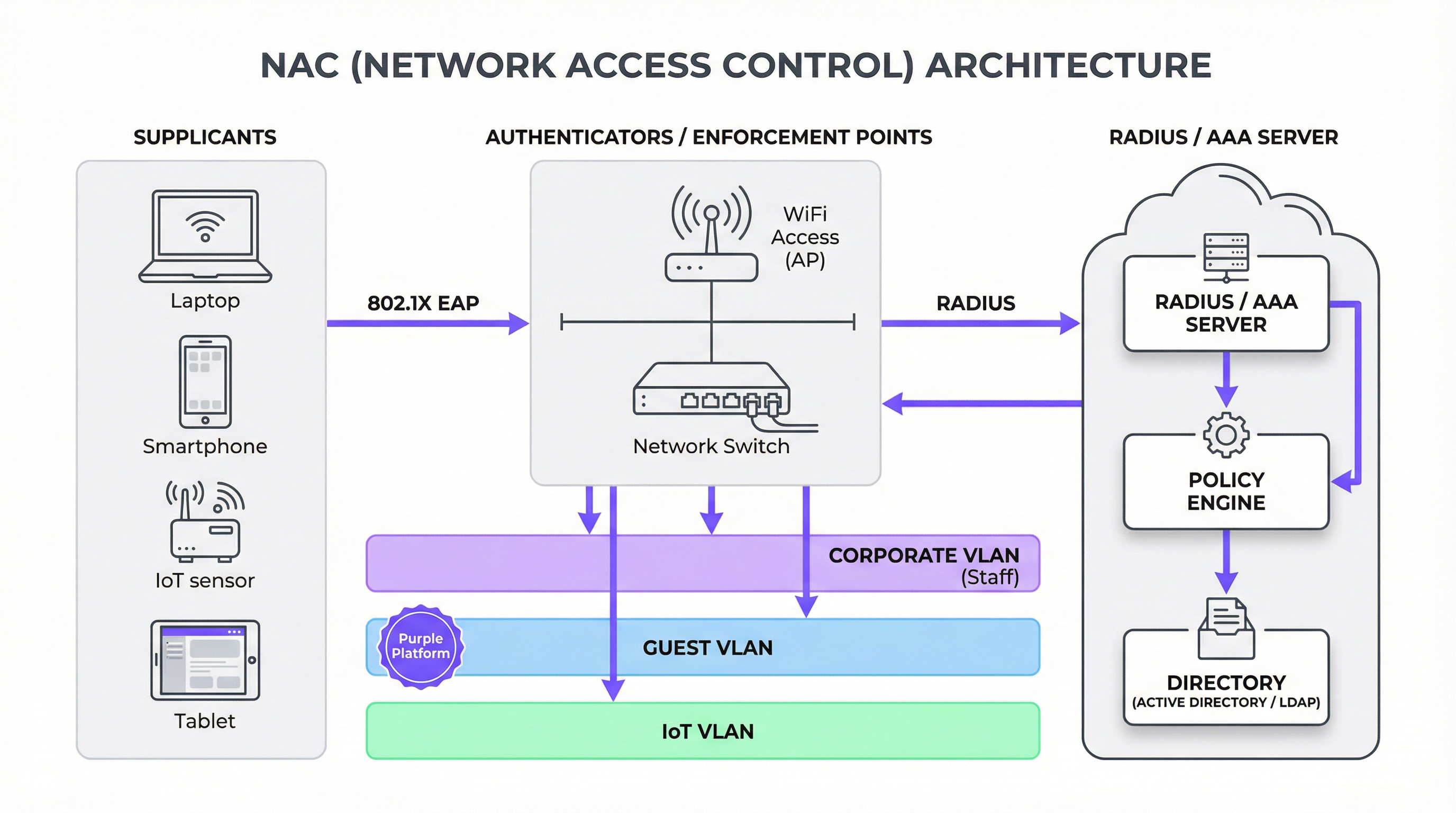
La piedra angular de la mayoría de las implementaciones modernas de NAC es el estándar IEEE 802.1X. Esta no es una tecnología única, sino un marco para el control de acceso a la red basado en puertos. Involucra a tres participantes clave:
- Suplicante (Supplicant): El dispositivo cliente (por ejemplo, una laptop, un smartphone) que solicita acceso a la red.
- Autenticador (Authenticator): El hardware de red que protege la red, generalmente un punto de acceso WiFi o un switch. Actúa como un guardián, permitiendo o bloqueando el tráfico.
- Servidor de autenticación: El cerebro centralizado de la operación, casi siempre un servidor RADIUS (Remote Authentication Dial-In User Service). Valida las credenciales del suplicante e instruye al autenticador sobre qué nivel de acceso otorgar.
El proceso funciona a través del Protocolo de Autenticación Extensible (EAP), que permite varios métodos de autenticación, desde simples nombres de usuario/contraseñas (EAP-PEAP) hasta certificados digitales altamente seguros (EAP-TLS). Cuando un dispositivo se conecta, el autenticador bloquea todo el tráfico excepto la comunicación 802.1X. Transmite las credenciales del suplicante al servidor RADIUS, que las verifica contra un directorio (como Active Directory). Si la autenticación es exitosa, el servidor RADIUS envía un mensaje de "Access-Accept" (Aceptación de acceso) de vuelta al autenticador, a menudo incluyendo instrucciones de políticas específicas, como asignar el dispositivo a una VLAN en particular.
NAC vs. Autenticación WiFi básica: Una distinción crítica
Es crucial que los tomadores de decisiones comprendan que NAC no es simplemente una contraseña mejorada. La diferencia es fundamental para la postura de seguridad de la red.
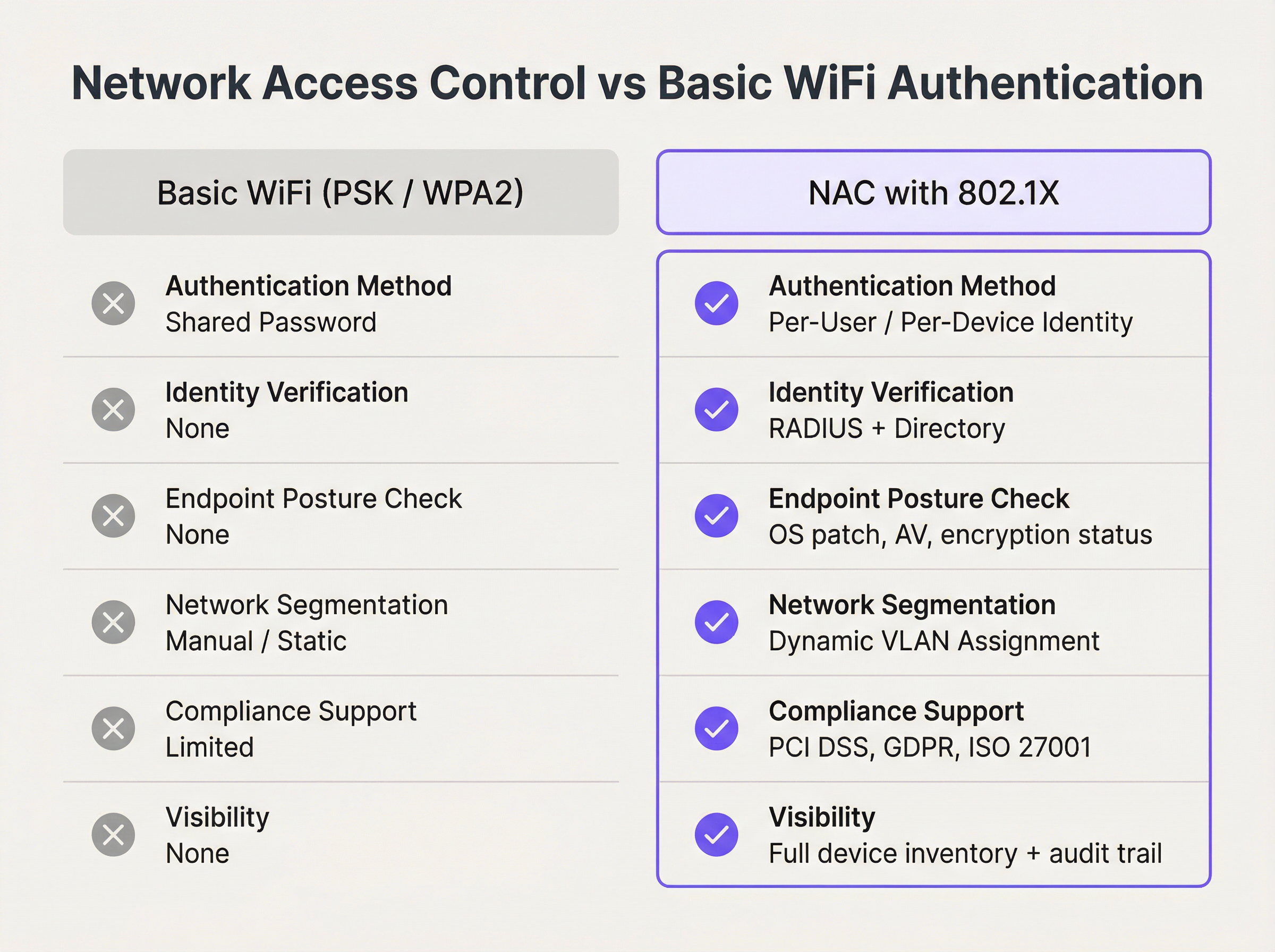
Como ilustra la comparación, NAC proporciona un control basado en la identidad que es imposible con credenciales compartidas. Mueve el perímetro de seguridad desde el borde de la red hasta el dispositivo individual, habilitando un enfoque Zero Trust (Confianza Cero) donde el acceso nunca se asume y siempre se verifica.
El papel del cumplimiento de los endpoints
Una solución NAC madura va más allá de la autenticación. Realiza una evaluación de postura en los dispositivos que se conectan para garantizar que cumplan con las políticas de seguridad predefinidas antes de otorgarles acceso. Esto puede incluir verificaciones de:
- Nivel de parches del sistema operativo: ¿El dispositivo ejecuta las últimas actualizaciones de seguridad?
- Software antivirus: ¿Hay un cliente AV aprobado instalado, en ejecución y actualizado?
- Cifrado de disco: ¿Está cifrado el disco duro del dispositivo?
- Firewall del host: ¿Está habilitado el firewall local?
Si un dispositivo no pasa estas verificaciones, puede ser colocado en una VLAN en cuarentena con acceso limitado, tal vez solo a servidores de remediación donde el usuario pueda descargar las actualizaciones requeridas. Esta aplicación proactiva es una herramienta poderosa para prevenir la propagación de malware desde endpoints comprometidos.
Guía de implementación
Implementar NAC es un proyecto estratégico, no una simple instalación de software. Se recomienda un enfoque por fases para minimizar las interrupciones y garantizar el éxito.
Fase 1: Descubrimiento y definición de políticas
Antes de aplicar cualquier política, debe comprender qué hay en su red. La fase inicial debe ser un modo pasivo, solo de descubrimiento. La solución NAC monitoreará el tráfico de la red para perfilar cada dispositivo conectado: desde laptops corporativas y smartphones del personal hasta dispositivos de invitados y hardware de IoT como smart TVs, terminales POS y sistemas HVAC. Esta visibilidad es fundamental para construir una política de acceso integral. Durante esta fase, definirá roles (por ejemplo, Usuario corporativo, Invitado, Contratista, Dispositivo IoT) y trazará los derechos de acceso para cada uno.
Fase 2: Aplicación por fases
Comience la aplicación en un segmento de la red limitado y de bajo riesgo, como el WiFi del personal del departamento de TI. Esto permite al equipo refinar las políticas y solucionar problemas en un entorno controlado. Para los dispositivos corporativos, implementar 802.1X con autenticación basada en certificados (EAP-TLS) es el estándar de oro, ofreciendo la experiencia de usuario más segura y fluida. Para el acceso de invitados y BYOD, un enfoque de Captive Portal es más práctico.
Fase 3: Integración del acceso de invitados y personal con Purple
En recintos con poblaciones de usuarios distintas, separar el tráfico de invitados y del personal es primordial. Aquí es donde una plataforma como Purple se integra en la arquitectura NAC. La política NAC en el autenticador (AP/switch) puede identificar el tráfico de invitados y redirigirlo al Captive Portal de Purple para la autenticación y aceptación de políticas. Mientras tanto, los dispositivos del personal pueden autenticarse silenciosamente a través de 802.1X contra un servidor RADIUS.

Este modelo híbrido ofrece lo mejor de ambos mundos:
- Red de invitados: Administrada por Purple para un recorrido de usuario con la marca, opciones de inicio de sesión social, análisis de datos y cumplimiento de regulaciones de privacidad de datos como GDPR. La red subyacente está aislada en una VLAN de invitados.
- Red del personal: Asegurada a través de 802.1X para una autenticación robusta basada en certificados, con dispositivos ubicados en una VLAN corporativa con acceso a recursos internos.
- Red operativa/IoT: Dispositivos como terminales POS o sistemas de gestión de edificios se ubican en su propia VLAN altamente restringida, a menudo utilizando autenticación basada en MAC como control de referencia.
Fase 4: Implementación completa y monitoreo
Una vez que las políticas han sido validadas y la integración probada, la aplicación puede implementarse en toda la organización. El monitoreo continuo es esencial. El panel de control de NAC se convierte en una herramienta principal para las operaciones de seguridad, proporcionando visibilidad en tiempo real de los eventos de acceso a la red, el estado de cumplimiento y las posibles amenazas.
Mejores prácticas
- Priorice la autenticación basada en certificados (EAP-TLS): Para dispositivos administrados por la empresa, evite las contraseñas. Los certificados son más seguros y brindan una experiencia de usuario sin fricciones.
- Implemente la asignación dinámica de VLAN (VLAN Steering): Utilice atributos RADIUS para asignar automáticamente los dispositivos al segmento de red correcto en función de su rol y postura. Esta es la esencia de la aplicación de políticas.
- Diseñe para fallos: ¿Qué sucede si el servidor RADIUS es inalcanzable? Configure los autenticadores para que fallen en modo abierto (fail-open, permite el acceso, menos seguro) o en modo cerrado (fail-closed, deniega el acceso, más seguro) según una evaluación de riesgos del segmento de red específico.
- No intente abarcar todo de una vez (Don't Boil the Ocean): Comience con una política simple e itere. Un punto de partida común es aplicar verificaciones de postura para dispositivos corporativos y proporcionar acceso básico solo a Internet para los invitados.
- Intégrese con su ecosistema de seguridad: Una solución NAC moderna debe integrarse con firewalls, SIEMs y herramientas de gestión de endpoints para permitir una respuesta automatizada a las amenazas. Por ejemplo, si un firewall detecta tráfico malicioso desde un endpoint, puede enviar una señal a la solución NAC para poner automáticamente en cuarentena ese dispositivo.
Solución de problemas y mitigación de riesgos
- Problemas con el suplicante 802.1X: El dolor de cabeza más común es el soporte inconsistente para 802.1X en diferentes sistemas operativos y controladores de dispositivos. Asegúrese de que los dispositivos estén configurados correctamente a través de MDM o GPO.
- Gestión de certificados: EAP-TLS requiere una Infraestructura de Clave Pública (PKI). Gestionar el ciclo de vida de los certificados (emisión, renovación, revocación) puede ser complejo. Planifique esta carga operativa.
- Aleatorización de direcciones MAC: Los dispositivos móviles modernos (iOS, Android) utilizan direcciones MAC aleatorias para evitar el rastreo, lo que puede romper las reglas de autenticación basadas en MAC. Para las redes de invitados, esto refuerza la necesidad de un inicio de sesión basado en un portal. Para el BYOD corporativo, requiere un flujo de autenticación basado en el usuario.
- Incorporación (Onboarding) de IoT: Muchos dispositivos IoT no soportan 802.1X. A menudo se requiere una combinación de autenticación basada en MAC y creación de perfiles. La solución NAC debe ser capaz de identificar un dispositivo como, por ejemplo, un Samsung Smart TV y asignarlo automáticamente a la VLAN de IoT adecuada.
ROI e impacto comercial
Invertir en NAC no es solo un gasto de seguridad; ofrece un valor comercial tangible.
| Área de impacto comercial | Métrica de medición | Resultado esperado |
|---|---|---|
| Mitigación de riesgos | Reducción de incidentes de seguridad originados por endpoints comprometidos. | Menor costo de remediación de brechas y recuperación de datos. |
| Cumplimiento | Auditorías exitosas de PCI DSS, GDPR, HIPAA. | Evitar multas regulatorias y daños a la reputación. |
| Eficiencia operativa | Reducción de tickets de soporte de TI por problemas de acceso a la red. | La automatización de la incorporación y la aplicación de políticas libera al personal de TI para proyectos estratégicos. |
| Experiencia del usuario | Experiencia de conexión más rápida y fluida para el personal. | Mayor productividad y menor frustración del usuario. |
| Inteligencia empresarial | (Con Purple) Análisis detallados sobre el comportamiento y la demografía de los invitados. | Decisiones basadas en datos para marketing, operaciones y distribución del recinto. |
Al cuantificar estos beneficios, los líderes de TI pueden construir un caso de negocio convincente para la implementación de NAC, enmarcándolo como un habilitador estratégico de un lugar de trabajo digital seguro y eficiente.
Referencias
[1] IBM, "Cost of a Data Breach Report 2023." [2] PCI Security Standards Council, "Guidance for PCI DSS Scoping and Network Segmentation." [3] IEEE, "IEEE 802.1X-2020 - IEEE Standard for Port-Based Network Access Control."
Términos clave y definiciones
Network Access Control (NAC)
A network security solution that uses a set of protocols to define and implement a policy that describes how to secure access to network nodes by devices when they initially attempt to access the network.
IT teams deploy NAC to prevent unauthorized users and non-compliant devices from accessing corporate or private networks, thereby reducing the attack surface.
IEEE 802.1X
An IEEE standard for port-based Network Access Control (PNAC). It is part of the IEEE 802.1 group of networking protocols and provides an authentication mechanism to devices wishing to attach to a LAN or WLAN.
This is the foundational standard for enterprise-grade authentication on both wired and wireless networks, enabling per-user and per-device identity verification.
RADIUS
Remote Authentication Dial-In User Service. A networking protocol that provides centralized Authentication, Authorization, and Accounting (AAA) management for users and devices that connect and use a network service.
In a NAC architecture, the RADIUS server is the brain. It receives authentication requests from switches and APs, validates credentials against a user directory, and sends back policy decisions.
Endpoint Compliance (Posture Assessment)
The process of checking a device during authentication to ensure it complies with a predefined set of security policies, such as having an up-to-date OS, active antivirus, and enabled firewall.
This is a key feature of advanced NAC solutions. It ensures that a device is not only authorized but also healthy before it is allowed onto the network, preventing the spread of malware.
VLAN (Virtual Local Area Network)
A logical grouping of devices in the same broadcast domain. VLANs are usually configured on switches by placing some interfaces into one broadcast domain and some into another.
NAC uses VLANs as a primary enforcement tool. Based on a device's identity and posture, the NAC solution instructs the switch to place it into a specific VLAN (e.g., "Guest", "Corporate"), effectively segmenting the network.
Captive Portal
A web page that the user of a public-access network is obliged to view and interact with before access is granted. Captive portals are typically used by business centers, airports, hotel lobbies, and other venues that offer free Wi-Fi.
While not as secure as 802.1X, captive portals are the standard for guest authentication. Platforms like Purple use them to manage terms of service, collect marketing data, and enforce access policies for non-corporate users.
EAP (Extensible Authentication Protocol)
An authentication framework frequently used in network and internet connections. It is defined in RFC 3748 and provides a standard way for different authentication methods to be used within the 802.1X framework.
IT architects choose different EAP types based on security needs. EAP-TLS (using certificates) is highly secure, while PEAP (using passwords) is easier to deploy but less secure.
PCI DSS
The Payment Card Industry Data Security Standard. A set of security standards designed to ensure that all companies that accept, process, store or transmit credit card information maintain a secure environment.
A primary driver for NAC deployment in retail and hospitality is PCI DSS requirement 1.2.1, which mandates the segmentation of the network where cardholder data is stored from guest or other networks.
Casos de éxito
A 500-room luxury hotel needs to provide secure WiFi for guests, staff, and a growing number of IoT devices (smart TVs, thermostats, mini-bar sensors) while ensuring PCI DSS compliance for its payment systems.
- Network Segmentation: Deploy a NAC solution to create distinct SSIDs and VLANs: "HotelGuest", "HotelStaff", and "HotelIoT". A fourth, wired-only VLAN is created for the PCI-compliant payment terminals.
- Guest Access: The "HotelGuest" SSID redirects users to a Purple captive portal. Guests authenticate via social login or an email form, accepting the terms of service. Purple manages GDPR consent and provides the hotel with visitor analytics. The NAC policy places all guest devices into the Guest VLAN, which has internet-only access and is isolated from all internal hotel systems.
- Staff Access: The "HotelStaff" SSID is configured for WPA3-Enterprise with 802.1X EAP-TLS. Corporate-issued devices (laptops, tablets) are provisioned with client certificates via an MDM solution. When staff connect, their device is authenticated by the RADIUS server and placed into the Staff VLAN, granting access to internal resources like the Property Management System (PMS).
- IoT Access: The "HotelIoT" SSID uses MAC authentication. The MAC addresses of all deployed IoT devices are pre-registered in the NAC system. When a smart TV connects, its MAC is verified, and it is placed in the IoT VLAN, which only has access to its specific management server and is blocked from both the guest and staff networks.
A multi-site retail chain with 150 stores wants to replace its insecure, shared WPA2-PSK network. They need to secure corporate devices, provide guest WiFi, and ensure that in-store POS terminals are isolated.
- Centralized RADIUS: A cloud-hosted RADIUS server is deployed to manage authentication for all 150 stores, ensuring consistent policy application.
- Corporate Devices: Store manager tablets and employee handheld scanners are configured via MDM to connect to a "Corporate" SSID using 802.1X certificate-based authentication. The NAC policy also performs a posture check to ensure the devices are running the company's approved software version.
- Guest WiFi: A public "RetailGuest" SSID uses a captive portal (like Purple) to provide internet access. This isolates guest traffic and allows the chain to run targeted marketing campaigns based on location analytics.
- POS Terminal Isolation: The POS terminals are connected via wired ports. The switch ports are configured with MAC-based authentication, locking them to the specific MAC addresses of the terminals. These ports are assigned to a dedicated, highly restricted PCI VLAN that can only communicate with the payment processor.
- Phased Rollout: The solution is first deployed to a single pilot store. Once validated, the configuration is pushed remotely to the other 149 stores, leveraging the centralized NAC and MDM platforms.
Análisis de escenarios
Q1. A stadium is hosting a major sporting event and needs to provide WiFi for fans, press, and operational staff. The press requires higher bandwidth and access to specific media servers. How would you design the network access policy?
💡 Sugerencia:Consider using different SSIDs and RADIUS-based VLAN steering.
Mostrar enfoque recomendado
- Fan WiFi: An open SSID, "StadiumFanWiFi", redirects all users to a captive portal for authentication. The portal can handle high-density connections and apply bandwidth throttling to ensure fair usage. All fans are placed in a general access, internet-only VLAN.
- Press WiFi: A hidden SSID, "StadiumPress", is protected with WPA2/3-Enterprise (802.1X). Pre-registered press members are given credentials. Upon authentication, the RADIUS server identifies them as part of the "Press" group and assigns them to a dedicated Press VLAN. This VLAN has a higher QoS profile and access to the internal media servers.
- Staff WiFi: A third hidden SSID, "StadiumOps", also uses 802.1X for operational staff. They are assigned to a secure Operations VLAN with access to ticketing, security, and building management systems.
Q2. Your company is implementing a BYOD (Bring Your Own Device) policy. An employee wants to connect their personal laptop to the corporate network. What are the minimum posture checks your NAC solution should perform before granting access?
💡 Sugerencia:Think about the most common vectors for malware and data leakage.
Mostrar enfoque recomendado
The minimum posture assessment for a BYOD device should include:
- Functional Firewall: The device's host-based firewall must be enabled to prevent unsolicited inbound connections.
- Updated Antivirus: An approved antivirus solution must be installed, running, and have received signature updates within the last 24-48 hours.
- OS Updates: The operating system must have all critical security patches installed. The policy might specify that the OS must be no more than one month behind the latest patch release.
- No Unapproved Software: A check for specific forbidden applications, such as peer-to-peer file-sharing clients, that could introduce risk. If the device fails any of these checks, it should be denied access or placed in a remediation VLAN.
Q3. A hospital wants to deploy new WiFi-connected infusion pumps. These devices do not support 802.1X. How can you securely onboard and manage them using a NAC solution?
💡 Sugerencia:Consider a multi-factor approach for headless devices that don't support advanced authentication.
Mostrar enfoque recomendado
Since the pumps don't support 802.1X, a layered approach is needed:
- MAC Authentication: Register the MAC address of every infusion pump in the NAC system. This provides a basic level of identity.
- Device Profiling: The NAC solution should be configured to profile the device based on its network traffic (e.g., the DHCP fingerprint, protocols used). It should identify the device as an "Infusion Pump Model X".
- Combined Policy: Create a policy that requires BOTH the MAC address to be on the allow list AND the device profile to match the expected fingerprint. This prevents MAC spoofing, as an attacker's laptop might have a valid MAC but will not behave like an infusion pump on the network.
- Strict VLAN and ACLs: Once authenticated, the pump is placed into a highly restricted "Medical_IoT" VLAN. An Access Control List (ACL) is applied to its traffic, permitting it to communicate ONLY with the specific IP address of the infusion pump management server and nothing else. All other traffic is explicitly denied.
Conclusiones clave
- ✓Network Access Control (NAC) enforces security policies on devices and users seeking to access network resources.
- ✓The IEEE 802.1X standard is the cornerstone of modern NAC, providing a framework for robust, identity-based authentication.
- ✓NAC goes beyond basic authentication by performing endpoint compliance checks (posture assessment) to ensure devices are healthy before they connect.
- ✓Dynamic VLAN assignment is a key NAC capability, automatically segmenting the network to isolate guests, staff, and IoT devices.
- ✓For guest WiFi, NAC integrates with captive portals like Purple to manage access, ensure compliance, and gather analytics.
- ✓Implementing NAC mitigates risk, helps achieve regulatory compliance (PCI DSS, GDPR), and improves operational efficiency.
- ✓A successful NAC deployment requires a phased approach, starting with discovery and policy definition before moving to gradual enforcement.




