

EAP Methods Compared: PEAP, EAP-TLS, EAP-TTLS, and EAP-FAST
This authoritative technical reference guide provides a side-by-side comparison of PEAP, EAP-TLS, EAP-TTLS, and EAP-FAST for enterprise WiFi authentication. It delivers actionable guidance on security posture, deployment complexity, and device compatibility to help IT managers and network architects choose the optimal 802.1X deployment strategy.
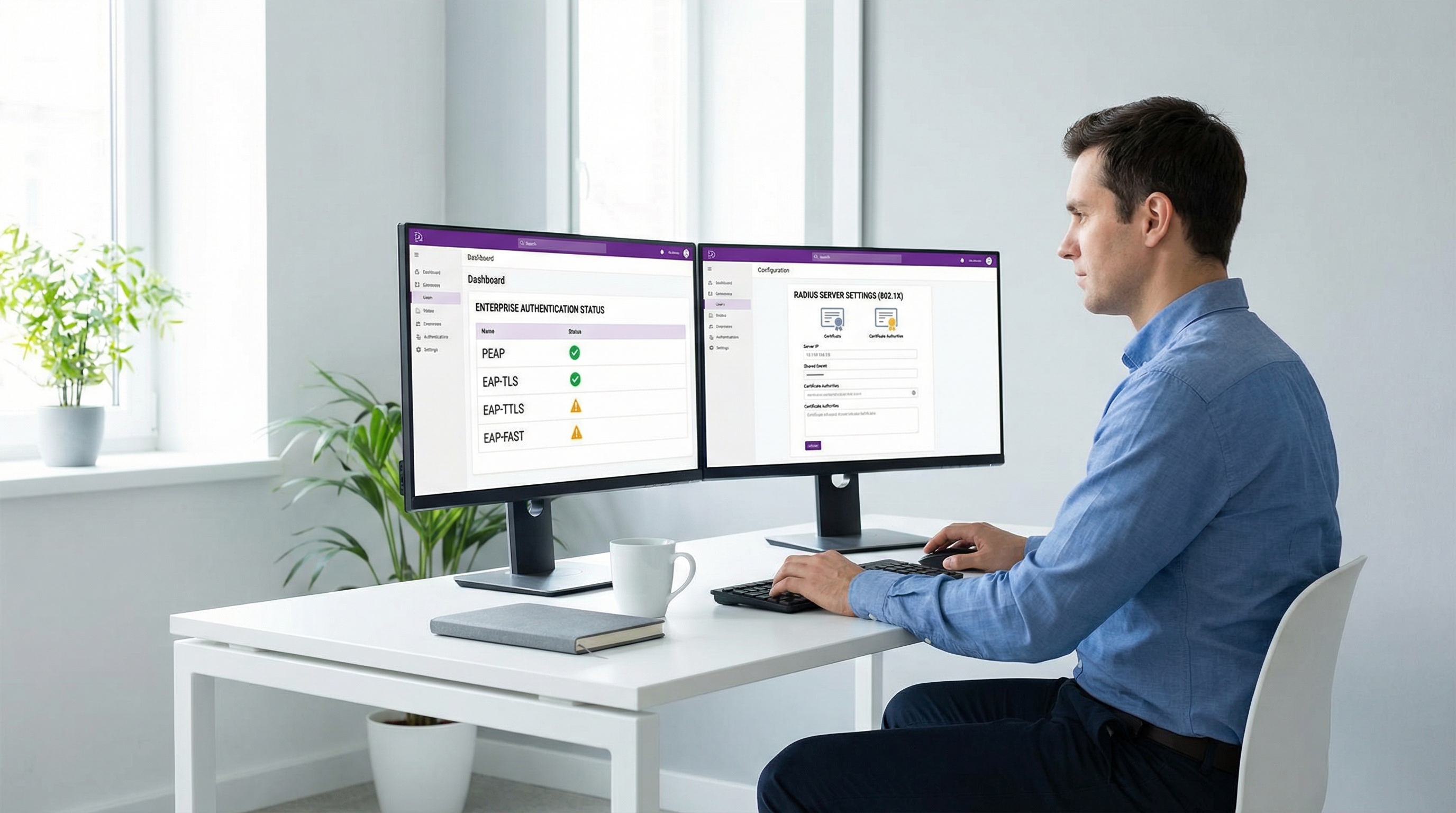
Executive Summary
For enterprise IT managers and network architects, selecting the right Extensible Authentication Protocol (EAP) method is a critical decision that balances security posture, deployment complexity, and user experience. As organisations move beyond vulnerable pre-shared keys (PSKs) to 802.1X authentication, the choice typically narrows down to four primary methods: PEAP, EAP-TLS, EAP-TTLS, and EAP-FAST. This guide provides a direct, technical comparison of these methods, equipping you to make informed architectural decisions for your Guest WiFi and internal corporate networks. We will examine the security differences between password-based tunnelled methods and mutual certificate authentication, evaluate when specific methods are appropriate, and provide actionable implementation guidance for modern enterprise environments.
Technical Deep-Dive: EAP Methods Compared
PEAP (Protected EAP)
PEAP is widely considered the enterprise workhorse for 802.1X authentication. Co-developed by Cisco, Microsoft, and RSA Security, it creates an encrypted TLS tunnel using a server-side certificate. Within this secure tunnel, the client authenticates using a legacy method, most commonly MSCHAPv2.
The primary advantage of PEAP is its near-universal native support across modern operating systems, including Windows, macOS, iOS, and Android. Because it only requires a certificate on the RADIUS server and not on the client devices, deployment is significantly less complex than certificate-based alternatives. This makes PEAP highly attractive for Bring Your Own Device (BYOD) environments or large public venues like Transport hubs where managing client certificates is impractical.
However, PEAP's reliance on passwords (via MSCHAPv2) introduces security risks. If a client device is not strictly configured to validate the server's certificate, users can be tricked into connecting to a rogue access point (an "evil twin" attack). The rogue AP can then capture the MSCHAPv2 challenge-response, which can be cracked offline to recover the user's password. Therefore, enforcing strict server certificate validation via Group Policy or MDM is a mandatory security control when deploying PEAP.
EAP-TLS (EAP-Transport Layer Security)
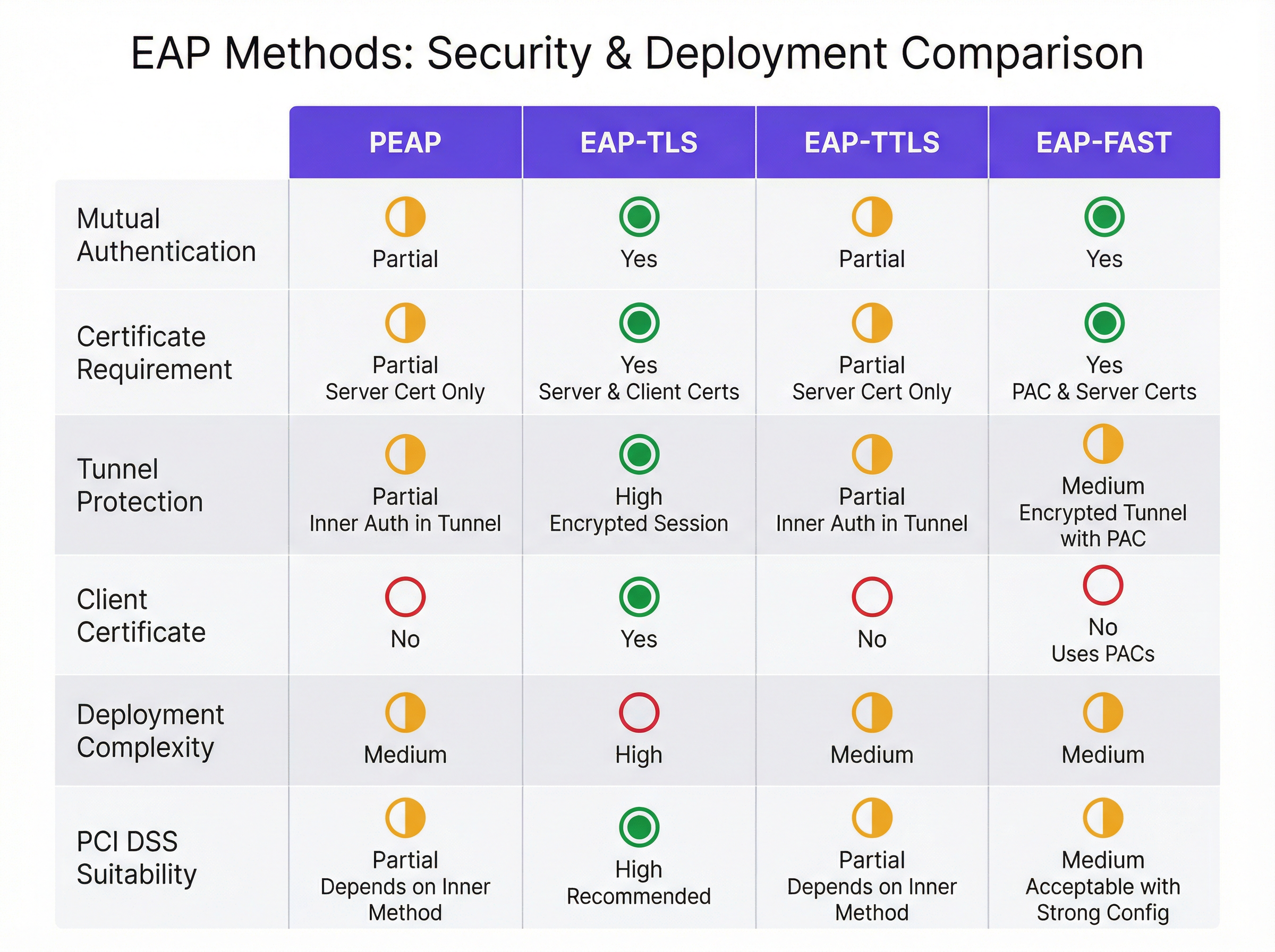
EAP-TLS represents the gold standard for enterprise wireless security. Unlike PEAP, EAP-TLS requires mutual certificate authentication. Both the RADIUS server and the client device must present a valid digital certificate before any network access is granted.
This mutual authentication eliminates the need for passwords entirely, rendering credential theft, dictionary attacks, and rogue AP attacks ineffective. If a device lacks the correct client certificate, it simply cannot connect to the network. For organisations subject to strict regulatory requirements, such as PCI DSS in the Retail sector or HIPAA in Healthcare, EAP-TLS is the strongly recommended approach.
The trade-off for this enhanced security is deployment complexity. Implementing EAP-TLS requires a robust Public Key Infrastructure (PKI) to issue, renew, and revoke certificates. It also necessitates a Mobile Device Management (MDM) solution, such as Microsoft Intune or Jamf, to securely distribute these certificates to endpoints. For guidance on Apple environments, see our guide on Jamf and RADIUS: Certificate-Based WiFi Authentication for Apple Device Fleets. EAP-TLS is the optimal choice for corporate-owned, managed device fleets where security is paramount.
EAP-TTLS (EAP Tunnelled TLS)
EAP-TTLS, co-developed by Funk Software and Certicom, operates similarly to PEAP by establishing an encrypted TLS tunnel using a server-side certificate. The key differentiator is its flexibility regarding the inner authentication method. While PEAP is heavily tied to MSCHAPv2, EAP-TTLS can encapsulate almost any authentication protocol, including PAP, CHAP, or MSCHAP, securely within the tunnel.
This flexibility makes EAP-TTLS highly valuable in environments that need to authenticate against older LDAP directories, RADIUS proxies, or non-Microsoft identity stores that do not natively support MSCHAPv2. It is famously the underlying protocol for eduroam, the global roaming access service for the international research and education community. Historically, native client support for EAP-TTLS was less ubiquitous than PEAP, often requiring third-party supplicants on older Windows versions, but modern operating systems now provide robust native support.
EAP-FAST (Flexible Authentication via Secure Tunnelling)
Developed by Cisco as a rapid replacement for the highly vulnerable LEAP protocol, EAP-FAST was designed to provide secure authentication without the strict requirement of deploying digital certificates. Instead of using a server certificate to establish the secure tunnel, EAP-FAST relies on Protected Access Credentials (PACs)—opaque blocks of data dynamically provisioned to clients by the authentication server.
EAP-FAST is characterised by its rapid session resumption capabilities. While it provides a secure, encrypted tunnel, its reliance on PACs rather than standard X.509 certificates makes it somewhat proprietary and less aligned with modern, vendor-neutral zero-trust architectures. Today, EAP-FAST is primarily relevant in legacy Cisco-centric environments, specific IoT deployments, or specialised ruggedised devices. For most new enterprise deployments, PEAP or EAP-TLS are preferred.
Implementation Guide
Deploying 802.1X authentication requires careful planning across the network stack, from the wireless access points to the RADIUS infrastructure and identity providers. When integrating with Purple's platform, our RADIUS servers support all major EAP methods, ensuring seamless authentication before users interact with features like Wayfinding or WiFi Analytics.

Step 1: Define the Authentication Strategy
Assess your endpoint fleet. If devices are corporate-owned and managed via MDM, target EAP-TLS. If you are supporting BYOD, PEAP is the pragmatic choice. Ensure your identity provider (Active Directory, Google Workspace, Okta) supports the required protocols (e.g., MSCHAPv2 for PEAP).
Step 2: Certificate Management
For all methods except EAP-FAST, you must deploy a server certificate to your RADIUS server. This certificate should ideally be issued by a trusted public Certificate Authority (CA) to minimise client-side trust warnings, though an internal Enterprise CA can be used if you control all endpoints. For EAP-TLS, establish your PKI and configure your MDM to automatically provision client certificates with the correct Subject Alternative Name (SAN) mappings.
Step 3: RADIUS and Access Point Configuration
Configure your wireless access points to use WPA2-Enterprise or WPA3-Enterprise, pointing them to your RADIUS server IP addresses with the correct shared secrets. On the RADIUS server, define your network policies, specifying the allowed EAP methods and mapping successful authentications to the appropriate VLANs based on user or device group membership.
Step 4: Endpoint Supplicant Configuration
This is the most critical step for security. For PEAP, use MDM or Group Policy to push a pre-configured WiFi profile to devices. This profile MUST explicitly specify the trusted RADIUS server names and the trusted Root CA that issued the server certificate. Crucially, disable the option that prompts users to trust new servers or certificates.
Best Practices
- Never Rely on User Judgement for Certificates: When deploying PEAP or EAP-TTLS, always pre-configure endpoint supplicants to trust specific server certificates. Relying on users to click "Accept" on a certificate warning undermines the entire security model and exposes the network to rogue AP attacks.
- Automate Certificate Lifecycle Management: Certificate expiration is a leading cause of 802.1X outages. Implement automated monitoring and renewal processes for both RADIUS server certificates and client certificates in EAP-TLS deployments.
- Implement WPA3-Enterprise: Where client support allows, transition to WPA3-Enterprise. It mandates the use of Protected Management Frames (PMF) and offers a 192-bit security suite option, providing stronger cryptographic protections than WPA2.
- Segment the Network: Use RADIUS attributes (like Filter-Id or Tunnel-Private-Group-Id) to dynamically assign authenticated users to specific VLANs based on their role, isolating guest traffic from corporate assets. For more on modern network design, review The Core SD WAN Benefits for Modern Businesses.
Troubleshooting & Risk Mitigation
Common failure modes in EAP deployments typically revolve around certificate validation and identity provider integration.
- Symptom: Clients fail to connect after a RADIUS server update.
- Risk: The new server certificate was not issued by the Root CA trusted by the clients, or the server name changed.
- Mitigation: Always test certificate rollovers in a staging environment. Ensure the new certificate chain is fully trusted by all endpoint profiles before applying it to production.
- Symptom: iOS devices connect fine, but Windows devices fail.
- Risk: Windows supplicants are often stricter about validating the Server Name Indication (SNI) or the specific EKU (Extended Key Usage) attributes on the server certificate.
- Mitigation: Verify the server certificate includes the 'Server Authentication' EKU and that the SAN matches the name configured in the Windows WiFi profile.
ROI & Business Impact
Transitioning to a robust EAP method delivers significant business value beyond raw security. By eliminating shared passwords, IT teams reduce the operational overhead of helpdesk tickets related to password resets or compromised PSKs. In environments like Hospitality, where staff turnover can be high, certificate-based authentication (EAP-TLS) ensures that access is automatically revoked when a device is wiped or a certificate expires, without needing to change a global password.
Furthermore, strong authentication is a prerequisite for compliance frameworks like PCI DSS and GDPR. By demonstrating robust access controls, organisations mitigate the risk of regulatory fines and reputational damage associated with data breaches. For a broader look at upgrading venue infrastructure, see Modern Hospitality WiFi Solutions Your Guests Deserve.
Podcast Briefing
Listen to our 10-minute technical briefing on EAP methods, covering implementation strategies and common pitfalls:
Key Terms & Definitions
802.1X
An IEEE standard for port-based network access control that provides an authentication mechanism to devices wishing to attach to a LAN or WLAN.
IT teams implement 802.1X to replace insecure shared passwords (PSKs) with individualised, enterprise-grade authentication.
RADIUS (Remote Authentication Dial-In User Service)
A networking protocol that provides centralised Authentication, Authorization, and Accounting (AAA) management for users who connect and use a network service.
The RADIUS server acts as the central brain of an 802.1X deployment, verifying credentials against an identity provider and telling the access point whether to allow the connection.
Supplicant
The software client on an endpoint device (laptop, smartphone) that communicates with the authenticator (access point) to negotiate network access via 802.1X.
Misconfigured supplicants are the primary cause of security vulnerabilities in PEAP deployments, particularly when server certificate validation is disabled.
Mutual Authentication
A security process in which both entities in a communications link authenticate each other (e.g., the client verifies the server, and the server verifies the client).
Crucial for preventing rogue AP attacks; EAP-TLS enforces this inherently, while PEAP requires strict supplicant configuration to achieve the client-to-server verification.
PKI (Public Key Infrastructure)
A set of roles, policies, hardware, software and procedures needed to create, manage, distribute, use, store and revoke digital certificates.
A robust PKI is the prerequisite for deploying EAP-TLS, often representing the largest barrier to entry for smaller IT teams.
Evil Twin Attack
A rogue wireless access point that masquerades as a legitimate enterprise network to eavesdrop on wireless communications or steal credentials.
This is the primary threat vector against poorly configured PEAP deployments where clients do not validate the RADIUS server certificate.
PAC (Protected Access Credential)
A strong shared secret dynamically provisioned to a client by an authentication server, used specifically in EAP-FAST to establish a secure tunnel.
PACs allow EAP-FAST to provide secure authentication without requiring the deployment of digital certificates.
MDM (Mobile Device Management)
Security software used by an IT department to monitor, manage, and secure employees' mobile devices across multiple mobile service providers and across multiple mobile operating systems.
MDM is essential for modern EAP-TLS deployments, allowing IT to silently push client certificates and strict WiFi profiles to corporate devices.
Case Studies
A national retail chain needs to deploy secure WiFi for point-of-sale (POS) tablets across 500 stores. The tablets are corporate-owned and managed via Microsoft Intune. They must comply with PCI DSS requirements. Which EAP method should they deploy and how?
The organisation should deploy EAP-TLS. Using Microsoft Intune, they will configure a Simple Certificate Enrollment Protocol (SCEP) profile to automatically provision unique client certificates to each POS tablet. They will then push a Wi-Fi profile via Intune that configures the tablets to connect using WPA2/WPA3-Enterprise, specifying EAP-TLS as the authentication method and selecting the provisioned client certificate. The RADIUS servers will be configured to authenticate the devices based on these certificates, mapping them to a restricted PCI-compliant VLAN.
A large university needs to provide secure WiFi for 20,000 students using a mix of personal laptops, smartphones, and tablets (BYOD). The university uses Active Directory for identity management. How should they approach 802.1X?
The university should deploy PEAP with MSCHAPv2. They will install a server certificate from a well-known public Certificate Authority (e.g., DigiCert, Let's Encrypt) on their RADIUS servers. To ensure security, they must provide an onboarding tool (like SecureW2 or a custom app) that automatically configures the students' devices. This tool will create the WiFi profile, explicitly define the trusted RADIUS server names, and enforce server certificate validation, preventing students from connecting to rogue APs.
Scenario Analysis
Q1. Your organisation is migrating from Google Workspace to a new cloud-based identity provider that only supports LDAP and does not support MSCHAPv2. You need to maintain your existing password-based 802.1X WiFi for legacy devices. Which EAP method must you configure on your RADIUS server?
💡 Hint:Consider which tunneled method allows for inner authentication protocols other than MSCHAPv2.
Show Recommended Approach
You must configure EAP-TTLS. Unlike PEAP, which is heavily reliant on MSCHAPv2 for inner authentication, EAP-TTLS can encapsulate older protocols like PAP or CHAP within its secure TLS tunnel, allowing it to interface with LDAP directories that lack MSCHAPv2 support.
Q2. A security audit reveals that users' Active Directory passwords are being compromised when they connect their smartphones to public WiFi networks at coffee shops. The attackers are broadcasting the corporate SSID. Your current deployment uses PEAP. How do you mitigate this without changing the EAP method?
💡 Hint:The issue is that the client devices are blindly trusting the rogue AP. How do you force the client to verify it's talking to the real corporate network?
Show Recommended Approach
You must configure the endpoint supplicants (via MDM or Group Policy) to enforce strict server certificate validation. The WiFi profile must explicitly specify the names of the trusted corporate RADIUS servers and the specific Root CA that issued their certificates. Additionally, you must disable the setting that prompts users to trust unknown certificates, ensuring the connection fails silently if the server is not authenticated.
Q3. You are deploying a fleet of ruggedised barcode scanners in a warehouse. The devices run a legacy embedded OS that does not support WPA2-Enterprise or standard 802.1X certificates, but they do support Cisco Compatible Extensions (CCX). You need secure authentication. What is the most likely EAP method to use?
💡 Hint:Look for the protocol developed specifically by Cisco for environments where certificate deployment is challenging or impossible.
Show Recommended Approach
EAP-FAST is the appropriate choice here. It was designed by Cisco specifically for environments where deploying certificates is impractical. It uses dynamically provisioned Protected Access Credentials (PACs) to establish the secure tunnel, making it suitable for legacy or specialised hardware that supports CCX but lacks robust PKI capabilities.
Key Takeaways
- ✓PEAP is the versatile workhorse, ideal for BYOD environments due to broad native support, but requires strict client-side configuration to prevent credential theft.
- ✓EAP-TLS is the gold standard for security, mandating mutual certificate authentication and eliminating passwords entirely, making it perfect for PCI DSS compliance.
- ✓EAP-TLS requires significant deployment infrastructure, specifically a robust PKI and MDM solution to manage client certificates.
- ✓EAP-TTLS provides a secure tunnel similar to PEAP but offers flexibility to use older inner authentication protocols (like PAP), making it useful for non-Microsoft identity stores.
- ✓EAP-FAST uses Protected Access Credentials (PACs) instead of certificates, remaining relevant primarily in legacy Cisco-centric or specific IoT environments.
- ✓Regardless of the method chosen, automating certificate lifecycle management is critical to preventing network outages.
- ✓Purple's platform integrates seamlessly with RADIUS servers supporting all major EAP methods, enabling secure foundations for advanced venue analytics.




