

Passwordless WiFi Authentication: Moving Beyond Pre-Shared Keys
This guide provides IT managers, network architects, and venue operations directors with a practical roadmap for eliminating shared WiFi passwords and migrating to identity-based, certificate-driven authentication. It covers the security and compliance failures of PSK-based networks, the technical architecture of 802.1X and EAP-TLS, and the role of Identity PSK (iPSK) as a critical transition technology for IoT and legacy devices. Venue operators in hospitality, retail, and the public sector will find actionable migration strategies, real-world implementation scenarios, and measurable business outcomes to justify the investment.
🎧 Listen to this Guide
View Transcript

Executive Summary
The Pre-Shared Key (PSK) has been the default mechanism for securing wireless networks in enterprise venues for over two decades. In a 200-room hotel, a national retail chain, or a conference centre hosting thousands of visitors, the shared WiFi password is a familiar fixture — printed on key cards, displayed on screens, and whispered across front desks. Yet this ubiquity masks a critical vulnerability: PSKs provide no identity, no audit trail, and no meaningful revocation capability at scale.
For IT leaders operating under PCI DSS, GDPR, or internal security mandates, the shared password is no longer a defensible position. This guide presents the business case and technical roadmap for migrating to passwordless WiFi authentication — specifically IEEE 802.1X with EAP-TLS certificate-based authentication, supported by Identity PSK (iPSK) as a transition mechanism for devices that cannot support enterprise authentication protocols. Whether you are managing Guest WiFi across a hotel estate or securing a retail network spanning hundreds of locations, the path forward is clear, achievable, and measurable.
Technical Deep-Dive
Why PSKs Fail at Enterprise Scale
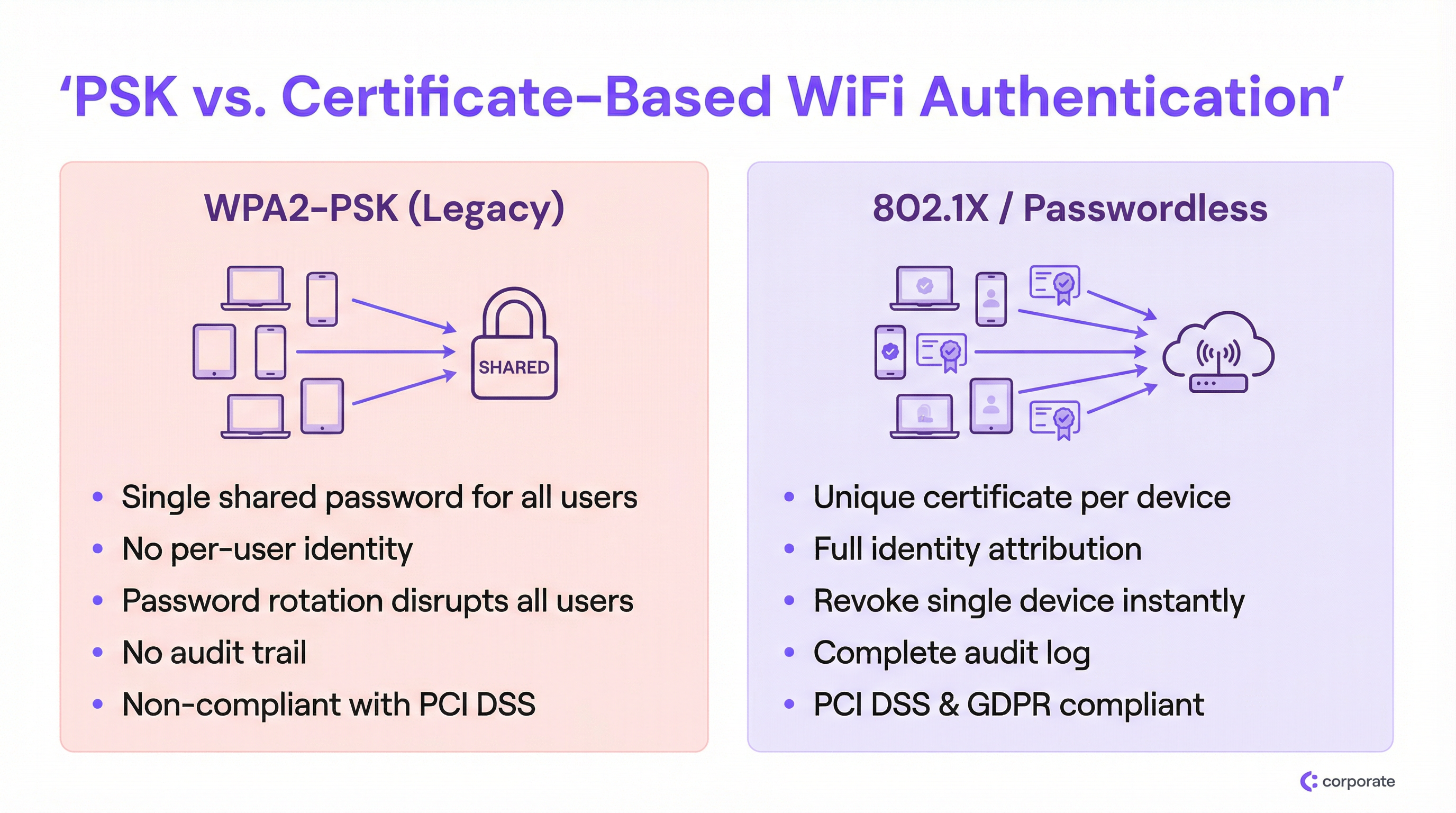
The fundamental flaw of WPA2-PSK in an enterprise setting is the complete decoupling of network access from user identity. When every device uses the same cryptographic key, the network cannot distinguish between a legitimate employee, a compromised IoT device, or an external threat actor who obtained the password from a photograph on social media.
This creates three compounding problems that grow more severe as the deployment scales:
1. Zero Identity Attribution. Network logs under a PSK deployment record only MAC addresses, not the actual user or device owner. During a security incident, this blinds IT teams entirely. You can see that a device is behaving anomalously; you cannot determine whose device it is or what business function it serves.
2. The Revocation Dilemma. If an employee departs under difficult circumstances or a device is reported lost, the only remediation available under a shared PSK model is to change the password for every single device on the network. In a busy Hospitality environment — a hotel with 300 staff devices, 200 IoT sensors, and 50 point-of-sale terminals — a password rotation is a multi-hour operational event that IT teams will avoid at all costs. The result is passwords that remain unchanged for years.
3. Compliance Failures. PCI DSS Requirement 8.2 mandates that access to systems in the cardholder data environment must be tied to an individual user account. A shared password is, by definition, non-compliant. Similarly, GDPR's accountability principle requires organisations to demonstrate control over who can access systems processing personal data. A shared WiFi password provides no such evidence.
The 802.1X Architecture
IEEE 802.1X is the port-based network access control standard that underpins enterprise WiFi security. Rather than a simple password check at the access point, 802.1X introduces a three-party authentication framework:
| Role | Component | Function |
|---|---|---|
| Supplicant | Client device (laptop, phone) | Presents credentials to request network access |
| Authenticator | Wireless Access Point | Passes credentials to the authentication server; enforces the access decision |
| Authentication Server | RADIUS Server | Validates credentials against an Identity Provider; returns an access decision |
The access point acts as a policy enforcement point, not a decision maker. This separation of concerns is architecturally significant: it means that authentication logic, identity data, and access policies all reside centrally, not distributed across dozens of access points. For multi-site deployments, this is transformative. For a deeper exploration of RADIUS architecture options, see our Cloud RADIUS vs On-Premise RADIUS: Decision Guide for IT Teams.
EAP-TLS: The Gold Standard for Passwordless WiFi Authentication
While 802.1X supports multiple credential types through the Extensible Authentication Protocol (EAP), the true passwordless experience is achieved through EAP-TLS (Transport Layer Security). EAP-TLS relies entirely on digital certificates for mutual authentication — the client presents a certificate to the server, and the server presents a certificate to the client, establishing trust in both directions.
The certificate lifecycle works as follows:
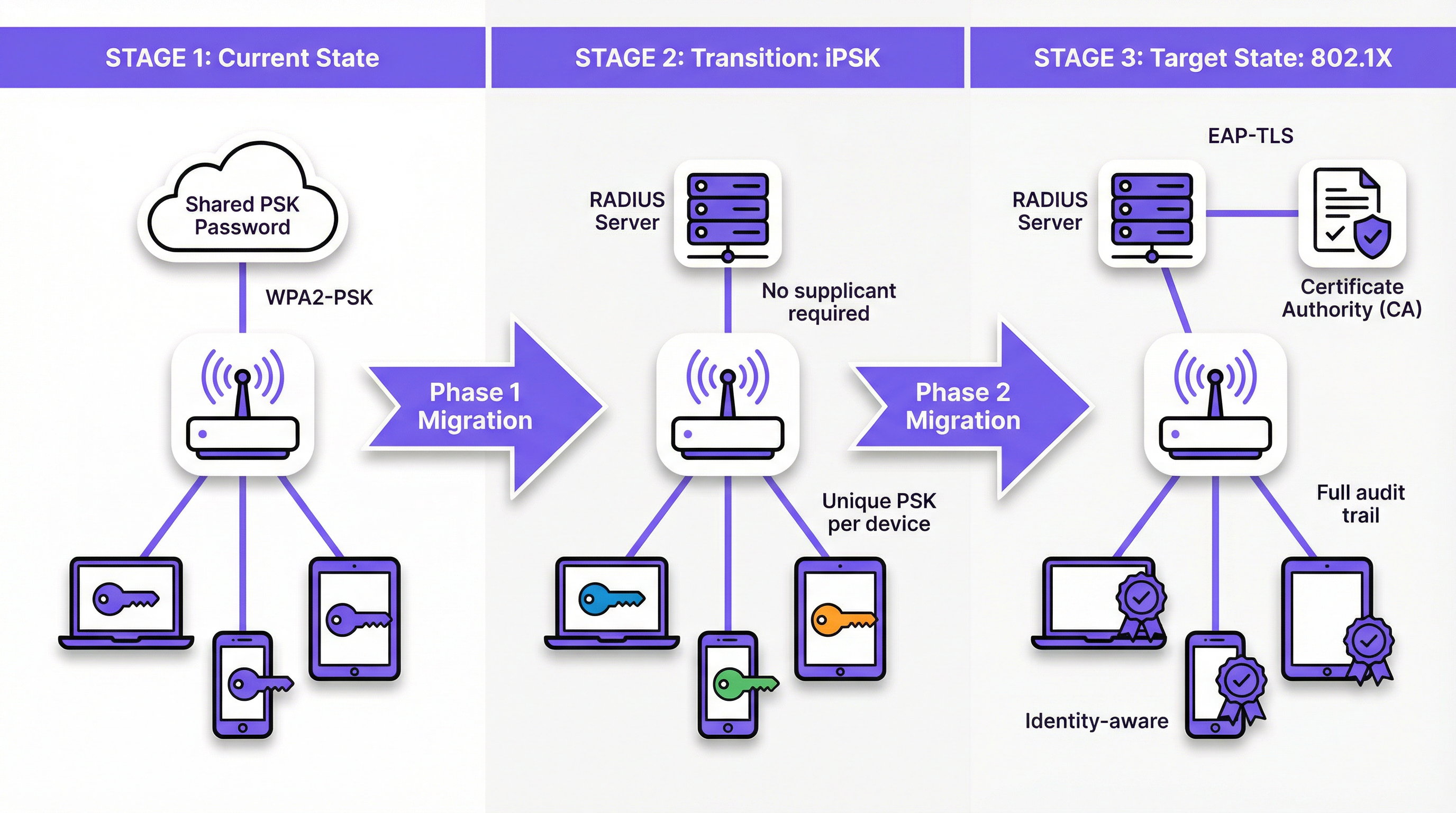
- A Certificate Authority (CA) — either internal (Microsoft AD CS) or cloud-based (SCEP/NDES via Intune) — issues a unique client certificate to each managed device.
- The certificate is provisioned to the device automatically via MDM (Intune, Jamf, or similar).
- When the device connects to the 802.1X SSID, it presents this certificate to the RADIUS server.
- The RADIUS server validates the certificate against the CA's trust chain and checks the Certificate Revocation List (CRL) or OCSP responder.
- If valid, the RADIUS server returns an Access-Accept, optionally including VLAN assignment attributes.
This architecture eliminates credential theft entirely. There is no password to intercept, replay, or phish. Revocation is surgical: removing a certificate from the CRL or disabling the user account in the Identity Provider (Azure AD, Okta, Google Workspace) instantly blocks that specific device without affecting any other user.
Identity PSK (iPSK): The Critical Transition Technology
The most significant barrier to full 802.1X adoption is the heterogeneous device landscape in enterprise venues. Smart TVs, wireless POS terminals, IP cameras, environmental Sensors, and legacy medical or industrial devices frequently lack the software supplicant required to process EAP-TLS certificates. Forcing these devices onto a shared PSK SSID would undermine the entire migration.
Identity PSK (iPSK) — also marketed as Multiple PSK (MPSK) or Dynamic PSK (DPSK) by various vendors — resolves this elegantly. From the device's perspective, it is connecting to a standard WPA2/WPA3-Personal network using a password. From the network's perspective, the RADIUS server has assigned a unique cryptographic key to that specific device's MAC address or user group. The access point enforces this mapping, ensuring that each device's key only grants access to that device's authorised network segment.
For a Retail environment, this means every wireless barcode scanner can have its own unique iPSK, assigned to a dedicated IoT VLAN. If a scanner is stolen, only its specific key is revoked. The rest of the network is unaffected.
Implementation Guide
Phase 1: Discovery and Segmentation
Before modifying any network configuration, conduct a comprehensive device audit using your WiFi Analytics platform. The goal is to categorise every connected device into one of three buckets:
- Managed Devices: Corporate laptops, tablets, and phones enrolled in an MDM. These are candidates for full EAP-TLS 802.1X.
- BYOD Devices: Employee personal devices or guest smartphones. These require a frictionless onboarding portal to provision certificates or unique credentials.
- Headless/IoT Devices: Smart TVs, POS terminals, printers, sensors, and any device without a user interface or 802.1X supplicant. These are candidates for iPSK.
This segmentation drives every subsequent architectural decision. Do not skip it.
Phase 2: Deploy iPSK for IoT and Legacy Devices
Configure your RADIUS server to support iPSK by creating MAC-to-PSK mappings for all headless devices. Most enterprise-grade RADIUS platforms (including cloud RADIUS solutions) support this natively. Assign each device group to an appropriate VLAN via RADIUS attributes (Tunnel-Type, Tunnel-Medium-Type, Tunnel-Private-Group-ID).
For venues with large IoT estates — such as a hotel with hundreds of smart room devices — integrate your RADIUS server with the Property Management System (PMS) or Building Management System (BMS) to automate iPSK provisioning when new devices are commissioned.
Phase 3: Deploy 802.1X for Managed Devices
For MDM-managed devices, the migration should be entirely transparent to the end user. Configure your MDM to push the following simultaneously:
- The client certificate (issued by your CA via SCEP or NDES).
- The WiFi profile specifying the 802.1X SSID, EAP-TLS as the authentication method, and the RADIUS server certificate for server validation.
Once the profile is deployed, devices will automatically authenticate to the new 802.1X SSID in the background. Run the legacy PSK SSID in parallel during the transition period, monitoring adoption via your RADIUS logs.
Phase 4: BYOD Onboarding Portal
For employee personal devices and guest access, deploy a network onboarding portal. The user experience should be: connect to a temporary onboarding SSID → authenticate with corporate SSO → the portal automatically provisions the certificate and WiFi profile → the device seamlessly connects to the 802.1X SSID. This process should require no technical knowledge from the user. See Modern Hospitality WiFi Solutions Your Guests Deserve for portal design principles applicable to guest-facing deployments.
Phase 5: Decommission the Legacy PSK SSID
Once monitoring confirms that all devices have migrated to either the 802.1X SSID or an iPSK-enabled SSID, schedule the decommissioning of the legacy shared PSK network. Communicate the cutover date to stakeholders in advance and maintain a rollback plan for the first 48 hours.
Best Practices
Never Rely on MAC Authentication Bypass (MAB) for Security. While MAB is widely used for IoT onboarding, it provides no real security. MAC addresses are transmitted in plain text and trivially spoofed. Any attacker who can observe a device's MAC address can impersonate it. Always prefer iPSK, which enforces a unique cryptographic key, over MAB.
Automate Certificate Lifecycle Management. Certificates expire. An expired client certificate is indistinguishable from a revoked one from the network's perspective — the device simply loses connectivity. Implement proactive alerting in your PKI and MDM platforms to renew certificates well before their expiry date. A 90-day certificate with a 30-day renewal window is a common and sensible configuration.
Validate the RADIUS Server Certificate on Clients. A frequently overlooked configuration is instructing the supplicant to validate the RADIUS server's certificate. Without this, devices are vulnerable to rogue AP attacks where an attacker stands up a fake RADIUS server to harvest credentials. Always configure the trusted CA and server certificate name in the WiFi profile pushed by MDM.
Implement Dynamic VLAN Assignment from Day One. Leverage RADIUS authorisation attributes to segment users and devices into appropriate VLANs based on their identity or group membership. Staff devices, guest devices, IoT devices, and POS terminals should never share a broadcast domain. This limits lateral movement in the event of a compromise.
Align with WPA3-Enterprise for New Deployments. For new access point deployments, specify WPA3-Enterprise (192-bit mode) in procurement requirements. This provides CNSA Suite-compliant cryptographic algorithms and eliminates legacy vulnerabilities. Review Wireless Access Points Definition Your Ultimate 2026 Guide for hardware selection guidance. For SD-WAN integration considerations, see The Core SD WAN Benefits for Modern Businesses.
Troubleshooting & Risk Mitigation
Certificate Expiration Outages
This is the single most common cause of 802.1X deployment failures post-launch. Symptoms: devices suddenly lose WiFi connectivity en masse, typically on a specific date. Root cause: client or RADIUS server certificates have expired.
Mitigation: Implement monitoring that alerts the IT team when any certificate in the chain (CA root, intermediate, server, or a significant proportion of client certificates) is within 60 days of expiry. Automate client certificate renewal via MDM/SCEP.
RADIUS Server High Availability
If the RADIUS server is unreachable, no device can authenticate, and the entire wireless network becomes inaccessible. In a hotel or retail environment, this is a critical operational failure.
Mitigation: Deploy at minimum two RADIUS servers (primary and secondary) configured as a failover pair. For cloud RADIUS, ensure the provider offers a geographically redundant architecture with an SLA that meets your operational requirements. Configure all access points to attempt the secondary RADIUS server within 3–5 seconds of a primary timeout.
Supplicant Misconfiguration on BYOD Devices
When users manually configure their devices for 802.1X (rather than using an automated onboarding portal), they frequently select the wrong EAP type, skip server certificate validation, or enter incorrect identity strings. This generates a high volume of helpdesk tickets.
Mitigation: Eliminate manual configuration entirely. All BYOD devices must be onboarded through the automated portal, which pushes a complete, validated WiFi profile. Disable the option for users to manually add the 802.1X SSID.
IoT Device MAC Address Rotation
Modern mobile operating systems (iOS 14+, Android 10+) use randomised MAC addresses by default, which breaks iPSK MAC-to-PSK mappings.
Mitigation: For corporate-managed BYOD devices, use MDM to disable MAC randomisation on the corporate SSID. For consumer IoT devices, configure the device to use a persistent MAC address in its network settings. For guest devices, use a separate onboarding flow that provisions a unique credential rather than relying on MAC address mapping.
ROI & Business Impact
The business case for migrating to passwordless WiFi authentication is compelling across multiple dimensions:
| Impact Area | PSK Status Quo | Post-Migration |
|---|---|---|
| Password Rotation Cost | 4–8 hours of IT time per rotation, multiplied by site count | Zero — no shared password to rotate |
| Offboarding Security | Manual, disruptive, often delayed | Automated, instant, zero disruption to others |
| Incident Response | Cannot attribute traffic to a specific user | Full identity attribution, instant device isolation |
| Compliance Posture | Non-compliant with PCI DSS Req. 8.2 | Compliant; full audit trail available |
| Helpdesk Ticket Volume | High — password sharing, rotation confusion | Low — automated onboarding, no passwords to forget |
For a 50-location retail chain rotating a shared PSK quarterly, the operational saving alone — eliminating four annual password rotation events across 50 sites — can represent hundreds of hours of IT time per year. The compliance risk mitigation value is harder to quantify but significantly more impactful: a PCI DSS breach finding related to inadequate access controls can result in fines, card scheme penalties, and remediation costs that dwarf the cost of the migration.
Beyond security, identity-aware networks unlock significant operational intelligence. When every device has an identity, your WiFi Analytics platform can provide richer data on device types, dwell times, and network usage patterns. This data feeds directly into venue optimisation, staffing decisions, and the kind of personalised experiences that Transport hubs and large venues are increasingly expected to deliver.
Moving beyond the shared password is not merely a security upgrade. It is a foundational investment in the operational maturity and resilience of your network infrastructure.
Key Terms & Definitions
Pre-Shared Key (PSK)
A single password shared among all users and devices to authenticate to a WiFi network using WPA2-Personal or WPA3-Personal.
The legacy default for venue WiFi. Operationally simple to deploy but fundamentally insecure at enterprise scale due to the absence of per-user identity and the impossibility of targeted revocation.
IEEE 802.1X
An IEEE standard for port-based network access control that provides an authentication mechanism for devices attempting to connect to a LAN or WLAN, requiring each device to authenticate individually against a central authentication server.
The foundational standard for enterprise WiFi security. IT teams encounter this when replacing shared passwords with identity-based access control, and it is a prerequisite for EAP-TLS deployment.
EAP-TLS (Extensible Authentication Protocol — Transport Layer Security)
An 802.1X authentication method that uses digital certificates on both the client device and the authentication server for mutual authentication, with no password involved.
The gold standard for passwordless WiFi. Considered the most secure EAP method because it eliminates credential theft entirely — there is no password to phish, replay, or brute-force.
RADIUS (Remote Authentication Dial-In User Service)
A networking protocol providing centralised Authentication, Authorisation, and Accounting (AAA) management for network access. In WiFi deployments, the RADIUS server sits between the access point and the Identity Provider.
The core infrastructure component of any 802.1X deployment. IT teams must decide between on-premise RADIUS (e.g., Microsoft NPS) and cloud RADIUS solutions, a decision that significantly impacts integration complexity and operational overhead.
Identity PSK (iPSK)
A WiFi authentication feature that assigns a unique pre-shared key to each individual device or user group via a RADIUS server, while presenting as a standard WPA2/WPA3-Personal network to connecting devices.
The critical transition technology for securing IoT and legacy devices that cannot support 802.1X supplicants. Provides per-device identity and revocation without requiring any changes to the connecting device.
Supplicant
The software component on a client device (laptop, smartphone) that implements the EAP protocol and communicates with the authenticator (access point) to present credentials during 802.1X authentication.
IoT devices, legacy POS terminals, and many consumer electronics lack a supplicant, which is the primary reason they cannot use standard 802.1X and require alternatives such as iPSK.
MAC Authentication Bypass (MAB)
A network access method that grants connectivity based solely on a device's MAC (Media Access Control) address, without any cryptographic credential.
Widely used as a fallback for headless devices but inherently insecure, as MAC addresses are broadcast in plain text and easily spoofed. Should be replaced by iPSK wherever possible.
Dynamic VLAN Assignment
A RADIUS authorisation feature that instructs the access point to place an authenticated device into a specific Virtual LAN (VLAN) based on the user's identity, group membership, or device type, as determined by the RADIUS server.
Essential for network segmentation in multi-tenant or mixed-use environments. Ensures that guest devices, corporate laptops, IoT sensors, and POS terminals are automatically isolated from each other without requiring separate physical SSIDs for each segment.
Certificate Revocation List (CRL)
A regularly published list maintained by a Certificate Authority (CA) that identifies certificates that have been revoked before their scheduled expiry date.
The mechanism by which RADIUS servers verify that a client certificate has not been revoked. IT teams must ensure RADIUS servers can reach the CRL distribution point; an inaccessible CRL can cause authentication failures or security gaps depending on the configured fail-open/fail-closed policy.
EAP-PEAP (Protected Extensible Authentication Protocol)
An 802.1X authentication method that creates an encrypted TLS tunnel and then authenticates the user with a username and password inside that tunnel.
A common stepping stone from PSK to full certificate authentication. More secure than PSK but still relies on passwords, making it vulnerable to credential theft. EAP-TLS is the preferred end-state for passwordless deployments.
Case Studies
A 300-room luxury hotel currently uses a single shared WPA2-PSK for all back-of-house staff devices: tablets for housekeeping, wireless POS terminals for food and beverage, and maintenance laptops. The IT Director needs to secure this network to comply with PCI DSS within the current quarter but cannot afford any downtime for operational staff. How should they approach the migration?
The migration should proceed in four steps, running the new and legacy networks in parallel throughout the transition.
Step 1 — Deploy Cloud RADIUS. Implement a cloud-based RADIUS server integrated with the hotel's Azure Active Directory. This provides the authentication backbone without requiring on-premise hardware.
Step 2 — Implement iPSK for POS Terminals and IoT. For the wireless POS terminals that cannot support 802.1X supplicants, configure the RADIUS server to issue unique iPSKs based on each terminal's MAC address. Assign all POS devices to a dedicated VLAN isolated from the general staff network. This immediately addresses PCI DSS segmentation requirements without touching the devices themselves.
Step 3 — MDM Deployment for Tablets and Laptops. Use the hotel's MDM (Intune) to silently push EAP-TLS certificates and the new 802.1X WiFi profile to the housekeeping tablets and maintenance laptops. Devices will automatically migrate to the new SSID without any user action required.
Step 4 — Monitor and Decommission. Run the legacy PSK SSID alongside the new 802.1X and iPSK SSIDs for two weeks. Monitor RADIUS authentication logs to confirm all devices have migrated. Once confirmed, disable the legacy SSID.
Expected outcome: PCI DSS compliance achieved within six weeks; zero operational downtime; IT team gains full device identity visibility and per-device revocation capability.
A national retail chain with 500 locations uses a shared WPA2-PSK for the corporate back-office WiFi network. When an area manager leaves the company, IT must coordinate a password change across all stores, which frequently results in store managers being locked out and losing access to inventory management systems during trading hours. The CISO wants to eliminate this risk entirely. What is the recommended architecture?
The solution is a full 802.1X deployment with EAP-TLS, integrated with the company's Okta Identity Provider.
Architecture:
- Deploy a cloud RADIUS service integrated with Okta via RADIUS proxy or native RADIUS protocol.
- Use Intune to push client certificates and the 802.1X WiFi profile to all corporate-managed Windows laptops and tablets across all 500 locations.
- Configure the RADIUS server to perform dynamic VLAN assignment based on Okta group membership (e.g., Store Manager, Area Manager, IT Admin).
Offboarding Integration:
- When HR deactivates a departing employee's Okta account, the RADIUS server immediately rejects any new authentication attempts from that user's certificate.
- The employee loses WiFi access across all 500 locations simultaneously, within seconds of account deactivation.
- All other employees remain connected without interruption.
BYOD Consideration:
- For employees who access the corporate WiFi on personal devices, deploy a self-service onboarding portal authenticated via Okta SSO. The portal provisions a unique certificate to the personal device, which is also tied to the Okta account and revoked automatically on offboarding.
Scenario Analysis
Q1. A university campus needs to secure the wireless network in student dormitories. Students bring a mix of laptops, smartphones, gaming consoles, and smart speakers. The university wants to ensure each student's devices are isolated from other students' devices, but cannot install MDM profiles on personal equipment. Which authentication strategy should be deployed, and how should device isolation be achieved?
💡 Hint:Gaming consoles and smart speakers lack 802.1X supplicants. Consider how iPSK combined with dynamic VLAN assignment can achieve per-student isolation without requiring MDM.
Show Recommended Approach
Deploy an iPSK solution integrated with a self-service onboarding portal. Students authenticate to the portal using their university SSO credentials and register the MAC addresses of their devices (including consoles and smart speakers, which lack 802.1X supplicants). The RADIUS server generates a unique iPSK for each student and maps all registered MAC addresses to that student's key. Dynamic VLAN assignment places all devices using a given student's iPSK into a personal micro-segment or private VLAN (PVLAN), preventing lateral communication between students' devices. For laptops and smartphones that support 802.1X, the onboarding portal can optionally provision a certificate and WiFi profile for EAP-TLS, providing stronger security for those devices while maintaining iPSK compatibility for consoles and smart speakers.
Q2. A hospital is auditing its wireless network for HIPAA compliance. They discover that 50 wireless infusion pumps are connected using a shared WPA2-PSK because the vendor states the pumps do not support EAP-TLS. The security team proposes moving the pumps to MAC Authentication Bypass (MAB) on an open (unencrypted) network segment to remove the shared password from the clinical environment. Is this the correct approach? If not, what should they do instead?
💡 Hint:Evaluate the security implications of removing encryption versus the risk of MAC address spoofing. Consider what iPSK provides that MAB does not.
Show Recommended Approach
No. Moving to MAB on an open network is a significant security regression. It removes over-the-air encryption entirely, meaning all traffic from the infusion pumps — including any clinical data — is transmitted in plain text and can be intercepted by anyone within radio range. Additionally, MAC addresses are trivially spoofed, meaning an attacker could impersonate a pump to gain access to the clinical network segment. The correct approach is iPSK. The infusion pumps will connect to what appears to be a standard WPA2-PSK network, maintaining over-the-air encryption. The RADIUS server assigns a unique, complex PSK to each pump's MAC address. This provides individual device identity (each pump is distinguishable in logs), targeted revocation (a single pump can be isolated without affecting others), and maintained encryption — all without requiring any changes to the pump firmware or vendor support.
Q3. You have successfully deployed 802.1X with EAP-TLS for 2,000 corporate-managed laptops. You manually tested one laptop and it connected perfectly. You then used your MDM to push the WiFi profile to all 2,000 devices. The following morning, the helpdesk receives hundreds of calls reporting that no laptops can connect to the corporate WiFi. What are the two most likely root causes, and how do you diagnose and resolve each?
💡 Hint:EAP-TLS requires two things from the client: a valid client certificate to present to the server, and the ability to validate the server's certificate. Consider whether the MDM push may have delivered the WiFi profile without the necessary certificates.
Show Recommended Approach
The two most likely root causes are: (1) The MDM pushed the WiFi profile but failed to provision the client certificates to the devices. The profile instructs the supplicant to use EAP-TLS, but without a client certificate to present, authentication fails immediately. Diagnose by checking the MDM deployment report for certificate provisioning status and reviewing the RADIUS server logs for 'no certificate presented' errors. Resolve by ensuring the MDM certificate profile (SCEP or PKCS) is deployed as a dependency before the WiFi profile. (2) The devices do not trust the RADIUS server's certificate. The WiFi profile specifies EAP-TLS but does not include the trusted CA certificate for server validation, causing the supplicant to reject the RADIUS server's certificate. Diagnose by checking supplicant logs on an affected device for 'server certificate validation failed' errors. Resolve by adding the root CA certificate (or the specific RADIUS server certificate) to the trusted certificates section of the MDM WiFi profile. The manual test succeeded because the test device may have had the CA certificate already installed from a previous configuration, or server validation was not enforced during the manual test.
Q4. A conference centre hosts 200 events per year, ranging from day-long trade shows to week-long residential conferences. Each event has a different organiser who requires branded WiFi for their attendees. Currently, the venue creates a new shared PSK for each event. The venue's IT manager wants to move to a more scalable, secure model. What architecture would you recommend?
💡 Hint:Consider the temporary, event-scoped nature of access and the need for branding. Think about how iPSK combined with a captive portal can serve both requirements.
Show Recommended Approach
Implement a dynamic iPSK model integrated with the venue's event management system. For each event, the system automatically generates a unique iPSK scoped to the event's duration. Attendees receive this key via the event registration confirmation or the organiser's branded onboarding portal. The RADIUS server maps the event's iPSK to a dedicated VLAN for that event, ensuring complete isolation between concurrent events. When the event ends, the iPSK is automatically expired, requiring no manual cleanup. For organisers who require a branded captive portal experience, deploy a portal layer on top of the iPSK SSID that presents the organiser's branding before granting full network access. This model eliminates the manual PSK management overhead, provides per-event network isolation, and gives the IT team a complete audit trail of which devices connected to which event.
Key Takeaways
- ✓Shared PSKs provide zero identity attribution — the network cannot distinguish between a legitimate user and a threat actor, making audit trails and compliance impossible.
- ✓IEEE 802.1X with EAP-TLS is the enterprise standard for passwordless WiFi, replacing passwords with unique digital certificates that cannot be phished, replayed, or shared.
- ✓Identity PSK (iPSK) is the essential transition technology for IoT and legacy devices that lack 802.1X supplicants — it provides per-device identity and targeted revocation without requiring any changes to the connecting device.
- ✓Never use MAC Authentication Bypass (MAB) as a security control — MAC addresses are trivially spoofed; always prefer iPSK for headless device authentication.
- ✓Automate certificate lifecycle management via MDM and PKI integration; expired certificates are the most common cause of post-deployment 802.1X outages.
- ✓Migration should be phased: discover and segment devices first, bridge IoT to iPSK, migrate managed devices to EAP-TLS via MDM, then decommission the legacy PSK SSID.
- ✓Moving to identity-based authentication unlocks downstream benefits beyond security: richer WiFi analytics, automated offboarding, dynamic network segmentation, and a defensible compliance posture under PCI DSS and GDPR.




