

WPA3 Enterprise vs iPSK: Choosing the Right Security Model
This guide provides a definitive technical comparison between WPA3 Enterprise and Identity Pre-Shared Key (iPSK) for enterprise WiFi networks. It empowers IT leaders to choose the optimal security model for their venues, balancing robust 802.1X authentication with the flexibility required for IoT and legacy devices.
🎧 Listen to this Guide
View Transcript
Executive Summary
For IT managers and network architects operating complex public-facing venues—from retail chains to sprawling conference centres—securing the wireless edge is a persistent challenge. The proliferation of IoT devices, coupled with stringent compliance mandates like PCI DSS and GDPR, demands robust access control. Historically, the choice was binary: complex 802.1X (WPA2/WPA3 Enterprise) or insecure, easily compromised Pre-Shared Keys (PSK).
Today, the decision typically centres on WPA3 Enterprise versus Identity PSK (iPSK). WPA3 Enterprise represents the gold standard for user authentication, leveraging cryptographic enhancements and mandatory management frame protection to secure human-operated devices. Conversely, iPSK provides a scalable, segmented approach for the exploding volume of headless IoT devices that cannot support 802.1X supplicants. This guide deconstructs both architectures, offering actionable deployment strategies to help you implement the right security model—or a hybrid approach—for your specific operational requirements. Whether you are upgrading a hospital's Guest WiFi or securing Sensors in a smart stadium, understanding these models is critical to maintaining a secure, performant network.

Technical Deep-Dive
WPA3 Enterprise: The 802.1X Evolution
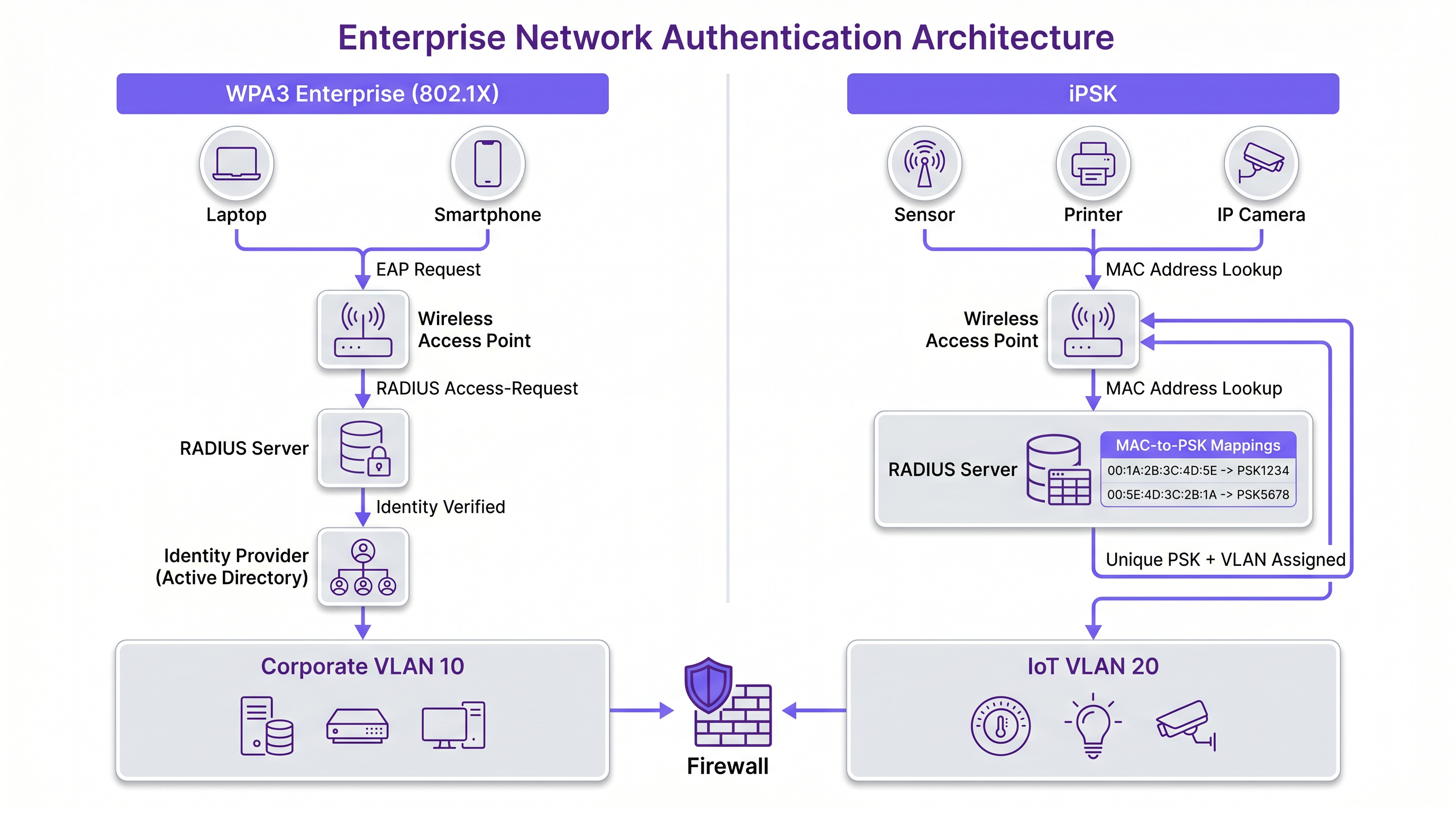
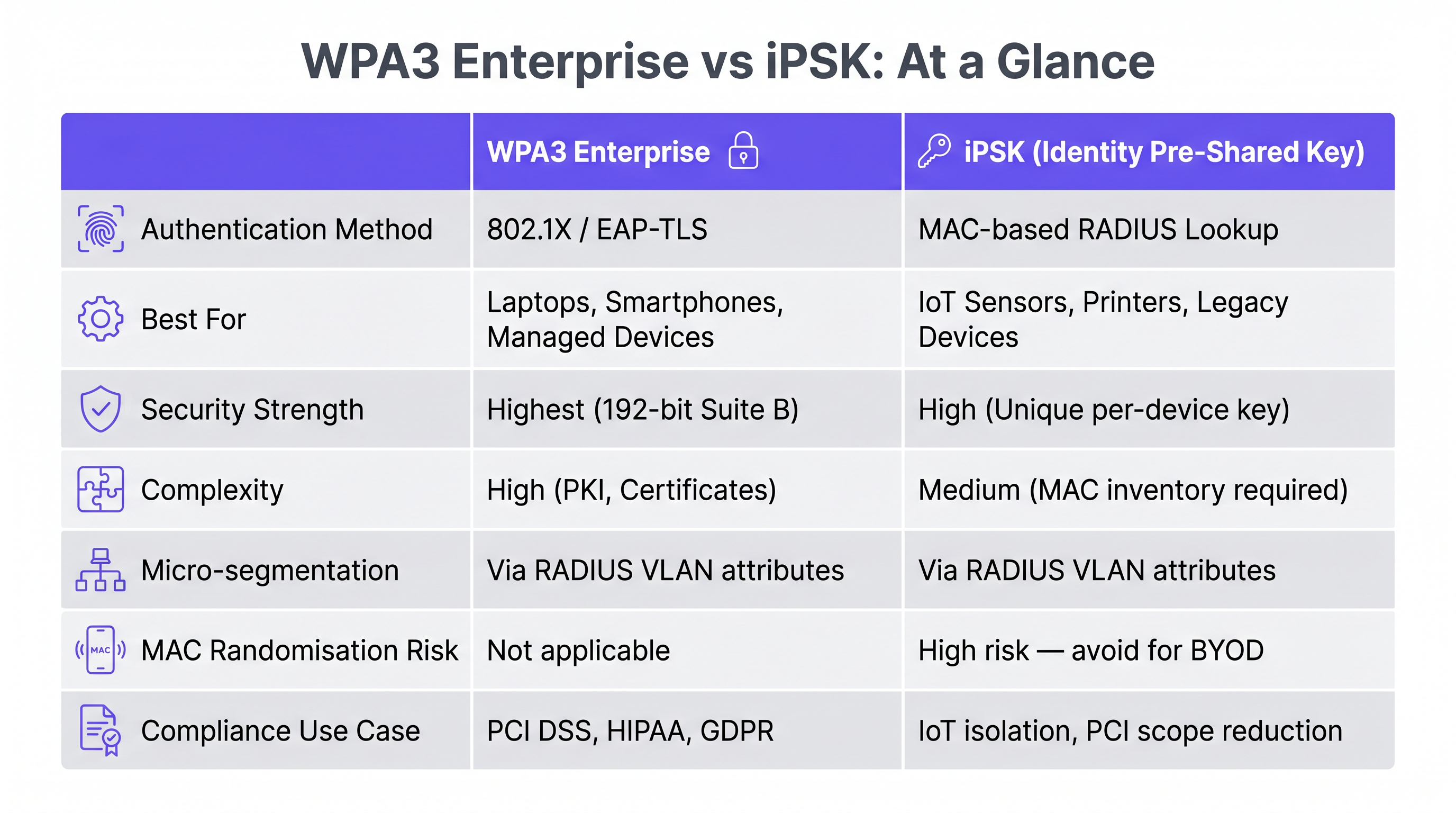
WPA3 Enterprise builds upon the foundation of 802.1X/EAP authentication, replacing legacy cryptographic protocols with a mandatory 192-bit security suite (often referred to as Suite B cryptography). This model requires a RADIUS server to authenticate each user individually, typically against an identity provider (IdP) such as Active Directory or Azure AD.
The primary technical advantage of WPA3 Enterprise is its robust protection against offline dictionary attacks and its enforcement of Protected Management Frames (PMF). PMF (802.11w) mitigates deauthentication and disassociation attacks, which are common vectors for disrupting venue operations or forcing clients onto rogue access points. For environments handling sensitive data, such as Healthcare facilities or corporate offices, WPA3 Enterprise provides the non-repudiation and individual accountability required by auditors.
However, the complexity of 802.1X deployment cannot be understated. It requires careful certificate management—a topic covered extensively in our guide on OCSP and Certificate Revocation for WiFi Authentication. Furthermore, the authentication overhead can impact roaming performance if Fast BSS Transition (802.11r) is not optimally configured.
Identity PSK (iPSK): Segmented Simplicity
iPSK (also known as Multiple PSK, Dynamic PSK, or PPSK depending on the vendor) fundamentally alters the traditional shared-password paradigm. Instead of a single passphrase for an entire SSID, iPSK allows the RADIUS server to dynamically assign a unique pre-shared key to individual devices or groups of devices based on their MAC address.
When a device associates, the access point queries the RADIUS server using the device's MAC address as the identity. The server responds with the specific PSK for that device and, crucially, standard RADIUS attributes such as VLAN assignments, QoS policies, and ACLs. This architecture provides micro-segmentation without the overhead of 802.1X supplicants.
For Retail environments deploying point-of-sale terminals, digital signage, and barcode scanners, iPSK is transformative. These headless devices rarely support 802.1X, and placing them on an open network or a traditional monolithic PSK network presents unacceptable risks. iPSK ensures that if a digital signage screen is compromised, its unique key can be revoked without forcing a password change for the entire venue.
Implementation Guide
Step 1: Device Profiling and Categorisation
Before selecting a security model, conduct a comprehensive audit of all endpoint types expected on the network. Categorise devices into two primary buckets:
- Supplicant-Capable Devices: Corporate laptops, modern smartphones, and tablets. These should be targeted for WPA3 Enterprise.
- Headless/Legacy Devices: IoT sensors, printers, IP cameras, and legacy scanners. These are candidates for iPSK.
For advanced profiling, consider implementing a Device Posture Assessment for Network Access Control to ensure devices meet minimum security baselines before network admission.
Step 2: Designing the SSID Architecture
A best-practice deployment often involves a dual-SSID strategy to balance security and compatibility:
- Corporate SSID (WPA3 Enterprise): Dedicated to staff devices. Utilises EAP-TLS for certificate-based authentication or PEAP-MSCHAPv2 where certificates are unfeasible. This ensures the highest level of encryption and user accountability.
- IoT/Device SSID (WPA2/WPA3 iPSK): Dedicated to headless devices. The RADIUS server assigns VLANs based on the device type (e.g., VLAN 10 for printers, VLAN 20 for HVAC sensors), ensuring lateral movement is restricted even if a device is compromised.
Step 3: RADIUS and Policy Configuration
Configure your RADIUS infrastructure (e.g., Cisco ISE, Aruba ClearPass, or a cloud-native NAC) to handle both authentication types. For iPSK, ensure the policy engine is configured to map MAC addresses to specific keys and VLAN attributes. Implement strict MAC address profiling to detect spoofing attempts.
Best Practices
- Enforce Certificate-Based Authentication: For WPA3 Enterprise, prioritise EAP-TLS over credential-based EAP methods. Certificates eliminate the risk of password theft and provide seamless, zero-touch authentication for managed devices.
- Implement Micro-Segmentation with iPSK: Do not simply use iPSK to provide unique passwords; leverage the RADIUS attributes to assign devices to isolated VLANs with strict ACLs. A compromised IoT camera should never be able to route traffic to a point-of-sale terminal.
- Automate Key Lifecycle Management: For iPSK, integrate the key generation and revocation process with your IT service management (ITSM) platform. Keys should be automatically rotated or revoked when a device is decommissioned.
- Monitor for MAC Spoofing: Because iPSK relies on MAC addresses for identification, it is susceptible to MAC spoofing. Implement endpoint profiling and behavioral analytics to detect anomalies, such as an "IP camera" attempting to access the HR database.
Troubleshooting & Risk Mitigation
WPA3 Enterprise Challenges
- Certificate Expiry: The most common cause of WPA3 Enterprise outages is expired RADIUS server certificates or client certificates. Implement robust monitoring and automated renewal pipelines.
- Supplicant Misconfiguration: Clients may fail to authenticate if they are not configured to validate the RADIUS server's certificate, leading to potential Man-in-the-Middle (MitM) attacks. Enforce supplicant configuration via MDM profiles.
iPSK Challenges
- MAC Address Randomisation: Modern smartphones use randomised MAC addresses to enhance privacy. This breaks iPSK, which relies on static MAC addresses for policy assignment. iPSK should strictly be reserved for IoT and corporate-owned devices with static MACs.
- Administrative Overhead: Manually managing thousands of iPSK entries is unsustainable. Ensure your NAC solution supports API-driven bulk provisioning and integrates with your asset inventory systems.
ROI & Business Impact
Implementing the correct security model directly impacts the bottom line by reducing operational friction and mitigating breach-related costs.
- Reduced Helpdesk Tickets: Moving away from complex 802.1X for incompatible devices drastically reduces helpdesk volume related to connectivity issues. iPSK provides a "plug-and-play" experience for IoT deployments.
- Accelerated IoT Rollouts: Venues deploying Wayfinding beacons or environmental sensors can provision devices rapidly using automated iPSK workflows, accelerating time-to-value for new technology initiatives.
- Compliance and Risk Reduction: WPA3 Enterprise provides the audit trails necessary for PCI DSS compliance, while iPSK segmentation contains potential breaches, limiting the blast radius and protecting brand reputation.
As discussed in our broader analysis of The Core SD WAN Benefits for Modern Businesses, securing the edge is a foundational requirement for modern network architecture. By thoughtfully applying WPA3 Enterprise and iPSK, IT leaders can build resilient, compliant networks that support the diverse demands of the modern venue.
Key Terms & Definitions
WPA3 Enterprise
The highest tier of Wi-Fi security, requiring individual user authentication via an 802.1X RADIUS server and enforcing 192-bit cryptographic strength.
Mandatory for securing corporate data and achieving compliance in enterprise environments.
iPSK (Identity Pre-Shared Key)
A security model where a RADIUS server dynamically assigns a unique passphrase to a device based on its MAC address, along with network policies like VLANs.
The standard solution for securing IoT and legacy devices that cannot support 802.1X supplicants.
802.1X
An IEEE standard for port-based network access control, providing an authentication mechanism to devices wishing to attach to a LAN or WLAN.
The underlying framework that powers WPA3 Enterprise authentication.
Supplicant
The software client on an endpoint device (like a laptop or smartphone) that communicates with the RADIUS server to negotiate 802.1X authentication.
IoT devices typically lack supplicants, necessitating the use of iPSK.
RADIUS
Remote Authentication Dial-In User Service; a networking protocol that provides centralized Authentication, Authorization, and Accounting (AAA) management.
The central server that processes authentication requests for both WPA3 Enterprise and iPSK.
Micro-segmentation
The security practice of dividing a network into isolated segments to reduce the attack surface and prevent lateral movement.
Achieved in wireless networks by using iPSK to dynamically assign different IoT devices to isolated VLANs.
EAP-TLS
Extensible Authentication Protocol-Transport Layer Security; an 802.1X method that uses digital certificates for both client and server authentication.
The most secure implementation of WPA3 Enterprise, eliminating the reliance on vulnerable passwords.
Protected Management Frames (PMF)
An IEEE standard (802.11w) that encrypts wireless management frames, preventing attackers from forging deauthentication packets.
Mandatory in WPA3, PMF protects venue networks from disruption and rogue AP attacks.
Case Studies
A 500-room luxury hotel is upgrading its infrastructure. They need to secure staff corporate laptops, thousands of in-room smart TVs, and staff handheld point-of-sale (POS) terminals. How should they architect the wireless security model?
The optimal approach is a dual-SSID strategy.
- Staff SSID (WPA3 Enterprise): Deployed for corporate laptops and managed staff smartphones. Configured with EAP-TLS using certificates pushed via the hotel's MDM. This ensures robust encryption for sensitive back-office communications.
- Operations SSID (iPSK): Deployed for the smart TVs and POS terminals. The NAC is configured to assign unique PSKs based on MAC addresses. Crucially, the RADIUS server assigns the TVs to an isolated 'Guest Entertainment VLAN' with internet-only access, while the POS terminals are assigned to a strictly controlled 'PCI VLAN' that only routes to the payment gateway.
A large retail chain is deploying new wireless barcode scanners across 50 locations. The scanners support WPA2-PSK but not 802.1X. The CISO mandates that a compromised scanner must not require a global password change across all stores.
The chain must implement iPSK for the barcode scanners.
- The IT team generates a unique PSK for each scanner's MAC address and provisions this via their NAC platform's API.
- The scanners connect to a hidden 'Retail-Ops' SSID.
- If a scanner is lost or stolen, the IT team simply revokes that specific MAC/PSK pairing in the NAC. The device is immediately denied network access, while the thousands of other scanners remain connected and operational.
Scenario Analysis
Q1. A stadium IT director wants to deploy 500 wireless environmental sensors to monitor temperature and humidity across the concourse. The sensors only support basic WPA2-Personal (PSK). How should they secure these devices while preventing lateral movement if a sensor is physically tampered with?
💡 Hint:Consider how to provide unique credentials to devices that don't support 802.1X while enforcing network isolation.
Show Recommended Approach
The director should deploy iPSK. Each sensor's MAC address is registered in the NAC, generating a unique PSK. Crucially, the RADIUS server must be configured to assign these MAC addresses to a dedicated, highly restricted 'IoT-Sensor VLAN'. This VLAN should have strict ACLs applied, allowing outbound traffic only to the specific cloud monitoring dashboard, completely blocking lateral movement to the stadium's corporate or POS networks.
Q2. A corporate office is migrating from WPA2 Enterprise (PEAP-MSCHAPv2) to WPA3 Enterprise. During testing, several older laptops fail to connect to the new WPA3 SSID, while modern smartphones connect without issue. What is the most likely cause?
💡 Hint:WPA3 mandates certain security features that were optional in WPA2.
Show Recommended Approach
The most likely cause is a lack of support for Protected Management Frames (PMF/802.11w) on the older laptops' wireless network interface cards (NICs) or drivers. WPA3 makes PMF mandatory. If the client driver cannot negotiate PMF, the association will fail. The IT team must update the wireless drivers on the legacy laptops or, if the hardware is incompatible, replace the NICs/devices.
Q3. A hospital IT team is designing a new wireless network. They need to support medical staff tablets (which handle patient data) and legacy wireless infusion pumps. What is the recommended SSID and security design?
💡 Hint:Different device capabilities require different authentication methods.
Show Recommended Approach
A dual-SSID design is required. The staff tablets, which handle sensitive Protected Health Information (PHI), should connect to a 'Clinical-Secure' SSID using WPA3 Enterprise (ideally EAP-TLS with certificates) to ensure maximum encryption and compliance. The legacy infusion pumps, which likely lack 802.1X supplicants, should connect to a separate 'Medical-Device' SSID using iPSK, with RADIUS dynamically assigning them to an isolated VLAN restricted to communicating only with the medical device management server.
Key Takeaways
- ✓WPA3 Enterprise is the gold standard for human-operated devices, offering 192-bit encryption and robust 802.1X authentication.
- ✓iPSK provides a scalable, secure solution for headless IoT devices that cannot support complex 802.1X supplicants.
- ✓iPSK allows dynamic assignment of unique passwords and VLANs based on device MAC addresses, enabling critical micro-segmentation.
- ✓A dual-SSID strategy (one for WPA3 Enterprise, one for iPSK) is the best practice for modern venues to balance security and compatibility.
- ✓WPA3 mandates Protected Management Frames (PMF), which prevents disruptive deauthentication attacks but may require client driver updates.
- ✓Never use iPSK for BYOD or guest networks, as modern MAC address randomisation breaks the MAC-to-policy mapping.
- ✓Automated key lifecycle management is essential for iPSK deployments to avoid unsustainable administrative overhead.




